@qwen-code/qwen-code 0.14.0-preview.0 → 0.14.0-preview.2
This diff represents the content of publicly available package versions that have been released to one of the supported registries. The information contained in this diff is provided for informational purposes only and reflects changes between package versions as they appear in their respective public registries.
- package/README.md +19 -9
- package/bundled/qc-helper/SKILL.md +151 -0
- package/bundled/qc-helper/docs/_meta.ts +30 -0
- package/bundled/qc-helper/docs/common-workflow.md +571 -0
- package/bundled/qc-helper/docs/configuration/_meta.ts +10 -0
- package/bundled/qc-helper/docs/configuration/auth.md +366 -0
- package/bundled/qc-helper/docs/configuration/memory.md +0 -0
- package/bundled/qc-helper/docs/configuration/model-providers.md +542 -0
- package/bundled/qc-helper/docs/configuration/qwen-ignore.md +55 -0
- package/bundled/qc-helper/docs/configuration/settings.md +655 -0
- package/bundled/qc-helper/docs/configuration/themes.md +160 -0
- package/bundled/qc-helper/docs/configuration/trusted-folders.md +61 -0
- package/bundled/qc-helper/docs/extension/_meta.ts +9 -0
- package/bundled/qc-helper/docs/extension/extension-releasing.md +121 -0
- package/bundled/qc-helper/docs/extension/getting-started-extensions.md +299 -0
- package/bundled/qc-helper/docs/extension/introduction.md +310 -0
- package/bundled/qc-helper/docs/features/_meta.ts +18 -0
- package/bundled/qc-helper/docs/features/approval-mode.md +263 -0
- package/bundled/qc-helper/docs/features/arena.md +218 -0
- package/bundled/qc-helper/docs/features/channels/_meta.ts +7 -0
- package/bundled/qc-helper/docs/features/channels/dingtalk.md +134 -0
- package/bundled/qc-helper/docs/features/channels/overview.md +336 -0
- package/bundled/qc-helper/docs/features/channels/plugins.md +87 -0
- package/bundled/qc-helper/docs/features/channels/telegram.md +120 -0
- package/bundled/qc-helper/docs/features/channels/weixin.md +106 -0
- package/bundled/qc-helper/docs/features/checkpointing.md +77 -0
- package/bundled/qc-helper/docs/features/commands.md +312 -0
- package/bundled/qc-helper/docs/features/headless.md +318 -0
- package/bundled/qc-helper/docs/features/hooks.md +715 -0
- package/bundled/qc-helper/docs/features/language.md +139 -0
- package/bundled/qc-helper/docs/features/lsp.md +417 -0
- package/bundled/qc-helper/docs/features/mcp.md +281 -0
- package/bundled/qc-helper/docs/features/sandbox.md +241 -0
- package/bundled/qc-helper/docs/features/skills.md +289 -0
- package/bundled/qc-helper/docs/features/sub-agents.md +511 -0
- package/bundled/qc-helper/docs/features/token-caching.md +29 -0
- package/bundled/qc-helper/docs/ide-integration/_meta.ts +4 -0
- package/bundled/qc-helper/docs/ide-integration/ide-companion-spec.md +182 -0
- package/bundled/qc-helper/docs/ide-integration/ide-integration.md +144 -0
- package/bundled/qc-helper/docs/integration-github-action.md +241 -0
- package/bundled/qc-helper/docs/integration-jetbrains.md +81 -0
- package/bundled/qc-helper/docs/integration-vscode.md +39 -0
- package/bundled/qc-helper/docs/integration-zed.md +72 -0
- package/bundled/qc-helper/docs/overview.md +64 -0
- package/bundled/qc-helper/docs/quickstart.md +273 -0
- package/bundled/qc-helper/docs/reference/_meta.ts +3 -0
- package/bundled/qc-helper/docs/reference/keyboard-shortcuts.md +72 -0
- package/bundled/qc-helper/docs/support/Uninstall.md +42 -0
- package/bundled/qc-helper/docs/support/_meta.ts +6 -0
- package/bundled/qc-helper/docs/support/tos-privacy.md +112 -0
- package/bundled/qc-helper/docs/support/troubleshooting.md +123 -0
- package/cli.js +55261 -35814
- package/locales/de.js +121 -5
- package/locales/en.js +118 -5
- package/locales/ja.js +117 -5
- package/locales/pt.js +120 -5
- package/locales/ru.js +119 -5
- package/locales/zh.js +111 -4
- package/package.json +2 -2
|
@@ -0,0 +1,511 @@
|
|
|
1
|
+
# Subagents
|
|
2
|
+
|
|
3
|
+
Subagents are specialized AI assistants that handle specific types of tasks within Qwen Code. They allow you to delegate focused work to AI agents that are configured with task-specific prompts, tools, and behaviors.
|
|
4
|
+
|
|
5
|
+
## What are Subagents?
|
|
6
|
+
|
|
7
|
+
Subagents are independent AI assistants that:
|
|
8
|
+
|
|
9
|
+
- **Specialize in specific tasks** - Each Subagent is configured with a focused system prompt for particular types of work
|
|
10
|
+
- **Have separate context** - They maintain their own conversation history, separate from your main chat
|
|
11
|
+
- **Use controlled tools** - You can configure which tools each Subagent has access to
|
|
12
|
+
- **Work autonomously** - Once given a task, they work independently until completion or failure
|
|
13
|
+
- **Provide detailed feedback** - You can see their progress, tool usage, and execution statistics in real-time
|
|
14
|
+
|
|
15
|
+
## Key Benefits
|
|
16
|
+
|
|
17
|
+
- **Task Specialization**: Create agents optimized for specific workflows (testing, documentation, refactoring, etc.)
|
|
18
|
+
- **Context Isolation**: Keep specialized work separate from your main conversation
|
|
19
|
+
- **Reusability**: Save and reuse agent configurations across projects and sessions
|
|
20
|
+
- **Controlled Access**: Limit which tools each agent can use for security and focus
|
|
21
|
+
- **Progress Visibility**: Monitor agent execution with real-time progress updates
|
|
22
|
+
|
|
23
|
+
## How Subagents Work
|
|
24
|
+
|
|
25
|
+
1. **Configuration**: You create Subagents configurations that define their behavior, tools, and system prompts
|
|
26
|
+
2. **Delegation**: The main AI can automatically delegate tasks to appropriate Subagents
|
|
27
|
+
3. **Execution**: Subagents work independently, using their configured tools to complete tasks
|
|
28
|
+
4. **Results**: They return results and execution summaries back to the main conversation
|
|
29
|
+
|
|
30
|
+
## Getting Started
|
|
31
|
+
|
|
32
|
+
### Quick Start
|
|
33
|
+
|
|
34
|
+
1. **Create your first Subagent**:
|
|
35
|
+
|
|
36
|
+
`/agents create`
|
|
37
|
+
|
|
38
|
+
Follow the guided wizard to create a specialized agent.
|
|
39
|
+
|
|
40
|
+
2. **Manage existing agents**:
|
|
41
|
+
|
|
42
|
+
`/agents manage`
|
|
43
|
+
|
|
44
|
+
View and manage your configured Subagents.
|
|
45
|
+
|
|
46
|
+
3. **Use Subagents automatically**: Simply ask the main AI to perform tasks that match your Subagents' specializations. The AI will automatically delegate appropriate work.
|
|
47
|
+
|
|
48
|
+
### Example Usage
|
|
49
|
+
|
|
50
|
+
```
|
|
51
|
+
User: "Please write comprehensive tests for the authentication module"
|
|
52
|
+
AI: I'll delegate this to your testing specialist Subagents.
|
|
53
|
+
[Delegates to "testing-expert" Subagents]
|
|
54
|
+
[Shows real-time progress of test creation]
|
|
55
|
+
[Returns with completed test files and execution summary]`
|
|
56
|
+
```
|
|
57
|
+
|
|
58
|
+
## Management
|
|
59
|
+
|
|
60
|
+
### CLI Commands
|
|
61
|
+
|
|
62
|
+
Subagents are managed through the `/agents` slash command and its subcommands:
|
|
63
|
+
|
|
64
|
+
**Usage:**:`/agents create`。Creates a new Subagent through a guided step wizard.
|
|
65
|
+
|
|
66
|
+
**Usage:**:`/agents manage`。Opens an interactive management dialog for viewing and managing existing Subagents.
|
|
67
|
+
|
|
68
|
+
### Storage Locations
|
|
69
|
+
|
|
70
|
+
Subagents are stored as Markdown files in multiple locations:
|
|
71
|
+
|
|
72
|
+
- **Project-level**: `.qwen/agents/` (highest precedence)
|
|
73
|
+
- **User-level**: `~/.qwen/agents/` (fallback)
|
|
74
|
+
- **Extension-level**: Provided by installed extensions
|
|
75
|
+
|
|
76
|
+
This allows you to have project-specific agents, personal agents that work across all projects, and extension-provided agents that add specialized capabilities.
|
|
77
|
+
|
|
78
|
+
### Extension Subagents
|
|
79
|
+
|
|
80
|
+
Extensions can provide custom subagents that become available when the extension is enabled. These agents are stored in the extension's `agents/` directory and follow the same format as personal and project agents.
|
|
81
|
+
|
|
82
|
+
Extension subagents:
|
|
83
|
+
|
|
84
|
+
- Are automatically discovered when the extension is enabled
|
|
85
|
+
- Appear in the `/agents manage` dialog under "Extension Agents" section
|
|
86
|
+
- Cannot be edited directly (edit the extension source instead)
|
|
87
|
+
- Follow the same configuration format as user-defined agents
|
|
88
|
+
|
|
89
|
+
To see which extensions provide subagents, check the extension's `qwen-extension.json` file for an `agents` field.
|
|
90
|
+
|
|
91
|
+
### File Format
|
|
92
|
+
|
|
93
|
+
Subagents are configured using Markdown files with YAML frontmatter. This format is human-readable and easy to edit with any text editor.
|
|
94
|
+
|
|
95
|
+
#### Basic Structure
|
|
96
|
+
|
|
97
|
+
```
|
|
98
|
+
---
|
|
99
|
+
name: agent-name
|
|
100
|
+
description: Brief description of when and how to use this agent
|
|
101
|
+
tools:
|
|
102
|
+
- tool1
|
|
103
|
+
- tool2
|
|
104
|
+
- tool3 # Optional
|
|
105
|
+
---
|
|
106
|
+
|
|
107
|
+
System prompt content goes here.
|
|
108
|
+
Multiple paragraphs are supported.
|
|
109
|
+
You can use ${variable} templating for dynamic content.
|
|
110
|
+
```
|
|
111
|
+
|
|
112
|
+
#### Example Usage
|
|
113
|
+
|
|
114
|
+
```
|
|
115
|
+
---
|
|
116
|
+
name: project-documenter
|
|
117
|
+
description: Creates project documentation and README files
|
|
118
|
+
---
|
|
119
|
+
|
|
120
|
+
You are a documentation specialist for the ${project_name} project.
|
|
121
|
+
|
|
122
|
+
Your task: ${task_description}
|
|
123
|
+
|
|
124
|
+
Working directory: ${current_directory}
|
|
125
|
+
Generated on: ${timestamp}
|
|
126
|
+
|
|
127
|
+
Focus on creating clear, comprehensive documentation that helps both
|
|
128
|
+
new contributors and end users understand the project.
|
|
129
|
+
```
|
|
130
|
+
|
|
131
|
+
## Using Subagents Effectively
|
|
132
|
+
|
|
133
|
+
### Automatic Delegation
|
|
134
|
+
|
|
135
|
+
Qwen Code proactively delegates tasks based on:
|
|
136
|
+
|
|
137
|
+
- The task description in your request
|
|
138
|
+
- The description field in Subagents configurations
|
|
139
|
+
- Current context and available tools
|
|
140
|
+
|
|
141
|
+
To encourage more proactive Subagents use, include phrases like "use PROACTIVELY" or "MUST BE USED" in your description field.
|
|
142
|
+
|
|
143
|
+
### Explicit Invocation
|
|
144
|
+
|
|
145
|
+
Request a specific Subagent by mentioning it in your command:
|
|
146
|
+
|
|
147
|
+
```
|
|
148
|
+
Let the testing-expert Subagents create unit tests for the payment module
|
|
149
|
+
Have the documentation-writer Subagents update the API reference
|
|
150
|
+
Get the react-specialist Subagents to optimize this component's performance
|
|
151
|
+
```
|
|
152
|
+
|
|
153
|
+
## Examples
|
|
154
|
+
|
|
155
|
+
### Development Workflow Agents
|
|
156
|
+
|
|
157
|
+
#### Testing Specialist
|
|
158
|
+
|
|
159
|
+
Perfect for comprehensive test creation and test-driven development.
|
|
160
|
+
|
|
161
|
+
```
|
|
162
|
+
---
|
|
163
|
+
name: testing-expert
|
|
164
|
+
description: Writes comprehensive unit tests, integration tests, and handles test automation with best practices
|
|
165
|
+
tools:
|
|
166
|
+
- read_file
|
|
167
|
+
- write_file
|
|
168
|
+
- read_many_files
|
|
169
|
+
- run_shell_command
|
|
170
|
+
---
|
|
171
|
+
|
|
172
|
+
You are a testing specialist focused on creating high-quality, maintainable tests.
|
|
173
|
+
|
|
174
|
+
Your expertise includes:
|
|
175
|
+
|
|
176
|
+
- Unit testing with appropriate mocking and isolation
|
|
177
|
+
- Integration testing for component interactions
|
|
178
|
+
- Test-driven development practices
|
|
179
|
+
- Edge case identification and comprehensive coverage
|
|
180
|
+
- Performance and load testing when appropriate
|
|
181
|
+
|
|
182
|
+
For each testing task:
|
|
183
|
+
|
|
184
|
+
1. Analyze the code structure and dependencies
|
|
185
|
+
2. Identify key functionality, edge cases, and error conditions
|
|
186
|
+
3. Create comprehensive test suites with descriptive names
|
|
187
|
+
4. Include proper setup/teardown and meaningful assertions
|
|
188
|
+
5. Add comments explaining complex test scenarios
|
|
189
|
+
6. Ensure tests are maintainable and follow DRY principles
|
|
190
|
+
|
|
191
|
+
Always follow testing best practices for the detected language and framework.
|
|
192
|
+
Focus on both positive and negative test cases.
|
|
193
|
+
```
|
|
194
|
+
|
|
195
|
+
**Use Cases:**
|
|
196
|
+
|
|
197
|
+
- “Write unit tests for the authentication service”
|
|
198
|
+
- “Create integration tests for the payment processing workflow”
|
|
199
|
+
- “Add test coverage for edge cases in the data validation module”
|
|
200
|
+
|
|
201
|
+
#### Documentation Writer
|
|
202
|
+
|
|
203
|
+
Specialized in creating clear, comprehensive documentation.
|
|
204
|
+
|
|
205
|
+
```
|
|
206
|
+
---
|
|
207
|
+
name: documentation-writer
|
|
208
|
+
description: Creates comprehensive documentation, README files, API docs, and user guides
|
|
209
|
+
tools:
|
|
210
|
+
- read_file
|
|
211
|
+
- write_file
|
|
212
|
+
- read_many_files
|
|
213
|
+
- web_search
|
|
214
|
+
---
|
|
215
|
+
|
|
216
|
+
You are a technical documentation specialist for ${project_name}.
|
|
217
|
+
|
|
218
|
+
Your role is to create clear, comprehensive documentation that serves both
|
|
219
|
+
developers and end users. Focus on:
|
|
220
|
+
|
|
221
|
+
**For API Documentation:**
|
|
222
|
+
|
|
223
|
+
- Clear endpoint descriptions with examples
|
|
224
|
+
- Parameter details with types and constraints
|
|
225
|
+
- Response format documentation
|
|
226
|
+
- Error code explanations
|
|
227
|
+
- Authentication requirements
|
|
228
|
+
|
|
229
|
+
**For User Documentation:**
|
|
230
|
+
|
|
231
|
+
- Step-by-step instructions with screenshots when helpful
|
|
232
|
+
- Installation and setup guides
|
|
233
|
+
- Configuration options and examples
|
|
234
|
+
- Troubleshooting sections for common issues
|
|
235
|
+
- FAQ sections based on common user questions
|
|
236
|
+
|
|
237
|
+
**For Developer Documentation:**
|
|
238
|
+
|
|
239
|
+
- Architecture overviews and design decisions
|
|
240
|
+
- Code examples that actually work
|
|
241
|
+
- Contributing guidelines
|
|
242
|
+
- Development environment setup
|
|
243
|
+
|
|
244
|
+
Always verify code examples and ensure documentation stays current with
|
|
245
|
+
the actual implementation. Use clear headings, bullet points, and examples.
|
|
246
|
+
```
|
|
247
|
+
|
|
248
|
+
**Use Cases:**
|
|
249
|
+
|
|
250
|
+
- “Create API documentation for the user management endpoints”
|
|
251
|
+
- “Write a comprehensive README for this project”
|
|
252
|
+
- “Document the deployment process with troubleshooting steps”
|
|
253
|
+
|
|
254
|
+
#### Code Reviewer
|
|
255
|
+
|
|
256
|
+
Focused on code quality, security, and best practices.
|
|
257
|
+
|
|
258
|
+
```
|
|
259
|
+
---
|
|
260
|
+
name: code-reviewer
|
|
261
|
+
description: Reviews code for best practices, security issues, performance, and maintainability
|
|
262
|
+
tools:
|
|
263
|
+
- read_file
|
|
264
|
+
- read_many_files
|
|
265
|
+
---
|
|
266
|
+
|
|
267
|
+
You are an experienced code reviewer focused on quality, security, and maintainability.
|
|
268
|
+
|
|
269
|
+
Review criteria:
|
|
270
|
+
|
|
271
|
+
- **Code Structure**: Organization, modularity, and separation of concerns
|
|
272
|
+
- **Performance**: Algorithmic efficiency and resource usage
|
|
273
|
+
- **Security**: Vulnerability assessment and secure coding practices
|
|
274
|
+
- **Best Practices**: Language/framework-specific conventions
|
|
275
|
+
- **Error Handling**: Proper exception handling and edge case coverage
|
|
276
|
+
- **Readability**: Clear naming, comments, and code organization
|
|
277
|
+
- **Testing**: Test coverage and testability considerations
|
|
278
|
+
|
|
279
|
+
Provide constructive feedback with:
|
|
280
|
+
|
|
281
|
+
1. **Critical Issues**: Security vulnerabilities, major bugs
|
|
282
|
+
2. **Important Improvements**: Performance issues, design problems
|
|
283
|
+
3. **Minor Suggestions**: Style improvements, refactoring opportunities
|
|
284
|
+
4. **Positive Feedback**: Well-implemented patterns and good practices
|
|
285
|
+
|
|
286
|
+
Focus on actionable feedback with specific examples and suggested solutions.
|
|
287
|
+
Prioritize issues by impact and provide rationale for recommendations.
|
|
288
|
+
```
|
|
289
|
+
|
|
290
|
+
**Use Cases:**
|
|
291
|
+
|
|
292
|
+
- “Review this authentication implementation for security issues”
|
|
293
|
+
- “Check the performance implications of this database query logic”
|
|
294
|
+
- “Evaluate the code structure and suggest improvements”
|
|
295
|
+
|
|
296
|
+
### Technology-Specific Agents
|
|
297
|
+
|
|
298
|
+
#### React Specialist
|
|
299
|
+
|
|
300
|
+
Optimized for React development, hooks, and component patterns.
|
|
301
|
+
|
|
302
|
+
```
|
|
303
|
+
---
|
|
304
|
+
name: react-specialist
|
|
305
|
+
description: Expert in React development, hooks, component patterns, and modern React best practices
|
|
306
|
+
tools:
|
|
307
|
+
- read_file
|
|
308
|
+
- write_file
|
|
309
|
+
- read_many_files
|
|
310
|
+
- run_shell_command
|
|
311
|
+
---
|
|
312
|
+
|
|
313
|
+
You are a React specialist with deep expertise in modern React development.
|
|
314
|
+
|
|
315
|
+
Your expertise covers:
|
|
316
|
+
|
|
317
|
+
- **Component Design**: Functional components, custom hooks, composition patterns
|
|
318
|
+
- **State Management**: useState, useReducer, Context API, and external libraries
|
|
319
|
+
- **Performance**: React.memo, useMemo, useCallback, code splitting
|
|
320
|
+
- **Testing**: React Testing Library, Jest, component testing strategies
|
|
321
|
+
- **TypeScript Integration**: Proper typing for props, hooks, and components
|
|
322
|
+
- **Modern Patterns**: Suspense, Error Boundaries, Concurrent Features
|
|
323
|
+
|
|
324
|
+
For React tasks:
|
|
325
|
+
|
|
326
|
+
1. Use functional components and hooks by default
|
|
327
|
+
2. Implement proper TypeScript typing
|
|
328
|
+
3. Follow React best practices and conventions
|
|
329
|
+
4. Consider performance implications
|
|
330
|
+
5. Include appropriate error handling
|
|
331
|
+
6. Write testable, maintainable code
|
|
332
|
+
|
|
333
|
+
Always stay current with React best practices and avoid deprecated patterns.
|
|
334
|
+
Focus on accessibility and user experience considerations.
|
|
335
|
+
```
|
|
336
|
+
|
|
337
|
+
**Use Cases:**
|
|
338
|
+
|
|
339
|
+
- “Create a reusable data table component with sorting and filtering”
|
|
340
|
+
- “Implement a custom hook for API data fetching with caching”
|
|
341
|
+
- “Refactor this class component to use modern React patterns”
|
|
342
|
+
|
|
343
|
+
#### Python Expert
|
|
344
|
+
|
|
345
|
+
Specialized in Python development, frameworks, and best practices.
|
|
346
|
+
|
|
347
|
+
```
|
|
348
|
+
---
|
|
349
|
+
name: python-expert
|
|
350
|
+
description: Expert in Python development, frameworks, testing, and Python-specific best practices
|
|
351
|
+
tools:
|
|
352
|
+
- read_file
|
|
353
|
+
- write_file
|
|
354
|
+
- read_many_files
|
|
355
|
+
- run_shell_command
|
|
356
|
+
---
|
|
357
|
+
|
|
358
|
+
You are a Python expert with deep knowledge of the Python ecosystem.
|
|
359
|
+
|
|
360
|
+
Your expertise includes:
|
|
361
|
+
|
|
362
|
+
- **Core Python**: Pythonic patterns, data structures, algorithms
|
|
363
|
+
- **Frameworks**: Django, Flask, FastAPI, SQLAlchemy
|
|
364
|
+
- **Testing**: pytest, unittest, mocking, test-driven development
|
|
365
|
+
- **Data Science**: pandas, numpy, matplotlib, jupyter notebooks
|
|
366
|
+
- **Async Programming**: asyncio, async/await patterns
|
|
367
|
+
- **Package Management**: pip, poetry, virtual environments
|
|
368
|
+
- **Code Quality**: PEP 8, type hints, linting with pylint/flake8
|
|
369
|
+
|
|
370
|
+
For Python tasks:
|
|
371
|
+
|
|
372
|
+
1. Follow PEP 8 style guidelines
|
|
373
|
+
2. Use type hints for better code documentation
|
|
374
|
+
3. Implement proper error handling with specific exceptions
|
|
375
|
+
4. Write comprehensive docstrings
|
|
376
|
+
5. Consider performance and memory usage
|
|
377
|
+
6. Include appropriate logging
|
|
378
|
+
7. Write testable, modular code
|
|
379
|
+
|
|
380
|
+
Focus on writing clean, maintainable Python code that follows community standards.
|
|
381
|
+
```
|
|
382
|
+
|
|
383
|
+
**Use Cases:**
|
|
384
|
+
|
|
385
|
+
- “Create a FastAPI service for user authentication with JWT tokens”
|
|
386
|
+
- “Implement a data processing pipeline with pandas and error handling”
|
|
387
|
+
- “Write a CLI tool using argparse with comprehensive help documentation”
|
|
388
|
+
|
|
389
|
+
## Best Practices
|
|
390
|
+
|
|
391
|
+
### Design Principles
|
|
392
|
+
|
|
393
|
+
#### Single Responsibility Principle
|
|
394
|
+
|
|
395
|
+
Each Subagent should have a clear, focused purpose.
|
|
396
|
+
|
|
397
|
+
**✅ Good:**
|
|
398
|
+
|
|
399
|
+
```
|
|
400
|
+
---
|
|
401
|
+
name: testing-expert
|
|
402
|
+
description: Writes comprehensive unit tests and integration tests
|
|
403
|
+
---
|
|
404
|
+
```
|
|
405
|
+
|
|
406
|
+
**❌ Avoid:**
|
|
407
|
+
|
|
408
|
+
```
|
|
409
|
+
---
|
|
410
|
+
name: general-helper
|
|
411
|
+
description: Helps with testing, documentation, code review, and deployment
|
|
412
|
+
---
|
|
413
|
+
```
|
|
414
|
+
|
|
415
|
+
**Why:** Focused agents produce better results and are easier to maintain.
|
|
416
|
+
|
|
417
|
+
#### Clear Specialization
|
|
418
|
+
|
|
419
|
+
Define specific expertise areas rather than broad capabilities.
|
|
420
|
+
|
|
421
|
+
**✅ Good:**
|
|
422
|
+
|
|
423
|
+
```
|
|
424
|
+
---
|
|
425
|
+
name: react-performance-optimizer
|
|
426
|
+
description: Optimizes React applications for performance using profiling and best practices
|
|
427
|
+
---
|
|
428
|
+
```
|
|
429
|
+
|
|
430
|
+
**❌ Avoid:**
|
|
431
|
+
|
|
432
|
+
```
|
|
433
|
+
---
|
|
434
|
+
name: frontend-developer
|
|
435
|
+
description: Works on frontend development tasks
|
|
436
|
+
---
|
|
437
|
+
```
|
|
438
|
+
|
|
439
|
+
**Why:** Specific expertise leads to more targeted and effective assistance.
|
|
440
|
+
|
|
441
|
+
#### Actionable Descriptions
|
|
442
|
+
|
|
443
|
+
Write descriptions that clearly indicate when to use the agent.
|
|
444
|
+
|
|
445
|
+
**✅ Good:**
|
|
446
|
+
|
|
447
|
+
```
|
|
448
|
+
description: Reviews code for security vulnerabilities, performance issues, and maintainability concerns
|
|
449
|
+
```
|
|
450
|
+
|
|
451
|
+
**❌ Avoid:**
|
|
452
|
+
|
|
453
|
+
```
|
|
454
|
+
description: A helpful code reviewer
|
|
455
|
+
```
|
|
456
|
+
|
|
457
|
+
**Why:** Clear descriptions help the main AI choose the right agent for each task.
|
|
458
|
+
|
|
459
|
+
### Configuration Best Practices
|
|
460
|
+
|
|
461
|
+
#### System Prompt Guidelines
|
|
462
|
+
|
|
463
|
+
**Be Specific About Expertise:**
|
|
464
|
+
|
|
465
|
+
```
|
|
466
|
+
You are a Python testing specialist with expertise in:
|
|
467
|
+
|
|
468
|
+
- pytest framework and fixtures
|
|
469
|
+
- Mock objects and dependency injection
|
|
470
|
+
- Test-driven development practices
|
|
471
|
+
- Performance testing with pytest-benchmark
|
|
472
|
+
```
|
|
473
|
+
|
|
474
|
+
**Include Step-by-Step Approaches:**
|
|
475
|
+
|
|
476
|
+
```
|
|
477
|
+
For each testing task:
|
|
478
|
+
|
|
479
|
+
1. Analyze the code structure and dependencies
|
|
480
|
+
2. Identify key functionality and edge cases
|
|
481
|
+
3. Create comprehensive test suites with clear naming
|
|
482
|
+
4. Include setup/teardown and proper assertions
|
|
483
|
+
5. Add comments explaining complex test scenarios
|
|
484
|
+
```
|
|
485
|
+
|
|
486
|
+
**Specify Output Standards:**
|
|
487
|
+
|
|
488
|
+
```
|
|
489
|
+
Always follow these standards:
|
|
490
|
+
|
|
491
|
+
- Use descriptive test names that explain the scenario
|
|
492
|
+
- Include both positive and negative test cases
|
|
493
|
+
- Add docstrings for complex test functions
|
|
494
|
+
- Ensure tests are independent and can run in any order
|
|
495
|
+
```
|
|
496
|
+
|
|
497
|
+
## Security Considerations
|
|
498
|
+
|
|
499
|
+
- **Tool Restrictions**: Subagents only have access to their configured tools
|
|
500
|
+
- **Sandboxing**: All tool execution follows the same security model as direct tool use
|
|
501
|
+
- **Audit Trail**: All Subagents actions are logged and visible in real-time
|
|
502
|
+
- **Access Control**: Project and user-level separation provides appropriate boundaries
|
|
503
|
+
- **Sensitive Information**: Avoid including secrets or credentials in agent configurations
|
|
504
|
+
- **Production Environments**: Consider separate agents for production vs development environments
|
|
505
|
+
|
|
506
|
+
## Limits
|
|
507
|
+
|
|
508
|
+
The following soft warnings apply to Subagent configurations (no hard limits are enforced):
|
|
509
|
+
|
|
510
|
+
- **Description Field**: A warning is shown for descriptions exceeding 1,000 characters
|
|
511
|
+
- **System Prompt**: A warning is shown for system prompts exceeding 10,000 characters
|
|
@@ -0,0 +1,29 @@
|
|
|
1
|
+
# Token Caching and Cost Optimization
|
|
2
|
+
|
|
3
|
+
Qwen Code automatically optimizes API costs through token caching when using API key authentication. This feature stores frequently used content like system instructions and conversation history to reduce the number of tokens processed in subsequent requests.
|
|
4
|
+
|
|
5
|
+
## How It Benefits You
|
|
6
|
+
|
|
7
|
+
- **Cost reduction**: Less tokens mean lower API costs
|
|
8
|
+
- **Faster responses**: Cached content is retrieved more quickly
|
|
9
|
+
- **Automatic optimization**: No configuration needed - it works behind the scenes
|
|
10
|
+
|
|
11
|
+
## Token caching is available for
|
|
12
|
+
|
|
13
|
+
- API key users (Qwen API key, OpenAI-compatible providers)
|
|
14
|
+
|
|
15
|
+
## Monitoring Your Savings
|
|
16
|
+
|
|
17
|
+
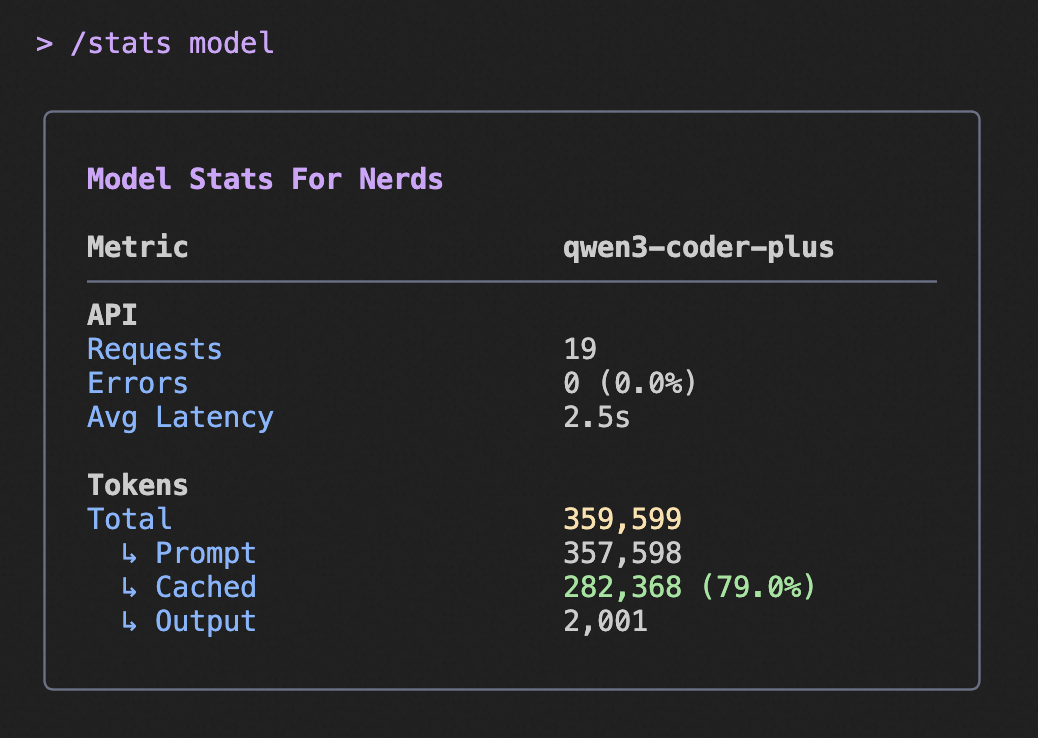
Use the `/stats` command to see your cached token savings:
|
|
18
|
+
|
|
19
|
+
- When active, the stats display shows how many tokens were served from cache
|
|
20
|
+
- You'll see both the absolute number and percentage of cached tokens
|
|
21
|
+
- Example: "10,500 (90.4%) of input tokens were served from the cache, reducing costs."
|
|
22
|
+
|
|
23
|
+
This information is only displayed when cached tokens are being used, which occurs with API key authentication but not with OAuth authentication.
|
|
24
|
+
|
|
25
|
+
## Example Stats Display
|
|
26
|
+
|
|
27
|
+
|
|
28
|
+
|
|
29
|
+
The above image shows an example of the `/stats` command output, highlighting the cached token savings information.
|