@pwrdrvr/microapps-cdk 0.2.1 → 0.2.7
This diff represents the content of publicly available package versions that have been released to one of the supported registries. The information contained in this diff is provided for informational purposes only and reflects changes between package versions as they appear in their respective public registries.
- package/.jsii +310 -241
- package/API.md +138 -3
- package/README.md +282 -135
- package/lib/MicroApps.d.ts +69 -46
- package/lib/MicroApps.js +26 -13
- package/lib/MicroAppsAPIGwy.d.ts +34 -30
- package/lib/MicroAppsAPIGwy.js +10 -10
- package/lib/MicroAppsCF.d.ts +74 -54
- package/lib/MicroAppsCF.js +11 -11
- package/lib/MicroAppsS3.d.ts +43 -39
- package/lib/MicroAppsS3.js +16 -16
- package/lib/MicroAppsSvcs.d.ts +113 -35
- package/lib/MicroAppsSvcs.js +28 -18
- package/lib/microapps-deployer/index.js.map +2 -2
- package/lib/microapps-router/index.js.map +2 -2
- package/package.json +4 -3
package/README.md
CHANGED
|
@@ -2,151 +2,298 @@
|
|
|
2
2
|
|
|
3
3
|
# Overview
|
|
4
4
|
|
|
5
|
-
The MicroApps project
|
|
5
|
+
The MicroApps project enables rapidly deploying many web apps to AWS on a single shared host name, fronted by a CloudFront Distribution, serving static assets from an S3 Bucket, and routing application requests via API Gateway. MicroApps is delivered as a CDK Construct for deployment, although alternative deployment methods can be used if desired and implemented.
|
|
6
|
+
|
|
7
|
+
MicroApps allows many versions of an application to be deployed either as ephemeral deploys (e.g. for pull request builds) or as semi-permanent deploys. The `microapps-router` Lambda function handled routing requests to apps to the current version targeted for a particular application start request using rules as complex as one is interested in implementing (e.g. A/B testing integration, canary releases, per-user rules for logged in users, per-group, per-deparment, and default rules).
|
|
8
|
+
|
|
9
|
+
Users start applications via a URL such as `[/{prefix}]/{appname}/`, which hits the `microapps-router` that looks up the version of the application to be run, then renders a transparent `iframe` with a link to that version. The URL seen by the user in the browser (and available for bookmarking) has no version in it, so subsequent launches (e.g. the next day or just in another tab) will lookup the version again. All relative URL API requests (e.g. `some/api/path`) will go to the corresponding API version that matches the version of the loaded static files, eliminating issues of incompatibility between static files and API deployments.
|
|
10
|
+
|
|
11
|
+
For development / testing purposes only, each version of an applicaton can be accessed directly via a URL of the pattern `[/{prefix}]/{appname}/{semver}/`. These "versioned" URLs are not intended to be advertised to end users as they would cause a user to be stuck on a particular version of the app if the URL was bookmarked. Note that the system does not limit access to particular versions of an application, as of 2022-01-26, but that can be added as a feature.
|
|
12
|
+
|
|
13
|
+
# Table of Contents <!-- omit in toc -->
|
|
14
|
+
|
|
15
|
+
- [Overview](#overview)
|
|
16
|
+
- [Video Preview of the Deploying CDK Construct](#video-preview-of-the-deploying-cdk-construct)
|
|
17
|
+
- [Installation / CDK Constructs](#installation--cdk-constructs)
|
|
18
|
+
- [Tutorial - Bootstrapping a Deploy](#tutorial---bootstrapping-a-deploy)
|
|
19
|
+
- [Why MicroApps](#why-microapps)
|
|
20
|
+
- [Limitations / Future Development](#limitations--future-development)
|
|
21
|
+
- [Related Projects / Components](#related-projects--components)
|
|
22
|
+
- [Architecure Diagram](#architecure-diagram)
|
|
23
|
+
- [Project Layout](#project-layout)
|
|
24
|
+
- [Creating a MicroApp Using Zip Lambda Functions](#creating-a-microapp-using-zip-lambda-functions)
|
|
25
|
+
- [Creating a MicroApp Using Docker Lambda Functions](#creating-a-microapp-using-docker-lambda-functions)
|
|
26
|
+
- [Next.js Apps](#nextjs-apps)
|
|
27
|
+
- [Modify package.json](#modify-packagejson)
|
|
28
|
+
- [Install Dependencies](#install-dependencies)
|
|
29
|
+
- [Dockerfile](#dockerfile)
|
|
30
|
+
- [next.config.js](#nextconfigjs)
|
|
31
|
+
- [deploy.json](#deployjson)
|
|
32
|
+
- [serverless.yaml](#serverlessyaml)
|
|
33
|
+
|
|
34
|
+
# Video Preview of the Deploying CDK Construct
|
|
35
|
+
|
|
36
|
+

|
|
37
|
+
|
|
38
|
+
# Installation / CDK Constructs
|
|
39
|
+
|
|
40
|
+
- `npm i --save-dev @pwrdrvr/microapps-cdk`
|
|
41
|
+
- Add `MicroApps` construct to your stack
|
|
42
|
+
- The `MicroApps` construct does a "turn-key" deployment complete with the Release app
|
|
43
|
+
- [Construct Hub](https://constructs.dev/packages/@pwrdrvr/microapps-cdk/)
|
|
44
|
+
- CDK API docs
|
|
45
|
+
- Python, DotNet, Java, JS/TS installation instructions
|
|
46
|
+
|
|
47
|
+
# Tutorial - Bootstrapping a Deploy
|
|
48
|
+
|
|
49
|
+
- `git clone https://github.com/pwrdrvr/microapps-core.git`
|
|
50
|
+
- Note: the repo is only being for the example CDK Stack, it is not necessary to clone the repo when used in a custom CDK Stack
|
|
51
|
+
- `cd microapps-core`
|
|
52
|
+
- `npm i -g aws-cdk`
|
|
53
|
+
- Install AWS CDK v2 CLI
|
|
54
|
+
- `asp [my-sso-profile-name]`
|
|
55
|
+
- Using the `aws` plugin from `oh-my-zsh` for AWS SSO
|
|
56
|
+
- Of course, there are other methods of setting env vars
|
|
57
|
+
- `aws sso login`
|
|
58
|
+
- Establish an AWS SSO session
|
|
59
|
+
- `cdk-sso-sync`
|
|
60
|
+
- Using `npm i -g cdk-sso-sync`
|
|
61
|
+
- Sets AWS SSO credentials in a way that CDK can use them
|
|
62
|
+
- Not necessary if not using AWS SSO
|
|
63
|
+
- `export AWS_REGION=us-east-2`
|
|
64
|
+
- Region needs to be set for the Lambda invoke - This can be done other ways in `~/.aws/config` as well
|
|
65
|
+
- `./deploy.sh`
|
|
66
|
+
- Deploys the CDK Stack
|
|
67
|
+
- Essentially runs two commands along with extraction of outputs:
|
|
68
|
+
- `npx cdk deploy --context @pwrdrvr/microapps:stackName=microapps-demo-deploy --context @pwrdrvr/microapps:deployReleaseApp=true microapps-basic`
|
|
69
|
+
- `npx microapps-publish publish -a release -n ${RELEASE_APP_PACKAGE_VERSION} -d ${DEPLOYER_LAMBDA_NAME} -l ${RELEASE_APP_LAMBDA_NAME} -s node_modules/@pwrdrvr/microapps-app-release-cdk/lib/.static_files/release/${RELEASE_APP_PACKAGE_VERSION}/ --overwrite --noCache`
|
|
70
|
+
- URL will be printed as last output
|
|
71
|
+
|
|
72
|
+
# Why MicroApps
|
|
73
|
+
|
|
74
|
+
MicroApps are like micro services, but for Web UIs. A MicroApp allows a single functional site to be developed by many independent teams within an organization. Teams must coordinate deployments and agree upon one implementation technology and framework when building a monolithic, or even a monorepo, web application.
|
|
75
|
+
|
|
76
|
+
Teams using MicroApps can deploy independently of each other with coordination being required only at points of intentional integration (e.g. adding a feature to pass context from one MicroApp to another or coordination of a major feature release to users) and sharing UI styles, if desired (it is possible to build styles that look the same across many different UI frameworks).
|
|
77
|
+
|
|
78
|
+
MicroApps also allow each team to use a UI framework and backend language that is most appropriate for their solving their business problem. Not every app has to use React or Next.js or even Node on the backend, but instead they can use whatever framework they want and Java, Go, C#, Python, etc. for UI API calls.
|
|
79
|
+
|
|
80
|
+
For internal sites, or logged-in-customer sites, different tools or products can be hosted in entirely independent MicroApps. A menuing system / toolbar application can be created as a MicroApp and that menu app can open the apps in the system within a transparent iframe. For externally facing sites, such as for an e-commerce site, it is possible to have a MicroApp serving `/product/...`, another serving `/search/...`, another serving `/`, etc.
|
|
81
|
+
|
|
82
|
+
# Limitations / Future Development
|
|
83
|
+
|
|
84
|
+
- `iframes`
|
|
85
|
+
- Yeah, yeah: `iframes` are not framesets and most of the hate about iframes is probably better directed at framesets
|
|
86
|
+
- The iframe serves a purpose but it stinks that it is there, primarily because it will cause issues with search bot indexing (SEO)
|
|
87
|
+
- There are other options available to implement that have their own drabacks:
|
|
88
|
+
- Using the `microapps-router` to proxy the "app start" request to a particular version of an app that then renders all of it's API resource requests to versioned URLs
|
|
89
|
+
- Works only with frameworks that support hashing filenams for each deploy to unique names
|
|
90
|
+
- This page would need to be marked as non-cachable
|
|
91
|
+
- This may work well with Next.js which wants to know the explicit path that it will be running at (it writes that path into all resource and API requests)
|
|
92
|
+
- Possible issue: the app would need to work ok being displayed at `[/{prefix}]/{appname}` when it may think that it's being displayed at `[/{prefix}]/{appname}/{semver}`
|
|
93
|
+
- Disadvantage: requires some level of UI framework features (e.g. writing the absolute resource paths) to work correctly - may not work as easily for all UI frameworks
|
|
94
|
+
- HTML5 added features to allow setting the relative path of all subsequent requests to be different than that displayed in the address bar
|
|
95
|
+
- Gotta see if this works in modern browsers
|
|
96
|
+
- Option to ditch the multiple-versions feature
|
|
97
|
+
- Works only with frameworks that support hashing filenams for each deploy to unique names
|
|
98
|
+
- Allows usage of the deploy and routing tooling without advantages and disadvantages of multiple-versions support
|
|
99
|
+
- AWS Only
|
|
100
|
+
- For the time being this has only been implemented for AWS technologies and APIs
|
|
101
|
+
- It is possible that Azure and GCP have sufficient support to enable porting the framework
|
|
102
|
+
- CDK would have to be replaced as well (unless it's made available for Azure and GCP in the near future)
|
|
103
|
+
- `microapps-publish` only supports Lambda function apps
|
|
104
|
+
- There is no technical reason for the apps to only run as Lambda functions
|
|
105
|
+
- Web apps could just as easily run on EC2, Kubernetes, EKS, ECS, etc
|
|
106
|
+
- Anything that API Gateway can route to can work for serving a MicroApp
|
|
107
|
+
- The publish tool needs to provide additional options for setting up the API Gateway route to the app
|
|
108
|
+
- Authentication
|
|
109
|
+
- Authentication requires rolling your own API Gateway and CloudFront deployment at the moment
|
|
110
|
+
- The "turn key" CDK Construct should provide options to show an example of how authentication can be integrated
|
|
111
|
+
- Release Rules
|
|
112
|
+
- Currently only a Default rule is supported
|
|
113
|
+
- Need to evaluate if a generic implementation can be made, possibly allowing plugins or webhooks to support arbitrary rules
|
|
114
|
+
- If not possible to make it perfectly generic, consider providing a more complete reference implementation of examples
|
|
115
|
+
|
|
116
|
+
# Related Projects / Components
|
|
117
|
+
|
|
118
|
+
- Release App
|
|
119
|
+
- The Release app is an initial, rudimentary, release control console for setting the default version of an application
|
|
120
|
+
- Built with Next.js
|
|
121
|
+
- [pwrdrvr/microapps-app-release](https://github.com/pwrdrvr/microapps-app-release)
|
|
122
|
+
- Next.js Demo App
|
|
123
|
+
- The Next.js Tutorial application deployed as a MicroApp
|
|
124
|
+
- [pwrdrvr/serverless-nextjs-demo](https://github.com/pwrdrvr/serverless-nextjs-demo)
|
|
125
|
+
- Serverless Next.js Router
|
|
126
|
+
- [pwrdrvr/serverless-nextjs-router](https://github.com/pwrdrvr/serverless-nextjs-router)
|
|
127
|
+
- Complementary to [@sls-next/serverless-component](https://github.com/serverless-nextjs/serverless-next.js)
|
|
128
|
+
- Allows Next.js apps to run as Lambda @ Origin for speed and cost improvements vs Lambda@Edge
|
|
129
|
+
- Essentially the router translates CloudFront Lambda events to API Gateway Lambda events and vice versa for responses
|
|
130
|
+
- The `serverless-nextjs` project allows Next.js apps to run as Lambda functions without Express, but there was a design change to make the Lambda functions run at Edge (note: need to recheck if this changed after early 2021)
|
|
131
|
+
- Lambda@Edge is _at least_ 3x more expensive than Lambda at the origin:
|
|
132
|
+
- In US East 1, the price per GB-Second is $0.00005001 for Lambda@Edge vs $0.0000166667 for Lambda at the origin
|
|
133
|
+
- Additionally, any DB or services calls from Lambda@Edge back to the origin will pay that 3x higher per GB-Second cost for any time spent waiting to send the request and get a response. Example:
|
|
134
|
+
- Lambda@Edge
|
|
135
|
+
- 0.250s Round Trip Time (RTT) for EU-zone edge request to hit US-East 1 Origin
|
|
136
|
+
- 0.200s DB lookup time
|
|
137
|
+
- 0.050s CPU usage to process the DB response
|
|
138
|
+
- 0.500s total billed time @ $0.00005001 @ 128 MB
|
|
139
|
+
- $0.000003125625 total charge
|
|
140
|
+
- Lambda at Origin
|
|
141
|
+
- RTT does not apply (it's effectively 1-2 ms to hit a DB in the same region)
|
|
142
|
+
- 0.200s DB lookup time
|
|
143
|
+
- 0.050s CPU usage to process the DB response
|
|
144
|
+
- 0.250s total billed time @ $0.0000166667 @ 128 MB
|
|
145
|
+
- Half the billed time of running on Lambda@Edge
|
|
146
|
+
- 1/6th the cost of running on Lambda@Edge:
|
|
147
|
+
- $0.000000520834375 total charge (assuming no CPU time to process the response)
|
|
148
|
+
- $0.000003125625 / $0.000000520834375 = 6x more expensive in Lambda@Edge
|
|
149
|
+
|
|
150
|
+
# Architecure Diagram
|
|
151
|
+
|
|
152
|
+
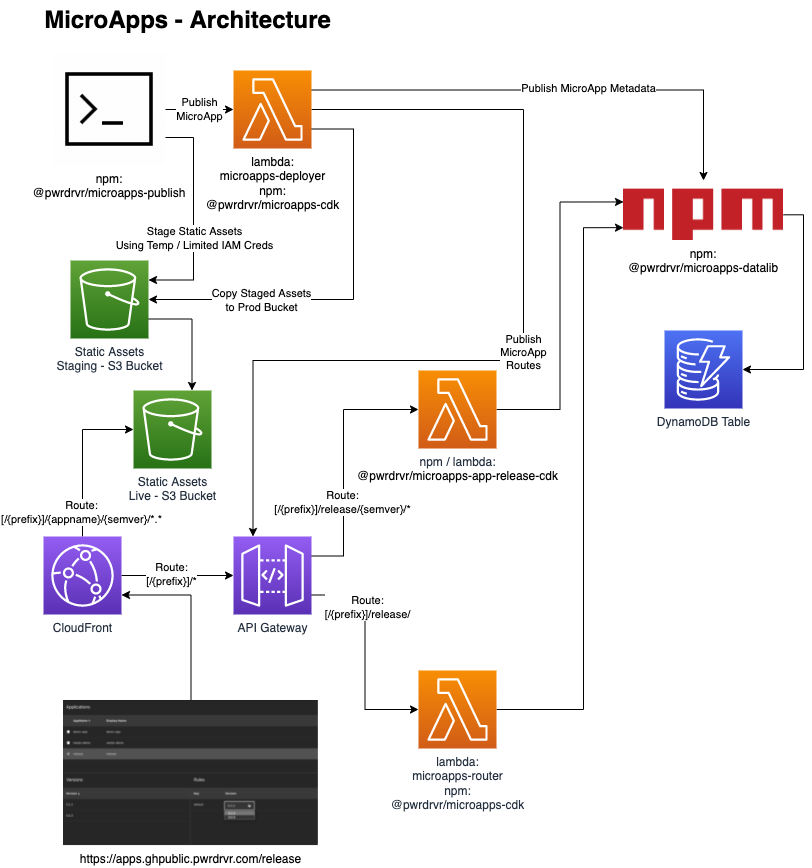
|
|
6
153
|
|
|
7
154
|
# Project Layout
|
|
8
155
|
|
|
9
|
-
- [packages/cdk]()
|
|
156
|
+
- [packages/cdk](https://github.com/pwrdrvr/microapps-core/tree/main/packages/cdk)
|
|
157
|
+
- Example CDK Stack
|
|
158
|
+
- Deploys MicroApps CDK stack for the GitHub Workflows
|
|
159
|
+
- Can be used as an example of how to use the MicroApps CDK Construct
|
|
160
|
+
- [packages/demo-app](https://github.com/pwrdrvr/microapps-core/tree/main/packages/demo-app)
|
|
161
|
+
- Example app with static resources and a Lambda function
|
|
162
|
+
- Does not use any Web UI framework at all
|
|
163
|
+
- [packages/microapps-cdk](https://github.com/pwrdrvr/microapps-core/tree/main/packages/microapps-cdk)
|
|
164
|
+
- MicroApps
|
|
165
|
+
- "Turn key" CDK Construct that creates all assets needed for a working MicroApps deployment
|
|
166
|
+
- MicroAppsAPIGwy
|
|
167
|
+
- Create APIGateway HTTP API
|
|
168
|
+
- Creates domain names to point to the edge (Cloudfront) and origin (API Gateway)
|
|
169
|
+
- MicroAppsCF
|
|
170
|
+
- Creates Cloudfront distribution
|
|
10
171
|
- MicroAppsS3
|
|
11
172
|
- Creates S3 buckets
|
|
12
|
-
- MicroAppsRepos
|
|
13
|
-
- Creates the ECR repos for components to be published into;
|
|
14
|
-
- Deployer
|
|
15
|
-
- Router
|
|
16
173
|
- MicroAppsSvcs
|
|
17
174
|
- Create DynamoDB table
|
|
18
175
|
- Create Deployer Lambda function
|
|
19
176
|
- Create Router Lambda function
|
|
20
|
-
|
|
21
|
-
-
|
|
22
|
-
-
|
|
23
|
-
-
|
|
24
|
-
|
|
25
|
-
- [packages/microapps-deployer]()
|
|
177
|
+
- [packages/microapps-datalib](https://github.com/pwrdrvr/microapps-core/tree/main/packages/microapps-datalib)
|
|
178
|
+
- Installed from `npm`:
|
|
179
|
+
- `npm i -g @pwrdrvr/microapps-datalib`
|
|
180
|
+
- APIs for access to the DynamoDB Table used by `microapps-publish`, `microapps-deployer`, and `@pwrdrvr/microapps-app-release-cdk`
|
|
181
|
+
- [packages/microapps-deployer](https://github.com/pwrdrvr/microapps-core/tree/main/packages/microapps-deployer)
|
|
26
182
|
- Lambda service invoked by `microapps-publish` to record new app/version in the DynamoDB table, create API Gateway integrations, copy S3 assets from staging to prod bucket, etc.
|
|
27
|
-
-
|
|
183
|
+
- Returns a temporary S3 token with restricted access to the staging S3 bucket for upload of the static files for one app/semver
|
|
184
|
+
- [packages/microapps-publish](https://github.com/pwrdrvr/microapps-core/tree/main/packages/microapps-publish)
|
|
185
|
+
- Installed from `npm`:
|
|
186
|
+
- `npm i -g @pwrdrvr/microapps-publish`
|
|
28
187
|
- Node executable that updates versions in config files, deploys static assets to the S3 staging bucket, optionally compiles and deploys a new Lambda function version, and invokes `microapps-deployer`
|
|
29
|
-
-
|
|
30
|
-
-
|
|
31
|
-
|
|
32
|
-
- ECR write
|
|
33
|
-
- Lambda version publish
|
|
34
|
-
- [packages/microapps-router]()
|
|
188
|
+
- AWS IAM permissions required:
|
|
189
|
+
- `lambda:InvokeFunction`
|
|
190
|
+
- [packages/microapps-router](https://github.com/pwrdrvr/microapps-core/tree/main/packages/microapps-router)
|
|
35
191
|
- Lambda function that determines which version of an app to point a user to on a particular invocation
|
|
36
192
|
|
|
37
|
-
#
|
|
38
|
-
|
|
39
|
-
|
|
40
|
-
|
|
41
|
-
|
|
42
|
-
|
|
43
|
-
-
|
|
44
|
-
|
|
45
|
-
|
|
46
|
-
|
|
47
|
-
|
|
48
|
-
|
|
49
|
-
|
|
50
|
-
|
|
51
|
-
|
|
52
|
-
|
|
53
|
-
|
|
54
|
-
|
|
55
|
-
|
|
56
|
-
|
|
57
|
-
|
|
58
|
-
|
|
59
|
-
|
|
60
|
-
|
|
61
|
-
|
|
62
|
-
|
|
63
|
-
|
|
64
|
-
|
|
65
|
-
|
|
66
|
-
|
|
67
|
-
|
|
68
|
-
|
|
69
|
-
|
|
70
|
-
|
|
71
|
-
|
|
72
|
-
|
|
73
|
-
|
|
74
|
-
|
|
75
|
-
|
|
76
|
-
|
|
77
|
-
|
|
78
|
-
|
|
79
|
-
|
|
80
|
-
|
|
81
|
-
|
|
82
|
-
|
|
83
|
-
|
|
84
|
-
|
|
85
|
-
|
|
86
|
-
|
|
87
|
-
|
|
88
|
-
|
|
89
|
-
|
|
90
|
-
|
|
91
|
-
|
|
92
|
-
|
|
93
|
-
|
|
94
|
-
|
|
95
|
-
|
|
96
|
-
|
|
97
|
-
|
|
98
|
-
|
|
99
|
-
|
|
100
|
-
|
|
101
|
-
|
|
102
|
-
|
|
103
|
-
|
|
104
|
-
|
|
105
|
-
|
|
106
|
-
|
|
107
|
-
|
|
108
|
-
|
|
109
|
-
|
|
110
|
-
|
|
111
|
-
|
|
112
|
-
|
|
113
|
-
|
|
114
|
-
|
|
115
|
-
|
|
116
|
-
|
|
117
|
-
|
|
118
|
-
|
|
119
|
-
|
|
120
|
-
|
|
121
|
-
|
|
122
|
-
|
|
123
|
-
|
|
124
|
-
|
|
125
|
-
|
|
126
|
-
|
|
127
|
-
|
|
128
|
-
-
|
|
129
|
-
|
|
130
|
-
|
|
131
|
-
|
|
132
|
-
|
|
133
|
-
|
|
134
|
-
|
|
135
|
-
|
|
136
|
-
|
|
137
|
-
|
|
138
|
-
|
|
139
|
-
|
|
140
|
-
|
|
141
|
-
|
|
142
|
-
|
|
143
|
-
|
|
144
|
-
- Init Cost: 0.15 millicents
|
|
145
|
-
- 1024 MB
|
|
146
|
-
- Duration Warm: 10 ms
|
|
147
|
-
- Duration Cold: 85 ms
|
|
148
|
-
- Init Duration: 185 ms
|
|
149
|
-
- Billed Duration Warm: 12 ms
|
|
150
|
-
- Billed Duration Init: 85 ms
|
|
151
|
-
- Warm Cost: 0.02 millicents
|
|
152
|
-
- Init Cost: 0.14 millicents
|
|
193
|
+
# Creating a MicroApp Using Zip Lambda Functions
|
|
194
|
+
|
|
195
|
+
[TBC]
|
|
196
|
+
|
|
197
|
+
# Creating a MicroApp Using Docker Lambda Functions
|
|
198
|
+
|
|
199
|
+
Note: semi-deprecated as of 2022-01-27. Zip Lambda functions are better supported.
|
|
200
|
+
|
|
201
|
+
## Next.js Apps
|
|
202
|
+
|
|
203
|
+
Create a Next.js app then follow the steps in this section to set it up for publishing to AWS Lambda @ Origin as a MicroApp. To publish new versions of the app use `npx microapps-publish --new-version x.y.z` when logged in to the target AWS account.
|
|
204
|
+
|
|
205
|
+
### Modify package.json
|
|
206
|
+
|
|
207
|
+
Replace the version with `0.0.0` so it can be modified by the `microapps-publish` tool.
|
|
208
|
+
|
|
209
|
+
### Install Dependencies
|
|
210
|
+
|
|
211
|
+
```
|
|
212
|
+
npm i --save-dev @sls-next/serverless-component@1.19.0 @pwrdrvr/serverless-nextjs-router @pwrdrvr/microapps-publish
|
|
213
|
+
```
|
|
214
|
+
|
|
215
|
+
### Dockerfile
|
|
216
|
+
|
|
217
|
+
Add this file to the root of the app.
|
|
218
|
+
|
|
219
|
+
```Dockerfile
|
|
220
|
+
FROM node:15-slim as base
|
|
221
|
+
|
|
222
|
+
WORKDIR /app
|
|
223
|
+
|
|
224
|
+
# Download the sharp libs once to save time
|
|
225
|
+
# Do this before copying anything else in
|
|
226
|
+
RUN mkdir -p image-lambda-npms && \
|
|
227
|
+
cd image-lambda-npms && npm i sharp && \
|
|
228
|
+
rm -rf node_modules/sharp/vendor/*/include/
|
|
229
|
+
|
|
230
|
+
# Copy in the build output from `npx serverless`
|
|
231
|
+
COPY .serverless_nextjs .
|
|
232
|
+
COPY config.json .
|
|
233
|
+
|
|
234
|
+
# Move the sharp libs into place
|
|
235
|
+
RUN rm -rf image-lambda/node_modules/ && \
|
|
236
|
+
mv image-lambda-npms/node_modules image-labmda/ && \
|
|
237
|
+
rm -rf image-lambda-npms
|
|
238
|
+
|
|
239
|
+
FROM public.ecr.aws/lambda/nodejs:14 AS final
|
|
240
|
+
|
|
241
|
+
# Copy in the munged code
|
|
242
|
+
COPY --from=base /app .
|
|
243
|
+
|
|
244
|
+
CMD [ "./index.handler" ]
|
|
245
|
+
```
|
|
246
|
+
|
|
247
|
+
### next.config.js
|
|
248
|
+
|
|
249
|
+
Add this file to the root of the app.
|
|
250
|
+
|
|
251
|
+
Replace `appname` with your URL path-compatible application name.
|
|
252
|
+
|
|
253
|
+
```js
|
|
254
|
+
const appRoot = '/appname/0.0.0';
|
|
255
|
+
|
|
256
|
+
// eslint-disable-next-line no-undef
|
|
257
|
+
module.exports = {
|
|
258
|
+
target: 'serverless',
|
|
259
|
+
webpack: (config, _options) => {
|
|
260
|
+
return config;
|
|
261
|
+
},
|
|
262
|
+
basePath: appRoot,
|
|
263
|
+
publicRuntimeConfig: {
|
|
264
|
+
// Will be available on both server and client
|
|
265
|
+
staticFolder: appRoot,
|
|
266
|
+
},
|
|
267
|
+
};
|
|
268
|
+
```
|
|
269
|
+
|
|
270
|
+
### deploy.json
|
|
271
|
+
|
|
272
|
+
Add this file to the root of the app.
|
|
273
|
+
|
|
274
|
+
Replace `appname` with your URL path-compatible application name.
|
|
275
|
+
|
|
276
|
+
```json
|
|
277
|
+
{
|
|
278
|
+
"AppName": "appname",
|
|
279
|
+
"SemVer": "0.0.0",
|
|
280
|
+
"DefaultFile": "",
|
|
281
|
+
"StaticAssetsPath": "./.serverless_nextjs/assets/appname/0.0.0/",
|
|
282
|
+
"LambdaARN": "arn:aws:lambda:us-east-1:123456789012:function:appname:v0_0_0",
|
|
283
|
+
"AWSAccountID": "123456789012",
|
|
284
|
+
"AWSRegion": "us-east-2",
|
|
285
|
+
"ServerlessNextRouterPath": "./node_modules/@pwrdrvr/serverless-nextjs-router/dist/index.js"
|
|
286
|
+
}
|
|
287
|
+
```
|
|
288
|
+
|
|
289
|
+
### serverless.yaml
|
|
290
|
+
|
|
291
|
+
Add this file to the root of the app.
|
|
292
|
+
|
|
293
|
+
```yaml
|
|
294
|
+
nextApp:
|
|
295
|
+
component: './node_modules/@sls-next/serverless-component'
|
|
296
|
+
inputs:
|
|
297
|
+
deploy: false
|
|
298
|
+
uploadStaticAssetsFromBuild: false
|
|
299
|
+
```
|