@ppdostudio/ppdo-cli 0.0.0-stage → 1.0.0-beta.1
This diff represents the content of publicly available package versions that have been released to one of the supported registries. The information contained in this diff is provided for informational purposes only and reflects changes between package versions as they appear in their respective public registries.
- package/CHANGELOG.md +66 -0
- package/LICENSE +114 -0
- package/README.md +362 -3
- package/THIRD-PARTY-NOTICES +25 -0
- package/dist/bin.js +5 -0
- package/dist/chunks/ado-XAHQWYNQ.js +103 -0
- package/dist/chunks/api-7RAWLIQV.js +2 -0
- package/dist/chunks/api-KN24TLH6.js +2 -0
- package/dist/chunks/auth-VZSJMSMF.js +6 -0
- package/dist/chunks/azCli-AEZK2RBQ.js +2 -0
- package/dist/chunks/batch-EZPKLWEI.js +4 -0
- package/dist/chunks/build-LSQEAEFK.js +4 -0
- package/dist/chunks/bulk-7FZCDH5U.js +2 -0
- package/dist/chunks/chunk-4KP27OCL.js +2 -0
- package/dist/chunks/chunk-5SBBTR3Y.js +2 -0
- package/dist/chunks/chunk-B4FPKDMH.js +2 -0
- package/dist/chunks/chunk-BALEFXOL.js +29 -0
- package/dist/chunks/chunk-BCAXUZIO.js +2 -0
- package/dist/chunks/chunk-BODUSF3V.js +2 -0
- package/dist/chunks/chunk-C42MGXRN.js +2 -0
- package/dist/chunks/chunk-DVQ7OYIJ.js +2 -0
- package/dist/chunks/chunk-GE3XBV3K.js +2 -0
- package/dist/chunks/chunk-H4OY4EFC.js +3 -0
- package/dist/chunks/chunk-HIW2K6OP.js +4 -0
- package/dist/chunks/chunk-I3TMFYRJ.js +194 -0
- package/dist/chunks/chunk-J4R6QXW7.js +2 -0
- package/dist/chunks/chunk-JAGU2NM5.js +2 -0
- package/dist/chunks/chunk-JEAIFLEN.js +51 -0
- package/dist/chunks/chunk-KBQYSAJX.js +2 -0
- package/dist/chunks/chunk-LB7WNZVK.js +5 -0
- package/dist/chunks/chunk-LL4XQ3L7.js +4 -0
- package/dist/chunks/chunk-MBNUMAAZ.js +2 -0
- package/dist/chunks/chunk-MGZDEW3X.js +8 -0
- package/dist/chunks/chunk-MK6QZ4ES.js +2 -0
- package/dist/chunks/chunk-MTF66YXU.js +2 -0
- package/dist/chunks/chunk-MZEUD7ET.js +6 -0
- package/dist/chunks/chunk-OXZG44O5.js +2 -0
- package/dist/chunks/chunk-PYTSDUPY.js +2 -0
- package/dist/chunks/chunk-QMTPHZLQ.js +2 -0
- package/dist/chunks/chunk-RC5VPVGC.js +2 -0
- package/dist/chunks/chunk-S4KF5Z3S.js +10 -0
- package/dist/chunks/chunk-STWQDANK.js +5 -0
- package/dist/chunks/chunk-TADCW6ZI.js +2 -0
- package/dist/chunks/chunk-TM3M633T.js +3 -0
- package/dist/chunks/chunk-TQLZ3TRU.js +2 -0
- package/dist/chunks/chunk-TXVNEV3M.js +3 -0
- package/dist/chunks/chunk-TZSB4PR7.js +4 -0
- package/dist/chunks/chunk-UCTMKA2J.js +4 -0
- package/dist/chunks/chunk-WIA546AL.js +13 -0
- package/dist/chunks/chunk-WMDKJRDC.js +2 -0
- package/dist/chunks/chunk-WNQERCOO.js +2 -0
- package/dist/chunks/chunk-WXOTXJNG.js +3 -0
- package/dist/chunks/chunk-ZHHVG47C.js +2 -0
- package/dist/chunks/chunk-ZNJ4DRCA.js +2 -0
- package/dist/chunks/chunk-ZUXLC5VX.js +2 -0
- package/dist/chunks/commands-GRWX32IX.js +2 -0
- package/dist/chunks/component-TCL43QXZ.js +2 -0
- package/dist/chunks/components-LRHXR5HR.js +2 -0
- package/dist/chunks/config-UKI5TBH5.js +2 -0
- package/dist/chunks/connection-QNXMJGHZ.js +2 -0
- package/dist/chunks/connref-U3CMQ64O.js +2 -0
- package/dist/chunks/customizations-VNEASPWI.js +7 -0
- package/dist/chunks/dependency-U6OQA5PS.js +3 -0
- package/dist/chunks/discovery-IWAWXXWF.js +2 -0
- package/dist/chunks/dist-ILNYGTM2.js +136 -0
- package/dist/chunks/dv-C45WDXRG.js +192 -0
- package/dist/chunks/env-GL5ZPAZI.js +5 -0
- package/dist/chunks/environment-FPS4AFM5.js +2 -0
- package/dist/chunks/environments-VZWNFJYE.js +2 -0
- package/dist/chunks/envvar-52V6K6LF.js +2 -0
- package/dist/chunks/esm-Z4QMBGAD.js +2 -0
- package/dist/chunks/fanout-Q3656CCP.js +2 -0
- package/dist/chunks/fetchxml-FWUQZP4M.js +6 -0
- package/dist/chunks/functions-SNCK2IYV.js +2 -0
- package/dist/chunks/graph-OK24IOUV.js +5 -0
- package/dist/chunks/group-TLGLTTUG.js +6 -0
- package/dist/chunks/history-67SQS54S.js +2 -0
- package/dist/chunks/identity-SRTOEQVC.js +2 -0
- package/dist/chunks/jobs-2ZPBDDHT.js +2 -0
- package/dist/chunks/lifecycle-OJRM7K2I.js +2 -0
- package/dist/chunks/main-HOYSLMHZ.js +4 -0
- package/dist/chunks/metadata-WYVJ7NP7.js +2 -0
- package/dist/chunks/metadataCreate-PBA3KH3A.js +2 -0
- package/dist/chunks/msalUser-3PBGT655.js +2 -0
- package/dist/chunks/names-ZRM6SAYU.js +2 -0
- package/dist/chunks/pack-3OYGV36R.js +2 -0
- package/dist/chunks/pat-KGOBISLG.js +2 -0
- package/dist/chunks/pipelines-62CVDRXV.js +4 -0
- package/dist/chunks/plan-ALLKT2QZ.js +2 -0
- package/dist/chunks/plugins-SBMDFXVA.js +4 -0
- package/dist/chunks/policies-BZR5437X.js +2 -0
- package/dist/chunks/pools-I4NVR67Z.js +2 -0
- package/dist/chunks/process-WS76WV3T.js +2 -0
- package/dist/chunks/project-HSZLY2AY.js +2 -0
- package/dist/chunks/projects-GXIQO7HV.js +4 -0
- package/dist/chunks/protect-X2J7LU7X.js +2 -0
- package/dist/chunks/provider-FN7TXWRE.js +2 -0
- package/dist/chunks/prs-F2EVQJRV.js +2 -0
- package/dist/chunks/records-7IQET422.js +2 -0
- package/dist/chunks/run-APD3TRCW.js +2 -0
- package/dist/chunks/run-G2MVOV3C.js +3 -0
- package/dist/chunks/run-H2OLE76P.js +2 -0
- package/dist/chunks/run-ICS4FNZA.js +3 -0
- package/dist/chunks/run-KP2SNX2A.js +3 -0
- package/dist/chunks/run-LNEOCXZA.js +2 -0
- package/dist/chunks/run-SB4QN5Q4.js +2 -0
- package/dist/chunks/run-XRPU3YZF.js +2 -0
- package/dist/chunks/runtime-MIU5CS5B.js +2 -0
- package/dist/chunks/security-RC3EI7CZ.js +2 -0
- package/dist/chunks/service-4VHAPTA6.js +2 -0
- package/dist/chunks/service-RFKOKM72.js +2 -0
- package/dist/chunks/services-4BORTJPM.js +2 -0
- package/dist/chunks/skills-6O2GSTU4.js +2 -0
- package/dist/chunks/solution-3WUUDYF3.js +2 -0
- package/dist/chunks/solutionExport-GTBTHG2D.js +2 -0
- package/dist/chunks/solutionfiles-VWZHFZZ6.js +2 -0
- package/dist/chunks/spn-2RZJLCML.js +2 -0
- package/dist/chunks/tokenCache-TQFT6LAD.js +2 -0
- package/dist/chunks/unpack-HUH7OJMP.js +2 -0
- package/dist/chunks/users-JIBQKPYA.js +2 -0
- package/dist/chunks/vargroups-Q2KG7LHR.js +2 -0
- package/dist/chunks/whoami-V54TCLT5.js +2 -0
- package/dist/chunks/workitems-UG5O3EGB.js +2 -0
- package/dist/chunks/xmldoc-B2HUNTVK.js +2 -0
- package/package.json +57 -6
- package/schema/ppdo-cli.schema.json +132 -0
- package/skills/README.md +12 -0
- package/skills/ppdo-cli/SKILL.md +84 -0
- package/skills/ppdo-cli-dataverse/SKILL.md +302 -0
- package/skills/ppdo-cli-devops/SKILL.md +150 -0
package/CHANGELOG.md
ADDED
|
@@ -0,0 +1,66 @@
|
|
|
1
|
+
# Changelog
|
|
2
|
+
|
|
3
|
+
All notable changes to this project will be documented in this file.
|
|
4
|
+
|
|
5
|
+
The format is based on [Keep a Changelog](https://keepachangelog.com/en/1.1.0/),
|
|
6
|
+
and this project adheres to [Semantic Versioning](https://semver.org/spec/v2.0.0.html).
|
|
7
|
+
|
|
8
|
+
## [Unreleased]
|
|
9
|
+
|
|
10
|
+
## [1.0.0-beta.1] - 2026-11-12
|
|
11
|
+
|
|
12
|
+
### Added
|
|
13
|
+
|
|
14
|
+
- The `pat` sign-in method signs in to one Azure DevOps organization with a personal access token.
|
|
15
|
+
|
|
16
|
+
### Security
|
|
17
|
+
|
|
18
|
+
- Child processes no longer get the environment variables that hold a client secret or a PAT.
|
|
19
|
+
- Azure DevOps tokens are no longer sent to a URL whose path uses `..` or `%2e%2e` segments to reach another organization.
|
|
20
|
+
|
|
21
|
+
## [1.0.0-beta.0] - 2026-11-12
|
|
22
|
+
|
|
23
|
+
First public release, on npm as `@ppdostudio/ppdo-cli`. Free to use under the ppdo-cli Free Use Licence.
|
|
24
|
+
|
|
25
|
+
### Added
|
|
26
|
+
|
|
27
|
+
- `ppdo-cli identity`, `group` and `env` set up accounts, groups with a safety mode, and the environments in each group.
|
|
28
|
+
- `ppdo-cli group discover` finds the Dataverse environments a group's account can reach.
|
|
29
|
+
- `ppdo-cli env use` sets the default environment, and `env pin` sets the environments for a repo.
|
|
30
|
+
- `ppdo-cli auth login|logout|status|token` signs identities in and out, and shows their sign-in status and tokens.
|
|
31
|
+
- A browser sign-in shows a sign-in ID in the terminal and on its pages, so several sign-ins at once can be told apart.
|
|
32
|
+
- `ppdo-cli whoami` shows which environment, mode and account each service uses.
|
|
33
|
+
- `ppdo-cli dv api` and `ado api` send any Dataverse or Azure DevOps request.
|
|
34
|
+
- `ppdo-cli dv query|get|create|update|delete|batch` read and write Dataverse rows.
|
|
35
|
+
- `ppdo-cli dv upsert|associate|disassociate` create or update many rows and link records.
|
|
36
|
+
- `ppdo-cli dv fn|action` call Dataverse functions and actions.
|
|
37
|
+
- `ppdo-cli dv history` shows who changed a record.
|
|
38
|
+
- `ppdo-cli dv metadata` reads and creates tables, columns, choices and keys.
|
|
39
|
+
- `ppdo-cli dv solution` lists, exports, imports and manages solutions.
|
|
40
|
+
- `ppdo-cli dv solution unpack|pack|clone|sync` keep solutions in source control without pac.
|
|
41
|
+
- `ppdo-cli dv publisher` lists and creates publishers.
|
|
42
|
+
- `ppdo-cli dv component` and `dv dependency` show a component's layers and dependencies.
|
|
43
|
+
- `ppdo-cli dv envvar|connref|connection` manage environment variables and connection references.
|
|
44
|
+
- `ppdo-cli dv workflow` lists cloud flows and other processes, turns them on and off, and shows flow runs.
|
|
45
|
+
- `ppdo-cli dv plugin` shows plugin registrations and trace logs, and turns steps on and off.
|
|
46
|
+
- `ppdo-cli dv job` follows system jobs.
|
|
47
|
+
- `ppdo-cli dv org|setting|team|role|user|access` show environment details, security and record access.
|
|
48
|
+
- `ppdo-cli dv view|form|webresource` edit views, forms and web resources as files.
|
|
49
|
+
- `ppdo-cli ado project|repo|pipeline|run` work with projects, repositories and pipeline runs.
|
|
50
|
+
- `ppdo-cli ado pr|wi` work with pull requests and work items.
|
|
51
|
+
- `ppdo-cli ado user|vargroup|environment|pool` look up users, variable groups, pipeline environments and agent pools.
|
|
52
|
+
- `ppdo-cli graph group` looks up Entra groups.
|
|
53
|
+
- `ppdo-cli skills` installs the agent skills into Claude Code or GitHub Copilot.
|
|
54
|
+
- `ppdo-cli commands` lists every command and whether it reads or writes.
|
|
55
|
+
- Three agent skills ship with the CLI: `ppdo-cli`, `ppdo-cli-dataverse` and `ppdo-cli-devops`.
|
|
56
|
+
- Each group's mode (`read-only`, `read-write` or `full`) limits what commands can change.
|
|
57
|
+
- `--dry-run` shows a request without sending it.
|
|
58
|
+
- `--env a,b` and `--group` run a read command against several environments.
|
|
59
|
+
- `--client-id` runs commands as an app (service principal) with no config.
|
|
60
|
+
- Output is JSON by default, or `-o ndjson|table|tsv`.
|
|
61
|
+
- The config is JSON, with a JSON schema for editors.
|
|
62
|
+
- `THIRD-PARTY-NOTICES` lists the open source packages bundled into ppdo-cli and their licences.
|
|
63
|
+
|
|
64
|
+
[Unreleased]: https://github.com/PPDOStudio/ppdo-cli-release/compare/v1.0.0-beta.1...HEAD
|
|
65
|
+
[1.0.0-beta.1]: https://github.com/PPDOStudio/ppdo-cli-release/releases/tag/v1.0.0-beta.1
|
|
66
|
+
[1.0.0-beta.0]: https://github.com/PPDOStudio/ppdo-cli-release/releases/tag/v1.0.0-beta.0
|
package/LICENSE
ADDED
|
@@ -0,0 +1,114 @@
|
|
|
1
|
+
ppdo-cli Free Use Licence, version 1.0
|
|
2
|
+
|
|
3
|
+
Copyright (c) 2026 Dylan Haskins and Ryan James. All rights reserved.
|
|
4
|
+
|
|
5
|
+
ppdo-cli is free to use. This licence lets you install and use it for any
|
|
6
|
+
purpose, including at work and for your clients. It does not let you change
|
|
7
|
+
it, redistribute it, sell it or offer it to others as your own. Dylan Haskins
|
|
8
|
+
and Ryan James (together "we" or "the Licensors") keep all rights not granted
|
|
9
|
+
below.
|
|
10
|
+
|
|
11
|
+
1. Definitions
|
|
12
|
+
|
|
13
|
+
"Software" means ppdo-cli as published by the Licensors, in any form:
|
|
14
|
+
the package and its release files, its documentation, the agent skills
|
|
15
|
+
that ship with it, and any updates the Licensors publish.
|
|
16
|
+
|
|
17
|
+
"You" means the person or organization that installs or uses the
|
|
18
|
+
Software. If you use it on behalf of an organization, "You" includes
|
|
19
|
+
that organization, and you confirm that you may accept this licence for
|
|
20
|
+
it.
|
|
21
|
+
|
|
22
|
+
2. What you may do
|
|
23
|
+
|
|
24
|
+
Subject to this licence, the Licensors grant You a free, worldwide,
|
|
25
|
+
non-exclusive, non-transferable licence to:
|
|
26
|
+
|
|
27
|
+
a. install and run the Software on any number of computers, servers,
|
|
28
|
+
build agents, pipelines and containers that You use, for any purpose,
|
|
29
|
+
including commercial work for You and for your clients;
|
|
30
|
+
b. make the copies needed for that, including installing the Software
|
|
31
|
+
from the Licensors' published sources in scripts, pipelines and
|
|
32
|
+
container images that You use;
|
|
33
|
+
c. let your employees and contractors use it for You under this licence;
|
|
34
|
+
d. use, copy and adapt the agent skills and documentation that ship with
|
|
35
|
+
the Software, for use with your own agents and tools;
|
|
36
|
+
e. use everything the Software produces for You (exported solutions,
|
|
37
|
+
reports, files and other output) as You choose. The Licensors claim
|
|
38
|
+
no rights in it.
|
|
39
|
+
|
|
40
|
+
3. What you may not do
|
|
41
|
+
|
|
42
|
+
Unless the Licensors agree in writing, You may not:
|
|
43
|
+
|
|
44
|
+
a. modify, translate or adapt the Software, or make works based on it,
|
|
45
|
+
except the agent skills and documentation as section 2.d allows;
|
|
46
|
+
b. distribute, publish, sell, rent, lend, sublicense or otherwise give
|
|
47
|
+
the Software to anyone except as section 2 allows, including in a
|
|
48
|
+
package registry, mirror or download site, or in a product or image
|
|
49
|
+
that You offer to others;
|
|
50
|
+
c. offer the Software, or a service whose main value is the Software, to
|
|
51
|
+
others as a hosted or managed service;
|
|
52
|
+
d. use the Software, or what You learn from its code, to build a
|
|
53
|
+
product that competes with it;
|
|
54
|
+
e. remove or change any copyright, licence or trademark notice in it;
|
|
55
|
+
f. get around any technical limit in it, or help anyone else do any of
|
|
56
|
+
the above.
|
|
57
|
+
|
|
58
|
+
You may read the Software's code to understand how it works, to fix a
|
|
59
|
+
problem in your own use of it, and as the law allows.
|
|
60
|
+
|
|
61
|
+
4. Names and trademarks
|
|
62
|
+
|
|
63
|
+
This licence grants no right to use the names "ppdo-cli", "PPDO",
|
|
64
|
+
"PPDO Studio" or "Power Platform DevOps Studio", or the Licensors'
|
|
65
|
+
logos, except to say truthfully that You use the Software.
|
|
66
|
+
|
|
67
|
+
5. Other software
|
|
68
|
+
|
|
69
|
+
The Software includes open source components that are licensed under
|
|
70
|
+
their own terms, listed in the notices that ship with it. Those terms
|
|
71
|
+
apply to those components; this licence does not limit them.
|
|
72
|
+
|
|
73
|
+
6. Feedback
|
|
74
|
+
|
|
75
|
+
If You send suggestions or feedback, the Licensors may use them freely,
|
|
76
|
+
with no obligation to You.
|
|
77
|
+
|
|
78
|
+
7. Ending this licence
|
|
79
|
+
|
|
80
|
+
This licence ends automatically if You break it. When it ends, You must
|
|
81
|
+
stop using the Software and delete your copies. Sections 4 and 8 to 10
|
|
82
|
+
continue after it ends.
|
|
83
|
+
|
|
84
|
+
8. No warranty
|
|
85
|
+
|
|
86
|
+
THE SOFTWARE IS PROVIDED "AS IS", WITHOUT WARRANTY OF ANY KIND, EXPRESS
|
|
87
|
+
OR IMPLIED, INCLUDING BUT NOT LIMITED TO THE WARRANTIES OF
|
|
88
|
+
MERCHANTABILITY, FITNESS FOR A PARTICULAR PURPOSE AND NONINFRINGEMENT.
|
|
89
|
+
|
|
90
|
+
The Software can read and change data and configuration in the services
|
|
91
|
+
You connect it to. You are responsible for the accounts, permissions and
|
|
92
|
+
safety modes You give it, and for checking what it changes.
|
|
93
|
+
|
|
94
|
+
9. Limitation of liability
|
|
95
|
+
|
|
96
|
+
TO THE EXTENT THE LAW ALLOWS, IN NO EVENT SHALL THE LICENSORS BE LIABLE
|
|
97
|
+
FOR ANY CLAIM, DAMAGES OR OTHER LIABILITY, INCLUDING LOSS OF DATA,
|
|
98
|
+
PROFITS OR BUSINESS, WHETHER IN AN ACTION OF CONTRACT, TORT OR
|
|
99
|
+
OTHERWISE, ARISING FROM, OUT OF OR IN CONNECTION WITH THE SOFTWARE OR
|
|
100
|
+
THE USE OF OR OTHER DEALINGS IN THE SOFTWARE.
|
|
101
|
+
|
|
102
|
+
10. General
|
|
103
|
+
|
|
104
|
+
a. The Licensors may publish new versions of this licence. Each version
|
|
105
|
+
of the Software stays available under the licence it was released
|
|
106
|
+
with.
|
|
107
|
+
b. If any part of this licence cannot be enforced, the rest still
|
|
108
|
+
applies.
|
|
109
|
+
c. This licence is governed by the laws of New Zealand, and the
|
|
110
|
+
courts of New Zealand have jurisdiction over any dispute about it.
|
|
111
|
+
|
|
112
|
+
To ask for other terms, contact Dylan Haskins through
|
|
113
|
+
https://github.com/dylanhaskins or Ryan James through
|
|
114
|
+
https://github.com/ryanmichaeljames.
|
package/README.md
CHANGED
|
@@ -1,3 +1,362 @@
|
|
|
1
|
-
|
|
2
|
-
|
|
3
|
-
|
|
1
|
+
|
|
2
|
+
|
|
3
|
+
[](https://www.npmjs.com/package/@ppdostudio/ppdo-cli)
|
|
4
|
+
[](https://www.npmjs.com/package/@ppdostudio/ppdo-cli)
|
|
5
|
+
[](https://nodejs.org/)
|
|
6
|
+
[](https://packagephobia.com/result?p=%40ppdostudio%2Fppdo-cli)
|
|
7
|
+
[](https://github.com/PPDOStudio/ppdo-cli-release/blob/main/LICENSE)
|
|
8
|
+
|
|
9
|
+
# ppdo-cli
|
|
10
|
+
|
|
11
|
+
One CLI for **Dataverse** and **Azure DevOps**, built for coding agents and the people who work with them, from [Power Platform DevOps Studio](https://github.com/dylanhaskins/PowerPlatform-DevOpsStudio-Releases). You sign in once, outside any agent. Claude Code, GitHub Copilot and your own scripts then run the same commands and get the same JSON.
|
|
12
|
+
|
|
13
|
+
```
|
|
14
|
+
ppdo-cli dv api GET accounts --param '$select=name' --param '$top=5'
|
|
15
|
+
ppdo-cli ado api GET {project}/_apis/build/builds --param '$top=5'
|
|
16
|
+
ppdo-cli dv solution unpack MySolution.zip --folder solutions/MySolution
|
|
17
|
+
ppdo-cli whoami --check
|
|
18
|
+
```
|
|
19
|
+
|
|
20
|
+
> **Beta.** Commands, options and output may change between beta releases. The command is `ppdo-cli` for now, so that it doesn't clash with the `ppdo` PowerShell module.
|
|
21
|
+
|
|
22
|
+
## Install
|
|
23
|
+
|
|
24
|
+
You need Node.js 22.12 or later (Node 24 LTS recommended).
|
|
25
|
+
|
|
26
|
+
Install it globally from npm, where it is `@ppdostudio/ppdo-cli`. While ppdo-cli is in beta, name the `beta` tag:
|
|
27
|
+
|
|
28
|
+
```
|
|
29
|
+
npm install -g @ppdostudio/ppdo-cli@beta
|
|
30
|
+
ppdo-cli --version
|
|
31
|
+
```
|
|
32
|
+
|
|
33
|
+
Or run it without installing: `npx @ppdostudio/ppdo-cli@beta --help`.
|
|
34
|
+
|
|
35
|
+
Then install the agent skills (see [Agent skills](#agent-skills)), for example `ppdo-cli skills install --target claude`.
|
|
36
|
+
|
|
37
|
+
- **Update:** `npm install -g @ppdostudio/ppdo-cli@beta` again replaces the installed version.
|
|
38
|
+
- **Uninstall:** `npm uninstall -g @ppdostudio/ppdo-cli`. The config and token caches stay in their folders (see [Configuration files](#configuration-files)).
|
|
39
|
+
|
|
40
|
+
Each release is also on [GitHub](https://github.com/PPDOStudio/ppdo-cli-release/releases), as `ppdostudio-ppdo-cli-<version>.tgz` with its checksum in `SHA256SUMS`. Install a downloaded file with `npm install -g ./ppdostudio-ppdo-cli-<version>.tgz`.
|
|
41
|
+
|
|
42
|
+
Commands with a cached token load no sign-in code, so they start fast.
|
|
43
|
+
|
|
44
|
+
## Set up
|
|
45
|
+
|
|
46
|
+
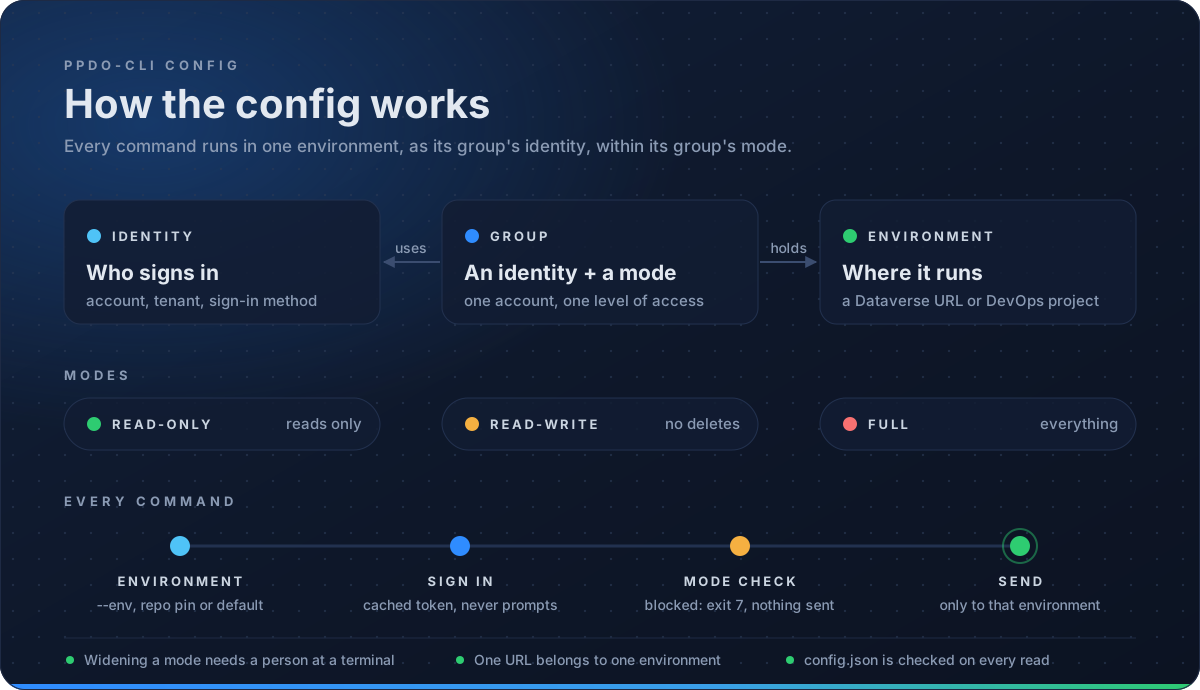
- An **identity** is one account in one tenant.
|
|
47
|
+
- A **group** holds an identity and a mode: how much agents may change.
|
|
48
|
+
- An **environment** is one Dataverse URL or one DevOps project. It belongs to exactly one group, and gets its account and mode from there.
|
|
49
|
+
|
|
50
|
+
|
|
51
|
+
|
|
52
|
+
```
|
|
53
|
+
ppdo-cli identity add work --tenant contoso.onmicrosoft.com --username you@contoso.com --method browser
|
|
54
|
+
ppdo-cli group add contoso-dev --identity work --mode full # read, write, delete
|
|
55
|
+
ppdo-cli group add contoso-test --identity work --mode read-write
|
|
56
|
+
ppdo-cli group add contoso-prod --identity work # read-only
|
|
57
|
+
ppdo-cli env add dev --in contoso-dev --dataverse https://contoso-dev.crm.dynamics.com
|
|
58
|
+
ppdo-cli env add uat --in contoso-test --dataverse https://contoso-uat.crm.dynamics.com
|
|
59
|
+
ppdo-cli env add prod --in contoso-prod --dataverse https://contoso.crm.dynamics.com
|
|
60
|
+
ppdo-cli env add platform --in contoso-dev --devops-org contoso --devops-project platform
|
|
61
|
+
ppdo-cli auth login work
|
|
62
|
+
ppdo-cli whoami --check
|
|
63
|
+
```
|
|
64
|
+
|
|
65
|
+
`ppdo-cli group discover <group>` lists every Dataverse environment the group's account can reach, and `--add <name>` adds them.
|
|
66
|
+
|
|
67
|
+
Commands use each service's default environment (`ppdo-cli env use <name>`), or `--env <name>`. To read from several at once, pass `--env dev,uat` or `--group contoso-test` to any read command. You get one labelled result per environment.
|
|
68
|
+
|
|
69
|
+
Different accounts for different services work too: put each in its own group. `ppdo-cli env pin dev platform` writes a `.ppdo-cli.json` at the root of a git repo, so every agent working there uses those environments.
|
|
70
|
+
|
|
71
|
+
Sign-in methods: `browser`, `broker` (Windows single sign-on), `device_code`, `az_cli`, `spn` (a service principal: `--client-id` with `--secret-env <VAR>` or `--certificate <pem|pfx>`) and `pat` (an Azure DevOps personal access token, see [below](#azure-devops-with-a-pat)). Tokens are cached per identity, encrypted with DPAPI on Windows. Commands never prompt for a sign-in: they exit with code 3 and print the `ppdo-cli auth login` command to run.
|
|
72
|
+
|
|
73
|
+
A `browser` sign-in opens a ppdo-cli page with a sign-in ID, such as `K7Q4-MD2X`, in its address, tab title and colour. The terminal prints the same ID, so with several sign-ins open at once you can tell which tab belongs to which.
|
|
74
|
+
|
|
75
|
+
### Azure DevOps with a PAT
|
|
76
|
+
|
|
77
|
+
Use a personal access token (PAT) only when an Entra sign-in to Azure DevOps isn't possible, for example on a device that Conditional Access blocks. A PAT lives for months, carries its own access, and skips the device checks that a sign-in gets. So ppdo-cli keeps it on a short leash:
|
|
78
|
+
|
|
79
|
+
- A `pat` identity is for **one** Azure DevOps organization. ppdo-cli sends the PAT to `https://dev.azure.com/<organization>/` only, and checks this on every request. A group that uses the identity can hold only DevOps environments of that organization. The PAT never reaches Dataverse or Graph.
|
|
80
|
+
- Only a person at a terminal can store a PAT, through hidden input. Agents can't sign in, store, change or re-point it, and changing a writable group's PAT identity needs a person too.
|
|
81
|
+
- Before ppdo-cli keeps a PAT, Azure DevOps must confirm it belongs to the identity's `--username`.
|
|
82
|
+
- No command shows it: not `auth token`, `auth status`, `whoami`, `--dry-run` or `-v`. Child processes (az, dotnet, the browser) don't get the variable that holds it.
|
|
83
|
+
|
|
84
|
+
```
|
|
85
|
+
ppdo-cli identity add ado --method pat --organization contoso --username you@contoso.com
|
|
86
|
+
ppdo-cli group add contoso-ado --identity ado --mode read-write
|
|
87
|
+
ppdo-cli env add platform --in contoso-ado --devops-org contoso --devops-project platform
|
|
88
|
+
ppdo-cli auth login ado --expires 2026-12-31 # paste the PAT; the input is hidden
|
|
89
|
+
ppdo-cli whoami --check
|
|
90
|
+
```
|
|
91
|
+
|
|
92
|
+
Create the PAT in Azure DevOps (User settings → Personal access tokens) with:
|
|
93
|
+
- **Organization:** this one organization, not "All accessible organizations". ppdo-cli refuses a PAT that is already stored for an identity of another organization.
|
|
94
|
+
- **Scopes:** the fewest that your commands need, for example Code (Read) for repos and pull requests, Work Items (Read), Build (Read). Add the write scopes only for a writable group.
|
|
95
|
+
- **Expiration:** short. Pass the same date to `--expires`, and ppdo-cli warns a week before and stops when it expires.
|
|
96
|
+
|
|
97
|
+
**Where it is kept.** On Windows the PAT is encrypted with DPAPI in `pat.<identity>.bin`, and ppdo-cli refuses to store or read it without DPAPI. On macOS and Linux it is protected by file permissions only, so `auth login` asks you to type `yes` first. DPAPI and file permissions both keep it from other users, not from other code running as you.
|
|
98
|
+
|
|
99
|
+
**In a pipeline**, set `--pat-env <VAR>` on the identity instead, and map the PAT into that variable. ppdo-cli reads that variable only (never `AZURE_DEVOPS_EXT_PAT` or other ambient ones) and confirms each new value with Azure DevOps on its first use.
|
|
100
|
+
|
|
101
|
+
`ppdo-cli auth logout <identity>` deletes the stored PAT. Revoke it in Azure DevOps too: the command prints the link.
|
|
102
|
+
|
|
103
|
+
### Configuration files
|
|
104
|
+
|
|
105
|
+
The `identity`, `group` and `env` commands write these files for you. Use the commands where you can: they check the rules below, and they ask a person at a terminal before anything gains a wider mode. The files are plain JSON, so you can also read or edit them by hand. Agents are told never to edit them.
|
|
106
|
+
|
|
107
|
+
| File | Where | What it holds |
|
|
108
|
+
|---|---|---|
|
|
109
|
+
| `config.json` | `%APPDATA%\ppdo-cli\` (Linux/macOS: `$XDG_CONFIG_HOME/ppdo-cli/`, default `~/.config/ppdo-cli/`) | identities, groups, environments, defaults |
|
|
110
|
+
| `.ppdo-cli.json` | the root of a git repo | the environments to use in that repo (`ppdo-cli env pin`) |
|
|
111
|
+
| `tokens.<identity>.bin`, `msal.<identity>.bin` | `%LOCALAPPDATA%\ppdo-cli\` (Linux/macOS: `$XDG_STATE_HOME/ppdo-cli/`, default `~/.local/state/ppdo-cli/`) | cached tokens and sign-in state, per identity, encrypted with DPAPI on Windows |
|
|
112
|
+
|
|
113
|
+
`PPDEVOPS_CONFIG_DIR` and `PPDEVOPS_STATE_DIR` move the two folders, for example to keep a test setup apart from your own.
|
|
114
|
+
|
|
115
|
+
ppdo-cli writes `config.json` with two-space indents and its keys always in the order shown below, so a change touches only the lines it needs. Fields that aren't set are left out.
|
|
116
|
+
|
|
117
|
+
A `config.json` with one identity of each kind, three groups and four environments:
|
|
118
|
+
|
|
119
|
+
```json
|
|
120
|
+
{
|
|
121
|
+
"current-dataverse": "dev",
|
|
122
|
+
"current-devops": "platform",
|
|
123
|
+
"output": "json",
|
|
124
|
+
"identities": {
|
|
125
|
+
"work": {
|
|
126
|
+
"tenant": "contoso.onmicrosoft.com",
|
|
127
|
+
"username": "you@contoso.com",
|
|
128
|
+
"method": "browser"
|
|
129
|
+
},
|
|
130
|
+
"work-sso": {
|
|
131
|
+
"tenant": "contoso.onmicrosoft.com",
|
|
132
|
+
"username": "you@contoso.com",
|
|
133
|
+
"method": "broker"
|
|
134
|
+
},
|
|
135
|
+
"az": {
|
|
136
|
+
"tenant": "contoso.onmicrosoft.com",
|
|
137
|
+
"username": "you@contoso.com",
|
|
138
|
+
"method": "az_cli",
|
|
139
|
+
"config_dir": "C:/Users/you/.azure-contoso"
|
|
140
|
+
},
|
|
141
|
+
"ci": {
|
|
142
|
+
"tenant": "contoso.onmicrosoft.com",
|
|
143
|
+
"method": "spn",
|
|
144
|
+
"client_id": "00000000-0000-0000-0000-000000000001",
|
|
145
|
+
"secret_env": "CONTOSO_SP_SECRET"
|
|
146
|
+
},
|
|
147
|
+
"ci-cert": {
|
|
148
|
+
"tenant": "contoso.onmicrosoft.com",
|
|
149
|
+
"method": "spn",
|
|
150
|
+
"client_id": "00000000-0000-0000-0000-000000000001",
|
|
151
|
+
"certificate": "C:/certs/contoso-sp.pem"
|
|
152
|
+
}
|
|
153
|
+
},
|
|
154
|
+
"groups": {
|
|
155
|
+
"contoso-dev": {
|
|
156
|
+
"identity": "work",
|
|
157
|
+
"mode": "full",
|
|
158
|
+
"environments": {
|
|
159
|
+
"dev": {
|
|
160
|
+
"dataverse": "https://contoso-dev.crm.dynamics.com"
|
|
161
|
+
},
|
|
162
|
+
"platform": {
|
|
163
|
+
"devops": "contoso/platform"
|
|
164
|
+
}
|
|
165
|
+
}
|
|
166
|
+
},
|
|
167
|
+
"contoso-test": {
|
|
168
|
+
"identity": "work",
|
|
169
|
+
"mode": "read-write",
|
|
170
|
+
"environments": {
|
|
171
|
+
"uat": {
|
|
172
|
+
"dataverse": "https://contoso-uat.crm.dynamics.com"
|
|
173
|
+
}
|
|
174
|
+
}
|
|
175
|
+
},
|
|
176
|
+
"contoso-prod": {
|
|
177
|
+
"identity": "ci",
|
|
178
|
+
"mode": "read-only",
|
|
179
|
+
"environments": {
|
|
180
|
+
"prod": {
|
|
181
|
+
"dataverse": "https://contoso.crm.dynamics.com"
|
|
182
|
+
}
|
|
183
|
+
}
|
|
184
|
+
}
|
|
185
|
+
}
|
|
186
|
+
}
|
|
187
|
+
```
|
|
188
|
+
|
|
189
|
+
The five identities:
|
|
190
|
+
- `work` is you, signing in with a browser.
|
|
191
|
+
- `work-sso` is you, through Windows single sign-on.
|
|
192
|
+
- `az` is whatever account `az login` signed in to its own `config_dir`.
|
|
193
|
+
- `ci` is a service principal with a client secret.
|
|
194
|
+
- `ci-cert` is the same service principal with a certificate.
|
|
195
|
+
|
|
196
|
+
A JSON schema for the file ships with the package as `schema/ppdo-cli.schema.json` (after a global install, under the folder `npm root -g` prints, in `@ppdostudio/ppdo-cli/schema/`). To get completion and checks in an editor, add `"$schema"` with a path to it as the first key. ppdo-cli keeps that key when it rewrites the file, and never adds one itself.
|
|
197
|
+
|
|
198
|
+
**Top level**
|
|
199
|
+
|
|
200
|
+
| Key | Meaning |
|
|
201
|
+
|---|---|
|
|
202
|
+
| `current-dataverse`, `current-devops` | The default environment for each service, by name. Set with `ppdo-cli env use <name>`. |
|
|
203
|
+
| `output` | The default output format: `json`, `ndjson`, `table` or `tsv`. `-o` and `PPDEVOPS_OUTPUT` win over it. |
|
|
204
|
+
| `$schema` | Optional, for editors (see above). |
|
|
205
|
+
|
|
206
|
+
**`identities.<name>`**: one account in one tenant.
|
|
207
|
+
|
|
208
|
+
| Key | Meaning |
|
|
209
|
+
|---|---|
|
|
210
|
+
| `tenant` | Entra tenant id or domain. Required, except for `pat`. |
|
|
211
|
+
| `method` | `browser` (default), `broker` (Windows single sign-on), `device_code`, `az_cli`, `spn` or `pat`. |
|
|
212
|
+
| `username` | The account to sign in as (UPN). Required for `browser`, `broker`, `device_code` and `pat`; a sign-in (or a PAT) for anyone else is refused. |
|
|
213
|
+
| `client_id` | The app (client) id. For `spn`, the service principal's id. For the other methods it defaults to the Azure CLI's public client; set it only to sign in through your own app registration. |
|
|
214
|
+
| `config_dir` | `az_cli` only: the `AZURE_CONFIG_DIR` to use, so one identity can have its own `az login`. `~` is expanded when the command writes it. |
|
|
215
|
+
| `secret_env` | `spn` only: the name of the environment variable that holds the client secret. The secret itself is never stored. |
|
|
216
|
+
| `certificate` | `spn` only, instead of `secret_env`: a PEM file with the private key and the certificate, or a PFX/P12 file without a password. |
|
|
217
|
+
| `organization` | `pat` only, and required: the one Azure DevOps organization the PAT is for. |
|
|
218
|
+
| `pat_env` | `pat` only: the name of the environment variable that holds the PAT, for pipelines. Without it, `ppdo-cli auth login` stores the PAT. |
|
|
219
|
+
|
|
220
|
+
**`groups.<name>`**: an account and how much agents may change.
|
|
221
|
+
|
|
222
|
+
| Key | Meaning |
|
|
223
|
+
|---|---|
|
|
224
|
+
| `identity` | The identity every environment in the group uses. Must name an identity above. |
|
|
225
|
+
| `mode` | `read-only` (default), `read-write` or `full`. See [Safety](#safety). |
|
|
226
|
+
| `environments` | The group's environments, by name (below). |
|
|
227
|
+
|
|
228
|
+
**`groups.<group>.environments.<name>`**: one Dataverse environment or one DevOps project. Exactly one of:
|
|
229
|
+
|
|
230
|
+
| Key | Meaning |
|
|
231
|
+
|---|---|
|
|
232
|
+
| `dataverse` | The environment URL, for example `https://contoso.crm.dynamics.com`. |
|
|
233
|
+
| `devops` | `<organization>/<project>`, for example `contoso/platform`. |
|
|
234
|
+
|
|
235
|
+
**Rules.** The commands refuse any change that breaks these, and ppdo-cli checks them again every time it reads the file, so a mistake made by hand stops every command with exit 2 and names the file to fix:
|
|
236
|
+
- An environment name is used once, in one group only.
|
|
237
|
+
- A Dataverse URL or DevOps project belongs to one environment only (URLs compare without case), so it always has one account and one mode. To change its group, use `ppdo-cli env move`.
|
|
238
|
+
- Every environment has `dataverse` or `devops`.
|
|
239
|
+
- `mode` and `method` are one of the values above. A typo such as `Full` is refused, not read as `read-only`.
|
|
240
|
+
- A group whose identity uses `pat` holds only DevOps environments of that identity's `organization`.
|
|
241
|
+
|
|
242
|
+
A group whose `identity` names an identity that isn't in the file is still read: commands that use it stop with "no identity named …". Add the identity again with `ppdo-cli identity add` (for a writable group, that needs a person at a terminal).
|
|
243
|
+
|
|
244
|
+
**`.ppdo-cli.json`** pins environments for one repo, by name. ppdo-cli looks for it from the current folder up to the git root (outside a git repo, only in the current folder). It can also hold a `$schema`, which `env pin` keeps:
|
|
245
|
+
|
|
246
|
+
```json
|
|
247
|
+
{
|
|
248
|
+
"dataverse": "dev",
|
|
249
|
+
"devops": "platform"
|
|
250
|
+
}
|
|
251
|
+
```
|
|
252
|
+
|
|
253
|
+
**Which environment, identity and format a command uses**, first match wins:
|
|
254
|
+
|
|
255
|
+
| What | Order |
|
|
256
|
+
|---|---|
|
|
257
|
+
| Environment | `--env` → `PPDEVOPS_DATAVERSE` / `PPDEVOPS_DEVOPS` → `.ppdo-cli.json` → `current-dataverse` / `current-devops` |
|
|
258
|
+
| Identity | `--identity` → `PPDEVOPS_IDENTITY` → the environment's group |
|
|
259
|
+
| Output format | `-o` → `PPDEVOPS_OUTPUT` → `output` in `config.json` → `json` |
|
|
260
|
+
|
|
261
|
+
### Running as an app (pipelines and one-offs)
|
|
262
|
+
|
|
263
|
+
`dv` and `ado` commands can run as a service principal with no config at all. Only `--client-id` turns this on; no environment variable does. The secret comes from `PPDEVOPS_CLIENT_SECRET` (at a terminal, ppdo-cli asks for it when that isn't set), or pass `--certificate <pem|pfx>`. `--env` takes a name or a URL. The mode is `--mode`, `read-only` by default. Nothing is saved: no config, no token cache.
|
|
264
|
+
|
|
265
|
+
```
|
|
266
|
+
ppdo-cli dv api GET WhoAmI --env https://contoso-uat.crm.dynamics.com \
|
|
267
|
+
--tenant contoso.onmicrosoft.com --client-id <app-id>
|
|
268
|
+
```
|
|
269
|
+
|
|
270
|
+
In Azure DevOps, map the secret variable into the step: `env: { PPDEVOPS_CLIENT_SECRET: $(clientSecret) }`. The app needs to be an application user (with a security role) in each Dataverse environment, and a user in the DevOps organization.
|
|
271
|
+
|
|
272
|
+
## Safety
|
|
273
|
+
|
|
274
|
+
Each group has a mode (a command run as an app takes its mode from `--mode` instead):
|
|
275
|
+
|
|
276
|
+
- `read-only`: reads, plus POSTs that only read (a `$batch` of GETs, solution export, WIQL).
|
|
277
|
+
- `read-write`: everything except deletes.
|
|
278
|
+
- `full`: everything.
|
|
279
|
+
|
|
280
|
+
A blocked request exits with code 7. `--dry-run` shows the request without sending it. Tokens are only ever sent to the environment's own host or organization, and are dropped on a redirect to anywhere else.
|
|
281
|
+
|
|
282
|
+
Widening what agents may change needs a person at a terminal. That means raising a group's mode, adding or moving an environment into a writable group, or pointing a writable environment or its group's identity somewhere new (including a PAT identity's `organization` or `pat_env`). Without a terminal, the command exits 7. An environment can't be in two groups, so a read-only production environment can't also be reached through a writable group.
|
|
283
|
+
|
|
284
|
+
## Output and errors
|
|
285
|
+
|
|
286
|
+
- stdout carries JSON only (`-o ndjson|table|tsv` for other formats, or `PPDEVOPS_OUTPUT`). JSON is ASCII-escaped, so it survives any console code page.
|
|
287
|
+
- Errors are one JSON object on stderr: `{"error": "...", "hint": "...", ...}`.
|
|
288
|
+
- `-v` logs each request to stderr with secrets and tokens redacted. `-q` hides notices.
|
|
289
|
+
|
|
290
|
+
Exit codes:
|
|
291
|
+
|
|
292
|
+
| Code | Meaning |
|
|
293
|
+
|---|---|
|
|
294
|
+
| 0 | ok |
|
|
295
|
+
| 1 | error |
|
|
296
|
+
| 2 | usage |
|
|
297
|
+
| 3 | auth |
|
|
298
|
+
| 4 | not found |
|
|
299
|
+
| 5 | throttled |
|
|
300
|
+
| 6 | conflict |
|
|
301
|
+
| 7 | blocked by mode |
|
|
302
|
+
| 8 | forbidden |
|
|
303
|
+
| 130 | interrupted |
|
|
304
|
+
|
|
305
|
+
## Commands
|
|
306
|
+
|
|
307
|
+
`ppdo-cli commands` lists every command with its class: R (read), W (write), D (delete), M (depends on the HTTP method) or L (local only). Each command's `--help` has examples.
|
|
308
|
+
|
|
309
|
+
In PowerShell, quote values that contain commas, such as `--env 'dev,uat'` or `--select 'name,accountnumber'`. Unquoted, PowerShell passes them on as separate words.
|
|
310
|
+
|
|
311
|
+
| Command | What it does |
|
|
312
|
+
|---|---|
|
|
313
|
+
| `identity`, `group`, `env` | Set up accounts, groups and environments (see [Set up](#set-up)). |
|
|
314
|
+
| `auth login \| logout \| status \| token` | Sign in, sign out, see cached tokens, or print a token for scripts (`--show` to print to a terminal). |
|
|
315
|
+
| `whoami [--check]` | Which environment, mode and account each service resolves to; `--check` calls each service to confirm. |
|
|
316
|
+
| `dv api <method> <path>` | Any Dataverse Web API request, with auth, retries, paging (`--paginate`), errors and modes handled. |
|
|
317
|
+
| `dv query \| get \| create \| update \| delete` | Rows by OData options or FetchXML, or by id or alternate key; `--bypass-plugins` on writes (full mode only). |
|
|
318
|
+
| `dv batch \| upsert` | NDJSON requests as `$batch` (optionally atomic changesets), or many rows created or updated by key, with a result per row. |
|
|
319
|
+
| `dv associate \| disassociate` | Link or unlink two records through a lookup or relationship. |
|
|
320
|
+
| `dv fn \| action <name>` | Call a function (GET) or action (POST), with parameters typed for you. |
|
|
321
|
+
| `dv history <entityset> <id>` | Who changed a record or one column, and when. |
|
|
322
|
+
| `dv metadata list \| get \| attribute \| optionset \| create ...` | Compact table, column and choice definitions; create tables, columns, choices and keys. |
|
|
323
|
+
| `dv solution list \| get \| components \| dependencies \| history` | Inspect solutions, their components, missing dependencies and past operations. |
|
|
324
|
+
| `dv solution export \| import \| import-results \| publish` | Export (`--both`, `--unpack`), import (`--async`, `--holding`, `--upgrade`, `--settings`, `--activate-*`), see why an import failed, publish. |
|
|
325
|
+
| `dv solution create \| update \| patch \| add-component \| remove-component \| promote` | The solution lifecycle without pac; `dv publisher list \| create` for publishers. |
|
|
326
|
+
| `dv component ... \| dependency list` | A component's layers, dependencies, unpublished changes and names; dependency rows for solutions or one component. |
|
|
327
|
+
| `dv envvar \| connref \| connection` | Environment variables and connection references (with typed `set`), and the connections available. |
|
|
328
|
+
| `dv workflow \| plugin \| job` | Flows and processes (on/off, runs, swap-connref), plugin registrations, traces and stats, and system jobs. |
|
|
329
|
+
| `dv org \| setting \| team \| role \| user \| access` | Environment details and settings, security roles and privileges, and why someone can see a record. |
|
|
330
|
+
| `dv view \| form \| webresource` | Edit views and forms as XML files and push web resources from files. |
|
|
331
|
+
| `dv solution unpack <file.zip>` | Unpack a solution into a source folder without pac. The layout and bytes match `pac solution unpack`, only changed files are written, and `--check` exits 6 when the folder differs. |
|
|
332
|
+
| `dv solution pack <folder> --save <file.zip>` | Pack a source folder into a solution zip without pac, with the same bytes every time. A `.cdsproj` folder builds its PCF and plug-in references first; `--map` reads files from a mapping file. |
|
|
333
|
+
| `dv solution clone <uniquename>` | Export a solution (unmanaged and managed together) into a new `.cdsproj` project with the source in `src/`. |
|
|
334
|
+
| `dv solution sync [folder]` | Re-export the folder's solution and write only what changed, deleting files of removed components; `--check` exits 6 when the folder is out of date. |
|
|
335
|
+
| `ado api <method> <path>` | Any Azure DevOps REST request; `{project}` is replaced with the environment's project, and `--host` reaches the other DevOps hosts. |
|
|
336
|
+
| `ado project list`, `ado repo list \| get \| file \| tree \| branches \| commits \| diff \| policies` | Projects and Git repositories: a file at a branch, tag or commit, commit history, a unified diff between two refs (`--stat` for the file list), and branch policies. |
|
|
337
|
+
| `ado pipeline list \| get \| run \| stages`, `ado run list \| get \| logs \| retry \| cancel` | Pipelines and runs: queue a run (`--wait`, `--skip-stage`, `--only-stage`), its stages and errors, step logs (`--failed-only`, `--save`), and re-running failed stages. |
|
|
338
|
+
| `ado pr list \| get \| diff \| checks \| threads \| create \| update \| comment \| resolve \| link \| auto-complete \| complete` | Pull requests: create, review the diff and policy checks, comment and resolve threads, link work items, and complete without ever bypassing a policy. |
|
|
339
|
+
| `ado wi get \| query \| queries \| create \| update \| comment \| comments \| react \| tags \| fields \| attachments \| link` | Work items: WIQL and saved queries, create and update with Markdown long-text fields, tags, comments and reactions, a type's fields, attachments, and links to PRs and commits. |
|
|
340
|
+
| `ado user get`, `ado vargroup list \| get \| create \| set`, `ado environment list \| create \| checks \| permit`, `ado pool list \| agents \| usage` | Users, variable groups (secret values never shown), pipeline environments with their approvals and checks, and agent pools with how long jobs waited. |
|
|
341
|
+
| `graph group get \| search` | Entra groups and their members, read-only: every request is a GET to Microsoft Graph whatever the mode. |
|
|
342
|
+
| `skills install \| uninstall \| list` | Install the agent skills into Claude Code or GitHub Copilot. |
|
|
343
|
+
|
|
344
|
+
Deployment commands, which replace the Studio runners, are coming next.
|
|
345
|
+
|
|
346
|
+
## Agent skills
|
|
347
|
+
|
|
348
|
+
```
|
|
349
|
+
ppdo-cli skills install --target claude # ~/.claude/skills
|
|
350
|
+
ppdo-cli skills install --target copilot --scope repo
|
|
351
|
+
ppdo-cli skills install --target claude --link # link instead of copy
|
|
352
|
+
```
|
|
353
|
+
|
|
354
|
+
`--link` (a junction on Windows, a symlink elsewhere) suits a local build: the agents always see the skills in your clone. `ppdo-cli skills uninstall` removes only the copies or links ppdo-cli made.
|
|
355
|
+
|
|
356
|
+
The bundled skills are `ppdo-cli` (load first: accounts, modes, exit codes, output), `ppdo-cli-dataverse` (data, metadata, solutions and source folders, diagnosis) and `ppdo-cli-devops` (repos, pull requests, work items, pipelines, failed runs). Together they list every `dv`, `ado` and `graph` command with all of its options.
|
|
357
|
+
|
|
358
|
+
## License
|
|
359
|
+
|
|
360
|
+
Free to use under the ppdo-cli Free Use Licence. Copyright (c) 2026 Dylan Haskins and Ryan James. All rights reserved. See [LICENSE](https://github.com/PPDOStudio/ppdo-cli-release/blob/main/LICENSE).
|
|
361
|
+
|
|
362
|
+
ppdo-cli bundles open source packages under their own licences. See [THIRD-PARTY-NOTICES](https://github.com/PPDOStudio/ppdo-cli-release/blob/main/THIRD-PARTY-NOTICES).
|
|
@@ -0,0 +1,25 @@
|
|
|
1
|
+
ppdo-cli third-party notices
|
|
2
|
+
|
|
3
|
+
ppdo-cli includes code from these open source packages, bundled into dist/.
|
|
4
|
+
Each package is licensed under its own terms, given in its repository.
|
|
5
|
+
The ppdo-cli Free Use Licence does not apply to them.
|
|
6
|
+
|
|
7
|
+
@azure/msal-common 16.13.0 MIT https://github.com/AzureAD/microsoft-authentication-library-for-js
|
|
8
|
+
@azure/msal-node 5.6.0 MIT https://github.com/AzureAD/microsoft-authentication-library-for-js
|
|
9
|
+
buffer-equal-constant-time 1.0.1 BSD-3-Clause https://github.com/goinstant/buffer-equal-constant-time
|
|
10
|
+
commander 14.0.3 MIT https://github.com/tj/commander.js
|
|
11
|
+
ecdsa-sig-formatter 1.0.11 Apache-2.0 https://github.com/Brightspace/node-ecdsa-sig-formatter
|
|
12
|
+
fflate 0.8.3 MIT https://github.com/101arrowz/fflate
|
|
13
|
+
jsonwebtoken 9.0.3 MIT https://github.com/auth0/node-jsonwebtoken
|
|
14
|
+
jwa 2.0.1 MIT https://github.com/brianloveswords/node-jwa
|
|
15
|
+
jws 4.0.1 MIT https://github.com/brianloveswords/node-jws
|
|
16
|
+
lodash.includes 4.3.0 MIT https://github.com/lodash/lodash
|
|
17
|
+
lodash.isboolean 3.0.3 MIT https://github.com/lodash/lodash
|
|
18
|
+
lodash.isinteger 4.0.4 MIT https://github.com/lodash/lodash
|
|
19
|
+
lodash.isnumber 3.0.3 MIT https://github.com/lodash/lodash
|
|
20
|
+
lodash.isplainobject 4.0.6 MIT https://github.com/lodash/lodash
|
|
21
|
+
lodash.isstring 4.0.1 MIT https://github.com/lodash/lodash
|
|
22
|
+
lodash.once 4.1.1 MIT https://github.com/lodash/lodash
|
|
23
|
+
ms 2.1.3 MIT https://github.com/vercel/ms
|
|
24
|
+
safe-buffer 5.2.1 MIT https://github.com/feross/safe-buffer
|
|
25
|
+
semver 7.8.6 ISC https://github.com/npm/node-semver
|
package/dist/bin.js
ADDED
|
@@ -0,0 +1,5 @@
|
|
|
1
|
+
#!/usr/bin/env node
|
|
2
|
+
import { createRequire as __cr } from 'node:module'; const require = __cr(import.meta.url);
|
|
3
|
+
import{a as t}from"./chunks/chunk-WMDKJRDC.js";import{a as e,k as s}from"./chunks/chunk-WXOTXJNG.js";import"./chunks/chunk-ZHHVG47C.js";import d from"node:module";d.enableCompileCache?.();async function a(){let o=process.argv.slice(2);if(o.length===1&&(o[0]==="--version"||o[0]==="-V")){process.stdout.write(`ppdo-cli ${t}
|
|
4
|
+
`),process.exitCode=0;return}let{main:n}=await import("./chunks/main-HOYSLMHZ.js");process.once("SIGINT",()=>{process.stderr.write(`{"error":"interrupted"}
|
|
5
|
+
`),process.exit(130)}),process.stdout.on("error",r=>{r.code==="EPIPE"&&process.exit(0),s(new e(`cannot write to stdout: ${r.message}`)),process.exit(1)}),process.exitCode=await n(o)}a();
|