@powerhousedao/academy 3.2.0-dev.2 → 3.2.0-dev.4
This diff represents the content of publicly available package versions that have been released to one of the supported registries. The information contained in this diff is provided for informational purposes only and reflects changes between package versions as they appear in their respective public registries.
- package/CHANGELOG.md +20 -0
- package/docs/academy/01-GetStarted/00-ExploreDemoPackage.mdx +188 -0
- package/docs/academy/01-GetStarted/01-CreateNewPowerhouseProject.md +10 -12
- package/docs/academy/01-GetStarted/02-DefineToDoListDocumentModel.md +8 -8
- package/docs/academy/01-GetStarted/03-ImplementOperationReducers.md +11 -11
- package/docs/academy/01-GetStarted/04-BuildToDoListEditor.md +13 -13
- package/docs/academy/01-GetStarted/_04-BuildToDoListEditor +12 -12
- package/docs/academy/01-GetStarted/home.mdx +50 -51
- package/docs/academy/01-GetStarted/images/Connect.png +0 -0
- package/docs/academy/01-GetStarted/images/Packagemanager.png +0 -0
- package/docs/academy/01-GetStarted/images/TodoDriveApp.png +0 -0
- package/docs/academy/01-GetStarted/styles.module.css +7 -14
- package/docs/academy/02-MasteryTrack/01-BuilderEnvironment/02-StandardDocumentModelWorkflow.md +25 -24
- package/docs/academy/02-MasteryTrack/01-BuilderEnvironment/03-BuilderTools.md +17 -17
- package/docs/academy/02-MasteryTrack/01-BuilderEnvironment/_category_.json +1 -1
- package/docs/academy/02-MasteryTrack/02-DocumentModelCreation/01-WhatIsADocumentModel.md +15 -15
- package/docs/academy/02-MasteryTrack/02-DocumentModelCreation/02-SpecifyTheStateSchema.md +11 -9
- package/docs/academy/02-MasteryTrack/02-DocumentModelCreation/03-SpecifyDocumentOperations.md +15 -15
- package/docs/academy/02-MasteryTrack/02-DocumentModelCreation/04-UseTheDocumentModelGenerator.md +9 -9
- package/docs/academy/02-MasteryTrack/02-DocumentModelCreation/05-ImplementDocumentReducers.md +15 -15
- package/docs/academy/02-MasteryTrack/02-DocumentModelCreation/06-ImplementDocumentModelTests.md +14 -14
- package/docs/academy/02-MasteryTrack/02-DocumentModelCreation/07-ExampleToDoListRepository.md +6 -6
- package/docs/academy/02-MasteryTrack/03-BuildingUserExperiences/01-BuildingDocumentEditors.md +31 -32
- package/docs/academy/02-MasteryTrack/03-BuildingUserExperiences/02-ConfiguringDrives.md +7 -9
- package/docs/academy/02-MasteryTrack/03-BuildingUserExperiences/03-BuildingADriveExplorer.md +485 -92
- package/docs/academy/02-MasteryTrack/03-BuildingUserExperiences/07-DocumentTools/{00-DocumentToolbar.md → 00-DocumentToolbar.mdx} +7 -2
- package/docs/academy/02-MasteryTrack/03-BuildingUserExperiences/07-DocumentTools/01-OperationHistory.md +12 -12
- package/docs/academy/02-MasteryTrack/03-BuildingUserExperiences/07-DocumentTools/02-RevisionHistoryTimeline.md +18 -7
- package/docs/academy/02-MasteryTrack/03-BuildingUserExperiences/07-DocumentTools/images/DocumentToolbar.png +0 -0
- package/docs/academy/02-MasteryTrack/03-BuildingUserExperiences/07-DocumentTools/images/revision-history-timeline.png +0 -0
- package/docs/academy/02-MasteryTrack/03-BuildingUserExperiences/08-Authorization/01-RenownAuthenticationFlow.md +22 -11
- package/docs/academy/02-MasteryTrack/03-BuildingUserExperiences/08-Authorization/02-Authorization.md +8 -8
- package/docs/academy/02-MasteryTrack/04-WorkWithData/01-ReadingAndWritingThroughTheAPI.mdx +13 -19
- package/docs/academy/02-MasteryTrack/04-WorkWithData/02-GraphQLAtPowerhouse.md +3 -3
- package/docs/academy/02-MasteryTrack/04-WorkWithData/03-WorkingWithSubgraphs/02-GraphQLAndSubgraphs.mdx +8 -8
- package/docs/academy/02-MasteryTrack/04-WorkWithData/03-WorkingWithSubgraphs/03-WorkingWithSubgraphs.md +28 -28
- package/docs/academy/02-MasteryTrack/04-WorkWithData/04-analytics-processor.md +4 -4
- package/docs/academy/02-MasteryTrack/04-WorkWithData/05-AnalyticsProcessorTutorial/01-SetupBuilderEnvironment.md +14 -14
- package/docs/academy/02-MasteryTrack/04-WorkWithData/05-AnalyticsProcessorTutorial/02-CreateNewPowerhouseProject.md +2 -2
- package/docs/academy/02-MasteryTrack/04-WorkWithData/05-AnalyticsProcessorTutorial/03-GenerateAnAnalyticsProcessor.md +6 -6
- package/docs/academy/02-MasteryTrack/04-WorkWithData/05-AnalyticsProcessorTutorial/04-UpdateAnalyticsProcessor.md +1 -1
- package/docs/academy/02-MasteryTrack/04-WorkWithData/06-Analytics Engine/GraphQL References/QueryingADocumentWithGraphQL.md +2 -2
- package/docs/academy/02-MasteryTrack/04-WorkWithData/06-Analytics Engine/best-practices.md +4 -4
- package/docs/academy/02-MasteryTrack/04-WorkWithData/06-Analytics Engine/graphql/index.md +7 -7
- package/docs/academy/02-MasteryTrack/04-WorkWithData/06-Analytics Engine/graphql/integration.md +1 -1
- package/docs/academy/02-MasteryTrack/04-WorkWithData/06-Analytics Engine/intro.md +6 -6
- package/docs/academy/02-MasteryTrack/04-WorkWithData/06-Analytics Engine/typescript/browser.md +1 -1
- package/docs/academy/02-MasteryTrack/04-WorkWithData/06-Analytics Engine/typescript/index.md +5 -5
- package/docs/academy/02-MasteryTrack/04-WorkWithData/06-Analytics Engine/typescript/memory.md +1 -1
- package/docs/academy/02-MasteryTrack/04-WorkWithData/06-Analytics Engine/typescript/pg.md +2 -2
- package/docs/academy/02-MasteryTrack/04-WorkWithData/06-Analytics Engine/typescript/schema.md +1 -1
- package/docs/academy/02-MasteryTrack/04-WorkWithData/06-Analytics Engine/typescript/utilities.md +1 -1
- package/docs/academy/02-MasteryTrack/04-WorkWithData/06-Analytics Engine/use-cases/index.md +1 -1
- package/docs/academy/02-MasteryTrack/04-WorkWithData/06-Analytics Engine/use-cases/maker.md +12 -12
- package/docs/academy/02-MasteryTrack/05-Launch/01-IntroductionToPackages.md +9 -9
- package/docs/academy/02-MasteryTrack/05-Launch/02-PublishYourProject.md +8 -8
- package/docs/academy/02-MasteryTrack/05-Launch/03-SetupEnvironment.md +35 -35
- package/docs/academy/02-MasteryTrack/05-Launch/04-ConfigureEnvironment.md +8 -8
- package/docs/academy/02-MasteryTrack/_category_.json +1 -1
- package/docs/academy/03-ExampleUsecases/Chatroom/03-DefineChatroomDocumentModel.md +5 -5
- package/docs/academy/04-APIReferences/01-ReactHooks.md +209 -0
- package/docs/academy/07-Cookbook.md +105 -105
- package/package.json +1 -1
- package/sidebars.ts +9 -10
- package/src/css/custom.css +18 -0
- package/docs/academy/01-GetStarted/00-ExploreDemoPackage.md +0 -88
- package/docs/academy/04-APIReferences/01-ReactHooks +0 -98
package/docs/academy/02-MasteryTrack/03-BuildingUserExperiences/03-BuildingADriveExplorer.md
CHANGED
|
@@ -1,46 +1,43 @@
|
|
|
1
|
-
# Build a
|
|
1
|
+
# Build a drive explorer
|
|
2
2
|
|
|
3
|
-
**Drive Explorers or Drive Apps** enhance how contributors and organizations interact with document models.
|
|
4
|
-
|
|
5
|
-
:::tip
|
|
6
|
-
A
|
|
3
|
+
**Drive Explorers (or Drive Apps)** enhance how contributors and organizations interact with document models.
|
|
4
|
+
They create an 'app-like' experience by providing a **custom interface** for exploring and interacting with the contents of a drive.
|
|
5
|
+
:::tip What is a Drive Explorer or Drive App?
|
|
6
|
+
A Drive Explorer or Drive App offers a tailored application designed around its document models.
|
|
7
7
|
Think of a Drive Explorer as a specialized lens—it offers **different ways to visualize, organize, and interact with** the data stored within a drive, making it more intuitive and efficient for specific use cases.
|
|
8
8
|
:::
|
|
9
9
|
|
|
10
|
-
###
|
|
10
|
+
### Drive explorers are purpose-built
|
|
11
11
|
|
|
12
|
-
|
|
12
|
+
Organizations typically build Drive Explorers for specific use cases, often packaging them with a corresponding document model. This allows for customized user experiences, streamlined workflows, and maximized efficiency for contributors.
|
|
13
13
|
|
|
14
14
|
Drive Explorers or Drive Apps **bridge the gap between raw data and usability**, unlocking the full potential of document models within the Powerhouse framework.
|
|
15
15
|
|
|
16
|
-
###
|
|
16
|
+
### Key features of drive apps
|
|
17
17
|
|
|
18
18
|
- **Custom Views & Organization** – Drive Apps can present data in formats like Kanban boards, list views, or other structured layouts to suit different workflows.
|
|
19
19
|
- **Aggregated Insights** – They can provide high-level summaries of important details across document models, enabling quick decision-making.
|
|
20
20
|
- **Enhanced Interactivity** – Drive Apps can include widgets, data processors, or read models to process and display document data dynamically.
|
|
21
21
|
|
|
22
|
-
|
|
22
|
+
## Build a drive app
|
|
23
23
|
|
|
24
|
-
|
|
24
|
+
Drive Apps provide custom interfaces for interacting with the contents of a drive.
|
|
25
|
+
Let's start with a **quick overview** of the three steps for building a Drive App. We will then apply these steps to create our **To-do List Drive App**.
|
|
25
26
|
|
|
26
|
-
|
|
27
|
-
Here is a **quick overview** of the 3 different steps towards building a Drive App **before we dive into the Todo List Drive App**
|
|
28
|
-
|
|
29
|
-
#### Step 1. Generate the scaffolding code
|
|
27
|
+
### Step 1. Generate the scaffolding code
|
|
30
28
|
|
|
31
29
|
Use the `generate drive editor` command to create the basic template structure for your Drive App:
|
|
32
30
|
|
|
33
31
|
```bash
|
|
34
|
-
|
|
35
32
|
ph generate --drive-editor <Drive App>
|
|
36
33
|
```
|
|
37
34
|
|
|
38
|
-
|
|
35
|
+
### Step 2. Update the manifest file
|
|
39
36
|
|
|
40
|
-
After creating your Drive App, update
|
|
41
|
-
|
|
37
|
+
After creating your Drive App, you need to update its `manifest.json` file.
|
|
38
|
+
This file identifies your project and its components within the Powerhouse ecosystem.
|
|
42
39
|
|
|
43
|
-
|
|
40
|
+
### Step 3. Customize the drive app
|
|
44
41
|
|
|
45
42
|
Review the generated template and modify it to better suit your document model:
|
|
46
43
|
|
|
@@ -48,88 +45,106 @@ Review the generated template and modify it to better suit your document model:
|
|
|
48
45
|
2. Add custom views specific to your data model
|
|
49
46
|
3. Implement specialized interactions for your use case
|
|
50
47
|
|
|
51
|
-
### About the
|
|
48
|
+
### About the drive app template
|
|
52
49
|
|
|
53
50
|
The default template provides a solid foundation. It contains:
|
|
54
51
|
- A tree structure navigation panel
|
|
55
52
|
- Basic file/folder operations
|
|
56
53
|
- Standard layout components
|
|
57
54
|
|
|
58
|
-
But the real power comes from tailoring the interface to your specific document models.
|
|
59
|
-
|
|
55
|
+
But the real power comes from tailoring the interface to your specific document models.
|
|
56
|
+
Now, let's implement a specific example for the to-do list we've been working on throughout this guide.
|
|
60
57
|
|
|
61
|
-
|
|
58
|
+
## Implementation example: To-do drive explorer
|
|
62
59
|
|
|
63
|
-
This example demonstrates how to create a
|
|
64
|
-
The application allows users to create and manage
|
|
60
|
+
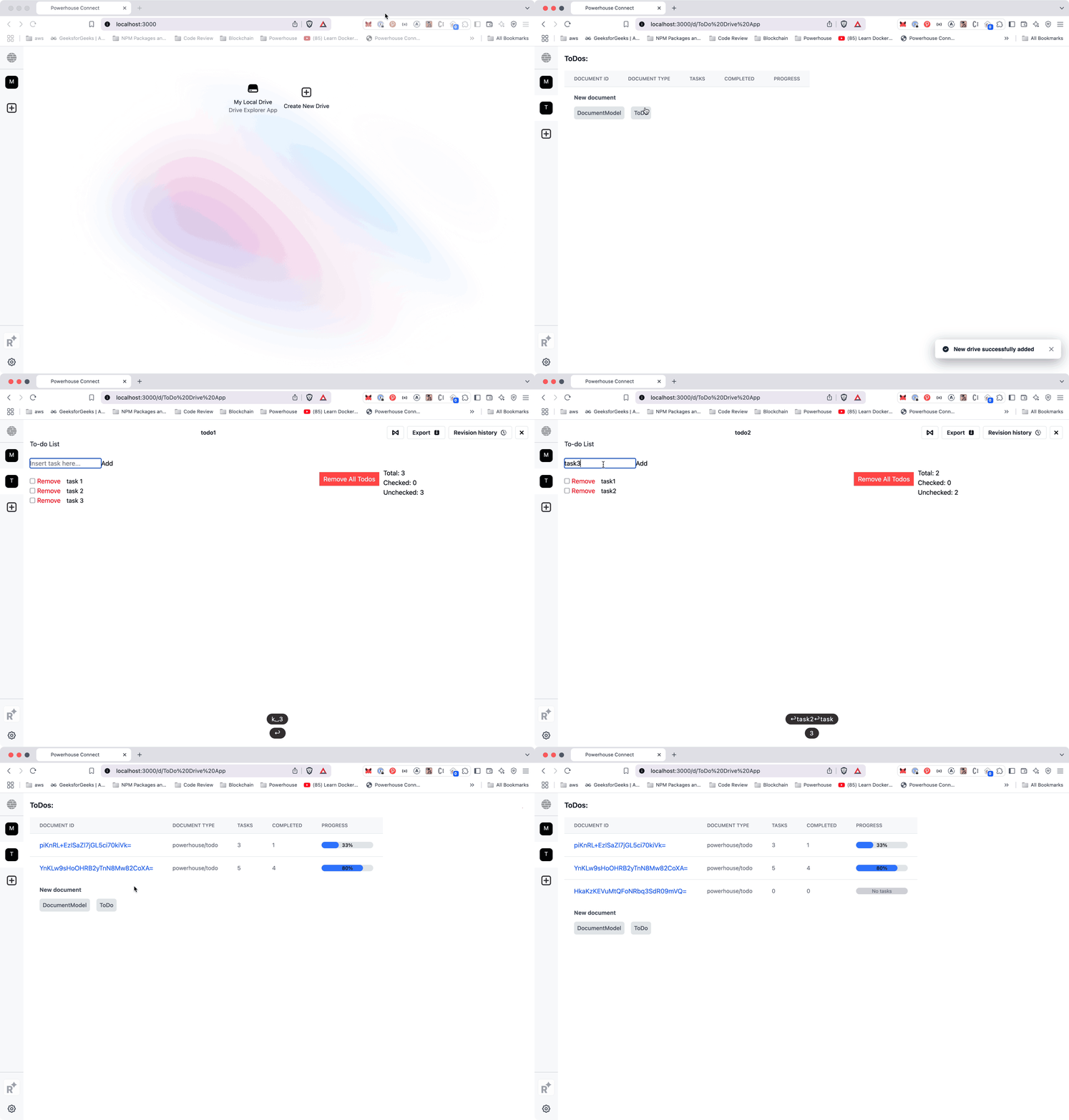
This example demonstrates how to create a To-do Drive Explorer application using the Powerhouse platform.
|
|
61
|
+
The application allows users to create and manage to-do lists with a visual progress indicator.
|
|
65
62
|
|
|
66
|
-
|
|
67
|
-
|
|
63
|
+
:::warning Heads-up!
|
|
64
|
+
If you've been following the Mastery Track, you can continue with the to-do list document model and Powerhouse project you've created. For more details, you can refer to the [Document Model Creation guide](/academy/MasteryTrack/DocumentModelCreation/SpecifyTheStateSchema).
|
|
68
65
|
|
|
69
|
-
|
|
66
|
+
If not, you can follow the shortened guide below to prepare your project for this tutorial.
|
|
70
67
|
|
|
71
|
-
|
|
72
|
-
|
|
73
|
-
:::
|
|
68
|
+
<details>
|
|
69
|
+
<summary>Prepare your Powerhouse Project to create a custom drive</summary>
|
|
74
70
|
|
|
75
|
-
|
|
76
|
-
|
|
77
|
-
- Generate the document model:
|
|
71
|
+
### 1. Create a To-do document model:
|
|
72
|
+
- Initialize a new project with `ph init` and give it a project name.
|
|
78
73
|
|
|
79
|
-
|
|
80
|
-
ph generate todo.phdm.zip
|
|
81
|
-
```
|
|
74
|
+
- Start by running Connect locally with `ph connect`
|
|
82
75
|
|
|
83
|
-
|
|
84
|
-
|
|
85
|
-
|
|
76
|
+
- Download the `todolist.phdm.zip` file from the [todo-demo-package GitHub repository](https://github.com/powerhouse-inc/todo-demo-package/blob/production/todolist.phdm.zip).
|
|
77
|
+
- Place the downloaded file in the root of your project directory.
|
|
78
|
+
- Generate the document model:
|
|
86
79
|
|
|
87
|
-
**3. Generate a document editor:**
|
|
88
80
|
```bash
|
|
89
|
-
ph generate
|
|
81
|
+
ph generate todolist.phdm.zip
|
|
90
82
|
```
|
|
91
83
|
|
|
92
|
-
|
|
93
|
-
|
|
94
|
-
|
|
84
|
+
### 2. Add the reducer code:
|
|
85
|
+
- Copy the code from [`base-operations.ts`](https://github.com/powerhouse-inc/todo-demo-package/blob/production/document-models/to-do-list/src/reducers/base-operations.ts)
|
|
86
|
+
- Paste it into `document-models/to-do/src/reducers/base-operations.ts`
|
|
95
87
|
|
|
96
|
-
|
|
97
|
-
|
|
98
|
-
|
|
99
|
-
|
|
88
|
+
### 3. Generate a document editor:
|
|
89
|
+
```bash
|
|
90
|
+
ph generate --editor ToDoList --document-types powerhouse/todolist
|
|
91
|
+
```
|
|
92
|
+
|
|
93
|
+
### 4. Add the editor code:
|
|
94
|
+
- Copy the code from [`editor.tsx`](https://github.com/powerhouse-inc/todo-demo-package/blob/production/editors/to-do-list/editor.tsx)
|
|
95
|
+
- Paste it into `editors/to-do-list/editor.tsx`
|
|
96
|
+
</details>
|
|
97
|
+
:::
|
|
98
|
+
|
|
99
|
+
## Generate the drive explorer app
|
|
100
|
+
|
|
101
|
+
### 1. Generate a drive explorer app:
|
|
102
|
+
```bash
|
|
103
|
+
ph generate --drive-editor todo-drive-explorer
|
|
104
|
+
```
|
|
100
105
|
|
|
101
|
-
|
|
106
|
+
### 2. Update the `powerhouse.manifest.json` file:
|
|
102
107
|
|
|
103
|
-
|
|
108
|
+
- The manifest file contains metadata for your package that is displayed when other users install it. Update the manifest to register your new Drive App:
|
|
104
109
|
|
|
105
|
-
|
|
106
|
-
|
|
107
|
-
|
|
108
|
-
|
|
109
|
-
|
|
110
|
-
|
|
110
|
+
```json
|
|
111
|
+
{
|
|
112
|
+
"name": "To-do List Package",
|
|
113
|
+
"description": "A simple todo list with a dedicated Drive Explorer App",
|
|
114
|
+
"category": "Productivity",
|
|
115
|
+
"publisher": {
|
|
111
116
|
"name": "Powerhouse",
|
|
112
117
|
"url": "https://www.powerhouse.inc/"
|
|
113
|
-
|
|
114
|
-
|
|
115
|
-
|
|
116
|
-
|
|
118
|
+
},
|
|
119
|
+
"documentModels": [
|
|
120
|
+
{
|
|
121
|
+
"id": "to-do-list",
|
|
122
|
+
"name": "To-do List"
|
|
123
|
+
}
|
|
124
|
+
],
|
|
125
|
+
"editors": [
|
|
126
|
+
{
|
|
127
|
+
"id": "to-do-list-editor",
|
|
128
|
+
"name": "To-do List Editor",
|
|
129
|
+
"documentTypes": ["todo-list"]
|
|
130
|
+
}
|
|
131
|
+
],
|
|
132
|
+
"apps": [
|
|
117
133
|
{
|
|
118
|
-
|
|
119
|
-
|
|
120
|
-
|
|
134
|
+
"id": "todo-drive-explorer",
|
|
135
|
+
"name": "To-do Drive App",
|
|
136
|
+
"driveEditor": "todo-drive-explorer"
|
|
121
137
|
}
|
|
122
|
-
|
|
123
|
-
|
|
124
|
-
|
|
125
|
-
|
|
126
|
-
```
|
|
138
|
+
],
|
|
139
|
+
"subgraphs": [],
|
|
140
|
+
"importScripts": []
|
|
141
|
+
}
|
|
127
142
|
|
|
128
|
-
|
|
143
|
+
```
|
|
129
144
|
|
|
130
|
-
|
|
145
|
+
### 3. Remove Unnecessary Default Components:
|
|
131
146
|
|
|
132
|
-
-
|
|
147
|
+
- First, let's remove some default template files that we won't need for this specific demo. If you want to see what the default template looks like before removing files, you can run `ph connect` at any time.
|
|
133
148
|
|
|
134
149
|
```bash
|
|
135
150
|
rm -rf editors/todo-drive-explorer/hooks
|
|
@@ -138,37 +153,415 @@ rm -rf editors/todo-drive-explorer/components/FolderItemsGrid.tsx
|
|
|
138
153
|
rm -rf editors/todo-drive-explorer/components/FolderTree.tsx
|
|
139
154
|
```
|
|
140
155
|
|
|
141
|
-
|
|
142
|
-
|
|
143
|
-
-
|
|
144
|
-
|
|
145
|
-
|
|
146
|
-
|
|
147
|
-
|
|
148
|
-
This type
|
|
149
|
-
|
|
150
|
-
|
|
151
|
-
|
|
156
|
+
### 4. Create custom components for your drive explorer:
|
|
157
|
+
|
|
158
|
+
- Next, create the following files. These will define the data types for our to-do items and provide the custom React components for our Drive Explorer.
|
|
159
|
+
|
|
160
|
+
<details>
|
|
161
|
+
<summary>Create `editors/todo-drive-explorer/types/todo.ts`</summary>
|
|
162
|
+
|
|
163
|
+
This file defines the TypeScript type `ToDoState`. It specifies the shape of to-do document data within the Drive Explorer, combining the document's revision information with its global state. This ensures that our components work with a predictable and strongly-typed data structure.
|
|
164
|
+
|
|
165
|
+
```typescript
|
|
166
|
+
import { type ToDoListDocument} from "../../../document-models/to-do-list/index.js"
|
|
167
|
+
|
|
168
|
+
export type ToDoState = {
|
|
169
|
+
documentType: string;
|
|
170
|
+
revision: {
|
|
171
|
+
global: number;
|
|
172
|
+
local: number;
|
|
173
|
+
};
|
|
174
|
+
global: ToDoListDocument["state"]["global"];
|
|
175
|
+
};
|
|
176
|
+
```
|
|
177
|
+
</details>
|
|
178
|
+
|
|
179
|
+
<details>
|
|
180
|
+
<summary>Create `editors/todo-drive-explorer/components/ProgressBar.tsx`</summary>
|
|
181
|
+
|
|
182
|
+
This is a simple React component that renders a visual progress bar. It takes a `value` and `max` number to calculate the percentage of completed tasks. It also displays the percentage and has a special state for when there are no tasks.
|
|
183
|
+
|
|
184
|
+
```tsx
|
|
185
|
+
import type { FC } from 'react';
|
|
186
|
+
|
|
187
|
+
interface ProgressBarProps {
|
|
188
|
+
value: number;
|
|
189
|
+
max: number;
|
|
190
|
+
}
|
|
191
|
+
|
|
192
|
+
export const ProgressBar: FC<ProgressBarProps> = ({ value, max }) => {
|
|
193
|
+
if (max === 0) {
|
|
194
|
+
return (
|
|
195
|
+
<div className="w-full bg-gray-200 rounded-full h-4">
|
|
196
|
+
<div className="bg-gray-300 h-4 rounded-full text-xs text-center text-gray-500">
|
|
197
|
+
No tasks
|
|
198
|
+
</div>
|
|
199
|
+
</div>
|
|
200
|
+
);
|
|
201
|
+
}
|
|
202
|
+
|
|
203
|
+
const percentage = Math.min(100, (value / max) * 100);
|
|
204
|
+
|
|
205
|
+
return (
|
|
206
|
+
<div className="w-full bg-gray-200 rounded-full h-4 relative">
|
|
207
|
+
<div
|
|
208
|
+
className="bg-blue-500 h-4 rounded-full transition-all duration-300"
|
|
209
|
+
style={{ width: `${percentage}%` }}
|
|
210
|
+
/>
|
|
211
|
+
<div className="absolute inset-0 flex items-center justify-center text-xs font-medium text-black">
|
|
212
|
+
{Math.round(percentage)}%
|
|
213
|
+
</div>
|
|
214
|
+
</div>
|
|
215
|
+
);
|
|
216
|
+
};
|
|
217
|
+
```
|
|
218
|
+
</details>
|
|
219
|
+
|
|
220
|
+
<details>
|
|
221
|
+
<summary>Update `editors/todo-drive-explorer/components/DriveExplorer.tsx`</summary>
|
|
222
|
+
|
|
223
|
+
This is the main component of our Drive Explorer. It fetches all `powerhouse/todo` documents from the drive, displays them in a table with their progress, and allows a user to click on a document to open it in the `EditorContainer`. It also includes a button to create new documents.
|
|
224
|
+
|
|
225
|
+
```typescript
|
|
226
|
+
import { useCallback, useState, useRef, useEffect, useMemo } from "react";
|
|
227
|
+
import type { FileNode, GetDocumentOptions, Node } from "document-drive";
|
|
228
|
+
import { EditorContainer, EditorContainerProps } from "./EditorContainer.js";
|
|
229
|
+
import type { DocumentModelModule } from "document-model";
|
|
230
|
+
import { CreateDocumentModal } from "@powerhousedao/design-system";
|
|
231
|
+
import { CreateDocument } from "./CreateDocument.js";
|
|
232
|
+
import { type DriveEditorContext, useDriveContext } from "@powerhousedao/reactor-browser";
|
|
233
|
+
import { ProgressBar } from "./ProgressBar.js";
|
|
234
|
+
|
|
235
|
+
import { type ToDoState } from "../types/todo.js"
|
|
236
|
+
|
|
237
|
+
interface DriveExplorerProps {
|
|
238
|
+
driveId: string;
|
|
239
|
+
nodes: Node[];
|
|
240
|
+
onAddFolder: (name: string, parentFolder?: string) => void;
|
|
241
|
+
onDeleteNode: (nodeId: string) => void;
|
|
242
|
+
renameNode: (nodeId: string, name: string) => void;
|
|
243
|
+
onCopyNode: (nodeId: string, targetName: string, parentId?: string) => void;
|
|
244
|
+
context: DriveEditorContext;
|
|
245
|
+
}
|
|
152
246
|
|
|
153
|
-
|
|
154
|
-
|
|
247
|
+
export function DriveExplorer({
|
|
248
|
+
driveId,
|
|
249
|
+
nodes,
|
|
250
|
+
context,
|
|
251
|
+
}: DriveExplorerProps) {
|
|
252
|
+
const { getDocumentRevision } = context;
|
|
253
|
+
|
|
254
|
+
const [activeDocumentId, setActiveDocumentId] = useState<
|
|
255
|
+
string | undefined
|
|
256
|
+
>();
|
|
257
|
+
const [openModal, setOpenModal] = useState(false);
|
|
258
|
+
const selectedDocumentModel = useRef<DocumentModelModule | null>(null);
|
|
259
|
+
const { addDocument, documentModels, useDriveDocumentStates } = useDriveContext();
|
|
260
|
+
|
|
261
|
+
const [state, fetchDocuments] = useDriveDocumentStates({ driveId });
|
|
262
|
+
|
|
263
|
+
useEffect(() => {
|
|
264
|
+
fetchDocuments(driveId).catch(console.error);
|
|
265
|
+
}, [activeDocumentId]);
|
|
266
|
+
|
|
267
|
+
const { todoNodes } = useMemo(() => {
|
|
268
|
+
return Object.keys(state).reduce(
|
|
269
|
+
(acc, curr) => {
|
|
270
|
+
const document = state[curr];
|
|
271
|
+
if (document.documentType.startsWith("powerhouse/todo")) {
|
|
272
|
+
acc.todoNodes[curr] = document as ToDoState;
|
|
273
|
+
}
|
|
274
|
+
|
|
275
|
+
return acc;
|
|
276
|
+
},
|
|
277
|
+
{
|
|
278
|
+
todoNodes: {} as Record<string, ToDoState>,
|
|
279
|
+
},
|
|
280
|
+
);
|
|
281
|
+
}, [state]);
|
|
282
|
+
|
|
283
|
+
|
|
284
|
+
const handleEditorClose = useCallback(() => {
|
|
285
|
+
setActiveDocumentId(undefined);
|
|
286
|
+
}, []);
|
|
287
|
+
|
|
288
|
+
const onCreateDocument = useCallback(
|
|
289
|
+
async (fileName: string) => {
|
|
290
|
+
setOpenModal(false);
|
|
291
|
+
|
|
292
|
+
const documentModel = selectedDocumentModel.current;
|
|
293
|
+
if (!documentModel) return;
|
|
294
|
+
|
|
295
|
+
const node = await addDocument(
|
|
296
|
+
driveId,
|
|
297
|
+
fileName,
|
|
298
|
+
documentModel.documentModel.id,
|
|
299
|
+
);
|
|
300
|
+
|
|
301
|
+
selectedDocumentModel.current = null;
|
|
302
|
+
setActiveDocumentId(node.id);
|
|
303
|
+
},
|
|
304
|
+
[addDocument, driveId],
|
|
305
|
+
);
|
|
306
|
+
|
|
307
|
+
const onSelectDocumentModel = useCallback(
|
|
308
|
+
(documentModel: DocumentModelModule) => {
|
|
309
|
+
selectedDocumentModel.current = documentModel;
|
|
310
|
+
setOpenModal(true);
|
|
311
|
+
},
|
|
312
|
+
[],
|
|
313
|
+
);
|
|
314
|
+
|
|
315
|
+
const onGetDocumentRevision = useCallback(
|
|
316
|
+
(options?: GetDocumentOptions) => {
|
|
317
|
+
if (!activeDocumentId) return;
|
|
318
|
+
return getDocumentRevision?.(activeDocumentId, options);
|
|
319
|
+
},
|
|
320
|
+
[getDocumentRevision, activeDocumentId],
|
|
321
|
+
);
|
|
322
|
+
|
|
323
|
+
const filteredDocumentModels = documentModels;
|
|
324
|
+
|
|
325
|
+
|
|
326
|
+
const fileNodes = nodes.filter((node) => node.kind === "file") as FileNode[];
|
|
327
|
+
// Get the active document info from nodes
|
|
328
|
+
const activeDocument = activeDocumentId
|
|
329
|
+
? fileNodes.find((file) => file.id === activeDocumentId)
|
|
330
|
+
: undefined;
|
|
331
|
+
|
|
332
|
+
const documentModelModule = activeDocument
|
|
333
|
+
? context.getDocumentModelModule(activeDocument.documentType)
|
|
334
|
+
: null;
|
|
335
|
+
|
|
336
|
+
const editorModule = activeDocument
|
|
337
|
+
? context.getEditor(activeDocument.documentType)
|
|
338
|
+
: null;
|
|
339
|
+
|
|
340
|
+
|
|
341
|
+
return (
|
|
342
|
+
<div className="flex h-full">
|
|
343
|
+
{/* Main Content */}
|
|
344
|
+
<div className="flex-1 p-4 overflow-y-auto">
|
|
345
|
+
{activeDocument && documentModelModule && editorModule ? (
|
|
346
|
+
<EditorContainer
|
|
347
|
+
context={{
|
|
348
|
+
...context,
|
|
349
|
+
getDocumentRevision: onGetDocumentRevision,
|
|
350
|
+
}}
|
|
351
|
+
documentId={activeDocumentId!}
|
|
352
|
+
documentType={activeDocument.documentType}
|
|
353
|
+
driveId={driveId}
|
|
354
|
+
onClose={handleEditorClose}
|
|
355
|
+
title={activeDocument.name}
|
|
356
|
+
documentModelModule={documentModelModule}
|
|
357
|
+
editorModule={editorModule}
|
|
358
|
+
/>
|
|
359
|
+
) : (
|
|
360
|
+
<>
|
|
361
|
+
<h2 className="text-lg font-semibold mb-4">ToDos:</h2>
|
|
362
|
+
<div className="overflow-x-auto">
|
|
363
|
+
<table className="min-w-full divide-y divide-gray-200">
|
|
364
|
+
<thead className="bg-gray-50">
|
|
365
|
+
<tr>
|
|
366
|
+
<th className="px-6 py-3 text-left text-xs font-medium text-gray-500 uppercase tracking-wider">Document ID</th>
|
|
367
|
+
<th className="px-6 py-3 text-left text-xs font-medium text-gray-500 uppercase tracking-wider">Document Type</th>
|
|
368
|
+
<th className="px-6 py-3 text-left text-xs font-medium text-gray-500 uppercase tracking-wider">Tasks</th>
|
|
369
|
+
<th className="px-6 py-3 text-left text-xs font-medium text-gray-500 uppercase tracking-wider">Completed</th>
|
|
370
|
+
<th className="px-6 py-3 text-left text-xs font-medium text-gray-500 uppercase tracking-wider">Progress</th>
|
|
371
|
+
</tr>
|
|
372
|
+
</thead>
|
|
373
|
+
<tbody className="bg-white divide-y divide-gray-200">
|
|
374
|
+
{Object.entries(todoNodes).map(([documentId, todoNode]) => (
|
|
375
|
+
<tr key={documentId} className="hover:bg-gray-50">
|
|
376
|
+
<td className="px-6 py-4 whitespace-nowrap">
|
|
377
|
+
<div
|
|
378
|
+
onClick={() => setActiveDocumentId(documentId)}
|
|
379
|
+
className="text-blue-600 hover:text-blue-800 cursor-pointer"
|
|
380
|
+
>
|
|
381
|
+
{documentId}
|
|
382
|
+
</div>
|
|
383
|
+
</td>
|
|
384
|
+
<td className="px-6 py-4 whitespace-nowrap text-sm text-gray-500">
|
|
385
|
+
{todoNode.documentType}
|
|
386
|
+
</td>
|
|
387
|
+
<td className="px-6 py-4 whitespace-nowrap text-sm text-gray-500">
|
|
388
|
+
{todoNode.global.stats.total}
|
|
389
|
+
</td>
|
|
390
|
+
<td className="px-6 py-4 whitespace-nowrap text-sm text-gray-500">
|
|
391
|
+
{todoNode.global.stats.checked}
|
|
392
|
+
</td>
|
|
393
|
+
<td className="px-6 py-4 whitespace-nowrap">
|
|
394
|
+
<div className="w-32">
|
|
395
|
+
<ProgressBar
|
|
396
|
+
value={todoNode.global.stats.checked}
|
|
397
|
+
max={todoNode.global.stats.total}
|
|
398
|
+
/>
|
|
399
|
+
</div>
|
|
400
|
+
</td>
|
|
401
|
+
</tr>
|
|
402
|
+
))}
|
|
403
|
+
</tbody>
|
|
404
|
+
</table>
|
|
405
|
+
</div>
|
|
406
|
+
|
|
407
|
+
{/* Create Document Section */}
|
|
408
|
+
<CreateDocument
|
|
409
|
+
createDocument={onSelectDocumentModel}
|
|
410
|
+
documentModels={filteredDocumentModels}
|
|
411
|
+
/>
|
|
412
|
+
</>
|
|
413
|
+
)}
|
|
414
|
+
</div>
|
|
415
|
+
|
|
416
|
+
{/* Create Document Modal */}
|
|
417
|
+
<CreateDocumentModal
|
|
418
|
+
onContinue={onCreateDocument}
|
|
419
|
+
onOpenChange={(open) => setOpenModal(open)}
|
|
420
|
+
open={openModal}
|
|
421
|
+
/>
|
|
422
|
+
</div>
|
|
423
|
+
);
|
|
424
|
+
}
|
|
425
|
+
```
|
|
426
|
+
</details>
|
|
427
|
+
|
|
428
|
+
|
|
429
|
+
<details>
|
|
430
|
+
<summary>Update `editors/todo-drive-explorer/components/EditorContainer.tsx`</summary>
|
|
431
|
+
|
|
432
|
+
This component acts as a wrapper for the document editor. When a user selects a document in `DriveExplorer.tsx`, this component mounts the appropriate editor (`to-do-list` editor in this case) and provides it with the necessary context and properties to function. It also renders the `DocumentToolbar` which provides actions like closing, exporting, and viewing revision history.
|
|
433
|
+
|
|
434
|
+
```typescript
|
|
435
|
+
import {
|
|
436
|
+
useDriveContext,
|
|
437
|
+
exportDocument,
|
|
438
|
+
type User,
|
|
439
|
+
type DriveEditorContext,
|
|
440
|
+
} from "@powerhousedao/reactor-browser";
|
|
441
|
+
import {
|
|
442
|
+
documentModelDocumentModelModule,
|
|
443
|
+
type DocumentModelModule,
|
|
444
|
+
type EditorContext,
|
|
445
|
+
type EditorProps,
|
|
446
|
+
type PHDocument,
|
|
447
|
+
type EditorModule,
|
|
448
|
+
type Operation,
|
|
449
|
+
} from "document-model";
|
|
450
|
+
import { useTimelineItems, getRevisionFromDate } from "@powerhousedao/common";
|
|
451
|
+
import {
|
|
452
|
+
DocumentToolbar,
|
|
453
|
+
RevisionHistory,
|
|
454
|
+
DefaultEditorLoader,
|
|
455
|
+
generateLargeTimeline,
|
|
456
|
+
type TimelineItem,
|
|
457
|
+
} from "@powerhousedao/design-system";
|
|
458
|
+
import { useState, Suspense, type FC, useCallback } from "react";
|
|
459
|
+
|
|
460
|
+
export interface EditorContainerProps {
|
|
461
|
+
driveId: string;
|
|
462
|
+
documentId: string;
|
|
463
|
+
documentType: string;
|
|
464
|
+
onClose: () => void;
|
|
465
|
+
title: string;
|
|
466
|
+
context: Omit<DriveEditorContext, "getDocumentRevision"> &
|
|
467
|
+
Pick<EditorContext, "getDocumentRevision">;
|
|
468
|
+
documentModelModule: DocumentModelModule<PHDocument>;
|
|
469
|
+
editorModule: EditorModule;
|
|
470
|
+
}
|
|
155
471
|
|
|
156
|
-
|
|
157
|
-
|
|
472
|
+
export const EditorContainer: React.FC<EditorContainerProps> = (props) => {
|
|
473
|
+
const { driveId, documentId, documentType, onClose, title, context, documentModelModule, editorModule } = props;
|
|
474
|
+
|
|
475
|
+
const [selectedTimelineItem, setSelectedTimelineItem] = useState<TimelineItem | null>(null);
|
|
476
|
+
const [showRevisionHistory, setShowRevisionHistory] = useState(false);
|
|
477
|
+
const { useDocumentEditorProps } = useDriveContext();
|
|
478
|
+
const user = context.user as User | undefined;
|
|
479
|
+
const timelineItems = useTimelineItems(documentId);
|
|
480
|
+
|
|
481
|
+
const { dispatch, error, document } = useDocumentEditorProps({
|
|
482
|
+
documentId,
|
|
483
|
+
documentType,
|
|
484
|
+
driveId,
|
|
485
|
+
documentModelModule,
|
|
486
|
+
user,
|
|
487
|
+
});
|
|
488
|
+
|
|
489
|
+
const onExport = useCallback(async () => {
|
|
490
|
+
if (document) {
|
|
491
|
+
const ext = documentModelModule.documentModel.extension;
|
|
492
|
+
await exportDocument(document, title, ext);
|
|
493
|
+
}
|
|
494
|
+
}, [document?.revision.global, document?.revision.local]);
|
|
495
|
+
|
|
496
|
+
const loadingContent = (
|
|
497
|
+
<div className="flex-1 flex justify-center items-center h-full">
|
|
498
|
+
<DefaultEditorLoader />
|
|
499
|
+
</div>
|
|
500
|
+
);
|
|
501
|
+
|
|
502
|
+
if (!document) return loadingContent;
|
|
503
|
+
|
|
504
|
+
const moduleWithComponent = editorModule as EditorModule<PHDocument>;
|
|
505
|
+
const EditorComponent = moduleWithComponent.Component;
|
|
506
|
+
|
|
507
|
+
return showRevisionHistory ? (
|
|
508
|
+
<RevisionHistory
|
|
509
|
+
documentId={documentId}
|
|
510
|
+
documentTitle={title}
|
|
511
|
+
globalOperations={document.operations.global}
|
|
512
|
+
key={documentId}
|
|
513
|
+
localOperations={document.operations.local}
|
|
514
|
+
onClose={() => setShowRevisionHistory(false)}
|
|
515
|
+
/>
|
|
516
|
+
) : (
|
|
517
|
+
<Suspense fallback={loadingContent}>
|
|
518
|
+
<DocumentToolbar
|
|
519
|
+
onClose={onClose}
|
|
520
|
+
onExport={onExport}
|
|
521
|
+
onShowRevisionHistory={() => setShowRevisionHistory(true)}
|
|
522
|
+
onSwitchboardLinkClick={() => {}}
|
|
523
|
+
title={title}
|
|
524
|
+
timelineButtonVisible
|
|
525
|
+
timelineItems={timelineItems.data}
|
|
526
|
+
onTimelineItemClick={setSelectedTimelineItem}
|
|
527
|
+
/>
|
|
528
|
+
<EditorComponent
|
|
529
|
+
context={{
|
|
530
|
+
...context,
|
|
531
|
+
readMode: !!selectedTimelineItem,
|
|
532
|
+
selectedTimelineRevision: getRevisionFromDate(
|
|
533
|
+
selectedTimelineItem?.startDate,
|
|
534
|
+
selectedTimelineItem?.endDate,
|
|
535
|
+
document.operations.global,
|
|
536
|
+
),
|
|
537
|
+
}}
|
|
538
|
+
dispatch={dispatch}
|
|
539
|
+
document={document}
|
|
540
|
+
error={error}
|
|
541
|
+
/>
|
|
542
|
+
</Suspense>
|
|
543
|
+
);
|
|
544
|
+
};
|
|
545
|
+
```
|
|
546
|
+
</details>
|
|
158
547
|
|
|
159
|
-
|
|
548
|
+
- In case you are getting stuck and want to verify your progress with the reference repository you can find the example repository of the [Todo-demo-package here](/academy/MasteryTrack/DocumentModelCreation/ExampleToDoListRepository)
|
|
549
|
+
### 3. Run the application:
|
|
550
|
+
- With the code for our Drive App in place, it's time to see it in action. Run Connect in Studio mode:
|
|
160
551
|
```bash
|
|
161
552
|
ph connect
|
|
162
553
|
```
|
|
163
554
|
|
|
164
555
|
|
|
165
556
|
|
|
166
|
-
###
|
|
167
|
-
|
|
557
|
+
### Now it's your turn!
|
|
558
|
+
Start building your own drive apps, explorers or experiences.
|
|
559
|
+
Congratulations on completing this tutorial!
|
|
560
|
+
You've successfully built a custom Drive Explorer, enhancing the way users interact with document models.
|
|
168
561
|
|
|
169
562
|
Now, take a moment to think about the possibilities!
|
|
170
|
-
- What **unique Drive Experiences** could you create for your own projects?
|
|
171
|
-
- How can you tailor interfaces and streamline workflows to unlock the full potential of your document models?
|
|
563
|
+
- What **unique Drive Experiences** could you create for your own projects?
|
|
564
|
+
- How can you tailor interfaces and streamline workflows to unlock the full potential of your document models?
|
|
172
565
|
|
|
173
566
|
The Powerhouse platform provides the tools. It's time to start building!
|
|
174
567
|
|