@powerhousedao/academy 3.2.0-dev.2 → 3.2.0-dev.3
This diff represents the content of publicly available package versions that have been released to one of the supported registries. The information contained in this diff is provided for informational purposes only and reflects changes between package versions as they appear in their respective public registries.
- package/CHANGELOG.md +10 -0
- package/docs/academy/01-GetStarted/00-ExploreDemoPackage.mdx +188 -0
- package/docs/academy/01-GetStarted/01-CreateNewPowerhouseProject.md +10 -12
- package/docs/academy/01-GetStarted/02-DefineToDoListDocumentModel.md +8 -8
- package/docs/academy/01-GetStarted/03-ImplementOperationReducers.md +11 -11
- package/docs/academy/01-GetStarted/04-BuildToDoListEditor.md +13 -13
- package/docs/academy/01-GetStarted/_04-BuildToDoListEditor +12 -12
- package/docs/academy/01-GetStarted/home.mdx +50 -51
- package/docs/academy/01-GetStarted/images/Connect.png +0 -0
- package/docs/academy/01-GetStarted/images/Packagemanager.png +0 -0
- package/docs/academy/01-GetStarted/images/TodoDriveApp.png +0 -0
- package/docs/academy/01-GetStarted/styles.module.css +7 -14
- package/docs/academy/02-MasteryTrack/01-BuilderEnvironment/02-StandardDocumentModelWorkflow.md +22 -22
- package/docs/academy/02-MasteryTrack/01-BuilderEnvironment/03-BuilderTools.md +17 -17
- package/docs/academy/02-MasteryTrack/01-BuilderEnvironment/_category_.json +1 -1
- package/docs/academy/02-MasteryTrack/02-DocumentModelCreation/01-WhatIsADocumentModel.md +15 -15
- package/docs/academy/02-MasteryTrack/02-DocumentModelCreation/02-SpecifyTheStateSchema.md +11 -9
- package/docs/academy/02-MasteryTrack/02-DocumentModelCreation/03-SpecifyDocumentOperations.md +15 -15
- package/docs/academy/02-MasteryTrack/02-DocumentModelCreation/04-UseTheDocumentModelGenerator.md +9 -9
- package/docs/academy/02-MasteryTrack/02-DocumentModelCreation/05-ImplementDocumentReducers.md +15 -15
- package/docs/academy/02-MasteryTrack/02-DocumentModelCreation/06-ImplementDocumentModelTests.md +14 -14
- package/docs/academy/02-MasteryTrack/02-DocumentModelCreation/07-ExampleToDoListRepository.md +4 -4
- package/docs/academy/02-MasteryTrack/03-BuildingUserExperiences/01-BuildingDocumentEditors.md +28 -30
- package/docs/academy/02-MasteryTrack/03-BuildingUserExperiences/02-ConfiguringDrives.md +7 -7
- package/docs/academy/02-MasteryTrack/03-BuildingUserExperiences/03-BuildingADriveExplorer.md +9 -10
- package/docs/academy/02-MasteryTrack/03-BuildingUserExperiences/07-DocumentTools/01-OperationHistory.md +11 -11
- package/docs/academy/02-MasteryTrack/03-BuildingUserExperiences/07-DocumentTools/02-RevisionHistoryTimeline.md +6 -6
- package/docs/academy/02-MasteryTrack/03-BuildingUserExperiences/08-Authorization/01-RenownAuthenticationFlow.md +8 -8
- package/docs/academy/02-MasteryTrack/03-BuildingUserExperiences/08-Authorization/02-Authorization.md +8 -8
- package/docs/academy/02-MasteryTrack/04-WorkWithData/01-ReadingAndWritingThroughTheAPI.mdx +5 -5
- package/docs/academy/02-MasteryTrack/04-WorkWithData/02-GraphQLAtPowerhouse.md +3 -3
- package/docs/academy/02-MasteryTrack/04-WorkWithData/03-WorkingWithSubgraphs/02-GraphQLAndSubgraphs.mdx +8 -8
- package/docs/academy/02-MasteryTrack/04-WorkWithData/03-WorkingWithSubgraphs/03-WorkingWithSubgraphs.md +28 -28
- package/docs/academy/02-MasteryTrack/04-WorkWithData/04-analytics-processor.md +4 -4
- package/docs/academy/02-MasteryTrack/04-WorkWithData/05-AnalyticsProcessorTutorial/01-SetupBuilderEnvironment.md +14 -14
- package/docs/academy/02-MasteryTrack/04-WorkWithData/05-AnalyticsProcessorTutorial/02-CreateNewPowerhouseProject.md +2 -2
- package/docs/academy/02-MasteryTrack/04-WorkWithData/05-AnalyticsProcessorTutorial/03-GenerateAnAnalyticsProcessor.md +6 -6
- package/docs/academy/02-MasteryTrack/04-WorkWithData/05-AnalyticsProcessorTutorial/04-UpdateAnalyticsProcessor.md +1 -1
- package/docs/academy/02-MasteryTrack/04-WorkWithData/06-Analytics Engine/GraphQL References/QueryingADocumentWithGraphQL.md +2 -2
- package/docs/academy/02-MasteryTrack/04-WorkWithData/06-Analytics Engine/best-practices.md +4 -4
- package/docs/academy/02-MasteryTrack/04-WorkWithData/06-Analytics Engine/graphql/index.md +7 -7
- package/docs/academy/02-MasteryTrack/04-WorkWithData/06-Analytics Engine/graphql/integration.md +1 -1
- package/docs/academy/02-MasteryTrack/04-WorkWithData/06-Analytics Engine/intro.md +6 -6
- package/docs/academy/02-MasteryTrack/04-WorkWithData/06-Analytics Engine/typescript/browser.md +1 -1
- package/docs/academy/02-MasteryTrack/04-WorkWithData/06-Analytics Engine/typescript/index.md +5 -5
- package/docs/academy/02-MasteryTrack/04-WorkWithData/06-Analytics Engine/typescript/memory.md +1 -1
- package/docs/academy/02-MasteryTrack/04-WorkWithData/06-Analytics Engine/typescript/pg.md +2 -2
- package/docs/academy/02-MasteryTrack/04-WorkWithData/06-Analytics Engine/typescript/schema.md +1 -1
- package/docs/academy/02-MasteryTrack/04-WorkWithData/06-Analytics Engine/typescript/utilities.md +1 -1
- package/docs/academy/02-MasteryTrack/04-WorkWithData/06-Analytics Engine/use-cases/index.md +1 -1
- package/docs/academy/02-MasteryTrack/04-WorkWithData/06-Analytics Engine/use-cases/maker.md +12 -12
- package/docs/academy/02-MasteryTrack/05-Launch/01-IntroductionToPackages.md +9 -9
- package/docs/academy/02-MasteryTrack/05-Launch/02-PublishYourProject.md +8 -8
- package/docs/academy/02-MasteryTrack/05-Launch/03-SetupEnvironment.md +35 -35
- package/docs/academy/02-MasteryTrack/05-Launch/04-ConfigureEnvironment.md +8 -8
- package/docs/academy/02-MasteryTrack/_category_.json +1 -1
- package/docs/academy/03-ExampleUsecases/Chatroom/03-DefineChatroomDocumentModel.md +5 -5
- package/docs/academy/07-Cookbook.md +105 -105
- package/package.json +1 -1
- package/sidebars.ts +9 -10
- package/src/css/custom.css +18 -0
- package/docs/academy/01-GetStarted/00-ExploreDemoPackage.md +0 -88
|
@@ -1,4 +1,4 @@
|
|
|
1
|
-
# Configure a
|
|
1
|
+
# Configure a drive
|
|
2
2
|
|
|
3
3
|
A drive in Powerhouse is a container or a wrapper for documents and data. It's a place where you can organize and store your documents and share them with others. This guide will walk you through the process of configuring and managing drives in your Powerhouse environment.
|
|
4
4
|
|
|
@@ -10,13 +10,13 @@ Before configuring a drive, ensure you have:
|
|
|
10
10
|
- Appropriate permissions to create and manage drives
|
|
11
11
|
:::
|
|
12
12
|
|
|
13
|
-
## Understanding
|
|
13
|
+
## Understanding drives
|
|
14
14
|
|
|
15
|
-
### Local
|
|
15
|
+
### Local drives
|
|
16
16
|
|
|
17
17
|
A local drive is a container for local documents and data, hosted on your local machine. Technically a drive is just another document model with a list of the documents inside the drive. When you run connect locally with `ph connect` a local drive is automatically added. You can also create a new local drive by clicking **'add drive'** in connect.
|
|
18
18
|
|
|
19
|
-
### Remote
|
|
19
|
+
### Remote drives vs. reactors
|
|
20
20
|
|
|
21
21
|
Remote drives in Powerhouse allow you to connect to and work with data stored in external systems or cloud services. These drives act as bridges between Powerhouse contributors and/or other data sources, enabling seamless data synchronization. Drives can exist in 3 category locations.
|
|
22
22
|
|
|
@@ -33,7 +33,7 @@ A reactor allows you to store multiple documents, but also host **drives** & Dri
|
|
|
33
33
|
|
|
34
34
|
A drive exists by making use of a reactor and the storagelayer that specific reactor is based on. A reactor is the lower level component that makes synchronisation of documents & drives possible.
|
|
35
35
|
|
|
36
|
-
### Drive
|
|
36
|
+
### Drive apps
|
|
37
37
|
|
|
38
38
|
**Drive Explorers** (also known as Drive Apps) are specialized interfaces that enhance how users interact with document models within a drive. As mentioned previously, technically a drive is just another document, with a list of the documents inside the drive. So it is obvious that you can create a custom editor for your drive-document.
|
|
39
39
|
|
|
@@ -42,7 +42,7 @@ These customized editors are called Drive explorers or Drive Apps. They provide
|
|
|
42
42
|
To learn more about building and customizing Drive Explorers, check out our [Building a Drive Explorer](/academy/MasteryTrack/BuildingUserExperiences/BuildingADriveExplorer) guide.
|
|
43
43
|
|
|
44
44
|
|
|
45
|
-
## Creating a
|
|
45
|
+
## Creating a new drive
|
|
46
46
|
|
|
47
47
|

|
|
48
48
|
|
|
@@ -54,7 +54,7 @@ To create a new drive in Powerhouse, follow these steps:
|
|
|
54
54
|
5. (Optional) Enable the "Make available offline" toggle if you want to keep a local backup of your drive.
|
|
55
55
|
6. Once all options are set, click the "Create new drive" button to finalize and create your drive.
|
|
56
56
|
|
|
57
|
-
## Adding a
|
|
57
|
+
## Adding a new remote drive via graphql mutation
|
|
58
58
|
|
|
59
59
|
You can also add a new remote drive to your Connect environment programmatically using GraphQL mutations. This is especially useful for automation, scripting, or integrating with external systems.
|
|
60
60
|
|
package/docs/academy/02-MasteryTrack/03-BuildingUserExperiences/03-BuildingADriveExplorer.md
CHANGED
|
@@ -1,4 +1,4 @@
|
|
|
1
|
-
# Build a
|
|
1
|
+
# Build a drive explorer
|
|
2
2
|
|
|
3
3
|
**Drive Explorers or Drive Apps** enhance how contributors and organizations interact with document models.
|
|
4
4
|
An 'app-like' experience is created by providing a **custom interface** for working with or exploring the contents of a drive.
|
|
@@ -7,19 +7,19 @@ A 'Drive Explorer or Drive App' offers a tailored application designed around it
|
|
|
7
7
|
Think of a Drive Explorer as a specialized lens—it offers **different ways to visualize, organize, and interact with** the data stored within a drive, making it more intuitive and efficient for specific use cases.
|
|
8
8
|
:::
|
|
9
9
|
|
|
10
|
-
### **Designed for
|
|
10
|
+
### **Designed for specific use cases**
|
|
11
11
|
|
|
12
12
|
Most Drive Explorers are built by organizations for specific purposes, aligning closely with a document model package or even being part of one. By integrating Drive Apps with document models, organizations can customize user experiences, streamline workflows, and maximize efficiency for their contributors.
|
|
13
13
|
|
|
14
14
|
Drive Explorers or Drive Apps **bridge the gap between raw data and usability**, unlocking the full potential of document models within the Powerhouse framework.
|
|
15
15
|
|
|
16
|
-
### **Key
|
|
16
|
+
### **Key features of drive apps**
|
|
17
17
|
|
|
18
18
|
- **Custom Views & Organization** – Drive Apps can present data in formats like Kanban boards, list views, or other structured layouts to suit different workflows.
|
|
19
19
|
- **Aggregated Insights** – They can provide high-level summaries of important details across document models, enabling quick decision-making.
|
|
20
20
|
- **Enhanced Interactivity** – Drive Apps can include widgets, data processors, or read models to process and display document data dynamically.
|
|
21
21
|
|
|
22
|
-
### **Building a
|
|
22
|
+
### **Building a drive app**
|
|
23
23
|
|
|
24
24
|
#### The steps of our tutorial
|
|
25
25
|
|
|
@@ -31,7 +31,6 @@ Here is a **quick overview** of the 3 different steps towards building a Drive A
|
|
|
31
31
|
Use the `generate drive editor` command to create the basic template structure for your Drive App:
|
|
32
32
|
|
|
33
33
|
```bash
|
|
34
|
-
|
|
35
34
|
ph generate --drive-editor <Drive App>
|
|
36
35
|
```
|
|
37
36
|
|
|
@@ -40,7 +39,7 @@ ph generate --drive-editor <Drive App>
|
|
|
40
39
|
After creating your Drive App, update the `manifest.json` file with relevant information:
|
|
41
40
|
The manifest file identifies your project and its components within the Powerhouse ecosystem.
|
|
42
41
|
|
|
43
|
-
#### Step 3. Customize the
|
|
42
|
+
#### Step 3. Customize the drive app
|
|
44
43
|
|
|
45
44
|
Review the generated template and modify it to better suit your document model:
|
|
46
45
|
|
|
@@ -48,7 +47,7 @@ Review the generated template and modify it to better suit your document model:
|
|
|
48
47
|
2. Add custom views specific to your data model
|
|
49
48
|
3. Implement specialized interactions for your use case
|
|
50
49
|
|
|
51
|
-
### About the
|
|
50
|
+
### About the drive app template
|
|
52
51
|
|
|
53
52
|
The default template provides a solid foundation. It contains:
|
|
54
53
|
- A tree structure navigation panel
|
|
@@ -58,7 +57,7 @@ The default template provides a solid foundation. It contains:
|
|
|
58
57
|
But the real power comes from tailoring the interface to your specific document models.
|
|
59
58
|
Now let's implement a specific example for a more complex todo-list then the one we've been working on.
|
|
60
59
|
|
|
61
|
-
### Implementation
|
|
60
|
+
### Implementation example: Todo drive explorer
|
|
62
61
|
|
|
63
62
|
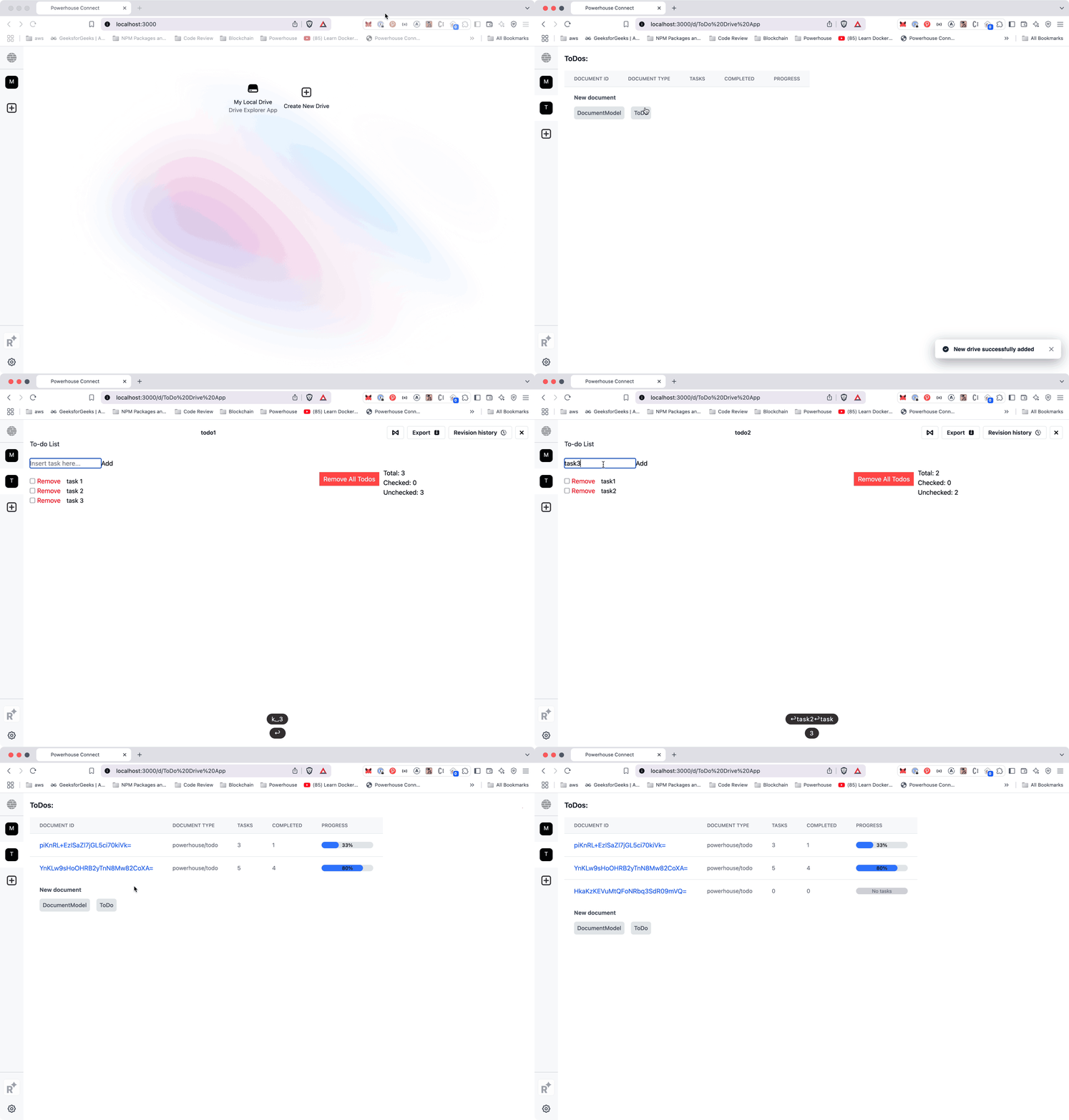
This example demonstrates how to create a Todo Drive Explorer application using the Powerhouse platform.
|
|
64
63
|
The application allows users to create and manage todo lists with a visual progress indicator.
|
|
@@ -125,7 +124,7 @@ Since you've likely already run through the [document modeling process](/academy
|
|
|
125
124
|
}
|
|
126
125
|
```
|
|
127
126
|
|
|
128
|
-
### Customize the
|
|
127
|
+
### Customize the drive explorer app
|
|
129
128
|
|
|
130
129
|
**1. Remove unnecessary default components:**
|
|
131
130
|
|
|
@@ -163,7 +162,7 @@ rm -rf editors/todo-drive-explorer/components/FolderTree.tsx
|
|
|
163
162
|
|
|
164
163
|
|
|
165
164
|
|
|
166
|
-
### **Start
|
|
165
|
+
### **Start building your own drive apps, explorers or experiences**
|
|
167
166
|
Congratulations on completing this tutorial! You've successfully built a custom Drive Explorer, enhancing the way users interact with document models.
|
|
168
167
|
|
|
169
168
|
Now, take a moment to think about the possibilities!
|
|
@@ -1,12 +1,12 @@
|
|
|
1
|
-
# Operations
|
|
1
|
+
# Operations history
|
|
2
2
|
|
|
3
|
-
## What
|
|
3
|
+
## What is a document model?
|
|
4
4
|
A **document model** in Powerhouse is the core unit for managing business data. Each document (such as an invoice, contributor agreement, or scope of work) is created from a specific document model, which defines:
|
|
5
5
|
|
|
6
6
|
- **State schema:** What data the document contains
|
|
7
7
|
- **Operations:** What actions can modify that document
|
|
8
8
|
|
|
9
|
-
## What
|
|
9
|
+
## What is operations history?
|
|
10
10
|
Every time a user edits a document, they do so by submitting a document operation (e.g., `ADD_LINE_ITEM`, `UPDATE_RECIPIENT`). These operations are:
|
|
11
11
|
|
|
12
12
|
- **Appended** to the document's history
|
|
@@ -15,14 +15,14 @@ Every time a user edits a document, they do so by submitting a document operatio
|
|
|
15
15
|
|
|
16
16
|
This design is based on **event sourcing** principles.
|
|
17
17
|
|
|
18
|
-
## Why
|
|
18
|
+
## Why use an operations history?
|
|
19
19
|
- **Auditability:** Inspect every change ever made to a document.
|
|
20
20
|
- **Transparency:** Contributors see what others have done.
|
|
21
21
|
- **Versioning:** Revert to any prior state or resolve conflicts using branching and merging.
|
|
22
22
|
- **Interoperability:** Operations are just data—they can be signed, stored on-chain, or synchronized across systems.
|
|
23
23
|
|
|
24
24
|
|
|
25
|
-
## Example: Invoice
|
|
25
|
+
## Example: Invoice document
|
|
26
26
|
Suppose you're editing a `powerhouse/invoice` document. Its operations history might look like this:
|
|
27
27
|
|
|
28
28
|
```plaintext
|
|
@@ -33,34 +33,34 @@ UPDATE_DUE_DATE(date: "2025-06-01")
|
|
|
33
33
|
|
|
34
34
|
The document's state at any time is the result of running those operations in order.
|
|
35
35
|
|
|
36
|
-
## Visualizing
|
|
36
|
+
## Visualizing operations history
|
|
37
37
|
|
|
38
|
-
### Revision
|
|
38
|
+
### Revision list and details
|
|
39
39
|
In Connect the Powerhouse UI displays a chronologic list of all applied modifications to the document, each with a unique event ID, state hash, and commit message. You can inspect each revision for signatures and errors.
|
|
40
40
|
|
|
41
41
|

|
|
42
42
|
|
|
43
43
|
|
|
44
|
-
### Viewing
|
|
44
|
+
### Viewing revision hashes and event IDs
|
|
45
45
|
Hovering over a revision reveals its event ID and state hash, providing traceability for every change.
|
|
46
46
|
|
|
47
47
|

|
|
48
48
|
|
|
49
49
|
|
|
50
|
-
### Signature
|
|
50
|
+
### Signature verification
|
|
51
51
|
Clicking the signature badge shows signature details, including signer address, hash, and verification status. This ensures every operation is cryptographically auditable.
|
|
52
52
|
Read more about how we are using [Renown](/academy/MasteryTrack/BuildingUserExperiences/Authorization/RenownAuthenticationFlow) for authentication & verification of signer data.
|
|
53
53
|
|
|
54
54
|

|
|
55
55
|
|
|
56
56
|
|
|
57
|
-
### Viewing
|
|
57
|
+
### Viewing committer addresses
|
|
58
58
|
You can also view the committer's address for each revision, supporting full transparency and accountability.
|
|
59
59
|
|
|
60
60
|

|
|
61
61
|
|
|
62
62
|
|
|
63
|
-
## Replay,
|
|
63
|
+
## Replay, branch, and merge (under development)
|
|
64
64
|
- **Replay:** When you load a document, the system replays all operations to build its state.
|
|
65
65
|
- **Branch:** Create a parallel version of the document to test changes or handle conflicts.
|
|
66
66
|
- **Merge:** Combine branches intelligently based on operations, not just raw field values.
|
|
@@ -1,8 +1,8 @@
|
|
|
1
|
-
# Revision
|
|
1
|
+
# Revision history timeline
|
|
2
2
|
|
|
3
3
|
The timeline feature enables users to view document history and navigate through different revisions of a document. This guide explains how to implement and customize the timeline functionality in your Powerhouse application.
|
|
4
4
|
|
|
5
|
-
## Enabling the
|
|
5
|
+
## Enabling the timeline feature
|
|
6
6
|
|
|
7
7
|
To enable the timeline feature in your document editor, you need to set `timelineEnabled: true` in your editor module configuration:
|
|
8
8
|
|
|
@@ -23,9 +23,9 @@ export const module: EditorModule<ToDoDocument> = {
|
|
|
23
23
|
|
|
24
24
|
This setting enables the timeline button in the document toolbar.
|
|
25
25
|
|
|
26
|
-
## Implementation
|
|
26
|
+
## Implementation options
|
|
27
27
|
|
|
28
|
-
### Default
|
|
28
|
+
### Default drive explorer
|
|
29
29
|
|
|
30
30
|
When using the default drive explorer with `ph connect`, the timeline functionality is handled automatically:
|
|
31
31
|
|
|
@@ -33,7 +33,7 @@ When using the default drive explorer with `ph connect`, the timeline functional
|
|
|
33
33
|
- The timeline button appears in the toolbar when enabled
|
|
34
34
|
- Users can click on timeline items to view document revisions
|
|
35
35
|
|
|
36
|
-
### Custom
|
|
36
|
+
### Custom drive explorer
|
|
37
37
|
|
|
38
38
|
For custom drive explorers, you need to handle timeline items fetching and user interaction manually. Here's how:
|
|
39
39
|
|
|
@@ -86,7 +86,7 @@ const [selectedTimelineItem, setSelectedTimelineItem] = useState<TimelineItem |
|
|
|
86
86
|
/>
|
|
87
87
|
```
|
|
88
88
|
|
|
89
|
-
## Handling
|
|
89
|
+
## Handling timeline revisions in document editor
|
|
90
90
|
|
|
91
91
|
In your document editor (e.g., `editors/to-do-list/editor.tsx`), you need to handle the timeline context props:
|
|
92
92
|
|
|
@@ -1,34 +1,34 @@
|
|
|
1
|
-
# Renown
|
|
1
|
+
# Renown authentication flow
|
|
2
2
|
|
|
3
3
|
The Renown login flow leverages decentralized identity (DID) creation and the Ceramic network for credential storage and verification, ensuring secure and verifiable actions within decentralized organizations. Below is a detailed breakdown of the process, aimed at developers integrating the Renown, Connect, and Switchboard components.
|
|
4
4
|
|
|
5
5
|
### Renown in the decentralized workplace
|
|
6
6
|
Renown provides a decentralized identity and reputation hub, where users connect their Ethereum address, creating a **Decentralized Identifier (DID)** tied to their wallet. Renown is designed to address the challenge of trust within DAOs, where contributors often operate under pseudonyms. In traditional organizations, personal identity and reputation are key to establishing trust and accountability. Renown replicates this dynamic in the digital space, allowing contributors to earn experience and build reputation without revealing their real-world identities. Over time, contributors can share their pseudonymous profiles with other organizations as cryptographic resumes, helping to secure new opportunities while maintaining privacy.
|
|
7
7
|
|
|
8
|
-
### Detailed
|
|
8
|
+
### Detailed login flow
|
|
9
9
|
|
|
10
|
-
#### 1. User
|
|
10
|
+
#### 1. User login via wallet connection
|
|
11
11
|
- The user starts by logging into Renown using their Ethereum address. This is done by signing a message with their wallet.
|
|
12
12
|
- The Ethereum key is used to create a DID (Decentralized Identifier), which uniquely represents the user without exposing their personal identity.
|
|
13
13
|
|
|
14
14
|

|
|
15
15
|
|
|
16
|
-
#### 2. DID
|
|
16
|
+
#### 2. DID creation
|
|
17
17
|
- A Decentralized Identifier (DID) is created based on the user's Ethereum key. The DID follows a specific format:
|
|
18
18
|
`did:example:123456789abcdefghijk`
|
|
19
19
|
- This DID acts as the user's digital identifier across decentralized systems.
|
|
20
20
|
|
|
21
|
-
#### 3. Credential
|
|
21
|
+
#### 3. Credential generation
|
|
22
22
|
- A credential is generated, allowing the DID to sign operations on behalf of the user. This credential is stored on Ceramic, a decentralized data stream network.
|
|
23
23
|
- Ceramic ensures that the credentials are securely stored and verifiable across the network. Credentials include the user's signing permissions and are linked to the DID.
|
|
24
24
|
|
|
25
|
-
#### 4. Operation
|
|
25
|
+
#### 4. Operation signing with Connect
|
|
26
26
|
- Connect uses the newly created DID to sign operations performed by the user. For example, when a document or transaction is edited in Connect, the operation is signed with the user's DID.
|
|
27
27
|
- This ensures that every action taken within the Connect system is linked to the user's decentralized identity, maintaining transparency and accountability.
|
|
28
28
|
|
|
29
29
|

|
|
30
30
|
|
|
31
|
-
#### 5. Switchboard
|
|
31
|
+
#### 5. Switchboard verification
|
|
32
32
|
- Once an operation is signed by the DID through Connect, it is sent to Switchboard for verification.
|
|
33
33
|
- Switchboard verifies whether the DID has a valid credential stored on Ceramic and if the DID was indeed the one that signed the operation.
|
|
34
34
|
- The request includes critical metadata such as the user's Ethereum address, the DID, the signed operation, and other parameters required for validation.
|
|
@@ -42,7 +42,7 @@ Renown provides a decentralized identity and reputation hub, where users connect
|
|
|
42
42
|
}
|
|
43
43
|
```
|
|
44
44
|
|
|
45
|
-
#### 6. Operation
|
|
45
|
+
#### 6. Operation validation and execution
|
|
46
46
|
- After Switchboard validates the operation, it ensures the operation context is accurate and the credentials match the signer.
|
|
47
47
|
- The operation is then either approved or rejected based on the verification results.
|
|
48
48
|
- Approved operations are processed, and changes made within the Connect system are synchronized across the relevant nodes.
|
package/docs/academy/02-MasteryTrack/03-BuildingUserExperiences/08-Authorization/02-Authorization.md
CHANGED
|
@@ -1,15 +1,15 @@
|
|
|
1
|
-
# Switchboard
|
|
1
|
+
# Switchboard authorization
|
|
2
2
|
|
|
3
3
|
This tutorial explains how to configure authorization for the Powerhouse Switchboard using the new role-based authentication system.
|
|
4
4
|
|
|
5
|
-
## Basic
|
|
5
|
+
## Basic configuration
|
|
6
6
|
|
|
7
7
|
The Switchboard supports two main ways to configure authorization:
|
|
8
8
|
|
|
9
9
|
1. Using environment variables
|
|
10
10
|
2. Using the powerhouse configuration file
|
|
11
11
|
|
|
12
|
-
### Environment
|
|
12
|
+
### Environment variables
|
|
13
13
|
|
|
14
14
|
The following environment variables can be used to configure authorization:
|
|
15
15
|
|
|
@@ -27,7 +27,7 @@ USERS="0xdef,0xghi"
|
|
|
27
27
|
ADMINS="0x123,0x456"
|
|
28
28
|
```
|
|
29
29
|
|
|
30
|
-
### Powerhouse
|
|
30
|
+
### Powerhouse configuration
|
|
31
31
|
|
|
32
32
|
Alternatively, you can configure authorization in your `powerhouse.config.json`:
|
|
33
33
|
|
|
@@ -44,7 +44,7 @@ Alternatively, you can configure authorization in your `powerhouse.config.json`:
|
|
|
44
44
|
}
|
|
45
45
|
```
|
|
46
46
|
|
|
47
|
-
## Role-
|
|
47
|
+
## Role-based access control
|
|
48
48
|
|
|
49
49
|
The new authorization system implements role-based access control with three distinct roles:
|
|
50
50
|
|
|
@@ -63,7 +63,7 @@ The new authorization system implements role-based access control with three dis
|
|
|
63
63
|
- Can manage drives
|
|
64
64
|
- Can perform administrative tasks
|
|
65
65
|
|
|
66
|
-
## Docker
|
|
66
|
+
## Docker configuration
|
|
67
67
|
|
|
68
68
|
When running the Switchboard in Docker, you can pass these configurations as environment variables:
|
|
69
69
|
|
|
@@ -75,13 +75,13 @@ docker run -e AUTH_ENABLED=true \
|
|
|
75
75
|
your-switchboard-image
|
|
76
76
|
```
|
|
77
77
|
|
|
78
|
-
## Authorization
|
|
78
|
+
## Authorization flow
|
|
79
79
|
|
|
80
80
|
1. Authentication can be enabled/disabled using AUTH_ENABLED
|
|
81
81
|
2. Users are assigned roles based on their wallet addresses
|
|
82
82
|
3. Each role has specific permissions and access levels
|
|
83
83
|
|
|
84
|
-
## Security
|
|
84
|
+
## Security best practices
|
|
85
85
|
|
|
86
86
|
1. Keep your admin wallet addresses secure
|
|
87
87
|
2. Use HTTPS in production environments
|
|
@@ -1,4 +1,4 @@
|
|
|
1
|
-
# Read
|
|
1
|
+
# Read and write through the API
|
|
2
2
|
|
|
3
3
|
## Introduction to Switchboard
|
|
4
4
|
|
|
@@ -17,7 +17,7 @@ Your API requests are authenticated using API keys or tokens. Any request that d
|
|
|
17
17
|
|
|
18
18
|
### Starting the reactor locally
|
|
19
19
|
|
|
20
|
-
In this documentation we'll show how to use a **GraphQL** query to query a document model. We'll **continue on the
|
|
20
|
+
In this documentation we'll show how to use a **GraphQL** query to query a document model. We'll **continue on the To-do Listexample** from our [introduction tutorial](/academy/GetStarted/DefineToDoListDocumentModel) , but the process can be applied to any other document model.
|
|
21
21
|
To make our document model available in the Apollo Studio Sandbox we'll need to store it on a remote [Reactor](/academy/Architecture/WorkingWithTheReactor).
|
|
22
22
|
|
|
23
23
|
:::info
|
|
@@ -44,7 +44,7 @@ It will return a url to access the Reactor.
|
|
|
44
44
|
[Reactor]: ➜ Reactor: http://localhost:4001/d/powerhouse
|
|
45
45
|
```
|
|
46
46
|
|
|
47
|
-
### Adding a remote drive or reactor to Connect
|
|
47
|
+
### Adding a remote drive or reactor to Connect
|
|
48
48
|
|
|
49
49
|
If the remote drive or Reactor isn't present yet in connect you can add it by clicking the (+) button in the Connect drive navigation
|
|
50
50
|
and using the localhost url to add a new drive with it's underlying reactor. Usually http://localhost:4001/d/powerhouse
|
|
@@ -66,7 +66,7 @@ Add to following todo's to your list:
|
|
|
66
66
|
|
|
67
67
|
Now that we have some data in our document model we can query it through the GraphQL API.
|
|
68
68
|
|
|
69
|
-
### 1. The complete state of the document
|
|
69
|
+
### 1. The complete state of the document
|
|
70
70
|
|
|
71
71
|
Whenever you want to start a query from a document within connect you can open up switchboard by looking for the Switchboard logo in the top right hand corner of the document editor interface.
|
|
72
72
|
This will prepopulate the Apollo Studio Sandbox with the correct **DocumentID** for your document model. This feature will not be available for documents stored on local drives.
|
|
@@ -93,7 +93,7 @@ As you can see there is a 'Delete' operation in the history on revision 5 as we
|
|
|
93
93
|
|
|
94
94
|
Now let's query the content of the document using Apollo Studio Sandbox. The left sidebar shows the schema documentation, where you can explore all available fields and types for your document model.
|
|
95
95
|
|
|
96
|
-
For our
|
|
96
|
+
For our To-do List document, let's construct a query that fetches the operations with the help of a nested operations field
|
|
97
97
|
|
|
98
98
|
```graphql
|
|
99
99
|
query {
|
|
@@ -11,7 +11,7 @@ In this section, we will cover **the core concepts of GraphQL with examples appl
|
|
|
11
11
|
- **Single Endpoint**: With GraphQL, you can access all the data you need through one endpoint, reducing the number of network requests.
|
|
12
12
|
- **Dynamic Queries**: Its introspective nature allows developers to explore the API's schema dynamically, which streamlines development and documentation.
|
|
13
13
|
|
|
14
|
-
## GraphQL: Core
|
|
14
|
+
## GraphQL: Core concepts
|
|
15
15
|
|
|
16
16
|
### Schema
|
|
17
17
|
The schema defines the structure of a GraphQL API. It acts as a contract between the client and server, detailing:
|
|
@@ -60,7 +60,7 @@ For example the contributor type has a relationship with the project type
|
|
|
60
60
|
|
|
61
61
|
---
|
|
62
62
|
|
|
63
|
-
### Fields
|
|
63
|
+
### Fields and arguments
|
|
64
64
|
- **Field**: A specific piece of data you can request from an object. When you build a query, you select the fields you want to retrieve.
|
|
65
65
|
- **Argument**: Key-value pairs that can be attached to fields to customize and refine the query. Some fields require arguments to work correctly, especially when dealing with mutations.
|
|
66
66
|
|
|
@@ -101,7 +101,7 @@ GraphQL APIs are self-documenting. Through introspection, you can query the API
|
|
|
101
101
|
```
|
|
102
102
|
|
|
103
103
|
---
|
|
104
|
-
### Connections,
|
|
104
|
+
### Connections, edges, and nodes
|
|
105
105
|
When dealing with lists of data, GraphQL employs a pattern that includes:
|
|
106
106
|
|
|
107
107
|
- **Connection**: A structure that represents a list of related objects.
|
|
@@ -1,4 +1,4 @@
|
|
|
1
|
-
# GraphQL and
|
|
1
|
+
# GraphQL and subgraphs
|
|
2
2
|
|
|
3
3
|
GraphQL plays a fundamental role in defining document model data schemas, handling data access patterns, and enabling event-driven workflows within the Powerhouse ecosystem.
|
|
4
4
|
This document provides an intro to graphQL and how it is used at Powerhouse when dealing with subgraphs
|
|
@@ -8,7 +8,7 @@ More specifically, GraphQL is used as:
|
|
|
8
8
|
- As the **query language in subgraphs**, which allow different services to expose and query structured data dynamically.
|
|
9
9
|
|
|
10
10
|
|
|
11
|
-
## Powerhouse's use of GraphQL
|
|
11
|
+
## Powerhouse's use of GraphQL subgraphs
|
|
12
12
|
Powerhouse structures its data into subgraphs, which are modular GraphQL services that connect to the Reactor, Powerhouse's core data infrastructure, or Operational Data Stores fueled by data from a processor.
|
|
13
13
|
|
|
14
14
|
### Fetching data from the Reactor
|
|
@@ -16,7 +16,7 @@ Powerhouse structures its data into subgraphs, which are modular GraphQL service
|
|
|
16
16
|
Powerhouse uses GraphQL to expose system-level data, such as drives, users, and operational records.
|
|
17
17
|
Example: The **System Subgraph** allows querying of drives, stored files and folders.
|
|
18
18
|
|
|
19
|
-
### Operational
|
|
19
|
+
### Operational data stores
|
|
20
20
|
|
|
21
21
|
Custom subgraphs can be created to store and retrieve operational data in real time.
|
|
22
22
|
Example: A subgraph can track file uploads and expose this data via GraphQL queries. ????
|
|
@@ -41,7 +41,7 @@ This schema ensures that every File entity has an ID, name, size, and timestamp.
|
|
|
41
41
|
|
|
42
42
|
In Powerhouse, each subgraph has its own SDL, ensuring modularity and flexibility while working within the ecosystem.
|
|
43
43
|
|
|
44
|
-
## CQRS
|
|
44
|
+
## CQRS breakdown
|
|
45
45
|
|
|
46
46
|
Powerhouse uses CQRS to separate write operations (commands) from read operations (queries).
|
|
47
47
|
This improves system scalability and flexibility.
|
|
@@ -55,7 +55,7 @@ Powerhouse's subgraphs act as the read layer, while processors handle write oper
|
|
|
55
55
|
| Write Model (Commands) | Handles state changes (adding, modifying, deleting) | GraphQL Mutations | Processor |
|
|
56
56
|
| Read Model (Queries) | Optimized for fetching/reading/retrieving data | GraphQL Queries | Subgraph |
|
|
57
57
|
|
|
58
|
-
### Read
|
|
58
|
+
### Read and write separation
|
|
59
59
|
**Read Model (Query)**
|
|
60
60
|
|
|
61
61
|
- Optimized for data retrieval
|
|
@@ -89,7 +89,7 @@ mutation {
|
|
|
89
89
|
}
|
|
90
90
|
```
|
|
91
91
|
|
|
92
|
-
### GraphQL
|
|
92
|
+
### GraphQL and event-driven architecture (EDA)
|
|
93
93
|
Event-Driven Architecture (EDA) enables asynchronous processing where events trigger actions. Powerhouse uses GraphQL to expose real-time event data from its Reactor and Operational Data Stores.
|
|
94
94
|
|
|
95
95
|
How GraphQL Fits into EDA
|
|
@@ -97,13 +97,13 @@ How GraphQL Fits into EDA
|
|
|
97
97
|
- **Event Subscription Mechanism** – Powerhouse is working towards integrating GraphQL Subscriptions for real-time updates.
|
|
98
98
|
- **Efficient Decoupling** – Events are stored in an operational datastore, and GraphQL queries retrieve structured results.
|
|
99
99
|
|
|
100
|
-
#### Example: Powerhouse's
|
|
100
|
+
#### Example: Powerhouse's event flow
|
|
101
101
|
1. Processor detects an event (e.g., file upload).
|
|
102
102
|
2. Writes event data to the Operational Data Store.
|
|
103
103
|
3. Subgraph exposes the updated data via GraphQL.
|
|
104
104
|
|
|
105
105
|
|
|
106
|
-
## GraphQL
|
|
106
|
+
## GraphQL subscriptions
|
|
107
107
|
Although Powerhouse currently uses queries and mutations, GraphQL Subscriptions could allow real-time streaming of event-based data.
|
|
108
108
|
|
|
109
109
|
#### Example (future implementation):
|