@portel/photon 1.2.0 → 1.4.0
This diff represents the content of publicly available package versions that have been released to one of the supported registries. The information contained in this diff is provided for informational purposes only and reflects changes between package versions as they appear in their respective public registries.
- package/README.md +319 -60
- package/dist/cli-alias.d.ts +21 -0
- package/dist/cli-alias.d.ts.map +1 -0
- package/dist/cli-alias.js +232 -0
- package/dist/cli-alias.js.map +1 -0
- package/dist/cli-formatter.d.ts +25 -0
- package/dist/cli-formatter.d.ts.map +1 -0
- package/dist/cli-formatter.js +326 -0
- package/dist/cli-formatter.js.map +1 -0
- package/dist/cli.js +961 -484
- package/dist/cli.js.map +1 -1
- package/dist/daemon/client.d.ts +15 -0
- package/dist/daemon/client.d.ts.map +1 -0
- package/dist/daemon/client.js +126 -0
- package/dist/daemon/client.js.map +1 -0
- package/dist/daemon/manager.d.ts +32 -0
- package/dist/daemon/manager.d.ts.map +1 -0
- package/dist/daemon/manager.js +155 -0
- package/dist/daemon/manager.js.map +1 -0
- package/dist/daemon/protocol.d.ts +48 -0
- package/dist/daemon/protocol.d.ts.map +1 -0
- package/dist/daemon/protocol.js +7 -0
- package/dist/daemon/protocol.js.map +1 -0
- package/dist/daemon/server.d.ts +12 -0
- package/dist/daemon/server.d.ts.map +1 -0
- package/dist/daemon/server.js +215 -0
- package/dist/daemon/server.js.map +1 -0
- package/dist/daemon/session-manager.d.ts +46 -0
- package/dist/daemon/session-manager.d.ts.map +1 -0
- package/dist/daemon/session-manager.js +120 -0
- package/dist/daemon/session-manager.js.map +1 -0
- package/dist/index.d.ts +13 -0
- package/dist/index.d.ts.map +1 -0
- package/dist/index.js +15 -0
- package/dist/index.js.map +1 -0
- package/dist/loader.d.ts +16 -1
- package/dist/loader.d.ts.map +1 -1
- package/dist/loader.js +125 -19
- package/dist/loader.js.map +1 -1
- package/dist/path-resolver.d.ts +12 -19
- package/dist/path-resolver.d.ts.map +1 -1
- package/dist/path-resolver.js +35 -61
- package/dist/path-resolver.js.map +1 -1
- package/dist/photon-cli-runner.d.ts +15 -0
- package/dist/photon-cli-runner.d.ts.map +1 -0
- package/dist/photon-cli-runner.js +1124 -0
- package/dist/photon-cli-runner.js.map +1 -0
- package/dist/photon-doc-extractor.d.ts +10 -0
- package/dist/photon-doc-extractor.d.ts.map +1 -1
- package/dist/photon-doc-extractor.js +89 -9
- package/dist/photon-doc-extractor.js.map +1 -1
- package/dist/schema-extractor.d.ts +27 -0
- package/dist/schema-extractor.d.ts.map +1 -1
- package/dist/schema-extractor.js +333 -2
- package/dist/schema-extractor.js.map +1 -1
- package/dist/server.d.ts.map +1 -1
- package/dist/server.js +16 -8
- package/dist/server.js.map +1 -1
- package/dist/template-manager.js +1 -1
- package/dist/types.d.ts +1 -0
- package/dist/types.d.ts.map +1 -1
- package/dist/types.js.map +1 -1
- package/package.json +7 -4
package/README.md
CHANGED
|
@@ -7,7 +7,7 @@
|
|
|
7
7
|
|
|
8
8
|
# Photon
|
|
9
9
|
|
|
10
|
-
**
|
|
10
|
+
**Universal runtime that turns single-file TypeScript into MCP server, CLI, and more.**
|
|
11
11
|
|
|
12
12
|
Photon TS files are Single file. Zero boilerplate. Pure business logic.
|
|
13
13
|
|
|
@@ -26,6 +26,21 @@ Photon TS files are Single file. Zero boilerplate. Pure business logic.
|
|
|
26
26
|
|
|
27
27
|
Think of it like **NPM and Node, but for MCP**.
|
|
28
28
|
|
|
29
|
+
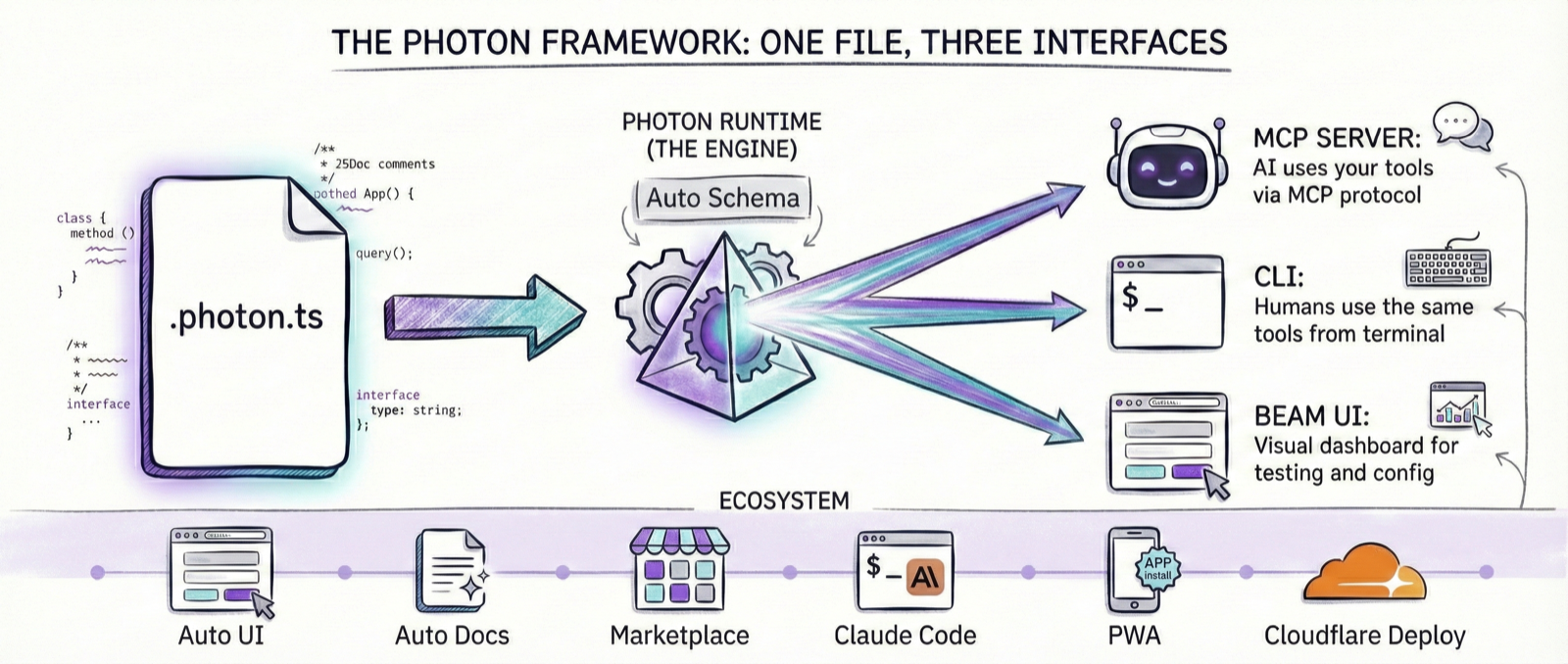
### Write Once, Use Everywhere
|
|
30
|
+
|
|
31
|
+
The same `.photon.ts` file automatically becomes:
|
|
32
|
+
- 🤖 **MCP Server** - Tools for Claude Desktop, Cursor, and AI assistants
|
|
33
|
+
- 💻 **CLI Tool** - Beautiful command-line interface for humans
|
|
34
|
+
- 🔌 **Platform Integrations** - NCP, Lumina, and future runtimes
|
|
35
|
+
|
|
36
|
+
```bash
|
|
37
|
+
# Same file, multiple interfaces:
|
|
38
|
+
photon mcp analytics # Run as MCP server for AI
|
|
39
|
+
photon cli analytics revenue # Use as CLI tool for humans
|
|
40
|
+
```
|
|
41
|
+
|
|
42
|
+
**Zero extra code. Pure business logic. Infinite deployment targets.**
|
|
43
|
+
|
|
29
44
|
### The Photon Ecosystem Flywheel
|
|
30
45
|
|
|
31
46
|
|
|
@@ -103,6 +118,28 @@ export default class Analytics {
|
|
|
103
118
|
|
|
104
119
|
**40 lines. One file. Production-ready.**
|
|
105
120
|
|
|
121
|
+
### Use It Everywhere
|
|
122
|
+
|
|
123
|
+
That single file now works as both an **MCP server** and a **CLI tool**:
|
|
124
|
+
|
|
125
|
+
```bash
|
|
126
|
+
# As an MCP server (for AI assistants)
|
|
127
|
+
photon mcp analytics
|
|
128
|
+
# → Claude Desktop can now call revenue() as a tool
|
|
129
|
+
|
|
130
|
+
# As a CLI (for humans)
|
|
131
|
+
photon cli analytics revenue --startDate 2024-01-01 --endDate 2024-12-31
|
|
132
|
+
# → Beautiful formatted output:
|
|
133
|
+
# ┌────────────┬──────────┐
|
|
134
|
+
# │ Date │ Revenue │
|
|
135
|
+
# ├────────────┼──────────┤
|
|
136
|
+
# │ 2024-01-01 │ $12,450 │
|
|
137
|
+
# │ 2024-01-02 │ $15,320 │
|
|
138
|
+
# └────────────┴──────────┘
|
|
139
|
+
```
|
|
140
|
+
|
|
141
|
+
**Same code. Same logic. Two interfaces. Zero duplication.**
|
|
142
|
+
|
|
106
143
|
---
|
|
107
144
|
|
|
108
145
|
## Why One File Changes Everything
|
|
@@ -139,6 +176,7 @@ photon mcp my-jira # Works immediately
|
|
|
139
176
|
```
|
|
140
177
|
|
|
141
178
|
**Use cases:**
|
|
179
|
+
|
|
142
180
|
- Add company-specific authentication
|
|
143
181
|
- Customize business logic
|
|
144
182
|
- Merge multiple photons
|
|
@@ -149,6 +187,7 @@ photon mcp my-jira # Works immediately
|
|
|
149
187
|
Prompt injection attacks are the new supply-chain threat. A malicious MCP can manipulate AI responses to exfiltrate your entire conversation history—not just credentials.
|
|
150
188
|
|
|
151
189
|
**One file = one audit:**
|
|
190
|
+
|
|
152
191
|
- Read 40 lines, understand everything
|
|
153
192
|
- No hidden code scattered across imports
|
|
154
193
|
- Fork and verify in minutes, not hours
|
|
@@ -189,8 +228,27 @@ photon info
|
|
|
189
228
|
# Install any photon (filesystem, git, postgres, mongodb, slack, etc.)
|
|
190
229
|
photon add filesystem
|
|
191
230
|
|
|
192
|
-
#
|
|
193
|
-
photon
|
|
231
|
+
# or else copy your own .photon.ts file to
|
|
232
|
+
# .photon folder in your user folder
|
|
233
|
+
|
|
234
|
+
# Call info command with mcp option
|
|
235
|
+
photon info filesystem --mcp
|
|
236
|
+
# Get client config json
|
|
237
|
+
{
|
|
238
|
+
"filesystem": {
|
|
239
|
+
"command": "photon",
|
|
240
|
+
"args": [
|
|
241
|
+
"mcp",
|
|
242
|
+
"filesystem"
|
|
243
|
+
],
|
|
244
|
+
"env": {
|
|
245
|
+
"FILESYSTEM_WORKDIR": "/Users/arul/Documents",
|
|
246
|
+
"FILESYSTEM_MAX_FILE_SIZE": "10485760",
|
|
247
|
+
"FILESYSTEM_ALLOW_HIDDEN": "false"
|
|
248
|
+
}
|
|
249
|
+
}
|
|
250
|
+
}
|
|
251
|
+
# Add to your client
|
|
194
252
|
```
|
|
195
253
|
|
|
196
254
|
### Build Photons with AI
|
|
@@ -210,17 +268,6 @@ photon marketplace add your-org/your-photons
|
|
|
210
268
|
photon add your-custom-tool
|
|
211
269
|
```
|
|
212
270
|
|
|
213
|
-
### Integrate with Your MCP Client
|
|
214
|
-
|
|
215
|
-
```bash
|
|
216
|
-
# Get configuration for any MCP client
|
|
217
|
-
photon info filesystem --mcp
|
|
218
|
-
```
|
|
219
|
-
|
|
220
|
-
Add the output to your MCP client's config file. **Consult your client's documentation** for setup instructions.
|
|
221
|
-
|
|
222
|
-
**MCP clients include:** Claude Desktop, Cursor, Zed, Continue, Cline, and more.
|
|
223
|
-
|
|
224
271
|
---
|
|
225
272
|
|
|
226
273
|
## The Value Proposition
|
|
@@ -235,11 +282,173 @@ Add the output to your MCP client's config file. **Consult your client's documen
|
|
|
235
282
|
| **Dependencies** | Manual npm install | Auto-installed from @dependencies |
|
|
236
283
|
| **Hot Reload** | Configure yourself | Built-in with --dev |
|
|
237
284
|
| **AI Context** | Scattered | Single file |
|
|
285
|
+
| **CLI Interface** | Write separate code | Automatic from same code |
|
|
286
|
+
| **Deployment Targets** | MCP only | MCP, CLI, NCP, Lumina, APIs... |
|
|
238
287
|
|
|
239
288
|
[See detailed comparison →](COMPARISON.md)
|
|
240
289
|
|
|
241
290
|
---
|
|
242
291
|
|
|
292
|
+
## CLI Interface
|
|
293
|
+
|
|
294
|
+
Every photon automatically provides a beautiful CLI interface with zero additional code. The same business logic that powers your MCP tools becomes instantly available from the terminal.
|
|
295
|
+
|
|
296
|
+
### Quick Example
|
|
297
|
+
|
|
298
|
+
```bash
|
|
299
|
+
# List all methods
|
|
300
|
+
photon cli lg-remote
|
|
301
|
+
|
|
302
|
+
# Call methods with natural syntax
|
|
303
|
+
photon cli lg-remote volume 50
|
|
304
|
+
photon cli lg-remote volume +5
|
|
305
|
+
photon cli lg-remote channel 7
|
|
306
|
+
photon cli lg-remote app netflix
|
|
307
|
+
|
|
308
|
+
# Get method help
|
|
309
|
+
photon cli lg-remote volume --help
|
|
310
|
+
```
|
|
311
|
+
|
|
312
|
+
### Beautiful Output Formats
|
|
313
|
+
|
|
314
|
+
Photon automatically formats output based on data structure:
|
|
315
|
+
|
|
316
|
+
**Tables** - Key-value pairs and flat objects:
|
|
317
|
+
```bash
|
|
318
|
+
$ photon cli lg-remote volume
|
|
319
|
+
┌─────────┬────┐
|
|
320
|
+
│ volume │ 45 │
|
|
321
|
+
├─────────┼────┤
|
|
322
|
+
│ muted │ no │
|
|
323
|
+
├─────────┼────┤
|
|
324
|
+
│ maxVol │ 100│
|
|
325
|
+
└─────────┴────┘
|
|
326
|
+
```
|
|
327
|
+
|
|
328
|
+
**Lists** - Arrays of items:
|
|
329
|
+
```bash
|
|
330
|
+
$ photon cli lg-remote apps
|
|
331
|
+
• Netflix (netflix)
|
|
332
|
+
• YouTube (youtube.leanback.v4)
|
|
333
|
+
• HDMI1 (com.webos.app.hdmi1)
|
|
334
|
+
• Disney+ (disney)
|
|
335
|
+
```
|
|
336
|
+
|
|
337
|
+
**Trees** - Hierarchical data (shown as formatted JSON)
|
|
338
|
+
**Primitives** - Simple values displayed directly
|
|
339
|
+
|
|
340
|
+
### Format System
|
|
341
|
+
|
|
342
|
+
Photon uses a smart format system with 5 standard types:
|
|
343
|
+
|
|
344
|
+
1. **`primitive`** - String, number, boolean
|
|
345
|
+
2. **`table`** - Flat object or array of flat objects
|
|
346
|
+
3. **`tree`** - Nested/hierarchical data
|
|
347
|
+
4. **`list`** - Array of simple items
|
|
348
|
+
5. **`none`** - No return value (void operations)
|
|
349
|
+
|
|
350
|
+
**Hint the format** (optional):
|
|
351
|
+
```typescript
|
|
352
|
+
/**
|
|
353
|
+
* Get current volume
|
|
354
|
+
* @format table
|
|
355
|
+
*/
|
|
356
|
+
async volume() {
|
|
357
|
+
return this._request('ssap://audio/getVolume');
|
|
358
|
+
}
|
|
359
|
+
```
|
|
360
|
+
|
|
361
|
+
**Auto-detection**: If no `@format` tag is provided, Photon automatically detects the best format based on the return value structure.
|
|
362
|
+
|
|
363
|
+
### CLI Command Reference
|
|
364
|
+
|
|
365
|
+
#### `photon cli <photon-name> [method] [args...]`
|
|
366
|
+
|
|
367
|
+
**List all methods:**
|
|
368
|
+
```bash
|
|
369
|
+
photon cli lg-remote
|
|
370
|
+
```
|
|
371
|
+
|
|
372
|
+
**Call a method:**
|
|
373
|
+
```bash
|
|
374
|
+
# No parameters
|
|
375
|
+
photon cli lg-remote status
|
|
376
|
+
|
|
377
|
+
# Single parameter
|
|
378
|
+
photon cli lg-remote volume 50
|
|
379
|
+
|
|
380
|
+
# Multiple parameters
|
|
381
|
+
photon cli lg-remote search query "breaking bad" limit 10
|
|
382
|
+
|
|
383
|
+
# Relative adjustments
|
|
384
|
+
photon cli lg-remote volume +5
|
|
385
|
+
photon cli lg-remote channel +1
|
|
386
|
+
```
|
|
387
|
+
|
|
388
|
+
**Get method help:**
|
|
389
|
+
```bash
|
|
390
|
+
photon cli lg-remote volume --help
|
|
391
|
+
```
|
|
392
|
+
|
|
393
|
+
**Raw JSON output:**
|
|
394
|
+
```bash
|
|
395
|
+
photon cli lg-remote volume --json
|
|
396
|
+
```
|
|
397
|
+
|
|
398
|
+
### One Codebase, Multiple Interfaces
|
|
399
|
+
|
|
400
|
+
The beauty of Photon's design: **improvements to business logic automatically work across all interfaces**.
|
|
401
|
+
|
|
402
|
+
Write your logic once:
|
|
403
|
+
```typescript
|
|
404
|
+
async volume(params?: { level?: number | string } | number | string) {
|
|
405
|
+
// Handle relative adjustments
|
|
406
|
+
if (typeof level === 'string' && level.startsWith('+')) {
|
|
407
|
+
const delta = parseInt(level);
|
|
408
|
+
const current = await this._getCurrentVolume();
|
|
409
|
+
const newVolume = current + delta;
|
|
410
|
+
await this._setVolume(newVolume);
|
|
411
|
+
}
|
|
412
|
+
// ... rest of logic
|
|
413
|
+
return this._getCurrentVolume(); // Always return current state
|
|
414
|
+
}
|
|
415
|
+
```
|
|
416
|
+
|
|
417
|
+
**Works everywhere:**
|
|
418
|
+
- ✅ **MCP**: Claude Desktop, Cursor, etc.
|
|
419
|
+
- ✅ **CLI**: `photon cli lg-remote volume +5`
|
|
420
|
+
- ✅ **Future interfaces**: HTTP, WebSocket, etc.
|
|
421
|
+
|
|
422
|
+
### Context-Aware Error Messages
|
|
423
|
+
|
|
424
|
+
Photons can provide helpful, context-aware errors:
|
|
425
|
+
|
|
426
|
+
```bash
|
|
427
|
+
$ photon cli lg-remote channels
|
|
428
|
+
❌ Error: TV channels not available. Currently on HDMI1.
|
|
429
|
+
Switch to a TV tuner input to access channels.
|
|
430
|
+
```
|
|
431
|
+
|
|
432
|
+
The same error quality appears in MCP tools—because it's the same code.
|
|
433
|
+
|
|
434
|
+
### Exit Codes
|
|
435
|
+
|
|
436
|
+
The CLI properly returns exit codes for automation:
|
|
437
|
+
- **0**: Success
|
|
438
|
+
- **1**: Error (tool execution failed, invalid parameters, etc.)
|
|
439
|
+
|
|
440
|
+
Perfect for shell scripts and CI/CD:
|
|
441
|
+
```bash
|
|
442
|
+
if photon cli lg-remote volume 50; then
|
|
443
|
+
echo "Volume set successfully"
|
|
444
|
+
else
|
|
445
|
+
echo "Failed to set volume"
|
|
446
|
+
exit 1
|
|
447
|
+
fi
|
|
448
|
+
```
|
|
449
|
+
|
|
450
|
+
---
|
|
451
|
+
|
|
243
452
|
## How Photon Works
|
|
244
453
|
|
|
245
454
|
### Convention = Automation
|
|
@@ -453,6 +662,55 @@ photon mcp calculator --config
|
|
|
453
662
|
- `--validate` - Validate configuration without running server
|
|
454
663
|
- `--config` - Show configuration template and exit
|
|
455
664
|
|
|
665
|
+
#### `photon cli <photon-name> [method] [args...]`
|
|
666
|
+
Run photon methods directly from the command line.
|
|
667
|
+
|
|
668
|
+
```bash
|
|
669
|
+
# List all available methods
|
|
670
|
+
photon cli calculator
|
|
671
|
+
|
|
672
|
+
# Call a method with arguments
|
|
673
|
+
photon cli calculator add 5 10
|
|
674
|
+
|
|
675
|
+
# Get method-specific help
|
|
676
|
+
photon cli calculator add --help
|
|
677
|
+
|
|
678
|
+
# Output raw JSON instead of formatted output
|
|
679
|
+
photon cli calculator add 5 10 --json
|
|
680
|
+
```
|
|
681
|
+
|
|
682
|
+
**Arguments:**
|
|
683
|
+
- Arguments are automatically coerced to expected types (string, number, boolean)
|
|
684
|
+
- Strings starting with `+` or `-` are preserved for relative adjustments
|
|
685
|
+
- Arrays and objects can be passed as JSON strings
|
|
686
|
+
|
|
687
|
+
**Options:**
|
|
688
|
+
- `--help` - Show help for the photon or specific method
|
|
689
|
+
- `--json` - Output raw JSON instead of formatted output
|
|
690
|
+
|
|
691
|
+
**Exit Codes:**
|
|
692
|
+
- `0` - Success
|
|
693
|
+
- `1` - Error (invalid arguments, execution failure, etc.)
|
|
694
|
+
|
|
695
|
+
**Examples:**
|
|
696
|
+
|
|
697
|
+
```bash
|
|
698
|
+
# Smart home control
|
|
699
|
+
photon cli lg-remote volume 50
|
|
700
|
+
photon cli lg-remote volume +5 # Relative adjustment
|
|
701
|
+
photon cli lg-remote channel 7
|
|
702
|
+
photon cli lg-remote app netflix
|
|
703
|
+
|
|
704
|
+
# Database queries
|
|
705
|
+
photon cli postgres query "SELECT * FROM users LIMIT 10"
|
|
706
|
+
|
|
707
|
+
# File operations
|
|
708
|
+
photon cli filesystem read-file path "/home/user/document.txt"
|
|
709
|
+
|
|
710
|
+
# Git operations
|
|
711
|
+
photon cli git commit message "feat: add new feature"
|
|
712
|
+
```
|
|
713
|
+
|
|
456
714
|
### Inspect & Configure
|
|
457
715
|
|
|
458
716
|
#### `photon info [name]`
|
|
@@ -901,46 +1159,6 @@ export default class MyPhoton {
|
|
|
901
1159
|
|
|
902
1160
|
---
|
|
903
1161
|
|
|
904
|
-
## Integration with MCP Clients
|
|
905
|
-
|
|
906
|
-
Photon works with **any MCP client**:
|
|
907
|
-
|
|
908
|
-
- **Claude Desktop** (Anthropic)
|
|
909
|
-
- **Cursor** (IDE)
|
|
910
|
-
- **Zed** (IDE)
|
|
911
|
-
- **Continue** (VS Code extension)
|
|
912
|
-
- **Cline** (VS Code extension)
|
|
913
|
-
- ... and more
|
|
914
|
-
|
|
915
|
-
### Setup
|
|
916
|
-
|
|
917
|
-
```bash
|
|
918
|
-
# Get configuration for your MCP client
|
|
919
|
-
photon info <photon-name> --mcp
|
|
920
|
-
```
|
|
921
|
-
|
|
922
|
-
**Consult your MCP client's documentation** for:
|
|
923
|
-
- Config file location
|
|
924
|
-
- Configuration format
|
|
925
|
-
- Setup instructions
|
|
926
|
-
|
|
927
|
-
Example output:
|
|
928
|
-
```json
|
|
929
|
-
{
|
|
930
|
-
"analytics": {
|
|
931
|
-
"command": "photon",
|
|
932
|
-
"args": ["mcp", "analytics"],
|
|
933
|
-
"env": {
|
|
934
|
-
"ANALYTICS_HOST": "localhost",
|
|
935
|
-
"ANALYTICS_DATABASE": "company",
|
|
936
|
-
"ANALYTICS_PASSWORD": "secret"
|
|
937
|
-
}
|
|
938
|
-
}
|
|
939
|
-
}
|
|
940
|
-
```
|
|
941
|
-
|
|
942
|
-
---
|
|
943
|
-
|
|
944
1162
|
## Examples
|
|
945
1163
|
|
|
946
1164
|
The repository includes example photons in `examples/`:
|
|
@@ -1062,18 +1280,59 @@ photon upgrade <name> # Update specific photon
|
|
|
1062
1280
|
|
|
1063
1281
|
## Roadmap
|
|
1064
1282
|
|
|
1065
|
-
### ✅
|
|
1283
|
+
### ✅ MCP Servers & CLI Interface (Available Now)
|
|
1066
1284
|
|
|
1285
|
+
**MCP Servers:**
|
|
1067
1286
|
Build and run photons as MCP servers for AI assistants. Works with Claude Desktop, Cursor, Zed, Continue, Cline, and any MCP-compatible client.
|
|
1068
1287
|
|
|
1069
|
-
|
|
1288
|
+
**CLI Interface:**
|
|
1289
|
+
Run photon methods directly from the command line with beautiful formatted output. Every photon automatically becomes a CLI tool with zero additional code.
|
|
1070
1290
|
|
|
1071
|
-
|
|
1291
|
+
**Write once, deploy everywhere:** The same business logic powers both your MCP tools and CLI commands.
|
|
1072
1292
|
|
|
1073
|
-
|
|
1074
|
-
|
|
1293
|
+
### 🔌 Ecosystem Integrations
|
|
1294
|
+
|
|
1295
|
+
Photon files are first-class citizens across multiple platforms:
|
|
1296
|
+
|
|
1297
|
+
#### NCP - Intelligent MCP Orchestration
|
|
1298
|
+
|
|
1299
|
+
[NCP](https://github.com/portel-dev/ncp) runs as an MCP client hosting many MCPs intelligently, while acting as an MCP server for any client. Photon files integrate seamlessly as context providers.
|
|
1300
|
+
|
|
1301
|
+
```bash
|
|
1302
|
+
# Photons work natively with NCP
|
|
1303
|
+
ncp add analytics.photon.ts
|
|
1304
|
+
```
|
|
1305
|
+
|
|
1306
|
+
NCP enables sophisticated MCP orchestration patterns, and `.photon.ts` files are designed to work seamlessly in this environment.
|
|
1307
|
+
|
|
1308
|
+
#### Lumina - Anything API Server *(Coming Soon)*
|
|
1309
|
+
|
|
1310
|
+
Turn any photon into a production API endpoint with zero configuration.
|
|
1311
|
+
|
|
1312
|
+
```bash
|
|
1313
|
+
# Same photon, now an HTTP API
|
|
1314
|
+
lumina serve analytics.photon.ts
|
|
1315
|
+
# → POST /revenue with JSON params
|
|
1316
|
+
# → GET /status
|
|
1317
|
+
# → Full REST API from your photon methods
|
|
1318
|
+
```
|
|
1319
|
+
|
|
1320
|
+
Lumina will make photons available as HTTP/WebSocket endpoints, enabling web apps, mobile clients, and traditional API consumers to use the same business logic.
|
|
1321
|
+
|
|
1322
|
+
#### Future Platforms
|
|
1323
|
+
|
|
1324
|
+
The `.photon.ts` format is designed to be consumed by any runtime:
|
|
1325
|
+
- WebSocket servers
|
|
1326
|
+
- Serverless functions (AWS Lambda, Cloudflare Workers)
|
|
1327
|
+
- Native desktop applications
|
|
1328
|
+
- Browser extensions
|
|
1329
|
+
- GraphQL servers
|
|
1330
|
+
|
|
1331
|
+
**One file. Many platforms. Pure business logic.**
|
|
1332
|
+
|
|
1333
|
+
---
|
|
1075
1334
|
|
|
1076
|
-
|
|
1335
|
+
Photon's framework-agnostic design enables future deployment targets. More on the way.
|
|
1077
1336
|
|
|
1078
1337
|
---
|
|
1079
1338
|
|
|
@@ -0,0 +1,21 @@
|
|
|
1
|
+
/**
|
|
2
|
+
* CLI Alias Manager (Cross-Platform)
|
|
3
|
+
*
|
|
4
|
+
* Creates executable aliases for photons so they can be called directly
|
|
5
|
+
* Supports: Windows, macOS, Linux
|
|
6
|
+
* Example: Instead of `photon cli lg-remote discover`
|
|
7
|
+
* Run: `lg-remote discover`
|
|
8
|
+
*/
|
|
9
|
+
/**
|
|
10
|
+
* Create a CLI alias for a photon (cross-platform)
|
|
11
|
+
*/
|
|
12
|
+
export declare function createAlias(photonName: string, aliasName?: string): Promise<void>;
|
|
13
|
+
/**
|
|
14
|
+
* Remove a CLI alias (cross-platform)
|
|
15
|
+
*/
|
|
16
|
+
export declare function removeAlias(aliasName: string): Promise<void>;
|
|
17
|
+
/**
|
|
18
|
+
* List all CLI aliases (cross-platform)
|
|
19
|
+
*/
|
|
20
|
+
export declare function listAliases(): Promise<void>;
|
|
21
|
+
//# sourceMappingURL=cli-alias.d.ts.map
|
|
@@ -0,0 +1 @@
|
|
|
1
|
+
{"version":3,"file":"cli-alias.d.ts","sourceRoot":"","sources":["../src/cli-alias.ts"],"names":[],"mappings":"AAAA;;;;;;;GAOG;AAYH;;GAEG;AACH,wBAAsB,WAAW,CAAC,UAAU,EAAE,MAAM,EAAE,SAAS,CAAC,EAAE,MAAM,GAAG,OAAO,CAAC,IAAI,CAAC,CAsCvF;AAoFD;;GAEG;AACH,wBAAsB,WAAW,CAAC,SAAS,EAAE,MAAM,GAAG,OAAO,CAAC,IAAI,CAAC,CAyBlE;AAED;;GAEG;AACH,wBAAsB,WAAW,IAAI,OAAO,CAAC,IAAI,CAAC,CAqDjD"}
|