@pixsame/cypress-plugin-visual-regression-diff 0.0.0-stage → 1.0.0
This diff represents the content of publicly available package versions that have been released to one of the supported registries. The information contained in this diff is provided for informational purposes only and reflects changes between package versions as they appear in their respective public registries.
- package/LICENSE +21 -0
- package/README.md +562 -2
- package/bin/cli.js +4 -0
- package/dist/commands.d.ts +60 -0
- package/dist/constants.d.ts +28 -0
- package/dist/constants.js +43 -0
- package/dist/constants.js.map +1 -0
- package/dist/constants.mjs +34 -0
- package/dist/constants.mjs.map +1 -0
- package/dist/migrate.d.ts +22 -0
- package/dist/migrate.js +554 -0
- package/dist/migrate.js.map +1 -0
- package/dist/plugins.d.ts +1 -0
- package/dist/plugins.js +575 -0
- package/dist/plugins.js.map +1 -0
- package/dist/plugins.mjs +567 -0
- package/dist/plugins.mjs.map +1 -0
- package/dist/support.d.ts +12 -0
- package/dist/support.js +647 -0
- package/dist/support.js.map +1 -0
- package/dist/support.mjs +633 -0
- package/dist/support.mjs.map +1 -0
- package/dist/types.d.ts +20 -0
- package/package.json +123 -3
package/LICENSE
ADDED
|
@@ -0,0 +1,21 @@
|
|
|
1
|
+
MIT License
|
|
2
|
+
|
|
3
|
+
Copyright (c) 2021 FRSOURCE - Let's shape your web
|
|
4
|
+
|
|
5
|
+
Permission is hereby granted, free of charge, to any person obtaining a copy
|
|
6
|
+
of this software and associated documentation files (the "Software"), to deal
|
|
7
|
+
in the Software without restriction, including without limitation the rights
|
|
8
|
+
to use, copy, modify, merge, publish, distribute, sublicense, and/or sell
|
|
9
|
+
copies of the Software, and to permit persons to whom the Software is
|
|
10
|
+
furnished to do so, subject to the following conditions:
|
|
11
|
+
|
|
12
|
+
The above copyright notice and this permission notice shall be included in all
|
|
13
|
+
copies or substantial portions of the Software.
|
|
14
|
+
|
|
15
|
+
THE SOFTWARE IS PROVIDED "AS IS", WITHOUT WARRANTY OF ANY KIND, EXPRESS OR
|
|
16
|
+
IMPLIED, INCLUDING BUT NOT LIMITED TO THE WARRANTIES OF MERCHANTABILITY,
|
|
17
|
+
FITNESS FOR A PARTICULAR PURPOSE AND NONINFRINGEMENT. IN NO EVENT SHALL THE
|
|
18
|
+
AUTHORS OR COPYRIGHT HOLDERS BE LIABLE FOR ANY CLAIM, DAMAGES OR OTHER
|
|
19
|
+
LIABILITY, WHETHER IN AN ACTION OF CONTRACT, TORT OR OTHERWISE, ARISING FROM,
|
|
20
|
+
OUT OF OR IN CONNECTION WITH THE SOFTWARE OR THE USE OR OTHER DEALINGS IN THE
|
|
21
|
+
SOFTWARE.
|
package/README.md
CHANGED
|
@@ -1,3 +1,563 @@
|
|
|
1
|
-
|
|
1
|
+
<p align="center">
|
|
2
|
+
<a href="https://www.npmjs.com/package/@pixsame/cypress-plugin-visual-regression-diff">
|
|
3
|
+
<img src="https://img.shields.io/npm/v/@pixsame/cypress-plugin-visual-regression-diff.svg" alt="NPM version badge">
|
|
4
|
+
</a>
|
|
5
|
+
<a href="https://www.npmjs.com/package/@pixsame/cypress-plugin-visual-regression-diff">
|
|
6
|
+
<img src="https://img.shields.io/npm/dt/@pixsame/cypress-plugin-visual-regression-diff.svg" alt="NPM total downloads badge">
|
|
7
|
+
</a>
|
|
8
|
+
<a href="https://qlty.sh/gh/FRSOURCE/projects/cypress-plugin-visual-regression-diff">
|
|
9
|
+
<img src="https://qlty.sh/gh/FRSOURCE/projects/cypress-plugin-visual-regression-diff/maintainability.svg" alt="Qlty maintainability badge">
|
|
10
|
+
</a>
|
|
11
|
+
<a href="https://qlty.sh/gh/FRSOURCE/projects/cypress-plugin-visual-regression-diff">
|
|
12
|
+
<img src="https://qlty.sh/gh/FRSOURCE/projects/cypress-plugin-visual-regression-diff/coverage.svg" alt="Qlty Code Coverage badge">
|
|
13
|
+
</a>
|
|
14
|
+
<a href="https://github.com/semantic-release/semantic-release">
|
|
15
|
+
<img src="https://img.shields.io/badge/%20%20%F0%9F%93%A6%F0%9F%9A%80-semantic--release-e10079.svg" alt="semantic-relase badge">
|
|
16
|
+
</a>
|
|
17
|
+
<a href="https://github.com/pixsame/pixsame/blob/main/LICENSE">
|
|
18
|
+
<img src="https://img.shields.io/github/license/pixsame/pixsame.svg" alt="license MIT badge">
|
|
19
|
+
</a>
|
|
20
|
+
</p>
|
|
2
21
|
|
|
3
|
-
|
|
22
|
+
<p align="center">
|
|
23
|
+
<img src="https://github.com/pixsame/pixsame/blob/main/assets/logo.svg" alt="Cypress Plugin Visual Regression Diff logo" height="120px"/>
|
|
24
|
+
</p>
|
|
25
|
+
|
|
26
|
+
<h1 align="center">Plugin for Cypress - Visual Regression Diff</h1>
|
|
27
|
+
<p align="center">Perform visual regression test with a nice GUI as help. 💅 <i>Only for Cypress!</i> Both e2e and component-testing compatible 💪</p>
|
|
28
|
+
|
|
29
|
+
> 📣 **We've just become pixsame, and our ecosystem is growing!** Read the [official announcement](https://github.com/pixsame/pixsame/issues/437) for more details.
|
|
30
|
+
|
|
31
|
+
<p align="center">
|
|
32
|
+
<a href="#getting-started">Getting Started</a>
|
|
33
|
+
·
|
|
34
|
+
<a href="#usage">Usage</a>
|
|
35
|
+
·
|
|
36
|
+
<a href="#faq">FAQ</a>
|
|
37
|
+
·
|
|
38
|
+
<a href="#migrating-from-frsourcecypress-plugin-visual-regression-diff">Migrating from @frsource</a>
|
|
39
|
+
·
|
|
40
|
+
<a href="https://github.com/pixsame/pixsame/issues">File an Issue</a>
|
|
41
|
+
·
|
|
42
|
+
<a href="https://github.com/pixsame/pixsame/discussions">Have a question or an idea?</a>
|
|
43
|
+
<br>
|
|
44
|
+
</p>
|
|
45
|
+
|
|
46
|
+
<p align="center">
|
|
47
|
+
<br>
|
|
48
|
+
<i>Plugin for visual regression testing that provides smooth experience:
|
|
49
|
+
<br>Specify threshold below which the test will fail.
|
|
50
|
+
<br>Quickly preview old & new screenshot directly in the Cypress UI.
|
|
51
|
+
<br>Find visual changes using images diff.
|
|
52
|
+
<br>Published as treeshakeable bundles, separate for JS ES5 or modern bundlers thanks to <a href="https://www.npmjs.com/package/microbundle">microbundle</a>.
|
|
53
|
+
<br>Working with every bundler (tested on webpack, vite, rollup),
|
|
54
|
+
<br>Provides proper typings as is written completely in <a href="https://www.typescriptlang.org">typescript</a>.</i>
|
|
55
|
+
<br>
|
|
56
|
+
<br>
|
|
57
|
+
</p>
|
|
58
|
+
|
|
59
|
+

|
|
60
|
+
|
|
61
|
+
## Getting started
|
|
62
|
+
|
|
63
|
+
### Installation
|
|
64
|
+
|
|
65
|
+
You can install this library using your favorite package manager:
|
|
66
|
+
|
|
67
|
+
```bash
|
|
68
|
+
# npm
|
|
69
|
+
npm install --save-dev @pixsame/cypress-plugin-visual-regression-diff
|
|
70
|
+
|
|
71
|
+
# yarn
|
|
72
|
+
yarn add -D @pixsame/cypress-plugin-visual-regression-diff
|
|
73
|
+
|
|
74
|
+
# pnpm
|
|
75
|
+
pnpm add -D @pixsame/cypress-plugin-visual-regression-diff
|
|
76
|
+
```
|
|
77
|
+
|
|
78
|
+
Next, you need to import the library:
|
|
79
|
+
|
|
80
|
+
- first, in your support file (located by default in `cypress/support/index.js`):
|
|
81
|
+
|
|
82
|
+
```ts
|
|
83
|
+
// typescript / ES6
|
|
84
|
+
import '@pixsame/cypress-plugin-visual-regression-diff';
|
|
85
|
+
|
|
86
|
+
// javascript
|
|
87
|
+
require('@pixsame/cypress-plugin-visual-regression-diff');
|
|
88
|
+
```
|
|
89
|
+
|
|
90
|
+
- secondly:
|
|
91
|
+
- (for Cypress 10.0+) in `cypress.config.js` (or `cypress.config.ts`):
|
|
92
|
+
|
|
93
|
+
```ts
|
|
94
|
+
// typescript / ES6
|
|
95
|
+
import { defineConfig } from 'cypress';
|
|
96
|
+
import { initPlugin as initVisualRegressionPlugin } from '@pixsame/cypress-plugin-visual-regression-diff/plugins';
|
|
97
|
+
|
|
98
|
+
export default defineConfig({
|
|
99
|
+
// initPlugin must be called in the section where it is used: e2e or component
|
|
100
|
+
e2e: {
|
|
101
|
+
setupNodeEvents(on, config) {
|
|
102
|
+
initVisualRegressionPlugin(on, config);
|
|
103
|
+
},
|
|
104
|
+
},
|
|
105
|
+
component: {
|
|
106
|
+
setupNodeEvents(on, config) {
|
|
107
|
+
initVisualRegressionPlugin(on, config);
|
|
108
|
+
},
|
|
109
|
+
},
|
|
110
|
+
});
|
|
111
|
+
```
|
|
112
|
+
|
|
113
|
+
- (for Cypress <10.0) in your plugins file (located by default in `cypress/plugins/index.js`):
|
|
114
|
+
|
|
115
|
+
```ts
|
|
116
|
+
// typescript / ES6
|
|
117
|
+
import { initPlugin as initVisualRegressionPlugin } from '@pixsame/cypress-plugin-visual-regression-diff/plugins';
|
|
118
|
+
|
|
119
|
+
export default function (
|
|
120
|
+
on: Cypress.PluginEvents,
|
|
121
|
+
config: Cypress.PluginConfigOptions,
|
|
122
|
+
) {
|
|
123
|
+
initVisualRegressionPlugin(on, config);
|
|
124
|
+
|
|
125
|
+
return config;
|
|
126
|
+
}
|
|
127
|
+
|
|
128
|
+
// javascript
|
|
129
|
+
const {
|
|
130
|
+
initPlugin: initVisualRegressionPlugin,
|
|
131
|
+
} = require('@pixsame/cypress-plugin-visual-regression-diff/plugins');
|
|
132
|
+
|
|
133
|
+
module.exports = function (on, config) {
|
|
134
|
+
initVisualRegressionPlugin(on, config);
|
|
135
|
+
|
|
136
|
+
return config;
|
|
137
|
+
};
|
|
138
|
+
```
|
|
139
|
+
|
|
140
|
+
That's it - now let's see how to use the library in [usage section](#usage).
|
|
141
|
+
|
|
142
|
+
## Usage
|
|
143
|
+
|
|
144
|
+
Once installed, the library might be used by writing in your test:
|
|
145
|
+
|
|
146
|
+
```ts
|
|
147
|
+
cy.get('.an-element-of-your-choice').matchImage();
|
|
148
|
+
```
|
|
149
|
+
|
|
150
|
+
Or, if you would like to make a screenshot of whole document:
|
|
151
|
+
|
|
152
|
+
```ts
|
|
153
|
+
cy.matchImage();
|
|
154
|
+
```
|
|
155
|
+
|
|
156
|
+
`matchImage` command will do a screenshot and compare it with image from a previous run. In case of regression the test will fail and you'll get a "See comparison" button to see what's a root of a problem.
|
|
157
|
+
|
|
158
|
+
## Example
|
|
159
|
+
|
|
160
|
+
Still got troubles with installation? Have a look at [examples directory of this repo](./examples) to see how this plugin can be used in e2e or component-testing Cypress environment within your project.
|
|
161
|
+
|
|
162
|
+
## Automatic clean up of unused images
|
|
163
|
+
|
|
164
|
+
It's useful to remove screenshots generated by the visual regression plugin that are not used by any test anymore.
|
|
165
|
+
Enable this feature via expose variable and enjoy freed up storage space 🚀:
|
|
166
|
+
|
|
167
|
+
```bash
|
|
168
|
+
# Cypress 15.10+
|
|
169
|
+
npx cypress run --expose "pluginVisualRegressionCleanupUnusedImages=true"
|
|
170
|
+
# Cypress <15.10 (deprecated in 15.10, removed in 16)
|
|
171
|
+
npx cypress run --env "pluginVisualRegressionCleanupUnusedImages=true"
|
|
172
|
+
```
|
|
173
|
+
|
|
174
|
+
## Configuration
|
|
175
|
+
|
|
176
|
+
Configure the plugin:
|
|
177
|
+
|
|
178
|
+
- by passing in configuration as an argument to `matchImage` command:
|
|
179
|
+
|
|
180
|
+
```ts
|
|
181
|
+
cy.matchImage({
|
|
182
|
+
// screenshot configuration, passed directly to the the Cypress screenshot method: https://docs.cypress.io/api/cypress-api/screenshot-api#Arguments
|
|
183
|
+
// default: { }
|
|
184
|
+
screenshotConfig: {
|
|
185
|
+
blackout: ['.element-to-be-blackouted'],
|
|
186
|
+
},
|
|
187
|
+
// pixelmatch options, see: https://www.npmjs.com/package/pixelmatch#pixelmatchimg1-img2-output-width-height-options
|
|
188
|
+
// default: { includeAA: true }
|
|
189
|
+
diffConfig: {
|
|
190
|
+
threshold: 0.01,
|
|
191
|
+
},
|
|
192
|
+
// whether to create missing baseline images automatically
|
|
193
|
+
// default: true
|
|
194
|
+
createMissingImages: false,
|
|
195
|
+
// whether to update images automatically - useful for CI
|
|
196
|
+
// - true: overwrite all baseline images without comparing (fastest)
|
|
197
|
+
// - 'failures-only': compare first, update baseline only when diff exceeds threshold
|
|
198
|
+
// - false: never update baseline images automatically
|
|
199
|
+
// default: false
|
|
200
|
+
updateImages: true,
|
|
201
|
+
// directory path in which screenshot images will be stored
|
|
202
|
+
// relative path are resolved against project root
|
|
203
|
+
// absolute paths (both on unix and windows OS) supported
|
|
204
|
+
// path separators will be normalised by the plugin depending on OS, you should always use / as path separator, e.g.: C:/my-directory/nested for windows-like drive notation
|
|
205
|
+
// There are one special variable available to be used in the path:
|
|
206
|
+
// - {spec_path} - relative path leading from project root to the current spec file directory (e.g. `/src/components/my-tested-component`)
|
|
207
|
+
// default: '{spec_path}/__image_snapshots__'
|
|
208
|
+
imagesPath: 'this-might-be-your-custom/maybe-nested-directory',
|
|
209
|
+
// maximum threshold above which the test should fail
|
|
210
|
+
// default: 0.01
|
|
211
|
+
maxDiffThreshold: 0.1,
|
|
212
|
+
// forces scale factor to be set as value "1"
|
|
213
|
+
// helps with screenshots being scaled 2x on high-density screens like Mac Retina
|
|
214
|
+
// default: true
|
|
215
|
+
forceDeviceScaleFactor: false,
|
|
216
|
+
// title used for naming the image file
|
|
217
|
+
// default: Cypress.currentTest.titlePath (your test title)
|
|
218
|
+
title: `${Cypress.currentTest.titlePath.join(' ')} (${Cypress.browser.displayName})`,
|
|
219
|
+
// pass a path to custom image that should be used for comparison
|
|
220
|
+
// instead of checking against the image from previous run
|
|
221
|
+
// default: undefined
|
|
222
|
+
matchAgainstPath: '/path/to/reference-image.png',
|
|
223
|
+
});
|
|
224
|
+
```
|
|
225
|
+
|
|
226
|
+
- via [global expose configuration](https://on.cypress.io/expose) (Cypress 15.10+). Configuration key names are the same as the keys of the configuration object above, but with added `pluginVisualRegression` prefix, e.g.:
|
|
227
|
+
|
|
228
|
+
```bash
|
|
229
|
+
# Cypress 15.10+
|
|
230
|
+
npx cypress run --expose "pluginVisualRegressionUpdateImages=true,pluginVisualRegressionDiffConfig={\"threshold\":0.01}"
|
|
231
|
+
# Cypress <15.10 (deprecated in 15.10, removed in 16)
|
|
232
|
+
npx cypress run --env "pluginVisualRegressionUpdateImages=true,pluginVisualRegressionDiffConfig={\"threshold\":0.01}"
|
|
233
|
+
```
|
|
234
|
+
|
|
235
|
+
Pass several options in one flag, separated by commas. When `--expose` (or `--env`) is repeated, Cypress keeps only the last occurrence.
|
|
236
|
+
|
|
237
|
+
```ts
|
|
238
|
+
// cypress.config.ts (Cypress 15.10+)
|
|
239
|
+
import { defineConfig } from 'cypress';
|
|
240
|
+
|
|
241
|
+
export default defineConfig({
|
|
242
|
+
expose: {
|
|
243
|
+
pluginVisualRegressionUpdateImages: true,
|
|
244
|
+
pluginVisualRegressionDiffConfig: { threshold: 0.01 },
|
|
245
|
+
},
|
|
246
|
+
});
|
|
247
|
+
```
|
|
248
|
+
|
|
249
|
+
```ts
|
|
250
|
+
// cypress.config.ts (Cypress <15.10, deprecated in newer versions)
|
|
251
|
+
import { defineConfig } from 'cypress';
|
|
252
|
+
|
|
253
|
+
export default defineConfig({
|
|
254
|
+
env: {
|
|
255
|
+
pluginVisualRegressionUpdateImages: true,
|
|
256
|
+
pluginVisualRegressionDiffConfig: { threshold: 0.01 },
|
|
257
|
+
},
|
|
258
|
+
});
|
|
259
|
+
```
|
|
260
|
+
|
|
261
|
+
For more ways of setting expose variables [take a look here](https://on.cypress.io/expose).
|
|
262
|
+
|
|
263
|
+
## Batch Review Mode
|
|
264
|
+
|
|
265
|
+
Batch Review Mode lets you run a full test suite without stopping on the first visual diff failure. Instead, all failing snapshots are collected and presented in an interactive review UI after the tests complete — so you can approve or skip changes in bulk.
|
|
266
|
+
|
|
267
|
+
### Additions in headed mode (non-CI environments)
|
|
268
|
+
|
|
269
|
+
When enabled, a floating action button (FAB) appears in the bottom-right corner of the Cypress test runner. As tests run:
|
|
270
|
+
|
|
271
|
+
- Whenever a `matchImage()` call exceeds the diff threshold, the counter badge on the FAB increments instead of immediately throwing an error.
|
|
272
|
+
- Once all tests finish, an error is thrown with the total count of failures.
|
|
273
|
+
- Clicking the FAB opens a carousel where you can review each failing snapshot side-by-side (new vs. old) and either **replace** the baseline or **skip** the change.
|
|
274
|
+
|
|
275
|
+
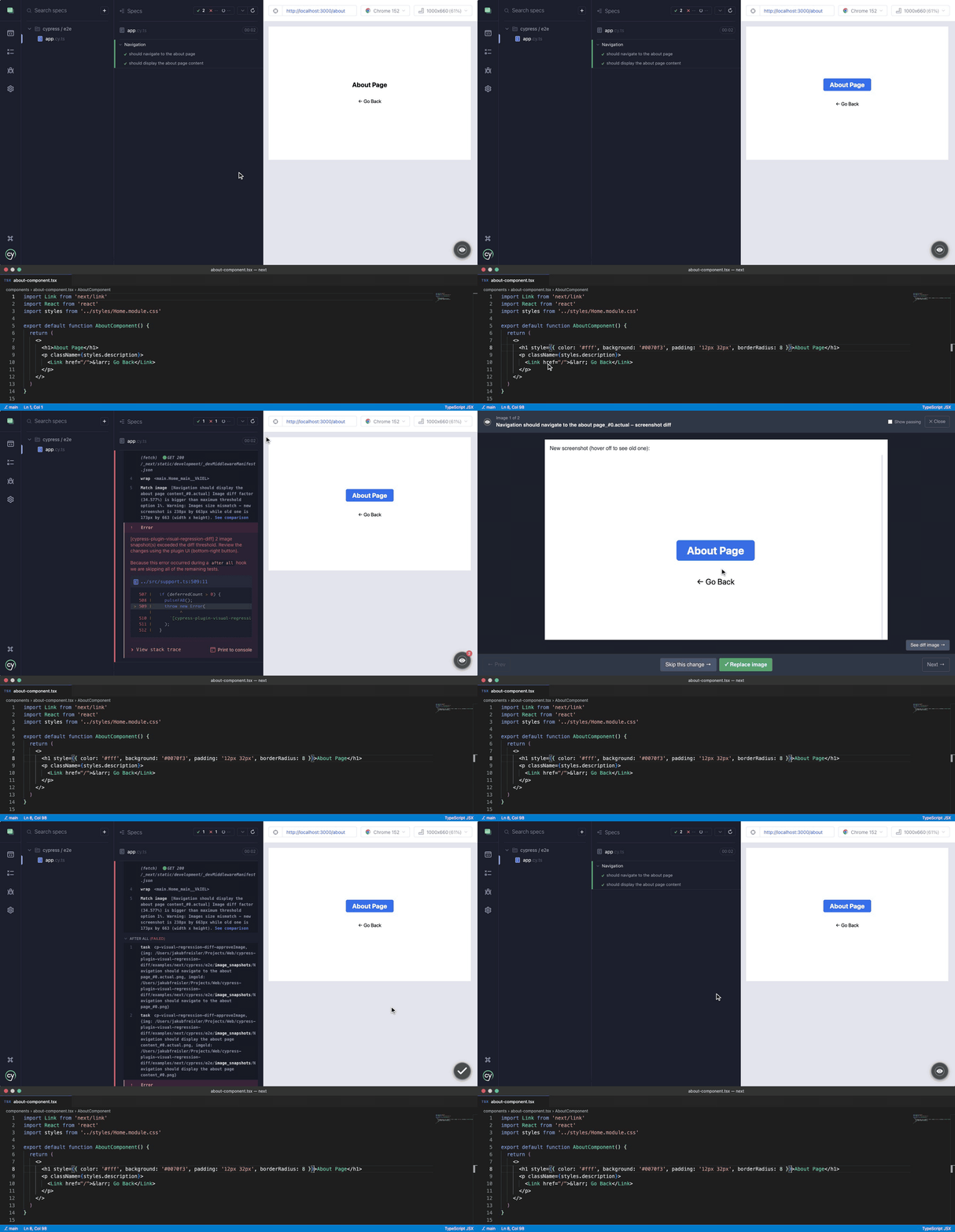
|
|
276
|
+
|
|
277
|
+
> Note: Batch mode will become the default in the next major version. To keep an old behaviour, make sure to set configuration property to `false` (see below for more details).
|
|
278
|
+
|
|
279
|
+
### How to enable
|
|
280
|
+
|
|
281
|
+
Batch Review Mode is a global option (it cannot be passed to `matchImage` directly). Enable it with the `pluginVisualRegressionBatchReviewMode` key:
|
|
282
|
+
|
|
283
|
+
```bash
|
|
284
|
+
# Cypress 15.10+
|
|
285
|
+
npx cypress open --expose "pluginVisualRegressionBatchReviewMode=true"
|
|
286
|
+
# Cypress <15.10 (deprecated in 15.10, removed in 16)
|
|
287
|
+
npx cypress open --env "pluginVisualRegressionBatchReviewMode=true"
|
|
288
|
+
```
|
|
289
|
+
|
|
290
|
+
```ts
|
|
291
|
+
// cypress.config.ts (Cypress 15.10+)
|
|
292
|
+
import { defineConfig } from 'cypress';
|
|
293
|
+
|
|
294
|
+
export default defineConfig({
|
|
295
|
+
expose: {
|
|
296
|
+
pluginVisualRegressionBatchReviewMode: true,
|
|
297
|
+
},
|
|
298
|
+
});
|
|
299
|
+
```
|
|
300
|
+
|
|
301
|
+
```ts
|
|
302
|
+
// cypress.config.ts (Cypress <15.10, deprecated in newer versions)
|
|
303
|
+
import { defineConfig } from 'cypress';
|
|
304
|
+
|
|
305
|
+
export default defineConfig({
|
|
306
|
+
env: {
|
|
307
|
+
pluginVisualRegressionBatchReviewMode: true,
|
|
308
|
+
},
|
|
309
|
+
});
|
|
310
|
+
```
|
|
311
|
+
|
|
312
|
+
### Reviewing passing images
|
|
313
|
+
|
|
314
|
+
Images that differ from the baseline but stay within `maxDiffThreshold` do not fail the test, yet they are still collected. The carousel has a **Show passing** checkbox that lets you browse them (each is marked with a `passed` badge) and replace their baseline too, e.g. to get rid of small accumulated drift.
|
|
315
|
+
|
|
316
|
+
The checkbox is unchecked by default. Use the `pluginVisualRegressionBatchReviewModeShowPassingImages` key to make it checked by default:
|
|
317
|
+
|
|
318
|
+
```bash
|
|
319
|
+
# Cypress 15.10+
|
|
320
|
+
npx cypress open --expose "pluginVisualRegressionBatchReviewMode=true" --expose "pluginVisualRegressionBatchReviewModeShowPassingImages=true"
|
|
321
|
+
# Cypress <15.10 (deprecated in 15.10, removed in 16)
|
|
322
|
+
npx cypress open --env "pluginVisualRegressionBatchReviewMode=true,pluginVisualRegressionBatchReviewModeShowPassingImages=true"
|
|
323
|
+
```
|
|
324
|
+
|
|
325
|
+
```ts
|
|
326
|
+
// cypress.config.ts (Cypress 15.10+)
|
|
327
|
+
import { defineConfig } from 'cypress';
|
|
328
|
+
|
|
329
|
+
export default defineConfig({
|
|
330
|
+
expose: {
|
|
331
|
+
pluginVisualRegressionBatchReviewMode: true,
|
|
332
|
+
pluginVisualRegressionBatchReviewModeShowPassingImages: true,
|
|
333
|
+
},
|
|
334
|
+
});
|
|
335
|
+
```
|
|
336
|
+
|
|
337
|
+
Toggling the checkbox in the runner is remembered in the browser's local storage and takes precedence over the configured value on subsequent runs.
|
|
338
|
+
|
|
339
|
+
## FAQ
|
|
340
|
+
|
|
341
|
+
<details><summary>Why screenshots doesn't conform to the `viewport` set in my Cypress configuration?</summary>
|
|
342
|
+
|
|
343
|
+
Screenshots in Cypress do not scale to the viewport size by default. You can change this behavior:
|
|
344
|
+
|
|
345
|
+
- globally, by changing default screenshot configuration: <code>Cypress.Screenshot.defaults({ capture: 'viewport' });</code>
|
|
346
|
+
- locally, by passing screenshot configuration directly to the <code>.matchImage</code> command: <code>cy.matchImage({ screenshotConfig: { capture: 'viewport' } });</code>
|
|
347
|
+
|
|
348
|
+
</details>
|
|
349
|
+
|
|
350
|
+
<details><summary>I've upgraded version of this plugin and all on my baseline images has been automatically updated. Why?</summary>
|
|
351
|
+
|
|
352
|
+
Sometimes we need to do a breaking change in image comparison or image generation algorithms. To provide you with the easiest upgrade path - the plugin updates your baseline images automatically. Just commit them to your repository after the plugin upgrade and you are good to go!
|
|
353
|
+
|
|
354
|
+
</details>
|
|
355
|
+
|
|
356
|
+
<details><summary>Screenshots look different between <code>cypress run</code> and <code>cypress open</code>. How do I fix it?</summary>
|
|
357
|
+
|
|
358
|
+
This is typically caused by device pixel ratio differences between headless and headed modes. Use the `forceDeviceScaleFactor` option to normalize the scale factor to `1`:
|
|
359
|
+
|
|
360
|
+
```ts
|
|
361
|
+
cy.matchImage({ forceDeviceScaleFactor: true });
|
|
362
|
+
```
|
|
363
|
+
|
|
364
|
+
Or set it globally via expose variable:
|
|
365
|
+
|
|
366
|
+
```bash
|
|
367
|
+
# Cypress 15.10+
|
|
368
|
+
npx cypress run --expose "pluginVisualRegressionForceDeviceScaleFactor=true"
|
|
369
|
+
# Cypress <15.10 (deprecated in 15.10, removed in 16)
|
|
370
|
+
npx cypress run --env "pluginVisualRegressionForceDeviceScaleFactor=true"
|
|
371
|
+
```
|
|
372
|
+
|
|
373
|
+
For persistent viewport size differences, consider setting the browser window size explicitly in `setupNodeEvents`:
|
|
374
|
+
|
|
375
|
+
```ts
|
|
376
|
+
on('before:browser:launch', (browser, launchOptions) => {
|
|
377
|
+
if (browser.name === 'chrome' && browser.isHeadless) {
|
|
378
|
+
launchOptions.args.push('--window-size=1280,720');
|
|
379
|
+
}
|
|
380
|
+
return launchOptions;
|
|
381
|
+
});
|
|
382
|
+
```
|
|
383
|
+
|
|
384
|
+
</details>
|
|
385
|
+
|
|
386
|
+
<details><summary>How do I use this plugin alongside other Cypress plugins that also register <code>setupNodeEvents</code> events?</summary>
|
|
387
|
+
|
|
388
|
+
Cypress only supports a single handler per event. If multiple plugins register the same event (e.g. `after:screenshot`), only the last one will be called. To compose multiple plugins safely, use [`cypress-on-fix`](https://github.com/bahmutov/cypress-on-fix):
|
|
389
|
+
|
|
390
|
+
```ts
|
|
391
|
+
import { defineConfig } from 'cypress';
|
|
392
|
+
import { initPlugin as initVisualRegressionPlugin } from '@pixsame/cypress-plugin-visual-regression-diff/plugins';
|
|
393
|
+
import fix from 'cypress-on-fix';
|
|
394
|
+
|
|
395
|
+
export default defineConfig({
|
|
396
|
+
e2e: {
|
|
397
|
+
setupNodeEvents(on, config) {
|
|
398
|
+
const fixedOn = fix(on);
|
|
399
|
+
initVisualRegressionPlugin(fixedOn, config);
|
|
400
|
+
// register other plugins using fixedOn here
|
|
401
|
+
},
|
|
402
|
+
},
|
|
403
|
+
});
|
|
404
|
+
```
|
|
405
|
+
|
|
406
|
+
</details>
|
|
407
|
+
|
|
408
|
+
<details><summary>How do I integrate with mochawesome or other reporters that embed screenshot images?</summary>
|
|
409
|
+
|
|
410
|
+
The plugin stores baseline images outside the default `cypress/screenshots/` directory. Some reporters (like `cypress-mochawesome-reporter`) expect screenshots to be in that folder.
|
|
411
|
+
|
|
412
|
+
Use the `processImgPath` task hook to control where the screenshot file is placed. Override it in `setupNodeEvents` after calling `initPlugin`:
|
|
413
|
+
|
|
414
|
+
```ts
|
|
415
|
+
setupNodeEvents(on, config) {
|
|
416
|
+
initVisualRegressionPlugin(on, config);
|
|
417
|
+
|
|
418
|
+
// Override the path processor to keep screenshots accessible to the reporter
|
|
419
|
+
on('task', {
|
|
420
|
+
'cp-visual-regression-diff-processImgPath': ({ path }: { path: string }) => {
|
|
421
|
+
// return a new path, or the same path to keep default behavior
|
|
422
|
+
return path;
|
|
423
|
+
},
|
|
424
|
+
});
|
|
425
|
+
}
|
|
426
|
+
```
|
|
427
|
+
|
|
428
|
+
</details>
|
|
429
|
+
|
|
430
|
+
<details><summary>How to fail on any visual difference, no matter how small?</summary>
|
|
431
|
+
|
|
432
|
+
Set `maxDiffThreshold` to `0`:
|
|
433
|
+
|
|
434
|
+
```ts
|
|
435
|
+
cy.matchImage({ maxDiffThreshold: 0 });
|
|
436
|
+
```
|
|
437
|
+
|
|
438
|
+
Or globally via an expose variable:
|
|
439
|
+
|
|
440
|
+
```bash
|
|
441
|
+
# Cypress 15.10+
|
|
442
|
+
npx cypress run --expose "pluginVisualRegressionMaxDiffThreshold=0"
|
|
443
|
+
# Cypress <15.10 (deprecated in 15.10, removed in 16)
|
|
444
|
+
npx cypress run --env "pluginVisualRegressionMaxDiffThreshold=0"
|
|
445
|
+
```
|
|
446
|
+
|
|
447
|
+
</details>
|
|
448
|
+
|
|
449
|
+
<details><summary>Why is the actual screenshot deleted after a successful image comparison?</summary>
|
|
450
|
+
|
|
451
|
+
When images match, the `.actual.png` file is temporary and gets cleaned up after the comparison. Only the baseline image (no suffix) is kept. This avoids storing redundant files.
|
|
452
|
+
|
|
453
|
+
When images do not match, the `.actual.png` file is kept and carries the same plugin metadata as a baseline image. You can safely rename or copy it over the baseline (e.g. in a CI job that opens a PR with updated baselines) - the plugin will treat it as an up-to-date baseline and won't rewrite it on the next run.
|
|
454
|
+
|
|
455
|
+
If you need actual screenshots to stay accessible for a reporter (e.g. `cypress-mochawesome-reporter`), use the `processImgPath` task hook to control where screenshots are stored. See [How do I integrate with mochawesome or other reporters that embed screenshot images?](#how-do-i-integrate-with-mochawesome-or-other-reporters-that-embed-screenshot-images)
|
|
456
|
+
|
|
457
|
+
</details>
|
|
458
|
+
|
|
459
|
+
<details><summary>How to remove spaces from screenshot filenames?</summary>
|
|
460
|
+
|
|
461
|
+
Screenshot filenames are derived from Cypress test titles, which may contain spaces. To use a filename without spaces, pass a custom `title` option to each `matchImage` call:
|
|
462
|
+
|
|
463
|
+
```ts
|
|
464
|
+
cy.matchImage({ title: 'my-screenshot-without-spaces' });
|
|
465
|
+
```
|
|
466
|
+
|
|
467
|
+
To apply this globally for all `matchImage` calls, override the command in your support file (`cypress/support/commands.ts`):
|
|
468
|
+
|
|
469
|
+
```ts
|
|
470
|
+
Cypress.Commands.overwrite('matchImage', (originalFn, subject, options = {}) =>
|
|
471
|
+
originalFn(subject, {
|
|
472
|
+
title: Cypress.currentTest.titlePath.join(' ').replace(/\s+/g, '-'),
|
|
473
|
+
...options,
|
|
474
|
+
}),
|
|
475
|
+
);
|
|
476
|
+
```
|
|
477
|
+
|
|
478
|
+
</details>
|
|
479
|
+
|
|
480
|
+
<details><summary>How to include the browser name in image filenames (for cross-browser testing)?</summary>
|
|
481
|
+
|
|
482
|
+
Different browsers may render fonts and elements slightly differently. To keep separate baseline images per browser, override `matchImage` in your support file (`cypress/support/commands.ts`) to set a browser-specific `imagesPath`:
|
|
483
|
+
|
|
484
|
+
```ts
|
|
485
|
+
Cypress.Commands.overwrite('matchImage', (originalFn, subject, options = {}) =>
|
|
486
|
+
originalFn(subject, {
|
|
487
|
+
imagesPath: `{spec_path}/__image_snapshots__/${Cypress.browser.name}`,
|
|
488
|
+
...options,
|
|
489
|
+
}),
|
|
490
|
+
);
|
|
491
|
+
```
|
|
492
|
+
|
|
493
|
+
This creates separate image directories per browser (e.g. `__image_snapshots__/chrome/`, `__image_snapshots__/firefox/`).
|
|
494
|
+
|
|
495
|
+
</details>
|
|
496
|
+
|
|
497
|
+
<details><summary>How to generate an HTML report showing baseline, diff, and actual images?</summary>
|
|
498
|
+
|
|
499
|
+
The plugin provides a built-in visual comparison overlay in the Cypress UI — clicking "See comparison" on a failed test shows the baseline, diff, and actual images side by side.
|
|
500
|
+
|
|
501
|
+
For CI or sharable HTML reports, integrate with a reporter such as [`cypress-mochawesome-reporter`](https://www.npmjs.com/package/cypress-mochawesome-reporter). See [How do I integrate with mochawesome or other reporters that embed screenshot images?](#how-do-i-integrate-with-mochawesome-or-other-reporters-that-embed-screenshot-images) for setup details.
|
|
502
|
+
|
|
503
|
+
</details>
|
|
504
|
+
|
|
505
|
+
## Migrating from `@frsource/cypress-plugin-visual-regression-diff`
|
|
506
|
+
|
|
507
|
+
This plugin used to be published under the `@frsource` npm scope as `@frsource/cypress-plugin-visual-regression-diff`. It now lives in the [pixsame](https://github.com/pixsame) organization and is published as `@pixsame/cypress-plugin-visual-regression-diff`. If you still have the old `@frsource/...` package installed, moving over is just a rename: `@pixsame/cypress-plugin-visual-regression-diff` 1.0.0 is the code of `@frsource/cypress-plugin-visual-regression-diff` 4.2.1 with no behavior change, so your baseline images, configuration and `cy.*` commands keep working as they are. New installs don't need any of this, see [Getting started](#getting-started).
|
|
508
|
+
|
|
509
|
+
The quickest way is the built-in command, which renames the dependency in every `package.json` below the current directory, updates imports and type references in your config and support files, and reinstalls with the package manager it finds:
|
|
510
|
+
|
|
511
|
+
```bash
|
|
512
|
+
npx @frsource/cypress-plugin-visual-regression-diff migrate
|
|
513
|
+
```
|
|
514
|
+
|
|
515
|
+
It lists the files it would change and asks before writing anything. Pass `--dry-run` to only see the list, `--yes` to skip the question (required in CI) and `--no-install` to skip the install step.
|
|
516
|
+
|
|
517
|
+
Prefer to do it by hand? Swap the package and replace the name in your imports:
|
|
518
|
+
|
|
519
|
+
```bash
|
|
520
|
+
npm uninstall @frsource/cypress-plugin-visual-regression-diff
|
|
521
|
+
npm install --save-dev @pixsame/cypress-plugin-visual-regression-diff
|
|
522
|
+
```
|
|
523
|
+
|
|
524
|
+
```diff
|
|
525
|
+
-import '@frsource/cypress-plugin-visual-regression-diff';
|
|
526
|
+
+import '@pixsame/cypress-plugin-visual-regression-diff';
|
|
527
|
+
-import { initPlugin } from '@frsource/cypress-plugin-visual-regression-diff/plugins';
|
|
528
|
+
+import { initPlugin } from '@pixsame/cypress-plugin-visual-regression-diff/plugins';
|
|
529
|
+
```
|
|
530
|
+
|
|
531
|
+
If you list the package in `compilerOptions.types` of a `tsconfig.json`, rename it there too.
|
|
532
|
+
|
|
533
|
+
## Commercial support
|
|
534
|
+
|
|
535
|
+
The plugin is free and MIT-licensed, and it stays that way. It's also maintained by one person in his spare time, so if your team needs more than best-effort answers on the issue tracker, here's what I offer:
|
|
536
|
+
|
|
537
|
+
- **Setup and migration, fixed price.** I get the plugin (or its GitHub App) running in your CI, sort out the "works on my Mac, fails on Linux" baselines, and hand over a short write-up. Usually one to two days.
|
|
538
|
+
- **Priority support, monthly.** A private channel, a response within one business day, and your issues at the top of the pile. Covers the plugin, the manifest tooling and the GitHub App.
|
|
539
|
+
- **Feature work and consulting, hourly.** A missing option, an adapter for your runner, or just an hour to look at why your screenshots drift.
|
|
540
|
+
|
|
541
|
+
Write to [pixsame@frsource.org](mailto:pixsame@frsource.org) with a sentence about your setup and I'll reply with a quote. If you only want to say thanks, the Sponsor button at the top of this repository does that (GitHub Sponsors, Patreon or Buy Me a Coffee), and every sponsor is listed in the release notes.
|
|
542
|
+
|
|
543
|
+
Security problems have their own path: see [SECURITY.md](https://github.com/pixsame/pixsame/blob/main/SECURITY.md).
|
|
544
|
+
|
|
545
|
+
## Questions
|
|
546
|
+
|
|
547
|
+
Don’t hesitate to ask a question directly on the [discussions board](https://github.com/pixsame/pixsame/discussions)!
|
|
548
|
+
|
|
549
|
+
## Changelog
|
|
550
|
+
|
|
551
|
+
Changes for every release are documented in the [release notes](https://github.com/pixsame/pixsame/releases) and [CHANGELOG files of every package](https://github.com/pixsame/pixsame/tree/main/packages).
|
|
552
|
+
|
|
553
|
+
## License
|
|
554
|
+
|
|
555
|
+
[MIT](https://opensource.org/licenses/MIT)
|
|
556
|
+
|
|
557
|
+
Copyright (c) 2021-present, Jakub FRS Freisler, [FRSOURCE](https://www.frsource.org/)
|
|
558
|
+
|
|
559
|
+
<p align="center">
|
|
560
|
+
<a href="https://www.frsource.org/" title="Click to visit FRSOURCE page!">
|
|
561
|
+
<img src="https://www.frsource.org/logo.jpg" alt="FRSOURCE logo" height="60px"/>
|
|
562
|
+
</a>
|
|
563
|
+
</p>
|
package/bin/cli.js
ADDED
|
@@ -0,0 +1,60 @@
|
|
|
1
|
+
import type pixelmatch from 'pixelmatch';
|
|
2
|
+
declare global {
|
|
3
|
+
interface Window {
|
|
4
|
+
/** Number of deferred visual diffs recorded during the current spec run. */
|
|
5
|
+
__cpvrdDeferredCount?: number;
|
|
6
|
+
}
|
|
7
|
+
namespace Cypress {
|
|
8
|
+
type MatchImageOptions = {
|
|
9
|
+
screenshotConfig?: Partial<Cypress.ScreenshotDefaultsOptions>;
|
|
10
|
+
diffConfig?: Parameters<typeof pixelmatch>[5];
|
|
11
|
+
createMissingImages?: boolean;
|
|
12
|
+
updateImages?: boolean | 'failures-only';
|
|
13
|
+
imagesPath?: string;
|
|
14
|
+
maxDiffThreshold?: number;
|
|
15
|
+
forceDeviceScaleFactor?: boolean;
|
|
16
|
+
title?: string;
|
|
17
|
+
matchAgainstPath?: string;
|
|
18
|
+
showPassingImages?: boolean;
|
|
19
|
+
};
|
|
20
|
+
type MatchImageReturn = {
|
|
21
|
+
diffValue: number | undefined;
|
|
22
|
+
imgNewPath: string;
|
|
23
|
+
imgPath: string;
|
|
24
|
+
imgDiffPath: string;
|
|
25
|
+
imgNewBase64: string | undefined;
|
|
26
|
+
imgBase64: string | undefined;
|
|
27
|
+
imgDiffBase64: string | undefined;
|
|
28
|
+
imgNew: InstanceType<Cypress['Buffer']> | undefined;
|
|
29
|
+
img: InstanceType<Cypress['Buffer']> | undefined;
|
|
30
|
+
imgDiff: InstanceType<Cypress['Buffer']> | undefined;
|
|
31
|
+
};
|
|
32
|
+
interface Chainable<Subject> {
|
|
33
|
+
/**
|
|
34
|
+
* Command to create and compare image snapshots.
|
|
35
|
+
* @memberof Cypress.Chainable
|
|
36
|
+
* @example cy.get('.my-element').matchImage();
|
|
37
|
+
*/
|
|
38
|
+
matchImage(options?: Cypress.MatchImageOptions): Chainable<MatchImageReturn>;
|
|
39
|
+
}
|
|
40
|
+
}
|
|
41
|
+
}
|
|
42
|
+
export declare const getConfig: (options: Cypress.MatchImageOptions) => {
|
|
43
|
+
scaleFactor: number;
|
|
44
|
+
createMissingImages: NonNullable<boolean | undefined>;
|
|
45
|
+
updateImages: NonNullable<boolean | "failures-only" | undefined>;
|
|
46
|
+
imagesPath: string;
|
|
47
|
+
maxDiffThreshold: number;
|
|
48
|
+
diffConfig: {
|
|
49
|
+
threshold?: number | undefined;
|
|
50
|
+
includeAA?: boolean | undefined;
|
|
51
|
+
alpha?: number | undefined;
|
|
52
|
+
aaColor?: [number, number, number] | undefined;
|
|
53
|
+
diffColor?: [number, number, number] | undefined;
|
|
54
|
+
diffColorAlt?: [number, number, number] | undefined;
|
|
55
|
+
diffMask?: boolean | undefined;
|
|
56
|
+
checkerboard?: boolean | undefined;
|
|
57
|
+
};
|
|
58
|
+
screenshotConfig: Partial<Cypress.ScreenshotDefaultsOptions>;
|
|
59
|
+
matchAgainstPath: string | undefined;
|
|
60
|
+
};
|
|
@@ -0,0 +1,28 @@
|
|
|
1
|
+
export declare const LINK_PREFIX = "#cp-visual-regression-diff-";
|
|
2
|
+
export declare const OVERLAY_CLASS = "cp-visual-regression-diff-overlay";
|
|
3
|
+
export declare const FAB_CLASS = "cp-visual-regression-diff-fab";
|
|
4
|
+
export declare const FAB_BADGE_CLASS = "cp-visual-regression-diff-fab-badge";
|
|
5
|
+
export declare const IMAGE_SNAPSHOT_PREFIX = "__cp-visual-regression-diff_snapshots__";
|
|
6
|
+
export declare enum FILE_SUFFIX {
|
|
7
|
+
diff = ".diff",
|
|
8
|
+
actual = ".actual"
|
|
9
|
+
}
|
|
10
|
+
export declare const TASK: {
|
|
11
|
+
getScreenshotPathInfo: string;
|
|
12
|
+
compareImages: string;
|
|
13
|
+
approveImage: string;
|
|
14
|
+
cleanupImages: string;
|
|
15
|
+
doesFileExist: string;
|
|
16
|
+
processImgPath: string;
|
|
17
|
+
recordPendingDiff: string;
|
|
18
|
+
getPendingDiffs: string;
|
|
19
|
+
clearPendingDiffs: string;
|
|
20
|
+
};
|
|
21
|
+
export declare const PATH_VARIABLES: {
|
|
22
|
+
readonly specPath: "{spec_path}";
|
|
23
|
+
readonly unixSystemRootPath: "{unix_system_root_path}";
|
|
24
|
+
readonly winSystemRootPath: "{win_system_root_path}";
|
|
25
|
+
};
|
|
26
|
+
export declare const WINDOWS_LIKE_DRIVE_REGEX: RegExp;
|
|
27
|
+
export declare const METADATA_KEY = "FRSOURCE_CPVRD_V";
|
|
28
|
+
export declare const LS_SHOW_NON_FAILING_DIFFS = "cp-vrd-show-non-failing-diffs";
|