@pipedream/openai 0.5.1 → 0.5.2
This diff represents the content of publicly available package versions that have been released to one of the supported registries. The information contained in this diff is provided for informational purposes only and reflects changes between package versions as they appear in their respective public registries.
- package/README.md +89 -20
- package/actions/analyze-image-content/analyze-image-content.mjs +131 -0
- package/actions/cancel-run/cancel-run.mjs +2 -1
- package/actions/chat/chat.mjs +5 -7
- package/actions/chat-with-assistant/chat-with-assistant.mjs +129 -0
- package/actions/classify-items-into-categories/classify-items-into-categories.mjs +27 -10
- package/actions/common/common-assistants.mjs +128 -0
- package/actions/common/common-helper.mjs +10 -3
- package/actions/{create-speech/create-speech.mjs → convert-text-to-speech/convert-text-to-speech.mjs} +3 -3
- package/actions/create-assistant/create-assistant.mjs +14 -22
- package/actions/create-batch/create-batch.mjs +78 -0
- package/actions/create-embeddings/create-embeddings.mjs +3 -3
- package/actions/create-fine-tuning-job/create-fine-tuning-job.mjs +14 -3
- package/actions/create-image/create-image.mjs +42 -88
- package/actions/create-moderation/create-moderation.mjs +35 -0
- package/actions/create-thread/create-thread.mjs +110 -8
- package/actions/create-transcription/create-transcription.mjs +4 -4
- package/actions/delete-file/delete-file.mjs +6 -5
- package/actions/list-files/list-files.mjs +3 -2
- package/actions/list-messages/list-messages.mjs +18 -21
- package/actions/list-run-steps/list-run-steps.mjs +18 -25
- package/actions/list-runs/list-runs.mjs +17 -34
- package/actions/modify-assistant/modify-assistant.mjs +13 -23
- package/actions/retrieve-file/retrieve-file.mjs +6 -5
- package/actions/retrieve-file-content/retrieve-file-content.mjs +29 -6
- package/actions/retrieve-run/retrieve-run.mjs +2 -1
- package/actions/retrieve-run-step/retrieve-run-step.mjs +8 -1
- package/actions/send-prompt/send-prompt.mjs +8 -3
- package/actions/submit-tool-outputs-to-run/submit-tool-outputs-to-run.mjs +18 -3
- package/actions/summarize/summarize.mjs +11 -10
- package/actions/translate-text/translate-text.mjs +9 -5
- package/actions/upload-file/upload-file.mjs +1 -1
- package/common/constants.mjs +154 -3
- package/openai.app.mjs +230 -269
- package/package.json +1 -1
- package/sources/{common.mjs → common/common.mjs} +11 -9
- package/sources/new-batch-completed/new-batch-completed.mjs +46 -0
- package/sources/new-batch-completed/test-event.mjs +29 -0
- package/sources/new-file-created/new-file-created.mjs +5 -3
- package/sources/new-file-created/test-event.mjs +10 -0
- package/sources/new-fine-tuning-job-created/new-fine-tuning-job-created.mjs +5 -3
- package/sources/new-fine-tuning-job-created/test-event.mjs +19 -0
- package/sources/new-run-state-changed/new-run-state-changed.mjs +4 -2
- package/sources/new-run-state-changed/test-event.mjs +36 -0
- package/actions/common/constants.mjs +0 -14
- package/actions/create-message/create-message.mjs +0 -64
- package/actions/create-run/create-run.mjs +0 -65
- package/actions/create-thread-and-run/create-thread-and-run.mjs +0 -62
- package/actions/modify-message/modify-message.mjs +0 -42
- package/actions/modify-run/modify-run.mjs +0 -45
package/README.md
CHANGED
|
@@ -1,22 +1,91 @@
|
|
|
1
1
|
# Overview
|
|
2
2
|
|
|
3
|
-
|
|
4
|
-
|
|
5
|
-
|
|
6
|
-
|
|
7
|
-
|
|
8
|
-
|
|
9
|
-
|
|
10
|
-
|
|
11
|
-
-
|
|
12
|
-
|
|
13
|
-
|
|
14
|
-
|
|
15
|
-
|
|
16
|
-
|
|
17
|
-
|
|
18
|
-
|
|
19
|
-
|
|
20
|
-
|
|
21
|
-
|
|
22
|
-
|
|
3
|
+
OpenAI provides a suite of powerful AI models through its API, enabling developers to integrate advanced natural language processing and generative capabilities into their applications. Here’s an overview of the services offered by OpenAI's API:
|
|
4
|
+
|
|
5
|
+
- [Text generation](https://platform.openai.com/docs/guides/text-generation)
|
|
6
|
+
- [Embeddings](https://platform.openai.com/docs/guides/embeddings)
|
|
7
|
+
- [Fine-tuning](https://platform.openai.com/docs/guides/fine-tuning)
|
|
8
|
+
- [Image Generation](https://platform.openai.com/docs/guides/images?context=node)
|
|
9
|
+
- [Vision](https://platform.openai.com/docs/guides/vision)
|
|
10
|
+
- [Text-to-Speech](https://platform.openai.com/docs/guides/text-to-speech)
|
|
11
|
+
- [Speech-to-Text](https://platform.openai.com/docs/guides/speech-to-text)
|
|
12
|
+
|
|
13
|
+
Use Python or Node.js code to make fully authenticated API requests with your OpenAI account:
|
|
14
|
+
|
|
15
|
+
# Example Use Cases
|
|
16
|
+
|
|
17
|
+
The OpenAI API can be leveraged in a wide range of business contexts to drive efficiency, enhance customer experiences, and innovate product offerings. Here are some specific business use cases for utilizing the OpenAI API:
|
|
18
|
+
|
|
19
|
+
### **Customer Support Automation**
|
|
20
|
+
|
|
21
|
+
Significantly reduce response times and free up human agents to tackle more complex issues by automating customer support ticket responses.
|
|
22
|
+
|
|
23
|
+
### **Content Creation and Management**
|
|
24
|
+
|
|
25
|
+
Utilize AI to generate high-quality content for blogs, articles, product descriptions, and marketing material.
|
|
26
|
+
|
|
27
|
+
### **Personalized Marketing and Advertising**
|
|
28
|
+
|
|
29
|
+
Optimize advertising copy and layouts based on user interaction data with a trained model via the Fine Tuning API.
|
|
30
|
+
|
|
31
|
+
### **Language Translation and Localization**
|
|
32
|
+
|
|
33
|
+
Use ChatGPT to translate and localize content across multiple languages, expanding your market reach without the need for extensive translation teams.
|
|
34
|
+
|
|
35
|
+
# Getting Started
|
|
36
|
+
|
|
37
|
+
First, sign up for an OpenAI account, then in a new workflow step open the OpenAI app:
|
|
38
|
+
|
|
39
|
+

|
|
40
|
+
|
|
41
|
+
Then select one of the Pre-built actions, or choose to use Node.js or Python:
|
|
42
|
+
|
|
43
|
+
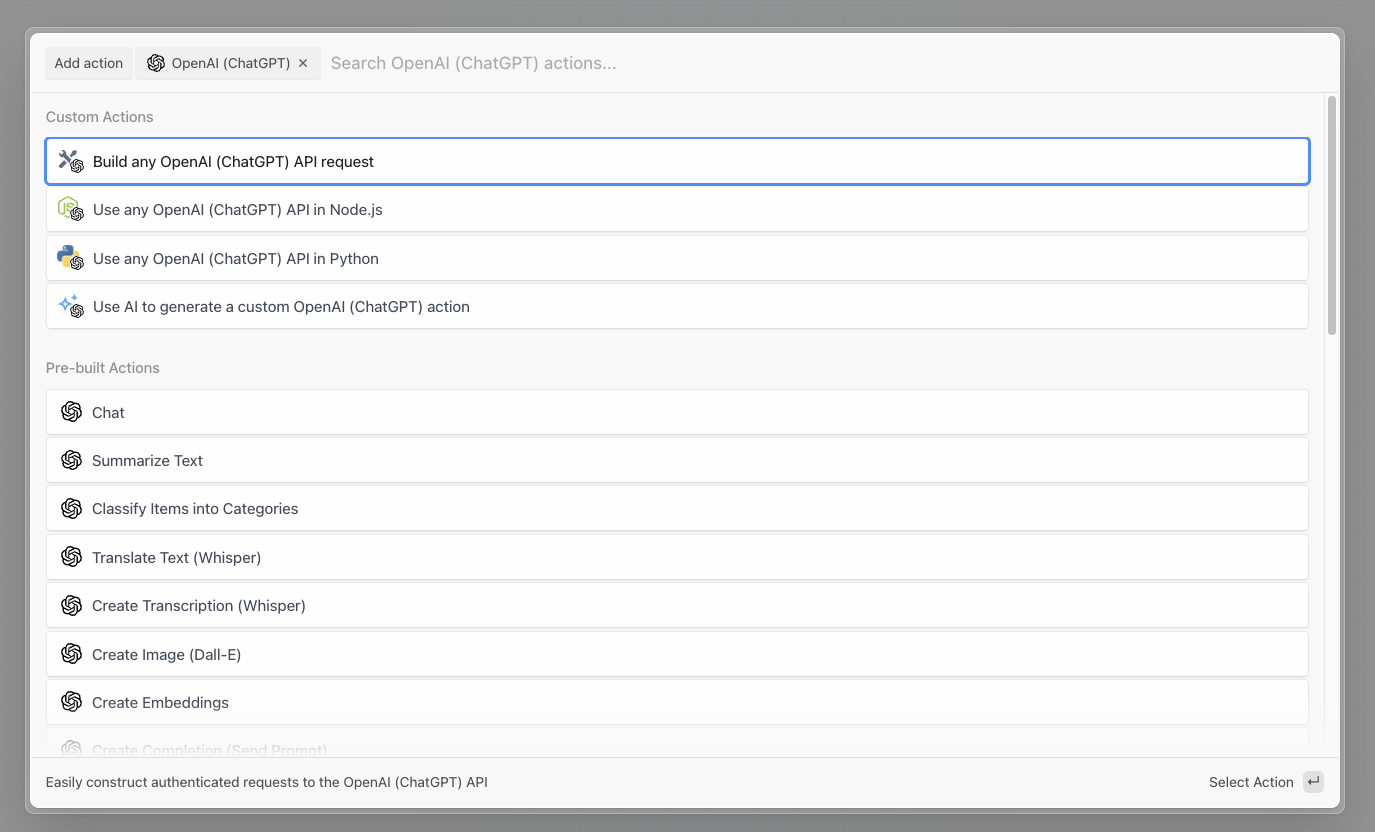
|
|
44
|
+
|
|
45
|
+
Then connect your OpenAI account to Pipedream. Open the [API keys section](https://platform.openai.com/api-keys) in the OpenAI dashboard.
|
|
46
|
+
|
|
47
|
+
Then select **Create a new secret key:**
|
|
48
|
+
|
|
49
|
+
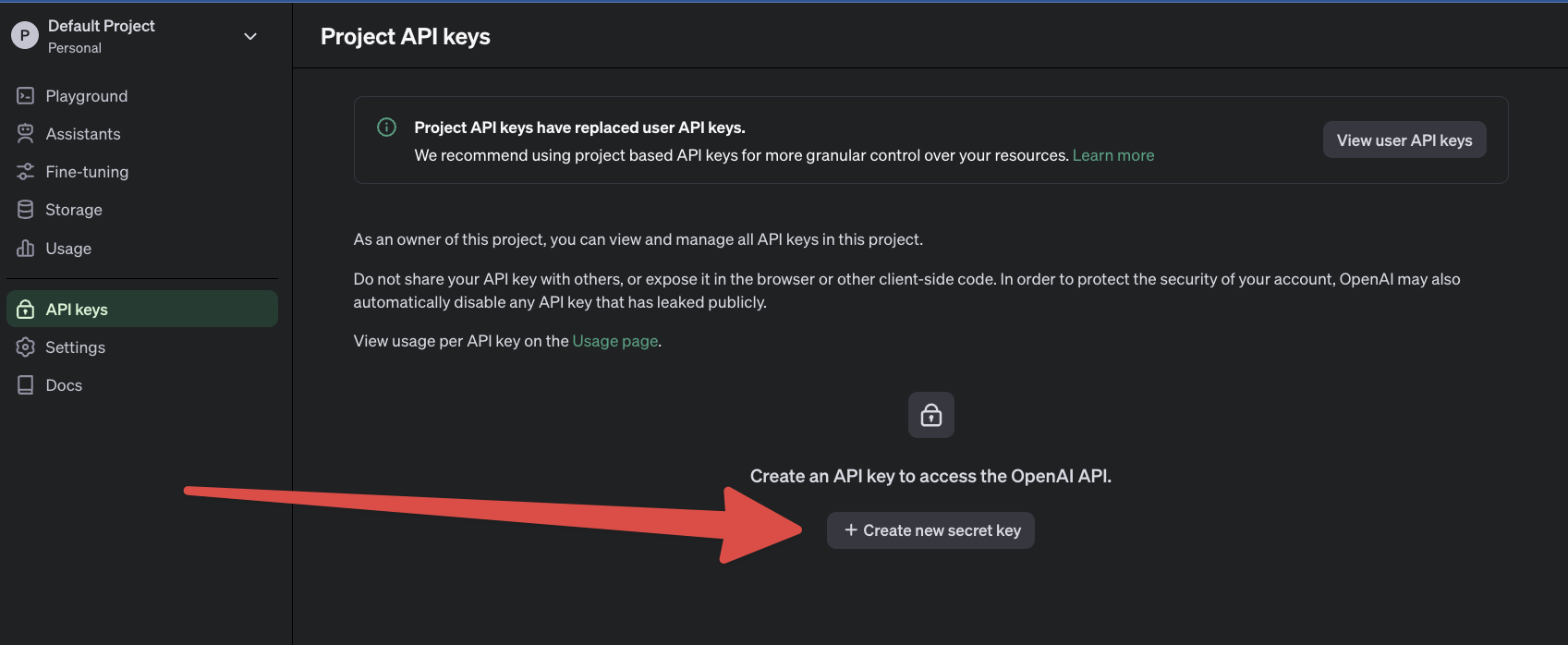
|
|
50
|
+
|
|
51
|
+
Name the key `Pipedream` and then save the API key within Pipedream. Now you’re all set to use pre-built actions like `Chat` or use your OpenAI API key directly in Node.js or Python code.
|
|
52
|
+
|
|
53
|
+
# Troubleshooting
|
|
54
|
+
|
|
55
|
+
## 401 - Invalid Authentication
|
|
56
|
+
|
|
57
|
+
---
|
|
58
|
+
|
|
59
|
+
Ensure the correct [API key](https://platform.openai.com/account/api-keys) and requesting organization are being used.
|
|
60
|
+
|
|
61
|
+
## 401 - Incorrect API key provided
|
|
62
|
+
|
|
63
|
+
---
|
|
64
|
+
|
|
65
|
+
Ensure the API key used is correct or [generate a new one](https://platform.openai.com/account/api-keys) and then reconnect it to Pipedream.
|
|
66
|
+
|
|
67
|
+
## 401 - You must be a member of an organization to use the API
|
|
68
|
+
|
|
69
|
+
Contact OpenAI to get added to a new organization or ask your organization manager to [invite you to an organization](https://platform.openai.com/account/team).
|
|
70
|
+
|
|
71
|
+
## 403 - Country, region, or territory not supported
|
|
72
|
+
|
|
73
|
+
You are accessing the API from an unsupported country, region, or territory.
|
|
74
|
+
|
|
75
|
+
## 429 - Rate limit reached for requests
|
|
76
|
+
|
|
77
|
+
---
|
|
78
|
+
|
|
79
|
+
You are sending requests too quickly. Pace your requests. Read the OpenAI [Rate limit guide](https://platform.openai.com/docs/guides/rate-limits). Use [Pipedream Concurrency and Throttling](https://pipedream.com/docs/workflows/concurrency-and-throttling) settings to control the frequency of API calls to OpenAI.
|
|
80
|
+
|
|
81
|
+
## 429 - You exceeded your current quota, please check your plan and billing details
|
|
82
|
+
|
|
83
|
+
You have run out of OpenAI credits or hit your maximum monthly spend. [Buy more OpenAI credits](https://platform.openai.com/account/billing) or learn how to [increase your OpenAI account limits](https://platform.openai.com/account/limits).
|
|
84
|
+
|
|
85
|
+
## 500 - The server had an error while processing your request
|
|
86
|
+
|
|
87
|
+
Retry your request after a brief wait and contact us if the issue persists. Check the [OpenAI status page](https://status.openai.com/).
|
|
88
|
+
|
|
89
|
+
## 503 - The engine is currently overloaded, please try again later
|
|
90
|
+
|
|
91
|
+
OpenAI’s servers are experiencing high amounts of traffic. Please retry your requests after a brief wait.
|
|
@@ -0,0 +1,131 @@
|
|
|
1
|
+
import openai from "../../openai.app.mjs";
|
|
2
|
+
import common from "../common/common-assistants.mjs";
|
|
3
|
+
import FormData from "form-data";
|
|
4
|
+
import fs from "fs";
|
|
5
|
+
|
|
6
|
+
export default {
|
|
7
|
+
...common,
|
|
8
|
+
key: "openai-analyze-image-content",
|
|
9
|
+
name: "Analyze Image Content",
|
|
10
|
+
description: "Send a message or question about an image and receive a response. [See the documentation](https://platform.openai.com/docs/api-reference/runs/createThreadAndRun)",
|
|
11
|
+
version: "0.0.1",
|
|
12
|
+
type: "action",
|
|
13
|
+
props: {
|
|
14
|
+
openai,
|
|
15
|
+
message: {
|
|
16
|
+
type: "string",
|
|
17
|
+
label: "Message",
|
|
18
|
+
description: "The message or question to send",
|
|
19
|
+
},
|
|
20
|
+
imageUrl: {
|
|
21
|
+
type: "string",
|
|
22
|
+
label: "Image URL",
|
|
23
|
+
description: "The URL of the image to analyze. Must be a supported image types: jpeg, jpg, png, gif, webp",
|
|
24
|
+
optional: true,
|
|
25
|
+
},
|
|
26
|
+
imageFileId: {
|
|
27
|
+
propDefinition: [
|
|
28
|
+
openai,
|
|
29
|
+
"fileId",
|
|
30
|
+
() => ({
|
|
31
|
+
purpose: "vision",
|
|
32
|
+
}),
|
|
33
|
+
],
|
|
34
|
+
optional: true,
|
|
35
|
+
},
|
|
36
|
+
filePath: {
|
|
37
|
+
type: "string",
|
|
38
|
+
label: "File Path",
|
|
39
|
+
description: "The path to a file in the `/tmp` directory. [See the documentation on working with files](https://pipedream.com/docs/code/nodejs/working-with-files/#writing-a-file-to-tmp)",
|
|
40
|
+
optional: true,
|
|
41
|
+
},
|
|
42
|
+
},
|
|
43
|
+
async run({ $ }) {
|
|
44
|
+
const { id: assistantId } = await this.openai.createAssistant({
|
|
45
|
+
$,
|
|
46
|
+
data: {
|
|
47
|
+
model: "gpt-4-vision-preview",
|
|
48
|
+
},
|
|
49
|
+
});
|
|
50
|
+
|
|
51
|
+
const data = {
|
|
52
|
+
assistant_id: assistantId,
|
|
53
|
+
thread: {
|
|
54
|
+
messages: [
|
|
55
|
+
{
|
|
56
|
+
role: "user",
|
|
57
|
+
content: [
|
|
58
|
+
{
|
|
59
|
+
type: "text",
|
|
60
|
+
text: this.message,
|
|
61
|
+
},
|
|
62
|
+
],
|
|
63
|
+
},
|
|
64
|
+
],
|
|
65
|
+
},
|
|
66
|
+
model: this.model,
|
|
67
|
+
};
|
|
68
|
+
if (this.imageUrl) {
|
|
69
|
+
data.thread.messages[0].content.push({
|
|
70
|
+
type: "image_url",
|
|
71
|
+
image_url: {
|
|
72
|
+
url: this.imageUrl,
|
|
73
|
+
},
|
|
74
|
+
});
|
|
75
|
+
}
|
|
76
|
+
if (this.imageFileId) {
|
|
77
|
+
data.thread.messages[0].content.push({
|
|
78
|
+
type: "image_file",
|
|
79
|
+
image_file: {
|
|
80
|
+
file_id: this.imageFileId,
|
|
81
|
+
},
|
|
82
|
+
});
|
|
83
|
+
}
|
|
84
|
+
if (this.filePath) {
|
|
85
|
+
const fileData = new FormData();
|
|
86
|
+
const content = fs.createReadStream(this.filePath.includes("tmp/")
|
|
87
|
+
? this.filePath
|
|
88
|
+
: `/tmp/${this.filePath}`);
|
|
89
|
+
fileData.append("purpose", "vision");
|
|
90
|
+
fileData.append("file", content);
|
|
91
|
+
|
|
92
|
+
const { id } = await this.openai.uploadFile({
|
|
93
|
+
$,
|
|
94
|
+
data: fileData,
|
|
95
|
+
headers: fileData.getHeaders(),
|
|
96
|
+
});
|
|
97
|
+
|
|
98
|
+
data.thread.messages[0].content.push({
|
|
99
|
+
type: "image_file",
|
|
100
|
+
image_file: {
|
|
101
|
+
file_id: id,
|
|
102
|
+
},
|
|
103
|
+
});
|
|
104
|
+
}
|
|
105
|
+
|
|
106
|
+
let run;
|
|
107
|
+
run = await this.openai.createThreadAndRun({
|
|
108
|
+
$,
|
|
109
|
+
data,
|
|
110
|
+
});
|
|
111
|
+
const runId = run.id;
|
|
112
|
+
const threadId = run.thread_id;
|
|
113
|
+
|
|
114
|
+
run = await this.pollRunUntilCompleted(run, threadId, runId, $);
|
|
115
|
+
|
|
116
|
+
// get response;
|
|
117
|
+
const { data: messages } = await this.openai.listMessages({
|
|
118
|
+
$,
|
|
119
|
+
threadId,
|
|
120
|
+
params: {
|
|
121
|
+
order: "desc",
|
|
122
|
+
},
|
|
123
|
+
});
|
|
124
|
+
const response = messages[0].content[0].text.value;
|
|
125
|
+
return {
|
|
126
|
+
response,
|
|
127
|
+
messages,
|
|
128
|
+
run,
|
|
129
|
+
};
|
|
130
|
+
},
|
|
131
|
+
};
|
|
@@ -4,7 +4,7 @@ export default {
|
|
|
4
4
|
key: "openai-cancel-run",
|
|
5
5
|
name: "Cancel Run (Assistants)",
|
|
6
6
|
description: "Cancels a run that is in progress. [See the documentation](https://platform.openai.com/docs/api-reference/runs/cancelRun)",
|
|
7
|
-
version: "0.0.
|
|
7
|
+
version: "0.0.7",
|
|
8
8
|
type: "action",
|
|
9
9
|
props: {
|
|
10
10
|
openai,
|
|
@@ -26,6 +26,7 @@ export default {
|
|
|
26
26
|
},
|
|
27
27
|
async run({ $ }) {
|
|
28
28
|
const response = await this.openai.cancelRun({
|
|
29
|
+
$,
|
|
29
30
|
threadId: this.threadId,
|
|
30
31
|
runId: this.runId,
|
|
31
32
|
});
|
package/actions/chat/chat.mjs
CHANGED
|
@@ -1,12 +1,13 @@
|
|
|
1
1
|
import openai from "../../openai.app.mjs";
|
|
2
2
|
import common from "../common/common.mjs";
|
|
3
|
+
import constants from "../../common/constants.mjs";
|
|
3
4
|
|
|
4
5
|
export default {
|
|
5
6
|
...common,
|
|
6
7
|
name: "Chat",
|
|
7
|
-
version: "0.1.
|
|
8
|
+
version: "0.1.10",
|
|
8
9
|
key: "openai-chat",
|
|
9
|
-
description: "The Chat API, using the `gpt-3.5-turbo` or `gpt-4` model. [See
|
|
10
|
+
description: "The Chat API, using the `gpt-3.5-turbo` or `gpt-4` model. [See the documentation](https://platform.openai.com/docs/api-reference/chat)",
|
|
10
11
|
type: "action",
|
|
11
12
|
props: {
|
|
12
13
|
openai,
|
|
@@ -43,10 +44,7 @@ export default {
|
|
|
43
44
|
type: "string",
|
|
44
45
|
label: "Response Format",
|
|
45
46
|
description: "Specify the format that the model must output. [Setting to `json_object` guarantees the message the model generates is valid JSON](https://platform.openai.com/docs/api-reference/chat/create#chat-create-response_format). Defaults to `text`",
|
|
46
|
-
options:
|
|
47
|
-
"text",
|
|
48
|
-
"json_object",
|
|
49
|
-
],
|
|
47
|
+
options: constants.CHAT_RESPONSE_FORMATS,
|
|
50
48
|
optional: true,
|
|
51
49
|
default: "text",
|
|
52
50
|
},
|
|
@@ -57,7 +55,7 @@ export default {
|
|
|
57
55
|
|
|
58
56
|
const response = await this.openai.createChatCompletion({
|
|
59
57
|
$,
|
|
60
|
-
args,
|
|
58
|
+
data: args,
|
|
61
59
|
});
|
|
62
60
|
|
|
63
61
|
if (response) {
|
|
@@ -0,0 +1,129 @@
|
|
|
1
|
+
import openai from "../../openai.app.mjs";
|
|
2
|
+
import common from "../common/common-assistants.mjs";
|
|
3
|
+
|
|
4
|
+
export default {
|
|
5
|
+
...common,
|
|
6
|
+
key: "openai-chat-with-assistant",
|
|
7
|
+
name: "Chat with Assistant",
|
|
8
|
+
description: "Sends a message and generates a response, storing the message history for a continuous conversation. [See the documentation](https://platform.openai.com/docs/api-reference/runs/createThreadAndRun)",
|
|
9
|
+
version: "0.0.1",
|
|
10
|
+
type: "action",
|
|
11
|
+
props: {
|
|
12
|
+
openai,
|
|
13
|
+
message: {
|
|
14
|
+
type: "string",
|
|
15
|
+
label: "Message",
|
|
16
|
+
description: "The message to send",
|
|
17
|
+
},
|
|
18
|
+
assistantId: {
|
|
19
|
+
propDefinition: [
|
|
20
|
+
openai,
|
|
21
|
+
"assistant",
|
|
22
|
+
],
|
|
23
|
+
description: "The assistant to use. Leave blank to create a new assistant",
|
|
24
|
+
optional: true,
|
|
25
|
+
},
|
|
26
|
+
name: {
|
|
27
|
+
propDefinition: [
|
|
28
|
+
openai,
|
|
29
|
+
"name",
|
|
30
|
+
],
|
|
31
|
+
},
|
|
32
|
+
instructions: {
|
|
33
|
+
propDefinition: [
|
|
34
|
+
openai,
|
|
35
|
+
"instructions",
|
|
36
|
+
],
|
|
37
|
+
},
|
|
38
|
+
model: {
|
|
39
|
+
propDefinition: [
|
|
40
|
+
openai,
|
|
41
|
+
"assistantModel",
|
|
42
|
+
],
|
|
43
|
+
optional: true,
|
|
44
|
+
default: "gpt-3.5-turbo",
|
|
45
|
+
},
|
|
46
|
+
threadId: {
|
|
47
|
+
propDefinition: [
|
|
48
|
+
openai,
|
|
49
|
+
"threadId",
|
|
50
|
+
],
|
|
51
|
+
description: "The unique identifier for the thread. Example: `thread_abc123`. Leave blank to create a new thread. To locate the thread ID, make sure your OpenAI Threads setting (Settings -> Organization/Personal -> General -> Features and capabilities -> Threads) is set to \"Visible to organization owners\" or \"Visible to everyone\". You can then access the list of threads and click on individual threads to reveal their IDs",
|
|
52
|
+
optional: true,
|
|
53
|
+
},
|
|
54
|
+
...common.props,
|
|
55
|
+
},
|
|
56
|
+
async run({ $ }) {
|
|
57
|
+
// create assistant if not provided
|
|
58
|
+
let assistantId = this.assistantId;
|
|
59
|
+
if (!assistantId) {
|
|
60
|
+
const { id: newAssistantId } = await this.openai.createAssistant({
|
|
61
|
+
$,
|
|
62
|
+
data: {
|
|
63
|
+
model: this.model,
|
|
64
|
+
name: this.name,
|
|
65
|
+
instructions: this.instructions,
|
|
66
|
+
tools: this.buildTools(),
|
|
67
|
+
tool_resources: this.buildToolResources(),
|
|
68
|
+
},
|
|
69
|
+
});
|
|
70
|
+
assistantId = newAssistantId;
|
|
71
|
+
}
|
|
72
|
+
|
|
73
|
+
// create and run thread if no thread is provided
|
|
74
|
+
let threadId = this.threadId;
|
|
75
|
+
let run;
|
|
76
|
+
if (!threadId) {
|
|
77
|
+
run = await this.openai.createThreadAndRun({
|
|
78
|
+
$,
|
|
79
|
+
data: {
|
|
80
|
+
assistant_id: assistantId,
|
|
81
|
+
thread: {
|
|
82
|
+
messages: [
|
|
83
|
+
{
|
|
84
|
+
role: "user",
|
|
85
|
+
content: this.message,
|
|
86
|
+
},
|
|
87
|
+
],
|
|
88
|
+
},
|
|
89
|
+
model: this.model,
|
|
90
|
+
instructions: this.instructions,
|
|
91
|
+
tools: this.buildTools(),
|
|
92
|
+
tool_resources: this.buildToolResources(),
|
|
93
|
+
},
|
|
94
|
+
});
|
|
95
|
+
threadId = run.thread_id;
|
|
96
|
+
} else {
|
|
97
|
+
// create run for thread if threadId is provided
|
|
98
|
+
run = await this.openai.createRun({
|
|
99
|
+
$,
|
|
100
|
+
threadId: this.threadId,
|
|
101
|
+
data: {
|
|
102
|
+
assistant_id: assistantId,
|
|
103
|
+
model: this.model,
|
|
104
|
+
instructions: this.instructions,
|
|
105
|
+
tools: this.buildTools(),
|
|
106
|
+
tool_resources: this.buildToolResources(),
|
|
107
|
+
},
|
|
108
|
+
});
|
|
109
|
+
}
|
|
110
|
+
const runId = run.id;
|
|
111
|
+
|
|
112
|
+
run = await this.pollRunUntilCompleted(run, threadId, runId, $);
|
|
113
|
+
|
|
114
|
+
// get response;
|
|
115
|
+
const { data: messages } = await this.openai.listMessages({
|
|
116
|
+
$,
|
|
117
|
+
threadId,
|
|
118
|
+
params: {
|
|
119
|
+
order: "desc",
|
|
120
|
+
},
|
|
121
|
+
});
|
|
122
|
+
const response = messages[0].content[0].text.value;
|
|
123
|
+
return {
|
|
124
|
+
response,
|
|
125
|
+
messages,
|
|
126
|
+
run,
|
|
127
|
+
};
|
|
128
|
+
},
|
|
129
|
+
};
|
|
@@ -3,12 +3,22 @@ import common from "../common/common-helper.mjs";
|
|
|
3
3
|
export default {
|
|
4
4
|
...common,
|
|
5
5
|
name: "Classify Items into Categories",
|
|
6
|
-
version: "0.0.
|
|
6
|
+
version: "0.0.11",
|
|
7
7
|
key: "openai-classify-items-into-categories",
|
|
8
|
-
description: "Classify items into specific categories using the Chat API",
|
|
8
|
+
description: "Classify items into specific categories using the Chat API. [See the documentation](https://platform.openai.com/docs/api-reference/chat)",
|
|
9
9
|
type: "action",
|
|
10
10
|
props: {
|
|
11
11
|
...common.props,
|
|
12
|
+
info: {
|
|
13
|
+
type: "alert",
|
|
14
|
+
alertType: "info",
|
|
15
|
+
content: `Provide a list of **items** and a list of **categories**. The output will contain an array of objects, each with properties \`item\` and \`category\`
|
|
16
|
+
\nExample:
|
|
17
|
+
\nIf **Categories** is \`["people", "pets"]\`, and **Items** is \`["dog", "George Washington"]\`
|
|
18
|
+
\n The output will contain the following categorizations:
|
|
19
|
+
\n \`[{"item":"dog","category":"pets"},{"item":"George Washington","category":"people"}]\`
|
|
20
|
+
`,
|
|
21
|
+
},
|
|
12
22
|
items: {
|
|
13
23
|
label: "Items",
|
|
14
24
|
description: "Items to categorize",
|
|
@@ -40,17 +50,24 @@ export default {
|
|
|
40
50
|
if (!messages || !response) {
|
|
41
51
|
throw new Error("Invalid API output, please reach out to https://pipedream.com/support");
|
|
42
52
|
}
|
|
43
|
-
const
|
|
44
|
-
|
|
45
|
-
|
|
46
|
-
|
|
47
|
-
|
|
48
|
-
|
|
53
|
+
const responses = response.choices?.map(({ message }) => message.content);
|
|
54
|
+
const categorizations = [];
|
|
55
|
+
for (const response of responses) {
|
|
56
|
+
try {
|
|
57
|
+
categorizations.push(JSON.parse(response));
|
|
58
|
+
} catch (err) {
|
|
59
|
+
console.log("Failed to parse output, assistant returned malformed JSON");
|
|
60
|
+
}
|
|
49
61
|
}
|
|
50
|
-
|
|
51
|
-
categorizations,
|
|
62
|
+
const output = {
|
|
52
63
|
messages,
|
|
53
64
|
};
|
|
65
|
+
if (this.n > 1) {
|
|
66
|
+
output.categorizations = categorizations;
|
|
67
|
+
} else {
|
|
68
|
+
output.categorizations = categorizations[0];
|
|
69
|
+
}
|
|
70
|
+
return output;
|
|
54
71
|
},
|
|
55
72
|
},
|
|
56
73
|
};
|
|
@@ -0,0 +1,128 @@
|
|
|
1
|
+
import constants from "../../common/constants.mjs";
|
|
2
|
+
|
|
3
|
+
export default {
|
|
4
|
+
props: {
|
|
5
|
+
toolTypes: {
|
|
6
|
+
type: "string[]",
|
|
7
|
+
label: "Tool Types",
|
|
8
|
+
description: "The types of tools to enable on the assistant",
|
|
9
|
+
options: constants.TOOL_TYPES,
|
|
10
|
+
optional: true,
|
|
11
|
+
reloadProps: true,
|
|
12
|
+
},
|
|
13
|
+
},
|
|
14
|
+
async additionalProps() {
|
|
15
|
+
const props = {};
|
|
16
|
+
if (!this.toolTypes?.length) {
|
|
17
|
+
return props;
|
|
18
|
+
}
|
|
19
|
+
return this.getToolProps();
|
|
20
|
+
},
|
|
21
|
+
methods: {
|
|
22
|
+
async getToolProps() {
|
|
23
|
+
const props = {};
|
|
24
|
+
if (this.toolTypes.includes("code_interpreter")) {
|
|
25
|
+
props.fileIds = {
|
|
26
|
+
type: "string[]",
|
|
27
|
+
label: "File IDs",
|
|
28
|
+
description: "List of file IDs to attach to the message",
|
|
29
|
+
optional: true,
|
|
30
|
+
options: async () => {
|
|
31
|
+
const { data } = await this.openai.listFiles({
|
|
32
|
+
purpose: "assistants",
|
|
33
|
+
});
|
|
34
|
+
return data?.map(({
|
|
35
|
+
filename, id,
|
|
36
|
+
}) => ({
|
|
37
|
+
label: filename,
|
|
38
|
+
value: id,
|
|
39
|
+
})) || [];
|
|
40
|
+
},
|
|
41
|
+
};
|
|
42
|
+
}
|
|
43
|
+
if (this.toolTypes.includes("file_search")) {
|
|
44
|
+
props.vectorStoreIds = {
|
|
45
|
+
type: "string[]",
|
|
46
|
+
label: "Vector Store IDs",
|
|
47
|
+
description: "The ID of the vector store to attach to this assistant",
|
|
48
|
+
optional: true,
|
|
49
|
+
options: async () => {
|
|
50
|
+
const { data } = await this.openai.listVectorStores();
|
|
51
|
+
return data?.map(({
|
|
52
|
+
name, id,
|
|
53
|
+
}) => ({
|
|
54
|
+
label: name,
|
|
55
|
+
value: id,
|
|
56
|
+
})) || [];
|
|
57
|
+
},
|
|
58
|
+
};
|
|
59
|
+
}
|
|
60
|
+
if (this.toolTypes.includes("function")) {
|
|
61
|
+
props.functionName = {
|
|
62
|
+
type: "string",
|
|
63
|
+
label: "Function Name",
|
|
64
|
+
description: "The name of the function to be called. Must be a-z, A-Z, 0-9, or contain underscores and dashes, with a maximum length of 64.",
|
|
65
|
+
};
|
|
66
|
+
props.functionDescription = {
|
|
67
|
+
type: "string",
|
|
68
|
+
label: "Function Description",
|
|
69
|
+
description: "A description of what the function does, used by the model to choose when and how to call the function.",
|
|
70
|
+
optional: true,
|
|
71
|
+
};
|
|
72
|
+
props.functionParameters = {
|
|
73
|
+
type: "object",
|
|
74
|
+
label: "Function Parameters",
|
|
75
|
+
description: "The parameters the functions accepts, described as a JSON Schema object. See the [guide](https://platform.openai.com/docs/guides/text-generation/function-calling) for examples, and the [JSON Schema reference](https://json-schema.org/understanding-json-schema/) for documentation about the format.",
|
|
76
|
+
optional: true,
|
|
77
|
+
};
|
|
78
|
+
}
|
|
79
|
+
return props;
|
|
80
|
+
},
|
|
81
|
+
buildTools() {
|
|
82
|
+
const tools = this.toolTypes?.filter((toolType) => toolType !== "function")?.map((toolType) => ({
|
|
83
|
+
type: toolType,
|
|
84
|
+
})) || [];
|
|
85
|
+
if (this.toolTypes?.includes("function")) {
|
|
86
|
+
tools.push({
|
|
87
|
+
type: "function",
|
|
88
|
+
function: {
|
|
89
|
+
name: this.functionName,
|
|
90
|
+
description: this.functionDescription,
|
|
91
|
+
parameters: this.functionParameters,
|
|
92
|
+
},
|
|
93
|
+
});
|
|
94
|
+
}
|
|
95
|
+
return tools.length
|
|
96
|
+
? tools
|
|
97
|
+
: undefined;
|
|
98
|
+
},
|
|
99
|
+
buildToolResources() {
|
|
100
|
+
const toolResources = {};
|
|
101
|
+
if (this.toolTypes?.includes("code_interpreter") && this.fileIds?.length) {
|
|
102
|
+
toolResources.code_interpreter = {
|
|
103
|
+
file_ids: this.fileIds,
|
|
104
|
+
};
|
|
105
|
+
}
|
|
106
|
+
if (this.toolTypes?.includes("file_search") && this.vectorStoreIds?.length) {
|
|
107
|
+
toolResources.file_search = {
|
|
108
|
+
vector_store_ids: this.vectorStoreIds,
|
|
109
|
+
};
|
|
110
|
+
}
|
|
111
|
+
return Object.keys(toolResources).length
|
|
112
|
+
? toolResources
|
|
113
|
+
: undefined;
|
|
114
|
+
},
|
|
115
|
+
async pollRunUntilCompleted(run, threadId, runId, $ = this) {
|
|
116
|
+
const timer = (ms) => new Promise((res) => setTimeout(res, ms));
|
|
117
|
+
while (run.status === "queued" || run.status === "in_progress") {
|
|
118
|
+
run = await this.openai.retrieveRun({
|
|
119
|
+
$,
|
|
120
|
+
threadId,
|
|
121
|
+
runId,
|
|
122
|
+
});
|
|
123
|
+
await timer(3000);
|
|
124
|
+
}
|
|
125
|
+
return run;
|
|
126
|
+
},
|
|
127
|
+
},
|
|
128
|
+
};
|
|
@@ -5,6 +5,13 @@ export default {
|
|
|
5
5
|
...common,
|
|
6
6
|
props: {
|
|
7
7
|
openai,
|
|
8
|
+
modelId: {
|
|
9
|
+
propDefinition: [
|
|
10
|
+
openai,
|
|
11
|
+
"chatCompletionModelId",
|
|
12
|
+
],
|
|
13
|
+
description: "The ID of the model to use for chat completions",
|
|
14
|
+
},
|
|
8
15
|
...common.props,
|
|
9
16
|
},
|
|
10
17
|
methods: {
|
|
@@ -33,14 +40,14 @@ export default {
|
|
|
33
40
|
content: this.userMessage(),
|
|
34
41
|
},
|
|
35
42
|
];
|
|
36
|
-
const
|
|
43
|
+
const data = {
|
|
37
44
|
...this._getCommonArgs(),
|
|
38
|
-
model:
|
|
45
|
+
model: this.modelId,
|
|
39
46
|
messages,
|
|
40
47
|
};
|
|
41
48
|
const response = await this.openai.createChatCompletion({
|
|
42
49
|
$,
|
|
43
|
-
|
|
50
|
+
data,
|
|
44
51
|
});
|
|
45
52
|
|
|
46
53
|
if (this.summary() && response) {
|
|
@@ -2,10 +2,10 @@ import fs from "fs";
|
|
|
2
2
|
import openai from "../../openai.app.mjs";
|
|
3
3
|
|
|
4
4
|
export default {
|
|
5
|
-
key: "openai-
|
|
6
|
-
name: "
|
|
5
|
+
key: "openai-convert-text-to-speech",
|
|
6
|
+
name: "Convert Text to Speech (TTS)",
|
|
7
7
|
description: "Generates audio from the input text. [See the documentation](https://platform.openai.com/docs/api-reference/audio/createSpeech)",
|
|
8
|
-
version: "0.0.
|
|
8
|
+
version: "0.0.6",
|
|
9
9
|
type: "action",
|
|
10
10
|
props: {
|
|
11
11
|
openai,
|