@perpetio/redline 2.1.1
This diff represents the content of publicly available package versions that have been released to one of the supported registries. The information contained in this diff is provided for informational purposes only and reflects changes between package versions as they appear in their respective public registries.
- package/LICENSE +56 -0
- package/README.md +763 -0
- package/bin/redline-mcp.cjs +30 -0
- package/docs/images/npm-banner.jpg +0 -0
- package/docs/images/npm-review.png +0 -0
- package/examples/plain-html.html +30 -0
- package/examples/playground.html +101 -0
- package/examples/react.jsx +23 -0
- package/examples/vue.vue +25 -0
- package/package.json +71 -0
- package/redline.d.cts +2 -0
- package/redline.d.mts +280 -0
- package/redline.d.ts +279 -0
- package/redline.js +2 -0
- package/redline.mjs +753 -0
package/README.md
ADDED
|
@@ -0,0 +1,763 @@
|
|
|
1
|
+
# Redline
|
|
2
|
+
|
|
3
|
+
[](https://redlinejs.com)
|
|
4
|
+
|
|
5
|
+
**Point at the problem. Your agent ships the fix.**
|
|
6
|
+
|
|
7
|
+
Redline adds visual feedback to any website. Highlight text, circle a detail,
|
|
8
|
+
or pin a comment to the exact element. Share the feedback with your team, copy
|
|
9
|
+
it into your coding agent, or connect the included MCP server so the agent can
|
|
10
|
+
read, reply, and resolve comments directly.
|
|
11
|
+
|
|
12
|
+
**No runtime dependencies · TypeScript included · No account needed for local reviews**
|
|
13
|
+
|
|
14
|
+
[Try the live demo](https://redlinejs.com) · [Quick start](#quick-start) ·
|
|
15
|
+
[Examples](#examples) · [Connect your agent](#ai-agents-mcp) ·
|
|
16
|
+
[Configuration](#configuration) · [API](#javascript-api)
|
|
17
|
+
|
|
18
|
+
## Quick start
|
|
19
|
+
|
|
20
|
+
### Install from npm
|
|
21
|
+
|
|
22
|
+
```bash
|
|
23
|
+
npm install @perpetio/redline
|
|
24
|
+
```
|
|
25
|
+
|
|
26
|
+
Start Redline after your page has rendered:
|
|
27
|
+
|
|
28
|
+
```js
|
|
29
|
+
import Redline from '@perpetio/redline';
|
|
30
|
+
|
|
31
|
+
Redline.init({
|
|
32
|
+
project: 'my-website',
|
|
33
|
+
startOpen: true,
|
|
34
|
+
spa: true,
|
|
35
|
+
});
|
|
36
|
+
|
|
37
|
+
// On unmount or hot reload, call Redline.destroy().
|
|
38
|
+
```
|
|
39
|
+
|
|
40
|
+
The review toolbar appears on your page. Press `P` and click an element to
|
|
41
|
+
leave your first comment. Without `startOpen: true`, Redline starts as a small
|
|
42
|
+
**Review** button. Use `spa: true` to keep separate comments for each route.
|
|
43
|
+
|
|
44
|
+
### Or add one script tag
|
|
45
|
+
|
|
46
|
+
No bundler needed. Paste this before `</body>`:
|
|
47
|
+
|
|
48
|
+
```html
|
|
49
|
+
<script
|
|
50
|
+
src="https://cdn.jsdelivr.net/npm/@perpetio/redline@2.1.1/redline.js"
|
|
51
|
+
data-project="my-website"
|
|
52
|
+
data-start-open="true"
|
|
53
|
+
defer
|
|
54
|
+
></script>
|
|
55
|
+
```
|
|
56
|
+
|
|
57
|
+
That's the whole installation. Comments stay in the reviewer's browser until
|
|
58
|
+
they export or send them. [Redline Cloud](https://app.redlinejs.com) is optional
|
|
59
|
+
when you want a shared review with your team and clients.
|
|
60
|
+
|
|
61
|
+
To self-host, download [redline.js](https://cdn.jsdelivr.net/npm/@perpetio/redline@2.1.1/redline.js)
|
|
62
|
+
and use your own script URL. The same package is also available on
|
|
63
|
+
[unpkg](https://unpkg.com/@perpetio/redline@2.1.1/redline.js).
|
|
64
|
+
|
|
65
|
+
## From feedback to a fix
|
|
66
|
+
|
|
67
|
+
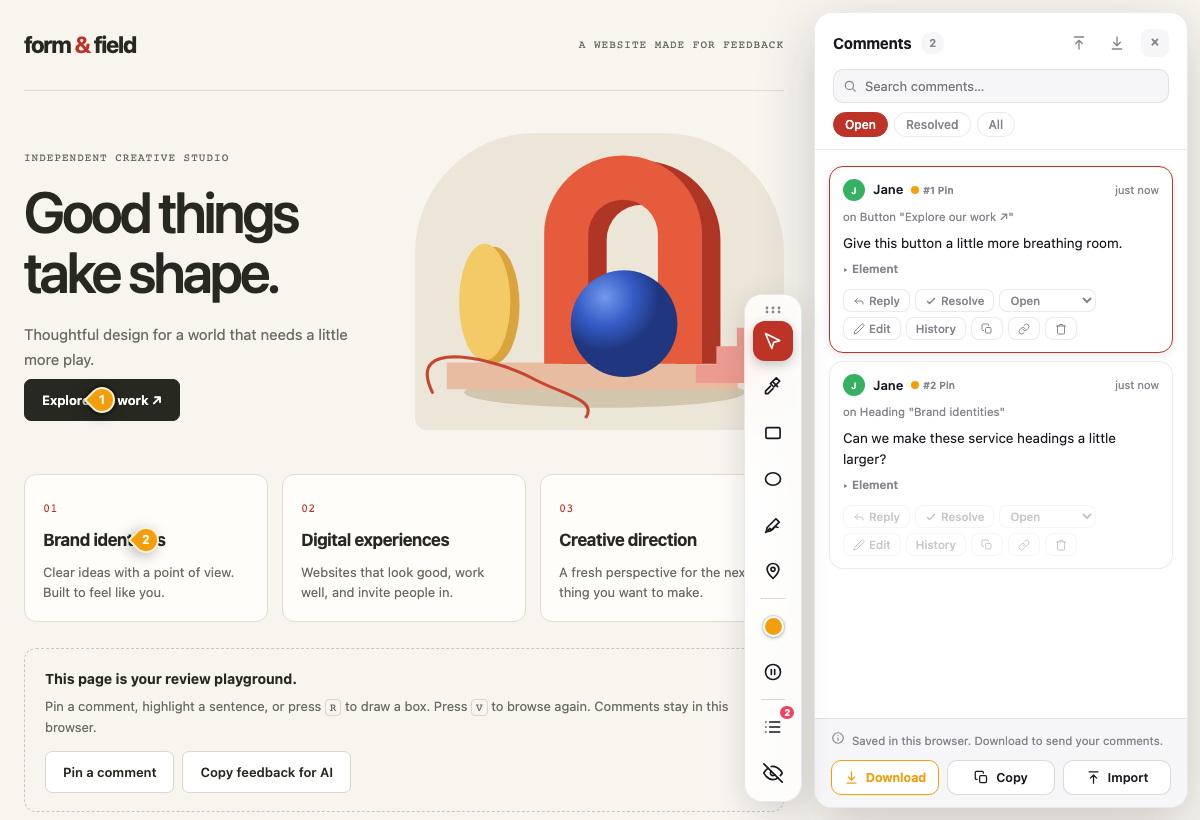
|
|
68
|
+
|
|
69
|
+
*An actual Redline review of the included playground. The comments are sample feedback.*
|
|
70
|
+
|
|
71
|
+
| You do this | Redline carries the context |
|
|
72
|
+
| --- | --- |
|
|
73
|
+
| **Point at what needs changing.** Highlight text, draw a box, or pin a comment. | The element's label, selector, surrounding heading, position, and styles travel with the note. |
|
|
74
|
+
| **Hand it to your coding agent.** Press `M` to copy Markdown, or connect over MCP. | In React, Vue, and Svelte development builds, the note can also name the component and source file. |
|
|
75
|
+
| **Close the loop.** Your agent replies and updates the comment's status over MCP. | Reviewers see the reply and the resolved status on the same page. |
|
|
76
|
+
|
|
77
|
+
## Examples
|
|
78
|
+
|
|
79
|
+
The package includes a working playground and small integrations you can copy.
|
|
80
|
+
|
|
81
|
+
| Start here | What you get |
|
|
82
|
+
| --- | --- |
|
|
83
|
+
| [Review playground](https://cdn.jsdelivr.net/npm/@perpetio/redline@2.1.1/examples/playground.html) | A complete HTML page to annotate, with **Pin a comment** and **Copy feedback for AI** buttons. |
|
|
84
|
+
| [Minimal HTML](https://cdn.jsdelivr.net/npm/@perpetio/redline@2.1.1/examples/plain-html.html) | A small page with one CDN script tag. |
|
|
85
|
+
| [React / Next.js component](https://cdn.jsdelivr.net/npm/@perpetio/redline@2.1.1/examples/react.jsx) | Mount once, follow route changes, and clean up on unmount. |
|
|
86
|
+
| [Vue 3 component](https://cdn.jsdelivr.net/npm/@perpetio/redline@2.1.1/examples/vue.vue) | The same setup using `onMounted` and `onUnmounted`. |
|
|
87
|
+
|
|
88
|
+
To run the playground after installing the package:
|
|
89
|
+
|
|
90
|
+
```bash
|
|
91
|
+
npx serve node_modules/@perpetio/redline --listen 4200
|
|
92
|
+
```
|
|
93
|
+
|
|
94
|
+
Open **http://localhost:4200/examples/playground.html**. This serves the installed
|
|
95
|
+
package locally; no API key, build step, or review backend is required. The links
|
|
96
|
+
above show the example source; use the local server to run the playground.
|
|
97
|
+
|
|
98
|
+
### Add your own feedback button
|
|
99
|
+
|
|
100
|
+
The public API also lets you connect review tools to your app's own controls:
|
|
101
|
+
|
|
102
|
+
```js
|
|
103
|
+
import Redline from '@perpetio/redline';
|
|
104
|
+
|
|
105
|
+
Redline.init({ project: 'my-website', spa: true });
|
|
106
|
+
|
|
107
|
+
// Call from your button's click handler:
|
|
108
|
+
function leaveFeedback() {
|
|
109
|
+
Redline.setTool('pin');
|
|
110
|
+
}
|
|
111
|
+
|
|
112
|
+
// Read the open comments as Markdown for a coding agent:
|
|
113
|
+
function getFeedbackForAgent() {
|
|
114
|
+
return Redline.markdown({ detail: 'detailed' });
|
|
115
|
+
}
|
|
116
|
+
```
|
|
117
|
+
|
|
118
|
+
See [framework integration](#framework-integration) for React, Next.js, Vue,
|
|
119
|
+
Svelte, Angular, WordPress, and other sites.
|
|
120
|
+
|
|
121
|
+
---
|
|
122
|
+
|
|
123
|
+
## Why Redline?
|
|
124
|
+
|
|
125
|
+
- **One import or script tag.** No runtime dependencies, framework requirement, or account for local reviews.
|
|
126
|
+
- **Useful context for coding agents.** Copy Markdown with element details, or use MCP to read, reply, and resolve feedback.
|
|
127
|
+
- **Works everywhere.** Plain HTML, React, Vue, Svelte, WordPress, Webflow,
|
|
128
|
+
Shopify, static sites — anything that renders HTML in a browser.
|
|
129
|
+
- **Local-first & private.** Comments stay on the reviewer's device until they
|
|
130
|
+
explicitly export or send feedback to an endpoint you configure.
|
|
131
|
+
- **Portable.** Reviewers export their feedback as JSON and send it to you; you
|
|
132
|
+
import it with one click and see every note in place.
|
|
133
|
+
- **Polished UI.** A floating toolbar, a Figma-style comments panel, light/dark
|
|
134
|
+
themes that auto-adapt to your page, and full keyboard shortcuts.
|
|
135
|
+
- **Dependency-free.** Vanilla JavaScript with no runtime dependencies.
|
|
136
|
+
|
|
137
|
+
---
|
|
138
|
+
|
|
139
|
+
## Features
|
|
140
|
+
|
|
141
|
+
| Tool | What it does |
|
|
142
|
+
|------|--------------|
|
|
143
|
+
| ✏️ **Highlight** | Select any text to highlight and comment on it |
|
|
144
|
+
| ▭ **Rectangle** | Draw a box around any region |
|
|
145
|
+
| ◯ **Circle** | Circle anything that needs attention |
|
|
146
|
+
| 📍 **Pin** | Drop a point marker anywhere |
|
|
147
|
+
| ⧉ **Several elements** | One comment on up to 20 elements: Shift+click them with the Pin tool, or turn on **Select several**, then **Comment on N elements** |
|
|
148
|
+
| 〰️ **Freehand** | Sketch directly on the page |
|
|
149
|
+
| ➕ **Section note** | Hover any paragraph/heading for a margin comment button |
|
|
150
|
+
| ⏸ **Freeze motion** | Pause CSS animations, transitions, Web Animations and video to comment on a moving page (`F`). Not frozen: JavaScript loops (`requestAnimationFrame`, GSAP, canvas), content inside shadow roots, content inside iframes (same-origin ones as well as cross-origin YouTube and Vimeo embeds), SVG SMIL animations, and animated GIF and WebP images. Freezing is refused while the tools are hidden. |
|
|
151
|
+
| ⠿ **Draggable toolbar** | Drag the grip to move the toolbar; it remembers the spot. With the grip focused, arrow keys move it, Shift moves it further, and Home resets it. Double-click the grip to reset it too. |
|
|
152
|
+
|
|
153
|
+
Plus: threaded replies, resolve/reopen, search & filter, deep-links to a single
|
|
154
|
+
comment (`#an=<id>`), an "off" mode that collapses to a small launcher, and a
|
|
155
|
+
**Download / Copy / Import** round-trip for sharing. A built-in
|
|
156
|
+
[MCP server](#ai-agents-mcp) lets your coding agent read, answer and resolve
|
|
157
|
+
the comments itself.
|
|
158
|
+
|
|
159
|
+
### Comment on several elements
|
|
160
|
+
|
|
161
|
+
For notes like "these three cards have different padding":
|
|
162
|
+
|
|
163
|
+
1. Press `P` for the Pin tool.
|
|
164
|
+
2. Shift+click each element. On a touch screen, turn on **Select several** in
|
|
165
|
+
the hint at the top and tap them. Picking an element again drops it.
|
|
166
|
+
3. Click **Comment on N elements** in the bar at the bottom, or press Enter.
|
|
167
|
+
|
|
168
|
+
The comment gets one marker, on the first element. While it is open or
|
|
169
|
+
hovered, every element is outlined with its number. Its card lists the
|
|
170
|
+
elements; click one to scroll to it. Esc clears the selection, and a second
|
|
171
|
+
Esc leaves the tool.
|
|
172
|
+
|
|
173
|
+
With a review backend, these comments need one that knows the `group` type:
|
|
174
|
+
the reference server from this release on. An older server answers `422`,
|
|
175
|
+
and the comment stays in this browser; a toast says so.
|
|
176
|
+
|
|
177
|
+
### Shadow DOM and iframes
|
|
178
|
+
|
|
179
|
+
Annotations reach into open shadow roots and same-origin iframes. Each shadow
|
|
180
|
+
root or iframe adds a segment to the selector, joined with ` >>> `:
|
|
181
|
+
|
|
182
|
+
```
|
|
183
|
+
#app-shell >>> div.shell > x-panel >>> button[aria-label="Save"]
|
|
184
|
+
#checkout-frame >>> #pay-button
|
|
185
|
+
```
|
|
186
|
+
|
|
187
|
+
Each segment is looked up inside the shadow root or iframe the previous one
|
|
188
|
+
found. The markers stay in your page and follow the iframe when it scrolls,
|
|
189
|
+
reloads or changes. A marker whose element is scrolled out of the iframe's
|
|
190
|
+
view is hidden until it scrolls back; opening its comment scrolls the iframe
|
|
191
|
+
to it. Versions before 1.6 don't understand ` >>> `: they may show
|
|
192
|
+
these comments as missing their anchor, or re-anchor one by its name to a
|
|
193
|
+
matching element in the page's light DOM.
|
|
194
|
+
|
|
195
|
+
| Where | Pin, rectangle, circle, freehand, several elements | Section note | Text highlight |
|
|
196
|
+
|-------|-----|-----|-----|
|
|
197
|
+
| Open shadow root | yes | yes | no |
|
|
198
|
+
| Same-origin iframe (nested up to 3 deep) | yes | no | no |
|
|
199
|
+
| Closed shadow root | the host element | the host's block | no |
|
|
200
|
+
| Cross-origin iframe | the `<iframe>` element | no | no |
|
|
201
|
+
|
|
202
|
+
Limits:
|
|
203
|
+
|
|
204
|
+
- No text highlights inside shadow roots or iframes.
|
|
205
|
+
- No section notes inside iframes.
|
|
206
|
+
- A cross-origin iframe's contents can't be reached. While a drawing tool is
|
|
207
|
+
on, a transparent shield over the frame takes the click, so the pin or shape
|
|
208
|
+
lands on the `<iframe>` element itself. Page content drawn over the frame,
|
|
209
|
+
such as a fixed header, still takes its own clicks.
|
|
210
|
+
- Shortcuts aren't seen while focus is inside a cross-origin iframe.
|
|
211
|
+
- An iframe's padding, transforms and zoom aren't accounted for, so markers
|
|
212
|
+
are off in a scaled frame (a device preview, for example).
|
|
213
|
+
- A closed shadow root can't be looked into, so a comment there is on its
|
|
214
|
+
host.
|
|
215
|
+
- Iframes inside shadow roots aren't found.
|
|
216
|
+
|
|
217
|
+
---
|
|
218
|
+
|
|
219
|
+
## Configuration
|
|
220
|
+
|
|
221
|
+
Configure with `data-` attributes on the script tag — all optional:
|
|
222
|
+
|
|
223
|
+
```html
|
|
224
|
+
<script
|
|
225
|
+
src="https://cdn.jsdelivr.net/npm/@perpetio/redline/redline.js"
|
|
226
|
+
data-project="marketing-site"
|
|
227
|
+
data-accent="#bd3426"
|
|
228
|
+
data-theme="auto"
|
|
229
|
+
data-position="bottom-right"
|
|
230
|
+
data-start-open="true"
|
|
231
|
+
data-note="Focus on the hero copy and pricing — flag anything off-brand."
|
|
232
|
+
data-spa="true"
|
|
233
|
+
data-post-url="https://feedback.example.com/feedback"
|
|
234
|
+
data-share-email="https://github.com/org/repo/issues/new?title=Review%20{page}&body={summary}"
|
|
235
|
+
defer
|
|
236
|
+
></script>
|
|
237
|
+
```
|
|
238
|
+
|
|
239
|
+
| Attribute | Default | Description |
|
|
240
|
+
|-----------|---------|-------------|
|
|
241
|
+
| `data-project` | `""` | Namespace for stored comments. Keep separate sites apart. |
|
|
242
|
+
| `data-page` | `location.pathname` | Page key comments are grouped under. |
|
|
243
|
+
| `data-accent` | — | Brand color for primary buttons & the active tool. |
|
|
244
|
+
| `data-theme` | `auto` | `light`, `dark`, or `auto` (sniffs your page background). |
|
|
245
|
+
| `data-position` | `bottom-right` | `bottom-right` or `bottom-left`. |
|
|
246
|
+
| `data-blocks` | sensible default | CSS selector for "section note" (+) targets. |
|
|
247
|
+
| `data-start-open` | `false` | Set to `true` to show the review toolbar immediately instead of the collapsed Review pill. |
|
|
248
|
+
| `data-note` | — | Author's note to reviewers — what should be reviewed. Shown when they start and atop the comments panel. |
|
|
249
|
+
| `data-spa` | `false` | Watch `pushState`, `replaceState`, and `popstate` for page changes. |
|
|
250
|
+
| `data-post-url` | — | URL that receives an explicit HTTP POST of the current page's export JSON. Adds **Send feedback**. |
|
|
251
|
+
| `data-share-email` | — | Email address or URL template for **Share**. `{page}`, `{count}`, and `{summary}` become URL-encoded values for a prefilled GitHub, GitLab, Jira, or other issue URL. |
|
|
252
|
+
| `data-capture` | `styles,components` | Extras each new comment records besides the element description: `styles`, `components`, both, or `off`. Component and source info only exists in development builds. |
|
|
253
|
+
| `data-editor-url` | — | "Open in editor" link template, e.g. `vscode://file/Users/me/app/{path}:{line}`. `{path}`, `{line}`, `{column}` come from the comment's source file. |
|
|
254
|
+
|
|
255
|
+
For programmatic setup, import the ES module and call `init(config)`:
|
|
256
|
+
|
|
257
|
+
```bash
|
|
258
|
+
npm install @perpetio/redline
|
|
259
|
+
```
|
|
260
|
+
|
|
261
|
+
```js
|
|
262
|
+
import Redline from '@perpetio/redline';
|
|
263
|
+
|
|
264
|
+
Redline.init({
|
|
265
|
+
project: 'marketing-site',
|
|
266
|
+
accent: '#bd3426',
|
|
267
|
+
spa: true,
|
|
268
|
+
postUrl: '/feedback',
|
|
269
|
+
});
|
|
270
|
+
// Call Redline.destroy() when unmounting or during hot reload.
|
|
271
|
+
```
|
|
272
|
+
|
|
273
|
+
The classic script still supports `window.RedlineConfig` set before it loads.
|
|
274
|
+
For a script injected after page load, call `window.Redline.init(config)`.
|
|
275
|
+
`init()` can be called again after `destroy()` without leaving listeners behind.
|
|
276
|
+
TypeScript declarations are included in the package.
|
|
277
|
+
|
|
278
|
+
---
|
|
279
|
+
|
|
280
|
+
### Redline Cloud (`data-workspace`)
|
|
281
|
+
|
|
282
|
+
With Redline Cloud, comments sync to a review instead of staying in the browser. Create the review at [app.redlinejs.com](https://app.redlinejs.com); its Setup tab has your workspace's snippet, the same for every site and review, and its Guests tab hands out the invite links:
|
|
283
|
+
|
|
284
|
+
```html
|
|
285
|
+
<script src="https://cdn.jsdelivr.net/npm/@perpetio/redline/redline.js"
|
|
286
|
+
data-workspace="ws_…" defer></script>
|
|
287
|
+
```
|
|
288
|
+
|
|
289
|
+
Each site address in the workspace is linked to one review, and everyone who
|
|
290
|
+
opens the tools on that site shares it: your team, guests and their invite
|
|
291
|
+
links. Creating a review links its site. The Setup tab's **Linked sites** moves
|
|
292
|
+
or removes a link, and **Settings → Connect to Redline** in the toolbar links a
|
|
293
|
+
site that isn't linked yet. The widget asks Redline Cloud for the site's review
|
|
294
|
+
only when someone opens the tools or arrives with an invite or sign-in link,
|
|
295
|
+
and remembers the answer.
|
|
296
|
+
|
|
297
|
+
| Attribute | Meaning |
|
|
298
|
+
|---|---|
|
|
299
|
+
| `data-workspace` | Your Redline Cloud workspace. Without it (and without `data-review-id`) the page stays local-only, exactly as above. |
|
|
300
|
+
| `data-review-id` | Pins the page to one review instead of the site's linked review. `local` connects a page on `localhost` or `127.0.0.1` to your coding agent (see [AI agents](#ai-agents-mcp)). |
|
|
301
|
+
| `data-post-retries` | `0` to `5`, default `3`. Retries for `data-post-url` after a network error, timeout, `408`, `429` or `5xx`. |
|
|
302
|
+
| `data-credentials` | `omit` (default), `same-origin` or `include`. Whether `data-post-url` requests carry cookies. Requests to Redline Cloud never do. |
|
|
303
|
+
|
|
304
|
+
Reviewers arrive through a personal link, `https://your-site/page?an_invite=…`.
|
|
305
|
+
The token is stored for that review in the reviewer's browser and removed from
|
|
306
|
+
the address bar, then exchanged for a 24-hour session on every load. Only the
|
|
307
|
+
site addresses registered on the review may use it.
|
|
308
|
+
|
|
309
|
+
- If the landing page forwards to another page before redline.js runs (a `/`
|
|
310
|
+
stub with a meta refresh, a script redirect) and drops the query string, the
|
|
311
|
+
token is recovered from the same-origin referrer, so the link still works.
|
|
312
|
+
Cross-origin referrers are never used.
|
|
313
|
+
- When the backend refuses (link revoked or expired, review closed, address not
|
|
314
|
+
registered, or no link at all), the panel says why and what to do next, and
|
|
315
|
+
comments stay in the browser; Download or Copy sends them by email.
|
|
316
|
+
- In a synced review there is nothing to submit: the footer reads "Sent to the
|
|
317
|
+
review" as soon as a comment is posted.
|
|
318
|
+
|
|
319
|
+
**Settings** in the toolbar has two sections. **Redline Cloud** signs you in
|
|
320
|
+
with your Redline account (**Connect to Redline**, also in the sign-in box as
|
|
321
|
+
**Continue with Redline**) or links the site. **MCP** shows the review's coding
|
|
322
|
+
agent and when it last connected, with a link to set it up, or on `localhost`
|
|
323
|
+
the switch for your local agent.
|
|
324
|
+
|
|
325
|
+
The backend is Redline Cloud: workspaces, members, guests and the agent are managed in the portal at [app.redlinejs.com](https://app.redlinejs.com). `server/redline-server.cjs` is internal: it runs the MCP server's local mode.
|
|
326
|
+
|
|
327
|
+
#### Team reviews and mentions
|
|
328
|
+
|
|
329
|
+
In a synced review, everyone in the review sees every comment and can reply.
|
|
330
|
+
Type `@` in a comment or reply to mention someone: they get a count on the
|
|
331
|
+
Redline button and a **Mentions** list across pages. Mention `@Agent` to hand
|
|
332
|
+
a comment to your coding agent; its MCP tools take `mentioned: true` to work
|
|
333
|
+
only on those. Only the creator and the review's authors can edit, resolve or
|
|
334
|
+
delete a comment. To keep reviewers' comments private from each other, turn on **Private review** in the review's Setup tab.
|
|
335
|
+
|
|
336
|
+
#### People and invites
|
|
337
|
+
|
|
338
|
+
Authors invite people from the panel. Open **People** (the icon next to
|
|
339
|
+
Import) and choose **Invite someone**. Enter a name, an optional email, a role,
|
|
340
|
+
and when the link expires (30 days by default). Copy the link and send it;
|
|
341
|
+
the person opens the site through it and is signed in.
|
|
342
|
+
|
|
343
|
+
From the list you can copy a link again, replace it with **New link**, or
|
|
344
|
+
revoke it, which signs the person out at once. Only authors who signed in with
|
|
345
|
+
an invite see People. Authors manage the same guests in the portal's Guests tab.
|
|
346
|
+
|
|
347
|
+
In Redline Cloud,
|
|
348
|
+
authors can email invite links. People can also sign in on any device with a
|
|
349
|
+
one-time email link, and mentioned people get one email per batch of
|
|
350
|
+
mentions, which they can switch off.
|
|
351
|
+
|
|
352
|
+
## Framework integration
|
|
353
|
+
|
|
354
|
+
For a bundler, install `@perpetio/redline`, call `init()` after mount, and
|
|
355
|
+
call `destroy()` on unmount. Use `spa: true` when your router changes paths
|
|
356
|
+
through the History API. Dynamic content is watched and re-anchored after it
|
|
357
|
+
renders. The classic script remains available for static pages.
|
|
358
|
+
|
|
359
|
+
### React and Next.js
|
|
360
|
+
|
|
361
|
+
Mount it once at the app root with a `useEffect`:
|
|
362
|
+
|
|
363
|
+
```jsx
|
|
364
|
+
// components/FeedbackLayer.jsx
|
|
365
|
+
import { useEffect } from "react";
|
|
366
|
+
import Redline from "@perpetio/redline";
|
|
367
|
+
|
|
368
|
+
export default function FeedbackLayer() {
|
|
369
|
+
useEffect(() => {
|
|
370
|
+
Redline.init({ project: "my-react-app", accent: "#bd3426", spa: true });
|
|
371
|
+
return () => Redline.destroy();
|
|
372
|
+
}, []);
|
|
373
|
+
return null;
|
|
374
|
+
}
|
|
375
|
+
```
|
|
376
|
+
|
|
377
|
+
```jsx
|
|
378
|
+
// App.jsx
|
|
379
|
+
import FeedbackLayer from "./components/FeedbackLayer";
|
|
380
|
+
|
|
381
|
+
export default function App() {
|
|
382
|
+
return (
|
|
383
|
+
<>
|
|
384
|
+
<FeedbackLayer />
|
|
385
|
+
{/* your app */}
|
|
386
|
+
</>
|
|
387
|
+
);
|
|
388
|
+
}
|
|
389
|
+
```
|
|
390
|
+
|
|
391
|
+
**Next.js (App Router):** mark `FeedbackLayer` as a client component with
|
|
392
|
+
`"use client";` at the top, then render it inside `app/layout.jsx`.
|
|
393
|
+
|
|
394
|
+
### Vue 3
|
|
395
|
+
|
|
396
|
+
```vue
|
|
397
|
+
<!-- App.vue -->
|
|
398
|
+
<script setup>
|
|
399
|
+
import { onMounted, onUnmounted } from "vue";
|
|
400
|
+
import Redline from "@perpetio/redline";
|
|
401
|
+
|
|
402
|
+
onMounted(() => {
|
|
403
|
+
Redline.init({ project: "my-vue-app", accent: "#10b981", spa: true });
|
|
404
|
+
});
|
|
405
|
+
onUnmounted(() => Redline.destroy());
|
|
406
|
+
</script>
|
|
407
|
+
```
|
|
408
|
+
|
|
409
|
+
For a static Vue page, the classic `<script>` tag also works in `index.html`.
|
|
410
|
+
|
|
411
|
+
### WordPress
|
|
412
|
+
|
|
413
|
+
**Option A — no code.** Install a "header/footer scripts" plugin (e.g. *WPCode*
|
|
414
|
+
or *Insert Headers and Footers*) and paste this into the **footer** box:
|
|
415
|
+
|
|
416
|
+
```html
|
|
417
|
+
<script src="https://cdn.jsdelivr.net/npm/@perpetio/redline/redline.js" data-project="my-wp-site" defer></script>
|
|
418
|
+
```
|
|
419
|
+
|
|
420
|
+
**Option B — theme code.** Add to your theme's `functions.php`:
|
|
421
|
+
|
|
422
|
+
```php
|
|
423
|
+
function redline_enqueue() {
|
|
424
|
+
wp_enqueue_script(
|
|
425
|
+
'redline',
|
|
426
|
+
'https://cdn.jsdelivr.net/npm/@perpetio/redline/redline.js',
|
|
427
|
+
array(),
|
|
428
|
+
'2.1.1',
|
|
429
|
+
true // load in footer
|
|
430
|
+
);
|
|
431
|
+
}
|
|
432
|
+
add_action( 'wp_enqueue_scripts', 'redline_enqueue' );
|
|
433
|
+
```
|
|
434
|
+
|
|
435
|
+
> Tip: wrap the enqueue in `if ( current_user_can('edit_posts') )` to show the
|
|
436
|
+
> review tools only to logged-in editors.
|
|
437
|
+
|
|
438
|
+
### Svelte and SvelteKit
|
|
439
|
+
|
|
440
|
+
```svelte
|
|
441
|
+
<!-- src/routes/+layout.svelte -->
|
|
442
|
+
<script>
|
|
443
|
+
import { onMount } from "svelte";
|
|
444
|
+
import Redline from "@perpetio/redline";
|
|
445
|
+
onMount(() => {
|
|
446
|
+
Redline.init({ spa: true });
|
|
447
|
+
return () => Redline.destroy();
|
|
448
|
+
});
|
|
449
|
+
</script>
|
|
450
|
+
|
|
451
|
+
<slot />
|
|
452
|
+
```
|
|
453
|
+
|
|
454
|
+
### Angular
|
|
455
|
+
|
|
456
|
+
Add the classic script before `</body>` in `src/index.html`. Enable SPA mode
|
|
457
|
+
so feedback stays grouped by route as the Angular router changes paths:
|
|
458
|
+
|
|
459
|
+
```html
|
|
460
|
+
<script src="https://cdn.jsdelivr.net/npm/@perpetio/redline/redline.js"
|
|
461
|
+
data-project="my-angular-app" data-spa="true" defer></script>
|
|
462
|
+
```
|
|
463
|
+
|
|
464
|
+
### Plain HTML, Webflow, Shopify, and Squarespace
|
|
465
|
+
|
|
466
|
+
Paste before `</body>` (or into the platform's "custom code / footer" field):
|
|
467
|
+
|
|
468
|
+
```html
|
|
469
|
+
<script src="https://cdn.jsdelivr.net/npm/@perpetio/redline/redline.js" defer></script>
|
|
470
|
+
```
|
|
471
|
+
|
|
472
|
+
---
|
|
473
|
+
|
|
474
|
+
## Element identification and AI agents
|
|
475
|
+
|
|
476
|
+
Every new comment records the element it is about: a readable label
|
|
477
|
+
(`Button "Start free trial"`), a stable selector that prefers ids and
|
|
478
|
+
`data-testid`, the nearest heading, its classes and size, computed styles,
|
|
479
|
+
and, in React, Vue or Svelte development builds, the component chain and
|
|
480
|
+
source file (`src/components/PlanCard.tsx:42:7`). The Pin tool outlines the
|
|
481
|
+
element under the cursor before you click, and the click never reaches the
|
|
482
|
+
page.
|
|
483
|
+
|
|
484
|
+
**Copy → Copy for AI agent** puts Markdown made for coding agents on the
|
|
485
|
+
clipboard, at Compact, Standard or Detailed level. Press `M` for the same.
|
|
486
|
+
Paste it into Claude Code, Cursor or any agent:
|
|
487
|
+
|
|
488
|
+
```markdown
|
|
489
|
+
## 1. Button "Start free trial"
|
|
490
|
+
Pin · open · Jane Doe
|
|
491
|
+
> Should say "Start 14-day trial", legal asked for it.
|
|
492
|
+
|
|
493
|
+
- Selector: `[data-testid="start-trial"]`
|
|
494
|
+
- Component: `<Pricing> <PlanCard> <Button>` · `src/components/PlanCard.tsx:42:7`
|
|
495
|
+
- Under heading: "Pricing"
|
|
496
|
+
```
|
|
497
|
+
|
|
498
|
+
Resolved and won't-fix comments are left out. From code:
|
|
499
|
+
`Redline.markdown({ detail: "detailed" })` returns the text and
|
|
500
|
+
`Redline.copy()` copies it.
|
|
501
|
+
|
|
502
|
+
## AI agents (MCP)
|
|
503
|
+
|
|
504
|
+
`redline-mcp` is an MCP server that gives your coding agent the review
|
|
505
|
+
comments directly. The agent reads what reviewers left, replies, and moves
|
|
506
|
+
each comment to in progress, resolved or won't fix. Reviewers see all of it in
|
|
507
|
+
the panel, with the agent's replies labelled Agent. Connected to a review in
|
|
508
|
+
Redline Cloud or running in local mode, it needs Node.js 20 or later.
|
|
509
|
+
|
|
510
|
+
Anyone who can comment on a review can write to your agent. Don't pair an
|
|
511
|
+
`open: true` review with an agent on a site that strangers can reach.
|
|
512
|
+
|
|
513
|
+
### Quick start (local)
|
|
514
|
+
|
|
515
|
+
1. In your project folder, register the server with your coding agent.
|
|
516
|
+
Local mode requires **Node.js 20 or later**.
|
|
517
|
+
|
|
518
|
+
**Claude Code:**
|
|
519
|
+
|
|
520
|
+
```bash
|
|
521
|
+
claude mcp add redline -- npx -y -p @perpetio/redline@latest redline-mcp
|
|
522
|
+
```
|
|
523
|
+
|
|
524
|
+
**Codex:**
|
|
525
|
+
|
|
526
|
+
```bash
|
|
527
|
+
codex mcp add redline -- npx -y -p @perpetio/redline@latest redline-mcp
|
|
528
|
+
```
|
|
529
|
+
|
|
530
|
+
Inside a project that already depends on `@perpetio/redline`,
|
|
531
|
+
`npx redline-mcp` works too.
|
|
532
|
+
|
|
533
|
+
It starts a review backend for the folder on `127.0.0.1:7335`, and keeps
|
|
534
|
+
its data in `.annotate/` in the project folder. That folder has its own
|
|
535
|
+
`.gitignore`, so nothing is committed.
|
|
536
|
+
2. Open the page you are developing, on `localhost` or `127.0.0.1`, with any
|
|
537
|
+
Redline snippet that has no `data-review-id`:
|
|
538
|
+
|
|
539
|
+
```html
|
|
540
|
+
<script src="https://unpkg.com/@perpetio/redline"></script>
|
|
541
|
+
```
|
|
542
|
+
|
|
543
|
+
Click **Settings** (the gear) in the Redline toolbar and turn on **Send
|
|
544
|
+
comments to my coding agent**. The switch is remembered for that site, and
|
|
545
|
+
the dot next to MCP shows whether the agent's server is running. To turn it
|
|
546
|
+
on from code instead, add `data-review-id="local"`.
|
|
547
|
+
3. Leave some comments, then tell the agent: "work through the Redline
|
|
548
|
+
comments".
|
|
549
|
+
|
|
550
|
+
A second agent session in the same folder attaches to the first one's backend.
|
|
551
|
+
The address is fixed, so one project at a time can use local mode; use a
|
|
552
|
+
Redline Cloud review for another project.
|
|
553
|
+
|
|
554
|
+
### Other clients
|
|
555
|
+
|
|
556
|
+
Any MCP client that can start a stdio server works. The usual JSON config:
|
|
557
|
+
|
|
558
|
+
```json
|
|
559
|
+
{
|
|
560
|
+
"mcpServers": {
|
|
561
|
+
"redline": {
|
|
562
|
+
"command": "npx",
|
|
563
|
+
"args": ["-y", "-p", "@perpetio/redline@latest", "redline-mcp"]
|
|
564
|
+
}
|
|
565
|
+
}
|
|
566
|
+
}
|
|
567
|
+
```
|
|
568
|
+
|
|
569
|
+
Local mode keeps its data in `.annotate/` in the folder the client starts the
|
|
570
|
+
server in. Clients that don't start servers in the project folder (Claude
|
|
571
|
+
Desktop starts them in `/`) need the folder given explicitly:
|
|
572
|
+
`"args": ["-y", "-p", "@perpetio/redline@latest", "redline-mcp", "--data-dir", "/absolute/path/to/project/.annotate"]`,
|
|
573
|
+
or the client's `cwd` setting.
|
|
574
|
+
|
|
575
|
+
### Tools
|
|
576
|
+
|
|
577
|
+
| Tool | What it does |
|
|
578
|
+
|---|---|
|
|
579
|
+
| `annotate_list_pending` | Open and in-progress comments, oldest first, as Markdown plus JSON. Optional `page` filter. |
|
|
580
|
+
| `annotate_get_comment` | One comment in full: styles, position, replies and activity. |
|
|
581
|
+
| `annotate_reply` | Adds a reply to a comment thread. |
|
|
582
|
+
| `annotate_set_status` | Sets `in_progress`, `resolved`, `wont_fix` or `open`. A note is posted as a reply first, and `wont_fix` needs one. |
|
|
583
|
+
| `annotate_watch` | Waits for new or changed comments, then returns them. |
|
|
584
|
+
|
|
585
|
+
### Remote mode
|
|
586
|
+
|
|
587
|
+
To work against a review in Redline Cloud instead of the local one, pass the
|
|
588
|
+
review and the review's agent invite:
|
|
589
|
+
|
|
590
|
+
```bash
|
|
591
|
+
npx -y -p @perpetio/redline@latest redline-mcp --review rvw_… --invite agt_…
|
|
592
|
+
```
|
|
593
|
+
|
|
594
|
+
`REDLINE_REVIEW` and `REDLINE_INVITE` work in place of the flags. Create the agent token in the review's Agent tab at [app.redlinejs.com](https://app.redlinejs.com); it shows this command ready to copy.
|
|
595
|
+
|
|
596
|
+
### Troubleshooting
|
|
597
|
+
|
|
598
|
+
Run `npx -y -p @perpetio/redline@latest redline-mcp doctor` in the same folder (with
|
|
599
|
+
the same flags or variables in remote mode). It prints a line per check, starting with the
|
|
600
|
+
mode, and exits 1 if one fails.
|
|
601
|
+
|
|
602
|
+
- **`127.0.0.1:7335 is used by redline-mcp for another project folder`**: one
|
|
603
|
+
project at a time can use local mode. Stop the other agent session, or use a
|
|
604
|
+
Redline Cloud review.
|
|
605
|
+
- **`127.0.0.1:7335 is in use by another program`**: local mode needs that
|
|
606
|
+
port. Stop the program, or use a Redline Cloud review.
|
|
607
|
+
- **`--port`, `--host` and `--api`** were removed in 2.0. Local mode always
|
|
608
|
+
runs on `127.0.0.1:7335`, and remote mode always connects to Redline Cloud.
|
|
609
|
+
|
|
610
|
+
## Sharing comments
|
|
611
|
+
|
|
612
|
+
Sharing is an explicit action:
|
|
613
|
+
|
|
614
|
+
1. A reviewer opens the **Comments panel** (toolbar list icon or press `A`).
|
|
615
|
+
2. They click **Download** (⬇) to save a `redline-<page>-<date>.json` file.
|
|
616
|
+
3. They send you that file.
|
|
617
|
+
4. You open the same page, click **Import** (⬆), pick the file — every comment
|
|
618
|
+
reappears anchored in place.
|
|
619
|
+
|
|
620
|
+
Reviewing a whole site? When other pages have comments too, the footer offers
|
|
621
|
+
**All pages** under the buttons: one file with every page's comments. Import it
|
|
622
|
+
on any page of the site and each comment goes back to the page it was made on
|
|
623
|
+
(the project name may differ between the two browsers).
|
|
624
|
+
|
|
625
|
+
To paste feedback directly into another tool, click **Copy** to copy the same
|
|
626
|
+
complete, import-compatible JSON payload to the clipboard.
|
|
627
|
+
|
|
628
|
+
You can also drive this from code (see the API below).
|
|
629
|
+
|
|
630
|
+
### Send feedback to your server
|
|
631
|
+
|
|
632
|
+
Set `data-post-url` on the classic script or `postUrl` in `init(config)`.
|
|
633
|
+
Reviewers will see a **Send feedback** button. It POSTs the same JSON export
|
|
634
|
+
to your endpoint with `Content-Type: application/json`. A successful response
|
|
635
|
+
must have a 2xx status. Sending does not delete the browser's local comments.
|
|
636
|
+
|
|
637
|
+
Every POST body carries a top-level `deliveryId`. It stays the same across the
|
|
638
|
+
retries of one submit, so store it and answer a repeat with success without
|
|
639
|
+
saving twice (the example receiver does). Failed sends are retried up to
|
|
640
|
+
`data-post-retries` times (default 3, at most 5) on network errors, timeouts,
|
|
641
|
+
`408`, `429` and `5xx`; other statuses such as `400` are not retried. Waits are
|
|
642
|
+
1 s, 2 s, 4 s…, or the receiver's `Retry-After` (seconds or an HTTP date, capped
|
|
643
|
+
at 30 s). A cross-origin browser reads `Retry-After` only if the receiver lists
|
|
644
|
+
it in `Access-Control-Expose-Headers`.
|
|
645
|
+
|
|
646
|
+
```html
|
|
647
|
+
<script src="/redline.js" data-post-url="https://feedback.example.com/feedback" defer></script>
|
|
648
|
+
```
|
|
649
|
+
|
|
650
|
+
Any endpoint that accepts a JSON `POST` works as the receiver. Answer `2xx`
|
|
651
|
+
once the feedback is stored. Retries reuse the body's `deliveryId`, so a
|
|
652
|
+
repeat can return the first result. Before exposing a receiver publicly, add
|
|
653
|
+
your site's authentication and rate limits.
|
|
654
|
+
|
|
655
|
+
### Prefill an issue
|
|
656
|
+
|
|
657
|
+
`data-share-email` also accepts an issue creation URL. The values of
|
|
658
|
+
`{page}`, `{count}`, and `{summary}` are URL encoded before substitution.
|
|
659
|
+
For example:
|
|
660
|
+
|
|
661
|
+
```html
|
|
662
|
+
<script src="/redline.js"
|
|
663
|
+
data-share-email="https://github.com/org/repo/issues/new?title=Review%20{page}&body={summary}"
|
|
664
|
+
defer></script>
|
|
665
|
+
```
|
|
666
|
+
|
|
667
|
+
The issue link contains a short comment summary. Download or send the full
|
|
668
|
+
JSON when teammates need to import annotations and their anchors.
|
|
669
|
+
|
|
670
|
+
---
|
|
671
|
+
|
|
672
|
+
## JavaScript API
|
|
673
|
+
|
|
674
|
+
A global `window.Redline` is available once the classic script loads. The
|
|
675
|
+
ES module exports the same controller as default, plus named `init` and
|
|
676
|
+
`destroy` functions. The module does not start until `init(config)` is called.
|
|
677
|
+
|
|
678
|
+
```js
|
|
679
|
+
Redline.open(); // show the review layer and open the comments panel
|
|
680
|
+
Redline.close();
|
|
681
|
+
Redline.toggle();
|
|
682
|
+
Redline.enable(); // show the review layer
|
|
683
|
+
Redline.disable(); // collapse to the launcher
|
|
684
|
+
Redline.setTool("highlight");// show the layer, then choose cursor | highlight | rect | circle | pen | pin
|
|
685
|
+
Redline.comments(); // → array of comment objects for this page
|
|
686
|
+
Redline.focus(id); // scroll to & highlight a comment
|
|
687
|
+
Redline.export(); // trigger the JSON download for this page
|
|
688
|
+
Redline.export({ scope: "site" }); // one file with every page's comments
|
|
689
|
+
Redline.import(); // open the file picker
|
|
690
|
+
await Redline.submit(); // POST the JSON export to postUrl
|
|
691
|
+
Redline.refresh(); // manually re-read the current page when spa is off
|
|
692
|
+
Redline.destroy(); // remove UI, observers, and event listeners
|
|
693
|
+
Redline.init({ spa: true }); // start again with programmatic settings
|
|
694
|
+
Redline.clear(); // delete all comments on this page (local)
|
|
695
|
+
Redline.toast("Saved!"); // show a toast
|
|
696
|
+
Redline.markdown({ detail: "standard" }); // Markdown for AI agents ("" when nothing is open)
|
|
697
|
+
await Redline.copy(); // copy that Markdown; { format: "json" } copies the export
|
|
698
|
+
Redline.setFrozen(true); // pause page animations, transitions and media; returns the new state
|
|
699
|
+
Redline.isFrozen(); // true while motion is frozen
|
|
700
|
+
window.addEventListener("annotate:freeze", e => console.log(e.detail.frozen));
|
|
701
|
+
Redline.version; // "2.1.1"
|
|
702
|
+
```
|
|
703
|
+
|
|
704
|
+
### Comment shape
|
|
705
|
+
|
|
706
|
+
```json
|
|
707
|
+
{
|
|
708
|
+
"id": "c…",
|
|
709
|
+
"page": "marketing-site:/pricing",
|
|
710
|
+
"url": "https://example.com/pricing",
|
|
711
|
+
"type": "highlight",
|
|
712
|
+
"author": "Jane Doe",
|
|
713
|
+
"text": "This price looks out of date.",
|
|
714
|
+
"color": "#f59e0b",
|
|
715
|
+
"anchor": { "exact": "…", "prefix": "…", "suffix": "…" },
|
|
716
|
+
"geom": null,
|
|
717
|
+
"target": { "label": "Paragraph \"…\"", "selector": "…", "…": "…" },
|
|
718
|
+
"resolved": false,
|
|
719
|
+
"replies": [],
|
|
720
|
+
"createdAt": "2026-06-16T10:00:00.000Z",
|
|
721
|
+
"updatedAt": "2026-06-16T10:00:00.000Z"
|
|
722
|
+
}
|
|
723
|
+
```
|
|
724
|
+
|
|
725
|
+
`target` is present on comments made with 1.6 or later; see docs/backlog/wire-protocol.md for every field.
|
|
726
|
+
|
|
727
|
+
---
|
|
728
|
+
|
|
729
|
+
## Keyboard shortcuts
|
|
730
|
+
|
|
731
|
+
| Key | Action | Key | Action |
|
|
732
|
+
|-----|--------|-----|--------|
|
|
733
|
+
| `V` | Browse | `P` | Pin |
|
|
734
|
+
| `H` | Highlight | `A` | Comments panel |
|
|
735
|
+
| `R` | Rectangle | `O` | Show / hide tools |
|
|
736
|
+
| `C` | Circle | `Esc` | Cancel |
|
|
737
|
+
| `D` | Freehand | `?` | Shortcuts card |
|
|
738
|
+
| `M` | Copy for AI agent | `F` | Freeze motion |
|
|
739
|
+
|
|
740
|
+
---
|
|
741
|
+
|
|
742
|
+
## Browser support
|
|
743
|
+
|
|
744
|
+
Modern evergreen browsers (Chrome, Edge, Firefox, Safari). Uses standard DOM
|
|
745
|
+
APIs only — no polyfills required. Gracefully no-ops where `localStorage` is
|
|
746
|
+
unavailable (private mode, sandboxed iframes).
|
|
747
|
+
|
|
748
|
+
---
|
|
749
|
+
|
|
750
|
+
## License
|
|
751
|
+
|
|
752
|
+
The widget and local mode are free to use in personal and commercial
|
|
753
|
+
projects under the terms in [LICENSE](https://cdn.jsdelivr.net/npm/@perpetio/redline@2.1.1/LICENSE).
|
|
754
|
+
Redline is not open source.
|
|
755
|
+
|
|
756
|
+
Redline is built on the source code of
|
|
757
|
+
[annotate.js](https://reviewjs.github.io/annotate/), used under the MIT
|
|
758
|
+
License. Its copyright notice, "Copyright (c) 2026 annotate.js contributors",
|
|
759
|
+
is kept in [LICENSE](https://cdn.jsdelivr.net/npm/@perpetio/redline@2.1.1/LICENSE).
|
|
760
|
+
|
|
761
|
+
Redline Cloud is a subscription service by Perpetio OÜ, provided under its
|
|
762
|
+
[Terms of Service](https://redlinejs.com/terms) and
|
|
763
|
+
[Privacy Policy](https://redlinejs.com/privacy).
|