@oxgeneral/orch 1.0.0 → 1.0.1
This diff represents the content of publicly available package versions that have been released to one of the supported registries. The information contained in this diff is provided for informational purposes only and reflects changes between package versions as they appear in their respective public registries.
- package/dist/{chunk-GBXUNDKN.js → chunk-O2OQCSBL.js} +26 -11
- package/dist/chunk-O2OQCSBL.js.map +1 -0
- package/dist/cli.js +5 -5
- package/dist/{container-LUWGNBSS.js → container-RY54L3XC.js} +2 -2
- package/dist/index.js +4 -4
- package/dist/index.js.map +1 -1
- package/dist/{init-JU343RXK.js → init-45BEMVL6.js} +35 -1
- package/dist/{orchestrator-QNAD7MFH.js → orchestrator-O6MFMATT.js} +24 -9
- package/dist/orchestrator-X2CWGFCL.js +5 -0
- package/dist/{orchestrator-IYWBVA7J.js.map → orchestrator-X2CWGFCL.js.map} +1 -1
- package/dist/{task-3O2OFSP6.js → task-5EL2RNGW.js} +1 -1
- package/package.json +13 -10
- package/readme.md +207 -151
- package/dist/chunk-GBXUNDKN.js.map +0 -1
- package/dist/orchestrator-IYWBVA7J.js +0 -5
package/readme.md
CHANGED
|
@@ -1,14 +1,14 @@
|
|
|
1
1
|
<p align="center">
|
|
2
2
|
<img src="assets/logo.svg" alt="ORCH" height="60" />
|
|
3
3
|
<p align="center">
|
|
4
|
-
<strong>
|
|
5
|
-
|
|
4
|
+
<strong>Open-source orchestration for zero-human companies, processes and departments.</strong><br/>
|
|
5
|
+
Engineering, editorial, sales, analytics — deploy entire AI departments from your terminal. Free forever.
|
|
6
6
|
</p>
|
|
7
7
|
<p align="center">
|
|
8
8
|
<a href="https://github.com/oxgeneral/ORCH/stargazers"><img src="https://img.shields.io/github/stars/oxgeneral/ORCH?style=social" alt="GitHub Stars" /></a>
|
|
9
9
|
<a href="https://www.orch.one/"><img src="https://img.shields.io/badge/website-orch.one-amber" alt="Website" /></a>
|
|
10
10
|
<a href="https://www.npmjs.com/package/@oxgeneral/orch"><img src="https://img.shields.io/npm/v/@oxgeneral/orch?color=cb0000" alt="npm" /></a>
|
|
11
|
-
<a href="#
|
|
11
|
+
<a href="#launch-your-ai-company-in-30-seconds"><img src="https://img.shields.io/badge/setup-30%20seconds-brightgreen" alt="30 second setup" /></a>
|
|
12
12
|
<a href="LICENSE"><img src="https://img.shields.io/badge/license-MIT-blue" alt="MIT License" /></a>
|
|
13
13
|
<a href="#development"><img src="https://img.shields.io/badge/tests-1493%20passing-brightgreen" alt="Tests" /></a>
|
|
14
14
|
<a href="#architecture"><img src="https://img.shields.io/badge/TypeScript-strict-blue" alt="TypeScript strict" /></a>
|
|
@@ -21,118 +21,173 @@
|
|
|
21
21
|
<video src="https://github.com/user-attachments/assets/c7c3ab77-e718-4e5a-a8cf-bfc446ace64e" width="100%" controls autoplay loop muted></video>
|
|
22
22
|
</div>
|
|
23
23
|
<p align="center">
|
|
24
|
-
<em>
|
|
24
|
+
<em>Command center: engineering shipping code, editorial publishing content, QA testing — all at once, while you sleep.</em>
|
|
25
25
|
</p>
|
|
26
26
|
|
|
27
27
|
---
|
|
28
28
|
|
|
29
|
-
## You
|
|
29
|
+
## You're still babysitting AI agents
|
|
30
30
|
|
|
31
31
|
You have 3 AI assistants open. Claude is implementing auth in one terminal. Codex is writing tests in another. A shell script runs migrations somewhere else.
|
|
32
32
|
|
|
33
|
-
You're the human router — switching tabs, copy-pasting context, manually tracking who's doing what, restarting crashed agents.
|
|
33
|
+
You're the human router — switching tabs, copy-pasting context, manually tracking who's doing what, restarting crashed agents at 2am.
|
|
34
34
|
|
|
35
|
-
**
|
|
35
|
+
**You're not the founder. You're the intern.**
|
|
36
36
|
|
|
37
|
-
## What if
|
|
37
|
+
## What if you had an entire AI department?
|
|
38
38
|
|
|
39
39
|
```
|
|
40
|
-
$ orch
|
|
41
|
-
|
|
42
|
-
|
|
43
|
-
|
|
44
|
-
|
|
45
|
-
|
|
46
|
-
|
|
47
|
-
|
|
48
|
-
|
|
49
|
-
|
|
50
|
-
|
|
40
|
+
$ orch org deploy startup-mvp --goal "Implement user auth with OAuth2"
|
|
41
|
+
|
|
42
|
+
✓ Deployed team "platform" — 5 agents
|
|
43
|
+
CTO (claude) → Decomposing goal into tasks...
|
|
44
|
+
Backend A (claude) → Waiting for tasks
|
|
45
|
+
Backend B (codex) → Waiting for tasks
|
|
46
|
+
QA (codex) → Waiting for tasks
|
|
47
|
+
Reviewer (claude) → Waiting for reviews
|
|
48
|
+
|
|
49
|
+
✓ CTO created 6 tasks from goal
|
|
50
|
+
|
|
51
|
+
$ orch run --all --watch
|
|
52
|
+
|
|
53
|
+
22:03 ▶ Backend A → "Implement OAuth2 flow" [feature/oauth]
|
|
54
|
+
22:03 ▶ Backend B → "JWT token service" [feature/jwt]
|
|
55
|
+
22:03 ▶ QA → waiting for implementations...
|
|
56
|
+
22:15 ✓ Backend B DONE (12m · 4,200 tokens)
|
|
57
|
+
22:15 ▶ QA → "Test JWT service" [test/jwt]
|
|
58
|
+
22:22 ✓ Backend A DONE (19m · 8,100 tokens)
|
|
59
|
+
22:24 ↻ QA RETRY attempt 2/3
|
|
60
|
+
22:28 ✓ QA DONE (6m · 2,800 tokens)
|
|
61
|
+
22:29 ▶ Reviewer → "Review OAuth2 implementation"
|
|
62
|
+
22:33 ✓ Reviewer DONE → all tasks in review
|
|
63
|
+
|
|
64
|
+
→ You went to sleep at 22:05.
|
|
65
|
+
→ You wake up to 6 tasks in review. Approve. Merge. Ship.
|
|
51
66
|
```
|
|
52
67
|
|
|
53
|
-
One
|
|
68
|
+
One goal. Five agents. Six PRs. Zero tab-switching. $4.20 in tokens.
|
|
54
69
|
|
|
55
|
-
##
|
|
70
|
+
## Launch your AI company in 30 seconds
|
|
56
71
|
|
|
57
72
|
```bash
|
|
58
73
|
npm install -g @oxgeneral/orch
|
|
59
74
|
```
|
|
60
75
|
|
|
61
|
-
|
|
76
|
+
```bash
|
|
77
|
+
cd ~/your-project && orch
|
|
78
|
+
```
|
|
79
|
+
|
|
80
|
+
That's it. ORCH auto-initializes, opens the TUI command center. Add agents and tasks right from there.
|
|
81
|
+
|
|
82
|
+
Or deploy a pre-built department:
|
|
62
83
|
|
|
63
84
|
```bash
|
|
64
|
-
|
|
65
|
-
orch
|
|
85
|
+
orch org deploy startup-mvp --goal "Build invoicing SaaS with Stripe"
|
|
86
|
+
orch run --all --watch
|
|
66
87
|
```
|
|
67
88
|
|
|
68
|
-
That's it.
|
|
89
|
+
**Requirements:** Node.js >= 20. That's it. No database. No cloud. No Docker.
|
|
69
90
|
|
|
70
|
-
|
|
91
|
+
## Your AI company org chart
|
|
71
92
|
|
|
72
|
-
|
|
93
|
+
### CTO — strategic decomposition
|
|
94
|
+
Set a high-level goal. Your CTO agent decomposes it into concrete tasks, assigns priorities, and delegates to the right departments. You set strategy — AI executes.
|
|
73
95
|
|
|
74
|
-
###
|
|
75
|
-
|
|
96
|
+
### Engineering Department — parallel execution
|
|
97
|
+
Backend A, Backend B, Frontend — each agent gets its own git worktree (isolated branch). They work in parallel without file conflicts. Failed? Auto-retry with exponential backoff. Stalled? Zombie detection kills and re-queues.
|
|
76
98
|
|
|
77
|
-
###
|
|
78
|
-
|
|
99
|
+
### QA Department — automated verification
|
|
100
|
+
QA agents pick up completed work, run tests, validate contracts. Reject with feedback → task goes back to engineering with your notes. The loop closes automatically.
|
|
79
101
|
|
|
80
|
-
###
|
|
102
|
+
### Code Review — mandatory quality gate
|
|
103
|
+
Nothing touches `main` until reviewed. Every task flows through the state machine:
|
|
81
104
|
```
|
|
82
105
|
todo → in_progress → review → done
|
|
83
|
-
|
|
84
|
-
|
|
106
|
+
↘ retrying → in_progress
|
|
107
|
+
↘ failed
|
|
85
108
|
```
|
|
86
|
-
Every transition
|
|
109
|
+
Every transition validated. No task gets lost. No code merges without approval.
|
|
110
|
+
|
|
111
|
+
### Inter-department communication
|
|
112
|
+
Agents talk to each other — direct messages, team broadcasts, shared context store. Backend finishes auth module → sends message to QA → QA starts testing. No copy-paste. No manual routing.
|
|
113
|
+
|
|
114
|
+
## Not just engineering
|
|
115
|
+
|
|
116
|
+
ORCH orchestrates **any process** — not just code. The shell adapter runs any CLI tool, which means any workflow becomes a zero-human department:
|
|
117
|
+
|
|
118
|
+
| Department | Agents | What they do |
|
|
119
|
+
|-----------|--------|-------------|
|
|
120
|
+
| **Engineering** | Claude, Codex, Cursor | Write code, fix bugs, refactor |
|
|
121
|
+
| **Editorial** | Claude (writer), Claude (editor), Shell (grammarly) | Write articles, edit, check grammar, publish |
|
|
122
|
+
| **Sales Ops** | Shell (CRM scripts), Claude (copywriter), Shell (email sender) | Generate leads, write sequences, send outreach |
|
|
123
|
+
| **Analytics** | Shell (pandas, duckdb), Claude (analyst), Shell (matplotlib) | Clean data, compute KPIs, generate reports |
|
|
124
|
+
| **Content Factory** | Claude (strategist), Claude (writer x2), Claude (SEO) | Plan content calendar, write posts, optimize |
|
|
125
|
+
| **Security** | Shell (Semgrep, Trivy, Gitleaks), Claude (hunter) | Scan code, correlate findings, auto-fix |
|
|
126
|
+
| **DevOps** | Shell (terraform, kubectl), Claude (architect) | Plan infra changes, apply, verify |
|
|
127
|
+
|
|
128
|
+
Every department gets the same superpowers: state machine governance, retry, messaging, isolation, review gate.
|
|
129
|
+
|
|
130
|
+
## Why founders choose ORCH
|
|
131
|
+
|
|
132
|
+
### You're the CEO, not the babysitter
|
|
133
|
+
Set goals, not tasks. Your CTO agent decomposes strategy into work. Backend builds. QA tests. Reviewer checks. You approve. That's the workflow.
|
|
134
|
+
|
|
135
|
+
### Real departments, not just agents
|
|
136
|
+
Teams with leads, shared task pools, auto-claiming. CTO, Backend, QA, Reviewer — organized like a real org chart. Broadcasts, messaging, shared context.
|
|
137
|
+
|
|
138
|
+
### Runs while you sleep
|
|
139
|
+
Auto-retry, stall detection, exponential backoff. Your agents don't stop when one fails — ORCH restarts, re-queues, and keeps going. Deploy at night, review in the morning.
|
|
140
|
+
|
|
141
|
+
### Main branch is sacred
|
|
142
|
+
Every agent works on its own git branch. Scope overlap detection prevents conflicts before they happen. Mandatory review step. Nothing merges until you approve.
|
|
143
|
+
|
|
144
|
+
### 30 seconds to a full department
|
|
145
|
+
`orch org deploy startup-mvp` — CTO, backend x2, QA, reviewer. Team created. Goal set. Agents ready. One command.
|
|
146
|
+
|
|
147
|
+
### Free. Yours. Forever.
|
|
148
|
+
MIT license. Your API keys. Your machine. State in `.orchestry/` — plain YAML, JSON, JSONL files you can read, edit, commit. Zero cloud dependencies.
|
|
149
|
+
|
|
150
|
+
### Works with every tool — AI or not
|
|
151
|
+
| Adapter | What it runs | Use as |
|
|
152
|
+
|---------|-------------|--------|
|
|
153
|
+
| `claude` | Claude Code CLI | CTO, Backend, Reviewer, Writer, Analyst |
|
|
154
|
+
| `opencode` | OpenCode (Gemini, DeepSeek via OpenRouter) | Backend, Frontend, Writer |
|
|
155
|
+
| `codex` | OpenAI Codex CLI | Backend, QA |
|
|
156
|
+
| `cursor` | Cursor Agent CLI (headless) | Frontend, Backend |
|
|
157
|
+
| `shell` | **Anything**: `npm test`, `python bot.py`, Semgrep, `curl`, CRM scripts, email senders, data pipelines | QA, Security, DevOps, Sales, Analytics, Content — any role |
|
|
158
|
+
|
|
159
|
+
The `shell` adapter is the key: **if it runs in a terminal, it's an employee**. This is how ORCH goes beyond engineering — any CLI tool becomes part of your zero-human company.
|
|
160
|
+
|
|
161
|
+
## Pre-built AI companies
|
|
162
|
+
|
|
163
|
+
Deploy a full department with one command:
|
|
164
|
+
|
|
165
|
+
**Engineering**
|
|
166
|
+
|
|
167
|
+
| Template | Agents | What it does |
|
|
168
|
+
|----------|--------|-------------|
|
|
169
|
+
| `startup-mvp` | CTO, Backend x2, Frontend, QA, Reviewer | Ship an MVP in 48 hours |
|
|
170
|
+
| `pr-review-corp` | Security, Performance, Style, QA, CTO | Automated review for every PR |
|
|
171
|
+
| `migration-squad` | CTO, Migrator x3, QA, Reviewer | JS-to-TS migration over a weekend |
|
|
172
|
+
| `security-dept` | Semgrep, Trivy, Gitleaks, Hunter, Reviewer | Multi-layer security audit |
|
|
173
|
+
| `test-factory` | Coverage, Backend x2, QA x2, Reviewer | Coverage from 40% to 80% overnight |
|
|
174
|
+
| `bugfix-dept` | Triager, Fixer x3, QA, Reviewer | 100 issues to 0 in a week |
|
|
175
|
+
|
|
176
|
+
**Non-Engineering**
|
|
177
|
+
|
|
178
|
+
| Template | Agents | What it does |
|
|
179
|
+
|----------|--------|-------------|
|
|
180
|
+
| `content-agency` | Strategist, Writer x2, Editor, SEO | Content factory: plan, write, edit, optimize |
|
|
181
|
+
| `data-lab` | Shell (pandas, duckdb, matplotlib), Analyst | 3 CSVs → executive report by morning |
|
|
182
|
+
| `sales-machine` | Researcher, Copywriter, Shell (email), QA | Lead gen → personalized sequences → send |
|
|
183
|
+
| `docs-team` | Architect, Writer x2, Editor, Reviewer | Technical docs from codebase analysis |
|
|
87
184
|
|
|
88
|
-
### Real-time dashboard in your terminal
|
|
89
185
|
```bash
|
|
90
|
-
orch
|
|
186
|
+
orch org list # See all companies
|
|
187
|
+
orch org deploy startup-mvp # Deploy the default
|
|
188
|
+
orch org deploy startup-mvp --goal "Build X" # Deploy with a goal
|
|
189
|
+
orch org export my-company # Save your setup as template
|
|
91
190
|
```
|
|
92
|
-
Full-screen Ink/React dashboard with:
|
|
93
|
-
- Live task & agent status with three tabs: **Tasks**, **Agents**, **Goals**
|
|
94
|
-
- Activity feed with token counts
|
|
95
|
-
- Keyboard-driven: create tasks, assign agents, approve reviews — without leaving the terminal
|
|
96
|
-
- Command bar with `/task add`, `/agent add`, tab completion
|
|
97
|
-
- **Help overlay** (`?` or `F1`) — discover all keyboard shortcuts at any time
|
|
98
|
-
- **Toast notifications** — done/failed/review completions with optional bell sound
|
|
99
|
-
- **Error hint panel** — when an agent fails, see the exact cause and fix hint inline
|
|
100
|
-
- **Detail panel resize** (`+`/`-`/`M`) — expand agent/task detail to full screen
|
|
101
|
-
- **Goal-task linking** — badge tasks with their goal, group by goal with `G`, see per-goal progress bars
|
|
102
|
-
- **Inline validation** — wizard forms validate as you type (duplicate names, invalid priority)
|
|
103
|
-
- **Tab badge flash** — header tabs blink on task completion events outside the active tab
|
|
104
|
-
|
|
105
|
-
### Goals — strategic direction for your agents
|
|
106
|
-
Define high-level goals and let ORCH autonomously generate tasks to achieve them. Goals have statuses (`active`, `paused`, `achieved`, `abandoned`), can be assigned to specific agents, and appear in a dedicated TUI tab for tracking.
|
|
107
|
-
|
|
108
|
-
### Teams — organize agents into squads
|
|
109
|
-
Group agents into teams with a lead, shared task pools, and auto-claiming. Each team member has a role and badge. The lead coordinates work distribution, and the team pool keeps related tasks together.
|
|
110
|
-
|
|
111
|
-
### Inter-agent messaging
|
|
112
|
-
Agents communicate through direct messages and broadcasts. Send context between agents, coordinate across teams, and keep everyone in sync — all via CLI or programmatically during runs.
|
|
113
|
-
|
|
114
|
-
### Reactive dispatch
|
|
115
|
-
No more waiting for the next 30-second poll cycle. When a task is created, ORCH dispatches it immediately (500ms debounce). Your agents start working in under a second.
|
|
116
|
-
|
|
117
|
-
### Autonomous mode
|
|
118
|
-
Set a goal, and ORCH generates work for idle agents automatically. Goal-directed task creation means your team stays productive without manual task assignment.
|
|
119
|
-
|
|
120
|
-
### Shared context store
|
|
121
|
-
A key-value store for inter-agent data exchange. Agents save results, share findings, and build on each other's work — with optional TTL for ephemeral data.
|
|
122
|
-
|
|
123
|
-
### Global config & settings wizard
|
|
124
|
-
Configure activity filters, display preferences, and agent defaults through the TUI settings wizard or `orch config edit`. No manual YAML editing required.
|
|
125
|
-
|
|
126
|
-
### Zero infrastructure
|
|
127
|
-
All state lives in `.orchestry/` — YAML configs, JSON state, JSONL event logs. No database. No cloud. No Docker. `git clone` and you're running.
|
|
128
|
-
|
|
129
|
-
### Works with any AI tool
|
|
130
|
-
| Adapter | What it runs |
|
|
131
|
-
|---------|-------------|
|
|
132
|
-
| `claude` | Claude Code CLI (`claude --print`) |
|
|
133
|
-
| `codex` | OpenAI Codex CLI (`codex exec --json`) |
|
|
134
|
-
| `cursor` | Cursor Agent CLI (headless mode) |
|
|
135
|
-
| `shell` | Any command: `npm test`, `python bot.py`, custom scripts |
|
|
136
191
|
|
|
137
192
|
## Full CLI reference
|
|
138
193
|
|
|
@@ -141,96 +196,71 @@ All state lives in `.orchestry/` — YAML configs, JSON state, JSONL event logs.
|
|
|
141
196
|
orch init # Initialize project
|
|
142
197
|
orch doctor # System diagnostics
|
|
143
198
|
|
|
199
|
+
# Departments & Agents
|
|
200
|
+
orch agent add <name> --adapter claude --role "CTO — decomposes goals"
|
|
201
|
+
orch agent list # Status of all agents
|
|
202
|
+
orch agent disable/enable <id> # Toggle availability
|
|
203
|
+
|
|
204
|
+
# Organization Templates
|
|
205
|
+
orch org list # List available companies
|
|
206
|
+
orch org deploy <template> # Deploy a full department
|
|
207
|
+
orch org deploy <template> --goal "..." # Deploy with a goal
|
|
208
|
+
orch org export <name> # Export current setup
|
|
209
|
+
|
|
144
210
|
# Tasks
|
|
145
211
|
orch task add "Title" -p 1 # Create task (priority 1-4)
|
|
146
212
|
orch task list # List all tasks
|
|
147
|
-
orch task list --status todo # Filter by status
|
|
148
213
|
orch task assign <task> <agent> # Manual assignment
|
|
149
214
|
orch task cancel <task> # Cancel running task
|
|
150
215
|
|
|
151
|
-
#
|
|
152
|
-
orch
|
|
153
|
-
orch
|
|
154
|
-
orch
|
|
216
|
+
# Teams (Departments)
|
|
217
|
+
orch team create <name> --lead <agent-id>
|
|
218
|
+
orch team join <team-id> <agent-id>
|
|
219
|
+
orch team add-task <team-id> <task-id>
|
|
220
|
+
orch team disband <id>
|
|
221
|
+
|
|
222
|
+
# Goals (Strategy)
|
|
223
|
+
orch goal add "Title" --description "..."
|
|
224
|
+
orch goal list
|
|
225
|
+
orch goal status <id> achieved
|
|
155
226
|
|
|
156
|
-
#
|
|
157
|
-
orch
|
|
158
|
-
orch team
|
|
159
|
-
orch
|
|
160
|
-
orch team leave <team-id> <agent-id> # Remove agent from team
|
|
161
|
-
orch team set-lead <team-id> <agent-id> # Transfer lead role
|
|
162
|
-
orch team add-task <team-id> <task-id> # Add task to team pool
|
|
163
|
-
orch team disband <id> # Disband a team
|
|
164
|
-
|
|
165
|
-
# Messaging
|
|
166
|
-
orch msg send <agent-id> "message" -s "subject" # Direct message
|
|
167
|
-
orch msg broadcast "message" -s "subject" # Broadcast to all
|
|
168
|
-
orch msg broadcast "message" --team <team-id> # Broadcast to team
|
|
169
|
-
orch msg inbox <agent-id> # View inbox
|
|
170
|
-
|
|
171
|
-
# Goals
|
|
172
|
-
orch goal add "Title" --description "desc" # Create a goal
|
|
173
|
-
orch goal list # List all goals
|
|
174
|
-
orch goal list --status active # Filter by status
|
|
175
|
-
orch goal show <id> # Goal details
|
|
176
|
-
orch goal status <id> achieved # Change status
|
|
177
|
-
orch goal update <id> --title "New title" # Update fields
|
|
178
|
-
orch goal delete <id> # Delete a goal
|
|
179
|
-
|
|
180
|
-
# Shared Context
|
|
181
|
-
orch context set <key> <value> # Store shared data
|
|
182
|
-
orch context get <key> # Retrieve shared data
|
|
183
|
-
orch context list # List all entries
|
|
227
|
+
# Communication
|
|
228
|
+
orch msg send <agent-id> "message" # Direct message
|
|
229
|
+
orch msg broadcast "message" --team <team-id> # Team broadcast
|
|
230
|
+
orch context set <key> <value> # Shared context
|
|
184
231
|
|
|
185
232
|
# Execution
|
|
233
|
+
orch run --all --watch # Launch all agents
|
|
186
234
|
orch run <task-id> # Run single task
|
|
187
|
-
orch run --all # Run everything
|
|
188
|
-
orch run --watch # Daemon mode
|
|
189
235
|
|
|
190
236
|
# Monitoring
|
|
191
237
|
orch status # Quick overview
|
|
192
238
|
orch logs <run-id> # View run logs
|
|
193
|
-
orch tui #
|
|
239
|
+
orch tui # Command center (TUI)
|
|
194
240
|
|
|
195
241
|
# Config
|
|
196
242
|
orch config edit # Open in $EDITOR
|
|
197
|
-
|
|
198
|
-
# Updates
|
|
199
|
-
orch update # Check for and install latest version
|
|
243
|
+
orch update # Check for updates
|
|
200
244
|
```
|
|
201
245
|
|
|
202
246
|
**Aliases:** `orchestry`, `orch`, `ao`
|
|
203
247
|
|
|
204
248
|
## Architecture
|
|
205
249
|
|
|
206
|
-
|
|
250
|
+
ORCH is an engine first, CLI second. The core has zero dependencies on CLI/TUI layers — you can import `@oxgeneral/orch` as a library and build your own interface.
|
|
207
251
|
|
|
208
252
|
```
|
|
209
253
|
src/
|
|
210
|
-
├── domain/ # Models
|
|
211
|
-
│ ├── task.ts # Task entity, priorities, statuses
|
|
212
|
-
│ ├── agent.ts # Agent entity, stats, badges
|
|
213
|
-
│ ├── run.ts # Run entity, event types
|
|
214
|
-
│ ├── goal.ts # Goal entity, statuses
|
|
215
|
-
│ ├── team.ts # Team entity, members, pools
|
|
216
|
-
│ ├── message.ts # Message entity, channels
|
|
217
|
-
│ ├── config.ts # Project config schema
|
|
218
|
-
│ ├── global-config.ts # Global user settings
|
|
219
|
-
│ ├── default-agents.ts # Default agent definitions
|
|
220
|
-
│ ├── transitions.ts # State machine transitions
|
|
221
|
-
│ ├── scope.ts # File scope matching
|
|
222
|
-
│ ├── state.ts # Orchestrator state
|
|
223
|
-
│ ├── events.ts # Event type definitions
|
|
224
|
-
│ └── errors.ts # Domain error types
|
|
254
|
+
├── domain/ # Models, state machine, errors
|
|
225
255
|
├── application/ # Orchestrator engine, services, event bus
|
|
226
256
|
├── infrastructure/
|
|
227
|
-
│ ├── adapters/ # Claude, OpenCode, Codex, Cursor, Shell
|
|
257
|
+
│ ├── adapters/ # Claude, OpenCode, Codex, Cursor, Shell
|
|
228
258
|
│ ├── storage/ # File-based (YAML/JSON/JSONL)
|
|
229
259
|
│ ├── process/ # PID management, graceful kill
|
|
230
|
-
│ ├── template/ # LiquidJS
|
|
231
|
-
│ └── workspace/ #
|
|
260
|
+
│ ├── template/ # LiquidJS prompt templates
|
|
261
|
+
│ └── workspace/ # Git worktree isolation
|
|
232
262
|
├── cli/ # Commander.js commands
|
|
233
|
-
└── tui/ # Ink + React
|
|
263
|
+
└── tui/ # Ink + React command center
|
|
234
264
|
```
|
|
235
265
|
|
|
236
266
|
## Development
|
|
@@ -238,19 +268,13 @@ src/
|
|
|
238
268
|
```bash
|
|
239
269
|
npm run dev # Run via tsx
|
|
240
270
|
npm run build # Build ESM + DTS
|
|
241
|
-
npm test #
|
|
271
|
+
npm test # 1493 tests via Vitest
|
|
242
272
|
npm run typecheck # Strict TypeScript
|
|
243
273
|
```
|
|
244
274
|
|
|
245
|
-
**Performance:** CLI startup is ~40% faster thanks to lazy command imports — heavy dependencies (orchestrator, adapters, LiquidJS) are loaded only when the relevant subcommand is invoked. `--help` and lightweight commands like `task list` skip the full container entirely.
|
|
246
|
-
|
|
247
275
|
## Community
|
|
248
276
|
|
|
249
|
-
|
|
250
|
-
|
|
251
|
-
**Next milestone: 25 stars** — when we get there, we'll add a public "Used by" showcase. If you're already running ORCH in your workflow, [open an issue](https://github.com/oxgeneral/ORCH/issues) and tell us — you'll be first on the list.
|
|
252
|
-
|
|
253
|
-
**If ORCH saves you time → [⭐ Star it on GitHub](https://github.com/oxgeneral/ORCH)** — it helps other developers find the project.
|
|
277
|
+
If ORCH saves you time — **[Star it on GitHub](https://github.com/oxgeneral/ORCH)** — it helps other founders find the project.
|
|
254
278
|
|
|
255
279
|
[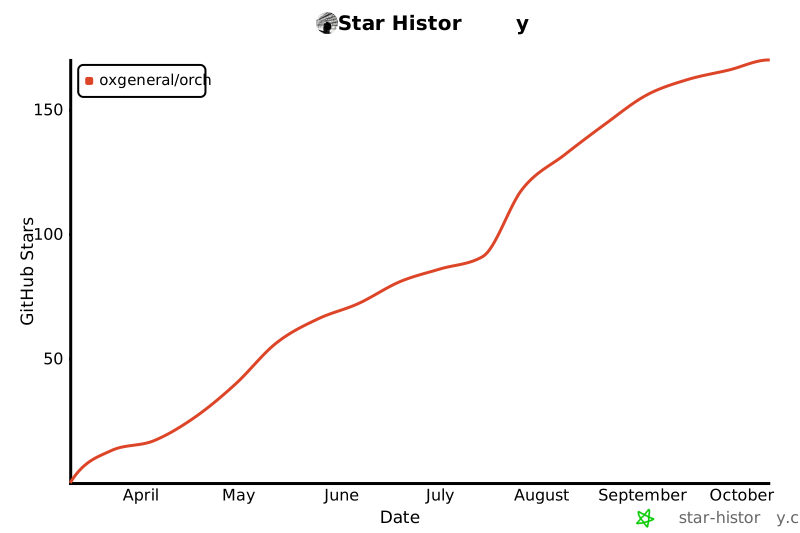](https://star-history.com/#oxgeneral/ORCH&Date)
|
|
256
280
|
|
|
@@ -259,12 +283,44 @@ We just hit **10 stars** — small number, real users. Every star so far came fr
|
|
|
259
283
|
|
|
260
284
|
## Used by / Early Adopters
|
|
261
285
|
|
|
262
|
-
>
|
|
286
|
+
> Running a zero-human company with ORCH? [Let us know](https://github.com/oxgeneral/ORCH/issues/new?title=Zero-human+company+with+ORCH&body=Tell+us+about+your+setup) — we'd love to feature you here.
|
|
263
287
|
|
|
264
288
|
<!-- ADOPTERS_START -->
|
|
265
|
-
*Be the first to
|
|
289
|
+
*Be the first to launch your AI company here.*
|
|
266
290
|
<!-- ADOPTERS_END -->
|
|
267
291
|
|
|
292
|
+
## FAQ
|
|
293
|
+
|
|
294
|
+
### Do I need a team to use ORCH?
|
|
295
|
+
|
|
296
|
+
No. **Solo founders are the primary users.** You + 2 agents is already a zero-human company. ORCH gives you auto-retry, state machine, dashboard, and token tracking even with a single agent. Start with one, scale to departments.
|
|
297
|
+
|
|
298
|
+
### Will agents mess up my codebase?
|
|
299
|
+
|
|
300
|
+
No. Every agent works in an isolated git worktree on its own branch. Nothing touches `main` until you explicitly approve. Mandatory review step in the state machine. Scope overlap detection prevents conflicts before they happen.
|
|
301
|
+
|
|
302
|
+
### Is this only for engineering?
|
|
303
|
+
|
|
304
|
+
No. The shell adapter runs any CLI tool — which means ORCH orchestrates any process. Engineering, editorial, sales, analytics, security, DevOps. **If it runs in a terminal, it's an employee.** Deploy `content-agency`, `data-lab`, or `sales-machine` with one command.
|
|
305
|
+
|
|
306
|
+
### How much does it cost?
|
|
307
|
+
|
|
308
|
+
ORCH is free forever (MIT). You pay only for the AI APIs you already use (Claude, Codex, etc.). The TUI shows token counts per agent per run in real-time — no surprise bills.
|
|
309
|
+
|
|
310
|
+
### What AI tools does it support?
|
|
311
|
+
|
|
312
|
+
Five adapters: **Claude Code**, **OpenCode** (Gemini, DeepSeek, any OpenRouter model), **Codex**, **Cursor**, and **Shell** (any CLI tool). Your API keys, your tools — ORCH coordinates them.
|
|
313
|
+
|
|
314
|
+
### Is there a cloud component?
|
|
315
|
+
|
|
316
|
+
None. Zero cloud. All state in `.orchestry/` — plain YAML, JSON, JSONL files. No signup, no account, no data leaves your machine.
|
|
317
|
+
|
|
318
|
+
### How is this different from Paperclip?
|
|
319
|
+
|
|
320
|
+
Paperclip needs PostgreSQL, a web server, and cloud setup. ORCH needs `npm install`. Same vision — zero-human companies — but ORCH is the hacker's version: terminal-first, file-based, zero infrastructure, MIT licensed.
|
|
321
|
+
|
|
322
|
+
---
|
|
323
|
+
|
|
268
324
|
## License
|
|
269
325
|
|
|
270
|
-
[MIT](LICENSE) —
|
|
326
|
+
[MIT](LICENSE) — build whatever you want.
|