@opensearch-project/agent-health 0.2.0 → 0.3.0
This diff represents the content of publicly available package versions that have been released to one of the supported registries. The information contained in this diff is provided for informational purposes only and reflects changes between package versions as they appear in their respective public registries.
- package/README.md +172 -301
- package/cli/dist/index.js +206 -66
- package/dist/assets/index-EvPLSTAS.js +267 -0
- package/dist/assets/index-RXasQKUs.css +1 -0
- package/dist/index.html +2 -2
- package/package.json +1 -1
- package/server/dist/app.js +17509 -13713
- package/server/dist/index.js +17594 -13690
- package/dist/assets/index-4BAkkFzo.js +0 -267
- package/dist/assets/index-C3K5cBQr.css +0 -1
package/README.md
CHANGED
|
@@ -1,26 +1,79 @@
|
|
|
1
|
-
|
|
1
|
+
<h1 align="center" style="border-bottom: none">
|
|
2
|
+
<div>
|
|
3
|
+
<a href="https://opensearch.org">
|
|
4
|
+
<img alt="OpenSearch Agent Health" src="assets/opensearch-logo.svg" width="200" />
|
|
5
|
+
</a>
|
|
6
|
+
<br>
|
|
7
|
+
Agent Health
|
|
8
|
+
</div>
|
|
9
|
+
</h1>
|
|
10
|
+
|
|
11
|
+
<h2 align="center" style="border-bottom: none">Open-source AI Agent Evaluation & Observability</h2>
|
|
12
|
+
|
|
13
|
+
<p align="center">
|
|
14
|
+
Agent Health helps you evaluate, monitor, and optimize AI agents. From autonomous RCA agents to coding assistants, it provides real-time execution streaming, LLM-based evaluation with trajectory comparison, batch experiments, and deep observability through OpenTelemetry traces — all backed by OpenSearch.
|
|
15
|
+
</p>
|
|
16
|
+
|
|
17
|
+
<div align="center">
|
|
2
18
|
|
|
3
19
|
[](LICENSE.txt)
|
|
4
20
|
[](https://www.npmjs.com/package/@opensearch-project/agent-health)
|
|
5
|
-
[](https://github.com/opensearch-project/agent-health/actions/workflows/ci.yml)
|
|
22
|
+
|
|
23
|
+
</div>
|
|
24
|
+
|
|
25
|
+
<p align="center">
|
|
26
|
+
<a href="https://opensearch.org"><b>Website</b></a> •
|
|
27
|
+
<a href="https://opensearch.org/slack.html"><b>Slack</b></a> •
|
|
28
|
+
<a href="https://x.com/OpenSearchProj"><b>Twitter/X</b></a> •
|
|
29
|
+
<a href="https://www.youtube.com/watch?v=MU3tTv4lKtc"><b>Demo Video</b></a> •
|
|
30
|
+
<a href="https://observability.opensearch.org/docs/agent-health/"><b>Documentation</b></a> •
|
|
31
|
+
<a href="CHANGELOG.md"><b>Changelog</b></a>
|
|
32
|
+
</p>
|
|
33
|
+
|
|
34
|
+
<div align="center" style="margin-top: 1em; margin-bottom: 1em;">
|
|
35
|
+
<a href="#what-is-agent-health">What is Agent Health?</a> •
|
|
36
|
+
<a href="#installation">Installation</a> •
|
|
37
|
+
<a href="#features">Features</a> •
|
|
38
|
+
<a href="#quick-configuration">Configuration</a> •
|
|
39
|
+
<a href="#contributing">Contributing</a>
|
|
40
|
+
</div>
|
|
41
|
+
|
|
42
|
+
<br>
|
|
43
|
+
|
|
44
|
+
<p align="center">
|
|
45
|
+
<a href="screenshots/Comparison.png">
|
|
46
|
+
<img alt="Agent Health — Run Comparison Dashboard" src="screenshots/Comparison.png" />
|
|
47
|
+
</a>
|
|
48
|
+
</p>
|
|
49
|
+
|
|
50
|
+
<p align="center">
|
|
51
|
+
<i>Side-by-side comparison of agent evaluation runs with pass rate, accuracy, cost, and performance metrics over time.</i>
|
|
52
|
+
</p>
|
|
53
|
+
|
|
54
|
+
---
|
|
6
55
|
|
|
56
|
+
<a id="what-is-agent-health"></a>
|
|
7
57
|
## What is Agent Health?
|
|
8
58
|
|
|
9
|
-
Agent Health is an evaluation and observability framework for AI agents. It helps you measure agent performance through "Golden Path" trajectory comparison—where an LLM judge evaluates agent actions against expected outcomes.
|
|
59
|
+
Agent Health is an evaluation and observability framework for AI agents, built on [OpenSearch](https://opensearch.org). It helps you measure agent performance through **"Golden Path" trajectory comparison** — where an LLM judge evaluates agent actions against expected outcomes — and provides deep observability into agent execution via OpenTelemetry traces.
|
|
10
60
|
|
|
11
61
|
**Who uses Agent Health:**
|
|
12
62
|
- AI teams building autonomous agents (RCA, customer support, data analysis)
|
|
13
63
|
- QA engineers testing agent behavior across scenarios
|
|
14
64
|
- Platform teams monitoring agent performance in production
|
|
65
|
+
- Developers using AI coding agents who want visibility into usage, costs, and productivity
|
|
66
|
+
|
|
67
|
+
> **See it in action:** Watch the [demo video on YouTube](https://www.youtube.com/watch?v=MU3tTv4lKtc)
|
|
68
|
+
|
|
69
|
+
---
|
|
70
|
+
|
|
71
|
+
<a id="installation"></a>
|
|
72
|
+
## Installation
|
|
15
73
|
|
|
16
|
-
|
|
17
|
-
- Real-time agent execution streaming and visualization
|
|
18
|
-
- LLM-based evaluation with pass/fail scoring
|
|
19
|
-
- Batch experiments comparing agents and models
|
|
20
|
-
- OpenTelemetry trace integration for performance analysis
|
|
21
|
-
- Pluggable connectors for different agent types (REST, SSE, CLI)
|
|
74
|
+
Get Agent Health running in minutes. Choose the option that best suits your needs:
|
|
22
75
|
|
|
23
|
-
|
|
76
|
+
### Option 1: NPX (Fastest — No Setup)
|
|
24
77
|
|
|
25
78
|
```bash
|
|
26
79
|
# Start Agent Health with demo data (no configuration needed)
|
|
@@ -29,99 +82,116 @@ npx @opensearch-project/agent-health
|
|
|
29
82
|
|
|
30
83
|
Opens http://localhost:4001 with pre-loaded sample data for exploration.
|
|
31
84
|
|
|
32
|
-
|
|
33
|
-
- [Getting Started Guide](./GETTING_STARTED.md) - Step-by-step walkthrough
|
|
34
|
-
- [Connect Your Agent](./docs/CONFIGURATION.md) - Configure your own agent
|
|
85
|
+
### Option 2: Docker Compose (with OpenSearch Observability Stack)
|
|
35
86
|
|
|
36
|
-
|
|
87
|
+
For the full observability stack with OpenSearch, OpenTelemetry Collector, and Data Prepper for trace ingestion:
|
|
37
88
|
|
|
38
|
-
|
|
39
|
-
|
|
40
|
-
|
|
41
|
-
|
|
42
|
-
- **Live Traces**: Real-time trace monitoring with auto-refresh and filtering
|
|
43
|
-
- **Trace Views**: Timeline and Flow visualizations for debugging
|
|
44
|
-
- **Reports**: Evaluation reports with LLM judge reasoning
|
|
45
|
-
- **Connectors**: Pluggable protocol adapters for different agent types
|
|
89
|
+
```bash
|
|
90
|
+
# Clone the repository
|
|
91
|
+
git clone https://github.com/opensearch-project/agent-health.git
|
|
92
|
+
cd agent-health
|
|
46
93
|
|
|
47
|
-
|
|
94
|
+
# Start the OpenSearch observability stack
|
|
95
|
+
docker compose up -d
|
|
48
96
|
|
|
49
|
-
|
|
50
|
-
|
|
51
|
-
| `agui-streaming` | AG-UI SSE | ML-Commons agents (default) |
|
|
52
|
-
| `rest` | HTTP POST | Non-streaming REST APIs |
|
|
53
|
-
| `subprocess` | CLI | Command-line tools |
|
|
54
|
-
| `claude-code` | Claude CLI | Claude Code agent comparison |
|
|
55
|
-
| `mock` | In-memory | Demo and testing |
|
|
56
|
-
|
|
57
|
-
For creating custom connectors, see [docs/CONNECTORS.md](./docs/CONNECTORS.md).
|
|
97
|
+
# Copy Docker environment configuration
|
|
98
|
+
cp .env.docker .env
|
|
58
99
|
|
|
59
|
-
|
|
100
|
+
# Start Agent Health (connects to local OpenSearch automatically)
|
|
101
|
+
npx @opensearch-project/agent-health
|
|
102
|
+
```
|
|
60
103
|
|
|
61
|
-
|
|
104
|
+
This brings up:
|
|
105
|
+
- **OpenSearch** — Stores traces, test cases, benchmarks, and evaluation results
|
|
106
|
+
- **OpenTelemetry Collector** — Receives telemetry data via OTLP (ports 4317/4318)
|
|
107
|
+
- **Data Prepper** — Transforms and enriches traces before OpenSearch ingestion
|
|
62
108
|
|
|
63
|
-
|
|
109
|
+
> **Prerequisites:** Docker Desktop with 4GB+ memory allocated. See [docker-compose.yml](./docker-compose.yml) for configuration options.
|
|
64
110
|
|
|
65
|
-
|
|
111
|
+
### Next Steps
|
|
66
112
|
|
|
67
|
-
|
|
113
|
+
- [Getting Started Guide](./GETTING_STARTED.md) — Step-by-step walkthrough from install to first evaluation
|
|
114
|
+
- [Configuration Guide](./docs/CONFIGURATION.md) — Connect your own agent and configure the environment
|
|
115
|
+
- [CLI Reference](./docs/CLI.md) — Full command-line documentation
|
|
68
116
|
|
|
69
117
|
---
|
|
70
118
|
|
|
71
|
-
|
|
119
|
+
<a id="features"></a>
|
|
120
|
+
## Features
|
|
72
121
|
|
|
73
|
-
|
|
74
|
-
# Start server (default action)
|
|
75
|
-
npx @opensearch-project/agent-health
|
|
122
|
+
### Agent Evaluation & Observability
|
|
76
123
|
|
|
77
|
-
|
|
78
|
-
|
|
124
|
+
| Feature | Description |
|
|
125
|
+
|---------|-------------|
|
|
126
|
+
| **Evals** | Real-time agent evaluation with trajectory streaming |
|
|
127
|
+
| **Experiments** | Batch evaluation runs with configurable parameters |
|
|
128
|
+
| **Compare** | Side-by-side trace comparison with aligned and merged views |
|
|
129
|
+
| **Agent Traces** | Table-based trace view with latency histogram, filtering, and detailed flyout |
|
|
130
|
+
| **Live Traces** | Real-time trace monitoring with auto-refresh and filtering |
|
|
131
|
+
| **Trace Views** | Timeline and Flow visualizations for debugging |
|
|
132
|
+
| **Reports** | Evaluation reports with LLM judge reasoning |
|
|
133
|
+
| **Connectors** | Pluggable protocol adapters (AG-UI SSE, REST, CLI, Claude Code) |
|
|
79
134
|
|
|
80
|
-
|
|
81
|
-
npx @opensearch-project/agent-health doctor
|
|
135
|
+
### Coding Agent Analytics
|
|
82
136
|
|
|
83
|
-
|
|
84
|
-
npx @opensearch-project/agent-health list agents
|
|
85
|
-
npx @opensearch-project/agent-health list connectors
|
|
137
|
+
A unified dashboard for monitoring AI coding agent usage across **Claude Code**, **Kiro**, and **Codex CLI**. Zero configuration — just run `agent-health` and it auto-detects installed agents.
|
|
86
138
|
|
|
87
|
-
|
|
88
|
-
|
|
139
|
+
- **Multi-agent dashboard**: Session history, cost estimation, tool usage, activity patterns, and efficiency metrics
|
|
140
|
+
- **9 analytics tabs**: Overview, Sessions, Projects, Costs, Activity, Efficiency, Tools, Advanced, and Workspace management
|
|
141
|
+
- **Interactive drill-downs**: Click any chart, card, or metric to drill into filtered session views
|
|
142
|
+
- **Workspace management**: View and edit Claude Code memory files, plans, tasks; browse Kiro MCP servers, agents, and extensions
|
|
143
|
+
- **Privacy-first**: All data stays local — reads directly from `~/.claude/`, `~/.kiro/`, `~/.codex/`
|
|
89
144
|
|
|
90
|
-
|
|
91
|
-
npx @opensearch-project/agent-health benchmark -f ./test-cases.json -a my-agent
|
|
92
|
-
npx @opensearch-project/agent-health benchmark -n "My Benchmark" -a my-agent --export results.json
|
|
145
|
+
[Full Coding Agent Analytics documentation](./docs/CODING_AGENT_ANALYTICS.md)
|
|
93
146
|
|
|
94
|
-
|
|
95
|
-
npx @opensearch-project/agent-health export -b "My Benchmark" -o test-cases.json
|
|
147
|
+
### Supported Connectors
|
|
96
148
|
|
|
97
|
-
|
|
98
|
-
|
|
99
|
-
|
|
149
|
+
| Connector | Protocol | Description |
|
|
150
|
+
|-----------|----------|-------------|
|
|
151
|
+
| `agui-streaming` | AG-UI SSE | ML-Commons agents (default) |
|
|
152
|
+
| `rest` | HTTP POST | Non-streaming REST APIs |
|
|
153
|
+
| `subprocess` | CLI | Command-line tools |
|
|
154
|
+
| `claude-code` | Claude CLI | Claude Code agent comparison |
|
|
155
|
+
| `mock` | In-memory | Demo and testing |
|
|
156
|
+
|
|
157
|
+
For creating custom connectors, see [docs/CONNECTORS.md](./docs/CONNECTORS.md).
|
|
158
|
+
|
|
159
|
+
### Observio Sample Agent
|
|
160
|
+
|
|
161
|
+
Agent Health includes **Observio**, a reference ReAct agent you can use as a practice target for evaluating and improving agent performance:
|
|
100
162
|
|
|
101
|
-
|
|
102
|
-
|
|
163
|
+
```bash
|
|
164
|
+
cd observio-sample-agent && npm install && npm run start:ag-ui
|
|
165
|
+
npx @opensearch-project/agent-health run -t demo-otel-001 -a observio
|
|
103
166
|
```
|
|
104
167
|
|
|
105
|
-
|
|
168
|
+
See the [Observio README](./observio-sample-agent/README.md) for details.
|
|
169
|
+
|
|
170
|
+
---
|
|
106
171
|
|
|
172
|
+
<a id="architecture"></a>
|
|
173
|
+
## Architecture
|
|
107
174
|
|
|
175
|
+
<p align="center">
|
|
176
|
+
<img alt="Agent Health Architecture" src="docs/diagrams/architecture.png" />
|
|
177
|
+
</p>
|
|
108
178
|
|
|
179
|
+
Agent Health uses a client-server architecture where all clients (UI, CLI) access OpenSearch through a unified HTTP API. The server handles agent communication via pluggable connectors and proxies LLM judge calls to AWS Bedrock.
|
|
109
180
|
|
|
110
|
-
|
|
181
|
+
For detailed architecture documentation, see [docs/ARCHITECTURE.md](./docs/ARCHITECTURE.md).
|
|
111
182
|
|
|
112
|
-
|
|
183
|
+
---
|
|
113
184
|
|
|
114
|
-
|
|
185
|
+
<a id="quick-configuration"></a>
|
|
186
|
+
## Quick Configuration
|
|
115
187
|
|
|
116
|
-
|
|
188
|
+
Agent Health works out-of-the-box with demo data. Configure when you're ready to connect your own agent:
|
|
117
189
|
|
|
118
190
|
```bash
|
|
119
191
|
# Generate a config file with examples
|
|
120
192
|
npx @opensearch-project/agent-health init
|
|
121
193
|
```
|
|
122
194
|
|
|
123
|
-
Or create it manually:
|
|
124
|
-
|
|
125
195
|
```typescript
|
|
126
196
|
// agent-health.config.ts
|
|
127
197
|
export default {
|
|
@@ -138,262 +208,63 @@ export default {
|
|
|
138
208
|
};
|
|
139
209
|
```
|
|
140
210
|
|
|
141
|
-
The config file is auto-detected from the current working directory. Supported file names (in priority order): `agent-health.config.ts`, `agent-health.config.js`, `agent-health.config.mjs`. See [`agent-health.config.example.ts`](./agent-health.config.example.ts) for all available options including authentication hooks.
|
|
142
|
-
|
|
143
211
|
> **Tip:** Run `npx @opensearch-project/agent-health doctor` to verify your configuration is loaded correctly.
|
|
144
212
|
|
|
145
|
-
|
|
146
|
-
|
|
147
|
-
**For LLM Judge evaluation** (uses AWS Bedrock):
|
|
148
|
-
```bash
|
|
149
|
-
# Create .env file
|
|
150
|
-
cp .env.example .env
|
|
151
|
-
|
|
152
|
-
# Add AWS credentials
|
|
153
|
-
AWS_REGION=us-east-1
|
|
154
|
-
AWS_ACCESS_KEY_ID=your_access_key
|
|
155
|
-
AWS_SECRET_ACCESS_KEY=your_secret_key
|
|
156
|
-
```
|
|
157
|
-
|
|
158
|
-
**Full configuration guide:** [CONFIGURATION.md](./docs/CONFIGURATION.md)
|
|
213
|
+
For full configuration options including authentication hooks and environment variables, see [CONFIGURATION.md](./docs/CONFIGURATION.md).
|
|
159
214
|
|
|
160
215
|
---
|
|
161
216
|
|
|
162
|
-
|
|
217
|
+
<a id="star-history"></a>
|
|
218
|
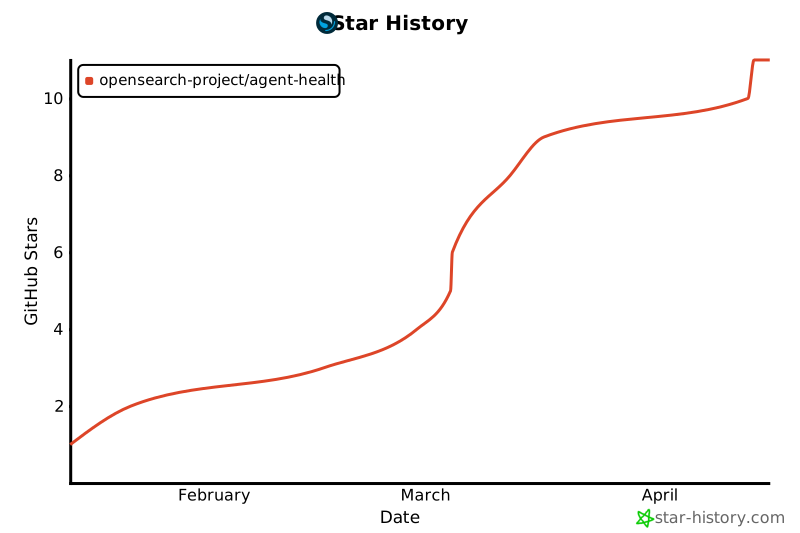
+
## Star History
|
|
163
219
|
|
|
164
|
-
|
|
165
|
-
|---------|-------------|
|
|
166
|
-
| `npm install` | Install dependencies |
|
|
167
|
-
| `npm run dev` | Start frontend dev server (port 4000) |
|
|
168
|
-
| `npm run dev:server` | Start backend server (port 4001) |
|
|
169
|
-
| `npm run build` | TypeScript compile + Vite production build |
|
|
170
|
-
| `npm test` | Run all tests |
|
|
171
|
-
| `npm run test:unit` | Run unit tests only |
|
|
172
|
-
| `npm run test:integration` | Run integration tests only |
|
|
173
|
-
| `npm run test:e2e` | Run E2E tests with Playwright |
|
|
174
|
-
| `npm run test:e2e:ui` | Run E2E tests with Playwright UI |
|
|
175
|
-
| `npm run test:all` | Run all tests (unit + integration + e2e) |
|
|
176
|
-
| `npm test -- --coverage` | Run tests with coverage report |
|
|
177
|
-
| `npm run build:all` | Build UI + server + CLI |
|
|
178
|
-
| `npm run build:cli` | Build CLI only |
|
|
179
|
-
|
|
180
|
-
### Production Mode
|
|
181
|
-
|
|
182
|
-
```bash
|
|
183
|
-
npm run server # Build UI + start single server on port 4001
|
|
184
|
-
```
|
|
220
|
+
If you find Agent Health useful, please consider giving us a star! Your support helps us grow our community and continue improving the project.
|
|
185
221
|
|
|
186
|
-
|
|
187
|
-
|
|
188
|
-
### NPX Usage
|
|
189
|
-
|
|
190
|
-
After publishing, run directly with npx:
|
|
191
|
-
|
|
192
|
-
```bash
|
|
193
|
-
npx @opensearch-project/agent-health # Start server on port 4001
|
|
194
|
-
npx @opensearch-project/agent-health --port 8080
|
|
195
|
-
npx @opensearch-project/agent-health --env-file .env
|
|
196
|
-
```
|
|
197
|
-
|
|
198
|
-
### Ports Summary
|
|
199
|
-
|
|
200
|
-
| Mode | Command | Port(s) |
|
|
201
|
-
|------|---------|---------|
|
|
202
|
-
| **Dev (frontend)** | `npm run dev` | 4000 |
|
|
203
|
-
| **Dev (backend)** | `npm run dev:server` | 4001 |
|
|
204
|
-
| **Production** | `npm run server` | 4001 |
|
|
205
|
-
| **NPX** | `npx @opensearch-project/agent-health` | 4001 (default) |
|
|
206
|
-
|
|
207
|
-
In development, the Vite dev server (4000) proxies `/api` requests to the backend (4001).
|
|
208
|
-
|
|
209
|
-
---
|
|
210
|
-
|
|
211
|
-
## Testing
|
|
212
|
-
|
|
213
|
-
AgentEval uses a comprehensive test suite with three layers:
|
|
214
|
-
|
|
215
|
-
### Test Types
|
|
216
|
-
|
|
217
|
-
| Type | Location | Command | Description |
|
|
218
|
-
|------|----------|---------|-------------|
|
|
219
|
-
| **Unit** | `tests/unit/` | `npm run test:unit` | Fast, isolated function tests |
|
|
220
|
-
| **Integration** | `tests/integration/` | `npm run test:integration` | Tests with real backend server |
|
|
221
|
-
| **E2E** | `tests/e2e/` | `npm run test:e2e` | Browser-based UI tests with Playwright |
|
|
222
|
-
|
|
223
|
-
### Running Tests
|
|
224
|
-
|
|
225
|
-
```bash
|
|
226
|
-
# All tests
|
|
227
|
-
npm test # Unit + integration
|
|
228
|
-
npm run test:all # Unit + integration + E2E
|
|
229
|
-
|
|
230
|
-
# By type
|
|
231
|
-
npm run test:unit # Unit tests only
|
|
232
|
-
npm run test:integration # Integration tests (starts server)
|
|
233
|
-
npm run test:e2e # E2E tests (starts servers)
|
|
234
|
-
npm run test:e2e:ui # E2E with Playwright UI for debugging
|
|
235
|
-
|
|
236
|
-
# With coverage
|
|
237
|
-
npm run test:unit -- --coverage
|
|
238
|
-
|
|
239
|
-
# Specific file
|
|
240
|
-
npm test -- path/to/file.test.ts
|
|
241
|
-
npx playwright test tests/e2e/dashboard.spec.ts
|
|
242
|
-
```
|
|
243
|
-
|
|
244
|
-
### E2E Testing with Playwright
|
|
245
|
-
|
|
246
|
-
E2E tests use [Playwright](https://playwright.dev/) to test the UI in a real browser.
|
|
247
|
-
|
|
248
|
-
```bash
|
|
249
|
-
# First time: install browsers
|
|
250
|
-
npx playwright install
|
|
251
|
-
|
|
252
|
-
# Run all E2E tests
|
|
253
|
-
npm run test:e2e
|
|
254
|
-
|
|
255
|
-
# Interactive UI mode (recommended for debugging)
|
|
256
|
-
npm run test:e2e:ui
|
|
257
|
-
|
|
258
|
-
# View test report
|
|
259
|
-
npm run test:e2e:report
|
|
260
|
-
```
|
|
261
|
-
|
|
262
|
-
**Writing E2E Tests:**
|
|
263
|
-
- Place tests in `tests/e2e/*.spec.ts`
|
|
264
|
-
- Use `data-testid` attributes for reliable selectors
|
|
265
|
-
- Handle empty states gracefully (check if data exists before asserting)
|
|
266
|
-
- See existing tests for patterns
|
|
267
|
-
|
|
268
|
-
### CI Pipeline
|
|
269
|
-
|
|
270
|
-
All PRs must pass these CI checks:
|
|
271
|
-
|
|
272
|
-
| Job | What it checks |
|
|
273
|
-
|-----|----------------|
|
|
274
|
-
| `build-and-test` | Build + unit tests + 90% coverage |
|
|
275
|
-
| `lint-and-typecheck` | TypeScript compilation |
|
|
276
|
-
| `license-check` | SPDX headers on all source files |
|
|
277
|
-
| `integration-tests` | Backend integration tests with coverage |
|
|
278
|
-
| `e2e-tests` | Playwright browser tests with pass/fail tracking |
|
|
279
|
-
| `security-scan` | npm audit for vulnerabilities |
|
|
280
|
-
| `test-summary` | Consolidated test results summary |
|
|
281
|
-
|
|
282
|
-
### Coverage Thresholds
|
|
283
|
-
|
|
284
|
-
| Test Type | Metric | Threshold |
|
|
285
|
-
|-----------|--------|-----------|
|
|
286
|
-
| Unit | Lines | ≥ 90% |
|
|
287
|
-
| Unit | Branches | ≥ 80% |
|
|
288
|
-
| Unit | Functions | ≥ 80% |
|
|
289
|
-
| Unit | Statements | ≥ 90% |
|
|
290
|
-
| Integration | Lines | Informational (no threshold) |
|
|
291
|
-
| E2E | Pass Rate | 100% |
|
|
292
|
-
|
|
293
|
-
### CI Artifacts
|
|
294
|
-
|
|
295
|
-
Each CI run produces these artifacts (downloadable from Actions tab):
|
|
296
|
-
|
|
297
|
-
| Artifact | Contents |
|
|
298
|
-
|----------|----------|
|
|
299
|
-
| `coverage-report` | Unit test coverage (HTML, LCOV) |
|
|
300
|
-
| `integration-coverage-report` | Integration test coverage |
|
|
301
|
-
| `playwright-report` | E2E test report with screenshots/traces |
|
|
302
|
-
| `test-badges` | Badge data JSON for coverage visualization |
|
|
303
|
-
|
|
304
|
-
### Full Evaluation Flow E2E Tests
|
|
305
|
-
|
|
306
|
-
The E2E test suite includes tests for the complete evaluation flow using mock modes:
|
|
307
|
-
- **Demo Agent** (`mock://demo`) - Simulated AG-UI streaming responses
|
|
308
|
-
- **Demo Model** (`provider: "demo"`) - Simulated LLM judge evaluation
|
|
309
|
-
|
|
310
|
-
This allows testing the full Create Test Case → Create Benchmark → Run Evaluation → View Results flow without requiring AWS credentials or a live agent in CI.
|
|
222
|
+
[](https://github.com/opensearch-project/agent-health)
|
|
311
223
|
|
|
312
224
|
---
|
|
313
225
|
|
|
314
|
-
|
|
315
|
-
|
|
316
|
-
Agent Health supports multiple agent types:
|
|
317
|
-
|
|
318
|
-
| Agent | Endpoint Variable | Setup |
|
|
319
|
-
|-------|-------------------|-------|
|
|
320
|
-
| **Observio** (sample) | `localhost:3001` | Included — see [observio-sample-agent/](./observio-sample-agent/) |
|
|
321
|
-
| Langgraph | `LANGGRAPH_ENDPOINT` | Simple localhost agent |
|
|
322
|
-
| HolmesGPT | `HOLMESGPT_ENDPOINT` | AG-UI compatible RCA agent |
|
|
323
|
-
| ML-Commons | `MLCOMMONS_ENDPOINT` | See [ML-Commons Setup](./docs/ML-COMMONS-SETUP.md) |
|
|
324
|
-
|
|
325
|
-
### Observio Sample Agent
|
|
326
|
-
|
|
327
|
-
Agent Health includes **Observio**, a reference ReAct agent you can use as a practice target for evaluating and improving agent performance. It's a great starting point if you don't have your own agent yet.
|
|
328
|
-
|
|
329
|
-
```bash
|
|
330
|
-
# Start Observio
|
|
331
|
-
cd observio-sample-agent && npm install && npm run start:ag-ui
|
|
332
|
-
|
|
333
|
-
# Evaluate it with Agent Health
|
|
334
|
-
npx @opensearch-project/agent-health run -t demo-otel-001 -a observio
|
|
335
|
-
```
|
|
336
|
-
|
|
337
|
-
See the [Observio README](./observio-sample-agent/README.md) for setup details and improvement areas.
|
|
338
|
-
|
|
226
|
+
<a id="contributing"></a>
|
|
227
|
+
## Contributing
|
|
339
228
|
|
|
340
|
-
|
|
229
|
+
We welcome contributions! There are many ways to get involved:
|
|
341
230
|
|
|
342
|
-
|
|
231
|
+
- [Report a Bug](https://github.com/opensearch-project/agent-health/issues/new/choose) — Found something broken? Let us know
|
|
232
|
+
- [Request a Feature](https://github.com/opensearch-project/agent-health/issues/new/choose) — Have an idea? We'd love to hear it
|
|
233
|
+
- [Submit a Pull Request](https://github.com/opensearch-project/agent-health/pulls) — Code contributions are always welcome
|
|
234
|
+
- [Join the Discussion](https://opensearch.org/slack.html) — Chat with us on the OpenSearch Slack
|
|
343
235
|
|
|
344
|
-
|
|
236
|
+
### Development Quick Start
|
|
345
237
|
|
|
346
238
|
```bash
|
|
347
|
-
|
|
348
|
-
|
|
349
|
-
|
|
350
|
-
|
|
351
|
-
|
|
239
|
+
git clone https://github.com/opensearch-project/agent-health.git
|
|
240
|
+
cd agent-health
|
|
241
|
+
npm install
|
|
242
|
+
npm run dev # Frontend on port 4000
|
|
243
|
+
npm run dev:server # Backend on port 4001
|
|
352
244
|
```
|
|
353
245
|
|
|
354
|
-
|
|
355
|
-
|
|
356
|
-
---
|
|
357
|
-
|
|
358
|
-
## Troubleshooting
|
|
246
|
+
All commits require DCO signoff (`git commit -s`) and all PRs must pass CI checks.
|
|
359
247
|
|
|
360
|
-
|
|
361
|
-
|-------|----------|
|
|
362
|
-
| Cannot connect to backend | Run `npm run dev:server`, check `curl http://localhost:4001/health` |
|
|
363
|
-
| AWS credentials expired | Refresh credentials in `.env` |
|
|
364
|
-
| Storage/Traces not working | Check OpenSearch endpoint and credentials in `.env` |
|
|
365
|
-
| Need verbose logs | Set `DEBUG=true` in `.env` or toggle in Settings page |
|
|
248
|
+
For detailed development setup, testing, CI pipeline, debugging, and troubleshooting, see the [Developer Guide](./DEVELOPER_GUIDE.md). For full contribution guidelines, see [CONTRIBUTING.md](./CONTRIBUTING.md).
|
|
366
249
|
|
|
367
250
|
---
|
|
368
251
|
|
|
369
|
-
##
|
|
370
|
-
|
|
371
|
-
We welcome contributions! See [CONTRIBUTING.md](./CONTRIBUTING.md) for guidelines.
|
|
372
|
-
|
|
373
|
-
### Development Workflow
|
|
374
|
-
|
|
375
|
-
1. Fork and clone the repository
|
|
376
|
-
2. Install dependencies: `npm install`
|
|
377
|
-
3. Create a feature branch: `git checkout -b feature/your-feature`
|
|
378
|
-
4. Make changes and add tests
|
|
379
|
-
5. Run tests: `npm test`
|
|
380
|
-
6. Commit with DCO signoff: `git commit -s -m "feat: your message"`
|
|
381
|
-
7. Push and create a Pull Request
|
|
252
|
+
## Documentation
|
|
382
253
|
|
|
383
|
-
|
|
254
|
+
| Guide | Description |
|
|
255
|
+
|-------|-------------|
|
|
256
|
+
| [Getting Started](./GETTING_STARTED.md) | Step-by-step walkthrough from install to first evaluation |
|
|
257
|
+
| [Configuration](./docs/CONFIGURATION.md) | Connect your agent and configure the environment |
|
|
258
|
+
| [CLI Reference](./docs/CLI.md) | Command-line interface documentation |
|
|
259
|
+
| [Coding Agent Analytics](./docs/CODING_AGENT_ANALYTICS.md) | Multi-agent dashboard and remote server monitoring |
|
|
260
|
+
| [Observio Sample Agent](./observio-sample-agent/) | Reference agent for practicing evaluations |
|
|
261
|
+
| [Developer Guide](./DEVELOPER_GUIDE.md) | Development setup, testing, CI, debugging |
|
|
262
|
+
| [Connectors Guide](./docs/CONNECTORS.md) | Create custom connectors for your agent type |
|
|
263
|
+
| [Architecture](./docs/ARCHITECTURE.md) | System design and patterns |
|
|
264
|
+
| [ML-Commons Setup](./docs/ML-COMMONS-SETUP.md) | OpenSearch ML-Commons integration |
|
|
384
265
|
|
|
385
266
|
---
|
|
386
267
|
|
|
387
|
-
|
|
388
|
-
|
|
389
|
-
|
|
390
|
-
- [Getting Started](./GETTING_STARTED.md) - Step-by-step walkthrough from install to first evaluation
|
|
391
|
-
- [Configuration](./docs/CONFIGURATION.md) - Connect your agent and configure the environment
|
|
392
|
-
- [CLI Reference](./docs/CLI.md) - Command-line interface documentation
|
|
393
|
-
- [Observio Sample Agent](./observio-sample-agent/) - Reference agent for practicing agent health improvements
|
|
394
|
-
|
|
395
|
-
### Developer Guides
|
|
396
|
-
- [Development Guide](./CLAUDE.md) - Architecture, coding conventions, and contributing
|
|
397
|
-
- [Connectors Guide](./docs/CONNECTORS.md) - Create custom connectors for your agent type
|
|
398
|
-
- [ML-Commons Setup](./docs/ML-COMMONS-SETUP.md) - OpenSearch ML-Commons integration
|
|
399
|
-
- [Architecture](./docs/ARCHITECTURE.md) - System design and patterns
|
|
268
|
+
<p align="center">
|
|
269
|
+
Made with care by the <a href="https://opensearch.org">OpenSearch</a> community
|
|
270
|
+
</p>
|