@ollamawg/cli 0.3.0 → 0.4.1
This diff represents the content of publicly available package versions that have been released to one of the supported registries. The information contained in this diff is provided for informational purposes only and reflects changes between package versions as they appear in their respective public registries.
- package/README.md +43 -15
- package/package.json +7 -7
package/README.md
CHANGED
|
@@ -6,7 +6,13 @@ Reach your Ollama server from your laptop and phone without exposing it to the i
|
|
|
6
6
|
|
|
7
7
|
It is a single Go binary. WireGuard runs in user space through [wireguard-go](https://git.zx2c4.com/wireguard-go) and gVisor's network stack, so the server needs no root, no kernel module and no TUN device. Computers connect with `ollamawg connect`, which needs no admin rights either. Phones use the official WireGuard app, because the keys and protocol are standard WireGuard.
|
|
8
8
|
|
|
9
|
-
|
|
9
|
+
**Website:** https://himanshu-mamgain.github.io/ollamawg/
|
|
10
|
+
|
|
11
|
+
> **Important**
|
|
12
|
+
>
|
|
13
|
+
> **ollamawg has not had an independent security audit.** Treat it as an evolving security tool, not an independently verified security product. The cryptography comes from wireguard-go and gVisor, which are widely deployed. ollamawg's own policy, proxy and dashboard code is small and covered by end-to-end tests, but nobody outside the project has reviewed it. Read the [Security model](https://github.com/himanshu-mamgain/ollamawg/blob/v0.4.1/docs/security.md) before you rely on it, and report problems as described there.
|
|
14
|
+
|
|
15
|
+
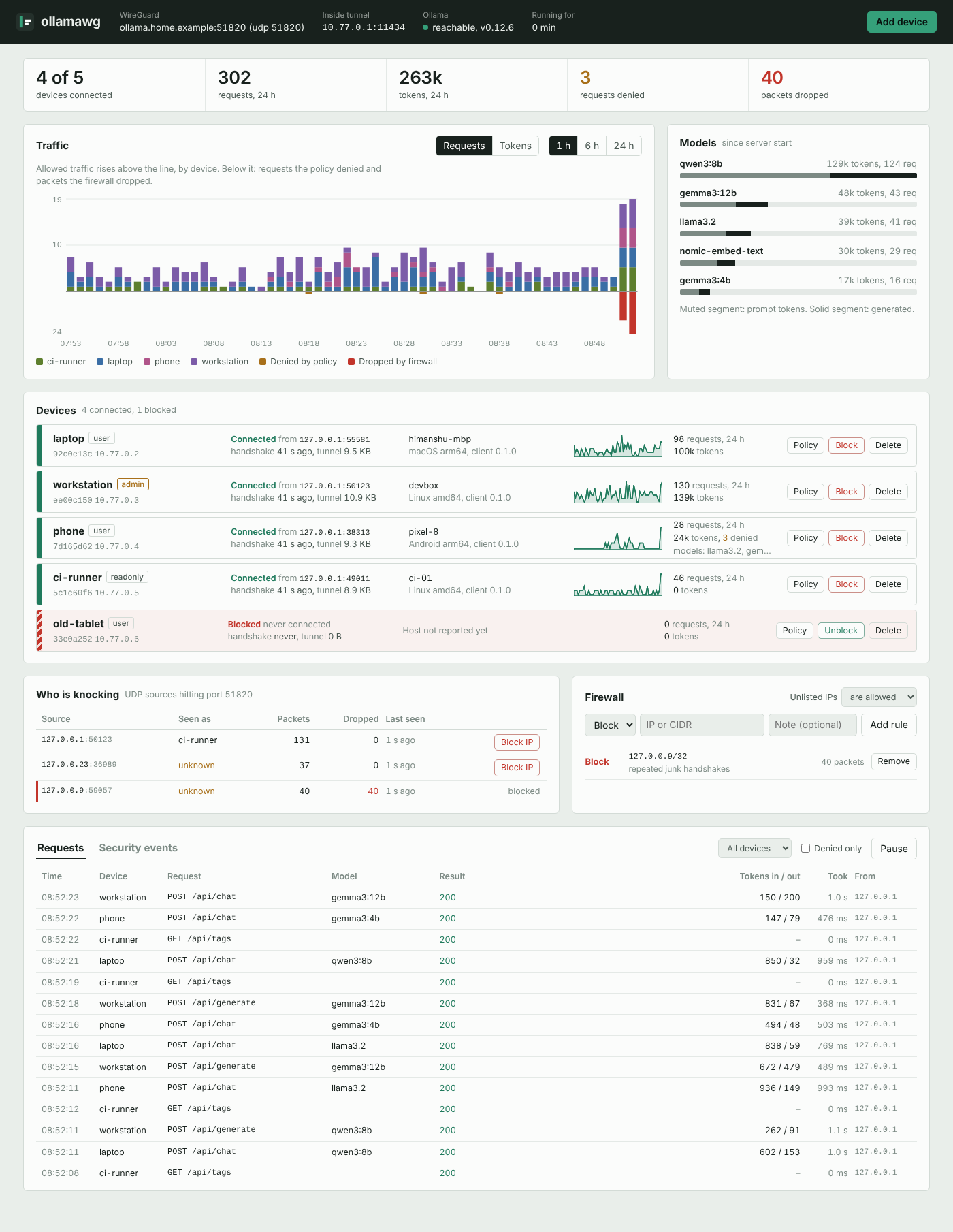
|
|
10
16
|
|
|
11
17
|
<sub>Screenshot taken with simulated devices and traffic.</sub>
|
|
12
18
|
|
|
@@ -43,17 +49,33 @@ Ollama itself stays on `127.0.0.1`. Nothing outside the tunnel can talk to it.
|
|
|
43
49
|
- ask your ISP for a public IP;
|
|
44
50
|
- or relay through a small VPS.
|
|
45
51
|
|
|
46
|
-
See [Troubleshooting](https://github.com/himanshu-mamgain/ollamawg/blob/v0.
|
|
52
|
+
See [Troubleshooting](https://github.com/himanshu-mamgain/ollamawg/blob/v0.4.1/docs/getting-started.md#troubleshooting).
|
|
47
53
|
|
|
48
54
|
## Install
|
|
49
55
|
|
|
56
|
+
No npm or Go needed: these scripts download the binary for your platform from [GitHub Releases](https://github.com/himanshu-mamgain/ollamawg/releases), check it against the release's `SHA256SUMS`, and install it without admin rights.
|
|
57
|
+
|
|
58
|
+
```powershell
|
|
59
|
+
# Windows (PowerShell): installs to %LOCALAPPDATA%\Programs\ollamawg and adds it to PATH
|
|
60
|
+
irm https://himanshu-mamgain.github.io/ollamawg/install.ps1 | iex
|
|
61
|
+
```
|
|
62
|
+
|
|
63
|
+
```sh
|
|
64
|
+
# macOS, Linux, FreeBSD: installs to /usr/local/bin if writable, else ~/.local/bin (never uses sudo)
|
|
65
|
+
curl -fsSL https://himanshu-mamgain.github.io/ollamawg/install.sh | sh
|
|
66
|
+
```
|
|
67
|
+
|
|
68
|
+
You can read the scripts first: [install.ps1](https://github.com/himanshu-mamgain/ollamawg/blob/v0.4.1/site/install.ps1), [install.sh](https://github.com/himanshu-mamgain/ollamawg/blob/v0.4.1/site/install.sh). Set `OLLAMAWG_VERSION=0.4.0` to pin a version, or `OLLAMAWG_INSTALL_DIR` to choose where it goes.
|
|
69
|
+
|
|
70
|
+
Or use a package manager:
|
|
71
|
+
|
|
50
72
|
```sh
|
|
51
73
|
npm install -g @ollamawg/cli # prebuilt binary for Linux, macOS, Windows and FreeBSD
|
|
52
74
|
npx @ollamawg/cli version # or run it without installing
|
|
53
75
|
go install github.com/himanshu-mamgain/ollamawg/cmd/ollamawg@latest
|
|
54
76
|
```
|
|
55
77
|
|
|
56
|
-
|
|
78
|
+
You can also download a binary from any [GitHub Release](https://github.com/himanshu-mamgain/ollamawg/releases) yourself. A `Dockerfile` is included; see [Running as a service](https://github.com/himanshu-mamgain/ollamawg/blob/v0.4.1/docs/deploy.md#docker).
|
|
57
79
|
|
|
58
80
|
## Quickstart
|
|
59
81
|
|
|
@@ -66,6 +88,8 @@ ollamawg serve
|
|
|
66
88
|
|
|
67
89
|
`init` writes `server.yaml` and prints the dashboard password. Open `http://127.0.0.1:8088` on the server, or reach it over SSH with `ssh -L 8088:127.0.0.1:8088 server`.
|
|
68
90
|
|
|
91
|
+
On Windows, `init` also lets devices through Windows Firewall: click **Yes** when Windows asks for permission. If you skip it or pass `--no-firewall`, run `ollamawg firewall` later.
|
|
92
|
+
|
|
69
93
|
### Add a laptop
|
|
70
94
|
|
|
71
95
|
```sh
|
|
@@ -95,11 +119,13 @@ You can also use **Add device** in the dashboard, then **Phone**.
|
|
|
95
119
|
|
|
96
120
|
Ollama apps such as Enchanted or Reins work too: point them at `http://10.77.0.1:11434`.
|
|
97
121
|
|
|
98
|
-
|
|
122
|
+
**Missed the QR code, lost a config, or got a new phone?** The server never stores device private keys, so a config can't be shown twice. Issue a new one instead: `ollamawg reissue --name phone --qr`, or **New config** on the device in the dashboard. The device keeps its name, address and policy, and the old config stops working.
|
|
123
|
+
|
|
124
|
+
<img src="https://raw.githubusercontent.com/himanshu-mamgain/ollamawg/v0.4.1/docs/images/chat.png" alt="The chat page on a phone" width="300">
|
|
99
125
|
|
|
100
126
|
<sub>Chat page on a phone, with a simulated model reply.</sub>
|
|
101
127
|
|
|
102
|
-
See [Getting started](https://github.com/himanshu-mamgain/ollamawg/blob/v0.
|
|
128
|
+
See [Getting started](https://github.com/himanshu-mamgain/ollamawg/blob/v0.4.1/docs/getting-started.md) for the full walkthrough.
|
|
103
129
|
|
|
104
130
|
## Dashboard login
|
|
105
131
|
|
|
@@ -129,7 +155,7 @@ With 2FA on:
|
|
|
129
155
|
- The dashboard opens on a login form that asks for the username, password and code.
|
|
130
156
|
- Scripts and Prometheus use the API token (`admin.api_token`) as `Authorization: Bearer <token>`.
|
|
131
157
|
|
|
132
|
-
See [Dashboard and admin API](https://github.com/himanshu-mamgain/ollamawg/blob/v0.
|
|
158
|
+
See [Dashboard and admin API](https://github.com/himanshu-mamgain/ollamawg/blob/v0.4.1/docs/dashboard.md).
|
|
133
159
|
|
|
134
160
|
## Features
|
|
135
161
|
|
|
@@ -164,6 +190,7 @@ See [Dashboard and admin API](https://github.com/himanshu-mamgain/ollamawg/blob/
|
|
|
164
190
|
Server
|
|
165
191
|
init create server.yaml with keys and a dashboard password
|
|
166
192
|
add-peer register a device; --qr prints a QR code for the WireGuard app
|
|
193
|
+
reissue new key and config (or --qr) for an existing device
|
|
167
194
|
remove-peer delete a device
|
|
168
195
|
list-peers show devices and rules
|
|
169
196
|
block block --device or --ip
|
|
@@ -171,6 +198,7 @@ Server
|
|
|
171
198
|
serve run the tunnel, proxy, chat page and dashboard
|
|
172
199
|
passwd set your own dashboard username and password
|
|
173
200
|
2fa enable, disable or check two-factor dashboard login
|
|
201
|
+
firewall let devices through the Windows Firewall (one permission prompt)
|
|
174
202
|
|
|
175
203
|
Client
|
|
176
204
|
connect bring the tunnel up and expose Ollama on 127.0.0.1:11434
|
|
@@ -187,19 +215,19 @@ Run `ollamawg <command> -h` for a command's flags.
|
|
|
187
215
|
|
|
188
216
|
| Guide | What's in it |
|
|
189
217
|
|---|---|
|
|
190
|
-
| [Getting started](https://github.com/himanshu-mamgain/ollamawg/blob/v0.
|
|
191
|
-
| [Configuration](https://github.com/himanshu-mamgain/ollamawg/blob/v0.
|
|
192
|
-
| [Dashboard and admin API](https://github.com/himanshu-mamgain/ollamawg/blob/v0.
|
|
193
|
-
| [Security model](https://github.com/himanshu-mamgain/ollamawg/blob/v0.
|
|
194
|
-
| [Running as a service](https://github.com/himanshu-mamgain/ollamawg/blob/v0.
|
|
195
|
-
| [Go library](https://github.com/himanshu-mamgain/ollamawg/blob/v0.
|
|
218
|
+
| [Getting started](https://github.com/himanshu-mamgain/ollamawg/blob/v0.4.1/docs/getting-started.md) | Install, set up a server, add laptops and phones, connect |
|
|
219
|
+
| [Configuration](https://github.com/himanshu-mamgain/ollamawg/blob/v0.4.1/docs/configuration.md) | Every field in `server.yaml` and client configs, roles, model rules |
|
|
220
|
+
| [Dashboard and admin API](https://github.com/himanshu-mamgain/ollamawg/blob/v0.4.1/docs/dashboard.md) | The UI, two-factor login, the HTTP API behind it, Prometheus metrics |
|
|
221
|
+
| [Security model](https://github.com/himanshu-mamgain/ollamawg/blob/v0.4.1/docs/security.md) | What is protected, how, and what is not |
|
|
222
|
+
| [Running as a service](https://github.com/himanshu-mamgain/ollamawg/blob/v0.4.1/docs/deploy.md) | systemd, launchd, Windows, Docker, port forwarding |
|
|
223
|
+
| [Go library](https://github.com/himanshu-mamgain/ollamawg/blob/v0.4.1/docs/library.md) | Embedding the server and client in your own programs |
|
|
196
224
|
|
|
197
225
|
## Limitations
|
|
198
226
|
|
|
199
227
|
- **Devices need to reach one UDP port on the server.** There is no relay or NAT traversal. CGNAT connections need one of the workarounds in [Requirements](#requirements).
|
|
200
228
|
- **The dashboard has one admin account.** Put a reverse proxy with SSO in front if several people manage it.
|
|
201
229
|
- **Chat history lives in each device's browser.** It is not synced between devices or stored on the server.
|
|
202
|
-
- **No independent security audit yet.** The cryptography comes from wireguard-go and gVisor
|
|
230
|
+
- **No independent security audit yet.** Treat ollamawg as an evolving security tool, not an independently verified security product. The cryptography comes from wireguard-go and gVisor; the policy layer is small and covered by end-to-end tests. See the [Security model](https://github.com/himanshu-mamgain/ollamawg/blob/v0.4.1/docs/security.md).
|
|
203
231
|
|
|
204
232
|
## Building from source
|
|
205
233
|
|
|
@@ -213,7 +241,7 @@ Go 1.24 or newer is required. Cross-compiling works out of the box, for example
|
|
|
213
241
|
|
|
214
242
|
## Releasing
|
|
215
243
|
|
|
216
|
-
Releases are cut from `main` by [`.github/workflows/publish.yml`](https://github.com/himanshu-mamgain/ollamawg/blob/v0.
|
|
244
|
+
Releases are cut from `main` by [`.github/workflows/publish.yml`](https://github.com/himanshu-mamgain/ollamawg/blob/v0.4.1/.github/workflows/publish.yml):
|
|
217
245
|
|
|
218
246
|
1. In a PR, bump `version` (and its `optionalDependencies`) in `npm/cli/package.json` and `Version` in `server.go`. A test fails if they differ.
|
|
219
247
|
2. Merge the PR. The workflow publishes every npm package that's missing that version, using trusted publishing with provenance, then creates the GitHub Release with binaries.
|
|
@@ -222,4 +250,4 @@ A re-run finishes a release that stopped halfway.
|
|
|
222
250
|
|
|
223
251
|
## License
|
|
224
252
|
|
|
225
|
-
[MIT](https://github.com/himanshu-mamgain/ollamawg/blob/v0.
|
|
253
|
+
[MIT](https://github.com/himanshu-mamgain/ollamawg/blob/v0.4.1/LICENSE)
|
package/package.json
CHANGED
|
@@ -1,6 +1,6 @@
|
|
|
1
1
|
{
|
|
2
2
|
"name": "@ollamawg/cli",
|
|
3
|
-
"version": "0.
|
|
3
|
+
"version": "0.4.1",
|
|
4
4
|
"description": "Reach your Ollama server from anywhere through a user-space WireGuard tunnel, with per-device access control and a dashboard.",
|
|
5
5
|
"keywords": [
|
|
6
6
|
"ollama",
|
|
@@ -28,11 +28,11 @@
|
|
|
28
28
|
"node": ">=16"
|
|
29
29
|
},
|
|
30
30
|
"optionalDependencies": {
|
|
31
|
-
"@ollamawg/darwin-arm64": "0.
|
|
32
|
-
"@ollamawg/darwin-x64": "0.
|
|
33
|
-
"@ollamawg/freebsd-x64": "0.
|
|
34
|
-
"@ollamawg/linux-arm64": "0.
|
|
35
|
-
"@ollamawg/linux-x64": "0.
|
|
36
|
-
"@ollamawg/win32-x64": "0.
|
|
31
|
+
"@ollamawg/darwin-arm64": "0.4.1",
|
|
32
|
+
"@ollamawg/darwin-x64": "0.4.1",
|
|
33
|
+
"@ollamawg/freebsd-x64": "0.4.1",
|
|
34
|
+
"@ollamawg/linux-arm64": "0.4.1",
|
|
35
|
+
"@ollamawg/linux-x64": "0.4.1",
|
|
36
|
+
"@ollamawg/win32-x64": "0.4.1"
|
|
37
37
|
}
|
|
38
38
|
}
|