@oliverflint/dataverse-dev-proxy-pptb 0.0.0-stage → 1.0.1
This diff represents the content of publicly available package versions that have been released to one of the supported registries. The information contained in this diff is provided for informational purposes only and reflects changes between package versions as they appear in their respective public registries.
- package/LICENSE +21 -0
- package/README.md +78 -2
- package/dist/assets/index-BJ2jfsD9.js +33 -0
- package/dist/assets/style-Df-9wR0J.css +1 -0
- package/dist/icon.svg +4 -0
- package/dist/index.html +14 -0
- package/dist/json-editor.png +0 -0
- package/dist/mapping-editor.png +0 -0
- package/index.html +12 -0
- package/package.json +54 -4
package/LICENSE
ADDED
|
@@ -0,0 +1,21 @@
|
|
|
1
|
+
MIT License
|
|
2
|
+
|
|
3
|
+
Copyright (c) 2026 Oliver Flint
|
|
4
|
+
|
|
5
|
+
Permission is hereby granted, free of charge, to any person obtaining a copy
|
|
6
|
+
of this software and associated documentation files (the "Software"), to deal
|
|
7
|
+
in the Software without restriction, including without limitation the rights
|
|
8
|
+
to use, copy, modify, merge, publish, distribute, sublicense, and/or sell
|
|
9
|
+
copies of the Software, and to permit persons to whom the Software is
|
|
10
|
+
furnished to do so, subject to the following conditions:
|
|
11
|
+
|
|
12
|
+
The above copyright notice and this permission notice shall be included in all
|
|
13
|
+
copies or substantial portions of the Software.
|
|
14
|
+
|
|
15
|
+
THE SOFTWARE IS PROVIDED "AS IS", WITHOUT WARRANTY OF ANY KIND, EXPRESS OR
|
|
16
|
+
IMPLIED, INCLUDING BUT NOT LIMITED TO THE WARRANTIES OF MERCHANTABILITY,
|
|
17
|
+
FITNESS FOR A PARTICULAR PURPOSE AND NONINFRINGEMENT. IN NO EVENT SHALL THE
|
|
18
|
+
AUTHORS OR COPYRIGHT HOLDERS BE LIABLE FOR ANY CLAIM, DAMAGES OR OTHER
|
|
19
|
+
LIABILITY, WHETHER IN AN ACTION OF CONTRACT, TORT OR OTHERWISE, ARISING FROM,
|
|
20
|
+
OUT OF OR IN CONNECTION WITH THE SOFTWARE OR THE USE OR OTHER DEALINGS IN THE
|
|
21
|
+
SOFTWARE.
|
package/README.md
CHANGED
|
@@ -1,3 +1,79 @@
|
|
|
1
|
-
#
|
|
1
|
+
# Dataverse Dev Proxy (PPTB)
|
|
2
2
|
|
|
3
|
-
|
|
3
|
+
Test local web resource changes in a Dataverse model-driven app before uploading them. Configure your mappings in Power Platform ToolBox, then open a dedicated Edge or Chrome session that serves local files for matching web resource requests. Edit or rebuild a local file and reload the app to see your changes.
|
|
4
|
+
|
|
5
|
+
The tool has been tested on Windows. macOS and Linux are untested.
|
|
6
|
+
|
|
7
|
+
## Requirements
|
|
8
|
+
|
|
9
|
+
- Power Platform ToolBox Desktop 1.2.7 or later.
|
|
10
|
+
- Node.js 22 or later, with npm and npx on PATH, and Microsoft Edge or Google Chrome installed.
|
|
11
|
+
- A Dataverse development environment and permission to sign in to its model-driven app.
|
|
12
|
+
- An active PPTB connection to that environment if you want to look up web resources. You can also enter logical names manually.
|
|
13
|
+
|
|
14
|
+
## Get started
|
|
15
|
+
|
|
16
|
+
1. Install **Dataverse Dev Proxy** from the ToolBox Marketplace and open it from **Installed Tools**.
|
|
17
|
+
2. Select **Open project**, choose a folder, then choose the JSON mapping file to open. Use **New config** to create a named file in that folder. `dataverse-dev.json` is the default. Use letters, numbers, spaces, dots, underscores, or hyphens in the filename, starting with a letter or number.
|
|
18
|
+
3. Enter your development environment’s HTTPS origin and, optionally, a model-driven app URL on the same origin. **Use PPTB connection** fills in the origin from the active connection.
|
|
19
|
+
4. Add a mapping with the web resource’s logical name, such as `new_/account.js`, and the path to your local build output. Use **Look up…** to search by logical or display name. Paths can be absolute or relative to the config file.
|
|
20
|
+
5. Select **Save and start** or **Start proxy**, then sign in to the browser that opens. Open the form or page that uses the resource and check the PPTB terminal for a `[local]` entry.
|
|
21
|
+
6. Rebuild or edit the file and reload the page. Start a new session after changing the configuration. Close the proxy browser to stop.
|
|
22
|
+
|
|
23
|
+
## Screenshots
|
|
24
|
+
|
|
25
|
+
### Mapping editor
|
|
26
|
+
|
|
27
|
+
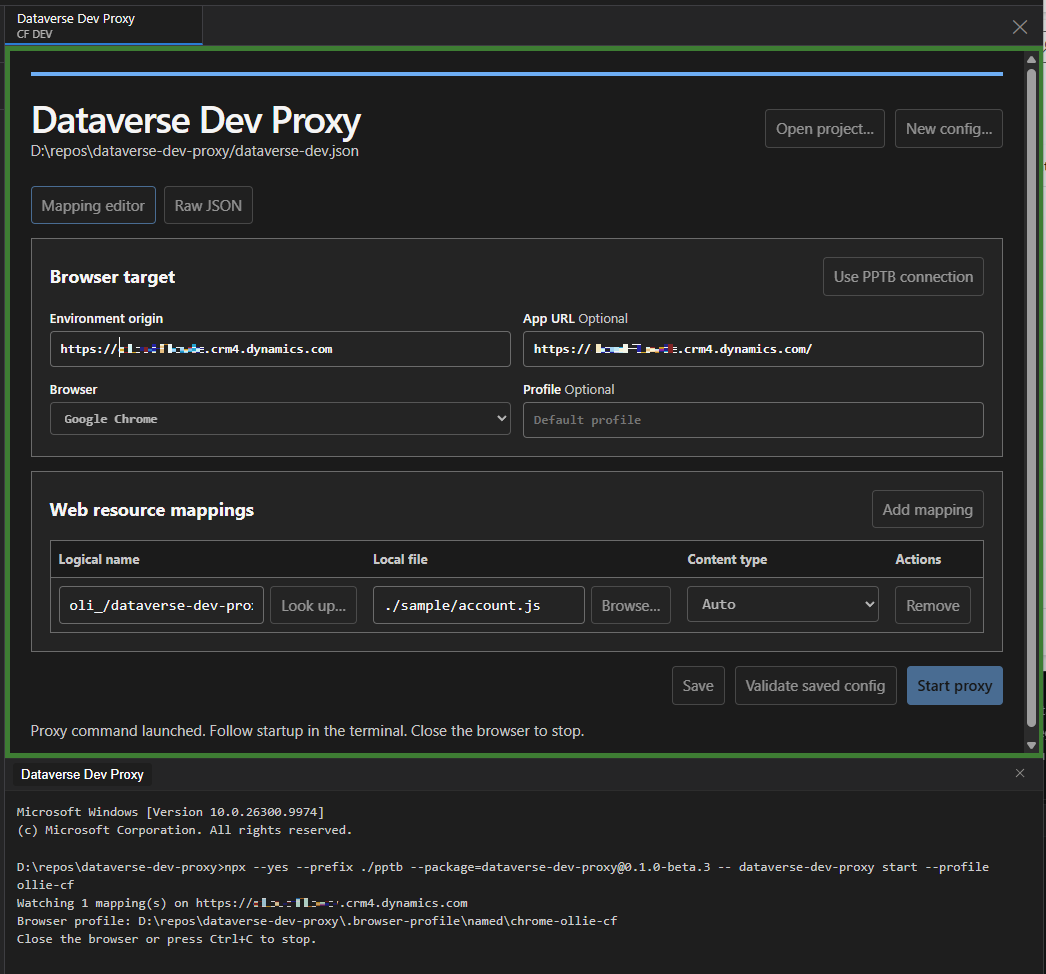
|
|
28
|
+
|
|
29
|
+
### Raw JSON editor
|
|
30
|
+
|
|
31
|
+
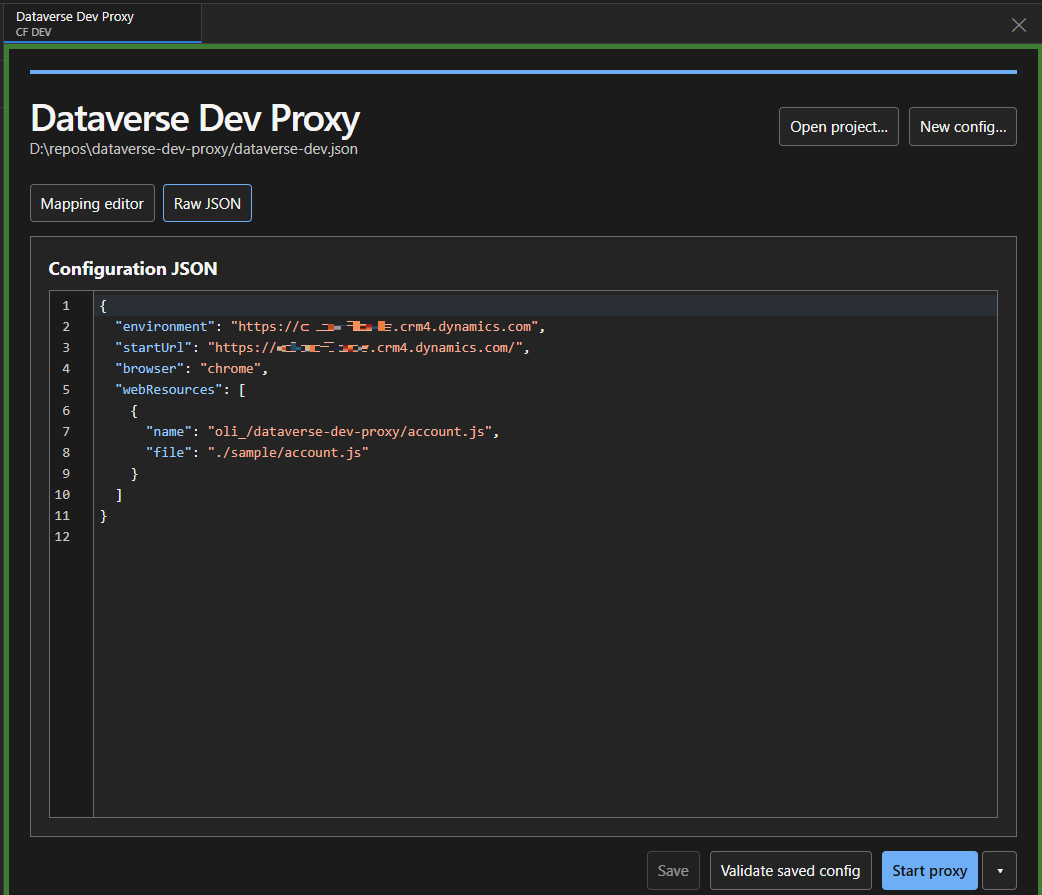
|
|
32
|
+
|
|
33
|
+
## Configuration and profiles
|
|
34
|
+
|
|
35
|
+
- **Content type** supports Dataverse format presets, an extension-based **Auto** option, and a custom MIME type. Logical names and local files can also be extensionless.
|
|
36
|
+
- **Raw JSON** edits the same config as the mapping table. It provides syntax highlighting, line numbers, and inline syntax errors. Use **Validate saved config** to check the mappings and local files through the CLI.
|
|
37
|
+
- Set a **Profile** name to keep sign-ins separate. The arrow beside **Start proxy** lists existing named profiles for the selected browser. Choosing one applies to that launch. The CLI provides profile clearing commands. [CLI documentation](https://github.com/OliverFlint/dataverse-dev-proxy)
|
|
38
|
+
|
|
39
|
+
## What this tool changes
|
|
40
|
+
|
|
41
|
+
- **Project config.** **Save** and **Save and start** create or update the selected JSON file. **Validate saved config** and **Start proxy** pass that file to the CLI. Relative paths resolve from the config folder, and configs in the same folder share its browser profiles. The tool checks whether the file changed on disk before saving. Keep a copy or track the config in version control if you need to restore earlier mappings.
|
|
42
|
+
- **Local browser data.** Launching the proxy creates or updates the dedicated browser profile under `.browser-profile/` beside the config. That folder can contain cookies and saved sign-ins. Keep it out of source control.
|
|
43
|
+
- **Local npm cache.** The PPTB terminal uses `npx` to resolve `@oliverflint/dataverse-dev-proxy@latest` for validation and launch. It checks the npm registry for updates when online and downloads the runner to npm’s cache as needed. No project dependency is required.
|
|
44
|
+
- **Browser responses.** The proxy serves local bytes for mapped GET requests on the configured Dataverse origin, inside the dedicated browser session. The lookup reads web resource names from the matching PPTB connection. The tool does not upload web resources, publish customizations, or write Dataverse records.
|
|
45
|
+
|
|
46
|
+
## Data and network use
|
|
47
|
+
|
|
48
|
+
The tool uses PPTB’s Dataverse API for lookup and its filesystem API for project files. The proxy browser connects to the configured environment and Microsoft sign-in as needed. The tool sends no telemetry to the publisher. Terminal output can include the environment origin, resource names, and local paths, so remove sensitive details before sharing logs.
|
|
49
|
+
|
|
50
|
+
## Troubleshooting
|
|
51
|
+
|
|
52
|
+
| Symptom | What to check |
|
|
53
|
+
| ---------------------------------- | ----------------------------------------------------------------------------------------------------------------------------------------------- |
|
|
54
|
+
| Access denied when opening files | Use **Open project** to select the folder and grant PPTB access. |
|
|
55
|
+
| Lookup fails or returns no results | Check that the active PPTB connection matches the project origin and can read web resources. Try a shorter search or use **Browse all**. |
|
|
56
|
+
| The terminal shows `[upstream]` | Check the mapped path and build output. The proxy falls back to Dataverse when it cannot read the local file. |
|
|
57
|
+
| The proxy fails to launch | Check the PPTB terminal. Confirm Node.js, npm, npx, and the chosen browser are available, and close any session already using the same profile. |
|
|
58
|
+
|
|
59
|
+
Report issues with your PPTB version, Node.js version, browser, and reproduction steps. [GitHub issues](https://github.com/OliverFlint/dataverse-dev-proxy/issues)
|
|
60
|
+
|
|
61
|
+
## Build from source
|
|
62
|
+
|
|
63
|
+
From the repository root, use Node.js 22.12 or later for the Vite build.
|
|
64
|
+
|
|
65
|
+
```sh
|
|
66
|
+
npm --prefix pptb ci
|
|
67
|
+
npm --prefix pptb run build
|
|
68
|
+
npm --prefix pptb run validate
|
|
69
|
+
```
|
|
70
|
+
|
|
71
|
+
In PPTB Desktop, enable **Show Debug Setting**, then use **Debug / Install by Package** to load the local `pptb` folder. This workflow requires pnpm. Run `npm --prefix pptb run dev-watch` to rebuild during development. The UI follows the Power Platform ToolBox React template. [PPTB React template](https://github.com/PowerPlatformToolBox/generator-pptb/tree/main/generators/app/templates/react)
|
|
72
|
+
|
|
73
|
+
## AI Assistance
|
|
74
|
+
|
|
75
|
+
Codex assisted with implementation, documentation, and automated checks. Oliver Flint maintains the tool.
|
|
76
|
+
|
|
77
|
+
## License
|
|
78
|
+
|
|
79
|
+
[MIT](https://github.com/OliverFlint/dataverse-dev-proxy/blob/main/LICENSE)
|