@olddevs/ui 4.2.1 → 4.3.0
This diff represents the content of publicly available package versions that have been released to one of the supported registries. The information contained in this diff is provided for informational purposes only and reflects changes between package versions as they appear in their respective public registries.
- package/CHANGELOG.md +22 -0
- package/dist/components/navigation/MegaMenu.d.ts +43 -23
- package/dist/components/navigation/MegaMenu.d.ts.map +1 -1
- package/dist/components/navigation/MegaMenu.js +110 -47
- package/dist/components/navigation/MegaMenu.js.map +1 -1
- package/dist/components/navigation/useMenuAim.d.ts +8 -8
- package/dist/components/navigation/useMenuAim.d.ts.map +1 -1
- package/dist/components/overlays/Menu.d.ts +4 -2
- package/dist/components/overlays/Menu.d.ts.map +1 -1
- package/dist/components/overlays/Menu.js.map +1 -1
- package/docs/components/index.en.md +2 -2
- package/docs/components/index.md +1 -1
- package/docs/components/navigation/mega-menu.en.md +91 -61
- package/docs/components/navigation/mega-menu.md +86 -56
- package/docs/components/overlays/menu.en.md +8 -4
- package/docs/components/overlays/menu.md +6 -3
- package/docs/getting-started.en.md +2 -2
- package/docs/getting-started.md +1 -1
- package/docs/glossary.en.md +23 -23
- package/docs/glossary.md +22 -22
- package/llms.txt +1 -1
- package/package.json +1 -1
- package/src/components/navigation/MegaMenu.tsx +300 -140
- package/src/components/navigation/useMenuAim.ts +19 -19
- package/src/components/overlays/Menu.tsx +12 -2
|
@@ -1 +1 @@
|
|
|
1
|
-
{"version":3,"file":"useMenuAim.d.ts","sourceRoot":"","sources":["../../../src/components/navigation/useMenuAim.ts"],"names":[],"mappings":"AAEA,OAAO,EAAkC,KAAK,SAAS,EAAE,MAAM,OAAO,CAAC;AAyBvE,mFAAmF;AACnF,eAAO,MAAM,aAAa,MAAM,CAAC;AAkBjC,UAAU,KAAK;IACb,CAAC,EAAE,MAAM,CAAC;IACV,CAAC,EAAE,MAAM,CAAC;CACX;AAED;;;;;;GAMG;AACH,wBAAgB,cAAc,CAAC,IAAI,EAAE,KAAK,EAAE,EAAE,EAAE,KAAK,EAAE,IAAI,EAAE,OAAO,EAAE,IAAI,EAAE,MAAM,GAAG,OAAO,WAkB3F;AAID,UAAU,cAAc;IACtB,
|
|
1
|
+
{"version":3,"file":"useMenuAim.d.ts","sourceRoot":"","sources":["../../../src/components/navigation/useMenuAim.ts"],"names":[],"mappings":"AAEA,OAAO,EAAkC,KAAK,SAAS,EAAE,MAAM,OAAO,CAAC;AAyBvE,mFAAmF;AACnF,eAAO,MAAM,aAAa,MAAM,CAAC;AAkBjC,UAAU,KAAK;IACb,CAAC,EAAE,MAAM,CAAC;IACV,CAAC,EAAE,MAAM,CAAC;CACX;AAED;;;;;;GAMG;AACH,wBAAgB,cAAc,CAAC,IAAI,EAAE,KAAK,EAAE,EAAE,EAAE,KAAK,EAAE,IAAI,EAAE,OAAO,EAAE,IAAI,EAAE,MAAM,GAAG,OAAO,WAkB3F;AAID,UAAU,cAAc;IACtB,oEAAoE;IACpE,KAAK,EAAE,MAAM,GAAG,IAAI,CAAC;IACrB,sDAAsD;IACtD,WAAW,EAAE,SAAS,CAAC,WAAW,GAAG,IAAI,CAAC,CAAC;IAC3C,sDAAsD;IACtD,MAAM,EAAE,CAAC,IAAI,EAAE,MAAM,GAAG,IAAI,KAAK,IAAI,CAAC;CACvC;AAED;;;;;;;;;;;GAWG;AACH,wBAAgB,UAAU,CAAC,EAAE,KAAK,EAAE,WAAW,EAAE,MAAM,EAAE,EAAE,cAAc;oBA0E9D,MAAM,GAAG,IAAI;;EA0BvB"}
|
|
@@ -40,9 +40,11 @@ export interface MenuProps<T extends object = object> extends AriaMenuProps<T> {
|
|
|
40
40
|
* Сторона, с которой панель раскрывается. Корневое меню по умолчанию — под
|
|
41
41
|
* кнопкой слева (`bottom start`); вложенное, внутри `SubmenuTrigger`, —
|
|
42
42
|
* сбоку от своего пункта, а на узком экране под ним. Явное значение
|
|
43
|
-
* побеждает оба умолчания.
|
|
43
|
+
* побеждает оба умолчания. `end top` и `start top` — сбоку по концу или
|
|
44
|
+
* началу строки: при письме справа налево они меняются местами, а
|
|
45
|
+
* `right top` и `left top` — нет.
|
|
44
46
|
*/
|
|
45
|
-
placement?: "bottom start" | "bottom end" | "top start" | "top end" | "right top" | "left top";
|
|
47
|
+
placement?: "bottom start" | "bottom end" | "top start" | "top end" | "end top" | "start top" | "right top" | "left top";
|
|
46
48
|
}
|
|
47
49
|
export interface MenuItemProps extends Omit<AriaMenuItemProps, "children" | "className"> {
|
|
48
50
|
/** Подпись пункта. Длинная обрезается многоточием. */
|
|
@@ -1 +1 @@
|
|
|
1
|
-
{"version":3,"file":"Menu.d.ts","sourceRoot":"","sources":["../../../src/components/overlays/Menu.tsx"],"names":[],"mappings":"AAEA,OAAO,EAA0B,KAAK,SAAS,EAAE,MAAM,OAAO,CAAC;AAC/D,OAAO,EASL,KAAK,aAAa,IAAI,iBAAiB,EACvC,KAAK,SAAS,IAAI,aAAa,EAC/B,KAAK,gBAAgB,IAAI,oBAAoB,EAC9C,MAAM,uBAAuB,CAAC;AAE/B,OAAO,EAAiB,KAAK,iBAAiB,EAAE,MAAM,qBAAqB,CAAC;AAe5E,OAAO,KAAK,EAAE,IAAI,EAAE,MAAM,uBAAuB,CAAC;AAGlD,OAAO,EAAE,WAAW,EAAE,cAAc,EAAE,MAAM,uBAAuB,CAAC;AAEpE,MAAM,WAAW,eAAgB,SAAQ,iBAAiB;IACxD,oDAAoD;IACpD,QAAQ,CAAC,EAAE,SAAS,CAAC;IACrB,4DAA4D;IAC5D,IAAI,CAAC,EAAE,SAAS,CAAC;IACjB,iDAAiD;IACjD,QAAQ,CAAC,EAAE,OAAO,CAAC;IACnB,qDAAqD;IACrD,YAAY,CAAC,EAAE,MAAM,CAAC;IACtB,wBAAwB;IACxB,SAAS,CAAC,EAAE,MAAM,CAAC;CACpB;AAED;;;;;;;;;;;;;;;;GAgBG;AACH,eAAO,MAAM,UAAU,+GAerB,CAAC;AAEH,MAAM,WAAW,SAAS,CAAC,CAAC,SAAS,MAAM,GAAG,MAAM,CAAE,SAAQ,aAAa,CAAC,CAAC,CAAC;IAC5E,2CAA2C;IAC3C,MAAM,CAAC,EAAE,MAAM,CAAC;IAChB
|
|
1
|
+
{"version":3,"file":"Menu.d.ts","sourceRoot":"","sources":["../../../src/components/overlays/Menu.tsx"],"names":[],"mappings":"AAEA,OAAO,EAA0B,KAAK,SAAS,EAAE,MAAM,OAAO,CAAC;AAC/D,OAAO,EASL,KAAK,aAAa,IAAI,iBAAiB,EACvC,KAAK,SAAS,IAAI,aAAa,EAC/B,KAAK,gBAAgB,IAAI,oBAAoB,EAC9C,MAAM,uBAAuB,CAAC;AAE/B,OAAO,EAAiB,KAAK,iBAAiB,EAAE,MAAM,qBAAqB,CAAC;AAe5E,OAAO,KAAK,EAAE,IAAI,EAAE,MAAM,uBAAuB,CAAC;AAGlD,OAAO,EAAE,WAAW,EAAE,cAAc,EAAE,MAAM,uBAAuB,CAAC;AAEpE,MAAM,WAAW,eAAgB,SAAQ,iBAAiB;IACxD,oDAAoD;IACpD,QAAQ,CAAC,EAAE,SAAS,CAAC;IACrB,4DAA4D;IAC5D,IAAI,CAAC,EAAE,SAAS,CAAC;IACjB,iDAAiD;IACjD,QAAQ,CAAC,EAAE,OAAO,CAAC;IACnB,qDAAqD;IACrD,YAAY,CAAC,EAAE,MAAM,CAAC;IACtB,wBAAwB;IACxB,SAAS,CAAC,EAAE,MAAM,CAAC;CACpB;AAED;;;;;;;;;;;;;;;;GAgBG;AACH,eAAO,MAAM,UAAU,+GAerB,CAAC;AAEH,MAAM,WAAW,SAAS,CAAC,CAAC,SAAS,MAAM,GAAG,MAAM,CAAE,SAAQ,aAAa,CAAC,CAAC,CAAC;IAC5E,2CAA2C;IAC3C,MAAM,CAAC,EAAE,MAAM,CAAC;IAChB;;;;;;;OAOG;IACH,SAAS,CAAC,EACN,cAAc,GACd,YAAY,GACZ,WAAW,GACX,SAAS,GACT,SAAS,GACT,WAAW,GACX,WAAW,GACX,UAAU,CAAC;CAChB;AAED,MAAM,WAAW,aAAc,SAAQ,IAAI,CAAC,iBAAiB,EAAE,UAAU,GAAG,WAAW,CAAC;IACtF,sDAAsD;IACtD,QAAQ,CAAC,EAAE,SAAS,CAAC;IACrB,8DAA8D;IAC9D,IAAI,CAAC,EAAE,SAAS,CAAC;IACjB,2DAA2D;IAC3D,QAAQ,CAAC,EAAE,SAAS,CAAC;IACrB,qEAAqE;IACrE,IAAI,CAAC,EAAE,IAAI,CAAC;IACZ,mEAAmE;IACnE,QAAQ,CAAC,EAAE,OAAO,CAAC;IACnB,uBAAuB;IACvB,SAAS,CAAC,EAAE,MAAM,CAAC;CACpB;AAED;;;;;;;;;;;;;;;;;;;;;;;;;;;;;;;;;;;;;GAqCG;AACH,eAAO,MAAM,IAAI,8GAyCf,CAAC;AAEH;;;;;;;GAOG;AACH,eAAO,MAAM,QAAQ,0GA2CnB,CAAC;AAEH,MAAM,WAAW,gBAAgB,CAAC,CAAC,SAAS,MAAM,GAAG,MAAM,CAAE,SAAQ,IAAI,CACvE,oBAAoB,CAAC,CAAC,CAAC,EACvB,WAAW,GAAG,UAAU,CACzB;IACC,oEAAoE;IACpE,KAAK,CAAC,EAAE,SAAS,CAAC;IAClB;;;;;;;OAOG;IACH,QAAQ,CAAC,EAAE,SAAS,CAAC;IACrB,wBAAwB;IACxB,SAAS,CAAC,EAAE,MAAM,CAAC;CACpB;AAED,qEAAqE;AACrE,eAAO,MAAM,WAAW,kHAUtB,CAAC;AAEH,0CAA0C;AAC1C,wBAAgB,aAAa,CAAC,EAC5B,SAAS,GACV,EAAE;IACD,mCAAmC;IACnC,SAAS,CAAC,EAAE,MAAM,CAAC;CACpB,+BAEA"}
|
|
@@ -1 +1 @@
|
|
|
1
|
-
{"version":3,"file":"Menu.js","sourceRoot":"","sources":["../../../src/components/overlays/Menu.tsx"],"names":[],"mappings":"AAAA,YAAY,CAAC;;AAEb,OAAO,EAAE,UAAU,EAAE,UAAU,EAAkB,MAAM,OAAO,CAAC;AAC/D,OAAO,EACL,MAAM,IAAI,UAAU,EACpB,IAAI,IAAI,QAAQ,EAChB,QAAQ,IAAI,YAAY,EACxB,WAAW,IAAI,eAAe,EAC9B,MAAM,EACN,OAAO,EACP,cAAc,EACd,SAAS,GAIV,MAAM,uBAAuB,CAAC;AAC/B,OAAO,EAAE,SAAS,EAAE,gBAAgB,EAAE,MAAM,gBAAgB,CAAC;AAC7D,OAAO,EAAE,aAAa,EAA0B,MAAM,qBAAqB,CAAC;AAC5E,OAAO,EAAE,mBAAmB,EAAE,MAAM,oCAAoC,CAAC;AACzE,OAAO,EAAE,EAAE,EAAE,MAAM,iBAAiB,CAAC;AACrC,OAAO,EACL,eAAe,EACf,oBAAoB,EACpB,uBAAuB,EACvB,wBAAwB,EACxB,wBAAwB,EACxB,uBAAuB,EACvB,cAAc,EACd,gBAAgB,EAChB,wBAAwB,EACxB,oBAAoB,GACrB,MAAM,mBAAmB,CAAC;AAE3B,OAAO,EAAE,SAAS,EAAE,MAAM,mBAAmB,CAAC;AAE9C,OAAO,EAAE,WAAW,EAAE,cAAc,EAAE,MAAM,uBAAuB,CAAC;AAgCpE,MAAM,CAAC,MAAM,UAAU,GAAG,UAAU,CAAqC,SAAS,UAAU,CAC1F,EAAE,QAAQ,EAAE,IAAI,EAAE,QAAQ,EAAE,OAAO,EAAE,IAAI,EAAE,IAAI,EAAE,QAAQ,EAAE,QAAQ,EAAE,SAAS,EAAE,GAAG,IAAI,EAAE,EACzF,GAAG;IAEH,OAAO,CACL,MAAC,UAAU,IACT,GAAG,EAAE,GAAG,EACR,UAAU,EAAE,QAAQ,EACpB,SAAS,EAAE,EAAE,CAAC,aAAa,CAAC,EAAE,OAAO,EAAE,IAAI,EAAE,IAAI,EAAE,QAAQ,EAAE,QAAQ,EAAE,CAAC,EAAE,SAAS,CAAC,KAChF,IAAI,aAEP,IAAI,EACJ,QAAQ,IAAI,IAAI,IAAI,CAAC,QAAQ,CAAC,CAAC,CAAC,yBAAO,QAAQ,GAAQ,CAAC,CAAC,CAAC,IAAI,IACpD,CACd,CAAC;AACJ,CAAC,CAAC,CAAC;
|
|
1
|
+
{"version":3,"file":"Menu.js","sourceRoot":"","sources":["../../../src/components/overlays/Menu.tsx"],"names":[],"mappings":"AAAA,YAAY,CAAC;;AAEb,OAAO,EAAE,UAAU,EAAE,UAAU,EAAkB,MAAM,OAAO,CAAC;AAC/D,OAAO,EACL,MAAM,IAAI,UAAU,EACpB,IAAI,IAAI,QAAQ,EAChB,QAAQ,IAAI,YAAY,EACxB,WAAW,IAAI,eAAe,EAC9B,MAAM,EACN,OAAO,EACP,cAAc,EACd,SAAS,GAIV,MAAM,uBAAuB,CAAC;AAC/B,OAAO,EAAE,SAAS,EAAE,gBAAgB,EAAE,MAAM,gBAAgB,CAAC;AAC7D,OAAO,EAAE,aAAa,EAA0B,MAAM,qBAAqB,CAAC;AAC5E,OAAO,EAAE,mBAAmB,EAAE,MAAM,oCAAoC,CAAC;AACzE,OAAO,EAAE,EAAE,EAAE,MAAM,iBAAiB,CAAC;AACrC,OAAO,EACL,eAAe,EACf,oBAAoB,EACpB,uBAAuB,EACvB,wBAAwB,EACxB,wBAAwB,EACxB,uBAAuB,EACvB,cAAc,EACd,gBAAgB,EAChB,wBAAwB,EACxB,oBAAoB,GACrB,MAAM,mBAAmB,CAAC;AAE3B,OAAO,EAAE,SAAS,EAAE,MAAM,mBAAmB,CAAC;AAE9C,OAAO,EAAE,WAAW,EAAE,cAAc,EAAE,MAAM,uBAAuB,CAAC;AAgCpE,MAAM,CAAC,MAAM,UAAU,GAAG,UAAU,CAAqC,SAAS,UAAU,CAC1F,EAAE,QAAQ,EAAE,IAAI,EAAE,QAAQ,EAAE,OAAO,EAAE,IAAI,EAAE,IAAI,EAAE,QAAQ,EAAE,QAAQ,EAAE,SAAS,EAAE,GAAG,IAAI,EAAE,EACzF,GAAG;IAEH,OAAO,CACL,MAAC,UAAU,IACT,GAAG,EAAE,GAAG,EACR,UAAU,EAAE,QAAQ,EACpB,SAAS,EAAE,EAAE,CAAC,aAAa,CAAC,EAAE,OAAO,EAAE,IAAI,EAAE,IAAI,EAAE,QAAQ,EAAE,QAAQ,EAAE,CAAC,EAAE,SAAS,CAAC,KAChF,IAAI,aAEP,IAAI,EACJ,QAAQ,IAAI,IAAI,IAAI,CAAC,QAAQ,CAAC,CAAC,CAAC,yBAAO,QAAQ,GAAQ,CAAC,CAAC,CAAC,IAAI,IACpD,CACd,CAAC;AACJ,CAAC,CAAC,CAAC;AA6EH,MAAM,CAAC,MAAM,IAAI,GAAG,UAAU,CAA4B,SAAS,IAAI,CACrE,EAAE,MAAM,GAAG,CAAC,EAAE,SAAS,EAAE,SAAS,EAAE,GAAG,IAAI,EAAE,EAC7C,GAAG;IAEH,MAAM,cAAc,GAAG,UAAU,CAAC,cAAc,CAAC,CAAC;IAGlD,MAAM,SAAS,GACb,cAAc,IAAI,IAAI;QACtB,SAAS,IAAI,cAAc;QAC3B,cAAc,CAAC,OAAO,KAAK,gBAAgB,CAAC;IAC9C,MAAM,gBAAgB,GAAG,mBAAmB,EAAE,CAAC;IAI/C,MAAM,iBAAiB,GACrB,SAAS;QACT,CAAC,SAAS;YACR,CAAC,CAAC,gBAAgB,KAAK,cAAc;gBACnC,CAAC,CAAC,gBAAgB;gBAClB,CAAC,CAAC,SAAS;YACb,CAAC,CAAC,cAAc,CAAC,CAAC;IAEtB,OAAO,CACL,KAAC,OAAO,IACN,MAAM,EAAE,MAAM,EACd,SAAS,EAAE,iBAAiB,EAC5B,SAAS,EAAE,EAAE,CAAC,gBAAgB,EAAE,SAAS,CAAC,YAW1C,KAAC,QAAQ,IAAC,GAAG,EAAE,GAAG,6BAA0B,MAAM,EAAC,SAAS,EAAC,cAAc,KAAK,IAAI,GAAI,GAChF,CACX,CAAC;AACJ,CAAC,CAAC,CAAC;AAUH,MAAM,CAAC,MAAM,QAAQ,GAAG,UAAU,CAAgC,SAAS,QAAQ,CACjF,EAAE,QAAQ,EAAE,IAAI,EAAE,QAAQ,EAAE,IAAI,GAAG,SAAS,EAAE,QAAQ,EAAE,SAAS,EAAE,GAAG,IAAI,EAAE,EAC5E,GAAG;IAEH,OAAO,CACL,KAAC,YAAY,IACX,GAAG,EAAE,GAAG,EACR,UAAU,EAAE,QAAQ,6BAMI,MAAM,EAC9B,SAAS,EAAE,EAAE,CACX,eAAe,EACf,cAAc,CAAC,IAAI,CAAC,EACpB,wBAAwB,EACxB,uBAAuB,EACvB,SAAS,CACV,KACG,IAAI,YAEP,CAAC,EAAE,UAAU,EAAE,UAAU,EAAE,EAAE,EAAE,CAAC,CAC/B,8BACG,CAAC,IAAI,IAAI,IAAI,IAAI,UAAU,CAAC,IAAI,CAC/B,eAAM,SAAS,EAAE,oBAAoB,YAClC,UAAU,CAAC,CAAC,CAAC,KAAC,SAAS,IAAC,IAAI,EAAE,EAAE,EAAE,WAAW,EAAE,CAAC,GAAI,CAAC,CAAC,CAAC,IAAI,GACvD,CACR,EACD,eAAM,SAAS,EAAC,UAAU,YAAE,QAAQ,GAAQ,EAC3C,QAAQ,IAAI,IAAI,IAAI,CACnB,cAAK,SAAS,EAAE,wBAAwB,YAAG,SAAS,CAAC,QAAQ,CAAC,GAAO,CACtE,EACA,UAAU,IAAI,CACb,eAAM,SAAS,EAAE,uBAAuB,YACtC,KAAC,gBAAgB,IAAC,IAAI,EAAE,EAAE,GAAI,GACzB,CACR,IACA,CACJ,GACY,CAChB,CAAC;AACJ,CAAC,CAAC,CAAC;AAsBH,MAAM,CAAC,MAAM,WAAW,GAAG,UAAU,CAAgC,SAAS,WAAW,CACvF,EAAE,KAAK,EAAE,QAAQ,EAAE,SAAS,EAAE,GAAG,IAAI,EAAE,EACvC,GAAG;IAEH,OAAO,CACL,MAAC,eAAe,IAAC,GAAG,EAAE,GAAG,EAAE,SAAS,EAAE,SAAS,KAAM,IAAI,aACtD,KAAK,IAAI,IAAI,IAAI,KAAC,MAAM,IAAC,SAAS,EAAE,wBAAwB,YAAG,KAAK,GAAU,EAC9E,QAAQ,IACO,CACnB,CAAC;AACJ,CAAC,CAAC,CAAC;AAGH,MAAM,UAAU,aAAa,CAAC,EAC5B,SAAS,GAIV;IACC,OAAO,KAAC,SAAS,IAAC,SAAS,EAAE,EAAE,CAAC,oBAAoB,EAAE,SAAS,CAAC,GAAI,CAAC;AACvE,CAAC"}
|
|
@@ -1,5 +1,5 @@
|
|
|
1
1
|
---
|
|
2
|
-
sourceHash:
|
|
2
|
+
sourceHash: 8b34aab7b3be
|
|
3
3
|
---
|
|
4
4
|
|
|
5
5
|
# Component catalog
|
|
@@ -122,7 +122,7 @@ Components built from primitives: the page frame, its navigation and header.
|
|
|
122
122
|
- [Breadcrumbs](navigation/breadcrumbs.md): `Breadcrumbs` — a chain of links "Section / Subsection / Page" that shows where the user is and lets them go back up a level
|
|
123
123
|
- [Pagination](navigation/pagination.md): `Pagination`, `pageRange` — a page switcher for long results: numbers, adjacent pages, jumping to the first and last; `pageRange` calculates which numbers to show
|
|
124
124
|
- [Stepper](navigation/stepper.md): `Stepper` — a step indicator for a wizard, an import or a checkout: shows the current step and lets you go back to a completed one
|
|
125
|
-
- [MegaMenu](navigation/mega-menu.md): `MegaMenu`, `MegaMenuCategory`, `MegaMenuGroup`, `MegaMenuLink`, `MegaMenuTrigger`, `MegaMenuButton` — an Amazon-style store catalog: a column of categories with a
|
|
125
|
+
- [MegaMenu](navigation/mega-menu.md): `MegaMenu`, `MegaMenuCategory`, `MegaMenuGroup`, `MegaMenuLink`, `MegaMenuTrigger`, `MegaMenuButton` — an Amazon-style store catalog: a column of categories with a flyout of link columns next to the hovered one; the pointer can cut diagonally across to the flyout without a neighboring category taking over; the same markup also opens as a dropdown overlay from a "Catalog" button
|
|
126
126
|
- [TreeView](navigation/tree-view.md): `TreeView` — a tree with expandable branches for categories, folders and sections; nodes can be selected, including with checkboxes
|
|
127
127
|
- [Selection bar](navigation/selection-bar.md): `SelectionBar`, `useStickyOffset` — a bar above a list or a grid where several objects are selected: shows "12 selected", bulk action buttons and a clear-selection button
|
|
128
128
|
- [Contextual save bar](navigation/contextual-save-bar.md): `ContextualSaveBar` — a bar at the bottom of the viewport that appears after the first edit of a form and offers to save or discard unsaved changes
|
package/docs/components/index.md
CHANGED
|
@@ -118,7 +118,7 @@
|
|
|
118
118
|
- [Breadcrumbs](navigation/breadcrumbs.md): `Breadcrumbs` — цепочка ссылок «Раздел / Подраздел / Страница», по которой видно, где пользователь, и можно вернуться на уровень выше
|
|
119
119
|
- [Pagination](navigation/pagination.md): `Pagination`, `pageRange` — переключатель страниц для длинной выдачи: номера, соседние страницы, переход к первой и последней; `pageRange` считает, какие номера показать
|
|
120
120
|
- [Stepper](navigation/stepper.md): `Stepper` — индикатор шагов мастера, импорта или оформления заказа: показывает текущий шаг и позволяет вернуться к уже пройденному
|
|
121
|
-
- [MegaMenu](navigation/mega-menu.md): `MegaMenu`, `MegaMenuCategory`, `MegaMenuGroup`, `MegaMenuLink`, `MegaMenuTrigger`, `MegaMenuButton` — каталог магазина в духе Amazon: столбец категорий, а справа от наведённой —
|
|
121
|
+
- [MegaMenu](navigation/mega-menu.md): `MegaMenu`, `MegaMenuCategory`, `MegaMenuGroup`, `MegaMenuLink`, `MegaMenuTrigger`, `MegaMenuButton` — каталог магазина в духе Amazon: столбец категорий, а справа от наведённой — Полка с колонками ссылок; курсор можно вести к Полке наискосок, категория под ним не перехватит наведение; та же разметка открывается выпадающим оверлеем от кнопки «Каталог»
|
|
122
122
|
- [TreeView](navigation/tree-view.md): `TreeView` — дерево с раскрываемыми ветками для категорий, папок и разделов; узлы можно выбирать, в том числе флажками
|
|
123
123
|
- [Selection bar](navigation/selection-bar.md): `SelectionBar`, `useStickyOffset` — полоса над списком или сеткой, где выбрано несколько объектов: показывает «Выбрано 12», кнопки массовых действий и сброс выделения
|
|
124
124
|
- [Contextual save bar](navigation/contextual-save-bar.md): `ContextualSaveBar` — полоса внизу окна, которая появляется после первой правки формы и предлагает сохранить или отменить несохранённые изменения
|
|
@@ -5,7 +5,7 @@ category: navigation
|
|
|
5
5
|
status: stable
|
|
6
6
|
source: src/components/navigation/MegaMenu.tsx
|
|
7
7
|
story: src/components/navigation/MegaMenu.stories.tsx
|
|
8
|
-
sourceHash:
|
|
8
|
+
sourceHash: 42179963266b
|
|
9
9
|
---
|
|
10
10
|
|
|
11
11
|
# MegaMenu
|
|
@@ -13,10 +13,11 @@ sourceHash: 731dae1c43c3
|
|
|
13
13
|
## Summary for AI
|
|
14
14
|
|
|
15
15
|
`MegaMenu` is an Amazon-style store catalog: a category column on the left and, next to the hovered
|
|
16
|
-
category, its
|
|
16
|
+
category, its flyout with columns of links and any content of your own. It is link navigation, not a command
|
|
17
17
|
menu: the markup follows the WAI-ARIA Disclosure Navigation pattern (`nav`, buttons with `aria-expanded`, real
|
|
18
|
-
`a` elements). Categories are `MegaMenuCategory`
|
|
19
|
-
|
|
18
|
+
`a` elements). Categories are `MegaMenuCategory` (directly or inside your own components, server components
|
|
19
|
+
included), columns are `MegaMenuGroup`, links are `MegaMenuLink`. The current section and the current page are
|
|
20
|
+
marked with the `active` prop, as on `NavItem`. The same catalog opens as a dropdown overlay from a button: `MegaMenuTrigger` with
|
|
20
21
|
`MegaMenuButton` and an unchanged `MegaMenu`.
|
|
21
22
|
|
|
22
23
|
## When to use
|
|
@@ -24,7 +25,7 @@ menu: the markup follows the WAI-ARIA Disclosure Navigation pattern (`nav`, butt
|
|
|
24
25
|
- A catalog with ten or more sections, each with subsections in columns: a store, a marketplace, a help portal.
|
|
25
26
|
- The sections should be visible at once and the subsections should appear on hover, without taking the user
|
|
26
27
|
off the page.
|
|
27
|
-
- The
|
|
28
|
+
- The flyout needs content of its own next to the links: a promo card, an image, a selection.
|
|
28
29
|
|
|
29
30
|
## When not to use
|
|
30
31
|
|
|
@@ -39,10 +40,10 @@ menu: the markup follows the WAI-ARIA Disclosure Navigation pattern (`nav`, butt
|
|
|
39
40
|
import { MegaMenu, MegaMenuCategory, MegaMenuGroup, MegaMenuLink } from "@olddevs/ui";
|
|
40
41
|
|
|
41
42
|
<MegaMenu aria-label="Catalog">
|
|
42
|
-
<MegaMenuCategory id="computers" label="Computers" href="/computers">
|
|
43
|
+
<MegaMenuCategory id="computers" label="Computers" href="/computers" active>
|
|
43
44
|
<MegaMenuGroup title="Laptops" href="/computers/laptops">
|
|
44
45
|
<MegaMenuLink href="/computers/laptops/gaming">Gaming</MegaMenuLink>
|
|
45
|
-
<MegaMenuLink href="/computers/laptops/ultrabooks"
|
|
46
|
+
<MegaMenuLink href="/computers/laptops/ultrabooks" active>
|
|
46
47
|
Ultrabooks
|
|
47
48
|
</MegaMenuLink>
|
|
48
49
|
</MegaMenuGroup>
|
|
@@ -59,67 +60,80 @@ import { MegaMenu, MegaMenuCategory, MegaMenuGroup, MegaMenuLink } from "@olddev
|
|
|
59
60
|
| ------------------------------------------ | --------- | ----------------------------------------------------------------------------------------------------------------- |
|
|
60
61
|
| `aria-label` | — | The accessible name of the navigation. Required: on a page with several `nav` elements, the name tells them apart |
|
|
61
62
|
| `value` / `defaultValue` / `onValueChange` | `null` | The open category (its `id`) or `null`, controlled or uncontrolled |
|
|
62
|
-
| `showcaseWidth` | `"40rem"` | The width of the
|
|
63
|
+
| `showcaseWidth` | `"40rem"` | The width of the flyout, shared by all categories so that the catalog does not jump between them |
|
|
63
64
|
| `className` | — | Classes for the `nav`; the default width of the category column is `w-64` |
|
|
64
65
|
|
|
65
66
|
`MegaMenuCategory`: `id` is the key for `value`; `label` is the text in the category column and the name of the
|
|
66
|
-
|
|
67
|
-
the
|
|
67
|
+
flyout; `icon`; `href` or `link` is the address of the whole section; `disabled`; `active` means the current page is in
|
|
68
|
+
this section; the children are the content of the flyout. For a category with a flyout, the address becomes a title link at the top of the flyout; for a
|
|
68
69
|
category without children, the row in the category column is itself the link. `link` is a router link passed as an
|
|
69
70
|
empty element (`link={<Link href="/x" />}`), and the label moves inside it. It is a separate prop rather than
|
|
70
|
-
`asChild` because the children of a category are its
|
|
71
|
+
`asChild` because the children of a category are its flyout.
|
|
71
72
|
|
|
72
|
-
`
|
|
73
|
-
|
|
73
|
+
`active` on a category sets `aria-current="true"` and gives the label the accent color, the same one a current
|
|
74
|
+
link gets. The mark stays whether or not the flyout is open: the route decides the current section, not hover. The
|
|
75
|
+
open category is still marked with a background, so one row can carry both. While no flyout is open, Tab enters the
|
|
76
|
+
category column on the current section. Your code decides which section is current, as with `active` on `NavItem`.
|
|
74
77
|
|
|
75
|
-
|
|
78
|
+
Categories don't have to be direct children of `MegaMenu`: you can split them across your own components and render
|
|
79
|
+
them from a Next.js server component. Each category reports itself to the column, and the column doesn't inspect its
|
|
80
|
+
children by type, because a server component's element arrives on the client with a different type. Before
|
|
81
|
+
hydration, while the categories haven't reported themselves yet, every available category is a Tab stop; after
|
|
82
|
+
hydration the column is a single stop again.
|
|
83
|
+
|
|
84
|
+
`MegaMenuGroup`: `title` is the title of the column and the name of its list; `href` or `link` turns the title into
|
|
85
|
+
a link (`link` is a router link passed as an empty element, as on a category); the children are `MegaMenuLink`
|
|
86
|
+
elements, and each one is placed in its own list item, including those passed in a fragment.
|
|
87
|
+
|
|
88
|
+
`MegaMenuLink`: the usual `a` props, `icon`, `active` and `asChild`. `active` sets `aria-current="page"` and the
|
|
76
89
|
look of the current link. The kit does not work out the current page itself, because every router compares
|
|
77
90
|
addresses by its own rules. `asChild` renders the link as a router element:
|
|
78
|
-
`<MegaMenuLink asChild><Link href="/x">Label</Link></MegaMenuLink>`.
|
|
91
|
+
`<MegaMenuLink asChild><Link href="/x">Label</Link></MegaMenuLink>`. The old name, `current`, works until 5.0 and is
|
|
92
|
+
marked `@deprecated`: the kit calls the current navigation item `active`.
|
|
79
93
|
|
|
80
|
-
## Hover and the
|
|
94
|
+
## Hover and the flyout
|
|
81
95
|
|
|
82
|
-
Hovering a category with the mouse opens its
|
|
83
|
-
the one whose
|
|
84
|
-
|
|
96
|
+
Hovering a category with the mouse opens its flyout at once, with no delay. Exactly one category is highlighted,
|
|
97
|
+
the one whose flyout is open: the highlight follows `aria-expanded`, not `:hover`. Hovering a category without a
|
|
98
|
+
flyout closes the open one, with the same caveat about aim as below.
|
|
85
99
|
|
|
86
|
-
The
|
|
100
|
+
The flyout closes 150 ms after the pointer has left both the category column and the flyout, so a brief
|
|
87
101
|
excursion past the edge does not reset the catalog. It also closes on a pointer press outside the catalog and when
|
|
88
102
|
focus leaves the catalog.
|
|
89
103
|
|
|
90
|
-
The content of a
|
|
104
|
+
The content of a flyout is mounted only for the open category, so a catalog of a hundred links and images does
|
|
91
105
|
not load everything at once. The region itself is always there, hidden: the button's `aria-controls` points to it.
|
|
92
106
|
|
|
93
|
-
The
|
|
94
|
-
links, then on down the page", and why the
|
|
107
|
+
The flyout is a DOM descendant of its category, not a portal. That is why the Tab order runs "category, its
|
|
108
|
+
links, then on down the page", and why the flyout sits flush against the category column without any position
|
|
95
109
|
calculation. An ancestor with `overflow: hidden` clips it, so put the catalog where there is room beside it.
|
|
96
110
|
|
|
97
|
-
The
|
|
111
|
+
The flyout sits on the end side of the line: on the right, or on the left in right-to-left writing. If there is
|
|
98
112
|
not enough room there and there is enough on the other side, it moves to the other side. The kit measures the side
|
|
99
|
-
ahead of time and again when the window is resized, so the arrow key that points "toward the
|
|
100
|
-
points to where the
|
|
113
|
+
ahead of time and again when the window is resized, so the arrow key that points "toward the flyout" already
|
|
114
|
+
points to where the flyout will appear.
|
|
101
115
|
|
|
102
116
|
## Touch and narrow screens
|
|
103
117
|
|
|
104
118
|
Touch has no hover, so the touch itself (`click`) opens a category, without aim. A pointer whose `pointerType` is
|
|
105
|
-
"touch" or "pen" neither opens a category on hover nor closes the
|
|
106
|
-
finger. Touching an open category again neither closes it nor goes anywhere. The
|
|
119
|
+
"touch" or "pen" neither opens a category on hover nor closes the flyout when it leaves: a pen behaves like a
|
|
120
|
+
finger. Touching an open category again neither closes it nor goes anywhere. The flyout closes on a touch outside
|
|
107
121
|
the catalog or on Escape.
|
|
108
122
|
|
|
109
123
|
The mouse behaves as before: hover, aim and closing after 150 ms all remain while the screen is wide.
|
|
110
124
|
|
|
111
125
|
On a narrow screen, under 640px (the same breakpoint as `Menu` submenus and Editor submenus), there is no room beside
|
|
112
|
-
the category column for the
|
|
126
|
+
the category column for the flyout: the edge of the window would cut it off on the right. So the catalog works as a
|
|
113
127
|
drill-down:
|
|
114
128
|
|
|
115
129
|
- The category column takes the full width, and category labels wrap instead of being truncated.
|
|
116
|
-
- An open category (by touch, click, Enter or Space) replaces the category column with its
|
|
130
|
+
- An open category (by touch, click, Enter or Space) replaces the category column with its flyout. The flyout
|
|
117
131
|
starts with a "Back" row that shows the category name. If the category has a link of its own, the link shows the
|
|
118
132
|
name, on the row below, instead of the "Back" row. Below that, the columns of links follow, one under another.
|
|
119
|
-
- "Back" returns the category column and puts focus on the category the person came from. Escape inside the
|
|
133
|
+
- "Back" returns the category column and puts focus on the category the person came from. Escape inside the flyout
|
|
120
134
|
works like "Back".
|
|
121
135
|
- When you drill down, focus moves to "Back": the category button is hidden along with the category column, and focus
|
|
122
|
-
left on it would be lost. In the
|
|
136
|
+
left on it would be lost. In the flyout on a narrow screen, the arrow key toward the category column does
|
|
123
137
|
nothing, because the column is not beside it.
|
|
124
138
|
- There is no aim on a narrow screen: hovering with the mouse does not open a category, and moving the mouse away does
|
|
125
139
|
not cancel the drill-down. Replacing the column under the cursor would pull it out from under the person's hand.
|
|
@@ -133,25 +147,25 @@ catalog supplies "Назад".
|
|
|
133
147
|
The kit reads the width through `matchMedia`, not through CSS, because the width determines the contents of the
|
|
134
148
|
markup (the category column is hidden), not just the look. Before hydration and on the server, the hook reports a wide
|
|
135
149
|
screen (ADR-0018): the server does not know the width, and the markup it produces is always the regular one. On a phone,
|
|
136
|
-
after hydration, a
|
|
150
|
+
after hydration, a flyout opened by `defaultValue` is re-rendered once as a drill-down. On a phone the `nav` takes
|
|
137
151
|
the full width through the `max-sm:w-full` class; a `w-*` class from `className` applies on a wide screen.
|
|
138
152
|
|
|
139
153
|
## Aim
|
|
140
154
|
|
|
141
|
-
On its way from a category to its
|
|
142
|
-
categories. If hover opened them at once, the
|
|
143
|
-
out of reach. Aim watches where the pointer is heading: while it moves toward the open
|
|
155
|
+
On its way from a category to its flyout, the pointer cuts diagonally and brushes against the neighboring
|
|
156
|
+
categories. If hover opened them at once, the flyout would change under the person's hand, and the links would be
|
|
157
|
+
out of reach. Aim watches where the pointer is heading: while it moves toward the open flyout, a neighboring
|
|
144
158
|
category does not take over the hover.
|
|
145
159
|
|
|
146
160
|
- The direction of the pointer's last step is compared with the wedge from its previous position to the two corners
|
|
147
|
-
of the
|
|
161
|
+
of the flyout's near edge: Kamens's triangle from "Where it comes from". A step into the wedge means the pointer
|
|
148
162
|
is aiming.
|
|
149
163
|
- One movement off course is forgiven; two in a row are not, and then the category under the pointer opens.
|
|
150
164
|
- If the pointer stops for 300 ms, the category under it opens even if it was aiming. The menu does not get stuck.
|
|
151
|
-
- When the pointer reaches the
|
|
165
|
+
- When the pointer reaches the flyout, the deferred switch is canceled.
|
|
152
166
|
- Clicking a category opens it at once, bypassing aim. The keyboard knows nothing about aim.
|
|
153
167
|
- Mouse only, and only on a wide screen: touch and pen open a category at once, and a narrow screen has no aim at all.
|
|
154
|
-
- The first hover, while there is no
|
|
168
|
+
- The first hover, while there is no flyout yet, opens the category with no delay at all: there is nothing to aim at.
|
|
155
169
|
|
|
156
170
|
The model is the same as for react-aria submenus (`Menu` with `SubmenuTrigger`), so that the two menus of the kit
|
|
157
171
|
behave alike. There are two differences. The category switch is deferred, not suppressed with `pointer-events: none`
|
|
@@ -177,6 +191,11 @@ triangle with corners at the pointer itself and at the top and bottom corners of
|
|
|
177
191
|
inside the triangle, the user is heading for the submenu, and items brushed on the way don't take it over. Once the
|
|
178
192
|
pointer leaves the triangle, the submenu switches immediately. Kamens published his analysis on 6 March 2013.
|
|
179
193
|
|
|
194
|
+
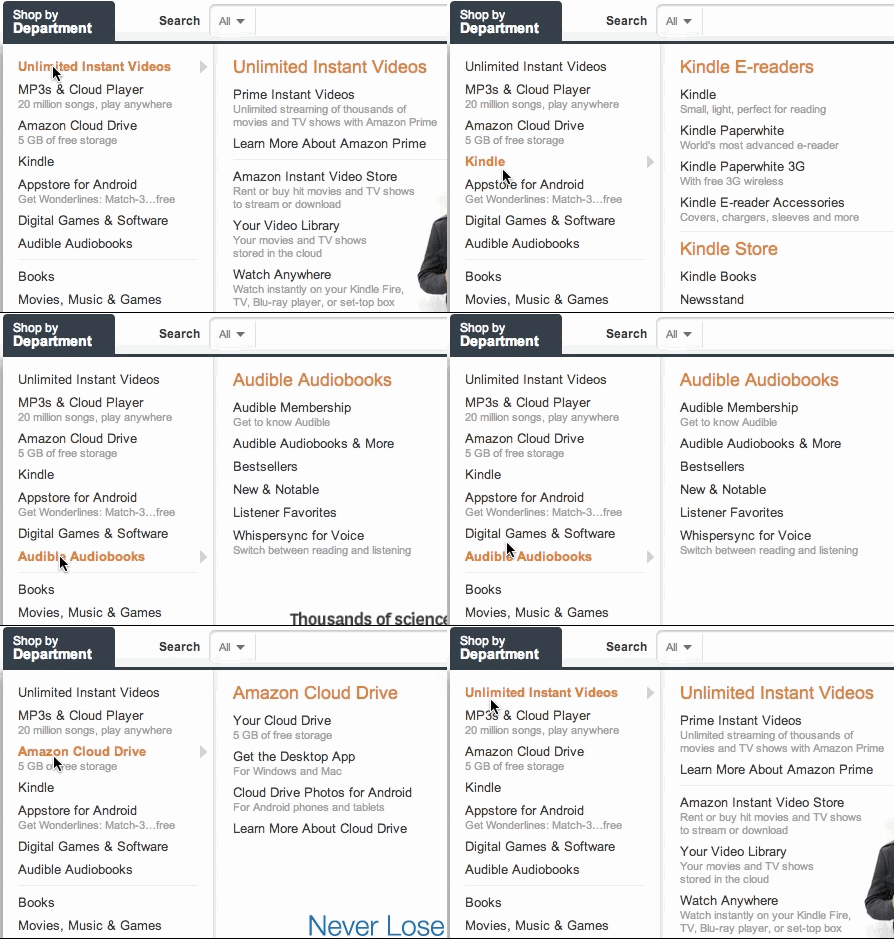
|
|
195
|
+
|
|
196
|
+
_Animation from [Ben Kamens's post](https://bjk5.com/post/44698559168/breaking-down-amazons-mega-dropdown), as
|
|
197
|
+
reproduced in the Habr retelling._
|
|
198
|
+
|
|
180
199
|
**The plugin and the math.** Kamens turned the idea into a jQuery plugin, `jQuery-menu-aim`, and used it in Khan
|
|
181
200
|
Academy's new "Learn" menu. Whether a point lies inside a triangle can be checked with cross products, and Sophie
|
|
182
201
|
Alpert helped him with that bit of linear algebra, but in the plugin Kamens went with something simpler: comparing
|
|
@@ -203,16 +222,21 @@ Primary sources:
|
|
|
203
222
|
## Keyboard and names
|
|
204
223
|
|
|
205
224
|
- The category column is a single Tab stop. The Up and Down arrows, Home and End move through the categories;
|
|
206
|
-
disabled ones are skipped. When the user comes back with Tab, they land on the category they were on
|
|
207
|
-
|
|
225
|
+
disabled ones are skipped. When the user comes back with Tab, they land on the category they were on; the first
|
|
226
|
+
time, on the open one, otherwise on the current section (`active`), otherwise on the first one.
|
|
227
|
+
- Typing a letter on a category moves focus to the next category whose label starts with it, wrapping around; the
|
|
228
|
+
same letter again moves to the one after. Letters typed in quick succession match the start of a label, and a
|
|
229
|
+
half-second pause clears them. A Space in the middle of typing is part of the label ("Home and garden"), not a
|
|
230
|
+
key that opens the category. A letter with Ctrl, Cmd or Alt is a keyboard shortcut, and the catalog leaves it alone.
|
|
231
|
+
- Enter, Space and the arrow toward the flyout open it and put focus on the first link. On a category that is a
|
|
208
232
|
link, Enter follows it.
|
|
209
|
-
- Inside the
|
|
210
|
-
does Escape, which also closes the
|
|
211
|
-
- While the
|
|
212
|
-
- The arrow "toward the
|
|
233
|
+
- Inside the flyout, plain Tab works. The arrow toward the category column returns focus to the category, and so
|
|
234
|
+
does Escape, which also closes the flyout. Tab past the last link moves on down the page and closes the flyout.
|
|
235
|
+
- While the flyout is open, it follows focus moved by arrows and letters the way it follows hover.
|
|
236
|
+
- The arrow "toward the flyout" is the one that points to where the flyout sits: in right-to-left writing and at
|
|
213
237
|
the edge of the screen, the arrows swap places.
|
|
214
238
|
- A screen reader hears a navigation with the name from `aria-label`, the categories as expand/collapse buttons, the
|
|
215
|
-
|
|
239
|
+
flyout as a region named after the category, and a column as a list named after its title.
|
|
216
240
|
|
|
217
241
|
## Dropdown mode
|
|
218
242
|
|
|
@@ -252,11 +276,11 @@ into one. `MegaMenuButton` accepts the kit's button look (`variant`, `tone`, `si
|
|
|
252
276
|
- **Opening.** Click, Enter, Space and the Down arrow on the button. Hover does not open the catalog: it should not
|
|
253
277
|
jump out at a stray mouse movement.
|
|
254
278
|
- **Focus.** On opening, focus goes to the first available category (or, if one is already open through `value` or
|
|
255
|
-
`defaultValue`, to that one), and the
|
|
256
|
-
and the
|
|
279
|
+
`defaultValue`, to that one), and the flyout stays closed until a category is chosen. After that the category column
|
|
280
|
+
and the flyout work as in the embedded mode.
|
|
257
281
|
- **Closing.** Escape on a category, a press outside the catalog, a second click on the button, following any link (a
|
|
258
282
|
category, a column title, a `MegaMenuLink`, router links included) and Tab past the last element.
|
|
259
|
-
The first Escape inside a
|
|
283
|
+
The first Escape inside a flyout closes only the flyout and returns focus to its category; the next one closes
|
|
260
284
|
the overlay.
|
|
261
285
|
- **Returning focus.** Focus returns to the button on Escape and on a second click. After Tab past the last element,
|
|
262
286
|
focus moves on down the page, past the button; Shift+Tab before the first element returns it to the button. After a
|
|
@@ -265,10 +289,14 @@ into one. `MegaMenuButton` accepts the kit's button look (`variant`, `tone`, `si
|
|
|
265
289
|
overlay is neither a menu nor a dialog, but the same navigation with links. The overlay has no `dialog` role.
|
|
266
290
|
- **Layers.** The overlay sits on the `popover` layer: above the scrim of an open `Dialog`, below the confirmation.
|
|
267
291
|
Inside a dialog, the first Escape closes the catalog and the next one closes the dialog. If focus is in an open
|
|
268
|
-
|
|
292
|
+
flyout, the very first Escape closes only the flyout and returns focus to its category.
|
|
293
|
+
- **Narrow screens.** Under 640px the overlay spans the window, minus 8px at each edge, instead of shrinking to the
|
|
294
|
+
longest label: labels wrap, a long one can't push the catalog off screen, and the width stays put when you drill
|
|
295
|
+
into a category. The drill-down, "Back" and Escape work inside the overlay just as in the embedded mode: the first
|
|
296
|
+
Escape in a flyout brings the column back, the next one closes the catalog.
|
|
269
297
|
- **Height.** The overlay is no taller than the visible area from the button to the edge of the window. The category
|
|
270
|
-
column and the
|
|
271
|
-
overlay's frame would clip the
|
|
298
|
+
column and the flyout each scroll within themselves (`overscroll-contain`), not the overlay as a whole: otherwise the
|
|
299
|
+
overlay's frame would clip the flyout, which stands beside the category column. On iOS the height is capped at
|
|
272
300
|
`min(24rem, 60dvh)`, like the `Menu` panel.
|
|
273
301
|
- **Appearance.** Smooth, on the kit's motion scale; with `prefers-reduced-motion`, no animation.
|
|
274
302
|
- **Server.** The server renders a closed button; the overlay is mounted in a portal after opening.
|
|
@@ -277,15 +305,17 @@ into one. `MegaMenuButton` accepts the kit's button look (`variant`, `tone`, `si
|
|
|
277
305
|
|
|
278
306
|
- Implementation: `src/components/navigation/MegaMenu.tsx`; aim is in `src/components/navigation/useMenuAim.ts`.
|
|
279
307
|
- Tests: `tests/mega-menu.test.tsx` covers roles and `aria-controls`, hover and mounting only the open
|
|
280
|
-
|
|
281
|
-
a category that is a link, a disabled category, `current
|
|
282
|
-
|
|
308
|
+
flyout, closing with a delay, roving tabindex, Enter, Escape and the arrows, Tab past the last link,
|
|
309
|
+
a category that is a link, a disabled category, `active` and the `current` alias, `asChild` and `link` (on a
|
|
310
|
+
category and on a column), fragments in a column, the current section and the Tab stop, typeahead, categories
|
|
311
|
+
inside your own components, the controlled value, a press outside the catalog and server rendering; `tests/mega-menu-aim.test.tsx` covers aim on mocked geometry and fake
|
|
283
312
|
time, and the flip at the edge; `tests/mega-menu-touch.test.tsx` covers touch and pen, a mocked `matchMedia`,
|
|
284
|
-
the drill-down in place of the category column, "Back" and focus, Escape, labels from the message catalog
|
|
285
|
-
|
|
286
|
-
the category column
|
|
313
|
+
the drill-down in place of the category column, "Back" and focus, Escape, labels from the message catalog, the
|
|
314
|
+
drill-down with categories inside your own components and server rendering; the browser test
|
|
315
|
+
`tests-visual/mega-menu.spec.ts` uses a real mouse moving diagonally and down the category column, and checks the
|
|
316
|
+
width of the dropdown on a phone.
|
|
287
317
|
- Dropdown mode: `tests/mega-menu-dropdown.test.tsx` covers opening by click and keys with focus on the first
|
|
288
|
-
category, every way of closing and returning focus, Escape in the
|
|
289
|
-
`popover` layer, the order of Escape inside a `Dialog
|
|
318
|
+
category, every way of closing and returning focus, Escape in the flyout, `open` / `defaultOpen` / `onOpenChange`, the
|
|
319
|
+
`popover` layer, the order of Escape inside a `Dialog`, the drill-down on a narrow screen and server rendering.
|
|
290
320
|
- Story: `src/components/navigation/MegaMenu.stories.tsx`, including `DropdownInTopBar`, a mega menu in a top bar; at phone
|
|
291
|
-
width, `PhoneColumn` and `
|
|
321
|
+
width, `PhoneColumn`, `PhoneDrillDown`, `PhoneDropdown` and `PhoneDropdownDrillDown`.
|