@nuxt/docs 4.0.0 → 4.0.2
This diff represents the content of publicly available package versions that have been released to one of the supported registries. The information contained in this diff is provided for informational purposes only and reflects changes between package versions as they appear in their respective public registries.
- package/1.getting-started/01.introduction.md +2 -2
- package/1.getting-started/02.installation.md +7 -7
- package/1.getting-started/03.configuration.md +1 -1
- package/1.getting-started/04.views.md +1 -1
- package/1.getting-started/06.styling.md +3 -3
- package/1.getting-started/08.seo-meta.md +2 -2
- package/1.getting-started/09.transitions.md +3 -3
- package/1.getting-started/10.data-fetching.md +3 -3
- package/1.getting-started/12.error-handling.md +1 -1
- package/1.getting-started/15.prerendering.md +2 -2
- package/1.getting-started/16.deployment.md +1 -1
- package/1.getting-started/17.testing.md +1 -1
- package/1.getting-started/18.upgrade.md +42 -7
- package/2.guide/0.index.md +3 -0
- package/2.guide/1.concepts/3.rendering.md +1 -1
- package/2.guide/2.directory-structure/1.app/1.components.md +1 -1
- package/2.guide/2.directory-structure/1.app/1.pages.md +1 -1
- package/2.guide/3.going-further/11.nightly-release-channel.md +4 -4
- package/2.guide/3.going-further/3.modules.md +2 -2
- package/2.guide/5.best-practices/.navigation.yml +3 -0
- package/2.guide/5.best-practices/hydration.md +188 -0
- package/2.guide/5.best-practices/performance.md +305 -0
- package/2.guide/5.best-practices/plugins.md +20 -0
- package/3.api/1.components/4.nuxt-link.md +1 -1
- package/3.api/2.composables/use-response-header.md +1 -1
- package/3.api/2.composables/use-route.md +1 -1
- package/3.api/3.utils/$fetch.md +1 -1
- package/3.api/3.utils/define-nuxt-route-middleware.md +1 -1
- package/3.api/3.utils/on-before-route-leave.md +1 -1
- package/3.api/3.utils/on-before-route-update.md +1 -1
- package/3.api/5.kit/1.modules.md +49 -0
- package/3.api/5.kit/10.templates.md +1 -1
- package/3.api/6.advanced/1.hooks.md +4 -4
- package/3.api/6.nuxt-config.md +7 -5
- package/5.community/4.contribution.md +18 -0
- package/7.migration/6.pages-and-layouts.md +1 -1
- package/7.migration/8.runtime-config.md +1 -1
- package/package.json +1 -1
|
@@ -24,7 +24,7 @@ Nuxt uses conventions and an opinionated directory structure to automate repetit
|
|
|
24
24
|
- **Server-side rendering out of the box:** Nuxt comes with built-in SSR capabilities, so you don't have to set up a separate server yourself.
|
|
25
25
|
- **Auto-imports:** write Vue composables and components in their respective directories and use them without having to import them with the benefits of tree-shaking and optimized JS bundles.
|
|
26
26
|
- **Data-fetching utilities:** Nuxt provides composables to handle SSR-compatible data fetching as well as different strategies.
|
|
27
|
-
- **Zero-config TypeScript support:** write type-safe code without having to learn TypeScript with our auto-generated types and `tsconfig.json
|
|
27
|
+
- **Zero-config TypeScript support:** write type-safe code without having to learn TypeScript with our auto-generated types and `tsconfig.json`.
|
|
28
28
|
- **Configured build tools:** we use [Vite](https://vite.dev) by default to support hot module replacement (HMR) in development and bundling your code for production with best-practices baked-in.
|
|
29
29
|
|
|
30
30
|
Nuxt takes care of these and provides both frontend and backend functionality so you can focus on what matters: **creating your web application**.
|
|
@@ -64,7 +64,7 @@ A Nuxt application can be deployed on a Node or Deno server, pre-rendered to be
|
|
|
64
64
|
|
|
65
65
|
### Modular
|
|
66
66
|
|
|
67
|
-
A module system allows to extend Nuxt with custom features and integrations with third-party services.
|
|
67
|
+
A module system allows you to extend Nuxt with custom features and integrations with third-party services.
|
|
68
68
|
|
|
69
69
|
:read-more{title="Nuxt Modules Concept" to="/docs/guide/concepts/modules"}
|
|
70
70
|
|
|
@@ -9,8 +9,8 @@ navigation.icon: i-lucide-play
|
|
|
9
9
|
If you just want to play around with Nuxt in your browser without setting up a project, you can use one of our online sandboxes:
|
|
10
10
|
|
|
11
11
|
::card-group
|
|
12
|
-
:card{title="Open on StackBlitz" icon="i-simple-icons-stackblitz" to="https://nuxt.new/s/
|
|
13
|
-
:card{title="Open on CodeSandbox" icon="i-simple-icons-codesandbox" to="https://nuxt.new/c/
|
|
12
|
+
:card{title="Open on StackBlitz" icon="i-simple-icons-stackblitz" to="https://nuxt.new/s/v4" target="_blank"}
|
|
13
|
+
:card{title="Open on CodeSandbox" icon="i-simple-icons-codesandbox" to="https://nuxt.new/c/v4" target="_blank"}
|
|
14
14
|
::
|
|
15
15
|
|
|
16
16
|
Or follow the steps below to set up a new Nuxt project on your computer.
|
|
@@ -39,23 +39,23 @@ Open a terminal (if you're using [Visual Studio Code](https://code.visualstudio.
|
|
|
39
39
|
::code-group{sync="pm"}
|
|
40
40
|
|
|
41
41
|
```bash [npm]
|
|
42
|
-
npm create nuxt <project-name>
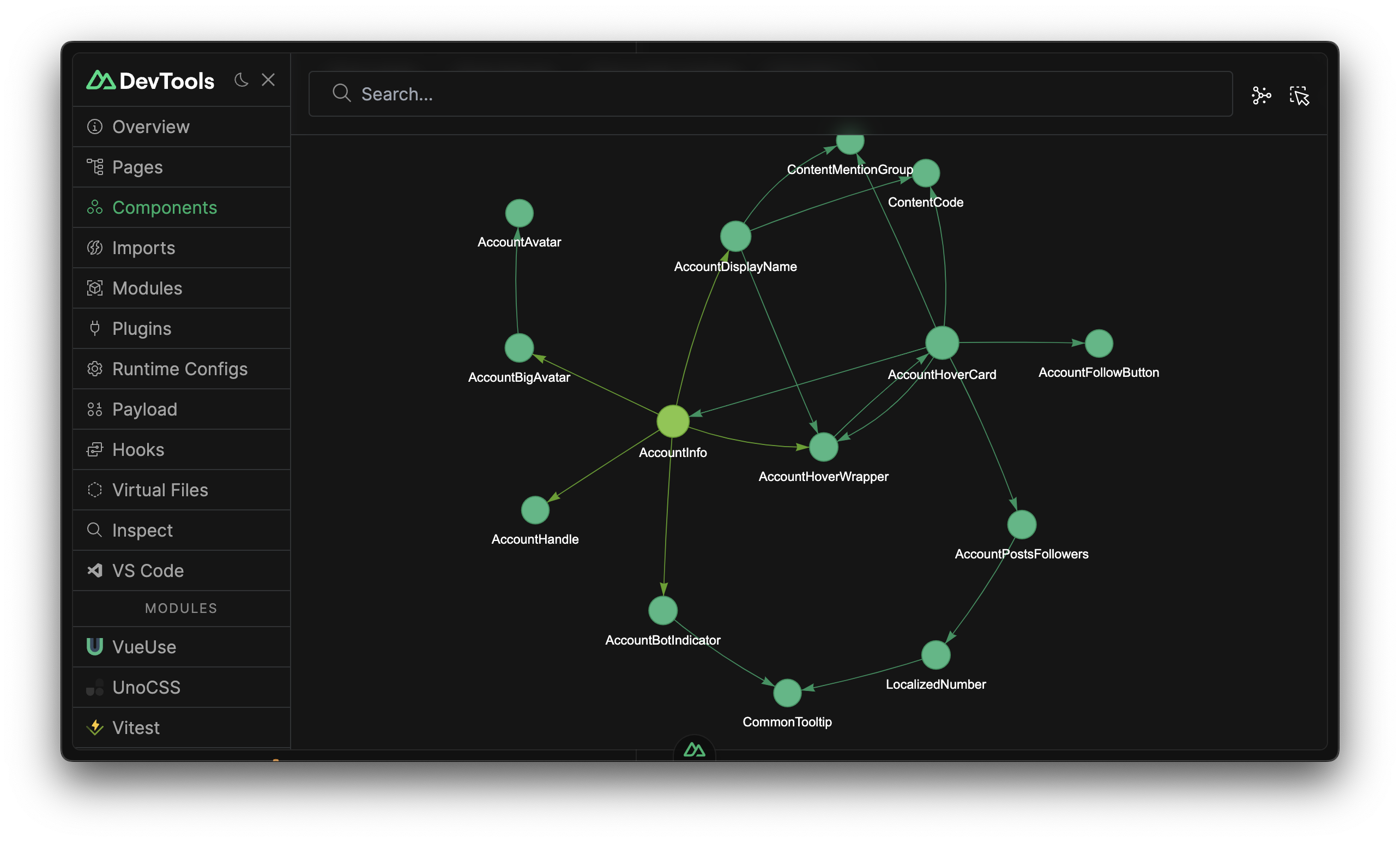
|
|
42
|
+
npm create nuxt@latest <project-name>
|
|
43
43
|
```
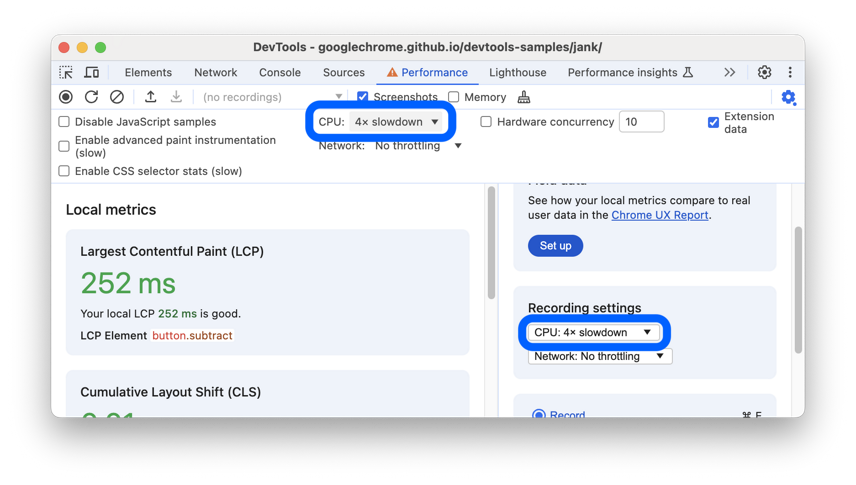
|
|
44
44
|
|
|
45
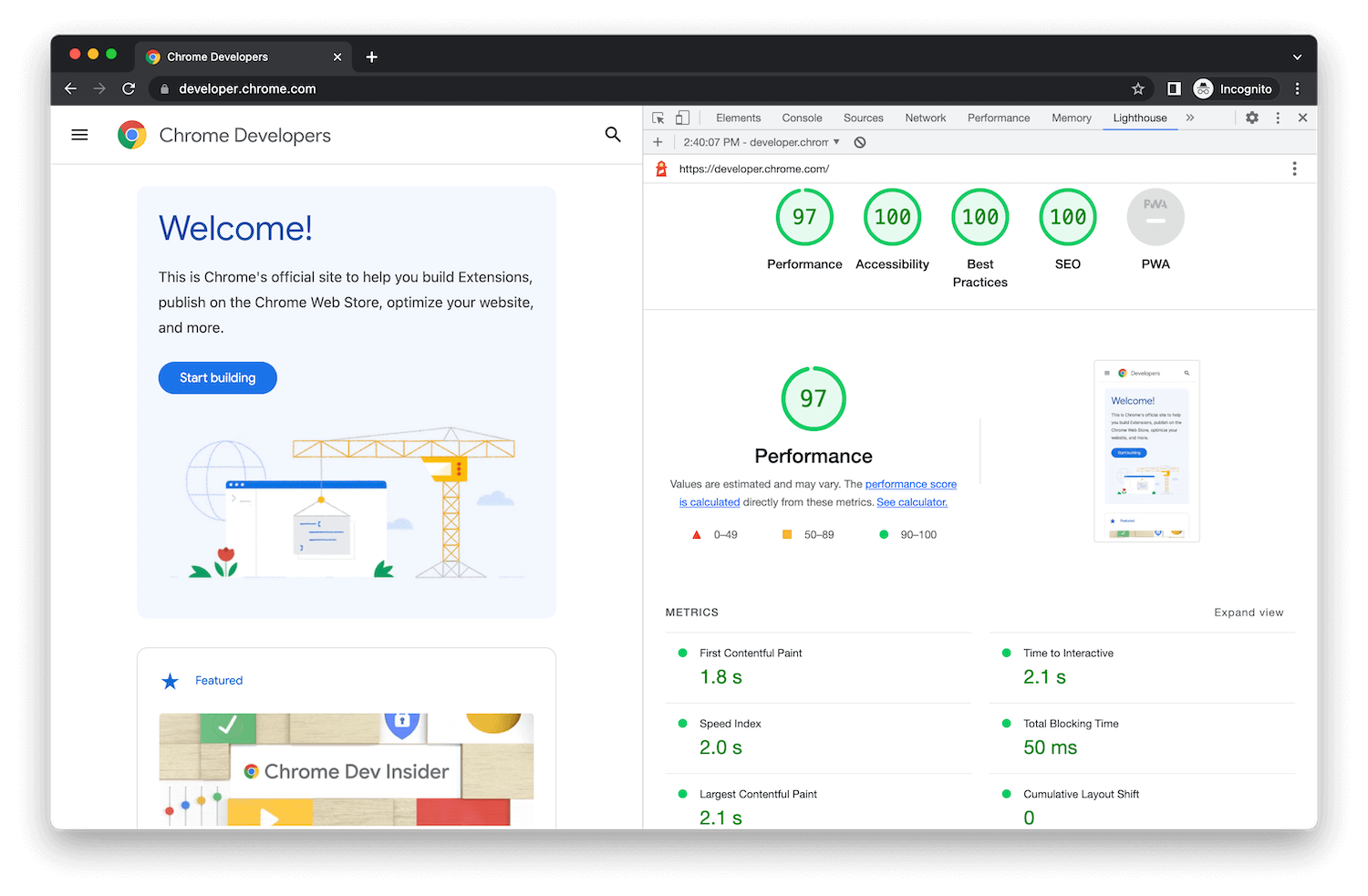
45
|
```bash [yarn]
|
|
46
|
-
yarn create nuxt <project-name>
|
|
46
|
+
yarn create nuxt@latest <project-name>
|
|
47
47
|
```
|
|
48
48
|
|
|
49
49
|
```bash [pnpm]
|
|
50
|
-
pnpm create nuxt <project-name>
|
|
50
|
+
pnpm create nuxt@latest <project-name>
|
|
51
51
|
```
|
|
52
52
|
|
|
53
53
|
```bash [bun]
|
|
54
|
-
bun create nuxt <project-name>
|
|
54
|
+
bun create nuxt@latest <project-name>
|
|
55
55
|
```
|
|
56
56
|
|
|
57
57
|
```bash [deno]
|
|
58
|
-
deno -A npm:create-nuxt@latest <project-name>
|
|
58
|
+
deno -A npm:create-nuxt@latest <project-name>
|
|
59
59
|
```
|
|
60
60
|
|
|
61
61
|
::
|
|
@@ -100,7 +100,7 @@ const runtimeConfig = useRuntimeConfig()
|
|
|
100
100
|
|
|
101
101
|
## App Configuration
|
|
102
102
|
|
|
103
|
-
The `app.config.ts` file, located in the source directory (by default the root of the project), is used to expose public variables that can be determined at build time. Contrary to the `runtimeConfig` option, these
|
|
103
|
+
The `app.config.ts` file, located in the source directory (by default the root of the project), is used to expose public variables that can be determined at build time. Contrary to the `runtimeConfig` option, these cannot be overridden using environment variables.
|
|
104
104
|
|
|
105
105
|
A minimal configuration file exports the `defineAppConfig` function containing an object with your configuration. The `defineAppConfig` helper is globally available without import.
|
|
106
106
|
|
|
@@ -88,7 +88,7 @@ To use pages, create `pages/index.vue` file and add `<NuxtPage />` component to
|
|
|
88
88
|
|
|
89
89
|

|
|
90
90
|
|
|
91
|
-
Layouts are wrappers around pages that contain a common User Interface for several pages, such as
|
|
91
|
+
Layouts are wrappers around pages that contain a common User Interface for several pages, such as header and footer displays. Layouts are Vue files using `<slot />` components to display the **page** content. The `layouts/default.vue` file will be used by default. Custom layouts can be set as part of your page metadata.
|
|
92
92
|
|
|
93
93
|
::note
|
|
94
94
|
If you only have a single layout in your application, we recommend using [`app.vue`](/docs/guide/directory-structure/app) with [`<NuxtPage />`](/docs/api/components/nuxt-page) instead.
|
|
@@ -51,7 +51,7 @@ The stylesheets will be inlined in the HTML rendered by Nuxt, injected globally
|
|
|
51
51
|
|
|
52
52
|
### Working With Fonts
|
|
53
53
|
|
|
54
|
-
Place your local fonts files in your
|
|
54
|
+
Place your local fonts files in your `public/` directory, for example in `public/fonts`. You can then reference them in your stylesheets using `url()`.
|
|
55
55
|
|
|
56
56
|
```css [assets/css/main.css]
|
|
57
57
|
@font-face {
|
|
@@ -119,7 +119,7 @@ export default defineNuxtConfig({
|
|
|
119
119
|
|
|
120
120
|
## External Stylesheets
|
|
121
121
|
|
|
122
|
-
You can include external stylesheets in your application by adding a link element in the head section of your nuxt.config file. You can achieve this result using different methods. Note that local stylesheets can also be included
|
|
122
|
+
You can include external stylesheets in your application by adding a link element in the head section of your nuxt.config file. You can achieve this result using different methods. Note that local stylesheets can also be included this way.
|
|
123
123
|
|
|
124
124
|
You can manipulate the head with the [`app.head`](/docs/api/nuxt-config#head) property of your Nuxt configuration:
|
|
125
125
|
|
|
@@ -409,7 +409,7 @@ You can use [CSS Modules](https://github.com/css-modules/css-modules) with the m
|
|
|
409
409
|
|
|
410
410
|
### Preprocessors Support
|
|
411
411
|
|
|
412
|
-
SFC style blocks support
|
|
412
|
+
SFC style blocks support preprocessor syntax. Vite comes with built-in support for .scss, .sass, .less, .styl and .stylus files without configuration. You just need to install them first, and they will be available directly in SFC with the lang attribute.
|
|
413
413
|
|
|
414
414
|
::code-group
|
|
415
415
|
|
|
@@ -12,7 +12,7 @@ and numerous configuration options to manage your app's head and SEO meta tags.
|
|
|
12
12
|
Providing an [`app.head`](/docs/api/nuxt-config#head) property in your [`nuxt.config.ts`](/docs/guide/directory-structure/nuxt-config) allows you to statically customize the head for your entire app.
|
|
13
13
|
|
|
14
14
|
::important
|
|
15
|
-
This method does not allow you to provide reactive data. We recommend
|
|
15
|
+
This method does not allow you to provide reactive data. We recommend using `useHead()` in `app.vue`.
|
|
16
16
|
::
|
|
17
17
|
|
|
18
18
|
It's good practice to set tags here that won't change such as your site title default, language and favicon.
|
|
@@ -75,7 +75,7 @@ useHead({
|
|
|
75
75
|
</script>
|
|
76
76
|
```
|
|
77
77
|
|
|
78
|
-
We recommend
|
|
78
|
+
We recommend taking a look at the [`useHead`](/docs/api/composables/use-head) and [`useHeadSafe`](/docs/api/composables/use-head-safe) composables.
|
|
79
79
|
|
|
80
80
|
## `useSeoMeta`
|
|
81
81
|
|
|
@@ -16,7 +16,7 @@ You can enable page transitions to apply an automatic transition for all your [p
|
|
|
16
16
|
export default defineNuxtConfig({
|
|
17
17
|
app: {
|
|
18
18
|
pageTransition: { name: 'page', mode: 'out-in' }
|
|
19
|
-
}
|
|
19
|
+
}
|
|
20
20
|
})
|
|
21
21
|
```
|
|
22
22
|
|
|
@@ -121,7 +121,7 @@ You can enable layout transitions to apply an automatic transition for all your
|
|
|
121
121
|
export default defineNuxtConfig({
|
|
122
122
|
app: {
|
|
123
123
|
layoutTransition: { name: 'layout', mode: 'out-in' }
|
|
124
|
-
}
|
|
124
|
+
}
|
|
125
125
|
})
|
|
126
126
|
```
|
|
127
127
|
|
|
@@ -470,4 +470,4 @@ export default defineNuxtRouteMiddleware(to => {
|
|
|
470
470
|
|
|
471
471
|
### Known Issues
|
|
472
472
|
|
|
473
|
-
- If you perform data fetching within your page setup functions,
|
|
473
|
+
- If you perform data fetching within your page setup functions, you may wish to reconsider using this feature for the moment. (By design, View Transitions completely freeze DOM updates whilst they are taking place.) We're looking at restricting the View Transition to the final moments before `<Suspense>` resolves, but in the interim you may want to consider carefully whether to adopt this feature if this describes you.
|
|
@@ -9,7 +9,7 @@ Nuxt comes with two composables and a built-in library to perform data-fetching
|
|
|
9
9
|
In a nutshell:
|
|
10
10
|
|
|
11
11
|
- [`$fetch`](/docs/api/utils/dollarfetch) is the simplest way to make a network request.
|
|
12
|
-
- [`useFetch`](/docs/api/composables/use-fetch) is wrapper around `$fetch` that fetches data only once in [universal rendering](/docs/guide/concepts/rendering#universal-rendering).
|
|
12
|
+
- [`useFetch`](/docs/api/composables/use-fetch) is a wrapper around `$fetch` that fetches data only once in [universal rendering](/docs/guide/concepts/rendering#universal-rendering).
|
|
13
13
|
- [`useAsyncData`](/docs/api/composables/use-async-data) is similar to `useFetch` but offers more fine-grained control.
|
|
14
14
|
|
|
15
15
|
Both `useFetch` and `useAsyncData` share a common set of options and patterns that we will detail in the last sections.
|
|
@@ -81,7 +81,7 @@ async function addTodo() {
|
|
|
81
81
|
|
|
82
82
|
::warning
|
|
83
83
|
Beware that using only `$fetch` will not provide [network calls de-duplication and navigation prevention](#the-need-for-usefetch-and-useasyncdata). :br
|
|
84
|
-
It is recommended to use `$fetch` for client-side interactions (event
|
|
84
|
+
It is recommended to use `$fetch` for client-side interactions (event-based) or combined with [`useAsyncData`](#useasyncdata) when fetching the initial component data.
|
|
85
85
|
::
|
|
86
86
|
|
|
87
87
|
::read-more{to="/docs/api/utils/dollarfetch"}
|
|
@@ -483,7 +483,7 @@ If you need to change the URL based on a reactive value, you may want to use a [
|
|
|
483
483
|
|
|
484
484
|
#### Computed URL
|
|
485
485
|
|
|
486
|
-
Sometimes you may need to compute
|
|
486
|
+
Sometimes you may need to compute a URL from reactive values, and refresh the data each time these change. Instead of juggling your way around, you can attach each param as a reactive value. Nuxt will automatically use the reactive value and re-fetch each time it changes.
|
|
487
487
|
|
|
488
488
|
```vue
|
|
489
489
|
<script setup lang="ts">
|
|
@@ -109,7 +109,7 @@ const handleError = () => clearError({ redirect: '/' })
|
|
|
109
109
|
Read more about `error.vue` and its uses.
|
|
110
110
|
::
|
|
111
111
|
|
|
112
|
-
For custom errors we highly recommend
|
|
112
|
+
For custom errors we highly recommend using `onErrorCaptured` composable that can be called in a page/component setup function or `vue:error` runtime nuxt hook that can be configured in a nuxt plugin.
|
|
113
113
|
|
|
114
114
|
```ts twoslash [plugins/error-handler.ts]
|
|
115
115
|
export default defineNuxtPlugin(nuxtApp => {
|
|
@@ -99,7 +99,7 @@ export default defineNuxtConfig({
|
|
|
99
99
|
});
|
|
100
100
|
```
|
|
101
101
|
|
|
102
|
-
::read-more{to="https://nitro.build/config
|
|
102
|
+
::read-more{to="https://nitro.build/config#routerules"}
|
|
103
103
|
Read more about Nitro's `routeRules` configuration.
|
|
104
104
|
::
|
|
105
105
|
|
|
@@ -177,7 +177,7 @@ export default defineNuxtConfig({
|
|
|
177
177
|
|
|
178
178
|
### `prerender:generate` Nitro hook
|
|
179
179
|
|
|
180
|
-
This is called for each route during prerendering. You can use this for fine
|
|
180
|
+
This is called for each route during prerendering. You can use this for fine-grained handling of each route that gets prerendered.
|
|
181
181
|
|
|
182
182
|
```ts [nuxt.config.ts]
|
|
183
183
|
export default defineNuxtConfig({
|
|
@@ -62,7 +62,7 @@ By default, the workload gets distributed to the workers with the round robin st
|
|
|
62
62
|
|
|
63
63
|
### Learn More
|
|
64
64
|
|
|
65
|
-
:read-more{to="https://nitro.build/deploy/node" title="the Nitro documentation for node-server preset"}
|
|
65
|
+
:read-more{to="https://nitro.build/deploy/runtimes/node" title="the Nitro documentation for node-server preset"}
|
|
66
66
|
|
|
67
67
|
:video-accordion{title="Watch Daniel Roe's short video on the topic" videoId="0x1H6K5yOfs"}
|
|
68
68
|
|
|
@@ -63,7 +63,7 @@ We currently ship an environment for unit testing code that needs a [Nuxt](https
|
|
|
63
63
|
|
|
64
64
|
::tip
|
|
65
65
|
When importing `@nuxt/test-utils` in your vitest config, It is necessary to have `"type": "module"` specified in your `package.json` or rename your vitest config file appropriately.
|
|
66
|
-
>
|
|
66
|
+
> i.e., `vitest.config.m{ts,js}`.
|
|
67
67
|
::
|
|
68
68
|
|
|
69
69
|
::tip
|
|
@@ -43,19 +43,19 @@ First, upgrade to Nuxt 4:
|
|
|
43
43
|
::code-group{sync="pm"}
|
|
44
44
|
|
|
45
45
|
```bash [npm]
|
|
46
|
-
npm install nuxt@^4.0.0
|
|
46
|
+
npm install nuxt@^4.0.0
|
|
47
47
|
```
|
|
48
48
|
|
|
49
49
|
```bash [yarn]
|
|
50
|
-
yarn add nuxt@^4.0.0
|
|
50
|
+
yarn add nuxt@^4.0.0
|
|
51
51
|
```
|
|
52
52
|
|
|
53
53
|
```bash [pnpm]
|
|
54
|
-
pnpm add nuxt@^4.0.0
|
|
54
|
+
pnpm add nuxt@^4.0.0
|
|
55
55
|
```
|
|
56
56
|
|
|
57
57
|
```bash [bun]
|
|
58
|
-
bun add nuxt@^4.0.0
|
|
58
|
+
bun add nuxt@^4.0.0
|
|
59
59
|
```
|
|
60
60
|
|
|
61
61
|
::
|
|
@@ -140,6 +140,7 @@ layers/
|
|
|
140
140
|
modules/
|
|
141
141
|
node_modules/
|
|
142
142
|
public/
|
|
143
|
+
shared/
|
|
143
144
|
server/
|
|
144
145
|
api/
|
|
145
146
|
middleware/
|
|
@@ -430,7 +431,7 @@ export default defineNuxtPlugin({
|
|
|
430
431
|
})
|
|
431
432
|
```
|
|
432
433
|
|
|
433
|
-
While not required it's
|
|
434
|
+
While not required it's recommended to update any imports from `@unhead/vue` to `#imports` or `nuxt/app`.
|
|
434
435
|
|
|
435
436
|
```diff
|
|
436
437
|
-import { useHead } from '@unhead/vue'
|
|
@@ -974,7 +975,41 @@ const importName = genSafeVariableName
|
|
|
974
975
|
You can automate this step by running `npx codemod@latest nuxt/4/template-compilation-changes`
|
|
975
976
|
::
|
|
976
977
|
|
|
977
|
-
### TypeScript Configuration Changes
|
|
978
|
+
### Default TypeScript Configuration Changes
|
|
979
|
+
|
|
980
|
+
🚦 **Impact Level**: Minimal
|
|
981
|
+
|
|
982
|
+
#### What Changed
|
|
983
|
+
|
|
984
|
+
`compilerOptions.noUncheckedIndexedAccess` is now `true` instead of `false`.
|
|
985
|
+
|
|
986
|
+
#### Reasons for Change
|
|
987
|
+
|
|
988
|
+
This change is a follow up to a prior [3.12 config update](https://github.com/nuxt/nuxt/pull/27485) where we improved our defaults, mostly adhering to [TotalTypeScript's recommendations](https://www.totaltypescript.com/tsconfig-cheat-sheet).
|
|
989
|
+
|
|
990
|
+
#### Migration Steps
|
|
991
|
+
|
|
992
|
+
There are two approaches:
|
|
993
|
+
|
|
994
|
+
1. Run a typecheck on your app and fix any new errors (recommended).
|
|
995
|
+
|
|
996
|
+
2. Override the new default in your `nuxt.config.ts`:
|
|
997
|
+
|
|
998
|
+
<!-- @case-police-ignore tsConfig -->
|
|
999
|
+
|
|
1000
|
+
```ts
|
|
1001
|
+
export default defineNuxtConfig({
|
|
1002
|
+
typescript: {
|
|
1003
|
+
tsConfig: {
|
|
1004
|
+
compilerOptions: {
|
|
1005
|
+
noUncheckedIndexedAccess: false
|
|
1006
|
+
}
|
|
1007
|
+
}
|
|
1008
|
+
}
|
|
1009
|
+
})
|
|
1010
|
+
```
|
|
1011
|
+
|
|
1012
|
+
### TypeScript Configuration Splitting
|
|
978
1013
|
|
|
979
1014
|
🚦 **Impact Level**: Minimal
|
|
980
1015
|
|
|
@@ -1121,7 +1156,7 @@ export default defineNuxtConfig({
|
|
|
1121
1156
|
})
|
|
1122
1157
|
```
|
|
1123
1158
|
|
|
1124
|
-
::read-more{to="https://nitro.build/config
|
|
1159
|
+
::read-more{to="https://nitro.build/config#prerender"}
|
|
1125
1160
|
Read more about Nitro's prerender configuration options.
|
|
1126
1161
|
::
|
|
1127
1162
|
|
package/2.guide/0.index.md
CHANGED
|
@@ -19,4 +19,7 @@ surround: false
|
|
|
19
19
|
::card{icon="i-lucide-book-open" title="Recipes" to="/docs/guide/recipes"}
|
|
20
20
|
Find solutions to common problems and learn how to implement them in your Nuxt project.
|
|
21
21
|
::
|
|
22
|
+
::card{icon="i-lucide-square-check" title="Best Practices" to="/docs/guide/best-practices"}
|
|
23
|
+
Learn about best practices when developing with Nuxt
|
|
24
|
+
::
|
|
22
25
|
::
|
|
@@ -70,7 +70,7 @@ Out of the box, a traditional Vue.js application is rendered in the browser (or
|
|
|
70
70
|
|
|
71
71
|
**Benefits of client-side rendering:**
|
|
72
72
|
- **Development speed**: When working entirely on the client-side, we don't have to worry about the server compatibility of the code, for example, by using browser-only APIs like the `window` object.
|
|
73
|
-
- **Cheaper:** Running a server adds a cost of infrastructure as you would need to run on a platform that supports JavaScript. We can host
|
|
73
|
+
- **Cheaper:** Running a server adds a cost of infrastructure as you would need to run on a platform that supports JavaScript. We can host client-only applications on any static server with HTML, CSS, and JavaScript files.
|
|
74
74
|
- **Offline:** Because code entirely runs in the browser, it can nicely keep working while the internet is unavailable.
|
|
75
75
|
|
|
76
76
|
**Downsides of client-side rendering:**
|
|
@@ -79,7 +79,7 @@ const MyButton = resolveComponent('MyButton')
|
|
|
79
79
|
```
|
|
80
80
|
|
|
81
81
|
::important
|
|
82
|
-
If you are using `resolveComponent` to handle dynamic components, make sure not to insert anything but the name of the component, which must be a literal string and not be or contain a variable. The string is statically analyzed at compilation step.
|
|
82
|
+
If you are using `resolveComponent` to handle dynamic components, make sure not to insert anything but the name of the component, which must be a literal string and not be or contain a variable. The string is statically analyzed at the compilation step.
|
|
83
83
|
::
|
|
84
84
|
|
|
85
85
|
:video-accordion{title="Watch Daniel Roe's short video about resolveComponent()" videoId="4kq8E5IUM2U"}
|
|
@@ -377,7 +377,7 @@ Learn more about `<NuxtLink>` usage.
|
|
|
377
377
|
Nuxt allows programmatic navigation through the `navigateTo()` utility method. Using this utility method, you will be able to programmatically navigate the user in your app. This is great for taking input from the user and navigating them dynamically throughout your application. In this example, we have a simple method called `navigate()` that gets called when the user submits a search form.
|
|
378
378
|
|
|
379
379
|
::note
|
|
380
|
-
|
|
380
|
+
Make sure to always `await` on `navigateTo` or chain its result by returning from functions.
|
|
381
381
|
::
|
|
382
382
|
|
|
383
383
|
```vue twoslash
|
|
@@ -26,8 +26,8 @@ Update `nuxt` dependency inside `package.json`:
|
|
|
26
26
|
```diff [package.json]
|
|
27
27
|
{
|
|
28
28
|
"devDependencies": {
|
|
29
|
-
-- "nuxt": "^
|
|
30
|
-
++ "nuxt": "npm:nuxt-nightly@
|
|
29
|
+
-- "nuxt": "^4.0.0"
|
|
30
|
+
++ "nuxt": "npm:nuxt-nightly@latest"
|
|
31
31
|
}
|
|
32
32
|
}
|
|
33
33
|
```
|
|
@@ -41,8 +41,8 @@ Update `nuxt` dependency inside `package.json`:
|
|
|
41
41
|
```diff [package.json]
|
|
42
42
|
{
|
|
43
43
|
"devDependencies": {
|
|
44
|
-
-- "nuxt": "npm:nuxt-nightly@
|
|
45
|
-
++ "nuxt": "^
|
|
44
|
+
-- "nuxt": "npm:nuxt-nightly@latest"
|
|
45
|
+
++ "nuxt": "^4.0.0"
|
|
46
46
|
}
|
|
47
47
|
}
|
|
48
48
|
```
|
|
@@ -785,7 +785,7 @@ Linking to the integration website and documentation is always a good idea.
|
|
|
785
785
|
|
|
786
786
|
#### Provide a StackBlitz Demo or Boilerplate
|
|
787
787
|
|
|
788
|
-
It's a good practice to make a minimal reproduction with your module and [StackBlitz](https://nuxt.new/s/
|
|
788
|
+
It's a good practice to make a minimal reproduction with your module and [StackBlitz](https://nuxt.new/s/v4) that you add to your module readme.
|
|
789
789
|
|
|
790
790
|
This not only provides potential users of your module a quick and easy way to experiment with the module but also an easy way for them to build minimal reproductions they can send you when they encounter issues.
|
|
791
791
|
|
|
@@ -813,7 +813,7 @@ Watch Vue School video about Nuxt module types.
|
|
|
813
813
|
|
|
814
814
|
**Community modules** are modules prefixed (scoped) with `@nuxtjs/` (e.g. [`@nuxtjs/tailwindcss`](https://tailwindcss.nuxtjs.org)). They are proven modules made and maintained by community members. Again, contributions are welcome from anyone.
|
|
815
815
|
|
|
816
|
-
**Third
|
|
816
|
+
**Third-party and other community modules** are modules (often) prefixed with `nuxt-`. Anyone can make them, using this prefix allows these modules to be discoverable on npm. This is the best starting point to draft and try an idea!
|
|
817
817
|
|
|
818
818
|
**Private or personal modules** are modules made for your own use case or company. They don't need to follow any naming rules to work with Nuxt and are often seen scoped under an npm organization (e.g. `@my-company/nuxt-auth`)
|
|
819
819
|
|
|
@@ -0,0 +1,188 @@
|
|
|
1
|
+
---
|
|
2
|
+
navigation.title: 'Nuxt and hydration'
|
|
3
|
+
title: Nuxt and hydration
|
|
4
|
+
description: Why fixing hydration issues is important
|
|
5
|
+
---
|
|
6
|
+
|
|
7
|
+
When developing, you may face hydration issues. Don't ignore those warnings.
|
|
8
|
+
|
|
9
|
+
# Why is it important to fix them?
|
|
10
|
+
|
|
11
|
+
Hydration mismatches are not just warnings - they are indicators of serious problems that can break your application:
|
|
12
|
+
|
|
13
|
+
## Performance Impact
|
|
14
|
+
|
|
15
|
+
- **Increased time to interactive**: Hydration errors force Vue to re-render the entire component tree, which will increase the time for your Nuxt app to become interactive
|
|
16
|
+
- **Poor user experience**: Users may see content flashing or unexpected layout shifts
|
|
17
|
+
|
|
18
|
+
## Functionality Issues
|
|
19
|
+
|
|
20
|
+
- **Broken interactivity**: Event listeners may not attach properly, leaving buttons and forms non-functional
|
|
21
|
+
- **State inconsistencies**: Application state can become out of sync between what the user sees and what the application thinks is rendered
|
|
22
|
+
- **SEO problems**: Search engines may index different content than what users actually see
|
|
23
|
+
|
|
24
|
+
# How to detect them
|
|
25
|
+
|
|
26
|
+
## Development Console Warnings
|
|
27
|
+
|
|
28
|
+
Vue will log hydration mismatch warnings in the browser console during development:
|
|
29
|
+
|
|
30
|
+

|
|
31
|
+
|
|
32
|
+
# Common reasons
|
|
33
|
+
|
|
34
|
+
## Browser-only APIs in Server Context
|
|
35
|
+
|
|
36
|
+
**Problem**: Using browser-specific APIs during server-side rendering.
|
|
37
|
+
|
|
38
|
+
```html
|
|
39
|
+
<template>
|
|
40
|
+
<div>User preference: {{ userTheme }}</div>
|
|
41
|
+
</template>
|
|
42
|
+
|
|
43
|
+
<script setup>
|
|
44
|
+
// This will cause hydration mismatch!
|
|
45
|
+
// localStorage doesn't exist on the server!
|
|
46
|
+
const userTheme = localStorage.getItem('theme') || 'light'
|
|
47
|
+
</script>
|
|
48
|
+
```
|
|
49
|
+
|
|
50
|
+
**Solution**: You can use [`useCookie`](/docs/api/composables/use-cookie):
|
|
51
|
+
|
|
52
|
+
```html
|
|
53
|
+
<template>
|
|
54
|
+
<div>User preference: {{ userTheme }}</div>
|
|
55
|
+
</template>
|
|
56
|
+
|
|
57
|
+
<script setup>
|
|
58
|
+
// This works on both server and client
|
|
59
|
+
const userTheme = useCookie('theme', { default: () => 'light' })
|
|
60
|
+
</script>
|
|
61
|
+
```
|
|
62
|
+
|
|
63
|
+
## Inconsistent Data
|
|
64
|
+
|
|
65
|
+
**Problem**: Different data between server and client.
|
|
66
|
+
|
|
67
|
+
```html
|
|
68
|
+
<template>
|
|
69
|
+
<div>{{ Math.random() }}</div>
|
|
70
|
+
</template>
|
|
71
|
+
```
|
|
72
|
+
|
|
73
|
+
**Solution**: Use SSR-friendly state:
|
|
74
|
+
|
|
75
|
+
```html
|
|
76
|
+
<template>
|
|
77
|
+
<div>{{ state }}</div>
|
|
78
|
+
</template>
|
|
79
|
+
|
|
80
|
+
<script setup>
|
|
81
|
+
const state = useState('random', () => Math.random())
|
|
82
|
+
</script>
|
|
83
|
+
```
|
|
84
|
+
|
|
85
|
+
## Conditional Rendering Based on Client State
|
|
86
|
+
|
|
87
|
+
**Problem**: Using client-only conditions during SSR.
|
|
88
|
+
|
|
89
|
+
```html
|
|
90
|
+
<template>
|
|
91
|
+
<div v-if="window?.innerWidth > 768">
|
|
92
|
+
Desktop content
|
|
93
|
+
</div>
|
|
94
|
+
</template>
|
|
95
|
+
```
|
|
96
|
+
|
|
97
|
+
**Solution**: Use media queries or handle it client-side:
|
|
98
|
+
|
|
99
|
+
```html
|
|
100
|
+
<template>
|
|
101
|
+
<div class="responsive-content">
|
|
102
|
+
<div class="hidden md:block">Desktop content</div>
|
|
103
|
+
<div class="md:hidden">Mobile content</div>
|
|
104
|
+
</div>
|
|
105
|
+
</template>
|
|
106
|
+
```
|
|
107
|
+
|
|
108
|
+
## Third-party Libraries with Side Effects
|
|
109
|
+
|
|
110
|
+
**Problem**: Libraries that modify the DOM or have browser dependencies (this happens a LOT with tag managers).
|
|
111
|
+
|
|
112
|
+
```html
|
|
113
|
+
<script setup>
|
|
114
|
+
if (import.meta.client) {
|
|
115
|
+
const { default: SomeBrowserLibrary } = await import('browser-only-lib')
|
|
116
|
+
SomeBrowserLibrary.init()
|
|
117
|
+
}
|
|
118
|
+
</script>
|
|
119
|
+
```
|
|
120
|
+
|
|
121
|
+
**Solution**: Initialise libraries after hydration has completed:
|
|
122
|
+
|
|
123
|
+
```html
|
|
124
|
+
<script setup>
|
|
125
|
+
onMounted(async () => {
|
|
126
|
+
const { default: SomeBrowserLibrary } = await import('browser-only-lib')
|
|
127
|
+
SomeBrowserLibrary.init()
|
|
128
|
+
})
|
|
129
|
+
</script>
|
|
130
|
+
```
|
|
131
|
+
|
|
132
|
+
## Dynamic Content Based on Time
|
|
133
|
+
|
|
134
|
+
**Problem**: Content that changes based on current time.
|
|
135
|
+
|
|
136
|
+
```html
|
|
137
|
+
<template>
|
|
138
|
+
<div>{{ greeting }}</div>
|
|
139
|
+
</template>
|
|
140
|
+
|
|
141
|
+
<script setup>
|
|
142
|
+
const hour = new Date().getHours()
|
|
143
|
+
const greeting = hour < 12 ? 'Good morning' : 'Good afternoon'
|
|
144
|
+
</script>
|
|
145
|
+
```
|
|
146
|
+
|
|
147
|
+
**Solution**: Use [`NuxtTime`](/docs/api/components/nuxt-time) component or handle it client-side:
|
|
148
|
+
|
|
149
|
+
```html
|
|
150
|
+
<template>
|
|
151
|
+
<div>
|
|
152
|
+
<NuxtTime :date="new Date()" format="HH:mm" />
|
|
153
|
+
</div>
|
|
154
|
+
</template>
|
|
155
|
+
```
|
|
156
|
+
|
|
157
|
+
```html
|
|
158
|
+
<template>
|
|
159
|
+
<div>
|
|
160
|
+
<ClientOnly>
|
|
161
|
+
{{ greeting }}
|
|
162
|
+
<template #fallback>
|
|
163
|
+
Hello!
|
|
164
|
+
</template>
|
|
165
|
+
</ClientOnly>
|
|
166
|
+
</div>
|
|
167
|
+
</template>
|
|
168
|
+
|
|
169
|
+
<script setup>
|
|
170
|
+
const greeting = ref('Hello!')
|
|
171
|
+
|
|
172
|
+
onMounted(() => {
|
|
173
|
+
const hour = new Date().getHours()
|
|
174
|
+
greeting.value = hour < 12 ? 'Good morning' : 'Good afternoon'
|
|
175
|
+
})
|
|
176
|
+
</script>
|
|
177
|
+
```
|
|
178
|
+
|
|
179
|
+
## In summary
|
|
180
|
+
|
|
181
|
+
1. **Use SSR-friendly composables**: [`useFetch`](/docs/api/composables/use-fetch), [`useAsyncData`](/docs/api/composables/use-async-data), [`useState`](/docs/api/composables/use-state)
|
|
182
|
+
2. **Wrap client-only code**: Use [`ClientOnly`](/docs/api/components/client-only) component for browser-specific content
|
|
183
|
+
3. **Consistent data sources**: Ensure server and client uses the same data
|
|
184
|
+
4. **Avoid side effects in setup**: Move browser-dependent code to `onMounted`
|
|
185
|
+
|
|
186
|
+
::tip
|
|
187
|
+
You can read the [Vue documentation on SSR hydration mismatch](https://vuejs.org/guide/scaling-up/ssr.html#hydration-mismatch) for a better understanding of hydration.
|
|
188
|
+
::
|
|
@@ -0,0 +1,305 @@
|
|
|
1
|
+
---
|
|
2
|
+
navigation.title: 'Nuxt Performance'
|
|
3
|
+
title: Nuxt performance
|
|
4
|
+
description: Best practices for improving performance of Nuxt apps.
|
|
5
|
+
---
|
|
6
|
+
|
|
7
|
+
Nuxt comes with built-in features designed to improve your application's performance and contribute to better [Core Web Vitals](https://web.dev/articles/vitals). There are also multiple Nuxt core modules that assist in improving performance in specific areas. This guide outlines best practices to optimize performance of your Nuxt application.
|
|
8
|
+
|
|
9
|
+
## Built-in Features
|
|
10
|
+
|
|
11
|
+
Nuxt offers several built-in features that help you optimize performance of your website. Understanding how these features work is crucial for achieving blazingly-fast performance.
|
|
12
|
+
|
|
13
|
+
### Links
|
|
14
|
+
|
|
15
|
+
[`<NuxtLink>`](/docs/api/components/nuxt-link) is a drop-in replacement for both Vue Router's `<RouterLink>` component and HTML's `<a>` tag. It intelligently determines whether the link is internal or external and renders it accordingly with available optimizations (prefetching, default attributes, etc.)
|
|
16
|
+
|
|
17
|
+
```html
|
|
18
|
+
<template>
|
|
19
|
+
<NuxtLink to="/about">About page</NuxtLink>
|
|
20
|
+
</template>
|
|
21
|
+
|
|
22
|
+
<!-- Which will render to with Vue Router & Smart Prefetching -->
|
|
23
|
+
<a href="/about">About page</a>
|
|
24
|
+
```
|
|
25
|
+
|
|
26
|
+
Nuxt automatically includes smart prefetching. That means it detects when a link is visible (by default), either in the viewport or when scrolling and prefetches the JavaScript for those pages so that they are ready when the user clicks the link.
|
|
27
|
+
|
|
28
|
+
You can also opt for prefetching on interaction instead:
|
|
29
|
+
|
|
30
|
+
```ts
|
|
31
|
+
export default defineNuxtConfig({
|
|
32
|
+
experimental: {
|
|
33
|
+
defaults: {
|
|
34
|
+
nuxtLink: {
|
|
35
|
+
prefetchOn: 'interaction',
|
|
36
|
+
},
|
|
37
|
+
}
|
|
38
|
+
}
|
|
39
|
+
})
|
|
40
|
+
```
|
|
41
|
+
|
|
42
|
+
:read-more{title="NuxtLink" to="/docs/api/components/nuxt-link"}
|
|
43
|
+
|
|
44
|
+
### Hybrid Rendering
|
|
45
|
+
|
|
46
|
+
In more complex applications, we may need a full control over how our application is rendered to support cases where some pages could be generated at build time, while others should be client-side rendered
|
|
47
|
+
|
|
48
|
+
Hybrid rendering allows different caching rules per route using Route Rules and decides how the server should respond to a new request on a given URL:
|
|
49
|
+
|
|
50
|
+
```ts
|
|
51
|
+
export default defineNuxtConfig({
|
|
52
|
+
routeRules: {
|
|
53
|
+
'/': {
|
|
54
|
+
prerender: true
|
|
55
|
+
},
|
|
56
|
+
'/products/**': {
|
|
57
|
+
swr: 3600
|
|
58
|
+
},
|
|
59
|
+
'/blog': {
|
|
60
|
+
isr: 3600
|
|
61
|
+
},
|
|
62
|
+
'/admin/**': {
|
|
63
|
+
ssr: false
|
|
64
|
+
},
|
|
65
|
+
}
|
|
66
|
+
})
|
|
67
|
+
```
|
|
68
|
+
|
|
69
|
+
Nuxt server will automatically register corresponding middleware and wrap routes with cache handlers using Nitro caching layer.
|
|
70
|
+
|
|
71
|
+
:read-more{title="Hybrid rendering" to="/docs/guide/concepts/rendering#hybrid-rendering"}
|
|
72
|
+
|
|
73
|
+
### Lazy Loading Components
|
|
74
|
+
|
|
75
|
+
To dynamically import a component (also known as lazy-loading a component) all you need to do is add the Lazy prefix to the component's name. This is useful if the component is not always needed.
|
|
76
|
+
|
|
77
|
+
```html
|
|
78
|
+
<script setup lang="ts">
|
|
79
|
+
const show = ref(false)
|
|
80
|
+
</script>
|
|
81
|
+
|
|
82
|
+
<template>
|
|
83
|
+
<div>
|
|
84
|
+
<h1>Mountains</h1>
|
|
85
|
+
<LazyMountainsList v-if="show" />
|
|
86
|
+
<button v-if="!show" @click="show = true">Show List</button>
|
|
87
|
+
</div>
|
|
88
|
+
</template>
|
|
89
|
+
```
|
|
90
|
+
|
|
91
|
+
By using the Lazy prefix you can delay loading the component code until the right moment, which can be helpful for optimizing your JavaScript bundle size.
|
|
92
|
+
|
|
93
|
+
:read-more{title="Lazy loading components" to="/docs/guide/directory-structure/components#dynamic-imports"}
|
|
94
|
+
|
|
95
|
+
### Lazy Hydration
|
|
96
|
+
|
|
97
|
+
It is not always necessary to hydrate (or make interactive) all the components of your site on the initial load. Using lazy hydration, you can control when components can have their code loaded, which can improve the time-to-interactive metric for your app. Nuxt allows you to control when components become interactive with lazy hydration (added in Nuxt v3.16).
|
|
98
|
+
|
|
99
|
+
```html
|
|
100
|
+
<template>
|
|
101
|
+
<div>
|
|
102
|
+
<LazyMyComponent hydrate-on-visible />
|
|
103
|
+
</div>
|
|
104
|
+
</template>
|
|
105
|
+
```
|
|
106
|
+
|
|
107
|
+
To optimize your app, you may want to delay the hydration of some components until they're visible, or until the browser is done with more important tasks.
|
|
108
|
+
|
|
109
|
+
:read-more{title="Lazy hydration" to="/docs/guide/directory-structure/components#delayed-or-lazy-hydration"}
|
|
110
|
+
|
|
111
|
+
### Fetching data
|
|
112
|
+
|
|
113
|
+
To avoid fetching same data twice (once on the server and once on client) Nuxt provides [`useFetch`](/docs/api/composables/use-fetch) and [`useAsyncData`](/docs/api/composables/use-async-data). They ensure that if an API call is made on the server, the data is forwarded to the client in the payload instead of being fetched again.
|
|
114
|
+
|
|
115
|
+
:read-more{title="Data fetching" to="/docs/getting-started/data-fetching"}
|
|
116
|
+
|
|
117
|
+
## Core Nuxt Modules
|
|
118
|
+
|
|
119
|
+
Apart from Nuxt's built-in features, there are also core modules maintained by the Nuxt team which help improve performance even further. These modules help handle assets such as images, custom fonts, or third party scripts.
|
|
120
|
+
|
|
121
|
+
### Images
|
|
122
|
+
|
|
123
|
+
Unoptimized images can have a significant negative impact on your website performance, specifically the [Largest Contentful Paint (LCP)](https://web.dev/articles/lcp) score.
|
|
124
|
+
|
|
125
|
+
In Nuxt we can use [Nuxt Image](https://image.nuxt.com/) module that is a plug-and-play image optimization for Nuxt apps. It allows resizing and transforming your images using built-in optimizer or your favorite images CDN.
|
|
126
|
+
|
|
127
|
+
:video-accordion{title="Watch the video by LearnVue about Nuxt Image" videoId="_UBff2eqGY0"}
|
|
128
|
+
|
|
129
|
+
[`<NuxtImg>`](/docs/api/components/nuxt-img) is a drop-in replacement for the native `<img>` tag that comes with following enhancements:
|
|
130
|
+
|
|
131
|
+
* Uses built-in provider to optimize local and remote images
|
|
132
|
+
* Converts `src` to provider optimized URLs with modern formats such as WebP or Avif
|
|
133
|
+
* Automatically resizes images based on `width` and `height`
|
|
134
|
+
* Generates responsive `sizes` when providing sizes option
|
|
135
|
+
* Supports native `lazy loading` as well as other `<img>` attributes
|
|
136
|
+
|
|
137
|
+
Images in your website can usually be separated by importance; the ones that are needed to be delivered first at initial load (i.e. `Largest Contentful Paint`), and the ones that can be loaded later or when specifically needed. For that, we could use the following optimizations:
|
|
138
|
+
|
|
139
|
+
```html
|
|
140
|
+
<template>
|
|
141
|
+
<!-- 🚨 Needs to be loaded ASAP -->
|
|
142
|
+
<NuxtImg
|
|
143
|
+
src="/hero-banner.jpg"
|
|
144
|
+
format="webp"
|
|
145
|
+
preload
|
|
146
|
+
loading="eager"
|
|
147
|
+
fetch-priority="high"
|
|
148
|
+
width="200"
|
|
149
|
+
height="100"
|
|
150
|
+
/>
|
|
151
|
+
|
|
152
|
+
<!-- 🐌 Can be loaded later -->
|
|
153
|
+
<NuxtImg
|
|
154
|
+
src="/facebook-logo.jpg"
|
|
155
|
+
format="webp"
|
|
156
|
+
loading="lazy"
|
|
157
|
+
fetch-priority="low"
|
|
158
|
+
width="200"
|
|
159
|
+
height="100"
|
|
160
|
+
/>
|
|
161
|
+
</template>
|
|
162
|
+
```
|
|
163
|
+
|
|
164
|
+
:read-more{title="Nuxt Image" to="https://image.nuxt.com/usage/nuxt-img"}
|
|
165
|
+
|
|
166
|
+
### Fonts
|
|
167
|
+
|
|
168
|
+
[Nuxt Fonts](https://fonts.nuxt.com/) will automatically optimize your fonts (including custom fonts) and remove external network requests for improved privacy and performance.
|
|
169
|
+
|
|
170
|
+
It includes built-in automatic self-hosting for any font file which means you can optimally load web fonts with reduced layout shift, thanks to the underlying package [fontaine](https://github.com/unjs/fontaine).
|
|
171
|
+
|
|
172
|
+
:video-accordion{title="Watch the talk by Daniel Roe about the idea behind Nuxt Fonts" videoId="D3F683UViBY"}
|
|
173
|
+
|
|
174
|
+
Nuxt Fonts processes all your CSS and does the following things automatically when it encounters a font-family declaration.
|
|
175
|
+
|
|
176
|
+
1. **Resolves fonts** – Looks for font files in public/, then checks web providers like Google, Bunny, and Fontshare.
|
|
177
|
+
2. **Generates @font-face rules** – Injects CSS rules to load fonts from the correct sources.
|
|
178
|
+
3. **Proxies & caches fonts** – Rewrites URLs to `/_fonts`, downloads and caches fonts locally.
|
|
179
|
+
4. **Creates fallback metrics** – Adjusts local system fonts to match web fonts, reducing layout shift ([CLS](https://web.dev/articles/cls)).
|
|
180
|
+
5. **Includes fonts in build** – Bundles fonts with your project, hashing file names and setting long-lived cache headers.
|
|
181
|
+
|
|
182
|
+
It supports multiple providers that are designed to be pluggable and extensible, so no matter your setup you should be able to use an existing provider or write your own.
|
|
183
|
+
|
|
184
|
+
### Scripts
|
|
185
|
+
|
|
186
|
+
Third-party resources like analytics tools, video embeds, maps, and social media integrations enhance website functionality but can significantly degrade user experience and negatively impact [Interaction to Next Paint (INP)](https://web.dev/articles/inp) and Largest Contentful Paint (LCP) scores.
|
|
187
|
+
|
|
188
|
+
[Nuxt Scripts](https://scripts.nuxt.com/) lets you load third-party scripts with better performance, privacy, security and DX.
|
|
189
|
+
|
|
190
|
+
:video-accordion{title="Watch the video by Alex Lichter about Nuxt Scripts" videoId="sjMqUUvH9AE"}
|
|
191
|
+
|
|
192
|
+
Nuxt Scripts provides an abstraction layer on top of third-party scripts, providing SSR support and type-safety and while still giving you full low-level control over how a script is loaded.
|
|
193
|
+
|
|
194
|
+
```ts
|
|
195
|
+
const { onLoaded, proxy } = useScriptGoogleAnalytics(
|
|
196
|
+
{
|
|
197
|
+
id: 'G-1234567',
|
|
198
|
+
scriptOptions: {
|
|
199
|
+
trigger: 'manual',
|
|
200
|
+
},
|
|
201
|
+
},
|
|
202
|
+
)
|
|
203
|
+
// queue events to be sent when ga loads
|
|
204
|
+
proxy.gtag('config', 'UA-123456789-1')
|
|
205
|
+
// or wait until ga is loaded
|
|
206
|
+
onLoaded((gtag) => {
|
|
207
|
+
// script loaded
|
|
208
|
+
})
|
|
209
|
+
```
|
|
210
|
+
|
|
211
|
+
:read-more{title="Nuxt Scripts" to="https://scripts.nuxt.com/scripts"}
|
|
212
|
+
|
|
213
|
+
## Profiling Tools
|
|
214
|
+
|
|
215
|
+
To improve performance, we need to first know how to measure it, starting with measuring performance during development - on local environment, and then moving to auditing application that are deployed on production.
|
|
216
|
+
|
|
217
|
+
### Nuxi Analyze
|
|
218
|
+
|
|
219
|
+
[This](/docs/api/commands/analyze) command of `nuxi` allows to analyze the production bundle or your Nuxt application. It leverages `vite-bundle-visualizer` (similar to `webpack-bundle-analyzer`) to generate a visual representation of your application's bundle, making it easier to identify which components take up the most space.
|
|
220
|
+
|
|
221
|
+
When you see a large block in the visualization, it often signals an opportunity for optimization—whether by splitting it into smaller parts, implementing lazy loading, or replacing it with a more efficient alternative, especially for third-party libraries.
|
|
222
|
+
|
|
223
|
+
Large blocks containing multiple elements can often be reduced by importing only the necessary components rather than entire modules while large standalone blocks may be better suited for lazy loading rather than being included in the main bundle.
|
|
224
|
+
|
|
225
|
+
### Nuxt DevTools
|
|
226
|
+
|
|
227
|
+
The [Nuxt DevTools](https://devtools.nuxt.com/) gives you insights and transparency about your Nuxt App to identify performance gaps and seamlessly manage your app configurations.
|
|
228
|
+
|
|
229
|
+
|
|
230
|
+
|
|
231
|
+
It comes with several features we can use to measure performance of Nuxt apps:
|
|
232
|
+
1. **Timeline** – Tracks time spent on rendering, updating, and initializing components to identify performance bottlenecks.
|
|
233
|
+
2. **Assets** – Displays file sizes (e.g., images) without transformations.
|
|
234
|
+
3. **Render Tree** – Shows connections between Vue components, scripts, and styles to optimize dynamic loading.
|
|
235
|
+
4. **Inspect** – Lists all files used in the Vue app with their size and evaluation time.
|
|
236
|
+
|
|
237
|
+
### Chrome DevTools
|
|
238
|
+
|
|
239
|
+
Chrome DevTools come with two useful tabs for measuring performance; `Performance` and `Lighthouse`.
|
|
240
|
+
|
|
241
|
+
When you open the [Performance](https://developer.chrome.com/docs/devtools/performance/overview) panel, it instantly shows your local **Largest Contentful Paint (LCP)** and **Cumulative Layout Shift (CLS)** scores (good, needs improvement, or bad).
|
|
242
|
+
|
|
243
|
+
If you interact with the page, it also captures **Interaction to Next Paint (INP)**, giving you a full view of your Core Web Vitals based on your device and network.
|
|
244
|
+
|
|
245
|
+
|
|
246
|
+
|
|
247
|
+
[Lighthouse](https://developer.chrome.com/docs/devtools/lighthouse) audits performance, accessibility, SEO, progressive web apps, and best practices. It runs tests on your page and generates a report. Use failing audits as a guide to improve your site.
|
|
248
|
+
|
|
249
|
+
|
|
250
|
+
|
|
251
|
+
Each audit has a reference document explaining why the audit is important, as well as how to fix it.
|
|
252
|
+
|
|
253
|
+
### PageSpeed Insights
|
|
254
|
+
|
|
255
|
+
[PageSpeed Insights (PSI)](https://developers.google.com/speed/docs/insights/v5/about) reports on the user experience of a page on both mobile and desktop devices, and provides suggestions on how that page may be improved.
|
|
256
|
+
|
|
257
|
+
It provides both lab and field data about a page. Lab data is useful for debugging issues, as it is collected in a controlled environment while field data is useful for capturing true, real-world user experience.
|
|
258
|
+
|
|
259
|
+
### Web Page Test
|
|
260
|
+
|
|
261
|
+
[WebPageTest](https://www.webpagetest.org/) is a web performance tool providing deep diagnostic information about how a page performs under a variety of conditions.
|
|
262
|
+
|
|
263
|
+
Each test can be run from different locations around the world, on real browsers, over any number of customizable network conditions.
|
|
264
|
+
|
|
265
|
+
## Common problems
|
|
266
|
+
|
|
267
|
+
When building more complex Nuxt applications, you will probably encounter some of the problems listed below. Understanding these problems and fixing them will help you improve performance of your website.
|
|
268
|
+
|
|
269
|
+
### Overusing plugins
|
|
270
|
+
|
|
271
|
+
**Problem**: A large number of plugins can cause performance issues, especially if they require expensive computations or take too long to initialize. Since plugins run during the hydration phase, inefficient setups can block rendering and degrade the user experience.
|
|
272
|
+
|
|
273
|
+
**Solution**: Inspect your plugins and see if some of them could be implemented rather as a composable or utility function instead.
|
|
274
|
+
|
|
275
|
+
### Unused code / dependencies
|
|
276
|
+
|
|
277
|
+
**Problem**: With the development of the project, there can be a case where there will be some unused code or a dependency. This additional functionality may not be used or needed while it will be increase the bundle size of our project.
|
|
278
|
+
|
|
279
|
+
**Solution**: Inspect your `package.json` for unused dependencies and analyze your code for unused utils/composables/functions.
|
|
280
|
+
|
|
281
|
+
### Not using Vue Performance tips
|
|
282
|
+
|
|
283
|
+
**Problem**: [Vue documentation](https://vuejs.org/guide/best-practices/performance) lists several Performance improvements we can use in our Nuxt projects as well but as they are part of Vue documentation, developers tend to forget about it and focus on Nuxt specific improvements only - while Nuxt application is still a Vue project.
|
|
284
|
+
|
|
285
|
+
**Solution**: Use concepts such as `shallowRef`, `v-memo`, `v-once`, etc to improve performance.
|
|
286
|
+
|
|
287
|
+
### Not following patterns
|
|
288
|
+
|
|
289
|
+
**Problem**: The more people are currently working on the project, the more difficult it will be to maintain the stable codebase. Developers have a tendency to introduce new concepts they've seen in another project which can cause conflicts and problems with performance.
|
|
290
|
+
|
|
291
|
+
**Solution**: Establish rules and patterns in the project such as [Good practices and Design Patterns for Vue Composables](https://dev.to/jacobandrewsky/good-practices-and-design-patterns-for-vue-composables-24lk)
|
|
292
|
+
|
|
293
|
+
### Trying to load everything at the same time
|
|
294
|
+
|
|
295
|
+
**Problem**: When a page is loaded and it is not correctly instructed about the order of loading elements it will result in fetching everything at the same time - which can be slow and result in bad User Experience.
|
|
296
|
+
|
|
297
|
+
**Solution**: Use concepts such as Progressive Enhancement where core webpage content is set first, then more nuanced and technically rigorous layers of presentation and features are added on top as the browser/internet connection allow.
|
|
298
|
+
|
|
299
|
+
## Useful Resources
|
|
300
|
+
|
|
301
|
+
To learn more about various techniques for improving performance, take a look at the following resources:
|
|
302
|
+
|
|
303
|
+
1. [Apply instant loading with the PRPL pattern](https://web.dev/articles/apply-instant-loading-with-prpl)
|
|
304
|
+
2. [Perceived performance](https://developer.mozilla.org/en-US/docs/Learn_web_development/Extensions/Performance/Perceived_performance)
|
|
305
|
+
3. [Understanding Critical Rendering Path](https://developer.mozilla.org/en-US/docs/Web/Performance/Guides/Critical_rendering_path)
|
|
@@ -0,0 +1,20 @@
|
|
|
1
|
+
---
|
|
2
|
+
navigation.title: 'Nuxt Plugins'
|
|
3
|
+
title: Nuxt Plugins
|
|
4
|
+
description: Best practices when using Nuxt plugins.
|
|
5
|
+
---
|
|
6
|
+
|
|
7
|
+
Plugins in Nuxt allow you to extend your application with additional functionality. However, improper use can lead to performance bottlenecks. This guide outlines best practices to optimize your Nuxt plugins.
|
|
8
|
+
|
|
9
|
+
## Avoid costly plugin setup
|
|
10
|
+
|
|
11
|
+
A large number of plugins can cause performance issues, especially if they require expensive computations or take too long to initialize. Since plugins run during the hydration phase, inefficient setups can block rendering and degrade the user experience.
|
|
12
|
+
|
|
13
|
+
## Use Composition whenever possible
|
|
14
|
+
|
|
15
|
+
Whenever possible, favor composition over plugins. Just like in Vue, many utilities and composables can be used directly without the need for a plugin. This keeps your project lightweight and improves maintainability.
|
|
16
|
+
|
|
17
|
+
## If `async`, enable `parallel`
|
|
18
|
+
|
|
19
|
+
By default, all plugins loads synchronously.
|
|
20
|
+
When defining asynchronous plugins, setting `parallel: true` allows multiple plugins to load concurrently, improving performance by preventing blocking operations.
|
|
@@ -226,7 +226,7 @@ export default defineNuxtConfig({
|
|
|
226
226
|
|
|
227
227
|
When not using `external`, `<NuxtLink>` supports all Vue Router's [`RouterLink` props](https://router.vuejs.org/api/interfaces/RouterLinkProps.html)
|
|
228
228
|
|
|
229
|
-
- `to`: Any URL or a [route location object](https://router.vuejs.org/api
|
|
229
|
+
- `to`: Any URL or a [route location object](https://router.vuejs.org/api/type-aliases/RouteLocation.html) from Vue Router
|
|
230
230
|
- `custom`: Whether `<NuxtLink>` should wrap its content in an `<a>` element. It allows taking full control of how a link is rendered and how navigation works when it is clicked. Works the same as [Vue Router's `custom` prop](https://router.vuejs.org/api/interfaces/RouterLinkProps.html#Properties-custom)
|
|
231
231
|
- `exactActiveClass`: A class to apply on exact active links. Works the same as [Vue Router's `exactActiveClass` prop](https://router.vuejs.org/api/interfaces/RouterLinkProps.html#Properties-exactActiveClass) on internal links. Defaults to Vue Router's default (`"router-link-exact-active"`)
|
|
232
232
|
- `activeClass`: A class to apply on active links. Works the same as [Vue Router's `activeClass` prop](https://router.vuejs.org/api/interfaces/RouterLinkProps.html#Properties-activeClass) on internal links. Defaults to Vue Router's default (`"router-link-active"`)
|
|
@@ -15,7 +15,7 @@ This composable is available in Nuxt v3.14+.
|
|
|
15
15
|
You can use the built-in [`useResponseHeader`](/docs/api/composables/use-response-header) composable to set any server response header within your pages, components, and plugins.
|
|
16
16
|
|
|
17
17
|
```ts
|
|
18
|
-
// Set
|
|
18
|
+
// Set a custom response header
|
|
19
19
|
const header = useResponseHeader('X-My-Header');
|
|
20
20
|
header.value = 'my-value';
|
|
21
21
|
```
|
|
@@ -49,4 +49,4 @@ Apart from dynamic parameters and query parameters, `useRoute()` also provides t
|
|
|
49
49
|
Browsers don't send [URL fragments](https://url.spec.whatwg.org/#concept-url-fragment) (for example `#foo`) when making requests. So using `route.fullPath` in your template can trigger hydration issues because this will include the fragment on client but not the server.
|
|
50
50
|
::
|
|
51
51
|
|
|
52
|
-
:read-more{icon="i-simple-icons-vuedotjs" to="https://router.vuejs.org/api
|
|
52
|
+
:read-more{icon="i-simple-icons-vuedotjs" to="https://router.vuejs.org/api/type-aliases/RouteLocationNormalizedLoaded.html"}
|
package/3.api/3.utils/$fetch.md
CHANGED
|
@@ -20,7 +20,7 @@ Using `$fetch` in components without wrapping it with [`useAsyncData`](/docs/api
|
|
|
20
20
|
|
|
21
21
|
## Usage
|
|
22
22
|
|
|
23
|
-
We recommend
|
|
23
|
+
We recommend using [`useFetch`](/docs/api/composables/use-fetch) or [`useAsyncData`](/docs/api/composables/use-async-data) + `$fetch` to prevent double data fetching when fetching the component data.
|
|
24
24
|
|
|
25
25
|
```vue [app.vue]
|
|
26
26
|
<script setup lang="ts">
|
|
@@ -28,7 +28,7 @@ interface RouteMiddleware {
|
|
|
28
28
|
|
|
29
29
|
A function that takes two Vue Router's route location objects as parameters: the next route `to` as the first, and the current route `from` as the second.
|
|
30
30
|
|
|
31
|
-
Learn more about available properties of `RouteLocationNormalized` in the **[Vue Router docs](https://router.vuejs.org/api
|
|
31
|
+
Learn more about available properties of `RouteLocationNormalized` in the **[Vue Router docs](https://router.vuejs.org/api/type-aliases/RouteLocationNormalized.html)**.
|
|
32
32
|
|
|
33
33
|
## Examples
|
|
34
34
|
|
|
@@ -8,4 +8,4 @@ links:
|
|
|
8
8
|
size: xs
|
|
9
9
|
---
|
|
10
10
|
|
|
11
|
-
:read-more{icon="i-simple-icons-vuedotjs" to="https://router.vuejs.org/api
|
|
11
|
+
:read-more{icon="i-simple-icons-vuedotjs" to="https://router.vuejs.org/api/functions/onBeforeRouteLeave.html" title="Vue Router Docs" target="_blank"}
|
|
@@ -8,4 +8,4 @@ links:
|
|
|
8
8
|
size: xs
|
|
9
9
|
---
|
|
10
10
|
|
|
11
|
-
:read-more{icon="i-simple-icons-vuedotjs" to="https://router.vuejs.org/api
|
|
11
|
+
:read-more{icon="i-simple-icons-vuedotjs" to="https://router.vuejs.org/api/functions/onBeforeRouteUpdate.html" title="Vue Router Docs" target="_blank"}
|
package/3.api/5.kit/1.modules.md
CHANGED
|
@@ -44,6 +44,12 @@ import type { ModuleDefinition, ModuleOptions, NuxtModule } from '@nuxt/schema'
|
|
|
44
44
|
export function defineNuxtModule<TOptions extends ModuleOptions> (
|
|
45
45
|
definition?: ModuleDefinition<TOptions, Partial<TOptions>, false> | NuxtModule<TOptions, Partial<TOptions>, false>,
|
|
46
46
|
): NuxtModule<TOptions, TOptions, false>
|
|
47
|
+
|
|
48
|
+
export function defineNuxtModule<TOptions extends ModuleOptions> (): {
|
|
49
|
+
with: <TOptionsDefaults extends Partial<TOptions>> (
|
|
50
|
+
definition: ModuleDefinition<TOptions, TOptionsDefaults, true> | NuxtModule<TOptions, TOptionsDefaults, true>
|
|
51
|
+
) => NuxtModule<TOptions, TOptionsDefaults, true>
|
|
52
|
+
}
|
|
47
53
|
```
|
|
48
54
|
|
|
49
55
|
### Parameters
|
|
@@ -122,6 +128,49 @@ If the user tries to use your module with an incompatible Nuxt version, they wil
|
|
|
122
128
|
- [nuxt] Nuxt version ^3.1.0 is required but currently using 3.0.0
|
|
123
129
|
```
|
|
124
130
|
|
|
131
|
+
#### Type Safety for Resolved Options with `.with()`
|
|
132
|
+
|
|
133
|
+
When you need type safety for your resolved/merged module options, you can use the `.with()` method. This enables TypeScript to properly infer the relationship between your module's defaults and the final resolved options that your setup function receives.
|
|
134
|
+
|
|
135
|
+
```ts
|
|
136
|
+
import { defineNuxtModule } from '@nuxt/kit'
|
|
137
|
+
|
|
138
|
+
// Define your module options interface
|
|
139
|
+
interface ModuleOptions {
|
|
140
|
+
apiKey: string
|
|
141
|
+
baseURL: string
|
|
142
|
+
timeout?: number
|
|
143
|
+
retries?: number
|
|
144
|
+
}
|
|
145
|
+
|
|
146
|
+
export default defineNuxtModule<ModuleOptions>().with({
|
|
147
|
+
meta: {
|
|
148
|
+
name: '@nuxtjs/my-api',
|
|
149
|
+
configKey: 'myApi'
|
|
150
|
+
},
|
|
151
|
+
defaults: {
|
|
152
|
+
baseURL: 'https://api.example.com',
|
|
153
|
+
timeout: 5000,
|
|
154
|
+
retries: 3
|
|
155
|
+
},
|
|
156
|
+
setup(resolvedOptions, nuxt) {
|
|
157
|
+
// resolvedOptions is properly typed as:
|
|
158
|
+
// {
|
|
159
|
+
// apiKey: string // Required, no default provided
|
|
160
|
+
// baseURL: string // Required, has default value
|
|
161
|
+
// timeout: number // Optional, has default value
|
|
162
|
+
// retries: number // Optional, has default value
|
|
163
|
+
// }
|
|
164
|
+
|
|
165
|
+
console.log(resolvedOptions.baseURL) // ✅ TypeScript knows this is always defined
|
|
166
|
+
console.log(resolvedOptions.timeout) // ✅ TypeScript knows this is always defined
|
|
167
|
+
console.log(resolvedOptions.retries) // ✅ TypeScript knows this is always defined
|
|
168
|
+
}
|
|
169
|
+
})
|
|
170
|
+
```
|
|
171
|
+
|
|
172
|
+
Without using `.with()`, the `resolvedOptions` parameter would be typed as the raw `ModuleOptions` interface, where `timeout` and `retries` could be `undefined` even when defaults are provided. The `.with()` method enables TypeScript to understand that default values make those properties non-optional in the resolved options.
|
|
173
|
+
|
|
125
174
|
## `installModule`
|
|
126
175
|
|
|
127
176
|
Install specified Nuxt module programmatically. This is helpful when your module depends on other modules. You can pass the module options as an object to `inlineOptions` and they will be passed to the module's `setup` function.
|
|
@@ -8,7 +8,7 @@ links:
|
|
|
8
8
|
size: xs
|
|
9
9
|
---
|
|
10
10
|
|
|
11
|
-
Templates
|
|
11
|
+
Templates allow you to generate extra files during development and build time. These files will be available in virtual filesystem and can be used in plugins, layouts, components, etc. `addTemplate` and `addTypeTemplate` allow you to add templates to the Nuxt application. `updateTemplates` allows you to regenerate templates that match the filter.
|
|
12
12
|
|
|
13
13
|
## `addTemplate`
|
|
14
14
|
|
|
@@ -74,13 +74,13 @@ Hook | Arguments | Description
|
|
|
74
74
|
`schema:resolved` | `schema` | Allows extending resolved schema.
|
|
75
75
|
`schema:beforeWrite` | `schema` | Called before writing the given schema.
|
|
76
76
|
`schema:written` | - | Called after the schema is written.
|
|
77
|
-
`vite:extend` | `viteBuildContext` | Allows
|
|
78
|
-
`vite:extendConfig` | `viteInlineConfig, env` | Allows
|
|
79
|
-
`vite:configResolved` | `viteInlineConfig, env` | Allows
|
|
77
|
+
`vite:extend` | `viteBuildContext` | Allows extending Vite default context.
|
|
78
|
+
`vite:extendConfig` | `viteInlineConfig, env` | Allows extending Vite default config.
|
|
79
|
+
`vite:configResolved` | `viteInlineConfig, env` | Allows reading the resolved Vite config.
|
|
80
80
|
`vite:serverCreated` | `viteServer, env` | Called when the Vite server is created.
|
|
81
81
|
`vite:compiled` | - | Called after Vite server is compiled.
|
|
82
82
|
`webpack:config` | `webpackConfigs` | Called before configuring the webpack compiler.
|
|
83
|
-
`webpack:configResolved` | `webpackConfigs` | Allows
|
|
83
|
+
`webpack:configResolved` | `webpackConfigs` | Allows reading the resolved webpack config.
|
|
84
84
|
`webpack:compile` | `options` | Called right before compilation.
|
|
85
85
|
`webpack:compiled` | `options` | Called after resources are loaded.
|
|
86
86
|
`webpack:change` | `shortPath` | Called on `change` on WebpackBar.
|
package/3.api/6.nuxt-config.md
CHANGED
|
@@ -37,13 +37,15 @@ your alias by prefixing it with `~`.
|
|
|
37
37
|
|
|
38
38
|
**Example**:
|
|
39
39
|
```js
|
|
40
|
-
|
|
40
|
+
import { fileURLToPath } from "node:url";
|
|
41
|
+
|
|
42
|
+
export default defineNuxtConfig({
|
|
41
43
|
alias: {
|
|
42
44
|
'images': fileURLToPath(new URL('./assets/images', import.meta.url)),
|
|
43
45
|
'style': fileURLToPath(new URL('./assets/style', import.meta.url)),
|
|
44
46
|
'data': fileURLToPath(new URL('./assets/other/data', import.meta.url))
|
|
45
47
|
}
|
|
46
|
-
}
|
|
48
|
+
})
|
|
47
49
|
```
|
|
48
50
|
|
|
49
51
|
```html
|
|
@@ -814,7 +816,7 @@ export default defineNuxtConfig({
|
|
|
814
816
|
|
|
815
817
|
### `decorators`
|
|
816
818
|
|
|
817
|
-
Enable
|
|
819
|
+
Enable the use of experimental decorators in Nuxt and Nitro.
|
|
818
820
|
|
|
819
821
|
- **Type**: `boolean`
|
|
820
822
|
- **Default:** `false`
|
|
@@ -1466,7 +1468,7 @@ export default {
|
|
|
1466
1468
|
|
|
1467
1469
|
Configuration for Nitro.
|
|
1468
1470
|
|
|
1469
|
-
**See**: [Nitro configuration docs](https://nitro.build/config
|
|
1471
|
+
**See**: [Nitro configuration docs](https://nitro.build/config)
|
|
1470
1472
|
|
|
1471
1473
|
### `routeRules`
|
|
1472
1474
|
|
|
@@ -1727,7 +1729,7 @@ Global route options applied to matching server routes.
|
|
|
1727
1729
|
|
|
1728
1730
|
**Experimental**: This is an experimental feature and API may change in the future.
|
|
1729
1731
|
|
|
1730
|
-
**See**: [Nitro route rules documentation](https://nitro.build/config
|
|
1732
|
+
**See**: [Nitro route rules documentation](https://nitro.build/config#routerules)
|
|
1731
1733
|
|
|
1732
1734
|
## router
|
|
1733
1735
|
|
|
@@ -80,6 +80,24 @@ If we mark a PR as 'pending', that means we likely have another task to do in re
|
|
|
80
80
|
|
|
81
81
|
We'll do our best to follow [our PR decision making flowchart](https://mermaid.live/view#pako:eNp9VE1v2kAQ_SsjXzBSEqlALlaUisSh0ACK2l4qcVm8Y9hi7672Iwly-O-ZtYPt5FAOCHbee_PmzdpVlCmOURLlhXrJ9sw4-JNuJNBnWs1UQafIQVjrERyWumAOv58-AJeXt29_0b7BXbWwwL0uRPa1vlZvcB_fF8oiMMmB2QM4BXkt3UoON7Lh3LWaDz2SVkK6QGt7DHvw0CKt5sxCKaQoWQEGtVHcZ04oGdw04LTVngW_LHOeFcURGGz97mw6PSv-iJdsi0UCA4nI7SfNwc3W3JZit3eQ1SZFDlKB15yswQ2MgbOjbYeatY3n8bcr-IWlekYYaJRcyB04I9gOB1CEfkF5dAVTzmFAtnqn4-bUYAiMMmHZgWhNPRhgus5mW2BATxq0NkIZ4Y4NbNjzE2ZchBzcHmGLe_ZMSKCcyRXyLrVFa_5n_PBK2xKy3kk9eOjULUdltk6C8kI-7NFDr8f4EVGDoqlp-wa4sJm3ltIMIuZ_mTQXJyTSkQZtunPqsKxShV9GKdkBYe1fHXjpbcjlvONlO9Kqx_M7YHmOmav_luxfE5zKwVs09hM5DLSupgYDlr5flDkwo7ykixKG-xDsUly1LZ-uY32dgDc7lG7YqwbNp0msJwmIUivjWFtfd-xRrEcJ7Omydz37qFplHOtxEp4GskI2qB5dRCWakglOz3oV8JuITJa4iRL6yZk5bKKNPBGOead-H2UWJc54vIiaW53SPgwrz4fIhVNm1bw76lfI6R2_MW21) when responding and reviewing to pull requests.
|
|
82
82
|
|
|
83
|
+
### AI-Assisted Contributions
|
|
84
|
+
|
|
85
|
+
We welcome the thoughtful use of AI tools when contributing to Nuxt, yet ask all contributors to follow [two core principles](https://roe.dev/blog/using-ai-in-open-source).
|
|
86
|
+
|
|
87
|
+
#### Never let an LLM speak for you
|
|
88
|
+
|
|
89
|
+
* All comments, issues, and pull request descriptions should be written in your own voice
|
|
90
|
+
* We value clear, human communication over perfect grammar or spelling
|
|
91
|
+
* Avoid copy-pasting AI-generated summaries that don't reflect your own understanding
|
|
92
|
+
|
|
93
|
+
#### Never let an LLM think for you
|
|
94
|
+
|
|
95
|
+
* Feel free to use AI tools to generate code or explore ideas
|
|
96
|
+
* Only submit contributions you fully understand and can explain
|
|
97
|
+
* Contributions should reflect your own reasoning and problem-solving
|
|
98
|
+
|
|
99
|
+
Our aim is ensuring quality and maintaining the joy of collaborating and communicating with real people. If you have ideas for improving our policy on AI in the Nuxt community, we'd love to hear them! ❤️
|
|
100
|
+
|
|
83
101
|
### Create a Module
|
|
84
102
|
|
|
85
103
|
If you've built something with Nuxt that's cool, why not [extract it into a module](/docs/guide/going-further/modules), so it can be shared with others? We have [many excellent modules already](/modules), but there's always room for more.
|
|
@@ -193,7 +193,7 @@ Most of the syntax and functionality are the same for the global [NuxtLink](/doc
|
|
|
193
193
|
When migrating from Nuxt 2 to Nuxt 3, you will have to update how you programmatically navigate your users. In Nuxt 2, you had access to the underlying Vue Router with `this.$router`. In Nuxt 3, you can use the `navigateTo()` utility method which allows you to pass a route and parameters to Vue Router.
|
|
194
194
|
|
|
195
195
|
::warning
|
|
196
|
-
|
|
196
|
+
Make sure to always `await` on [`navigateTo`](/docs/api/utils/navigate-to) or chain its result by returning from functions.
|
|
197
197
|
::
|
|
198
198
|
|
|
199
199
|
::code-group
|