@nr-connect/node-red 1.0.0 → 1.0.1
This diff represents the content of publicly available package versions that have been released to one of the supported registries. The information contained in this diff is provided for informational purposes only and reflects changes between package versions as they appear in their respective public registries.
- package/README.md +24 -5
- package/package.json +6 -1
package/README.md
CHANGED
|
@@ -1,3 +1,5 @@
|
|
|
1
|
+
|
|
2
|
+
|
|
1
3
|
# @nr-connect/node-red
|
|
2
4
|
|
|
3
5
|
**Zero-config remote access, FlowFuse Dashboard 2.0 multi-user authentication & page-level RBAC, public webhooks, and push notifications for self-hosted Node-RED (`>= 3.0.0`).**
|
|
@@ -39,7 +41,24 @@ Exposing a self-hosted Node-RED instance usually means choosing between an all-o
|
|
|
39
41
|
|
|
40
42
|
That's it! The plugin automatically downloads and supervises the outbound connector binary in `<userDir>/bin/`, discovers your FlowFuse Dashboard 2.0 `ui-page` nodes, and brings your secure HTTPS address online.
|
|
41
43
|
|
|
42
|
-
> **Try the Built-in Example Flow:** In Node-RED, open **Menu -> Import -> Examples -> `@nr-connect/node-red` -> `starter-demo`** for a ready-to-run multi-page Dashboard 2.0 layout demonstrating `msg._client.user`, role-based controls, and push notifications.
|
|
44
|
+
> **Try the Built-in Example Flow:** In Node-RED, open **Menu -> Import -> Examples -> `@nr-connect/node-red` -> `starter-demo`** for a ready-to-run multi-page Dashboard 2.0 layout demonstrating `msg._client.user`, role-based controls, and push notifications.
|
|
45
|
+
|
|
46
|
+
---
|
|
47
|
+
|
|
48
|
+
## Zero to Deployed & Secured Node-RED
|
|
49
|
+
|
|
50
|
+
[](https://app.nr-connect.com/screenshots/nr-connect-demo.mp4)
|
|
51
|
+
|
|
52
|
+
*Install, connect, and access your dashboard anywhere — click the animation to watch the HD demo.*
|
|
53
|
+
|
|
54
|
+
### NR Connect Portal — Instances Overview
|
|
55
|
+
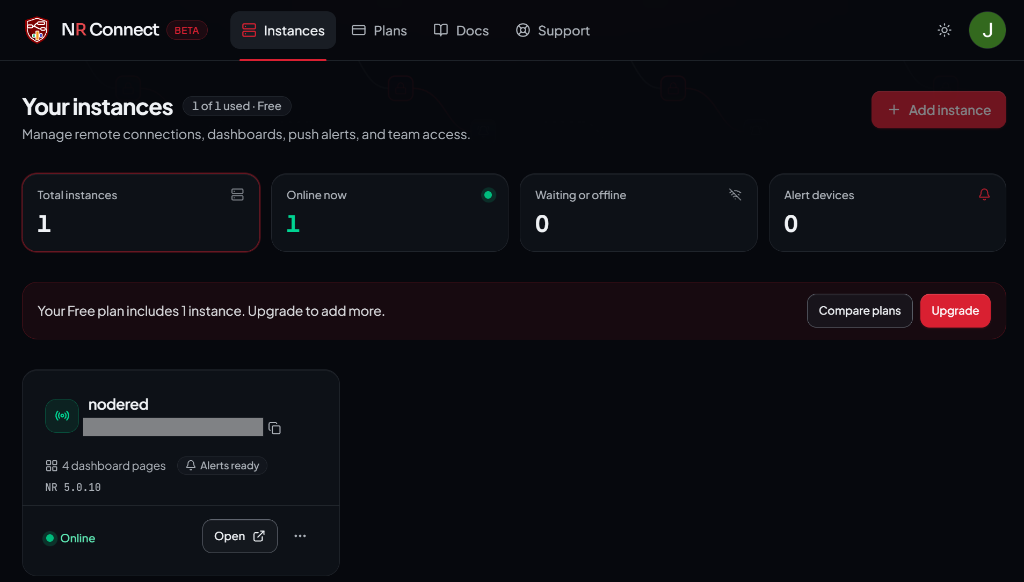
|
|
56
|
+
|
|
57
|
+
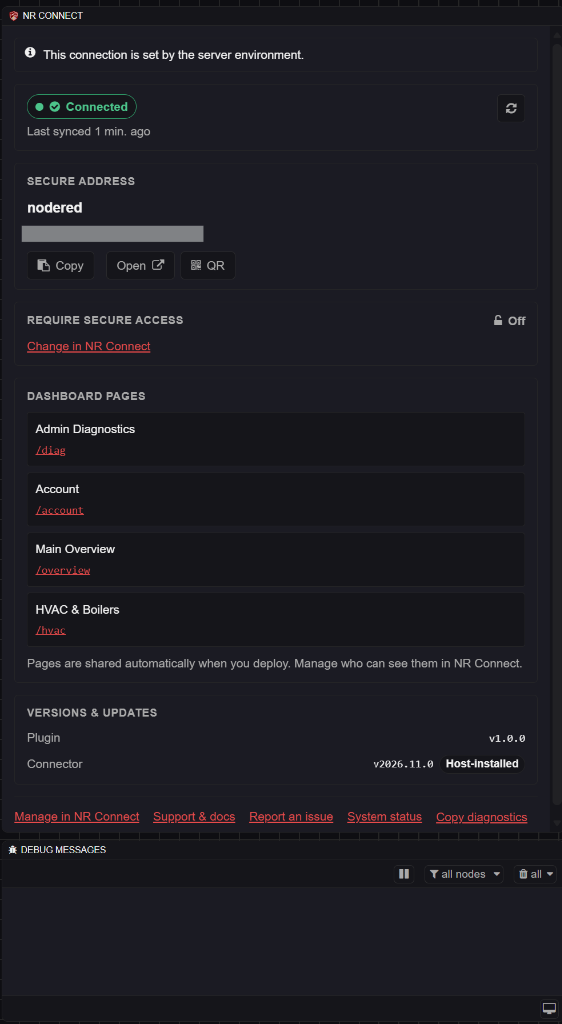
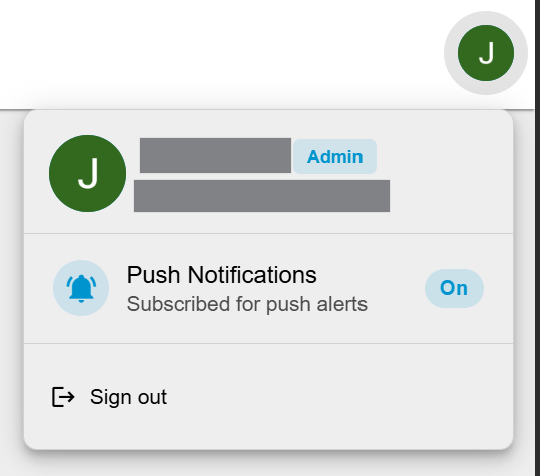
### Node-RED Editor Sidebar & Dashboard 2.0 Profile Widget
|
|
58
|
+
|
|
59
|
+
| Node-RED Editor Sidebar | Dashboard 2.0 `nrc profile` App-Bar Menu |
|
|
60
|
+
| :---: | :---: |
|
|
61
|
+
|  |  |
|
|
43
62
|
|
|
44
63
|
---
|
|
45
64
|
|
|
@@ -49,7 +68,7 @@ That's it! The plugin automatically downloads and supervises the outbound connec
|
|
|
49
68
|
- **Automatic Connector Setup & Supervision:** Downloads and SHA-256 verifies the platform-specific NR Connect connector into `<userDir>/bin/` on startup if missing and supervises the outbound connection automatically.
|
|
50
69
|
- **Signed Request Verification:** Verifies cryptographically signed NR Connect identity and page-permission headers on remote requests within a `+/- 2-minute` replay window.
|
|
51
70
|
- **FlowFuse Dashboard 2.0 Page-Level RBAC:**
|
|
52
|
-
- Automatically discovers `ui-page` nodes on `flows:started` and syncs them with NR Connect on deploy and every
|
|
71
|
+
- Automatically discovers `ui-page` nodes on `flows:started` and syncs them with NR Connect on deploy and on periodic check-ins (every 15 minutes by default).
|
|
53
72
|
- Enforces page-level access rules across FlowFuse Dashboard 2.0 Socket.IO connections (`ui-config`, live `msg-input` / `widget-sync` / `widget-load` broadcasts, and incoming `widget-action` / `widget-change` / `widget-send` / `widget-load` events) as well as `_setup` and `_debug` store endpoints.
|
|
54
73
|
- Registers `node-red-dashboard-2` auth hooks (`nr-connect-d2-auth`) to populate `msg._client.user` on incoming widget and connection events.
|
|
55
74
|
- **NR Connect Editor Sidebar:** Live `RED.comms` status pill, last check-in timestamp with **Check in now**, one-click **Copy** / **Open** for your secure URL, **Require secure access** state, discovered **Dashboard pages**, and one-click **Copy diagnostics**.
|
|
@@ -102,7 +121,7 @@ Found in the **`network`** palette category as **`nrc notify`**, this node sends
|
|
|
102
121
|
1. Create an instance in the NR Connect Portal to receive a connection code (`NR_CONNECT_TOKEN`).
|
|
103
122
|
2. Open the **NR Connect** tab in the Node-RED Editor sidebar.
|
|
104
123
|
3. Paste your connection code and click **Connect**. The plugin verifies the code with the portal before saving `<userDir>/.nr-connect.json` (`0600`), starts the connector, and syncs discovered `ui-page` nodes.
|
|
105
|
-
4. **Require secure access** is managed from your instance settings in the NR Connect Portal and updates in Node-RED on the next check-in (
|
|
124
|
+
4. **Require secure access** is managed from your instance settings in the NR Connect Portal and updates in Node-RED on the next check-in (every 15 minutes by default, or immediately via **Check in now**).
|
|
106
125
|
5. To switch codes or remove the connection, use **Use a different code** or **Disconnect** in the sidebar footer. Disconnecting stops the connector, deletes `<userDir>/.nr-connect.json`, and turns off Require secure access immediately.
|
|
107
126
|
|
|
108
127
|
### Option B: Environment Variables (Headless / Docker / Balena)
|
|
@@ -146,6 +165,6 @@ When **Require secure access** (`requireSecureAccess`) is enabled in NR Connect,
|
|
|
146
165
|
|
|
147
166
|
## Support & Community
|
|
148
167
|
|
|
149
|
-
- **Documentation & Troubleshooting:** Visit the NR Connect
|
|
168
|
+
- **Documentation & Troubleshooting:** Visit the [NR Connect Documentation & Troubleshooting Guide](https://nr-connect.com/docs/troubleshooting) for guides on Docker networking, Require secure access recovery, NTP clock sync, and connector updates.
|
|
150
169
|
- **Diagnostics:** Open the **NR Connect** sidebar tab in Node-RED and click **Copy diagnostics** to copy a redacted JSON block (Node.js, Node-RED, plugin, and connector versions — zero connection codes or secrets) when filing a bug report.
|
|
151
|
-
- **Bug Reports, Q&A & Private Support:** Open the **Support & docs** link in the sidebar footer
|
|
170
|
+
- **Bug Reports, Q&A & Private Support:** Open the **Support & docs** link in the sidebar footer, visit [nr-connect.com/support](https://nr-connect.com/support), or contact [support@nr-connect.com](mailto:support@nr-connect.com).
|
package/package.json
CHANGED
|
@@ -1,8 +1,13 @@
|
|
|
1
1
|
{
|
|
2
2
|
"name": "@nr-connect/node-red",
|
|
3
|
-
"version": "1.0.
|
|
3
|
+
"version": "1.0.1",
|
|
4
4
|
"description": "Zero-config remote access, FlowFuse Dashboard 2.0 multi-user authentication & page-level RBAC, public webhooks, and push notifications for Node-RED",
|
|
5
|
+
"author": "NR Connect <support@nr-connect.com> (https://nr-connect.com)",
|
|
5
6
|
"homepage": "https://nr-connect.com/docs",
|
|
7
|
+
"repository": {
|
|
8
|
+
"type": "git",
|
|
9
|
+
"url": "https://github.com/nr-connect/community.git"
|
|
10
|
+
},
|
|
6
11
|
"bugs": {
|
|
7
12
|
"url": "https://github.com/nr-connect/community/issues",
|
|
8
13
|
"email": "support@nr-connect.com"
|