@npgamedev/godot-mcp-server 0.0.1 → 1.0.0
This diff represents the content of publicly available package versions that have been released to one of the supported registries. The information contained in this diff is provided for informational purposes only and reflects changes between package versions as they appear in their respective public registries.
- package/ATTRIBUTIONS.md +141 -0
- package/LICENSE +28 -0
- package/README.md +386 -4
- package/dist/extensions/extensionChanges.js +131 -0
- package/dist/extensions/extensionCommand.js +25 -0
- package/dist/extensions/extensionDiscovery.js +141 -0
- package/dist/extensions/extensionRegistrar.js +82 -0
- package/dist/extensions/extensions.js +33 -0
- package/dist/groups/builtinGroups.js +60 -0
- package/dist/groups/defs/3dTools.js +17 -0
- package/dist/groups/defs/animationAuthoring.js +16 -0
- package/dist/groups/defs/assetOps.js +6 -0
- package/dist/groups/defs/audio.js +6 -0
- package/dist/groups/defs/classdb.js +6 -0
- package/dist/groups/defs/cleanup.js +6 -0
- package/dist/groups/defs/debugger.js +6 -0
- package/dist/groups/defs/editorAdvanced.js +16 -0
- package/dist/groups/defs/inputMap.js +6 -0
- package/dist/groups/defs/layerNaming.js +6 -0
- package/dist/groups/defs/lspCodeAnalysis.js +23 -0
- package/dist/groups/defs/lspCodeNavigation.js +15 -0
- package/dist/groups/defs/navigation.js +17 -0
- package/dist/groups/defs/particles.js +21 -0
- package/dist/groups/defs/pathEditing.js +22 -0
- package/dist/groups/defs/placeholders.js +28 -0
- package/dist/groups/defs/procedural.js +6 -0
- package/dist/groups/defs/resourceIo.js +6 -0
- package/dist/groups/defs/runtimeAdvanced.js +17 -0
- package/dist/groups/defs/sceneAdvanced.js +6 -0
- package/dist/groups/defs/sceneInheritance.js +6 -0
- package/dist/groups/defs/signals.js +6 -0
- package/dist/groups/defs/spriteframes.js +16 -0
- package/dist/groups/defs/theme.js +6 -0
- package/dist/groups/defs/tilemap.js +6 -0
- package/dist/groups/defs/tileset.js +22 -0
- package/dist/groups/defs/tilesetEdit.js +21 -0
- package/dist/groups/defs/userData.js +6 -0
- package/dist/groups/extensionGroups.js +182 -0
- package/dist/groups/groupActivation.js +210 -0
- package/dist/groups/groupCatalogue.js +52 -0
- package/dist/groups/groupMatch.js +182 -0
- package/dist/groups/groupResult.js +16 -0
- package/dist/groups/groupState.js +15 -0
- package/dist/groups/groupToolHandlers.js +103 -0
- package/dist/groups/groupTypes.js +10 -0
- package/dist/groups/groups.js +205 -0
- package/dist/index.js +144 -0
- package/dist/lsp/lspClient.js +509 -0
- package/dist/lsp/lspLabels.js +105 -0
- package/dist/lsp/lspProjectScan.js +156 -0
- package/dist/lsp/lspSession.js +139 -0
- package/dist/lsp/lspStatusReporter.js +76 -0
- package/dist/lsp/lspUri.js +68 -0
- package/dist/mcp/prompts.js +59 -0
- package/dist/mcp/resources.js +113 -0
- package/dist/mcp/roots.js +30 -0
- package/dist/registration/catalogue.js +123 -0
- package/dist/registration/extensionCollision.js +38 -0
- package/dist/registration/operations.js +67 -0
- package/dist/registration/screenshotResponse.js +71 -0
- package/dist/registration/toolDispatch.js +76 -0
- package/dist/registration/toolMeta.js +104 -0
- package/dist/registration/toolRefs.js +48 -0
- package/dist/registration/toolRegistry.js +211 -0
- package/dist/registry.js +291 -0
- package/dist/registryLiveness.js +113 -0
- package/dist/security/pathGuard.js +97 -0
- package/dist/security/profiles.js +104 -0
- package/dist/security/untrusted.js +23 -0
- package/dist/shared/errorContract.js +154 -0
- package/dist/shared/errors.js +21 -0
- package/dist/shared/pagination.js +135 -0
- package/dist/shared/schemaCoercion.js +173 -0
- package/dist/shared/stableJson.js +27 -0
- package/dist/shared/types.js +1 -0
- package/dist/shared/version.js +82 -0
- package/dist/startup/cliArgs.js +103 -0
- package/dist/startup/configReload.js +57 -0
- package/dist/startup/hooks.js +89 -0
- package/dist/startup/lifecycle.js +22 -0
- package/dist/startup/portConfig.js +127 -0
- package/dist/startup/reconcile.js +81 -0
- package/dist/startup/registrars.js +59 -0
- package/dist/startup/serverMode.js +19 -0
- package/dist/startup/startupEnv.js +142 -0
- package/dist/tools/animation.js +88 -0
- package/dist/tools/asset.js +58 -0
- package/dist/tools/assetWrite.js +16 -0
- package/dist/tools/audio.js +40 -0
- package/dist/tools/classdb.js +43 -0
- package/dist/tools/collision.js +23 -0
- package/dist/tools/debug.js +46 -0
- package/dist/tools/diff.js +18 -0
- package/dist/tools/editor.js +222 -0
- package/dist/tools/file.js +38 -0
- package/dist/tools/folder.js +27 -0
- package/dist/tools/inputMap.js +54 -0
- package/dist/tools/layerNames.js +29 -0
- package/dist/tools/lsp.js +524 -0
- package/dist/tools/navigation.js +24 -0
- package/dist/tools/node.js +145 -0
- package/dist/tools/nodeManagement.js +82 -0
- package/dist/tools/particles.js +83 -0
- package/dist/tools/path.js +30 -0
- package/dist/tools/playtest.js +99 -0
- package/dist/tools/procedural.js +101 -0
- package/dist/tools/resource.js +47 -0
- package/dist/tools/runtime.js +338 -0
- package/dist/tools/save.js +64 -0
- package/dist/tools/scene.js +102 -0
- package/dist/tools/sceneInheritance.js +19 -0
- package/dist/tools/sceneQuery.js +38 -0
- package/dist/tools/script.js +75 -0
- package/dist/tools/signals.js +53 -0
- package/dist/tools/sound.js +31 -0
- package/dist/tools/spatial.js +41 -0
- package/dist/tools/spriteframes.js +94 -0
- package/dist/tools/texture.js +35 -0
- package/dist/tools/theme.js +35 -0
- package/dist/tools/threeD.js +116 -0
- package/dist/tools/tilemap.js +51 -0
- package/dist/tools/tileset.js +226 -0
- package/dist/transport/authHandshake.js +43 -0
- package/dist/transport/bridge.js +225 -0
- package/dist/transport/channel.js +352 -0
- package/dist/transport/heartbeat.js +54 -0
- package/dist/transport/runtimeConnection.js +239 -0
- package/dist/transport/tokenPath.js +98 -0
- package/package.json +97 -4
package/ATTRIBUTIONS.md
ADDED
|
@@ -0,0 +1,141 @@
|
|
|
1
|
+
# Attributions (godot-mcp-server)
|
|
2
|
+
|
|
3
|
+
This repo's TypeScript source was independently written. No code from any reference
|
|
4
|
+
repository has been copied verbatim or near-verbatim into `src/` or `test/`. The
|
|
5
|
+
entries below cover (a) original artwork made for this project, (b) runtime
|
|
6
|
+
library dependencies whose licenses ship with the installed package, and (c)
|
|
7
|
+
architectural references we studied while planning the stack.
|
|
8
|
+
|
|
9
|
+
If future iterations import or adapt code from any of the sources below, append a
|
|
10
|
+
"Copied into: …" line with the file path(s) to keep this file accurate.
|
|
11
|
+
|
|
12
|
+
---
|
|
13
|
+
|
|
14
|
+
## Artwork
|
|
15
|
+
|
|
16
|
+
The project logo and hero banner were created by **Jessica Mariana Aisen** for the
|
|
17
|
+
Godot MCP Toolkit.
|
|
18
|
+
|
|
19
|
+
Commissioned for this project; the copyright is held by NPGameDev.
|
|
20
|
+
|
|
21
|
+
The MIT licence covers the source code. It does not cover the project logo, banner
|
|
22
|
+
or name, which are the project's brand identity and are not licensed for reuse.
|
|
23
|
+
|
|
24
|
+
---
|
|
25
|
+
|
|
26
|
+
## modelcontextprotocol/typescript-sdk
|
|
27
|
+
|
|
28
|
+
Source: <https://github.com/modelcontextprotocol/typescript-sdk>
|
|
29
|
+
License: MIT (prior contributions) and Apache License 2.0 (new contributions)
|
|
30
|
+
|
|
31
|
+
Copyright (c) 2024-2025 Model Context Protocol a Series of LF Projects, LLC
|
|
32
|
+
|
|
33
|
+
Used as: runtime library dependency (npm: `@modelcontextprotocol/sdk`). No source
|
|
34
|
+
from the upstream repository is reproduced here. The installed npm package
|
|
35
|
+
carries its own LICENSE.
|
|
36
|
+
|
|
37
|
+
---
|
|
38
|
+
|
|
39
|
+
## Coding-Solo/godot-mcp
|
|
40
|
+
|
|
41
|
+
Source: <https://github.com/Coding-Solo/godot-mcp>
|
|
42
|
+
License: MIT
|
|
43
|
+
|
|
44
|
+
Copyright (c) 2025 Solomon Elias
|
|
45
|
+
|
|
46
|
+
Contributed (architecture reference only — no code copied): foundational MCP server
|
|
47
|
+
structure (stdio transport + tool registry pattern), bundled-GDScript handler
|
|
48
|
+
pattern, cross-platform Godot auto-detection, debug output capture.
|
|
49
|
+
|
|
50
|
+
---
|
|
51
|
+
|
|
52
|
+
## tugcantopaloglu/godot-mcp
|
|
53
|
+
|
|
54
|
+
Source: <https://github.com/tugcantopaloglu/godot-mcp>
|
|
55
|
+
License: MIT
|
|
56
|
+
|
|
57
|
+
Copyright (c) 2025 Tugcan Topaloglu
|
|
58
|
+
Copyright (c) 2025 Solomon Elias
|
|
59
|
+
|
|
60
|
+
Contributed (architecture reference only — no code copied): `game_eval` pattern
|
|
61
|
+
(arbitrary GDScript execution with return values and await support), signal
|
|
62
|
+
management system concepts, generic node property inspection via
|
|
63
|
+
`get_property_list()`, reentrancy guard pattern for concurrent command
|
|
64
|
+
prevention.
|
|
65
|
+
|
|
66
|
+
---
|
|
67
|
+
|
|
68
|
+
## ee0pdt/Godot-MCP
|
|
69
|
+
|
|
70
|
+
Source: <https://github.com/ee0pdt/Godot-MCP>
|
|
71
|
+
License: MIT
|
|
72
|
+
|
|
73
|
+
Copyright (c) 2025 (author unnamed in LICENSE)
|
|
74
|
+
|
|
75
|
+
Contributed (architecture reference only — no code copied): structural reference
|
|
76
|
+
for the two-layer plugin + TypeScript server architecture.
|
|
77
|
+
|
|
78
|
+
---
|
|
79
|
+
|
|
80
|
+
## tomyud1/godot-mcp
|
|
81
|
+
|
|
82
|
+
Source: <https://github.com/tomyud1/godot-mcp>
|
|
83
|
+
License: MIT
|
|
84
|
+
|
|
85
|
+
Copyright (c) 2025-2026 Tomer Yud
|
|
86
|
+
|
|
87
|
+
Contributed (architecture reference only — no code copied): reference
|
|
88
|
+
implementation for MCP server + Godot plugin integration.
|
|
89
|
+
|
|
90
|
+
---
|
|
91
|
+
|
|
92
|
+
## youichi-uda/godot-mcp-pro (architectural study of the TypeScript server layer)
|
|
93
|
+
|
|
94
|
+
Source: <https://github.com/youichi-uda/godot-mcp-pro>
|
|
95
|
+
License: MIT (plugin component); the TypeScript server component is separately
|
|
96
|
+
licensed.
|
|
97
|
+
|
|
98
|
+
Copyright (c) 2026 Youichi Uda (y1uda)
|
|
99
|
+
|
|
100
|
+
Contributed (architecture reference only — no code copied): WebSocket bridge
|
|
101
|
+
architecture (Node.js ↔ Godot editor plugin), JSON-RPC 2.0 over WebSocket
|
|
102
|
+
protocol design, full/lite/minimal deployment mode pattern.
|
|
103
|
+
|
|
104
|
+
---
|
|
105
|
+
|
|
106
|
+
## Sods2/claude-code-gdscript-lsp
|
|
107
|
+
|
|
108
|
+
Source: <https://github.com/Sods2/claude-code-gdscript-lsp>
|
|
109
|
+
License: MIT
|
|
110
|
+
|
|
111
|
+
Copyright (c) 2026 Alessandro Spano
|
|
112
|
+
|
|
113
|
+
Contributed (architecture reference only — no code copied): GDScript LSP bridge
|
|
114
|
+
architecture (stdio ↔ TCP), message-buffering pattern for when Godot is not
|
|
115
|
+
running.
|
|
116
|
+
|
|
117
|
+
---
|
|
118
|
+
|
|
119
|
+
## htdt/godogen
|
|
120
|
+
|
|
121
|
+
Source: <https://github.com/htdt/godogen>
|
|
122
|
+
License: MIT
|
|
123
|
+
|
|
124
|
+
Copyright (c) 2026 Alex Ermolov
|
|
125
|
+
|
|
126
|
+
Contributed (architecture reference only — no code copied): visual QA feedback
|
|
127
|
+
loop concept (screenshot + vision analysis after code generation).
|
|
128
|
+
|
|
129
|
+
---
|
|
130
|
+
|
|
131
|
+
## Notes
|
|
132
|
+
|
|
133
|
+
MIT only requires preserving notices for code that is directly copied or
|
|
134
|
+
substantially reproduced. No code from the repositories listed above was copied into
|
|
135
|
+
this repository — those entries document the architectural study we credit by
|
|
136
|
+
courtesy. The
|
|
137
|
+
`@modelcontextprotocol/sdk` entry is the only one that represents a true runtime
|
|
138
|
+
dependency; its license ships inside the installed npm package.
|
|
139
|
+
|
|
140
|
+
The companion GDScript-side repository (`godot-mcp-toolkit`) carries its own
|
|
141
|
+
`ATTRIBUTIONS.md` with the subset of references relevant to the plugin.
|
package/LICENSE
ADDED
|
@@ -0,0 +1,28 @@
|
|
|
1
|
+
MIT License
|
|
2
|
+
|
|
3
|
+
Copyright (c) 2026 NPGameDev
|
|
4
|
+
|
|
5
|
+
Permission is hereby granted, free of charge, to any person obtaining a copy
|
|
6
|
+
of this software and associated documentation files (the "Software"), to deal
|
|
7
|
+
in the Software without restriction, including without limitation the rights
|
|
8
|
+
to use, copy, modify, merge, publish, distribute, sublicense, and/or sell
|
|
9
|
+
copies of the Software, and to permit persons to whom the Software is
|
|
10
|
+
furnished to do so, subject to the following conditions:
|
|
11
|
+
|
|
12
|
+
The above copyright notice and this permission notice shall be included in all
|
|
13
|
+
copies or substantial portions of the Software.
|
|
14
|
+
|
|
15
|
+
THE SOFTWARE IS PROVIDED "AS IS", WITHOUT WARRANTY OF ANY KIND, EXPRESS OR
|
|
16
|
+
IMPLIED, INCLUDING BUT NOT LIMITED TO THE WARRANTIES OF MERCHANTABILITY,
|
|
17
|
+
FITNESS FOR A PARTICULAR PURPOSE AND NONINFRINGEMENT. IN NO EVENT SHALL THE
|
|
18
|
+
AUTHORS OR COPYRIGHT HOLDERS BE LIABLE FOR ANY CLAIM, DAMAGES OR OTHER
|
|
19
|
+
LIABILITY, WHETHER IN AN ACTION OF CONTRACT, TORT OR OTHERWISE, ARISING FROM,
|
|
20
|
+
OUT OF OR IN CONNECTION WITH THE SOFTWARE OR THE USE OR OTHER DEALINGS IN THE
|
|
21
|
+
SOFTWARE.
|
|
22
|
+
|
|
23
|
+
---
|
|
24
|
+
|
|
25
|
+
Note on artwork and branding
|
|
26
|
+
|
|
27
|
+
The MIT licence covers the source code. It does not cover the project logo, banner
|
|
28
|
+
or name, which are the project's brand identity and are not licensed for reuse.
|
package/README.md
CHANGED
|
@@ -1,6 +1,388 @@
|
|
|
1
|
-
|
|
1
|
+
<!-- Brand banner, 1280×640, commissioned art; the image lives in the toolkit repo (docs/media/), absolute raw URL so it renders on npm. -->
|
|
2
|
+
|
|
2
3
|
|
|
3
|
-
|
|
4
|
-
(e.g. Claude Code) drive the Godot editor via the companion `godot-mcp-toolkit` plugin.
|
|
4
|
+
# Godot MCP Server
|
|
5
5
|
|
|
6
|
-
|
|
6
|
+
[](https://github.com/NPGameDev/godot-mcp-server/actions/workflows/ci.yml)
|
|
7
|
+

|
|
8
|
+
[](LICENSE)
|
|
9
|
+
|
|
10
|
+
The npm bridge that connects AI coding assistants to the Godot 4.2+ editor over the [Model Context Protocol](https://modelcontextprotocol.io). Your assistant can create scenes, edit scripts, inspect nodes, run playtests, and read the results back, directly inside the editor while you watch. It pairs with the [Godot MCP Toolkit](https://github.com/NPGameDev/godot-mcp-toolkit) editor plugin, which hosts the WebSocket servers this bridge talks to.
|
|
11
|
+
|
|
12
|
+
> Runs fully locally. No telemetry, no cloud services, no account. Nothing leaves your machine.
|
|
13
|
+
>
|
|
14
|
+
> This is an independent community project, not affiliated with or endorsed by the Godot Foundation or Anthropic.
|
|
15
|
+
>
|
|
16
|
+
> Desktop only: Windows, macOS, and Linux. Requires Node.js 22 or newer.
|
|
17
|
+
|
|
18
|
+
> 📐 **[Architecture →](docs/architecture/README.md)** covers how the server is built: the entrypoint and startup, the WebSocket bridge, the catalogue and dispatch pipeline, `discover_tools`, the GDScript LSP client, and the registry consumer. Also rendered at [npgamedev.github.io/godot-mcp-server/architecture](https://npgamedev.github.io/godot-mcp-server/architecture/).
|
|
19
|
+
|
|
20
|
+
## Why this one?
|
|
21
|
+
|
|
22
|
+
*Built to fit your workflow, not the other way around.*
|
|
23
|
+
|
|
24
|
+
The number that says the most is **150+ operations**. That is the real work on offer: create a node, paint a tilemap cell, key an animation track, read a live node mid-playtest, and roughly a hundred and fifty more. Those operations are packaged into **up to 112 tools** (an always-on core plus **28 on-demand groups**), because a tool is a slot in your client's tool budget and an operation is a thing you can actually do. Related actions sit behind one tool, which keeps the list short while the operation count tells the honest story of breadth. Some operations are version-gated, so older Godot versions (down to 4.2) expose fewer. "Up to" is literal.
|
|
25
|
+
|
|
26
|
+
Two things drive the design, and they carry equal weight:
|
|
27
|
+
|
|
28
|
+
- **You can extend it without a fixed ceiling.** The toolkit's extension API lets a project register its own tools in GDScript. They hot-reload and reach the agent through this bridge exactly like built-ins, and there is no fixed cap on how many you add. The limit is what the current system supports, and each iteration raises that ceiling and gives extensions more room. C#/.NET projects extend the same way, which is the proof that this fits every project instead of being a bolt-on. Heuristic or third-party-dependent tools stay out of the core on purpose, and the extension API is where they belong.
|
|
29
|
+
- **You can check the results.** The agent's context window is a budget, so the tool surface starts small (~8,800 tokens) and grows only when the agent asks for more. The evidence section below says what CI asserts on every build, what the test manifests cover, and what was measured when. Links, not adjectives.
|
|
30
|
+
|
|
31
|
+
Tested primarily with [Claude Code](https://docs.anthropic.com/en/docs/claude-code), and compatible with any MCP client.
|
|
32
|
+
|
|
33
|
+
## Quick start
|
|
34
|
+
|
|
35
|
+
### 1. Install the bridge
|
|
36
|
+
|
|
37
|
+
```bash
|
|
38
|
+
npm install -g @npgamedev/godot-mcp-server
|
|
39
|
+
```
|
|
40
|
+
|
|
41
|
+
Requires Node.js 22 or newer (`node --version` to check). Clients can also run it without a global install via `npx -y @npgamedev/godot-mcp-server`, which is the form the config files below use.
|
|
42
|
+
|
|
43
|
+
### 2. Install and enable the Godot plugin
|
|
44
|
+
|
|
45
|
+
Install the [Godot MCP Toolkit](https://github.com/NPGameDev/godot-mcp-toolkit) from the Godot AssetLib (or GitHub Releases), then enable it: Project Settings → Plugins → **Godot MCP Toolkit** → Active.
|
|
46
|
+
|
|
47
|
+
You should see: the MCP dock appears, and the Output log prints
|
|
48
|
+
|
|
49
|
+
```
|
|
50
|
+
[MCPServer] listening on 127.0.0.1:6550
|
|
51
|
+
```
|
|
52
|
+
|
|
53
|
+
(the port may land anywhere from 6550 to 6560; the dock's status section names the live one).
|
|
54
|
+
|
|
55
|
+
### 3. Configure your MCP client
|
|
56
|
+
|
|
57
|
+
The easiest path: let the plugin write the config. **Project → Tools → MCP Toolkit → Write .mcp.json** creates a correct `.mcp.json` at your project root (Windows wrapper included), and the dock keeps it healthy.
|
|
58
|
+
|
|
59
|
+
For every other client (Claude Desktop, Cursor, Windsurf, VS Code, Cline, Codex CLI, Gemini CLI) and the per-OS gotchas, use the **[client setup guide](docs/mcp-clients.md)**. It is the canonical setup matrix.
|
|
60
|
+
|
|
61
|
+
<details>
|
|
62
|
+
<summary>Prefer to write .mcp.json by hand?</summary>
|
|
63
|
+
|
|
64
|
+
```json
|
|
65
|
+
{
|
|
66
|
+
"mcpServers": {
|
|
67
|
+
"godot-mcp-toolkit": {
|
|
68
|
+
"command": "npx",
|
|
69
|
+
"args": ["-y", "@npgamedev/godot-mcp-server"]
|
|
70
|
+
}
|
|
71
|
+
}
|
|
72
|
+
}
|
|
73
|
+
```
|
|
74
|
+
|
|
75
|
+
On Windows, `npx` is a `.cmd` shim, so wrap it:
|
|
76
|
+
|
|
77
|
+
```json
|
|
78
|
+
{
|
|
79
|
+
"mcpServers": {
|
|
80
|
+
"godot-mcp-toolkit": {
|
|
81
|
+
"command": "cmd",
|
|
82
|
+
"args": ["/c", "npx", "-y", "@npgamedev/godot-mcp-server"]
|
|
83
|
+
}
|
|
84
|
+
}
|
|
85
|
+
}
|
|
86
|
+
```
|
|
87
|
+
|
|
88
|
+
</details>
|
|
89
|
+
|
|
90
|
+
<details>
|
|
91
|
+
<summary>Prefer to let the agent set it up?</summary>
|
|
92
|
+
|
|
93
|
+
Paste this into Claude Code from your project directory. It was tested end-to-end with Claude Code; other clients adapt via the [client setup guide](docs/mcp-clients.md). The agent drives the command-line steps; you open the editor and reconnect the client when it asks.
|
|
94
|
+
|
|
95
|
+
```text
|
|
96
|
+
Set up the Godot MCP Toolkit for this project:
|
|
97
|
+
1. Install the bridge: npm install -g @npgamedev/godot-mcp-server (check Node >= 22 first).
|
|
98
|
+
2. If this project has no .mcp.json, create one with a "godot-mcp-toolkit" server entry
|
|
99
|
+
running "npx -y @npgamedev/godot-mcp-server" (on Windows, wrap with cmd /c).
|
|
100
|
+
3. Fresh setup only: if addons/godot_mcp_toolkit exists but project.godot has no
|
|
101
|
+
[editor_plugins] entry enabling it, add the enable line so the plugin loads on first launch.
|
|
102
|
+
If this project is already open in Godot, tell me to enable it via Project Settings > Plugins instead,
|
|
103
|
+
do not edit project.godot under a running editor.
|
|
104
|
+
4. Then STOP and tell me to: open the project in Godot, confirm the dock shows
|
|
105
|
+
"[MCPServer] listening", and reconnect you (the MCP client) so the new config loads.
|
|
106
|
+
5. After I confirm, run one read-only probe (list the scene tree or read project settings)
|
|
107
|
+
and report what you see.
|
|
108
|
+
```
|
|
109
|
+
|
|
110
|
+
</details>
|
|
111
|
+
|
|
112
|
+
**macOS, launching your client from Finder/Dock?** The standard config connects either way for modern clients. If yours won't, the [client setup guide](docs/mcp-clients.md#macos-if-a-gui-launched-client-wont-connect) has the fix, from PATH diagnosis to the safe fallbacks.
|
|
113
|
+
|
|
114
|
+
### 4. Connect and ask for something
|
|
115
|
+
|
|
116
|
+
Launch your MCP client from the project root. The server discovers the plugin through a shared project registry and authenticates with a per-session token automatically.
|
|
117
|
+
|
|
118
|
+
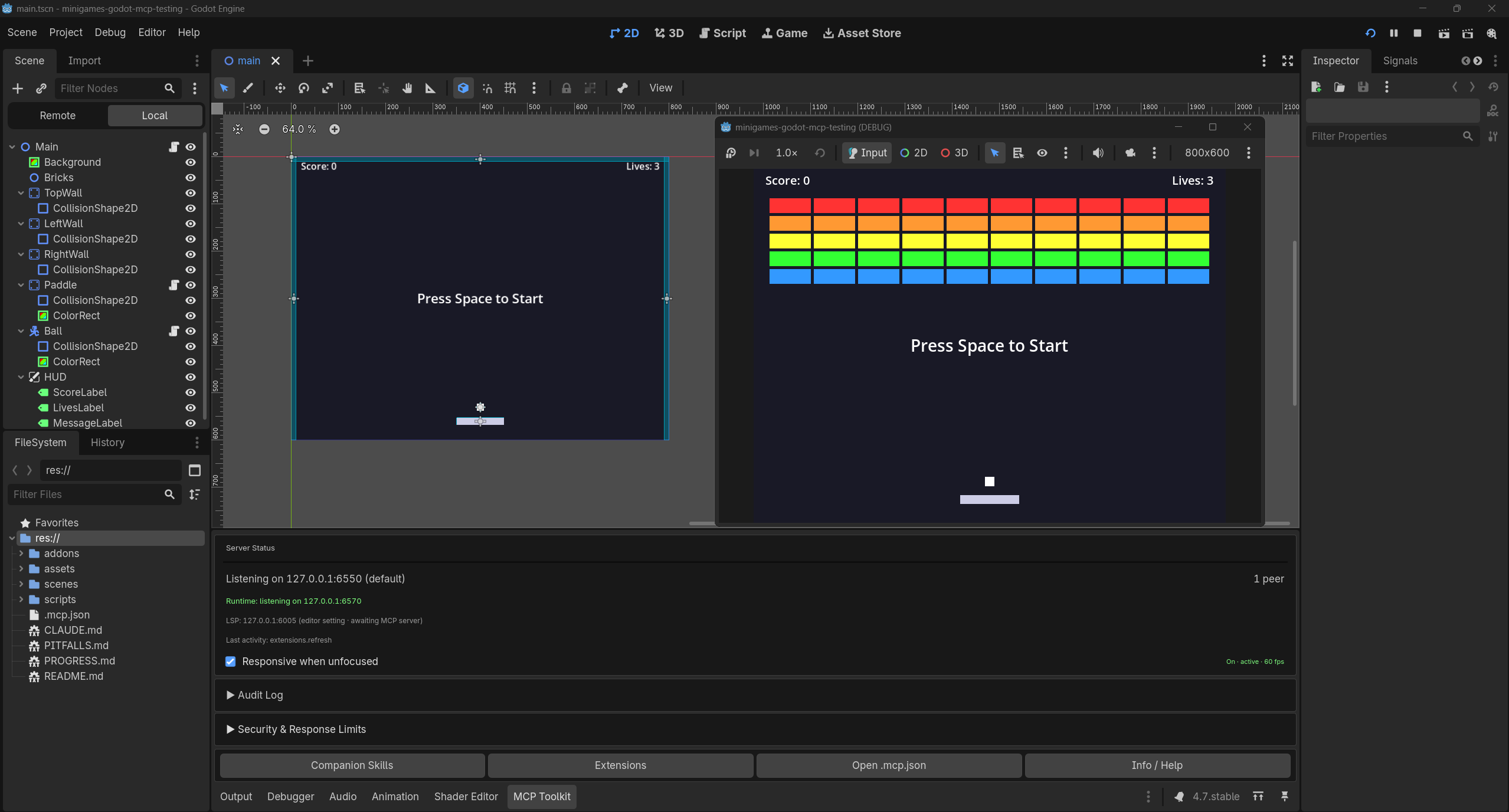
Then try the first prompt below. This is the kind of result it produces:
|
|
119
|
+
|
|
120
|
+
<!-- captured: pre-1.0, Godot 4.7, 2026-07-24, human-recorded (editor + MCP dock, 1 peer connected, game running); image lives in the toolkit repo (docs/media/), absolute raw URL so it renders on npm. -->
|
|
121
|
+
|
|
122
|
+
|
|
123
|
+
If a step does not produce its "you should see", head to the [troubleshooting guide](https://github.com/NPGameDev/godot-mcp-toolkit/blob/main/docs/troubleshooting.md). It starts with a 60-second checklist and a connectivity probe.
|
|
124
|
+
|
|
125
|
+
## Try asking…
|
|
126
|
+
|
|
127
|
+
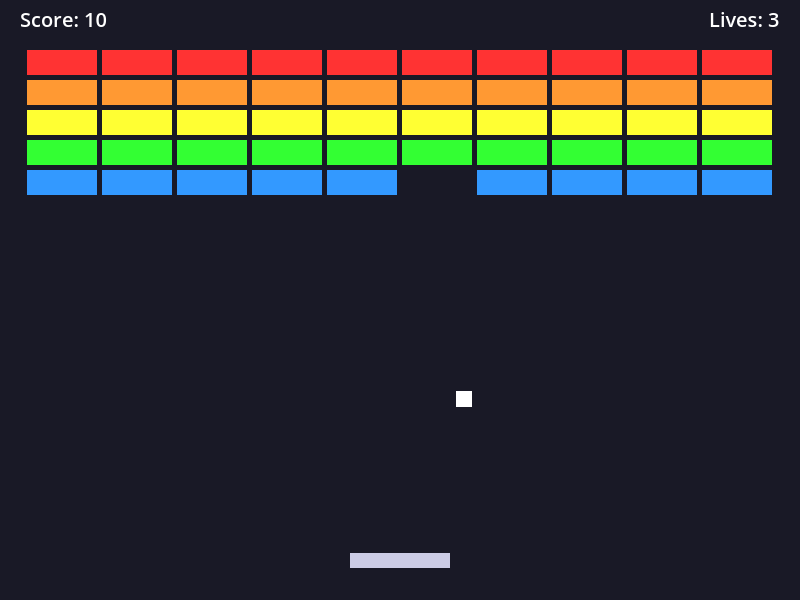
1. *"Build a small brick-breaker: paddle, ball, a wall of bricks, a score label, and a game-over screen, then playtest it."*
|
|
128
|
+
2. *"Add a CharacterBody2D named Player to the main scene, with a Sprite2D and a CollisionShape2D under it."*
|
|
129
|
+
3. *"Create a main menu scene with a Start button that switches to the game scene when clicked."*
|
|
130
|
+
4. *"Run the game, then tell me the Player's position and velocity while it's running."*
|
|
131
|
+
|
|
132
|
+
The last three run in seconds. The first one is a real project, the same kind of small game we build end-to-end when validating a release, in a single agent session. Larger games span multiple sessions, with or without MCP.
|
|
133
|
+
|
|
134
|
+
<!-- captured: pre-1.0, Godot 4.5, 2026-07-24, via runtime_screenshot of the running brick-breaker (mid-flight); image lives in the toolkit repo (docs/media/). -->
|
|
135
|
+
|
|
136
|
+
|
|
137
|
+
*The brick-breaker from prompt 1 above.*
|
|
138
|
+
|
|
139
|
+
## What the tools cover
|
|
140
|
+
|
|
141
|
+
The always-on core handles the everyday work: scenes, nodes, scripts, project settings, playtests, screenshots, input simulation, code execution. Specialized surfaces load on demand, and the assistant activates them mid-session with `discover_tools`, by keyword or by name:
|
|
142
|
+
|
|
143
|
+
| Group | What it unlocks |
|
|
144
|
+
|-------|-----------------|
|
|
145
|
+
| `3d_tools` | 3D primitives, lights, cameras, and environment setups |
|
|
146
|
+
| `animation_authoring` | Keyframes, tracks, and AnimationTree state machines |
|
|
147
|
+
| `asset_ops` | Asset listing, dependency queries, binary imports |
|
|
148
|
+
| `audio` | Audio buses, effects, and volume settings |
|
|
149
|
+
| `classdb` | Godot class hierarchy: properties, methods, signals, inheritance |
|
|
150
|
+
| `cleanup` | Deleting files, scripts, scenes, resources, folders; closing scenes |
|
|
151
|
+
| `debugger` | Debugger state, breakpoints, execution flow |
|
|
152
|
+
| `editor_advanced` | Editor screenshots, filesystem refresh, wait-for-idle |
|
|
153
|
+
| `input_map` | Input actions and their key/controller bindings |
|
|
154
|
+
| `layer_naming` | Physics, render, and navigation layer names |
|
|
155
|
+
| `lsp_code_analysis` | GDScript diagnostics, symbols, hover, project-wide compile check |
|
|
156
|
+
| `lsp_code_navigation` | Completion, go-to-definition, find references |
|
|
157
|
+
| `navigation` | Navigation regions, meshes, obstacle avoidance |
|
|
158
|
+
| `particles` | GPU particle systems |
|
|
159
|
+
| `path_editing` | Path2D curves; collision shapes from sprite textures |
|
|
160
|
+
| `placeholders` | Procedural placeholder textures and sound effects |
|
|
161
|
+
| `procedural` | Gradients, curves, and noise resources |
|
|
162
|
+
| `resource_io` | Loading and writing `.tres`/`.res` resources |
|
|
163
|
+
| `runtime_advanced` | Live node state, runtime property sets, AnimationPlayer control |
|
|
164
|
+
| `scene_advanced` | Scene diffs; batch instantiation |
|
|
165
|
+
| `scene_inheritance` | Inherited scenes (variants) |
|
|
166
|
+
| `signals` | Emitting signals at editor-time or runtime |
|
|
167
|
+
| `spriteframes` | SpriteFrames animations; spritesheet imports |
|
|
168
|
+
| `theme` | UI theme overrides: styleboxes, fonts, colors, constants |
|
|
169
|
+
| `tilemap` | TileMap cell reads, paints, bulk fills |
|
|
170
|
+
| `tileset` | TileSet resources, atlas sources, layers, alternatives |
|
|
171
|
+
| `tileset_edit` | Per-tile physics, terrain, navigation, visuals, custom data |
|
|
172
|
+
| `user_data` | `user://` save files: read, write, delete, list |
|
|
173
|
+
|
|
174
|
+
Those 28 groups are the built-in surface. A project can add more: register your own tools through the toolkit's GDScript extension API and they reach the agent through this bridge like any built-in, with no fixed cap on how many, and the ceiling only rises as the toolkit grows.
|
|
175
|
+
|
|
176
|
+
The authoritative per-tool list (every tool, operation, parameter, and version gate) is the generated **[tool reference](docs/tool-reference/README.md)**. Which tools exist on which Godot version is in the shipped [compatibility guide](https://github.com/NPGameDev/godot-mcp-toolkit/blob/main/addons/godot_mcp_toolkit/docs/compatibility.md).
|
|
177
|
+
|
|
178
|
+
## How it is designed
|
|
179
|
+
|
|
180
|
+
A few deliberate choices shape the tool surface:
|
|
181
|
+
|
|
182
|
+
- **Consolidated tools, counted operations.** Related actions share one tool with an action parameter instead of one tool each. The short tool list fits every client's tool budget and costs fewer context tokens; the 150+ operation count is what says how much the toolkit can really do.
|
|
183
|
+
- **Read/write discipline.** Every tool carries read-only and destructive annotations, so clients can auto-allow safe tools and gate risky ones. Read-only mode can hide every mutating tool with one switch.
|
|
184
|
+
- **Two channels.** The bridge dials the Editor channel (the WebSocket server inside the editor) for authoring, and the Runtime channel (the server inside the running game) during playtests. One side channel, the GDScript language-server client, connects to Godot's LSP directly.
|
|
185
|
+
- **Registry-driven discovery.** Every endpoint (editor port, runtime port, LSP, auth token) resolves from the plugin's machine-wide project registry, so there is no blind port scanning and no manual setup for multiple editors or git worktrees.
|
|
186
|
+
- **Version-adaptive.** Tools degrade gracefully across Godot 4.2 to 4.7: version-gated tools are filtered from the list rather than failing cryptically, and the surface completes itself once the editor's version is known.
|
|
187
|
+
|
|
188
|
+
## Configuration
|
|
189
|
+
|
|
190
|
+
Everything works with zero configuration; the registry handles discovery. The variables below override the **dial** (connect) side. The **listen** side (the ports the editor and game bind) is configured on the plugin: see the shipped [advanced configuration guide](https://github.com/NPGameDev/godot-mcp-toolkit/blob/main/addons/godot_mcp_toolkit/docs/advanced_configuration.md).
|
|
191
|
+
|
|
192
|
+
### Environment variables
|
|
193
|
+
|
|
194
|
+
| Variable | Default | Description |
|
|
195
|
+
|----------|---------|-------------|
|
|
196
|
+
| `GODOT_MCP_EDITOR_PORT` | auto | Editor WebSocket port to dial (default: discovered from the project registry) |
|
|
197
|
+
| `GODOT_MCP_RUNTIME_PORT` | auto | Running game's WebSocket port to dial |
|
|
198
|
+
| `GODOT_MCP_LSP_PORT` | auto | GDScript language-server port to dial |
|
|
199
|
+
| `GODOT_MCP_LSP_HOST` | `127.0.0.1` | GDScript language-server host to dial |
|
|
200
|
+
| `GODOT_MCP_PROJECT_PATH` | `cwd` | Absolute path to the Godot project |
|
|
201
|
+
| `GODOT_MCP_TOKEN_PATH` | auto | Auth-token file override (default: the path the plugin publishes in the registry) |
|
|
202
|
+
| `GODOT_MCP_READ_ONLY` | `0` | Set to `1` to hide every mutating tool (server-enforced) |
|
|
203
|
+
| `GODOT_MCP_RATE_LIMIT` | `0` | Max tool calls per second (`0` = unlimited) |
|
|
204
|
+
| `GODOT_MCP_SCRIPT_READ_LIMIT` | built-in cap | Size cap (bytes) on script-read responses |
|
|
205
|
+
| `GODOT_MCP_WS_BUFFER_LIMIT` | built-in cap | Size cap (bytes) on the WebSocket receive buffer |
|
|
206
|
+
| `GODOT_MCP_CONFIG_VERSION` | written by the plugin | Config-schema version stamp in `.mcp.json`; the server warns on stderr if it is missing or does not match |
|
|
207
|
+
|
|
208
|
+
### CLI flags
|
|
209
|
+
|
|
210
|
+
Dial-target overrides, resolved with precedence **CLI flag > env var > registry discovery > default**:
|
|
211
|
+
|
|
212
|
+
| Flag | Equivalent env var |
|
|
213
|
+
|------|--------------------|
|
|
214
|
+
| `--editor-port <n>` | `GODOT_MCP_EDITOR_PORT` |
|
|
215
|
+
| `--runtime-port <n>` | `GODOT_MCP_RUNTIME_PORT` |
|
|
216
|
+
| `--lsp-port <n>` | `GODOT_MCP_LSP_PORT` |
|
|
217
|
+
| `--lsp-host <h>` | `GODOT_MCP_LSP_HOST` |
|
|
218
|
+
| `--tools-count` | none; prints the static tool/operation/group summary and exits |
|
|
219
|
+
| `--list-eager` | none; prints the always-on and meta tool names as JSON and exits |
|
|
220
|
+
| `--help` | none; prints usage and exits |
|
|
221
|
+
|
|
222
|
+
Both `--flag value` and `--flag=value` forms are accepted.
|
|
223
|
+
|
|
224
|
+
### Multiple editors / pinned ports
|
|
225
|
+
|
|
226
|
+
With no configuration, the server discovers each editor's port through the shared project registry, so parallel editors and git worktrees need no setup. Pin a port only when you need a deterministic setup (CI, containers).
|
|
227
|
+
|
|
228
|
+
> [!IMPORTANT]
|
|
229
|
+
> A pinned port must be pinned on **both** sides with the same value: the editor binds where *its* environment says, and the server dials where *yours* says. An environment variable is not a sync channel. It is two independent per-process reads, and the common failure is `.mcp.json` pinning the server while the editor launches without the value (a desktop shortcut does not inherit a shell's export). The server fails fast with a message naming the mismatch instead of hanging; if you don't want to manage this, don't pin.
|
|
230
|
+
|
|
231
|
+
## Read-only mode
|
|
232
|
+
|
|
233
|
+
For supervised environments (classrooms, CI, demos, reviewing an unfamiliar project), set `GODOT_MCP_READ_ONLY=1` in the server's env. Every mutating tool is left unregistered, absent from the tool list entirely, no matter what the client or the model asks for. Turn it off and reconnect the client to restore full access; the tool list is decided at connect time. For per-tool permission rules on top (auto-allowing reads, prompting on writes), see the [permissions section of the client setup guide](docs/mcp-clients.md#permissions-and-read-only-mode).
|
|
234
|
+
|
|
235
|
+
## Headless mode
|
|
236
|
+
|
|
237
|
+
Most tools work under `godot --headless --editor`: file, scene, node, script, ClassDB, and project tools all function without a display. Screenshot tools return `HEADLESS_UNSUPPORTED`, and everything that needs a running game degrades with clear errors (a headless environment has no display for the game process to present). The canonical per-tool headless matrix is in the shipped [compatibility guide](https://github.com/NPGameDev/godot-mcp-toolkit/blob/main/addons/godot_mcp_toolkit/docs/compatibility.md#headless-mode---headless).
|
|
238
|
+
|
|
239
|
+
## Token efficiency
|
|
240
|
+
|
|
241
|
+
The tool catalogue consumes context-window tokens, so the surface starts small and grows on demand: the startup surface costs **~8,800 tokens**, the full surface (every group activated) **~29,000**, and read-only mode **~7,800**. Per-group costs, the measurement method, and the regeneration command are in [docs/token-efficiency.md](docs/token-efficiency.md).
|
|
242
|
+
|
|
243
|
+
## How we know it works
|
|
244
|
+
|
|
245
|
+
CI fails the build if any of these numbers drift: **112 tools** (34 always-on + 2 meta, 78 on-demand) in **28 groups**, covering **150+ operations**; **39 tools** visible in read-only mode.
|
|
246
|
+
|
|
247
|
+
- Every tool has smoke coverage (happy path, guards, error hints), mapped in the [smoke coverage manifest](test/SMOKE-COVERAGE-MANIFEST.md). Cross-tool stateful flows run as their own deterministic suite (`npm run flows`), and dispatch behavior (mutation serialization, cancellation, disconnects) as another. Separate suites, separately maintained.
|
|
248
|
+
- Every tool is also exercised end-to-end from GDScript in the toolkit's interactive sweep, mapped in the [sweep coverage manifest](https://github.com/NPGameDev/godot-mcp-toolkit/blob/main/Validations/SWEEP-COVERAGE-MANIFEST.md). Last full pass: 479 cases on Godot 4.7 (2026-07-03).
|
|
249
|
+
- CI exercises Godot **4.2 through 4.7**, on **Windows, macOS, and Linux**, in both **GDScript and C# (mono)** editors. The floor (build, unit tests, lint, format, and the static catalogue gate) runs on every push; the full behavioral matrix is an opt-in deep tier, and headless-incompatible sections (screenshots, display-bound input) are skipped there and validated locally.
|
|
250
|
+
- An accuracy eval suite (`npm run eval`) validates tool-call correctness and workflow efficiency against a live editor: "does it work well", separate from smoke's "does it work".
|
|
251
|
+
- Five small games (a clicker, a brick-breaker, chess, a platformer, and a tower defense) were each built end-to-end in a single agent session as release validation.
|
|
252
|
+
- The bundled workflow skill was measured in a controlled two-wave run (same game, with and without the skill, at one version): see [companion-skill efficiency](docs/companion-skill-efficiency.md).
|
|
253
|
+
- Concurrent human + AI editing is validated for specific scenarios: creating nodes during manual scene-tree edits, undo interleaving, editing a node while its Inspector is open, and mid-drag reparenting. Complex viewport interactions may benefit from taking turns.
|
|
254
|
+
|
|
255
|
+
## Known limitations
|
|
256
|
+
|
|
257
|
+
- **Dynamic tool loading needs a client that processes `tools/list_changed`.** Tools activated mid-session via `discover_tools` appear only if the MCP client handles that notification. Current Claude Code versions do, in both interactive and pipe (`claude -p`) mode (verified 2026-07-19); earlier versions did not process it in pipe mode. If newly activated tools do not appear, reconnect or upgrade the client, or call `extensions_refresh` to force a re-sync of extension tools.
|
|
258
|
+
- **Screenshot capture size.** A full-size viewport capture (a 3D viewport especially) can exceed the WebSocket transport buffer and fail with `RESPONSE_TOO_LARGE`. Pass `image_response_mode: "disk"` to save the PNG and receive its path, or request a lower `image_detail`.
|
|
259
|
+
|
|
260
|
+
## Security
|
|
261
|
+
|
|
262
|
+
The default posture is localhost-only, token-authenticated, and auditable:
|
|
263
|
+
|
|
264
|
+
- **Session auth.** Random 64-char hex token per plugin start; unauthorized connections rejected.
|
|
265
|
+
- **Filesystem sandbox.** `res://` only by default; path traversal blocked (lexical canonicalization, plugin-side), with a fast server-side pre-filter.
|
|
266
|
+
- **Read-only mode.** `GODOT_MCP_READ_ONLY=1` hides every mutating tool, enforced here server-side.
|
|
267
|
+
- **Audit log.** Every tool call logged with timestamp and parameter hash.
|
|
268
|
+
- **Response caps.** Size-limited reads prevent accidental data exfiltration.
|
|
269
|
+
- **Untrusted envelopes.** Per-call nonce-tagged wrappers mitigate prompt injection.
|
|
270
|
+
- **Localhost only.** `127.0.0.1` bind on every socket; never `0.0.0.0`.
|
|
271
|
+
|
|
272
|
+
Vulnerability reporting and isolation guidance (containers, VMs, restricted accounts) are in [SECURITY.md](SECURITY.md). Per-tool risk notes and recommended client-side permission rules: the shipped [security recommendations](https://github.com/NPGameDev/godot-mcp-toolkit/blob/main/addons/godot_mcp_toolkit/docs/security-recommendations.md); a ready-made Claude Code allow-list example is in the [client setup guide](docs/mcp-clients.md#permissions-and-read-only-mode).
|
|
273
|
+
|
|
274
|
+
> **Disclaimer:** We design every layer with defense-in-depth, but no software is immune to misuse or unforeseen vulnerabilities. This project is provided under the [MIT License](LICENSE) with no warranty. You are responsible for evaluating whether it meets your security requirements before use.
|
|
275
|
+
|
|
276
|
+
## Architecture
|
|
277
|
+
|
|
278
|
+
```
|
|
279
|
+
┌─────────────┐ ┌─────────────────────┐ ┌────────────────────┐
|
|
280
|
+
│ MCP client │─ stdio ─>│ godot-mcp-server │─ ws ────>│ godot-mcp-toolkit │
|
|
281
|
+
│ (AI agent) │ │ (this package) │ :6550 │ (Godot plugin) │
|
|
282
|
+
└─────────────┘ └─────────┬───────────┘ └─────────┬──────────┘
|
|
283
|
+
│ │
|
|
284
|
+
└──── ws :6570 (runtime) ───────>│
|
|
285
|
+
(the running game) (autoload)
|
|
286
|
+
```
|
|
287
|
+
|
|
288
|
+
- **Editor channel** (default port 6550) operates on the edited scene via `EditorInterface`.
|
|
289
|
+
- **Runtime channel** (default port 6570) operates on the live `SceneTree` in the running game. Auto-connected when `game_start` runs with `wait_for_runtime: true`.
|
|
290
|
+
|
|
291
|
+
Port discovery is automatic via the shared project registry; auth tokens resolve per project (and per worktree). The full story (startup, transport, dispatch, security boundaries, with diagrams) is in [docs/architecture/README.md](docs/architecture/README.md).
|
|
292
|
+
|
|
293
|
+
## FAQ
|
|
294
|
+
|
|
295
|
+
<details>
|
|
296
|
+
<summary><strong>Can it build a whole game in one shot?</strong></summary>
|
|
297
|
+
|
|
298
|
+
Small games, yes. Our validation minigames were each built in a single agent session (the brick-breaker in the examples above is one of them). Larger games take multiple sessions, with or without MCP.
|
|
299
|
+
|
|
300
|
+
</details>
|
|
301
|
+
|
|
302
|
+
<details>
|
|
303
|
+
<summary><strong>Can I use it commercially?</strong></summary>
|
|
304
|
+
|
|
305
|
+
Yes. MIT, both the server and the addon.
|
|
306
|
+
|
|
307
|
+
</details>
|
|
308
|
+
|
|
309
|
+
<details>
|
|
310
|
+
<summary><strong>Should I commit the addon to my game repo?</strong></summary>
|
|
311
|
+
|
|
312
|
+
Yes. The bundled export plugin strips it (and its auth tokens) from exported builds; the runtime piece self-disables outside debug builds.
|
|
313
|
+
|
|
314
|
+
</details>
|
|
315
|
+
|
|
316
|
+
<details>
|
|
317
|
+
<summary><strong>Does it work headless / in CI?</strong></summary>
|
|
318
|
+
|
|
319
|
+
Yes, with honest caveats: most tools work under `--headless --editor`; screenshots and everything needing a running game degrade. See [Headless mode](#headless-mode) above and the shipped [compatibility guide](https://github.com/NPGameDev/godot-mcp-toolkit/blob/main/addons/godot_mcp_toolkit/docs/compatibility.md)'s headless matrix.
|
|
320
|
+
|
|
321
|
+
</details>
|
|
322
|
+
|
|
323
|
+
<details>
|
|
324
|
+
<summary><strong>C# projects?</strong></summary>
|
|
325
|
+
|
|
326
|
+
Supported. Use the mono (.NET) Godot editor build; the standard build cannot load `.cs` scripts. See the C# section of the shipped [compatibility guide](https://github.com/NPGameDev/godot-mcp-toolkit/blob/main/addons/godot_mcp_toolkit/docs/compatibility.md).
|
|
327
|
+
|
|
328
|
+
</details>
|
|
329
|
+
|
|
330
|
+
<details>
|
|
331
|
+
<summary><strong>Multiple editors or git worktrees?</strong></summary>
|
|
332
|
+
|
|
333
|
+
Yes. Per-project instance isolation (hash-based subdirectories) and per-editor port ranges. See the shipped [multi-instance guide](https://github.com/NPGameDev/godot-mcp-toolkit/blob/main/addons/godot_mcp_toolkit/docs/multi-instance.md).
|
|
334
|
+
|
|
335
|
+
</details>
|
|
336
|
+
|
|
337
|
+
<details>
|
|
338
|
+
<summary><strong>What leaves my machine?</strong></summary>
|
|
339
|
+
|
|
340
|
+
Nothing. Runs fully locally, no telemetry, no cloud services, no account.
|
|
341
|
+
|
|
342
|
+
</details>
|
|
343
|
+
|
|
344
|
+
## Documentation
|
|
345
|
+
|
|
346
|
+
- [Documentation map](docs/README.md): every doc, organized by what you want to do.
|
|
347
|
+
- [Client setup](docs/mcp-clients.md): per-client configuration with per-OS paths and gotchas.
|
|
348
|
+
- [Tool reference](docs/tool-reference/README.md) (generated): every tool, operation, parameter, and version gate.
|
|
349
|
+
- [Token efficiency](docs/token-efficiency.md): the measured context cost of the tool surface.
|
|
350
|
+
- [Companion-skill efficiency](docs/companion-skill-efficiency.md): the measured build-time savings from the bundled workflow skill.
|
|
351
|
+
- [Testing locally](docs/testing-locally.md): every test layer and how to add coverage.
|
|
352
|
+
- [Troubleshooting](https://github.com/NPGameDev/godot-mcp-toolkit/blob/main/docs/troubleshooting.md): 60-second checklist, connectivity probe, symptom-to-fix entries.
|
|
353
|
+
- [Architecture](docs/architecture/README.md): subsystems, transport, contract surface, with diagrams.
|
|
354
|
+
|
|
355
|
+
## Contributing
|
|
356
|
+
|
|
357
|
+
See [CONTRIBUTING.md](CONTRIBUTING.md) for environment setup, the test layers, and the documentation rules.
|
|
358
|
+
|
|
359
|
+
## Releases
|
|
360
|
+
|
|
361
|
+
This project follows [Semantic Versioning](https://semver.org/). The toolkit
|
|
362
|
+
plugin and the MCP server bridge are versioned independently; install the
|
|
363
|
+
latest of each and they negotiate compatibility at connect (see
|
|
364
|
+
[RELEASING.md](RELEASING.md) → Compatibility).
|
|
365
|
+
|
|
366
|
+
- **npm:** `npm install -g @npgamedev/godot-mcp-server@latest`
|
|
367
|
+
- **Godot Asset Store / AssetLib:** search "Godot MCP Toolkit" in the editor's
|
|
368
|
+
AssetLib tab
|
|
369
|
+
- **GitHub Releases:** download from either repo's Releases page for manual installation
|
|
370
|
+
|
|
371
|
+
See [RELEASING.md](RELEASING.md) for maintainer release process and version policy.
|
|
372
|
+
|
|
373
|
+
## Author
|
|
374
|
+
|
|
375
|
+
**NPGameDev** · [npgamedev.com](https://npgamedev.com) · [GitHub](https://github.com/NPGameDev)
|
|
376
|
+
|
|
377
|
+
For inquiries and requests: [np@npgamedev.com](mailto:np@npgamedev.com)
|
|
378
|
+
|
|
379
|
+
## Trademarks
|
|
380
|
+
|
|
381
|
+
Godot and the Godot logo are trademarks of the Godot Foundation. This bridge is
|
|
382
|
+
an independent community project with no affiliation with or endorsement from the
|
|
383
|
+
Foundation, and it is not an official Godot product. The name describes what the
|
|
384
|
+
bridge connects to: the Godot Engine.
|
|
385
|
+
|
|
386
|
+
## License
|
|
387
|
+
|
|
388
|
+
MIT: see [LICENSE](LICENSE). Upstream notices in [ATTRIBUTIONS.md](ATTRIBUTIONS.md).
|