@node-projects/speedscope 0.0.0-stage → 2.1.0
This diff represents the content of publicly available package versions that have been released to one of the supported registries. The information contained in this diff is provided for informational purposes only and reflects changes between package versions as they appear in their respective public registries.
- package/LICENSE +21 -0
- package/README.md +253 -2
- package/bin/cli.mjs +173 -0
- package/bin/server.mjs +80 -0
- package/dist/release/LICENSE +21 -0
- package/dist/release/SourceCodePro-Regular.ttf-ILST5JV6.woff2 +0 -0
- package/dist/release/favicon-16x16-V2DMIAZS.js +2 -0
- package/dist/release/favicon-16x16-VSI62OPJ.png +0 -0
- package/dist/release/favicon-32x32-3EB2YCUY.png +0 -0
- package/dist/release/favicon-32x32-THY3JDJL.js +2 -0
- package/dist/release/favicon-FOKUP5Y5.ico +0 -0
- package/dist/release/favicon-M34RF7BI.js +2 -0
- package/dist/release/file-format-schema.json +332 -0
- package/dist/release/index.html +20 -0
- package/dist/release/perf-vertx-stacks-01-collapsed-all-ZNUIGAJL.txt +199 -0
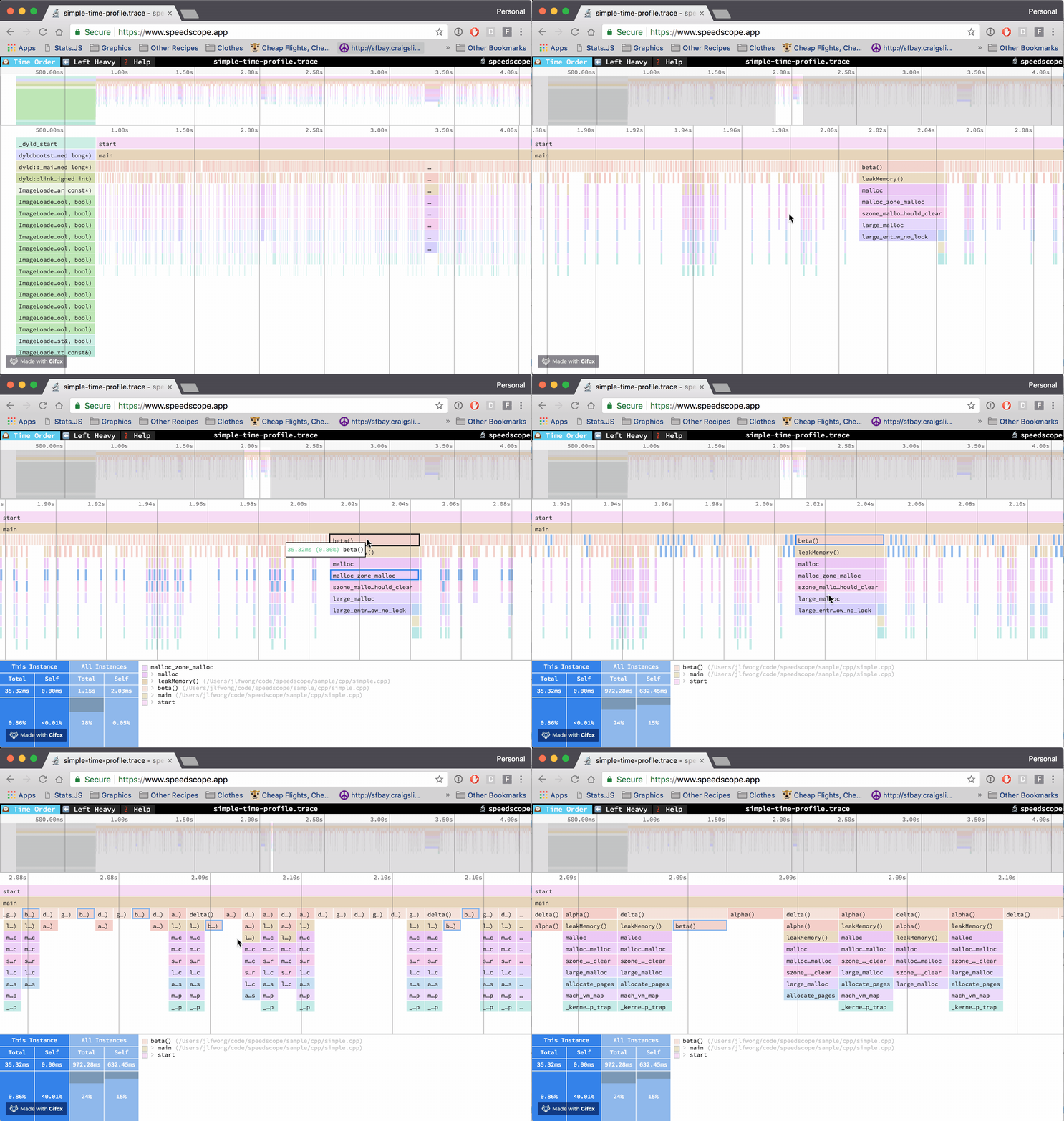
- package/dist/release/release.txt +3 -0
- package/dist/release/source-code-pro.LICENSE.md +93 -0
- package/dist/release/speedscope-GHPHNKXC.css +2 -0
- package/dist/release/speedscope-OUBBGH23.js +191 -0
- package/dist/release/streamparser-json.LICENSE +21 -0
- package/docs/JAVA_THREAD_DUMPS.md +32 -0
- package/docs/LARGE_TRACE_PERFORMANCE.md +346 -0
- package/docs/OFFLINE.md +58 -0
- package/docs/PROFILE_FILTERS.md +73 -0
- package/docs/RELEASING.md +142 -0
- package/docs/SEARCH_AND_LAYOUT.md +260 -0
- package/docs/SOURCE_AND_LABELS.md +69 -0
- package/package.json +123 -4
- package/src/lib/file-format-spec.ts +150 -0
package/LICENSE
ADDED
|
@@ -0,0 +1,21 @@
|
|
|
1
|
+
MIT License
|
|
2
|
+
|
|
3
|
+
Copyright (c) 2018 Jamie Wong
|
|
4
|
+
|
|
5
|
+
Permission is hereby granted, free of charge, to any person obtaining a copy
|
|
6
|
+
of this software and associated documentation files (the "Software"), to deal
|
|
7
|
+
in the Software without restriction, including without limitation the rights
|
|
8
|
+
to use, copy, modify, merge, publish, distribute, sublicense, and/or sell
|
|
9
|
+
copies of the Software, and to permit persons to whom the Software is
|
|
10
|
+
furnished to do so, subject to the following conditions:
|
|
11
|
+
|
|
12
|
+
The above copyright notice and this permission notice shall be included in all
|
|
13
|
+
copies or substantial portions of the Software.
|
|
14
|
+
|
|
15
|
+
THE SOFTWARE IS PROVIDED "AS IS", WITHOUT WARRANTY OF ANY KIND, EXPRESS OR
|
|
16
|
+
IMPLIED, INCLUDING BUT NOT LIMITED TO THE WARRANTIES OF MERCHANTABILITY,
|
|
17
|
+
FITNESS FOR A PARTICULAR PURPOSE AND NONINFRINGEMENT. IN NO EVENT SHALL THE
|
|
18
|
+
AUTHORS OR COPYRIGHT HOLDERS BE LIABLE FOR ANY CLAIM, DAMAGES OR OTHER
|
|
19
|
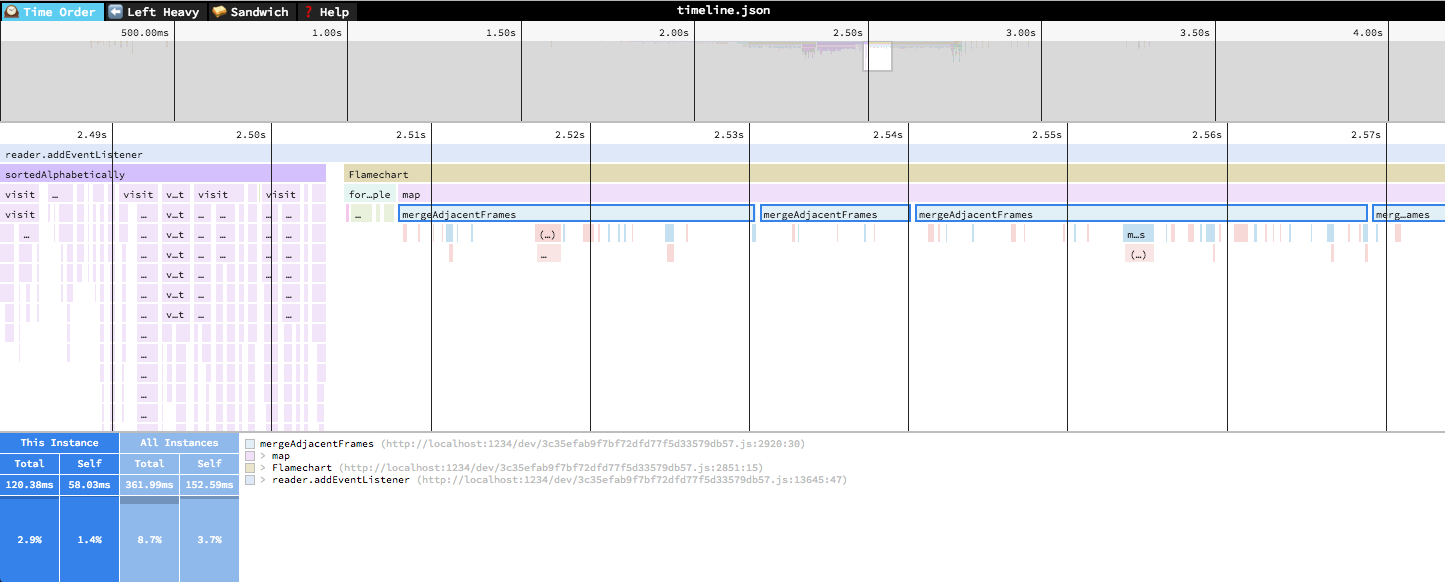
+
LIABILITY, WHETHER IN AN ACTION OF CONTRACT, TORT OR OTHERWISE, ARISING FROM,
|
|
20
|
+
OUT OF OR IN CONNECTION WITH THE SOFTWARE OR THE USE OR OTHER DEALINGS IN THE
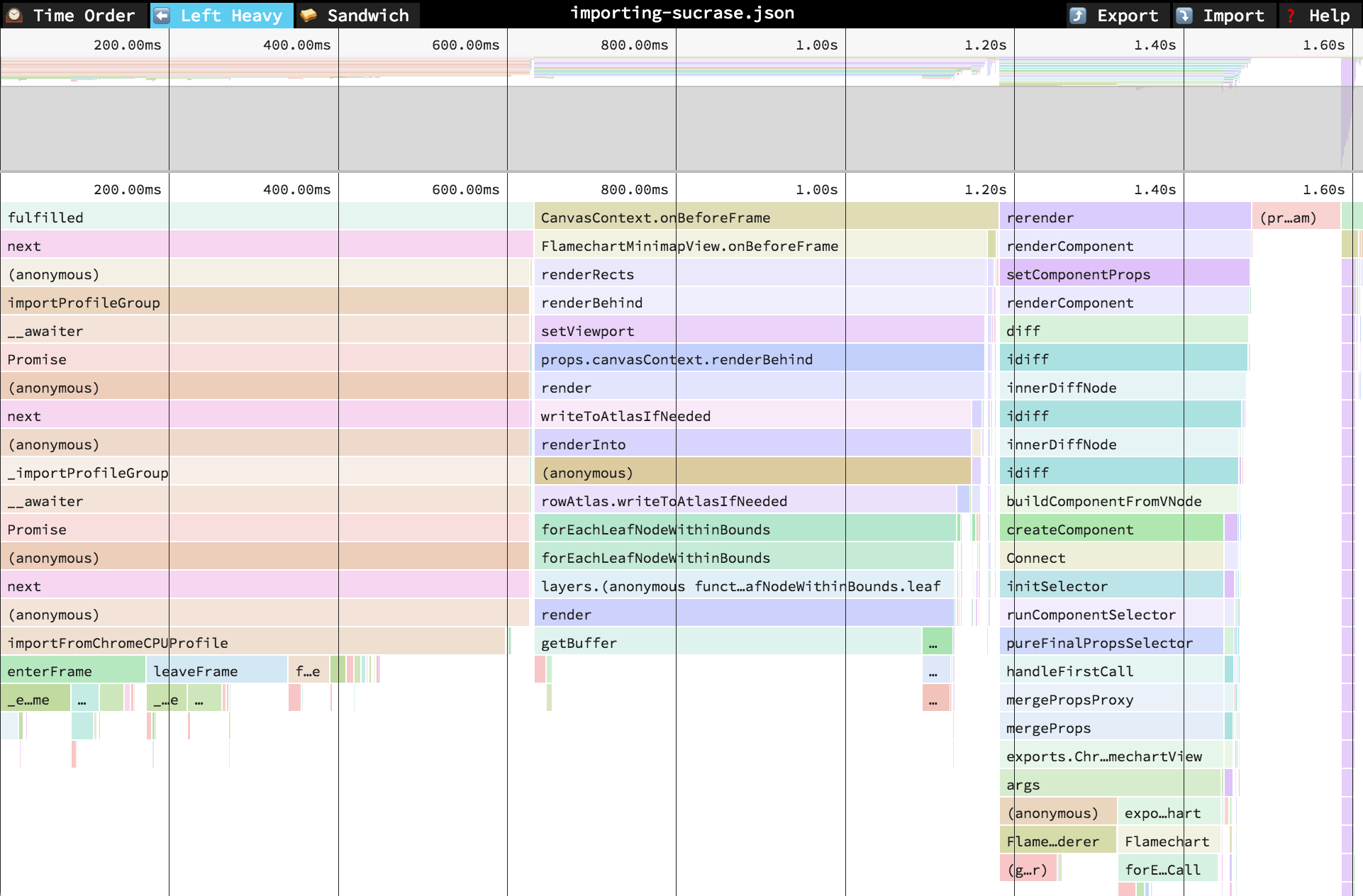
|
|
21
|
+
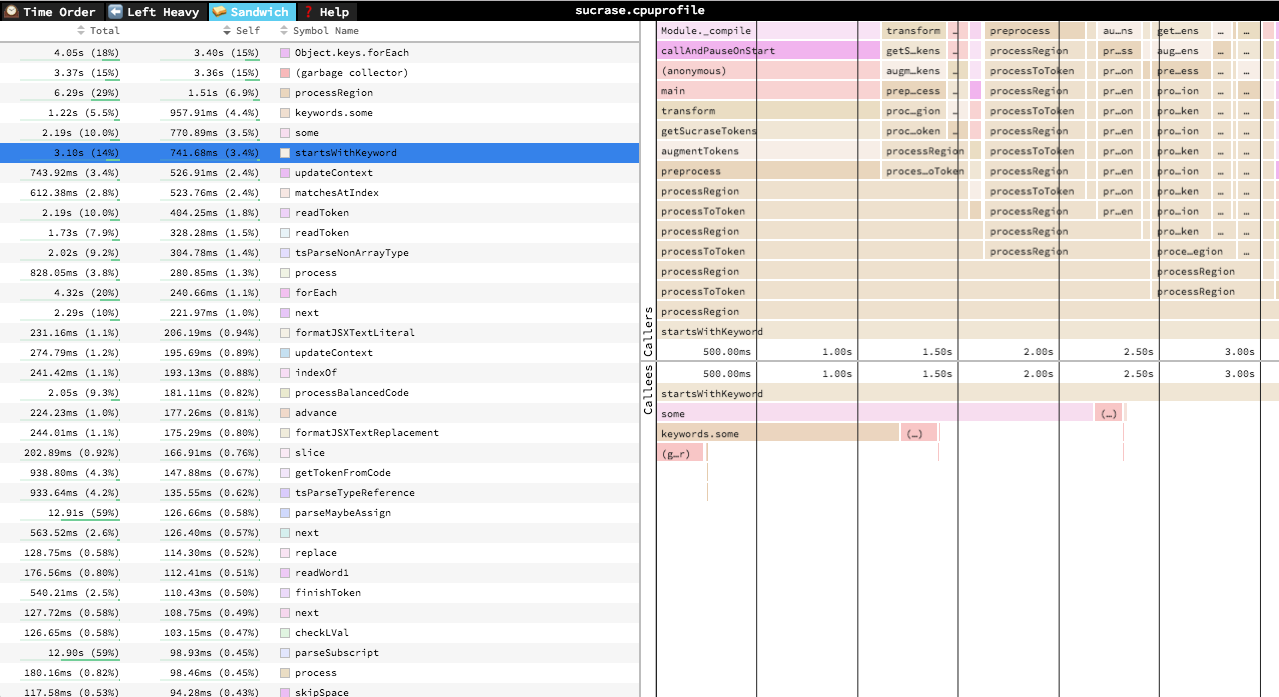
SOFTWARE.
|
package/README.md
CHANGED
|
@@ -1,3 +1,254 @@
|
|
|
1
|
-
|
|
1
|
+
English | [简体中文](./README-zh_CN.md)
|
|
2
|
+
# 🔬speedscope — node-projects fork
|
|
2
3
|
|
|
3
|
-
|
|
4
|
+
[](https://github.com/node-projects/speedscope/actions/workflows/ci.yml)
|
|
5
|
+
[](https://node-projects.github.io/speedscope/)
|
|
6
|
+
[](https://www.npmjs.com/package/@node-projects/speedscope)
|
|
7
|
+
[](https://github.com/node-projects/speedscope/actions/workflows/release.yml)
|
|
8
|
+
[](LICENSE)
|
|
9
|
+
[](https://github.com/sponsors/jogibear9988)
|
|
10
|
+
|
|
11
|
+
A fast, interactive web-based viewer for performance profiles (JavaScript, Ruby,
|
|
12
|
+
Python, Go, native traces and more).
|
|
13
|
+
**[Open the app](https://node-projects.github.io/speedscope/)** — profiles are processed
|
|
14
|
+
in your browser. This fork builds on [jlfwong/speedscope](https://github.com/jlfwong/speedscope)
|
|
15
|
+
and adds large-trace improvements, profile transformations and an accessible Call Tree.
|
|
16
|
+
|
|
17
|
+
Given raw profiling data, speedscope allows you to interactively explore the data to get insight into what's slow in your application, or allocating all the memory, or whatever data is represented in the profiling data.
|
|
18
|
+
|
|
19
|
+
|
|
20
|
+
|
|
21
|
+
[0]: https://en.wikipedia.org/wiki/Profiling_(computer_programming)#Statistical_profilers
|
|
22
|
+
[1]: https://github.com/brendangregg/FlameGraph
|
|
23
|
+
|
|
24
|
+
# Supported file formats
|
|
25
|
+
|
|
26
|
+
speedscope is designed to ingest profiles from a variety of different profilers for different programming languages & environments. Click the links below for documentation on how to import from a specific source.
|
|
27
|
+
|
|
28
|
+
- JavaScript
|
|
29
|
+
- [Importing from Chrome](https://github.com/jlfwong/speedscope/wiki/Importing-from-Chrome)
|
|
30
|
+
- [Importing from Firefox](https://github.com/jlfwong/speedscope/wiki/Importing-from-Firefox)
|
|
31
|
+
- [Importing from Safari](https://github.com/jlfwong/speedscope/wiki/Importing-from-Safari)
|
|
32
|
+
- [Importing from Node.js](https://github.com/jlfwong/speedscope/wiki/Importing-from-Node.js)
|
|
33
|
+
- [Importing from Hermes (for React Native)](https://github.com/jlfwong/speedscope/wiki/Importing-from-Hermes)
|
|
34
|
+
- JS Self-Profiling: import the JSON returned by `await profiler.stop()` from the [JS Self-Profiling API](https://wicg.github.io/js-self-profiling/).
|
|
35
|
+
- Ruby
|
|
36
|
+
- [Importing from stackprof](https://github.com/jlfwong/speedscope/wiki/Importing-from-stackprof-(ruby))
|
|
37
|
+
- [Importing from rbspy](https://github.com/jlfwong/speedscope/wiki/Importing-from-rbspy-(ruby))
|
|
38
|
+
- [Importing from ruby-prof](https://github.com/jlfwong/speedscope/wiki/Importing-from-ruby-prof)
|
|
39
|
+
- Python
|
|
40
|
+
- [Importing from py-spy](https://github.com/jlfwong/speedscope/wiki/Importing-from-py-spy-(python))
|
|
41
|
+
- [pyspeedscope](https://github.com/windelbouwman/pyspeedscope)
|
|
42
|
+
- [Importing from Austin](https://github.com/P403n1x87/austin-python#format-conversion)
|
|
43
|
+
- [Importing from pyinstrument](https://github.com/jlfwong/speedscope/wiki/Importing-from-pyinstrument-(python))
|
|
44
|
+
- PHP
|
|
45
|
+
- [Importing from phpspy or sj-i/php-profiler](https://github.com/sj-i/php-profiler/pull/101)
|
|
46
|
+
- Go
|
|
47
|
+
- [Importing from pprof](https://github.com/jlfwong/speedscope/wiki/Importing-from-pprof-(go))
|
|
48
|
+
- Rust
|
|
49
|
+
- [flamescope](https://github.com/coolreader18/flamescope)
|
|
50
|
+
- Java
|
|
51
|
+
- [Importing from async‐profiler (Java)
|
|
52
|
+
](https://github.com/jlfwong/speedscope/wiki/Importing-from-async%E2%80%90profiler-(Java))
|
|
53
|
+
- [Importing from Java Flight Recorder](https://github.com/jlfwong/speedscope/wiki/Importing-from-Java-Flight-Recorder)
|
|
54
|
+
- [Importing Java thread dumps (`jstack` / `Thread.print`)](docs/JAVA_THREAD_DUMPS.md)
|
|
55
|
+
- Erlang/Elixir
|
|
56
|
+
- [eflambe](https://github.com/Stratus3D/eflambe)
|
|
57
|
+
- Native code
|
|
58
|
+
- [Importing from Instruments.app](https://github.com/jlfwong/speedscope/wiki/Importing-from-Instruments.app) (macOS)
|
|
59
|
+
- [Importing from `perf`](https://github.com/jlfwong/speedscope/wiki/Importing-from-perf-(linux)) (linux)
|
|
60
|
+
- [Importing from .NET Core](https://github.com/jlfwong/speedscope/wiki/Importing-from-.NET-Core)
|
|
61
|
+
- [Importing from GHC (Haskell)](https://github.com/jlfwong/speedscope/wiki/Importing-from-Haskell)
|
|
62
|
+
- [Importing from custom sources](https://github.com/jlfwong/speedscope/wiki/Importing-from-custom-sources)
|
|
63
|
+
|
|
64
|
+
Contributions to add support for additional formats are welcome! Open an issue in
|
|
65
|
+
[this fork](https://github.com/node-projects/speedscope/issues). The importer guides
|
|
66
|
+
above are maintained upstream and remain useful for the supported file formats.
|
|
67
|
+
# Usage
|
|
68
|
+
|
|
69
|
+
Visit [the hosted app](https://node-projects.github.io/speedscope/), then browse for a
|
|
70
|
+
profile file or drag it onto the page. Imported profiles stay in your browser.
|
|
71
|
+
After a successful online visit, the hosted app can reopen offline and import a
|
|
72
|
+
local recording. See [offline use and update behavior](docs/OFFLINE.md).
|
|
73
|
+
|
|
74
|
+
Large JSON and trace captures import in the background with progress and a
|
|
75
|
+
**Cancel import** button. This improves responsiveness; very large captures can
|
|
76
|
+
still exceed browser memory limits. Search offers Contains, Whole word and Exact
|
|
77
|
+
matching for function names and source paths.
|
|
78
|
+
Graph-search navigation retains at most 10,000 results and clearly marks larger
|
|
79
|
+
result sets; refine the query to narrow them. Symbol/highlight caches are bounded.
|
|
80
|
+
Use **Profile actions → Filter frames…** to include your code or exclude framework
|
|
81
|
+
frames by file path or name. It creates a separate aggregate profile and keeps the
|
|
82
|
+
original available. See [filter rules and weight semantics](docs/PROFILE_FILTERS.md).
|
|
83
|
+
Choose **Profile actions → Search all profiles…** to find functions across threads
|
|
84
|
+
and open a result in its original profile. Sandwich's table and caller/callee
|
|
85
|
+
panes can now be resized with draggable or keyboard-operated dividers. See
|
|
86
|
+
[search and layout controls](docs/SEARCH_AND_LAYOUT.md).
|
|
87
|
+
Selected-stack scope names are clickable; deep stacks page through at most 100
|
|
88
|
+
ancestors at a time to keep details responsive.
|
|
89
|
+
Window titles identify the loaded file. Sandwich shows the selected function's
|
|
90
|
+
full name and source, and selected-stack details explain the statistics through
|
|
91
|
+
**About these statistics**.
|
|
92
|
+
**Profile actions** also offers configurable source-code links for VS Code or web
|
|
93
|
+
repositories, and compact path labels in graphs. Full names remain searchable
|
|
94
|
+
and available in details. See [source links and graph labels](docs/SOURCE_AND_LABELS.md).
|
|
95
|
+
Duration traces stream plain/gzip input and discard unused events. Oversized
|
|
96
|
+
captures stop with a clear limit error; see [import limits and measurements](docs/LARGE_TRACE_PERFORMANCE.md#streaming-duration-traces).
|
|
97
|
+
|
|
98
|
+
## Command line usage
|
|
99
|
+
|
|
100
|
+
For offline use, or convenience in the terminal, you can also install speedscope
|
|
101
|
+
via npm:
|
|
102
|
+
|
|
103
|
+
npm install -g @node-projects/speedscope
|
|
104
|
+
|
|
105
|
+
The npm package is scoped; the executable remains `speedscope`. If replacing a
|
|
106
|
+
global upstream installation, run `npm uninstall -g speedscope` first. The CLI
|
|
107
|
+
requires Node.js 22 or newer. You can also run it without a global installation:
|
|
108
|
+
|
|
109
|
+
npx --package @node-projects/speedscope speedscope --serve /path/to/profile
|
|
110
|
+
|
|
111
|
+
Invoking `speedscope /path/to/profile` will load speedscope in your default browser.
|
|
112
|
+
|
|
113
|
+
Use `speedscope --serve /path/to/profile` to serve speedscope and the profile over
|
|
114
|
+
HTTP on an available loopback port. This also works with stdin (`speedscope --serve -`).
|
|
115
|
+
The server stays running until you press Ctrl+C. Profiles remain on your computer.
|
|
116
|
+
Without `--serve`, profile wrappers are kept in separate directories under your
|
|
117
|
+
system temporary directory's `speedscope` folder.
|
|
118
|
+
|
|
119
|
+
## Development server
|
|
120
|
+
|
|
121
|
+
Run `npm run serve` to start the development server on port 8000. Set
|
|
122
|
+
`SPEEDSCOPE_PORT` to an integer from 1 through 65535 to choose another port.
|
|
123
|
+
For example, in PowerShell: `$env:SPEEDSCOPE_PORT='8080'; npm run serve`.
|
|
124
|
+
|
|
125
|
+
## Self-contained directory
|
|
126
|
+
|
|
127
|
+
If you don't have npm or node installed, you can also download a
|
|
128
|
+
self-contained version from [this fork's GitHub releases](https://github.com/node-projects/speedscope/releases).
|
|
129
|
+
After you download the zip file from a release, simply unzip it and open the
|
|
130
|
+
contained `index.html` in Chrome or Firefox.
|
|
131
|
+
|
|
132
|
+
## Importing via URL
|
|
133
|
+
|
|
134
|
+
To load a specific profile by URL, you can append a hash fragment like `#profileURL=[URL-encoded profile URL]&title=[URL-encoded custom title]`. Note that the server hosting the profile must have CORS configured to allow AJAX requests from speedscope.
|
|
135
|
+
|
|
136
|
+
If the endpoint requires a particular representation, add
|
|
137
|
+
`&profileAccepts=application%2Fjson` to send an `Accept: application/json` header.
|
|
138
|
+
|
|
139
|
+
## Views
|
|
140
|
+
|
|
141
|
+
### 🕰Time Order
|
|
142
|
+
|
|
143
|
+
|
|
144
|
+
In the "Time Order" view (the default), call stacks are ordered left-to-right in the same order as they occurred in the input file, which is usually going to be the chronological order they were recorded in. This view is most helpful for understanding the behavior of an application over time, e.g. "first the data is fetched from the database, then the data is prepared for serialization, then the data is serialized to JSON".
|
|
145
|
+
|
|
146
|
+
The horizontal axis represents the "weight" of each stack (most commonly CPU time), and the vertical axis shows you the stack active at the time of the sample. If you click on one of the frames, you'll be able to see summary statistics about it.
|
|
147
|
+
|
|
148
|
+
|
|
149
|
+
### ⬅️Left Heavy
|
|
150
|
+
|
|
151
|
+
|
|
152
|
+
In the "Left Heavy" view, identical stacks are grouped together, regardless of whether they were recorded sequentially. Then, the stacks are sorted so that the heaviest stack for each parent is on the left -- hence "left heavy". This view is useful for understanding where all the time is going in situations where there are hundreds or thousands of function calls interleaved between other call stacks.
|
|
153
|
+
|
|
154
|
+
### 🥪 Sandwich
|
|
155
|
+
|
|
156
|
+
|
|
157
|
+
The Sandwich view is a table view in which you can find a list of all functions and their associated times. It's called "Sandwich" view because if you select one of the rows in the table, you can see flamegraphs for all the callers and callees of the selected row. You can sort by total time or self time. Total time is the time spent in a function and all its callees. Self time is the time spent in a function, excluding its callees.
|
|
158
|
+
|
|
159
|
+
|
|
160
|
+
## Navigation
|
|
161
|
+
|
|
162
|
+
Function selection follows you between Time Order, Left Heavy and Sandwich;
|
|
163
|
+
each view keeps its own call instance and zoom within the active profile.
|
|
164
|
+
|
|
165
|
+
The overview outlines the visible range. Tab to **Profile overview** for keyboard
|
|
166
|
+
pan, plus/minus zoom, and Home to reset. See [overview controls](docs/SEARCH_AND_LAYOUT.md#navigate-the-overview).
|
|
167
|
+
|
|
168
|
+
Once a profile has loaded, the main view is split into two: the top area is the "minimap", and the bottom area is the "stack view".
|
|
169
|
+
|
|
170
|
+
Colors follow the order of frames sorted by file path and symbol name. Frames
|
|
171
|
+
near each other in that order have similar colors; colors do not indicate cost.
|
|
172
|
+
Search matches both symbol names and file paths, ignoring case. A file-only
|
|
173
|
+
match highlights the frame without marking characters in its symbol name.
|
|
174
|
+
|
|
175
|
+
### Minimap Navigation
|
|
176
|
+
|
|
177
|
+
* Scroll on either axis to pan around
|
|
178
|
+
* Click and drag to narrow your view to a specific range
|
|
179
|
+
|
|
180
|
+
### Stack View Navigation
|
|
181
|
+
|
|
182
|
+
* Scroll on either axis to pan around
|
|
183
|
+
* Pinch to zoom
|
|
184
|
+
* Hold Cmd+Scroll to zoom
|
|
185
|
+
* Double click on a frame to fit the viewport to it
|
|
186
|
+
* Click on a frame to view summary statistics about it
|
|
187
|
+
|
|
188
|
+
### Keyboard Navigation
|
|
189
|
+
|
|
190
|
+
* `+`: zoom in
|
|
191
|
+
* `-`: zoom out
|
|
192
|
+
* `0`: zoom out to see the entire profile
|
|
193
|
+
* `w`/`a`/`s`/`d` or arrow keys: pan around the profile
|
|
194
|
+
* `1`: Switch to the "Time Order" view
|
|
195
|
+
* `2`: Switch to the "Left Heavy" view
|
|
196
|
+
* `3`: Switch to the "Sandwich" view
|
|
197
|
+
* `r`: Collapse recursion in the flamegraphs
|
|
198
|
+
* `Cmd+S`/`Ctrl+S` to save the current profile
|
|
199
|
+
* `Cmd+O`/`Ctrl+O` to open a new profile
|
|
200
|
+
* `n`: Go to next profile/thread if one is available
|
|
201
|
+
* `p`: Go to previous profile/thread if one is available
|
|
202
|
+
* `t`: Open the profile/thread selector if available
|
|
203
|
+
* `Cmd+F`/`Ctrl+F`: to open search. While open, `Enter` and `Shift+Enter` cycle through results
|
|
204
|
+
|
|
205
|
+
## Additional views in this fork
|
|
206
|
+
|
|
207
|
+
`4` opens the keyboard-accessible **Call Tree** table, with total/self weights,
|
|
208
|
+
source locations, expandable callees, and bounded rows for large profiles.
|
|
209
|
+
It is also the fallback when WebGL cannot initialize.
|
|
210
|
+
|
|
211
|
+
The **Profile actions** menu creates a new profile while preserving the originals:
|
|
212
|
+
crop the visible Time Order range, combine original profiles with matching units,
|
|
213
|
+
invert stacks, or group stacks by source file. Combining adds busy-stack weights;
|
|
214
|
+
it does not align threads on a shared wall-clock timeline. Inversion and file grouping
|
|
215
|
+
are aggregate views, so inspect them in Left Heavy or Call Tree.
|
|
216
|
+
|
|
217
|
+
Known aggregate profiles disable Time Order. Aggregate/derived flags survive this
|
|
218
|
+
fork's exports so combining original captures after reimport does not count derived
|
|
219
|
+
views again. Export shows progress and a Cancel button while writing JSON chunks.
|
|
220
|
+
See [large-trace measurements and limits](docs/LARGE_TRACE_PERFORMANCE.md) for the
|
|
221
|
+
performance follow-up and benchmark commands.
|
|
222
|
+
|
|
223
|
+
Run `npm run prepack` to build an offline viewer and
|
|
224
|
+
`dist/speedscope-<version>.zip` on Windows, macOS, or Linux. Extract the ZIP and open
|
|
225
|
+
`index.html`. This includes the JFR WebAssembly decoder without a network fetch.
|
|
226
|
+
The npm package exposes the profile format with
|
|
227
|
+
`import type {FileFormat} from '@node-projects/speedscope'`; internal rendering APIs are not public.
|
|
228
|
+
|
|
229
|
+
## Hosting and releases
|
|
230
|
+
|
|
231
|
+
GitHub Actions tests Node.js 22/24 on Windows and Linux. Pushes to `main` build and
|
|
232
|
+
deploy the app to [GitHub Pages](https://node-projects.github.io/speedscope/).
|
|
233
|
+
`npm run build:pages` builds the same site locally in `dist/pages` with relative
|
|
234
|
+
asset URLs for the `/speedscope/` project path.
|
|
235
|
+
|
|
236
|
+
Publishing a GitHub release tagged `vX.Y.Z` (or `X.Y.Z`) publishes
|
|
237
|
+
`@node-projects/speedscope` with that version, after tests and packaging. Prerelease
|
|
238
|
+
versions or releases marked as prereleases use npm's `next` tag. Stable releases
|
|
239
|
+
use `latest`. The workflow attaches standalone ZIP and npm tarball downloads to
|
|
240
|
+
the release. npm trusted publishing is configured for this workflow; see
|
|
241
|
+
[release operation and first-publish validation](docs/RELEASING.md).
|
|
242
|
+
|
|
243
|
+
Support development via [GitHub Sponsors](https://github.com/sponsors/jogibear9988)
|
|
244
|
+
or [Patreon](https://www.patreon.com/jogibear9988). Funding configuration is shared
|
|
245
|
+
with [Web Component Designer](https://github.com/node-projects/web-component-designer).
|
|
246
|
+
|
|
247
|
+
## Contributing
|
|
248
|
+
|
|
249
|
+
The [maintained issue backlog](docs/ISSUE_BACKLOG.md) classifies all reviewed open
|
|
250
|
+
upstream reports as bugs, features or maintenance, including usefulness,
|
|
251
|
+
implementation status, remaining work and priorities. We have not fixed every
|
|
252
|
+
upstream issue; partial and unverified reports stay explicit in that list.
|
|
253
|
+
|
|
254
|
+
Do you want to contribute to speedscope? Sweeeeet. Check out [CONTRIBUTING.md](./CONTRIBUTING.md) for instructions on setting up your dev environment.
|
package/bin/cli.mjs
ADDED
|
@@ -0,0 +1,173 @@
|
|
|
1
|
+
#!/usr/bin/env node
|
|
2
|
+
import path from 'node:path'
|
|
3
|
+
import fs from 'node:fs'
|
|
4
|
+
import {startServer} from './server.mjs'
|
|
5
|
+
import os from 'node:os'
|
|
6
|
+
import stream from 'node:stream'
|
|
7
|
+
import {fileURLToPath, pathToFileURL} from 'node:url'
|
|
8
|
+
|
|
9
|
+
import open from 'open'
|
|
10
|
+
|
|
11
|
+
const __filename = fileURLToPath(import.meta.url)
|
|
12
|
+
const __dirname = path.dirname(__filename)
|
|
13
|
+
|
|
14
|
+
const helpString = `Usage: speedscope [--serve] [filepath]
|
|
15
|
+
|
|
16
|
+
If invoked with no arguments, will open a local copy of speedscope in your default browser.
|
|
17
|
+
Once open, you can browse for a profile to import.
|
|
18
|
+
|
|
19
|
+
If - is used as the filepath, will read from stdin instead.
|
|
20
|
+
|
|
21
|
+
cat /path/to/profile | speedscope -
|
|
22
|
+
|
|
23
|
+
Options:
|
|
24
|
+
--serve Start a local HTTP server instead of using file:// URLs
|
|
25
|
+
`
|
|
26
|
+
|
|
27
|
+
function getProfileStream(relPath) {
|
|
28
|
+
const absPath = path.resolve(process.cwd(), relPath)
|
|
29
|
+
if (relPath === '-') {
|
|
30
|
+
// Read from stdin
|
|
31
|
+
return process.stdin
|
|
32
|
+
} else {
|
|
33
|
+
return fs.createReadStream(absPath)
|
|
34
|
+
}
|
|
35
|
+
}
|
|
36
|
+
|
|
37
|
+
function getProfileBuffer(relPath) {
|
|
38
|
+
const profileStream = getProfileStream(relPath)
|
|
39
|
+
const chunks = []
|
|
40
|
+
return new Promise((resolve, reject) => {
|
|
41
|
+
profileStream.pipe(
|
|
42
|
+
stream.Writable({
|
|
43
|
+
write(chunk, encoding, callback) {
|
|
44
|
+
chunks.push(chunk)
|
|
45
|
+
callback()
|
|
46
|
+
},
|
|
47
|
+
final() {
|
|
48
|
+
resolve(Buffer.concat(chunks))
|
|
49
|
+
},
|
|
50
|
+
}),
|
|
51
|
+
)
|
|
52
|
+
profileStream.on('error', ev => reject(ev))
|
|
53
|
+
})
|
|
54
|
+
}
|
|
55
|
+
|
|
56
|
+
function buildProfileJs(filename, sourceBuffer) {
|
|
57
|
+
try {
|
|
58
|
+
const sourceBase64 = sourceBuffer.toString('base64')
|
|
59
|
+
return `speedscope.loadFileFromBase64(${JSON.stringify(filename)}, ${JSON.stringify(
|
|
60
|
+
sourceBase64,
|
|
61
|
+
)})`
|
|
62
|
+
} catch (e) {
|
|
63
|
+
if (e && e.message && /Cannot create a string longer than/.exec(e.message)) {
|
|
64
|
+
return `alert("Sorry, ${filename} is too large to be loaded via command-line argument! Try dragging it into speedscope instead.")`
|
|
65
|
+
} else {
|
|
66
|
+
throw e
|
|
67
|
+
}
|
|
68
|
+
}
|
|
69
|
+
}
|
|
70
|
+
|
|
71
|
+
async function mainFile(filePath) {
|
|
72
|
+
let urlToOpen = pathToFileURL(path.resolve(__dirname, '../dist/release/index.html')).href
|
|
73
|
+
|
|
74
|
+
if (filePath) {
|
|
75
|
+
const sourceBuffer = await getProfileBuffer(filePath)
|
|
76
|
+
const filename = path.basename(filePath)
|
|
77
|
+
const jsSource = buildProfileJs(filename, sourceBuffer)
|
|
78
|
+
|
|
79
|
+
const tempRoot = path.join(os.tmpdir(), 'speedscope')
|
|
80
|
+
fs.mkdirSync(tempRoot, {recursive: true})
|
|
81
|
+
const tempDir = fs.mkdtempSync(path.join(tempRoot, 'profile-'))
|
|
82
|
+
const jsPath = path.join(tempDir, 'Source.js')
|
|
83
|
+
console.log(`Creating temp file ${jsPath}`)
|
|
84
|
+
fs.writeFileSync(jsPath, jsSource)
|
|
85
|
+
urlToOpen += `#localProfilePath=${encodeURIComponent(pathToFileURL(jsPath).href)}`
|
|
86
|
+
|
|
87
|
+
// For some silly reason, the macOS `open` and Windows `start` commands ignore hash parameters
|
|
88
|
+
// passed as part of the URL. To get around this weird issue, we'll create a local HTML file
|
|
89
|
+
// that just redirects.
|
|
90
|
+
if (process.platform === 'darwin' || process.platform === 'win32') {
|
|
91
|
+
const htmlPath = path.join(tempDir, `Wrapper.html`)
|
|
92
|
+
console.log(`Creating temp file ${htmlPath}`)
|
|
93
|
+
fs.writeFileSync(htmlPath, `<script>window.location=${JSON.stringify(urlToOpen)}</script>`)
|
|
94
|
+
|
|
95
|
+
urlToOpen = pathToFileURL(htmlPath).href
|
|
96
|
+
}
|
|
97
|
+
}
|
|
98
|
+
|
|
99
|
+
console.log('Opening', urlToOpen, 'in your default browser')
|
|
100
|
+
|
|
101
|
+
// We'd like to avoid blocking the terminal on the browsing closing,
|
|
102
|
+
// but for some reason this doesn't work at all on Windows if we
|
|
103
|
+
// don't use wait: true.
|
|
104
|
+
const wait = process.platform === 'win32'
|
|
105
|
+
await open(urlToOpen, {wait})
|
|
106
|
+
}
|
|
107
|
+
|
|
108
|
+
async function mainServe(filePath) {
|
|
109
|
+
const serveDir = path.resolve(__dirname, '../dist/release')
|
|
110
|
+
const profile = filePath
|
|
111
|
+
? {name: path.basename(filePath), buffer: await getProfileBuffer(filePath)}
|
|
112
|
+
: null
|
|
113
|
+
const {server, port, profilePath} = await startServer(serveDir, profile)
|
|
114
|
+
const baseURL = `http://127.0.0.1:${port}/`
|
|
115
|
+
const urlToOpen = profilePath
|
|
116
|
+
? `${baseURL}#profileURL=${encodeURIComponent(new URL(profilePath, baseURL).href)}`
|
|
117
|
+
: baseURL
|
|
118
|
+
|
|
119
|
+
console.log(`speedscope is running at ${urlToOpen}`)
|
|
120
|
+
console.log('Press Ctrl+C to stop')
|
|
121
|
+
|
|
122
|
+
try {
|
|
123
|
+
await open(urlToOpen)
|
|
124
|
+
} catch (e) {
|
|
125
|
+
server.close()
|
|
126
|
+
throw e
|
|
127
|
+
}
|
|
128
|
+
|
|
129
|
+
// Keep the process alive to serve requests
|
|
130
|
+
process.on('SIGINT', () => {
|
|
131
|
+
server.close()
|
|
132
|
+
process.exit(0)
|
|
133
|
+
})
|
|
134
|
+
process.on('SIGTERM', () => {
|
|
135
|
+
server.close()
|
|
136
|
+
process.exit(0)
|
|
137
|
+
})
|
|
138
|
+
}
|
|
139
|
+
|
|
140
|
+
async function main() {
|
|
141
|
+
if (process.argv.includes('--help') || process.argv.includes('-h')) {
|
|
142
|
+
console.log(helpString)
|
|
143
|
+
return
|
|
144
|
+
}
|
|
145
|
+
|
|
146
|
+
if (process.argv.includes('--version') || process.argv.includes('-v')) {
|
|
147
|
+
const json = fs.readFileSync(path.resolve(__dirname, '../package.json'), {encoding: 'utf-8'})
|
|
148
|
+
const {version} = JSON.parse(json)
|
|
149
|
+
console.log(`v${version}`)
|
|
150
|
+
return
|
|
151
|
+
}
|
|
152
|
+
|
|
153
|
+
const serve = process.argv.includes('--serve')
|
|
154
|
+
const args = process.argv.slice(2).filter(a => a !== '--serve')
|
|
155
|
+
|
|
156
|
+
if (args.length > 1) {
|
|
157
|
+
throw new Error('At most one filepath argument expected')
|
|
158
|
+
}
|
|
159
|
+
|
|
160
|
+
const filePath = args[0] || null
|
|
161
|
+
|
|
162
|
+
if (serve) {
|
|
163
|
+
await mainServe(filePath)
|
|
164
|
+
} else {
|
|
165
|
+
await mainFile(filePath)
|
|
166
|
+
}
|
|
167
|
+
}
|
|
168
|
+
|
|
169
|
+
main().catch(e => {
|
|
170
|
+
console.log(e.stack + '\n')
|
|
171
|
+
console.log(helpString)
|
|
172
|
+
process.exit(1)
|
|
173
|
+
})
|
package/bin/server.mjs
ADDED
|
@@ -0,0 +1,80 @@
|
|
|
1
|
+
import http from 'node:http'
|
|
2
|
+
import path from 'node:path'
|
|
3
|
+
import {promises as fs} from 'node:fs'
|
|
4
|
+
|
|
5
|
+
const CONTENT_TYPES = {
|
|
6
|
+
'.html': 'text/html; charset=utf-8',
|
|
7
|
+
'.js': 'application/javascript',
|
|
8
|
+
'.css': 'text/css',
|
|
9
|
+
'.png': 'image/png',
|
|
10
|
+
'.ico': 'image/x-icon',
|
|
11
|
+
'.woff2': 'font/woff2',
|
|
12
|
+
'.wasm': 'application/wasm',
|
|
13
|
+
'.map': 'application/json',
|
|
14
|
+
'.json': 'application/json',
|
|
15
|
+
'.txt': 'text/plain',
|
|
16
|
+
}
|
|
17
|
+
|
|
18
|
+
function isWithin(root, target) {
|
|
19
|
+
const relative = path.relative(root, target)
|
|
20
|
+
return relative !== '..' && !relative.startsWith(`..${path.sep}`) && !path.isAbsolute(relative)
|
|
21
|
+
}
|
|
22
|
+
|
|
23
|
+
export async function startServer(serveDir, profile = null) {
|
|
24
|
+
const root = await fs.realpath(serveDir)
|
|
25
|
+
const profilePath = profile ? `/__speedscope_profile__/${encodeURIComponent(profile.name)}` : null
|
|
26
|
+
const server = http.createServer(async (req, res) => {
|
|
27
|
+
if (req.method !== 'GET' && req.method !== 'HEAD') {
|
|
28
|
+
res.writeHead(405, {Allow: 'GET, HEAD'})
|
|
29
|
+
res.end()
|
|
30
|
+
return
|
|
31
|
+
}
|
|
32
|
+
let pathname
|
|
33
|
+
try {
|
|
34
|
+
pathname = decodeURIComponent(new URL(req.url, 'http://localhost').pathname)
|
|
35
|
+
if (pathname.includes('\0')) throw new Error('Invalid path')
|
|
36
|
+
} catch {
|
|
37
|
+
res.writeHead(400)
|
|
38
|
+
res.end()
|
|
39
|
+
return
|
|
40
|
+
}
|
|
41
|
+
if (profile && pathname === decodeURIComponent(profilePath)) {
|
|
42
|
+
res.writeHead(200, {'Content-Type': 'application/octet-stream', 'Cache-Control': 'no-store'})
|
|
43
|
+
res.end(req.method === 'HEAD' ? undefined : profile.buffer)
|
|
44
|
+
return
|
|
45
|
+
}
|
|
46
|
+
const target = path.resolve(root, `.${pathname === '/' ? '/index.html' : pathname}`)
|
|
47
|
+
if (!isWithin(root, target)) {
|
|
48
|
+
res.writeHead(403)
|
|
49
|
+
res.end()
|
|
50
|
+
return
|
|
51
|
+
}
|
|
52
|
+
try {
|
|
53
|
+
// Check the resolved target too, so symlinks cannot expose files outside dist.
|
|
54
|
+
const realTarget = await fs.realpath(target)
|
|
55
|
+
if (!isWithin(root, realTarget)) {
|
|
56
|
+
res.writeHead(403)
|
|
57
|
+
res.end()
|
|
58
|
+
return
|
|
59
|
+
}
|
|
60
|
+
if (!(await fs.stat(realTarget)).isFile()) {
|
|
61
|
+
res.writeHead(404)
|
|
62
|
+
res.end()
|
|
63
|
+
return
|
|
64
|
+
}
|
|
65
|
+
const data = req.method === 'HEAD' ? undefined : await fs.readFile(realTarget)
|
|
66
|
+
res.writeHead(200, {
|
|
67
|
+
'Content-Type': CONTENT_TYPES[path.extname(realTarget)] || 'application/octet-stream',
|
|
68
|
+
})
|
|
69
|
+
res.end(data)
|
|
70
|
+
} catch {
|
|
71
|
+
res.writeHead(404)
|
|
72
|
+
res.end()
|
|
73
|
+
}
|
|
74
|
+
})
|
|
75
|
+
await new Promise((resolve, reject) => {
|
|
76
|
+
server.once('error', reject)
|
|
77
|
+
server.listen(0, '127.0.0.1', resolve)
|
|
78
|
+
})
|
|
79
|
+
return {server, port: server.address().port, profilePath}
|
|
80
|
+
}
|
|
@@ -0,0 +1,21 @@
|
|
|
1
|
+
MIT License
|
|
2
|
+
|
|
3
|
+
Copyright (c) 2018 Jamie Wong
|
|
4
|
+
|
|
5
|
+
Permission is hereby granted, free of charge, to any person obtaining a copy
|
|
6
|
+
of this software and associated documentation files (the "Software"), to deal
|
|
7
|
+
in the Software without restriction, including without limitation the rights
|
|
8
|
+
to use, copy, modify, merge, publish, distribute, sublicense, and/or sell
|
|
9
|
+
copies of the Software, and to permit persons to whom the Software is
|
|
10
|
+
furnished to do so, subject to the following conditions:
|
|
11
|
+
|
|
12
|
+
The above copyright notice and this permission notice shall be included in all
|
|
13
|
+
copies or substantial portions of the Software.
|
|
14
|
+
|
|
15
|
+
THE SOFTWARE IS PROVIDED "AS IS", WITHOUT WARRANTY OF ANY KIND, EXPRESS OR
|
|
16
|
+
IMPLIED, INCLUDING BUT NOT LIMITED TO THE WARRANTIES OF MERCHANTABILITY,
|
|
17
|
+
FITNESS FOR A PARTICULAR PURPOSE AND NONINFRINGEMENT. IN NO EVENT SHALL THE
|
|
18
|
+
AUTHORS OR COPYRIGHT HOLDERS BE LIABLE FOR ANY CLAIM, DAMAGES OR OTHER
|
|
19
|
+
LIABILITY, WHETHER IN AN ACTION OF CONTRACT, TORT OR OTHERWISE, ARISING FROM,
|
|
20
|
+
OUT OF OR IN CONNECTION WITH THE SOFTWARE OR THE USE OR OTHER DEALINGS IN THE
|
|
21
|
+
SOFTWARE.
|
|
Binary file
|
|
Binary file
|
|
Binary file
|
|
Binary file
|