@nocobase/plugin-theme-editor 0.20.0-alpha.9 → 0.21.0-alpha.10
This diff represents the content of publicly available package versions that have been released to one of the supported registries. The information contained in this diff is provided for informational purposes only and reflects changes between package versions as they appear in their respective public registries.
- package/LICENSE.txt +122 -0
- package/README.md +31 -27
- package/README.zh-CN.md +19 -15
- package/dist/client/index.d.ts +2 -2
- package/dist/client/index.js +1 -1
- package/dist/externalVersion.js +4 -4
- package/dist/server/plugin.d.ts +2 -2
- package/dist/server/plugin.js +4 -4
- package/package.json +2 -2
package/LICENSE.txt
ADDED
|
@@ -0,0 +1,122 @@
|
|
|
1
|
+
Updated Date: March 30, 2024
|
|
2
|
+
|
|
3
|
+
NocoBase License Agreement
|
|
4
|
+
|
|
5
|
+
NocoBase Co., Ltd. ("The Company") https://www.nocobase.com/ issues this License Agreement ("Agreement") to you. You, as an individual or a company ("User"), will be deemed to voluntarily accept all terms of this Agreement by using NocoBase (including but not limited to obtaining NocoBase source code or installation package in any form, installing and using NocoBase, purchasing NocoBase commercial license and services, purchasing NocoBase commercial plugins). If the User does not agree to any term of this Agreement, or cannot accurately understand our interpretation of the relevant terms, please stop using it immediately.
|
|
6
|
+
|
|
7
|
+
This Agreement applies to any use, quotation, contract, invoice, and all software delivered by the Company. The User and the Company or NocoBase's agents can no longer sign a separate license agreement for the sale and delivery of the software.
|
|
8
|
+
|
|
9
|
+
The Company reserves the right to formulate and modify this Agreement from time to time as needed. If there are changes, the Company will announce them in the form of website announcements, without further individual notification. The changed Agreement will automatically take effect once it is announced, becoming part of this Agreement.
|
|
10
|
+
|
|
11
|
+
==============
|
|
12
|
+
1. Definitions
|
|
13
|
+
==============
|
|
14
|
+
1.1 "Software" refers to the NocoBase kernel and plugins placed in the same code repository as the kernel, including their source code, installation packages, images, and all their modifications, updates, and upgrades.
|
|
15
|
+
|
|
16
|
+
1.2 "Plugin Market" refers to the market provided by the Company for selling Software plugins and solutions.
|
|
17
|
+
|
|
18
|
+
1.3 "Commercial Plugin" refers to the paid plugins provided by the Plugin Market.
|
|
19
|
+
|
|
20
|
+
1.4 "Root Version" refers to the major version number before the first point in the version number. For example, from 1.0 to 1.x are all the same Root Version 1.
|
|
21
|
+
|
|
22
|
+
1.5 "Plugin Package" is the unit for batch licensing Commercial Plugins. P5, P10, and P20 Plugin Packages include installation packages for 5, 10, and 20 Commercial Plugins respectively. P5+, P10+, P20+ provide the source code of the Plugins in addition to the installation packages.
|
|
23
|
+
|
|
24
|
+
1.6 "Upper Layer Application" refers to a specific business use case application serving internal or external customers of the User, developed based on Software and Commercial Plugins, such as ERP/CRM.
|
|
25
|
+
|
|
26
|
+
1.7 "Third-Party Open Source Software" refers to open source software provided with Software and Commercial Plugins. They are licensed through various published open source software licenses or copyright notices accompanying such software.
|
|
27
|
+
|
|
28
|
+
===================================
|
|
29
|
+
2. Intellectual Property Protection
|
|
30
|
+
===================================
|
|
31
|
+
|
|
32
|
+
Except for Third-Party Open Source Software, the Company owns all copyrights, trademark rights, patent rights, trade secrets, and other intellectual property rights of the Software and Commercial Plugins, and has registered and protected them in relevant countries and regions according to the "Paris Convention" or "TRIPS Agreement", ensuring that the intellectual property rights of the Software and Commercial Plugins are internationally recognized and protected.
|
|
33
|
+
|
|
34
|
+
=============
|
|
35
|
+
3. Disclaimer
|
|
36
|
+
=============
|
|
37
|
+
|
|
38
|
+
3.1 Users shall not use the Software and Commercial Plugins to engage in activities that violate local laws and regulations, religious beliefs. All legal responsibilities and legal consequences arising from the use of Software and Commercial Plugins shall be borne by the User.
|
|
39
|
+
|
|
40
|
+
3.2 The Company shall not be liable for any direct, indirect, special, incidental, or consequential damages (including but not limited to loss of profits, business interruption, data loss, or business information disclosure) caused by the User's use of the Software and Commercial Plugins, even if it has been previously informed of the possibility of such damages.
|
|
41
|
+
|
|
42
|
+
===============
|
|
43
|
+
4. License Type
|
|
44
|
+
===============
|
|
45
|
+
|
|
46
|
+
4.1 The Software uses a dual license type of AGPL-3.0 Open Source License https://www.gnu.org/licenses/agpl-3..en.htm and Commercial License.
|
|
47
|
+
|
|
48
|
+
4.2 Commercial Plugins use Commercial License.
|
|
49
|
+
|
|
50
|
+
================================================
|
|
51
|
+
5. Rights and Obligations of Open Source License
|
|
52
|
+
================================================
|
|
53
|
+
|
|
54
|
+
5.1 The Software can be used for commercial purposes, such as developing applications for internal use within a company or for clients.
|
|
55
|
+
|
|
56
|
+
5.2 User can sell plugins developed for the Software in the Plugin Market.
|
|
57
|
+
|
|
58
|
+
5.3 Outside the Plugin Market, changes and plugins to the Software developed by User or third parties, and third-party software integrated with the Software must all be open sourced under the AGPL-3.0 license.
|
|
59
|
+
|
|
60
|
+
5.4 It is not allowed to remove or change the brand, name, link, version number, license, and other information about NocoBase on the Software interface, except for the main LOGO in the upper left corner of the page.
|
|
61
|
+
|
|
62
|
+
5.5 It is not allowed to remove or change all intellectual property statements about NocoBase in the code.
|
|
63
|
+
|
|
64
|
+
5.6 It is not allowed to provide any form of no-code, zero-code, low-code platform SaaS products to the public using the original or modified Software.
|
|
65
|
+
|
|
66
|
+
5.7 Comply with all requirements of the AGPL-3.0 agreement.
|
|
67
|
+
|
|
68
|
+
===============================
|
|
69
|
+
6. Rights of Commercial License
|
|
70
|
+
===============================
|
|
71
|
+
|
|
72
|
+
6.1 Obtain a permanent commercial license for a Root Version of the Software or Commercial Plugin.
|
|
73
|
+
|
|
74
|
+
6.2 Get 6 months of exclusive technical support.
|
|
75
|
+
|
|
76
|
+
6.3 Upgrade to the next Root Version at 50% of the contract price.
|
|
77
|
+
|
|
78
|
+
6.4 The licensed Software and Commercial Plugins can be used for commercial purposes, such as developing applications for internal use within a company or for clients, with no restrictions on the number of applications and users.
|
|
79
|
+
|
|
80
|
+
6.5 Changes and plugins to the Software, and applications integrated with the Software do not need to be open sourced.
|
|
81
|
+
|
|
82
|
+
6.6 Can remove or change the brand, name, link, version number, license, and other information about NocoBase on the Software interface.
|
|
83
|
+
|
|
84
|
+
6.7 Can sell plugins developed for Software in the Plugin Market or on User’s own website.
|
|
85
|
+
|
|
86
|
+
6.8 Can sell or provide Upper Layer Applications developed based on Software in the form of SaaS to the public.
|
|
87
|
+
|
|
88
|
+
6.9 Not restricted by the AGPL-3.0 agreement.
|
|
89
|
+
|
|
90
|
+
6.10 If there are other agreements in the contract for the above rights, the contract agreement shall prevail.
|
|
91
|
+
|
|
92
|
+
====================================
|
|
93
|
+
7. Obligations of Commercial License
|
|
94
|
+
====================================
|
|
95
|
+
|
|
96
|
+
7.1 It is not allowed to remove or change all intellectual property statements about NocoBase in the code.
|
|
97
|
+
|
|
98
|
+
7.2 It is not allowed to sell, transfer, lease, share, or give away the Commercial License.
|
|
99
|
+
|
|
100
|
+
7.3 It is not allowed to sell, transfer, lease, share, or give away any form of no-code, zero-code, low-code platform, or developer tools developed based on Software.
|
|
101
|
+
|
|
102
|
+
7.4 It is not allowed to provide any form of no-code, zero-code, low-code platform SaaS products to the public using the original or modified Software.
|
|
103
|
+
|
|
104
|
+
7.5 It is not allowed to use reverse engineering, decompilation, and other means to try to discover the source code of Commercial Plugins that have not obtained source code license.
|
|
105
|
+
|
|
106
|
+
7.6 It is not allowed to disclose the source code of Commercial Plugins to any third party.
|
|
107
|
+
|
|
108
|
+
7.7 If there is a violation of the above obligations or the terms of this Agreement, the rights owned by the User will be immediately terminated, the paid fees will not be refunded, and the Company reserves the right to pursue the User's legal responsibility.
|
|
109
|
+
|
|
110
|
+
7.8 If there are other agreements in the contract for the above obligations, the contract agreement shall prevail.
|
|
111
|
+
|
|
112
|
+
=============================================================
|
|
113
|
+
8. Legal Jurisdiction, Interpretation, and Dispute Resolution
|
|
114
|
+
=============================================================
|
|
115
|
+
|
|
116
|
+
8.1 Except for Mainland China, the interpretation, application, and all matters related to this agreement are subject to the jurisdiction of Singapore law.
|
|
117
|
+
|
|
118
|
+
8.2 Any dispute related to this Agreement should first be resolved through friendly negotiation. If the negotiation fails to resolve the dispute, the dispute should be submitted to the International Chamber of Commerce (ICC) for arbitration. The arbitration venue should be Singapore, conducted in English.
|
|
119
|
+
|
|
120
|
+
8.3 All terms and conditions of this Agreement shall be deemed enforceable to the maximum extent permitted by applicable law. If any term of this Agreement is deemed invalid by any applicable law, the invalidity of that term does not affect the validity of any other term of this Agreement, and it should be deemed that the invalid term has been modified as much as possible to make it valid and enforceable, or if the term cannot be modified, it should be deemed to have been deleted from this Agreement.
|
|
121
|
+
|
|
122
|
+
8.4 The arbitration award is final, binding on both parties, and can be enforced in any court with jurisdiction.
|
package/README.md
CHANGED
|
@@ -1,55 +1,59 @@
|
|
|
1
1
|
English | [中文](./README.zh-CN.md)
|
|
2
2
|
|
|
3
|
-
|
|
3
|
+
# Theme Editor
|
|
4
4
|
|
|
5
|
-
|
|
5
|
+
> Note: The current theme feature is implemented based on antd 5.x version. It is recommended to read about the [Customizing Theme](https://ant.design/docs/react/customize-theme#%E8%87%AA%E5%AE%9A%E4%B9%89%E4%B8%BB%E9%A2%98) concept before proceeding with this document.
|
|
6
6
|
|
|
7
|
-
|
|
7
|
+
## Introduction
|
|
8
8
|
|
|
9
|
-
|
|
9
|
+
The plugin is essentially a tool for modifying the style of the entire front-end page. It currently supports editing global [SeedToken](https://ant.design/docs/react/customize-theme#seedtoken), [MapToken](https://ant.design/docs/react/customize-theme#maptoken), and [AliasToken](https://ant.design/docs/react/customize-theme#aliastoken), as well as enabling a [switch](https://ant.design/docs/react/customize-theme#%E4%BD%BF%E7%94%A8%E9%A2%84%E8%AE%BE%E7%AE%97%E6%B3%95) to Dark Mode and Compact Mode. In the future, it may support [component-level](https://ant.design/docs/react/customize-theme#%E4%BF%AE%E6%94%B9%E7%BB%84%E4%BB%B6%E5%8F%98%E9%87%8F-component-token) theme customization.
|
|
10
10
|
|
|
11
|
-
|
|
11
|
+
## User Guide
|
|
12
12
|
|
|
13
|
-
|
|
13
|
+
### Enabling The Theme Plugin
|
|
14
14
|
|
|
15
|
-
|
|
15
|
+
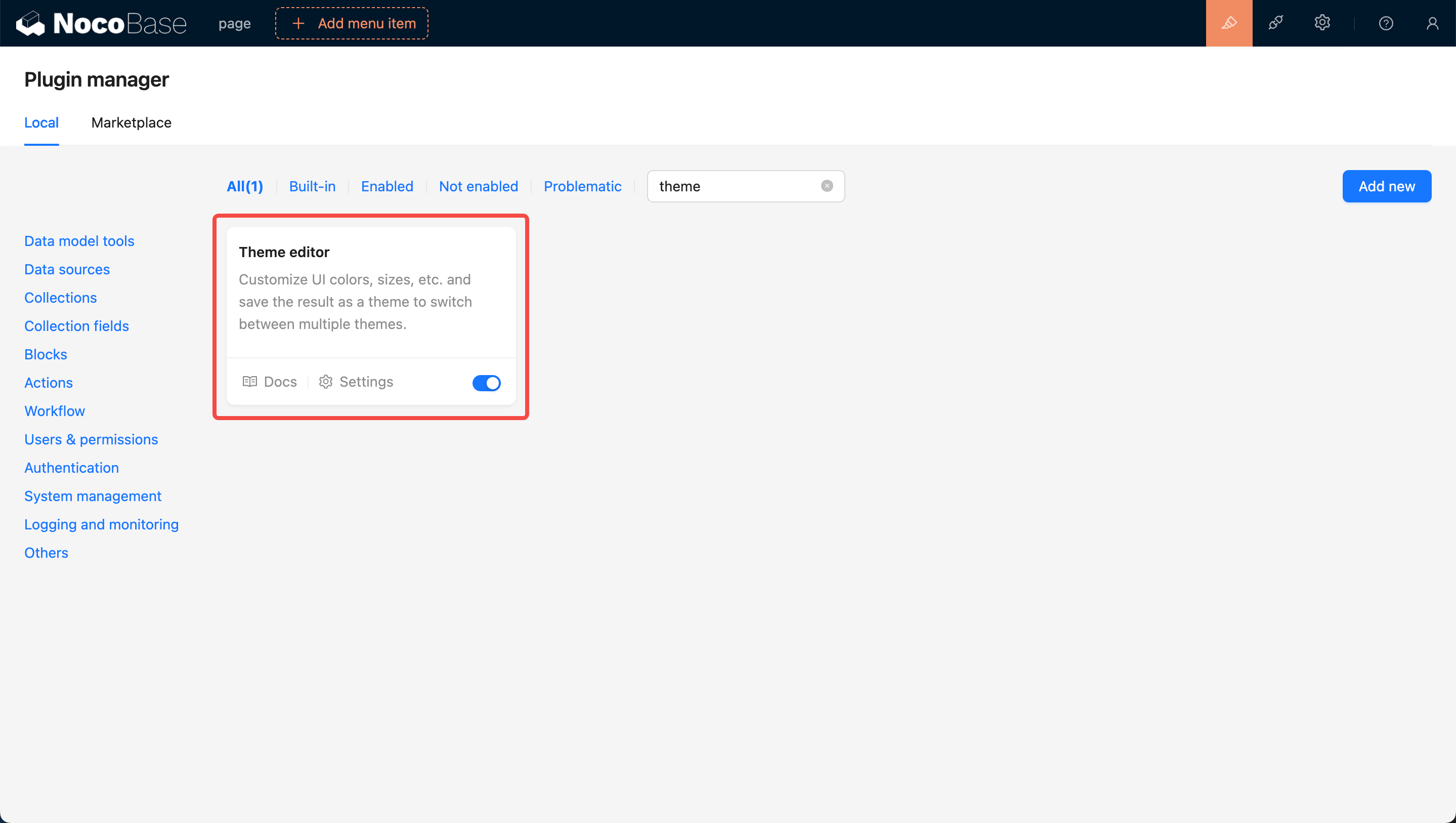
Firstly, update NocoBase to the latest version (v0.11.1 or above). Then, search for the `Theme Editor` card in the `Plugin Management` Page. Click on the Enable button at the bottom right of the card and wait for the page to refresh.
|
|
16
16
|
|
|
17
|
-
|
|
17
|
+
|
|
18
18
|
|
|
19
|
-
|
|
19
|
+
### Navigate to the Theme Configuration Page
|
|
20
20
|
|
|
21
|
-
|
|
21
|
+
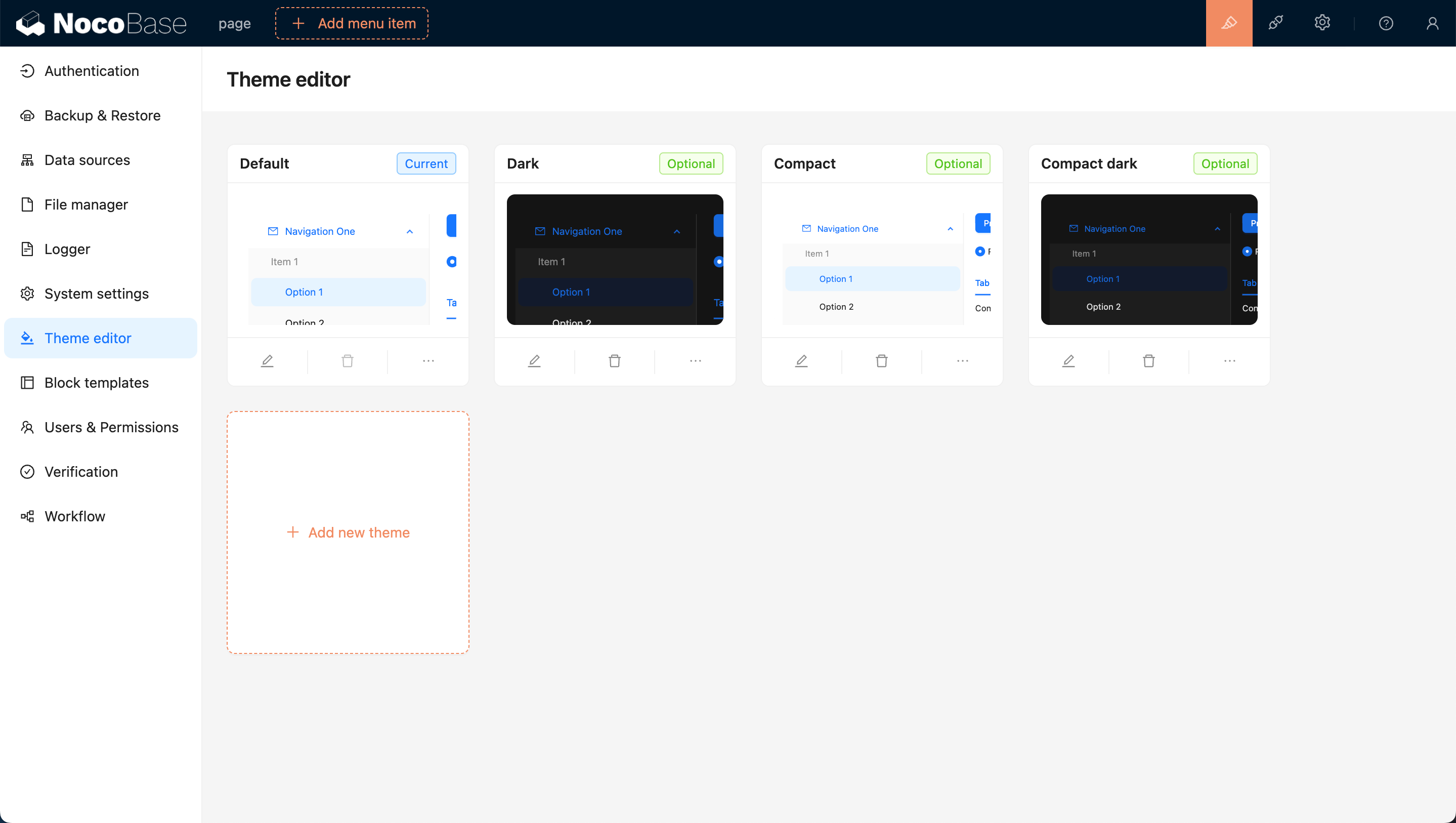
After enabling, click on the settings button at the bottom left of the card, and you will be redirected to the theme editing page. By default, there are four theme options: `Default Theme`, `Dark Theme`, `Compact Theme`, and `Compact Dark Theme`.
|
|
22
22
|
|
|
23
|
-
|
|
23
|
+
|
|
24
24
|
|
|
25
|
-
|
|
25
|
+
## Adding a New Theme
|
|
26
26
|
|
|
27
|
-
|
|
27
|
+
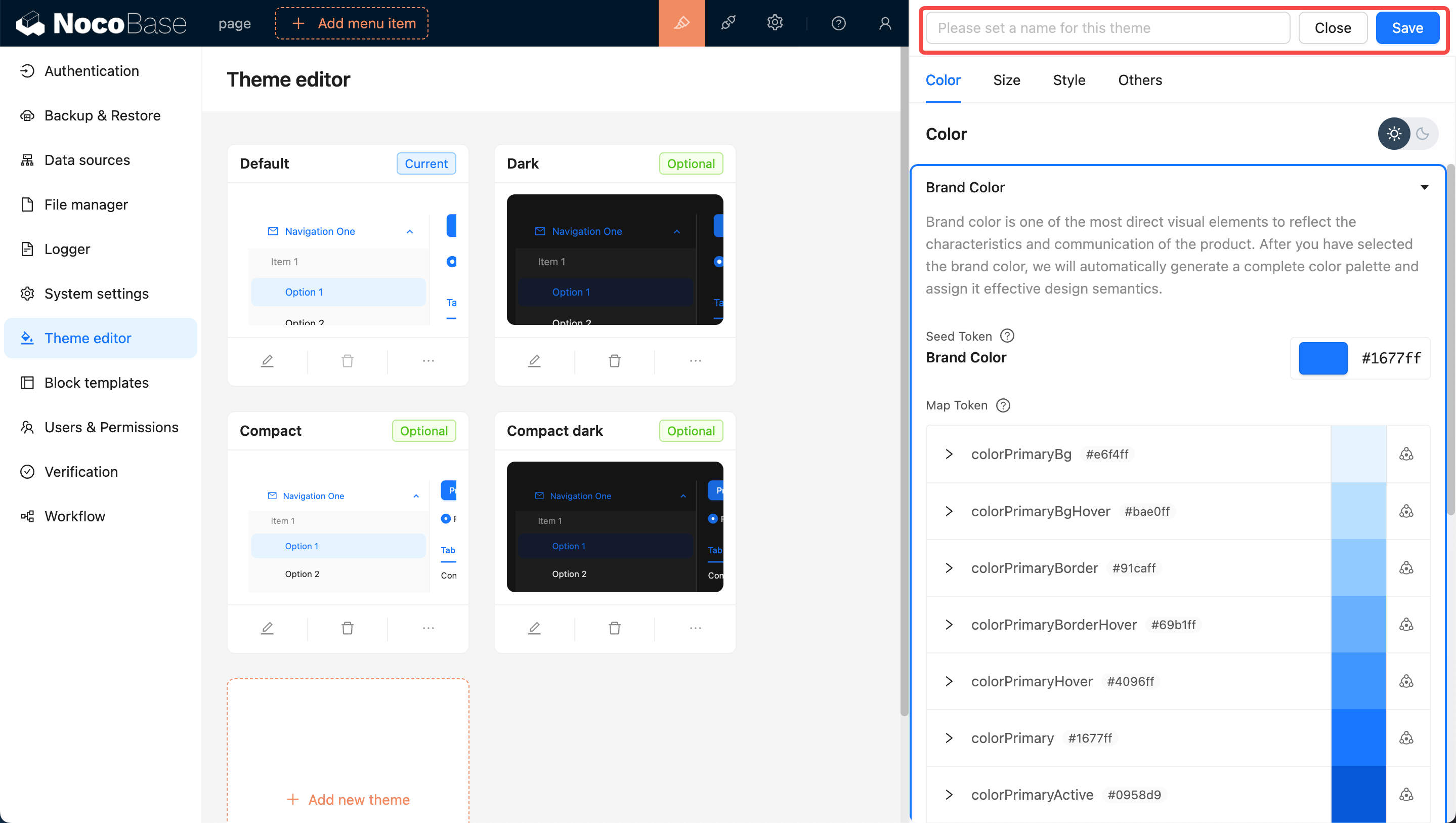
Click the `Add New Theme` button and choose `Create a Brand New Theme`. A Theme Editor will pop up on the right side of the page, allowing you to edit Colors, Sizes, Styles, and more. After editing, enter a theme name and click save to add the new theme.
|
|
28
28
|
|
|
29
|
-
|
|
29
|
+
|
|
30
30
|
|
|
31
|
-
|
|
31
|
+
## Applying the New Theme
|
|
32
32
|
|
|
33
|
-
|
|
33
|
+
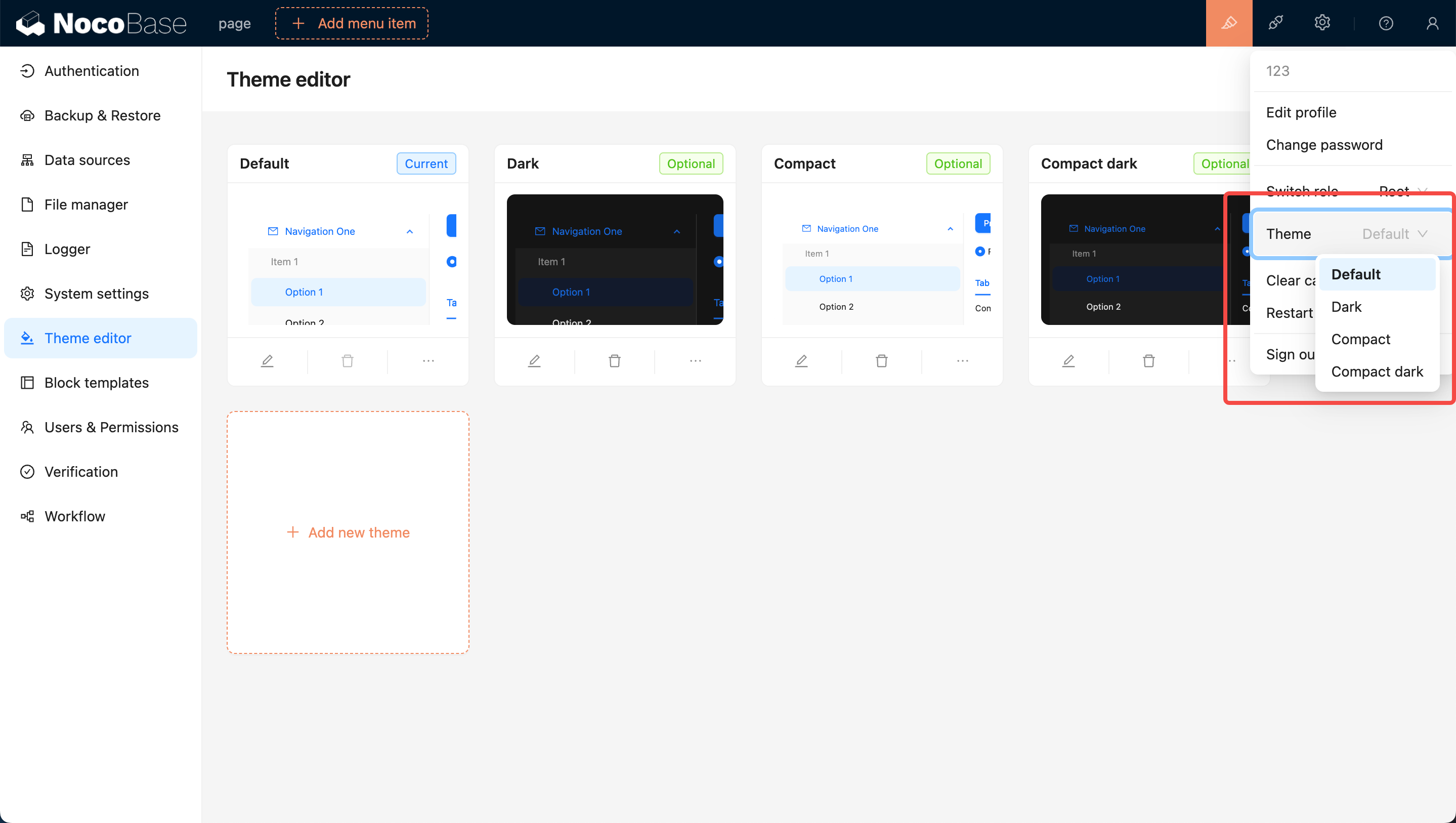
You can move the mouse to the top right corner of the page, where you will see a theme switcher. Clicking on it allows you to switch to other themes, such as the newly added theme.
|
|
34
34
|
|
|
35
|
-
|
|
35
|
+
|
|
36
36
|
|
|
37
|
-
|
|
37
|
+
## Editing an Existing Theme
|
|
38
38
|
|
|
39
|
-
|
|
39
|
+
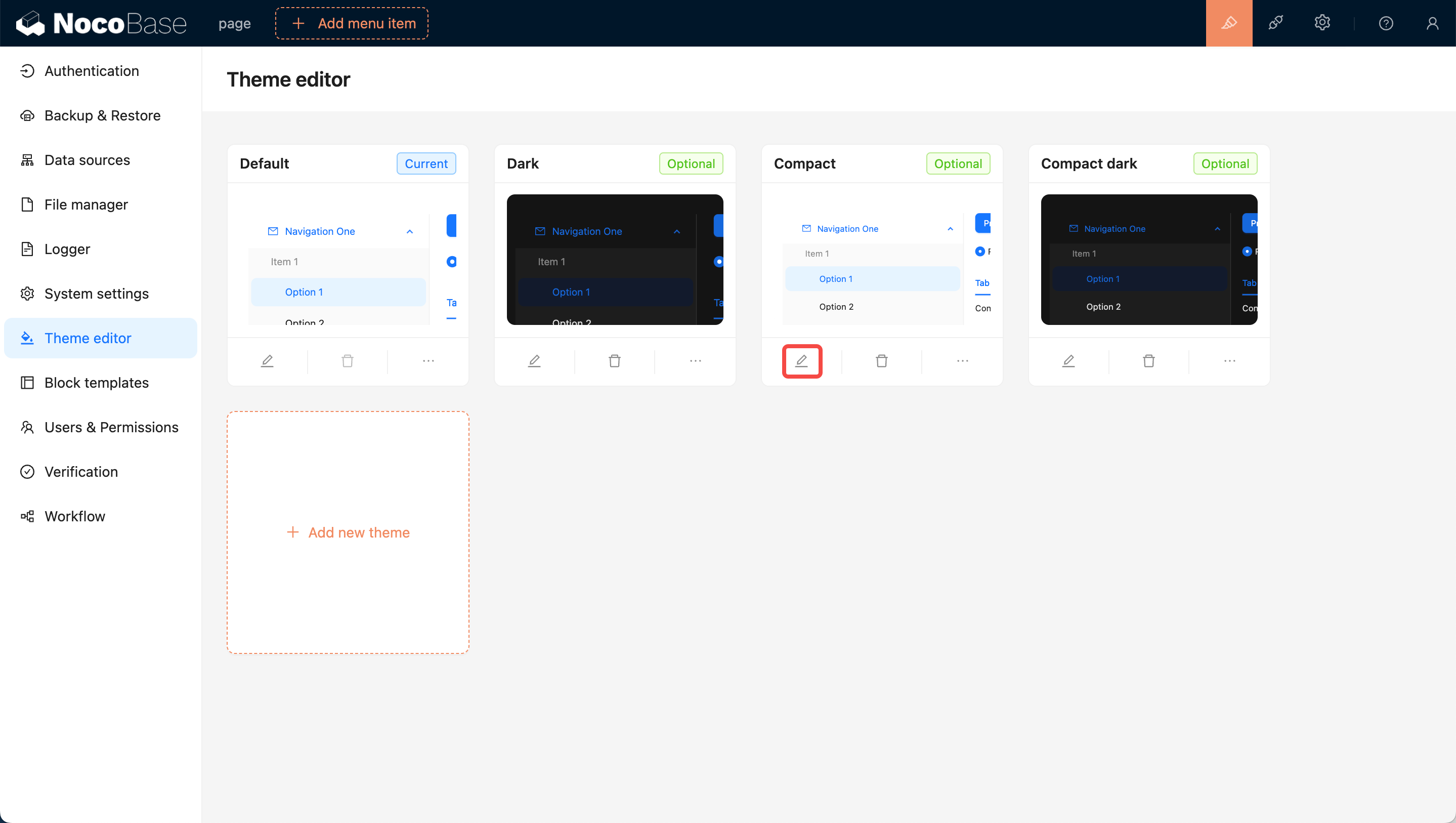
Click the `Edit` button at the bottom left of the card. Similar to adding a new theme, a Theme Editor will pop up on the right side of the page. After editing, click save to complete the theme modification.
|
|
40
40
|
|
|
41
|
-
|
|
41
|
+
|
|
42
42
|
|
|
43
|
-
|
|
43
|
+
## User Options for Theme Switching
|
|
44
44
|
|
|
45
|
-
|
|
45
|
+
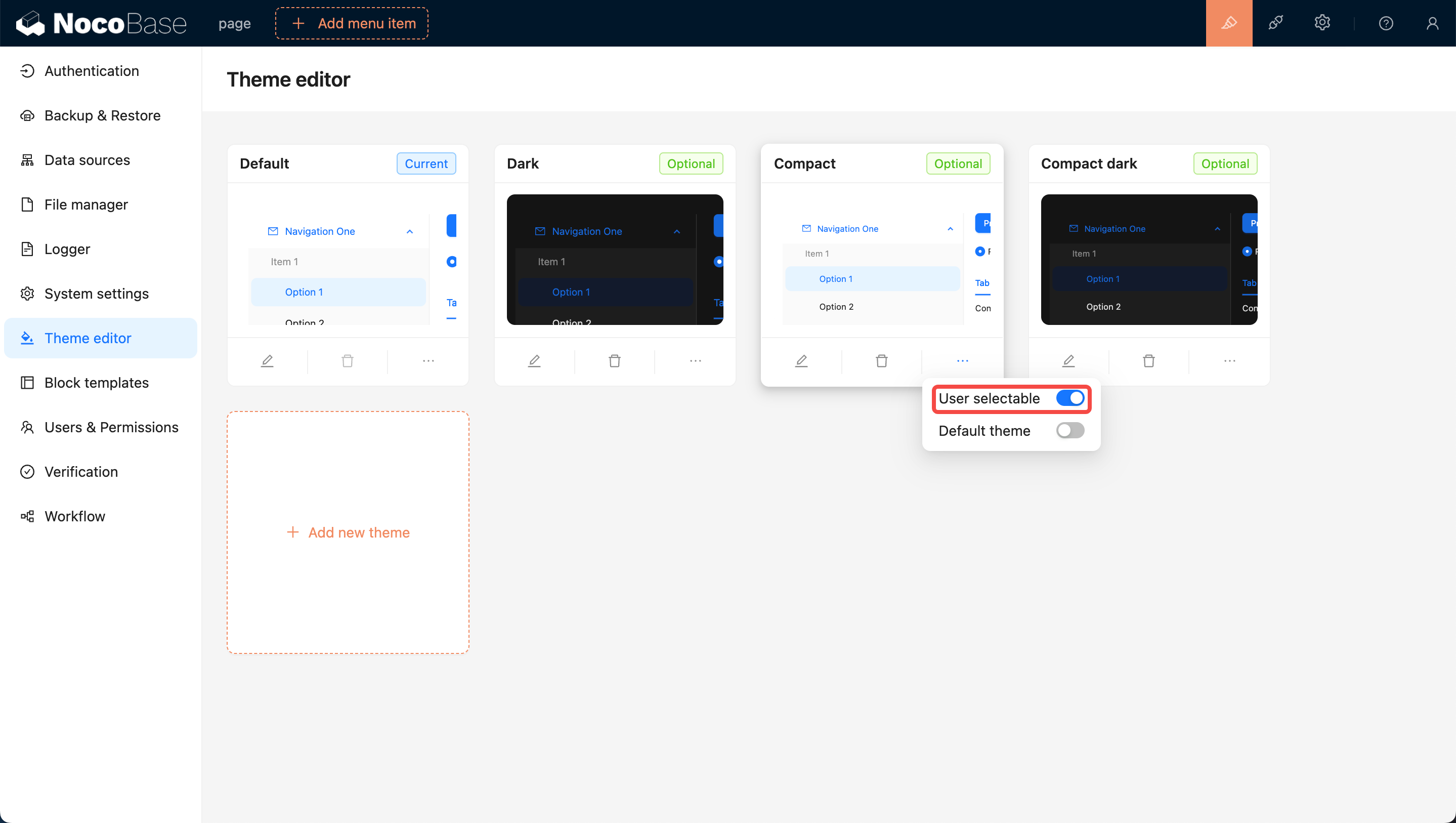
Newly added themes are by default available for users to switch to. If you do not want users to switch to a certain theme, you can turn off the `User selectable` switch at the bottom right of the theme card, making it unavailable for users to choose.
|
|
46
46
|
|
|
47
|
-
|
|
47
|
+
|
|
48
48
|
|
|
49
|
-
|
|
49
|
+
## Setting as Default Theme (The Default Theme Cannot Be Deleted)
|
|
50
50
|
|
|
51
|
-
|
|
51
|
+
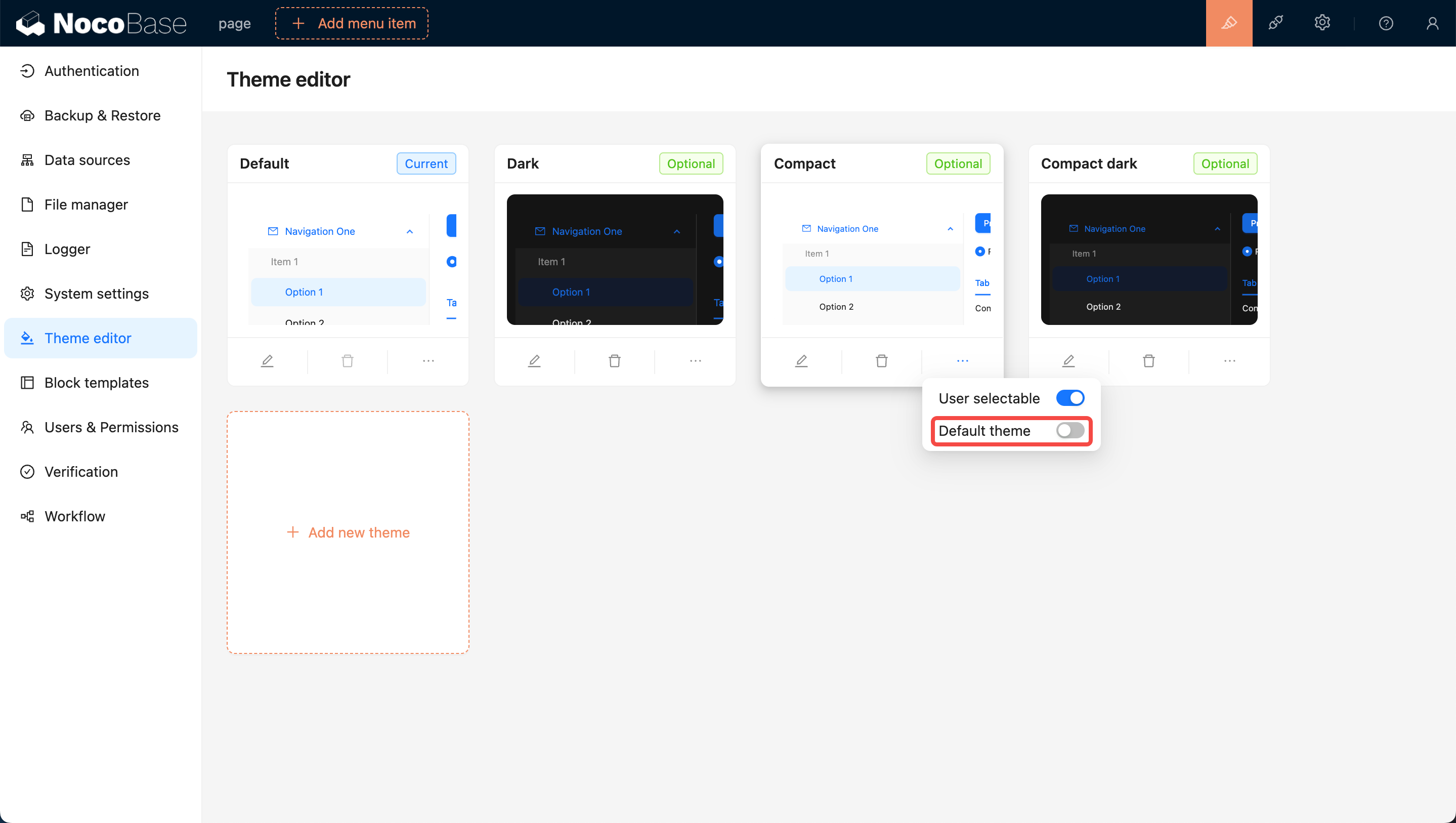
Initially, the `Default Theme` is set as the default. If you want to set a specific theme as the new default, switch on the `Default Theme` toggle at the bottom right of the card. This will ensure that when users open the page for the first time, they will be presented with this theme.
|
|
52
52
|
|
|
53
|
-
|
|
53
|
+
|
|
54
54
|
|
|
55
|
-
|
|
55
|
+
## Deleting a Theme
|
|
56
|
+
|
|
57
|
+
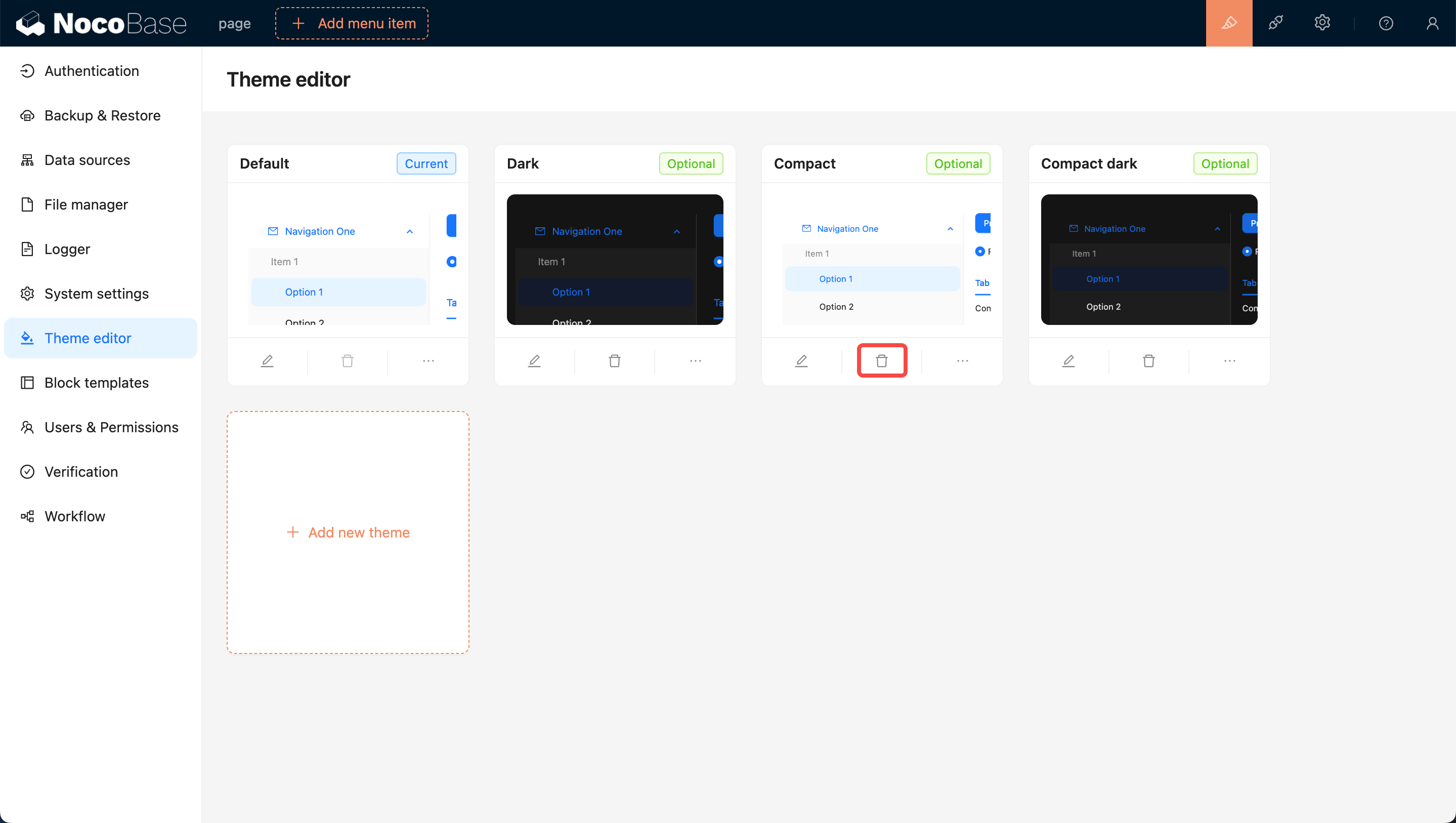
Click on the Delete button below the card, then click on the confirmation button that pops up to remove the theme.
|
|
58
|
+
|
|
59
|
+
|
package/README.zh-CN.md
CHANGED
|
@@ -1,55 +1,59 @@
|
|
|
1
1
|
[English](./README.md) | 中文
|
|
2
2
|
|
|
3
|
+
# 主题编辑器
|
|
4
|
+
|
|
3
5
|
> 当前主题功能是在 antd 5.x 版本的基础上实现的,所以在阅读本文之前最好先阅读一下[定制主题](https://ant.design/docs/react/customize-theme-cn#%E8%87%AA%E5%AE%9A%E4%B9%89%E4%B8%BB%E9%A2%98)相关的概念。
|
|
4
6
|
|
|
5
7
|
## 介绍
|
|
6
8
|
|
|
7
|
-
|
|
9
|
+
可以简单理解为该插件就是用来修改整个前端页面的样式的。目前支持编辑全局范围的 [SeedToken](https://ant.design/docs/react/customize-theme-cn#seedtoken)、[MapToken](https://ant.design/docs/react/customize-theme-cn#maptoken)、[AliasToken](https://ant.design/docs/react/customize-theme-cn#aliastoken),和支持[切换](https://ant.design/docs/react/customize-theme-cn#%E4%BD%BF%E7%94%A8%E9%A2%84%E8%AE%BE%E7%AE%97%E6%B3%95)为 `暗黑模式` 和 `紧凑模式`。后期有可能会支持[组件级别](https://ant.design/docs/react/customize-theme-cn#%E4%BF%AE%E6%94%B9%E7%BB%84%E4%BB%B6%E5%8F%98%E9%87%8F-component-token)的主题定制。
|
|
8
10
|
|
|
9
|
-
##
|
|
11
|
+
## 使用说明
|
|
10
12
|
|
|
11
|
-
###
|
|
13
|
+
### 启用主题插件
|
|
12
14
|
|
|
13
|
-
首先把 NocoBase
|
|
15
|
+
首先把 NocoBase 更新到最新版本(v0.11.1 及以上),然后在 `插件管理页面` 搜索 `主题编辑器` 的卡片,点击卡片右下角的 `启用` 按钮等待页面刷新。
|
|
14
16
|
|
|
15
|
-
|
|
17
|
+

|
|
16
18
|
|
|
17
|
-
###
|
|
19
|
+
### 跳转到主题配置页面
|
|
18
20
|
|
|
19
|
-
|
|
21
|
+
启用之后点击卡片左下角的设置按钮,会跳转到主题编辑页面。默认会有四个主题选项,分别是 `默认主题`、`暗黑主题` 、 `紧凑主题` 和 `紧凑暗黑主题`。
|
|
20
22
|
|
|
21
|
-
|
|
23
|
+

|
|
22
24
|
|
|
23
25
|
## 新增一个主题
|
|
24
26
|
|
|
25
27
|
点击 `添加新主题` 按钮,选择 `新增一个全新的主题`,然后会在页面右侧弹出一个 `主题编辑器`,支持编辑 `颜色`、`尺寸`、`风格`等。编辑好之后输入主题名称然后点击保存即可完成主题的新增。
|
|
26
28
|
|
|
27
|
-
|
|
29
|
+

|
|
28
30
|
|
|
29
31
|
## 应用新主题
|
|
30
32
|
|
|
31
33
|
可以把鼠标移到页面右上角,可以看到一个主题切换项,点击可以切换到其他主题,比如可以切换刚才新增的主题。
|
|
32
34
|
|
|
33
|
-
|
|
35
|
+

|
|
34
36
|
|
|
35
37
|
## 编辑已经存在的主题
|
|
36
38
|
|
|
37
39
|
点击卡片左下角的 `编辑` 按钮,如同新增主题一样,会在页面右侧弹出一个 `主题编辑器`,编辑好之后点击保存即可完成主题的编辑。
|
|
38
40
|
|
|
41
|
+

|
|
42
|
+
|
|
39
43
|
## 用户切换主题时的可选项
|
|
40
44
|
|
|
41
|
-
|
|
45
|
+
新添加的主题默认是允许用户切换的,如果不想让用户切换到某个主题,可以关闭主题卡片右下角的 `可被用户选择` 开关,这样用户就无法切换到该主题了。
|
|
42
46
|
|
|
43
|
-
|
|
47
|
+

|
|
44
48
|
|
|
45
49
|
## 设置为默认主题(默认主题不可删除)
|
|
46
50
|
|
|
47
|
-
在初始状态下,默认主题是
|
|
51
|
+
在初始状态下,默认主题是 `默认主题`,如果想把某个主题设置为默认主题,可以开启卡片右下角的 `默认主题` 开关,这样当用户第一次打开页面时看到的就是该主题。
|
|
48
52
|
|
|
49
|
-
|
|
53
|
+

|
|
50
54
|
|
|
51
55
|
## 删除主题
|
|
52
56
|
|
|
53
57
|
点击卡片下方的 `删除` 按钮,然后点击弹出的确认按钮即可删除主题。
|
|
54
58
|
|
|
55
|
-
|
|
59
|
+

|
package/dist/client/index.d.ts
CHANGED
|
@@ -1,5 +1,5 @@
|
|
|
1
1
|
import { Plugin } from '@nocobase/client';
|
|
2
|
-
export declare class
|
|
2
|
+
export declare class PluginThemeEditorClient extends Plugin {
|
|
3
3
|
load(): Promise<void>;
|
|
4
4
|
}
|
|
5
|
-
export default
|
|
5
|
+
export default PluginThemeEditorClient;
|
package/dist/client/index.js
CHANGED
|
@@ -83,4 +83,4 @@ In order to be iterable, non-array objects must have a [Symbol.iterator]() metho
|
|
|
83
83
|
transform: translateX(0);
|
|
84
84
|
}
|
|
85
85
|
}
|
|
86
|
-
`})),ol=h.memo(e=>{var p;const{addMenuItem:r}=z.useCurrentUserSettingsMenu(),t=em(),[n,a]=h.useState(!1),{theme:l,setTheme:c}=z.useGlobalTheme(),{styles:s}=rm();h.useEffect(()=>{r(t,{before:"divider_3"})},[r,t]);const d=h.useMemo(()=>n?{transform:"rotate(0)",flexGrow:1,width:0,height:"100%"}:{flexGrow:1,width:0,height:"100%"},[n]),g=o.jsxs("div",{style:{display:"flex",overflow:"hidden",height:"100%"},children:[o.jsx("div",{style:d,children:e.children}),n?o.jsx("div",{className:s.editor,children:o.jsx(R1,{onThemeChange:c})}):null]});return(p=l==null?void 0:l.token)!=null&&p.motionUnit||Ne.set(l,"token.motionUnit",z.defaultTheme.token.motionUnit),o.jsx(i.ConfigProvider,{theme:l,children:o.jsx(on,{children:o.jsx(nn,{children:o.jsx(ln,{open:n,setOpen:a,children:g})})})})});ol.displayName="CustomThemeProvider";class rl extends z.Plugin{load(){return oo(this,null,function*(){this.app.use(ol),this.app.pluginSettingsManager.add(Qt,{title:`{{t("Theme editor", {ns:"${Qt}"})}}`,icon:"BgColorsOutlined",Component:Wi,aclSnippet:"pm.theme-editor.themes"})})}}W.
|
|
86
|
+
`})),ol=h.memo(e=>{var p;const{addMenuItem:r}=z.useCurrentUserSettingsMenu(),t=em(),[n,a]=h.useState(!1),{theme:l,setTheme:c}=z.useGlobalTheme(),{styles:s}=rm();h.useEffect(()=>{r(t,{before:"divider_3"})},[r,t]);const d=h.useMemo(()=>n?{transform:"rotate(0)",flexGrow:1,width:0,height:"100%"}:{flexGrow:1,width:0,height:"100%"},[n]),g=o.jsxs("div",{style:{display:"flex",overflow:"hidden",height:"100%"},children:[o.jsx("div",{style:d,children:e.children}),n?o.jsx("div",{className:s.editor,children:o.jsx(R1,{onThemeChange:c})}):null]});return(p=l==null?void 0:l.token)!=null&&p.motionUnit||Ne.set(l,"token.motionUnit",z.defaultTheme.token.motionUnit),o.jsx(i.ConfigProvider,{theme:l,children:o.jsx(on,{children:o.jsx(nn,{children:o.jsx(ln,{open:n,setOpen:a,children:g})})})})});ol.displayName="CustomThemeProvider";class rl extends z.Plugin{load(){return oo(this,null,function*(){this.app.use(ol),this.app.pluginSettingsManager.add(Qt,{title:`{{t("Theme editor", {ns:"${Qt}"})}}`,icon:"BgColorsOutlined",Component:Wi,aclSnippet:"pm.theme-editor.themes"})})}}W.PluginThemeEditorClient=rl,W.default=rl,Object.defineProperties(W,{__esModule:{value:!0},[Symbol.toStringTag]:{value:"Module"}})});
|
package/dist/externalVersion.js
CHANGED
|
@@ -1,13 +1,13 @@
|
|
|
1
1
|
module.exports = {
|
|
2
|
-
"@nocobase/client": "0.
|
|
2
|
+
"@nocobase/client": "0.21.0-alpha.10",
|
|
3
3
|
"react": "18.2.0",
|
|
4
4
|
"antd": "5.12.8",
|
|
5
5
|
"lodash": "4.17.21",
|
|
6
|
-
"@nocobase/server": "0.
|
|
6
|
+
"@nocobase/server": "0.21.0-alpha.10",
|
|
7
7
|
"@ant-design/cssinjs": "1.18.1",
|
|
8
8
|
"@ant-design/icons": "5.2.6",
|
|
9
|
-
"@nocobase/utils": "0.
|
|
9
|
+
"@nocobase/utils": "0.21.0-alpha.10",
|
|
10
10
|
"react-i18next": "11.18.6",
|
|
11
|
-
"@nocobase/database": "0.
|
|
11
|
+
"@nocobase/database": "0.21.0-alpha.10",
|
|
12
12
|
"@emotion/css": "11.11.2"
|
|
13
13
|
};
|
package/dist/server/plugin.d.ts
CHANGED
|
@@ -1,5 +1,5 @@
|
|
|
1
1
|
import { InstallOptions, Plugin } from '@nocobase/server';
|
|
2
|
-
export declare class
|
|
2
|
+
export declare class PluginThemeEditorServer extends Plugin {
|
|
3
3
|
theme: any;
|
|
4
4
|
afterAdd(): void;
|
|
5
5
|
beforeLoad(): Promise<void>;
|
|
@@ -9,4 +9,4 @@ export declare class ThemeEditorPlugin extends Plugin {
|
|
|
9
9
|
afterDisable(): Promise<void>;
|
|
10
10
|
remove(): Promise<void>;
|
|
11
11
|
}
|
|
12
|
-
export default
|
|
12
|
+
export default PluginThemeEditorServer;
|
package/dist/server/plugin.js
CHANGED
|
@@ -27,14 +27,14 @@ var __toESM = (mod, isNodeMode, target) => (target = mod != null ? __create(__ge
|
|
|
27
27
|
var __toCommonJS = (mod) => __copyProps(__defProp({}, "__esModule", { value: true }), mod);
|
|
28
28
|
var plugin_exports = {};
|
|
29
29
|
__export(plugin_exports, {
|
|
30
|
-
|
|
30
|
+
PluginThemeEditorServer: () => PluginThemeEditorServer,
|
|
31
31
|
default: () => plugin_default
|
|
32
32
|
});
|
|
33
33
|
module.exports = __toCommonJS(plugin_exports);
|
|
34
34
|
var import_server = require("@nocobase/server");
|
|
35
35
|
var import_path = __toESM(require("path"));
|
|
36
36
|
var import_builtinThemes = require("./builtinThemes");
|
|
37
|
-
class
|
|
37
|
+
class PluginThemeEditorServer extends import_server.Plugin {
|
|
38
38
|
theme;
|
|
39
39
|
afterAdd() {
|
|
40
40
|
}
|
|
@@ -73,8 +73,8 @@ class ThemeEditorPlugin extends import_server.Plugin {
|
|
|
73
73
|
async remove() {
|
|
74
74
|
}
|
|
75
75
|
}
|
|
76
|
-
var plugin_default =
|
|
76
|
+
var plugin_default = PluginThemeEditorServer;
|
|
77
77
|
// Annotate the CommonJS export names for ESM import in node:
|
|
78
78
|
0 && (module.exports = {
|
|
79
|
-
|
|
79
|
+
PluginThemeEditorServer
|
|
80
80
|
});
|
package/package.json
CHANGED
|
@@ -1,6 +1,6 @@
|
|
|
1
1
|
{
|
|
2
2
|
"name": "@nocobase/plugin-theme-editor",
|
|
3
|
-
"version": "0.
|
|
3
|
+
"version": "0.21.0-alpha.10",
|
|
4
4
|
"main": "dist/server/index.js",
|
|
5
5
|
"homepage": "https://docs.nocobase.com/handbook/theme-editor",
|
|
6
6
|
"homepage.zh-CN": "https://docs-cn.nocobase.com/handbook/theme-editor",
|
|
@@ -32,7 +32,7 @@
|
|
|
32
32
|
"@nocobase/test": "0.x",
|
|
33
33
|
"@nocobase/utils": "0.x"
|
|
34
34
|
},
|
|
35
|
-
"gitHead": "
|
|
35
|
+
"gitHead": "98adf5ec996a4f359c6ca1c4a6ac837c43b6e268",
|
|
36
36
|
"keywords": [
|
|
37
37
|
"System management"
|
|
38
38
|
]
|