@nocobase/plugin-ai 2.3.0-beta.3 → 3.0.0-alpha.11
This diff represents the content of publicly available package versions that have been released to one of the supported registries. The information contained in this diff is provided for informational purposes only and reflects changes between package versions as they appear in their respective public registries.
- package/dist/ai/docs/nocobase/ai/ai-quick-start.md +1 -1
- package/dist/ai/docs/nocobase/ai/claude-code/index.md +1 -1
- package/dist/ai/docs/nocobase/ai/codex/index.md +1 -1
- package/dist/ai/docs/nocobase/ai/hermes-agent/index.md +1 -1
- package/dist/ai/docs/nocobase/ai/index.md +6 -25
- package/dist/ai/docs/nocobase/ai/install-nocobase-app.md +1 -1
- package/dist/ai/docs/nocobase/ai/openclaw/index.md +1 -1
- package/dist/ai/docs/nocobase/ai/opencode/index.md +1 -1
- package/dist/ai/docs/nocobase/ai/quick-start.mdx +9 -7
- package/dist/ai/docs/nocobase/ai/workbuddy/index.md +1 -1
- package/dist/ai/docs/nocobase/ai-builder/ai-portal/agent-workflow.md +153 -0
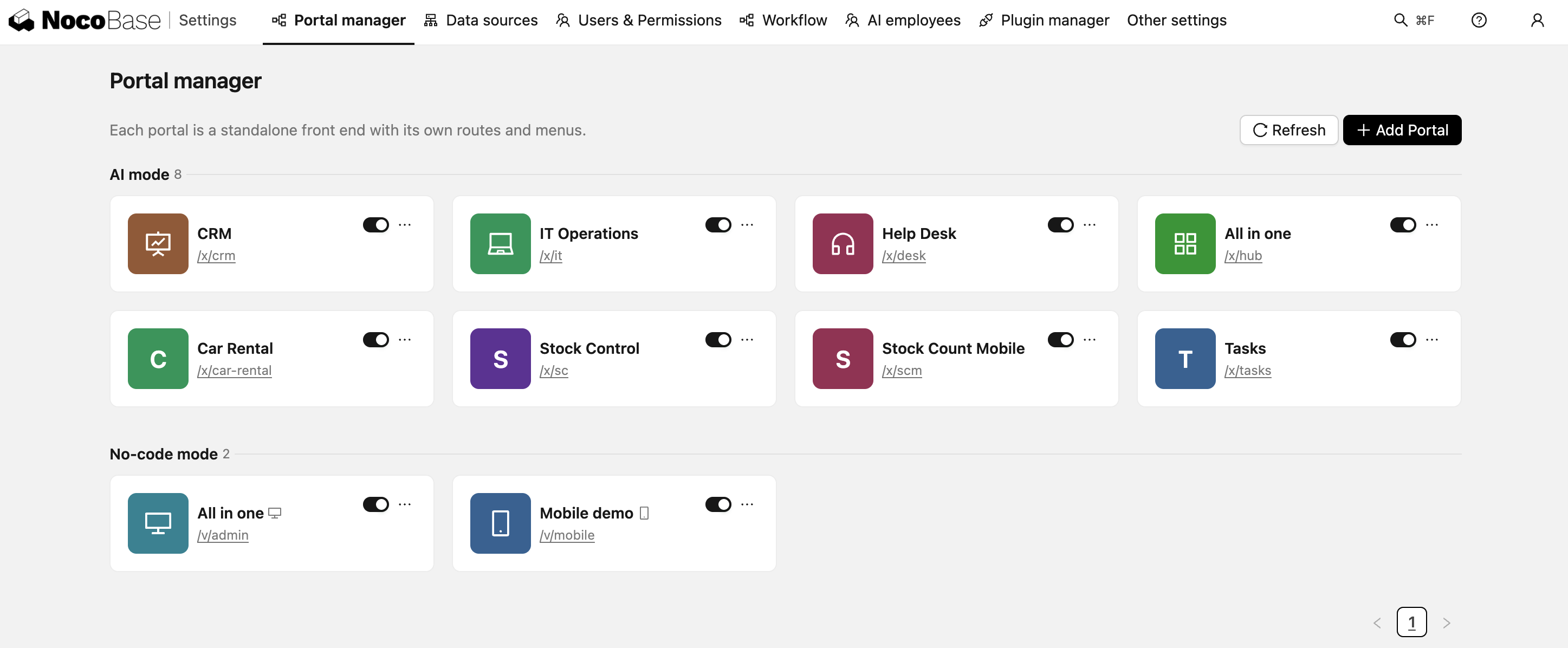
- package/dist/ai/docs/nocobase/ai-builder/ai-portal/components.md +134 -0
- package/dist/ai/docs/nocobase/ai-builder/ai-portal/deploy.md +164 -0
- package/dist/ai/docs/nocobase/ai-builder/ai-portal/index.md +144 -0
- package/dist/ai/docs/nocobase/ai-builder/ai-portal/model-selection.md +120 -0
- package/dist/ai/docs/nocobase/ai-builder/ai-portal/project-structure.md +128 -0
- package/dist/ai/docs/nocobase/ai-builder/index.md +73 -32
- package/dist/ai/docs/nocobase/ai-builder/ui-builder.md +2 -0
- package/dist/ai/docs/nocobase/ai-dev/index.md +2 -1
- package/dist/ai/docs/nocobase/ai-employees/dev/ai-employee/complete-example.md +206 -0
- package/dist/ai/docs/nocobase/ai-employees/dev/ai-employee/define-ai-employee.md +149 -0
- package/dist/ai/docs/nocobase/ai-employees/dev/ai-employee/define-skill.md +138 -0
- package/dist/ai/docs/nocobase/ai-employees/dev/ai-employee/define-tool.md +189 -0
- package/dist/ai/docs/nocobase/ai-employees/dev/ai-employee/frontend-tool-ui.md +296 -0
- package/dist/ai/docs/nocobase/ai-employees/dev/ai-employee/index.md +126 -0
- package/dist/ai/docs/nocobase/ai-employees/dev/ai-employee/internationalization.md +88 -0
- package/dist/ai/docs/nocobase/ai-employees/dev/ai-employee/troubleshooting.md +86 -0
- package/dist/ai/docs/nocobase/ai-employees/{knowledge-base/dev → dev/knowledge-base}/external-knowledge-base.md +2 -2
- package/dist/ai/docs/nocobase/ai-employees/knowledge-base/knowledge-base/index.md +1 -1
- package/dist/ai/docs/nocobase/api/app/env.md +1 -1
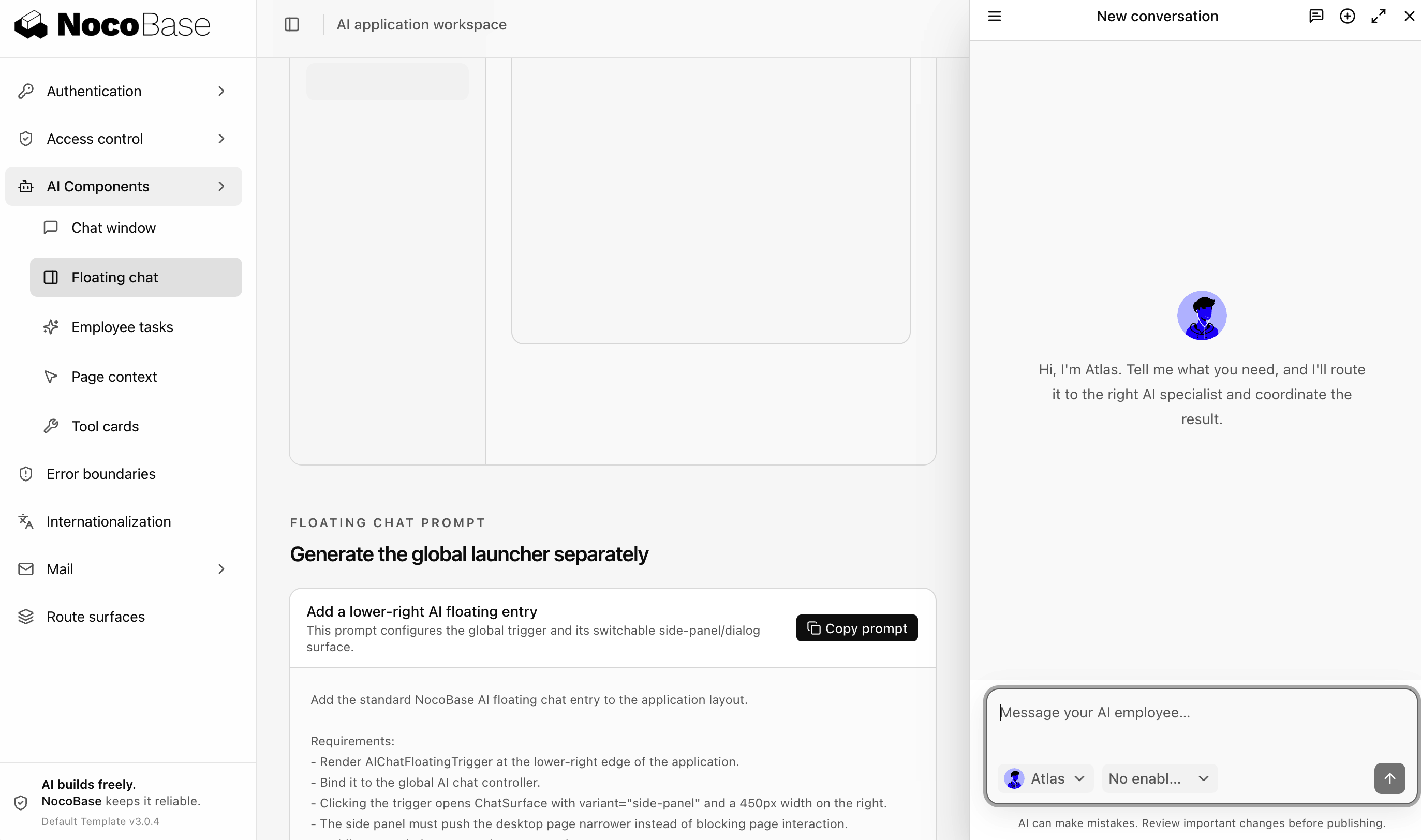
- package/dist/ai/docs/nocobase/api/cli/index.md +14 -2
- package/dist/ai/docs/nocobase/api/cli/portal/config.md +46 -0
- package/dist/ai/docs/nocobase/api/cli/portal/create.md +45 -0
- package/dist/ai/docs/nocobase/api/cli/portal/deploy.md +39 -0
- package/dist/ai/docs/nocobase/api/cli/portal/destroy.md +43 -0
- package/dist/ai/docs/nocobase/api/cli/portal/dev.md +51 -0
- package/dist/ai/docs/nocobase/api/cli/portal/index.md +142 -0
- package/dist/ai/docs/nocobase/api/cli/portal/info.md +41 -0
- package/dist/ai/docs/nocobase/api/cli/portal/list.md +40 -0
- package/dist/ai/docs/nocobase/api/cli/portal/pull.md +53 -0
- package/dist/ai/docs/nocobase/api/cli/portal/push.md +41 -0
- package/dist/ai/docs/nocobase/development/index.md +1 -1
- package/dist/ai/docs/nocobase/get-started/installation/env.md +1 -1
- package/dist/ai/docs/nocobase/nocobase-cli/installation/cli.md +1 -1
- package/dist/ai/docs/nocobase/plugins/@nocobase/plugin-action-bulk-edit/index.md +1 -1
- package/dist/ai/docs/nocobase/plugins/@nocobase/plugin-action-bulk-update/index.md +1 -1
- package/dist/ai/docs/nocobase/plugins/@nocobase/plugin-action-custom-request/index.md +1 -1
- package/dist/ai/docs/nocobase/plugins/@nocobase/plugin-action-duplicate/index.md +1 -1
- package/dist/ai/docs/nocobase/plugins/@nocobase/plugin-action-export/index.md +1 -1
- package/dist/ai/docs/nocobase/plugins/@nocobase/plugin-action-import/index.md +1 -1
- package/dist/ai/docs/nocobase/plugins/@nocobase/plugin-action-print/index.md +1 -1
- package/dist/ai/docs/nocobase/plugins/@nocobase/plugin-ai/index.md +1 -1
- package/dist/ai/docs/nocobase/plugins/@nocobase/plugin-ai-gigachat/index.md +1 -1
- package/dist/ai/docs/nocobase/plugins/@nocobase/plugin-api-doc/index.md +1 -1
- package/dist/ai/docs/nocobase/plugins/@nocobase/plugin-api-keys/index.md +1 -1
- package/dist/ai/docs/nocobase/plugins/@nocobase/plugin-async-task-manager/index.md +1 -1
- package/dist/ai/docs/nocobase/plugins/@nocobase/plugin-audit-logs/index.md +1 -1
- package/dist/ai/docs/nocobase/plugins/@nocobase/plugin-auth/index.md +1 -1
- package/dist/ai/docs/nocobase/plugins/@nocobase/plugin-auth-sms/index.md +1 -1
- package/dist/ai/docs/nocobase/plugins/@nocobase/plugin-backup-restore/index.md +1 -1
- package/dist/ai/docs/nocobase/plugins/@nocobase/plugin-backups/index.md +1 -1
- package/dist/ai/docs/nocobase/plugins/@nocobase/plugin-block-comment/index.md +1 -1
- package/dist/ai/docs/nocobase/plugins/@nocobase/plugin-block-grid-card/index.md +1 -1
- package/dist/ai/docs/nocobase/plugins/@nocobase/plugin-block-iframe/index.md +1 -1
- package/dist/ai/docs/nocobase/plugins/@nocobase/plugin-block-list/index.md +1 -1
- package/dist/ai/docs/nocobase/plugins/@nocobase/plugin-block-markdown/index.md +1 -1
- package/dist/ai/docs/nocobase/plugins/@nocobase/plugin-block-multi-step-form/index.md +1 -1
- package/dist/ai/docs/nocobase/plugins/@nocobase/plugin-block-template/index.md +1 -1
- package/dist/ai/docs/nocobase/plugins/@nocobase/plugin-block-tree/index.md +1 -1
- package/dist/ai/docs/nocobase/plugins/@nocobase/plugin-block-workbench/index.md +1 -1
- package/dist/ai/docs/nocobase/plugins/@nocobase/plugin-calendar/index.md +1 -1
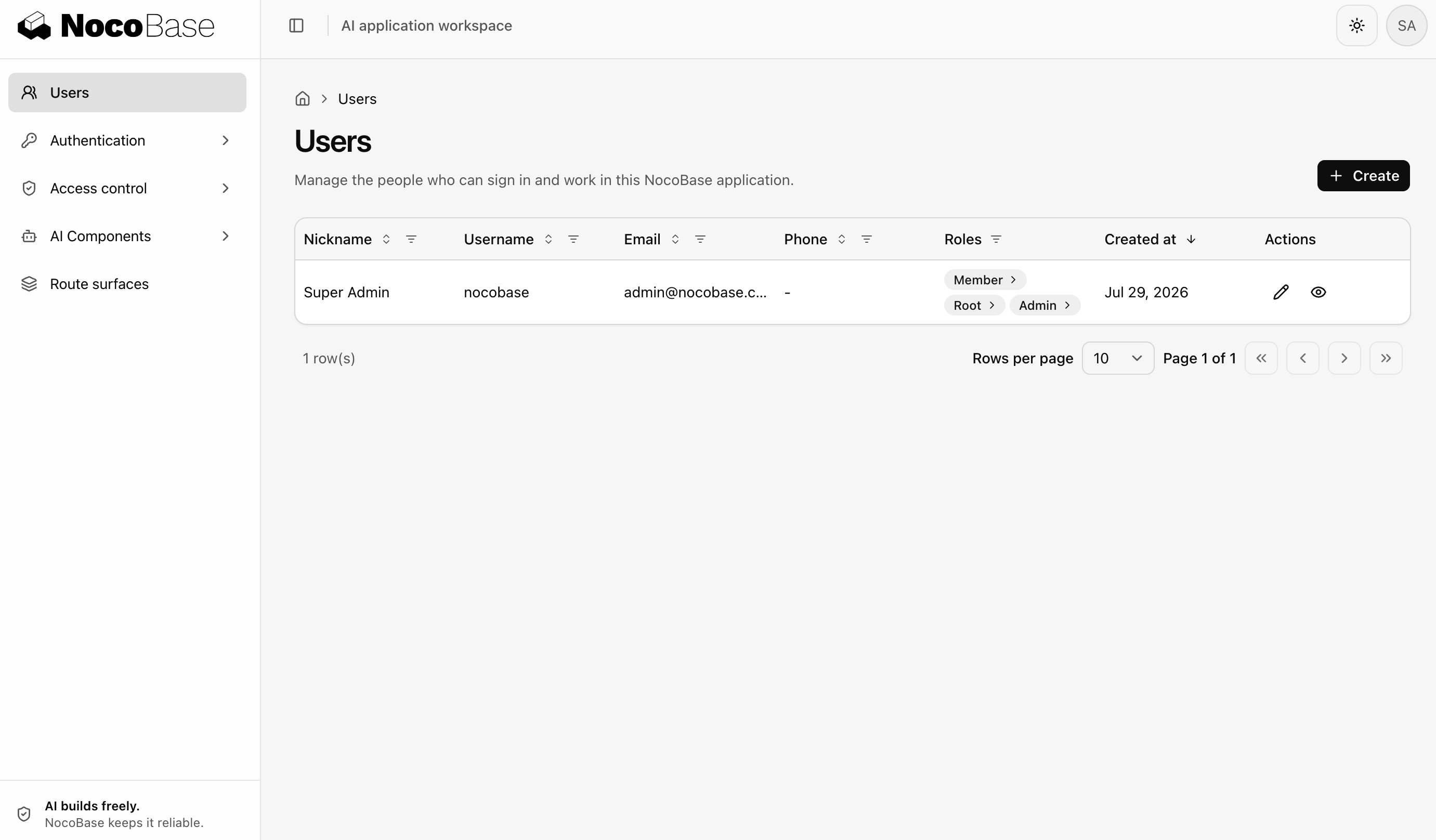
- package/dist/ai/docs/nocobase/plugins/@nocobase/plugin-charts/index.md +1 -1
- package/dist/ai/docs/nocobase/plugins/@nocobase/plugin-client/index.md +1 -1
- package/dist/ai/docs/nocobase/plugins/@nocobase/plugin-collection-fdw/index.md +1 -1
- package/dist/ai/docs/nocobase/plugins/@nocobase/plugin-collection-sql/index.md +1 -1
- package/dist/ai/docs/nocobase/plugins/@nocobase/plugin-collection-tree/index.md +1 -1
- package/dist/ai/docs/nocobase/plugins/@nocobase/plugin-comments/index.md +1 -1
- package/dist/ai/docs/nocobase/plugins/@nocobase/plugin-custom-variables/index.md +1 -1
- package/dist/ai/docs/nocobase/plugins/@nocobase/plugin-data-source-main/index.md +1 -1
- package/dist/ai/docs/nocobase/plugins/@nocobase/plugin-data-source-manager/index.md +1 -1
- package/dist/ai/docs/nocobase/plugins/@nocobase/plugin-data-visualization/index.md +1 -1
- package/dist/ai/docs/nocobase/plugins/@nocobase/plugin-data-visualization-echarts/index.md +1 -1
- package/dist/ai/docs/nocobase/plugins/@nocobase/plugin-departments/index.md +1 -1
- package/dist/ai/docs/nocobase/plugins/@nocobase/plugin-embed/index.md +1 -1
- package/dist/ai/docs/nocobase/plugins/@nocobase/plugin-environment-variables/index.md +1 -1
- package/dist/ai/docs/nocobase/plugins/@nocobase/plugin-error-handler/index.md +1 -1
- package/dist/ai/docs/nocobase/plugins/@nocobase/plugin-field-attachment-url/index.md +1 -1
- package/dist/ai/docs/nocobase/plugins/@nocobase/plugin-field-china-region/index.md +1 -1
- package/dist/ai/docs/nocobase/plugins/@nocobase/plugin-field-code/index.md +1 -1
- package/dist/ai/docs/nocobase/plugins/@nocobase/plugin-field-formula/index.md +1 -1
- package/dist/ai/docs/nocobase/plugins/@nocobase/plugin-field-m2m-array/index.md +1 -1
- package/dist/ai/docs/nocobase/plugins/@nocobase/plugin-field-markdown-vditor/index.md +1 -1
- package/dist/ai/docs/nocobase/plugins/@nocobase/plugin-field-sequence/index.md +1 -1
- package/dist/ai/docs/nocobase/plugins/@nocobase/plugin-field-sort/index.md +1 -1
- package/dist/ai/docs/nocobase/plugins/@nocobase/plugin-file-manager/index.md +1 -1
- package/dist/ai/docs/nocobase/plugins/@nocobase/plugin-file-previewer-office/index.md +1 -1
- package/dist/ai/docs/nocobase/plugins/@nocobase/plugin-flow-engine/index.md +1 -1
- package/dist/ai/docs/nocobase/plugins/@nocobase/plugin-form-drafts/index.md +1 -1
- package/dist/ai/docs/nocobase/plugins/@nocobase/plugin-gantt/index.md +1 -1
- package/dist/ai/docs/nocobase/plugins/@nocobase/plugin-graph-collection-manager/index.md +1 -1
- package/dist/ai/docs/nocobase/plugins/@nocobase/plugin-idp-oauth/index.md +1 -1
- package/dist/ai/docs/nocobase/plugins/@nocobase/plugin-kanban/index.md +1 -1
- package/dist/ai/docs/nocobase/plugins/@nocobase/plugin-license/index.md +1 -1
- package/dist/ai/docs/nocobase/plugins/@nocobase/plugin-locale-tester/index.md +1 -1
- package/dist/ai/docs/nocobase/plugins/@nocobase/plugin-localization/index.md +1 -1
- package/dist/ai/docs/nocobase/plugins/@nocobase/plugin-logger/index.md +1 -1
- package/dist/ai/docs/nocobase/plugins/@nocobase/plugin-map/index.md +1 -1
- package/dist/ai/docs/nocobase/plugins/@nocobase/plugin-mcp-server/index.md +1 -1
- package/dist/ai/docs/nocobase/plugins/@nocobase/plugin-mobile/index.md +1 -1
- package/dist/ai/docs/nocobase/plugins/@nocobase/plugin-mobile-client/index.md +1 -1
- package/dist/ai/docs/nocobase/plugins/@nocobase/plugin-multi-app-manager/index.md +1 -1
- package/dist/ai/docs/nocobase/plugins/@nocobase/plugin-multi-app-share-collection/index.md +1 -1
- package/dist/ai/docs/nocobase/plugins/@nocobase/plugin-multi-keyword-filter/index.md +1 -1
- package/dist/ai/docs/nocobase/plugins/@nocobase/plugin-notification-email/index.md +1 -1
- package/dist/ai/docs/nocobase/plugins/@nocobase/plugin-notification-in-app-message/index.md +1 -1
- package/dist/ai/docs/nocobase/plugins/@nocobase/plugin-notification-manager/index.md +1 -1
- package/dist/ai/docs/nocobase/plugins/@nocobase/plugin-public-forms/index.md +1 -1
- package/dist/ai/docs/nocobase/plugins/@nocobase/plugin-snapshot-field/index.md +1 -1
- package/dist/ai/docs/nocobase/plugins/@nocobase/plugin-system-settings/index.md +1 -1
- package/dist/ai/docs/nocobase/plugins/@nocobase/plugin-text-copy/index.md +1 -1
- package/dist/ai/docs/nocobase/plugins/@nocobase/plugin-theme-editor/index.md +1 -1
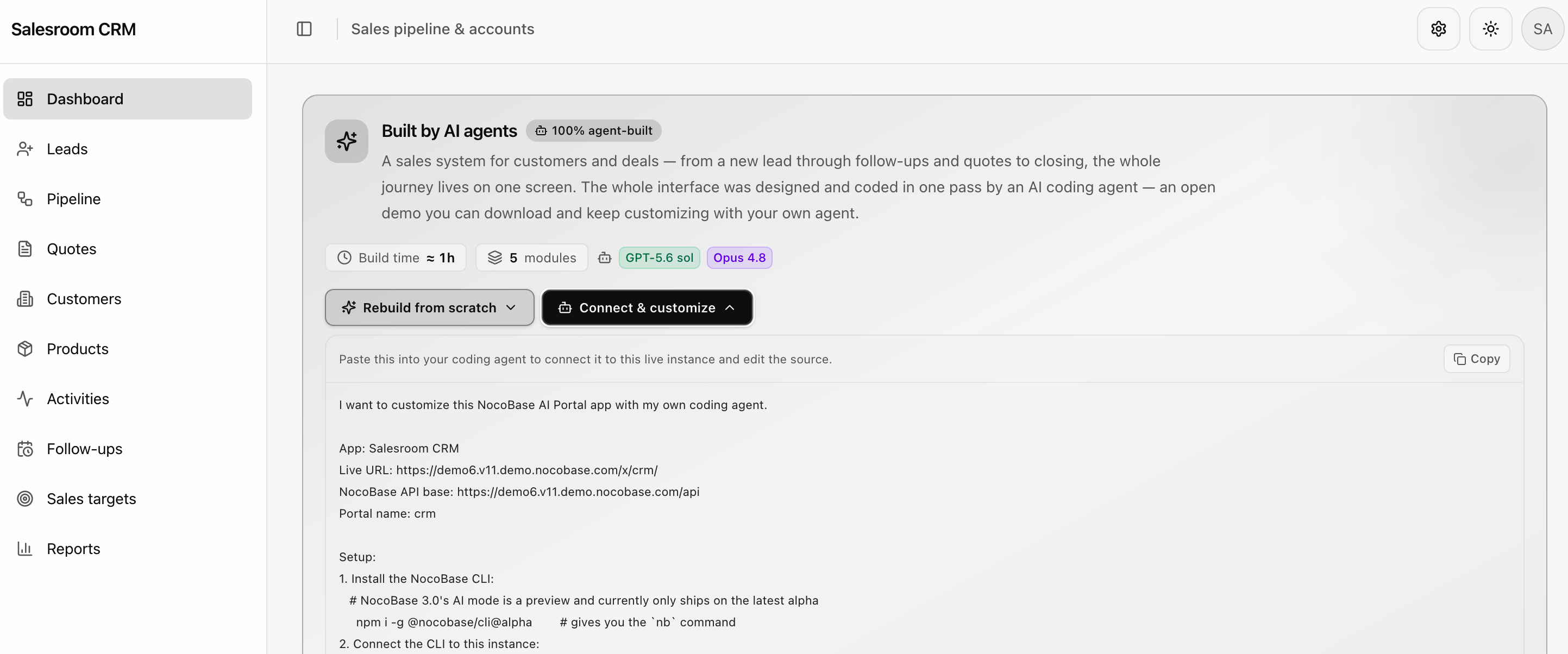
- package/dist/ai/docs/nocobase/plugins/@nocobase/plugin-ui-layout/index.md +1 -1
- package/dist/ai/docs/nocobase/plugins/@nocobase/plugin-ui-schema-storage/index.md +1 -1
- package/dist/ai/docs/nocobase/plugins/@nocobase/plugin-ui-templates/index.md +1 -1
- package/dist/ai/docs/nocobase/plugins/@nocobase/plugin-user-data-sync/index.md +1 -1
- package/dist/ai/docs/nocobase/plugins/@nocobase/plugin-users/index.md +1 -1
- package/dist/ai/docs/nocobase/plugins/@nocobase/plugin-verification/index.md +1 -1
- package/dist/ai/docs/nocobase/plugins/@nocobase/plugin-workflow/index.md +1 -1
- package/dist/ai/docs/nocobase/plugins/@nocobase/plugin-workflow-action-trigger/index.md +1 -1
- package/dist/ai/docs/nocobase/plugins/@nocobase/plugin-workflow-aggregate/index.md +1 -1
- package/dist/ai/docs/nocobase/plugins/@nocobase/plugin-workflow-cc/index.md +1 -1
- package/dist/ai/docs/nocobase/plugins/@nocobase/plugin-workflow-custom-action-trigger/index.md +1 -1
- package/dist/ai/docs/nocobase/plugins/@nocobase/plugin-workflow-date-calculation/index.md +1 -1
- package/dist/ai/docs/nocobase/plugins/@nocobase/plugin-workflow-delay/index.md +1 -1
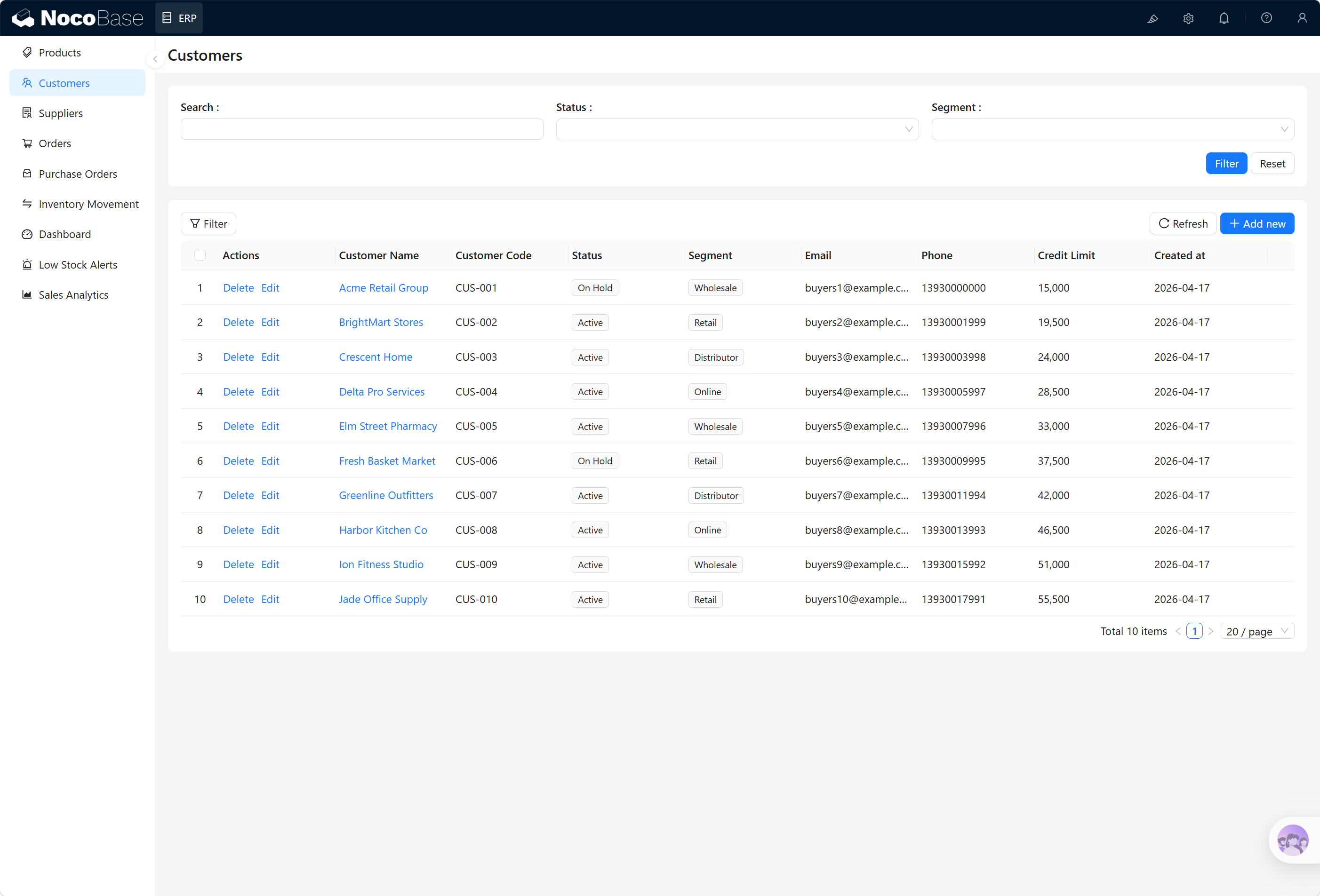
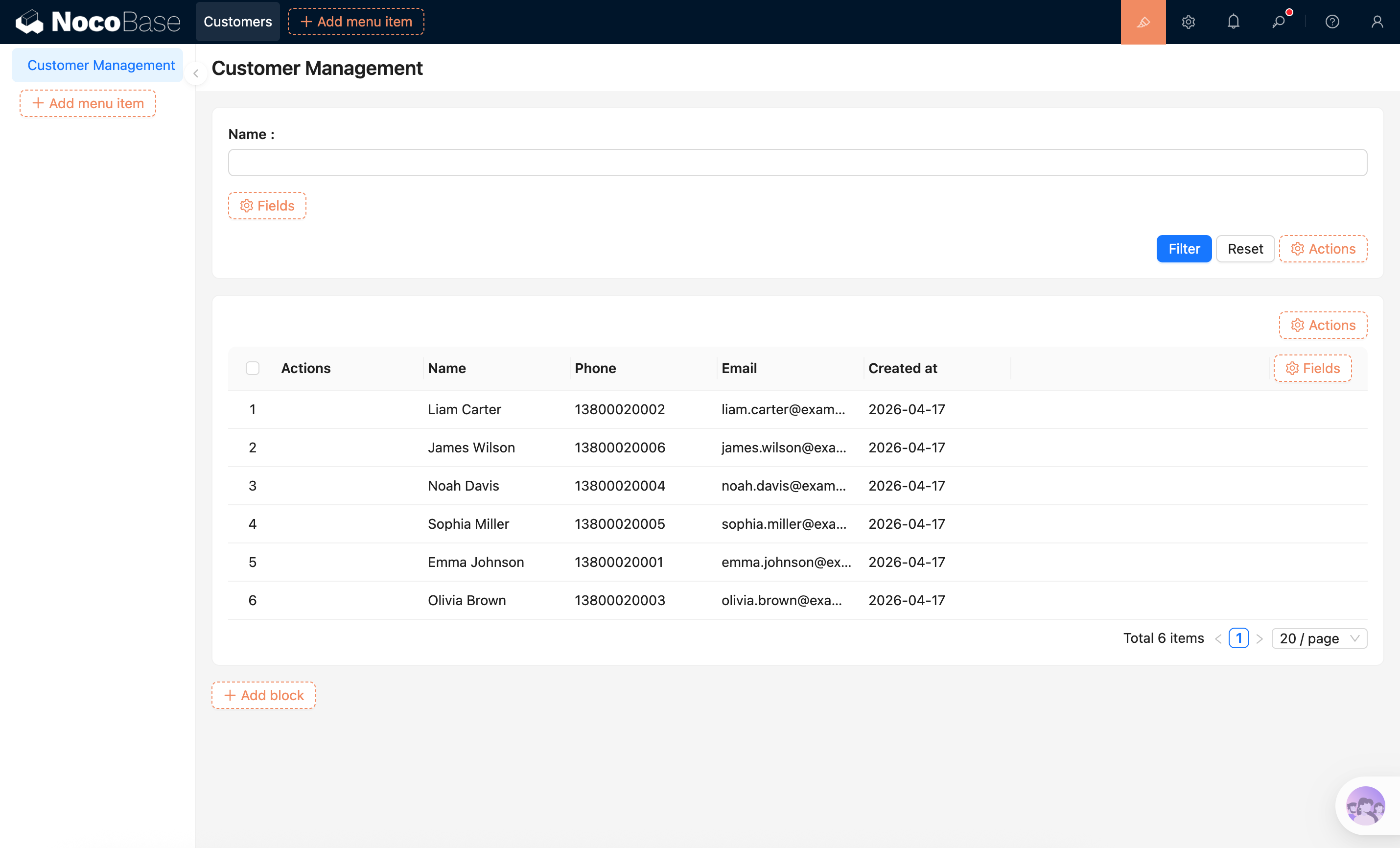
- package/dist/ai/docs/nocobase/plugins/@nocobase/plugin-workflow-dynamic-calculation/index.md +1 -1
- package/dist/ai/docs/nocobase/plugins/@nocobase/plugin-workflow-javascript/index.md +1 -1
- package/dist/ai/docs/nocobase/plugins/@nocobase/plugin-workflow-json-variable-mapping/index.md +1 -1
- package/dist/ai/docs/nocobase/plugins/@nocobase/plugin-workflow-loop/index.md +1 -1
- package/dist/ai/docs/nocobase/plugins/@nocobase/plugin-workflow-mailer/index.md +1 -1
- package/dist/ai/docs/nocobase/plugins/@nocobase/plugin-workflow-manual/index.md +1 -1
- package/dist/ai/docs/nocobase/plugins/@nocobase/plugin-workflow-notification/index.md +1 -1
- package/dist/ai/docs/nocobase/plugins/@nocobase/plugin-workflow-parallel/index.md +1 -1
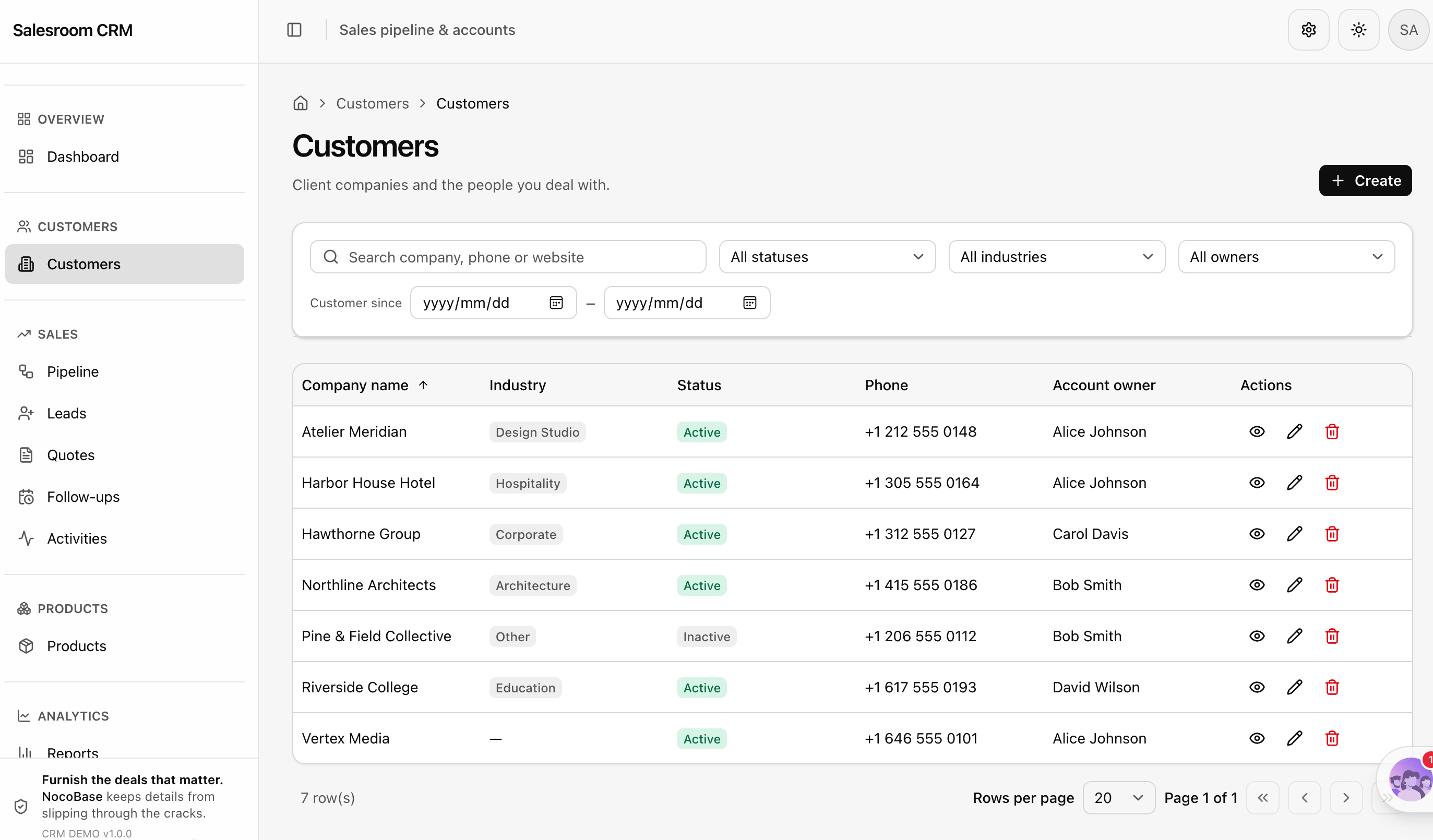
- package/dist/ai/docs/nocobase/plugins/@nocobase/plugin-workflow-request/index.md +1 -1
- package/dist/ai/docs/nocobase/plugins/@nocobase/plugin-workflow-request-interceptor/index.md +1 -1
- package/dist/ai/docs/nocobase/plugins/@nocobase/plugin-workflow-response-message/index.md +1 -1
- package/dist/ai/docs/nocobase/plugins/@nocobase/plugin-workflow-sql/index.md +1 -1
- package/dist/ai/docs/nocobase/plugins/@nocobase/plugin-workflow-test/index.md +1 -1
- package/dist/ai/docs/nocobase/plugins/@nocobase/plugin-workflow-variable/index.md +1 -1
- package/dist/client/{244.28ee769f796b7c2f.js → 244.276308c9b2090ec2.js} +1 -1
- package/dist/client/{264.cc98933ef65608b6.js → 264.6ca5f2eeb4173d86.js} +1 -1
- package/dist/client/index.js +2 -2
- package/dist/client-v2/{244.39348a95d627d9e3.js → 244.e85b8d4659ca66c0.js} +1 -1
- package/dist/client-v2/{264.be92ff6a4d2612f1.js → 264.3c7d8e90aa7f46ee.js} +1 -1
- package/dist/client-v2/index.js +2 -2
- package/dist/externalVersion.js +15 -15
- package/dist/node_modules/@langchain/mistralai/package.json +1 -1
- package/dist/node_modules/@langchain/xai/package.json +1 -1
- package/dist/node_modules/fs-extra/package.json +1 -1
- package/dist/node_modules/jsonrepair/package.json +1 -1
- package/dist/node_modules/just-bash/package.json +1 -1
- package/dist/node_modules/nodejs-snowflake/package.json +1 -1
- package/dist/node_modules/openai/package.json +1 -1
- package/dist/node_modules/zod/package.json +1 -1
- package/dist/server/ai-employees/ai-conversations.d.ts +2 -1
- package/dist/server/ai-employees/ai-conversations.js +2 -0
- package/dist/server/collections/ai-conversations.js +5 -0
- package/dist/server/migrations/20260803185305-migrate-ai-conversations-portal-name.d.ts +14 -0
- package/dist/server/migrations/20260803185305-migrate-ai-conversations-portal-name.js +52 -0
- package/dist/server/resource/aiConversations.js +14 -2
- package/package.json +2 -2
|
@@ -0,0 +1,144 @@
|
|
|
1
|
+
---
|
|
2
|
+
title: "AI Portal Quick Start"
|
|
3
|
+
description: "AI Portal building lets an AI Agent write your business system code, with NocoBase providing authentication, database, API, and permissions as the foundation. The code lives in an application entry called AI Portal."
|
|
4
|
+
keywords: "AI Portal building,AI Builder,AI Portal,NocoBase AI,NocoBase foundation,frontend development,React,shadcn/ui,AI Agent,quick start"
|
|
5
|
+
---
|
|
6
|
+
|
|
7
|
+
# AI Portal Quick Start
|
|
8
|
+
|
|
9
|
+
We found that AI vibe coding can produce a good-looking page, but it has a hard time connecting to a real business system — or it ends up reimplementing authentication, permissions, and collection design from scratch.
|
|
10
|
+
|
|
11
|
+
NocoBase, as a low-code/no-code platform, already provides all of that. You can treat it as the foundation of your system kernel, letting the AI Agent focus on business logic while NocoBase supplies reliable authentication, database, API, and permission infrastructure.
|
|
12
|
+
|
|
13
|
+
For this we provide an application entry called **AI Portal**. Its source code lives locally and is reserved for the AI Agent to write. Code written in this entry can access NocoBase's built-in capabilities directly, and the built pages are ready to visit.
|
|
14
|
+
|
|
15
|
+
|
|
16
|
+
|
|
17
|
+
## What NocoBase provides
|
|
18
|
+
|
|
19
|
+
When you build a business system, the time usually goes not into the pages but into everything behind them — user login, permission checks, collection design, CRUD APIs, file upload and download. Every system needs these, and building them from scratch each time doesn't pay off.
|
|
20
|
+
|
|
21
|
+
NocoBase already provides all of them:
|
|
22
|
+
|
|
23
|
+
- **Authentication** — Username and password login works out of the box. OIDC, SAML, CAS, LDAP, SMS, DingTalk, WeCom and others work once enabled on the server, and the frontend just needs to hook into them
|
|
24
|
+
- **Database and multiple data sources** — Built-in collection management, plus connections to external data sources such as MySQL and PostgreSQL
|
|
25
|
+
- **REST API** — Once a collection exists, its CRUD endpoints come with it, supporting filtering, sorting, pagination, and association fields
|
|
26
|
+
- **Access control** — Role-based ACL down to the field and record level. The frontend can read the current user's permissions and decide what to show
|
|
27
|
+
- **Workflow** — Business process automation, triggered from the frontend or by data changes
|
|
28
|
+
- **File storage** — Upload and download
|
|
29
|
+
|
|
30
|
+
|
|
31
|
+
|
|
32
|
+
On top of these capabilities we built a standard [system template](https://github.com/nocobase/portal-template-default) that the AI Agent can copy to get a working application running. NocoBase also provides a set of Skills such as [Data Modeling](../data-modeling.md) and [ACL Configuration](../acl.md), so once you describe your business requirements, the AI Agent not only generates frontend pages but also creates the collections and configures the permissions, giving you a complete business system.
|
|
33
|
+
|
|
34
|
+
## Prerequisites
|
|
35
|
+
|
|
36
|
+
- NocoBase >= 3.0.0-alpha.6
|
|
37
|
+
- Node.js >= 22
|
|
38
|
+
- [pnpm](https://pnpm.io/installation) — the Portal template uses it to install dependencies and start the dev server
|
|
39
|
+
- The alpha version of `nocobase cli` (**note: only the alpha version is supported for now**)
|
|
40
|
+
- `npm install -g @nocobase/cli@alpha`
|
|
41
|
+
- Plus a NocoBase application already initialized through `nb init --ui`. See the [AI Agent Integration Guide](../../ai/quick-start.md)
|
|
42
|
+
- An AI Agent, such as Claude Code, Codex, or Cursor
|
|
43
|
+
|
|
44
|
+
## Step 1: Confirm you already have an AI Portal
|
|
45
|
+
|
|
46
|
+
First confirm the default `main` is there:
|
|
47
|
+
|
|
48
|
+
```bash
|
|
49
|
+
nb portal list
|
|
50
|
+
```
|
|
51
|
+
|
|
52
|
+

|
|
53
|
+
|
|
54
|
+
The output lists the Portal name, access URL, Portal type, source storage, dev path, enabled status, and default status.
|
|
55
|
+
|
|
56
|
+
After pulling the source, `info` gives you more detail, such as where the dev path and the deploy path each point:
|
|
57
|
+
|
|
58
|
+
```bash
|
|
59
|
+
nb portal info main
|
|
60
|
+
```
|
|
61
|
+
|
|
62
|
+
## Step 2: Start development mode
|
|
63
|
+
|
|
64
|
+
```bash
|
|
65
|
+
# Pull the portal source
|
|
66
|
+
nb portal pull main
|
|
67
|
+
# Start the dev server
|
|
68
|
+
nb portal dev main
|
|
69
|
+
```
|
|
70
|
+
|
|
71
|
+
The dev server runs on `http://localhost:5173` by default.
|
|
72
|
+
|
|
73
|
+
The template ships with a user management page built on NocoBase's `users` collection. Log in and take a look — it also makes a good starting sample for the AI to follow.
|
|
74
|
+
|
|
75
|
+
|
|
76
|
+
|
|
77
|
+
## Step 3: Have the AI change a page
|
|
78
|
+
|
|
79
|
+
Go into the Portal's dev workspace (`pull` puts it in `./main` by default; if you're not sure, check the dev path with `nb portal info main`), open your AI Agent there — Claude Code, Codex, Cursor, whichever — and give it a prompt:
|
|
80
|
+
|
|
81
|
+
```
|
|
82
|
+
Add a customer management page
|
|
83
|
+
with a customer list, search by name, and a detail drawer that opens when a row is clicked
|
|
84
|
+
```
|
|
85
|
+
|
|
86
|
+
<!-- 需要一个视频,展示从输入提示词到 AI 完成页面编写、开发服务热更新出效果的完整过程 -->
|
|
87
|
+
|
|
88
|
+
The AI reads through the existing pages and extensions, writes the new page following the template's conventions, and you'll see the result at `http://localhost:5173`.
|
|
89
|
+
|
|
90
|
+
To learn how to work with an AI Agent effectively, see [Building with an AI Agent](./agent-workflow.md).
|
|
91
|
+
|
|
92
|
+
## Step 4: Deploy
|
|
93
|
+
|
|
94
|
+
Once the local changes look right, push the source to the remote, then build and deploy:
|
|
95
|
+
|
|
96
|
+
```bash
|
|
97
|
+
nb portal push main --message "Add customer management page"
|
|
98
|
+
nb portal deploy main
|
|
99
|
+
```
|
|
100
|
+
|
|
101
|
+
Where `push` sends the source depends on this Portal's source storage setting. The default is `nocobase`, where NocoBase manages the source. If you set it to `git` with [`nb portal config`](../../api/cli/portal/config.md), `push` commits and pushes the source to the Git repository you specified, and `--message` becomes the Git commit message. See [Deployment and Source Management](./deploy.md#source-storage) for details.
|
|
102
|
+
|
|
103
|
+
Once deployed, visit `/x/main/` to see your changes.
|
|
104
|
+
|
|
105
|
+
That completes the full loop — describe what you need, the AI writes the code, you check it locally, then push and deploy.
|
|
106
|
+
|
|
107
|
+
## When you need more entries
|
|
108
|
+
|
|
109
|
+
An application can have several Portals. Internal staff use one, external customers another — pages and permissions stay fully separate while the data is shared:
|
|
110
|
+
|
|
111
|
+
```bash
|
|
112
|
+
nb portal create customer
|
|
113
|
+
```
|
|
114
|
+
|
|
115
|
+
Creating generates `./customer` in the current directory as the dev workspace, or you can point it elsewhere with `--path`. A new Portal is developed with `nb portal dev` and deployed with `nb portal deploy` just like the first one — go into its workspace and open your AI Agent. See [Deployment and Source Management](./deploy.md) for details.
|
|
116
|
+
|
|
117
|
+
## Try the demo
|
|
118
|
+
|
|
119
|
+
If you want to see AI Portal building in action, request a demo environment at https://demo.nocobase.com/new. After you fill in the form, we generate a dedicated demo environment for you, containing several AI Portal applications built on the NocoBase foundation.
|
|
120
|
+
|
|
121
|
+

|
|
122
|
+
|
|
123
|
+
Then pick an AI Portal and go in:
|
|
124
|
+
|
|
125
|
+
|
|
126
|
+
|
|
127
|
+
The Portal welcome page also gives you a prompt that lets your AI Agent connect to this AI Portal application directly, pull the application code, start a dev server locally, change pages, then push and deploy back to the demo environment. Refresh the page after a successful deployment and you'll see the result.
|
|
128
|
+
|
|
129
|
+
## What's next
|
|
130
|
+
|
|
131
|
+
- [Building with an AI Agent](./agent-workflow.md) — How to write prompts, and how to roll back when the AI gets it wrong
|
|
132
|
+
- [Project Structure and Tech Stack](./project-structure.md) — The template's directory conventions and common commands
|
|
133
|
+
- [Deployment and Source Management](./deploy.md) — Putting Portal source under Git, and multi-environment deployment
|
|
134
|
+
|
|
135
|
+
## Related Links
|
|
136
|
+
|
|
137
|
+
- [Building with an AI Agent](./agent-workflow.md) — Drive the AI to write Portal pages in natural language
|
|
138
|
+
- [Project Structure and Tech Stack](./project-structure.md) — The template's directory conventions and common commands
|
|
139
|
+
- [Standard Components and Extensions](./components.md) — The shadcn/ui component base and the extension mechanism
|
|
140
|
+
- [Deployment and Source Management](./deploy.md) — The full develop, push, and deploy flow
|
|
141
|
+
- [AI Agent Integration Guide](../../ai/quick-start.md) — Install NocoBase CLI and complete initialization
|
|
142
|
+
- [AI Builder Quick Start](../index.md) — The other way to build, without writing code
|
|
143
|
+
- [Version Control](../version-control.md) — Version snapshots for no-code building
|
|
144
|
+
- [`nb portal` Command Reference](../../api/cli/portal/index.md) — Complete parameter reference for all Portal commands
|
|
@@ -0,0 +1,120 @@
|
|
|
1
|
+
---
|
|
2
|
+
title: "LLM Selection"
|
|
3
|
+
description: "Explore test results and selection guidance for using leading flagship models to build NocoBase applications, based on a standardized evaluation system covering data modeling, pages, permissions, and workflows."
|
|
4
|
+
keywords: "NocoBase AI Builder,LLM selection,GPT,DeepSeek,Qwen,AI Agent,model evaluation"
|
|
5
|
+
---
|
|
6
|
+
|
|
7
|
+
# LLM Selection
|
|
8
|
+
|
|
9
|
+
:::tip Key takeaway
|
|
10
|
+
|
|
11
|
+
**Leading flagship models currently available on the market can all build the core of a NocoBase application.**
|
|
12
|
+
|
|
13
|
+
Models differ in the completeness of their initial output, build time, and number of issues. Choose one based on the model services already available to you, network conditions in your region, cost, and your team's preferences.
|
|
14
|
+
|
|
15
|
+
:::
|
|
16
|
+
|
|
17
|
+
This evaluation used a standardized CRM requirement set (a sales opportunity and customer follow-up system) to validate the applications built by different models:
|
|
18
|
+
|
|
19
|
+
| Evaluation dimensions | Standardized evaluation items |
|
|
20
|
+
| :---: | :---: |
|
|
21
|
+
| 14 | 61 |
|
|
22
|
+
|
|
23
|
+
## Evaluation dimensions
|
|
24
|
+
|
|
25
|
+
The evaluation covers NocoBase's core capabilities, configuration capabilities, and foundational components. It also checks whether each model can understand requirements and carry out the corresponding build tasks.
|
|
26
|
+
|
|
27
|
+
| Capability | Evaluation focus |
|
|
28
|
+
| --- | --- |
|
|
29
|
+
| Data modeling | Collections, field types, relationships, required and unique constraints, and default values |
|
|
30
|
+
| Pages and features | Navigation, lists, forms, details, search, filters, and dashboards |
|
|
31
|
+
| Business logic | Status transitions, business validation, calculation rules, and consistency of related data |
|
|
32
|
+
| Permissions and security | Roles, menu permissions, action permissions, data scopes, and field permissions |
|
|
33
|
+
| Workflow automation | Triggers, nodes, conditional branches, notifications, data side effects, and failure retries |
|
|
34
|
+
| User experience | Information architecture, form experience, action feedback, and responsive layouts |
|
|
35
|
+
| Robustness | Invalid input, duplicate submissions, consistency on failure, data volume, and network recovery |
|
|
36
|
+
| Requirements coverage | Whether explicit requirements and core business paths are fully implemented |
|
|
37
|
+
| Reasonable extensions | Whether features proactively added by the model serve a clear business purpose |
|
|
38
|
+
| Scope control | Whether the result contains duplicate, unused, or out-of-scope business modules |
|
|
39
|
+
|
|
40
|
+
## Evaluation results
|
|
41
|
+
|
|
42
|
+
| Evaluation dimension | GPT-5.6 Sol | DeepSeek-V4-Flash | Qwen3.8-Max | GPT-5.6 Luna |
|
|
43
|
+
| --- | :---: | :---: | :---: | :---: |
|
|
44
|
+
| Data modeling | <span style="color:#15803d;font-weight:600">✓ Pass</span> | <span style="color:#15803d;font-weight:600">✓ Pass</span> | <span style="color:#15803d;font-weight:600">✓ Pass</span> | <span style="color:#15803d;font-weight:600">✓ Pass</span> |
|
|
45
|
+
| Feature completion | <span style="color:#15803d;font-weight:600">✓ Pass</span> | <span style="color:#15803d;font-weight:600">✓ Pass</span> | <span style="color:#15803d;font-weight:600">✓ Pass</span> | <span style="color:#d97706;font-weight:600">◐ Partial pass</span> |
|
|
46
|
+
| Business logic | <span style="color:#15803d;font-weight:600">✓ Pass</span> | <span style="color:#15803d;font-weight:600">✓ Pass</span> | <span style="color:#15803d;font-weight:600">✓ Pass</span> | <span style="color:#15803d;font-weight:600">✓ Pass</span> |
|
|
47
|
+
| Permissions and security | <span style="color:#15803d;font-weight:600">✓ Pass</span> | <span style="color:#15803d;font-weight:600">✓ Pass</span> | <span style="color:#15803d;font-weight:600">✓ Pass</span> | <span style="color:#15803d;font-weight:600">✓ Pass</span> |
|
|
48
|
+
| Workflow automation | <span style="color:#15803d;font-weight:600">✓ Pass</span> | <span style="color:#15803d;font-weight:600">✓ Pass</span> | <span style="color:#15803d;font-weight:600">✓ Pass</span> | <span style="color:#15803d;font-weight:600">✓ Pass</span> |
|
|
49
|
+
| User experience | <span style="color:#15803d;font-weight:600">✓ Pass</span> | <span style="color:#15803d;font-weight:600">✓ Pass</span> | <span style="color:#15803d;font-weight:600">✓ Pass</span> | <span style="color:#d97706;font-weight:600">◐ Partial pass</span> |
|
|
50
|
+
| Robustness | <span style="color:#15803d;font-weight:600">✓ Pass</span> | <span style="color:#15803d;font-weight:600">✓ Pass</span> | <span style="color:#15803d;font-weight:600">✓ Pass</span> | <span style="color:#15803d;font-weight:600">✓ Pass</span> |
|
|
51
|
+
| Requirements coverage | <span style="color:#15803d;font-weight:600">✓ Pass</span> | <span style="color:#15803d;font-weight:600">✓ Pass</span> | <span style="color:#15803d;font-weight:600">✓ Pass</span> | <span style="color:#d97706;font-weight:600">◐ Partial pass</span> |
|
|
52
|
+
| Reasonable extensions | <span style="color:#15803d;font-weight:600">✓ Pass</span> | <span style="color:#15803d;font-weight:600">✓ Pass</span> | <span style="color:#15803d;font-weight:600">✓ Pass</span> | <span style="color:#15803d;font-weight:600">✓ Pass</span> |
|
|
53
|
+
| Scope control | <span style="color:#15803d;font-weight:600">✓ Pass</span> | <span style="color:#15803d;font-weight:600">✓ Pass</span> | <span style="color:#15803d;font-weight:600">✓ Pass</span> | <span style="color:#15803d;font-weight:600">✓ Pass</span> |
|
|
54
|
+
| **Build speed** | <span style="color:#2563eb;font-weight:700">Relatively fast</span> | <span style="color:#2563eb;font-weight:700">Relatively fast</span> | <span style="color:#d97706;font-weight:700">Slow</span> | <span style="color:#15803d;font-weight:700">Fastest</span> |
|
|
55
|
+
| **Single-run quality score** | <span style="display:inline-block;min-width:42px;padding:2px 10px;border-radius:6px;color:#1d4ed8;background:#eff6ff;font-weight:800">90</span> | <span style="display:inline-block;min-width:42px;padding:2px 10px;border-radius:6px;color:#1d4ed8;background:#eff6ff;font-weight:800">91</span> | <span style="display:inline-block;min-width:42px;padding:2px 10px;border-radius:6px;color:#1d4ed8;background:#eff6ff;font-weight:800">90</span> | <span style="display:inline-block;min-width:42px;padding:2px 10px;border-radius:6px;color:#c2410c;background:#fff7ed;font-weight:800">77</span> |
|
|
56
|
+
|
|
57
|
+
:::tip Single-run quality score
|
|
58
|
+
|
|
59
|
+
The single-run quality score has a maximum of 100 points. One point is deducted for each bug found during the first complete acceptance check, providing an indication of the quality of the model's initial build. The model can resolve these issues through subsequent feedback and revisions.
|
|
60
|
+
|
|
61
|
+
:::
|
|
62
|
+
|
|
63
|
+
:::info Note on build time
|
|
64
|
+
|
|
65
|
+
Build time is affected by factors such as computer hardware performance, dependency installation and Build compilation, model service response speed, and network conditions.
|
|
66
|
+
|
|
67
|
+
:::
|
|
68
|
+
|
|
69
|
+
## Evaluation item details
|
|
70
|
+
|
|
71
|
+
The 61 standardized evaluation items are organized into three layers: 46 items for build result quality, 7 for requirements understanding and reasonable extensions, and 8 for build process efficiency. Every item uses consistent inspection methods and pass criteria.
|
|
72
|
+
|
|
73
|
+
### Layer 1: Build result quality (46 items)
|
|
74
|
+
|
|
75
|
+
<table style="table-layout: fixed; width: 100%;">
|
|
76
|
+
<colgroup><col style="width: 32%;" /><col style="width: 68%;" /></colgroup>
|
|
77
|
+
<thead><tr><th>Evaluation dimension</th><th>Standardized evaluation items</th></tr></thead>
|
|
78
|
+
<tbody>
|
|
79
|
+
<tr><td>Data modeling (8 items)</td><td><code>DM-01</code> Whether all required collections are created<br /><code>DM-02</code> Whether all required fields exist<br /><code>DM-03</code> Whether field types are correct<br /><code>DM-04</code> Whether one-to-one relationships can be created and used<br /><code>DM-05</code> Whether one-to-many relationships can be created and used<br /><code>DM-06</code> Whether many-to-many relationships can be created and used<br /><code>DM-07</code> Whether required, unique, and default-value rules take effect<br /><code>DM-08</code> Whether related data can be viewed and filtered</td></tr>
|
|
80
|
+
<tr><td>Feature completion (6 items)</td><td><code>FC-01</code> Whether all required pages and navigation entries are present<br /><code>FC-02</code> Whether records can be created, viewed, edited, and deleted<br /><code>FC-03</code> Whether core user journeys can be completed end to end<br /><code>FC-04</code> Whether key business actions are available<br /><code>FC-05</code> Whether search, filtering, and sorting are available<br /><code>FC-06</code> Whether dashboards contain the required content</td></tr>
|
|
81
|
+
<tr><td>Business logic (6 items)</td><td><code>BL-01</code> Whether opportunity status transition rules are correct<br /><code>BL-02</code> Whether business validation rules take effect<br /><code>BL-03</code> Whether calculated fields and statistical definitions are correct<br /><code>BL-04</code> Whether data is mapped correctly after lead conversion<br /><code>BL-05</code> Whether updates to related records remain consistent<br /><code>BL-06</code> Whether deletion and archiving rules are correct</td></tr>
|
|
82
|
+
<tr><td>Permissions and security (7 items)</td><td><code>ACL-01</code> Whether all required roles are created<br /><code>ACL-02</code> Whether test users and role assignments are correct<br /><code>ACL-03</code> Whether page and menu access permissions are correct<br /><code>ACL-04</code> Whether data operation permissions are correct<br /><code>ACL-05</code> Whether record-level data scopes are correct<br /><code>ACL-06</code> Whether field-level view and edit permissions are correct<br /><code>ACL-07</code> Whether role changes and combined roles behave correctly</td></tr>
|
|
83
|
+
<tr><td>Workflow automation (7 items)</td><td><code>WF-01</code> Whether all required workflows are created and enabled<br /><code>WF-02</code> Whether workflow triggers are designed correctly<br /><code>WF-03</code> Whether node order and data transfer are correct<br /><code>WF-04</code> Whether conditions and branch results are correct<br /><code>WF-05</code> Whether record read/write side effects are correct<br /><code>WF-06</code> Whether notification recipients and content are correct<br /><code>WF-07</code> Whether failure logs and retry behavior are traceable</td></tr>
|
|
84
|
+
<tr><td>User experience (7 items)</td><td><code>UX-01</code> Whether navigation and information architecture are clear<br /><code>UX-02</code> Whether list information and common actions are easy to use<br /><code>UX-03</code> Whether form grouping, order, and guidance are clear<br /><code>UX-04</code> Whether detail pages support understanding and follow-up actions<br /><code>UX-05</code> Whether action feedback and status changes are clear<br /><code>UX-06</code> Whether the application is usable at different screen widths<br /><code>UX-07</code> Whether empty, loading, and error states are complete</td></tr>
|
|
85
|
+
<tr><td>Robustness (5 items)</td><td><code>ROB-01</code> Whether invalid and boundary inputs are handled safely<br /><code>ROB-02</code> Whether duplicate submissions cause duplicate side effects<br /><code>ROB-03</code> Whether data remains consistent when execution fails<br /><code>ROB-04</code> Whether the application remains usable with empty and large datasets<br /><code>ROB-05</code> Whether the application can recover after a session or network interruption</td></tr>
|
|
86
|
+
</tbody>
|
|
87
|
+
</table>
|
|
88
|
+
|
|
89
|
+
### Layer 2: Requirements understanding and reasonable extensions (7 items)
|
|
90
|
+
|
|
91
|
+
<table style="table-layout: fixed; width: 100%;">
|
|
92
|
+
<colgroup><col style="width: 32%;" /><col style="width: 68%;" /></colgroup>
|
|
93
|
+
<thead><tr><th>Evaluation dimension</th><th>Standardized evaluation items</th></tr></thead>
|
|
94
|
+
<tbody>
|
|
95
|
+
<tr><td>Requirements coverage (3 items)</td><td><code>COV-01</code> Whether all pages and actions requested in the prompt are implemented<br /><code>COV-02</code> Whether all data, permissions, and workflows requested in the prompt are implemented<br /><code>COV-03</code> Whether capabilities required by the main process but not individually specified in the prompt are present</td></tr>
|
|
96
|
+
<tr><td>Reasonable extensions (2 items)</td><td><code>EXT-01</code> Whether proactively added fields, relationships, and rules are necessary<br /><code>EXT-02</code> Whether proactively added pages, actions, and statistics serve a clear purpose</td></tr>
|
|
97
|
+
<tr><td>Scope control (2 items)</td><td><code>SCOPE-01</code> Whether duplicate or unused features and configurations are generated<br /><code>SCOPE-02</code> Whether business modules unrelated to the task scope are added</td></tr>
|
|
98
|
+
</tbody>
|
|
99
|
+
</table>
|
|
100
|
+
|
|
101
|
+
### Layer 3: Build process efficiency (8 items)
|
|
102
|
+
|
|
103
|
+
<table style="table-layout: fixed; width: 100%;">
|
|
104
|
+
<colgroup><col style="width: 32%;" /><col style="width: 68%;" /></colgroup>
|
|
105
|
+
<thead><tr><th>Evaluation dimension</th><th>Standardized evaluation items</th></tr></thead>
|
|
106
|
+
<tbody>
|
|
107
|
+
<tr><td>Time to first usable result (1 item)</td><td><code>EFF-FIRST-01</code> Time required to reach the first usable result</td></tr>
|
|
108
|
+
<tr><td>Convergence efficiency (3 items)</td><td><code>EFF-FINAL-01</code> Number of iterations required to reach final acceptance<br /><code>EFF-FINAL-02</code> Total time required to reach the final state<br /><code>EFF-FINAL-03</code> Tokens consumed to reach the final state</td></tr>
|
|
109
|
+
<tr><td>Human intervention (1 item)</td><td><code>EFF-HUMAN-01</code> Number of human interventions during the evaluation</td></tr>
|
|
110
|
+
<tr><td>Repeatability (3 items)</td><td><code>EFF-STABLE-01</code> Whether repeated runs of the same task produce consistent acceptance results<br /><code>EFF-STABLE-02</code> Whether collections, relationships, roles, and workflows are consistent across three runs<br /><code>EFF-STABLE-03</code> Whether variation in iterations and time remains controlled</td></tr>
|
|
111
|
+
</tbody>
|
|
112
|
+
</table>
|
|
113
|
+
|
|
114
|
+
## Next steps
|
|
115
|
+
|
|
116
|
+
- [Build collaboratively with an AI Agent](./agent-workflow.md) — Describe pages and interactions in natural language and iterate continuously with an AI Agent
|
|
117
|
+
- [AI Portal quick start](./index.md) — Create and run your first AI Portal
|
|
118
|
+
- [Data modeling](../data-modeling.md) — Create collections, fields, and relationships with natural language
|
|
119
|
+
- [Workflow management](../workflow.md) — Create, edit, enable, and diagnose workflows
|
|
120
|
+
- [Permission configuration](../acl.md) — Manage roles, permission policies, user assignments, and risk assessments
|
|
@@ -0,0 +1,128 @@
|
|
|
1
|
+
---
|
|
2
|
+
title: "Project Structure and Tech Stack"
|
|
3
|
+
description: "The AI Portal template's tech stack, directory conventions, environment variables, and common commands, so you can tell whether the AI put its code in the right place."
|
|
4
|
+
keywords: "AI Portal,project structure,tech stack,React,Vite,Refine,Tailwind CSS,shadcn/ui,environment variables"
|
|
5
|
+
---
|
|
6
|
+
|
|
7
|
+
# Project Structure and Tech Stack
|
|
8
|
+
|
|
9
|
+
:::tip Prerequisites
|
|
10
|
+
|
|
11
|
+
Before reading this page, make sure you have your first Portal running by following the [AI Portal Quick Start](./index.md).
|
|
12
|
+
|
|
13
|
+
:::
|
|
14
|
+
|
|
15
|
+
Most day-to-day development can be left to the AI. Still, knowing the template's structure lets you tell whether the AI put its code in the right place, and makes problems easier to locate.
|
|
16
|
+
|
|
17
|
+
## Tech stack
|
|
18
|
+
|
|
19
|
+
The Portal template is based on `@nocobase/portal-template-default`, with source at [nocobase/portal-template-default](https://github.com/nocobase/portal-template-default).
|
|
20
|
+
|
|
21
|
+
| Technology | Purpose |
|
|
22
|
+
| --- | --- |
|
|
23
|
+
| React 19 + TypeScript | Frontend framework |
|
|
24
|
+
| Vite | Dev server and build tool |
|
|
25
|
+
| [Refine](https://refine.dev/docs/) | Data layer framework, handling resources, routing, forms, and permissions |
|
|
26
|
+
| Tailwind CSS 4 | Styling |
|
|
27
|
+
| [shadcn/ui](https://ui.shadcn.com/) | Component base, source owned by the project |
|
|
28
|
+
| lucide | Icon library |
|
|
29
|
+
| pnpm | Package manager |
|
|
30
|
+
|
|
31
|
+
This combination is the frontend stack AI is most familiar with today, which makes what it writes more accurate.
|
|
32
|
+
|
|
33
|
+
The Portal is a pure frontend project for now, with business logic handled through NocoBase's API, standard components, and so on. Support for having the AI Agent write Portal backend code is coming.
|
|
34
|
+
|
|
35
|
+
## Directory structure
|
|
36
|
+
|
|
37
|
+
```text
|
|
38
|
+
src/
|
|
39
|
+
├── app/ Routing and extension loading
|
|
40
|
+
├── pages/ Login, registration, forgot password, and so on
|
|
41
|
+
├── components/ Components
|
|
42
|
+
│ ├── ui/ shadcn/ui component base
|
|
43
|
+
│ ├── app-shell/ Layout, navigation, loading states
|
|
44
|
+
│ ├── auth/ Authentication components
|
|
45
|
+
│ └── ...
|
|
46
|
+
├── extensions/ Extensions, active once installed
|
|
47
|
+
├── lib/ NocoBase client wrapper and ACL logic
|
|
48
|
+
├── providers/ Refine providers
|
|
49
|
+
├── hooks/ Custom hooks
|
|
50
|
+
└── locales/ Localized strings
|
|
51
|
+
```
|
|
52
|
+
|
|
53
|
+
A few key locations:
|
|
54
|
+
|
|
55
|
+
- **`src/app/routes.tsx`** — Route structure. Authenticated and unauthenticated routes are separate, and routes provided by extensions are mounted automatically
|
|
56
|
+
- **`src/app/extensions.tsx`** — Extension loading, using `import.meta.glob` to scan `src/extensions/*/extension.tsx`
|
|
57
|
+
- **`src/providers/data.ts`** — Refine's data provider, translating Refine's query syntax into NocoBase API parameters
|
|
58
|
+
- **`src/lib/nocobase/client.ts`** — `NocoBaseClient`, the low-level wrapper behind every request
|
|
59
|
+
- **`src/components/ui/`** — 60-odd shadcn/ui components, ready to use
|
|
60
|
+
|
|
61
|
+
Business pages usually go under `src/extensions/`, one directory per feature module. See [Standard Components and Extensions](./components.md).
|
|
62
|
+
|
|
63
|
+
## Key files
|
|
64
|
+
|
|
65
|
+
| File | Purpose |
|
|
66
|
+
| --- | --- |
|
|
67
|
+
| `AGENTS.md` | Development conventions for the AI Agent. You can add your own project rules here |
|
|
68
|
+
| `components.json` | shadcn/ui configuration, including style, icon library, and path aliases |
|
|
69
|
+
| `.env` / `.env.local` | Environment variables, refreshed automatically by `nb portal dev` and `deploy` |
|
|
70
|
+
| `vite.config.ts` | Build configuration, including the API proxy used during development |
|
|
71
|
+
|
|
72
|
+
## Environment variables
|
|
73
|
+
|
|
74
|
+
| Variable | Description |
|
|
75
|
+
| --- | --- |
|
|
76
|
+
| `NOCOBASE_API_URL` | NocoBase REST API root, **must end with `/api`**. Usually `/api` for same-origin deployments |
|
|
77
|
+
| `NOCOBASE_PORTAL_BASE` | Public path the Portal is mounted at. `/` for local development, the actual deployment path such as `/x/main/` for builds |
|
|
78
|
+
| `NOCOBASE_AUTHENTICATOR` | Authenticator name, `basic` by default |
|
|
79
|
+
| `NOCOBASE_API_TOKEN` | Temporary token for development. Don't commit a real value |
|
|
80
|
+
| `API_CLIENT_STORAGE_PREFIX` | Token storage prefix. Keep it aligned if the server customizes it |
|
|
81
|
+
| `API_CLIENT_STORAGE_TYPE` | Token storage method, `localStorage` by default |
|
|
82
|
+
| `API_CLIENT_SHARE_TOKEN` | Whether to share the token, `false` by default |
|
|
83
|
+
|
|
84
|
+
`nb portal dev` and `nb portal deploy` write these for you, so you usually don't need to touch them. The last three only need aligning when the server has customized how auth tokens are stored.
|
|
85
|
+
|
|
86
|
+
During development, if `NOCOBASE_API_URL` is an absolute address, Vite sets up a proxy to forward requests, so you don't have to deal with CORS yourself.
|
|
87
|
+
|
|
88
|
+
## Common commands
|
|
89
|
+
|
|
90
|
+
These are the ones you'll use day to day. Dependency installation, environment variable refreshing, and builds are all handled by the CLI behind the scenes:
|
|
91
|
+
|
|
92
|
+
| Command | Purpose |
|
|
93
|
+
| --- | --- |
|
|
94
|
+
| `nb portal list` | See which Portals the current application has |
|
|
95
|
+
| `nb portal info <portal>` | Check a Portal's dev path, deploy path, and access URL |
|
|
96
|
+
| `nb portal create <portal>` | Create a new Portal's dev workspace from the template |
|
|
97
|
+
| `nb portal pull <portal>` | Pull the remote Portal source into the local dev workspace |
|
|
98
|
+
| `nb portal dev <portal>` | Start the local dev server and see changes live |
|
|
99
|
+
| `nb portal push <portal>` | Push local source changes to the remote |
|
|
100
|
+
| `nb portal deploy <portal>` | Build and deploy, making changes live for users |
|
|
101
|
+
| `nb portal config <portal>` | Adjust source storage, Git settings, and the dev workspace path |
|
|
102
|
+
| `nb portal destroy <portal>` | Delete the Portal record and its deployed files |
|
|
103
|
+
|
|
104
|
+
For the full parameters of each command, see the [`nb portal` Command Reference](../../api/cli/portal/index.md).
|
|
105
|
+
|
|
106
|
+
## Where the dev workspace lives
|
|
107
|
+
|
|
108
|
+
A Portal's dev workspace goes into the directory you were in when you ran `nb portal create` or `nb portal pull`:
|
|
109
|
+
|
|
110
|
+
```text
|
|
111
|
+
./<portal>
|
|
112
|
+
```
|
|
113
|
+
|
|
114
|
+
You can point it elsewhere with `--path` when creating or pulling. The built deployment artifacts go somewhere else — under the target application's storage, kept in sync by `nb portal deploy`, and not something you normally deal with.
|
|
115
|
+
|
|
116
|
+
If you're not sure where a Portal's dev workspace is, just check:
|
|
117
|
+
|
|
118
|
+
```bash
|
|
119
|
+
nb portal info main
|
|
120
|
+
```
|
|
121
|
+
|
|
122
|
+
## Related Links
|
|
123
|
+
|
|
124
|
+
- [AI Portal Quick Start](./index.md) — Get your first AI-written frontend entry running
|
|
125
|
+
- [Standard Components and Extensions](./components.md) — The shadcn/ui component base and the extension mechanism
|
|
126
|
+
- [Deployment and Source Management](./deploy.md) — The build and deploy flow, and source storage
|
|
127
|
+
- [Building with an AI Agent](./agent-workflow.md) — Drive the AI to write pages in natural language
|
|
128
|
+
- [`nb portal info`](../../api/cli/portal/info.md) — Check where a Portal's dev workspace is
|
|
@@ -1,15 +1,64 @@
|
|
|
1
1
|
---
|
|
2
2
|
title: "AI Builder Quick Start"
|
|
3
|
-
description: "AI Builder is NocoBase's AI-assisted building capability.
|
|
4
|
-
keywords: "AI Builder,NocoBase AI,Agent Skills,natural language building,low-code AI,quick start"
|
|
3
|
+
description: "AI Builder is NocoBase's AI-assisted building capability. Use natural language for data modeling, UI building, workflow orchestration, and permission setup, through either no-code configuration or AI-written code."
|
|
4
|
+
keywords: "AI Builder,NocoBase AI,Agent Skills,natural language building,low-code AI,AI Portal,quick start"
|
|
5
5
|
---
|
|
6
6
|
|
|
7
7
|
# AI Builder Quick Start
|
|
8
8
|
|
|
9
|
-
AI Builder is NocoBase's AI-assisted building capability — you
|
|
9
|
+
AI Builder is NocoBase's AI-assisted building capability — you describe your business requirements in natural language, and an AI Agent builds the system for you. It covers the whole chain, from data modeling, UI building, workflow orchestration, and permission setup through to going live.
|
|
10
|
+
|
|
11
|
+
When it comes to **how the interface gets built**, there are two ways:
|
|
12
|
+
|
|
13
|
+
- **AI + no-code Portal building** — The AI builds your interface through NocoBase's no-code configuration capabilities, producing configuration stored in the database. This suits standard CRUD and internal admin backends, and business users can keep adjusting it in the interface afterwards
|
|
14
|
+
- **AI Portal building** — NocoBase provides the foundation (data, authentication, permissions, and more) while the AI Agent writes code locally, with output you can commit straight to Git. After building and deploying, it's reachable through the [AI Portal](./ai-portal/index.md). This suits custom interactions, complex business systems, and cases with specific visual requirements
|
|
15
|
+
|
|
16
|
+
Either way, collections, permissions, and workflows go through the same set of Skills — while the AI Agent writes pages, it can create your collections and set up permissions along the way, building a complete business system step by step through conversation.
|
|
17
|
+
|
|
18
|
+
## Choosing between the two
|
|
19
|
+
|
|
20
|
+
Each of those two ways corresponds to an access entry. A NocoBase application can have several entries sharing the same data, and the access path tells you which is which:
|
|
21
|
+
|
|
22
|
+
```text
|
|
23
|
+
/v/<name> no-code Portal
|
|
24
|
+
/x/<name> AI Portal
|
|
25
|
+
```
|
|
26
|
+
|
|
27
|
+
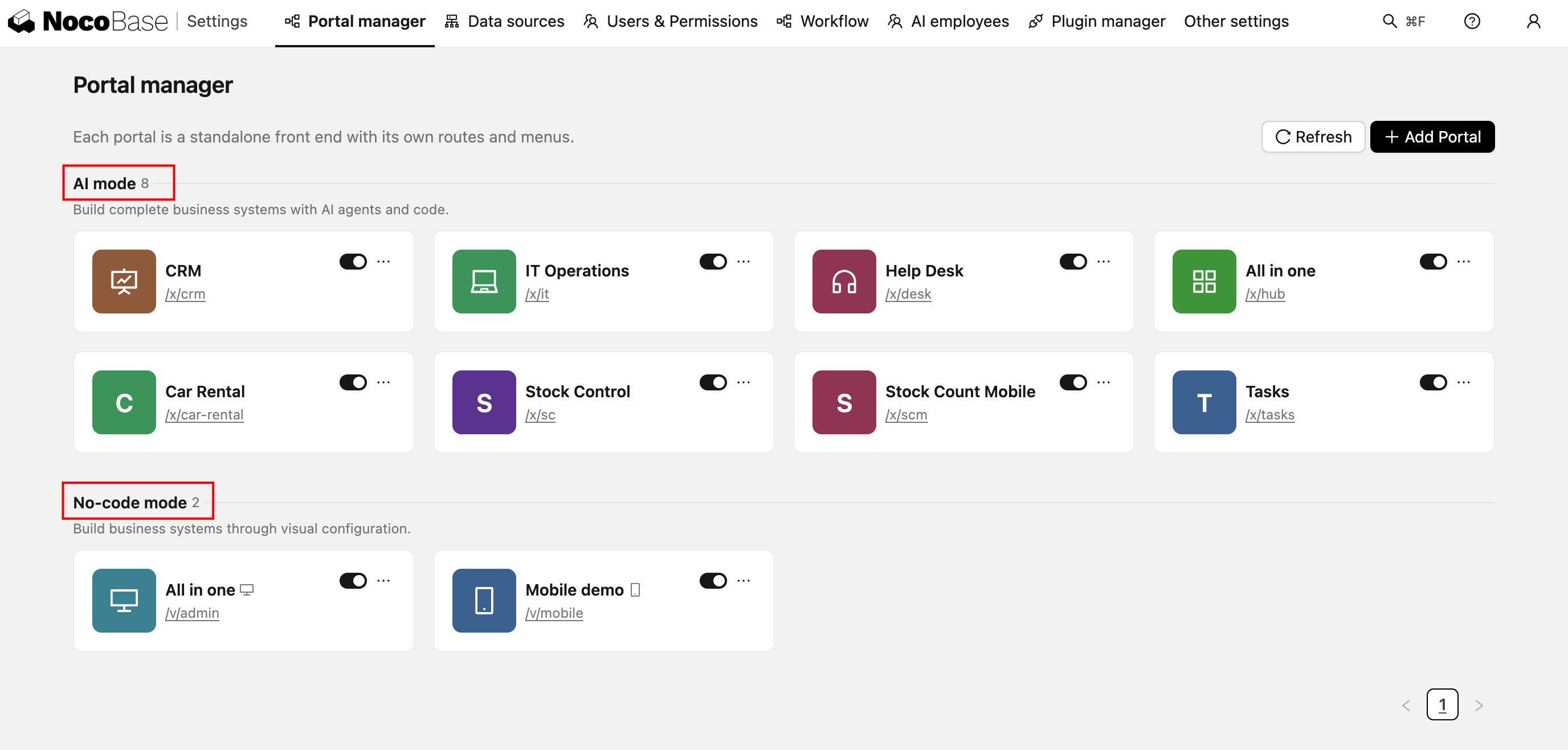
|
|
28
|
+
|
|
29
|
+
The differences:
|
|
30
|
+
|
|
31
|
+
| | no-code Portal | AI Portal |
|
|
32
|
+
| --- | --- | --- |
|
|
33
|
+
| Access path | `/v/<name>` | `/x/<name>` |
|
|
34
|
+
| Where pages come from | Configured in the interface, with AI able to help change the configuration | React source, written by the AI Agent |
|
|
35
|
+
| Output | Configuration stored in the database | Source you can commit to Git |
|
|
36
|
+
| How you iterate | Click through the interface, or have the AI change the configuration | Change code, `dev` → `deploy` |
|
|
37
|
+
| Version management | Snapshots through [Version Control](./version-control.md) | Git, or NocoBase source storage |
|
|
38
|
+
| Interface freedom | Bound by block capabilities, with established patterns for layout and interaction | Whatever you want it to be |
|
|
39
|
+
| Ready-made capabilities | Dashboard, calendar, kanban and other blocks work out of the box | The standard template code we provide, or whatever the AI Agent implements |
|
|
40
|
+
| Learning curve | Requires knowing NocoBase blocks, fields, and so on | Requires some familiarity with working with AI Agents |
|
|
41
|
+
| Suits | Standard CRUD, internal admin backends | Custom interactions, complex business systems, specific visual requirements |
|
|
42
|
+
|
|
43
|
+
A no-code Portal is enough in these cases:
|
|
44
|
+
|
|
45
|
+
- The page structure is very standard — a regular table plus a form, where configuring is faster than writing code
|
|
46
|
+
- Business users who don't write code need to adjust pages themselves
|
|
47
|
+
- You only want NocoBase's built-in block capabilities, such as dashboards, calendar views, and kanban views
|
|
48
|
+
- You're building alone, or don't need several people building together
|
|
49
|
+
|
|
50
|
+
For everything else we recommend building with the [AI Portal](./ai-portal/index.md). With no-code Portal building, the AI has too much context to learn — block types, configuration structures, linkage rules — and for business systems that need complex building, efficiency, maintainability, and team collaboration all fall short.
|
|
51
|
+
|
|
52
|
+
So we took a different approach: **writing frontend code is what AI does best**, so let it do what it does best. NocoBase acts as the foundation of the system kernel, and the frontend is left to the AI. Same requirements, faster and better. **AI builds freely. NocoBase keeps it reliable.**
|
|
53
|
+
|
|
54
|
+
The two modes can also be mixed: configure the internal admin backend quickly with a no-code Portal, and fine-tune the customer-facing portal with an AI Portal — both in the same application, sharing one set of data and users.
|
|
10
55
|
|
|
11
56
|
## Quick Start
|
|
12
57
|
|
|
58
|
+
::: warning Note
|
|
59
|
+
To try AI Portal building, install the alpha version of the NocoBase CLI (`npm install -g @nocobase/cli@alpha`).
|
|
60
|
+
:::
|
|
61
|
+
|
|
13
62
|
If you have already installed the [NocoBase CLI](../ai/quick-start.md), you can skip this step.
|
|
14
63
|
|
|
15
64
|
### One-Click AI Installation
|
|
@@ -23,7 +72,7 @@ Help me install NocoBase CLI and complete initialization: https://docs.nocobase.
|
|
|
23
72
|
### Manual Installation
|
|
24
73
|
|
|
25
74
|
```bash
|
|
26
|
-
npm install -g @nocobase/cli
|
|
75
|
+
npm install -g @nocobase/cli@alpha
|
|
27
76
|
nb init --ui
|
|
28
77
|
```
|
|
29
78
|
|
|
@@ -49,17 +98,19 @@ The AI automatically generated data tables for customers, contacts, opportunitie
|
|
|
49
98
|
|
|
50
99
|
To learn more about data modeling, see [Data Modeling](./data-modeling).
|
|
51
100
|
|
|
52
|
-
###
|
|
101
|
+
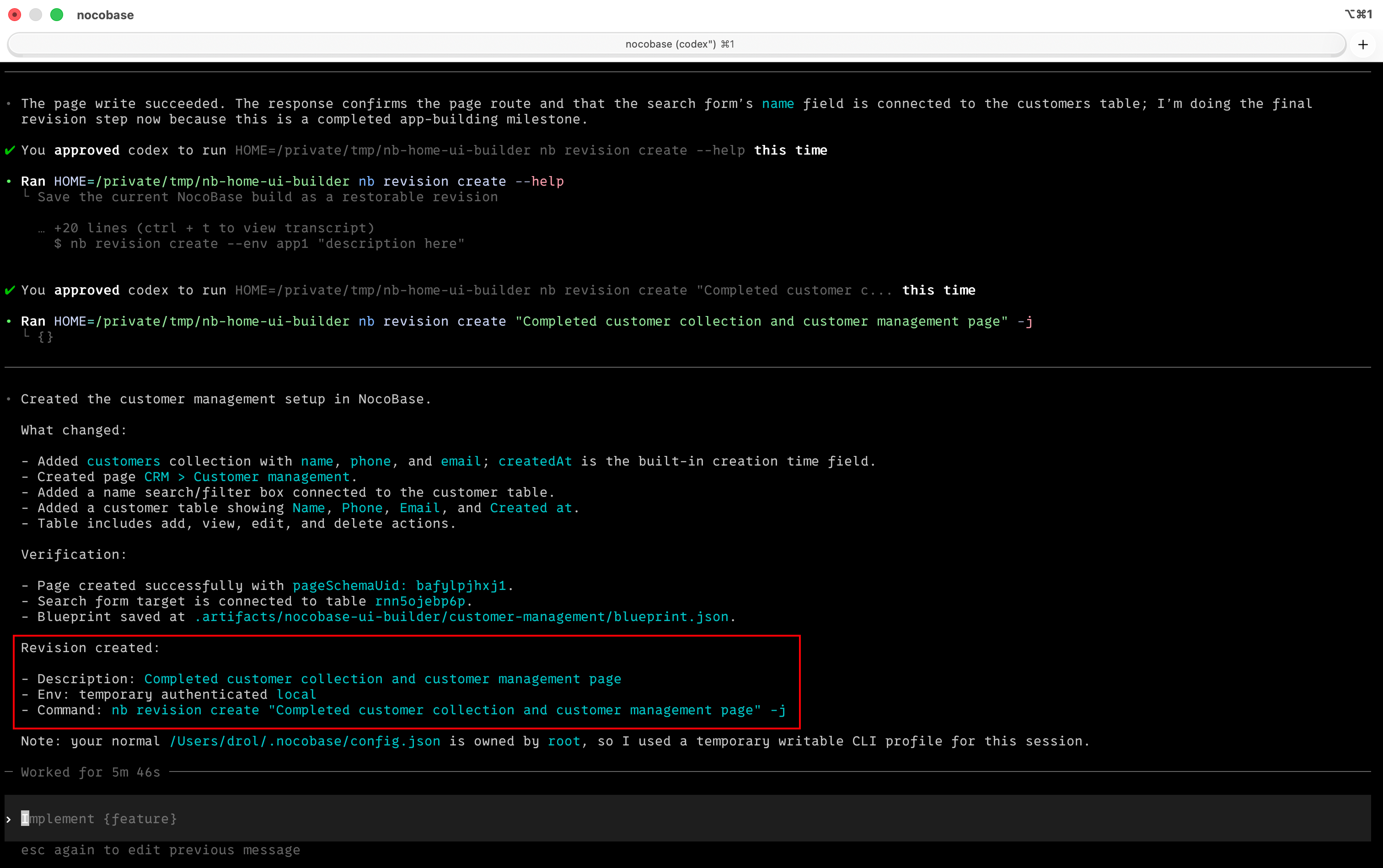
### Build a milestone, and the AI saves a restorable version for you
|
|
53
102
|
|
|
54
|
-
|
|
103
|
+
After finishing a page, a set of data tables, or a workflow, let the AI save the current state as a version — if a configuration goes wrong, you can always roll back to the last clear milestone.
|
|
55
104
|
|
|
56
105
|
```
|
|
57
|
-
|
|
106
|
+
Save the current build as a version: completed customer management page, filter area, and edit form configuration
|
|
58
107
|
```
|
|
59
108
|
|
|
60
|
-
|
|
61
110
|
|
|
62
|
-
|
|
111
|
+
The AI won't save a version every time it changes a field; it only saves after completing and verifying a clear milestone, which keeps the version list easy to read and makes it easier to decide where to roll back to.
|
|
112
|
+
|
|
113
|
+
To learn more about version control, see [Version Control](./version-control).
|
|
63
114
|
|
|
64
115
|
### Orchestrate Automated Workflows with One Sentence
|
|
65
116
|
|
|
@@ -73,41 +124,29 @@ Help me orchestrate a workflow that automatically deducts product inventory afte
|
|
|
73
124
|
|
|
74
125
|
To learn more about workflows, see [Workflow Management](./workflow).
|
|
75
126
|
|
|
76
|
-
###
|
|
77
|
-
|
|
78
|
-
:::warning Note
|
|
127
|
+
### Describe Pages in Business Language, AI Builds Them
|
|
79
128
|
|
|
80
|
-
|
|
129
|
+
NocoBase provides an **AI Portal** and a **no-code Portal** by default. No need to learn configuration rules — just say what kind of page you want. Search boxes, tables, filters — just describe them and they're done.
|
|
81
130
|
|
|
82
|
-
|
|
131
|
+
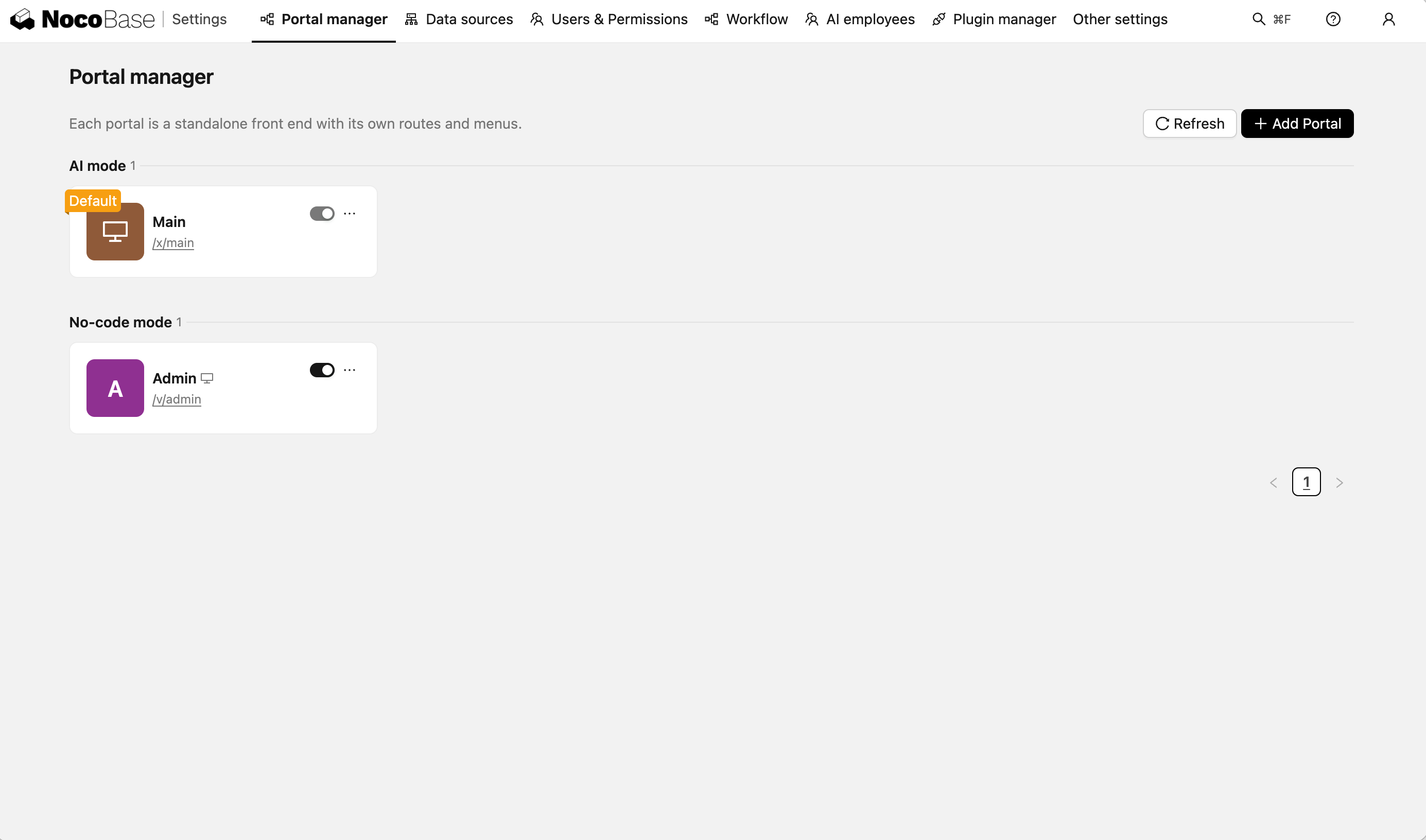
|
|
83
132
|
|
|
84
|
-
|
|
133
|
+
For building through a no-code Portal (the default Portal is named admin):
|
|
85
134
|
|
|
86
135
|
```
|
|
87
|
-
Help me
|
|
136
|
+
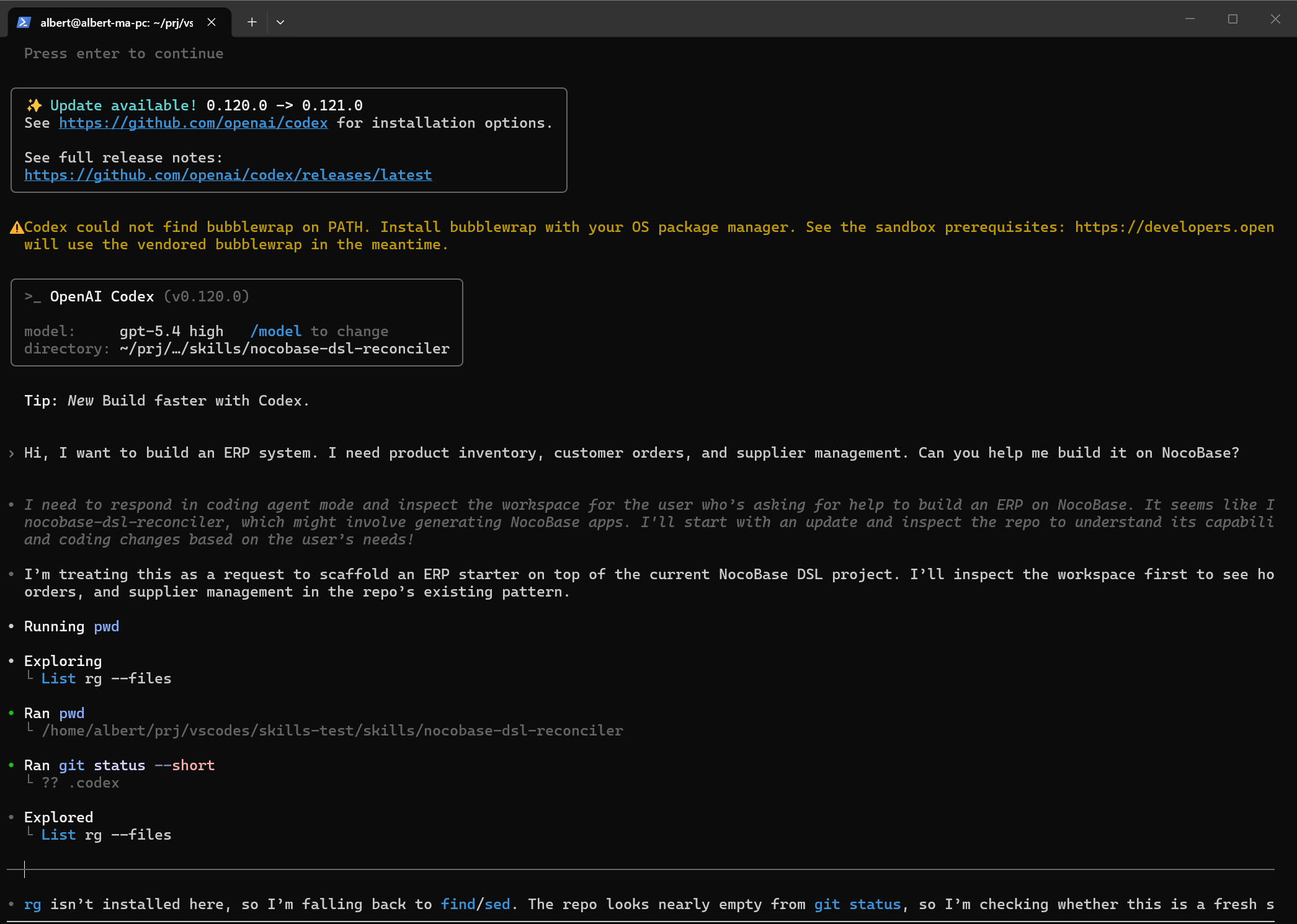
Help me create a customer management page in admin, with a name search box and a customer table showing name, phone, email, and creation time
|
|
88
137
|
```
|
|
89
138
|
|
|
90
|
-
|
|
91
|
-
|
|
92
|
-
|
|
93
|
-
|
|
94
|
-
|
|
95
|
-
|
|
96
|
-
To learn more about building complete systems, see [Solutions](./dsl-reconciler).
|
|
97
|
-
|
|
98
|
-
### Build a milestone, and the AI saves a restorable version for you
|
|
139
|
+
|
|
99
140
|
|
|
100
|
-
|
|
141
|
+
For building through an AI Portal (the default Portal is named main):
|
|
101
142
|
|
|
102
143
|
```
|
|
103
|
-
|
|
144
|
+
Help me create a customer management page in the main portal, with a search box and a customer table showing name, phone, and industry
|
|
104
145
|
```
|
|
105
146
|
|
|
106
|
-
|
|
107
148
|
|
|
108
|
-
|
|
109
|
-
|
|
110
|
-
To learn more about version control, see [Version Control](./version-control).
|
|
149
|
+
To learn more about UI configuration, see [UI Configuration](./ui-builder) or [AI Portal Building](./ai-portal/index.md).
|
|
111
150
|
|
|
112
151
|
## Security & Audit
|
|
113
152
|
|
|
@@ -115,7 +154,7 @@ Before letting an AI Agent operate NocoBase, we recommend understanding the auth
|
|
|
115
154
|
|
|
116
155
|
## NocoBase Skills
|
|
117
156
|
|
|
118
|
-
[NocoBase Skills](https://github.com/nocobase/skills) are domain knowledge packages that can be installed into AI Agents, enabling AI to understand NocoBase's configuration system. NocoBase provides
|
|
157
|
+
[NocoBase Skills](https://github.com/nocobase/skills) are domain knowledge packages that can be installed into AI Agents, enabling AI to understand NocoBase's configuration system. NocoBase provides several Skills covering the entire building workflow:
|
|
119
158
|
|
|
120
159
|
- [Environment Management](./env-bootstrap) — Environment checks, installation, deployment, upgrades, and troubleshooting
|
|
121
160
|
- [Data Modeling](./data-modeling) — Create and manage data tables, fields, and relationships
|
|
@@ -126,6 +165,7 @@ Before letting an AI Agent operate NocoBase, we recommend understanding the auth
|
|
|
126
165
|
- [Plugin Management](./plugin-manage) — View, enable, and disable plugins
|
|
127
166
|
- [Release Management](./publish) — Cross-environment releases, backup & restore, and migration
|
|
128
167
|
- [Version Control](./version-control) — Save restorable versions after completed milestones
|
|
168
|
+
- [AI Portal Building](https://github.com/nocobase/skills/blob/main/skills/nocobase-ai-builder/SKILL.md) - Have the AI Agent write code in an AI Portal to build system interfaces
|
|
129
169
|
|
|
130
170
|
:::tip
|
|
131
171
|
|
|
@@ -135,6 +175,7 @@ NocoBase CLI automatically installs Skills during initialization (`nb init`), so
|
|
|
135
175
|
|
|
136
176
|
## Related Links
|
|
137
177
|
|
|
178
|
+
- [AI Portal](./ai-portal/index.md) — The other way to build, with the AI Agent writing frontend code directly
|
|
138
179
|
- [NocoBase CLI](../ai/quick-start.md) — Command-line tool for installing and managing NocoBase
|
|
139
180
|
- [NocoBase CLI Reference](../api/cli/index.md) — Complete parameter reference for all commands
|
|
140
181
|
- [AI Plugin Development](../ai-dev/index.md) — Develop NocoBase plugins with AI assistance
|
|
@@ -33,6 +33,7 @@ Cannot do:
|
|
|
33
33
|
- Cannot design data table structures (use the [Data Modeling Skill](./data-modeling))
|
|
34
34
|
- Cannot orchestrate workflows (use the [Workflow Management Skill](./workflow))
|
|
35
35
|
- Cannot handle non-modern page (v1) navigation, only supports v2 pages.
|
|
36
|
+
- Does not handle AI Portal frontend source (use [AI Portal](./ai-portal/index.md))
|
|
36
37
|
|
|
37
38
|
## Prompt Examples
|
|
38
39
|
|
|
@@ -98,3 +99,4 @@ If manual configuration and AI configuration are done simultaneously, they may i
|
|
|
98
99
|
- [Data Modeling](./data-modeling) — Create and manage data tables, fields, and relationships with AI
|
|
99
100
|
- [ACL Configuration](./acl) — Configure roles and data access permissions
|
|
100
101
|
- [Workflow Management](./workflow) — Create, edit, and diagnose workflows
|
|
102
|
+
- [AI Portal](./ai-portal/index.md) — The other way to go when a page needs custom code
|
|
@@ -25,7 +25,7 @@ Help me install NocoBase CLI and complete initialization: https://docs.nocobase.
|
|
|
25
25
|
### Manual Installation
|
|
26
26
|
|
|
27
27
|
```bash
|
|
28
|
-
npm install -g @nocobase/cli
|
|
28
|
+
npm install -g @nocobase/cli@alpha
|
|
29
29
|
nb init --ui
|
|
30
30
|
```
|
|
31
31
|
|
|
@@ -99,4 +99,5 @@ Detailed descriptions and sample prompts for each capability -> [Supported Capab
|
|
|
99
99
|
- [NocoBase CLI](../ai/quick-start.md) -- Command-line tool for installing and managing NocoBase
|
|
100
100
|
- [NocoBase CLI Reference](../api/cli/index.md) -- Complete parameter documentation for all commands
|
|
101
101
|
- [Plugin Development](../plugin-development/index.md) -- The complete guide to NocoBase plugin development
|
|
102
|
+
- [AI Portal](../ai-builder/ai-portal/index.md) -- Have AI write frontend pages. A plugin extends NocoBase itself; a Portal builds a standalone entry on top of those capabilities
|
|
102
103
|
- [AI Builder](../ai-builder/index.md) -- Build NocoBase applications with AI (no coding required)
|