@nocobase/plugin-ai 2.2.0-beta.16 → 2.2.0-beta.18
This diff represents the content of publicly available package versions that have been released to one of the supported registries. The information contained in this diff is provided for informational purposes only and reflects changes between package versions as they appear in their respective public registries.
- package/dist/ai/docs/nocobase/ai-dev/watermark-plugin.md +2 -0
- package/dist/ai/docs/nocobase/api/cli/api/resource/create.md +4 -3
- package/dist/ai/docs/nocobase/file-manager/file-preview/index.md +44 -3
- package/dist/ai/docs/nocobase/file-manager/storage/aliyun-oss.md +100 -3
- package/dist/ai/docs/nocobase/plugin-development/build.md +10 -4
- package/dist/ai/docs/nocobase/plugin-development/client/appendix/faq.md +1 -1
- package/dist/ai/docs/nocobase/plugin-development/client/examples/custom-action.md +2 -0
- package/dist/ai/docs/nocobase/plugin-development/client/examples/custom-block.md +2 -0
- package/dist/ai/docs/nocobase/plugin-development/client/examples/custom-field.md +2 -0
- package/dist/ai/docs/nocobase/plugin-development/client/examples/fullstack-plugin.md +2 -0
- package/dist/ai/docs/nocobase/plugin-development/client/examples/settings-page.md +2 -0
- package/dist/ai/docs/nocobase/plugin-development/common/i18n.md +3 -3
- package/dist/ai/docs/nocobase/plugin-development/server/cache.md +1 -1
- package/dist/ai/docs/nocobase/plugin-development/server/collections.md +0 -6
- package/dist/ai/docs/nocobase/plugin-development/server/command.md +2 -2
- package/dist/ai/docs/nocobase/plugin-development/server/context.md +2 -2
- package/dist/ai/docs/nocobase/plugin-development/server/i18n.md +4 -4
- package/dist/ai/docs/nocobase/plugin-development/write-your-first-plugin.md +91 -43
- package/dist/ai/docs/nocobase/users-permissions/sync/index.md +8 -1
- package/dist/ai/docs/nocobase/users-permissions/sync/sources/dingtalk.md +138 -0
- package/dist/ai/docs/nocobase/users-permissions/sync/sources/ldap.md +87 -0
- package/dist/ai/docs/nocobase/workflow/nodes/javascript.md +21 -1
- package/dist/client/244.1086967ad8fdedf4.js +10 -0
- package/dist/client/{705.19b642db34de438a.js → 705.a4fe26945d175e8a.js} +1 -1
- package/dist/client/index.js +3 -3
- package/dist/client-v2/244.678c34d698985c60.js +10 -0
- package/dist/client-v2/420.a5b929a5e7f330be.js +10 -0
- package/dist/client-v2/{705.8dc34d43f02f322c.js → 705.f2e1b26a3f000075.js} +1 -1
- package/dist/client-v2/ai-employees/chatbox/hooks/reasoning-stream.d.ts +10 -0
- package/dist/client-v2/ai-employees/chatbox/stores/chat-box.d.ts +0 -2
- package/dist/client-v2/index.js +3 -3
- package/dist/client-v2/llm-providers/forms.d.ts +2 -0
- package/dist/client-v2/llm-providers/index.d.ts +1 -0
- package/dist/client-v2/models/ai-employees/AIEmployeeShortcutModel.d.ts +3 -0
- package/dist/client-v2/pages/EmployeesPage.d.ts +3 -0
- package/dist/client-v2/pages/LLMServicesPage.d.ts +9 -4
- package/dist/client-v2/repositories/AIConfigRepository.d.ts +2 -0
- package/dist/externalVersion.js +18 -16
- package/dist/locale/de-DE.json +2 -1
- package/dist/locale/en-US.json +9 -5
- package/dist/locale/es-ES.json +2 -1
- package/dist/locale/fr-FR.json +2 -1
- package/dist/locale/hu-HU.json +2 -1
- package/dist/locale/id-ID.json +2 -1
- package/dist/locale/it-IT.json +2 -1
- package/dist/locale/ja-JP.json +2 -1
- package/dist/locale/ko-KR.json +2 -1
- package/dist/locale/nl-NL.json +2 -1
- package/dist/locale/pt-BR.json +2 -1
- package/dist/locale/ru-RU.json +2 -1
- package/dist/locale/tr-TR.json +2 -1
- package/dist/locale/uk-UA.json +2 -1
- package/dist/locale/vi-VN.json +2 -1
- package/dist/locale/zh-CN.json +9 -5
- package/dist/locale/zh-TW.json +2 -1
- package/dist/node_modules/@langchain/mistralai/package.json +1 -1
- package/dist/node_modules/@langchain/xai/package.json +1 -1
- package/dist/node_modules/fs-extra/package.json +1 -1
- package/dist/node_modules/jsonrepair/package.json +1 -1
- package/dist/node_modules/just-bash/package.json +1 -1
- package/dist/node_modules/nodejs-snowflake/package.json +1 -1
- package/dist/node_modules/openai/package.json +1 -1
- package/dist/node_modules/zod/package.json +1 -1
- package/dist/server/ai-employees/ai-employee.js +40 -24
- package/dist/server/ai-employees/reasoning-stream-state.d.ts +23 -0
- package/dist/server/ai-employees/reasoning-stream-state.js +63 -0
- package/dist/server/llm-providers/common/reasoning.js +18 -10
- package/dist/{client-v2/ai-employees/chatbox/components/DebugPanel.d.ts → server/llm-providers/deepseek/index.d.ts} +2 -2
- package/dist/server/llm-providers/deepseek/index.js +32 -0
- package/dist/server/llm-providers/deepseek/provider.d.ts +57 -0
- package/dist/server/llm-providers/deepseek/provider.js +320 -0
- package/dist/server/llm-providers/deepseek/reasoning.d.ts +83 -0
- package/dist/server/llm-providers/deepseek/reasoning.js +285 -0
- package/dist/server/llm-providers/mistral.d.ts +1 -1
- package/dist/server/llm-providers/provider.d.ts +1 -0
- package/dist/server/llm-providers/provider.js +3 -0
- package/dist/server/llm-providers/shengsuanyun.d.ts +29 -0
- package/dist/server/llm-providers/shengsuanyun.js +114 -0
- package/dist/server/manager/ai-manager.d.ts +3 -0
- package/dist/server/manager/ai-manager.js +7 -2
- package/dist/server/plugin.js +2 -0
- package/dist/server/types/ai-message.type.d.ts +4 -0
- package/dist/swagger/index.d.ts +14 -0
- package/dist/swagger/llm.d.ts +8 -0
- package/dist/swagger/llm.js +8 -0
- package/dist/swagger/schemas.d.ts +6 -0
- package/dist/swagger/schemas.js +6 -0
- package/package.json +2 -2
- package/dist/client/244.8631eb5cf3f05e21.js +0 -10
- package/dist/client-v2/244.c428e645ecb94414.js +0 -10
- package/dist/client-v2/420.b2aedb1ff71fca0e.js +0 -10
- package/dist/client-v2/debug-logger.d.ts +0 -52
- package/dist/server/llm-providers/deepseek.d.ts +0 -40
- package/dist/server/llm-providers/deepseek.js +0 -174
|
@@ -85,6 +85,8 @@ yarn pm create @my-project/plugin-watermark
|
|
|
85
85
|
|
|
86
86
|
AI generates a standard plugin directory structure under `packages/plugins/@my-project/plugin-watermark/`.
|
|
87
87
|
|
|
88
|
+
Once the scaffold is created, start development mode so your code changes hot-reload: for a project created by `nb init`, run `nb source dev` from the project root (`<app-path>`); for a NocoBase source repository you cloned yourself, run `yarn dev` from the source root.
|
|
89
|
+
|
|
88
90
|
### 3. Write Server-Side Code
|
|
89
91
|
|
|
90
92
|
AI will generate the following files:
|
|
@@ -1,12 +1,12 @@
|
|
|
1
1
|
---
|
|
2
2
|
title: "nb api resource create"
|
|
3
|
-
description: "nb api resource create command reference: create
|
|
3
|
+
description: "nb api resource create command reference: create one or more records in a selected NocoBase resource."
|
|
4
4
|
keywords: "nb api resource create,NocoBase CLI,create record,CRUD"
|
|
5
5
|
---
|
|
6
6
|
|
|
7
7
|
# nb api resource create
|
|
8
8
|
|
|
9
|
-
Create
|
|
9
|
+
Create records in a selected resource. Pass record data as a JSON object through `--values`, or as a JSON array of objects to create multiple records in a single request.
|
|
10
10
|
|
|
11
11
|
## Usage
|
|
12
12
|
|
|
@@ -21,7 +21,7 @@ nb api resource create --resource <resource> --values <json> [flags]
|
|
|
21
21
|
| `--resource` | string | Resource name, required |
|
|
22
22
|
| `--data-source` | string | Data source key, default `main` |
|
|
23
23
|
| `--source-id` | string | Source record ID for association resources |
|
|
24
|
-
| `--values` | string | Data for the new
|
|
24
|
+
| `--values` | string | Data for the new records: a JSON object, or a JSON array of objects to create multiple records; required |
|
|
25
25
|
| `--whitelist` | string[] | Fields allowed to write; repeatable or pass a JSON array |
|
|
26
26
|
| `--blacklist` | string[] | Fields forbidden to write; repeatable or pass a JSON array |
|
|
27
27
|
|
|
@@ -31,6 +31,7 @@ Also supports common connection parameters from [`nb api resource`](./index.md).
|
|
|
31
31
|
|
|
32
32
|
```bash
|
|
33
33
|
nb api resource create --resource users --values '{"nickname":"Ada"}'
|
|
34
|
+
nb api resource create --resource users --values '[{"nickname":"Ada"},{"nickname":"Grace"}]'
|
|
34
35
|
nb api resource create --resource posts.comments --source-id 1 --values '{"content":"Hello"}'
|
|
35
36
|
```
|
|
36
37
|
|
|
@@ -8,12 +8,53 @@ For file types that do not support native preview, you can enable preview functi
|
|
|
8
8
|
|
|
9
9
|
Currently, NocoBase provides the following file preview plugins:
|
|
10
10
|
|
|
11
|
-
|
|
11
|
+
- [Office File Preview Plugin](./ms-office.md)
|
|
12
12
|
|
|
13
|
-
## PDF preview
|
|
13
|
+
## PDF preview mechanism
|
|
14
14
|
|
|
15
|
-
NocoBase
|
|
15
|
+
NocoBase selects the PDF preview method according to whether the file URL has the same origin as the current page:
|
|
16
|
+
|
|
17
|
+
| File URL | Common storage type | Preview method | CORS requirement |
|
|
18
|
+
| --- | --- | --- | --- |
|
|
19
|
+
| Same origin as NocoBase | Local storage | NocoBase reads the file and renders it with the built-in PDF.js viewer | No cross-origin CORS involved |
|
|
20
|
+
| Cross-origin | Third-party storage such as OSS, S3, COS, or a CDN | The browser opens the file URL in an iframe | The iframe preview itself does not require CORS |
|
|
21
|
+
|
|
22
|
+
:::tip What determines the preview method
|
|
23
|
+
|
|
24
|
+
The preview method depends on whether the file URL is same-origin, not directly on the storage engine name. Local storage served from a separate file domain is treated as cross-origin. Third-party storage accessed through a same-origin NocoBase proxy is treated as same-origin.
|
|
25
|
+
|
|
26
|
+
:::
|
|
27
|
+
|
|
28
|
+
### Local storage or a same-origin URL
|
|
29
|
+
|
|
30
|
+
Local storage URLs usually start with `/storage/uploads/` and have the same origin as the NocoBase page. During preview, NocoBase reads the PDF data and passes it to the built-in PDF.js viewer to render pages and text.
|
|
31
|
+
|
|
32
|
+
This method does not depend on the browser's built-in PDF reader. Even if the file response uses `Content-Disposition: attachment` for security, NocoBase can still read and render the file in the preview component. The file URL must remain accessible with the current login state.
|
|
33
|
+
|
|
34
|
+
### Third-party storage or a cross-origin URL
|
|
35
|
+
|
|
36
|
+
Third-party storage such as OSS, S3, COS, and CDNs usually uses a separate domain. NocoBase places this PDF URL in an iframe, so the browser and the storage service's response headers determine the result.
|
|
37
|
+
|
|
38
|
+
To open a PDF in the iframe, the storage service should normally return `Content-Type: application/pdf` and must not force a download with `Content-Disposition: attachment`. If the response requests a download, the browser downloads the file directly and NocoBase cannot override that behavior in the frontend.
|
|
39
|
+
|
|
40
|
+
Loading a cross-origin PDF in an iframe does not itself require CORS. However, the download button in the preview component reads the file with `fetch` and creates a Blob, so cross-origin downloads still require the storage service to allow CORS requests from the NocoBase site.
|
|
41
|
+
|
|
42
|
+
### Notes for Aliyun OSS
|
|
43
|
+
|
|
44
|
+
In some cases, the default Aliyun OSS domain forces a download by returning `Content-Disposition: attachment` and `x-oss-force-download: true`. Images may still preview normally, while a PDF placed in an iframe is downloaded.
|
|
45
|
+
|
|
46
|
+
You can usually resolve this by binding a custom domain to the bucket and configuring NocoBase to access files through that domain. See [Aliyun OSS troubleshooting](../storage/aliyun-oss.md#common-issues) for configuration and diagnostic steps.
|
|
47
|
+
|
|
48
|
+
### Security boundary for cross-origin previews
|
|
49
|
+
|
|
50
|
+
Some browsers or PDF readers may support scripts, forms, or other interactive content inside PDF files. If the previewed file comes from an untrusted source, pay attention to the security boundary for script execution.
|
|
16
51
|
|
|
17
52
|
We recommend isolating the file access domain from the NocoBase site and API domains. For example, serve files from OSS, S3, COS, or a CDN through a dedicated domain, instead of sharing the same origin with the NocoBase frontend or API.
|
|
18
53
|
|
|
19
54
|
If the file domain is different from the API domain, and the API does not enable CORS access for the file domain, scripts running in the PDF preview environment are usually restricted by the browser's same-origin policy. They cannot directly read the NocoBase page, browser storage, or API responses.
|
|
55
|
+
|
|
56
|
+
## Related links
|
|
57
|
+
|
|
58
|
+
- [Office File Preview Plugin](./ms-office.md)
|
|
59
|
+
- [Aliyun OSS](../storage/aliyun-oss.md)
|
|
60
|
+
- [S3 Pro](../storage/s3-pro.md)
|
|
@@ -7,7 +7,7 @@ A storage engine based on Aliyun OSS. Before use, you need to prepare the releva
|
|
|
7
7
|
|
|
8
8
|
This engine does not support private access. After a file is uploaded, NocoBase generates a directly accessible URL, and anyone who has that URL can access the file.
|
|
9
9
|
|
|
10
|
-
Even if the OSS bucket itself is private, the built-in Aliyun OSS engine does not generate temporary signed URLs for file access. If you need private access, use [S3 Pro](./s3-pro). If historical files already exist, see [Migrate to S3 Pro](./migrate-to-s3-pro.md).
|
|
10
|
+
Even if the OSS bucket itself is private, the built-in Aliyun OSS engine does not generate temporary signed URLs for file access. If you need private access, use [S3 Pro](./s3-pro.md). If historical files already exist, see [Migrate to S3 Pro](./migrate-to-s3-pro.md).
|
|
11
11
|
|
|
12
12
|
:::
|
|
13
13
|
|
|
@@ -18,9 +18,13 @@ Even if the OSS bucket itself is private, the built-in Aliyun OSS engine does no
|
|
|
18
18
|
|
|
19
19
|
|
|
20
20
|
:::info{title=Note}
|
|
21
|
-
This section only introduces the specific parameters for the Aliyun OSS storage engine. For general parameters,
|
|
21
|
+
This section only introduces the specific parameters for the Aliyun OSS storage engine. For general parameters, see [General Engine Parameters](./index.md#common-parameters).
|
|
22
22
|
:::
|
|
23
23
|
|
|
24
|
+
### Base URL
|
|
25
|
+
|
|
26
|
+
Enter the file access URL prefix, such as a custom domain bound to the current bucket: `https://oss.example.com`. Accessing PDFs through the default Aliyun OSS domain may cause the browser to download them. We recommend binding a custom domain first. See [Common issues](#common-issues) below for details.
|
|
27
|
+
|
|
24
28
|
### Region
|
|
25
29
|
|
|
26
30
|
Enter the region of the OSS storage, for example: `oss-cn-hangzhou`.
|
|
@@ -43,4 +47,97 @@ Enter the name of the OSS bucket.
|
|
|
43
47
|
|
|
44
48
|
### Timeout
|
|
45
49
|
|
|
46
|
-
Enter the timeout for uploading to Aliyun OSS, in milliseconds. The default is `60000` milliseconds (i.e., 60 seconds).
|
|
50
|
+
Enter the timeout for uploading to Aliyun OSS, in milliseconds. The default is `60000` milliseconds (i.e., 60 seconds).
|
|
51
|
+
|
|
52
|
+
## Common issues
|
|
53
|
+
|
|
54
|
+
### A PDF is downloaded instead of previewed
|
|
55
|
+
|
|
56
|
+
NocoBase previews cross-origin PDFs in an iframe. The browser accesses the OSS file URL directly, so the OSS response headers determine whether the file is displayed or downloaded.
|
|
57
|
+
|
|
58
|
+
If a PDF is downloaded from the iframe, inspect the file request in the browser developer tools. A typical problematic response looks like this:
|
|
59
|
+
|
|
60
|
+
```http
|
|
61
|
+
Content-Type: application/pdf
|
|
62
|
+
Content-Disposition: attachment
|
|
63
|
+
x-oss-force-download: true
|
|
64
|
+
```
|
|
65
|
+
|
|
66
|
+
`Content-Type: application/pdf` identifies the file correctly, but `Content-Disposition: attachment` instructs the browser to download it. The default Aliyun OSS domain forces downloads in some cases. See the official Aliyun documentation: [How do I configure a PDF file to be previewed instead of downloaded?](https://help.aliyun.com/zh/oss/user-guide/how-do-i-configure-an-object-to-be-previewed-instead-of-downloaded).
|
|
67
|
+
|
|
68
|
+
We recommend the following configuration:
|
|
69
|
+
|
|
70
|
+
1. Follow [Access OSS resources through a custom domain](https://help.aliyun.com/zh/oss/user-guide/access-buckets-via-custom-domain-names) to bind a custom domain to the bucket
|
|
71
|
+
2. Configure DNS and the HTTPS certificate, then verify that the custom domain can access the file directly
|
|
72
|
+
3. Configure the access URL for the NocoBase storage engine in use
|
|
73
|
+
|
|
74
|
+
For step 3:
|
|
75
|
+
|
|
76
|
+
- With the built-in **Aliyun OSS** engine, set **Base URL** to the bound custom domain, such as `https://oss.example.com`
|
|
77
|
+
- With [S3 Pro](./s3-pro.md) connected to Aliyun OSS, the upload endpoint can continue to use the regional OSS endpoint; set the access endpoint to the custom domain and set `Full access URL style` to `Ignore`
|
|
78
|
+
|
|
79
|
+
Upload a new PDF to verify the configuration. If an existing file record stores a complete URL, also make sure that the URL returned to the frontend now uses the custom domain.
|
|
80
|
+
|
|
81
|
+
:::tip Check the response headers
|
|
82
|
+
|
|
83
|
+
Previewing a cross-origin PDF in an iframe does not itself require CORS. Whether the PDF can be displayed inline primarily depends on `Content-Type` and `Content-Disposition`. This is separate from the CORS requirement for the download button described below.
|
|
84
|
+
|
|
85
|
+
:::
|
|
86
|
+
|
|
87
|
+
### An image previews correctly, but the download button reports a CORS error
|
|
88
|
+
|
|
89
|
+
Images are usually previewed with `<img>`, and cross-origin PDFs are previewed with an iframe. Both can display resources without CORS response headers. The download button, however, reads the file with `fetch` and creates a Blob for the browser to download. This request is subject to the browser's same-origin policy.
|
|
90
|
+
|
|
91
|
+
The following console error means that OSS did not return `Access-Control-Allow-Origin` for the current NocoBase site:
|
|
92
|
+
|
|
93
|
+
```text
|
|
94
|
+
Access to fetch at 'https://oss.example.com/path/to/file.jpg' from origin
|
|
95
|
+
'https://example.com' has been blocked by CORS policy:
|
|
96
|
+
No 'Access-Control-Allow-Origin' header is present on the requested resource.
|
|
97
|
+
```
|
|
98
|
+
|
|
99
|
+
Follow the official Aliyun guide [Configure cross-origin resource sharing](https://help.aliyun.com/zh/oss/user-guide/configure-cross-origin-resource-sharing) and create a CORS rule for the bucket. For downloads from the preview component, use values like these:
|
|
100
|
+
|
|
101
|
+
| Setting | Recommended value |
|
|
102
|
+
| --- | --- |
|
|
103
|
+
| Allowed Origins | The complete NocoBase origin, such as `https://example.com` |
|
|
104
|
+
| Allowed Methods | `GET`, `HEAD` |
|
|
105
|
+
| Allowed Headers | `*` |
|
|
106
|
+
| Expose Headers | `ETag`, `Content-Disposition` |
|
|
107
|
+
| MaxAgeSeconds | `600` |
|
|
108
|
+
|
|
109
|
+
If S3 Pro also uploads files directly from the browser, add methods such as `PUT` and `POST` according to the actual upload requests shown in the browser Network panel, or create a separate upload rule.
|
|
110
|
+
|
|
111
|
+
After saving the rule, request the file again with the NocoBase site origin. The response should include at least:
|
|
112
|
+
|
|
113
|
+
```http
|
|
114
|
+
Access-Control-Allow-Origin: https://example.com
|
|
115
|
+
Access-Control-Allow-Methods: GET, HEAD
|
|
116
|
+
```
|
|
117
|
+
|
|
118
|
+
The browser may already have cached the response used for the image preview. That request did not include an `Origin` header, and the cached response may not contain `Access-Control-Allow-Origin`. If downloading still fails after you configure CORS, clear the browser cache for the file or select **Disable cache** in the developer tools and try again.
|
|
119
|
+
|
|
120
|
+
### Verify the response headers
|
|
121
|
+
|
|
122
|
+
Use `curl` to simulate a cross-origin request from the NocoBase site. Replace the example origin, file URL, and signature parameters with the actual values:
|
|
123
|
+
|
|
124
|
+
```bash
|
|
125
|
+
curl -sS -D - -o /dev/null \
|
|
126
|
+
-H 'Origin: https://example.com' \
|
|
127
|
+
'https://oss.example.com/path/to/file.pdf?<signed-query>'
|
|
128
|
+
```
|
|
129
|
+
|
|
130
|
+
Check the following results:
|
|
131
|
+
|
|
132
|
+
- PDF preview returns `Content-Type: application/pdf` without `Content-Disposition: attachment`
|
|
133
|
+
- Cross-origin download returns an `Access-Control-Allow-Origin` matching the NocoBase site
|
|
134
|
+
- The actual file URL uses the custom domain instead of the default `*.oss-cn-*.aliyuncs.com` domain
|
|
135
|
+
|
|
136
|
+
It is normal for a request without an `Origin` header to omit CORS response headers. Keep the `Origin` header in the example when verifying CORS.
|
|
137
|
+
|
|
138
|
+
## Related links
|
|
139
|
+
|
|
140
|
+
- [File Preview](../file-preview/index.md)
|
|
141
|
+
- [S3 Pro](./s3-pro.md)
|
|
142
|
+
- [Migrate to S3 Pro](./migrate-to-s3-pro.md)
|
|
143
|
+
- [Storage Engines](./index.md)
|
|
@@ -6,7 +6,7 @@ keywords: "plugin build,plugin package,yarn build,tar,build.config.ts,Rsbuild,ts
|
|
|
6
6
|
|
|
7
7
|
# Build and Package
|
|
8
8
|
|
|
9
|
-
After plugin development is complete, you need to go through two steps — build (compile source code) and package (generate `.
|
|
9
|
+
After plugin development is complete, you need to go through two steps — build (compile source code) and package (generate `.tgz`) — before distributing it to other NocoBase applications.
|
|
10
10
|
|
|
11
11
|
## Build Plugin
|
|
12
12
|
|
|
@@ -26,13 +26,13 @@ If the plugin is created in a source code repository, the first build will trigg
|
|
|
26
26
|
|
|
27
27
|
## Package Plugin
|
|
28
28
|
|
|
29
|
-
Packaging compresses the build artifacts into a `.
|
|
29
|
+
Packaging compresses the build artifacts into a `.tgz` file for easy upload to other environments:
|
|
30
30
|
|
|
31
31
|
```bash
|
|
32
32
|
yarn nocobase tar @my-project/plugin-hello
|
|
33
33
|
```
|
|
34
34
|
|
|
35
|
-
The package file is output to `storage/tar/@my-project/plugin-hello.
|
|
35
|
+
The package file is output to `storage/tar/` by default, named `<package-name>-<version>.tgz` — for example, `storage/tar/@my-project/plugin-hello-0.1.0.tgz`.
|
|
36
36
|
|
|
37
37
|
You can also combine build and package into one step using the `--tar` flag:
|
|
38
38
|
|
|
@@ -42,7 +42,13 @@ yarn build @my-project/plugin-hello --tar
|
|
|
42
42
|
|
|
43
43
|
## Upload to Other NocoBase Applications
|
|
44
44
|
|
|
45
|
-
Upload and extract the `.
|
|
45
|
+
Upload and extract the `.tgz` file to the target application's `./storage/plugins` directory. For detailed steps, see [Install and Upgrade Plugins](../get-started/install-upgrade-plugins.mdx).
|
|
46
|
+
|
|
47
|
+
If the target application was created with the NocoBase CLI (`nb init`), you can also import it directly with `nb plugin import` instead of extracting it manually:
|
|
48
|
+
|
|
49
|
+
```bash
|
|
50
|
+
nb plugin import /your/path/plugin-hello-0.1.0.tgz
|
|
51
|
+
```
|
|
46
52
|
|
|
47
53
|
### Enable a Plugin by Default
|
|
48
54
|
|
|
@@ -12,7 +12,7 @@ This page collects common pitfalls when developing client plugins. If you run in
|
|
|
12
12
|
|
|
13
13
|
### Plugin not visible in the Plugin Manager after creation
|
|
14
14
|
|
|
15
|
-
Make sure you ran `yarn pm create` instead of manually creating the directory. `yarn pm create`
|
|
15
|
+
Make sure you ran `yarn pm create` instead of manually creating the directory. Besides generating files, `yarn pm create` updates `tsconfig.paths.json` and runs `yarn postinstall`, which links the plugin into `node_modules` and regenerates the client plugin index so the application can discover it. A manually created directory skips that step — run `yarn nocobase upgrade` to rescan and register it in the `applicationPlugins` table.
|
|
16
16
|
|
|
17
17
|
### No changes on the page after enabling a plugin
|
|
18
18
|
|
|
@@ -49,6 +49,8 @@ yarn pm create @my-project/plugin-simple-action
|
|
|
49
49
|
|
|
50
50
|
For detailed instructions, see [Writing Your First Plugin](../../write-your-first-plugin).
|
|
51
51
|
|
|
52
|
+
Next, start development mode so your code changes hot-reload: for a project created by `nb init`, run `nb source dev` from the project root (`<app-path>`); for a NocoBase source repository you cloned yourself, run `yarn dev` from the source root.
|
|
53
|
+
|
|
52
54
|
## Step 2: Create Action Models
|
|
53
55
|
|
|
54
56
|
Each action needs to declare the scenario it appears in via the `static scene` property:
|
|
@@ -51,6 +51,8 @@ yarn pm create @my-project/plugin-simple-block
|
|
|
51
51
|
|
|
52
52
|
This will generate a basic file structure under `packages/plugins/@my-project/plugin-simple-block`. For detailed instructions, see [Writing Your First Plugin](../../write-your-first-plugin).
|
|
53
53
|
|
|
54
|
+
Next, start development mode so your code changes hot-reload: for a project created by `nb init`, run `nb source dev` from the project root (`<app-path>`); for a NocoBase source repository you cloned yourself, run `yarn dev` from the source root.
|
|
55
|
+
|
|
54
56
|
## Step 2: Create the Block Model
|
|
55
57
|
|
|
56
58
|
Create `src/client-v2/models/SimpleBlockModel.tsx`. This is the core of the entire plugin -- defining how the block renders and how it's configured.
|
|
@@ -52,6 +52,8 @@ yarn pm create @my-project/plugin-field-simple
|
|
|
52
52
|
|
|
53
53
|
For detailed instructions, see [Writing Your First Plugin](../../write-your-first-plugin).
|
|
54
54
|
|
|
55
|
+
Next, start development mode so your code changes hot-reload: for a project created by `nb init`, run `nb source dev` from the project root (`<app-path>`); for a NocoBase source repository you cloned yourself, run `yarn dev` from the source root.
|
|
56
|
+
|
|
55
57
|
## Step 2: Create the Field Model
|
|
56
58
|
|
|
57
59
|
Create `src/client-v2/models/DisplaySimpleFieldModel.tsx`. This is the core of the plugin -- defining how the field renders and which field interface it binds to.
|
|
@@ -55,6 +55,8 @@ yarn pm create @my-project/plugin-custom-table-block-resource
|
|
|
55
55
|
|
|
56
56
|
For detailed instructions, see [Writing Your First Plugin](../../write-your-first-plugin).
|
|
57
57
|
|
|
58
|
+
Next, start development mode so your code changes hot-reload: for a project created by `nb init`, run `nb source dev` from the project root (`<app-path>`); for a NocoBase source repository you cloned yourself, run `yarn dev` from the source root.
|
|
59
|
+
|
|
58
60
|
## Step 2: Define the Data Table (Server-Side)
|
|
59
61
|
|
|
60
62
|
Create `src/server/collections/todoItems.ts`. NocoBase will automatically load collection definitions from this directory:
|
|
@@ -52,6 +52,8 @@ yarn pm create @my-project/plugin-settings-page
|
|
|
52
52
|
|
|
53
53
|
This will generate a basic file structure under `packages/plugins/@my-project/plugin-settings-page`, including `src/client-v2/`, `src/server/`, `src/locale/`, and other directories. For detailed instructions, see [Writing Your First Plugin](../../write-your-first-plugin).
|
|
54
54
|
|
|
55
|
+
Next, start development mode so your code changes hot-reload: for a project created by `nb init`, run `nb source dev` from the project root (`<app-path>`); for a NocoBase source repository you cloned yourself, run `yarn dev` from the source root.
|
|
56
|
+
|
|
55
57
|
## Step 2: Register the Settings Page
|
|
56
58
|
|
|
57
59
|
Edit `src/client-v2/plugin.tsx`. In `load()`, use `this.pluginSettingsManager` to register the settings page. This is done in two steps -- first register the menu entry with `addMenuItem()`, then register the actual page with `addPageTabItem()`:
|
|
@@ -61,11 +61,11 @@ export class PluginSampleI18nServer extends Plugin {
|
|
|
61
61
|
},
|
|
62
62
|
],
|
|
63
63
|
});
|
|
64
|
-
await this.app.changeLanguage(answer1);
|
|
64
|
+
await this.app.i18n.changeLanguage(answer1);
|
|
65
65
|
const answer2 = await input({
|
|
66
|
-
message: app.i18n.t('Enter your name'),
|
|
66
|
+
message: this.app.i18n.t('Enter your name'),
|
|
67
67
|
});
|
|
68
|
-
console.log(app.i18n.t(`Your name is {{name}}`, { name: answer2 }));
|
|
68
|
+
console.log(this.app.i18n.t(`Your name is {{name}}`, { name: answer2 }));
|
|
69
69
|
});
|
|
70
70
|
}
|
|
71
71
|
}
|
|
@@ -212,7 +212,7 @@ export default class PluginCacheDemo extends Plugin {
|
|
|
212
212
|
});
|
|
213
213
|
|
|
214
214
|
// Create cache using newly registered store
|
|
215
|
-
const redisCache = await this.app.createCache({
|
|
215
|
+
const redisCache = await this.app.cacheManager.createCache({
|
|
216
216
|
name: 'redisCache',
|
|
217
217
|
store: 'redis',
|
|
218
218
|
prefix: 'app:',
|
|
@@ -197,12 +197,6 @@ When a plugin is first activated, the system will automatically synchronize Coll
|
|
|
197
197
|
yarn nocobase upgrade
|
|
198
198
|
```
|
|
199
199
|
|
|
200
|
-
If exceptions or dirty data occur during synchronization, you can rebuild the table structure by reinstalling the application:
|
|
201
|
-
|
|
202
|
-
```bash
|
|
203
|
-
yarn nocobase install -f
|
|
204
|
-
```
|
|
205
|
-
|
|
206
200
|
If you need to migrate existing data during plugin upgrades -- such as renaming fields, splitting tables, backfilling default values, etc. -- you should handle it through [Migration](./migration.md) scripts rather than manually modifying the database.
|
|
207
201
|
|
|
208
202
|
## Making a Collection Appear in the UI Data Table List
|
|
@@ -30,7 +30,7 @@ export default function (app: Application) {
|
|
|
30
30
|
app
|
|
31
31
|
.command('echo')
|
|
32
32
|
.option('-v, --version')
|
|
33
|
-
.action(async (
|
|
33
|
+
.action(async (options) => {
|
|
34
34
|
console.log('Hello World!');
|
|
35
35
|
if (options.version) {
|
|
36
36
|
console.log('Current version:', await app.version.get());
|
|
@@ -68,7 +68,7 @@ export default class PluginHelloServer extends Plugin {
|
|
|
68
68
|
app
|
|
69
69
|
.command('echo')
|
|
70
70
|
.option('-v, --version')
|
|
71
|
-
.action(async (
|
|
71
|
+
.action(async (options) => {
|
|
72
72
|
console.log('Hello World!');
|
|
73
73
|
if (options.version) {
|
|
74
74
|
console.log('Current version:', await app.version.get());
|
|
@@ -56,7 +56,7 @@ resourceManager.use(async (ctx) => {
|
|
|
56
56
|
|
|
57
57
|
```ts
|
|
58
58
|
resourceManager.use(async (ctx) => {
|
|
59
|
-
await ctx.cache.set('key', 'value',
|
|
59
|
+
await ctx.cache.set('key', 'value', 60 * 1000); // Cache for 60 seconds (TTL is in milliseconds)
|
|
60
60
|
const val = await ctx.cache.get('key');
|
|
61
61
|
ctx.body = val;
|
|
62
62
|
});
|
|
@@ -113,7 +113,7 @@ resourceManager.use(async (ctx) => {
|
|
|
113
113
|
|
|
114
114
|
```ts
|
|
115
115
|
resourceManager.use(async (ctx) => {
|
|
116
|
-
const canEdit =
|
|
116
|
+
const canEdit = ctx.can({ resource: 'posts', action: 'edit' });
|
|
117
117
|
if (!canEdit) {
|
|
118
118
|
ctx.throw(403, 'Forbidden');
|
|
119
119
|
}
|
|
@@ -68,13 +68,13 @@ export class PluginSampleI18nServer extends Plugin {
|
|
|
68
68
|
]
|
|
69
69
|
});
|
|
70
70
|
|
|
71
|
-
await this.app.changeLanguage(answer1);
|
|
71
|
+
await this.app.i18n.changeLanguage(answer1);
|
|
72
72
|
|
|
73
73
|
const answer2 = await input({
|
|
74
|
-
message: app.i18n.t('Enter your name')
|
|
74
|
+
message: this.app.i18n.t('Enter your name')
|
|
75
75
|
});
|
|
76
76
|
|
|
77
|
-
console.log(app.i18n.t('Your name is {{name}}', { name: answer2 }));
|
|
77
|
+
console.log(this.app.i18n.t('Your name is {{name}}', { name: answer2 }));
|
|
78
78
|
});
|
|
79
79
|
}
|
|
80
80
|
}
|
|
@@ -129,7 +129,7 @@ export class PluginSampleI18nServer extends Plugin {
|
|
|
129
129
|
load() {
|
|
130
130
|
this.app.use(async (ctx, next) => {
|
|
131
131
|
if (ctx.path === '/api/plugin-i18n') {
|
|
132
|
-
ctx.body = this.
|
|
132
|
+
ctx.body = this.t('Hello');
|
|
133
133
|
}
|
|
134
134
|
await next();
|
|
135
135
|
});
|
|
@@ -28,50 +28,83 @@ yarn pm create @my-project/plugin-hello
|
|
|
28
28
|
After the command runs successfully, it will generate basic files in the `packages/plugins/@my-project/plugin-hello` directory. The default structure is as follows:
|
|
29
29
|
|
|
30
30
|
```bash
|
|
31
|
-
|
|
32
|
-
|
|
33
|
-
|
|
34
|
-
|
|
35
|
-
|
|
36
|
-
|
|
37
|
-
|
|
38
|
-
|
|
39
|
-
|
|
40
|
-
|
|
41
|
-
|
|
42
|
-
|
|
43
|
-
|
|
44
|
-
|
|
45
|
-
|
|
46
|
-
|
|
47
|
-
|
|
48
|
-
|
|
49
|
-
|
|
50
|
-
|
|
51
|
-
|
|
52
|
-
|
|
53
|
-
|
|
54
|
-
|
|
55
|
-
|
|
56
|
-
|
|
57
|
-
|
|
58
|
-
|
|
59
|
-
|
|
60
|
-
|
|
31
|
+
packages/plugins/@my-project/plugin-hello/
|
|
32
|
+
├─ package.json
|
|
33
|
+
├─ README.md
|
|
34
|
+
├─ .npmignore
|
|
35
|
+
├─ client-v2.d.ts # v2 client entry type declaration
|
|
36
|
+
├─ client-v2.js # v2 client entry
|
|
37
|
+
├─ client.d.ts # v1 client entry type declaration
|
|
38
|
+
├─ client.js # v1 client entry
|
|
39
|
+
├─ server.d.ts # Server entry type declaration
|
|
40
|
+
├─ server.js # Server entry
|
|
41
|
+
└─ src
|
|
42
|
+
├─ index.ts # Default export server-side plugin
|
|
43
|
+
├─ client-v2 # v2 client-side code location
|
|
44
|
+
│ ├─ index.tsx # Default exported client-side plugin class
|
|
45
|
+
│ ├─ plugin.tsx # Plugin entry (extends @nocobase/client-v2 Plugin)
|
|
46
|
+
│ └─ client.d.ts
|
|
47
|
+
├─ client # v1 client-side code location
|
|
48
|
+
│ ├─ index.tsx
|
|
49
|
+
│ ├─ plugin.tsx
|
|
50
|
+
│ ├─ locale.ts
|
|
51
|
+
│ ├─ models
|
|
52
|
+
│ │ └─ index.ts
|
|
53
|
+
│ └─ client.d.ts
|
|
54
|
+
├─ server # Server-side code location
|
|
55
|
+
│ ├─ index.ts # Default exported server-side plugin class
|
|
56
|
+
│ ├─ plugin.ts # Plugin entry (extends @nocobase/server Plugin)
|
|
57
|
+
│ └─ collections # Server-side collections (empty directory initially)
|
|
58
|
+
└─ locale # Locale resources
|
|
59
|
+
├─ en-US.json
|
|
60
|
+
└─ zh-CN.json
|
|
61
61
|
```
|
|
62
62
|
|
|
63
|
-
|
|
63
|
+
The scaffold generates a minimal skeleton — `src/client-v2/` contains only entry files. The `models/` directory and `locale.ts` used in the following steps are ones you create yourself.
|
|
64
|
+
|
|
65
|
+
Next, start development mode so your code changes hot-reload:
|
|
66
|
+
|
|
67
|
+
- If the project was created with the NocoBase CLI (`nb init`), run this from the project root (`<app-path>`):
|
|
68
|
+
|
|
69
|
+
```bash
|
|
70
|
+
nb source dev
|
|
71
|
+
```
|
|
72
|
+
|
|
73
|
+
- If you cloned the NocoBase source repository yourself, run this from the source root:
|
|
74
|
+
|
|
75
|
+
```bash
|
|
76
|
+
yarn dev
|
|
77
|
+
```
|
|
78
|
+
|
|
79
|
+
Once it is running, access the plugin manager page in your browser (default URL: http://localhost:13000/admin/settings/plugin-manager) to confirm whether the plugin appears in the list.
|
|
64
80
|
|
|
65
81
|
## Step 2: Implement a Simple Client Block
|
|
66
82
|
|
|
67
83
|
Next, we'll add a custom block model to the plugin to display a welcome message.
|
|
68
84
|
|
|
69
|
-
1. **Create
|
|
85
|
+
1. **Create the translation helper file** `src/client-v2/locale.ts`. `tExpr` declares a namespaced translation expression, and `useT` provides the translation function inside components:
|
|
86
|
+
|
|
87
|
+
```ts
|
|
88
|
+
import { tExpr as _tExpr, useFlowEngine } from '@nocobase/flow-engine';
|
|
89
|
+
// @ts-ignore
|
|
90
|
+
import pkg from '../../package.json';
|
|
91
|
+
|
|
92
|
+
export function useT() {
|
|
93
|
+
const engine = useFlowEngine();
|
|
94
|
+
return (str: string) => engine.context.t(str, { ns: [pkg.name, 'client'] });
|
|
95
|
+
}
|
|
96
|
+
|
|
97
|
+
export function tExpr(key: string) {
|
|
98
|
+
return _tExpr(key, { ns: [pkg.name, 'client'] });
|
|
99
|
+
}
|
|
100
|
+
```
|
|
101
|
+
|
|
102
|
+
2. **Create a new block model file** `src/client-v2/models/HelloBlockModel.tsx`:
|
|
70
103
|
|
|
71
104
|
```tsx pure
|
|
72
|
-
import { BlockModel } from '@nocobase/client-v2';
|
|
73
105
|
import React from 'react';
|
|
74
|
-
import {
|
|
106
|
+
import { BlockModel } from '@nocobase/client-v2';
|
|
107
|
+
import { tExpr } from '../locale';
|
|
75
108
|
|
|
76
109
|
export class HelloBlockModel extends BlockModel {
|
|
77
110
|
renderComponent() {
|
|
@@ -89,18 +122,27 @@ HelloBlockModel.define({
|
|
|
89
122
|
});
|
|
90
123
|
```
|
|
91
124
|
|
|
92
|
-
|
|
125
|
+
3. **Register the block model**. Creating the model file is not enough on its own — the frontend runtime does not scan the `models/` directory automatically, so you have to register it explicitly in the plugin entry. Edit `src/client-v2/plugin.tsx` and declare how the model is loaded via `registerModelLoaders` inside `load()`:
|
|
93
126
|
|
|
94
|
-
```
|
|
95
|
-
import {
|
|
96
|
-
|
|
127
|
+
```tsx pure
|
|
128
|
+
import { Plugin } from '@nocobase/client-v2';
|
|
129
|
+
|
|
130
|
+
export class PluginHelloClientV2 extends Plugin {
|
|
131
|
+
async load() {
|
|
132
|
+
this.flowEngine.registerModelLoaders({
|
|
133
|
+
HelloBlockModel: {
|
|
134
|
+
loader: () => import('./models/HelloBlockModel'),
|
|
135
|
+
},
|
|
136
|
+
});
|
|
137
|
+
}
|
|
138
|
+
}
|
|
97
139
|
|
|
98
|
-
export default
|
|
99
|
-
HelloBlockModel,
|
|
100
|
-
} as Record<string, ModelConstructor>;
|
|
140
|
+
export default PluginHelloClientV2;
|
|
101
141
|
```
|
|
102
142
|
|
|
103
|
-
|
|
143
|
+
`registerModelLoaders` takes lazy-loading functions, so a model is only loaded once it is actually used. The key (`HelloBlockModel`) must match the model class name — the runtime uses it to pick the model class out of the module's named exports.
|
|
144
|
+
|
|
145
|
+
After saving the code, if you're running development mode, you should see hot-reload logs in the terminal output.
|
|
104
146
|
|
|
105
147
|
## Step 3: Activate and Test the Plugin
|
|
106
148
|
|
|
@@ -162,7 +204,7 @@ If the plugin is created in a source code repository, the first build will trigg
|
|
|
162
204
|
|
|
163
205
|
:::
|
|
164
206
|
|
|
165
|
-
After the build completes, the package file is located
|
|
207
|
+
After the build completes, the package file is located under `storage/tar/` by default, named `<package-name>-<version>.tgz` — for example, `storage/tar/@my-project/plugin-hello-0.1.0.tgz`.
|
|
166
208
|
|
|
167
209
|
:::tip
|
|
168
210
|
|
|
@@ -174,6 +216,12 @@ It's recommended to write test cases to verify core logic before publishing a pl
|
|
|
174
216
|
|
|
175
217
|
Upload and extract the package file to the target application's `./storage/plugins` directory. For detailed steps, see [Install and Upgrade Plugins](../get-started/install-upgrade-plugins.mdx).
|
|
176
218
|
|
|
219
|
+
If the target application was created with the NocoBase CLI (`nb init`), you can also import it directly with `nb plugin import` instead of extracting it manually:
|
|
220
|
+
|
|
221
|
+
```bash
|
|
222
|
+
nb plugin import /your/path/plugin-hello-0.1.0.tgz
|
|
223
|
+
```
|
|
224
|
+
|
|
177
225
|
## Related Links
|
|
178
226
|
|
|
179
227
|
- [Plugin Development Overview](./index.md) — Understand NocoBase microkernel architecture and plugin lifecycle
|
|
@@ -8,6 +8,13 @@ pkg: '@nocobase/plugin-user-data-sync'
|
|
|
8
8
|
|
|
9
9
|
This feature allows you to register and manage user data synchronization sources. By default, an HTTP API is provided, but additional data sources can be supported through plugins. It supports syncing data to the **Users** and **Departments** collections by default, with the possibility to extend synchronization to other target resources using plugins.
|
|
10
10
|
|
|
11
|
+
## Available data sources
|
|
12
|
+
|
|
13
|
+
- [DingTalk](./sources/dingtalk.md) — Synchronize DingTalk users and departments, with incremental updates through HTTP callbacks or Stream mode.
|
|
14
|
+
- [LDAP](./sources/ldap.md) — Synchronize LDAP users and optional organizational units by reusing an LDAP authenticator.
|
|
15
|
+
- [WeCom](./sources/wecom.md) — Synchronize users and departments from WeCom.
|
|
16
|
+
- [HTTP API](./sources/api.md) — Push user and department data through the synchronization API.
|
|
17
|
+
|
|
11
18
|
## Data Source Management and Synchronization
|
|
12
19
|
|
|
13
20
|
|
|
@@ -51,4 +58,4 @@ For failed synchronization tasks, you can click **Retry**.
|
|
|
51
58
|
In case of synchronization failures, you can troubleshoot the issue through system logs. Additionally, raw synchronization records are stored in the `user-data-sync` directory under the application logs folder.
|
|
52
59
|
|
|
53
60
|
|
|
54
|
-
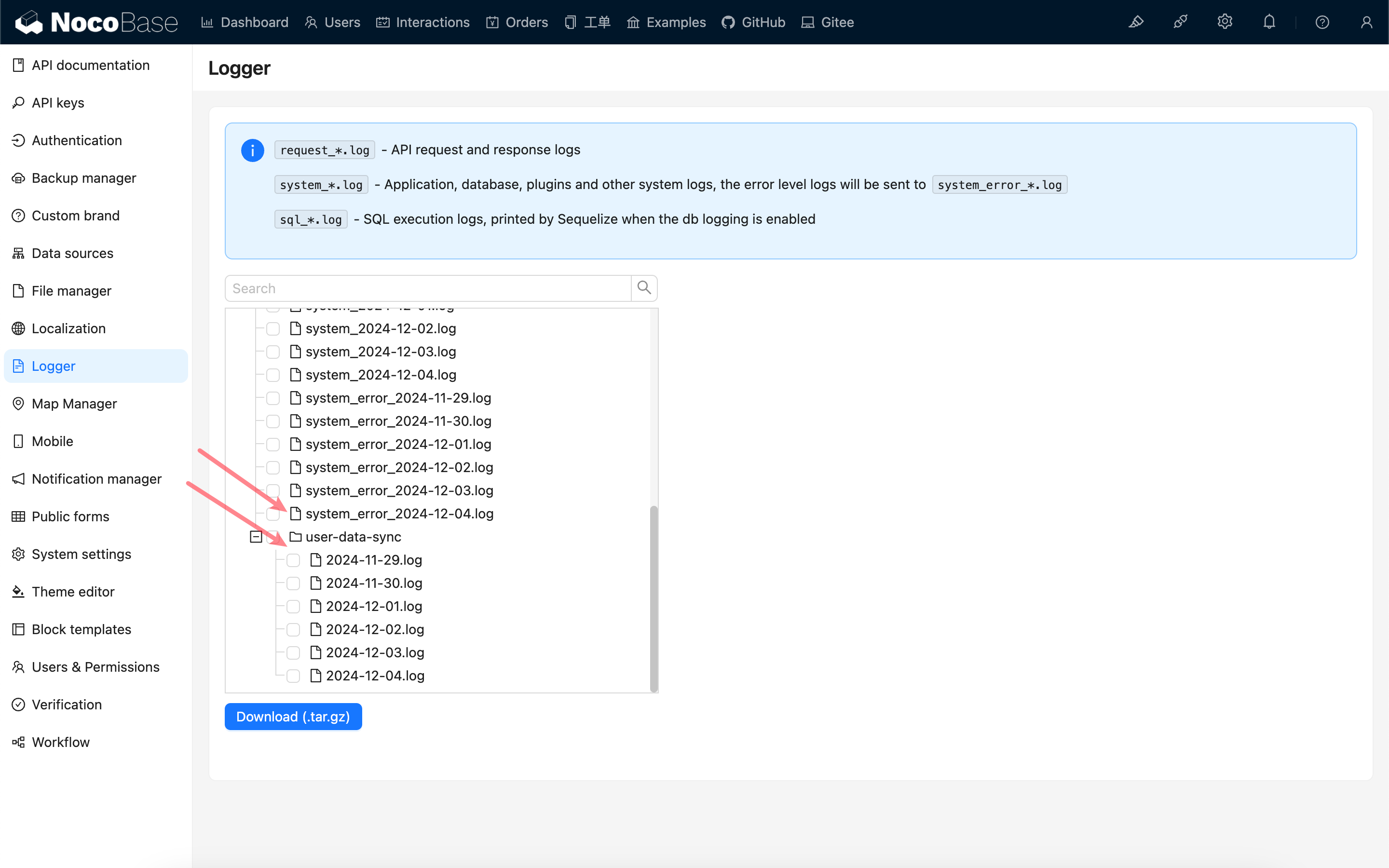
|
|
61
|
+

|