@nocobase/plugin-ai 2.2.0-beta.14 → 2.2.0-beta.15
This diff represents the content of publicly available package versions that have been released to one of the supported registries. The information contained in this diff is provided for informational purposes only and reflects changes between package versions as they appear in their respective public registries.
- package/client-v2.d.ts +1 -0
- package/dist/ai/docs/nocobase/interface-builder/blocks/data-blocks/comment.md +107 -0
- package/dist/ai/docs/nocobase/interface-builder/index.md +7 -6
- package/dist/ai/docs/nocobase/interface-builder/ui-layout/desktop.md +97 -0
- package/dist/ai/docs/nocobase/interface-builder/ui-layout/index.md +50 -0
- package/dist/ai/docs/nocobase/interface-builder/ui-layout/mobile.md +133 -0
- package/dist/ai/docs/nocobase/plugins/@nocobase/plugin-block-comment/index.md +14 -0
- package/dist/ai/docs/nocobase/runjs/context/ai.md +206 -0
- package/dist/ai/docs/nocobase/workflow/development/api.md +259 -77
- package/dist/ai/docs/nocobase/workflow/development/index.md +2 -1
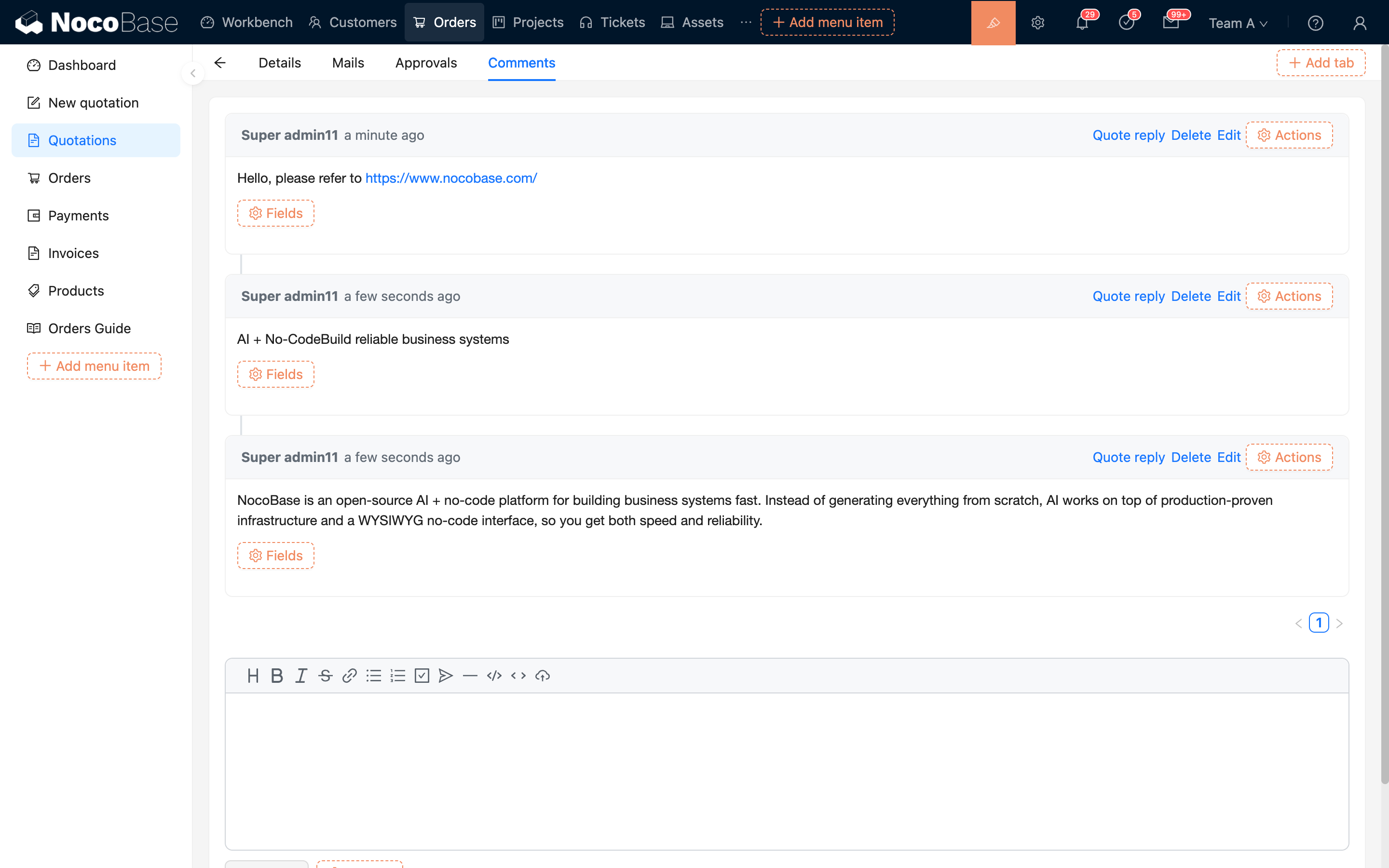
- package/dist/ai/docs/nocobase/workflow/development/migration.md +319 -0
- package/dist/ai/docs/nocobase/workflow/development/node.md +84 -51
- package/dist/ai/docs/nocobase/workflow/development/trigger.md +122 -20
- package/dist/ai/tools/formFiller.js +4 -3
- package/dist/ai/tools/subAgentWebSearch.js +20 -15
- package/dist/client/23.65ea8c37cd4b884b.js +10 -0
- package/dist/client/264.cc98933ef65608b6.js +10 -0
- package/dist/client/336.7a8a8853196ad779.js +11 -0
- package/dist/client/372.40eb52905e3f3049.js +10 -0
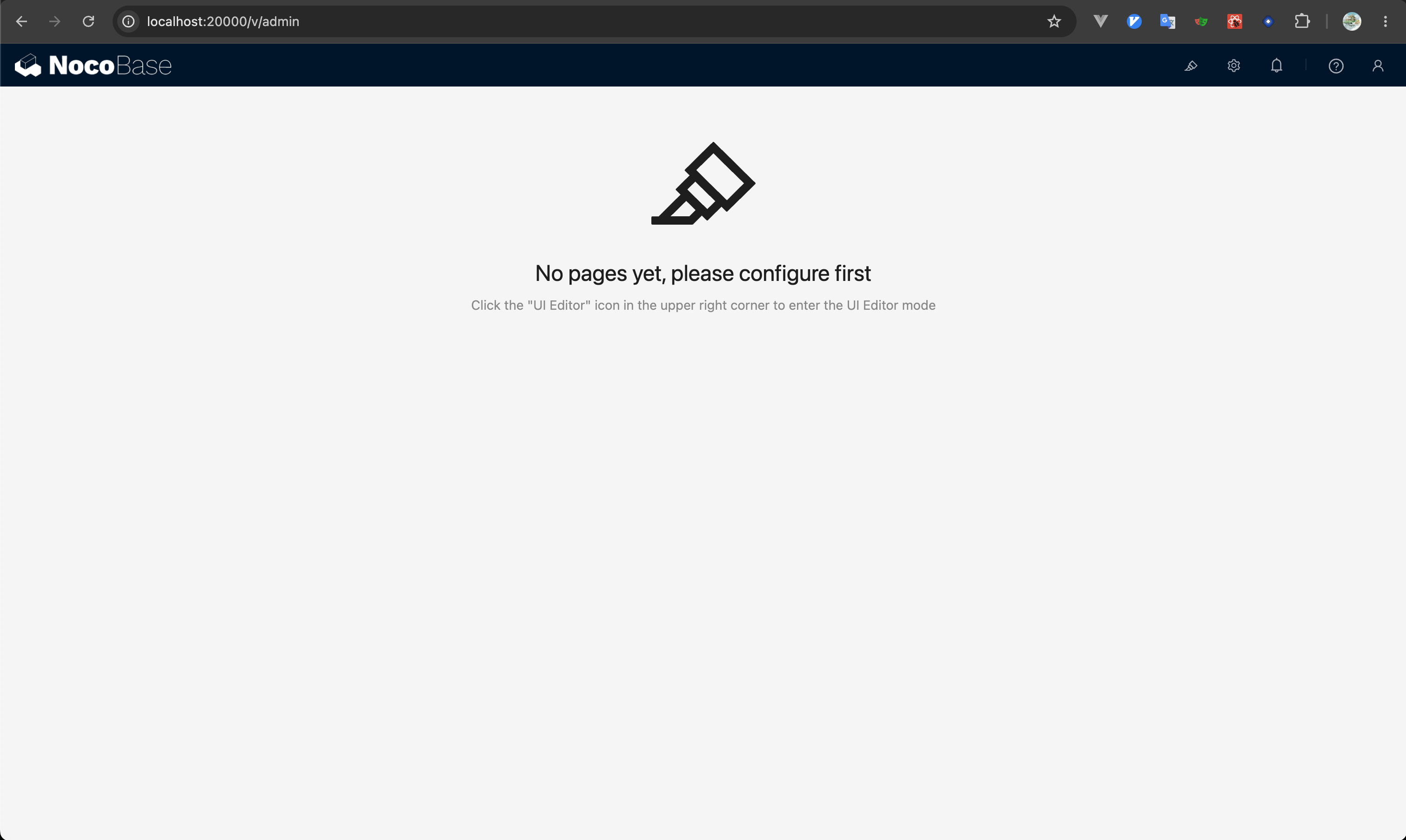
- package/dist/client/416.92b74ca47e4099c4.js +10 -0
- package/dist/client/446.d63c38d0309fe250.js +10 -0
- package/dist/client/525.203778500aca5d05.js +10 -0
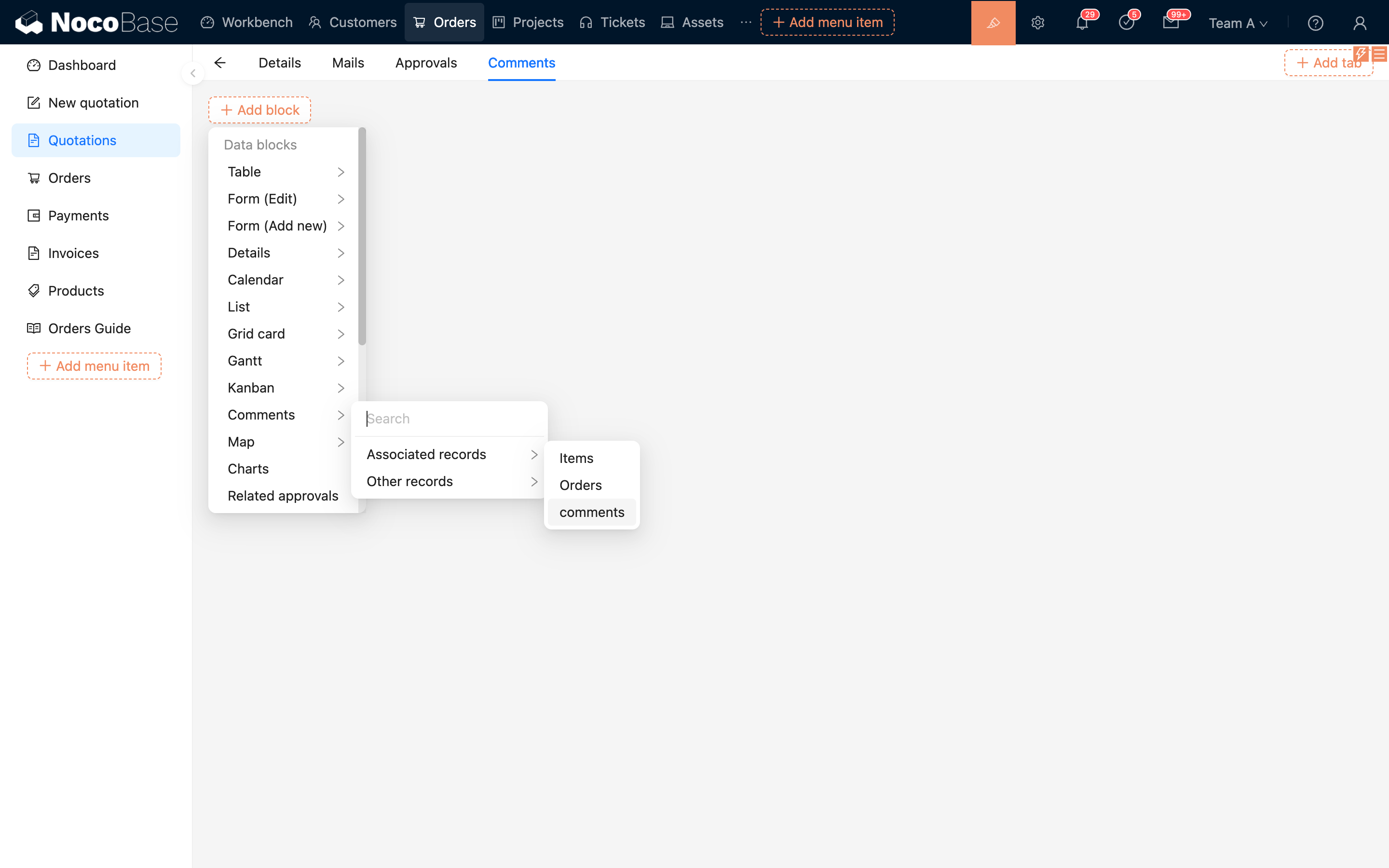
- package/dist/client/663.680bcf6272a8504d.js +10 -0
- package/dist/client/681.399948c18d753667.js +10 -0
- package/dist/client/705.380279da896021fb.js +10 -0
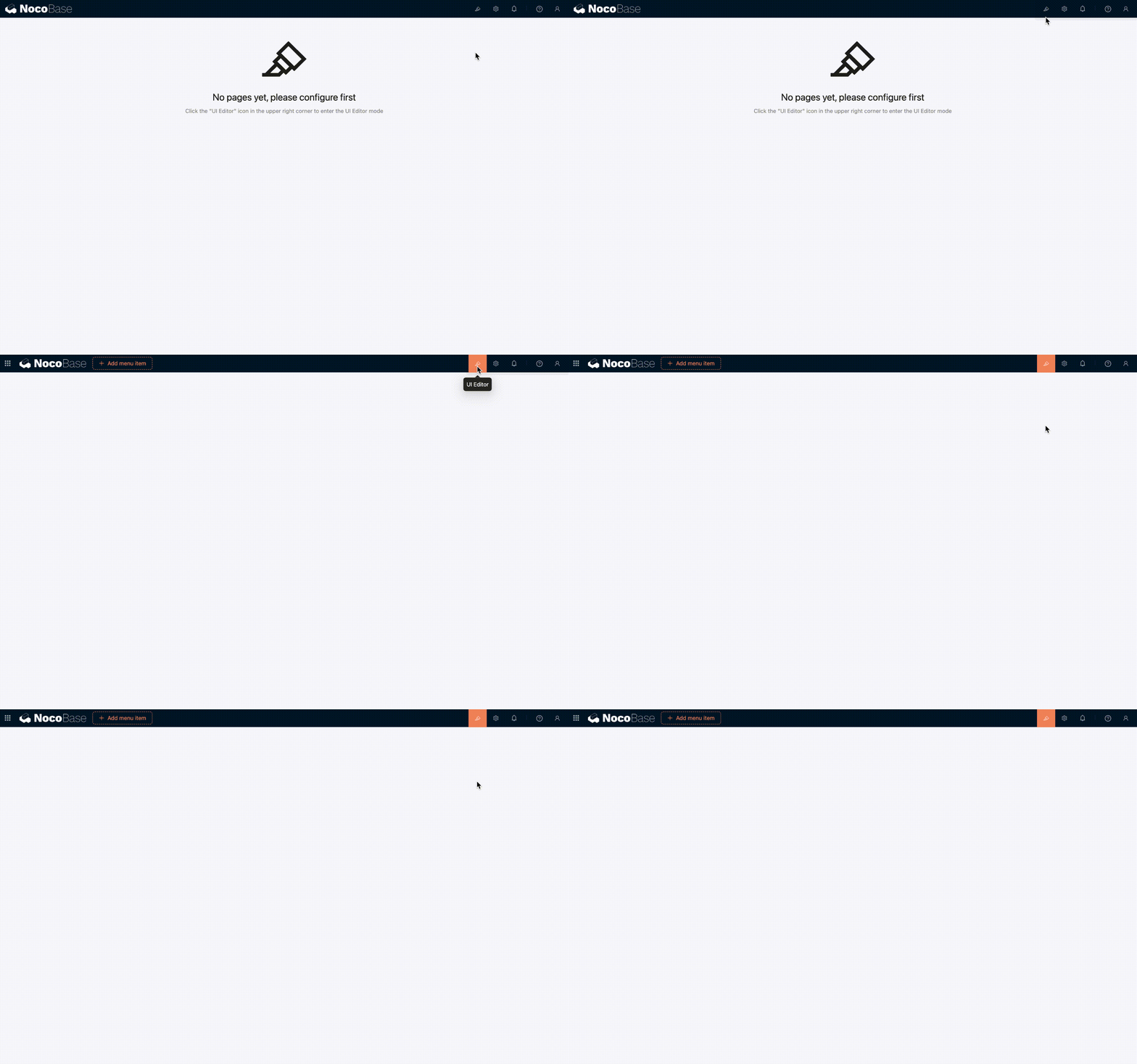
- package/dist/client/ai-employees/1.x/selector/AIContextCollector.d.ts +1 -4
- package/dist/client/ai-employees/permissions/PermissionsTab.d.ts +21 -5
- package/dist/client/index.d.ts +15 -20
- package/dist/client/index.js +8 -8
- package/dist/client/workflow/nodes/employee/index.d.ts +2 -23
- package/dist/client/workflow/nodes/llm/index.d.ts +2 -52
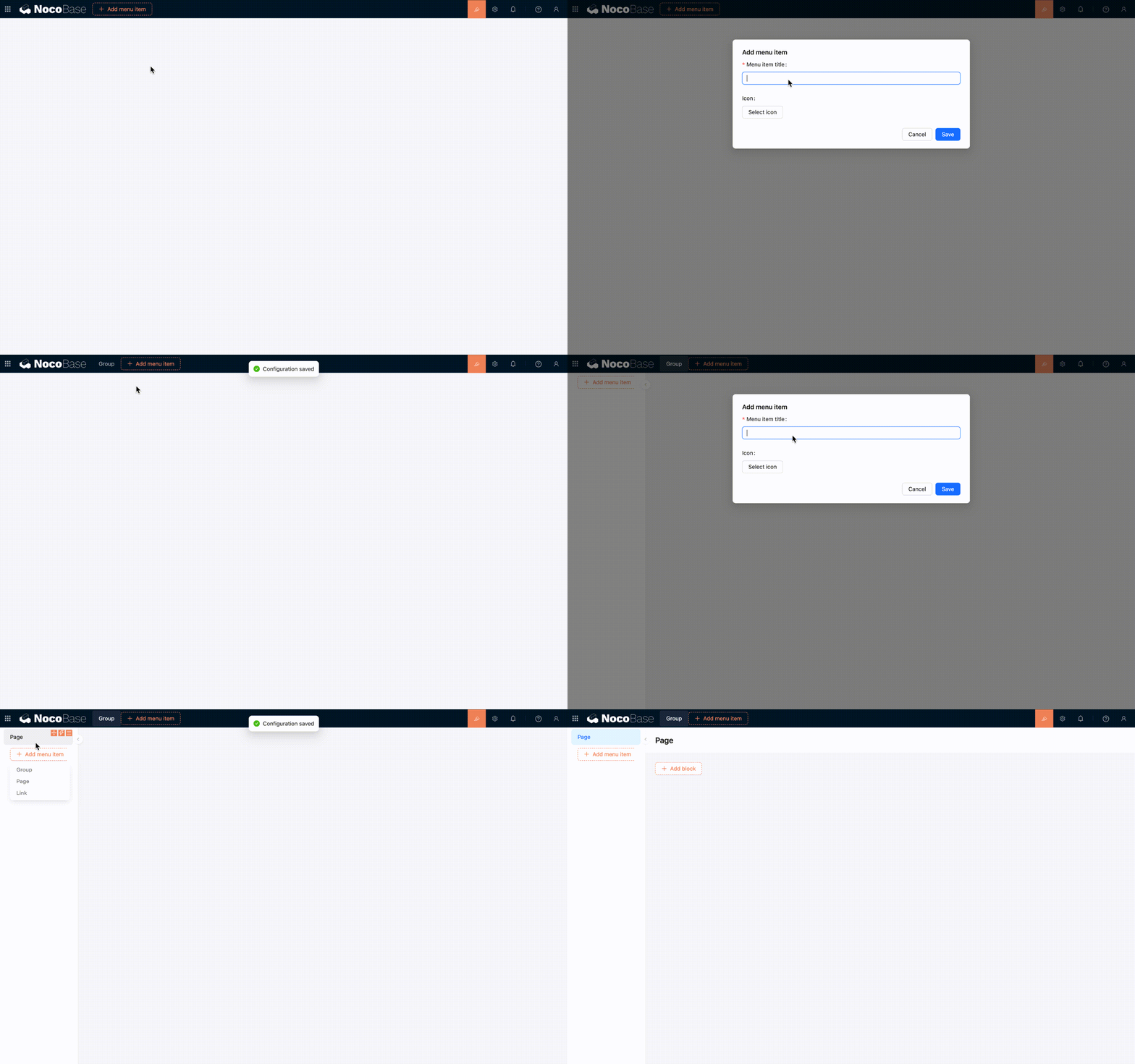
- package/dist/client/workflow/triggers/ai-employee/index.d.ts +2 -83
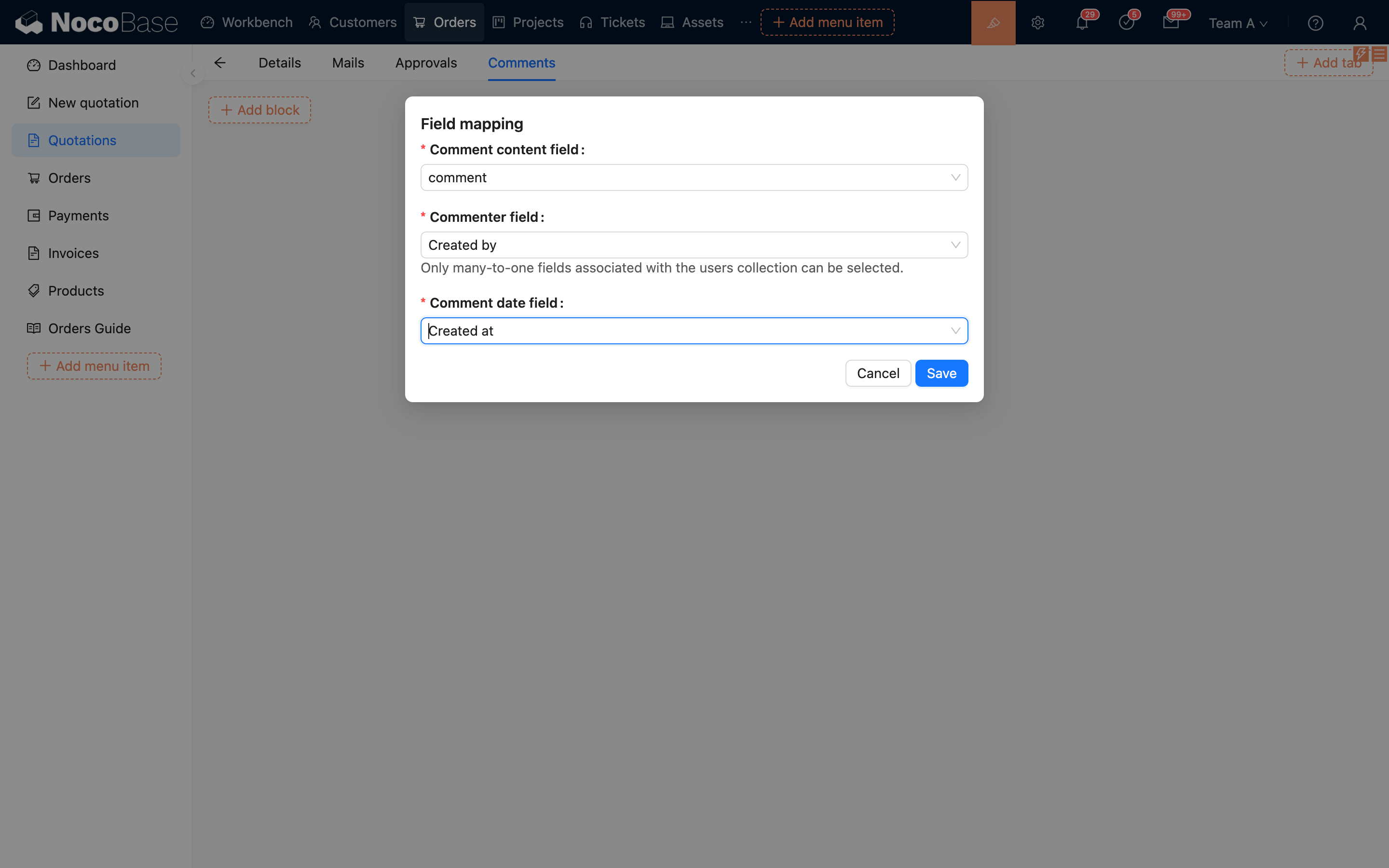
- package/dist/client-v2/23.1bcb6986b40723d8.js +10 -0
- package/dist/client-v2/264.be92ff6a4d2612f1.js +10 -0
- package/dist/client-v2/336.e406470429e0670e.js +11 -0
- package/dist/client-v2/372.8cc3fde09c9bec77.js +10 -0
- package/dist/client-v2/406.341be51205c674e0.js +10 -0
- package/dist/client-v2/416.0e1c2d9cde43b83d.js +10 -0
- package/dist/client-v2/446.073d450882db29fd.js +10 -0
- package/dist/client-v2/457.d72febb89e88fc00.js +10 -0
- package/dist/client-v2/663.342341f0b2b412d8.js +10 -0
- package/dist/client-v2/681.082f4f1c7b841983.js +10 -0
- package/dist/client-v2/705.1d10027ff8cfdf79.js +10 -0
- package/dist/{client/ai-employees/admin/AvatarSelect.d.ts → client-v2/ai-employees/AIEmployeeDropdown.d.ts} +8 -9
- package/dist/client-v2/ai-employees/AIEmployeeShortcut.d.ts +9 -2
- package/dist/{client → client-v2}/ai-employees/AddContextButton.d.ts +1 -1
- package/dist/{client → client-v2}/ai-employees/ai-coding/AICodingButton.d.ts +2 -1
- package/dist/{client/ai-employees/chatbox → client-v2/ai-employees/chatbox/components}/Actions.d.ts +2 -4
- package/dist/{client/ai-employees/chatbox → client-v2/ai-employees/chatbox/components}/AddLLMModal.d.ts +2 -4
- package/dist/client-v2/ai-employees/chatbox/components/Attachments.d.ts +27 -0
- package/dist/{client/ai-employees/permissions/Permissions.d.ts → client-v2/ai-employees/chatbox/components/ChatBox.d.ts} +2 -2
- package/dist/{client/ai-employees/chatbox → client-v2/ai-employees/chatbox/components}/ChatBoxLayout.d.ts +1 -1
- package/dist/{client/ai-employees/chatbox → client-v2/ai-employees/chatbox/components}/ContextItem.d.ts +1 -1
- package/dist/{client/ai-employees/admin/Employees.d.ts → client-v2/ai-employees/chatbox/components/DebugPanel.d.ts} +1 -1
- package/dist/{client/ai-employees/chatbox/markdown/Code.d.ts → client-v2/ai-employees/chatbox/components/Markdown.d.ts} +12 -5
- package/dist/{client/ai-employees/admin/ProfileSettings.d.ts → client-v2/ai-employees/chatbox/components/MessageContent.d.ts} +3 -2
- package/dist/client-v2/ai-employees/chatbox/components/MessageRenderers.d.ts +39 -0
- package/dist/{client/ai-employees/chatbox/generative-ui → client-v2/ai-employees/chatbox/components}/ToolCard.d.ts +7 -5
- package/dist/{client/ai-employees/admin/datasource/components/basic → client-v2/ai-employees/chatbox/components}/index.d.ts +5 -2
- package/dist/{client → client-v2}/ai-employees/chatbox/hooks/useChat.d.ts +21 -22
- package/dist/client-v2/ai-employees/chatbox/hooks/useChatBoxActions.d.ts +3 -2
- package/dist/{client → client-v2}/ai-employees/chatbox/hooks/useChatConversationActions.d.ts +2 -2
- package/dist/{client → client-v2}/ai-employees/chatbox/hooks/useChatMessageActions.d.ts +8 -4
- package/dist/{client → client-v2}/ai-employees/chatbox/hooks/useToolCallActions.d.ts +1 -1
- package/dist/client-v2/ai-employees/chatbox/hooks/useUploadFiles.d.ts +46 -0
- package/dist/{client → client-v2}/ai-employees/chatbox/hooks/useWorkflowTasks.d.ts +1 -1
- package/dist/{client → client-v2}/ai-employees/chatbox/model.d.ts +9 -2
- package/dist/client-v2/ai-employees/chatbox/roles.d.ts +162 -0
- package/dist/client-v2/ai-employees/chatbox/stores/chat-box.d.ts +1 -49
- package/dist/client-v2/ai-employees/chatbox/stores/chat-conversations.d.ts +2 -19
- package/dist/client-v2/ai-employees/chatbox/stores/chat-messages.d.ts +1 -46
- package/dist/{client → client-v2}/ai-employees/chatbox/stores/chat-tool-call.d.ts +1 -15
- package/dist/client-v2/ai-employees/chatbox/stores/chat-tools.d.ts +30 -0
- package/dist/client-v2/ai-employees/chatbox/stores/create-selectors.d.ts +31 -3
- package/dist/{client/ai-employees/chatbox/conversations/common.d.ts → client-v2/ai-employees/chatbox/stores/workflow-tasks.d.ts} +21 -4
- package/dist/client-v2/ai-employees/chatbox/utils/normalizeTriggerTaskOptions.d.ts +19 -0
- package/dist/{client → client-v2}/ai-employees/chatbox/utils.d.ts +26 -6
- package/dist/{client/ai-employees/data-visualization/context.d.ts → client-v2/ai-employees/context/chart-config.d.ts} +1 -1
- package/dist/{client → client-v2}/ai-employees/context/code-editor.d.ts +1 -1
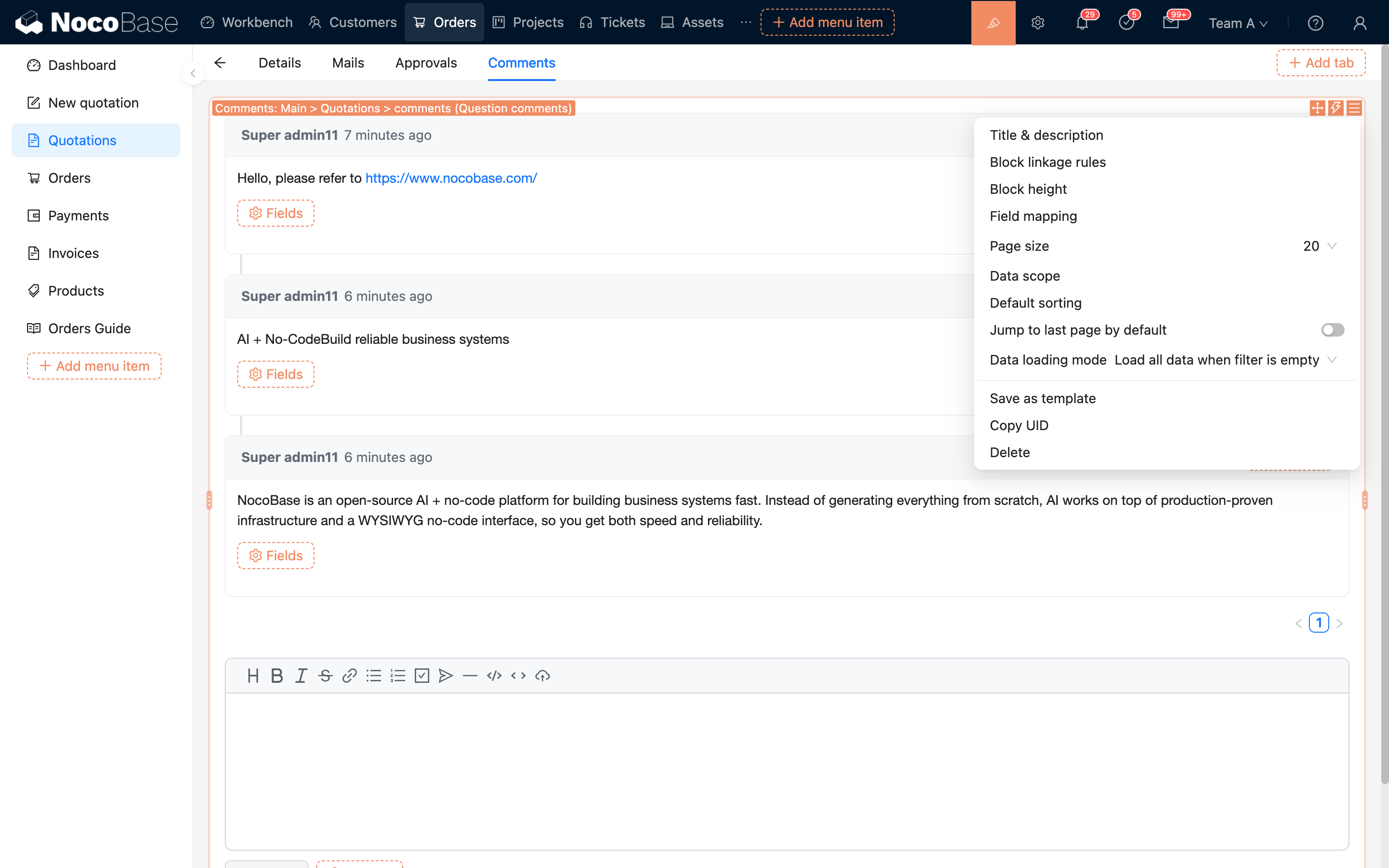
- package/dist/{client → client-v2}/ai-employees/context/datasource.d.ts +1 -1
- package/dist/{client → client-v2}/ai-employees/context/flow-models.d.ts +1 -1
- package/dist/{client/ai-employees/admin/datasource/components/DatasourceSettingDetail.d.ts → client-v2/ai-employees/data-modeling/setup.d.ts} +6 -5
- package/dist/{client → client-v2}/ai-employees/datasource/DatasourceSelector.d.ts +6 -2
- package/dist/{client/ai-employees/admin/datasource/flow-models/DatasourceSettingModel.d.ts → client-v2/ai-employees/flow/index.d.ts} +4 -6
- package/dist/{client → client-v2}/ai-employees/form-filler/tools/index.d.ts +1 -1
- package/dist/{client → client-v2}/ai-employees/stores/ai-selection.d.ts +4 -4
- package/dist/{client → client-v2}/ai-employees/stores/dialog-controller.d.ts +4 -4
- package/dist/{client/ai-employees/business-report/ui → client-v2/ai-employees/tools}/BusinessReportCard.d.ts +2 -2
- package/dist/{client/ai-employees/business-report/ui → client-v2/ai-employees/tools}/BusinessReportModal.d.ts +2 -2
- package/dist/{client/ai-employees/1.x/selector/withAISelectable.d.ts → client-v2/ai-employees/tools/ChartGeneratorCard.d.ts} +5 -4
- package/dist/{client/ai-employees/ai-coding/ui → client-v2/ai-employees/tools}/CodeToolCard.d.ts +1 -1
- package/dist/{client/ai-employees/data-modeling/ui → client-v2/ai-employees/tools}/DataModelingCard.d.ts +3 -5
- package/dist/{client/ai-employees/data-modeling/ui → client-v2/ai-employees/tools}/DataModelingModal.d.ts +4 -6
- package/dist/{client/ai-employees/sub-agents/ui → client-v2/ai-employees/tools}/SubAgentDispatchCard.d.ts +4 -9
- package/dist/{client/ai-employees/AISettingsProvider.d.ts → client-v2/ai-employees/tools/SuggestionsOptionsCard.d.ts} +6 -8
- package/dist/{client/ai-employees/workflow-tasks/ui → client-v2/ai-employees/tools}/WorkflowTaskOutputCard.d.ts +7 -2
- package/dist/{client/ai-employees/ai-coding/tools/context-tools.d.ts → client-v2/ai-employees/tools/ai-coding.d.ts} +3 -1
- package/dist/client-v2/ai-employees/tools/business-report-utils.d.ts +45 -0
- package/dist/{client/ai-employees/data-modeling/ui → client-v2/ai-employees/tools/data-modeling}/CollectionNode.d.ts +2 -3
- package/dist/{client/ai-employees/data-modeling/ui → client-v2/ai-employees/tools/data-modeling}/Diagram.d.ts +1 -1
- package/dist/{client/ai-employees/data-modeling/ui → client-v2/ai-employees/tools/data-modeling}/Table.d.ts +2 -2
- package/dist/client-v2/ai-employees/tools/data-modeling/legacy-template.d.ts +13 -0
- package/dist/client-v2/ai-employees/tools/data-modeling/runtime.d.ts +15 -0
- package/dist/{client/ai-employees → client-v2/ai-employees/tools}/data-modeling/types.d.ts +27 -4
- package/dist/client-v2/ai-employees/tools/data-modeling/useFieldInterfaceOptions.d.ts +151 -0
- package/dist/{client/ai-employees/data-visualization/tools/index.d.ts → client-v2/ai-employees/tools/data-visualization.d.ts} +1 -1
- package/dist/client-v2/ai-employees/tools/index.d.ts +32 -0
- package/dist/client-v2/ai-employees/types.d.ts +101 -7
- package/dist/client-v2/components/RemoteSelect.d.ts +43 -0
- package/dist/{client → client-v2}/debug-logger.d.ts +2 -2
- package/dist/client-v2/f0053e745af0ad03.svg +50 -0
- package/dist/client-v2/index.d.ts +9 -8
- package/dist/client-v2/index.js +37 -1
- package/dist/client-v2/llm-providers/forms.d.ts +44 -0
- package/dist/client-v2/llm-providers/index.d.ts +24 -0
- package/dist/{client/ai-employees/ai-coding/tools/index.d.ts → client-v2/llm-services/utils.d.ts} +5 -3
- package/dist/client-v2/locale.d.ts +14 -0
- package/dist/client-v2/manager/ai-manager.d.ts +55 -0
- package/dist/client-v2/models/ai-employees/AIEmployeeActionModel.d.ts +33 -0
- package/dist/client-v2/models/ai-employees/AIEmployeeShortcutModel.d.ts +44 -0
- package/dist/client-v2/pages/AdminSettingsPage.d.ts +24 -0
- package/dist/client-v2/pages/DatasourceSettingsPage.d.ts +62 -0
- package/dist/client-v2/pages/EmployeesPage.d.ts +62 -0
- package/dist/client-v2/pages/LLMServicesPage.d.ts +75 -0
- package/dist/client-v2/pages/MCPSettingsPage.d.ts +73 -0
- package/dist/client-v2/pages/drawerWidth.d.ts +10 -0
- package/dist/client-v2/pages/permissions/Permissions.d.ts +67 -0
- package/dist/client-v2/pages/permissions/PermissionsTab.d.ts +12 -0
- package/dist/client-v2/pages/useUnsavedChangesBeforeClose.d.ts +29 -0
- package/dist/client-v2/plugin.d.ts +33 -0
- package/dist/client-v2/repositories/AIConfigRepository.d.ts +3 -23
- package/dist/client-v2/runjs/registerAIEmployeeRunJSFacade.d.ts +20 -0
- package/dist/client-v2/workflow/components/FormValueRegistry.d.ts +12 -0
- package/dist/{client/components/ListCollapse.d.ts → client-v2/workflow/components/WorkflowListCollapse.d.ts} +4 -4
- package/dist/client-v2/workflow/constants.d.ts +26 -0
- package/dist/client-v2/workflow/nodes/employee/components/AIEmployeeFieldset.d.ts +11 -0
- package/dist/{client/ai-employees/common/CodeHighlight.d.ts → client-v2/workflow/nodes/employee/components/AIEmployeeSelect.d.ts} +5 -6
- package/dist/{client/ai-employees/ContextAwareTooltip.d.ts → client-v2/workflow/nodes/employee/components/Assignees.d.ts} +2 -1
- package/dist/client-v2/workflow/nodes/employee/components/FeedbackSettings.d.ts +17 -0
- package/dist/client-v2/workflow/nodes/employee/components/FileInputs.d.ts +11 -0
- package/dist/{client/ai-employees/AIEmployeesProvider.d.ts → client-v2/workflow/nodes/employee/components/MessageInputs.d.ts} +2 -3
- package/dist/client-v2/workflow/nodes/employee/components/ModelOptions.d.ts +17 -0
- package/dist/{client/ai-employees/admin/datasource/components/basic/CollectionCascader.d.ts → client-v2/workflow/nodes/employee/components/SkillSettings.d.ts} +6 -3
- package/dist/client-v2/workflow/nodes/employee/components/StructuredOutput.d.ts +11 -0
- package/dist/client-v2/workflow/nodes/employee/components/UserInput.d.ts +18 -0
- package/dist/client-v2/workflow/nodes/employee/components/WebSearchOptions.d.ts +16 -0
- package/dist/client-v2/workflow/nodes/employee/index.d.ts +23 -0
- package/dist/{client/ai-employees/AIEmployeeListItem.d.ts → client-v2/workflow/nodes/llm/components/LLMFieldset.d.ts} +3 -5
- package/dist/{client/admin-settings/AdminSettings.d.ts → client-v2/workflow/nodes/llm/components/Messages.d.ts} +2 -1
- package/dist/client-v2/workflow/nodes/llm/components/StructuredOutput.d.ts +11 -0
- package/dist/client-v2/workflow/nodes/llm/index.d.ts +30 -0
- package/dist/{client/ai-employees/1.x/selector/BlockSelector.d.ts → client-v2/workflow/register.d.ts} +2 -6
- package/dist/client-v2/workflow/triggers/ai-employee/AIEmployeeTriggerConfig.d.ts +11 -0
- package/dist/client-v2/workflow/triggers/ai-employee/Parameters.d.ts +11 -0
- package/dist/client-v2/workflow/triggers/ai-employee/index.d.ts +25 -0
- package/dist/client-v2/workflow/types.d.ts +128 -0
- package/dist/externalVersion.js +20 -25
- package/dist/locale/en-US.json +43 -1
- package/dist/locale/zh-CN.json +43 -1
- package/dist/node_modules/@langchain/mistralai/package.json +1 -1
- package/dist/node_modules/@langchain/xai/package.json +1 -1
- package/dist/node_modules/fs-extra/package.json +1 -1
- package/dist/node_modules/jsonrepair/package.json +1 -1
- package/dist/node_modules/just-bash/package.json +1 -1
- package/dist/node_modules/nodejs-snowflake/package.json +1 -1
- package/dist/node_modules/openai/package.json +1 -1
- package/dist/node_modules/zod/package.json +1 -1
- package/dist/server/ai-employees/ai-employee.js +7 -1
- package/dist/server/ai-employees/prompts.d.ts +2 -1
- package/dist/server/ai-employees/prompts.js +8 -2
- package/dist/server/ai-employees/tool-call-sanitizer.d.ts +1 -0
- package/dist/server/ai-employees/tool-call-sanitizer.js +2 -1
- package/dist/server/ai-employees/utils.js +11 -5
- package/dist/server/llm-providers/dashscope.d.ts +2 -1
- package/dist/server/llm-providers/dashscope.js +16 -1
- package/dist/server/llm-providers/deepseek.d.ts +2 -1
- package/dist/server/llm-providers/deepseek.js +33 -2
- package/dist/server/llm-providers/kimi/provider.d.ts +2 -1
- package/dist/server/llm-providers/kimi/provider.js +22 -2
- package/dist/server/llm-providers/mistral.d.ts +36 -2
- package/dist/server/llm-providers/mistral.js +62 -2
- package/dist/server/llm-providers/openai/completions.d.ts +2 -1
- package/dist/server/llm-providers/openai/completions.js +17 -1
- package/dist/server/llm-providers/openai/responses.d.ts +2 -1
- package/dist/server/llm-providers/openai/responses.js +17 -1
- package/dist/server/llm-providers/provider.d.ts +7 -0
- package/dist/server/llm-providers/provider.js +7 -1
- package/dist/server/manager/ai-context-datasource-manager.js +34 -7
- package/dist/server/manager/ai-manager.d.ts +2 -1
- package/dist/server/manager/ai-manager.js +4 -1
- package/package.json +5 -5
- package/dist/client/119.c6bf8c6433167d81.js +0 -10
- package/dist/client/170.d98eacdc00d9d527.js +0 -10
- package/dist/client/228.b4b709f93b86b6b9.js +0 -10
- package/dist/client/280.003b9e9788599244.js +0 -10
- package/dist/client/290.0f7f441d8a94f03c.js +0 -10
- package/dist/client/331.d547c95410476a69.js +0 -10
- package/dist/client/406.15c09d98faa2ccf1.js +0 -10
- package/dist/client/428.5eb4f53ddbb6a3b8.js +0 -10
- package/dist/client/462.d172d0fe91519e35.js +0 -10
- package/dist/client/486.dcac8f3fcec19c33.js +0 -10
- package/dist/client/502.2b4a51e0a8122e52.js +0 -10
- package/dist/client/525.33a9c8ec28be4ec4.js +0 -10
- package/dist/client/559.959c46d0056ccdc8.js +0 -10
- package/dist/client/561.7ec804ef39ec7dcd.js +0 -10
- package/dist/client/580.35ba54ff91b7fe6d.js +0 -10
- package/dist/client/597.b0d64948d74cf6cb.js +0 -10
- package/dist/client/604.89c674f35b52b4ef.js +0 -10
- package/dist/client/614.aa766080f6b99aab.js +0 -10
- package/dist/client/646.051c1437c9ca4fd4.js +0 -10
- package/dist/client/687.224e569a99cae4bb.js +0 -10
- package/dist/client/699.57c0a1acb723202a.js +0 -10
- package/dist/client/711.92cd94681fde7e05.js +0 -10
- package/dist/client/758.a9741e81911e53c3.js +0 -10
- package/dist/client/768.5177bff46ae71a5b.js +0 -10
- package/dist/client/792.abb57765453bcbcc.js +0 -10
- package/dist/client/820.f72ef2462b61d812.js +0 -10
- package/dist/client/832.0cf69e3f43c320b2.js +0 -10
- package/dist/client/927.d95c74ebb8fd51c9.js +0 -10
- package/dist/client/ai-employees/1.x/selector/AISelectorProvider.d.ts +0 -33
- package/dist/client/ai-employees/ProfileCard.d.ts +0 -15
- package/dist/client/ai-employees/admin/ChatSettings.d.ts +0 -10
- package/dist/client/ai-employees/admin/DataSourceSettings.d.ts +0 -10
- package/dist/client/ai-employees/admin/EnableSwitch.d.ts +0 -10
- package/dist/client/ai-employees/admin/InputsFormSettings.d.ts +0 -10
- package/dist/client/ai-employees/admin/KnowledgeBaseSettings.d.ts +0 -10
- package/dist/client/ai-employees/admin/ModelSettings.d.ts +0 -10
- package/dist/client/ai-employees/admin/SkillSettings.d.ts +0 -19
- package/dist/client/ai-employees/admin/SystemPrompt.d.ts +0 -10
- package/dist/client/ai-employees/admin/Templates.d.ts +0 -10
- package/dist/client/ai-employees/admin/ToolsSettings.d.ts +0 -17
- package/dist/client/ai-employees/admin/datasource/components/DatasourceSettingForm.d.ts +0 -10
- package/dist/client/ai-employees/admin/datasource/components/DatasourceSettingGrid.d.ts +0 -10
- package/dist/client/ai-employees/admin/datasource/components/basic/FieldsTransfer.d.ts +0 -17
- package/dist/client/ai-employees/admin/datasource/components/form-steps/CollectionSetting.d.ts +0 -17
- package/dist/client/ai-employees/admin/datasource/components/form-steps/FieldsSetting.d.ts +0 -15
- package/dist/client/ai-employees/admin/datasource/components/form-steps/FilterSetting.d.ts +0 -17
- package/dist/client/ai-employees/admin/datasource/components/form-steps/Preview.d.ts +0 -13
- package/dist/client/ai-employees/admin/datasource/components/form-steps/SortSetting.d.ts +0 -15
- package/dist/client/ai-employees/admin/datasource/components/form-steps/index.d.ts +0 -13
- package/dist/client/ai-employees/admin/datasource/components/index.d.ts +0 -9
- package/dist/client/ai-employees/admin/datasource/context.d.ts +0 -17
- package/dist/client/ai-employees/admin/datasource/flow-models/index.d.ts +0 -9
- package/dist/client/ai-employees/admin/datasource/index.d.ts +0 -10
- package/dist/client/ai-employees/admin/hooks.d.ts +0 -39
- package/dist/client/ai-employees/admin/mcp/MCPSettings.d.ts +0 -10
- package/dist/client/ai-employees/admin/mcp/MCPToolsList.d.ts +0 -19
- package/dist/client/ai-employees/admin/mcp/context.d.ts +0 -15
- package/dist/client/ai-employees/admin/mcp/schemas.d.ts +0 -1314
- package/dist/client/ai-employees/ai-coding/CodeHistory.d.ts +0 -10
- package/dist/client/ai-employees/ai-coding/markdown/Code.d.ts +0 -16
- package/dist/client/ai-employees/avatars.d.ts +0 -9
- package/dist/client/ai-employees/built-in/utils.d.ts +0 -15
- package/dist/client/ai-employees/business-report/tools/index.d.ts +0 -10
- package/dist/client/ai-employees/business-report/ui/report-utils.d.ts +0 -38
- package/dist/client/ai-employees/chart-generator/tools/index.d.ts +0 -10
- package/dist/client/ai-employees/chart-generator/ui/ECharts.d.ts +0 -13
- package/dist/client/ai-employees/chatbox/AIThinking.d.ts +0 -12
- package/dist/client/ai-employees/chatbox/Attachment.d.ts +0 -14
- package/dist/client/ai-employees/chatbox/AttachmentsHeader.d.ts +0 -10
- package/dist/client/ai-employees/chatbox/ChatBox.d.ts +0 -12
- package/dist/client/ai-employees/chatbox/ContextItemsHeader.d.ts +0 -10
- package/dist/client/ai-employees/chatbox/DebugPanel.d.ts +0 -16
- package/dist/client/ai-employees/chatbox/EditMessageHeader.d.ts +0 -10
- package/dist/client/ai-employees/chatbox/HintMessageHeader.d.ts +0 -10
- package/dist/client/ai-employees/chatbox/MessageRenderer.d.ts +0 -33
- package/dist/client/ai-employees/chatbox/SenderFooter.d.ts +0 -13
- package/dist/client/ai-employees/chatbox/SenderHeader.d.ts +0 -10
- package/dist/client/ai-employees/chatbox/SenderPrefix.d.ts +0 -10
- package/dist/client/ai-employees/chatbox/Upload.d.ts +0 -12
- package/dist/client/ai-employees/chatbox/VirtualList.d.ts +0 -28
- package/dist/client/ai-employees/chatbox/conversations/ConversationsList.d.ts +0 -13
- package/dist/client/ai-employees/chatbox/conversations/WorkflowTasksList.d.ts +0 -13
- package/dist/client/ai-employees/chatbox/conversations/index.d.ts +0 -9
- package/dist/client/ai-employees/chatbox/generative-ui/DefaultToolCard.d.ts +0 -16
- package/dist/client/ai-employees/chatbox/hooks/useChatBoxActions.d.ts +0 -18
- package/dist/client/ai-employees/chatbox/hooks/useUploadFiles.d.ts +0 -12
- package/dist/client/ai-employees/chatbox/markdown/ECharts.d.ts +0 -10
- package/dist/client/ai-employees/chatbox/markdown/Form.d.ts +0 -10
- package/dist/client/ai-employees/chatbox/markdown/Generating.d.ts +0 -10
- package/dist/client/ai-employees/chatbox/markdown/Markdown.d.ts +0 -13
- package/dist/client/ai-employees/chatbox/roles.d.ts +0 -32
- package/dist/client/ai-employees/chatbox/stores/chat-box.d.ts +0 -9
- package/dist/client/ai-employees/chatbox/stores/chat-conversations.d.ts +0 -9
- package/dist/client/ai-employees/chatbox/stores/chat-messages.d.ts +0 -9
- package/dist/client/ai-employees/chatbox/stores/chat-tools.d.ts +0 -51
- package/dist/client/ai-employees/chatbox/stores/create-selectors.d.ts +0 -18
- package/dist/client/ai-employees/chatbox/stores/workflow-tasks.d.ts +0 -45
- package/dist/client/ai-employees/context/classic-pages.d.ts +0 -10
- package/dist/client/ai-employees/data-modeling/Table.d.ts +0 -12
- package/dist/client/ai-employees/data-modeling/setup.d.ts +0 -10
- package/dist/client/ai-employees/data-modeling/tools/index.d.ts +0 -10
- package/dist/client/ai-employees/data-modeling/ui/useFieldInterfaceOptions.d.ts +0 -14
- package/dist/client/ai-employees/datasource/DatasourceList.d.ts +0 -17
- package/dist/client/ai-employees/datasource/index.d.ts +0 -9
- package/dist/client/ai-employees/flow/events/index.d.ts +0 -9
- package/dist/client/ai-employees/flow/index.d.ts +0 -36
- package/dist/client/ai-employees/flow/models/AIEmployeeActionModel.d.ts +0 -18
- package/dist/client/ai-employees/flow/models/AIEmployeeShortcutModel.d.ts +0 -30
- package/dist/client/ai-employees/shortcuts/ShortcutList.d.ts +0 -10
- package/dist/client/ai-employees/shortcuts/useShortcuts.d.ts +0 -13
- package/dist/client/ai-employees/stores/context-aware.d.ts +0 -19
- package/dist/client/ai-employees/sub-agents/tools/index.d.ts +0 -10
- package/dist/client/ai-employees/suggestions/tools/index.d.ts +0 -10
- package/dist/client/ai-employees/suggestions/ui/SuggestionsOptions.d.ts +0 -13
- package/dist/client/ai-employees/types.d.ts +0 -259
- package/dist/client/ai-employees/workflow-tasks/tools/index.d.ts +0 -10
- package/dist/client/chat-settings/Messages.d.ts +0 -11
- package/dist/client/chat-settings/StructuredOutput.d.ts +0 -11
- package/dist/client/components/skill-settings.d.ts +0 -22
- package/dist/client/features/components.d.ts +0 -9
- package/dist/client/features/feature-manager.d.ts +0 -9
- package/dist/client/features/index.d.ts +0 -9
- package/dist/client/features/vector-database-provider.d.ts +0 -9
- package/dist/client/features/vector-store-provider.d.ts +0 -9
- package/dist/client/llm-providers/anthropic/ModelSettings.d.ts +0 -10
- package/dist/client/llm-providers/anthropic/ProviderSettings.d.ts +0 -10
- package/dist/client/llm-providers/anthropic/index.d.ts +0 -10
- package/dist/client/llm-providers/components/Chat.d.ts +0 -10
- package/dist/client/llm-providers/components/ModelSelect.d.ts +0 -10
- package/dist/client/llm-providers/dashscope/ModelSettings.d.ts +0 -10
- package/dist/client/llm-providers/dashscope/ProviderSettings.d.ts +0 -10
- package/dist/client/llm-providers/dashscope/index.d.ts +0 -10
- package/dist/client/llm-providers/deepseek/ModelSettings.d.ts +0 -10
- package/dist/client/llm-providers/deepseek/index.d.ts +0 -10
- package/dist/client/llm-providers/google-genai/MessageRenderer.d.ts +0 -13
- package/dist/client/llm-providers/google-genai/ModelSettings.d.ts +0 -10
- package/dist/client/llm-providers/google-genai/ProviderSettings.d.ts +0 -10
- package/dist/client/llm-providers/google-genai/index.d.ts +0 -10
- package/dist/client/llm-providers/kimi/ModelSettings.d.ts +0 -10
- package/dist/client/llm-providers/kimi/index.d.ts +0 -10
- package/dist/client/llm-providers/mimo/ModelSettings.d.ts +0 -10
- package/dist/client/llm-providers/mimo/index.d.ts +0 -10
- package/dist/client/llm-providers/mistral/ModelSettings.d.ts +0 -10
- package/dist/client/llm-providers/mistral/index.d.ts +0 -10
- package/dist/client/llm-providers/ollama/ModelSettings.d.ts +0 -10
- package/dist/client/llm-providers/ollama/ProviderSettings.d.ts +0 -10
- package/dist/client/llm-providers/ollama/index.d.ts +0 -10
- package/dist/client/llm-providers/openai/completions/ModelSettings.d.ts +0 -10
- package/dist/client/llm-providers/openai/completions/index.d.ts +0 -10
- package/dist/client/llm-providers/openai/components/ProviderSettings.d.ts +0 -10
- package/dist/client/llm-providers/openai/responses/ModelSettings.d.ts +0 -10
- package/dist/client/llm-providers/openai/responses/index.d.ts +0 -10
- package/dist/client/llm-providers/orcarouter/ModelSettings.d.ts +0 -10
- package/dist/client/llm-providers/orcarouter/ProviderSettings.d.ts +0 -10
- package/dist/client/llm-providers/orcarouter/index.d.ts +0 -10
- package/dist/client/llm-providers/tongyi/ModelSettings.d.ts +0 -10
- package/dist/client/llm-providers/tongyi/ProviderSettings.d.ts +0 -10
- package/dist/client/llm-providers/tongyi/index.d.ts +0 -10
- package/dist/client/llm-providers/xai/ModelSettings.d.ts +0 -10
- package/dist/client/llm-providers/xai/index.d.ts +0 -10
- package/dist/client/llm-services/LLMServices.d.ts +0 -13
- package/dist/client/llm-services/component/DefaultModelSelect.d.ts +0 -10
- package/dist/client/llm-services/component/EnabledModelsSelect.d.ts +0 -23
- package/dist/client/llm-services/component/LLMTestFlight.d.ts +0 -10
- package/dist/client/llm-services/component/ModelOptionsSettings.d.ts +0 -10
- package/dist/client/llm-services/component/UnifiedModelSettings.d.ts +0 -10
- package/dist/client/llm-services/hooks/useLLMServiceCatalog.d.ts +0 -18
- package/dist/client/llm-services/llm-providers.d.ts +0 -27
- package/dist/client/llm-services/utils.d.ts +0 -35
- package/dist/client/manager/ai-feature-manager.d.ts +0 -9
- package/dist/client/manager/ai-manager.d.ts +0 -35
- package/dist/client/repositories/AIConfigRepository.d.ts +0 -60
- package/dist/client/repositories/hooks/useAIConfigRepository.d.ts +0 -10
- package/dist/client/schemas/llms.d.ts +0 -347
- package/dist/client/workflow/nodes/employee/components/AIEmployeeSelect.d.ts +0 -10
- package/dist/client/workflow/nodes/employee/components/assigness.d.ts +0 -11
- package/dist/client/workflow/nodes/employee/components/file-inputs.d.ts +0 -10
- package/dist/client/workflow/nodes/employee/components/message-inputs.d.ts +0 -12
- package/dist/client/workflow/nodes/employee/components/model-options.d.ts +0 -10
- package/dist/client/workflow/nodes/employee/components/structured-output.d.ts +0 -10
- package/dist/client/workflow/nodes/employee/components/users-select.d.ts +0 -15
- package/dist/client/workflow/nodes/employee/components/web-search-options.d.ts +0 -10
- package/dist/client/workflow/nodes/employee/configuration.d.ts +0 -12
- package/dist/client/workflow/nodes/employee/flow-models/feedback.d.ts +0 -14
- package/dist/client/workflow/nodes/employee/flow-models/task.d.ts +0 -13
- package/dist/client/workflow/nodes/llm/ModelSettings.d.ts +0 -11
- package/dist/client/workflow/triggers/ai-employee/Parameters.d.ts +0 -13
- /package/dist/{client → client-v2}/ai-employees/AISelection.d.ts +0 -0
- /package/dist/{client → client-v2}/ai-employees/AISelectionControl.d.ts +0 -0
- /package/dist/{client → client-v2}/ai-employees/ai-coding/prompts.d.ts +0 -0
- /package/dist/{client → client-v2}/ai-employees/ai-coding/setup.d.ts +0 -0
- /package/dist/{client/ai-employees/chatbox/AIEmployeeSwitch.d.ts → client-v2/ai-employees/chatbox/components/AIEmployeeSwitcher.d.ts} +0 -0
- /package/dist/{client/ai-employees/chatbox → client-v2/ai-employees/chatbox/components}/ChatButton.d.ts +0 -0
- /package/dist/{client/ai-employees/chatbox/conversations → client-v2/ai-employees/chatbox/components}/Conversations.d.ts +0 -0
- /package/dist/{client/ai-employees/chatbox → client-v2/ai-employees/chatbox/components}/Messages.d.ts +0 -0
- /package/dist/{client/ai-employees/chatbox → client-v2/ai-employees/chatbox/components}/ModelSwitcher.d.ts +0 -0
- /package/dist/{client/ai-employees/chatbox → client-v2/ai-employees/chatbox/components}/SearchSwitch.d.ts +0 -0
- /package/dist/{client/ai-employees/chatbox → client-v2/ai-employees/chatbox/components}/Sender.d.ts +0 -0
- /package/dist/{client/ai-employees/chatbox/generative-ui → client-v2/ai-employees/chatbox/components}/ToolModal.d.ts +0 -0
- /package/dist/{client/ai-employees/chatbox → client-v2/ai-employees/chatbox/components}/UserPrompt.d.ts +0 -0
- /package/dist/{client → client-v2}/ai-employees/chatbox/hooks/useChatBoxEffect.d.ts +0 -0
- /package/dist/{client → client-v2}/ai-employees/chatbox/hooks/useLoadMoreObserver.d.ts +0 -0
- /package/dist/client-v2/ai-employees/{chatbox/stores → stores}/global-store.d.ts +0 -0
- /package/dist/{client/ai-employees/flow/models → client-v2/models/ai-employees}/AIEmployeeShortcutListModel.d.ts +0 -0
- /package/dist/{client/ai-employees/flow/models → client-v2/models/ai-employees}/index.d.ts +0 -0
- /package/dist/{client/ai-employees/flow/events/ai-context-selection.d.ts → client-v2/workflow/components/index.d.ts} +0 -0
package/client-v2.d.ts
CHANGED
|
@@ -0,0 +1,107 @@
|
|
|
1
|
+
---
|
|
2
|
+
pkg: "@nocobase/plugin-block-comment"
|
|
3
|
+
title: "Comment Block"
|
|
4
|
+
description: "Comment block: view and create comments in record details, pop-ups, and similar scenarios, with field mapping, pagination, data scope, default sorting, and auto jump to last page."
|
|
5
|
+
keywords: "Comment Block,CommentBlock,comment collection,field mapping,data scope,default sorting,interface builder,NocoBase"
|
|
6
|
+
---
|
|
7
|
+
|
|
8
|
+
# Comment Block
|
|
9
|
+
|
|
10
|
+
## Introduction
|
|
11
|
+
|
|
12
|
+
The Comment block adds commenting capabilities to business records. You can add it to detail pages or pop-ups for tasks, articles, tickets, customers, and other records, so users can view, reply to, and create comments around the current record.
|
|
13
|
+
|
|
14
|
+
|
|
15
|
+
|
|
16
|
+
:::tip
|
|
17
|
+
|
|
18
|
+
The Comment block does not create a collection by itself. Before using it, prepare a collection for storing comments and configure fields such as comment content, commenter, comment owner, and comment time.
|
|
19
|
+
|
|
20
|
+
:::
|
|
21
|
+
|
|
22
|
+
## Add a block
|
|
23
|
+
|
|
24
|
+
The Comment block is usually added to the detail page or pop-up of a business record.
|
|
25
|
+
|
|
26
|
+
|
|
27
|
+
|
|
28
|
+
1. Open the target record detail page or pop-up
|
|
29
|
+
2. Click "Add block"
|
|
30
|
+
3. Select "Comment"
|
|
31
|
+
4. Select the collection used to store comments
|
|
32
|
+
5. Complete field mapping as prompted
|
|
33
|
+
|
|
34
|
+
If the Comment block is created from an association, NocoBase will try to automatically identify the comment owner field and the current record value based on the current association. In this case, "Comment owner field" and "Comment owner field value" are filled automatically, and usually do not need manual configuration.
|
|
35
|
+
|
|
36
|
+
|
|
37
|
+
|
|
38
|
+
If the block is created directly from the comment collection, you need to manually configure the comment owner field and value.
|
|
39
|
+
|
|
40
|
+
.png)
|
|
41
|
+
|
|
42
|
+
## Field mapping
|
|
43
|
+
|
|
44
|
+
The Comment block uses "Field mapping" to know how each comment should be displayed and saved.
|
|
45
|
+
|
|
46
|
+
| Configuration | Description |
|
|
47
|
+
| --- | --- |
|
|
48
|
+
| Comment content field | Select the field used to store the comment body. |
|
|
49
|
+
| Commenter field | Select a many-to-one field associated with the users collection. |
|
|
50
|
+
| Comment owner field | Select the field used to store the current business record identifier. |
|
|
51
|
+
| Comment owner field value | Specify the current business record value, such as `{{ ctx.popup.record.id }}`. |
|
|
52
|
+
| Comment date field | Select the comment time field, used for display and default sorting. |
|
|
53
|
+
|
|
54
|
+
### Comment owner field
|
|
55
|
+
|
|
56
|
+
"Comment owner field" is used to filter comments for the current record, and is also written when a new comment is created.
|
|
57
|
+
|
|
58
|
+
When selected manually, the dropdown only shows ordinary scalar fields and does not show association fields. Common configurations are:
|
|
59
|
+
|
|
60
|
+
| Business collection | Owner field in comment collection | Comment owner field value |
|
|
61
|
+
| --- | --- | --- |
|
|
62
|
+
| Tasks | `taskId` | `{{ ctx.popup.record.id }}` |
|
|
63
|
+
| Articles | `postId` | `{{ ctx.popup.record.id }}` |
|
|
64
|
+
| Tickets | `ticketId` | `{{ ctx.popup.record.id }}` |
|
|
65
|
+
|
|
66
|
+
If the current record uses a unique identifier other than `id`, change "Comment owner field value" to the corresponding field, such as `{{ ctx.popup.record.uuid }}`.
|
|
67
|
+
|
|
68
|
+
### Automatic mapping from associations
|
|
69
|
+
|
|
70
|
+
If the block is created from an association of the business record, the Comment block prioritizes the foreign key field of that association as the comment owner field, and uses the current record value as the comment owner field value.
|
|
71
|
+
|
|
72
|
+

|
|
73
|
+
|
|
74
|
+
For example, if there is a one-to-many association between the task collection and the task comment collection, and the foreign key field in the task comment collection is `taskId`, then when you add a Comment block from the association in the task detail page, the block automatically uses:
|
|
75
|
+
|
|
76
|
+
- Comment owner field: `taskId`
|
|
77
|
+
- Comment owner field value: the identifier of the current task record
|
|
78
|
+
|
|
79
|
+
This approach is suitable for most scenarios and reduces manual configuration errors.
|
|
80
|
+
|
|
81
|
+
## Block settings
|
|
82
|
+
|
|
83
|
+
|
|
84
|
+
|
|
85
|
+
### Page size
|
|
86
|
+
|
|
87
|
+
Set how many comments are displayed on each page. Available values include `5`, `10`, `20`, `50`, `100`, and `200`.
|
|
88
|
+
|
|
89
|
+
### Data scope
|
|
90
|
+
|
|
91
|
+
Set the data filtering scope for the comment list. You can add more conditions here, such as showing only comments that match certain status or permission conditions.
|
|
92
|
+
|
|
93
|
+
For more details, see [Set data scope](../block-settings/data-scope.md).
|
|
94
|
+
|
|
95
|
+
### Default sorting rule
|
|
96
|
+
|
|
97
|
+
Set the default sorting rule for the comment list. Usually, you can sort by the comment date field in ascending or descending order.
|
|
98
|
+
|
|
99
|
+
If no default sorting rule is configured separately, the Comment block prioritizes the "Comment date field" as the default sorting field.
|
|
100
|
+
|
|
101
|
+
For more details, see [Set sorting rule](../block-settings/sorting-rule.md).
|
|
102
|
+
|
|
103
|
+
### Auto jump to last page
|
|
104
|
+
|
|
105
|
+
Disabled by default. When disabled, the Comment block stays on the first page after opening.
|
|
106
|
+
|
|
107
|
+
When enabled, the Comment block jumps to the last page on first load. This is suitable when you want users to see the latest comments first.
|
|
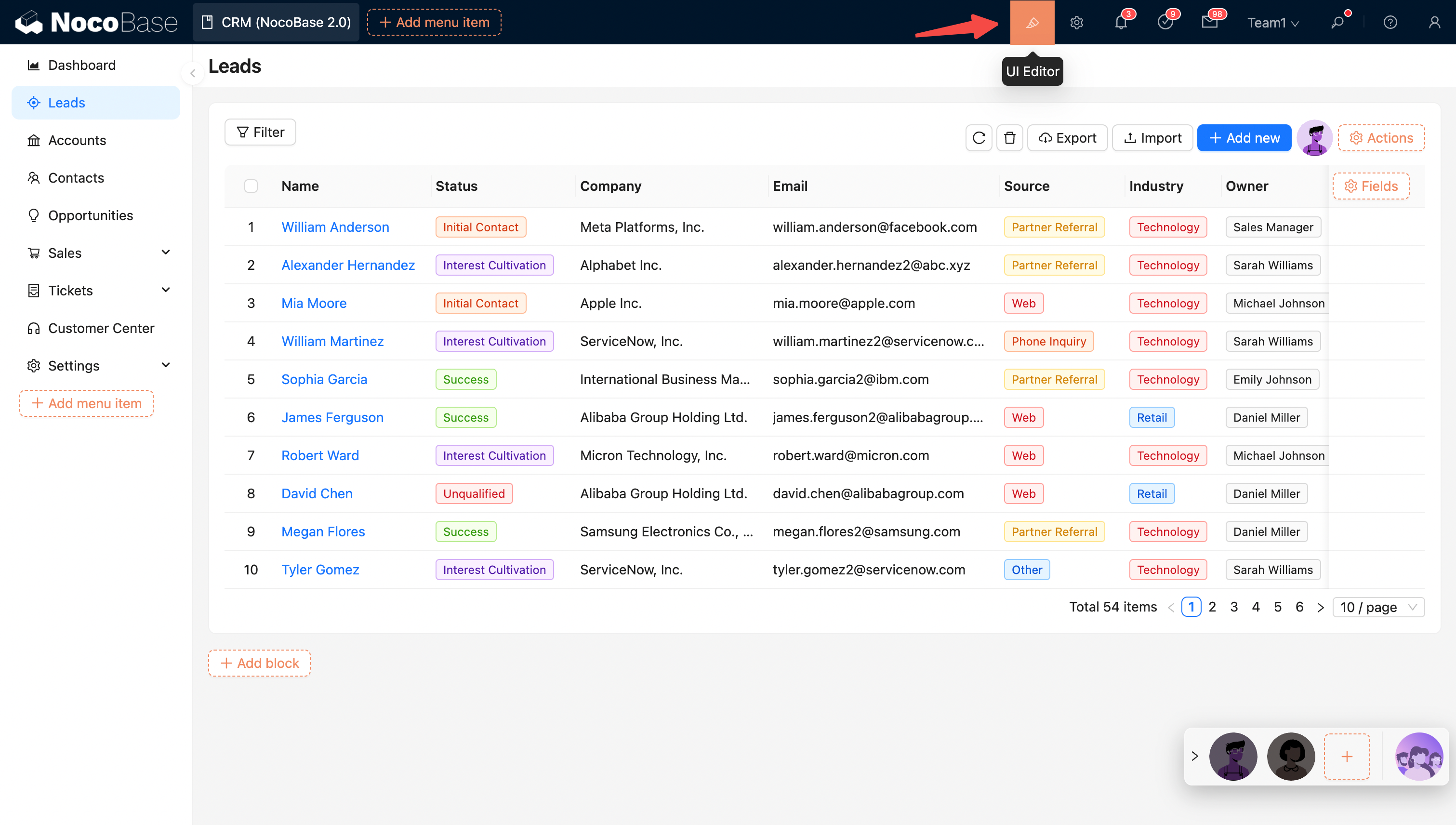
@@ -16,12 +16,9 @@ Edit mode:
|
|
|
16
16
|
|
|
17
17
|
|
|
18
18
|
|
|
19
|
-
## Layout
|
|
19
|
+
## UI Layout
|
|
20
20
|
|
|
21
|
-
NocoBase
|
|
22
|
-
|
|
23
|
-
|
|
24
|
-
|
|
21
|
+
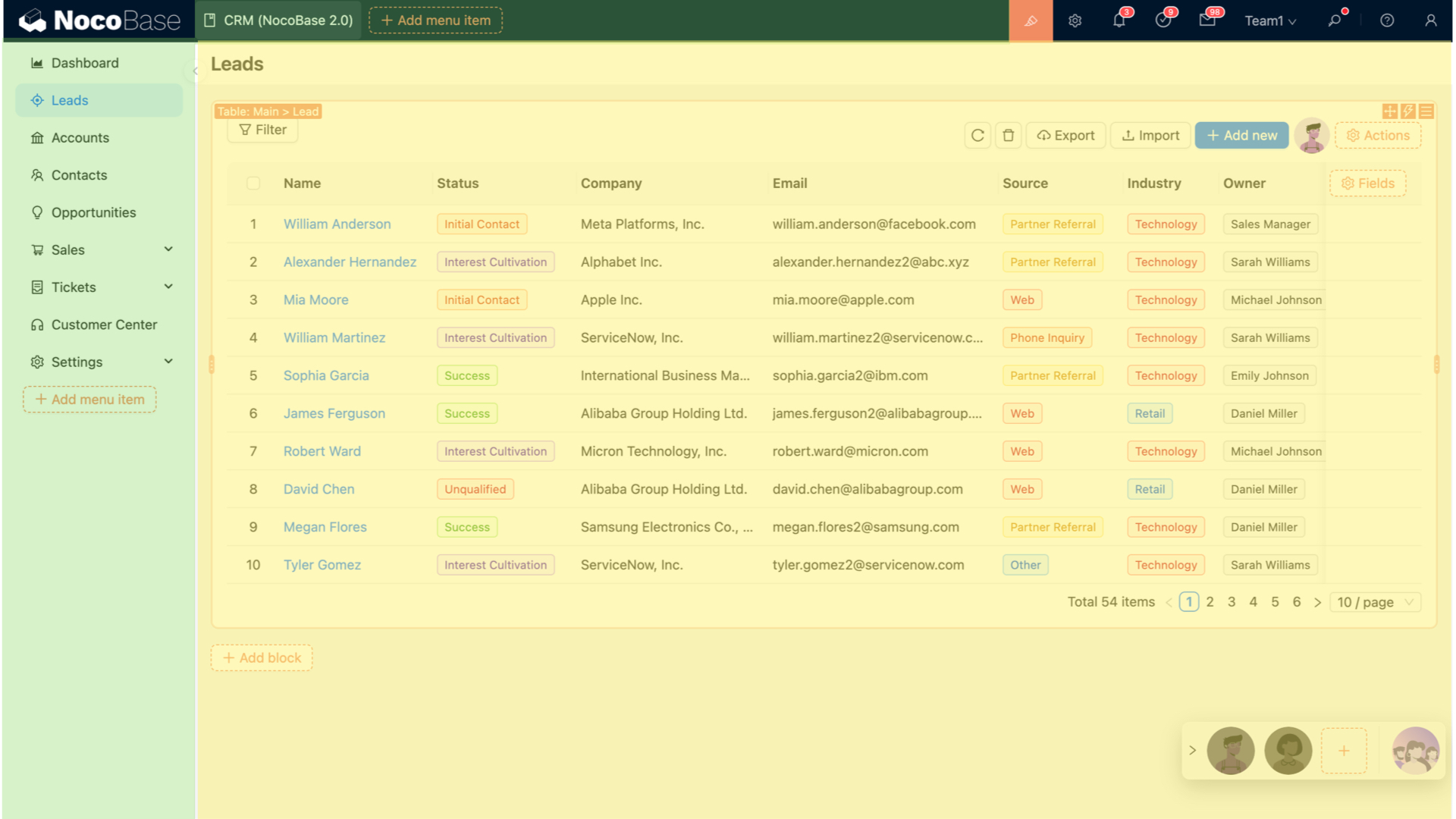
NocoBase provides desktop and mobile layouts. The desktop layout works well for standard administration and adapts its navigation and page content on phones. The mobile layout provides separate mobile navigation and page configuration. See [UI Layout](./ui-layout/index.md) for details.
|
|
25
22
|
|
|
26
23
|
|
|
27
24
|
## Configuration Options
|
|
@@ -55,4 +52,8 @@ Action configuration options:
|
|
|
55
52
|
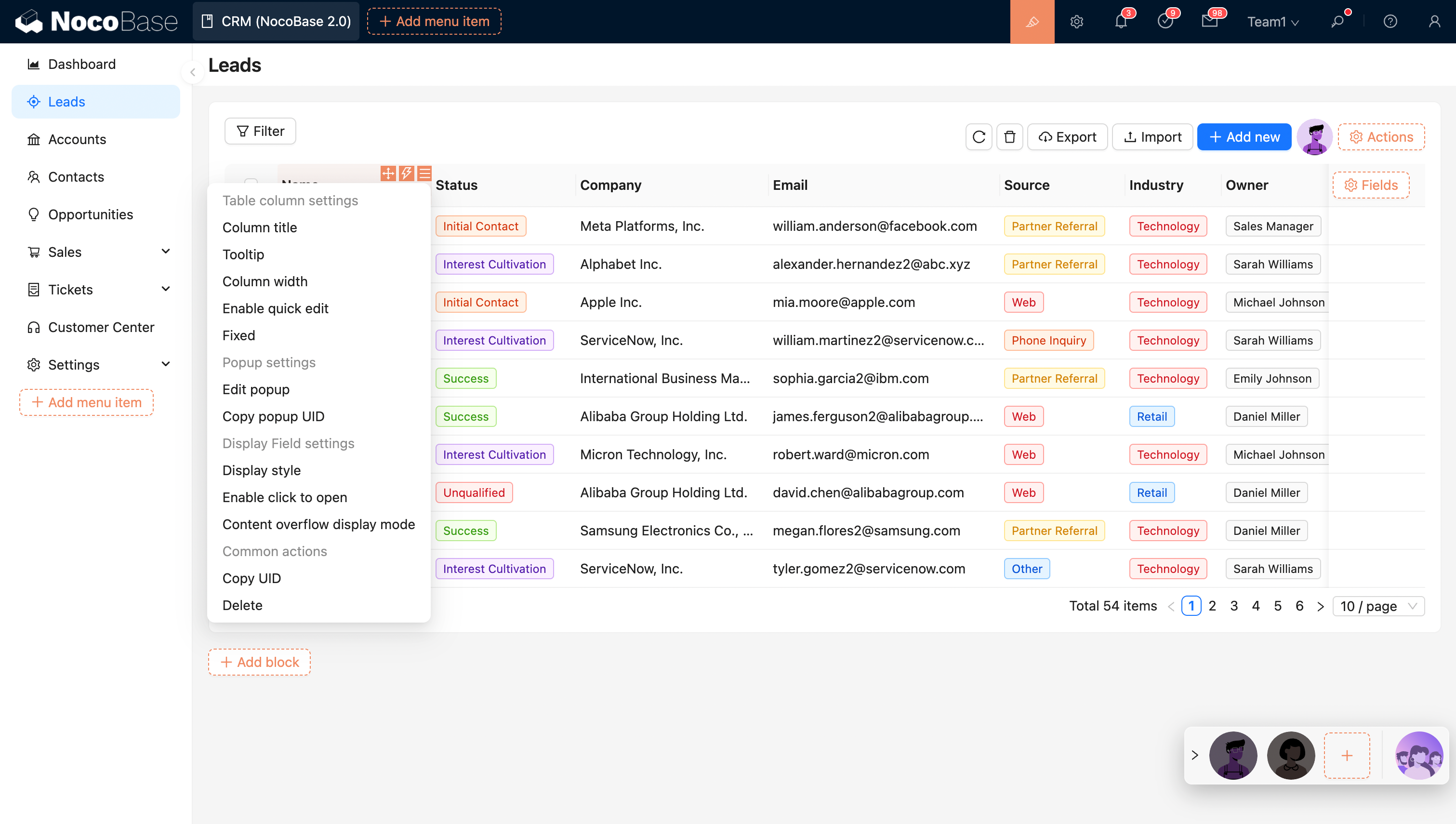
Table column configuration options:
|
|
56
53
|
|
|
57
54
|
|
|
58
|
-
|
|
55
|
+

|
|
56
|
+
|
|
57
|
+
## Related links
|
|
58
|
+
|
|
59
|
+
- [UI Layout](./ui-layout/index.md) — Learn about desktop and mobile layouts
|
|
@@ -0,0 +1,97 @@
|
|
|
1
|
+
---
|
|
2
|
+
title: "Desktop Layout"
|
|
3
|
+
description: "Learn about the navigation structure, page building, route management, and narrow-screen responsive behavior of the NocoBase desktop layout."
|
|
4
|
+
keywords: "desktop layout,UI layout,narrow-screen responsive,page building,route management,UI Editor,NocoBase"
|
|
5
|
+
---
|
|
6
|
+
|
|
7
|
+
# Desktop Layout
|
|
8
|
+
|
|
9
|
+
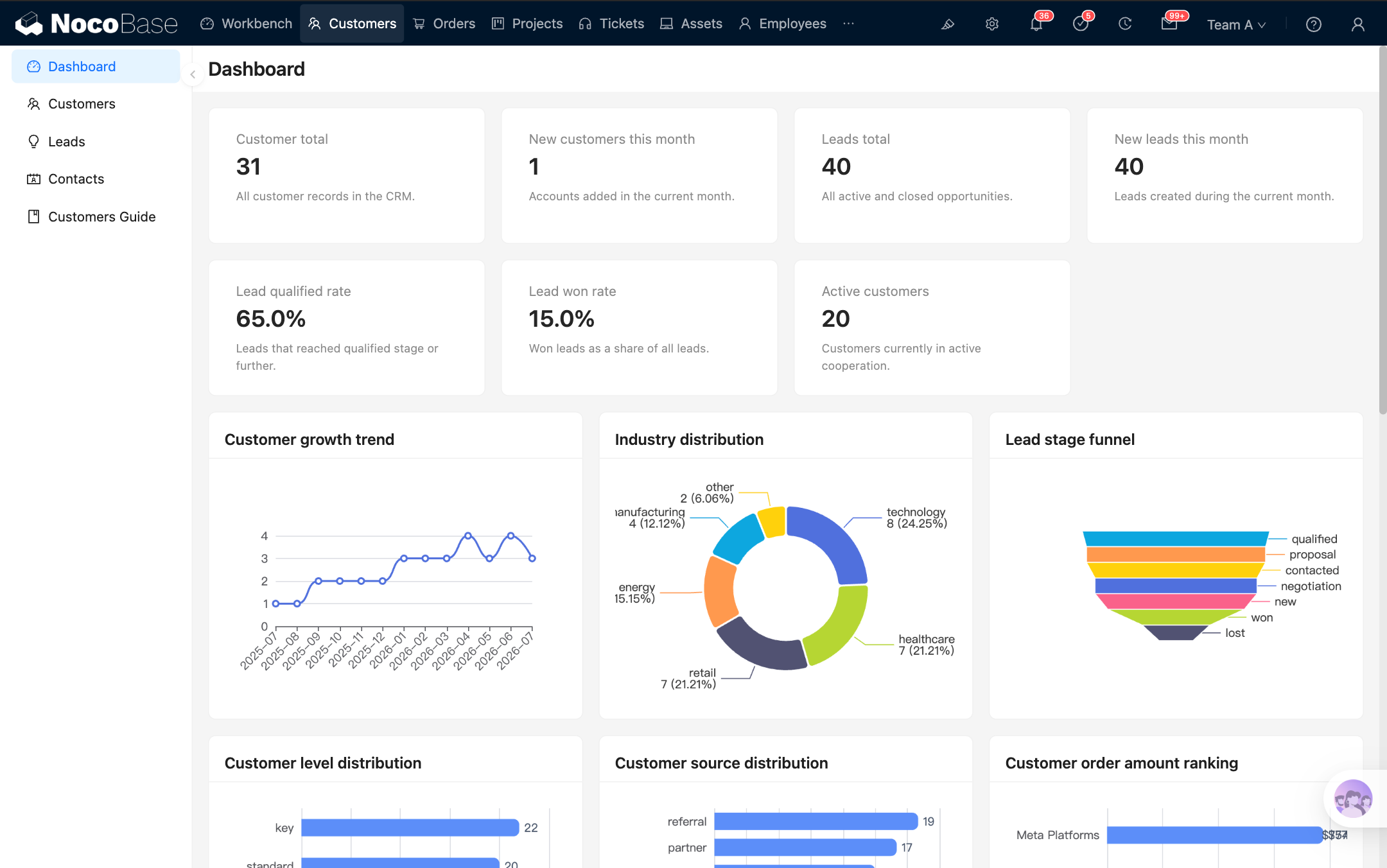
In NocoBase, the **desktop layout** is the default application interface. It is designed for data management, form entry, business configuration, and everyday work on a computer, and can also be used on mobile devices.
|
|
10
|
+
|
|
11
|
+
The desktop layout is available at `/admin` by default. If the application has its own access prefix, the actual URL automatically includes that prefix.
|
|
12
|
+
|
|
13
|
+
|
|
14
|
+
|
|
15
|
+
|
|
16
|
+
|
|
17
|
+
## Build a page
|
|
18
|
+
|
|
19
|
+
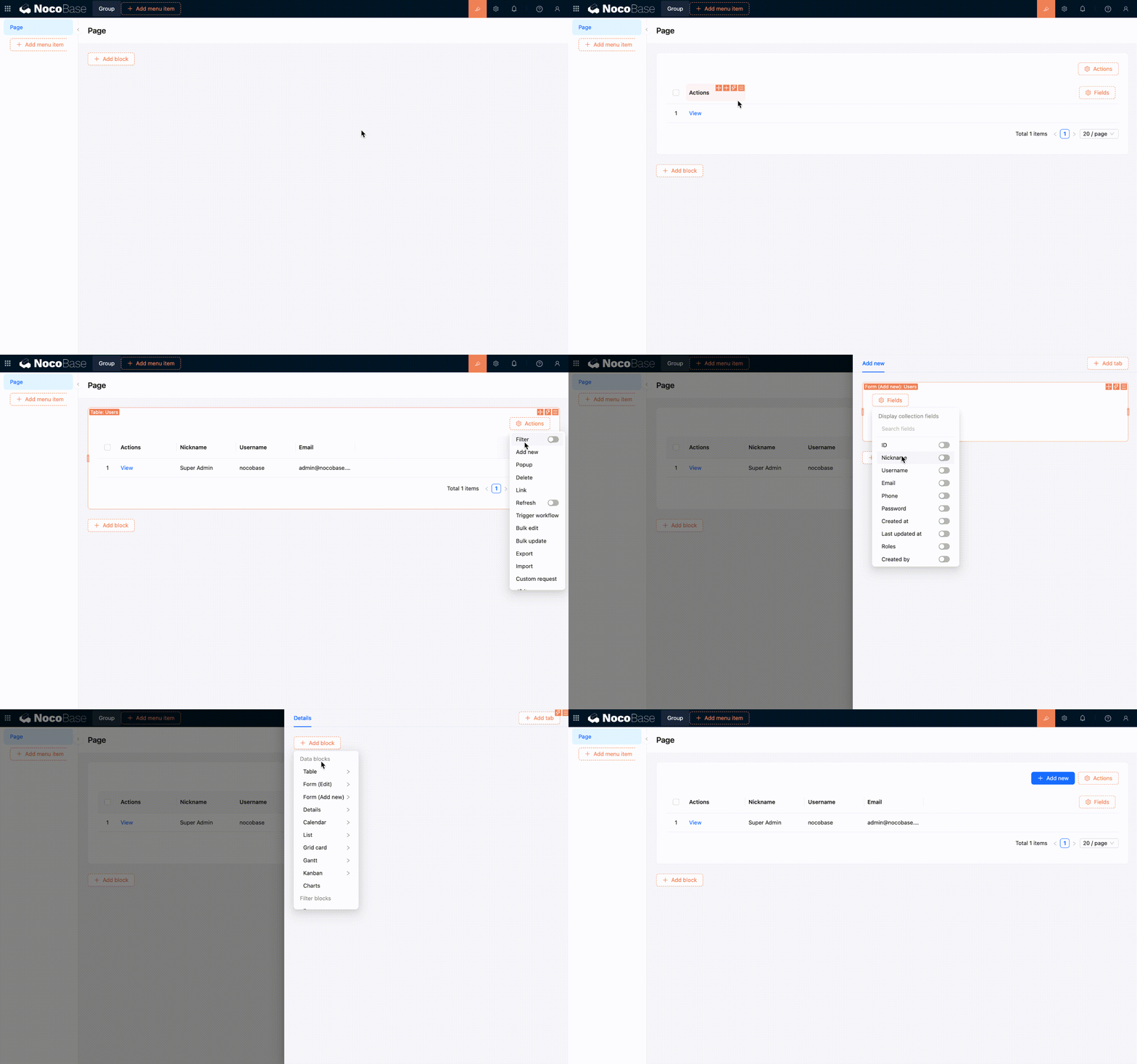
### Step 1: Open the desktop layout
|
|
20
|
+
|
|
21
|
+
Visit `/admin` to open the desktop layout. After signing in, the application usually opens this layout directly.
|
|
22
|
+
|
|
23
|
+
|
|
24
|
+
|
|
25
|
+
### Step 2: Open UI Editor
|
|
26
|
+
|
|
27
|
+
Click 「UI Editor」 in the upper-right corner of the page to enter UI building mode. Configuration entries then appear around menus, pages, blocks, fields, and actions.
|
|
28
|
+
|
|
29
|
+
|
|
30
|
+
|
|
31
|
+
### Step 3: Create menus and pages
|
|
32
|
+
|
|
33
|
+
You can add groups, pages, or links in the navigation area, and enable tabs for a page. After creating a page, open it and add the blocks you need.
|
|
34
|
+
|
|
35
|
+
Page content is built in the same way as other interfaces: add [blocks](../blocks/index.md) first, then configure [fields](../fields/index.md) and [actions](../actions/index.md) for your business needs.
|
|
36
|
+
|
|
37
|
+
|
|
38
|
+
|
|
39
|
+
### Step 4: Configure page content
|
|
40
|
+
|
|
41
|
+
Add table, form, details, filter, or other blocks to the page, then adjust the fields, actions, and arrangement of the blocks. Each change is reflected directly on the current page.
|
|
42
|
+
|
|
43
|
+
|
|
44
|
+
|
|
45
|
+
## Manage routes and menus
|
|
46
|
+
|
|
47
|
+
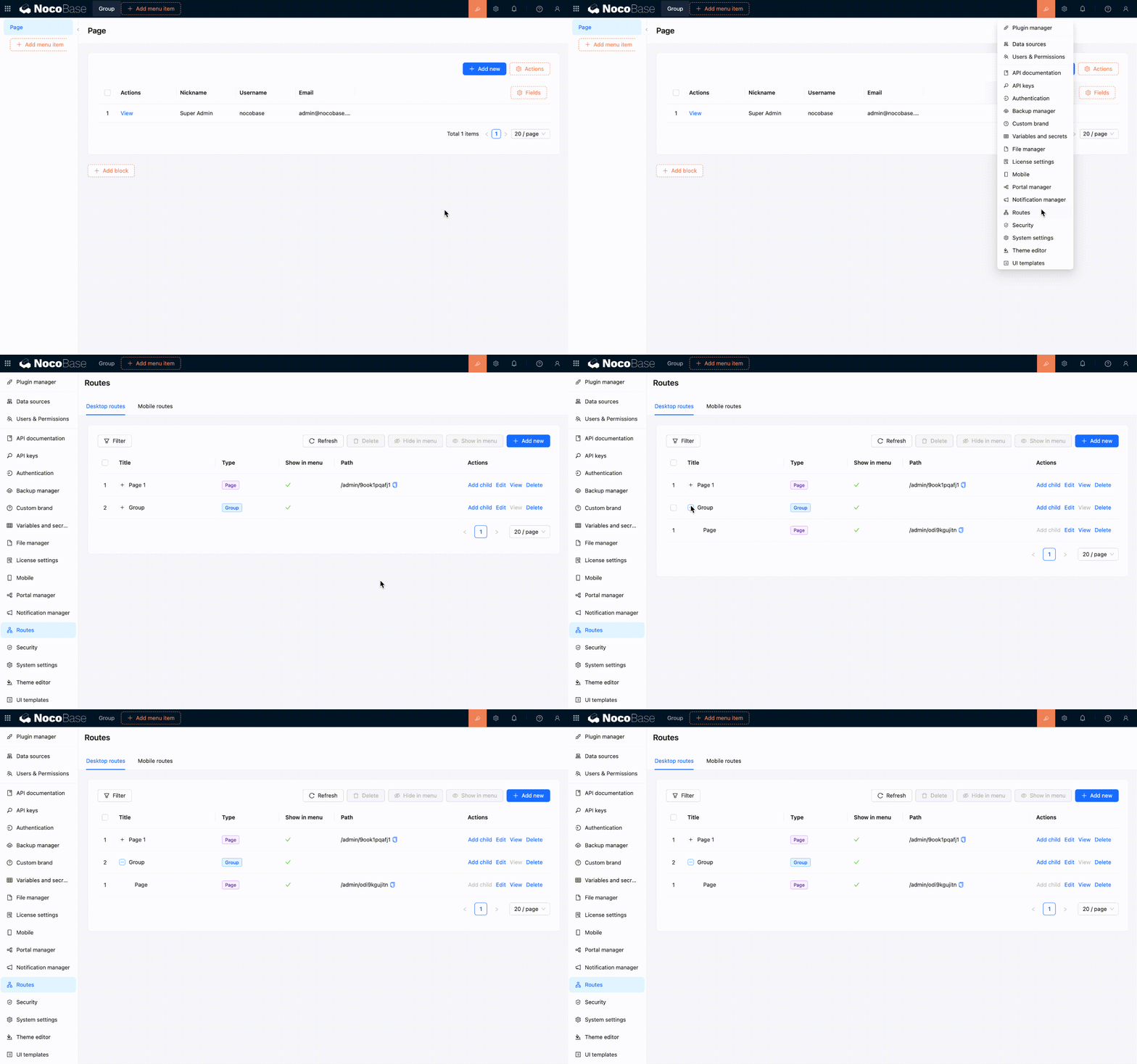
When you add a page or link in the navigation area, it also appears in the [Route Manager](../../routes/index.md). Changes made in the Route Manager also update the menu.
|
|
48
|
+
|
|
49
|
+
The desktop layout supports these common route types:
|
|
50
|
+
|
|
51
|
+
- **Group** — Organizes multiple pages and links under the same navigation group.
|
|
52
|
+
- **Page** — Opens a page where you can continue adding blocks.
|
|
53
|
+
- **Link** — Opens an internal or external URL.
|
|
54
|
+
- **Tab** — Organizes multiple content tabs within a page.
|
|
55
|
+
|
|
56
|
+
In the Route Manager, you can add, edit, delete, show, or hide routes. It is often the more convenient place to reorganize the entire menu structure.
|
|
57
|
+
|
|
58
|
+
|
|
59
|
+
|
|
60
|
+
## Responsive behavior on narrow screens
|
|
61
|
+
|
|
62
|
+
The desktop layout can be used directly on a phone or in a narrow browser window. In narrow-screen mode, it still uses the same desktop routes and pages. It does not automatically switch to the mobile layout.
|
|
63
|
+
|
|
64
|
+
### Layout changes
|
|
65
|
+
|
|
66
|
+
The navigation menu collapses, and top actions move into a more compact entry. Page margins and spacing between blocks also shrink, while the content area adapts to the visible height of the mobile browser.
|
|
67
|
+
|
|
68
|
+
UI Editor is not available on narrow screens. To change menus or pages, you need to return to a desktop browser and make the changes there.
|
|
69
|
+
|
|
70
|
+

|
|
71
|
+
|
|
72
|
+
### How page content adapts
|
|
73
|
+
|
|
74
|
+
Common components also adjust their interactions for narrow screens, making them easier to use on a phone. For instance, multi-column blocks switch to a single column, tables allow horizontal scrolling for columns that extend beyond the screen, and pagination and action entries become more compact. Selection, date and time, filter, and subpage interactions also use forms that are easier to operate on a phone.
|
|
75
|
+
|
|
76
|
+
:::tip Desktop responsiveness and the mobile layout
|
|
77
|
+
|
|
78
|
+
If you only access the application from a phone occasionally, the responsive desktop layout is usually enough. If you need separate bottom navigation, mobile pages, and mobile workflows, build a [mobile layout](./mobile.md) as well.
|
|
79
|
+
|
|
80
|
+
:::
|
|
81
|
+
|
|
82
|
+
## Recommendations
|
|
83
|
+
|
|
84
|
+
- Use the desktop layout by default for work performed mainly on a computer.
|
|
85
|
+
- Finish building the page on a wide screen, then narrow the window to check its responsive behavior.
|
|
86
|
+
- If a page contains many table columns or horizontal actions, keep only the necessary content to reduce the workload on smaller screens.
|
|
87
|
+
- If the desktop and mobile workflows differ significantly, separate pages are usually clearer.
|
|
88
|
+
|
|
89
|
+
## Related links
|
|
90
|
+
|
|
91
|
+
- [UI layout overview](./index.md) — Compare desktop and mobile layout use cases
|
|
92
|
+
- [Mobile layout](./mobile.md) — Build separate mobile navigation and pages
|
|
93
|
+
- [Blocks](../blocks/index.md) — Add and configure blocks on a page
|
|
94
|
+
- [Fields](../fields/index.md) — Configure fields in tables, forms, and details blocks
|
|
95
|
+
- [Actions](../actions/index.md) — Configure actions on pages and blocks
|
|
96
|
+
- [Route Manager](../../routes/index.md) — Manage desktop menus and routes in one place
|
|
97
|
+
- [Permission configuration](../../users-permissions/acl/permissions.md) — Control which desktop routes each role can access
|
|
@@ -0,0 +1,50 @@
|
|
|
1
|
+
---
|
|
2
|
+
title: "UI Layout"
|
|
3
|
+
description: "An overview of NocoBase UI layouts, including desktop and mobile layout features, use cases, and how their configurations relate."
|
|
4
|
+
keywords: "UI layout,desktop layout,mobile layout,responsive layout,mobile pages,NocoBase"
|
|
5
|
+
---
|
|
6
|
+
|
|
7
|
+
# UI Layout
|
|
8
|
+
|
|
9
|
+
NocoBase provides desktop and mobile layouts. Both layouts support UI building, so you can create pages and configure blocks, fields, and actions within them.
|
|
10
|
+
|
|
11
|
+
The desktop layout is the default choice and works well for everyday administration and data processing on a computer. If you need dedicated navigation and pages for mobile devices, you can build a mobile layout as well.
|
|
12
|
+
|
|
13
|
+
## Desktop layout
|
|
14
|
+
|
|
15
|
+
The [desktop layout](./desktop.md) is available at `/admin` by default. It consists of top navigation, side navigation, and a page content area, making it suitable for common business scenarios such as managing tables, entering form data, and viewing records.
|
|
16
|
+
|
|
17
|
+
The desktop layout also supports responsive behavior on narrow screens. When a page is displayed on a smaller screen, the navigation, spacing, and common components adjust to fit while continuing to use the existing desktop menus and pages.
|
|
18
|
+
|
|
19
|
+

|
|
20
|
+
|
|
21
|
+
## Mobile layout
|
|
22
|
+
|
|
23
|
+
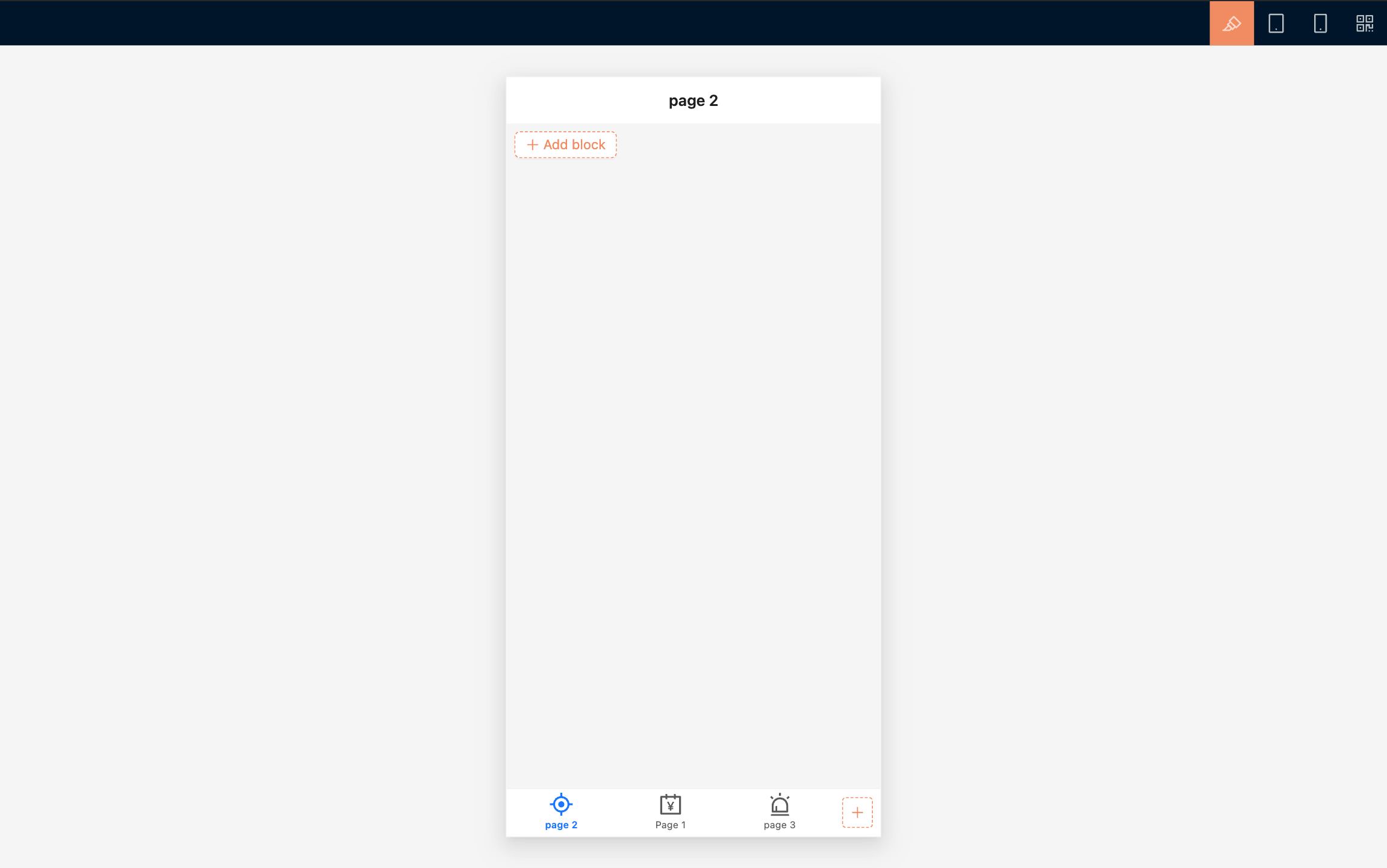
The [mobile layout](./mobile.md) is available at `/mobile` by default. It uses a bottom tab bar for primary navigation and provides separate mobile pages, links, and page tabs.
|
|
24
|
+
|
|
25
|
+
The mobile layout works well for frequent phone-based tasks such as on-site data entry, mobile approvals, task processing, and data lookup. You can build and preview pages in a desktop browser, then use a QR code to check the result on a physical device.
|
|
26
|
+
|
|
27
|
+
|
|
28
|
+
|
|
29
|
+
## Which layout should I use?
|
|
30
|
+
|
|
31
|
+
Use the desktop layout by default.
|
|
32
|
+
|
|
33
|
+
| I want to... | Recommended layout |
|
|
34
|
+
| --- | --- |
|
|
35
|
+
| Work mainly on a computer and occasionally access pages from a phone | [Desktop layout](./desktop.md) |
|
|
36
|
+
| Design separate navigation, pages, and workflows for phones | [Mobile layout](./mobile.md) |
|
|
37
|
+
| Provide a complete experience for both computers and mobile devices | Build the desktop and mobile layouts separately |
|
|
38
|
+
|
|
39
|
+
## How the configurations relate
|
|
40
|
+
|
|
41
|
+
The desktop and mobile layouts use the same data sources and business data. You can use the same data table to build separate pages for different devices.
|
|
42
|
+
|
|
43
|
+
Menus, routes, and page configurations are maintained separately. Changes to a desktop page do not automatically update its mobile counterpart, and changes to mobile navigation do not affect desktop navigation. [Route access permissions](../../users-permissions/acl/permissions.md) also need to be configured separately for each layout.
|
|
44
|
+
|
|
45
|
+
## Related links
|
|
46
|
+
|
|
47
|
+
- [Desktop layout](./desktop.md) — Build desktop pages and learn how they behave on narrow screens
|
|
48
|
+
- [Mobile layout](./mobile.md) — Build separate mobile navigation and pages
|
|
49
|
+
- [Route Manager](../../routes/index.md) — Manage desktop and mobile pages, links, and menus
|
|
50
|
+
- [Permission configuration](../../users-permissions/acl/permissions.md) — Control which menus and pages each role can access
|
|
@@ -0,0 +1,133 @@
|
|
|
1
|
+
---
|
|
2
|
+
title: "Mobile Layout"
|
|
3
|
+
description: "Learn about NocoBase mobile navigation, page building, desktop preview, subpage interactions, routes, and permissions."
|
|
4
|
+
keywords: "mobile layout,mobile pages,bottom navigation,mobile preview,mobile routes,UI Editor,NocoBase"
|
|
5
|
+
---
|
|
6
|
+
|
|
7
|
+
# Mobile Layout
|
|
8
|
+
|
|
9
|
+
In NocoBase, the **mobile layout** is used to build dedicated navigation and pages for mobile devices. It is available at `/mobile` by default and uses a bottom tab bar as its primary navigation, making it more suitable for data entry, lookup, approval, and task processing on a phone.
|
|
10
|
+
|
|
11
|
+
The mobile and desktop layouts use the same data sources and business data, but their menus, routes, and page content are configured separately. This lets you reorganize pages around mobile workflows without being constrained by the desktop page structure.
|
|
12
|
+
|
|
13
|
+
<!-- Add a full-page screenshot of the mobile layout on a physical device -->
|
|
14
|
+
|
|
15
|
+
## Open and preview the mobile layout
|
|
16
|
+
|
|
17
|
+
By default, you can click 「Mobile」 in Settings to open the layout, or visit `/mobile` directly.
|
|
18
|
+
|
|
19
|
+
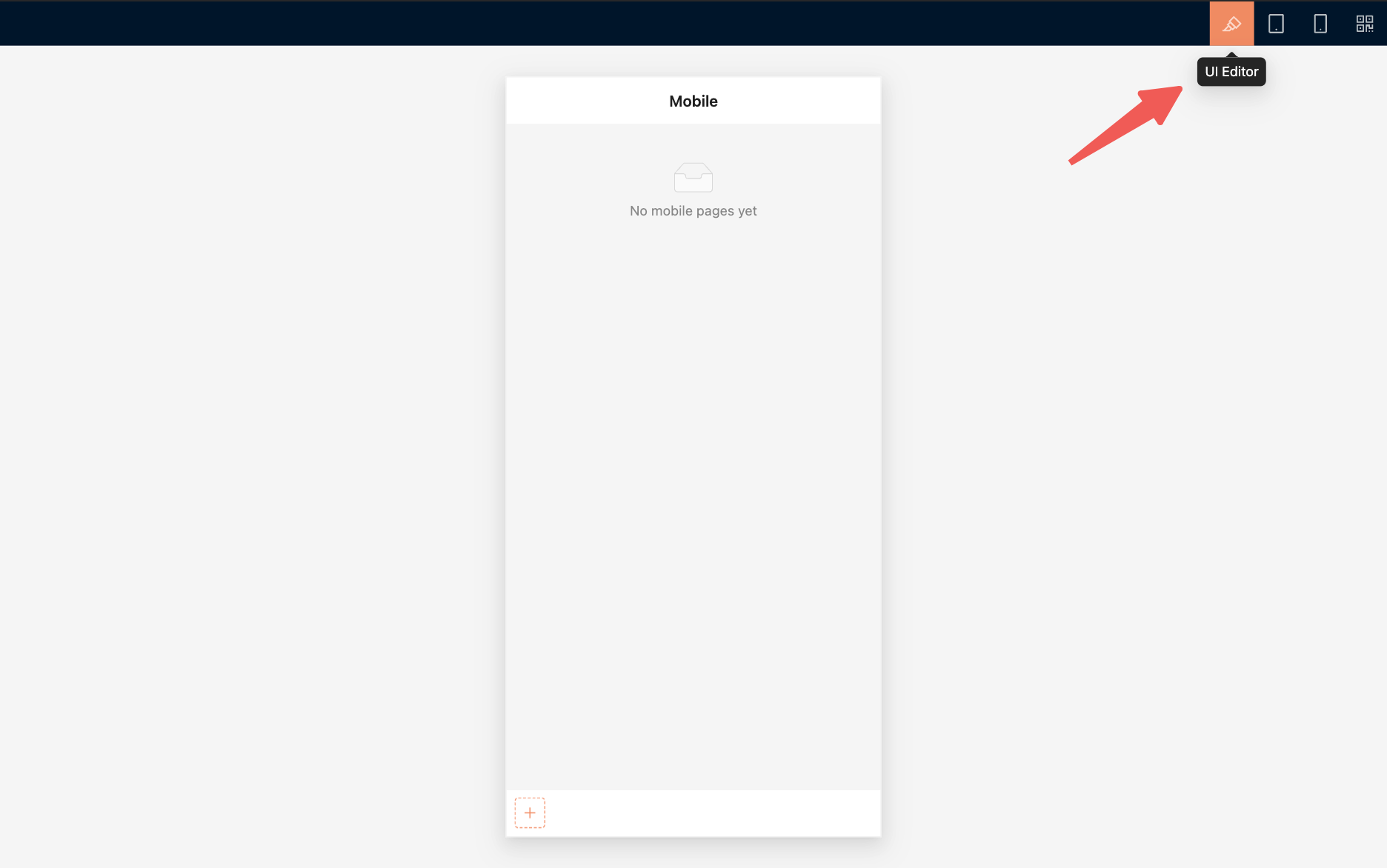
It is best to build pages in a desktop browser. The desktop view provides a mobile preview area and a toolbar at the top:
|
|
20
|
+
|
|
21
|
+
- 「UI Editor」 turns UI building mode on or off.
|
|
22
|
+
- 「Tablet preview」 checks the display on wider mobile devices.
|
|
23
|
+
- 「Mobile preview」 restores the phone-sized preview area.
|
|
24
|
+
- 「QR code」 opens the current mobile URL on a phone.
|
|
25
|
+
|
|
26
|
+
|
|
27
|
+
|
|
28
|
+
After building the pages on a computer, scan the QR code and check them on a physical device. Pay particular attention to navigation, scrolling, form input, pop-up pages, and safe areas.
|
|
29
|
+
|
|
30
|
+
## Build mobile navigation
|
|
31
|
+
|
|
32
|
+
The mobile layout uses a bottom tab bar as its primary navigation. Primary navigation currently supports mainly pages and links.
|
|
33
|
+
|
|
34
|
+
### Add a page
|
|
35
|
+
|
|
36
|
+
1. Open 「UI Editor」.
|
|
37
|
+
2. Click the add button on the right side of the bottom tab bar.
|
|
38
|
+
3. Select 「Page」.
|
|
39
|
+
4. Enter a page title and select an icon.
|
|
40
|
+
5. Submit the form to open the new page, then continue adding page content.
|
|
41
|
+
|
|
42
|
+
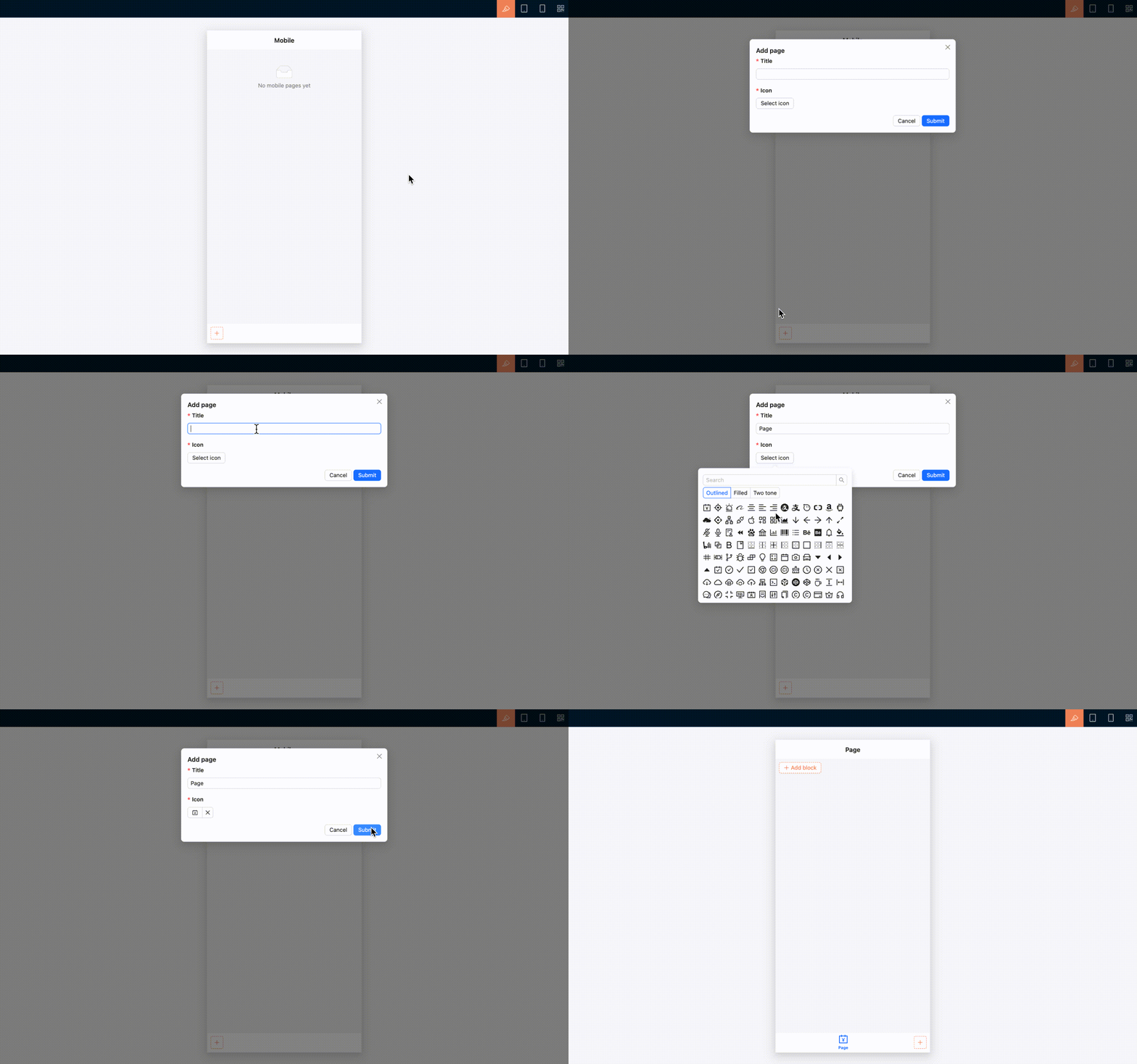
|
|
43
|
+
|
|
44
|
+
### Add a link
|
|
45
|
+
|
|
46
|
+
To open an internal or external URL, select 「Link」 and configure its title, icon, and URL.
|
|
47
|
+
|
|
48
|
+
A link can open in the current window or a new window, depending on its configuration.
|
|
49
|
+
|
|
50
|
+
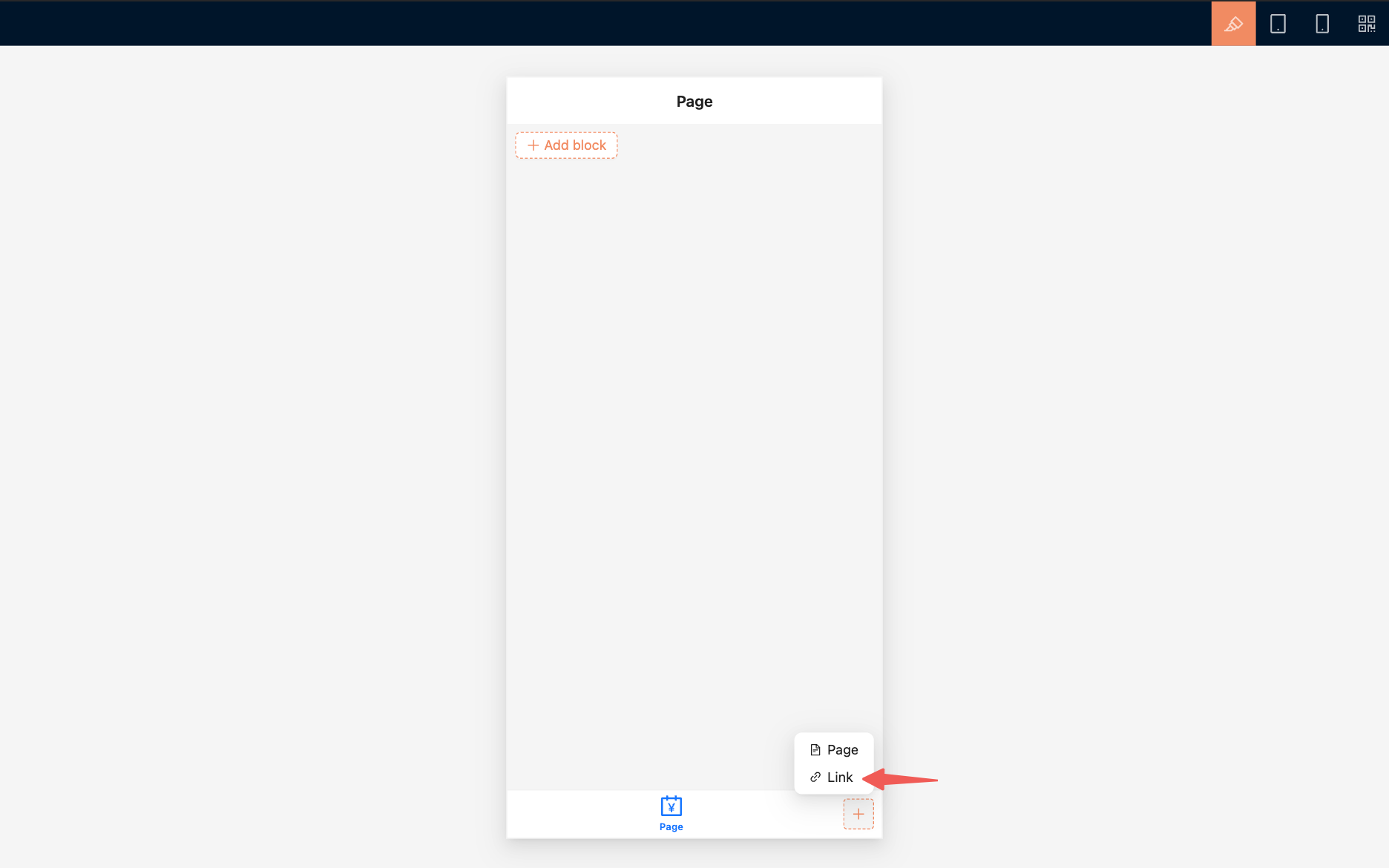
|
|
51
|
+
|
|
52
|
+
### Arrange navigation
|
|
53
|
+
|
|
54
|
+
In UI building mode, drag bottom tabs to reorder them. You can also edit a tab's title and icon, configure linkage rules, copy its UID, or delete it.
|
|
55
|
+
|
|
56
|
+
To view, show, hide, or delete mobile routes in one place, open 「Settings / Routes / Mobile routes」.
|
|
57
|
+
|
|
58
|
+
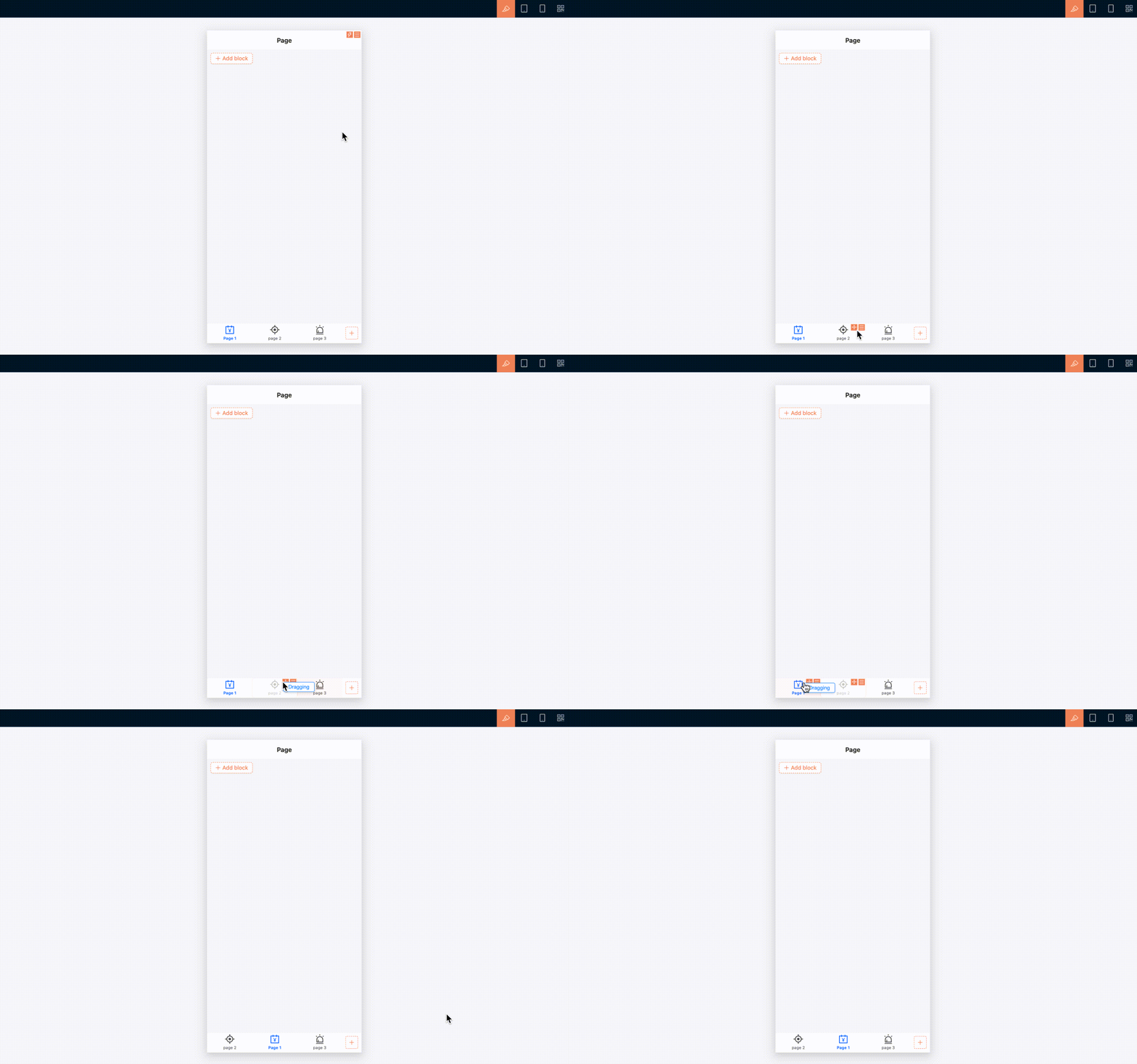
|
|
59
|
+
|
|
60
|
+
## Build a mobile page
|
|
61
|
+
|
|
62
|
+
Create and open a mobile page before adding blocks to it. The approach to building page content is essentially the same as on desktop: use [blocks](../blocks/index.md), [fields](../fields/index.md), and [actions](../actions/index.md) to organize business content. However, mobile navigation and some component interactions are adjusted for smaller screens.
|
|
63
|
+
|
|
64
|
+
### Add page content
|
|
65
|
+
|
|
66
|
+
1. Open the mobile page you want to build.
|
|
67
|
+
2. Make sure 「UI Editor」 is enabled.
|
|
68
|
+
3. Click 「Add block」 on the page.
|
|
69
|
+
4. Select a table, form, details, filter, or another block.
|
|
70
|
+
5. Continue configuring fields, actions, and block settings.
|
|
71
|
+
|
|
72
|
+
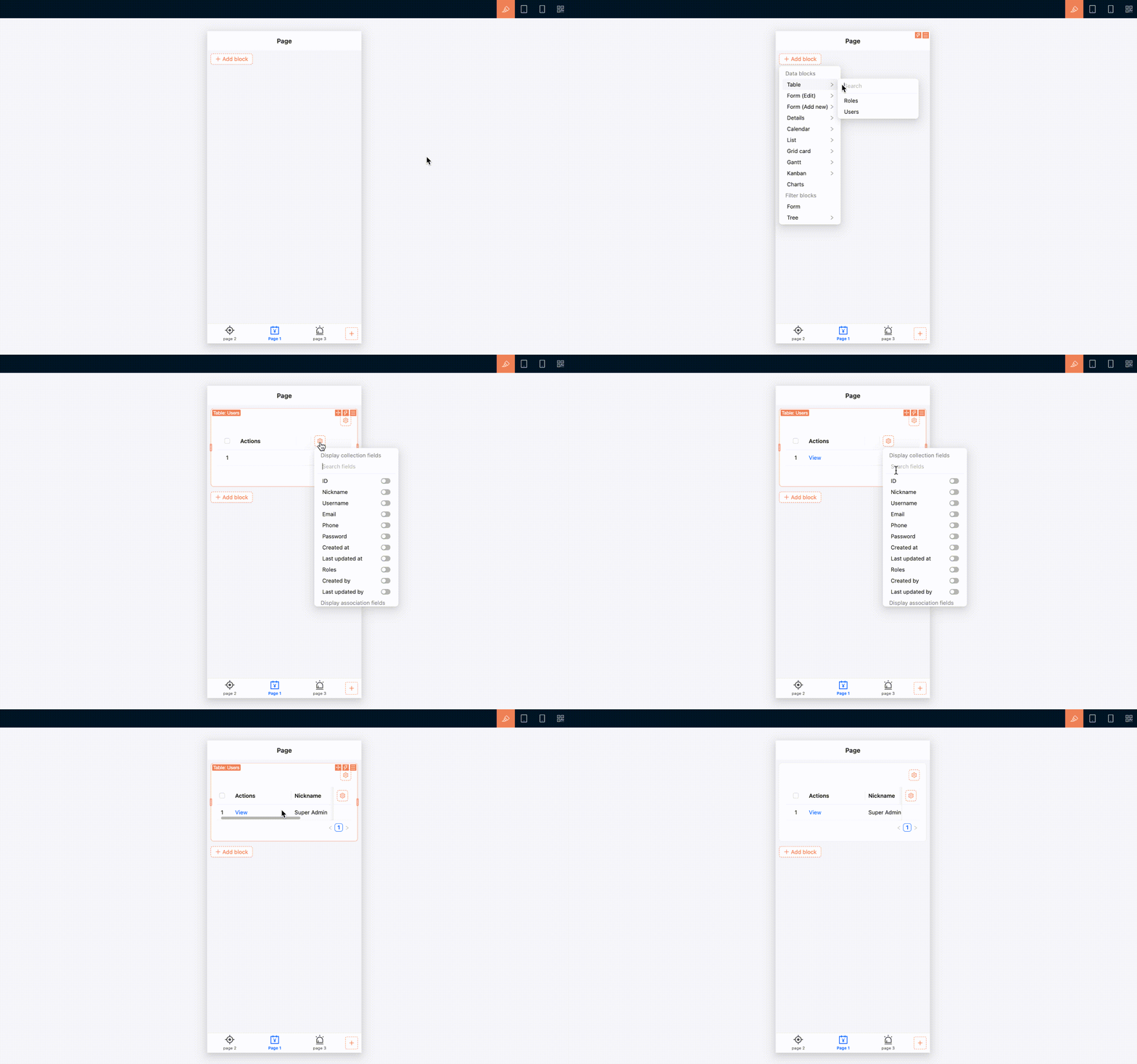
|
|
73
|
+
|
|
74
|
+
### Use page tabs
|
|
75
|
+
|
|
76
|
+
A mobile page can also use tabs. If multiple pieces of content belong under the same navigation entry but remain relatively independent, place them in separate tabs.
|
|
77
|
+
|
|
78
|
+
1. Open the page settings and enable 「Enable page tabs」. You can also edit the page under 「Settings / Routes / Mobile routes」 and select 「Enable page tabs」.
|
|
79
|
+
2. Turn on 「UI Editor」.
|
|
80
|
+
3. Click 「Add tab」 on the right side of the page tab bar.
|
|
81
|
+
4. Add the tab, then configure its name and page content.
|
|
82
|
+
|
|
83
|
+
If a mobile page contains only a small amount of content, use a single page. You do not need to enable tabs.
|
|
84
|
+
|
|
85
|
+
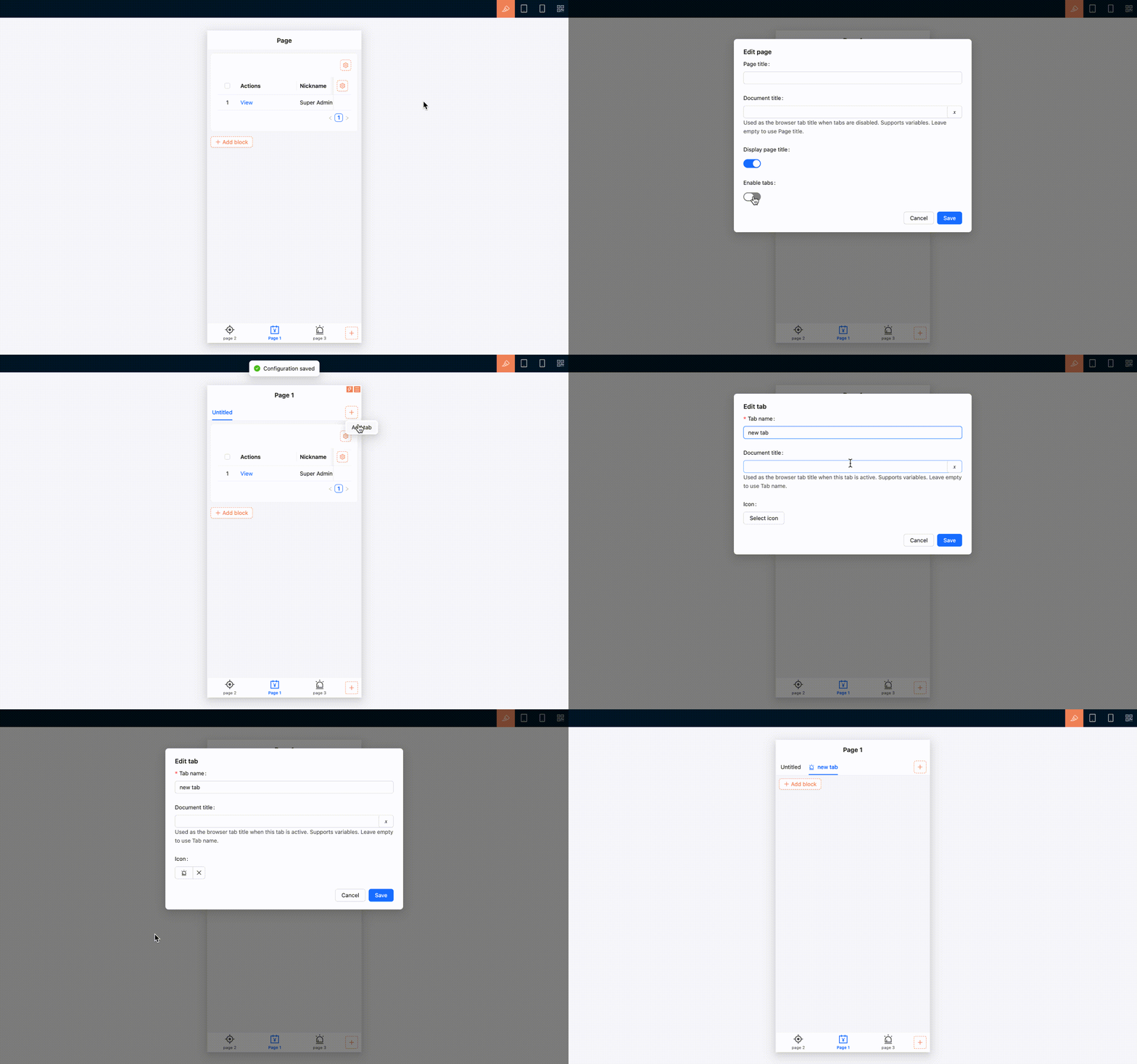
|
|
86
|
+
|
|
87
|
+
### Mobile interactions for common components
|
|
88
|
+
|
|
89
|
+
Common components adjust their arrangement and interactions for the mobile layout. For instance, multi-column content automatically switches to a single column that is easier to browse vertically; selection and date-time fields use mobile-friendly pickers; and filters, associated record selection, and subpages use interfaces designed for touch interaction.
|
|
90
|
+
|
|
91
|
+
Tables remain tables on mobile, with horizontal scrolling for columns that extend beyond the screen. Any additional mobile behavior depends on the support provided by each block.
|
|
92
|
+
|
|
93
|
+
## Pages and subpages
|
|
94
|
+
|
|
95
|
+
Content opened from view, edit, associated record selection, and similar actions appears as a mobile subpage. The subpage provides a back button that returns you to the previous page.
|
|
96
|
+
|
|
97
|
+
When you open a deeper subpage, the bottom tab bar is hidden to leave more room for the current content. It reappears when you close the subpage or return to the previous level.
|
|
98
|
+
|
|
99
|
+
When switching between bottom tabs, the state of open pages is preserved, making it easier to move between mobile tasks.
|
|
100
|
+
|
|
101
|
+
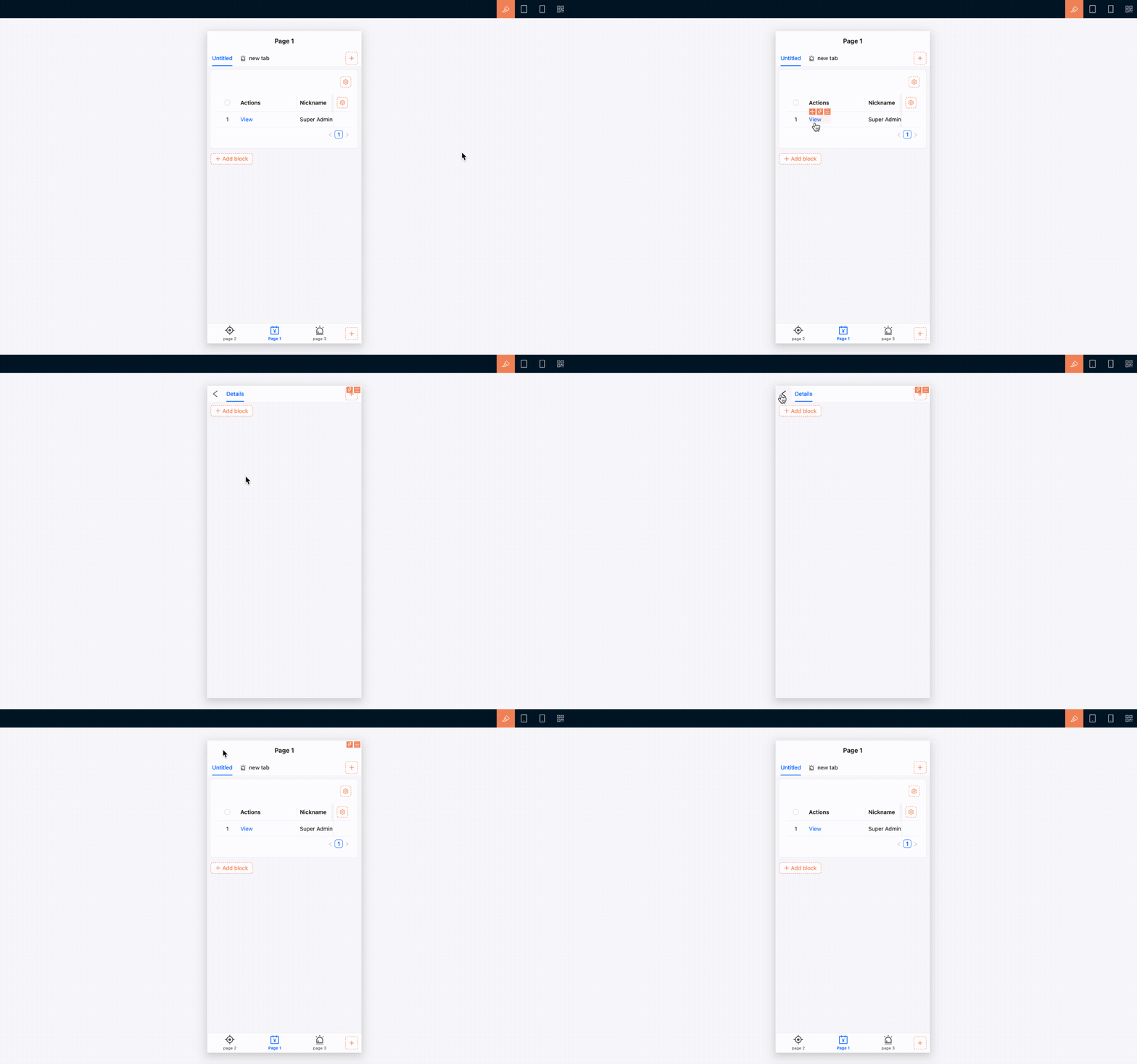
|
|
102
|
+
|
|
103
|
+
## Manage routes and permissions
|
|
104
|
+
|
|
105
|
+
Mobile routes can be maintained in the [Route Manager](../../routes/index.md). Open 「Settings / Routes / Mobile routes」 to add, edit, delete, show, or hide pages and links, or to configure tabs for a page.
|
|
106
|
+
|
|
107
|
+
Mobile route access permissions are configured separately from desktop permissions. Under role permissions, open 「Mobile routes」 and select the pages the current role can access. See [Permission configuration](../../users-permissions/acl/permissions.md) for details.
|
|
108
|
+
|
|
109
|
+
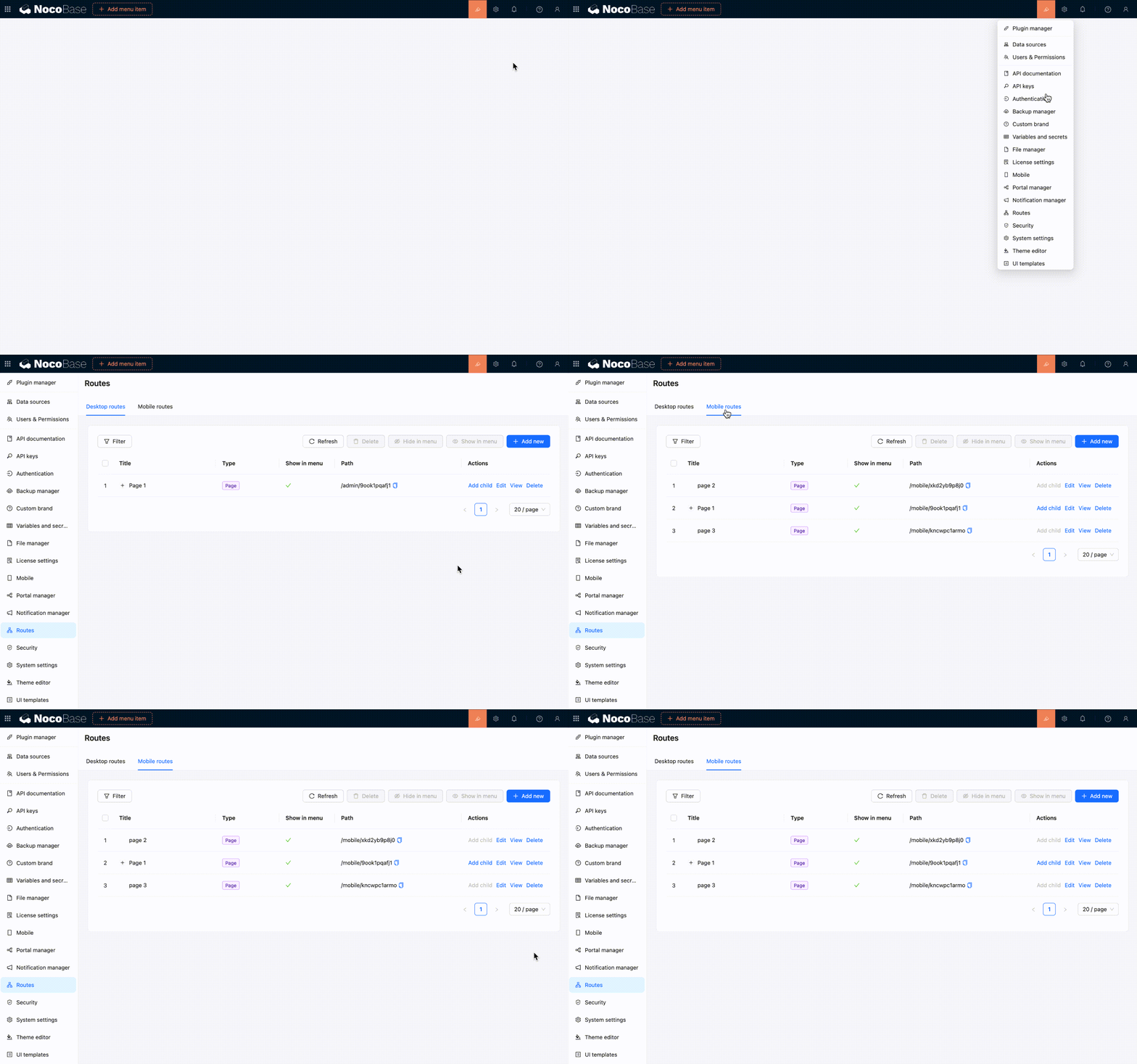
|
|
110
|
+
|
|
111
|
+
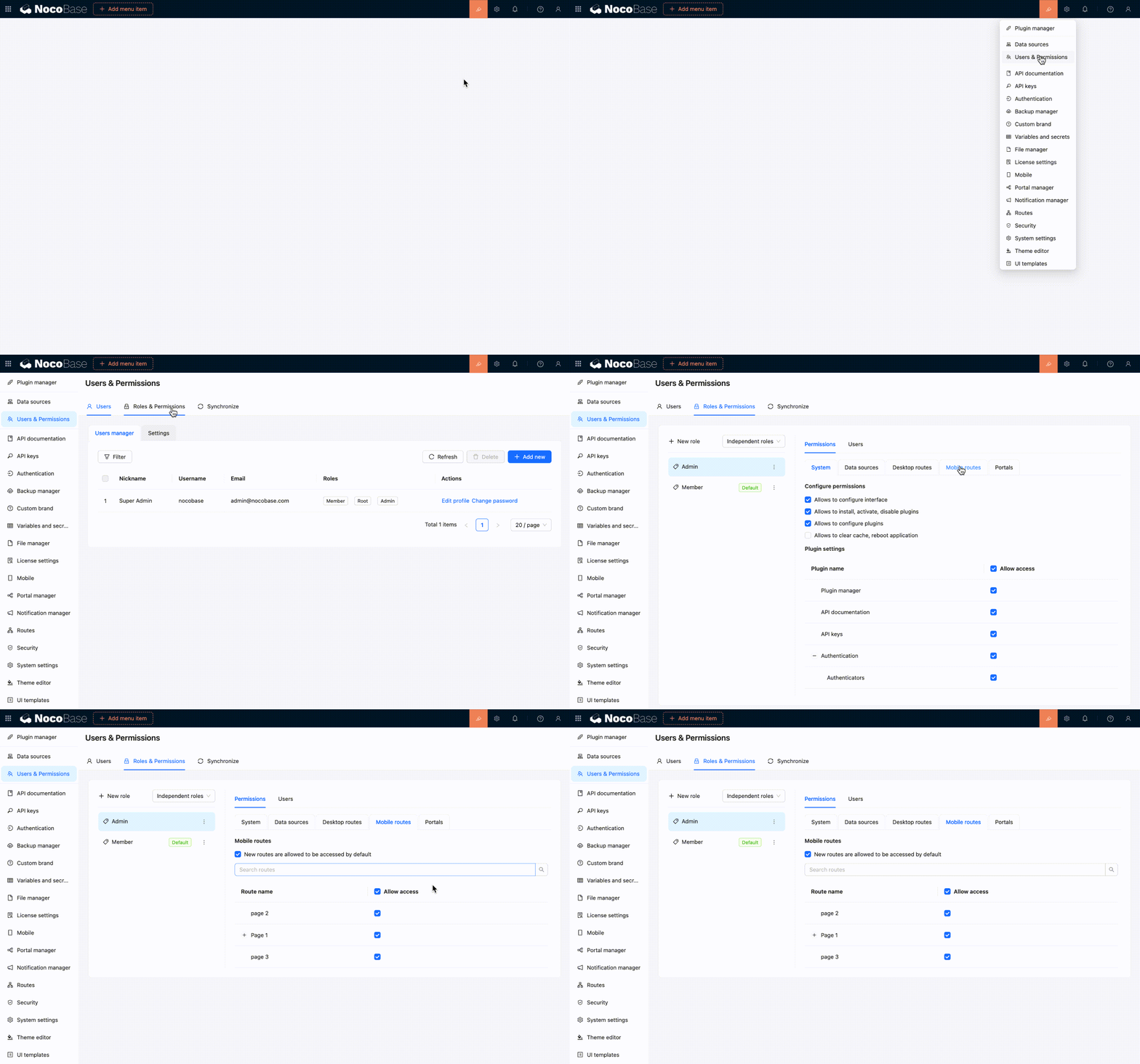
|
|
112
|
+
|
|
113
|
+
## Relationship with the desktop layout
|
|
114
|
+
|
|
115
|
+
You can build separate desktop and mobile pages from the same data table. For instance, a desktop page may use a table with many fields for data processing, while a mobile page may use a simpler list or form for on-site data entry.
|
|
116
|
+
|
|
117
|
+
The two layouts do not synchronize pages automatically. Changes to desktop pages, menus, or routes do not update the mobile configuration, and mobile changes do not affect desktop pages.
|
|
118
|
+
|
|
119
|
+
:::tip Recommendation
|
|
120
|
+
|
|
121
|
+
If mobile users only need occasional access to desktop pages, try the responsive [desktop layout](./desktop.md) first. Build a separate mobile layout only when you need dedicated navigation and page workflows for mobile devices.
|
|
122
|
+
|
|
123
|
+
:::
|
|
124
|
+
|
|
125
|
+
## Related links
|
|
126
|
+
|
|
127
|
+
- [UI layout overview](./index.md) — Compare desktop and mobile layout use cases
|
|
128
|
+
- [Desktop layout](./desktop.md) — Use the default desktop layout and its narrow-screen responsiveness
|
|
129
|
+
- [Blocks](../blocks/index.md) — Add business content to mobile pages
|
|
130
|
+
- [Fields](../fields/index.md) — Configure mobile forms and data display fields
|
|
131
|
+
- [Actions](../actions/index.md) — Configure actions on mobile pages
|
|
132
|
+
- [Route Manager](../../routes/index.md) — Manage mobile pages, links, and tabs
|
|
133
|
+
- [Permission configuration](../../users-permissions/acl/permissions.md) — Control which mobile routes each role can access
|
|
@@ -0,0 +1,14 @@
|
|
|
1
|
+
---
|
|
2
|
+
title: "Block: Comment"
|
|
3
|
+
keywords: "Block: Comment,comment block,comment collection,plugin,NocoBase"
|
|
4
|
+
displayName: "Block: Comment"
|
|
5
|
+
packageName: '@nocobase/plugin-block-comment'
|
|
6
|
+
description: |
|
|
7
|
+
Provides a Comment block for viewing and creating comments in record details, pop-ups, and similar scenarios.
|
|
8
|
+
isFree: true
|
|
9
|
+
builtIn: true
|
|
10
|
+
defaultEnabled: false
|
|
11
|
+
editionLevel: 0
|
|
12
|
+
---
|
|
13
|
+
|
|
14
|
+
# Block: Comment
|
|
@@ -0,0 +1,206 @@
|
|
|
1
|
+
---
|
|
2
|
+
title: "ctx.ai"
|
|
3
|
+
description: "Use ctx.ai in RunJS to trigger AI employee tasks, either with inline task content or with tasks configured on an AI employee action."
|
|
4
|
+
keywords: "ctx.ai,AI employee,triggerTask,triggerModelTask,RunJS,NocoBase"
|
|
5
|
+
---
|
|
6
|
+
|
|
7
|
+
# ctx.ai
|
|
8
|
+
|
|
9
|
+
Use `ctx.ai` in RunJS to trigger **AI employee tasks**. It works well in JSBlock, JSAction, and other interactions where a button, form, or business flow needs to hand work to a specific AI employee.
|
|
10
|
+
|
|
11
|
+
`ctx.ai` only triggers tasks. It does not return the execution result of the AI employee task. After the call, the task enters the AI employee conversation flow, and the result is handled by the AI employee session.
|
|
12
|
+
|
|
13
|
+
:::warning Note
|
|
14
|
+
|
|
15
|
+
`ctx.ai` is provided by the AI plugin. If the AI plugin is not enabled, or the current RunJS environment has not loaded the corresponding client capability, `ctx.ai` may not exist. You can check `ctx.ai?.triggerTask` or `ctx.ai?.triggerModelTask` before calling it.
|
|
16
|
+
|
|
17
|
+
:::
|
|
18
|
+
|
|
19
|
+
## Methods
|
|
20
|
+
|
|
21
|
+
### ctx.ai.triggerTask()
|
|
22
|
+
|
|
23
|
+
Trigger an AI employee task directly.
|
|
24
|
+
|
|
25
|
+
```ts
|
|
26
|
+
ctx.ai.triggerTask(options: TriggerTaskOptions): void
|
|
27
|
+
```
|
|
28
|
+
|
|
29
|
+
| Parameter | Type | Description |
|
|
30
|
+
|------|------|------|
|
|
31
|
+
| `aiEmployee` | `string \| AIEmployee` | AI employee. When a string is passed, NocoBase matches `AIEmployee.username` exactly, and the AI employee must be accessible to the current user. |
|
|
32
|
+
| `tasks` | `Task[]` | Tasks to trigger. |
|
|
33
|
+
| `open` | `boolean` | Whether to open the AI employee conversation panel. |
|
|
34
|
+
| `auto` | `boolean` | Whether to use the auto-trigger semantics of an AI employee action. |
|
|
35
|
+
|
|
36
|
+
Common `Task` fields:
|
|
37
|
+
|
|
38
|
+
| Field | Type | Description |
|
|
39
|
+
|------|------|------|
|
|
40
|
+
| `title` | `string` | Task title. |
|
|
41
|
+
| `message.system` | `string` | System message, used to constrain the AI employee's role and output requirements. |
|
|
42
|
+
| `message.user` | `string` | User message, which is the main instruction for this task. |
|
|
43
|
+
| `message.workContext` | `ContextItem[]` | Page block context used by the task. |
|
|
44
|
+
| `autoSend` | `boolean` | Whether to send the task message automatically. |
|
|
45
|
+
| `webSearch` | `boolean` | Whether Web search is allowed for this task. |
|
|
46
|
+
| `model` | `{ llmService: string; model: string } \| null` | Model used by this task. |
|
|
47
|
+
| `skillSettings` | `SkillSettings` | Skills and tools available to this task. |
|
|
48
|
+
|
|
49
|
+
### Add Page Block Context
|
|
50
|
+
|
|
51
|
+
`message.workContext` currently passes page blocks. Put the FlowModel uid of the target page block into it:
|
|
52
|
+
|
|
53
|
+
```ts
|
|
54
|
+
message: {
|
|
55
|
+
user: 'Review the current users table and summarize operational risks.',
|
|
56
|
+
workContext: [
|
|
57
|
+
{
|
|
58
|
+
type: 'flow-model',
|
|
59
|
+
uid: 'USERS_TABLE_BLOCK_UID',
|
|
60
|
+
},
|
|
61
|
+
],
|
|
62
|
+
}
|
|
63
|
+
```
|
|
64
|
+
|
|
65
|
+
| Field | Description |
|
|
66
|
+
|------|------|
|
|
67
|
+
| `type` | Fixed to `flow-model`, meaning this item is a page block context. |
|
|
68
|
+
| `uid` | FlowModel uid of the page block, such as a table block, detail block, or chart block. |
|
|
69
|
+
|
|
70
|
+
If you want to use the current JSBlock itself as context, use the current model uid:
|
|
71
|
+
|
|
72
|
+
```ts
|
|
73
|
+
workContext: [
|
|
74
|
+
{
|
|
75
|
+
type: 'flow-model',
|
|
76
|
+
uid: ctx.model.uid,
|
|
77
|
+
},
|
|
78
|
+
],
|
|
79
|
+
```
|
|
80
|
+
|
|
81
|
+
Usually, `message.workContext` should be placed inside the `message` of a concrete task. `triggerModelTask()` reuses the task configured on the target AI employee action, so it also reads `message.workContext` from that task.
|
|
82
|
+
|
|
83
|
+
### Specify Model
|
|
84
|
+
|
|
85
|
+
`model` specifies the model for a single task. If omitted, the AI employee's default model configuration is used. Passing `null` means no task-level model is specified.
|
|
86
|
+
|
|
87
|
+
```ts
|
|
88
|
+
model: {
|
|
89
|
+
llmService: 'openai-main',
|
|
90
|
+
model: 'gpt-4.1',
|
|
91
|
+
}
|
|
92
|
+
```
|
|
93
|
+
|
|
94
|
+
### Configure Skills / Tools
|
|
95
|
+
|
|
96
|
+
`skillSettings` specifies the skills and tools available to a single task. If omitted, the AI employee's own capability configuration is used.
|
|
97
|
+
|
|
98
|
+
```ts
|
|
99
|
+
skillSettings: {
|
|
100
|
+
skillsVersion: 2,
|
|
101
|
+
toolsVersion: 2,
|
|
102
|
+
skills: ['business-analysis-report'],
|
|
103
|
+
tools: ['businessReportGenerator'],
|
|
104
|
+
}
|
|
105
|
+
```
|
|
106
|
+
|
|
107
|
+
To explicitly disable all skills or tools for this task, pass empty arrays and keep the version fields:
|
|
108
|
+
|
|
109
|
+
```ts
|
|
110
|
+
skillSettings: {
|
|
111
|
+
skillsVersion: 2,
|
|
112
|
+
toolsVersion: 2,
|
|
113
|
+
skills: [],
|
|
114
|
+
tools: [],
|
|
115
|
+
}
|
|
116
|
+
```
|
|
117
|
+
|
|
118
|
+
The following example asks `viz` to generate a handoff brief and opens the AI employee conversation panel:
|
|
119
|
+
|
|
120
|
+
```ts
|
|
121
|
+
if (!ctx.ai?.triggerTask) {
|
|
122
|
+
ctx.message.error(ctx.t('AI employee task API is not available.'));
|
|
123
|
+
return;
|
|
124
|
+
}
|
|
125
|
+
|
|
126
|
+
ctx.ai.triggerTask({
|
|
127
|
+
aiEmployee: 'viz',
|
|
128
|
+
open: true,
|
|
129
|
+
tasks: [
|
|
130
|
+
{
|
|
131
|
+
title: ctx.t('Daily operations handoff brief'),
|
|
132
|
+
message: {
|
|
133
|
+
system:
|
|
134
|
+
'You prepare reusable daily operations handoff briefs. Focus on risks, blockers, decisions, owners, and next actions.',
|
|
135
|
+
user: [
|
|
136
|
+
"Prepare today's operations handoff brief.",
|
|
137
|
+
'Cover customer escalations, SLA risks, approvals, and follow-up owners.',
|
|
138
|
+
'Return a concise brief that can be posted to the team channel.',
|
|
139
|
+
].join('\n'),
|
|
140
|
+
},
|
|
141
|
+
autoSend: true,
|
|
142
|
+
webSearch: false,
|
|
143
|
+
},
|
|
144
|
+
],
|
|
145
|
+
});
|
|
146
|
+
|
|
147
|
+
ctx.message.success(ctx.t('AI employee task triggered.'));
|
|
148
|
+
```
|
|
149
|
+
|
|
150
|
+
If `aiEmployee` is a string, NocoBase matches accessible AI employees by `username` exactly. If no match is found, the task is not triggered and a warning is printed to the console.
|
|
151
|
+
|
|
152
|
+
### ctx.ai.triggerModelTask()
|
|
153
|
+
|
|
154
|
+
Read a task from an AI employee action model on the page and trigger it.
|
|
155
|
+
|
|
156
|
+
```ts
|
|
157
|
+
ctx.ai.triggerModelTask(uid: string, taskIndex: number, options?: TriggerModelTaskOptions): void
|
|
158
|
+
```
|
|
159
|
+
|
|
160
|
+
| Parameter | Type | Description |
|
|
161
|
+
|------|------|------|
|
|
162
|
+
| `uid` | `string` | FlowModel uid of the AI employee action. |
|
|
163
|
+
| `taskIndex` | `number` | Task index, starting from `0`. |
|
|
164
|
+
| `options.open` | `boolean` | Whether to open the AI employee conversation panel. |
|
|
165
|
+
| `options.auto` | `boolean` | Whether to use the auto-trigger semantics of an AI employee action. |
|
|
166
|
+
|
|
167
|
+
This method reads the AI employee and task configuration from the target model. It is useful when the task has already been configured on an AI employee action on the page, and RunJS only needs to trigger it.
|
|
168
|
+
|
|
169
|
+
```ts
|
|
170
|
+
if (!ctx.ai?.triggerModelTask) {
|
|
171
|
+
ctx.message.error(ctx.t('AI employee task API is not available.'));
|
|
172
|
+
return;
|
|
173
|
+
}
|
|
174
|
+
|
|
175
|
+
const weeklyReviewActionUid = 'AI_EMPLOYEE_ACTION_MODEL_UID';
|
|
176
|
+
|
|
177
|
+
ctx.ai.triggerModelTask(weeklyReviewActionUid, 0, {
|
|
178
|
+
open: true,
|
|
179
|
+
});
|
|
180
|
+
|
|
181
|
+
ctx.message.success(ctx.t('Configured AI employee task triggered.'));
|
|
182
|
+
```
|
|
183
|
+
|
|
184
|
+
If the target model does not exist, has no AI employee configured, or the specified index has no task, no task is triggered and a warning is printed to the console.
|
|
185
|
+
|
|
186
|
+
## Which Method to Use
|
|
187
|
+
|
|
188
|
+
| Scenario | Recommended method |
|
|
189
|
+
|------|------|
|
|
190
|
+
| Task content is assembled dynamically in RunJS, such as from form values. | `ctx.ai.triggerTask()` |
|
|
191
|
+
| The task has already been configured on an AI employee action on the page, and RunJS only triggers it. | `ctx.ai.triggerModelTask()` |
|
|
192
|
+
| Business users need to adjust task content without changing code. | `ctx.ai.triggerModelTask()` |
|
|
193
|
+
| The AI employee, prompt, or sending behavior needs to be decided at runtime. | `ctx.ai.triggerTask()` |
|
|
194
|
+
|
|
195
|
+
## Notes
|
|
196
|
+
|
|
197
|
+
- `triggerTask()` and `triggerModelTask()` are fire-and-forget. They do not return the execution result of the AI employee task.
|
|
198
|
+
- `aiEmployee` strings only match `AIEmployee.username` exactly. They do not match nicknames, job titles, or translated names.
|
|
199
|
+
- `triggerModelTask()` uses a `0`-based `taskIndex`.
|
|
200
|
+
- `triggerModelTask()` reads task configuration from the target AI employee action model. If the task needs work context, configure `message.workContext` on that task.
|
|
201
|
+
|
|
202
|
+
## Related
|
|
203
|
+
|
|
204
|
+
- [ctx.message](./message.md): Show lightweight prompts before and after triggering tasks.
|
|
205
|
+
- [ctx.render](./render.md): Render buttons or forms in JSBlock.
|
|
206
|
+
- [ctx.model](./model.md): Get current FlowModel information.
|