@nocobase/plugin-ai 2.2.0-beta.12 → 2.2.0-beta.14
This diff represents the content of publicly available package versions that have been released to one of the supported registries. The information contained in this diff is provided for informational purposes only and reflects changes between package versions as they appear in their respective public registries.
- package/dist/ai/docs/nocobase/ai-employees/scenarios/company-background-research.md +125 -0
- package/dist/ai/docs/nocobase/building-tips/operations-dashboard.md +513 -0
- package/dist/ai/docs/nocobase/file-manager/stable-url.md +87 -0
- package/dist/ai/docs/nocobase/get-started/deployment/production.md +24 -2
- package/dist/ai/docs/nocobase/get-started/installation/docker-caddy.mdx +3 -0
- package/dist/ai/docs/nocobase/get-started/installation/docker-nginx.mdx +3 -0
- package/dist/ai/docs/nocobase/get-started/installation/docker.mdx +27 -3
- package/dist/ai/docs/nocobase/get-started/installation/env.md +33 -0
- package/dist/ai/docs/nocobase/index.md +1 -1
- package/dist/ai/docs/nocobase/multi-app/multi-app-vs-multi-portal-vs-multi-space.md +159 -0
- package/dist/ai/docs/nocobase/multi-app/multi-portal/index.md +195 -0
- package/dist/ai/docs/nocobase/nocobase-cli/production/index.md +10 -0
- package/dist/ai/docs/nocobase/nocobase-cli/production/reverse-proxy/caddy.md +15 -2
- package/dist/ai/docs/nocobase/nocobase-cli/production/reverse-proxy/index.md +1 -1
- package/dist/ai/docs/nocobase/nocobase-cli/production/reverse-proxy/nginx.md +16 -2
- package/dist/ai/docs/nocobase/tutorials/index.md +20 -1
- package/dist/client/646.051c1437c9ca4fd4.js +10 -0
- package/dist/client/index.js +3 -3
- package/dist/externalVersion.js +16 -16
- package/dist/locale/en-US.json +2 -0
- package/dist/locale/zh-CN.json +2 -0
- package/dist/node_modules/@langchain/mistralai/package.json +1 -1
- package/dist/node_modules/@langchain/xai/package.json +1 -1
- package/dist/node_modules/fs-extra/package.json +1 -1
- package/dist/node_modules/jsonrepair/package.json +1 -1
- package/dist/node_modules/just-bash/package.json +1 -1
- package/dist/node_modules/nodejs-snowflake/package.json +1 -1
- package/dist/node_modules/openai/package.json +1 -1
- package/dist/node_modules/zod/package.json +1 -1
- package/dist/server/ai-employees/ai-employee.d.ts +1 -0
- package/dist/server/ai-employees/ai-employee.js +30 -1
- package/dist/server/attachments.d.ts +24 -0
- package/dist/server/attachments.js +204 -0
- package/dist/server/document-loader/cached.d.ts +1 -0
- package/dist/server/document-loader/cached.js +18 -9
- package/dist/server/document-loader/loader.d.ts +0 -1
- package/dist/server/document-loader/loader.js +25 -8
- package/dist/server/document-loader/types.d.ts +7 -0
- package/dist/server/llm-providers/anthropic.d.ts +2 -1
- package/dist/server/llm-providers/anthropic.js +1 -3
- package/dist/server/llm-providers/google-genai.d.ts +1 -1
- package/dist/server/llm-providers/google-genai.js +1 -5
- package/dist/server/llm-providers/provider.d.ts +3 -2
- package/dist/server/llm-providers/provider.js +26 -3
- package/dist/server/plugin.js +14 -0
- package/dist/server/resource/aiConversations.js +44 -1
- package/dist/server/utils.d.ts +5 -2
- package/dist/server/utils.js +11 -19
- package/dist/server/workflow/nodes/employee/files.d.ts +3 -1
- package/dist/server/workflow/nodes/employee/files.js +31 -5
- package/package.json +2 -2
- package/dist/client/646.2e395a514c511084.js +0 -10
|
@@ -0,0 +1,87 @@
|
|
|
1
|
+
---
|
|
2
|
+
pkg: '@nocobase/plugin-file-manager'
|
|
3
|
+
title: "Stable URL (proxy URL)"
|
|
4
|
+
description: "Explains NocoBase stable file URLs, access permissions, redirects, temporary Office preview URLs, and behavior across file-related features."
|
|
5
|
+
keywords: "stable URL,proxy URL,permanent URL,file access,file permissions,Office preview,NocoBase"
|
|
6
|
+
---
|
|
7
|
+
|
|
8
|
+
# Stable URL
|
|
9
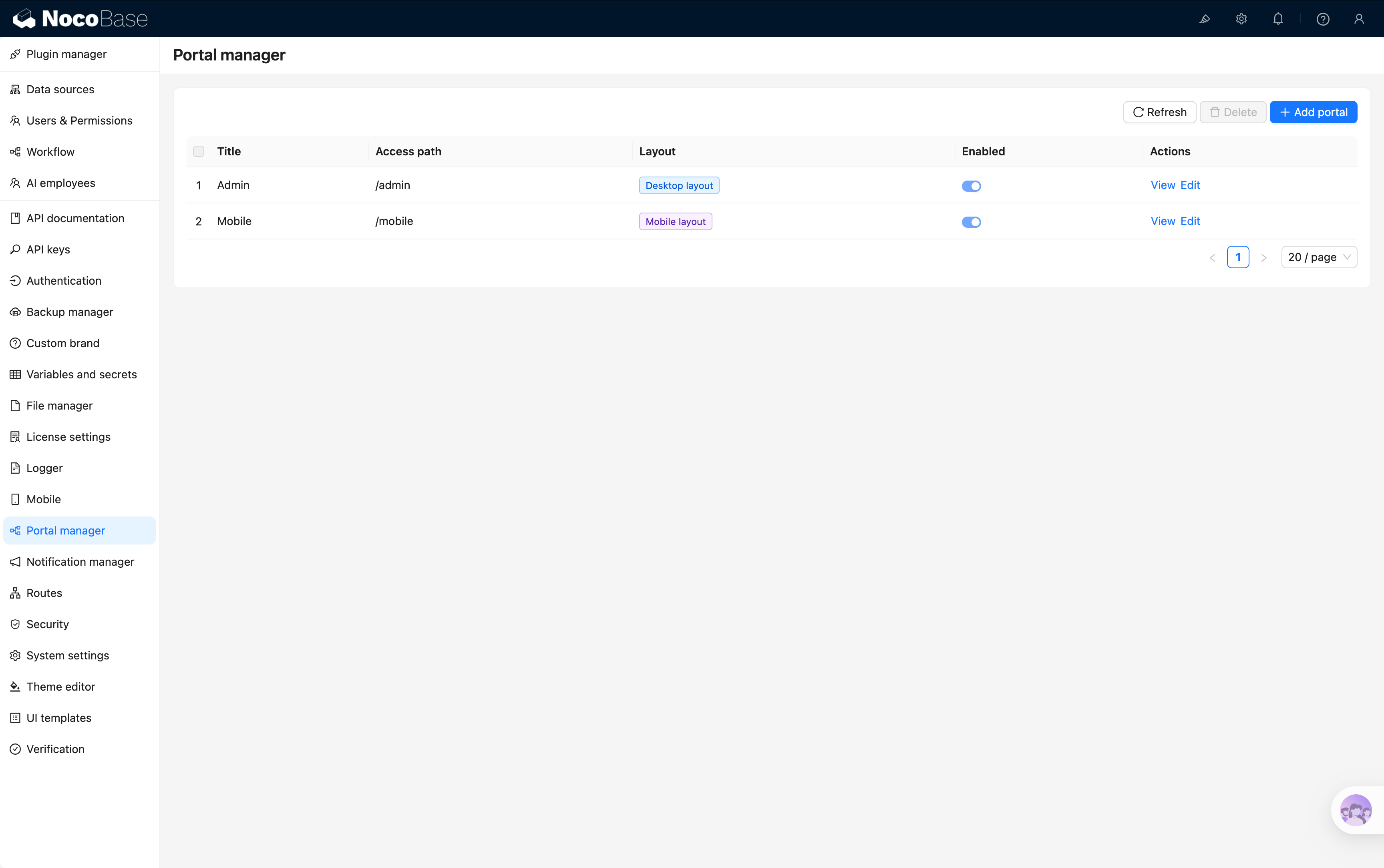
|
+
|
|
10
|
+
Files managed by a NocoBase storage engine are accessed through a **stable URL**. The URL first reaches NocoBase, where the file record and access permissions are checked, and then redirects to the actual URL generated by the storage engine.
|
|
11
|
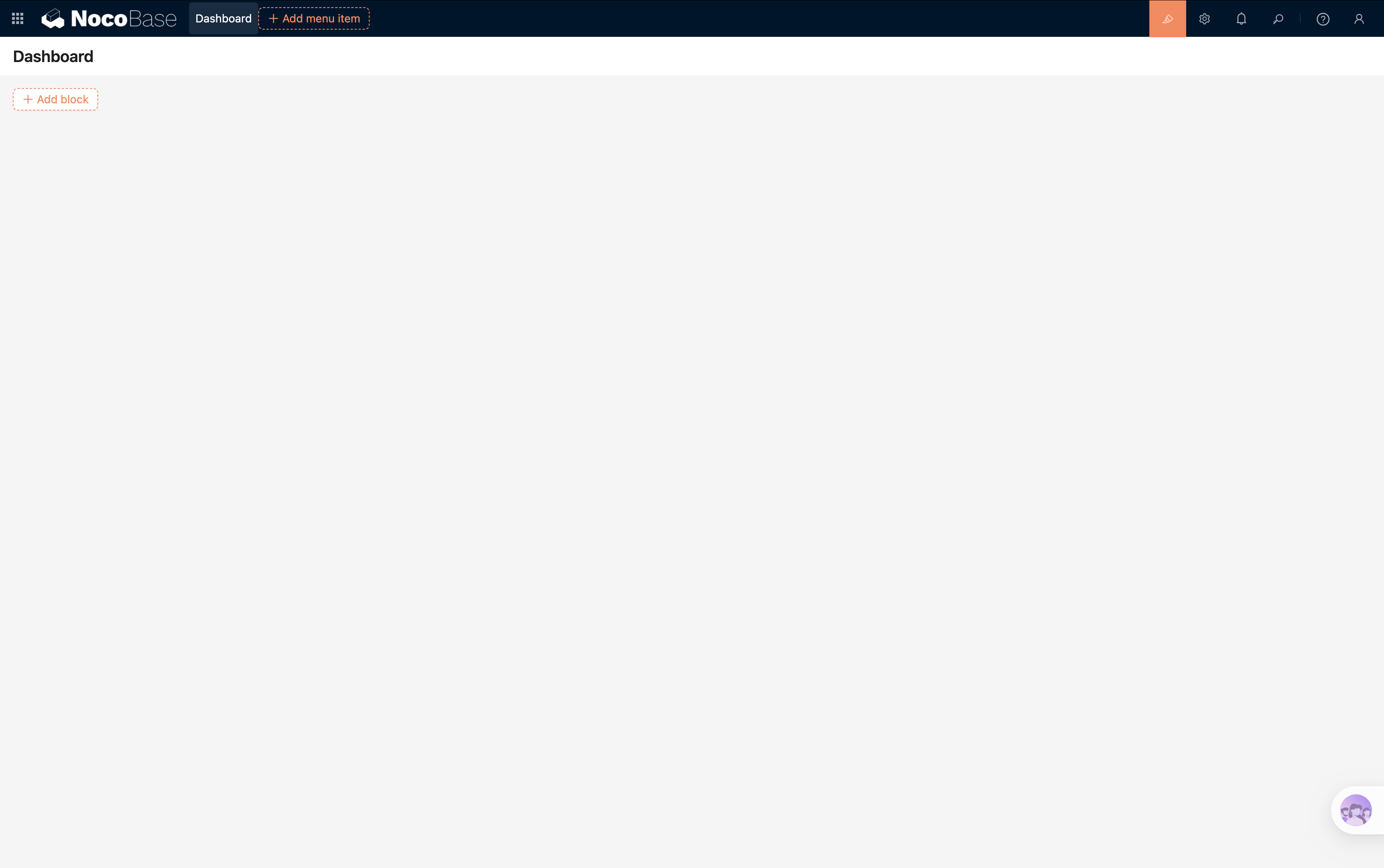
+
|
|
12
|
+
## URL format
|
|
13
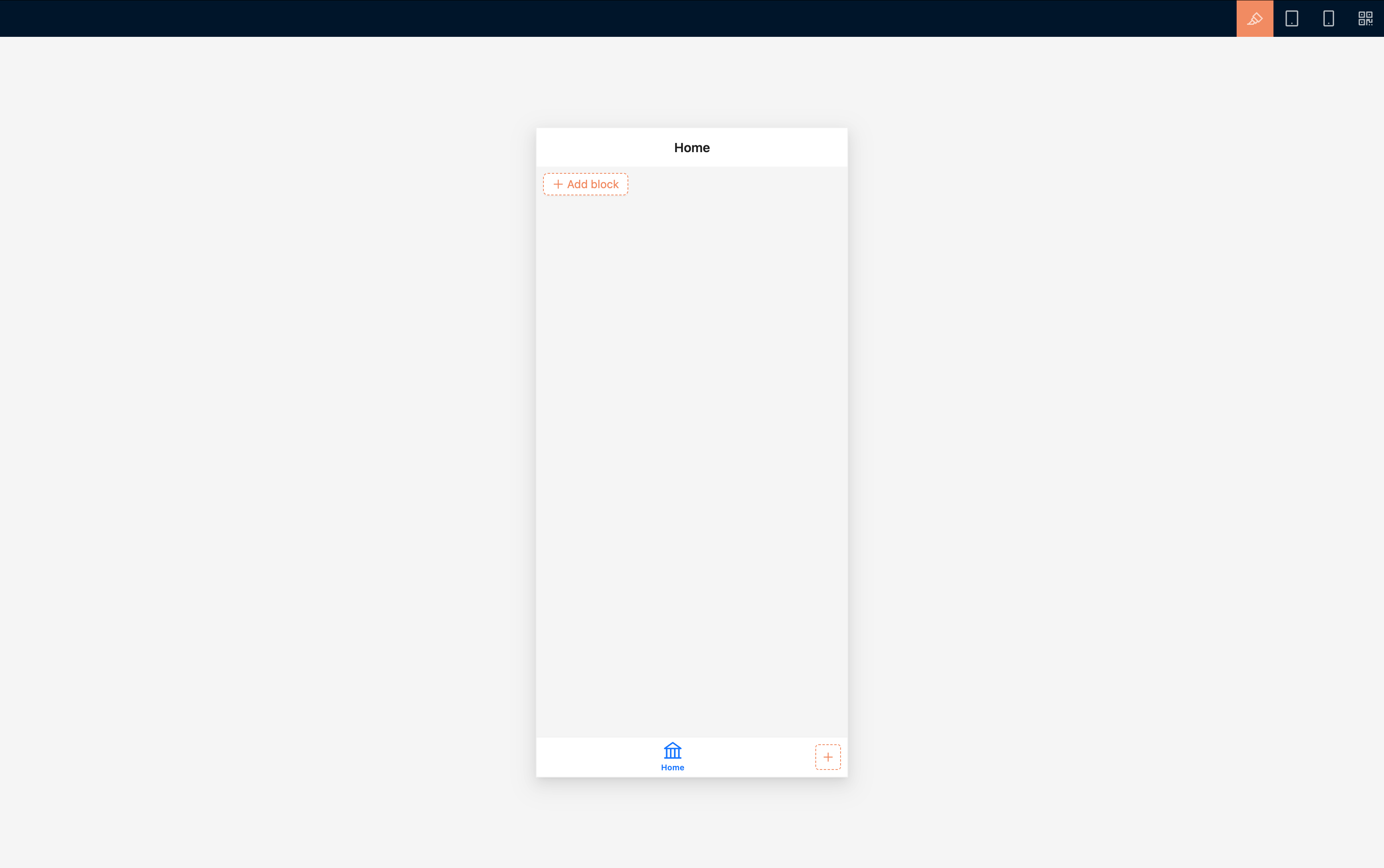
|
+
|
|
14
|
+
```text
|
|
15
|
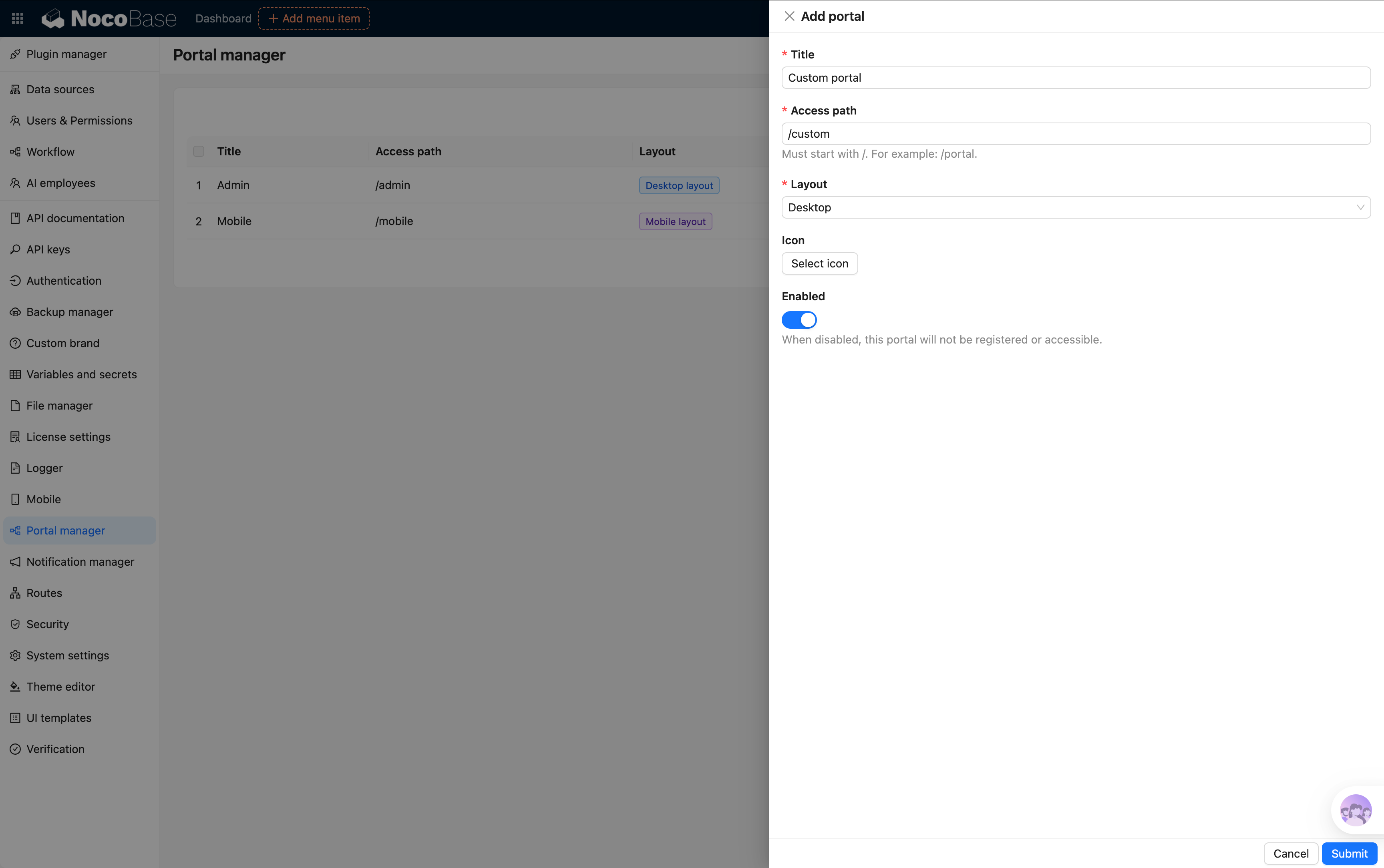
+
/files/<app>/<dataSource>/<collection>/<id><extname>
|
|
16
|
+
```
|
|
17
|
+
|
|
18
|
+
For example:
|
|
19
|
+
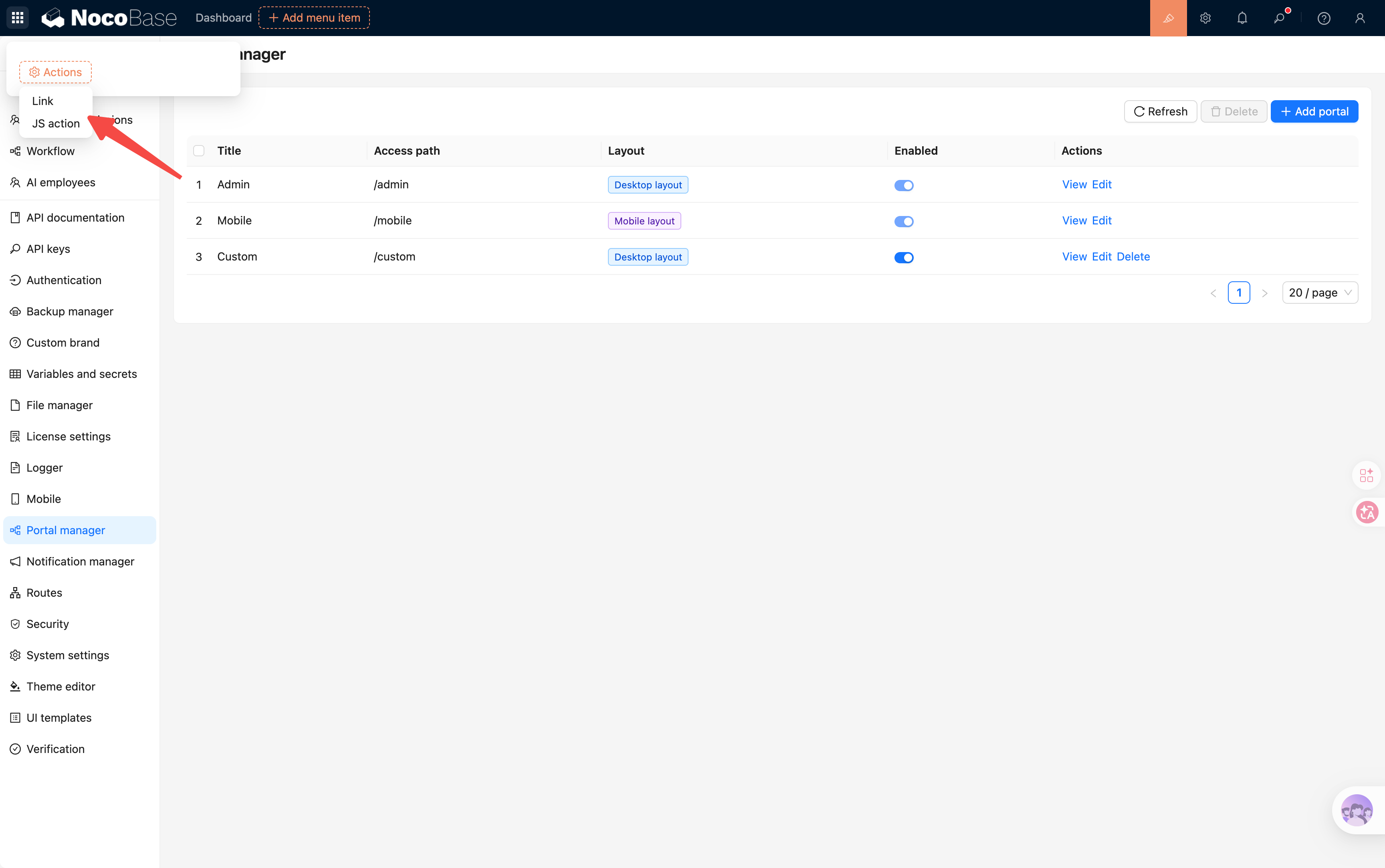
|
|
20
|
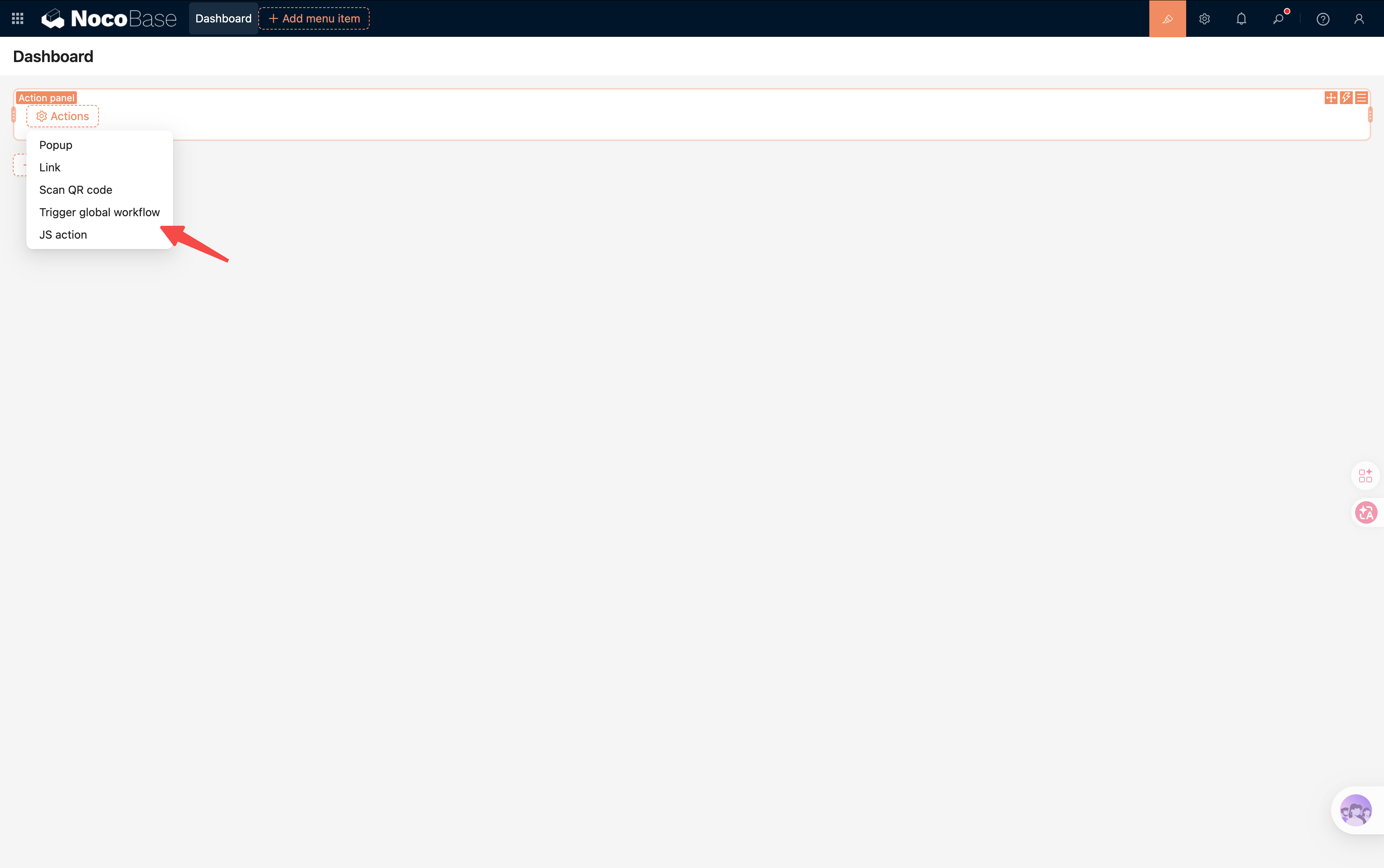
+
```text
|
|
21
|
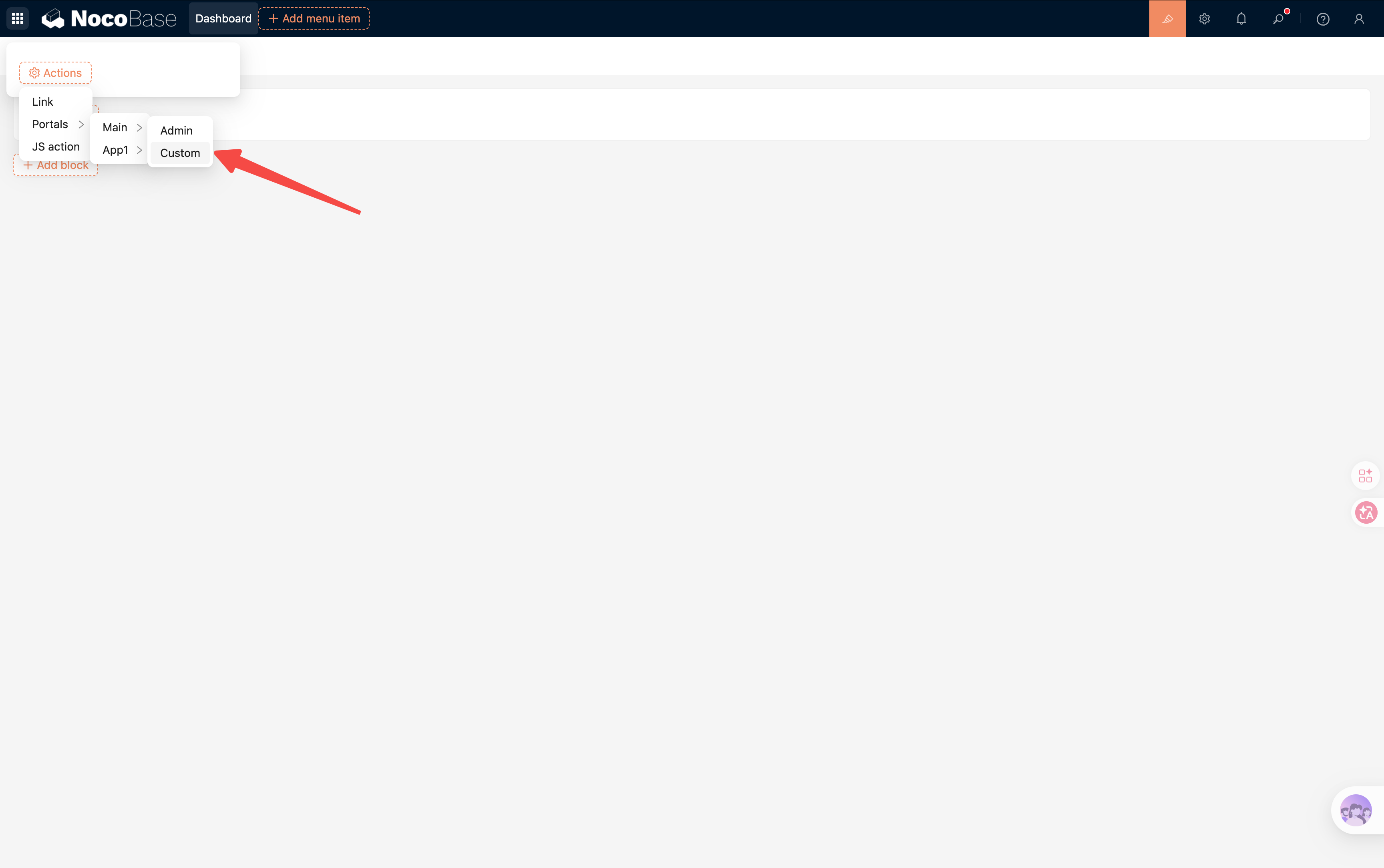
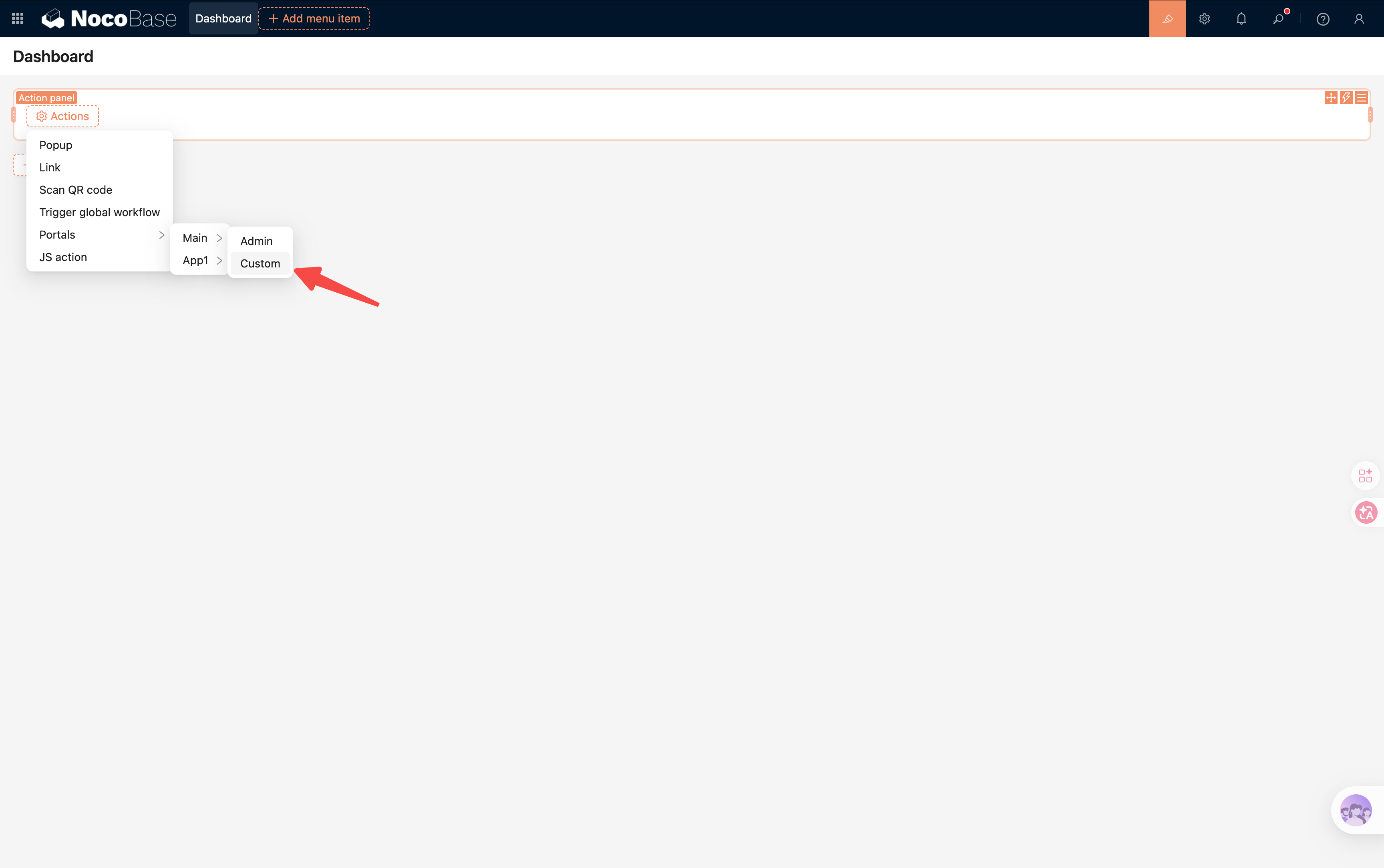
+
/files/main/main/attachments/42.pdf
|
|
22
|
+
```
|
|
23
|
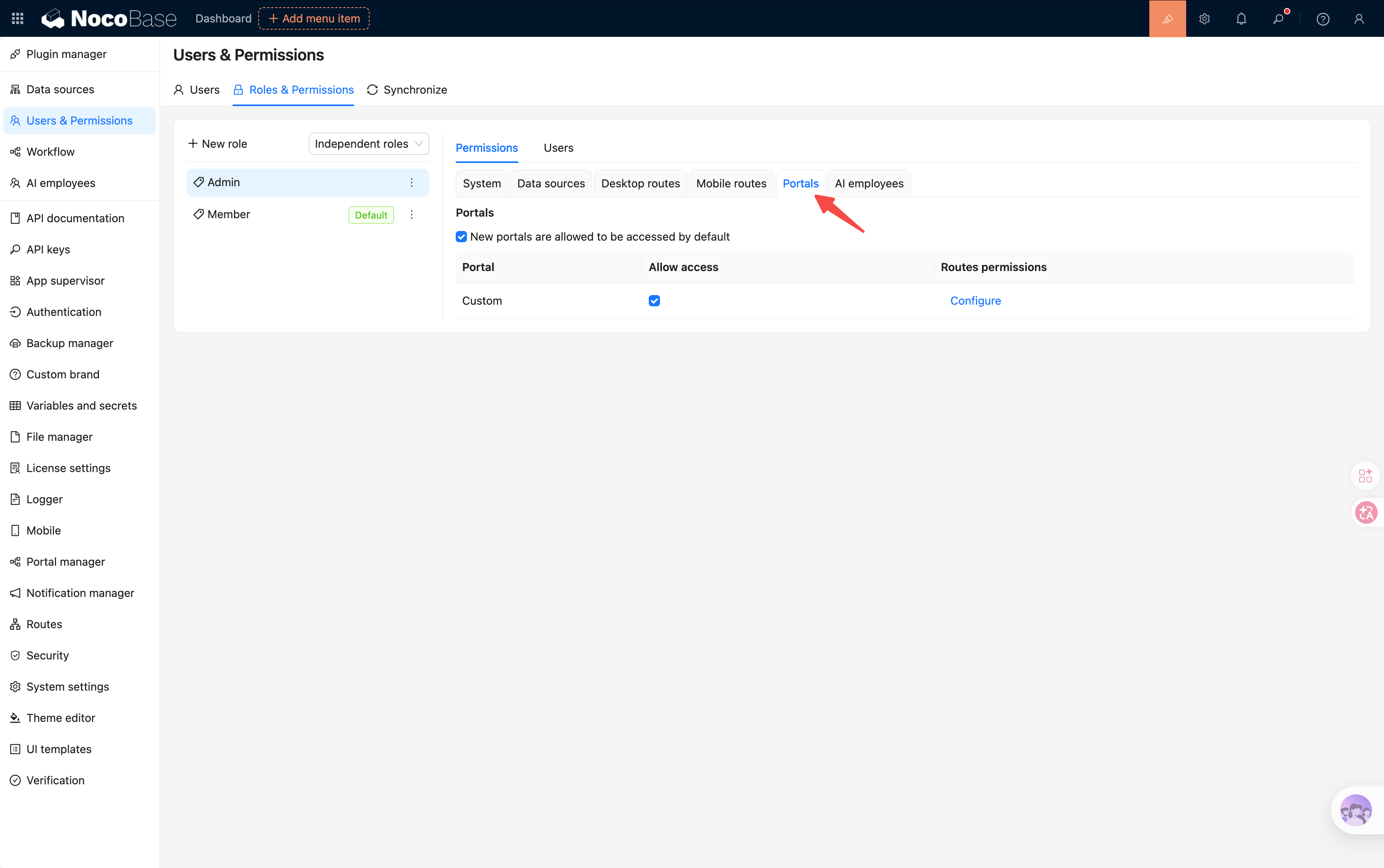
+
|
|
24
|
+
When `APP_PUBLIC_PATH=/nocobase` is configured, the URL starts with `/nocobase/files/`. The path identifies the app, data source, file collection, record ID, and extension. The ID and extension cannot be changed after creation, which keeps the URL stable for the lifetime of the record.
|
|
25
|
+
|
|
26
|
+
## URL variants
|
|
27
|
+
|
|
28
|
+
| Purpose | URL | Behavior |
|
|
29
|
+
|---|---|---|
|
|
30
|
+
| Open or embed | `/files/.../42.pdf` | Checks permission and redirects to the actual file URL |
|
|
31
|
+
| Preview | `/files/.../42.png?preview=1` | Redirects to the preview or thumbnail URL |
|
|
32
|
+
| Download | `/files/.../42.pdf?download=1` | Redirects with download semantics |
|
|
33
|
+
| Office preview | `/files/.../42.xlsx?temporaryAccessToken=...` | Allows Microsoft Office Online Viewer to fetch one file for a short time |
|
|
34
|
+
|
|
35
|
+
:::tip
|
|
36
|
+
|
|
37
|
+
Use the `url` and `preview` values returned by NocoBase. Application code normally should not construct `/files` URLs or their query parameters.
|
|
38
|
+
|
|
39
|
+
:::
|
|
40
|
+
|
|
41
|
+
## Behavior across NocoBase
|
|
42
|
+
|
|
43
|
+
- Attachment fields and file collections return stable URLs after upload and when records are queried
|
|
44
|
+
- [HTTP API](./http-api.md) responses no longer expose local paths, storage domains, or presigned download URLs
|
|
45
|
+
- Markdown uploads store the stable URL, including files in private S3, OSS, COS, or S3 Pro storage
|
|
46
|
+
- Attachment URL fields store a stable URL for managed uploads, while manually entered external URLs remain unchanged
|
|
47
|
+
- Image, PDF, audio, video, and text previews use the stable URL and the current NocoBase login session
|
|
48
|
+
- Public forms grant limited access to files uploaded in the current public-form browser session; this does not create a generally public link
|
|
49
|
+
|
|
50
|
+
## Office preview
|
|
51
|
+
|
|
52
|
+
Microsoft Office Online Viewer fetches the file from Microsoft servers and cannot use the user's NocoBase cookie. When the user opens an Office preview, NocoBase first checks the user's file permission and then issues a temporary URL for that file.
|
|
53
|
+
|
|
54
|
+
The URL is valid for 10 minutes by default. `TEMPORARY_FILE_ACCESS_EXPIRES_IN` may be set from 5 to 10 minutes. It is requested again when the preview is reopened and must never be saved in an attachment field, Markdown content, or a business record.
|
|
55
|
+
|
|
56
|
+
## Permissions and redirects
|
|
57
|
+
|
|
58
|
+
Logged-in requests use the current app credentials and role. After permission is granted, NocoBase responds with `302` and redirects to the local or object-storage URL.
|
|
59
|
+
|
|
60
|
+
Stable URLs support `GET` and `HEAD`. Other methods return `405`. A command-line client must follow redirects, for example:
|
|
61
|
+
|
|
62
|
+
```bash
|
|
63
|
+
curl -L \
|
|
64
|
+
-H "Authorization: Bearer <JWT>" \
|
|
65
|
+
"https://example.com/files/main/main/attachments/42.pdf"
|
|
66
|
+
```
|
|
67
|
+
|
|
68
|
+
## Important notes
|
|
69
|
+
|
|
70
|
+
- Stable does not mean public; recipients still need permission to view the file
|
|
71
|
+
- Deleting the record or changing its app, data source, or collection context invalidates the old URL
|
|
72
|
+
- Do not persist `temporaryAccessToken` or use it as a sharing link
|
|
73
|
+
- Do not cache the `302 Location` as a permanent URL because storage signatures can expire
|
|
74
|
+
- Do not rewrite the app, data source, collection, ID, or extension in the path
|
|
75
|
+
- Reverse proxies must forward the `/files/` route under `APP_PUBLIC_PATH` to NocoBase. For subpath deployments, keep a compatible root-level `/files/` route as well. Configurations generated by the NocoBase CLI include both routes automatically
|
|
76
|
+
- Deployments where the pages access the API cross-origin (with `API_BASE_URL` pointing to another origin) must add the page origin to `CORS_ORIGIN_WHITELIST`; otherwise the login cookie is never stored and stable URLs return `403` for lack of credentials. See [Environment Variables](../get-started/installation/env.md#api_base_url)
|
|
77
|
+
- Use a different `hostname` for each independent NocoBase service instead of separating services only by port. Browser cookies are not isolated by port; see [Production Environment Deployment](../get-started/deployment/production.md)
|
|
78
|
+
- Sub-apps in the same NocoBase deployment are distinguished by app name and do not need separate hostnames. However, an independent service on another port still needs hostname isolation if it contains a main app or sub-app with the same name
|
|
79
|
+
- Custom `fetch()` code may also need object-storage CORS after following the redirect
|
|
80
|
+
- Use a dedicated sharing or public-access feature when a long-lived public link is required
|
|
81
|
+
|
|
82
|
+
## Related links
|
|
83
|
+
|
|
84
|
+
- [HTTP API](./http-api.md) — Upload and query files through the API
|
|
85
|
+
- [File preview](./file-preview/index.md) — Preview behavior for supported file types
|
|
86
|
+
- [Office file preview](./file-preview/ms-office.md) — Configure Microsoft Office Online Viewer
|
|
87
|
+
- [Storage engines](./storage/index.md) — Configure local and object storage
|
|
@@ -2,12 +2,34 @@
|
|
|
2
2
|
|
|
3
3
|
When deploying NocoBase in a production environment, installing dependencies can be cumbersome due to differences in build methods across various systems and environments. For a complete functional experience, we recommend deploying with **Docker**. If your system environment cannot use Docker, you can also deploy using **create-nocobase-app**.
|
|
4
4
|
|
|
5
|
-
:::warning
|
|
5
|
+
:::warning Note
|
|
6
6
|
|
|
7
7
|
It is not recommended to deploy directly from source code in a production environment. The source code has many dependencies, is large in size, and a full compilation has high CPU and memory requirements. If you must deploy from source code, it is recommended to first build a custom Docker image and then deploy it.
|
|
8
8
|
|
|
9
9
|
:::
|
|
10
10
|
|
|
11
|
+
:::warning Note
|
|
12
|
+
|
|
13
|
+
If you deploy multiple independent NocoBase services, use a different `hostname` for each service, such as separate subdomains. Do not distinguish services only by port, for example `https://example.com:13000` and `https://example.com:14000`.
|
|
14
|
+
|
|
15
|
+
NocoBase uses cookies to maintain login state and [file access permissions](../../file-manager/stable-url.md). Browsers do not isolate cookies by port, so services on different ports under the same `hostname` may share cookies with the same name. This can overwrite login state or cause file preview and download authorization failures.
|
|
16
|
+
|
|
17
|
+
Sub-apps within the same NocoBase deployment are outside this restriction. Login cookies are distinguished by app name, so the main app and differently named sub-apps can share one `hostname`.
|
|
18
|
+
|
|
19
|
+
However, independent services still need isolation. If another NocoBase service runs on a different port under the same `hostname` and contains a main app or sub-app with the same name, its cookies may still conflict.
|
|
20
|
+
|
|
21
|
+
Use addresses such as `app1.example.com` and `app2.example.com`, then route them to different NocoBase services through Nginx or Caddy.
|
|
22
|
+
|
|
23
|
+
:::
|
|
24
|
+
|
|
25
|
+
## Separated Frontend / Cross-Origin API Access
|
|
26
|
+
|
|
27
|
+
Prefer keeping the pages and the API on the same origin: use a reverse proxy under one domain to forward `${APP_PUBLIC_PATH}api/` and `${APP_PUBLIC_PATH}files/` to the NocoBase service, and leave `API_BASE_URL` empty.
|
|
28
|
+
|
|
29
|
+
If the pages must access the API cross-origin (with `API_BASE_URL` pointing to another origin), add the page origin to `CORS_ORIGIN_WHITELIST`. Otherwise the browser ignores `Set-Cookie` in API responses, the login cookie is never stored, and preview and download through stable file URLs fail authorization.
|
|
30
|
+
|
|
31
|
+
Also note that cookies are stored per `hostname`: when the pages and the API use entirely different domains, requests to `/files/` from the page domain will not carry the login cookie stored under the API domain. Such deployments should switch to a same-origin reverse proxy. See [Environment Variables](../installation/env.md#api_base_url).
|
|
32
|
+
|
|
11
33
|
## Deployment Process
|
|
12
34
|
|
|
13
35
|
For production environment deployment, you can refer to the existing installation and upgrade steps.
|
|
@@ -39,4 +61,4 @@ In a production environment, it is recommended to manage static assets with a pr
|
|
|
39
61
|
Depending on the installation method, you can use the following commands to manage the NocoBase process:
|
|
40
62
|
|
|
41
63
|
- [docker compose](./common-commands/docker-compose.md)
|
|
42
|
-
- [pm2](./common-commands/pm2.md)
|
|
64
|
+
- [pm2](./common-commands/pm2.md)
|
|
@@ -94,6 +94,7 @@ services:
|
|
|
94
94
|
- `NOCOBASE_PROXY_UPSTREAM_HOST=app` lets the Caddy container reach the `app` service through the Compose network
|
|
95
95
|
- `./storage` must be mounted into both the `app` and `caddy` containers so they can share proxy config, static assets, and uploaded files
|
|
96
96
|
- The `caddy` container should wait until `nocobase.caddy` is generated, then link it to `/etc/caddy/Caddyfile` with `ln -sf`
|
|
97
|
+
- The generated config forwards both the `/files/` route under `APP_PUBLIC_PATH` and the root-level `/files/` route to NocoBase for authenticated file previews and downloads
|
|
97
98
|
- Expose only the Caddy container port to the host. For testing, you can start with `13000:80`; in production, you usually expose the host `80` and `443` ports directly, while the `app` service does not need to expose its port to the host
|
|
98
99
|
|
|
99
100
|
## If you use a local host Caddy
|
|
@@ -169,6 +170,8 @@ sudo systemctl reload caddy
|
|
|
169
170
|
|
|
170
171
|
If your host Caddy does not use `/etc/caddy/Caddyfile`, replace the link target with your own config path. Usually it is safer to keep `nocobase.caddy` as the main entry file instead of copying its content manually.
|
|
171
172
|
|
|
173
|
+
If you maintain Caddy yourself instead of using the generated config, make sure `/files/*` and the corresponding route under `APP_PUBLIC_PATH` are forwarded to NocoBase before the SPA fallback rules. See [Caddy Reverse Proxy](../../nocobase-cli/production/reverse-proxy/caddy.md) for a complete example.
|
|
174
|
+
|
|
172
175
|
## Related links
|
|
173
176
|
|
|
174
177
|
- [Docker Installation (Built-in Nginx)](./docker.mdx) — Start with the single-container setup
|
|
@@ -95,6 +95,7 @@ services:
|
|
|
95
95
|
- `NOCOBASE_PROXY_UPSTREAM_HOST=app` lets the Nginx container reach the `app` service through the Compose network
|
|
96
96
|
- `./storage` must be mounted into both the `app` and `nginx` containers so they can share proxy config, static assets, and uploaded files
|
|
97
97
|
- The `nginx` container should wait until `nocobase.conf` is generated, then link it to `/etc/nginx/conf.d/default.conf` with `ln -sf`
|
|
98
|
+
- The generated config forwards both the `/files/` route under `APP_PUBLIC_PATH` and the root-level `/files/` route to NocoBase for authenticated file previews and downloads
|
|
98
99
|
- If you use an external Nginx container, let the `nginx` container handle the host port mapping. For testing, you can start with `13000:80`; in production, you usually expose the host `80` and `443` ports directly, while the `app` service does not need to expose its port to the host
|
|
99
100
|
|
|
100
101
|
## If you use a local host Nginx
|
|
@@ -170,6 +171,8 @@ sudo systemctl reload nginx
|
|
|
170
171
|
|
|
171
172
|
If your host Nginx does not use the `conf.d` directory, replace the link target with your own config path. Usually it is safer to keep `nocobase.conf` as a file included from the `http {}` context instead of copying its content manually.
|
|
172
173
|
|
|
174
|
+
If you maintain Nginx yourself instead of using the generated config, make sure `/files/` and the corresponding route under `APP_PUBLIC_PATH` are forwarded to NocoBase before the SPA fallback rules. See [Nginx Reverse Proxy](../../nocobase-cli/production/reverse-proxy/nginx.md) for a complete example.
|
|
175
|
+
|
|
173
176
|
## Related links
|
|
174
177
|
|
|
175
178
|
- [Docker Installation (Built-in Nginx)](./docker.mdx) — Start with the single-container setup
|
|
@@ -627,7 +627,7 @@ If you use the built-in Nginx image, it is usually better not to expose `13000`
|
|
|
627
627
|
|
|
628
628
|
The following config proxies domain requests to `http://127.0.0.1:13000/`:
|
|
629
629
|
|
|
630
|
-
```
|
|
630
|
+
```nginx
|
|
631
631
|
server {
|
|
632
632
|
listen 80;
|
|
633
633
|
server_name your_domain.com; # Replace your_domain.com with your domain
|
|
@@ -658,6 +658,8 @@ server {
|
|
|
658
658
|
|
|
659
659
|
If you also want to enable HTTPS, configure `443` and the certificate on the host Nginx. The NocoBase container does not need to handle certificates separately.
|
|
660
660
|
|
|
661
|
+
The `location /` block in this root-path configuration also proxies `/api/`, `/ws`, and `/files/`. If you split static assets from application routes, make sure `/files/` is still forwarded to NocoBase and is not handled as a static directory.
|
|
662
|
+
|
|
661
663
|
### Subpath deployment
|
|
662
664
|
|
|
663
665
|
If you want to deploy the app under a subpath, such as `https://your_domain.com/nocobase/`, configure the `APP_PUBLIC_PATH` environment variable first:
|
|
@@ -674,7 +676,7 @@ Keep the leading and trailing `/` in the path. After this is configured, the app
|
|
|
674
676
|
|
|
675
677
|
Then configure the host Nginx with the same subpath proxy:
|
|
676
678
|
|
|
677
|
-
```
|
|
679
|
+
```nginx
|
|
678
680
|
server {
|
|
679
681
|
listen 80;
|
|
680
682
|
server_name your_domain.com; # Replace your_domain.com with your domain
|
|
@@ -700,10 +702,32 @@ server {
|
|
|
700
702
|
send_timeout 600;
|
|
701
703
|
proxy_buffering off;
|
|
702
704
|
}
|
|
705
|
+
|
|
706
|
+
# Keep compatibility with root-level file access URLs.
|
|
707
|
+
location ^~ /files/ {
|
|
708
|
+
proxy_pass http://127.0.0.1:13000;
|
|
709
|
+
proxy_http_version 1.1;
|
|
710
|
+
|
|
711
|
+
proxy_set_header X-Forwarded-For $proxy_add_x_forwarded_for;
|
|
712
|
+
proxy_set_header X-Forwarded-Proto $upstream_x_forwarded_proto;
|
|
713
|
+
proxy_set_header Host $final_host;
|
|
714
|
+
proxy_set_header Referer $http_referer;
|
|
715
|
+
proxy_set_header User-Agent $http_user_agent;
|
|
716
|
+
|
|
717
|
+
add_header Cache-Control "no-cache, no-store" always;
|
|
718
|
+
|
|
719
|
+
proxy_connect_timeout 600;
|
|
720
|
+
proxy_send_timeout 600;
|
|
721
|
+
proxy_read_timeout 600;
|
|
722
|
+
send_timeout 600;
|
|
723
|
+
}
|
|
703
724
|
}
|
|
704
725
|
```
|
|
705
726
|
|
|
706
|
-
|
|
727
|
+
Keep these points in mind:
|
|
728
|
+
|
|
729
|
+
- `APP_PUBLIC_PATH` and the path in `proxy_pass` must stay consistent. If either side misses `/nocobase/`, static assets and routing will usually not work correctly
|
|
730
|
+
- `/nocobase/files/` is forwarded by `location /nocobase/`; the compatible root-level `/files/` route must be forwarded to NocoBase separately
|
|
707
731
|
|
|
708
732
|
### Other options
|
|
709
733
|
|
|
@@ -86,6 +86,39 @@ API_BASE_PATH=/api/
|
|
|
86
86
|
|
|
87
87
|
### API_BASE_URL
|
|
88
88
|
|
|
89
|
+
Base URL the frontend uses to access the NocoBase API. Empty by default, which means the same-origin `${APP_PUBLIC_PATH}api/` is used.
|
|
90
|
+
|
|
91
|
+
```bash
|
|
92
|
+
API_BASE_URL=
|
|
93
|
+
```
|
|
94
|
+
|
|
95
|
+
Only set it to the full API address when the pages and the API service are on different origins (different protocol, domain, or port):
|
|
96
|
+
|
|
97
|
+
```bash
|
|
98
|
+
API_BASE_URL=https://api.example.com/api/
|
|
99
|
+
```
|
|
100
|
+
|
|
101
|
+
:::warning{title="Cross-origin deployments"}
|
|
102
|
+
NocoBase uses cookies to maintain login state and to authorize [stable file URLs](../../file-manager/stable-url.md). When `API_BASE_URL` points to a different origin than the pages:
|
|
103
|
+
|
|
104
|
+
- The page origin must be added to [`CORS_ORIGIN_WHITELIST`](#cors_origin_whitelist). Otherwise the browser ignores `Set-Cookie` in API responses, the login cookie is never stored, and cookie-dependent features such as file preview and download fail with `403`.
|
|
105
|
+
- Cookies are stored per `hostname`. If the pages and the API use entirely different domains, requests to `/files/` stable URLs from the page domain will not carry the login cookie stored under the API domain, so file access still fails.
|
|
106
|
+
|
|
107
|
+
Prefer serving the pages and the API from the same origin through a reverse proxy and leaving `API_BASE_URL` empty.
|
|
108
|
+
:::
|
|
109
|
+
|
|
110
|
+
### CORS_ORIGIN_WHITELIST
|
|
111
|
+
|
|
112
|
+
Whitelist of origins allowed to access the API cross-origin with credentials (cookies). Multiple origins are separated by commas. Empty by default.
|
|
113
|
+
|
|
114
|
+
```bash
|
|
115
|
+
CORS_ORIGIN_WHITELIST=https://www.example.com,https://admin.example.com
|
|
116
|
+
```
|
|
117
|
+
|
|
118
|
+
- When not configured, only same-origin requests are treated as trusted; cross-origin requests can still call the API anonymously, but the browser is not allowed to read or write cookies for them.
|
|
119
|
+
- When configured, whitelisted origins receive an exact `Access-Control-Allow-Origin` echo and `Access-Control-Allow-Credentials: true`, which lets the browser send and store login cookies on cross-origin requests.
|
|
120
|
+
- The sign-in API validates the request `Origin` / `Referer`; cross-origin sign-in requests from origins outside the whitelist are rejected with `403`.
|
|
121
|
+
|
|
89
122
|
### CLUSTER_MODE
|
|
90
123
|
|
|
91
124
|
> `v1.6.0+`
|
|
@@ -28,7 +28,7 @@ features:
|
|
|
28
28
|
link: /ai/install-nocobase-app
|
|
29
29
|
- title: Tutorials
|
|
30
30
|
details: Step-by-step tutorials to build real projects with NocoBase from scratch.
|
|
31
|
-
link: /tutorials/
|
|
31
|
+
link: /tutorials/
|
|
32
32
|
|
|
33
33
|
- title: AI
|
|
34
34
|
details: An AI-powered new way to get started - use natural language to build, use, and develop.
|
|
@@ -0,0 +1,159 @@
|
|
|
1
|
+
# Multi-portal, Multi-app, and Multi-space
|
|
2
|
+
|
|
3
|
+
NocoBase provides three capabilities: Multi-portal, Multi-app, and Multi-space.
|
|
4
|
+
|
|
5
|
+
They solve problems at different levels. They can be used independently or together.
|
|
6
|
+
|
|
7
|
+
## Key differences
|
|
8
|
+
|
|
9
|
+
| Capability | Multi-portal | Multi-app | Multi-space |
|
|
10
|
+
|------|------|------|------|
|
|
11
|
+
| What problem it solves | Provides multiple access entries | Splits business into multiple systems | Isolates business data |
|
|
12
|
+
| Core focus | Where users enter | How the system is divided | Who the data belongs to |
|
|
13
|
+
| Data | Shared | Independent by default | Isolated |
|
|
14
|
+
| Pages and menus | Independent | Independent | Shared |
|
|
15
|
+
| Plugin configuration | Shared | Independent | Shared |
|
|
16
|
+
| User system | Shared | Can be shared through SSO | Shared |
|
|
17
|
+
| Typical scenarios | Different roles need different entries | Different businesses need independent management | Multiple organizations, stores, or tenants |
|
|
18
|
+
| Can be combined | Yes | Yes | Yes |
|
|
19
|
+
|
|
20
|
+
## Multi-portal
|
|
21
|
+
|
|
22
|
+
Multi-portal provides multiple access entries within the same application.
|
|
23
|
+
|
|
24
|
+
For example:
|
|
25
|
+
|
|
26
|
+
```text
|
|
27
|
+
ERP App
|
|
28
|
+
|
|
29
|
+
├─ Admin Portal (/v/admin)
|
|
30
|
+
├─ Store Portal (/v/store)
|
|
31
|
+
├─ Distributor Portal (/v/dealer)
|
|
32
|
+
└─ Mobile Portal (/v/mobile)
|
|
33
|
+
```
|
|
34
|
+
|
|
35
|
+
Features:
|
|
36
|
+
|
|
37
|
+
- Uses the same application
|
|
38
|
+
- Shares the same data
|
|
39
|
+
- Shares plugin configuration
|
|
40
|
+
- Pages and menus can be configured independently
|
|
41
|
+
|
|
42
|
+
Suitable for scenarios where different roles need different access entries, such as:
|
|
43
|
+
|
|
44
|
+
- Administrators
|
|
45
|
+
- Employees
|
|
46
|
+
- Customers
|
|
47
|
+
- Distributors
|
|
48
|
+
|
|
49
|
+
## Multi-app
|
|
50
|
+
|
|
51
|
+
Multi-app splits business into multiple independent applications.
|
|
52
|
+
|
|
53
|
+
For example:
|
|
54
|
+
|
|
55
|
+
```text
|
|
56
|
+
Group System
|
|
57
|
+
|
|
58
|
+
├─ CRM
|
|
59
|
+
├─ ERP
|
|
60
|
+
├─ OA
|
|
61
|
+
└─ Analytics
|
|
62
|
+
```
|
|
63
|
+
|
|
64
|
+
Features:
|
|
65
|
+
|
|
66
|
+
- Each app is managed independently
|
|
67
|
+
- Independent plugin configuration
|
|
68
|
+
- Independent database connection
|
|
69
|
+
- Independent upgrade and maintenance
|
|
70
|
+
|
|
71
|
+
Suitable for:
|
|
72
|
+
|
|
73
|
+
- Splitting large business systems
|
|
74
|
+
- Multi-team collaborative development
|
|
75
|
+
- Batch creation of apps for SaaS platforms
|
|
76
|
+
- Independent apps for different customers
|
|
77
|
+
|
|
78
|
+
## Multi-space
|
|
79
|
+
|
|
80
|
+
Multi-space isolates business data within the same application.
|
|
81
|
+
|
|
82
|
+
For example:
|
|
83
|
+
|
|
84
|
+
```text
|
|
85
|
+
Store Management App
|
|
86
|
+
|
|
87
|
+
Spaces
|
|
88
|
+
├─ Beijing Store
|
|
89
|
+
├─ Shanghai Store
|
|
90
|
+
└─ Shenzhen Store
|
|
91
|
+
```
|
|
92
|
+
|
|
93
|
+
Features:
|
|
94
|
+
|
|
95
|
+
- Shared pages
|
|
96
|
+
- Shared menus
|
|
97
|
+
- Shared workflows
|
|
98
|
+
- Shared configuration
|
|
99
|
+
- Isolated data
|
|
100
|
+
|
|
101
|
+
For tables that have a space field enabled, the system automatically filters data according to the current space.
|
|
102
|
+
|
|
103
|
+
From the user's perspective:
|
|
104
|
+
|
|
105
|
+
- The Beijing store can only see Beijing store data
|
|
106
|
+
- The Shanghai store can only see Shanghai store data
|
|
107
|
+
- The Shenzhen store can only see Shenzhen store data
|
|
108
|
+
|
|
109
|
+
But all stores still use the same system.
|
|
110
|
+
|
|
111
|
+
## Relationship among the three
|
|
112
|
+
|
|
113
|
+
These three capabilities do not conflict. They work on different dimensions.
|
|
114
|
+
|
|
115
|
+
They can be used together:
|
|
116
|
+
|
|
117
|
+
```text
|
|
118
|
+
Group System
|
|
119
|
+
|
|
120
|
+
CRM App
|
|
121
|
+
├─ Admin Portal
|
|
122
|
+
├─ Sales Portal
|
|
123
|
+
└─ Customer Portal
|
|
124
|
+
|
|
125
|
+
Spaces
|
|
126
|
+
├─ Beijing Branch
|
|
127
|
+
├─ Shanghai Branch
|
|
128
|
+
└─ Shenzhen Branch
|
|
129
|
+
```
|
|
130
|
+
|
|
131
|
+
Conceptually:
|
|
132
|
+
|
|
133
|
+
```text
|
|
134
|
+
Portal
|
|
135
|
+
↓
|
|
136
|
+
Where users enter the system
|
|
137
|
+
|
|
138
|
+
App
|
|
139
|
+
↓
|
|
140
|
+
How the system is divided
|
|
141
|
+
|
|
142
|
+
Space
|
|
143
|
+
↓
|
|
144
|
+
Who the data belongs to
|
|
145
|
+
```
|
|
146
|
+
|
|
147
|
+
## How to choose
|
|
148
|
+
|
|
149
|
+
If you only want to provide different entries for different roles, choose **Multi-portal**.
|
|
150
|
+
|
|
151
|
+
If you want to split business into multiple independent systems, choose **Multi-app**.
|
|
152
|
+
|
|
153
|
+
If you want to isolate data for different organizations or tenants within the same system, choose **Multi-space**.
|
|
154
|
+
|
|
155
|
+
In real projects, these three capabilities are usually combined rather than used as substitutes for one another.
|
|
156
|
+
|
|
157
|
+
In one sentence:
|
|
158
|
+
|
|
159
|
+
> Multi-portal solves entry points, Multi-app solves system splitting, and Multi-space solves data isolation.
|
|
@@ -0,0 +1,195 @@
|
|
|
1
|
+
---
|
|
2
|
+
title: "Multi-portal"
|
|
3
|
+
description: "Learn the concept, use cases, configuration, and relationship between Multi-portal, Multi-app, and Multi-space in NocoBase."
|
|
4
|
+
keywords: "workspace, portal, multi-portal, NocoBase"
|
|
5
|
+
pkg: "@nocobase/plugin-multi-portal"
|
|
6
|
+
---
|
|
7
|
+
|
|
8
|
+
# Multi-portal
|
|
9
|
+
|
|
10
|
+
## What is a portal
|
|
11
|
+
|
|
12
|
+
A portal is used to provide multiple access entries within the same application.
|
|
13
|
+
|
|
14
|
+
Each portal can have its own:
|
|
15
|
+
|
|
16
|
+
- Pages
|
|
17
|
+
- Menus
|
|
18
|
+
- Navigation structure
|
|
19
|
+
- Layout
|
|
20
|
+
- Permission settings
|
|
21
|
+
|
|
22
|
+
The Multi-portal plugin provides the following capabilities:
|
|
23
|
+
|
|
24
|
+
- Portal management
|
|
25
|
+
- Portal switching
|
|
26
|
+
- Portal permission control
|
|
27
|
+
|
|
28
|
+
With these capabilities, you can provide different experiences for different roles while sharing the same data and business capabilities.
|
|
29
|
+
|
|
30
|
+
## Why use portals
|
|
31
|
+
|
|
32
|
+
In real business scenarios, different roles often need different interfaces.
|
|
33
|
+
|
|
34
|
+
For example, in a retail management system:
|
|
35
|
+
|
|
36
|
+
```text
|
|
37
|
+
Retail Management System
|
|
38
|
+
|
|
39
|
+
├─ Headquarters Portal
|
|
40
|
+
├─ Store Portal
|
|
41
|
+
├─ Distributor Portal
|
|
42
|
+
└─ Mobile Portal
|
|
43
|
+
```
|
|
44
|
+
|
|
45
|
+
Headquarters staff focus on:
|
|
46
|
+
|
|
47
|
+
- Product management
|
|
48
|
+
- Inventory management
|
|
49
|
+
- Data analysis
|
|
50
|
+
|
|
51
|
+
Store staff focus on:
|
|
52
|
+
|
|
53
|
+
- Cashiering
|
|
54
|
+
- Stocktaking
|
|
55
|
+
- Order processing
|
|
56
|
+
|
|
57
|
+
Distributors focus on:
|
|
58
|
+
|
|
59
|
+
- Purchasing
|
|
60
|
+
- Reconciliation
|
|
61
|
+
- Shipment status
|
|
62
|
+
|
|
63
|
+
Although everyone uses the same system, different roles do not need to see the same menus and pages.
|
|
64
|
+
|
|
65
|
+
That is exactly the problem portals solve.
|
|
66
|
+
|
|
67
|
+
## Relationship between portals and menus
|
|
68
|
+
|
|
69
|
+
Each portal has its own menu tree.
|
|
70
|
+
|
|
71
|
+
Menus in different portals do not affect each other.
|
|
72
|
+
|
|
73
|
+
For example:
|
|
74
|
+
|
|
75
|
+
```text
|
|
76
|
+
Headquarters Portal
|
|
77
|
+
├─ Product Management
|
|
78
|
+
├─ Supply Chain Management
|
|
79
|
+
└─ Data Analysis
|
|
80
|
+
|
|
81
|
+
Store Portal
|
|
82
|
+
├─ Cashiering
|
|
83
|
+
├─ Order Management
|
|
84
|
+
└─ Stocktaking
|
|
85
|
+
```
|
|
86
|
+
|
|
87
|
+
## Relationship between portals and pages
|
|
88
|
+
|
|
89
|
+
Pages belong to their respective portals.
|
|
90
|
+
|
|
91
|
+
The same page can also be shown only in specific portals.
|
|
92
|
+
|
|
93
|
+
This makes it possible to design completely different workflows for different roles.
|
|
94
|
+
|
|
95
|
+
## Relationship between portals and permissions
|
|
96
|
+
|
|
97
|
+
Portals themselves can be configured with access permissions.
|
|
98
|
+
|
|
99
|
+
Only authorized users can access the corresponding portal.
|
|
100
|
+
|
|
101
|
+
Unauthorized portals:
|
|
102
|
+
|
|
103
|
+
- Do not appear in the switcher list
|
|
104
|
+
- Cannot be accessed directly
|
|
105
|
+
|
|
106
|
+
## Portal management
|
|
107
|
+
|
|
108
|
+
After enabling the Multi-portal plugin, the system provides two built-in portals by default:
|
|
109
|
+
|
|
110
|
+
| Portal | Path | Purpose |
|
|
111
|
+
|----------|----------|----------|
|
|
112
|
+
| Desktop | `/v/admin` | Desktop entry |
|
|
113
|
+
| Mobile | `/v/mobile` | Mobile entry |
|
|
114
|
+
|
|
115
|
+
### Built-in portals
|
|
116
|
+
|
|
117
|
+
|
|
118
|
+
|
|
119
|
+
### Desktop portal
|
|
120
|
+
|
|
121
|
+
Access path:
|
|
122
|
+
|
|
123
|
+
```text
|
|
124
|
+
/v/admin
|
|
125
|
+
```
|
|
126
|
+
|
|
127
|
+
|
|
128
|
+
|
|
129
|
+
### Mobile portal
|
|
130
|
+
|
|
131
|
+
Access path:
|
|
132
|
+
|
|
133
|
+
```text
|
|
134
|
+
/v/mobile
|
|
135
|
+
```
|
|
136
|
+
|
|
137
|
+
|
|
138
|
+
|
|
139
|
+
## Create a portal
|
|
140
|
+
|
|
141
|
+
In addition to the built-in portals, you can create more portals based on business needs.
|
|
142
|
+
|
|
143
|
+
For example:
|
|
144
|
+
|
|
145
|
+
- Store portal
|
|
146
|
+
- Distributor portal
|
|
147
|
+
- Customer service portal
|
|
148
|
+
- Data analysis portal
|
|
149
|
+
|
|
150
|
+
After creation, you can configure:
|
|
151
|
+
|
|
152
|
+
- Pages
|
|
153
|
+
- Menus
|
|
154
|
+
- Permissions
|
|
155
|
+
- Navigation
|
|
156
|
+
|
|
157
|
+
|
|
158
|
+
|
|
159
|
+
## Switch portals
|
|
160
|
+
|
|
161
|
+
Users can quickly switch between portals through the portal switcher.
|
|
162
|
+
|
|
163
|
+
### Switch portals within a single app
|
|
164
|
+
|
|
165
|
+
Add it to the portal switcher panel in the upper-left corner
|
|
166
|
+
|
|
167
|
+
|
|
168
|
+
|
|
169
|
+
Add it to the action panel block
|
|
170
|
+
|
|
171
|
+
|
|
172
|
+
|
|
173
|
+
### Switch portals across apps
|
|
174
|
+
|
|
175
|
+
After enabling Multi-app and configuring SSO, users can also switch between portals across different apps through the portal switcher.
|
|
176
|
+
|
|
177
|
+
Add it to the portal switcher panel in the upper-left corner
|
|
178
|
+
|
|
179
|
+
|
|
180
|
+
|
|
181
|
+
Add it to the action panel block
|
|
182
|
+
|
|
183
|
+
|
|
184
|
+
|
|
185
|
+
## Portal permissions
|
|
186
|
+
|
|
187
|
+
You can control which portals a user can access through role permissions.
|
|
188
|
+
|
|
189
|
+
Unauthorized portals do not appear in the portal switcher list, and users cannot access those entries directly.
|
|
190
|
+
|
|
191
|
+
|
|
192
|
+
|
|
193
|
+
## Related links
|
|
194
|
+
|
|
195
|
+
For the differences and combination patterns among Multi-portal, Multi-app, and Multi-space, see: [Multi-portal, Multi-app, and Multi-space](../multi-app-vs-multi-portal-vs-multi-space.md).
|
|
@@ -69,6 +69,16 @@ If you happen to be stuck here "Why do you need `nb app autostart`", just contin
|
|
|
69
69
|
- If you are going to connect to the reverse proxy, `appPort` has been saved in env
|
|
70
70
|
- If you are ready to officially open it to the outside world, you have already planned the domain name, entrance port and HTTPS solution.
|
|
71
71
|
|
|
72
|
+
:::warning Note
|
|
73
|
+
|
|
74
|
+
Use a different `hostname`, such as a separate subdomain, for each independent NocoBase service. Do not distinguish services only by port. Browser cookies are not isolated by port, so services under the same `hostname` may overwrite login state and affect [stable URL](../../file-manager/stable-url.md) authorization.
|
|
75
|
+
|
|
76
|
+
Sub-apps within the same NocoBase deployment are distinguished by app name and do not need separate hostnames. However, if another independent NocoBase service runs on a different port under the same `hostname` and contains a main app or sub-app with the same name, its cookies may still conflict.
|
|
77
|
+
|
|
78
|
+
For example, use `app1.example.com` and `app2.example.com` instead of `example.com:13000` and `example.com:14000`.
|
|
79
|
+
|
|
80
|
+
:::
|
|
81
|
+
|
|
72
82
|
If you have not completed the CLI installation or env initialization, go back to [Install using CLI](../installation/cli.md).
|
|
73
83
|
|
|
74
84
|
If the command prompts that env is missing `appPort`, first execute [`nb env update`](../../api/cli/env/update.md) to fill it in.
|