@nocobase/plugin-ai 2.2.0-alpha.1 → 2.2.0-beta.2
This diff represents the content of publicly available package versions that have been released to one of the supported registries. The information contained in this diff is provided for informational purposes only and reflects changes between package versions as they appear in their respective public registries.
- package/dist/ai/docs/nocobase/ai/ai-quick-start.md +1 -1
- package/dist/ai/docs/nocobase/ai/claude-code/index.md +2 -2
- package/dist/ai/docs/nocobase/ai/codex/index.md +2 -2
- package/dist/ai/docs/nocobase/ai/hermes-agent/index.md +2 -2
- package/dist/ai/docs/nocobase/ai/index.md +1 -1
- package/dist/ai/docs/nocobase/ai/install-nocobase-app.md +104 -0
- package/dist/ai/docs/nocobase/ai/local-development-setup.md +94 -0
- package/dist/ai/docs/nocobase/ai/openclaw/index.md +2 -2
- package/dist/ai/docs/nocobase/ai/opencode/index.md +2 -2
- package/dist/ai/docs/nocobase/ai/quick-start.mdx +22 -15
- package/dist/ai/docs/nocobase/ai/upgrade-nocobase-app.md +105 -0
- package/dist/ai/docs/nocobase/ai/windows-wsl.md +409 -0
- package/dist/ai/docs/nocobase/ai/workbuddy/index.md +2 -2
- package/dist/ai/docs/nocobase/ai-builder/index.md +17 -2
- package/dist/ai/docs/nocobase/ai-builder/version-control.md +120 -0
- package/dist/ai/docs/nocobase/ai-dev/index.md +1 -1
- package/dist/ai/docs/nocobase/api/cli/init.md +1 -1
- package/dist/ai/docs/nocobase/api/cli/plugin/import.md +1 -1
- package/dist/ai/docs/nocobase/get-started/how-nocobase-works.mdx +8 -1
- package/dist/ai/docs/nocobase/get-started/quickstart.md +6 -1
- package/dist/ai/docs/nocobase/get-started/system-requirements.md +9 -1
- package/dist/ai/docs/nocobase/index.md +7 -10
- package/dist/ai/docs/nocobase/interface-builder/blocks/data-blocks/gantt.md +204 -0
- package/dist/ai/docs/nocobase/interface-builder/fields/field-settings/scan-input.md +43 -0
- package/dist/ai/docs/nocobase/{quickstart → nocobase-cli}/index.md +6 -6
- package/dist/ai/docs/nocobase/{quickstart → nocobase-cli}/installation/cli.md +2 -8
- package/dist/ai/docs/nocobase/{quickstart → nocobase-cli}/installation/env.md +3 -3
- package/dist/ai/docs/nocobase/{quickstart → nocobase-cli}/installation/migration.md +1 -1
- package/dist/ai/docs/nocobase/{quickstart → nocobase-cli}/production/index.md +1 -1
- package/dist/ai/docs/nocobase/{quickstart → nocobase-cli}/production/reverse-proxy/caddy.md +1 -1
- package/dist/ai/docs/nocobase/{quickstart → nocobase-cli}/production/reverse-proxy/index.md +1 -1
- package/dist/ai/docs/nocobase/{quickstart → nocobase-cli}/production/reverse-proxy/nginx.md +1 -1
- package/dist/ai/docs/nocobase/ops-management/version-control/index.md +21 -6
- package/dist/ai/docs/nocobase/plugins/@nocobase/plugin-acl/index.md +5 -3
- package/dist/ai/docs/nocobase/plugins/@nocobase/plugin-action-bulk-edit/index.md +5 -3
- package/dist/ai/docs/nocobase/plugins/@nocobase/plugin-action-bulk-update/index.md +5 -3
- package/dist/ai/docs/nocobase/plugins/@nocobase/plugin-action-custom-request/index.md +5 -2
- package/dist/ai/docs/nocobase/plugins/@nocobase/plugin-action-duplicate/index.md +4 -2
- package/dist/ai/docs/nocobase/plugins/@nocobase/plugin-action-export/index.md +4 -2
- package/dist/ai/docs/nocobase/plugins/@nocobase/plugin-action-export-pro/index.md +3 -1
- package/dist/ai/docs/nocobase/plugins/@nocobase/plugin-action-import/index.md +4 -2
- package/dist/ai/docs/nocobase/plugins/@nocobase/plugin-action-import-pro/index.md +3 -1
- package/dist/ai/docs/nocobase/plugins/@nocobase/plugin-action-print/index.md +3 -1
- package/dist/ai/docs/nocobase/plugins/@nocobase/plugin-action-template-print/index.md +5 -3
- package/dist/ai/docs/nocobase/plugins/@nocobase/plugin-ai/index.md +6 -2
- package/dist/ai/docs/nocobase/plugins/@nocobase/plugin-ai-gigachat/index.md +3 -1
- package/dist/ai/docs/nocobase/plugins/@nocobase/plugin-ai-knowledge-base/index.md +2 -0
- package/dist/ai/docs/nocobase/plugins/@nocobase/plugin-api-doc/index.md +4 -2
- package/dist/ai/docs/nocobase/plugins/@nocobase/plugin-api-keys/index.md +5 -3
- package/dist/ai/docs/nocobase/plugins/@nocobase/plugin-app-sso/index.md +16 -0
- package/dist/ai/docs/nocobase/plugins/@nocobase/plugin-app-supervisor/index.md +5 -3
- package/dist/ai/docs/nocobase/plugins/@nocobase/plugin-async-task-manager/index.md +5 -3
- package/dist/ai/docs/nocobase/plugins/@nocobase/plugin-audit-logger/index.md +2 -0
- package/dist/ai/docs/nocobase/plugins/@nocobase/plugin-audit-logs/index.md +3 -1
- package/dist/ai/docs/nocobase/plugins/@nocobase/plugin-auth/index.md +3 -1
- package/dist/ai/docs/nocobase/plugins/@nocobase/plugin-auth-cas/index.md +3 -1
- package/dist/ai/docs/nocobase/plugins/@nocobase/plugin-auth-dingtalk/index.md +5 -3
- package/dist/ai/docs/nocobase/plugins/@nocobase/plugin-auth-ldap/index.md +3 -1
- package/dist/ai/docs/nocobase/plugins/@nocobase/plugin-auth-oidc/index.md +3 -1
- package/dist/ai/docs/nocobase/plugins/@nocobase/plugin-auth-saml/index.md +3 -1
- package/dist/ai/docs/nocobase/plugins/@nocobase/plugin-auth-sms/index.md +5 -3
- package/dist/ai/docs/nocobase/plugins/@nocobase/plugin-auth-wecom/index.md +5 -3
- package/dist/ai/docs/nocobase/plugins/@nocobase/plugin-backup-restore/index.md +3 -1
- package/dist/ai/docs/nocobase/plugins/@nocobase/plugin-backups/index.md +5 -3
- package/dist/ai/docs/nocobase/plugins/@nocobase/plugin-block-grid-card/index.md +4 -2
- package/dist/ai/docs/nocobase/plugins/@nocobase/plugin-block-iframe/index.md +3 -1
- package/dist/ai/docs/nocobase/plugins/@nocobase/plugin-block-list/index.md +3 -1
- package/dist/ai/docs/nocobase/plugins/@nocobase/plugin-block-markdown/index.md +4 -2
- package/dist/ai/docs/nocobase/plugins/@nocobase/plugin-block-multi-step-form/index.md +6 -1
- package/dist/ai/docs/nocobase/plugins/@nocobase/plugin-block-template/index.md +3 -1
- package/dist/ai/docs/nocobase/plugins/@nocobase/plugin-block-tree/index.md +3 -1
- package/dist/ai/docs/nocobase/plugins/@nocobase/plugin-block-workbench/index.md +3 -1
- package/dist/ai/docs/nocobase/plugins/@nocobase/plugin-calendar/index.md +4 -2
- package/dist/ai/docs/nocobase/plugins/@nocobase/plugin-charts/index.md +5 -1
- package/dist/ai/docs/nocobase/plugins/@nocobase/plugin-client/index.md +4 -2
- package/dist/ai/docs/nocobase/plugins/@nocobase/plugin-collection-fdw/index.md +3 -1
- package/dist/ai/docs/nocobase/plugins/@nocobase/plugin-collection-sql/index.md +3 -1
- package/dist/ai/docs/nocobase/plugins/@nocobase/plugin-collection-tree/index.md +3 -1
- package/dist/ai/docs/nocobase/plugins/@nocobase/plugin-comments/index.md +3 -1
- package/dist/ai/docs/nocobase/plugins/@nocobase/plugin-custom-brand/index.md +2 -0
- package/dist/ai/docs/nocobase/plugins/@nocobase/plugin-custom-variables/index.md +3 -1
- package/dist/ai/docs/nocobase/plugins/@nocobase/plugin-data-source-external-clickhouse/index.md +5 -3
- package/dist/ai/docs/nocobase/plugins/@nocobase/plugin-data-source-external-doris/index.md +5 -3
- package/dist/ai/docs/nocobase/plugins/@nocobase/plugin-data-source-external-mariadb/index.md +3 -1
- package/dist/ai/docs/nocobase/plugins/@nocobase/plugin-data-source-external-mssql/index.md +3 -1
- package/dist/ai/docs/nocobase/plugins/@nocobase/plugin-data-source-external-mysql/index.md +3 -1
- package/dist/ai/docs/nocobase/plugins/@nocobase/plugin-data-source-external-nocobase/index.md +16 -0
- package/dist/ai/docs/nocobase/plugins/@nocobase/plugin-data-source-external-oracle/index.md +5 -3
- package/dist/ai/docs/nocobase/plugins/@nocobase/plugin-data-source-external-postgres/index.md +3 -1
- package/dist/ai/docs/nocobase/plugins/@nocobase/plugin-data-source-kingbase/index.md +4 -2
- package/dist/ai/docs/nocobase/plugins/@nocobase/plugin-data-source-main/index.md +5 -3
- package/dist/ai/docs/nocobase/plugins/@nocobase/plugin-data-source-manager/index.md +5 -3
- package/dist/ai/docs/nocobase/plugins/@nocobase/plugin-data-source-rest-api/index.md +3 -1
- package/dist/ai/docs/nocobase/plugins/@nocobase/plugin-data-visualization/index.md +5 -3
- package/dist/ai/docs/nocobase/plugins/@nocobase/plugin-data-visualization-echarts/index.md +8 -4
- package/dist/ai/docs/nocobase/plugins/@nocobase/plugin-departments/index.md +3 -1
- package/dist/ai/docs/nocobase/plugins/@nocobase/plugin-email-manager/index.md +4 -2
- package/dist/ai/docs/nocobase/plugins/@nocobase/plugin-embed/index.md +4 -1
- package/dist/ai/docs/nocobase/plugins/@nocobase/plugin-environment-variables/index.md +3 -1
- package/dist/ai/docs/nocobase/plugins/@nocobase/plugin-error-handler/index.md +3 -1
- package/dist/ai/docs/nocobase/plugins/@nocobase/plugin-field-attachment-url/index.md +4 -2
- package/dist/ai/docs/nocobase/plugins/@nocobase/plugin-field-china-region/index.md +5 -3
- package/dist/ai/docs/nocobase/plugins/@nocobase/plugin-field-code/index.md +3 -1
- package/dist/ai/docs/nocobase/plugins/@nocobase/plugin-field-component-mask/index.md +5 -3
- package/dist/ai/docs/nocobase/plugins/@nocobase/plugin-field-encryption/index.md +2 -0
- package/dist/ai/docs/nocobase/plugins/@nocobase/plugin-field-formula/index.md +3 -1
- package/dist/ai/docs/nocobase/plugins/@nocobase/plugin-field-m2m-array/index.md +5 -3
- package/dist/ai/docs/nocobase/plugins/@nocobase/plugin-field-markdown-vditor/index.md +4 -2
- package/dist/ai/docs/nocobase/plugins/@nocobase/plugin-field-sequence/index.md +3 -1
- package/dist/ai/docs/nocobase/plugins/@nocobase/plugin-field-signature/index.md +3 -1
- package/dist/ai/docs/nocobase/plugins/@nocobase/plugin-field-sort/index.md +3 -1
- package/dist/ai/docs/nocobase/plugins/@nocobase/plugin-file-manager/index.md +5 -3
- package/dist/ai/docs/nocobase/plugins/@nocobase/plugin-file-previewer-office/index.md +5 -3
- package/dist/ai/docs/nocobase/plugins/@nocobase/plugin-file-storage-s3-pro/index.md +4 -2
- package/dist/ai/docs/nocobase/plugins/@nocobase/plugin-flow-engine/index.md +4 -2
- package/dist/ai/docs/nocobase/plugins/@nocobase/plugin-form-drafts/index.md +5 -3
- package/dist/ai/docs/nocobase/plugins/@nocobase/plugin-gantt/index.md +3 -1
- package/dist/ai/docs/nocobase/plugins/@nocobase/plugin-graph-collection-manager/index.md +8 -1
- package/dist/ai/docs/nocobase/plugins/@nocobase/plugin-idp-oauth/index.md +14 -0
- package/dist/ai/docs/nocobase/plugins/@nocobase/plugin-ip-restriction/index.md +2 -0
- package/dist/ai/docs/nocobase/plugins/@nocobase/plugin-kanban/index.md +4 -2
- package/dist/ai/docs/nocobase/plugins/@nocobase/plugin-license/index.md +3 -1
- package/dist/ai/docs/nocobase/plugins/@nocobase/plugin-locale-tester/index.md +3 -1
- package/dist/ai/docs/nocobase/plugins/@nocobase/plugin-localization/index.md +4 -2
- package/dist/ai/docs/nocobase/plugins/@nocobase/plugin-lock-adapter-redis/index.md +2 -0
- package/dist/ai/docs/nocobase/plugins/@nocobase/plugin-logger/index.md +4 -2
- package/dist/ai/docs/nocobase/plugins/@nocobase/plugin-map/index.md +4 -2
- package/dist/ai/docs/nocobase/plugins/@nocobase/plugin-mcp-server/index.md +14 -0
- package/dist/ai/docs/nocobase/plugins/@nocobase/plugin-migration-manager/index.md +5 -3
- package/dist/ai/docs/nocobase/plugins/@nocobase/plugin-mobile/index.md +8 -1
- package/dist/ai/docs/nocobase/plugins/@nocobase/plugin-mobile-client/index.md +7 -3
- package/dist/ai/docs/nocobase/plugins/@nocobase/plugin-multi-app-manager/index.md +3 -1
- package/dist/ai/docs/nocobase/plugins/@nocobase/plugin-multi-app-share-collection/index.md +3 -1
- package/dist/ai/docs/nocobase/plugins/@nocobase/plugin-multi-keyword-filter/index.md +4 -1
- package/dist/ai/docs/nocobase/plugins/@nocobase/plugin-multi-space/index.md +5 -3
- package/dist/ai/docs/nocobase/plugins/@nocobase/plugin-notification-email/index.md +3 -1
- package/dist/ai/docs/nocobase/plugins/@nocobase/plugin-notification-in-app-message/index.md +3 -1
- package/dist/ai/docs/nocobase/plugins/@nocobase/plugin-notification-manager/index.md +5 -3
- package/dist/ai/docs/nocobase/plugins/@nocobase/plugin-password-policy/index.md +2 -0
- package/dist/ai/docs/nocobase/plugins/@nocobase/plugin-public-forms/index.md +5 -3
- package/dist/ai/docs/nocobase/plugins/@nocobase/plugin-pubsub-adapter-redis/index.md +2 -0
- package/dist/ai/docs/nocobase/plugins/@nocobase/plugin-queue-adapter-rabbitmq/index.md +2 -0
- package/dist/ai/docs/nocobase/plugins/@nocobase/plugin-queue-adapter-redis/index.md +2 -0
- package/dist/ai/docs/nocobase/plugins/@nocobase/plugin-record-history/index.md +2 -0
- package/dist/ai/docs/nocobase/plugins/@nocobase/plugin-request-encryption/index.md +2 -0
- package/dist/ai/docs/nocobase/plugins/@nocobase/plugin-snapshot-field/index.md +6 -4
- package/dist/ai/docs/nocobase/plugins/@nocobase/plugin-system-settings/index.md +3 -1
- package/dist/ai/docs/nocobase/plugins/@nocobase/plugin-telemetry/index.md +2 -0
- package/dist/ai/docs/nocobase/plugins/@nocobase/plugin-telemetry-prometheus/index.md +2 -0
- package/dist/ai/docs/nocobase/plugins/@nocobase/plugin-text-copy/index.md +5 -3
- package/dist/ai/docs/nocobase/plugins/@nocobase/plugin-theme-editor/index.md +4 -2
- package/dist/ai/docs/nocobase/plugins/@nocobase/plugin-two-factor-authentication/index.md +2 -0
- package/dist/ai/docs/nocobase/plugins/@nocobase/plugin-ui-schema-storage/index.md +4 -2
- package/dist/ai/docs/nocobase/plugins/@nocobase/plugin-ui-templates/index.md +4 -2
- package/dist/ai/docs/nocobase/plugins/@nocobase/plugin-user-data-sync/index.md +5 -3
- package/dist/ai/docs/nocobase/plugins/@nocobase/plugin-users/index.md +4 -2
- package/dist/ai/docs/nocobase/plugins/@nocobase/plugin-verification/index.md +3 -1
- package/dist/ai/docs/nocobase/plugins/@nocobase/plugin-verification-totp-authenticator/index.md +2 -0
- package/dist/ai/docs/nocobase/plugins/@nocobase/plugin-version-control/index.md +3 -1
- package/dist/ai/docs/nocobase/plugins/@nocobase/plugin-workerid-allocator-redis/index.md +4 -2
- package/dist/ai/docs/nocobase/plugins/@nocobase/plugin-workflow/index.md +3 -1
- package/dist/ai/docs/nocobase/plugins/@nocobase/plugin-workflow-action-trigger/index.md +4 -2
- package/dist/ai/docs/nocobase/plugins/@nocobase/plugin-workflow-aggregate/index.md +5 -3
- package/dist/ai/docs/nocobase/plugins/@nocobase/plugin-workflow-approval/index.md +4 -2
- package/dist/ai/docs/nocobase/plugins/@nocobase/plugin-workflow-cc/index.md +3 -1
- package/dist/ai/docs/nocobase/plugins/@nocobase/plugin-workflow-custom-action-trigger/index.md +4 -2
- package/dist/ai/docs/nocobase/plugins/@nocobase/plugin-workflow-date-calculation/index.md +5 -3
- package/dist/ai/docs/nocobase/plugins/@nocobase/plugin-workflow-delay/index.md +4 -2
- package/dist/ai/docs/nocobase/plugins/@nocobase/plugin-workflow-dynamic-calculation/index.md +6 -4
- package/dist/ai/docs/nocobase/plugins/@nocobase/plugin-workflow-javascript/index.md +5 -3
- package/dist/ai/docs/nocobase/plugins/@nocobase/plugin-workflow-json-query/index.md +5 -3
- package/dist/ai/docs/nocobase/plugins/@nocobase/plugin-workflow-json-variable-mapping/index.md +3 -1
- package/dist/ai/docs/nocobase/plugins/@nocobase/plugin-workflow-loop/index.md +4 -2
- package/dist/ai/docs/nocobase/plugins/@nocobase/plugin-workflow-mailer/index.md +5 -3
- package/dist/ai/docs/nocobase/plugins/@nocobase/plugin-workflow-manual/index.md +5 -3
- package/dist/ai/docs/nocobase/plugins/@nocobase/plugin-workflow-notification/index.md +5 -3
- package/dist/ai/docs/nocobase/plugins/@nocobase/plugin-workflow-parallel/index.md +5 -3
- package/dist/ai/docs/nocobase/plugins/@nocobase/plugin-workflow-request/index.md +5 -3
- package/dist/ai/docs/nocobase/plugins/@nocobase/plugin-workflow-request-interceptor/index.md +4 -2
- package/dist/ai/docs/nocobase/plugins/@nocobase/plugin-workflow-response-message/index.md +4 -2
- package/dist/ai/docs/nocobase/plugins/@nocobase/plugin-workflow-sql/index.md +5 -3
- package/dist/ai/docs/nocobase/plugins/@nocobase/plugin-workflow-subflow/index.md +3 -1
- package/dist/ai/docs/nocobase/plugins/@nocobase/plugin-workflow-test/index.md +4 -2
- package/dist/ai/docs/nocobase/plugins/@nocobase/plugin-workflow-variable/index.md +5 -3
- package/dist/ai/docs/nocobase/plugins/@nocobase/plugin-workflow-webhook/index.md +4 -2
- package/dist/client/561.7ec804ef39ec7dcd.js +10 -0
- package/dist/client/{646.b0ed728921b007d4.js → 646.d4483b4ff23da0a0.js} +1 -1
- package/dist/client/components/ListCollapse.d.ts +2 -1
- package/dist/client/features/components.d.ts +9 -0
- package/dist/client/features/feature-manager.d.ts +1 -9
- package/dist/client/features/index.d.ts +1 -9
- package/dist/client/features/vector-database-provider.d.ts +1 -10
- package/dist/client/features/vector-store-provider.d.ts +9 -0
- package/dist/client/index.d.ts +1 -0
- package/dist/client/index.js +2 -2
- package/dist/client/manager/ai-feature-manager.d.ts +1 -6
- package/dist/client-v2/features/components.d.ts +14 -0
- package/dist/client-v2/features/feature-manager.d.ts +19 -0
- package/dist/client-v2/features/index.d.ts +22 -0
- package/dist/client-v2/features/vector-database-provider.d.ts +18 -0
- package/dist/client-v2/features/vector-store-provider.d.ts +38 -0
- package/dist/client-v2/index.d.ts +5 -0
- package/dist/client-v2/index.js +1 -1
- package/dist/client-v2/manager/ai-feature-manager.d.ts +15 -0
- package/dist/externalVersion.js +17 -17
- package/dist/node_modules/@langchain/xai/package.json +1 -1
- package/dist/node_modules/fs-extra/package.json +1 -1
- package/dist/node_modules/jsonrepair/package.json +1 -1
- package/dist/node_modules/just-bash/package.json +1 -1
- package/dist/node_modules/nodejs-snowflake/package.json +1 -1
- package/dist/node_modules/openai/package.json +1 -1
- package/dist/node_modules/zod/package.json +1 -1
- package/dist/server/ai-employees/ai-knowledge-base.js +1 -1
- package/dist/server/features/feature-manager.d.ts +2 -2
- package/dist/server/features/vector-store-provider.d.ts +1 -0
- package/dist/server/llm-providers/dashscope.js +2 -2
- package/dist/server/llm-providers/kimi/provider.js +2 -2
- package/dist/server/llm-providers/mimo.js +2 -2
- package/dist/server/llm-providers/openai/completions.js +2 -2
- package/dist/server/llm-providers/openai/responses.js +8 -4
- package/dist/server/llm-providers/provider.d.ts +2 -2
- package/dist/server/llm-providers/provider.js +1 -0
- package/dist/server/types/knowledge-base.type.d.ts +1 -1
- package/dist/server/workflow/nodes/llm/index.js +3 -0
- package/package.json +3 -2
- package/dist/client/561.776886c5308e3c26.js +0 -10
- /package/dist/ai/docs/nocobase/{quickstart → nocobase-cli}/cli-design/nb-app-design-intent.md +0 -0
- /package/dist/ai/docs/nocobase/{quickstart → nocobase-cli}/cli-design/nb-proxy-design-intent.md +0 -0
- /package/dist/ai/docs/nocobase/{quickstart → nocobase-cli}/installation/airgap.md +0 -0
- /package/dist/ai/docs/nocobase/{quickstart → nocobase-cli}/installation/docker-compose.md +0 -0
- /package/dist/ai/docs/nocobase/{quickstart → nocobase-cli}/operations/backup-restore.md +0 -0
- /package/dist/ai/docs/nocobase/{quickstart → nocobase-cli}/operations/manage-app.md +0 -0
- /package/dist/ai/docs/nocobase/{quickstart → nocobase-cli}/operations/multi-environment.md +0 -0
- /package/dist/ai/docs/nocobase/{quickstart → nocobase-cli}/plugins/third-party.md +0 -0
- /package/dist/ai/docs/nocobase/{quickstart → nocobase-cli}/production/autostart.md +0 -0
- /package/dist/ai/docs/nocobase/{quickstart → nocobase-cli}/release-management.md +0 -0
|
@@ -27,7 +27,7 @@ If the prerequisites are not met, tell the user they need to install the missing
|
|
|
27
27
|
If the user already has NocoBase CLI installed (run `nb --version` to check), proceed to the next step. If not, run the following command to install:
|
|
28
28
|
|
|
29
29
|
```bash
|
|
30
|
-
npm install -g @nocobase/cli
|
|
30
|
+
npm install -g @nocobase/cli
|
|
31
31
|
```
|
|
32
32
|
|
|
33
33
|
Run `nb --version` to confirm successful installation.
|
|
@@ -63,7 +63,7 @@ Before starting, make sure you have the following environment ready:
|
|
|
63
63
|
|
|
64
64
|
- Claude Code installed (`npm install -g @anthropic-ai/claude-code`)
|
|
65
65
|
- Node.js >= 22 (for running NocoBase CLI and Skills)
|
|
66
|
-
- If you already have a NocoBase instance, **AI capabilities are evolving rapidly
|
|
66
|
+
- If you already have a NocoBase instance, **AI capabilities are evolving rapidly. The minimum required version is NocoBase 2.1.0, and we recommend updating to the latest version.**
|
|
67
67
|
|
|
68
68
|
## Quick Start
|
|
69
69
|
|
|
@@ -78,7 +78,7 @@ Help me install NocoBase CLI and complete initialization: https://docs.nocobase.
|
|
|
78
78
|
### Manual Installation
|
|
79
79
|
|
|
80
80
|
```bash
|
|
81
|
-
npm install -g @nocobase/cli
|
|
81
|
+
npm install -g @nocobase/cli
|
|
82
82
|
nb init --ui
|
|
83
83
|
```
|
|
84
84
|
|
|
@@ -61,7 +61,7 @@ Before starting, make sure you have the following environment ready:
|
|
|
61
61
|
|
|
62
62
|
- Codex installed (`npm install -g @openai/codex`)
|
|
63
63
|
- Node.js >= 22 (for running NocoBase CLI and Skills)
|
|
64
|
-
- If you already have a NocoBase instance, **AI capabilities are evolving rapidly
|
|
64
|
+
- If you already have a NocoBase instance, **AI capabilities are evolving rapidly. The minimum required version is NocoBase 2.1.0, and we recommend updating to the latest version.**
|
|
65
65
|
|
|
66
66
|
## Quick Start
|
|
67
67
|
|
|
@@ -76,7 +76,7 @@ Help me install NocoBase CLI and complete initialization: https://docs.nocobase.
|
|
|
76
76
|
### Manual Installation
|
|
77
77
|
|
|
78
78
|
```bash
|
|
79
|
-
npm install -g @nocobase/cli
|
|
79
|
+
npm install -g @nocobase/cli
|
|
80
80
|
nb init --ui
|
|
81
81
|
```
|
|
82
82
|
|
|
@@ -69,7 +69,7 @@ Before starting, make sure you have the following environment ready:
|
|
|
69
69
|
|
|
70
70
|
- A server running Hermes Agent (Linux / macOS, Python 3.10+)
|
|
71
71
|
- Node.js >= 22 (for running NocoBase CLI and Skills)
|
|
72
|
-
- If you already have a NocoBase instance, **AI capabilities are evolving rapidly
|
|
72
|
+
- If you already have a NocoBase instance, **AI capabilities are evolving rapidly. The minimum required version is NocoBase 2.1.0, and we recommend updating to the latest version.**
|
|
73
73
|
|
|
74
74
|
Installing Hermes requires just one command:
|
|
75
75
|
|
|
@@ -96,7 +96,7 @@ Help me install NocoBase CLI and complete initialization: https://docs.nocobase.
|
|
|
96
96
|
### Manual Installation
|
|
97
97
|
|
|
98
98
|
```bash
|
|
99
|
-
npm install -g @nocobase/cli
|
|
99
|
+
npm install -g @nocobase/cli
|
|
100
100
|
nb init --ui
|
|
101
101
|
```
|
|
102
102
|
|
|
@@ -92,7 +92,7 @@ features:
|
|
|
92
92
|
items:
|
|
93
93
|
- title: NocoBase CLI
|
|
94
94
|
details: The command-line tool for NocoBase — install and you're ready to go, with built-in AI Skills that let your AI assistant directly operate NocoBase.
|
|
95
|
-
link: /
|
|
95
|
+
link: /nocobase-cli/
|
|
96
96
|
- title: NocoBase Skills
|
|
97
97
|
details: Domain knowledge packages installable into AI Agents, enabling AI to understand NocoBase's capabilities and conventions.
|
|
98
98
|
link: /ai-builder#nocobase-skills
|
|
@@ -0,0 +1,104 @@
|
|
|
1
|
+
---
|
|
2
|
+
title: Install NocoBase App
|
|
3
|
+
description: Install NocoBase CLI and quickly create a new NocoBase application with `nb init --ui`, so your AI Agent can start working right away.
|
|
4
|
+
---
|
|
5
|
+
|
|
6
|
+
# Install NocoBase App
|
|
7
|
+
|
|
8
|
+
## Prerequisites
|
|
9
|
+
|
|
10
|
+
- Node.js >= 22
|
|
11
|
+
- Yarn 1.x
|
|
12
|
+
- If you plan to install with Docker, make sure Docker is already running
|
|
13
|
+
|
|
14
|
+
## Step 1: Install CLI
|
|
15
|
+
|
|
16
|
+
Install NocoBase CLI globally first:
|
|
17
|
+
|
|
18
|
+
```bash
|
|
19
|
+
npm install -g @nocobase/cli
|
|
20
|
+
nb --version
|
|
21
|
+
```
|
|
22
|
+
|
|
23
|
+
If you often work with multiple terminals or want to operate in parallel with AI Agents, we also recommend running `nb session setup` once. This lets each session keep its own `current env`, so they are less likely to affect one another.
|
|
24
|
+
|
|
25
|
+
## Step 2: Initialize the app
|
|
26
|
+
|
|
27
|
+
We recommend opening the visual wizard directly:
|
|
28
|
+
|
|
29
|
+
```bash
|
|
30
|
+
nb init --ui
|
|
31
|
+
```
|
|
32
|
+
|
|
33
|
+
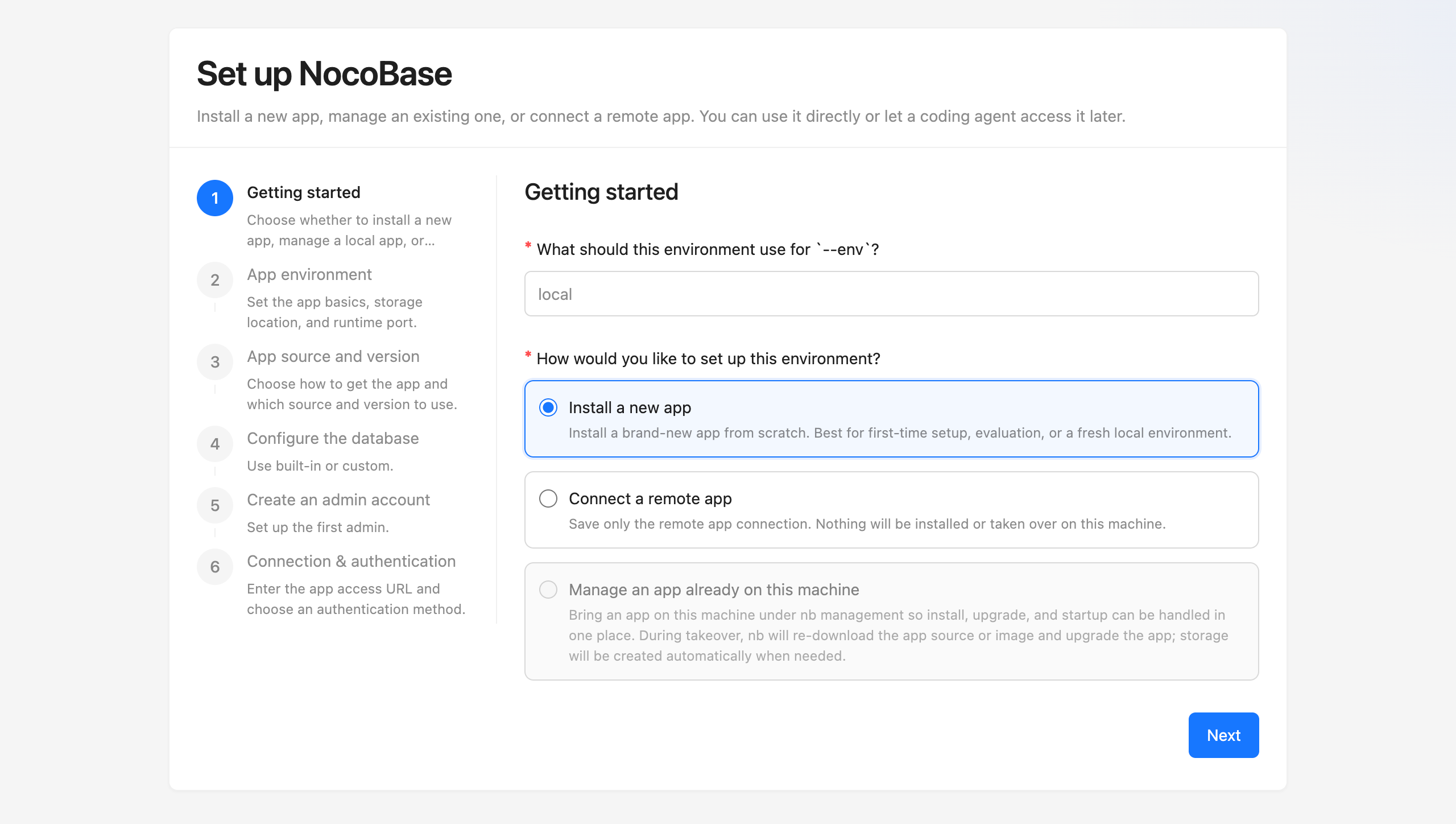
|
|
34
|
+
|
|
35
|
+
Different setup paths show slightly different steps. If you follow the default `Install a new app` path, you will usually see these six steps:
|
|
36
|
+
|
|
37
|
+
1. `Getting started` - set the `--env` identifier and choose `Install a new app`
|
|
38
|
+
2. `App environment` - set the app basics, storage location, and runtime port
|
|
39
|
+
3. `App source and version` - choose how to get the app and which source and version to use
|
|
40
|
+
4. `Configure the database` - choose the built-in database or a custom database
|
|
41
|
+
5. `Create an admin account` - set up the first admin account
|
|
42
|
+
6. `Connection & authentication` - enter the app access URL and choose an authentication method
|
|
43
|
+
|
|
44
|
+
If you prefer terminal interaction, you can also run:
|
|
45
|
+
|
|
46
|
+
```bash
|
|
47
|
+
nb init
|
|
48
|
+
```
|
|
49
|
+
|
|
50
|
+
If you need to initialize in scripts or CI, use non-interactive mode:
|
|
51
|
+
|
|
52
|
+
```bash
|
|
53
|
+
nb init --yes --env app1
|
|
54
|
+
```
|
|
55
|
+
|
|
56
|
+
:::tip Install on a remote server
|
|
57
|
+
|
|
58
|
+
If you run `nb init --ui` on a server, we recommend changing the default host to that server's IP first. That way, you can open the wizard from your local browser.
|
|
59
|
+
|
|
60
|
+
```bash
|
|
61
|
+
nb config set default-ui-host <server-ip>
|
|
62
|
+
nb config set default-api-host <server-ip>
|
|
63
|
+
```
|
|
64
|
+
|
|
65
|
+
:::
|
|
66
|
+
|
|
67
|
+
## Step 3: Confirm the app is ready
|
|
68
|
+
|
|
69
|
+
After installation, it is usually worth confirming these three things first:
|
|
70
|
+
|
|
71
|
+
- The env has been saved successfully
|
|
72
|
+
- The app has started normally
|
|
73
|
+
- You can sign in with the administrator account
|
|
74
|
+
|
|
75
|
+
Common commands:
|
|
76
|
+
|
|
77
|
+
```bash
|
|
78
|
+
nb env list
|
|
79
|
+
nb env info
|
|
80
|
+
nb app logs
|
|
81
|
+
```
|
|
82
|
+
|
|
83
|
+
For a local default installation, you can usually open `http://localhost:13000` in your browser directly. After signing in, start a new AI Agent session or restart the current one, and the AI can begin working with this NocoBase app.
|
|
84
|
+
|
|
85
|
+
CLI configuration is stored in `~/.nocobase/` by default, so AI Agents can usually access it from any working directory.
|
|
86
|
+
|
|
87
|
+
If this app will be exposed to real users later, we do not recommend using `IP + port` for the long term. The next step is usually to put it behind a reverse proxy and enable HTTPS.
|
|
88
|
+
|
|
89
|
+
## Next Steps
|
|
90
|
+
|
|
91
|
+
- If you already have a running NocoBase app, see [AI Agent Integration Guide](./quick-start.mdx)
|
|
92
|
+
- If you want to manage app startup, shutdown, logs, and upgrades, see [Manage apps](../nocobase-cli/operations/manage-app.md)
|
|
93
|
+
- If you want to continue with production deployment, see [Install apps with CLI](../nocobase-cli/installation/cli.md) and [Production deployment overview](../nocobase-cli/production/index.md)
|
|
94
|
+
- If you want AI to start building apps, see [AI Builder](../ai-builder/index.md)
|
|
95
|
+
|
|
96
|
+
## Related Links
|
|
97
|
+
|
|
98
|
+
- [Installation and Version Comparison](../get-started/quickstart.md) — Compare installation methods and version channels first, then decide how to install
|
|
99
|
+
- [AI Agent Integration Guide](./quick-start.mdx) — Connect an existing NocoBase app and let your AI Agent start working
|
|
100
|
+
- [`nb init` command reference](../api/cli/init.md) — Initialize a new app, take over an existing local app, or connect a remote app
|
|
101
|
+
- [`nb env info` command reference](../api/cli/env/info.md) — View the connection details and runtime configuration of the current env
|
|
102
|
+
- [NocoBase CLI](../api/cli/index.md) — Full reference for all `nb` commands
|
|
103
|
+
- [Manage apps](../nocobase-cli/operations/manage-app.md) — Start, stop, restart, view logs, and upgrade apps
|
|
104
|
+
- [Multiple environment management](../nocobase-cli/operations/multi-environment.md) — Common operations when you maintain multiple envs at the same time
|
|
@@ -0,0 +1,94 @@
|
|
|
1
|
+
---
|
|
2
|
+
title: Local Development Setup
|
|
3
|
+
description: Prepare the local operating system environment for NocoBase CLI and NocoBase apps, covering Windows WSL, macOS, Linux, Node.js, Yarn, and Docker.
|
|
4
|
+
---
|
|
5
|
+
|
|
6
|
+
# Local Development Setup
|
|
7
|
+
|
|
8
|
+
This page helps you prepare a local environment for NocoBase CLI and NocoBase apps. It is intended for local development, feature evaluation, and AI Agents installing or managing NocoBase on your computer.
|
|
9
|
+
|
|
10
|
+
For real user-facing deployment, see [Production system requirements](../get-started/system-requirements.md).
|
|
11
|
+
|
|
12
|
+
## Windows: Use WSL
|
|
13
|
+
|
|
14
|
+
For local setup on Windows, we recommend keeping the main development environment inside WSL 2: install Node.js, Yarn, and NocoBase CLI in the Linux distribution in WSL, and run related commands from the WSL terminal.
|
|
15
|
+
|
|
16
|
+
WSL is closer to the Linux environments where NocoBase is commonly deployed. This gives you several benefits:
|
|
17
|
+
|
|
18
|
+
- Dependency installation, build, startup, and log troubleshooting are closer to the actual server workflow
|
|
19
|
+
- After Docker Desktop WSL integration is enabled, you can run `docker` commands directly inside WSL
|
|
20
|
+
- You can avoid extra issues from native Windows path formats, file permissions, symlinks, and native dependency builds
|
|
21
|
+
- It is better for AI Agent workflows. When an agent runs commands such as `nb`, `yarn`, or `docker`, it uses one consistent Linux file path, shell syntax, and runtime environment, which makes troubleshooting more direct
|
|
22
|
+
|
|
23
|
+
If the WSL-based local development environment is not ready yet, see [Set Up a Local Development Environment on Windows with WSL](./windows-wsl.md).
|
|
24
|
+
|
|
25
|
+
Recommended setup:
|
|
26
|
+
|
|
27
|
+
- Windows 10 / 11
|
|
28
|
+
- WSL 2
|
|
29
|
+
- Ubuntu LTS
|
|
30
|
+
- Node.js >= 22
|
|
31
|
+
- Yarn 1.x
|
|
32
|
+
- Docker Desktop, if you plan to install NocoBase with Docker
|
|
33
|
+
|
|
34
|
+
Usually, Node.js, Yarn, and NocoBase CLI should all be installed inside WSL. If you use Docker Desktop, enable WSL integration in Docker Desktop so WSL can access Docker.
|
|
35
|
+
|
|
36
|
+
Check the environment:
|
|
37
|
+
|
|
38
|
+
```bash
|
|
39
|
+
node -v
|
|
40
|
+
yarn -v
|
|
41
|
+
docker version
|
|
42
|
+
```
|
|
43
|
+
|
|
44
|
+
:::tip Note
|
|
45
|
+
|
|
46
|
+
NocoBase can also be installed on Windows Server. WSL is recommended here for local development and AI Agent setup on personal computers. It does not mean Windows Server cannot be used for deployment.
|
|
47
|
+
|
|
48
|
+
:::
|
|
49
|
+
|
|
50
|
+
## macOS
|
|
51
|
+
|
|
52
|
+
On macOS, you can use the local terminal directly.
|
|
53
|
+
|
|
54
|
+
Prepare:
|
|
55
|
+
|
|
56
|
+
- Node.js >= 22
|
|
57
|
+
- Yarn 1.x
|
|
58
|
+
- Docker Desktop, OrbStack, or Colima, if you plan to install NocoBase with Docker
|
|
59
|
+
|
|
60
|
+
Check the environment:
|
|
61
|
+
|
|
62
|
+
```bash
|
|
63
|
+
node -v
|
|
64
|
+
yarn -v
|
|
65
|
+
docker version
|
|
66
|
+
```
|
|
67
|
+
|
|
68
|
+
If you do not use Docker, you can skip `docker version`.
|
|
69
|
+
|
|
70
|
+
## Linux
|
|
71
|
+
|
|
72
|
+
Linux can be used directly as a local development environment. Ubuntu, Debian, or other common distributions are recommended.
|
|
73
|
+
|
|
74
|
+
Prepare:
|
|
75
|
+
|
|
76
|
+
- Node.js >= 22
|
|
77
|
+
- Yarn 1.x
|
|
78
|
+
- Docker Engine, if you plan to install NocoBase with Docker
|
|
79
|
+
|
|
80
|
+
Check the environment:
|
|
81
|
+
|
|
82
|
+
```bash
|
|
83
|
+
node -v
|
|
84
|
+
yarn -v
|
|
85
|
+
docker version
|
|
86
|
+
```
|
|
87
|
+
|
|
88
|
+
If you do not use Docker, you can skip `docker version`.
|
|
89
|
+
|
|
90
|
+
## Next Steps
|
|
91
|
+
|
|
92
|
+
- [Installation and Version Comparison](../get-started/quickstart.md) — Compare installation methods and version channels first
|
|
93
|
+
- [Install NocoBase App](./install-nocobase-app.md) — Initialize a local app with NocoBase CLI
|
|
94
|
+
- [AI Agent Integration Guide](./quick-start.mdx) — Let an AI Agent connect to and operate NocoBase
|
|
@@ -63,7 +63,7 @@ Before starting, make sure you have the following environment ready:
|
|
|
63
63
|
|
|
64
64
|
- A deployed OpenClaw Agent ([one-click Lark deployment](https://openclaw.feishu.cn) or local deployment)
|
|
65
65
|
- Node.js >= 22 (for running NocoBase CLI and Skills)
|
|
66
|
-
- If you already have a NocoBase instance, **AI capabilities are evolving rapidly
|
|
66
|
+
- If you already have a NocoBase instance, **AI capabilities are evolving rapidly. The minimum required version is NocoBase 2.1.0, and we recommend updating to the latest version.**
|
|
67
67
|
|
|
68
68
|
:::warning Note
|
|
69
69
|
|
|
@@ -84,7 +84,7 @@ Help me install NocoBase CLI and complete initialization: https://docs.nocobase.
|
|
|
84
84
|
### Manual Installation
|
|
85
85
|
|
|
86
86
|
```bash
|
|
87
|
-
npm install -g @nocobase/cli
|
|
87
|
+
npm install -g @nocobase/cli
|
|
88
88
|
nb init --ui
|
|
89
89
|
```
|
|
90
90
|
|
|
@@ -63,7 +63,7 @@ Before starting, make sure you have the following environment ready:
|
|
|
63
63
|
|
|
64
64
|
- OpenCode installed ([installation guide](https://opencode.ai/docs/))
|
|
65
65
|
- Node.js >= 22 (for running NocoBase CLI and Skills)
|
|
66
|
-
- If you already have a NocoBase instance, **AI capabilities are evolving rapidly
|
|
66
|
+
- If you already have a NocoBase instance, **AI capabilities are evolving rapidly. The minimum required version is NocoBase 2.1.0, and we recommend updating to the latest version.**
|
|
67
67
|
|
|
68
68
|
## Quick Start
|
|
69
69
|
|
|
@@ -78,7 +78,7 @@ Help me install NocoBase CLI and complete initialization: https://docs.nocobase.
|
|
|
78
78
|
### Manual Installation
|
|
79
79
|
|
|
80
80
|
```bash
|
|
81
|
-
npm install -g @nocobase/cli
|
|
81
|
+
npm install -g @nocobase/cli
|
|
82
82
|
nb init --ui
|
|
83
83
|
```
|
|
84
84
|
|
|
@@ -2,7 +2,6 @@
|
|
|
2
2
|
title: "AI Agent Integration Guide"
|
|
3
3
|
description: "Install NocoBase CLI, connect to or install a NocoBase application, and let AI Agents start operating your business system."
|
|
4
4
|
keywords: "NocoBase CLI,AI Agent,integration,connect,installation,Skills,quick start"
|
|
5
|
-
sidebar: false
|
|
6
5
|
---
|
|
7
6
|
|
|
8
7
|
# AI Agent Integration Guide
|
|
@@ -42,7 +41,7 @@ If you don't have a NocoBase application yet, you can use CLI to install and ini
|
|
|
42
41
|
#### Step 1: Install CLI
|
|
43
42
|
|
|
44
43
|
```bash
|
|
45
|
-
npm install -g @nocobase/cli
|
|
44
|
+
npm install -g @nocobase/cli
|
|
46
45
|
nb --version // Confirm successful installation
|
|
47
46
|
```
|
|
48
47
|
|
|
@@ -58,15 +57,16 @@ Configuration files and application data are stored in your home directory by de
|
|
|
58
57
|
|
|
59
58
|
:::
|
|
60
59
|
|
|
61
|
-
The browser will automatically open a visual configuration page, guiding you through
|
|
60
|
+
The browser will automatically open a visual configuration page, guiding you through 6 steps:
|
|
62
61
|
|
|
63
|
-
1.
|
|
64
|
-
2.
|
|
65
|
-
3.
|
|
66
|
-
4.
|
|
67
|
-
5.
|
|
62
|
+
1. "Getting started" — Choose whether to install a new app, manage a local app, or connect a remote app.
|
|
63
|
+
2. "App environment" — Set the app basics, storage location, and runtime port.
|
|
64
|
+
3. "App source and version" — Choose how to get the app and which source and version to use.
|
|
65
|
+
4. "Configure the database" — Use built-in or custom.
|
|
66
|
+
5. "Create an admin account" — Set up the first admin.
|
|
67
|
+
6. "Connection & authentication" — Enter the app access URL and choose an authentication method.
|
|
68
68
|
|
|
69
|
-

|
|
70
70
|
|
|
71
71
|
After installation is complete, open your browser and visit `http://localhost:13000` (default port), then log in with the admin account you just set up.
|
|
72
72
|
|
|
@@ -92,7 +92,7 @@ After configuration is complete, restart your AI Agent session and you can start
|
|
|
92
92
|
|
|
93
93
|
## Connect AI Agent to an Existing NocoBase
|
|
94
94
|
|
|
95
|
-
If you already have a running NocoBase instance, you can connect AI Agent to it directly. **Since AI capabilities are evolving rapidly,
|
|
95
|
+
If you already have a running NocoBase instance, you can connect AI Agent to it directly. **Since AI capabilities are evolving rapidly, the minimum required version is NocoBase 2.1.0, and we recommend updating to the latest version.**
|
|
96
96
|
|
|
97
97
|
<Tabs>
|
|
98
98
|
<Tab label="Manual Connection" value="manual-connect">
|
|
@@ -100,7 +100,7 @@ If you already have a running NocoBase instance, you can connect AI Agent to it
|
|
|
100
100
|
#### Step 1: Install CLI
|
|
101
101
|
|
|
102
102
|
```bash
|
|
103
|
-
npm install -g @nocobase/cli
|
|
103
|
+
npm install -g @nocobase/cli
|
|
104
104
|
nb --version // Confirm successful installation
|
|
105
105
|
```
|
|
106
106
|
|
|
@@ -116,12 +116,12 @@ Configuration files are stored in your home directory by default. See [NB_CLI_RO
|
|
|
116
116
|
|
|
117
117
|
:::
|
|
118
118
|
|
|
119
|
-
The browser will automatically open a visual configuration page. In the first step "Start Configuration", select "
|
|
119
|
+
The browser will automatically open a visual configuration page. In the first step "Start Configuration", select "Remote Connection", then:
|
|
120
120
|
|
|
121
121
|
1. **Enter API Address** — Input the API address of your existing NocoBase instance (e.g., `http://localhost:13000/api`)
|
|
122
122
|
2. **Select Authentication Method** — Choose an [authentication method](../ai-builder/security) (OAuth is recommended for quick setup)
|
|
123
123
|
|
|
124
|
-

|
|
125
125
|
|
|
126
126
|
No need to configure installation method, database, or admin account — the wizard will skip those steps.
|
|
127
127
|
|
|
@@ -132,7 +132,7 @@ Start a new or restart the AI Agent session, and you can let the AI Agent start
|
|
|
132
132
|
</Tab>
|
|
133
133
|
<Tab label="Connect with AI Agent" value="ai-connect">
|
|
134
134
|
|
|
135
|
-
Copy the prompt below to your AI assistant. It will complete CLI installation and guide you through connecting to your existing NocoBase instance. Select "
|
|
135
|
+
Copy the prompt below to your AI assistant. It will complete CLI installation and guide you through connecting to your existing NocoBase instance. Select "Remote Connection" in the first step of the visual wizard:
|
|
136
136
|
|
|
137
137
|
```
|
|
138
138
|
Help me install NocoBase CLI and complete initialization: https://docs.nocobase.com/ai/ai-quick-start.md (please read the linked content directly)
|
|
@@ -145,6 +145,13 @@ After configuration is complete, restart your AI Agent session and you can start
|
|
|
145
145
|
|
|
146
146
|
## What's Next
|
|
147
147
|
|
|
148
|
+
### Production Installation and Deployment
|
|
149
|
+
|
|
150
|
+
If you're preparing to deploy NocoBase to production, this order usually works best:
|
|
151
|
+
|
|
152
|
+
1. [Install using CLI](../nocobase-cli/installation/cli.md) - the complete installation flow. This is the right place when you want to install CLI from scratch, initialize env, and confirm the app is already running on your server
|
|
153
|
+
2. [Production deployment overview](../nocobase-cli/production/index.md) - the next step after the app is running. This mainly covers autostart, reverse proxy, domain setup, and HTTPS
|
|
154
|
+
|
|
148
155
|
### Manage Application Environments
|
|
149
156
|
|
|
150
157
|
If you need to manage existing NocoBase instances (such as test or production environments), or switch between multiple environments, see [Environment Management](../ai-builder/env-bootstrap) — covering environment checks, adding environments, upgrades, and troubleshooting.
|
|
@@ -172,4 +179,4 @@ If you already have a NocoBase application running, or have successfully complet
|
|
|
172
179
|
- [AI Employees](../ai-employees/index.md) — Collaborate with AI in the business interface
|
|
173
180
|
- [Environment Management](../ai-builder/env-bootstrap) — Environment checks, adding environments, upgrades, and troubleshooting
|
|
174
181
|
- [NocoBase CLI Command Reference](../api/cli/index.md) — Full parameter documentation for all commands
|
|
175
|
-
- [Installation Methods and Version Comparison](../
|
|
182
|
+
- [Installation Methods and Version Comparison](../ai/quickstart) — Different installation methods and version channels for NocoBase
|
|
@@ -0,0 +1,105 @@
|
|
|
1
|
+
---
|
|
2
|
+
title: Upgrade NocoBase App
|
|
3
|
+
description: Upgrade a NocoBase app saved as a CLI env with nb app upgrade, including env confirmation, upgrade commands, target versions, and verification.
|
|
4
|
+
---
|
|
5
|
+
|
|
6
|
+
# Upgrade NocoBase App
|
|
7
|
+
|
|
8
|
+
## Step 1: Confirm the Current Env
|
|
9
|
+
|
|
10
|
+
```bash
|
|
11
|
+
nb env current
|
|
12
|
+
```
|
|
13
|
+
|
|
14
|
+
If you are not sure which envs are available, list them first:
|
|
15
|
+
|
|
16
|
+
```bash
|
|
17
|
+
nb env list
|
|
18
|
+
```
|
|
19
|
+
|
|
20
|
+
If the current env is not the app you want to upgrade, switch to the target env:
|
|
21
|
+
|
|
22
|
+
```bash
|
|
23
|
+
nb env use <env-name>
|
|
24
|
+
```
|
|
25
|
+
|
|
26
|
+
## Step 2: Run the Upgrade
|
|
27
|
+
|
|
28
|
+
:::warning Note
|
|
29
|
+
|
|
30
|
+
By default, upgrade downloads the app source code or Docker image again.
|
|
31
|
+
|
|
32
|
+
For npm / Git envs, the `source/` directory is deleted and downloaded again. Do not put files you need to keep in `source/`.
|
|
33
|
+
|
|
34
|
+
If you have already prepared the source code or Docker image manually and do not want CLI to download it again, add `--skip-download` after the command.
|
|
35
|
+
|
|
36
|
+
:::
|
|
37
|
+
|
|
38
|
+
The default upgrade command is:
|
|
39
|
+
|
|
40
|
+
```bash
|
|
41
|
+
nb app upgrade
|
|
42
|
+
```
|
|
43
|
+
|
|
44
|
+
This command usually completes these steps:
|
|
45
|
+
|
|
46
|
+
1. Stop the current app
|
|
47
|
+
2. Download and replace the saved source or image
|
|
48
|
+
3. Sync commercial plugins
|
|
49
|
+
4. Upgrade and start the app
|
|
50
|
+
5. Refresh env runtime information
|
|
51
|
+
|
|
52
|
+
In scripts, CI, or AI Agent sessions, pass `--force` explicitly:
|
|
53
|
+
|
|
54
|
+
```bash
|
|
55
|
+
nb app upgrade --force
|
|
56
|
+
```
|
|
57
|
+
|
|
58
|
+
If the app to upgrade is not the current env, specify the env:
|
|
59
|
+
|
|
60
|
+
```bash
|
|
61
|
+
nb app upgrade --env app1 --yes --force
|
|
62
|
+
```
|
|
63
|
+
|
|
64
|
+
### Upgrade to a Specific Version
|
|
65
|
+
|
|
66
|
+
Use `--version` to upgrade to a specific version channel:
|
|
67
|
+
|
|
68
|
+
```bash
|
|
69
|
+
nb app upgrade --version beta
|
|
70
|
+
```
|
|
71
|
+
|
|
72
|
+
You can also pass an exact version:
|
|
73
|
+
|
|
74
|
+
```bash
|
|
75
|
+
nb app upgrade --version 2.1.0-beta.24
|
|
76
|
+
```
|
|
77
|
+
|
|
78
|
+
After a successful upgrade, CLI writes the target version back to the env configuration, so later upgrades or recovery flows can reuse it.
|
|
79
|
+
|
|
80
|
+
### Skip Download
|
|
81
|
+
|
|
82
|
+
If you have already updated the source code or Docker image, and only want to run upgrade and start based on the current content, add `--skip-download`:
|
|
83
|
+
|
|
84
|
+
```bash
|
|
85
|
+
nb app upgrade --skip-download
|
|
86
|
+
```
|
|
87
|
+
|
|
88
|
+
This skips source or image download and also skips commercial plugin sync. Use it only when the target version has already been prepared manually.
|
|
89
|
+
|
|
90
|
+
## Step 3: Verify the Result
|
|
91
|
+
|
|
92
|
+
After the upgrade, check env runtime and app logs:
|
|
93
|
+
|
|
94
|
+
```bash
|
|
95
|
+
nb env info
|
|
96
|
+
nb app logs
|
|
97
|
+
```
|
|
98
|
+
|
|
99
|
+
Then open the app and confirm that the administrator account can sign in. If you want an AI Agent to continue working with this app, start a new AI Agent session or restart the current one so it can read the latest env information.
|
|
100
|
+
|
|
101
|
+
## Related Links
|
|
102
|
+
|
|
103
|
+
- [Manage apps](../nocobase-cli/operations/manage-app.md) — Start, stop, restart, view logs, and upgrade apps
|
|
104
|
+
- [`nb app upgrade` command reference](../api/cli/app/upgrade.md) — View all upgrade command options
|
|
105
|
+
- [Multiple environment management](../nocobase-cli/operations/multi-environment.md) — Confirm, switch, and maintain multiple CLI envs
|