@nocobase/plugin-ai 2.1.9 → 2.1.11
This diff represents the content of publicly available package versions that have been released to one of the supported registries. The information contained in this diff is provided for informational purposes only and reflects changes between package versions as they appear in their respective public registries.
- package/dist/ai/docs/nocobase/ai-employees/workflow/nodes/knowledge/index.md +8 -0
- package/dist/ai/docs/nocobase/api/cli/app/restart.md +4 -0
- package/dist/ai/docs/nocobase/api/cli/app/start.md +7 -0
- package/dist/ai/docs/nocobase/api/cli/app/upgrade.md +6 -0
- package/dist/ai/docs/nocobase/api/cli/init.md +39 -2
- package/dist/ai/docs/nocobase/api/cli/source/download.md +19 -0
- package/dist/ai/docs/nocobase/data-sources/data-modeling/collection-fields/validation.md +11 -8
- package/dist/ai/docs/nocobase/development/index.md +6 -2
- package/dist/ai/docs/nocobase/interface-builder/fields/field-settings/validation-rules.md +6 -2
- package/dist/ai/docs/nocobase/plugin-development/client/index.md +1 -0
- package/dist/ai/docs/nocobase/shared-components/create-form-registry.md +38 -0
- package/dist/ai/docs/nocobase/shared-components/filter/collection-filter-panel.md +44 -0
- package/dist/ai/docs/nocobase/shared-components/filter/index.md +44 -0
- package/dist/ai/docs/nocobase/shared-components/form/code-scanner.md +34 -0
- package/dist/ai/docs/nocobase/shared-components/form/dialog-form-layout.md +45 -0
- package/dist/ai/docs/nocobase/shared-components/form/drawer-form-layout.md +45 -0
- package/dist/ai/docs/nocobase/shared-components/form/env-variable-input.md +30 -0
- package/dist/ai/docs/nocobase/shared-components/form/file-size-input.md +24 -0
- package/dist/ai/docs/nocobase/shared-components/form/json-text-area.md +28 -0
- package/dist/ai/docs/nocobase/shared-components/form/password-input.md +23 -0
- package/dist/ai/docs/nocobase/shared-components/form/remote-select.md +34 -0
- package/dist/ai/docs/nocobase/shared-components/form/scan-input.md +27 -0
- package/dist/ai/docs/nocobase/shared-components/form/typed-variable-input.md +30 -0
- package/dist/ai/docs/nocobase/shared-components/form/variable-input.md +35 -0
- package/dist/ai/docs/nocobase/shared-components/form/variable-json-text-area.md +33 -0
- package/dist/ai/docs/nocobase/shared-components/form/variable-text-area.md +33 -0
- package/dist/ai/docs/nocobase/shared-components/icon.md +21 -0
- package/dist/ai/docs/nocobase/shared-components/index.md +70 -0
- package/dist/ai/docs/nocobase/shared-components/table/index.md +39 -0
- package/dist/ai/docs/nocobase/shared-components/table/sort-handle.md +37 -0
- package/dist/ai/docs/nocobase/shared-components/table/sortable-row.md +36 -0
- package/dist/client/580.35ba54ff91b7fe6d.js +10 -0
- package/dist/client/ai-employees/admin/mcp/schemas.d.ts +46 -18
- package/dist/client/index.js +1 -1
- package/dist/collections/ai-mcp-clients.js +5 -0
- package/dist/externalVersion.js +16 -16
- package/dist/locale/en-US.json +8 -3
- package/dist/locale/zh-CN.json +8 -3
- package/dist/node_modules/@langchain/xai/package.json +1 -1
- package/dist/node_modules/fs-extra/package.json +1 -1
- package/dist/node_modules/jsonrepair/package.json +1 -1
- package/dist/node_modules/just-bash/package.json +1 -1
- package/dist/node_modules/nodejs-snowflake/package.json +1 -1
- package/dist/node_modules/openai/package.json +1 -1
- package/dist/node_modules/zod/package.json +1 -1
- package/dist/server/ai-employees/ai-employee.js +8 -3
- package/dist/server/plugin.d.ts +2 -0
- package/dist/server/plugin.js +30 -0
- package/dist/server/resource/aiConversations.js +1 -1
- package/dist/server/resource/aiMcpClients.js +2 -2
- package/dist/server/resource/aiTools.js +14 -9
- package/package.json +2 -2
- package/dist/client/580.e75f97fb883ad042.js +0 -10
|
@@ -64,6 +64,14 @@ The core of this example is three synchronization workflows. They process the sa
|
|
|
64
64
|
|
|
65
65
|
`Key` is the most important field in the synchronization chain. Create, update, and delete workflows must use the same `Key` rule. The example directly uses the record ID of the `Answers` collection.
|
|
66
66
|
|
|
67
|
+
:::tip Text content ingestion and vectorization
|
|
68
|
+
|
|
69
|
+
When configuring a Create document or Update document node, if `Document type` is set to `Text`, the workflow first saves the text field selected in `Content` as a `.txt` document, then writes it to the target knowledge base. The knowledge base then generates segments according to the current segmentation settings, vectorizes enabled segments together with their related questions, and stores them in the vector database bound to the knowledge base.
|
|
70
|
+
|
|
71
|
+
This process runs as an asynchronous workflow node. A completed node does not mean the document can be retrieved immediately. Usually, wait until `Status` in the `Documents` list changes to `Success` before checking segments or running hit tests.
|
|
72
|
+
|
|
73
|
+
:::
|
|
74
|
+
|
|
67
75
|
## Operation guides
|
|
68
76
|
|
|
69
77
|
- [Create document](./create-document)
|
|
@@ -35,6 +35,10 @@ If you explicitly pass `--env` and it differs from the current env, the CLI asks
|
|
|
35
35
|
|
|
36
36
|
By default, when applicable, the CLI first runs `nb license plugins sync --skip-if-no-license` to synchronize the commercial plugins allowed by the current license. Then local envs automatically complete any required install or upgrade preparation before starting again, and Docker envs complete that step before recreating the container. Whenever the CLI needs to wait for readiness, it checks `__health_check`: it prints one waiting line first, then one progress line every 10 seconds until the app becomes available or times out.
|
|
37
37
|
|
|
38
|
+
## Hook Scripts
|
|
39
|
+
|
|
40
|
+
If the current env saved a hook with `nb init --hook-script`, `nb app restart` runs `afterAppStart(context)` once after the app restarts and passes `__health_check`. It uses `context.phase = 'app-start'` and `context.command = 'app:restart'`.
|
|
41
|
+
|
|
38
42
|
## Related Commands
|
|
39
43
|
|
|
40
44
|
- [`nb app start`](./start.md)
|
|
@@ -34,6 +34,13 @@ nb app start --env local-docker
|
|
|
34
34
|
If you explicitly pass `--env` and it differs from the current env, the CLI asks for confirmation first. In non-interactive terminals or AI agent sessions, add `--yes` yourself or run `nb env use <name>` first and try again.
|
|
35
35
|
|
|
36
36
|
By default, when applicable, the CLI first runs `nb license plugins sync --skip-if-no-license` to synchronize the commercial plugins allowed by the current license. Then local envs automatically complete any required install or upgrade preparation before starting, and Docker envs recreate the app container from saved env config. Whenever the CLI needs to wait for readiness, it checks `__health_check`: it prints one waiting line first, then one progress line every 10 seconds until the app becomes available or times out.
|
|
37
|
+
|
|
38
|
+
## Hook Scripts
|
|
39
|
+
|
|
40
|
+
If the current env saved a hook with `nb init --hook-script`, `nb app start` runs `afterAppStart(context)` after the app actually starts and passes `__health_check`. Installed envs use `context.phase = 'app-start'` and `context.command = 'app:start'`. If the app is already running, this command does not run the hook.
|
|
41
|
+
|
|
42
|
+
For prepared envs created with `--prepare-only`, the first `nb app start` runs `beforeAppInstall(context)`, completes the first install and startup, then runs `afterAppStart(context)`. Both hooks receive `context.phase = 'init'` and `context.command = 'app:start'`.
|
|
43
|
+
|
|
37
44
|
## Related Commands
|
|
38
45
|
|
|
39
46
|
- [`nb app stop`](./stop.md)
|
|
@@ -58,6 +58,12 @@ Step 4 automatically completes any required upgrade preparation for the current
|
|
|
58
58
|
|
|
59
59
|
If the final `nb env update` step fails, the upgrade still counts as successful. The CLI prints a warning and tells you to run `nb env update <envName>` manually afterward.
|
|
60
60
|
|
|
61
|
+
## Hook Scripts
|
|
62
|
+
|
|
63
|
+
If the current env saved a hook with `nb init --hook-script`, `nb app upgrade` passes the upgrade lifecycle to the hook. For npm/Git source, source refresh runs `beforeDependencyInstall(context)` before dependency installation with `context.phase = 'upgrade'` and `context.command = 'app:upgrade'`.
|
|
64
|
+
|
|
65
|
+
The app upgrade startup step then runs `beforeAppInstall(context)`, and after the app starts and passes `__health_check`, it runs `afterAppStart(context)`. Both hooks also use `context.phase = 'upgrade'` and `context.command = 'app:upgrade'`. Docker source does not run `beforeDependencyInstall`, but it does run the app-level hooks.
|
|
66
|
+
|
|
61
67
|
## Related Commands
|
|
62
68
|
|
|
63
69
|
- [`nb source download`](../source/download.md)
|
|
@@ -42,7 +42,7 @@ nb init --env app1 --resume
|
|
|
42
42
|
|
|
43
43
|
`--prepare-only` is intended for flows where the env should be prepared first, then the license is activated, and only after that the app is installed and started.
|
|
44
44
|
|
|
45
|
-
If you want to save the env config
|
|
45
|
+
If you want to save the env config and prepare the database first, while delaying dependency download, app installation, and first startup, you can use:
|
|
46
46
|
|
|
47
47
|
```bash
|
|
48
48
|
nb init --env app1 --prepare-only
|
|
@@ -67,6 +67,7 @@ By default, the CLI organizes local files under `app-path` using the following c
|
|
|
67
67
|
|
|
68
68
|
```text
|
|
69
69
|
<app-path>/
|
|
70
|
+
├── .nb/ # CLI metadata for this env, such as hooks.mjs
|
|
70
71
|
├── source/ # Default directory for app source code or downloaded content
|
|
71
72
|
├── storage/ # Runtime data directory
|
|
72
73
|
└── .env # Optional app environment variable file
|
|
@@ -74,6 +75,7 @@ By default, the CLI organizes local files under `app-path` using the following c
|
|
|
74
75
|
|
|
75
76
|
Typically:
|
|
76
77
|
|
|
78
|
+
- `.nb/` stores CLI-managed metadata. A script passed with `--hook-script` is copied to `<app-path>/.nb/hooks.mjs`, so later `nb app upgrade` and local source restore can reuse it
|
|
77
79
|
- `source/` mainly corresponds to the local app directory for npm / Git envs. For Docker envs, the CLI also keeps this default path derivation, but most of the time you do not need to care about it manually. Pay special attention during upgrades: the `source/` directory will be deleted and downloaded again, so do not put files you need to keep here
|
|
78
80
|
- `storage/` is used for runtime data, such as built-in database data, plugins, logs, and more
|
|
79
81
|
- `.env` is an optional app environment variable file. You only need to add it in `<app-path>/.env` when you want to customize environment variables; if this file exists, Docker, npm, and Git install sources will all read it by default
|
|
@@ -101,7 +103,7 @@ If you are following the local UI wizard step by step, you can first use the tab
|
|
|
101
103
|
| ------------------------- | ----------------------------------------------------------------------------------------------------------------------------------------------------------------------------------------------------------------- |
|
|
102
104
|
| `Getting started` | `--env`、`--yes`、`--ui`、`--locale`、`--verbose`、`--skip-skills`、`--resume` |
|
|
103
105
|
| `App environment` | `--lang`、`--app-path`、`--app-port`、`--force` |
|
|
104
|
-
| `App source and version` | `--source`、`--version`、`--skip-download`、`--git-url`、`--docker-registry`、`--docker-platform`、`--npm-registry`、`--replace`、`--dev-dependencies`、`--output-dir`、`--docker-save`、`--build`、`--build-dts` |
|
|
106
|
+
| `App source and version` | `--source`、`--version`、`--skip-download`、`--git-url`、`--docker-registry`、`--docker-platform`、`--npm-registry`、`--replace`、`--dev-dependencies`、`--output-dir`、`--docker-save`、`--build`、`--build-dts`、`--hook-script` |
|
|
105
107
|
| `Configure the database` | `--builtin-db`、`--db-dialect`、`--builtin-db-image`、`--db-host`、`--db-port`、`--db-database`、`--db-user`、`--db-password`、`--db-schema`、`--db-table-prefix`、`--db-underscored` |
|
|
106
108
|
| `Create an admin account` | `--root-username`、`--root-email`、`--root-password`、`--root-nickname` |
|
|
107
109
|
| `Remote connection` | `--api-base-url`、`--auth-type`、`--access-token`、`--username`、`--password`、`--skip-auth` |
|
|
@@ -184,6 +186,7 @@ The “Default” below means the value or behavior that `nb init` usually uses
|
|
|
184
186
|
| `--npm-registry` | string | Empty | Registry used for npm/Git download and dependency installation |
|
|
185
187
|
| `--build` / `--no-build` | boolean | `true` | Whether to build after installing npm/Git dependencies |
|
|
186
188
|
| `--build-dts` | boolean | `false` | Whether to generate TypeScript declaration files during npm/Git builds |
|
|
189
|
+
| `--hook-script` | string | None | Copy the specified hook module to `<app-path>/.nb/hooks.mjs` and save it in the env config; supports the `beforeDependencyInstall`, `beforeAppInstall`, and `afterAppStart` lifecycle hooks |
|
|
187
190
|
|
|
188
191
|
## Examples
|
|
189
192
|
|
|
@@ -233,6 +236,40 @@ nb init --env app1 --yes --source git --version latest \
|
|
|
233
236
|
--git-url https://gitee.com/nocobase/nocobase.git
|
|
234
237
|
```
|
|
235
238
|
|
|
239
|
+
### Extend the install flow with a hook script
|
|
240
|
+
|
|
241
|
+
If you need to prepare extra content during installation, pass a local ESM module with `--hook-script`:
|
|
242
|
+
|
|
243
|
+
```bash
|
|
244
|
+
nb init --env app1 --yes --source git --hook-script ./hooks.mjs
|
|
245
|
+
```
|
|
246
|
+
|
|
247
|
+
The CLI copies this file to `<app-path>/.nb/hooks.mjs` and saves `hookScript: ".nb/hooks.mjs"` in the env config. Later `nb app start`, `nb app restart`, and `nb app upgrade` reuse it from that location.
|
|
248
|
+
|
|
249
|
+
The hook file must default-export an object. Implement only the methods you need:
|
|
250
|
+
|
|
251
|
+
```js
|
|
252
|
+
export default {
|
|
253
|
+
beforeDependencyInstall: async (context) => {
|
|
254
|
+
// Runs after git clone / npm scaffold and before yarn install.
|
|
255
|
+
},
|
|
256
|
+
beforeAppInstall: async (context) => {
|
|
257
|
+
// Runs before the app-level install or upgrade command.
|
|
258
|
+
},
|
|
259
|
+
afterAppStart: async (context) => {
|
|
260
|
+
// Runs after the app actually starts and passes the health check.
|
|
261
|
+
},
|
|
262
|
+
};
|
|
263
|
+
```
|
|
264
|
+
|
|
265
|
+
- `beforeDependencyInstall` only applies to npm/Git source and runs right before the real `yarn install`; Docker source does not run it
|
|
266
|
+
- `beforeAppInstall` runs before app-level install or upgrade commands, and applies to npm/Git/Docker source
|
|
267
|
+
- `afterAppStart` runs after the app actually starts and passes `__health_check`; `nb app start`, `nb app restart`, and `nb app upgrade` may all trigger it
|
|
268
|
+
|
|
269
|
+
`--prepare-only` only saves the env config and copies the hook file. It does not execute hooks. When you later run `nb app start` for the first time, the CLI runs the first-install hooks with `context.phase` set to `init` and `context.command` set to `app:start`.
|
|
270
|
+
|
|
271
|
+
`context` includes lifecycle information such as `phase`, `command`, `source`, `version`, `appPath`, `sourcePath`, `storagePath`, `hookScript`, and `envConfig`. If a hook throws, the current CLI command fails. Because `afterAppStart` can run repeatedly during start, restart, and upgrade flows, keep it idempotent.
|
|
272
|
+
|
|
236
273
|
### Quick install and use basic authentication
|
|
237
274
|
|
|
238
275
|
If you want to quickly install a local app in non-interactive mode and directly save `basic` authentication after installation, you can also write it like this. This way, you do not need to open a browser to complete OAuth.
|
|
@@ -33,6 +33,7 @@ nb source download [flags]
|
|
|
33
33
|
| `--npm-registry` | string | Registry used for npm/Git downloads and dependency installation |
|
|
34
34
|
| `--build` / `--no-build` | boolean | Whether to build after npm/Git dependency installation |
|
|
35
35
|
| `--build-dts` | boolean | Whether to generate TypeScript declaration files during npm/Git build |
|
|
36
|
+
| `--hook-script` | string | Hook module to run after npm scaffold or Git clone and before dependency installation; only applies to npm/Git source |
|
|
36
37
|
|
|
37
38
|
## Examples
|
|
38
39
|
|
|
@@ -47,8 +48,26 @@ nb source download --source git --version alpha --git-url=git@github.com:nocobas
|
|
|
47
48
|
nb source download --source git --version fix/cli-v2
|
|
48
49
|
nb source download -y --source npm --version alpha --build-dts
|
|
49
50
|
nb source download -y --source npm --version alpha --npm-registry=https://registry.npmmirror.com
|
|
51
|
+
nb source download -y --source git --version beta --hook-script ./hooks.mjs
|
|
50
52
|
```
|
|
51
53
|
|
|
54
|
+
## Pre-install hook
|
|
55
|
+
|
|
56
|
+
`--hook-script` only affects the current `nb source download` run. If you want the hook to be saved with the env and reused by `nb app upgrade` or local source restore, pass it through [`nb init --hook-script`](../init.md) instead.
|
|
57
|
+
|
|
58
|
+
The hook file must default-export an object with `beforeDependencyInstall(context)`:
|
|
59
|
+
|
|
60
|
+
```js
|
|
61
|
+
export default {
|
|
62
|
+
beforeDependencyInstall: async ({ sourcePath, version, envConfig }) => {
|
|
63
|
+
// Runs after git clone / npm scaffold and before yarn install.
|
|
64
|
+
},
|
|
65
|
+
};
|
|
66
|
+
```
|
|
67
|
+
|
|
68
|
+
When you run `nb source download --hook-script` directly, `beforeDependencyInstall` receives `context.phase` as `source-download` and `context.command` as `source:download`. This command does not run `beforeAppInstall` or `afterAppStart`; those hooks belong to app install, start, restart, and upgrade flows.
|
|
69
|
+
|
|
70
|
+
|
|
52
71
|
## Version Aliases
|
|
53
72
|
|
|
54
73
|
With Git source, common dist-tags are resolved to branches: `latest` -> `main`, `beta` -> `next`, `alpha` -> `develop`.
|
|
@@ -78,6 +78,9 @@ After configuring field rules, the corresponding validation rules will be trigge
|
|
|
78
78
|
|
|
79
79
|

|
|
80
80
|
|
|
81
|
+
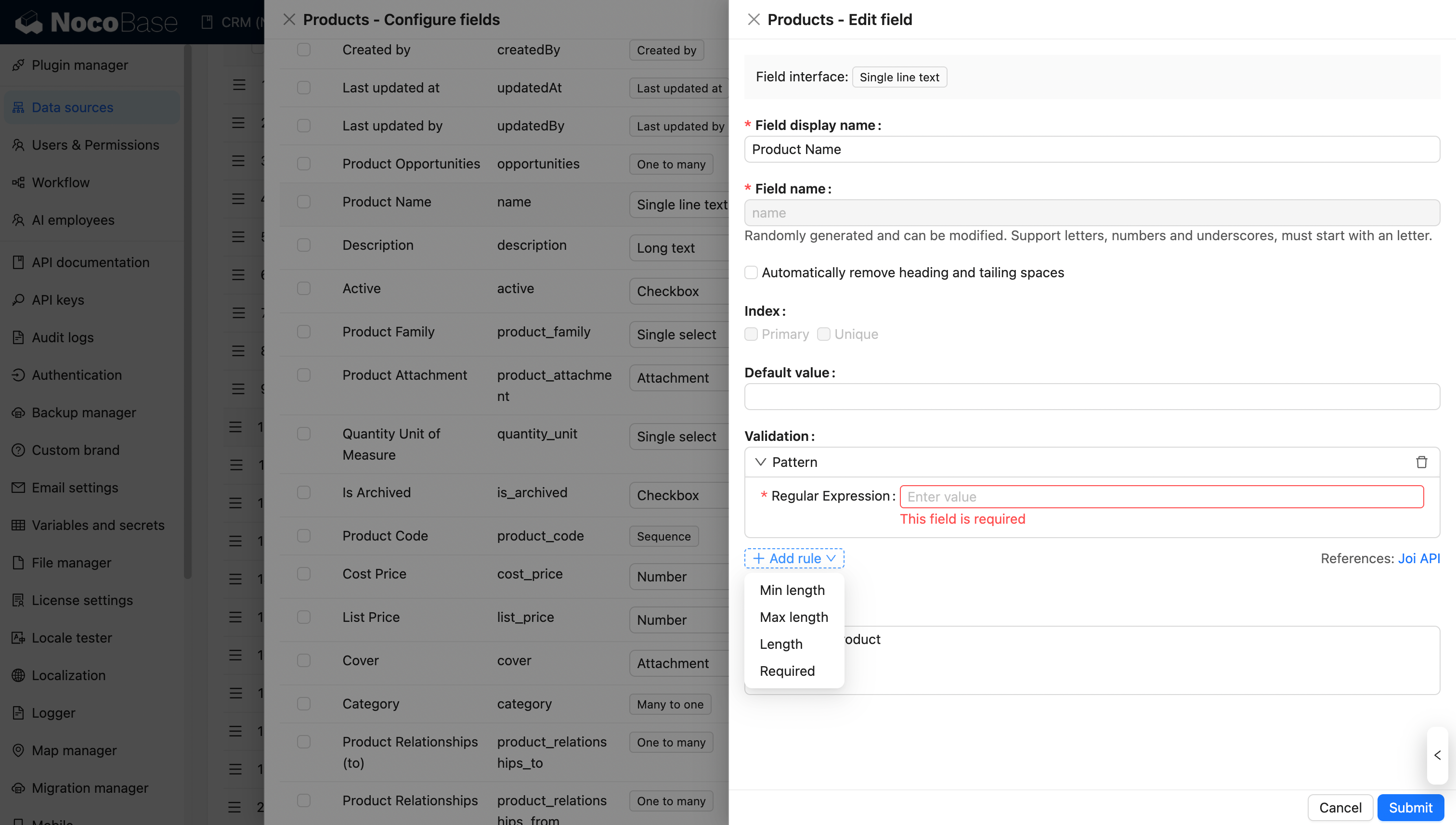
When the field is used in a form, field validation rules are also displayed in the field validation settings. These rules appear under **Server-side field validation rules** and are read-only there. If you need to change them, edit the field in Data source → Collection configuration.
|
|
82
|
+
|
|
83
|
+
You can still add extra rules for the current form field under **Client-side validation rules**. These rules only apply to the current field component. The final validation result combines **Server-side field validation rules** and **Client-side validation rules**.
|
|
81
84
|
|
|
82
85
|
Validation rules also apply to sub-table and sub-form components:
|
|
83
86
|
|
|
@@ -93,12 +96,12 @@ Note that in sub-form or sub-table scenarios, required validation for associatio
|
|
|
93
96
|

|
|
94
97
|
|
|
95
98
|
|
|
96
|
-
## Differences
|
|
97
|
-
|
|
99
|
+
## Differences Between Server-Side Field Validation Rules and Client-Side Validation Rules
|
|
100
|
+
Server-side field validation rules and client-side validation rules are configured in different places and have different scopes.
|
|
98
101
|
|
|
99
102
|
### Configuration Method Differences
|
|
100
|
-
- **
|
|
101
|
-
- **
|
|
103
|
+
- **Server-side field validation rules**: Set field rules in Data source → Collection configuration. These rules are the base rules of the field.
|
|
104
|
+
- **Client-side validation rules**: Configure extra rules in a form field's settings. These rules only affect the current field component.
|
|
102
105
|
|
|
103
106
|

|
|
104
107
|
|
|
@@ -109,7 +112,7 @@ Client-side and server-side field validation are applied in different scenarios,
|
|
|
109
112
|
|
|
110
113
|
|
|
111
114
|
### Validation Trigger Timing Differences
|
|
112
|
-
- **
|
|
113
|
-
- **
|
|
114
|
-
- **
|
|
115
|
-
- **Error messages**: Client-side validation
|
|
115
|
+
- **Server-side field validation rules**: Trigger frontend validation when the field is used in a form, and also validate before data is written. They also apply to scenarios that create or update data, such as workflows and data imports.
|
|
116
|
+
- **Client-side validation rules**: Trigger frontend validation in the current form field only.
|
|
117
|
+
- **Rule display**: Server-side field validation rules are shown as inherited read-only rules. Client-side validation rules are shown separately and can be edited there.
|
|
118
|
+
- **Error messages**: Client-side validation rules support custom error messages, while server-side field validation rules do not currently support custom error messages.
|
|
@@ -2,8 +2,8 @@
|
|
|
2
2
|
pageType: home
|
|
3
3
|
pageName: development
|
|
4
4
|
title: "NocoBase Development Guide"
|
|
5
|
-
description: "NocoBase development guide: plugin development, FlowEngine, RunJS, block/field/action extensions, data source extensions, workflow extensions, authentication extensions."
|
|
6
|
-
keywords: "NocoBase,development guide,plugin development,FlowEngine,RunJS,NocoBase extensions"
|
|
5
|
+
description: "NocoBase development guide: plugin development, shared components, FlowEngine, RunJS, block/field/action extensions, data source extensions, workflow extensions, authentication extensions."
|
|
6
|
+
keywords: "NocoBase,development guide,plugin development,shared components,FlowEngine,RunJS,NocoBase extensions"
|
|
7
7
|
features:
|
|
8
8
|
- title: Core Development
|
|
9
9
|
details: Master NocoBase's underlying extension mechanism and advanced development capabilities, including the plugin system, AI assistance, FlowEngine and RunJS environment, to build a solid development foundation.
|
|
@@ -24,6 +24,10 @@ features:
|
|
|
24
24
|
details: JavaScript execution environment for JS blocks, JS fields, and JS actions, and similar scenarios.
|
|
25
25
|
link: /runjs
|
|
26
26
|
showOnHome: true
|
|
27
|
+
- title: Shared Components
|
|
28
|
+
details: Reuse the built-in form, filter, table, and icon components in NocoBase client v2 when building plugin pages.
|
|
29
|
+
link: /shared-components
|
|
30
|
+
showOnHome: true
|
|
27
31
|
- title: Plugin Ecosystem
|
|
28
32
|
details: Extend the capabilities of existing plugins through other plugins, building a hierarchical and modular plugin ecosystem to enhance system extensibility and collaboration.
|
|
29
33
|
items:
|
|
@@ -30,10 +30,14 @@ Most fields support the configuration of validation rules. After a field is conf
|
|
|
30
30
|
|
|
31
31
|
|
|
32
32
|
|
|
33
|
-
###
|
|
33
|
+
### Client-Side Validation Rules in Field Settings
|
|
34
34
|
|
|
35
35
|
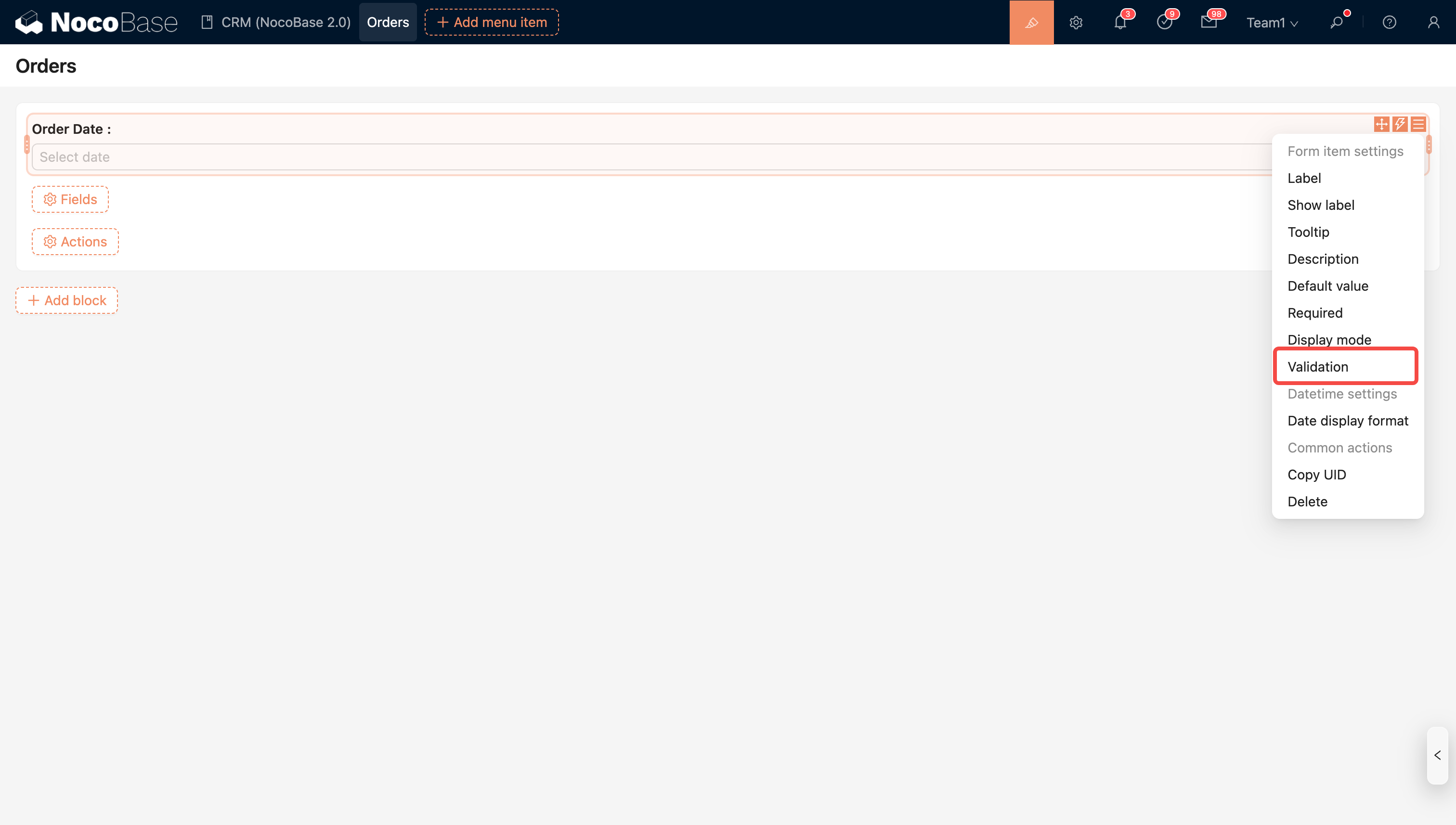
Validation rules set in the field configuration will trigger frontend validation to ensure user input complies with the regulations.
|
|
36
36
|
|
|
37
|
+
If the corresponding collection field already has validation rules, those rules are shown in the validation settings under **Server-side field validation rules**. They are inherited from the data source field configuration and are read-only here. If you need to change them, edit the collection field in Data source → Collection configuration.
|
|
38
|
+
|
|
39
|
+
Rules added under **Client-side validation rules** only apply to the current field component. They do not change the collection field configuration. When both groups exist, NocoBase applies the inherited field rules and client-side validation rules together.
|
|
40
|
+
|
|
37
41
|
|
|
38
42
|
|
|
39
43
|
|
|
@@ -45,4 +49,4 @@ Validation rules set in the field configuration will trigger frontend validation
|
|
|
45
49
|
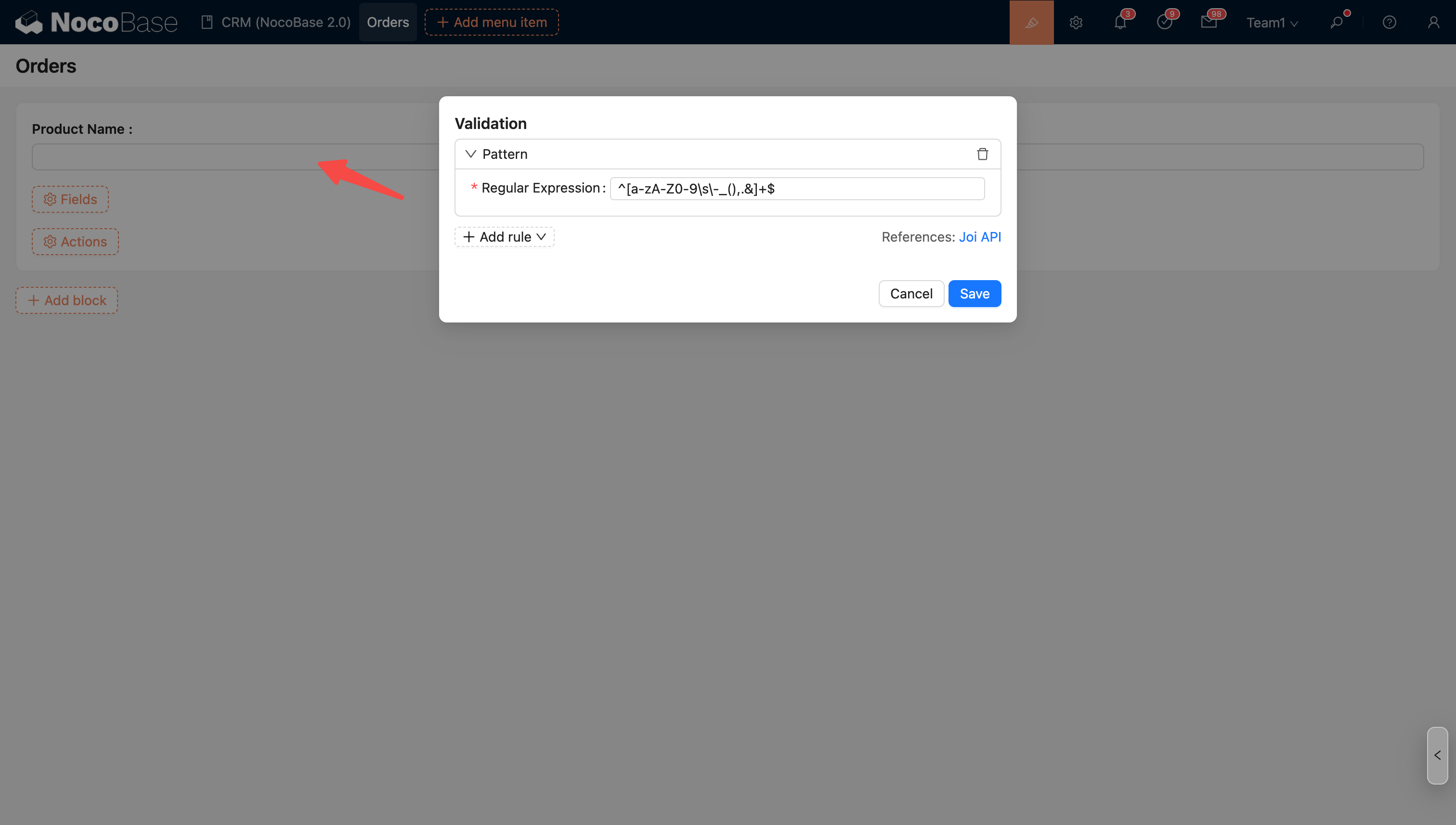
**Text fields** also support custom regex validation to meet specific format requirements.
|
|
46
50
|
|
|
47
51
|
|
|
48
|
-
|
|
52
|
+

|
|
@@ -29,6 +29,7 @@ Specifically:
|
|
|
29
29
|
1. **[Plugin](./plugin)**: The plugin entry class. Register routes, models, and other resources in lifecycle methods like `load()`.
|
|
30
30
|
2. **[Router](./router)**: Register page routes via `router.add()` and plugin settings pages via `pluginSettingsManager`.
|
|
31
31
|
3. **[Component](./component/index.md)**: Routes mount React components. Just use React + Antd by default -- no different from regular frontend development.
|
|
32
|
+
| Find reusable form, filter, and table components | [Shared Components](/shared-components/) |
|
|
32
33
|
4. **[Context](./ctx/index.md)**: In plugins, access context via `this.context`; in components, use `useFlowContext()` to get the context. This gives you access to NocoBase capabilities -- making requests (`ctx.api`), internationalization (`ctx.t`), logging (`ctx.logger`), etc.
|
|
33
34
|
5. **[FlowEngine](./flow-engine/index.md)**: If your components need to appear in the "Add Block / Field / Action" menus and support visual configuration by users, you need to wrap them with FlowModel.
|
|
34
35
|
|
|
@@ -0,0 +1,38 @@
|
|
|
1
|
+
---
|
|
2
|
+
title: "createFormRegistry"
|
|
3
|
+
description: "createFormRegistry: Create an internal registry for plugin extension items."
|
|
4
|
+
keywords: "createFormRegistry,NocoBase,client-v2"
|
|
5
|
+
---
|
|
6
|
+
|
|
7
|
+
# createFormRegistry
|
|
8
|
+
|
|
9
|
+
`createFormRegistry` is used to create an internal registry for plugin extension items.
|
|
10
|
+
|
|
11
|
+
## Basic Usage
|
|
12
|
+
|
|
13
|
+
```ts
|
|
14
|
+
import { createFormRegistry, type FormRegistryEntry } from '@nocobase/client-v2';
|
|
15
|
+
|
|
16
|
+
interface StorageType extends FormRegistryEntry {
|
|
17
|
+
title: string;
|
|
18
|
+
Component: React.ComponentType;
|
|
19
|
+
}
|
|
20
|
+
|
|
21
|
+
const storageTypes = createFormRegistry<StorageType>('file-manager/storage-types');
|
|
22
|
+
|
|
23
|
+
storageTypes.register({ name: 'local', title: 'Local', Component: LocalStorageForm });
|
|
24
|
+
storageTypes.register({ name: 's3', title: 'Amazon S3', Component: S3StorageForm });
|
|
25
|
+
|
|
26
|
+
const s3 = storageTypes.get('s3');
|
|
27
|
+
const all = storageTypes.list();
|
|
28
|
+
```
|
|
29
|
+
|
|
30
|
+
## API
|
|
31
|
+
|
|
32
|
+
| Prop | Type | Description |
|
|
33
|
+
| --- | --- | --- |
|
|
34
|
+
| `register(entry)` | `-` | Register an entry |
|
|
35
|
+
| `unregister(name)` | `-` | Remove an entry |
|
|
36
|
+
| `get(name)` | `-` | Get an entry by name |
|
|
37
|
+
| `has(name)` | `-` | Check whether an entry exists |
|
|
38
|
+
| `list()` | `-` | Return all entries |
|
|
@@ -0,0 +1,44 @@
|
|
|
1
|
+
---
|
|
2
|
+
title: "CollectionFilterPanel"
|
|
3
|
+
description: "CollectionFilterPanel: Embed a Collection filter panel in a page."
|
|
4
|
+
keywords: "CollectionFilterPanel,NocoBase,client-v2"
|
|
5
|
+
---
|
|
6
|
+
|
|
7
|
+
# CollectionFilterPanel
|
|
8
|
+
|
|
9
|
+
`CollectionFilterPanel` is used to embed a Collection filter panel in a page.
|
|
10
|
+
|
|
11
|
+
## Basic Usage
|
|
12
|
+
|
|
13
|
+
```tsx
|
|
14
|
+
import { CollectionFilterPanel, type CollectionFilterPanelRef } from '@nocobase/client-v2';
|
|
15
|
+
|
|
16
|
+
const ref = useRef<CollectionFilterPanelRef>(null);
|
|
17
|
+
|
|
18
|
+
<CollectionFilterPanel ref={ref} collection={collection} t={t} />;
|
|
19
|
+
|
|
20
|
+
const filter = ref.current?.getFilter();
|
|
21
|
+
```
|
|
22
|
+
|
|
23
|
+
## API
|
|
24
|
+
|
|
25
|
+
| Prop | Type | Description |
|
|
26
|
+
| --- | --- | --- |
|
|
27
|
+
| `collection` | `Collection | undefined` | Collection used as the field source |
|
|
28
|
+
| `initialValue` | `Record<string, unknown>` | Initial filter value |
|
|
29
|
+
| `onChange` | `(filter) => void` | Change callback |
|
|
30
|
+
| `t` | `(key, options?) => string` | Translation function |
|
|
31
|
+
| `filterableFieldNames` | `string[]` | Field allowlist |
|
|
32
|
+
| `nonfilterableFieldNames` | `string[]` | Field blocklist |
|
|
33
|
+
| `noIgnore` | `boolean` | Skip allowlist restrictions |
|
|
34
|
+
|
|
35
|
+
## Methods
|
|
36
|
+
|
|
37
|
+
| Method | Description |
|
|
38
|
+
| --- | --- |
|
|
39
|
+
| `getFilter()` | Get the compiled filter |
|
|
40
|
+
| `reset()` | Clear all conditions |
|
|
41
|
+
|
|
42
|
+
## Related Links
|
|
43
|
+
|
|
44
|
+
- [CollectionFilter](./)
|
|
@@ -0,0 +1,44 @@
|
|
|
1
|
+
---
|
|
2
|
+
title: "CollectionFilter"
|
|
3
|
+
description: "CollectionFilter: Filter a Collection with multiple conditions."
|
|
4
|
+
keywords: "CollectionFilter,NocoBase,client-v2"
|
|
5
|
+
---
|
|
6
|
+
|
|
7
|
+
# CollectionFilter
|
|
8
|
+
|
|
9
|
+
`CollectionFilter` is used to filter a Collection with multiple conditions.
|
|
10
|
+
|
|
11
|
+
## Basic Usage
|
|
12
|
+
|
|
13
|
+
```tsx
|
|
14
|
+
import { CollectionFilter } from '@nocobase/client-v2';
|
|
15
|
+
|
|
16
|
+
<CollectionFilter
|
|
17
|
+
collection={collection}
|
|
18
|
+
t={t}
|
|
19
|
+
onChange={(filter) => {
|
|
20
|
+
listRequest.run({ filter });
|
|
21
|
+
}}
|
|
22
|
+
/>;
|
|
23
|
+
```
|
|
24
|
+
|
|
25
|
+
## API
|
|
26
|
+
|
|
27
|
+
| Prop | Type | Description |
|
|
28
|
+
| --- | --- | --- |
|
|
29
|
+
| `collection` | `Collection | undefined` | Collection used as the field source |
|
|
30
|
+
| `initialValue` | `Record<string, unknown>` | Initial filter value |
|
|
31
|
+
| `onChange` | `(filter) => void` | Change callback |
|
|
32
|
+
| `t` | `(key, options?) => string` | Translation function |
|
|
33
|
+
| `filterableFieldNames` | `string[]` | Field allowlist |
|
|
34
|
+
| `nonfilterableFieldNames` | `string[]` | Field blocklist |
|
|
35
|
+
| `noIgnore` | `boolean` | Skip allowlist restrictions |
|
|
36
|
+
| `buttonText` | `React.ReactNode` | Custom button text |
|
|
37
|
+
| `showCount` | `boolean` | Whether to show the number of conditions |
|
|
38
|
+
| `popoverProps` | `PopoverProps` | Props passed to Antd Popover |
|
|
39
|
+
| `buttonProps` | `ButtonProps` | Props passed to Antd Button |
|
|
40
|
+
| `popoverMinWidth` | `number` | Minimum width of the Popover content |
|
|
41
|
+
|
|
42
|
+
## Related Links
|
|
43
|
+
|
|
44
|
+
- [CollectionFilterPanel](./collection-filter-panel)
|
|
@@ -0,0 +1,34 @@
|
|
|
1
|
+
---
|
|
2
|
+
title: "CodeScanner"
|
|
3
|
+
description: "CodeScanner: Control the low-level full-screen scanner."
|
|
4
|
+
keywords: "CodeScanner,NocoBase,client-v2"
|
|
5
|
+
---
|
|
6
|
+
|
|
7
|
+
# CodeScanner
|
|
8
|
+
|
|
9
|
+
`CodeScanner` is used to control the low-level full-screen scanner.
|
|
10
|
+
|
|
11
|
+
## Basic Usage
|
|
12
|
+
|
|
13
|
+
```tsx
|
|
14
|
+
import { CodeScanner } from '@nocobase/client-v2';
|
|
15
|
+
|
|
16
|
+
<CodeScanner
|
|
17
|
+
visible={visible}
|
|
18
|
+
onClose={() => setVisible(false)}
|
|
19
|
+
onScanSuccess={(text) => setValue(text)}
|
|
20
|
+
/>;
|
|
21
|
+
```
|
|
22
|
+
|
|
23
|
+
## API
|
|
24
|
+
|
|
25
|
+
| Prop | Type | Description |
|
|
26
|
+
| --- | --- | --- |
|
|
27
|
+
| `visible` | `boolean` | Whether the scanner is visible |
|
|
28
|
+
| `formatsToSupport` | `Html5QrcodeSupportedFormats[]` | Supported QR code or barcode formats |
|
|
29
|
+
| `onClose` | `() => void` | Called when the scanner closes |
|
|
30
|
+
| `onScanSuccess` | `(result: string) => void` | Called after a successful scan |
|
|
31
|
+
|
|
32
|
+
## Related Links
|
|
33
|
+
|
|
34
|
+
- [ScanInput](./scan-input)
|
|
@@ -0,0 +1,45 @@
|
|
|
1
|
+
---
|
|
2
|
+
title: "DialogFormLayout"
|
|
3
|
+
description: "DialogFormLayout: Put a standard form in a dialog."
|
|
4
|
+
keywords: "DialogFormLayout,NocoBase,client-v2"
|
|
5
|
+
---
|
|
6
|
+
|
|
7
|
+
# DialogFormLayout
|
|
8
|
+
|
|
9
|
+
`DialogFormLayout` is used to put a standard form in a dialog.
|
|
10
|
+
|
|
11
|
+
## Basic Usage
|
|
12
|
+
|
|
13
|
+
```tsx
|
|
14
|
+
import { DialogFormLayout } from '@nocobase/client-v2';
|
|
15
|
+
|
|
16
|
+
ctx.viewer.dialog({
|
|
17
|
+
closable: true,
|
|
18
|
+
content: () => (
|
|
19
|
+
<DialogFormLayout title={t('Bind verifier')} onSubmit={handleSubmit}>
|
|
20
|
+
<Form form={form} layout="vertical">
|
|
21
|
+
<Form.Item name="code" label={t('Code')}>
|
|
22
|
+
<Input />
|
|
23
|
+
</Form.Item>
|
|
24
|
+
</Form>
|
|
25
|
+
</DialogFormLayout>
|
|
26
|
+
),
|
|
27
|
+
});
|
|
28
|
+
```
|
|
29
|
+
|
|
30
|
+
## API
|
|
31
|
+
|
|
32
|
+
| Prop | Type | Description |
|
|
33
|
+
| --- | --- | --- |
|
|
34
|
+
| `title` | `React.ReactNode` | Title content |
|
|
35
|
+
| `children` | `React.ReactNode` | Content rendered inside the component |
|
|
36
|
+
| `onCancel` | `() => void | Promise<void>` | Called before Cancel closes the view |
|
|
37
|
+
| `onSubmit` | `() => void | Promise<void>` | Called when Submit is clicked |
|
|
38
|
+
| `submitting` | `boolean` | Loading state of the submit button |
|
|
39
|
+
| `submitText` | `React.ReactNode` | Submit button text |
|
|
40
|
+
| `cancelText` | `React.ReactNode` | Cancel button text |
|
|
41
|
+
| `footer` | `React.ReactNode` | Replace the default footer |
|
|
42
|
+
|
|
43
|
+
## Related Links
|
|
44
|
+
|
|
45
|
+
- [DrawerFormLayout](./drawer-form-layout)
|
|
@@ -0,0 +1,45 @@
|
|
|
1
|
+
---
|
|
2
|
+
title: "DrawerFormLayout"
|
|
3
|
+
description: "DrawerFormLayout: Put a standard form in a drawer."
|
|
4
|
+
keywords: "DrawerFormLayout,NocoBase,client-v2"
|
|
5
|
+
---
|
|
6
|
+
|
|
7
|
+
# DrawerFormLayout
|
|
8
|
+
|
|
9
|
+
`DrawerFormLayout` is used to put a standard form in a drawer.
|
|
10
|
+
|
|
11
|
+
## Basic Usage
|
|
12
|
+
|
|
13
|
+
```tsx
|
|
14
|
+
import { DrawerFormLayout } from '@nocobase/client-v2';
|
|
15
|
+
|
|
16
|
+
ctx.viewer.drawer({
|
|
17
|
+
width: '50%',
|
|
18
|
+
closable: true,
|
|
19
|
+
content: () => (
|
|
20
|
+
<DrawerFormLayout title={t('Add provider')} onSubmit={handleSubmit}>
|
|
21
|
+
<Form form={form} layout="vertical">
|
|
22
|
+
<Form.Item name="name" label={t('Name')} rules={[{ required: true }]}>
|
|
23
|
+
<Input />
|
|
24
|
+
</Form.Item>
|
|
25
|
+
</Form>
|
|
26
|
+
</DrawerFormLayout>
|
|
27
|
+
),
|
|
28
|
+
});
|
|
29
|
+
```
|
|
30
|
+
|
|
31
|
+
## API
|
|
32
|
+
|
|
33
|
+
| Prop | Type | Description |
|
|
34
|
+
| --- | --- | --- |
|
|
35
|
+
| `title` | `React.ReactNode` | Title content |
|
|
36
|
+
| `children` | `React.ReactNode` | Content rendered inside the component |
|
|
37
|
+
| `onSubmit` | `() => void | Promise<void>` | Called when Submit is clicked |
|
|
38
|
+
| `submitting` | `boolean` | Loading state of the submit button |
|
|
39
|
+
| `submitText` | `React.ReactNode` | Submit button text |
|
|
40
|
+
| `cancelText` | `React.ReactNode` | Cancel button text |
|
|
41
|
+
| `footer` | `React.ReactNode` | Replace the default footer |
|
|
42
|
+
|
|
43
|
+
## Related Links
|
|
44
|
+
|
|
45
|
+
- [DialogFormLayout](./dialog-form-layout)
|
|
@@ -0,0 +1,30 @@
|
|
|
1
|
+
---
|
|
2
|
+
title: "EnvVariableInput"
|
|
3
|
+
description: "EnvVariableInput: Allow only `$env` is used to environment variables."
|
|
4
|
+
keywords: "EnvVariableInput,NocoBase,client-v2"
|
|
5
|
+
---
|
|
6
|
+
|
|
7
|
+
# EnvVariableInput
|
|
8
|
+
|
|
9
|
+
`EnvVariableInput` is used to allow only `$env` environment variables.
|
|
10
|
+
|
|
11
|
+
## Basic Usage
|
|
12
|
+
|
|
13
|
+
```tsx file="../_demos/env-variable-input.tsx" preview
|
|
14
|
+
```
|
|
15
|
+
|
|
16
|
+
## API
|
|
17
|
+
|
|
18
|
+
| Prop | Type | Description |
|
|
19
|
+
| --- | --- | --- |
|
|
20
|
+
| `value` | `string` | Current value |
|
|
21
|
+
| `onChange` | `(value: string) => void` | Change callback |
|
|
22
|
+
| `addonBefore` | `React.ReactNode` | Content before the input |
|
|
23
|
+
| `disabled` | `boolean` | Whether disabled |
|
|
24
|
+
| `password` | `boolean` | Mask plain non-variable values |
|
|
25
|
+
| `placeholder` | `string` | Placeholder text |
|
|
26
|
+
|
|
27
|
+
## Related Links
|
|
28
|
+
|
|
29
|
+
- [VariableInput](./variable-input)
|
|
30
|
+
- [TypedVariableInput](./typed-variable-input)
|
|
@@ -0,0 +1,24 @@
|
|
|
1
|
+
---
|
|
2
|
+
title: "FileSizeInput"
|
|
3
|
+
description: "FileSizeInput: Enter a file size and store it as bytes."
|
|
4
|
+
keywords: "FileSizeInput,NocoBase,client-v2"
|
|
5
|
+
---
|
|
6
|
+
|
|
7
|
+
# FileSizeInput
|
|
8
|
+
|
|
9
|
+
`FileSizeInput` is used to enter a file size and store it as bytes.
|
|
10
|
+
|
|
11
|
+
## Basic Usage
|
|
12
|
+
|
|
13
|
+
```tsx file="../_demos/file-size-input.tsx" preview
|
|
14
|
+
```
|
|
15
|
+
|
|
16
|
+
## API
|
|
17
|
+
|
|
18
|
+
| Prop | Type | Description |
|
|
19
|
+
| --- | --- | --- |
|
|
20
|
+
| `value` | `number` | Current value |
|
|
21
|
+
| `onChange` | `(value: number | null) => void` | Change callback |
|
|
22
|
+
| `disabled` | `boolean` | Whether disabled |
|
|
23
|
+
| `min` | `number` | Minimum value |
|
|
24
|
+
| `max` | `number` | Maximum value |
|
|
@@ -0,0 +1,28 @@
|
|
|
1
|
+
---
|
|
2
|
+
title: "JsonTextArea"
|
|
3
|
+
description: "JsonTextArea: Edit JSON / JSON5 configuration."
|
|
4
|
+
keywords: "JsonTextArea,NocoBase,client-v2"
|
|
5
|
+
---
|
|
6
|
+
|
|
7
|
+
# JsonTextArea
|
|
8
|
+
|
|
9
|
+
`JsonTextArea` is used to edit JSON / JSON5 configuration.
|
|
10
|
+
|
|
11
|
+
## Basic Usage
|
|
12
|
+
|
|
13
|
+
```tsx file="../_demos/json-text-area.tsx" preview
|
|
14
|
+
```
|
|
15
|
+
|
|
16
|
+
## API
|
|
17
|
+
|
|
18
|
+
| Prop | Type | Description |
|
|
19
|
+
| --- | --- | --- |
|
|
20
|
+
| `value` | `unknown` | Current value |
|
|
21
|
+
| `onChange` | `(value: unknown) => void` | Change callback |
|
|
22
|
+
| `space` | `number` | Stringify indentation |
|
|
23
|
+
| `json5` | `boolean` | Whether to parse with JSON5 |
|
|
24
|
+
| `showError` | `boolean` | Whether to show parse errors |
|
|
25
|
+
|
|
26
|
+
## Related Links
|
|
27
|
+
|
|
28
|
+
- [VariableJsonTextArea](./variable-json-text-area)
|
|
@@ -0,0 +1,23 @@
|
|
|
1
|
+
---
|
|
2
|
+
title: "PasswordInput"
|
|
3
|
+
description: "PasswordInput: Enter a password with a strength indicator."
|
|
4
|
+
keywords: "PasswordInput,NocoBase,client-v2"
|
|
5
|
+
---
|
|
6
|
+
|
|
7
|
+
# PasswordInput
|
|
8
|
+
|
|
9
|
+
`PasswordInput` is used to enter a password with a strength indicator.
|
|
10
|
+
|
|
11
|
+
## Basic Usage
|
|
12
|
+
|
|
13
|
+
```tsx file="../_demos/password-input.tsx" preview
|
|
14
|
+
```
|
|
15
|
+
|
|
16
|
+
## API
|
|
17
|
+
|
|
18
|
+
| Prop | Type | Description |
|
|
19
|
+
| --- | --- | --- |
|
|
20
|
+
| `value` | `string` | Current value |
|
|
21
|
+
| `onChange` | `(event) => void` | Change callback |
|
|
22
|
+
| `disabled` | `boolean` | Whether disabled |
|
|
23
|
+
| `placeholder` | `string` | Placeholder text |
|