@nocobase/plugin-ai 2.1.41 → 2.1.44
This diff represents the content of publicly available package versions that have been released to one of the supported registries. The information contained in this diff is provided for informational purposes only and reflects changes between package versions as they appear in their respective public registries.
- package/dist/ai/docs/nocobase/users-permissions/sync/index.md +8 -1
- package/dist/ai/docs/nocobase/users-permissions/sync/sources/dingtalk.md +138 -0
- package/dist/ai/docs/nocobase/users-permissions/sync/sources/ldap.md +87 -0
- package/dist/client/{428.5eb4f53ddbb6a3b8.js → 428.ffedb3a4562be095.js} +1 -1
- package/dist/client/{559.959c46d0056ccdc8.js → 559.10842a76928b119c.js} +1 -1
- package/dist/client/index.js +3 -3
- package/dist/client/llm-providers/shengsuanyun/ModelSettings.d.ts +10 -0
- package/dist/client/llm-providers/shengsuanyun/ProviderSettings.d.ts +10 -0
- package/dist/client/llm-providers/shengsuanyun/index.d.ts +10 -0
- package/dist/externalVersion.js +16 -16
- package/dist/locale/en-US.json +3 -0
- package/dist/locale/zh-CN.json +3 -0
- package/dist/node_modules/@langchain/mistralai/package.json +1 -1
- package/dist/node_modules/@langchain/xai/package.json +1 -1
- package/dist/node_modules/fs-extra/package.json +1 -1
- package/dist/node_modules/jsonrepair/package.json +1 -1
- package/dist/node_modules/just-bash/package.json +1 -1
- package/dist/node_modules/nodejs-snowflake/package.json +1 -1
- package/dist/node_modules/openai/package.json +1 -1
- package/dist/node_modules/zod/package.json +1 -1
- package/dist/server/llm-providers/shengsuanyun.d.ts +29 -0
- package/dist/server/llm-providers/shengsuanyun.js +114 -0
- package/dist/server/plugin.js +2 -0
- package/package.json +2 -2
|
@@ -8,6 +8,13 @@ pkg: '@nocobase/plugin-user-data-sync'
|
|
|
8
8
|
|
|
9
9
|
This feature allows you to register and manage user data synchronization sources. By default, an HTTP API is provided, but additional data sources can be supported through plugins. It supports syncing data to the **Users** and **Departments** collections by default, with the possibility to extend synchronization to other target resources using plugins.
|
|
10
10
|
|
|
11
|
+
## Available data sources
|
|
12
|
+
|
|
13
|
+
- [DingTalk](./sources/dingtalk.md) — Synchronize DingTalk users and departments, with incremental updates through HTTP callbacks or Stream mode.
|
|
14
|
+
- [LDAP](./sources/ldap.md) — Synchronize LDAP users and optional organizational units by reusing an LDAP authenticator.
|
|
15
|
+
- [WeCom](./sources/wecom.md) — Synchronize users and departments from WeCom.
|
|
16
|
+
- [HTTP API](./sources/api.md) — Push user and department data through the synchronization API.
|
|
17
|
+
|
|
11
18
|
## Data Source Management and Synchronization
|
|
12
19
|
|
|
13
20
|
|
|
@@ -51,4 +58,4 @@ For failed synchronization tasks, you can click **Retry**.
|
|
|
51
58
|
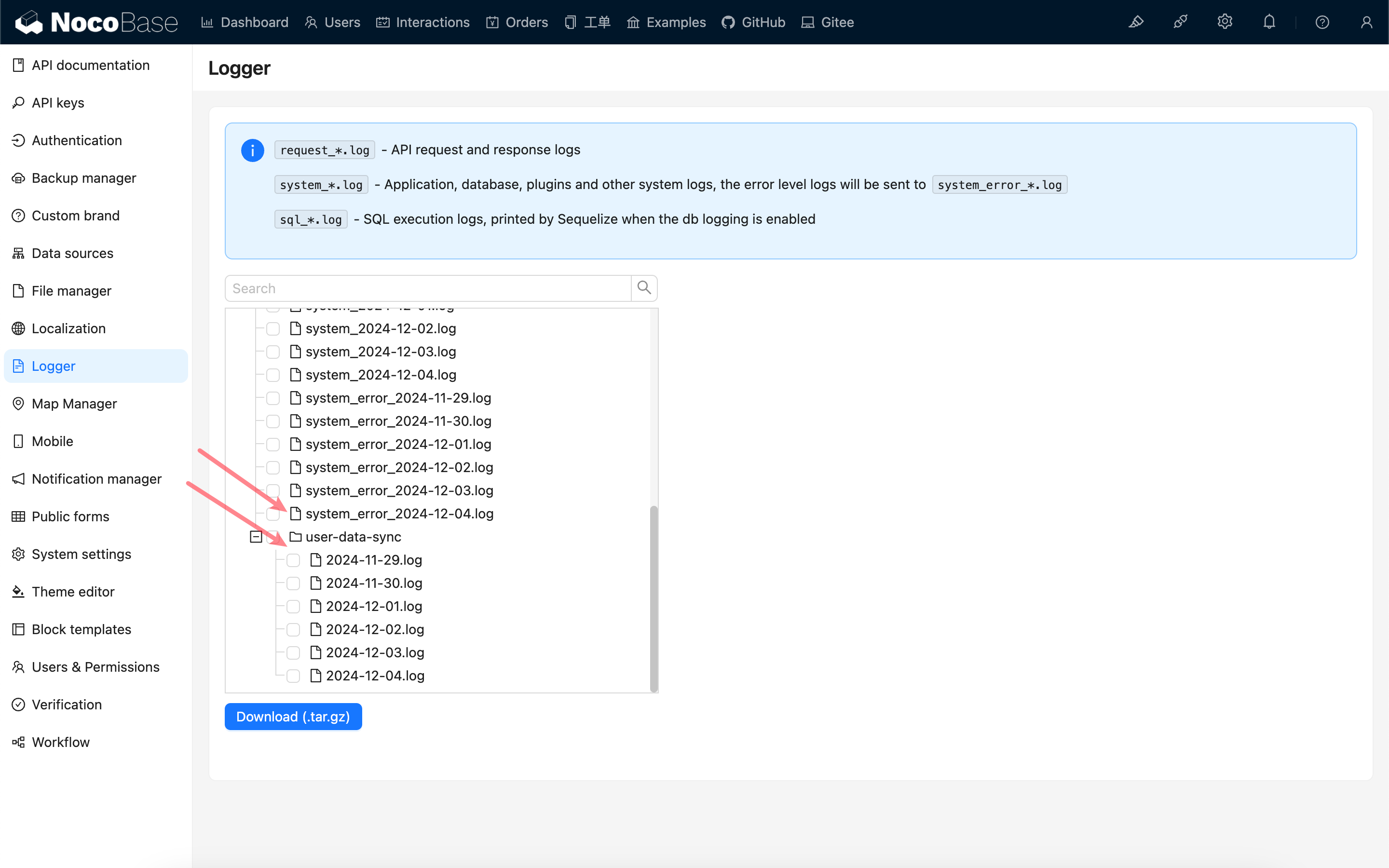
In case of synchronization failures, you can troubleshoot the issue through system logs. Additionally, raw synchronization records are stored in the `user-data-sync` directory under the application logs folder.
|
|
52
59
|
|
|
53
60
|
|
|
54
|
-
|
|
61
|
+

|
|
@@ -0,0 +1,138 @@
|
|
|
1
|
+
---
|
|
2
|
+
pkg: '@nocobase/plugin-auth-dingtalk'
|
|
3
|
+
title: "Synchronize User Data from DingTalk"
|
|
4
|
+
description: "Synchronize DingTalk users and departments to NocoBase and receive incremental changes through HTTP callbacks or Stream mode."
|
|
5
|
+
keywords: "DingTalk,user synchronization,department synchronization,Stream mode,event subscription,NocoBase"
|
|
6
|
+
---
|
|
7
|
+
|
|
8
|
+
# Synchronize User Data from DingTalk
|
|
9
|
+
|
|
10
|
+
<PluginInfo commercial="true" name="auth-dingtalk"></PluginInfo>
|
|
11
|
+
|
|
12
|
+
## Introduction
|
|
13
|
+
|
|
14
|
+
The **DingTalk** plugin synchronizes users and departments from a DingTalk organization to NocoBase. It supports full synchronization on demand and incremental updates through either an HTTP callback or a Stream connection.
|
|
15
|
+
|
|
16
|
+
## Before you begin
|
|
17
|
+
|
|
18
|
+
1. Install and enable the **DingTalk** and **User Data Synchronization** plugins.
|
|
19
|
+
2. Create an internal application in the DingTalk developer console.
|
|
20
|
+
3. Grant the contact permissions and configure the data permission scope described below.
|
|
21
|
+
4. Copy the application's Client ID and Client Secret. See [Authentication: DingTalk](/auth-verification/auth-dingtalk/) for the credential setup.
|
|
22
|
+
|
|
23
|
+
## Configure contact permissions and the data permission scope
|
|
24
|
+
|
|
25
|
+
Open **Permission Management** for the application in the DingTalk developer console and grant the following contact permissions.
|
|
26
|
+
|
|
27
|
+
| Permission | Identifier | Required | Purpose |
|
|
28
|
+
| --- | --- | --- | --- |
|
|
29
|
+
| Read department information | `qyapi_get_department_list` | Yes | Read the department list, names, and hierarchy. |
|
|
30
|
+
| Read department members | `qyapi_get_department_member` | Yes | Read the member list of each department. |
|
|
31
|
+
| Read member information | `qyapi_get_member` | Yes | Read member details and department memberships. |
|
|
32
|
+
| Employee mobile number information | `fieldMobile` | When using mobile numbers | Synchronize mobile numbers. This permission is required when **User unique identifier field** is `mobile`. |
|
|
33
|
+
| Email and other personal information | `fieldEmail` | No | Grant this permission when user email addresses need to be synchronized. |
|
|
34
|
+
|
|
35
|
+
After granting the permissions, configure the application's **Data Permission Scope** (also called **Contact Permission Scope** or **Visibility Range** in some console versions) to include the departments and employees that may be synchronized. Select all employees for a full organization synchronization. If only selected departments or employees are included, NocoBase synchronizes only those entries.
|
|
36
|
+
|
|
37
|
+
:::warning
|
|
38
|
+
API permissions determine which fields the application can read, while the data permission scope determines which departments and employees it can read. Both must be configured. Event subscriptions do not replace contact read permissions: after receiving an event, NocoBase still calls DingTalk APIs to retrieve the latest user or department information.
|
|
39
|
+
:::
|
|
40
|
+
|
|
41
|
+
If the same DingTalk application is also used for sign-in, grant the personal-information permissions described in [Authentication: DingTalk](/auth-verification/auth-dingtalk/). Those sign-in permissions are not required solely for user data synchronization.
|
|
42
|
+
|
|
43
|
+
## Add a DingTalk synchronization source
|
|
44
|
+
|
|
45
|
+
Go to **Users & Permissions > Synchronize**, click **Add new**, and select **DingTalk** as the type.
|
|
46
|
+
|
|
47
|
+
Configure the following fields:
|
|
48
|
+
|
|
49
|
+
| Field | Description |
|
|
50
|
+
| --- | --- |
|
|
51
|
+
| Source name | A unique name for this synchronization source. |
|
|
52
|
+
| Enabled | Starts event reception for this source and enables synchronization tasks. |
|
|
53
|
+
| Client ID | The Client ID of the DingTalk internal application. Environment variables and secrets are supported. |
|
|
54
|
+
| Client Secret | The Client Secret of the DingTalk internal application. Environment variables and secrets are supported. |
|
|
55
|
+
| User unique identifier field | Select `mobile` or `unionId`. Keep the selected field stable after the first synchronization. Users without a value for the selected field are skipped. |
|
|
56
|
+
| Event receiving mode | Select **HTTP callback** or **Stream mode** for incremental user and department changes. |
|
|
57
|
+
|
|
58
|
+
Save and enable the source, then click **Sync** to complete the initial full synchronization before relying on incremental events.
|
|
59
|
+
|
|
60
|
+
## Choose an event receiving mode
|
|
61
|
+
|
|
62
|
+
### Stream mode
|
|
63
|
+
|
|
64
|
+
Stream mode establishes an outbound persistent connection from the NocoBase server to DingTalk. It does not require a public callback URL, Token, or EncodingAESKey.
|
|
65
|
+
|
|
66
|
+
1. In the DingTalk developer console, open the application's event subscription settings and select **Stream mode**.
|
|
67
|
+
2. Subscribe to the user and department change events required by the application.
|
|
68
|
+
3. In NocoBase, select **Stream mode**, save the source, and enable it.
|
|
69
|
+
|
|
70
|
+
The Stream client starts when the source is enabled. Updating, disabling, or deleting the source refreshes or closes the corresponding connection.
|
|
71
|
+
|
|
72
|
+
:::info
|
|
73
|
+
The NocoBase server must be able to establish outbound connections to DingTalk. A reverse proxy or public inbound callback endpoint is not required for Stream mode.
|
|
74
|
+
:::
|
|
75
|
+
|
|
76
|
+
### HTTP callback
|
|
77
|
+
|
|
78
|
+
HTTP callback mode receives DingTalk events through a NocoBase callback URL.
|
|
79
|
+
|
|
80
|
+
1. Select **HTTP callback** in NocoBase.
|
|
81
|
+
2. Enter the Token and EncodingAESKey configured for the DingTalk event subscription.
|
|
82
|
+
3. Save the source and copy the generated **Event callback URL**.
|
|
83
|
+
4. Configure that URL in the DingTalk developer console and subscribe to the required user and department events.
|
|
84
|
+
|
|
85
|
+
The callback URL must be reachable by DingTalk. In a production environment, expose it through HTTPS and make sure the reverse proxy forwards the request path unchanged.
|
|
86
|
+
|
|
87
|
+
## Supported incremental events
|
|
88
|
+
|
|
89
|
+
Both event receiving modes handle the following DingTalk events:
|
|
90
|
+
|
|
91
|
+
| Event | Result in NocoBase |
|
|
92
|
+
| --- | --- |
|
|
93
|
+
| `user_add_org` | Create or update the user. |
|
|
94
|
+
| `user_modify_org` | Update the user. |
|
|
95
|
+
| `user_leave_org` | Delete the synchronized user. |
|
|
96
|
+
| `org_dept_create` | Create or update the department. |
|
|
97
|
+
| `org_dept_modify` | Update the department and synchronize its users. |
|
|
98
|
+
| `org_dept_remove` | Delete the synchronized department. |
|
|
99
|
+
|
|
100
|
+
## Synchronized fields
|
|
101
|
+
|
|
102
|
+
### Department fields
|
|
103
|
+
|
|
104
|
+
| DingTalk field | NocoBase field or purpose |
|
|
105
|
+
| --- | --- |
|
|
106
|
+
| `dept_id` | Source-unique department identifier. |
|
|
107
|
+
| `name` | Department name. |
|
|
108
|
+
| `parent_id` | Parent department used to build the department hierarchy. If the parent is outside the data permission scope, the department is synchronized as a root department. |
|
|
109
|
+
|
|
110
|
+
### User fields
|
|
111
|
+
|
|
112
|
+
| DingTalk field | NocoBase field or purpose |
|
|
113
|
+
| --- | --- |
|
|
114
|
+
| `mobile` or `unionid` | Generates the source-unique user identifier and username according to **User unique identifier field**. A user without the selected field is skipped. |
|
|
115
|
+
| `name` | User nickname. |
|
|
116
|
+
| `mobile` | Phone number. Requires the **Employee mobile number information** permission. |
|
|
117
|
+
| `email`, falling back to `org_email` | Email address. Requires the **Email and other personal information** permission. |
|
|
118
|
+
| `dept_id_list` | Department memberships. Only departments within the data permission scope are retained. |
|
|
119
|
+
| `dept_order_list` | Primary department. |
|
|
120
|
+
| `leader_in_dept` | Whether the user is an owner of the corresponding department. |
|
|
121
|
+
|
|
122
|
+
### Department owners
|
|
123
|
+
|
|
124
|
+
DingTalk uses `leader_in_dept` in the user details to indicate whether the user is an owner of each department they belong to. NocoBase synchronizes this flag separately for each department: the same user can own multiple departments, and an owned department does not have to be the user's primary department. Only departments within the data permission scope are included.
|
|
125
|
+
|
|
126
|
+
When an owner flag is removed in DingTalk, the corresponding owner flag in NocoBase is removed by the next synchronization. Owner status changed manually in NocoBase may be overwritten by DingTalk data during the next synchronization.
|
|
127
|
+
|
|
128
|
+
Full and incremental synchronization use the same field mapping. Other DingTalk user fields, such as avatar, job title, and employee number, are not currently synchronized.
|
|
129
|
+
|
|
130
|
+
## Troubleshooting
|
|
131
|
+
|
|
132
|
+
- If synchronization returns no data or an entire department is missing, verify the three required contact read permissions and confirm that the department is included in the data permission scope.
|
|
133
|
+
- If a user is present but their mobile number or email address is empty, verify the **Employee mobile number information** or **Email and other personal information** permission respectively.
|
|
134
|
+
- If DingTalk reports that a department or employee is outside the permission scope, expand the application's data permission scope instead of only resubscribing to events.
|
|
135
|
+
- If users are skipped, verify that they have a value for the configured unique identifier field.
|
|
136
|
+
- For Stream mode, check the application logs for `Dingtalk stream client starting`, `Dingtalk stream client started`, or connection errors.
|
|
137
|
+
- For HTTP callback mode, verify that the callback URL is publicly reachable and that Token and EncodingAESKey match the DingTalk configuration.
|
|
138
|
+
- Run a manual full synchronization after changing the application's permissions or visibility range.
|
|
@@ -0,0 +1,87 @@
|
|
|
1
|
+
---
|
|
2
|
+
pkg: '@nocobase/plugin-auth-ldap'
|
|
3
|
+
title: "Synchronize User Data from LDAP"
|
|
4
|
+
description: "Synchronize LDAP users and departments to NocoBase by reusing an existing LDAP authenticator."
|
|
5
|
+
keywords: "LDAP,user synchronization,department synchronization,Bind DN,Search DN,NocoBase"
|
|
6
|
+
---
|
|
7
|
+
|
|
8
|
+
# Synchronize User Data from LDAP
|
|
9
|
+
|
|
10
|
+
<PluginInfo commercial="true" name="auth-ldap"></PluginInfo>
|
|
11
|
+
|
|
12
|
+
## Introduction
|
|
13
|
+
|
|
14
|
+
The **Auth: LDAP** plugin can use an existing LDAP authenticator as a user data synchronization source. The synchronization source reuses the authenticator's LDAP connection, Bind DN, Search DN, search scope, and attribute mappings, then writes the resulting users and optional department hierarchy to NocoBase.
|
|
15
|
+
|
|
16
|
+
## Before you begin
|
|
17
|
+
|
|
18
|
+
1. Install and enable the **Auth: LDAP** and **User Data Synchronization** plugins.
|
|
19
|
+
2. Create and verify an LDAP authenticator. See [Authentication: LDAP](/auth-verification/auth-ldap/).
|
|
20
|
+
3. Make sure the authenticator's attribute mappings include the fields needed by NocoBase, such as username or email, nickname, and phone number.
|
|
21
|
+
|
|
22
|
+
## Add an LDAP synchronization source
|
|
23
|
+
|
|
24
|
+
Go to **Users & Permissions > Synchronize**, click **Add new**, and select **LDAP** as the type.
|
|
25
|
+
|
|
26
|
+
Configure the following fields:
|
|
27
|
+
|
|
28
|
+
| Field | Description |
|
|
29
|
+
| --- | --- |
|
|
30
|
+
| Source name | A unique name for this synchronization source. |
|
|
31
|
+
| Enabled | Enables manual synchronization and LDAP synchronization tasks for this source. |
|
|
32
|
+
| LDAP authenticator | The existing LDAP authenticator whose connection and attribute mappings will be reused. |
|
|
33
|
+
| Sync filter | The LDAP filter used to find users during synchronization. The default is `(&(objectCategory=person)(objectClass=user))`. Adjust it to match your directory schema. |
|
|
34
|
+
| Size limit | Optional maximum number of entries returned by an LDAP search. Leave it empty to use the LDAP server's default limit. |
|
|
35
|
+
| Page size | Optional page size for paged LDAP searches. Use this when the directory contains more entries than a single query can return. |
|
|
36
|
+
| Sync departments | Also synchronizes the LDAP organizational hierarchy to NocoBase departments. |
|
|
37
|
+
| Department search DN | Required when department synchronization is enabled. Specify the DN that contains the organizational units to synchronize, for example `ou=departments,dc=example,dc=com`. |
|
|
38
|
+
|
|
39
|
+
:::info
|
|
40
|
+
The synchronization source uses the selected authenticator's Bind DN and Bind password to search LDAP. It does not store a second copy of the LDAP connection credentials.
|
|
41
|
+
:::
|
|
42
|
+
|
|
43
|
+
## Synchronize users
|
|
44
|
+
|
|
45
|
+
Save and enable the source, then click **Sync** to start a full synchronization. Open **Task** to review the result and retry a failed task.
|
|
46
|
+
|
|
47
|
+
User matching follows the field selected in the LDAP authenticator's **Use this field to bind the user** setting. Keep that setting and the authenticator's attribute mappings stable after the first synchronization to avoid creating duplicate users.
|
|
48
|
+
|
|
49
|
+
## Synchronize departments
|
|
50
|
+
|
|
51
|
+
Enable **Sync departments** and enter a **Department search DN** when the LDAP directory contains a hierarchy that should be represented in NocoBase.
|
|
52
|
+
|
|
53
|
+
The plugin searches organizational units below that DN, preserves their parent-child relationships, and associates users with departments based on their distinguished names. The configured Department search DN must cover the organizational units referenced by the users you expect to synchronize.
|
|
54
|
+
|
|
55
|
+
## Synchronized fields
|
|
56
|
+
|
|
57
|
+
### User fields
|
|
58
|
+
|
|
59
|
+
User fields reuse the selected LDAP authenticator's **Attribute mapping**:
|
|
60
|
+
|
|
61
|
+
| LDAP attribute or setting | NocoBase field or purpose |
|
|
62
|
+
| --- | --- |
|
|
63
|
+
| Login account attribute | Used as the source-unique user identifier and written to the username or email selected by the authenticator's **Use this field to bind the user** setting. This attribute is usually inferred from `{{account}}` in the authenticator's search filter, such as `uid`, `sAMAccountName`, or `mail`. A user without this attribute is skipped. |
|
|
64
|
+
| Attribute mapped to `username` | Username. |
|
|
65
|
+
| Attribute mapped to `nickname` | User nickname. |
|
|
66
|
+
| Attribute mapped to `email` | Email address. |
|
|
67
|
+
| Attribute mapped to `phone` | Phone number. |
|
|
68
|
+
| `distinguishedName`, falling back to the entry DN | Finds the nearest synchronized department in the DN path and sets it as the user's primary department. This applies only when department synchronization is enabled. |
|
|
69
|
+
|
|
70
|
+
For a multi-valued LDAP attribute, only the first value is currently synchronized. Other user attributes that are not included in the authenticator's attribute mapping are not synchronized.
|
|
71
|
+
|
|
72
|
+
### Department fields
|
|
73
|
+
|
|
74
|
+
| LDAP attribute or structure | NocoBase field or purpose |
|
|
75
|
+
| --- | --- |
|
|
76
|
+
| `objectGUID` | Source-unique department identifier. An organizational unit without this attribute is skipped. |
|
|
77
|
+
| `ou`, `cn`, `name` | The first non-empty value in this order becomes the department name. An organizational unit without a name is skipped. |
|
|
78
|
+
| `distinguishedName`, falling back to the entry DN | Identifies the current department and its parent to build the department hierarchy. |
|
|
79
|
+
|
|
80
|
+
Department synchronization searches for `organizationalUnit` and `container` objects by default. It does not currently synchronize multiple user departments from attributes such as `memberOf`, or department owners.
|
|
81
|
+
|
|
82
|
+
## Troubleshooting
|
|
83
|
+
|
|
84
|
+
- If no users are returned, verify the authenticator's Search DN, search scope, Bind DN permissions, and the synchronization filter.
|
|
85
|
+
- If the result is truncated, configure a page size and verify the LDAP server's size limits.
|
|
86
|
+
- If departments are missing, verify that department synchronization is enabled and the Department search DN covers the required organizational units.
|
|
87
|
+
- Review the synchronization task details and application logs for LDAP connection, bind, and search errors.
|