@nocobase/plugin-ai 2.1.31 → 2.2.0-alpha.10
This diff represents the content of publicly available package versions that have been released to one of the supported registries. The information contained in this diff is provided for informational purposes only and reflects changes between package versions as they appear in their respective public registries.
- package/client-v2.d.ts +1 -0
- package/dist/ai/docs/nocobase/api/app/env.md +1 -1
- package/dist/ai/docs/nocobase/api/cli/index.md +14 -2
- package/dist/ai/docs/nocobase/api/cli/portal/config.md +44 -0
- package/dist/ai/docs/nocobase/api/cli/portal/create.md +48 -0
- package/dist/ai/docs/nocobase/api/cli/portal/deploy.md +39 -0
- package/dist/ai/docs/nocobase/api/cli/portal/destroy.md +41 -0
- package/dist/ai/docs/nocobase/api/cli/portal/dev.md +39 -0
- package/dist/ai/docs/nocobase/api/cli/portal/index.md +136 -0
- package/dist/ai/docs/nocobase/api/cli/portal/info.md +41 -0
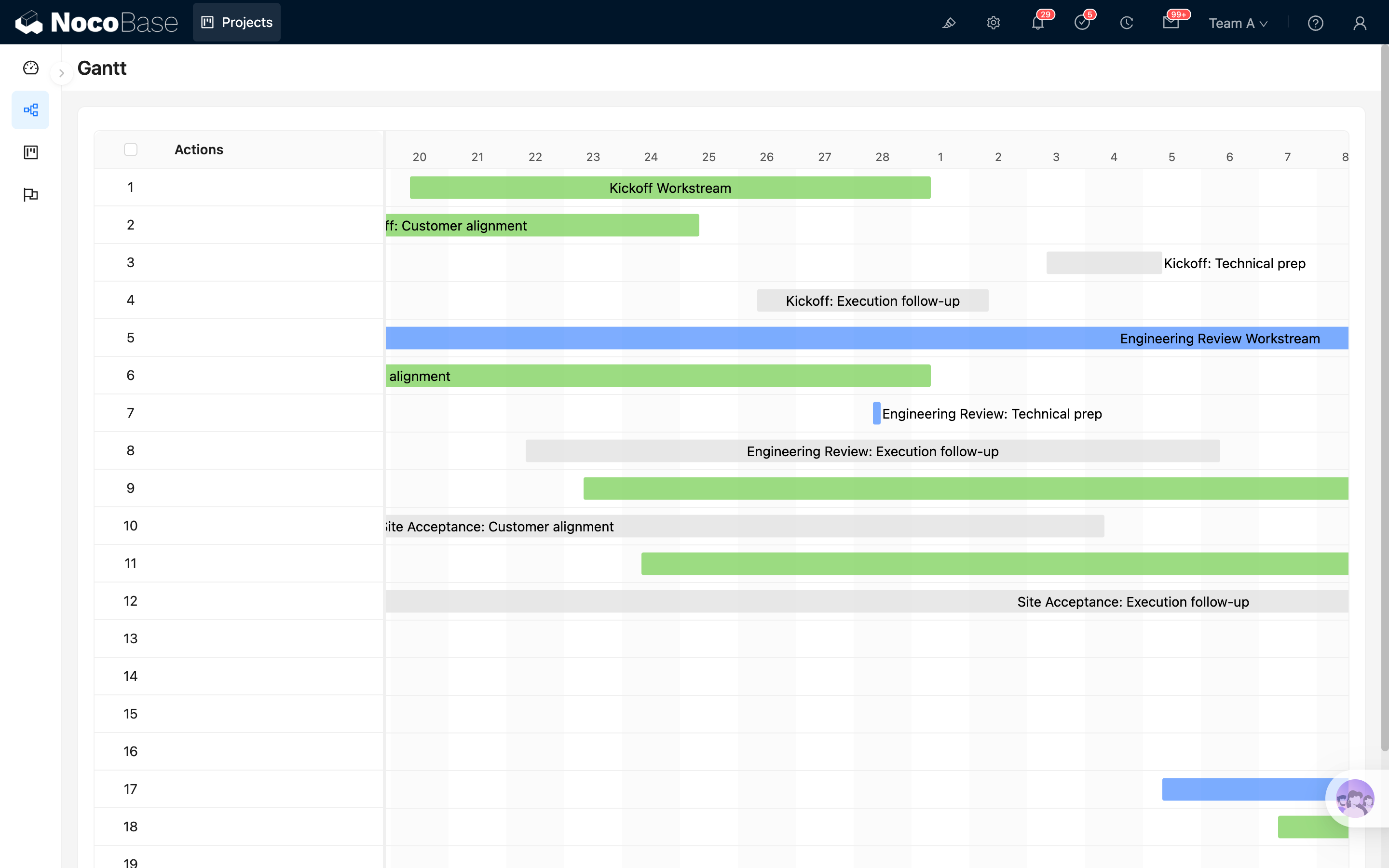
- package/dist/ai/docs/nocobase/api/cli/portal/list.md +40 -0
- package/dist/ai/docs/nocobase/api/cli/portal/pull.md +43 -0
- package/dist/ai/docs/nocobase/api/cli/portal/push.md +41 -0
- package/dist/ai/docs/nocobase/file-manager/stable-url.md +87 -0
- package/dist/ai/docs/nocobase/file-manager/storage/index.md +66 -26
- package/dist/ai/docs/nocobase/file-manager/storage/s3-pro.md +58 -7
- package/dist/ai/docs/nocobase/get-started/deployment/production.md +24 -2
- package/dist/ai/docs/nocobase/get-started/installation/docker-caddy.mdx +3 -0
- package/dist/ai/docs/nocobase/get-started/installation/docker-nginx.mdx +3 -0
- package/dist/ai/docs/nocobase/get-started/installation/docker.mdx +27 -3
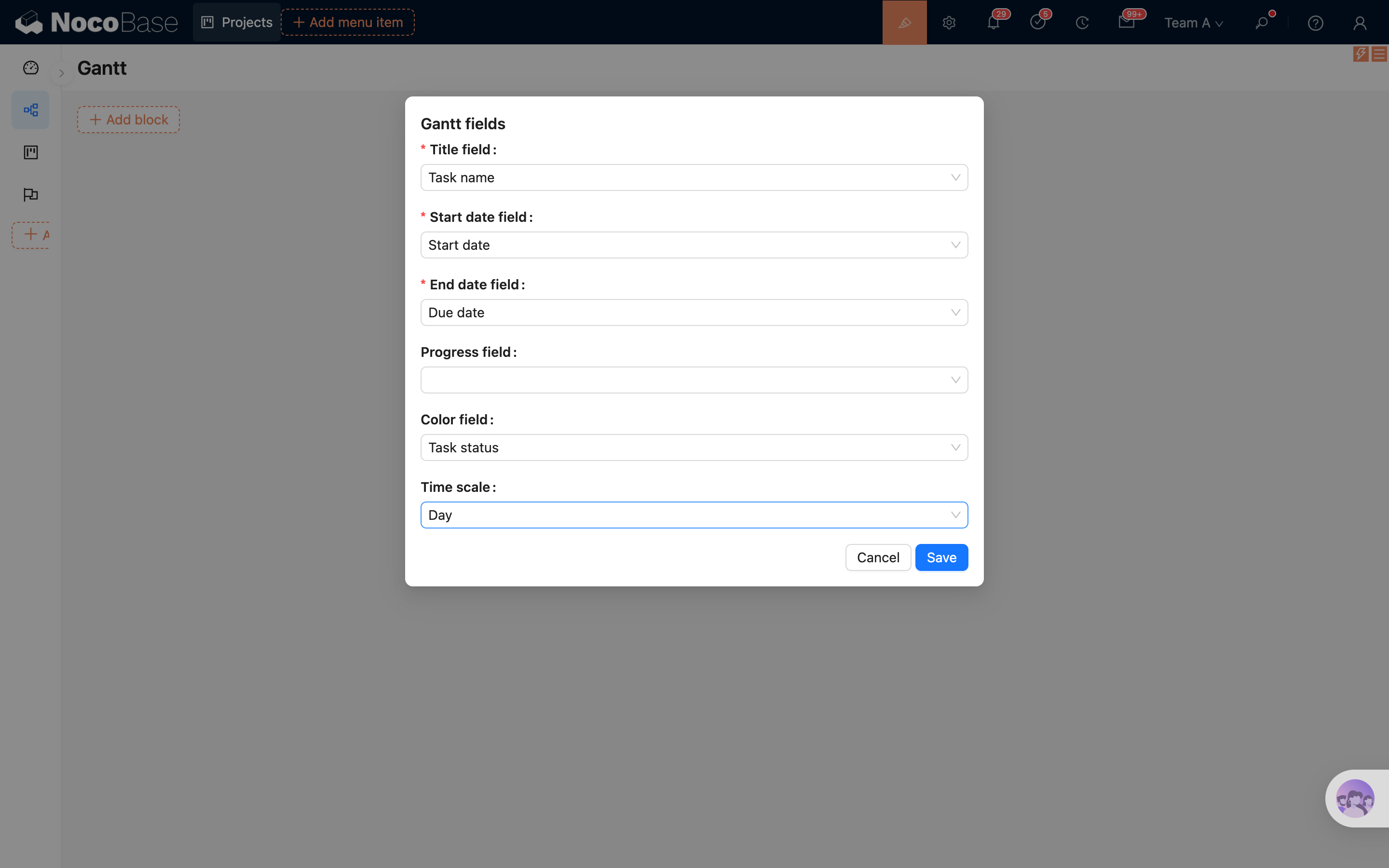
- package/dist/ai/docs/nocobase/get-started/installation/env.md +34 -1
- package/dist/ai/docs/nocobase/interface-builder/blocks/data-blocks/comment.md +107 -0
- package/dist/ai/docs/nocobase/interface-builder/blocks/data-blocks/gantt.md +204 -0
- package/dist/ai/docs/nocobase/interface-builder/index.md +7 -6
- package/dist/ai/docs/nocobase/interface-builder/ui-layout/desktop.md +97 -0
- package/dist/ai/docs/nocobase/interface-builder/ui-layout/index.md +50 -0
- package/dist/ai/docs/nocobase/interface-builder/ui-layout/mobile.md +133 -0
- package/dist/ai/docs/nocobase/nocobase-cli/production/index.md +10 -0
- package/dist/ai/docs/nocobase/nocobase-cli/production/reverse-proxy/caddy.md +15 -2
- package/dist/ai/docs/nocobase/nocobase-cli/production/reverse-proxy/index.md +1 -1
- package/dist/ai/docs/nocobase/nocobase-cli/production/reverse-proxy/nginx.md +16 -2
- package/dist/ai/docs/nocobase/plugins/@nocobase/plugin-block-comment/index.md +14 -0
- package/dist/ai/docs/nocobase/plugins/@nocobase/plugin-multi-portal/index.md +16 -0
- package/dist/ai/docs/nocobase/plugins/@nocobase/plugin-ui-layout/index.md +14 -0
- package/dist/ai/docs/nocobase/plugins/@nocobase/plugin-workflow-transaction/index.md +16 -0
- package/dist/ai/docs/nocobase/runjs/context/ai.md +206 -0
- package/dist/ai/docs/nocobase/workflow/development/api.md +259 -77
- package/dist/ai/docs/nocobase/workflow/development/index.md +2 -1
- package/dist/ai/docs/nocobase/workflow/development/migration.md +319 -0
- package/dist/ai/docs/nocobase/workflow/development/node.md +84 -51
- package/dist/ai/docs/nocobase/workflow/development/trigger.md +122 -20
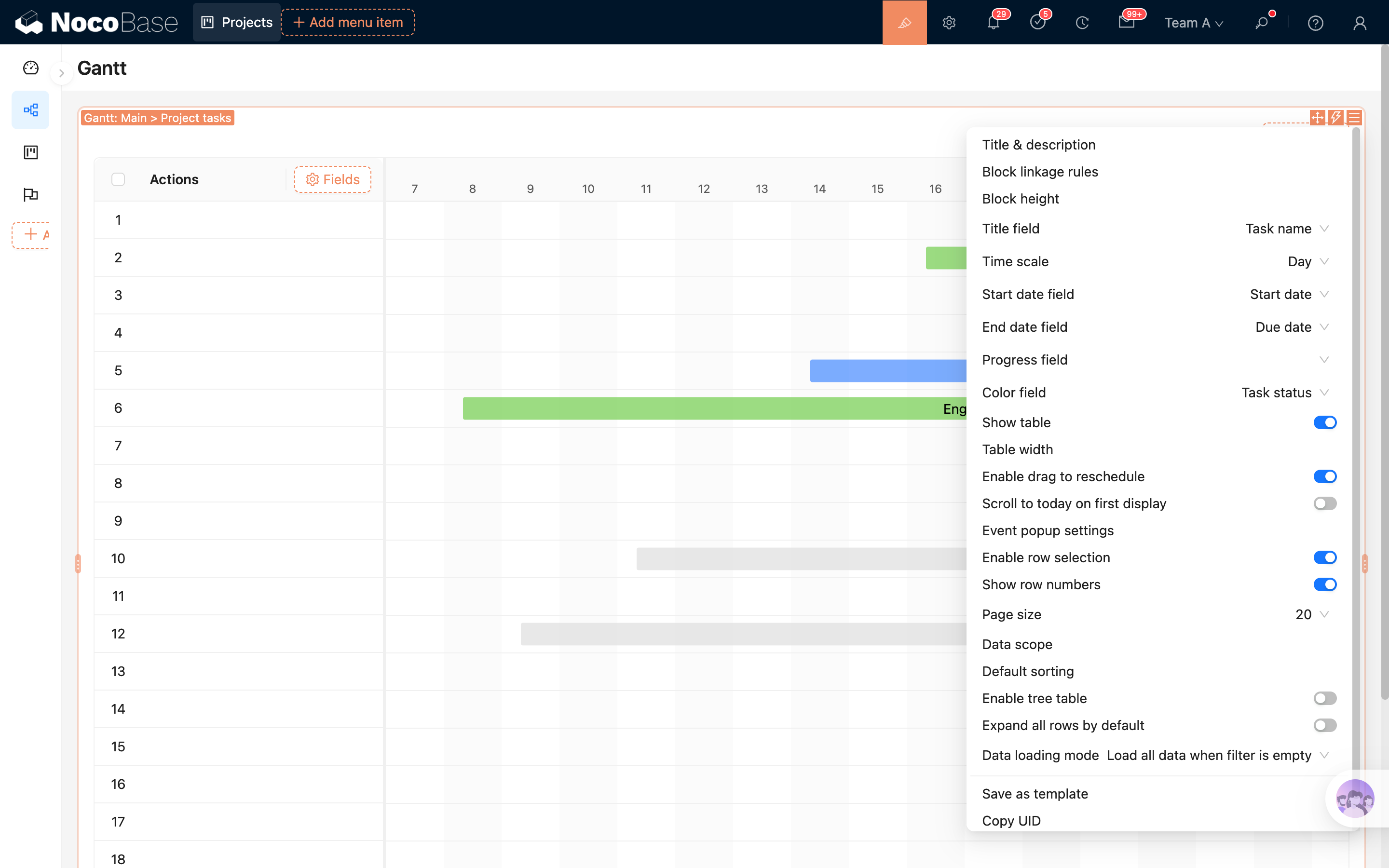
- package/dist/ai/docs/nocobase/workflow/nodes/index.md +2 -1
- package/dist/ai/docs/nocobase/workflow/nodes/transaction.md +81 -0
- package/dist/ai/tools/executeFrontendTool.d.ts +10 -0
- package/dist/ai/tools/executeFrontendTool.js +86 -0
- package/dist/ai/tools/formFiller.js +4 -3
- package/dist/ai/tools/loadFrontendTool.d.ts +10 -0
- package/dist/ai/tools/loadFrontendTool.js +99 -0
- package/dist/ai/tools/subAgentWebSearch.js +20 -15
- package/dist/client/23.65ea8c37cd4b884b.js +10 -0
- package/dist/client/264.cc98933ef65608b6.js +10 -0
- package/dist/client/336.7a8a8853196ad779.js +11 -0
- package/dist/client/372.49163fac65cef81c.js +10 -0
- package/dist/client/416.92b74ca47e4099c4.js +10 -0
- package/dist/client/446.d63c38d0309fe250.js +10 -0
- package/dist/client/525.94dd4136c1361477.js +10 -0
- package/dist/client/663.680bcf6272a8504d.js +10 -0
- package/dist/client/681.399948c18d753667.js +10 -0
- package/dist/client/705.19b642db34de438a.js +10 -0
- package/dist/client/ai-employees/1.x/selector/AIContextCollector.d.ts +1 -4
- package/dist/client/ai-employees/permissions/PermissionsTab.d.ts +21 -5
- package/dist/client/index.d.ts +15 -20
- package/dist/client/index.js +8 -8
- package/dist/client/workflow/nodes/employee/index.d.ts +2 -23
- package/dist/client/workflow/nodes/llm/index.d.ts +2 -52
- package/dist/client/workflow/triggers/ai-employee/index.d.ts +2 -83
- package/dist/client-v2/23.1bcb6986b40723d8.js +10 -0
- package/dist/client-v2/264.be92ff6a4d2612f1.js +10 -0
- package/dist/client-v2/336.e406470429e0670e.js +11 -0
- package/dist/client-v2/372.387161cdeb106987.js +10 -0
- package/dist/client-v2/406.341be51205c674e0.js +10 -0
- package/dist/client-v2/416.0e1c2d9cde43b83d.js +10 -0
- package/dist/client-v2/446.073d450882db29fd.js +10 -0
- package/dist/client-v2/457.d72febb89e88fc00.js +10 -0
- package/dist/client-v2/663.342341f0b2b412d8.js +10 -0
- package/dist/client-v2/681.082f4f1c7b841983.js +10 -0
- package/dist/client-v2/705.8dc34d43f02f322c.js +10 -0
- package/dist/{client/ai-employees/admin/AvatarSelect.d.ts → client-v2/ai-employees/AIEmployeeDropdown.d.ts} +8 -9
- package/dist/client-v2/ai-employees/AIEmployeeShortcut.d.ts +9 -2
- package/dist/{client → client-v2}/ai-employees/AddContextButton.d.ts +1 -1
- package/dist/{client → client-v2}/ai-employees/ai-coding/AICodingButton.d.ts +2 -1
- package/dist/{client/ai-employees/chatbox → client-v2/ai-employees/chatbox/components}/Actions.d.ts +2 -4
- package/dist/{client/ai-employees/chatbox → client-v2/ai-employees/chatbox/components}/AddLLMModal.d.ts +2 -4
- package/dist/client-v2/ai-employees/chatbox/components/Attachments.d.ts +27 -0
- package/dist/{client/ai-employees/permissions/Permissions.d.ts → client-v2/ai-employees/chatbox/components/ChatBox.d.ts} +2 -2
- package/dist/{client/ai-employees/chatbox → client-v2/ai-employees/chatbox/components}/ChatBoxLayout.d.ts +1 -1
- package/dist/{client/ai-employees/chatbox → client-v2/ai-employees/chatbox/components}/ContextItem.d.ts +1 -1
- package/dist/{client/ai-employees/admin/Employees.d.ts → client-v2/ai-employees/chatbox/components/DebugPanel.d.ts} +1 -1
- package/dist/{client/ai-employees/chatbox/markdown/Code.d.ts → client-v2/ai-employees/chatbox/components/Markdown.d.ts} +12 -5
- package/dist/{client/ai-employees/admin/ProfileSettings.d.ts → client-v2/ai-employees/chatbox/components/MessageContent.d.ts} +3 -2
- package/dist/client-v2/ai-employees/chatbox/components/MessageRenderers.d.ts +39 -0
- package/dist/{client/ai-employees/chatbox/generative-ui → client-v2/ai-employees/chatbox/components}/ToolCard.d.ts +7 -5
- package/dist/{client/ai-employees/admin/datasource/components/basic → client-v2/ai-employees/chatbox/components}/index.d.ts +5 -2
- package/dist/{client → client-v2}/ai-employees/chatbox/hooks/useChat.d.ts +21 -22
- package/dist/client-v2/ai-employees/chatbox/hooks/useChatBoxActions.d.ts +3 -2
- package/dist/{client → client-v2}/ai-employees/chatbox/hooks/useChatConversationActions.d.ts +2 -2
- package/dist/{client → client-v2}/ai-employees/chatbox/hooks/useChatMessageActions.d.ts +8 -4
- package/dist/{client → client-v2}/ai-employees/chatbox/hooks/useToolCallActions.d.ts +1 -1
- package/dist/client-v2/ai-employees/chatbox/hooks/useUploadFiles.d.ts +46 -0
- package/dist/{client → client-v2}/ai-employees/chatbox/hooks/useWorkflowTasks.d.ts +1 -1
- package/dist/{client → client-v2}/ai-employees/chatbox/model.d.ts +9 -2
- package/dist/client-v2/ai-employees/chatbox/roles.d.ts +162 -0
- package/dist/client-v2/ai-employees/chatbox/stores/chat-box.d.ts +1 -49
- package/dist/client-v2/ai-employees/chatbox/stores/chat-conversations.d.ts +2 -19
- package/dist/client-v2/ai-employees/chatbox/stores/chat-messages.d.ts +1 -46
- package/dist/{client → client-v2}/ai-employees/chatbox/stores/chat-tool-call.d.ts +1 -15
- package/dist/client-v2/ai-employees/chatbox/stores/chat-tools.d.ts +30 -0
- package/dist/client-v2/ai-employees/chatbox/stores/create-selectors.d.ts +31 -3
- package/dist/{client/ai-employees/chatbox/conversations/common.d.ts → client-v2/ai-employees/chatbox/stores/workflow-tasks.d.ts} +21 -4
- package/dist/client-v2/ai-employees/chatbox/utils/normalizeTriggerTaskOptions.d.ts +19 -0
- package/dist/{client → client-v2}/ai-employees/chatbox/utils.d.ts +26 -7
- package/dist/{client/ai-employees/data-visualization/context.d.ts → client-v2/ai-employees/context/chart-config.d.ts} +1 -1
- package/dist/{client → client-v2}/ai-employees/context/code-editor.d.ts +1 -1
- package/dist/{client → client-v2}/ai-employees/context/datasource.d.ts +1 -1
- package/dist/{client → client-v2}/ai-employees/context/flow-models.d.ts +1 -1
- package/dist/{client/ai-employees/admin/datasource/components/DatasourceSettingDetail.d.ts → client-v2/ai-employees/data-modeling/setup.d.ts} +6 -5
- package/dist/{client → client-v2}/ai-employees/datasource/DatasourceSelector.d.ts +6 -2
- package/dist/{client/ai-employees/admin/datasource/flow-models/DatasourceSettingModel.d.ts → client-v2/ai-employees/flow/index.d.ts} +4 -6
- package/dist/{client → client-v2}/ai-employees/form-filler/tools/index.d.ts +1 -1
- package/dist/{client/ai-employees/ai-coding/tools/index.d.ts → client-v2/ai-employees/frontend-tools.d.ts} +3 -3
- package/dist/{client → client-v2}/ai-employees/stores/ai-selection.d.ts +4 -4
- package/dist/{client → client-v2}/ai-employees/stores/dialog-controller.d.ts +4 -4
- package/dist/{client/ai-employees/business-report/ui → client-v2/ai-employees/tools}/BusinessReportCard.d.ts +2 -2
- package/dist/{client/ai-employees/business-report/ui → client-v2/ai-employees/tools}/BusinessReportModal.d.ts +2 -2
- package/dist/{client/ai-employees/1.x/selector/withAISelectable.d.ts → client-v2/ai-employees/tools/ChartGeneratorCard.d.ts} +5 -4
- package/dist/{client/ai-employees/ai-coding/ui → client-v2/ai-employees/tools}/CodeToolCard.d.ts +1 -1
- package/dist/{client/ai-employees/data-modeling/ui → client-v2/ai-employees/tools}/DataModelingCard.d.ts +3 -5
- package/dist/{client/ai-employees/data-modeling/ui → client-v2/ai-employees/tools}/DataModelingModal.d.ts +4 -6
- package/dist/{client/ai-employees/sub-agents/ui → client-v2/ai-employees/tools}/SubAgentDispatchCard.d.ts +4 -9
- package/dist/{client/ai-employees/AISettingsProvider.d.ts → client-v2/ai-employees/tools/SuggestionsOptionsCard.d.ts} +6 -8
- package/dist/{client/ai-employees/workflow-tasks/ui → client-v2/ai-employees/tools}/WorkflowTaskOutputCard.d.ts +7 -2
- package/dist/{client/ai-employees/ai-coding/tools/context-tools.d.ts → client-v2/ai-employees/tools/ai-coding.d.ts} +3 -1
- package/dist/client-v2/ai-employees/tools/business-report-utils.d.ts +45 -0
- package/dist/{client/ai-employees/data-modeling/ui → client-v2/ai-employees/tools/data-modeling}/CollectionNode.d.ts +2 -3
- package/dist/{client/ai-employees/data-modeling/ui → client-v2/ai-employees/tools/data-modeling}/Diagram.d.ts +1 -1
- package/dist/{client/ai-employees/data-modeling/ui → client-v2/ai-employees/tools/data-modeling}/Table.d.ts +2 -2
- package/dist/client-v2/ai-employees/tools/data-modeling/legacy-template.d.ts +13 -0
- package/dist/client-v2/ai-employees/tools/data-modeling/runtime.d.ts +15 -0
- package/dist/{client/ai-employees → client-v2/ai-employees/tools}/data-modeling/types.d.ts +27 -4
- package/dist/client-v2/ai-employees/tools/data-modeling/useFieldInterfaceOptions.d.ts +151 -0
- package/dist/{client/ai-employees/data-visualization/tools/index.d.ts → client-v2/ai-employees/tools/data-visualization.d.ts} +1 -1
- package/dist/client-v2/ai-employees/tools/index.d.ts +32 -0
- package/dist/client-v2/ai-employees/types.d.ts +104 -7
- package/dist/client-v2/components/RemoteSelect.d.ts +43 -0
- package/dist/{client → client-v2}/debug-logger.d.ts +2 -2
- package/dist/client-v2/f0053e745af0ad03.svg +50 -0
- package/dist/client-v2/index.d.ts +9 -8
- package/dist/client-v2/index.js +37 -1
- package/dist/client-v2/llm-providers/forms.d.ts +44 -0
- package/dist/client-v2/llm-providers/index.d.ts +24 -0
- package/dist/{client/ai-employees/chart-generator/tools/index.d.ts → client-v2/llm-services/utils.d.ts} +5 -2
- package/dist/client-v2/locale.d.ts +14 -0
- package/dist/client-v2/manager/ai-manager.d.ts +57 -0
- package/dist/client-v2/manager/frontend-tool-registry.d.ts +30 -0
- package/dist/client-v2/models/ai-employees/AIEmployeeActionModel.d.ts +33 -0
- package/dist/client-v2/models/ai-employees/AIEmployeeShortcutModel.d.ts +44 -0
- package/dist/client-v2/pages/AdminSettingsPage.d.ts +24 -0
- package/dist/client-v2/pages/DatasourceSettingsPage.d.ts +62 -0
- package/dist/client-v2/pages/EmployeesPage.d.ts +63 -0
- package/dist/client-v2/pages/LLMServicesPage.d.ts +75 -0
- package/dist/client-v2/pages/MCPSettingsPage.d.ts +73 -0
- package/dist/client-v2/pages/drawerWidth.d.ts +10 -0
- package/dist/client-v2/pages/permissions/Permissions.d.ts +67 -0
- package/dist/client-v2/pages/permissions/PermissionsTab.d.ts +12 -0
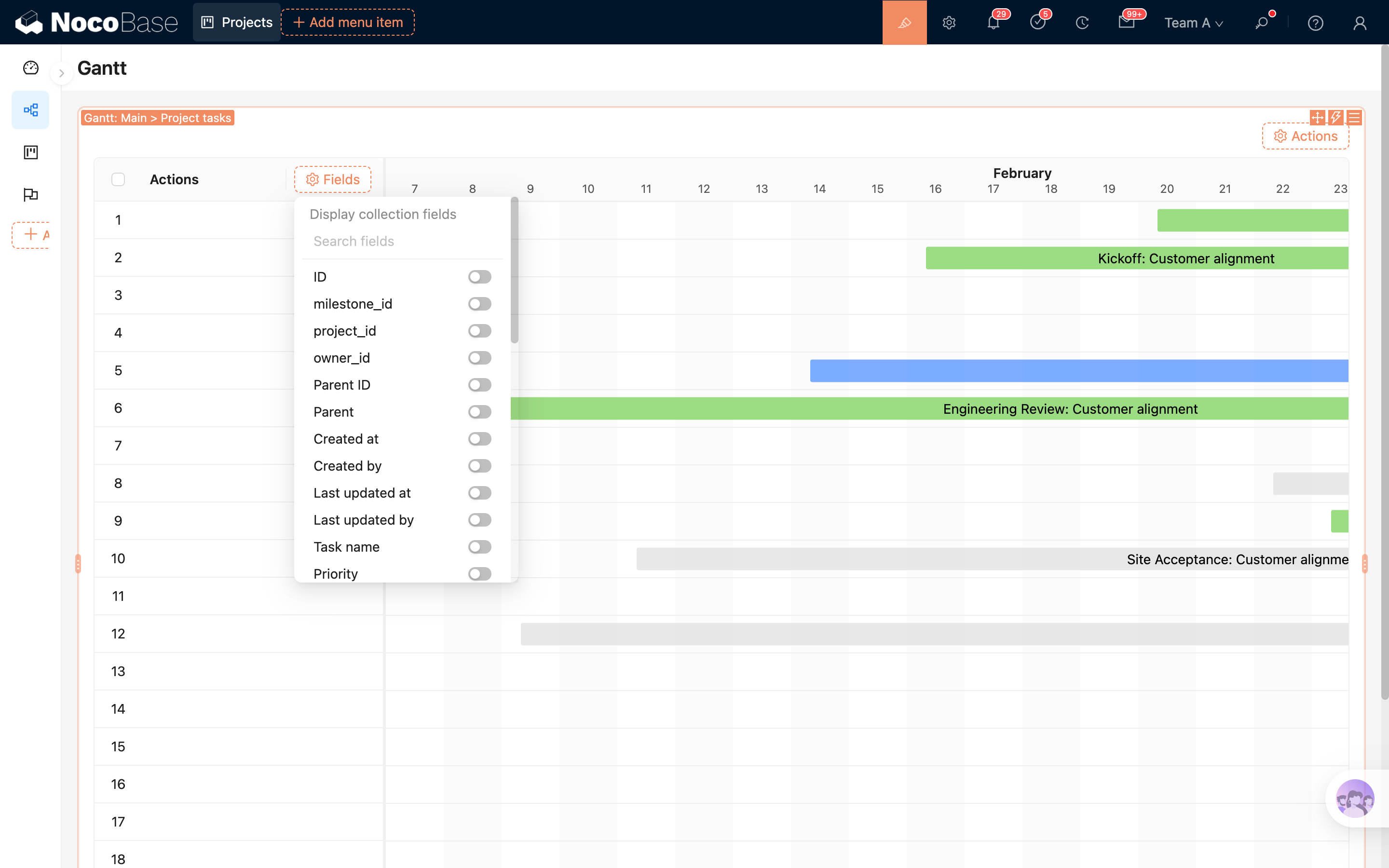
- package/dist/client-v2/pages/useUnsavedChangesBeforeClose.d.ts +29 -0
- package/dist/client-v2/plugin.d.ts +33 -0
- package/dist/client-v2/repositories/AIConfigRepository.d.ts +3 -23
- package/dist/client-v2/runjs/registerAIEmployeeRunJSFacade.d.ts +20 -0
- package/dist/client-v2/workflow/components/FormValueRegistry.d.ts +12 -0
- package/dist/{client/components/ListCollapse.d.ts → client-v2/workflow/components/WorkflowListCollapse.d.ts} +4 -4
- package/dist/client-v2/workflow/constants.d.ts +26 -0
- package/dist/client-v2/workflow/nodes/employee/components/AIEmployeeFieldset.d.ts +11 -0
- package/dist/{client/ai-employees/common/CodeHighlight.d.ts → client-v2/workflow/nodes/employee/components/AIEmployeeSelect.d.ts} +5 -6
- package/dist/{client/ai-employees/ContextAwareTooltip.d.ts → client-v2/workflow/nodes/employee/components/Assignees.d.ts} +2 -1
- package/dist/client-v2/workflow/nodes/employee/components/FeedbackSettings.d.ts +17 -0
- package/dist/client-v2/workflow/nodes/employee/components/FileInputs.d.ts +11 -0
- package/dist/{client/ai-employees/AIEmployeesProvider.d.ts → client-v2/workflow/nodes/employee/components/MessageInputs.d.ts} +2 -3
- package/dist/client-v2/workflow/nodes/employee/components/ModelOptions.d.ts +17 -0
- package/dist/{client/ai-employees/admin/datasource/components/basic/CollectionCascader.d.ts → client-v2/workflow/nodes/employee/components/SkillSettings.d.ts} +6 -3
- package/dist/client-v2/workflow/nodes/employee/components/StructuredOutput.d.ts +11 -0
- package/dist/client-v2/workflow/nodes/employee/components/UserInput.d.ts +18 -0
- package/dist/client-v2/workflow/nodes/employee/components/WebSearchOptions.d.ts +16 -0
- package/dist/client-v2/workflow/nodes/employee/index.d.ts +23 -0
- package/dist/{client/ai-employees/AIEmployeeListItem.d.ts → client-v2/workflow/nodes/llm/components/LLMFieldset.d.ts} +3 -5
- package/dist/{client/admin-settings/AdminSettings.d.ts → client-v2/workflow/nodes/llm/components/Messages.d.ts} +2 -1
- package/dist/client-v2/workflow/nodes/llm/components/StructuredOutput.d.ts +11 -0
- package/dist/client-v2/workflow/nodes/llm/index.d.ts +30 -0
- package/dist/{client/ai-employees/1.x/selector/BlockSelector.d.ts → client-v2/workflow/register.d.ts} +2 -6
- package/dist/client-v2/workflow/triggers/ai-employee/AIEmployeeTriggerConfig.d.ts +11 -0
- package/dist/client-v2/workflow/triggers/ai-employee/Parameters.d.ts +11 -0
- package/dist/client-v2/workflow/triggers/ai-employee/index.d.ts +25 -0
- package/dist/client-v2/workflow/types.d.ts +128 -0
- package/dist/common/frontend-tools.d.ts +26 -0
- package/dist/common/frontend-tools.js +57 -0
- package/dist/externalVersion.js +20 -25
- package/dist/locale/en-US.json +48 -1
- package/dist/locale/zh-CN.json +48 -1
- package/dist/node_modules/@langchain/mistralai/package.json +1 -1
- package/dist/node_modules/@langchain/xai/package.json +1 -1
- package/dist/node_modules/fs-extra/package.json +1 -1
- package/dist/node_modules/jsonrepair/package.json +1 -1
- package/dist/node_modules/just-bash/package.json +1 -1
- package/dist/node_modules/nodejs-snowflake/package.json +1 -1
- package/dist/node_modules/openai/package.json +1 -1
- package/dist/node_modules/zod/package.json +1 -1
- package/dist/server/ai-employees/ai-conversations.d.ts +2 -0
- package/dist/server/ai-employees/ai-employee.d.ts +1 -1
- package/dist/server/ai-employees/ai-employee.js +27 -8
- package/dist/server/ai-employees/prompts.d.ts +2 -1
- package/dist/server/ai-employees/prompts.js +8 -2
- package/dist/server/ai-employees/tool-call-sanitizer.d.ts +1 -0
- package/dist/server/ai-employees/tool-call-sanitizer.js +2 -1
- package/dist/server/ai-employees/utils.js +11 -5
- package/dist/server/collections/ai-usage-events.d.ts +10 -0
- package/dist/server/collections/ai-usage-events.js +183 -0
- package/dist/server/document-loader/constants.js +1 -0
- package/dist/server/frontend-tools.d.ts +25 -0
- package/dist/server/frontend-tools.js +171 -0
- package/dist/server/llm-providers/dashscope.d.ts +2 -1
- package/dist/server/llm-providers/dashscope.js +16 -1
- package/dist/server/llm-providers/deepseek.d.ts +2 -1
- package/dist/server/llm-providers/deepseek.js +33 -2
- package/dist/server/llm-providers/kimi/provider.d.ts +2 -1
- package/dist/server/llm-providers/kimi/provider.js +22 -2
- package/dist/server/llm-providers/mistral.d.ts +36 -2
- package/dist/server/llm-providers/mistral.js +62 -2
- package/dist/server/llm-providers/openai/completions.d.ts +2 -1
- package/dist/server/llm-providers/openai/completions.js +17 -1
- package/dist/server/llm-providers/openai/responses.d.ts +2 -1
- package/dist/server/llm-providers/openai/responses.js +17 -1
- package/dist/server/llm-providers/provider.d.ts +7 -0
- package/dist/server/llm-providers/provider.js +7 -1
- package/dist/server/manager/ai-chat-conversation.js +2 -0
- package/dist/server/manager/ai-context-datasource-manager.js +34 -7
- package/dist/server/manager/ai-manager.d.ts +2 -1
- package/dist/server/manager/ai-manager.js +4 -1
- package/dist/server/manager/ai-usage-events.d.ts +49 -0
- package/dist/server/manager/ai-usage-events.js +195 -0
- package/dist/server/manager/work-context-handler.js +10 -3
- package/dist/server/resource/aiConversations.d.ts +2 -0
- package/dist/server/resource/aiConversations.js +27 -1
- package/package.json +5 -5
- package/dist/client/119.c6bf8c6433167d81.js +0 -10
- package/dist/client/170.d98eacdc00d9d527.js +0 -10
- package/dist/client/228.b4b709f93b86b6b9.js +0 -10
- package/dist/client/280.003b9e9788599244.js +0 -10
- package/dist/client/290.0f7f441d8a94f03c.js +0 -10
- package/dist/client/331.d547c95410476a69.js +0 -10
- package/dist/client/406.15c09d98faa2ccf1.js +0 -10
- package/dist/client/428.5eb4f53ddbb6a3b8.js +0 -10
- package/dist/client/462.d172d0fe91519e35.js +0 -10
- package/dist/client/486.dcac8f3fcec19c33.js +0 -10
- package/dist/client/502.2b4a51e0a8122e52.js +0 -10
- package/dist/client/525.33a9c8ec28be4ec4.js +0 -10
- package/dist/client/559.959c46d0056ccdc8.js +0 -10
- package/dist/client/561.7ec804ef39ec7dcd.js +0 -10
- package/dist/client/580.35ba54ff91b7fe6d.js +0 -10
- package/dist/client/597.b0d64948d74cf6cb.js +0 -10
- package/dist/client/604.89c674f35b52b4ef.js +0 -10
- package/dist/client/614.aa766080f6b99aab.js +0 -10
- package/dist/client/646.07bb23e72fb6eb15.js +0 -10
- package/dist/client/687.224e569a99cae4bb.js +0 -10
- package/dist/client/699.57c0a1acb723202a.js +0 -10
- package/dist/client/711.92cd94681fde7e05.js +0 -10
- package/dist/client/758.a9741e81911e53c3.js +0 -10
- package/dist/client/768.5177bff46ae71a5b.js +0 -10
- package/dist/client/792.abb57765453bcbcc.js +0 -10
- package/dist/client/820.f72ef2462b61d812.js +0 -10
- package/dist/client/832.0cf69e3f43c320b2.js +0 -10
- package/dist/client/927.d95c74ebb8fd51c9.js +0 -10
- package/dist/client/ai-employees/1.x/selector/AISelectorProvider.d.ts +0 -33
- package/dist/client/ai-employees/ProfileCard.d.ts +0 -15
- package/dist/client/ai-employees/admin/ChatSettings.d.ts +0 -10
- package/dist/client/ai-employees/admin/DataSourceSettings.d.ts +0 -10
- package/dist/client/ai-employees/admin/EnableSwitch.d.ts +0 -10
- package/dist/client/ai-employees/admin/InputsFormSettings.d.ts +0 -10
- package/dist/client/ai-employees/admin/KnowledgeBaseSettings.d.ts +0 -10
- package/dist/client/ai-employees/admin/ModelSettings.d.ts +0 -10
- package/dist/client/ai-employees/admin/SkillSettings.d.ts +0 -19
- package/dist/client/ai-employees/admin/SystemPrompt.d.ts +0 -10
- package/dist/client/ai-employees/admin/Templates.d.ts +0 -10
- package/dist/client/ai-employees/admin/ToolsSettings.d.ts +0 -17
- package/dist/client/ai-employees/admin/datasource/components/DatasourceSettingForm.d.ts +0 -10
- package/dist/client/ai-employees/admin/datasource/components/DatasourceSettingGrid.d.ts +0 -10
- package/dist/client/ai-employees/admin/datasource/components/basic/FieldsTransfer.d.ts +0 -17
- package/dist/client/ai-employees/admin/datasource/components/form-steps/CollectionSetting.d.ts +0 -17
- package/dist/client/ai-employees/admin/datasource/components/form-steps/FieldsSetting.d.ts +0 -15
- package/dist/client/ai-employees/admin/datasource/components/form-steps/FilterSetting.d.ts +0 -17
- package/dist/client/ai-employees/admin/datasource/components/form-steps/Preview.d.ts +0 -13
- package/dist/client/ai-employees/admin/datasource/components/form-steps/SortSetting.d.ts +0 -15
- package/dist/client/ai-employees/admin/datasource/components/form-steps/index.d.ts +0 -13
- package/dist/client/ai-employees/admin/datasource/components/index.d.ts +0 -9
- package/dist/client/ai-employees/admin/datasource/context.d.ts +0 -17
- package/dist/client/ai-employees/admin/datasource/flow-models/index.d.ts +0 -9
- package/dist/client/ai-employees/admin/datasource/index.d.ts +0 -10
- package/dist/client/ai-employees/admin/hooks.d.ts +0 -39
- package/dist/client/ai-employees/admin/mcp/MCPSettings.d.ts +0 -10
- package/dist/client/ai-employees/admin/mcp/MCPToolsList.d.ts +0 -19
- package/dist/client/ai-employees/admin/mcp/context.d.ts +0 -15
- package/dist/client/ai-employees/admin/mcp/schemas.d.ts +0 -1314
- package/dist/client/ai-employees/ai-coding/CodeHistory.d.ts +0 -10
- package/dist/client/ai-employees/ai-coding/markdown/Code.d.ts +0 -16
- package/dist/client/ai-employees/avatars.d.ts +0 -9
- package/dist/client/ai-employees/built-in/utils.d.ts +0 -15
- package/dist/client/ai-employees/business-report/tools/index.d.ts +0 -10
- package/dist/client/ai-employees/business-report/ui/report-utils.d.ts +0 -38
- package/dist/client/ai-employees/chart-generator/ui/ECharts.d.ts +0 -13
- package/dist/client/ai-employees/chatbox/AIThinking.d.ts +0 -12
- package/dist/client/ai-employees/chatbox/Attachment.d.ts +0 -14
- package/dist/client/ai-employees/chatbox/AttachmentsHeader.d.ts +0 -10
- package/dist/client/ai-employees/chatbox/ChatBox.d.ts +0 -12
- package/dist/client/ai-employees/chatbox/ContextItemsHeader.d.ts +0 -10
- package/dist/client/ai-employees/chatbox/DebugPanel.d.ts +0 -16
- package/dist/client/ai-employees/chatbox/EditMessageHeader.d.ts +0 -10
- package/dist/client/ai-employees/chatbox/HintMessageHeader.d.ts +0 -10
- package/dist/client/ai-employees/chatbox/MessageRenderer.d.ts +0 -33
- package/dist/client/ai-employees/chatbox/SenderFooter.d.ts +0 -13
- package/dist/client/ai-employees/chatbox/SenderHeader.d.ts +0 -10
- package/dist/client/ai-employees/chatbox/SenderPrefix.d.ts +0 -10
- package/dist/client/ai-employees/chatbox/Upload.d.ts +0 -12
- package/dist/client/ai-employees/chatbox/VirtualList.d.ts +0 -28
- package/dist/client/ai-employees/chatbox/conversations/ConversationsList.d.ts +0 -13
- package/dist/client/ai-employees/chatbox/conversations/WorkflowTasksList.d.ts +0 -13
- package/dist/client/ai-employees/chatbox/conversations/index.d.ts +0 -9
- package/dist/client/ai-employees/chatbox/generative-ui/DefaultToolCard.d.ts +0 -16
- package/dist/client/ai-employees/chatbox/hooks/useChatBoxActions.d.ts +0 -18
- package/dist/client/ai-employees/chatbox/hooks/useUploadFiles.d.ts +0 -12
- package/dist/client/ai-employees/chatbox/markdown/ECharts.d.ts +0 -10
- package/dist/client/ai-employees/chatbox/markdown/Form.d.ts +0 -10
- package/dist/client/ai-employees/chatbox/markdown/Generating.d.ts +0 -10
- package/dist/client/ai-employees/chatbox/markdown/Markdown.d.ts +0 -13
- package/dist/client/ai-employees/chatbox/roles.d.ts +0 -32
- package/dist/client/ai-employees/chatbox/stores/chat-box.d.ts +0 -9
- package/dist/client/ai-employees/chatbox/stores/chat-conversations.d.ts +0 -9
- package/dist/client/ai-employees/chatbox/stores/chat-messages.d.ts +0 -9
- package/dist/client/ai-employees/chatbox/stores/chat-tools.d.ts +0 -51
- package/dist/client/ai-employees/chatbox/stores/create-selectors.d.ts +0 -18
- package/dist/client/ai-employees/chatbox/stores/workflow-tasks.d.ts +0 -45
- package/dist/client/ai-employees/context/classic-pages.d.ts +0 -10
- package/dist/client/ai-employees/data-modeling/Table.d.ts +0 -12
- package/dist/client/ai-employees/data-modeling/setup.d.ts +0 -10
- package/dist/client/ai-employees/data-modeling/tools/index.d.ts +0 -10
- package/dist/client/ai-employees/data-modeling/ui/useFieldInterfaceOptions.d.ts +0 -14
- package/dist/client/ai-employees/datasource/DatasourceList.d.ts +0 -17
- package/dist/client/ai-employees/datasource/index.d.ts +0 -9
- package/dist/client/ai-employees/flow/events/index.d.ts +0 -9
- package/dist/client/ai-employees/flow/index.d.ts +0 -36
- package/dist/client/ai-employees/flow/models/AIEmployeeActionModel.d.ts +0 -18
- package/dist/client/ai-employees/flow/models/AIEmployeeShortcutModel.d.ts +0 -30
- package/dist/client/ai-employees/shortcuts/ShortcutList.d.ts +0 -10
- package/dist/client/ai-employees/shortcuts/useShortcuts.d.ts +0 -13
- package/dist/client/ai-employees/stores/context-aware.d.ts +0 -19
- package/dist/client/ai-employees/sub-agents/tools/index.d.ts +0 -10
- package/dist/client/ai-employees/suggestions/tools/index.d.ts +0 -10
- package/dist/client/ai-employees/suggestions/ui/SuggestionsOptions.d.ts +0 -13
- package/dist/client/ai-employees/types.d.ts +0 -259
- package/dist/client/ai-employees/workflow-tasks/tools/index.d.ts +0 -10
- package/dist/client/chat-settings/Messages.d.ts +0 -11
- package/dist/client/chat-settings/StructuredOutput.d.ts +0 -11
- package/dist/client/components/skill-settings.d.ts +0 -22
- package/dist/client/features/components.d.ts +0 -9
- package/dist/client/features/feature-manager.d.ts +0 -9
- package/dist/client/features/index.d.ts +0 -9
- package/dist/client/features/vector-database-provider.d.ts +0 -9
- package/dist/client/features/vector-store-provider.d.ts +0 -9
- package/dist/client/llm-providers/anthropic/ModelSettings.d.ts +0 -10
- package/dist/client/llm-providers/anthropic/ProviderSettings.d.ts +0 -10
- package/dist/client/llm-providers/anthropic/index.d.ts +0 -10
- package/dist/client/llm-providers/components/Chat.d.ts +0 -10
- package/dist/client/llm-providers/components/ModelSelect.d.ts +0 -10
- package/dist/client/llm-providers/dashscope/ModelSettings.d.ts +0 -10
- package/dist/client/llm-providers/dashscope/ProviderSettings.d.ts +0 -10
- package/dist/client/llm-providers/dashscope/index.d.ts +0 -10
- package/dist/client/llm-providers/deepseek/ModelSettings.d.ts +0 -10
- package/dist/client/llm-providers/deepseek/index.d.ts +0 -10
- package/dist/client/llm-providers/google-genai/MessageRenderer.d.ts +0 -13
- package/dist/client/llm-providers/google-genai/ModelSettings.d.ts +0 -10
- package/dist/client/llm-providers/google-genai/ProviderSettings.d.ts +0 -10
- package/dist/client/llm-providers/google-genai/index.d.ts +0 -10
- package/dist/client/llm-providers/kimi/ModelSettings.d.ts +0 -10
- package/dist/client/llm-providers/kimi/index.d.ts +0 -10
- package/dist/client/llm-providers/mimo/ModelSettings.d.ts +0 -10
- package/dist/client/llm-providers/mimo/index.d.ts +0 -10
- package/dist/client/llm-providers/mistral/ModelSettings.d.ts +0 -10
- package/dist/client/llm-providers/mistral/index.d.ts +0 -10
- package/dist/client/llm-providers/ollama/ModelSettings.d.ts +0 -10
- package/dist/client/llm-providers/ollama/ProviderSettings.d.ts +0 -10
- package/dist/client/llm-providers/ollama/index.d.ts +0 -10
- package/dist/client/llm-providers/openai/completions/ModelSettings.d.ts +0 -10
- package/dist/client/llm-providers/openai/completions/index.d.ts +0 -10
- package/dist/client/llm-providers/openai/components/ProviderSettings.d.ts +0 -10
- package/dist/client/llm-providers/openai/responses/ModelSettings.d.ts +0 -10
- package/dist/client/llm-providers/openai/responses/index.d.ts +0 -10
- package/dist/client/llm-providers/orcarouter/ModelSettings.d.ts +0 -10
- package/dist/client/llm-providers/orcarouter/ProviderSettings.d.ts +0 -10
- package/dist/client/llm-providers/orcarouter/index.d.ts +0 -10
- package/dist/client/llm-providers/tongyi/ModelSettings.d.ts +0 -10
- package/dist/client/llm-providers/tongyi/ProviderSettings.d.ts +0 -10
- package/dist/client/llm-providers/tongyi/index.d.ts +0 -10
- package/dist/client/llm-providers/xai/ModelSettings.d.ts +0 -10
- package/dist/client/llm-providers/xai/index.d.ts +0 -10
- package/dist/client/llm-services/LLMServices.d.ts +0 -13
- package/dist/client/llm-services/component/DefaultModelSelect.d.ts +0 -10
- package/dist/client/llm-services/component/EnabledModelsSelect.d.ts +0 -23
- package/dist/client/llm-services/component/LLMTestFlight.d.ts +0 -10
- package/dist/client/llm-services/component/ModelOptionsSettings.d.ts +0 -10
- package/dist/client/llm-services/component/UnifiedModelSettings.d.ts +0 -10
- package/dist/client/llm-services/hooks/useLLMServiceCatalog.d.ts +0 -18
- package/dist/client/llm-services/llm-providers.d.ts +0 -27
- package/dist/client/llm-services/utils.d.ts +0 -35
- package/dist/client/manager/ai-feature-manager.d.ts +0 -9
- package/dist/client/manager/ai-manager.d.ts +0 -35
- package/dist/client/repositories/AIConfigRepository.d.ts +0 -60
- package/dist/client/repositories/hooks/useAIConfigRepository.d.ts +0 -10
- package/dist/client/schemas/llms.d.ts +0 -347
- package/dist/client/workflow/nodes/employee/components/AIEmployeeSelect.d.ts +0 -10
- package/dist/client/workflow/nodes/employee/components/assigness.d.ts +0 -11
- package/dist/client/workflow/nodes/employee/components/file-inputs.d.ts +0 -10
- package/dist/client/workflow/nodes/employee/components/message-inputs.d.ts +0 -12
- package/dist/client/workflow/nodes/employee/components/model-options.d.ts +0 -10
- package/dist/client/workflow/nodes/employee/components/structured-output.d.ts +0 -10
- package/dist/client/workflow/nodes/employee/components/users-select.d.ts +0 -13
- package/dist/client/workflow/nodes/employee/components/web-search-options.d.ts +0 -10
- package/dist/client/workflow/nodes/employee/configuration.d.ts +0 -12
- package/dist/client/workflow/nodes/employee/flow-models/feedback.d.ts +0 -14
- package/dist/client/workflow/nodes/employee/flow-models/task.d.ts +0 -13
- package/dist/client/workflow/nodes/llm/ModelSettings.d.ts +0 -11
- package/dist/client/workflow/triggers/ai-employee/Parameters.d.ts +0 -13
- /package/dist/{client → client-v2}/ai-employees/AISelection.d.ts +0 -0
- /package/dist/{client → client-v2}/ai-employees/AISelectionControl.d.ts +0 -0
- /package/dist/{client → client-v2}/ai-employees/ai-coding/prompts.d.ts +0 -0
- /package/dist/{client → client-v2}/ai-employees/ai-coding/setup.d.ts +0 -0
- /package/dist/{client/ai-employees/chatbox/AIEmployeeSwitch.d.ts → client-v2/ai-employees/chatbox/components/AIEmployeeSwitcher.d.ts} +0 -0
- /package/dist/{client/ai-employees/chatbox → client-v2/ai-employees/chatbox/components}/ChatButton.d.ts +0 -0
- /package/dist/{client/ai-employees/chatbox/conversations → client-v2/ai-employees/chatbox/components}/Conversations.d.ts +0 -0
- /package/dist/{client/ai-employees/chatbox → client-v2/ai-employees/chatbox/components}/Messages.d.ts +0 -0
- /package/dist/{client/ai-employees/chatbox → client-v2/ai-employees/chatbox/components}/ModelSwitcher.d.ts +0 -0
- /package/dist/{client/ai-employees/chatbox → client-v2/ai-employees/chatbox/components}/SearchSwitch.d.ts +0 -0
- /package/dist/{client/ai-employees/chatbox → client-v2/ai-employees/chatbox/components}/Sender.d.ts +0 -0
- /package/dist/{client/ai-employees/chatbox/generative-ui → client-v2/ai-employees/chatbox/components}/ToolModal.d.ts +0 -0
- /package/dist/{client/ai-employees/chatbox → client-v2/ai-employees/chatbox/components}/UserPrompt.d.ts +0 -0
- /package/dist/{client → client-v2}/ai-employees/chatbox/hooks/useChatBoxEffect.d.ts +0 -0
- /package/dist/{client → client-v2}/ai-employees/chatbox/hooks/useLoadMoreObserver.d.ts +0 -0
- /package/dist/client-v2/ai-employees/{chatbox/stores → stores}/global-store.d.ts +0 -0
- /package/dist/{client/ai-employees/flow/models → client-v2/models/ai-employees}/AIEmployeeShortcutListModel.d.ts +0 -0
- /package/dist/{client/ai-employees/flow/models → client-v2/models/ai-employees}/index.d.ts +0 -0
- /package/dist/{client/ai-employees/flow/events/ai-context-selection.d.ts → client-v2/workflow/components/index.d.ts} +0 -0
|
@@ -0,0 +1,204 @@
|
|
|
1
|
+
---
|
|
2
|
+
pkg: '@nocobase/plugin-gantt'
|
|
3
|
+
title: 'Gantt Block'
|
|
4
|
+
description: 'The Gantt block displays record start and end dates and progress on a timeline. It is suitable for project planning, task scheduling, and milestone tracking, and supports title fields, date fields, progress fields, color fields, time scale, the left table, and event popup settings.'
|
|
5
|
+
keywords: 'Gantt block,Gantt,project planning,task scheduling,timeline,progress management,UI building,NocoBase'
|
|
6
|
+
---
|
|
7
|
+
|
|
8
|
+
# Gantt Block
|
|
9
|
+
|
|
10
|
+
## Introduction
|
|
11
|
+
|
|
12
|
+
The Gantt block displays record start and end dates and progress on a timeline. It is suitable for project planning, task scheduling, milestone tracking, and other scenarios where you need to view task duration by time.
|
|
13
|
+
|
|
14
|
+
|
|
15
|
+
|
|
16
|
+
## Installation
|
|
17
|
+
|
|
18
|
+
This block is a built-in plugin and does not require additional installation.
|
|
19
|
+
|
|
20
|
+
## Add Block
|
|
21
|
+
|
|
22
|
+
After selecting the Gantt block and choosing a data table, configure the fields required by the Gantt block in the popup:
|
|
23
|
+
|
|
24
|
+
1. Select the title field, which is used to display the task name
|
|
25
|
+
2. Select the start date field, which is used to determine the task start time
|
|
26
|
+
3. Select the end date field, which is used to determine the task end time
|
|
27
|
+
4. Optionally select the progress field, which is used to display and drag to update task progress
|
|
28
|
+
5. Optionally select the color field, which is used to distinguish different tasks
|
|
29
|
+
6. Select the time scale, which controls the granularity of the timeline
|
|
30
|
+
|
|
31
|
+
After completing the configuration, you can create the Gantt block.
|
|
32
|
+
|
|
33
|
+
.png>)
|
|
34
|
+
|
|
35
|
+
|
|
36
|
+
|
|
37
|
+
## Block Settings
|
|
38
|
+
|
|
39
|
+
|
|
40
|
+
|
|
41
|
+
### Gantt Fields
|
|
42
|
+
|
|
43
|
+
Gantt fields determine how records are mapped to timeline tasks.
|
|
44
|
+
|
|
45
|
+
They include:
|
|
46
|
+
|
|
47
|
+
- The title field determines the name displayed on the task bar
|
|
48
|
+
- The start date field determines where the task bar starts
|
|
49
|
+
- The end date field determines where the task bar ends
|
|
50
|
+
- The progress field determines the progress displayed inside the task bar
|
|
51
|
+
- The color field determines the task bar color
|
|
52
|
+
- The time scale determines whether the timeline is displayed by hour, day, week, month, and so on
|
|
53
|
+
|
|
54
|
+
### Title Field
|
|
55
|
+
|
|
56
|
+
Used to display the task name. Usually, you can select a string field such as task name, project name, or title.
|
|
57
|
+
|
|
58
|
+
### Start Date Field
|
|
59
|
+
|
|
60
|
+
Used to specify the task start time. The Gantt block uses this field to place the task on the timeline.
|
|
61
|
+
|
|
62
|
+
### End Date Field
|
|
63
|
+
|
|
64
|
+
Used to specify the task end time. When the start date and end date are the same, the task is displayed as a shorter time range.
|
|
65
|
+
|
|
66
|
+
### Progress Field
|
|
67
|
+
|
|
68
|
+
Used to display task completion progress, and supports updating it by dragging the progress handle on the task bar.
|
|
69
|
+
|
|
70
|
+
The progress field uses a float field. Data is stored from `0` to `1`, and displayed as a percentage in the Gantt block. For example, `0.6` is displayed as `60%`.
|
|
71
|
+
|
|
72
|
+
### Color Field
|
|
73
|
+
|
|
74
|
+
Used to set the task bar color, making it easier to distinguish different task types, statuses, or priorities.
|
|
75
|
+
|
|
76
|
+
The color field supports:
|
|
77
|
+
|
|
78
|
+
- Single select field
|
|
79
|
+
- Color field
|
|
80
|
+
|
|
81
|
+
If a single select field is used, the Gantt block will prioritize the color configured for the selected option.
|
|
82
|
+
|
|
83
|
+
### Time Scale
|
|
84
|
+
|
|
85
|
+
Used to control the timeline display granularity.
|
|
86
|
+
|
|
87
|
+
Currently supported:
|
|
88
|
+
|
|
89
|
+
- Hour
|
|
90
|
+
- Quarter of day
|
|
91
|
+
- Half of day
|
|
92
|
+
- Day
|
|
93
|
+
- Week
|
|
94
|
+
- Month
|
|
95
|
+
- Year
|
|
96
|
+
- Quarter
|
|
97
|
+
|
|
98
|
+
For short task spans, use hour, half-day, or day. For longer task spans, use week, month, quarter, or year.
|
|
99
|
+
|
|
100
|
+
### Show Table
|
|
101
|
+
|
|
102
|
+
When enabled, the Gantt block displays a table area on the left. You can configure table columns to show key task attributes.
|
|
103
|
+
|
|
104
|
+
When disabled, the block only displays the timeline on the right. This is suitable when page space is limited or you only need to view scheduling.
|
|
105
|
+
|
|
106
|
+
### Table Width
|
|
107
|
+
|
|
108
|
+
Used to set the width of the left table area. This setting only appears when Show table is enabled.
|
|
109
|
+
|
|
110
|
+
If there are many table fields, increase the table width. If only a few fields are kept, reduce the width and leave more space for the timeline.
|
|
111
|
+
|
|
112
|
+
### Enable Drag to Reschedule
|
|
113
|
+
|
|
114
|
+
When enabled, you can drag task bars on the timeline to adjust start and end dates.
|
|
115
|
+
|
|
116
|
+
Details:
|
|
117
|
+
|
|
118
|
+
- Drag the whole task bar to adjust both the start date and end date
|
|
119
|
+
- Drag the handles on both sides of the task bar to adjust the start date or end date
|
|
120
|
+
- Drag the progress handle to update the progress field
|
|
121
|
+
|
|
122
|
+
If you do not want users to modify schedules directly in the Gantt block, disable this option.
|
|
123
|
+
|
|
124
|
+
### Scroll to Today on First Display
|
|
125
|
+
|
|
126
|
+
When enabled, the Gantt block automatically scrolls to today when it is first displayed.
|
|
127
|
+
|
|
128
|
+
This option is suitable for projects with long task spans. When the page opens, users can first see tasks near the current date.
|
|
129
|
+
|
|
130
|
+
### Event Popup Settings
|
|
131
|
+
|
|
132
|
+
Used to configure how a task bar opens after being clicked.
|
|
133
|
+
|
|
134
|
+
You can configure:
|
|
135
|
+
|
|
136
|
+
- Open mode, such as drawer, dialog, or page
|
|
137
|
+
- Popup size
|
|
138
|
+
- Popup template
|
|
139
|
+
|
|
140
|
+
After clicking a task bar, NocoBase opens the current record according to this configuration, making it convenient to view or edit task details.
|
|
141
|
+
|
|
142
|
+
### Data Scope
|
|
143
|
+
|
|
144
|
+
Used to limit the data displayed in the Gantt block.
|
|
145
|
+
|
|
146
|
+
For example: only show tasks under the current project, or only show unfinished tasks.
|
|
147
|
+
|
|
148
|
+
For more details, refer to [Data Scope](../block-settings/data-scope).
|
|
149
|
+
|
|
150
|
+
### Page Size
|
|
151
|
+
|
|
152
|
+
Used to control the number of records loaded per page. When there are many records, users can switch pages to view more tasks.
|
|
153
|
+
|
|
154
|
+
### Show Row Numbers
|
|
155
|
+
|
|
156
|
+
When enabled, the left table displays row numbers, making it easier to locate records when there are many tasks.
|
|
157
|
+
|
|
158
|
+
### Tree Table
|
|
159
|
+
|
|
160
|
+
If the current data table is a tree table, the Gantt block can enable tree table mode. After enabling it, the left table displays records by parent-child hierarchy, and the timeline on the right displays tasks in the same hierarchy.
|
|
161
|
+
|
|
162
|
+
In tree table mode, you can also configure Expand all rows by default.
|
|
163
|
+
|
|
164
|
+
## Configure Fields
|
|
165
|
+
|
|
166
|
+
The left table area uses table columns to display record fields.
|
|
167
|
+
|
|
168
|
+
|
|
169
|
+
|
|
170
|
+
### Add Fields
|
|
171
|
+
|
|
172
|
+
After Show table is enabled, you can add field columns to the left table. Field settings can refer to [Table Column](../../fields/generic/table-column).
|
|
173
|
+
|
|
174
|
+
### Actions Column
|
|
175
|
+
|
|
176
|
+
The Gantt block includes an actions column by default. You can add record actions such as view, edit, and delete to the actions column.
|
|
177
|
+
|
|
178
|
+
If Event popup settings have already been configured, you can also click the task bar on the right to open record details.
|
|
179
|
+
|
|
180
|
+
## Configure Actions
|
|
181
|
+
|
|
182
|
+
The Gantt block supports configuring global actions at the top. Available action types depend on the enabled capabilities in the current environment.
|
|
183
|
+
|
|
184
|
+
.png>)
|
|
185
|
+
|
|
186
|
+
### Built-in Actions
|
|
187
|
+
|
|
188
|
+
- Today: quickly scroll to today
|
|
189
|
+
- Expand/Collapse: expand or collapse all rows in tree table mode
|
|
190
|
+
|
|
191
|
+
### Global Actions
|
|
192
|
+
|
|
193
|
+
- [Add New](../../actions/types/add-new)
|
|
194
|
+
- [Popup](../../actions/types/pop-up)
|
|
195
|
+
- [Link](../../actions/types/link)
|
|
196
|
+
- [Refresh](../../actions/types/refresh)
|
|
197
|
+
- [Filter](../../actions/types/filter)
|
|
198
|
+
- [Bulk Edit](../../actions/types/bulk-edit)
|
|
199
|
+
- [Bulk Update](../../actions/types/bulk-update)
|
|
200
|
+
- [Trigger Workflow](../../actions/types/trigger-workflow)
|
|
201
|
+
- [Custom Request](../../actions/types/custom-request)
|
|
202
|
+
- [JS Item](../../actions/types/js-item)
|
|
203
|
+
- [JS Action](../../actions/types/js-action)
|
|
204
|
+
- [AI Employee](../../actions/types/ai-employee)
|
|
@@ -16,12 +16,9 @@ Edit mode:
|
|
|
16
16
|
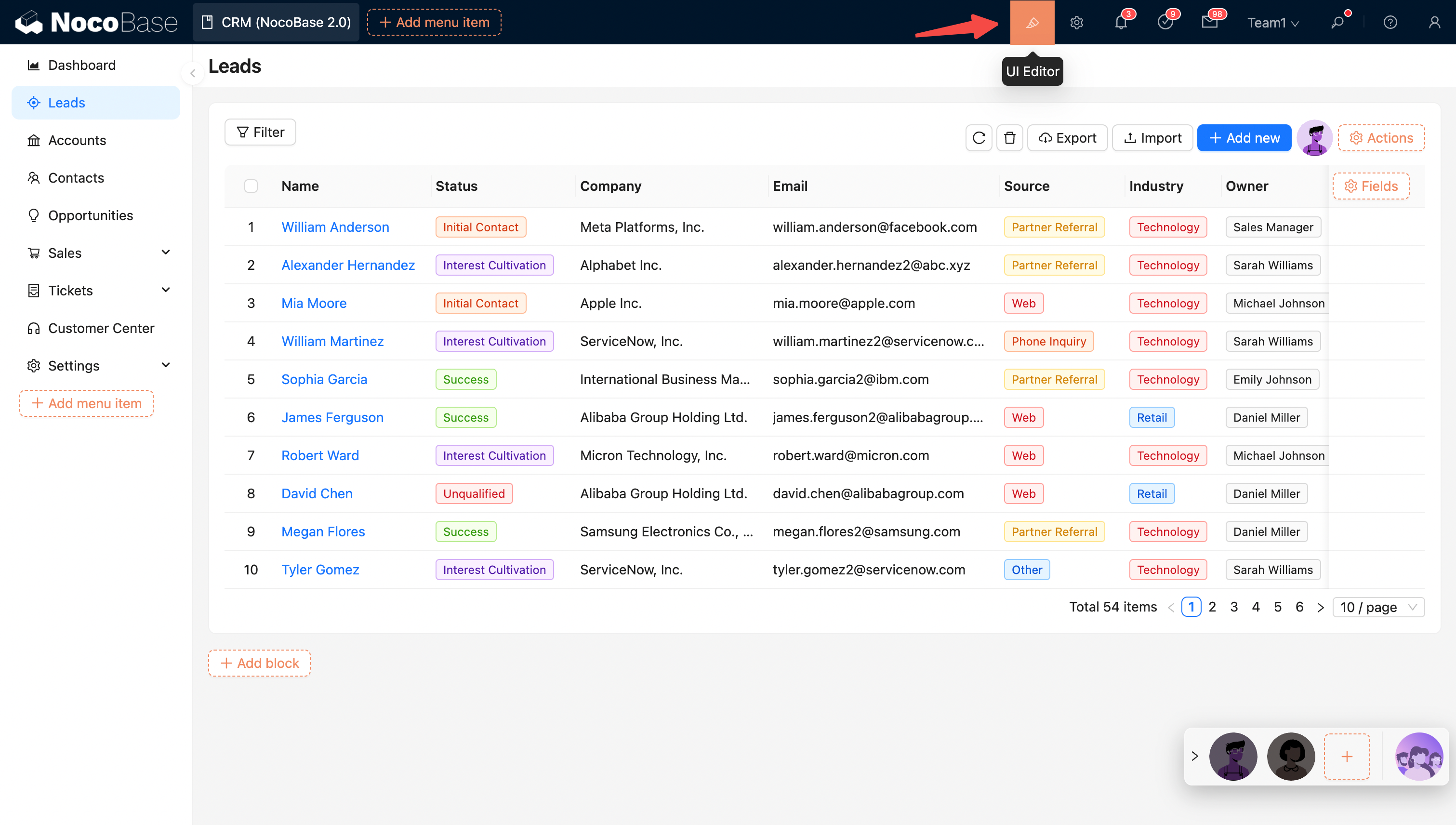
|
|
17
17
|
|
|
18
18
|
|
|
19
|
-
## Layout
|
|
19
|
+
## UI Layout
|
|
20
20
|
|
|
21
|
-
NocoBase
|
|
22
|
-
|
|
23
|
-
|
|
24
|
-
|
|
21
|
+
NocoBase provides desktop and mobile layouts. The desktop layout works well for standard administration and adapts its navigation and page content on phones. The mobile layout provides separate mobile navigation and page configuration. See [UI Layout](./ui-layout/index.md) for details.
|
|
25
22
|
|
|
26
23
|
|
|
27
24
|
## Configuration Options
|
|
@@ -55,4 +52,8 @@ Action configuration options:
|
|
|
55
52
|
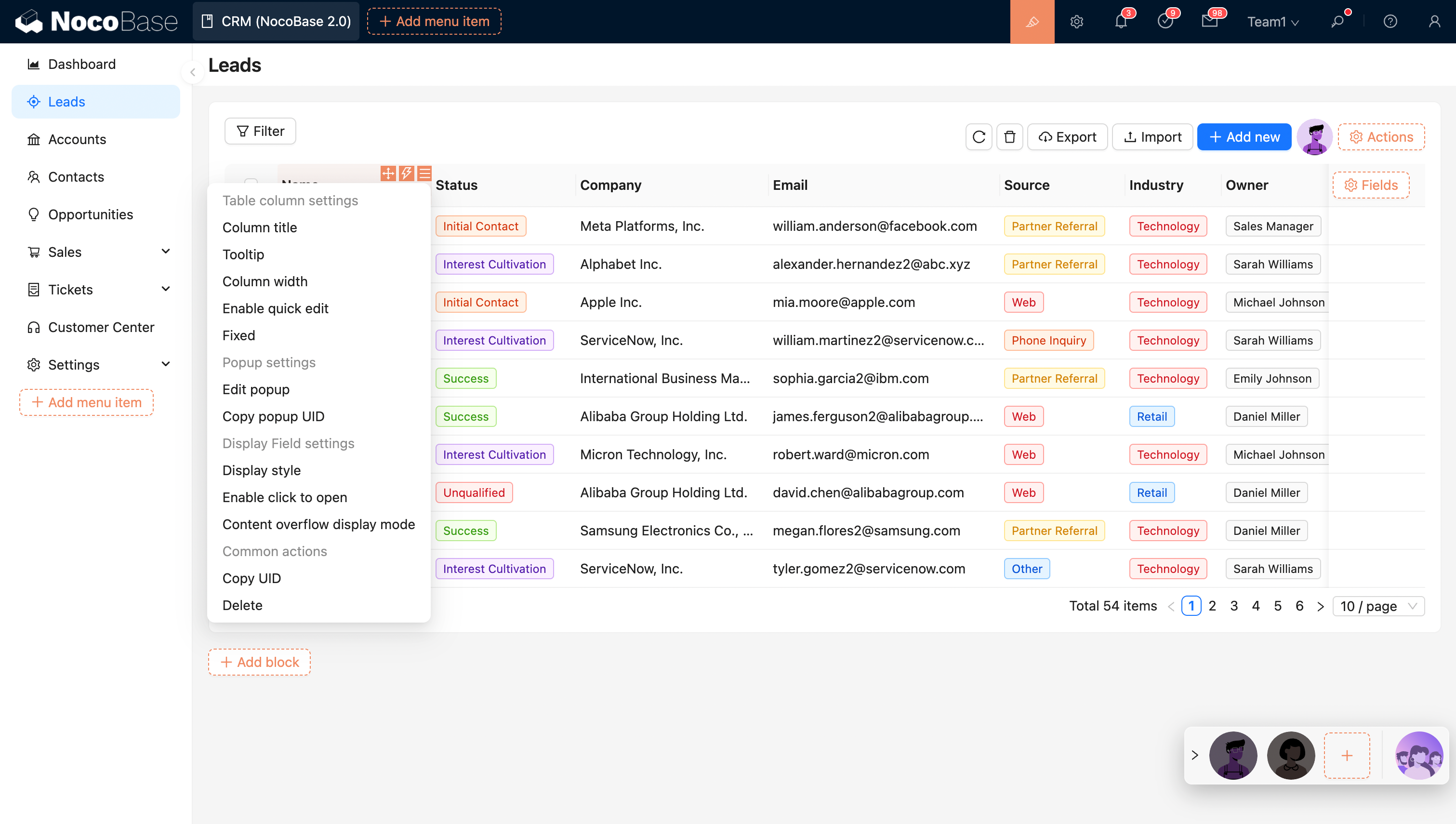
Table column configuration options:
|
|
56
53
|
|
|
57
54
|
|
|
58
|
-
|
|
55
|
+

|
|
56
|
+
|
|
57
|
+
## Related links
|
|
58
|
+
|
|
59
|
+
- [UI Layout](./ui-layout/index.md) — Learn about desktop and mobile layouts
|
|
@@ -0,0 +1,97 @@
|
|
|
1
|
+
---
|
|
2
|
+
title: "Desktop Layout"
|
|
3
|
+
description: "Learn about the navigation structure, page building, route management, and narrow-screen responsive behavior of the NocoBase desktop layout."
|
|
4
|
+
keywords: "desktop layout,UI layout,narrow-screen responsive,page building,route management,UI Editor,NocoBase"
|
|
5
|
+
---
|
|
6
|
+
|
|
7
|
+
# Desktop Layout
|
|
8
|
+
|
|
9
|
+
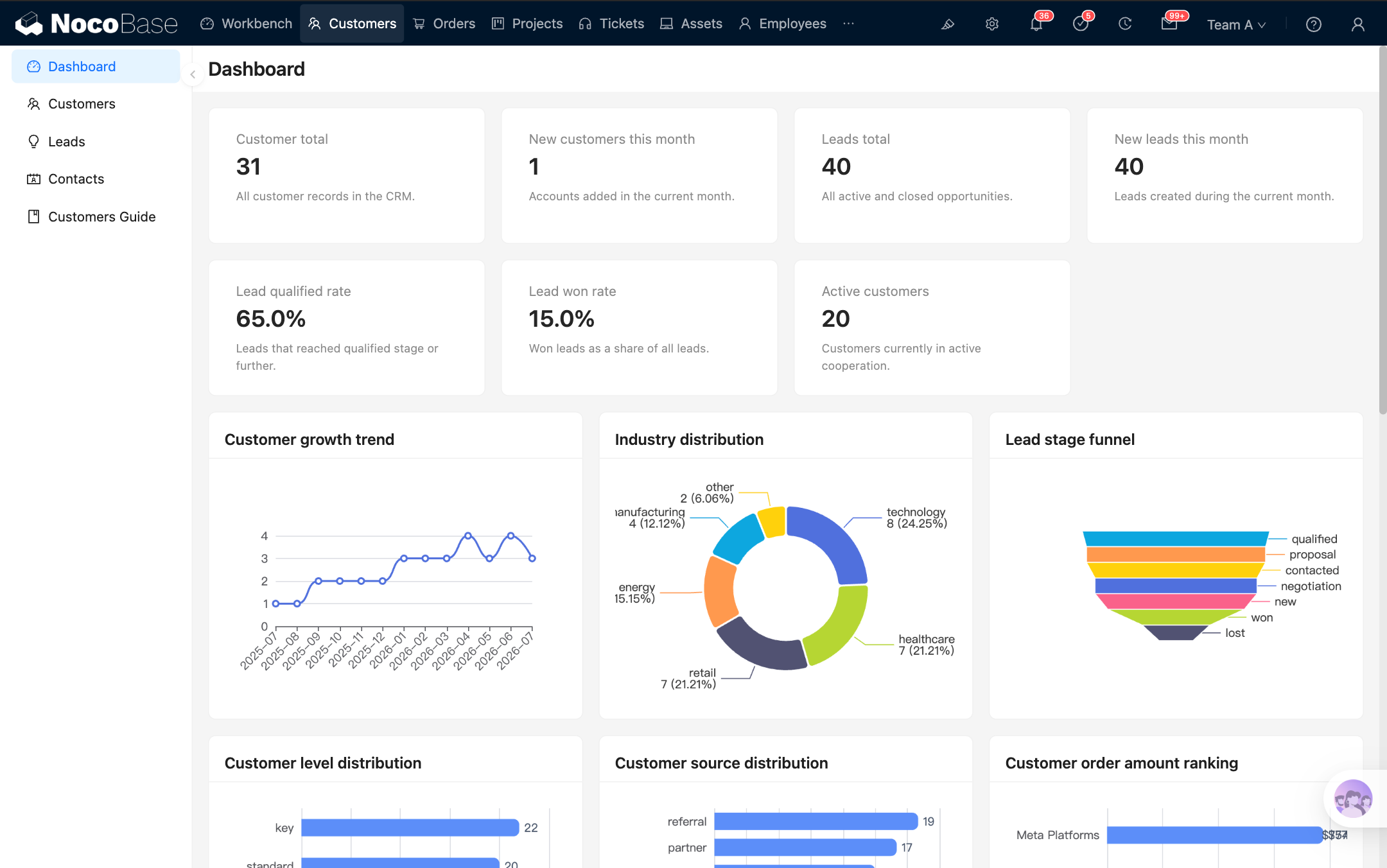
In NocoBase, the **desktop layout** is the default application interface. It is designed for data management, form entry, business configuration, and everyday work on a computer, and can also be used on mobile devices.
|
|
10
|
+
|
|
11
|
+
The desktop layout is available at `/admin` by default. If the application has its own access prefix, the actual URL automatically includes that prefix.
|
|
12
|
+
|
|
13
|
+
|
|
14
|
+
|
|
15
|
+
|
|
16
|
+
|
|
17
|
+
## Build a page
|
|
18
|
+
|
|
19
|
+
### Step 1: Open the desktop layout
|
|
20
|
+
|
|
21
|
+
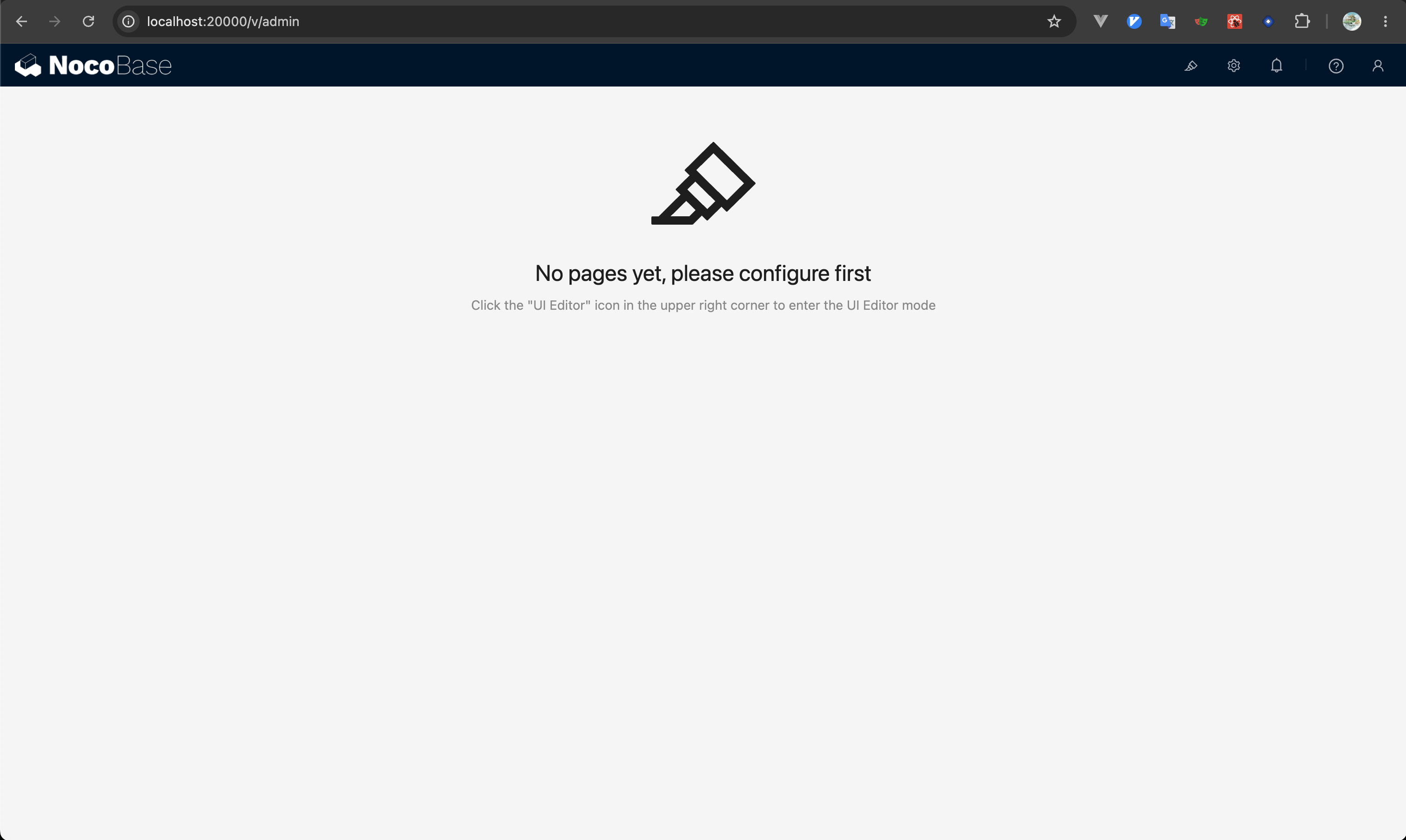
Visit `/admin` to open the desktop layout. After signing in, the application usually opens this layout directly.
|
|
22
|
+
|
|
23
|
+
|
|
24
|
+
|
|
25
|
+
### Step 2: Open UI Editor
|
|
26
|
+
|
|
27
|
+
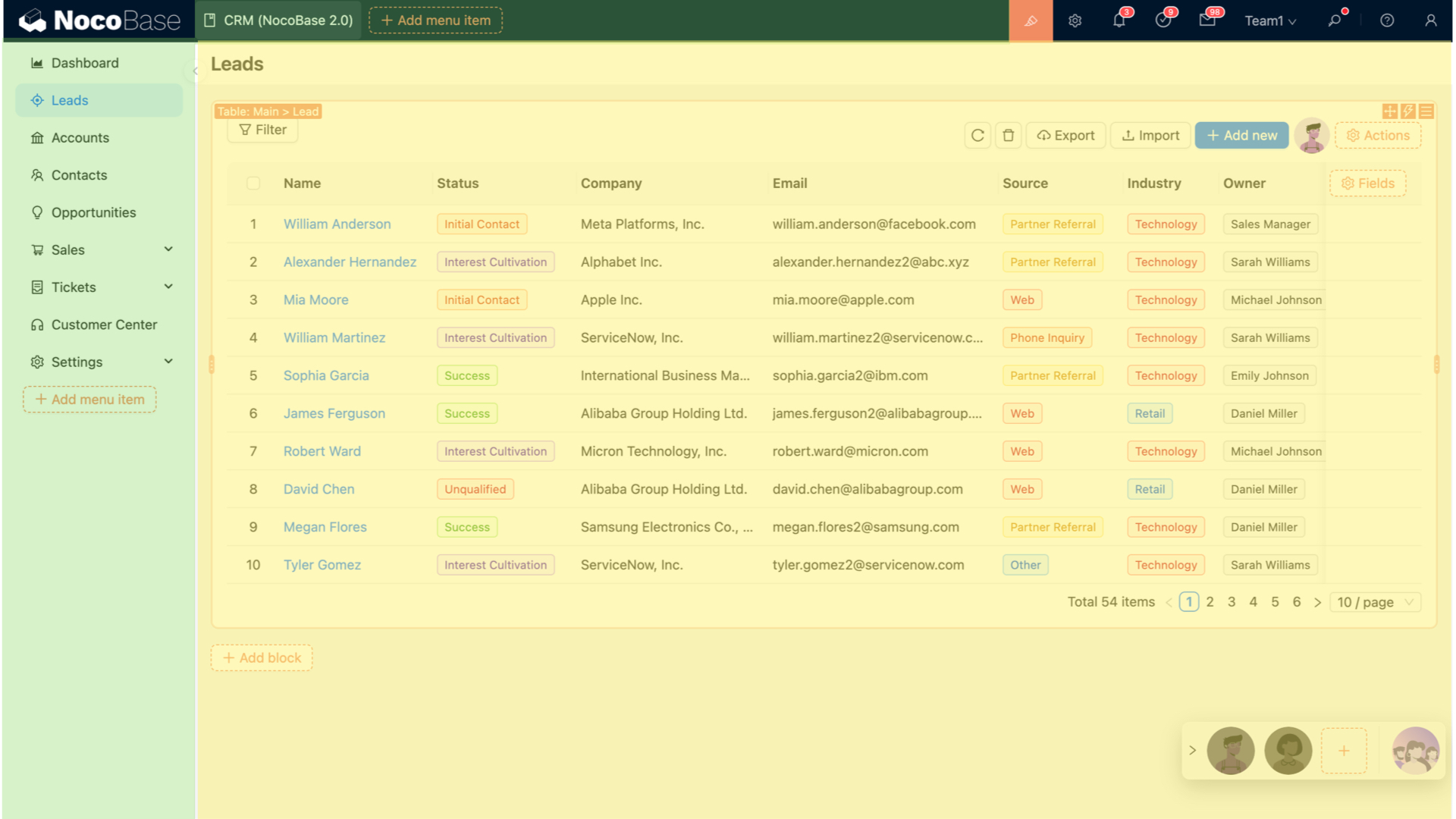
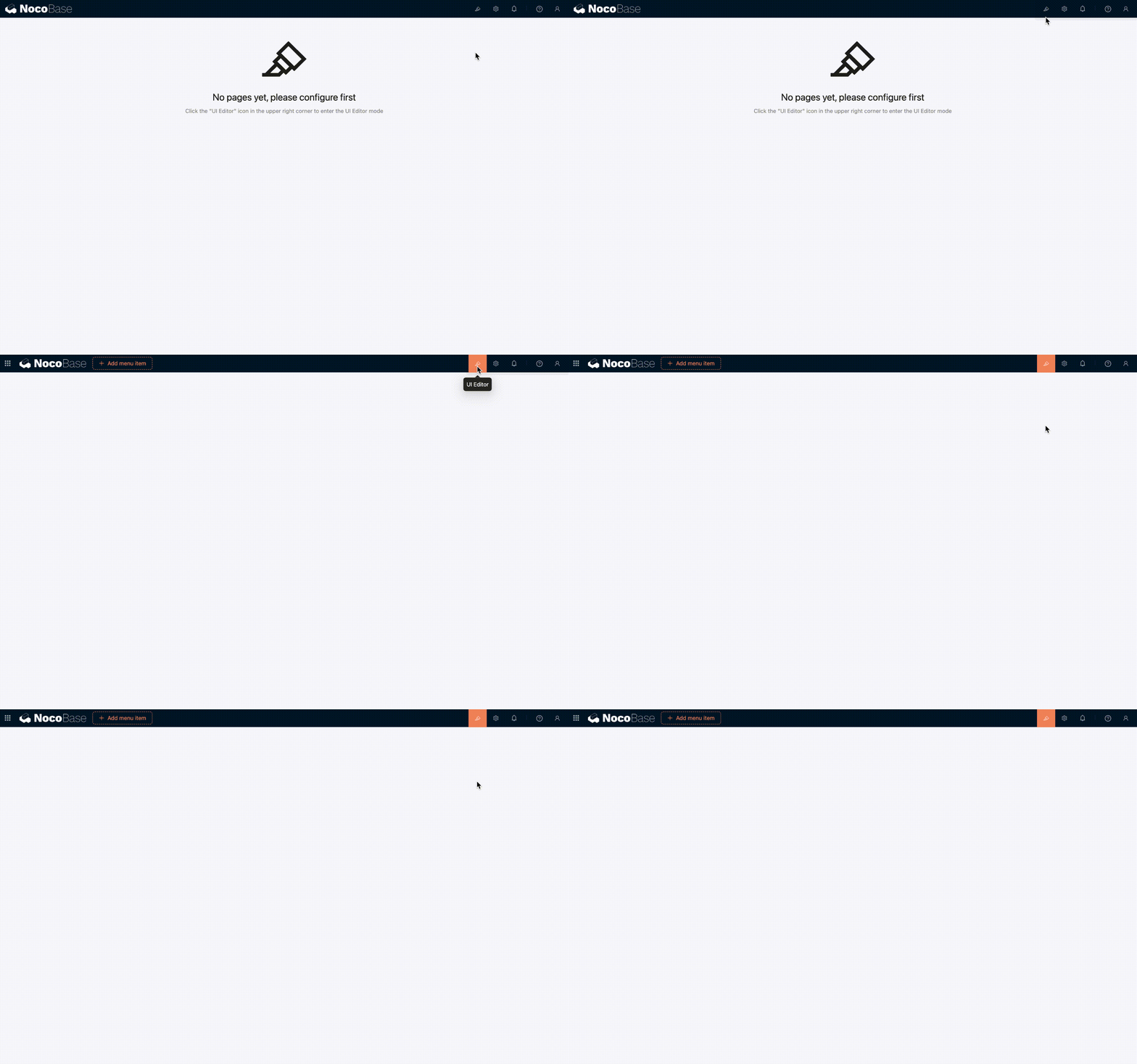
Click 「UI Editor」 in the upper-right corner of the page to enter UI building mode. Configuration entries then appear around menus, pages, blocks, fields, and actions.
|
|
28
|
+
|
|
29
|
+
|
|
30
|
+
|
|
31
|
+
### Step 3: Create menus and pages
|
|
32
|
+
|
|
33
|
+
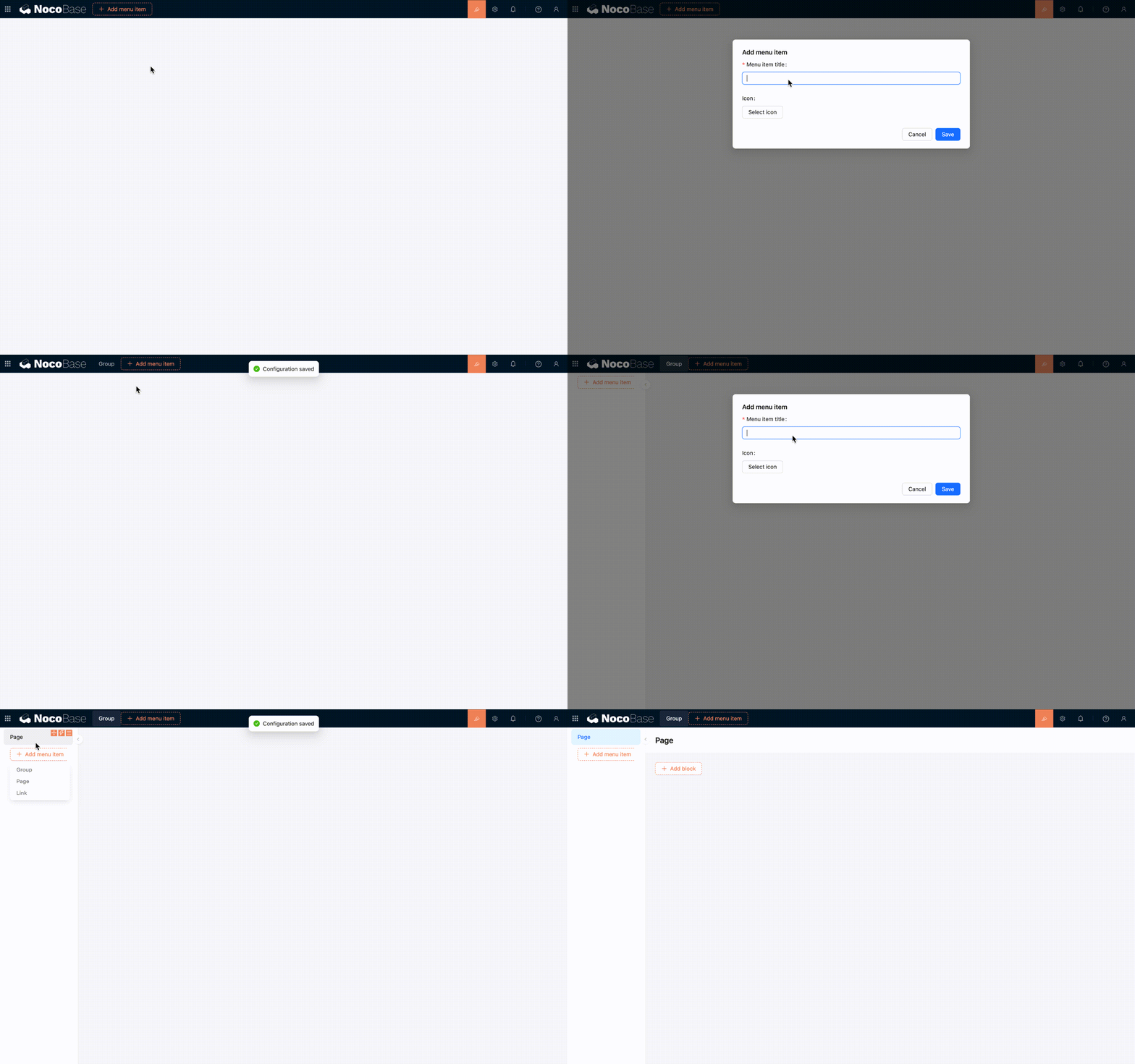
You can add groups, pages, or links in the navigation area, and enable tabs for a page. After creating a page, open it and add the blocks you need.
|
|
34
|
+
|
|
35
|
+
Page content is built in the same way as other interfaces: add [blocks](../blocks/index.md) first, then configure [fields](../fields/index.md) and [actions](../actions/index.md) for your business needs.
|
|
36
|
+
|
|
37
|
+
|
|
38
|
+
|
|
39
|
+
### Step 4: Configure page content
|
|
40
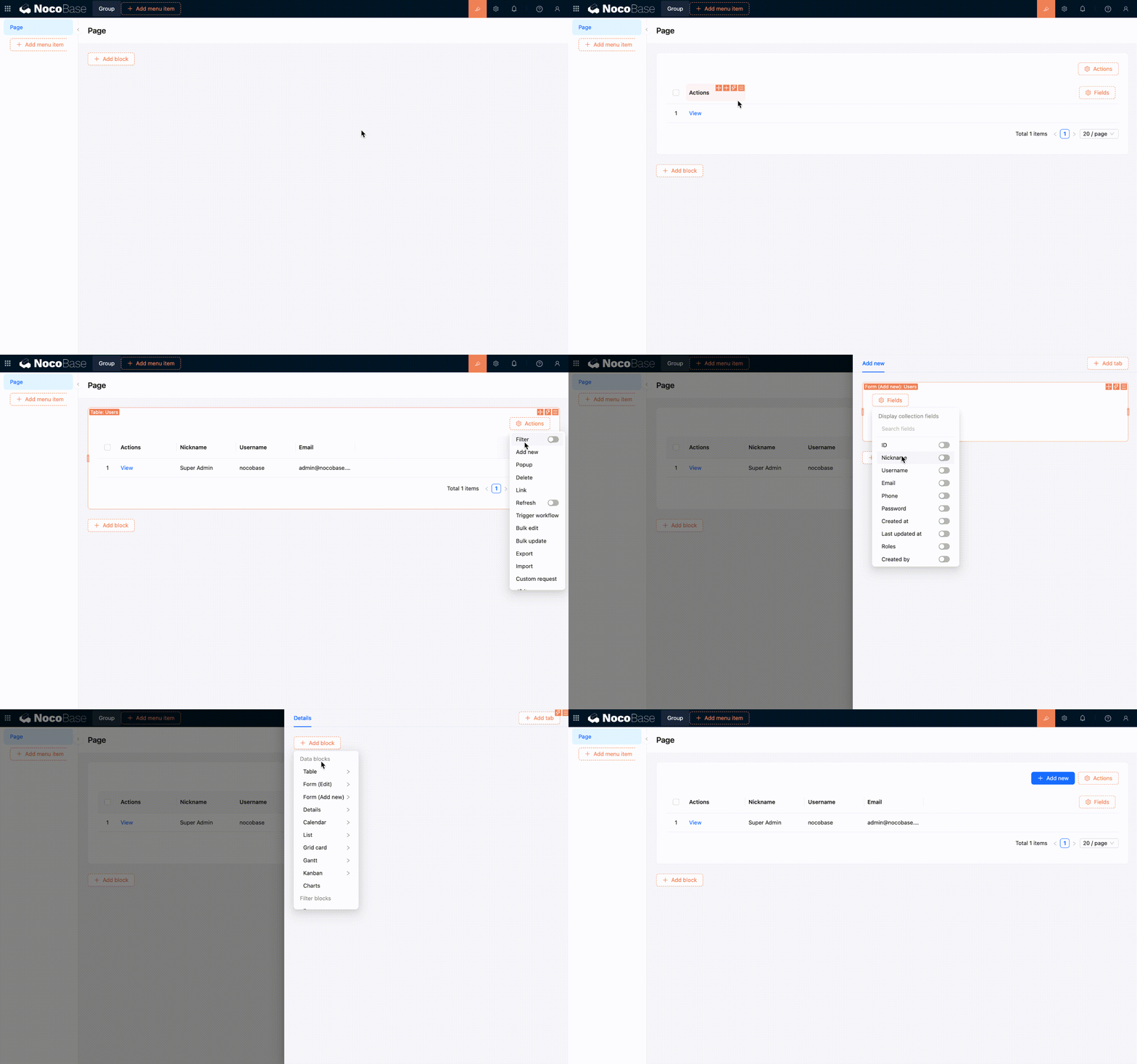
|
+
|
|
41
|
+
Add table, form, details, filter, or other blocks to the page, then adjust the fields, actions, and arrangement of the blocks. Each change is reflected directly on the current page.
|
|
42
|
+
|
|
43
|
+
|
|
44
|
+
|
|
45
|
+
## Manage routes and menus
|
|
46
|
+
|
|
47
|
+
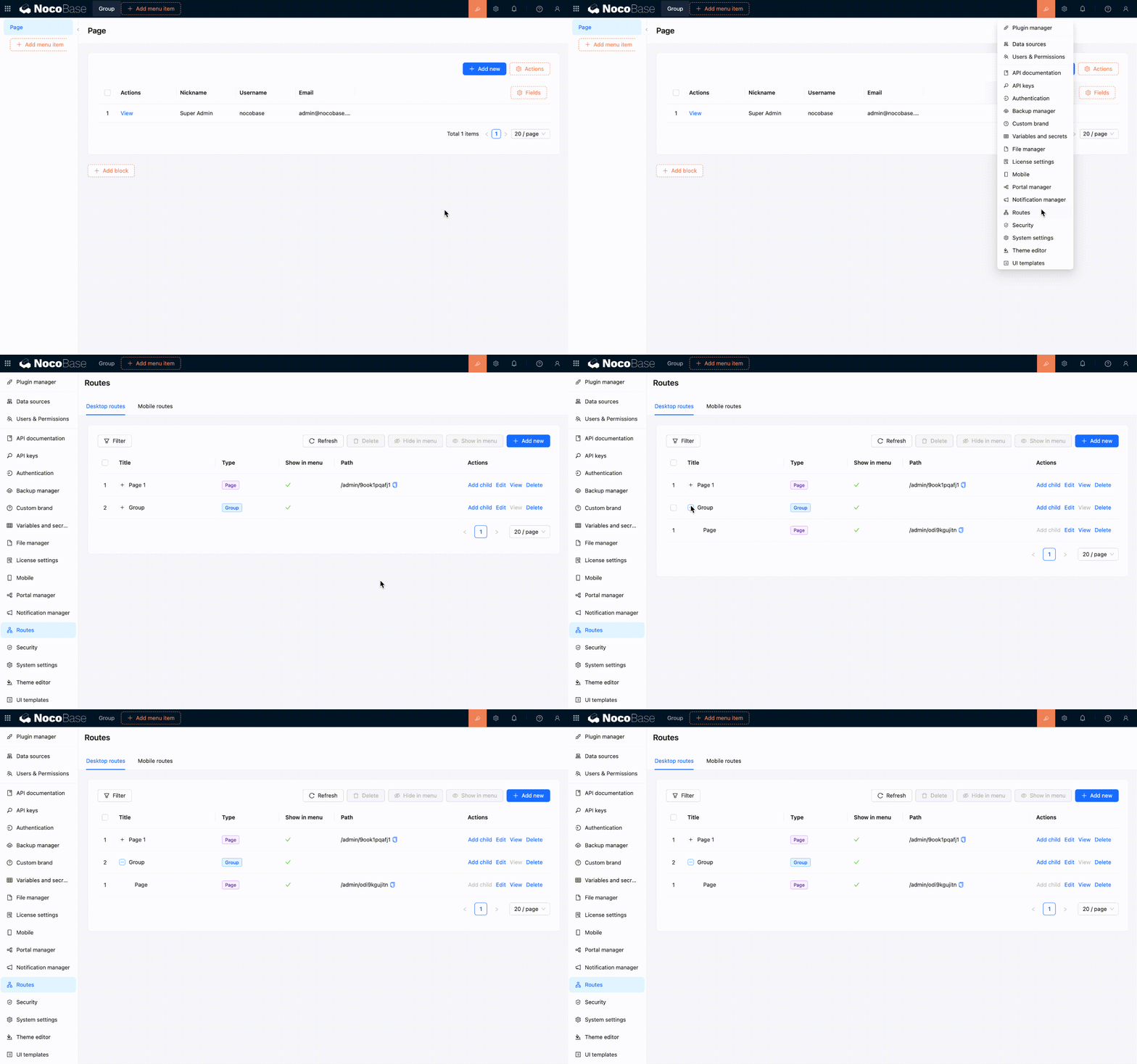
When you add a page or link in the navigation area, it also appears in the [Route Manager](../../routes/index.md). Changes made in the Route Manager also update the menu.
|
|
48
|
+
|
|
49
|
+
The desktop layout supports these common route types:
|
|
50
|
+
|
|
51
|
+
- **Group** — Organizes multiple pages and links under the same navigation group.
|
|
52
|
+
- **Page** — Opens a page where you can continue adding blocks.
|
|
53
|
+
- **Link** — Opens an internal or external URL.
|
|
54
|
+
- **Tab** — Organizes multiple content tabs within a page.
|
|
55
|
+
|
|
56
|
+
In the Route Manager, you can add, edit, delete, show, or hide routes. It is often the more convenient place to reorganize the entire menu structure.
|
|
57
|
+
|
|
58
|
+
|
|
59
|
+
|
|
60
|
+
## Responsive behavior on narrow screens
|
|
61
|
+
|
|
62
|
+
The desktop layout can be used directly on a phone or in a narrow browser window. In narrow-screen mode, it still uses the same desktop routes and pages. It does not automatically switch to the mobile layout.
|
|
63
|
+
|
|
64
|
+
### Layout changes
|
|
65
|
+
|
|
66
|
+
The navigation menu collapses, and top actions move into a more compact entry. Page margins and spacing between blocks also shrink, while the content area adapts to the visible height of the mobile browser.
|
|
67
|
+
|
|
68
|
+
UI Editor is not available on narrow screens. To change menus or pages, you need to return to a desktop browser and make the changes there.
|
|
69
|
+
|
|
70
|
+

|
|
71
|
+
|
|
72
|
+
### How page content adapts
|
|
73
|
+
|
|
74
|
+
Common components also adjust their interactions for narrow screens, making them easier to use on a phone. For instance, multi-column blocks switch to a single column, tables allow horizontal scrolling for columns that extend beyond the screen, and pagination and action entries become more compact. Selection, date and time, filter, and subpage interactions also use forms that are easier to operate on a phone.
|
|
75
|
+
|
|
76
|
+
:::tip Desktop responsiveness and the mobile layout
|
|
77
|
+
|
|
78
|
+
If you only access the application from a phone occasionally, the responsive desktop layout is usually enough. If you need separate bottom navigation, mobile pages, and mobile workflows, build a [mobile layout](./mobile.md) as well.
|
|
79
|
+
|
|
80
|
+
:::
|
|
81
|
+
|
|
82
|
+
## Recommendations
|
|
83
|
+
|
|
84
|
+
- Use the desktop layout by default for work performed mainly on a computer.
|
|
85
|
+
- Finish building the page on a wide screen, then narrow the window to check its responsive behavior.
|
|
86
|
+
- If a page contains many table columns or horizontal actions, keep only the necessary content to reduce the workload on smaller screens.
|
|
87
|
+
- If the desktop and mobile workflows differ significantly, separate pages are usually clearer.
|
|
88
|
+
|
|
89
|
+
## Related links
|
|
90
|
+
|
|
91
|
+
- [UI layout overview](./index.md) — Compare desktop and mobile layout use cases
|
|
92
|
+
- [Mobile layout](./mobile.md) — Build separate mobile navigation and pages
|
|
93
|
+
- [Blocks](../blocks/index.md) — Add and configure blocks on a page
|
|
94
|
+
- [Fields](../fields/index.md) — Configure fields in tables, forms, and details blocks
|
|
95
|
+
- [Actions](../actions/index.md) — Configure actions on pages and blocks
|
|
96
|
+
- [Route Manager](../../routes/index.md) — Manage desktop menus and routes in one place
|
|
97
|
+
- [Permission configuration](../../users-permissions/acl/permissions.md) — Control which desktop routes each role can access
|
|
@@ -0,0 +1,50 @@
|
|
|
1
|
+
---
|
|
2
|
+
title: "UI Layout"
|
|
3
|
+
description: "An overview of NocoBase UI layouts, including desktop and mobile layout features, use cases, and how their configurations relate."
|
|
4
|
+
keywords: "UI layout,desktop layout,mobile layout,responsive layout,mobile pages,NocoBase"
|
|
5
|
+
---
|
|
6
|
+
|
|
7
|
+
# UI Layout
|
|
8
|
+
|
|
9
|
+
NocoBase provides desktop and mobile layouts. Both layouts support UI building, so you can create pages and configure blocks, fields, and actions within them.
|
|
10
|
+
|
|
11
|
+
The desktop layout is the default choice and works well for everyday administration and data processing on a computer. If you need dedicated navigation and pages for mobile devices, you can build a mobile layout as well.
|
|
12
|
+
|
|
13
|
+
## Desktop layout
|
|
14
|
+
|
|
15
|
+
The [desktop layout](./desktop.md) is available at `/admin` by default. It consists of top navigation, side navigation, and a page content area, making it suitable for common business scenarios such as managing tables, entering form data, and viewing records.
|
|
16
|
+
|
|
17
|
+
The desktop layout also supports responsive behavior on narrow screens. When a page is displayed on a smaller screen, the navigation, spacing, and common components adjust to fit while continuing to use the existing desktop menus and pages.
|
|
18
|
+
|
|
19
|
+

|
|
20
|
+
|
|
21
|
+
## Mobile layout
|
|
22
|
+
|
|
23
|
+
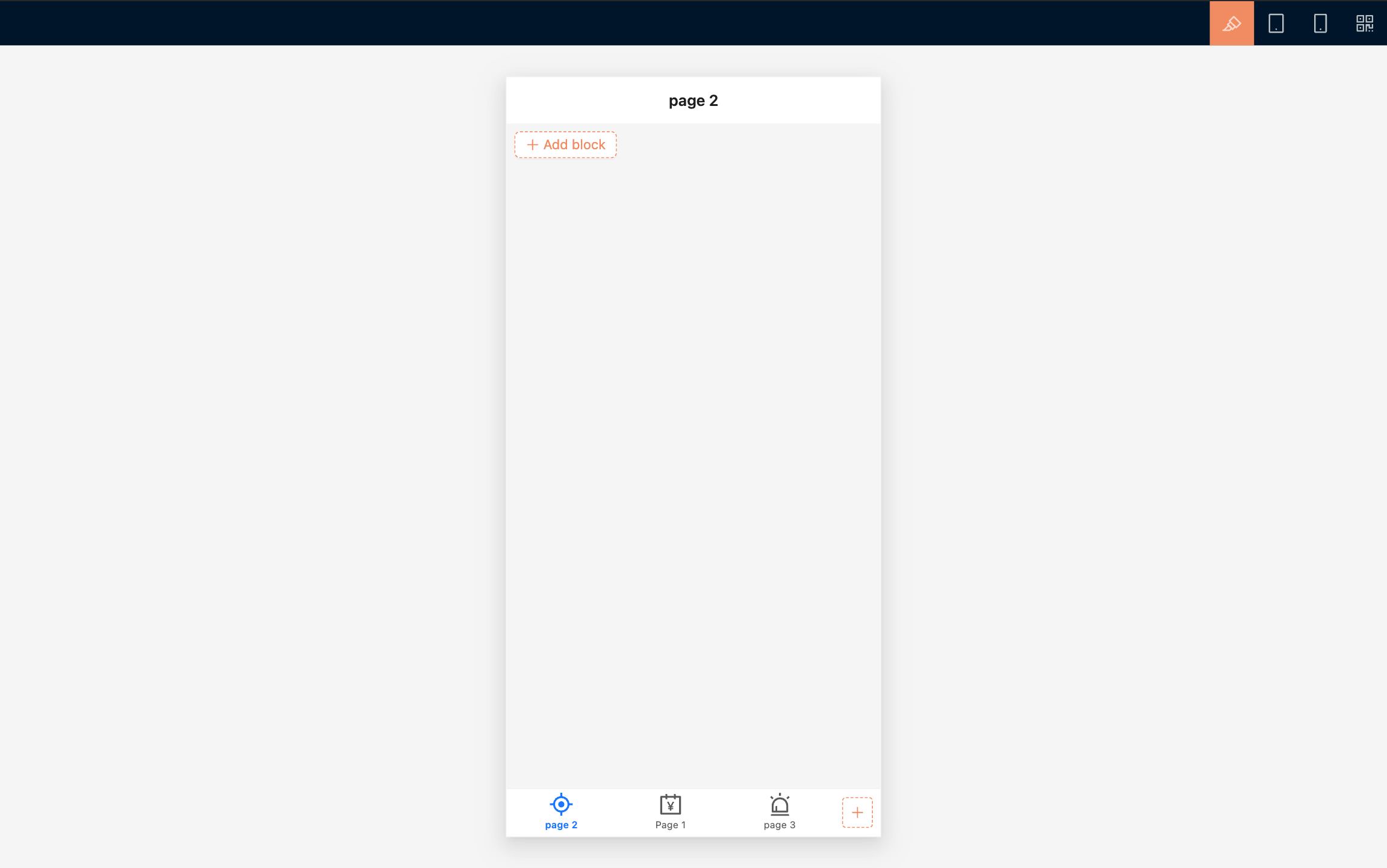
The [mobile layout](./mobile.md) is available at `/mobile` by default. It uses a bottom tab bar for primary navigation and provides separate mobile pages, links, and page tabs.
|
|
24
|
+
|
|
25
|
+
The mobile layout works well for frequent phone-based tasks such as on-site data entry, mobile approvals, task processing, and data lookup. You can build and preview pages in a desktop browser, then use a QR code to check the result on a physical device.
|
|
26
|
+
|
|
27
|
+
|
|
28
|
+
|
|
29
|
+
## Which layout should I use?
|
|
30
|
+
|
|
31
|
+
Use the desktop layout by default.
|
|
32
|
+
|
|
33
|
+
| I want to... | Recommended layout |
|
|
34
|
+
| --- | --- |
|
|
35
|
+
| Work mainly on a computer and occasionally access pages from a phone | [Desktop layout](./desktop.md) |
|
|
36
|
+
| Design separate navigation, pages, and workflows for phones | [Mobile layout](./mobile.md) |
|
|
37
|
+
| Provide a complete experience for both computers and mobile devices | Build the desktop and mobile layouts separately |
|
|
38
|
+
|
|
39
|
+
## How the configurations relate
|
|
40
|
+
|
|
41
|
+
The desktop and mobile layouts use the same data sources and business data. You can use the same data table to build separate pages for different devices.
|
|
42
|
+
|
|
43
|
+
Menus, routes, and page configurations are maintained separately. Changes to a desktop page do not automatically update its mobile counterpart, and changes to mobile navigation do not affect desktop navigation. [Route access permissions](../../users-permissions/acl/permissions.md) also need to be configured separately for each layout.
|
|
44
|
+
|
|
45
|
+
## Related links
|
|
46
|
+
|
|
47
|
+
- [Desktop layout](./desktop.md) — Build desktop pages and learn how they behave on narrow screens
|
|
48
|
+
- [Mobile layout](./mobile.md) — Build separate mobile navigation and pages
|
|
49
|
+
- [Route Manager](../../routes/index.md) — Manage desktop and mobile pages, links, and menus
|
|
50
|
+
- [Permission configuration](../../users-permissions/acl/permissions.md) — Control which menus and pages each role can access
|
|
@@ -0,0 +1,133 @@
|
|
|
1
|
+
---
|
|
2
|
+
title: "Mobile Layout"
|
|
3
|
+
description: "Learn about NocoBase mobile navigation, page building, desktop preview, subpage interactions, routes, and permissions."
|
|
4
|
+
keywords: "mobile layout,mobile pages,bottom navigation,mobile preview,mobile routes,UI Editor,NocoBase"
|
|
5
|
+
---
|
|
6
|
+
|
|
7
|
+
# Mobile Layout
|
|
8
|
+
|
|
9
|
+
In NocoBase, the **mobile layout** is used to build dedicated navigation and pages for mobile devices. It is available at `/mobile` by default and uses a bottom tab bar as its primary navigation, making it more suitable for data entry, lookup, approval, and task processing on a phone.
|
|
10
|
+
|
|
11
|
+
The mobile and desktop layouts use the same data sources and business data, but their menus, routes, and page content are configured separately. This lets you reorganize pages around mobile workflows without being constrained by the desktop page structure.
|
|
12
|
+
|
|
13
|
+
<!-- Add a full-page screenshot of the mobile layout on a physical device -->
|
|
14
|
+
|
|
15
|
+
## Open and preview the mobile layout
|
|
16
|
+
|
|
17
|
+
By default, you can click 「Mobile」 in Settings to open the layout, or visit `/mobile` directly.
|
|
18
|
+
|
|
19
|
+
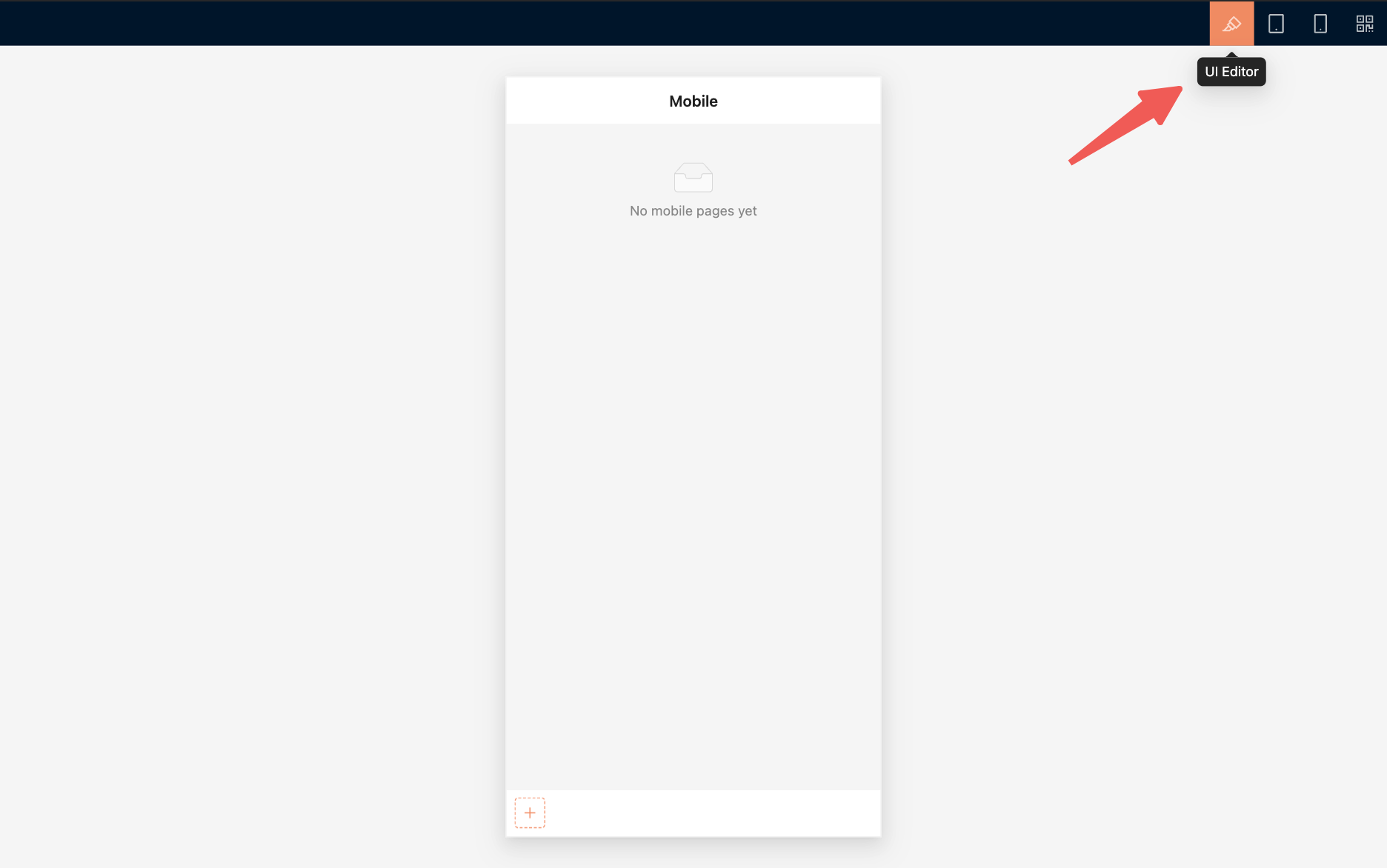
It is best to build pages in a desktop browser. The desktop view provides a mobile preview area and a toolbar at the top:
|
|
20
|
+
|
|
21
|
+
- 「UI Editor」 turns UI building mode on or off.
|
|
22
|
+
- 「Tablet preview」 checks the display on wider mobile devices.
|
|
23
|
+
- 「Mobile preview」 restores the phone-sized preview area.
|
|
24
|
+
- 「QR code」 opens the current mobile URL on a phone.
|
|
25
|
+
|
|
26
|
+
|
|
27
|
+
|
|
28
|
+
After building the pages on a computer, scan the QR code and check them on a physical device. Pay particular attention to navigation, scrolling, form input, pop-up pages, and safe areas.
|
|
29
|
+
|
|
30
|
+
## Build mobile navigation
|
|
31
|
+
|
|
32
|
+
The mobile layout uses a bottom tab bar as its primary navigation. Primary navigation currently supports mainly pages and links.
|
|
33
|
+
|
|
34
|
+
### Add a page
|
|
35
|
+
|
|
36
|
+
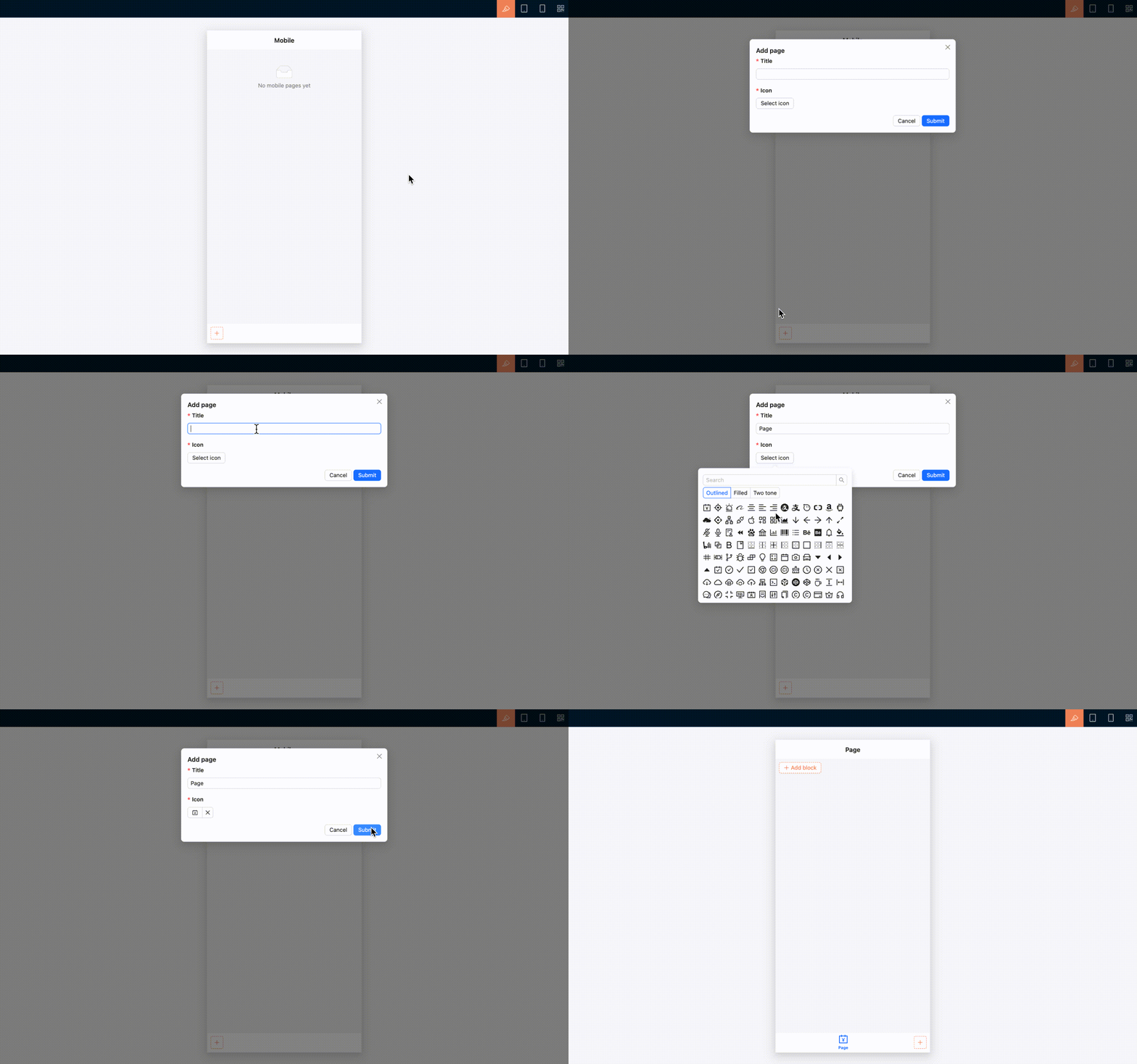
1. Open 「UI Editor」.
|
|
37
|
+
2. Click the add button on the right side of the bottom tab bar.
|
|
38
|
+
3. Select 「Page」.
|
|
39
|
+
4. Enter a page title and select an icon.
|
|
40
|
+
5. Submit the form to open the new page, then continue adding page content.
|
|
41
|
+
|
|
42
|
+
|
|
43
|
+
|
|
44
|
+
### Add a link
|
|
45
|
+
|
|
46
|
+
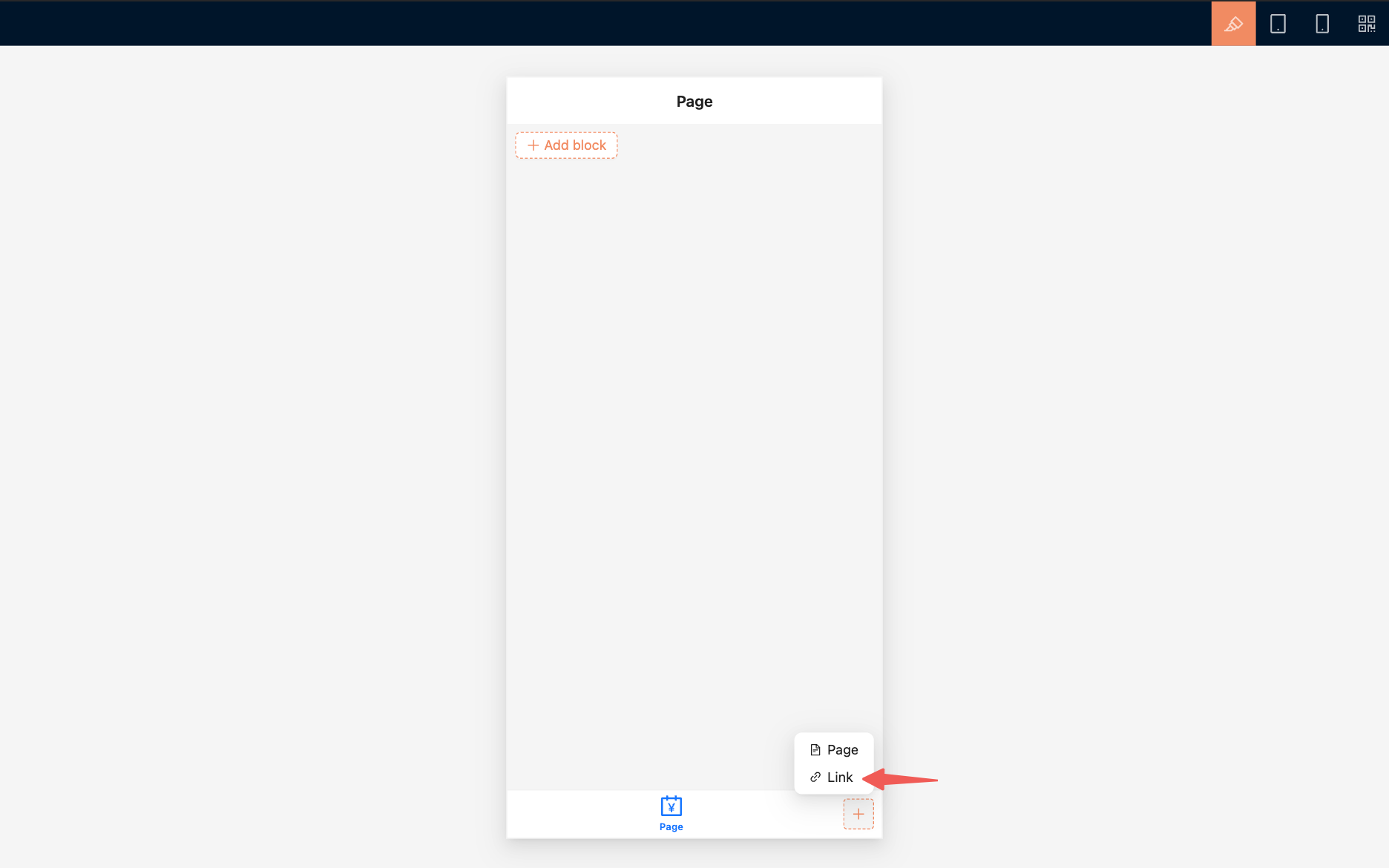
To open an internal or external URL, select 「Link」 and configure its title, icon, and URL.
|
|
47
|
+
|
|
48
|
+
A link can open in the current window or a new window, depending on its configuration.
|
|
49
|
+
|
|
50
|
+
|
|
51
|
+
|
|
52
|
+
### Arrange navigation
|
|
53
|
+
|
|
54
|
+
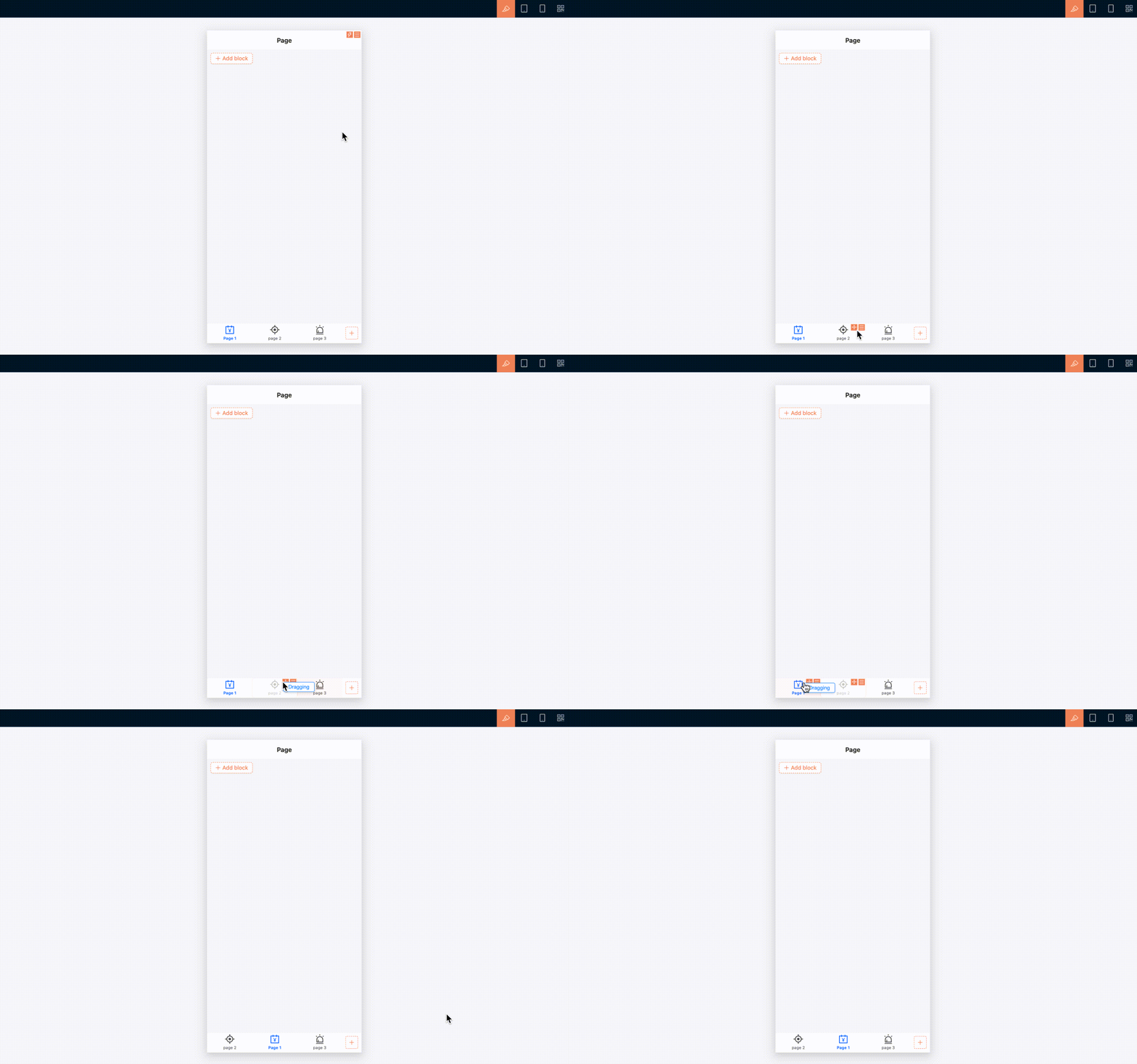
In UI building mode, drag bottom tabs to reorder them. You can also edit a tab's title and icon, configure linkage rules, copy its UID, or delete it.
|
|
55
|
+
|
|
56
|
+
To view, show, hide, or delete mobile routes in one place, open 「Settings / Routes / Mobile routes」.
|
|
57
|
+
|
|
58
|
+
|
|
59
|
+
|
|
60
|
+
## Build a mobile page
|
|
61
|
+
|
|
62
|
+
Create and open a mobile page before adding blocks to it. The approach to building page content is essentially the same as on desktop: use [blocks](../blocks/index.md), [fields](../fields/index.md), and [actions](../actions/index.md) to organize business content. However, mobile navigation and some component interactions are adjusted for smaller screens.
|
|
63
|
+
|
|
64
|
+
### Add page content
|
|
65
|
+
|
|
66
|
+
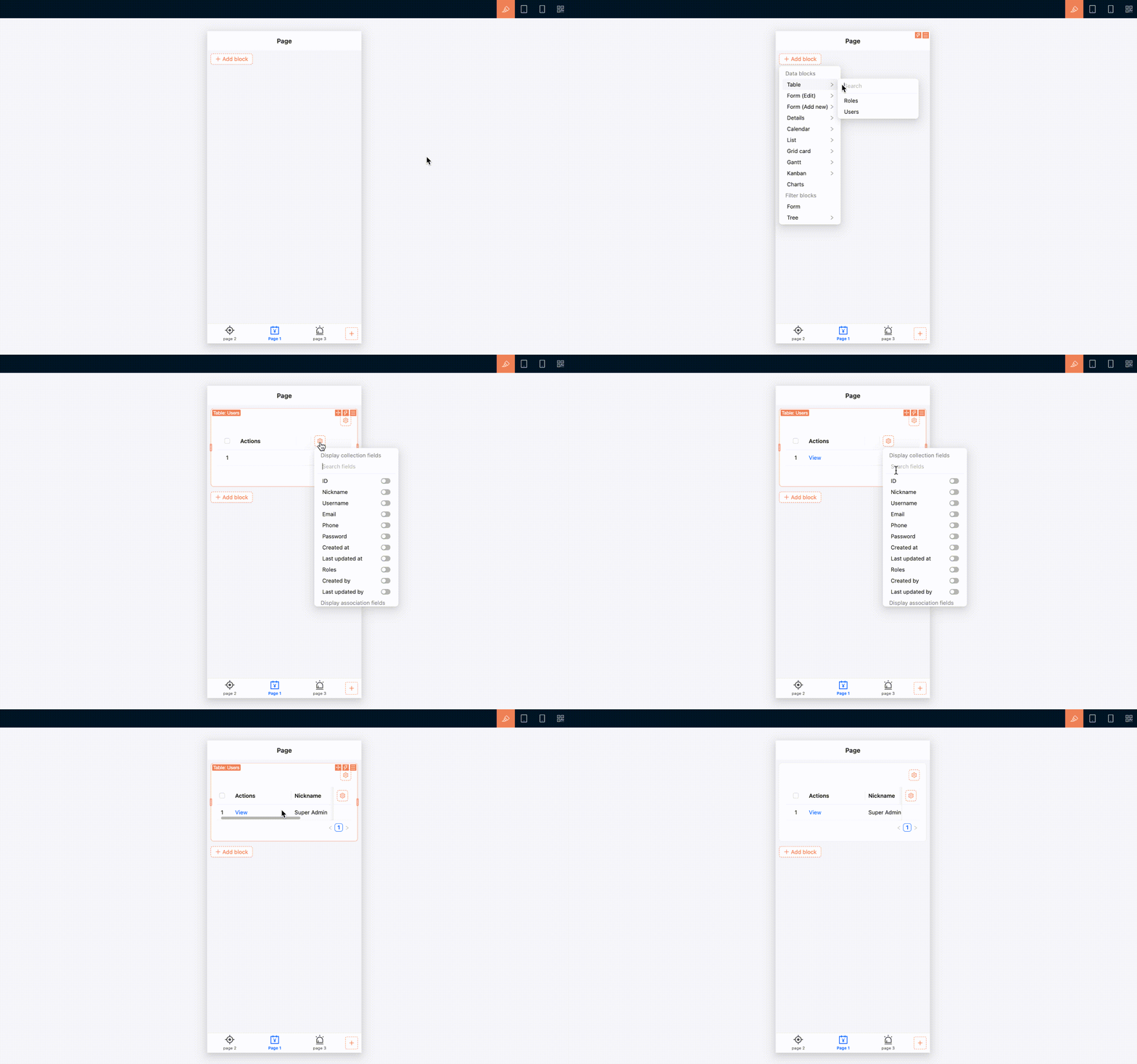
1. Open the mobile page you want to build.
|
|
67
|
+
2. Make sure 「UI Editor」 is enabled.
|
|
68
|
+
3. Click 「Add block」 on the page.
|
|
69
|
+
4. Select a table, form, details, filter, or another block.
|
|
70
|
+
5. Continue configuring fields, actions, and block settings.
|
|
71
|
+
|
|
72
|
+
|
|
73
|
+
|
|
74
|
+
### Use page tabs
|
|
75
|
+
|
|
76
|
+
A mobile page can also use tabs. If multiple pieces of content belong under the same navigation entry but remain relatively independent, place them in separate tabs.
|
|
77
|
+
|
|
78
|
+
1. Open the page settings and enable 「Enable page tabs」. You can also edit the page under 「Settings / Routes / Mobile routes」 and select 「Enable page tabs」.
|
|
79
|
+
2. Turn on 「UI Editor」.
|
|
80
|
+
3. Click 「Add tab」 on the right side of the page tab bar.
|
|
81
|
+
4. Add the tab, then configure its name and page content.
|
|
82
|
+
|
|
83
|
+
If a mobile page contains only a small amount of content, use a single page. You do not need to enable tabs.
|
|
84
|
+
|
|
85
|
+
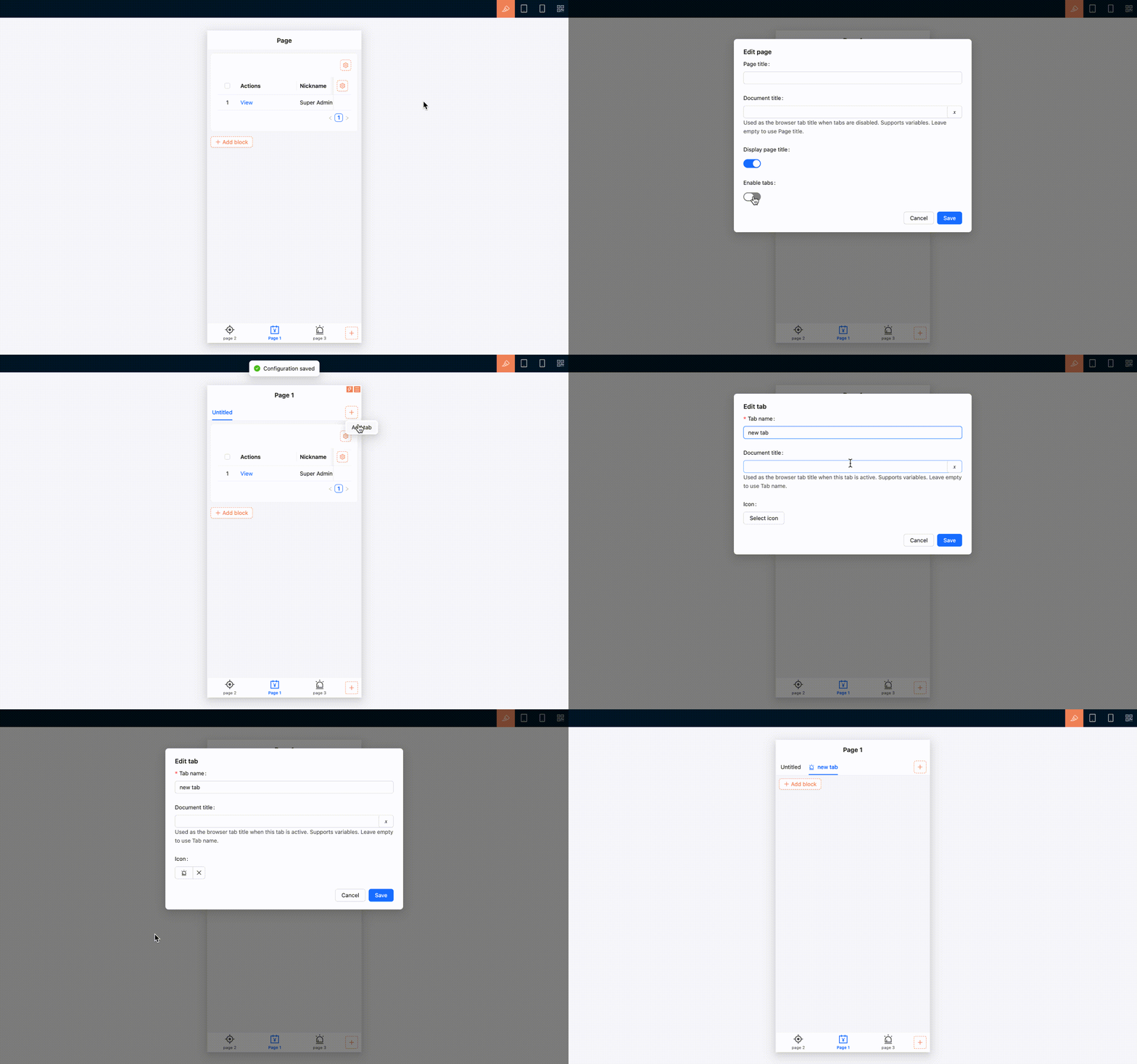
|
|
86
|
+
|
|
87
|
+
### Mobile interactions for common components
|
|
88
|
+
|
|
89
|
+
Common components adjust their arrangement and interactions for the mobile layout. For instance, multi-column content automatically switches to a single column that is easier to browse vertically; selection and date-time fields use mobile-friendly pickers; and filters, associated record selection, and subpages use interfaces designed for touch interaction.
|
|
90
|
+
|
|
91
|
+
Tables remain tables on mobile, with horizontal scrolling for columns that extend beyond the screen. Any additional mobile behavior depends on the support provided by each block.
|
|
92
|
+
|
|
93
|
+
## Pages and subpages
|
|
94
|
+
|
|
95
|
+
Content opened from view, edit, associated record selection, and similar actions appears as a mobile subpage. The subpage provides a back button that returns you to the previous page.
|
|
96
|
+
|
|
97
|
+
When you open a deeper subpage, the bottom tab bar is hidden to leave more room for the current content. It reappears when you close the subpage or return to the previous level.
|
|
98
|
+
|
|
99
|
+
When switching between bottom tabs, the state of open pages is preserved, making it easier to move between mobile tasks.
|
|
100
|
+
|
|
101
|
+
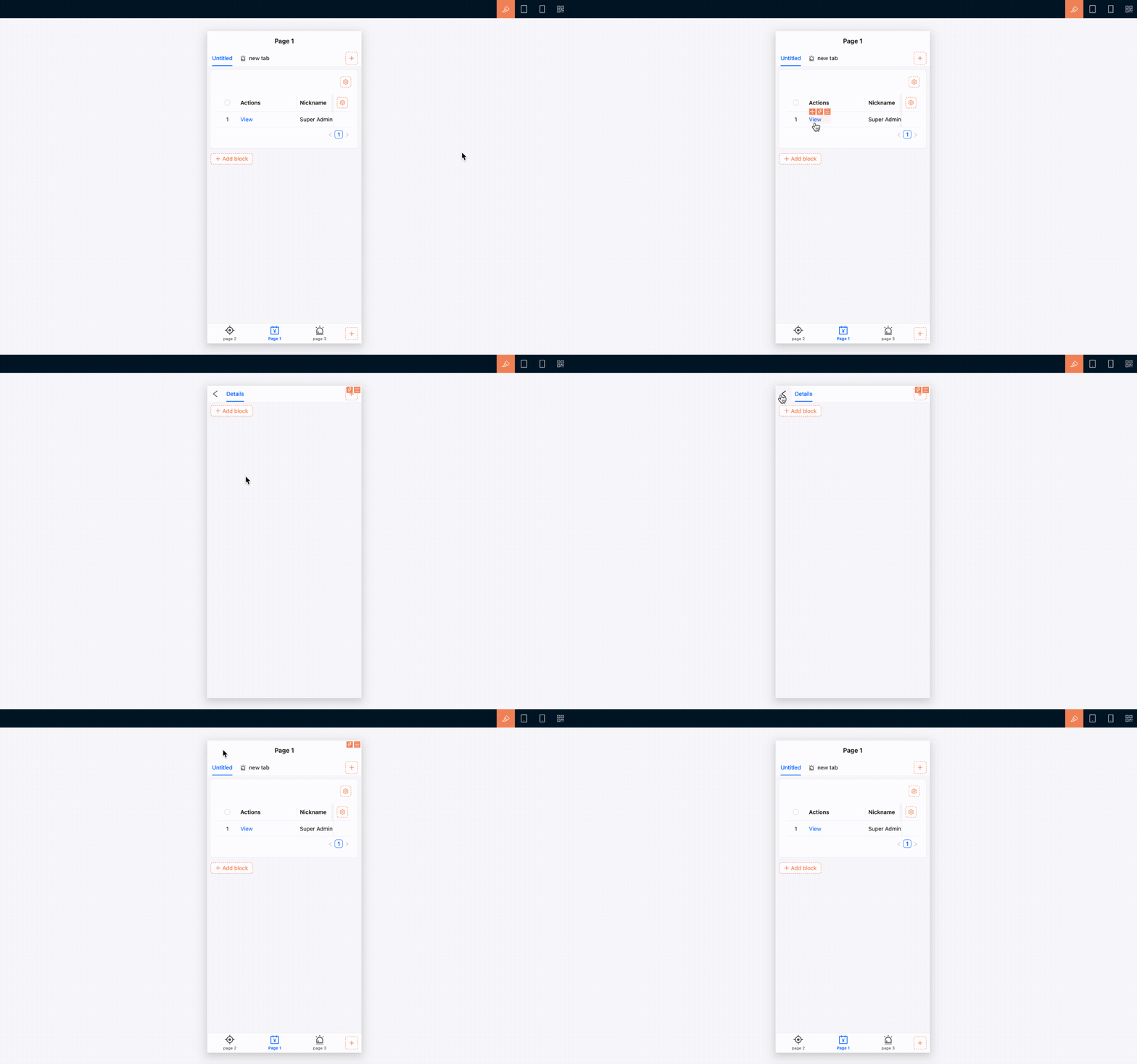
|
|
102
|
+
|
|
103
|
+
## Manage routes and permissions
|
|
104
|
+
|
|
105
|
+
Mobile routes can be maintained in the [Route Manager](../../routes/index.md). Open 「Settings / Routes / Mobile routes」 to add, edit, delete, show, or hide pages and links, or to configure tabs for a page.
|
|
106
|
+
|
|
107
|
+
Mobile route access permissions are configured separately from desktop permissions. Under role permissions, open 「Mobile routes」 and select the pages the current role can access. See [Permission configuration](../../users-permissions/acl/permissions.md) for details.
|
|
108
|
+
|
|
109
|
+
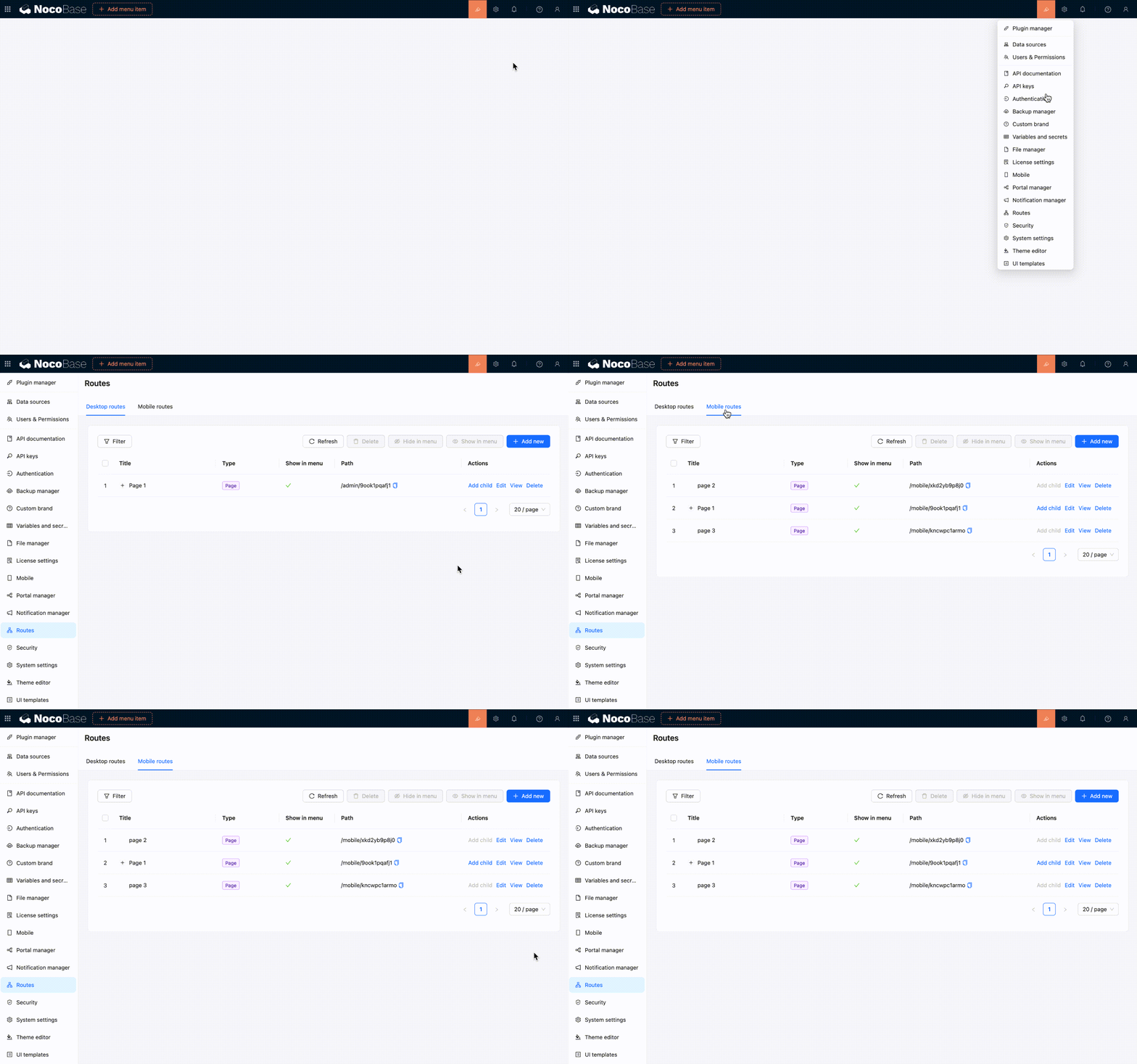
|
|
110
|
+
|
|
111
|
+
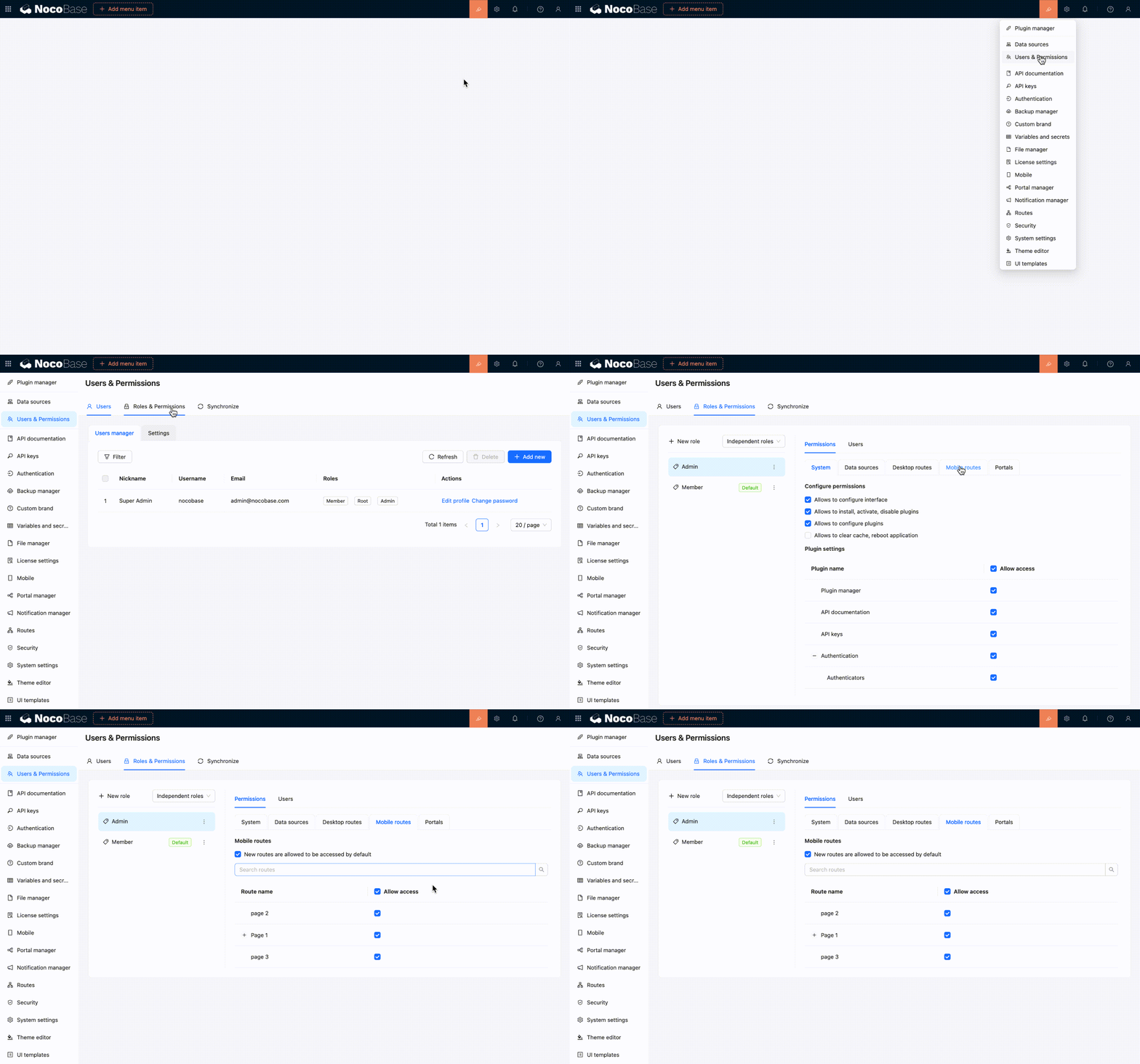
|
|
112
|
+
|
|
113
|
+
## Relationship with the desktop layout
|
|
114
|
+
|
|
115
|
+
You can build separate desktop and mobile pages from the same data table. For instance, a desktop page may use a table with many fields for data processing, while a mobile page may use a simpler list or form for on-site data entry.
|
|
116
|
+
|
|
117
|
+
The two layouts do not synchronize pages automatically. Changes to desktop pages, menus, or routes do not update the mobile configuration, and mobile changes do not affect desktop pages.
|
|
118
|
+
|
|
119
|
+
:::tip Recommendation
|
|
120
|
+
|
|
121
|
+
If mobile users only need occasional access to desktop pages, try the responsive [desktop layout](./desktop.md) first. Build a separate mobile layout only when you need dedicated navigation and page workflows for mobile devices.
|
|
122
|
+
|
|
123
|
+
:::
|
|
124
|
+
|
|
125
|
+
## Related links
|
|
126
|
+
|
|
127
|
+
- [UI layout overview](./index.md) — Compare desktop and mobile layout use cases
|
|
128
|
+
- [Desktop layout](./desktop.md) — Use the default desktop layout and its narrow-screen responsiveness
|
|
129
|
+
- [Blocks](../blocks/index.md) — Add business content to mobile pages
|
|
130
|
+
- [Fields](../fields/index.md) — Configure mobile forms and data display fields
|
|
131
|
+
- [Actions](../actions/index.md) — Configure actions on mobile pages
|
|
132
|
+
- [Route Manager](../../routes/index.md) — Manage mobile pages, links, and tabs
|
|
133
|
+
- [Permission configuration](../../users-permissions/acl/permissions.md) — Control which mobile routes each role can access
|
|
@@ -69,6 +69,16 @@ If you happen to be stuck here "Why do you need `nb app autostart`", just contin
|
|
|
69
69
|
- If you are going to connect to the reverse proxy, `appPort` has been saved in env
|
|
70
70
|
- If you are ready to officially open it to the outside world, you have already planned the domain name, entrance port and HTTPS solution.
|
|
71
71
|
|
|
72
|
+
:::warning Note
|
|
73
|
+
|
|
74
|
+
Use a different `hostname`, such as a separate subdomain, for each independent NocoBase service. Do not distinguish services only by port. Browser cookies are not isolated by port, so services under the same `hostname` may overwrite login state and affect [stable URL](../../file-manager/stable-url.md) authorization.
|
|
75
|
+
|
|
76
|
+
Sub-apps within the same NocoBase deployment are distinguished by app name and do not need separate hostnames. However, if another independent NocoBase service runs on a different port under the same `hostname` and contains a main app or sub-app with the same name, its cookies may still conflict.
|
|
77
|
+
|
|
78
|
+
For example, use `app1.example.com` and `app2.example.com` instead of `example.com:13000` and `example.com:14000`.
|
|
79
|
+
|
|
80
|
+
:::
|
|
81
|
+
|
|
72
82
|
If you have not completed the CLI installation or env initialization, go back to [Install using CLI](../installation/cli.md).
|
|
73
83
|
|
|
74
84
|
If the command prompts that env is missing `appPort`, first execute [`nb env update`](../../api/cli/env/update.md) to fill it in.
|
|
@@ -124,7 +124,7 @@ If you want to make up for Caddy site-level configuration, such as additional he
|
|
|
124
124
|
|
|
125
125
|
If your application is not CLI hosted, or you explicitly want to maintain the complete Caddy configuration yourself, you can also write it by hand.
|
|
126
126
|
|
|
127
|
-
However, for NocoBase, the production environment entry is usually not just a simple `reverse_proxy`. In addition to forwarding API requests to the backend application, a complete and working Caddy configuration usually also needs to handle the upload directory, front-end static resources, `.well-known` routing, WebSocket, and SPA fallback
|
|
127
|
+
However, for NocoBase, the production environment entry is usually not just a simple `reverse_proxy`. In addition to forwarding API requests to the backend application, a complete and working Caddy configuration usually also needs to handle the upload directory, front-end static resources, the `/files/` file access route, `.well-known` routing, WebSocket, and SPA fallback pages.
|
|
128
128
|
|
|
129
129
|
Taking `test2` as an example, key directories related to Caddy usually include:
|
|
130
130
|
|
|
@@ -139,6 +139,7 @@ In other words, handwritten configuration usually needs to cover at least the fo
|
|
|
139
139
|
- `dist`: Expose the front-end build product directory
|
|
140
140
|
- `oauth well-known`: Handle OAuth discovery paths
|
|
141
141
|
- `openid well-known`: Handle OpenID discovery paths
|
|
142
|
+
- `files`: Forward file access requests under `/files/` to the backend application
|
|
142
143
|
- `api`: forward `/api/` request to the backend application
|
|
143
144
|
- `ws`: forward WebSocket requests to the backend application
|
|
144
145
|
- `spa v2`: Provides front-end entry and return page for `/v/`
|
|
@@ -187,6 +188,10 @@ c.local.nocobase.com {
|
|
|
187
188
|
reverse_proxy host.docker.internal:56575
|
|
188
189
|
}
|
|
189
190
|
|
|
191
|
+
handle /files/* {
|
|
192
|
+
reverse_proxy host.docker.internal:56575
|
|
193
|
+
}
|
|
194
|
+
|
|
190
195
|
handle /api/* {
|
|
191
196
|
reverse_proxy host.docker.internal:56575
|
|
192
197
|
}
|
|
@@ -249,7 +254,15 @@ A more prudent approach is usually:
|
|
|
249
254
|
2. Confirm the routing structure and actual path based on the generated results.
|
|
250
255
|
3. Then make manual adjustments according to your domain name, running mode and mounting path.
|
|
251
256
|
|
|
252
|
-
This is usually less likely to miss details related to WebSockets, static resources, upload directories, `.well-known` routes, or SPA fallback pages than handwriting a configuration from scratch.
|
|
257
|
+
This is usually less likely to miss details related to `/files/`, WebSockets, static resources, upload directories, `.well-known` routes, or SPA fallback pages than handwriting a configuration from scratch.
|
|
258
|
+
|
|
259
|
+
:::warning Note
|
|
260
|
+
|
|
261
|
+
`/files/` is an application route that must pass through NocoBase authorization. Do not handle it as a static directory or let it fall through to the SPA fallback. Forward it to the NocoBase backend and place the rule before `handle_path /*` and other front-end fallback rules.
|
|
262
|
+
|
|
263
|
+
If `APP_PUBLIC_PATH=/nocobase/` is configured, also forward `/nocobase/files/*`. Keep the root-level `/files/*` rule for compatibility with existing file URLs.
|
|
264
|
+
|
|
265
|
+
:::
|
|
253
266
|
|
|
254
267
|
## Check and reload configuration
|
|
255
268
|
|
|
@@ -9,7 +9,7 @@ keywords: "NocoBase,nb proxy nginx,nb proxy caddy, reverse proxy, Nginx, Caddy,
|
|
|
9
9
|
|
|
10
10
|
This article only applies to applications installed using `nb init`.
|
|
11
11
|
|
|
12
|
-
In NocoBase, the production environment reverse proxy does more than simply forward requests to the application process.
|
|
12
|
+
In NocoBase, the production environment reverse proxy does more than simply forward requests to the application process. It also needs to handle WebSockets, subpaths, front-end static resources, upload directories, the `/files/` file access route, and SPA fallback pages.
|
|
13
13
|
|
|
14
14
|
The function of `nb proxy` is to collect these easily missed details into a stable set of command entries.
|
|
15
15
|
|
|
@@ -122,7 +122,7 @@ If you want to add site-level Nginx configuration, such as current limiting, add
|
|
|
122
122
|
|
|
123
123
|
If your application is not CLI hosted, or you explicitly want to maintain the complete Nginx configuration yourself, you can also write it by hand.
|
|
124
124
|
|
|
125
|
-
However, for NocoBase, the production reverse proxy is usually more than a simple `proxy_pass`. In addition to forwarding API requests to the backend application, a complete and usable configuration usually needs to handle the upload directory, front-end static resources, WebSocket, `.well-known` route, and SPA fallback
|
|
125
|
+
However, for NocoBase, the production reverse proxy is usually more than a simple `proxy_pass`. In addition to forwarding API requests to the backend application, a complete and usable configuration usually needs to handle the upload directory, front-end static resources, the `/files/` file access route, WebSocket, the `.well-known` route, and SPA fallback pages.
|
|
126
126
|
|
|
127
127
|
Taking `test2` as an example, key files and directories related to Nginx usually include:
|
|
128
128
|
|
|
@@ -138,6 +138,7 @@ In other words, handwritten configuration usually needs to cover at least the fo
|
|
|
138
138
|
- `uploads`: Expose the upload directory through `alias`
|
|
139
139
|
- `dist`: Expose the front-end build product directory through `alias`
|
|
140
140
|
- `well-known`: Handle OAuth / OpenID related discovery paths
|
|
141
|
+
- `files`: Forward file access requests under `/files/` to the backend application
|
|
141
142
|
- `api`: forward `/api/` request to the backend application
|
|
142
143
|
- `ws`: forward WebSocket requests to the backend application
|
|
143
144
|
- `spa`: Provides front-end entry and `try_files` fallback for `/` and `/v/`
|
|
@@ -180,6 +181,11 @@ server {
|
|
|
180
181
|
include NB_CLI_ROOT/.nocobase/proxy/nginx/snippets/proxy-location.conf;
|
|
181
182
|
}
|
|
182
183
|
|
|
184
|
+
location ^~ /files/ {
|
|
185
|
+
proxy_pass http://127.0.0.1:56575;
|
|
186
|
+
include NB_CLI_ROOT/.nocobase/proxy/nginx/snippets/proxy-location.conf;
|
|
187
|
+
}
|
|
188
|
+
|
|
183
189
|
location ^~ /api/ {
|
|
184
190
|
proxy_pass http://127.0.0.1:56575;
|
|
185
191
|
include NB_CLI_ROOT/.nocobase/proxy/nginx/snippets/proxy-location.conf;
|
|
@@ -229,7 +235,15 @@ A more prudent approach is usually:
|
|
|
229
235
|
2. Confirm the routing structure and actual path based on the generated results.
|
|
230
236
|
3. Then make manual adjustments according to your domain name, running mode and mounting path.
|
|
231
237
|
|
|
232
|
-
This is usually less likely to miss details related to WebSockets, static resources, upload directories, or SPA fallback pages than handwriting a configuration from scratch.
|
|
238
|
+
This is usually less likely to miss details related to `/files/`, WebSockets, static resources, upload directories, or SPA fallback pages than handwriting a configuration from scratch.
|
|
239
|
+
|
|
240
|
+
:::warning Note
|
|
241
|
+
|
|
242
|
+
`/files/` is an application route that must pass through NocoBase authorization. Do not handle it as a static directory or let it fall through to the SPA fallback. Forward it to the NocoBase backend and place the rule before `location /` and other front-end fallback rules.
|
|
243
|
+
|
|
244
|
+
If `APP_PUBLIC_PATH=/nocobase/` is configured, also forward `/nocobase/files/`. Keep the root-level `/files/` rule for compatibility with existing file URLs.
|
|
245
|
+
|
|
246
|
+
:::
|
|
233
247
|
|
|
234
248
|
## How to handle HTTPS
|
|
235
249
|
|
|
@@ -0,0 +1,14 @@
|
|
|
1
|
+
---
|
|
2
|
+
title: "Block: Comment"
|
|
3
|
+
keywords: "Block: Comment,comment block,comment collection,plugin,NocoBase"
|
|
4
|
+
displayName: "Block: Comment"
|
|
5
|
+
packageName: '@nocobase/plugin-block-comment'
|
|
6
|
+
description: |
|
|
7
|
+
Provides a Comment block for viewing and creating comments in record details, pop-ups, and similar scenarios.
|
|
8
|
+
isFree: true
|
|
9
|
+
builtIn: true
|
|
10
|
+
defaultEnabled: false
|
|
11
|
+
editionLevel: 0
|
|
12
|
+
---
|
|
13
|
+
|
|
14
|
+
# Block: Comment
|