@nocobase/plugin-ai 2.1.3 → 2.1.4
This diff represents the content of publicly available package versions that have been released to one of the supported registries. The information contained in this diff is provided for informational purposes only and reflects changes between package versions as they appear in their respective public registries.
- package/dist/ai/docs/nocobase/ai/local-development-setup.md +94 -0
- package/dist/ai/docs/nocobase/ai/upgrade-nocobase-app.md +105 -0
- package/dist/ai/docs/nocobase/ai/windows-wsl.md +409 -0
- package/dist/ai/docs/nocobase/api/cli/init.md +1 -1
- package/dist/ai/docs/nocobase/get-started/system-requirements.md +9 -1
- package/dist/externalVersion.js +16 -16
- package/dist/node_modules/@langchain/xai/package.json +1 -1
- package/dist/node_modules/fs-extra/package.json +1 -1
- package/dist/node_modules/jsonrepair/package.json +1 -1
- package/dist/node_modules/just-bash/package.json +1 -1
- package/dist/node_modules/nodejs-snowflake/package.json +1 -1
- package/dist/node_modules/openai/package.json +1 -1
- package/dist/node_modules/zod/package.json +1 -1
- package/package.json +2 -2
|
@@ -0,0 +1,94 @@
|
|
|
1
|
+
---
|
|
2
|
+
title: Local Development Setup
|
|
3
|
+
description: Prepare the local operating system environment for NocoBase CLI and NocoBase apps, covering Windows WSL, macOS, Linux, Node.js, Yarn, and Docker.
|
|
4
|
+
---
|
|
5
|
+
|
|
6
|
+
# Local Development Setup
|
|
7
|
+
|
|
8
|
+
This page helps you prepare a local environment for NocoBase CLI and NocoBase apps. It is intended for local development, feature evaluation, and AI Agents installing or managing NocoBase on your computer.
|
|
9
|
+
|
|
10
|
+
For real user-facing deployment, see [Production system requirements](../get-started/system-requirements.md).
|
|
11
|
+
|
|
12
|
+
## Windows: Use WSL
|
|
13
|
+
|
|
14
|
+
For local setup on Windows, we recommend keeping the main development environment inside WSL 2: install Node.js, Yarn, and NocoBase CLI in the Linux distribution in WSL, and run related commands from the WSL terminal.
|
|
15
|
+
|
|
16
|
+
WSL is closer to the Linux environments where NocoBase is commonly deployed. This gives you several benefits:
|
|
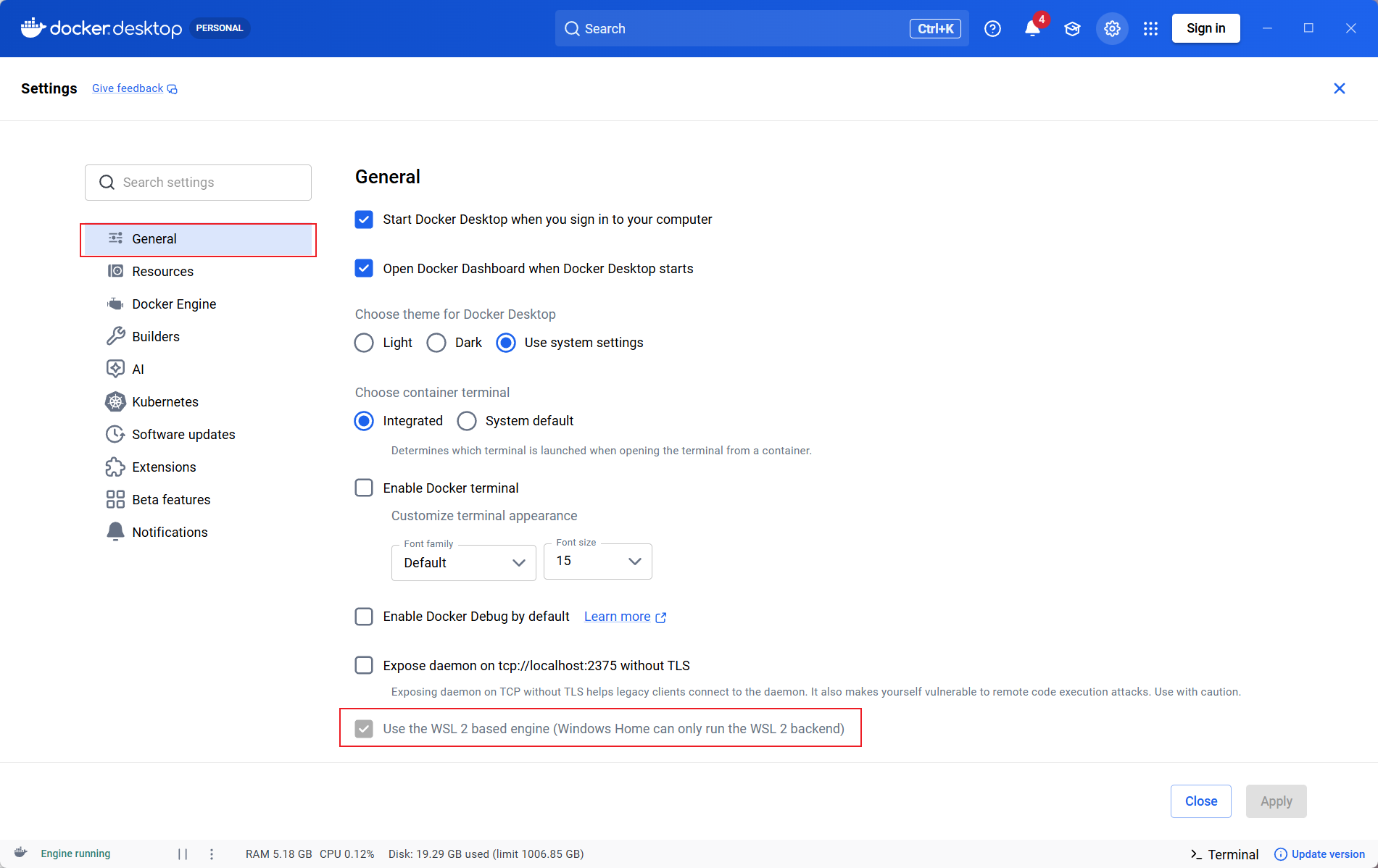
17
|
+
|
|
18
|
+
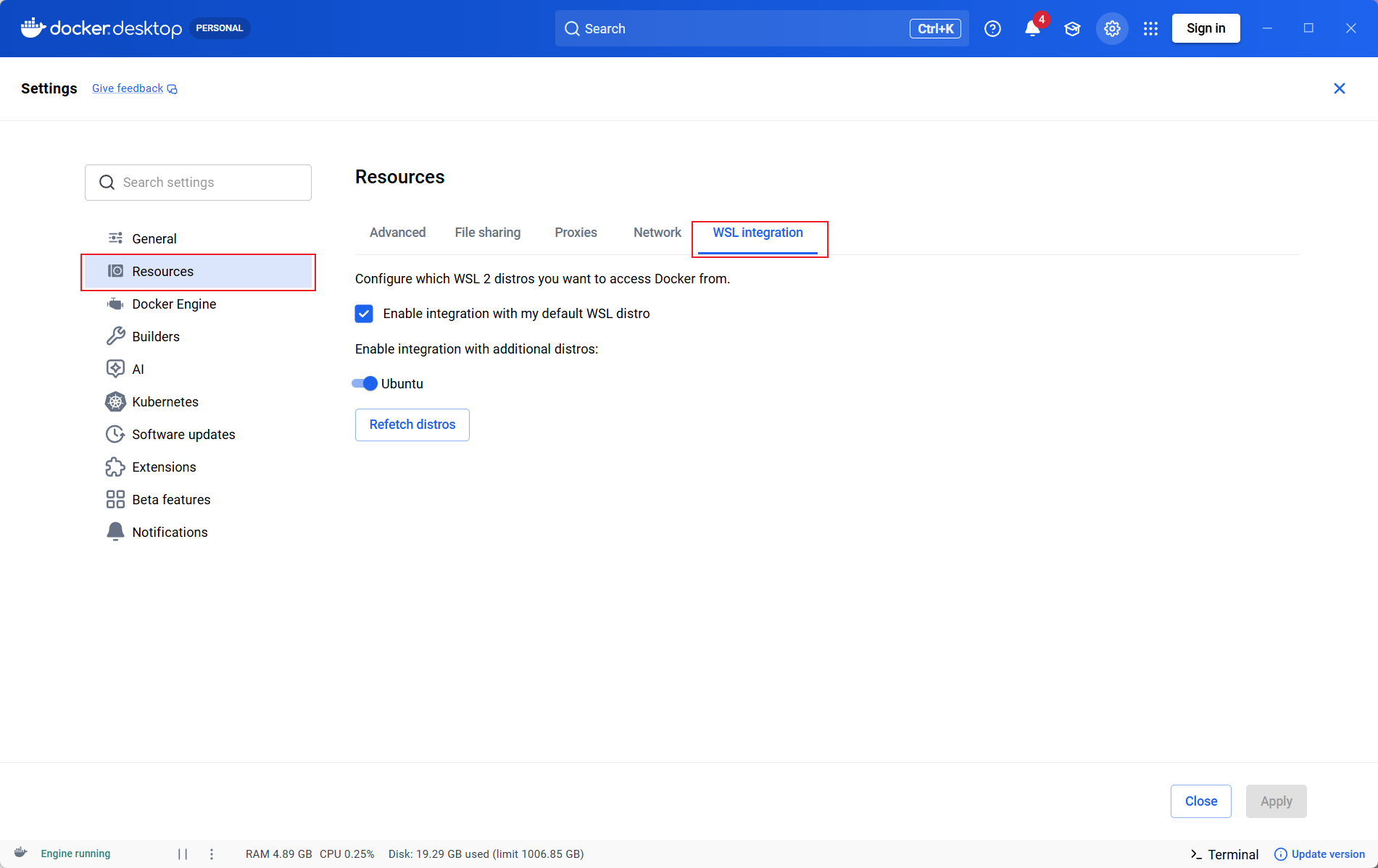
- Dependency installation, build, startup, and log troubleshooting are closer to the actual server workflow
|
|
19
|
+
- After Docker Desktop WSL integration is enabled, you can run `docker` commands directly inside WSL
|
|
20
|
+
- You can avoid extra issues from native Windows path formats, file permissions, symlinks, and native dependency builds
|
|
21
|
+
- It is better for AI Agent workflows. When an agent runs commands such as `nb`, `yarn`, or `docker`, it uses one consistent Linux file path, shell syntax, and runtime environment, which makes troubleshooting more direct
|
|
22
|
+
|
|
23
|
+
If the WSL-based local development environment is not ready yet, see [Set Up a Local Development Environment on Windows with WSL](./windows-wsl.md).
|
|
24
|
+
|
|
25
|
+
Recommended setup:
|
|
26
|
+
|
|
27
|
+
- Windows 10 / 11
|
|
28
|
+
- WSL 2
|
|
29
|
+
- Ubuntu LTS
|
|
30
|
+
- Node.js >= 22
|
|
31
|
+
- Yarn 1.x
|
|
32
|
+
- Docker Desktop, if you plan to install NocoBase with Docker
|
|
33
|
+
|
|
34
|
+
Usually, Node.js, Yarn, and NocoBase CLI should all be installed inside WSL. If you use Docker Desktop, enable WSL integration in Docker Desktop so WSL can access Docker.
|
|
35
|
+
|
|
36
|
+
Check the environment:
|
|
37
|
+
|
|
38
|
+
```bash
|
|
39
|
+
node -v
|
|
40
|
+
yarn -v
|
|
41
|
+
docker version
|
|
42
|
+
```
|
|
43
|
+
|
|
44
|
+
:::tip Note
|
|
45
|
+
|
|
46
|
+
NocoBase can also be installed on Windows Server. WSL is recommended here for local development and AI Agent setup on personal computers. It does not mean Windows Server cannot be used for deployment.
|
|
47
|
+
|
|
48
|
+
:::
|
|
49
|
+
|
|
50
|
+
## macOS
|
|
51
|
+
|
|
52
|
+
On macOS, you can use the local terminal directly.
|
|
53
|
+
|
|
54
|
+
Prepare:
|
|
55
|
+
|
|
56
|
+
- Node.js >= 22
|
|
57
|
+
- Yarn 1.x
|
|
58
|
+
- Docker Desktop, OrbStack, or Colima, if you plan to install NocoBase with Docker
|
|
59
|
+
|
|
60
|
+
Check the environment:
|
|
61
|
+
|
|
62
|
+
```bash
|
|
63
|
+
node -v
|
|
64
|
+
yarn -v
|
|
65
|
+
docker version
|
|
66
|
+
```
|
|
67
|
+
|
|
68
|
+
If you do not use Docker, you can skip `docker version`.
|
|
69
|
+
|
|
70
|
+
## Linux
|
|
71
|
+
|
|
72
|
+
Linux can be used directly as a local development environment. Ubuntu, Debian, or other common distributions are recommended.
|
|
73
|
+
|
|
74
|
+
Prepare:
|
|
75
|
+
|
|
76
|
+
- Node.js >= 22
|
|
77
|
+
- Yarn 1.x
|
|
78
|
+
- Docker Engine, if you plan to install NocoBase with Docker
|
|
79
|
+
|
|
80
|
+
Check the environment:
|
|
81
|
+
|
|
82
|
+
```bash
|
|
83
|
+
node -v
|
|
84
|
+
yarn -v
|
|
85
|
+
docker version
|
|
86
|
+
```
|
|
87
|
+
|
|
88
|
+
If you do not use Docker, you can skip `docker version`.
|
|
89
|
+
|
|
90
|
+
## Next Steps
|
|
91
|
+
|
|
92
|
+
- [Installation and Version Comparison](../get-started/quickstart.md) — Compare installation methods and version channels first
|
|
93
|
+
- [Install NocoBase App](./install-nocobase-app.md) — Initialize a local app with NocoBase CLI
|
|
94
|
+
- [AI Agent Integration Guide](./quick-start.mdx) — Let an AI Agent connect to and operate NocoBase
|
|
@@ -0,0 +1,105 @@
|
|
|
1
|
+
---
|
|
2
|
+
title: Upgrade NocoBase App
|
|
3
|
+
description: Upgrade a NocoBase app saved as a CLI env with nb app upgrade, including env confirmation, upgrade commands, target versions, and verification.
|
|
4
|
+
---
|
|
5
|
+
|
|
6
|
+
# Upgrade NocoBase App
|
|
7
|
+
|
|
8
|
+
## Step 1: Confirm the Current Env
|
|
9
|
+
|
|
10
|
+
```bash
|
|
11
|
+
nb env current
|
|
12
|
+
```
|
|
13
|
+
|
|
14
|
+
If you are not sure which envs are available, list them first:
|
|
15
|
+
|
|
16
|
+
```bash
|
|
17
|
+
nb env list
|
|
18
|
+
```
|
|
19
|
+
|
|
20
|
+
If the current env is not the app you want to upgrade, switch to the target env:
|
|
21
|
+
|
|
22
|
+
```bash
|
|
23
|
+
nb env use <env-name>
|
|
24
|
+
```
|
|
25
|
+
|
|
26
|
+
## Step 2: Run the Upgrade
|
|
27
|
+
|
|
28
|
+
:::warning Note
|
|
29
|
+
|
|
30
|
+
By default, upgrade downloads the app source code or Docker image again.
|
|
31
|
+
|
|
32
|
+
For npm / Git envs, the `source/` directory is deleted and downloaded again. Do not put files you need to keep in `source/`.
|
|
33
|
+
|
|
34
|
+
If you have already prepared the source code or Docker image manually and do not want CLI to download it again, add `--skip-download` after the command.
|
|
35
|
+
|
|
36
|
+
:::
|
|
37
|
+
|
|
38
|
+
The default upgrade command is:
|
|
39
|
+
|
|
40
|
+
```bash
|
|
41
|
+
nb app upgrade
|
|
42
|
+
```
|
|
43
|
+
|
|
44
|
+
This command usually completes these steps:
|
|
45
|
+
|
|
46
|
+
1. Stop the current app
|
|
47
|
+
2. Download and replace the saved source or image
|
|
48
|
+
3. Sync commercial plugins
|
|
49
|
+
4. Upgrade and start the app
|
|
50
|
+
5. Refresh env runtime information
|
|
51
|
+
|
|
52
|
+
In scripts, CI, or AI Agent sessions, pass `--force` explicitly:
|
|
53
|
+
|
|
54
|
+
```bash
|
|
55
|
+
nb app upgrade --force
|
|
56
|
+
```
|
|
57
|
+
|
|
58
|
+
If the app to upgrade is not the current env, specify the env:
|
|
59
|
+
|
|
60
|
+
```bash
|
|
61
|
+
nb app upgrade --env app1 --yes --force
|
|
62
|
+
```
|
|
63
|
+
|
|
64
|
+
### Upgrade to a Specific Version
|
|
65
|
+
|
|
66
|
+
Use `--version` to upgrade to a specific version channel:
|
|
67
|
+
|
|
68
|
+
```bash
|
|
69
|
+
nb app upgrade --version beta
|
|
70
|
+
```
|
|
71
|
+
|
|
72
|
+
You can also pass an exact version:
|
|
73
|
+
|
|
74
|
+
```bash
|
|
75
|
+
nb app upgrade --version 2.1.0-beta.24
|
|
76
|
+
```
|
|
77
|
+
|
|
78
|
+
After a successful upgrade, CLI writes the target version back to the env configuration, so later upgrades or recovery flows can reuse it.
|
|
79
|
+
|
|
80
|
+
### Skip Download
|
|
81
|
+
|
|
82
|
+
If you have already updated the source code or Docker image, and only want to run upgrade and start based on the current content, add `--skip-download`:
|
|
83
|
+
|
|
84
|
+
```bash
|
|
85
|
+
nb app upgrade --skip-download
|
|
86
|
+
```
|
|
87
|
+
|
|
88
|
+
This skips source or image download and also skips commercial plugin sync. Use it only when the target version has already been prepared manually.
|
|
89
|
+
|
|
90
|
+
## Step 3: Verify the Result
|
|
91
|
+
|
|
92
|
+
After the upgrade, check env runtime and app logs:
|
|
93
|
+
|
|
94
|
+
```bash
|
|
95
|
+
nb env info
|
|
96
|
+
nb app logs
|
|
97
|
+
```
|
|
98
|
+
|
|
99
|
+
Then open the app and confirm that the administrator account can sign in. If you want an AI Agent to continue working with this app, start a new AI Agent session or restart the current one so it can read the latest env information.
|
|
100
|
+
|
|
101
|
+
## Related Links
|
|
102
|
+
|
|
103
|
+
- [Manage apps](../nocobase-cli/operations/manage-app.md) — Start, stop, restart, view logs, and upgrade apps
|
|
104
|
+
- [`nb app upgrade` command reference](../api/cli/app/upgrade.md) — View all upgrade command options
|
|
105
|
+
- [Multiple environment management](../nocobase-cli/operations/multi-environment.md) — Confirm, switch, and maintain multiple CLI envs
|
|
@@ -0,0 +1,409 @@
|
|
|
1
|
+
---
|
|
2
|
+
title: Set Up a Local Development Environment on Windows with WSL
|
|
3
|
+
description: Prepare Ubuntu, Docker Desktop, Node.js, Yarn, and Codex CLI with WSL 2 on Windows for NocoBase local development and AI Agent workflows.
|
|
4
|
+
---
|
|
5
|
+
|
|
6
|
+
# Set Up a Local Development Environment on Windows with WSL
|
|
7
|
+
|
|
8
|
+
For local NocoBase development on Windows, we recommend preparing WSL 2 first. This lets Node.js, Yarn, NocoBase CLI, Docker commands, and AI Agents run in the same Linux shell, with paths, permissions, and native dependency builds closer to common Linux deployment environments.
|
|
9
|
+
|
|
10
|
+
If you are not sure whether you need WSL, see [Local Development Setup](./local-development-setup.md) first.
|
|
11
|
+
|
|
12
|
+
## Before You Start
|
|
13
|
+
|
|
14
|
+
Before installing WSL, check your Windows version and virtualization status.
|
|
15
|
+
|
|
16
|
+
### Check the Windows Version
|
|
17
|
+
|
|
18
|
+
Press `Win + R`, enter `winver`, and confirm that your system meets one of the following requirements:
|
|
19
|
+
|
|
20
|
+
- Windows 11
|
|
21
|
+
- Windows 10 version 2004 or later, Build 19041 or later
|
|
22
|
+
|
|
23
|
+
If your version is older, upgrade Windows before continuing.
|
|
24
|
+
|
|
25
|
+
### Check Virtualization
|
|
26
|
+
|
|
27
|
+
Open Task Manager, go to Performance / CPU, and confirm that Virtualization is shown as Enabled.
|
|
28
|
+
|
|
29
|
+
If virtualization is not enabled, enable it in BIOS / UEFI. The option name varies by vendor, such as Intel VT-x, Intel Virtualization Technology, AMD-V, or SVM Mode.
|
|
30
|
+
|
|
31
|
+
## Step 1: Install WSL 2
|
|
32
|
+
|
|
33
|
+
Open PowerShell as administrator:
|
|
34
|
+
|
|
35
|
+
1. Open the Windows Start menu
|
|
36
|
+
2. Search for `PowerShell`
|
|
37
|
+
3. Right-click and choose Run as administrator
|
|
38
|
+
|
|
39
|
+
Run:
|
|
40
|
+
|
|
41
|
+
```powershell
|
|
42
|
+
wsl --install
|
|
43
|
+
```
|
|
44
|
+
|
|
45
|
+
Restart your computer after installation.
|
|
46
|
+
|
|
47
|
+
By default, this command installs Ubuntu. When Ubuntu starts for the first time, it asks you to create a Linux username and password. This username and password are only used inside WSL and do not need to match your Windows account.
|
|
48
|
+
|
|
49
|
+
To install a specific distribution, list the available distributions first:
|
|
50
|
+
|
|
51
|
+
```powershell
|
|
52
|
+
wsl --list --online
|
|
53
|
+
```
|
|
54
|
+
|
|
55
|
+
Then install a distribution, such as Ubuntu:
|
|
56
|
+
|
|
57
|
+
```powershell
|
|
58
|
+
wsl --install -d Ubuntu
|
|
59
|
+
```
|
|
60
|
+
|
|
61
|
+
## Step 2: Confirm the WSL Version
|
|
62
|
+
|
|
63
|
+
Run the following command in PowerShell:
|
|
64
|
+
|
|
65
|
+
```powershell
|
|
66
|
+
wsl --list --verbose
|
|
67
|
+
```
|
|
68
|
+
|
|
69
|
+
The output should look like this:
|
|
70
|
+
|
|
71
|
+
```text
|
|
72
|
+
NAME STATE VERSION
|
|
73
|
+
* Ubuntu Running 2
|
|
74
|
+
```
|
|
75
|
+
|
|
76
|
+
Confirm that `VERSION` is `2`. If a distribution is still using WSL 1, convert it to WSL 2:
|
|
77
|
+
|
|
78
|
+
```powershell
|
|
79
|
+
wsl --set-version Ubuntu 2
|
|
80
|
+
```
|
|
81
|
+
|
|
82
|
+
We also recommend setting WSL 2 as the default version for newly installed distributions:
|
|
83
|
+
|
|
84
|
+
```powershell
|
|
85
|
+
wsl --set-default-version 2
|
|
86
|
+
```
|
|
87
|
+
|
|
88
|
+
You can also update WSL once:
|
|
89
|
+
|
|
90
|
+
```powershell
|
|
91
|
+
wsl --update
|
|
92
|
+
```
|
|
93
|
+
|
|
94
|
+
## Step 3: Install Docker Desktop
|
|
95
|
+
|
|
96
|
+
If you plan to install or run NocoBase with Docker, install Docker Desktop for Windows.
|
|
97
|
+
|
|
98
|
+
Download the installer from the Docker documentation:
|
|
99
|
+
|
|
100
|
+
- [Install Docker Desktop on Windows](https://docs.docker.com/desktop/setup/install/windows-install/)
|
|
101
|
+
|
|
102
|
+
During installation, pay attention to these options:
|
|
103
|
+
|
|
104
|
+
1. Usually, choose `Per-user` for personal local development
|
|
105
|
+
2. On the configuration page, select `Use WSL 2 instead of Hyper-V`
|
|
106
|
+
3. After installation, start Docker Desktop from the Windows Start menu
|
|
107
|
+
4. On first launch, read and accept the Docker Desktop Subscription Service Agreement
|
|
108
|
+
|
|
109
|
+
## Step 4: Enable Docker WSL Integration
|
|
110
|
+
|
|
111
|
+
After Docker Desktop starts, first confirm that the WSL 2 backend is enabled:
|
|
112
|
+
|
|
113
|
+
1. Go to Docker Desktop / Settings / General
|
|
114
|
+
2. Confirm that Use the WSL 2 based engine is enabled
|
|
115
|
+
3. Click Apply
|
|
116
|
+
|
|
117
|
+
|
|
118
|
+
|
|
119
|
+
Then enable distribution integration:
|
|
120
|
+
|
|
121
|
+
1. Go to Docker Desktop / Settings / Resources / WSL Integration
|
|
122
|
+
2. Enable Enable integration with my default WSL distro
|
|
123
|
+
3. Find the distribution you want to use, such as `Ubuntu`
|
|
124
|
+
4. Enable the switch for that distribution
|
|
125
|
+
5. Click Apply & restart or Apply
|
|
126
|
+
|
|
127
|
+
|
|
128
|
+
|
|
129
|
+
If WSL Integration does not appear under Resources, Docker Desktop is usually in Windows containers mode. Click the Docker icon in the Windows system tray, switch to Linux containers, and check again.
|
|
130
|
+
|
|
131
|
+
## Step 5: Verify Docker
|
|
132
|
+
|
|
133
|
+
First verify from PowerShell:
|
|
134
|
+
|
|
135
|
+
```powershell
|
|
136
|
+
wsl --list --verbose
|
|
137
|
+
docker version
|
|
138
|
+
docker compose version
|
|
139
|
+
docker run hello-world
|
|
140
|
+
```
|
|
141
|
+
|
|
142
|
+
Then enter WSL:
|
|
143
|
+
|
|
144
|
+
```powershell
|
|
145
|
+
wsl
|
|
146
|
+
```
|
|
147
|
+
|
|
148
|
+
Run the following commands inside WSL:
|
|
149
|
+
|
|
150
|
+
```bash
|
|
151
|
+
docker version
|
|
152
|
+
docker compose version
|
|
153
|
+
docker run hello-world
|
|
154
|
+
```
|
|
155
|
+
|
|
156
|
+
If the `hello-world` container is pulled and runs successfully, Docker Desktop and WSL 2 integration are working.
|
|
157
|
+
|
|
158
|
+
## Step 6: Install Node.js and Yarn in WSL
|
|
159
|
+
|
|
160
|
+
WSL itself is not a Node.js runtime environment. Ubuntu installed through `wsl --install` usually does not include Node.js or npm, so install them inside the WSL distribution.
|
|
161
|
+
|
|
162
|
+
Enter WSL from PowerShell:
|
|
163
|
+
|
|
164
|
+
```powershell
|
|
165
|
+
wsl
|
|
166
|
+
```
|
|
167
|
+
|
|
168
|
+
All commands below are run in the WSL terminal.
|
|
169
|
+
|
|
170
|
+
First check whether Node.js is already installed:
|
|
171
|
+
|
|
172
|
+
```bash
|
|
173
|
+
node -v
|
|
174
|
+
npm -v
|
|
175
|
+
```
|
|
176
|
+
|
|
177
|
+
If you see `command not found`, install Node.js with one of the following methods.
|
|
178
|
+
|
|
179
|
+
### Option A: Install Node.js 22 with NodeSource
|
|
180
|
+
|
|
181
|
+
If this WSL environment only needs one shared Node.js version, NodeSource is recommended.
|
|
182
|
+
|
|
183
|
+
```bash
|
|
184
|
+
sudo apt update
|
|
185
|
+
sudo apt install -y curl
|
|
186
|
+
curl -fsSL https://deb.nodesource.com/setup_22.x -o nodesource_setup.sh
|
|
187
|
+
sudo -E bash nodesource_setup.sh
|
|
188
|
+
sudo apt install -y nodejs
|
|
189
|
+
```
|
|
190
|
+
|
|
191
|
+
Verify the installation:
|
|
192
|
+
|
|
193
|
+
```bash
|
|
194
|
+
node -v
|
|
195
|
+
npm -v
|
|
196
|
+
npx -v
|
|
197
|
+
```
|
|
198
|
+
|
|
199
|
+
### Option B: Install Node.js 22 with nvm
|
|
200
|
+
|
|
201
|
+
If you need to switch Node.js versions across projects, or if a project uses `.nvmrc` to pin the version, use nvm.
|
|
202
|
+
|
|
203
|
+
```bash
|
|
204
|
+
sudo apt update
|
|
205
|
+
sudo apt install -y curl ca-certificates
|
|
206
|
+
curl -o- https://raw.githubusercontent.com/nvm-sh/nvm/v0.40.5/install.sh | bash
|
|
207
|
+
source ~/.bashrc
|
|
208
|
+
nvm install 22
|
|
209
|
+
nvm use 22
|
|
210
|
+
```
|
|
211
|
+
|
|
212
|
+
Verify the installation:
|
|
213
|
+
|
|
214
|
+
```bash
|
|
215
|
+
node -v
|
|
216
|
+
npm -v
|
|
217
|
+
npx -v
|
|
218
|
+
```
|
|
219
|
+
|
|
220
|
+
If the project root needs to pin Node.js 22, create `.nvmrc`:
|
|
221
|
+
|
|
222
|
+
```bash
|
|
223
|
+
echo "22" > .nvmrc
|
|
224
|
+
nvm install
|
|
225
|
+
nvm use
|
|
226
|
+
```
|
|
227
|
+
|
|
228
|
+
Later, run this command after entering the project directory:
|
|
229
|
+
|
|
230
|
+
```bash
|
|
231
|
+
nvm use
|
|
232
|
+
```
|
|
233
|
+
|
|
234
|
+
This switches to the version specified by the project.
|
|
235
|
+
|
|
236
|
+
:::warning Note
|
|
237
|
+
|
|
238
|
+
Choose either NodeSource or nvm. We do not recommend mixing both Node.js management methods in the same WSL user environment.
|
|
239
|
+
|
|
240
|
+
:::
|
|
241
|
+
|
|
242
|
+
### Install Yarn 1.x
|
|
243
|
+
|
|
244
|
+
NocoBase local development requires Yarn 1.x. After Node.js is installed, you can enable Yarn through Corepack:
|
|
245
|
+
|
|
246
|
+
```bash
|
|
247
|
+
corepack enable
|
|
248
|
+
corepack prepare yarn@1.22.22 --activate
|
|
249
|
+
yarn -v
|
|
250
|
+
```
|
|
251
|
+
|
|
252
|
+
If Corepack is not available in your environment, install Yarn with npm:
|
|
253
|
+
|
|
254
|
+
```bash
|
|
255
|
+
npm install -g yarn@1.22.22
|
|
256
|
+
yarn -v
|
|
257
|
+
```
|
|
258
|
+
|
|
259
|
+
## Step 7: Install Codex CLI
|
|
260
|
+
|
|
261
|
+
Codex CLI can also be used in the native Windows command line. In this guide, it is installed inside WSL so Codex and the NocoBase local toolchain stay in the same Linux environment. When Codex runs commands such as `nb`, `yarn`, or `docker`, it uses the same file paths, shell syntax, and runtime environment.
|
|
262
|
+
|
|
263
|
+
Confirm that you are currently inside WSL:
|
|
264
|
+
|
|
265
|
+
```bash
|
|
266
|
+
echo $WSL_DISTRO_NAME
|
|
267
|
+
```
|
|
268
|
+
|
|
269
|
+
If it outputs a distribution name such as `Ubuntu`, you are inside WSL.
|
|
270
|
+
|
|
271
|
+
Run the Codex CLI installer inside WSL:
|
|
272
|
+
|
|
273
|
+
```bash
|
|
274
|
+
curl -fsSL https://chatgpt.com/codex/install.sh | sh
|
|
275
|
+
```
|
|
276
|
+
|
|
277
|
+
For non-interactive installation, use:
|
|
278
|
+
|
|
279
|
+
```bash
|
|
280
|
+
curl -fsSL https://chatgpt.com/codex/install.sh | CODEX_NON_INTERACTIVE=1 sh
|
|
281
|
+
```
|
|
282
|
+
|
|
283
|
+
After installation, run:
|
|
284
|
+
|
|
285
|
+
```bash
|
|
286
|
+
codex
|
|
287
|
+
```
|
|
288
|
+
|
|
289
|
+
The first run prompts you to sign in. Follow the prompts and authenticate with a ChatGPT account or OpenAI API key.
|
|
290
|
+
|
|
291
|
+
Verify that the Codex command is available:
|
|
292
|
+
|
|
293
|
+
```bash
|
|
294
|
+
codex --version
|
|
295
|
+
```
|
|
296
|
+
|
|
297
|
+
We recommend starting Codex from a project directory inside WSL:
|
|
298
|
+
|
|
299
|
+
```bash
|
|
300
|
+
mkdir -p ~/projects
|
|
301
|
+
cd ~/projects/my-app
|
|
302
|
+
codex
|
|
303
|
+
```
|
|
304
|
+
|
|
305
|
+
:::tip Note
|
|
306
|
+
|
|
307
|
+
Because Codex is installed inside WSL, run `codex` from the WSL terminal afterward. If you run `codex` from Windows PowerShell, it uses the native Windows command-line environment, which is not the same environment prepared in this guide.
|
|
308
|
+
|
|
309
|
+
:::
|
|
310
|
+
|
|
311
|
+
## Where to Put Project Files
|
|
312
|
+
|
|
313
|
+
We recommend putting project files inside the WSL filesystem, for example:
|
|
314
|
+
|
|
315
|
+
```bash
|
|
316
|
+
~/projects/my-app
|
|
317
|
+
```
|
|
318
|
+
|
|
319
|
+
Avoid using the Windows mounted path as the default project location, for example:
|
|
320
|
+
|
|
321
|
+
```bash
|
|
322
|
+
/mnt/c/Users/<your-name>/projects/my-app
|
|
323
|
+
```
|
|
324
|
+
|
|
325
|
+
This usually gives better filesystem performance and reduces symlink and permission issues. The difference is especially visible for projects with many dependency files, such as Node.js, Python, Java, or Go projects.
|
|
326
|
+
|
|
327
|
+
To access WSL files from Windows Explorer, open:
|
|
328
|
+
|
|
329
|
+
```text
|
|
330
|
+
\\wsl$\Ubuntu\home\<your-name>
|
|
331
|
+
```
|
|
332
|
+
|
|
333
|
+
## FAQ
|
|
334
|
+
|
|
335
|
+
### WSL Says the docker Command Is Not Found
|
|
336
|
+
|
|
337
|
+
First confirm that the distribution uses WSL 2:
|
|
338
|
+
|
|
339
|
+
```powershell
|
|
340
|
+
wsl --list --verbose
|
|
341
|
+
```
|
|
342
|
+
|
|
343
|
+
If it is WSL 1, convert it to WSL 2:
|
|
344
|
+
|
|
345
|
+
```powershell
|
|
346
|
+
wsl --set-version Ubuntu 2
|
|
347
|
+
```
|
|
348
|
+
|
|
349
|
+
Then return to Docker Desktop, go to Settings / Resources / WSL Integration, enable integration for the corresponding distribution, and apply the change.
|
|
350
|
+
|
|
351
|
+
### WSL Integration Is Missing
|
|
352
|
+
|
|
353
|
+
Usually, Docker Desktop is currently in Windows containers mode.
|
|
354
|
+
|
|
355
|
+
You can handle it like this:
|
|
356
|
+
|
|
357
|
+
1. Click the Docker icon in the Windows system tray
|
|
358
|
+
2. Choose Switch to Linux containers
|
|
359
|
+
3. Wait for Docker Desktop to restart
|
|
360
|
+
4. Go to Settings / Resources / WSL Integration again
|
|
361
|
+
|
|
362
|
+
### Docker Desktop Fails to Start or WSL Looks Abnormal
|
|
363
|
+
|
|
364
|
+
Try this first:
|
|
365
|
+
|
|
366
|
+
```powershell
|
|
367
|
+
wsl --shutdown
|
|
368
|
+
wsl --update
|
|
369
|
+
```
|
|
370
|
+
|
|
371
|
+
Then restart Docker Desktop.
|
|
372
|
+
|
|
373
|
+
### Docker Engine Was Manually Installed in WSL
|
|
374
|
+
|
|
375
|
+
Docker recommends uninstalling Docker Engine or Docker CLI that was installed directly inside the WSL Linux distribution before installing Docker Desktop. Otherwise, it may conflict with Docker Desktop WSL integration.
|
|
376
|
+
|
|
377
|
+
Usually, uninstall `docker-ce`, `docker-ce-cli`, `containerd.io`, and related packages inside the WSL distribution, and then use the Docker CLI integration provided by Docker Desktop.
|
|
378
|
+
|
|
379
|
+
### WSL Says the codex Command Is Not Found
|
|
380
|
+
|
|
381
|
+
First confirm that you are running the command inside WSL, not PowerShell:
|
|
382
|
+
|
|
383
|
+
```bash
|
|
384
|
+
echo $WSL_DISTRO_NAME
|
|
385
|
+
```
|
|
386
|
+
|
|
387
|
+
Then check whether Codex is in `PATH`:
|
|
388
|
+
|
|
389
|
+
```bash
|
|
390
|
+
which codex
|
|
391
|
+
```
|
|
392
|
+
|
|
393
|
+
If it cannot be found, reopen the WSL terminal or run the installer again:
|
|
394
|
+
|
|
395
|
+
```bash
|
|
396
|
+
curl -fsSL https://chatgpt.com/codex/install.sh | sh
|
|
397
|
+
```
|
|
398
|
+
|
|
399
|
+
## Official References
|
|
400
|
+
|
|
401
|
+
- [Microsoft Learn: How to install Linux on Windows with WSL](https://learn.microsoft.com/en-us/windows/wsl/install)
|
|
402
|
+
- [Microsoft Learn: Install Node.js on Windows Subsystem for Linux](https://learn.microsoft.com/en-us/windows/dev-environment/javascript/nodejs-on-wsl)
|
|
403
|
+
- [Docker Docs: Install Docker Desktop on Windows](https://docs.docker.com/desktop/setup/install/windows-install/)
|
|
404
|
+
- [Docker Docs: Docker Desktop WSL 2 backend on Windows](https://docs.docker.com/desktop/features/wsl/)
|
|
405
|
+
- [Docker Docs: Change your Docker Desktop settings](https://docs.docker.com/desktop/settings-and-maintenance/settings/)
|
|
406
|
+
- [OpenAI Developers: Codex CLI](https://developers.openai.com/codex/cli)
|
|
407
|
+
- [OpenAI Developers: Codex on Windows](https://developers.openai.com/codex/windows)
|
|
408
|
+
- [nvm: Node Version Manager](https://github.com/nvm-sh/nvm)
|
|
409
|
+
- [npm Docs: Downloading and installing Node.js and npm](https://docs.npmjs.com/downloading-and-installing-node-js-and-npm/)
|
|
@@ -74,7 +74,7 @@ By default, the CLI organizes local files under `app-path` using the following c
|
|
|
74
74
|
|
|
75
75
|
Typically:
|
|
76
76
|
|
|
77
|
-
- `source/` mainly corresponds to the local app directory for npm / Git envs. For Docker envs, the CLI also keeps this default path derivation, but most of the time you do not need to care about it manually
|
|
77
|
+
- `source/` mainly corresponds to the local app directory for npm / Git envs. For Docker envs, the CLI also keeps this default path derivation, but most of the time you do not need to care about it manually. Pay special attention during upgrades: the `source/` directory will be deleted and downloaded again, so do not put files you need to keep here
|
|
78
78
|
- `storage/` is used for runtime data, such as built-in database data, plugins, logs, and more
|
|
79
79
|
- `.env` is an optional app environment variable file. You only need to add it in `<app-path>/.env` when you want to customize environment variables; if this file exists, Docker, npm, and Git install sources will all read it by default
|
|
80
80
|
|
|
@@ -11,6 +11,14 @@ Except for functionality validation or purely experimental scenarios, **we stron
|
|
|
11
11
|
|
|
12
12
|
The system configuration and capacity planning of those services must be evaluated and tuned separately based on the **actual data size, workload, and concurrency level**.
|
|
13
13
|
|
|
14
|
+
## Operating System
|
|
15
|
+
|
|
16
|
+
For production environments, Linux servers are recommended, such as Ubuntu LTS, Debian, Rocky Linux, or AlmaLinux. Docker, reverse proxy, process management, logging, and backup workflows are more mature on Linux and are easier to integrate with common cloud server environments.
|
|
17
|
+
|
|
18
|
+
NocoBase can also be installed on Windows Server. If you choose Windows Server, confirm Node.js, database, reverse proxy, process supervision, backup, file permissions, firewall, and related operations based on your actual deployment method.
|
|
19
|
+
|
|
20
|
+
macOS is usually more suitable for local development and testing, and is not recommended as a production server. If you are setting up NocoBase locally for development or AI Agent usage, see [Local Development Setup](../ai/local-development-setup.md).
|
|
21
|
+
|
|
14
22
|
## Single-Node Deployment Mode
|
|
15
23
|
|
|
16
24
|
Single-node deployment mode means the NocoBase application service runs on a single server or container instance.
|
|
@@ -85,4 +93,4 @@ In cluster mode, the recommended hardware configuration for each application nod
|
|
|
85
93
|
Recommendations for production environments:
|
|
86
94
|
|
|
87
95
|
- Adjust the node count dynamically based on monitoring metrics (CPU, memory, request latency, and so on).
|
|
88
|
-
- Reserve a resource buffer to handle traffic spikes.
|
|
96
|
+
- Reserve a resource buffer to handle traffic spikes.
|
package/dist/externalVersion.js
CHANGED
|
@@ -8,22 +8,22 @@
|
|
|
8
8
|
*/
|
|
9
9
|
|
|
10
10
|
module.exports = {
|
|
11
|
-
"@nocobase/plugin-acl": "2.1.
|
|
12
|
-
"@nocobase/plugin-workflow": "2.1.
|
|
13
|
-
"@nocobase/client": "2.1.
|
|
14
|
-
"@nocobase/utils": "2.1.
|
|
15
|
-
"@nocobase/client-v2": "2.1.
|
|
16
|
-
"@nocobase/database": "2.1.
|
|
17
|
-
"@nocobase/server": "2.1.
|
|
18
|
-
"@nocobase/plugin-file-manager": "2.1.
|
|
19
|
-
"@nocobase/actions": "2.1.
|
|
20
|
-
"@nocobase/ai": "2.1.
|
|
11
|
+
"@nocobase/plugin-acl": "2.1.4",
|
|
12
|
+
"@nocobase/plugin-workflow": "2.1.4",
|
|
13
|
+
"@nocobase/client": "2.1.4",
|
|
14
|
+
"@nocobase/utils": "2.1.4",
|
|
15
|
+
"@nocobase/client-v2": "2.1.4",
|
|
16
|
+
"@nocobase/database": "2.1.4",
|
|
17
|
+
"@nocobase/server": "2.1.4",
|
|
18
|
+
"@nocobase/plugin-file-manager": "2.1.4",
|
|
19
|
+
"@nocobase/actions": "2.1.4",
|
|
20
|
+
"@nocobase/ai": "2.1.4",
|
|
21
21
|
"langchain": "1.2.39",
|
|
22
22
|
"react": "18.2.0",
|
|
23
23
|
"antd": "5.24.2",
|
|
24
24
|
"@formily/core": "2.3.7",
|
|
25
25
|
"@formily/react": "2.3.7",
|
|
26
|
-
"@nocobase/flow-engine": "2.1.
|
|
26
|
+
"@nocobase/flow-engine": "2.1.4",
|
|
27
27
|
"@ant-design/icons": "5.6.1",
|
|
28
28
|
"@formily/antd-v5": "1.2.3",
|
|
29
29
|
"@formily/shared": "2.3.7",
|
|
@@ -33,20 +33,20 @@ module.exports = {
|
|
|
33
33
|
"lodash": "4.18.1",
|
|
34
34
|
"@langchain/core": "1.1.48",
|
|
35
35
|
"@langchain/langgraph": "1.1.5",
|
|
36
|
-
"@nocobase/cache": "2.1.
|
|
36
|
+
"@nocobase/cache": "2.1.4",
|
|
37
37
|
"@langchain/anthropic": "1.3.17",
|
|
38
38
|
"@langchain/openai": "1.2.7",
|
|
39
39
|
"@langchain/deepseek": "1.0.11",
|
|
40
40
|
"@langchain/google-genai": "2.1.18",
|
|
41
41
|
"@langchain/ollama": "1.2.7",
|
|
42
|
-
"@nocobase/acl": "2.1.
|
|
43
|
-
"@nocobase/resourcer": "2.1.
|
|
42
|
+
"@nocobase/acl": "2.1.4",
|
|
43
|
+
"@nocobase/resourcer": "2.1.4",
|
|
44
44
|
"@emotion/css": "11.13.0",
|
|
45
45
|
"dayjs": "1.11.13",
|
|
46
46
|
"react-i18next": "11.18.6",
|
|
47
|
-
"@nocobase/plugin-data-source-manager": "2.1.
|
|
47
|
+
"@nocobase/plugin-data-source-manager": "2.1.4",
|
|
48
48
|
"@langchain/langgraph-checkpoint": "1.0.0",
|
|
49
|
-
"@nocobase/data-source-manager": "2.1.
|
|
49
|
+
"@nocobase/data-source-manager": "2.1.4",
|
|
50
50
|
"react-dom": "18.2.0",
|
|
51
51
|
"axios": "1.7.7"
|
|
52
52
|
};
|
|
@@ -1 +1 @@
|
|
|
1
|
-
{"name":"@langchain/xai","version":"1.3.3","description":"xAI integration for LangChain.js","author":"LangChain","license":"MIT","type":"module","engines":{"node":">=20"},"repository":{"type":"git","url":"git@github.com:langchain-ai/langchainjs.git"},"homepage":"https://github.com/langchain-ai/langchainjs/tree/main/libs/langchain-xai/","dependencies":{"@langchain/openai":"1.2.7"},"peerDependencies":{"@langchain/core":"^1.0.0"},"devDependencies":{"@tsconfig/recommended":"^1.0.3","@types/uuid":"^9","@vitest/coverage-v8":"^3.2.4","dotenv":"^16.3.1","dpdm":"^3.14.0","eslint":"^9.34.0","prettier":"^3.5.0","typescript":"~5.8.3","vitest":"^3.2.4","zod":"^3.25.76","@langchain/core":"^1.1.21","@langchain/eslint":"0.1.1","@langchain/openai":"^1.2.7","@langchain/tsconfig":"0.0.1","@langchain/standard-tests":"0.0.23"},"publishConfig":{"access":"public"},"main":"./dist/index.cjs","types":"./dist/index.d.cts","exports":{".":{"input":"./src/index.ts","require":{"types":"./dist/index.d.cts","default":"./dist/index.cjs"},"import":{"types":"./dist/index.d.ts","default":"./dist/index.js"}},"./package.json":"./package.json"},"files":["dist/","CHANGELOG.md","README.md","LICENSE"],"module":"./dist/index.js","scripts":{"build":"turbo build:compile --filter @langchain/xai --output-logs new-only","build:compile":"tsdown","lint:eslint":"eslint --cache src/","lint:dpdm":"dpdm --skip-dynamic-imports circular --exit-code circular:1 --no-warning --no-tree src/*.ts src/**/*.ts","lint":"pnpm lint:eslint && pnpm lint:dpdm","lint:fix":"pnpm lint:eslint --fix && pnpm lint:dpdm","clean":"rm -rf .turbo dist/","test":"vitest run","test:watch":"vitest --watch","test:int":"vitest --mode int","test:standard:unit":"vitest --mode standard-unit","test:standard:int":"vitest --mode standard-int","test:standard":"pnpm test:standard:unit && pnpm test:standard:int","format":"prettier --write \"src\"","format:check":"prettier --check \"src\"","typegen":"pnpm run typegen:profiles","typegen:profiles":"pnpm --filter @langchain/model-profiles make --config profiles.toml"},"_lastModified":"2026-06-
|
|
1
|
+
{"name":"@langchain/xai","version":"1.3.3","description":"xAI integration for LangChain.js","author":"LangChain","license":"MIT","type":"module","engines":{"node":">=20"},"repository":{"type":"git","url":"git@github.com:langchain-ai/langchainjs.git"},"homepage":"https://github.com/langchain-ai/langchainjs/tree/main/libs/langchain-xai/","dependencies":{"@langchain/openai":"1.2.7"},"peerDependencies":{"@langchain/core":"^1.0.0"},"devDependencies":{"@tsconfig/recommended":"^1.0.3","@types/uuid":"^9","@vitest/coverage-v8":"^3.2.4","dotenv":"^16.3.1","dpdm":"^3.14.0","eslint":"^9.34.0","prettier":"^3.5.0","typescript":"~5.8.3","vitest":"^3.2.4","zod":"^3.25.76","@langchain/core":"^1.1.21","@langchain/eslint":"0.1.1","@langchain/openai":"^1.2.7","@langchain/tsconfig":"0.0.1","@langchain/standard-tests":"0.0.23"},"publishConfig":{"access":"public"},"main":"./dist/index.cjs","types":"./dist/index.d.cts","exports":{".":{"input":"./src/index.ts","require":{"types":"./dist/index.d.cts","default":"./dist/index.cjs"},"import":{"types":"./dist/index.d.ts","default":"./dist/index.js"}},"./package.json":"./package.json"},"files":["dist/","CHANGELOG.md","README.md","LICENSE"],"module":"./dist/index.js","scripts":{"build":"turbo build:compile --filter @langchain/xai --output-logs new-only","build:compile":"tsdown","lint:eslint":"eslint --cache src/","lint:dpdm":"dpdm --skip-dynamic-imports circular --exit-code circular:1 --no-warning --no-tree src/*.ts src/**/*.ts","lint":"pnpm lint:eslint && pnpm lint:dpdm","lint:fix":"pnpm lint:eslint --fix && pnpm lint:dpdm","clean":"rm -rf .turbo dist/","test":"vitest run","test:watch":"vitest --watch","test:int":"vitest --mode int","test:standard:unit":"vitest --mode standard-unit","test:standard:int":"vitest --mode standard-int","test:standard":"pnpm test:standard:unit && pnpm test:standard:int","format":"prettier --write \"src\"","format:check":"prettier --check \"src\"","typegen":"pnpm run typegen:profiles","typegen:profiles":"pnpm --filter @langchain/model-profiles make --config profiles.toml"},"_lastModified":"2026-06-13T07:00:55.631Z"}
|
|
@@ -1 +1 @@
|
|
|
1
|
-
{"name":"fs-extra","version":"9.1.0","description":"fs-extra contains methods that aren't included in the vanilla Node.js fs package. Such as recursive mkdir, copy, and remove.","engines":{"node":">=10"},"homepage":"https://github.com/jprichardson/node-fs-extra","repository":{"type":"git","url":"https://github.com/jprichardson/node-fs-extra"},"keywords":["fs","file","file system","copy","directory","extra","mkdirp","mkdir","mkdirs","recursive","json","read","write","extra","delete","remove","touch","create","text","output","move","promise"],"author":"JP Richardson <jprichardson@gmail.com>","license":"MIT","dependencies":{"at-least-node":"^1.0.0","graceful-fs":"^4.2.0","jsonfile":"^6.0.1","universalify":"^2.0.0"},"devDependencies":{"coveralls":"^3.0.0","klaw":"^2.1.1","klaw-sync":"^3.0.2","minimist":"^1.1.1","mocha":"^5.0.5","nyc":"^15.0.0","proxyquire":"^2.0.1","read-dir-files":"^0.1.1","standard":"^14.1.0"},"main":"./lib/index.js","files":["lib/","!lib/**/__tests__/"],"scripts":{"full-ci":"npm run lint && npm run coverage","coverage":"nyc -r lcovonly npm run unit","coveralls":"coveralls < coverage/lcov.info","lint":"standard","test-find":"find ./lib/**/__tests__ -name *.test.js | xargs mocha","test":"npm run lint && npm run unit","unit":"node test.js"},"_lastModified":"2026-06-
|
|
1
|
+
{"name":"fs-extra","version":"9.1.0","description":"fs-extra contains methods that aren't included in the vanilla Node.js fs package. Such as recursive mkdir, copy, and remove.","engines":{"node":">=10"},"homepage":"https://github.com/jprichardson/node-fs-extra","repository":{"type":"git","url":"https://github.com/jprichardson/node-fs-extra"},"keywords":["fs","file","file system","copy","directory","extra","mkdirp","mkdir","mkdirs","recursive","json","read","write","extra","delete","remove","touch","create","text","output","move","promise"],"author":"JP Richardson <jprichardson@gmail.com>","license":"MIT","dependencies":{"at-least-node":"^1.0.0","graceful-fs":"^4.2.0","jsonfile":"^6.0.1","universalify":"^2.0.0"},"devDependencies":{"coveralls":"^3.0.0","klaw":"^2.1.1","klaw-sync":"^3.0.2","minimist":"^1.1.1","mocha":"^5.0.5","nyc":"^15.0.0","proxyquire":"^2.0.1","read-dir-files":"^0.1.1","standard":"^14.1.0"},"main":"./lib/index.js","files":["lib/","!lib/**/__tests__/"],"scripts":{"full-ci":"npm run lint && npm run coverage","coverage":"nyc -r lcovonly npm run unit","coveralls":"coveralls < coverage/lcov.info","lint":"standard","test-find":"find ./lib/**/__tests__ -name *.test.js | xargs mocha","test":"npm run lint && npm run unit","unit":"node test.js"},"_lastModified":"2026-06-13T07:00:55.789Z"}
|
|
@@ -1 +1 @@
|
|
|
1
|
-
{"name":"jsonrepair","version":"3.13.1","description":"Repair broken JSON documents","repository":{"type":"git","url":"https://github.com/josdejong/jsonrepair.git"},"type":"module","main":"lib/cjs/index.js","module":"lib/esm/index.js","browser":"lib/umd/jsonrepair.min.js","types":"lib/types/index.d.ts","sideEffects":false,"exports":{".":{"import":"./lib/esm/index.js","require":"./lib/cjs/index.js","types":"./lib/types/index.d.ts"},"./stream":{"import":"./lib/esm/stream.js","require":"./lib/cjs/stream.js","types":"./lib/types/stream.d.ts"}},"keywords":["simple","json","repair","fix","invalid","stream","streaming"],"bin":{"jsonrepair":"./bin/cli.js"},"scripts":{"test":"vitest watch src","test:it":"vitest run src","build":"npm-run-all build:**","build:clean":"del-cli lib","build:esm":"babel src --out-dir lib/esm --extensions \".ts\" --source-maps --config-file ./babel.config.json","build:cjs":"babel src --out-dir lib/cjs --extensions \".ts\" --source-maps --config-file ./babel-cjs.config.json && cpy tools/cjs lib/cjs --flat","build:umd":"rollup lib/esm/index.js --format umd --name JSONRepair --sourcemap --output.file lib/umd/jsonrepair.js && cpy tools/cjs/package.json lib/umd --flat","build:umd:min":"uglifyjs --compress --mangle --source-map --comments --output lib/umd/jsonrepair.min.js -- lib/umd/jsonrepair.js","build:types":"tsc --project tsconfig-types.json","build:validate":"vitest run test-lib","lint":"biome check","format":"biome check --write","benchmark":"npm run build:esm && node tools/benchmark/run.mjs","build-and-test":"npm run lint && npm run test:it && npm run build","release":"npm-run-all release:**","release:build-and-test":"npm run build-and-test","release:version":"standard-version","release:push":"git push && git push --tag","release:publish":"npm publish","release-dry-run":"npm run build-and-test && standard-version --dry-run","prepare":"husky"},"files":["README.md","LICENSE.md","lib"],"author":"Jos de Jong","license":"ISC","devDependencies":{"@babel/cli":"7.28.3","@babel/core":"7.28.4","@babel/plugin-transform-typescript":"7.28.0","@babel/preset-env":"7.28.3","@babel/preset-typescript":"7.27.1","@biomejs/biome":"2.2.4","@commitlint/cli":"19.8.1","@commitlint/config-conventional":"19.8.1","@types/node":"24.5.2","cpy-cli":"6.0.0","del-cli":"7.0.0","husky":"9.1.7","npm-run-all":"4.1.5","rollup":"4.51.0","standard-version":"9.5.0","tinybench":"5.0.1","ts-node":"10.9.2","typescript":"5.9.2","uglify-js":"3.19.3","vitest":"3.2.4"},"_lastModified":"2026-06-
|
|
1
|
+
{"name":"jsonrepair","version":"3.13.1","description":"Repair broken JSON documents","repository":{"type":"git","url":"https://github.com/josdejong/jsonrepair.git"},"type":"module","main":"lib/cjs/index.js","module":"lib/esm/index.js","browser":"lib/umd/jsonrepair.min.js","types":"lib/types/index.d.ts","sideEffects":false,"exports":{".":{"import":"./lib/esm/index.js","require":"./lib/cjs/index.js","types":"./lib/types/index.d.ts"},"./stream":{"import":"./lib/esm/stream.js","require":"./lib/cjs/stream.js","types":"./lib/types/stream.d.ts"}},"keywords":["simple","json","repair","fix","invalid","stream","streaming"],"bin":{"jsonrepair":"./bin/cli.js"},"scripts":{"test":"vitest watch src","test:it":"vitest run src","build":"npm-run-all build:**","build:clean":"del-cli lib","build:esm":"babel src --out-dir lib/esm --extensions \".ts\" --source-maps --config-file ./babel.config.json","build:cjs":"babel src --out-dir lib/cjs --extensions \".ts\" --source-maps --config-file ./babel-cjs.config.json && cpy tools/cjs lib/cjs --flat","build:umd":"rollup lib/esm/index.js --format umd --name JSONRepair --sourcemap --output.file lib/umd/jsonrepair.js && cpy tools/cjs/package.json lib/umd --flat","build:umd:min":"uglifyjs --compress --mangle --source-map --comments --output lib/umd/jsonrepair.min.js -- lib/umd/jsonrepair.js","build:types":"tsc --project tsconfig-types.json","build:validate":"vitest run test-lib","lint":"biome check","format":"biome check --write","benchmark":"npm run build:esm && node tools/benchmark/run.mjs","build-and-test":"npm run lint && npm run test:it && npm run build","release":"npm-run-all release:**","release:build-and-test":"npm run build-and-test","release:version":"standard-version","release:push":"git push && git push --tag","release:publish":"npm publish","release-dry-run":"npm run build-and-test && standard-version --dry-run","prepare":"husky"},"files":["README.md","LICENSE.md","lib"],"author":"Jos de Jong","license":"ISC","devDependencies":{"@babel/cli":"7.28.3","@babel/core":"7.28.4","@babel/plugin-transform-typescript":"7.28.0","@babel/preset-env":"7.28.3","@babel/preset-typescript":"7.27.1","@biomejs/biome":"2.2.4","@commitlint/cli":"19.8.1","@commitlint/config-conventional":"19.8.1","@types/node":"24.5.2","cpy-cli":"6.0.0","del-cli":"7.0.0","husky":"9.1.7","npm-run-all":"4.1.5","rollup":"4.51.0","standard-version":"9.5.0","tinybench":"5.0.1","ts-node":"10.9.2","typescript":"5.9.2","uglify-js":"3.19.3","vitest":"3.2.4"},"_lastModified":"2026-06-13T07:01:02.043Z"}
|
|
@@ -1 +1 @@
|
|
|
1
|
-
{"name":"just-bash","version":"2.14.3","description":"A simulated bash environment with virtual filesystem","repository":{"type":"git","url":"git+https://github.com/vercel-labs/just-bash.git"},"homepage":"https://github.com/vercel-labs/just-bash#readme","bugs":{"url":"https://github.com/vercel-labs/just-bash/issues"},"type":"module","main":"dist/bundle/index.js","types":"dist/index.d.ts","exports":{".":{"browser":"./dist/bundle/browser.js","require":{"types":"./dist/index.d.cts","default":"./dist/bundle/index.cjs"},"import":{"types":"./dist/index.d.ts","default":"./dist/bundle/index.js"}},"./browser":{"types":"./dist/browser.d.ts","import":"./dist/bundle/browser.js"}},"files":["dist/bundle/","dist/bin/","dist/*.d.ts","dist/*.d.cts","dist/ast/*.d.ts","dist/commands/**/*.d.ts","dist/fs/**/*.d.ts","dist/interpreter/**/*.d.ts","dist/network/**/*.d.ts","dist/parser/*.d.ts","dist/sandbox/*.d.ts","dist/utils/*.d.ts","vendor/cpython-emscripten/","README.md","CHANGELOG.md","dist/AGENTS.md"],"bin":{"just-bash":"./dist/bin/just-bash.js","just-bash-shell":"./dist/bin/shell/shell.js"},"publishConfig":{"access":"public"},"keywords":[],"author":"Malte and Claude","license":"Apache-2.0","devDependencies":{"@types/ini":"^4.1.1","@types/node":"^25.0.3","@types/papaparse":"^5.5.2","@types/sprintf-js":"^1.1.4","@types/sql.js":"^1.4.9","@types/turndown":"^5.0.6","@vitest/coverage-v8":"^4.0.18","esbuild":"^0.27.2","fast-check":"^3.23.2","knip":"^5.41.1","typescript":"^5.9.3","vitest":"^4.0.16"},"dependencies":{"seek-bzip":"^2.0.0","diff":"^8.0.2","fast-xml-parser":"5.3.3","file-type":"^21.2.0","ini":"^6.0.0","minimatch":"^10.1.1","modern-tar":"^0.7.3","papaparse":"^5.5.3","quickjs-emscripten":"^0.32.0","re2js":"^1.2.1","smol-toml":"^1.6.0","sprintf-js":"^1.1.3","sql.js":"^1.13.0","turndown":"^7.2.2","yaml":"^2.8.2"},"optionalDependencies":{"@mongodb-js/zstd":"^7.0.0","node-liblzma":"^2.0.3"},"scripts":{"build":"rm -rf dist && tsc && pnpm build:lib && pnpm build:lib:cjs && pnpm build:browser && pnpm build:cli && pnpm build:shell && pnpm build:worker && pnpm build:clean && cp dist/index.d.ts dist/index.d.cts && sed '1,/^-->/d' AGENTS.npm.md > dist/AGENTS.md","build:clean":"find dist -name '*.test.js' -delete && find dist -name '*.test.d.ts' -delete","build:worker":"esbuild src/commands/python3/worker.ts --bundle --platform=node --format=esm --outfile=src/commands/python3/worker.js --external:../../../vendor/cpython-emscripten/* && cp src/commands/python3/worker.js dist/commands/python3/worker.js && mkdir -p dist/bin/chunks && cp src/commands/python3/worker.js dist/bin/chunks/worker.js && mkdir -p dist/bundle/chunks && cp src/commands/python3/worker.js dist/bundle/chunks/worker.js && esbuild src/commands/js-exec/js-exec-worker.ts --bundle --platform=node --format=esm --outfile=src/commands/js-exec/js-exec-worker.js --external:quickjs-emscripten && cp src/commands/js-exec/js-exec-worker.js dist/commands/js-exec/js-exec-worker.js && cp src/commands/js-exec/js-exec-worker.js dist/bin/chunks/js-exec-worker.js && cp src/commands/js-exec/js-exec-worker.js dist/bundle/chunks/js-exec-worker.js","build:lib":"esbuild dist/index.js --bundle --splitting --platform=node --format=esm --minify --outdir=dist/bundle --chunk-names=chunks/[name]-[hash] --external:diff --external:minimatch --external:sprintf-js --external:turndown --external:sql.js --external:quickjs-emscripten --external:@mongodb-js/zstd --external:node-liblzma --external:seek-bzip","build:lib:cjs":"esbuild dist/index.js --bundle --platform=node --format=cjs --minify --outfile=dist/bundle/index.cjs --external:diff --external:minimatch --external:sprintf-js --external:turndown --external:sql.js --external:quickjs-emscripten --external:@mongodb-js/zstd --external:node-liblzma --external:seek-bzip","build:browser":"esbuild dist/browser.js --bundle --platform=browser --format=esm --minify --outfile=dist/bundle/browser.js --external:diff --external:minimatch --external:sprintf-js --external:turndown --external:node:zlib --external:@mongodb-js/zstd --external:node-liblzma --external:seek-bzip --define:__BROWSER__=true --alias:node:dns=./src/shims/browser-unsupported.js","build:cli":"esbuild dist/cli/just-bash.js --bundle --splitting --platform=node --format=esm --minify --outdir=dist/bin --entry-names=[name] --chunk-names=chunks/[name]-[hash] --banner:js='#!/usr/bin/env node' --external:sql.js --external:quickjs-emscripten --external:@mongodb-js/zstd --external:node-liblzma --external:seek-bzip","build:shell":"esbuild dist/cli/shell.js --bundle --splitting --platform=node --format=esm --minify --outdir=dist/bin/shell --entry-names=[name] --chunk-names=chunks/[name]-[hash] --banner:js='#!/usr/bin/env node' --external:sql.js --external:quickjs-emscripten --external:@mongodb-js/zstd --external:node-liblzma --external:seek-bzip","validate":"pnpm lint && pnpm knip && pnpm typecheck && pnpm build && pnpm check:worker-sync && pnpm test:run && pnpm test:wasm && pnpm test:dist","typecheck":"tsc --noEmit","lint":"pnpm lint:banned","check:worker-sync":"node scripts/check-worker-sync.js","lint:banned":"node scripts/check-banned-patterns.js","lint:fix":"pnpm --workspace-root lint:fix","knip":"knip","test":"vitest","test:run":"vitest run --exclude src/security/fuzzing/ --exclude src/commands/python3/ --exclude src/commands/sqlite3/ --exclude src/commands/js-exec/ --exclude src/agent-examples/python-scripting.test.ts","test:dist":"vitest run src/cli/just-bash.bundle.test.ts","test:unit":"vitest run --config vitest.unit.config.ts","test:wasm":"vitest run --config vitest.wasm.config.ts","test:comparison":"vitest run --config vitest.comparison.config.ts","test:comparison:record":"RECORD_FIXTURES=1 vitest run --config vitest.comparison.config.ts","test:coverage":"vitest run --coverage","test:coverage:unit":"vitest run --config vitest.unit.config.ts --coverage","test:fuzz":"vitest run src/security/fuzzing/","test:fuzz:long":"FUZZ_RUNS=10000 vitest run src/security/fuzzing/","shell":"npx tsx src/cli/shell.ts","dev:exec":"npx tsx src/cli/exec.ts"},"_lastModified":"2026-06-
|
|
1
|
+
{"name":"just-bash","version":"2.14.3","description":"A simulated bash environment with virtual filesystem","repository":{"type":"git","url":"git+https://github.com/vercel-labs/just-bash.git"},"homepage":"https://github.com/vercel-labs/just-bash#readme","bugs":{"url":"https://github.com/vercel-labs/just-bash/issues"},"type":"module","main":"dist/bundle/index.js","types":"dist/index.d.ts","exports":{".":{"browser":"./dist/bundle/browser.js","require":{"types":"./dist/index.d.cts","default":"./dist/bundle/index.cjs"},"import":{"types":"./dist/index.d.ts","default":"./dist/bundle/index.js"}},"./browser":{"types":"./dist/browser.d.ts","import":"./dist/bundle/browser.js"}},"files":["dist/bundle/","dist/bin/","dist/*.d.ts","dist/*.d.cts","dist/ast/*.d.ts","dist/commands/**/*.d.ts","dist/fs/**/*.d.ts","dist/interpreter/**/*.d.ts","dist/network/**/*.d.ts","dist/parser/*.d.ts","dist/sandbox/*.d.ts","dist/utils/*.d.ts","vendor/cpython-emscripten/","README.md","CHANGELOG.md","dist/AGENTS.md"],"bin":{"just-bash":"./dist/bin/just-bash.js","just-bash-shell":"./dist/bin/shell/shell.js"},"publishConfig":{"access":"public"},"keywords":[],"author":"Malte and Claude","license":"Apache-2.0","devDependencies":{"@types/ini":"^4.1.1","@types/node":"^25.0.3","@types/papaparse":"^5.5.2","@types/sprintf-js":"^1.1.4","@types/sql.js":"^1.4.9","@types/turndown":"^5.0.6","@vitest/coverage-v8":"^4.0.18","esbuild":"^0.27.2","fast-check":"^3.23.2","knip":"^5.41.1","typescript":"^5.9.3","vitest":"^4.0.16"},"dependencies":{"seek-bzip":"^2.0.0","diff":"^8.0.2","fast-xml-parser":"5.3.3","file-type":"^21.2.0","ini":"^6.0.0","minimatch":"^10.1.1","modern-tar":"^0.7.3","papaparse":"^5.5.3","quickjs-emscripten":"^0.32.0","re2js":"^1.2.1","smol-toml":"^1.6.0","sprintf-js":"^1.1.3","sql.js":"^1.13.0","turndown":"^7.2.2","yaml":"^2.8.2"},"optionalDependencies":{"@mongodb-js/zstd":"^7.0.0","node-liblzma":"^2.0.3"},"scripts":{"build":"rm -rf dist && tsc && pnpm build:lib && pnpm build:lib:cjs && pnpm build:browser && pnpm build:cli && pnpm build:shell && pnpm build:worker && pnpm build:clean && cp dist/index.d.ts dist/index.d.cts && sed '1,/^-->/d' AGENTS.npm.md > dist/AGENTS.md","build:clean":"find dist -name '*.test.js' -delete && find dist -name '*.test.d.ts' -delete","build:worker":"esbuild src/commands/python3/worker.ts --bundle --platform=node --format=esm --outfile=src/commands/python3/worker.js --external:../../../vendor/cpython-emscripten/* && cp src/commands/python3/worker.js dist/commands/python3/worker.js && mkdir -p dist/bin/chunks && cp src/commands/python3/worker.js dist/bin/chunks/worker.js && mkdir -p dist/bundle/chunks && cp src/commands/python3/worker.js dist/bundle/chunks/worker.js && esbuild src/commands/js-exec/js-exec-worker.ts --bundle --platform=node --format=esm --outfile=src/commands/js-exec/js-exec-worker.js --external:quickjs-emscripten && cp src/commands/js-exec/js-exec-worker.js dist/commands/js-exec/js-exec-worker.js && cp src/commands/js-exec/js-exec-worker.js dist/bin/chunks/js-exec-worker.js && cp src/commands/js-exec/js-exec-worker.js dist/bundle/chunks/js-exec-worker.js","build:lib":"esbuild dist/index.js --bundle --splitting --platform=node --format=esm --minify --outdir=dist/bundle --chunk-names=chunks/[name]-[hash] --external:diff --external:minimatch --external:sprintf-js --external:turndown --external:sql.js --external:quickjs-emscripten --external:@mongodb-js/zstd --external:node-liblzma --external:seek-bzip","build:lib:cjs":"esbuild dist/index.js --bundle --platform=node --format=cjs --minify --outfile=dist/bundle/index.cjs --external:diff --external:minimatch --external:sprintf-js --external:turndown --external:sql.js --external:quickjs-emscripten --external:@mongodb-js/zstd --external:node-liblzma --external:seek-bzip","build:browser":"esbuild dist/browser.js --bundle --platform=browser --format=esm --minify --outfile=dist/bundle/browser.js --external:diff --external:minimatch --external:sprintf-js --external:turndown --external:node:zlib --external:@mongodb-js/zstd --external:node-liblzma --external:seek-bzip --define:__BROWSER__=true --alias:node:dns=./src/shims/browser-unsupported.js","build:cli":"esbuild dist/cli/just-bash.js --bundle --splitting --platform=node --format=esm --minify --outdir=dist/bin --entry-names=[name] --chunk-names=chunks/[name]-[hash] --banner:js='#!/usr/bin/env node' --external:sql.js --external:quickjs-emscripten --external:@mongodb-js/zstd --external:node-liblzma --external:seek-bzip","build:shell":"esbuild dist/cli/shell.js --bundle --splitting --platform=node --format=esm --minify --outdir=dist/bin/shell --entry-names=[name] --chunk-names=chunks/[name]-[hash] --banner:js='#!/usr/bin/env node' --external:sql.js --external:quickjs-emscripten --external:@mongodb-js/zstd --external:node-liblzma --external:seek-bzip","validate":"pnpm lint && pnpm knip && pnpm typecheck && pnpm build && pnpm check:worker-sync && pnpm test:run && pnpm test:wasm && pnpm test:dist","typecheck":"tsc --noEmit","lint":"pnpm lint:banned","check:worker-sync":"node scripts/check-worker-sync.js","lint:banned":"node scripts/check-banned-patterns.js","lint:fix":"pnpm --workspace-root lint:fix","knip":"knip","test":"vitest","test:run":"vitest run --exclude src/security/fuzzing/ --exclude src/commands/python3/ --exclude src/commands/sqlite3/ --exclude src/commands/js-exec/ --exclude src/agent-examples/python-scripting.test.ts","test:dist":"vitest run src/cli/just-bash.bundle.test.ts","test:unit":"vitest run --config vitest.unit.config.ts","test:wasm":"vitest run --config vitest.wasm.config.ts","test:comparison":"vitest run --config vitest.comparison.config.ts","test:comparison:record":"RECORD_FIXTURES=1 vitest run --config vitest.comparison.config.ts","test:coverage":"vitest run --coverage","test:coverage:unit":"vitest run --config vitest.unit.config.ts --coverage","test:fuzz":"vitest run src/security/fuzzing/","test:fuzz:long":"FUZZ_RUNS=10000 vitest run src/security/fuzzing/","shell":"npx tsx src/cli/shell.ts","dev:exec":"npx tsx src/cli/exec.ts"},"_lastModified":"2026-06-13T07:01:01.877Z"}
|
|
@@ -1 +1 @@
|
|
|
1
|
-
{"name":"nodejs-snowflake","collaborators":["Utkarsh Srivastava <utkarsh@sagacious.dev>"],"description":"Generate time sortable 64 bits unique ids for distributed systems (inspired from twitter snowflake)","version":"2.0.1","license":"Apache 2.0","repository":{"type":"git","url":"https://github.com/utkarsh-pro/nodejs-snowflake.git"},"files":["nodejs_snowflake_bg.wasm","nodejs_snowflake.js","nodejs_snowflake.d.ts"],"main":"nodejs_snowflake.js","types":"nodejs_snowflake.d.ts","_lastModified":"2026-06-
|
|
1
|
+
{"name":"nodejs-snowflake","collaborators":["Utkarsh Srivastava <utkarsh@sagacious.dev>"],"description":"Generate time sortable 64 bits unique ids for distributed systems (inspired from twitter snowflake)","version":"2.0.1","license":"Apache 2.0","repository":{"type":"git","url":"https://github.com/utkarsh-pro/nodejs-snowflake.git"},"files":["nodejs_snowflake_bg.wasm","nodejs_snowflake.js","nodejs_snowflake.d.ts"],"main":"nodejs_snowflake.js","types":"nodejs_snowflake.d.ts","_lastModified":"2026-06-13T07:00:50.724Z"}
|
|
@@ -1 +1 @@
|
|
|
1
|
-
{"name":"openai","version":"6.22.0","description":"The official TypeScript library for the OpenAI API","author":"OpenAI <support@openai.com>","types":"./index.d.ts","main":"./index.js","type":"commonjs","repository":"github:openai/openai-node","license":"Apache-2.0","packageManager":"yarn@1.22.22","files":["**/*"],"private":false,"publishConfig":{"access":"public"},"scripts":{"test":"./scripts/test","build":"./scripts/build","format":"./scripts/format","tsn":"ts-node -r tsconfig-paths/register","lint":"./scripts/lint","fix":"./scripts/format"},"dependencies":{},"bin":{"openai":"bin/cli"},"exports":{".":{"require":{"types":"./index.d.ts","default":"./index.js"},"types":"./index.d.mts","default":"./index.mjs"},"./_vendor/*.mjs":{"default":"./_vendor/*.mjs"},"./_vendor/*.js":{"default":"./_vendor/*.js"},"./_vendor/*":{"import":"./_vendor/*.mjs","require":"./_vendor/*.js"},"./api-promise":{"import":"./api-promise.mjs","require":"./api-promise.js"},"./api-promise.js":{"default":"./api-promise.js"},"./api-promise.mjs":{"default":"./api-promise.mjs"},"./azure":{"import":"./azure.mjs","require":"./azure.js"},"./azure.js":{"default":"./azure.js"},"./azure.mjs":{"default":"./azure.mjs"},"./beta/*.mjs":{"default":"./beta/*.mjs"},"./beta/*.js":{"default":"./beta/*.js"},"./beta/*":{"import":"./beta/*.mjs","require":"./beta/*.js"},"./client":{"import":"./client.mjs","require":"./client.js"},"./client.js":{"default":"./client.js"},"./client.mjs":{"default":"./client.mjs"},"./core/*.mjs":{"default":"./core/*.mjs"},"./core/*.js":{"default":"./core/*.js"},"./core/*":{"import":"./core/*.mjs","require":"./core/*.js"},"./error":{"import":"./error.mjs","require":"./error.js"},"./error.js":{"default":"./error.js"},"./error.mjs":{"default":"./error.mjs"},"./helpers/*.mjs":{"default":"./helpers/*.mjs"},"./helpers/*.js":{"default":"./helpers/*.js"},"./helpers/*":{"import":"./helpers/*.mjs","require":"./helpers/*.js"},"./index":{"import":"./index.mjs","require":"./index.js"},"./index.js":{"default":"./index.js"},"./index.mjs":{"default":"./index.mjs"},"./lib/*.mjs":{"default":"./lib/*.mjs"},"./lib/*.js":{"default":"./lib/*.js"},"./lib/*":{"import":"./lib/*.mjs","require":"./lib/*.js"},"./pagination":{"import":"./pagination.mjs","require":"./pagination.js"},"./pagination.js":{"default":"./pagination.js"},"./pagination.mjs":{"default":"./pagination.mjs"},"./realtime/*.mjs":{"default":"./realtime/*.mjs"},"./realtime/*.js":{"default":"./realtime/*.js"},"./realtime/*":{"import":"./realtime/*.mjs","require":"./realtime/*.js"},"./resource":{"import":"./resource.mjs","require":"./resource.js"},"./resource.js":{"default":"./resource.js"},"./resource.mjs":{"default":"./resource.mjs"},"./resources/*.mjs":{"default":"./resources/*.mjs"},"./resources/*.js":{"default":"./resources/*.js"},"./resources/*":{"import":"./resources/*.mjs","require":"./resources/*.js"},"./resources":{"import":"./resources.mjs","require":"./resources.js"},"./resources.js":{"default":"./resources.js"},"./resources.mjs":{"default":"./resources.mjs"},"./streaming":{"import":"./streaming.mjs","require":"./streaming.js"},"./streaming.js":{"default":"./streaming.js"},"./streaming.mjs":{"default":"./streaming.mjs"},"./uploads":{"import":"./uploads.mjs","require":"./uploads.js"},"./uploads.js":{"default":"./uploads.js"},"./uploads.mjs":{"default":"./uploads.mjs"},"./version":{"import":"./version.mjs","require":"./version.js"},"./version.js":{"default":"./version.js"},"./version.mjs":{"default":"./version.mjs"}},"peerDependencies":{"ws":"^8.18.0","zod":"^3.25 || ^4.0"},"peerDependenciesMeta":{"ws":{"optional":true},"zod":{"optional":true}},"_lastModified":"2026-06-
|
|
1
|
+
{"name":"openai","version":"6.22.0","description":"The official TypeScript library for the OpenAI API","author":"OpenAI <support@openai.com>","types":"./index.d.ts","main":"./index.js","type":"commonjs","repository":"github:openai/openai-node","license":"Apache-2.0","packageManager":"yarn@1.22.22","files":["**/*"],"private":false,"publishConfig":{"access":"public"},"scripts":{"test":"./scripts/test","build":"./scripts/build","format":"./scripts/format","tsn":"ts-node -r tsconfig-paths/register","lint":"./scripts/lint","fix":"./scripts/format"},"dependencies":{},"bin":{"openai":"bin/cli"},"exports":{".":{"require":{"types":"./index.d.ts","default":"./index.js"},"types":"./index.d.mts","default":"./index.mjs"},"./_vendor/*.mjs":{"default":"./_vendor/*.mjs"},"./_vendor/*.js":{"default":"./_vendor/*.js"},"./_vendor/*":{"import":"./_vendor/*.mjs","require":"./_vendor/*.js"},"./api-promise":{"import":"./api-promise.mjs","require":"./api-promise.js"},"./api-promise.js":{"default":"./api-promise.js"},"./api-promise.mjs":{"default":"./api-promise.mjs"},"./azure":{"import":"./azure.mjs","require":"./azure.js"},"./azure.js":{"default":"./azure.js"},"./azure.mjs":{"default":"./azure.mjs"},"./beta/*.mjs":{"default":"./beta/*.mjs"},"./beta/*.js":{"default":"./beta/*.js"},"./beta/*":{"import":"./beta/*.mjs","require":"./beta/*.js"},"./client":{"import":"./client.mjs","require":"./client.js"},"./client.js":{"default":"./client.js"},"./client.mjs":{"default":"./client.mjs"},"./core/*.mjs":{"default":"./core/*.mjs"},"./core/*.js":{"default":"./core/*.js"},"./core/*":{"import":"./core/*.mjs","require":"./core/*.js"},"./error":{"import":"./error.mjs","require":"./error.js"},"./error.js":{"default":"./error.js"},"./error.mjs":{"default":"./error.mjs"},"./helpers/*.mjs":{"default":"./helpers/*.mjs"},"./helpers/*.js":{"default":"./helpers/*.js"},"./helpers/*":{"import":"./helpers/*.mjs","require":"./helpers/*.js"},"./index":{"import":"./index.mjs","require":"./index.js"},"./index.js":{"default":"./index.js"},"./index.mjs":{"default":"./index.mjs"},"./lib/*.mjs":{"default":"./lib/*.mjs"},"./lib/*.js":{"default":"./lib/*.js"},"./lib/*":{"import":"./lib/*.mjs","require":"./lib/*.js"},"./pagination":{"import":"./pagination.mjs","require":"./pagination.js"},"./pagination.js":{"default":"./pagination.js"},"./pagination.mjs":{"default":"./pagination.mjs"},"./realtime/*.mjs":{"default":"./realtime/*.mjs"},"./realtime/*.js":{"default":"./realtime/*.js"},"./realtime/*":{"import":"./realtime/*.mjs","require":"./realtime/*.js"},"./resource":{"import":"./resource.mjs","require":"./resource.js"},"./resource.js":{"default":"./resource.js"},"./resource.mjs":{"default":"./resource.mjs"},"./resources/*.mjs":{"default":"./resources/*.mjs"},"./resources/*.js":{"default":"./resources/*.js"},"./resources/*":{"import":"./resources/*.mjs","require":"./resources/*.js"},"./resources":{"import":"./resources.mjs","require":"./resources.js"},"./resources.js":{"default":"./resources.js"},"./resources.mjs":{"default":"./resources.mjs"},"./streaming":{"import":"./streaming.mjs","require":"./streaming.js"},"./streaming.js":{"default":"./streaming.js"},"./streaming.mjs":{"default":"./streaming.mjs"},"./uploads":{"import":"./uploads.mjs","require":"./uploads.js"},"./uploads.js":{"default":"./uploads.js"},"./uploads.mjs":{"default":"./uploads.mjs"},"./version":{"import":"./version.mjs","require":"./version.js"},"./version.js":{"default":"./version.js"},"./version.mjs":{"default":"./version.mjs"}},"peerDependencies":{"ws":"^8.18.0","zod":"^3.25 || ^4.0"},"peerDependenciesMeta":{"ws":{"optional":true},"zod":{"optional":true}},"_lastModified":"2026-06-13T07:00:53.066Z"}
|
|
@@ -1 +1 @@
|
|
|
1
|
-
{"name":"zod","version":"4.3.5","type":"module","license":"MIT","author":"Colin McDonnell <zod@colinhacks.com>","description":"TypeScript-first schema declaration and validation library with static type inference","homepage":"https://zod.dev","llms":"https://zod.dev/llms.txt","llmsFull":"https://zod.dev/llms-full.txt","mcpServer":"https://mcp.inkeep.com/zod/mcp","funding":"https://github.com/sponsors/colinhacks","sideEffects":false,"files":["src","**/*.js","**/*.mjs","**/*.cjs","**/*.d.ts","**/*.d.mts","**/*.d.cts","**/package.json"],"keywords":["typescript","schema","validation","type","inference"],"main":"./index.cjs","types":"./index.d.cts","module":"./index.js","zshy":{"exports":{"./package.json":"./package.json",".":"./src/index.ts","./mini":"./src/mini/index.ts","./locales":"./src/locales/index.ts","./v3":"./src/v3/index.ts","./v4":"./src/v4/index.ts","./v4-mini":"./src/v4-mini/index.ts","./v4/mini":"./src/v4/mini/index.ts","./v4/core":"./src/v4/core/index.ts","./v4/locales":"./src/v4/locales/index.ts","./v4/locales/*":"./src/v4/locales/*"},"conditions":{"@zod/source":"src"}},"exports":{"./package.json":"./package.json",".":{"@zod/source":"./src/index.ts","types":"./index.d.cts","import":"./index.js","require":"./index.cjs"},"./mini":{"@zod/source":"./src/mini/index.ts","types":"./mini/index.d.cts","import":"./mini/index.js","require":"./mini/index.cjs"},"./locales":{"@zod/source":"./src/locales/index.ts","types":"./locales/index.d.cts","import":"./locales/index.js","require":"./locales/index.cjs"},"./v3":{"@zod/source":"./src/v3/index.ts","types":"./v3/index.d.cts","import":"./v3/index.js","require":"./v3/index.cjs"},"./v4":{"@zod/source":"./src/v4/index.ts","types":"./v4/index.d.cts","import":"./v4/index.js","require":"./v4/index.cjs"},"./v4-mini":{"@zod/source":"./src/v4-mini/index.ts","types":"./v4-mini/index.d.cts","import":"./v4-mini/index.js","require":"./v4-mini/index.cjs"},"./v4/mini":{"@zod/source":"./src/v4/mini/index.ts","types":"./v4/mini/index.d.cts","import":"./v4/mini/index.js","require":"./v4/mini/index.cjs"},"./v4/core":{"@zod/source":"./src/v4/core/index.ts","types":"./v4/core/index.d.cts","import":"./v4/core/index.js","require":"./v4/core/index.cjs"},"./v4/locales":{"@zod/source":"./src/v4/locales/index.ts","types":"./v4/locales/index.d.cts","import":"./v4/locales/index.js","require":"./v4/locales/index.cjs"},"./v4/locales/*":{"@zod/source":"./src/v4/locales/*","types":"./v4/locales/*","import":"./v4/locales/*","require":"./v4/locales/*"}},"repository":{"type":"git","url":"git+https://github.com/colinhacks/zod.git"},"bugs":{"url":"https://github.com/colinhacks/zod/issues"},"support":{"backing":{"npm-funding":true}},"scripts":{"clean":"git clean -xdf . -e node_modules","build":"zshy --project tsconfig.build.json","postbuild":"tsx ../../scripts/write-stub-package-jsons.ts && pnpm biome check --write .","test:watch":"pnpm vitest","test":"pnpm vitest run","prepublishOnly":"tsx ../../scripts/check-versions.ts"},"_lastModified":"2026-06-
|
|
1
|
+
{"name":"zod","version":"4.3.5","type":"module","license":"MIT","author":"Colin McDonnell <zod@colinhacks.com>","description":"TypeScript-first schema declaration and validation library with static type inference","homepage":"https://zod.dev","llms":"https://zod.dev/llms.txt","llmsFull":"https://zod.dev/llms-full.txt","mcpServer":"https://mcp.inkeep.com/zod/mcp","funding":"https://github.com/sponsors/colinhacks","sideEffects":false,"files":["src","**/*.js","**/*.mjs","**/*.cjs","**/*.d.ts","**/*.d.mts","**/*.d.cts","**/package.json"],"keywords":["typescript","schema","validation","type","inference"],"main":"./index.cjs","types":"./index.d.cts","module":"./index.js","zshy":{"exports":{"./package.json":"./package.json",".":"./src/index.ts","./mini":"./src/mini/index.ts","./locales":"./src/locales/index.ts","./v3":"./src/v3/index.ts","./v4":"./src/v4/index.ts","./v4-mini":"./src/v4-mini/index.ts","./v4/mini":"./src/v4/mini/index.ts","./v4/core":"./src/v4/core/index.ts","./v4/locales":"./src/v4/locales/index.ts","./v4/locales/*":"./src/v4/locales/*"},"conditions":{"@zod/source":"src"}},"exports":{"./package.json":"./package.json",".":{"@zod/source":"./src/index.ts","types":"./index.d.cts","import":"./index.js","require":"./index.cjs"},"./mini":{"@zod/source":"./src/mini/index.ts","types":"./mini/index.d.cts","import":"./mini/index.js","require":"./mini/index.cjs"},"./locales":{"@zod/source":"./src/locales/index.ts","types":"./locales/index.d.cts","import":"./locales/index.js","require":"./locales/index.cjs"},"./v3":{"@zod/source":"./src/v3/index.ts","types":"./v3/index.d.cts","import":"./v3/index.js","require":"./v3/index.cjs"},"./v4":{"@zod/source":"./src/v4/index.ts","types":"./v4/index.d.cts","import":"./v4/index.js","require":"./v4/index.cjs"},"./v4-mini":{"@zod/source":"./src/v4-mini/index.ts","types":"./v4-mini/index.d.cts","import":"./v4-mini/index.js","require":"./v4-mini/index.cjs"},"./v4/mini":{"@zod/source":"./src/v4/mini/index.ts","types":"./v4/mini/index.d.cts","import":"./v4/mini/index.js","require":"./v4/mini/index.cjs"},"./v4/core":{"@zod/source":"./src/v4/core/index.ts","types":"./v4/core/index.d.cts","import":"./v4/core/index.js","require":"./v4/core/index.cjs"},"./v4/locales":{"@zod/source":"./src/v4/locales/index.ts","types":"./v4/locales/index.d.cts","import":"./v4/locales/index.js","require":"./v4/locales/index.cjs"},"./v4/locales/*":{"@zod/source":"./src/v4/locales/*","types":"./v4/locales/*","import":"./v4/locales/*","require":"./v4/locales/*"}},"repository":{"type":"git","url":"git+https://github.com/colinhacks/zod.git"},"bugs":{"url":"https://github.com/colinhacks/zod/issues"},"support":{"backing":{"npm-funding":true}},"scripts":{"clean":"git clean -xdf . -e node_modules","build":"zshy --project tsconfig.build.json","postbuild":"tsx ../../scripts/write-stub-package-jsons.ts && pnpm biome check --write .","test:watch":"pnpm vitest","test":"pnpm vitest run","prepublishOnly":"tsx ../../scripts/check-versions.ts"},"_lastModified":"2026-06-13T07:00:51.643Z"}
|
package/package.json
CHANGED
|
@@ -6,7 +6,7 @@
|
|
|
6
6
|
"description": "Create AI employees with diverse skills to collaborate with humans, build systems, and handle business operations.",
|
|
7
7
|
"description.ru-RU": "Поддержка интеграции с AI-сервисами: предоставляются AI-узлы для рабочих процессов, расширяя возможности бизнес-обработки.",
|
|
8
8
|
"description.zh-CN": "创建各种技能的 AI 员工,与人类协同,搭建系统,处理业务。",
|
|
9
|
-
"version": "2.1.
|
|
9
|
+
"version": "2.1.4",
|
|
10
10
|
"main": "dist/server/index.js",
|
|
11
11
|
"homepage": "https://docs.nocobase.com/handbook/action-ai",
|
|
12
12
|
"homepage.ru-RU": "https://docs-ru.nocobase.com/handbook/action-ai",
|
|
@@ -65,5 +65,5 @@
|
|
|
65
65
|
"keywords": [
|
|
66
66
|
"AI"
|
|
67
67
|
],
|
|
68
|
-
"gitHead": "
|
|
68
|
+
"gitHead": "73c01b1e842afdaafdffd6fa4bb090c1da9b0816"
|
|
69
69
|
}
|