@nocobase/plugin-ai 2.1.1 → 2.1.3
This diff represents the content of publicly available package versions that have been released to one of the supported registries. The information contained in this diff is provided for informational purposes only and reflects changes between package versions as they appear in their respective public registries.
- package/dist/ai/docs/nocobase/ai/claude-code/index.md +1 -1
- package/dist/ai/docs/nocobase/ai/codex/index.md +1 -1
- package/dist/ai/docs/nocobase/ai/hermes-agent/index.md +1 -1
- package/dist/ai/docs/nocobase/ai/index.md +1 -1
- package/dist/ai/docs/nocobase/ai/install-nocobase-app.md +104 -0
- package/dist/ai/docs/nocobase/ai/openclaw/index.md +1 -1
- package/dist/ai/docs/nocobase/ai/opencode/index.md +1 -1
- package/dist/ai/docs/nocobase/ai/quick-start.mdx +20 -13
- package/dist/ai/docs/nocobase/ai/workbuddy/index.md +1 -1
- package/dist/ai/docs/nocobase/ai-builder/index.md +16 -1
- package/dist/ai/docs/nocobase/ai-builder/version-control.md +120 -0
- package/dist/ai/docs/nocobase/api/cli/plugin/import.md +1 -1
- package/dist/ai/docs/nocobase/get-started/how-nocobase-works.mdx +8 -1
- package/dist/ai/docs/nocobase/get-started/quickstart.md +6 -1
- package/dist/ai/docs/nocobase/index.md +7 -10
- package/dist/ai/docs/nocobase/{quickstart → nocobase-cli}/index.md +6 -6
- package/dist/ai/docs/nocobase/{quickstart → nocobase-cli}/installation/cli.md +1 -1
- package/dist/ai/docs/nocobase/{quickstart → nocobase-cli}/installation/env.md +3 -3
- package/dist/ai/docs/nocobase/{quickstart → nocobase-cli}/installation/migration.md +1 -1
- package/dist/ai/docs/nocobase/{quickstart → nocobase-cli}/production/index.md +1 -1
- package/dist/ai/docs/nocobase/{quickstart → nocobase-cli}/production/reverse-proxy/caddy.md +1 -1
- package/dist/ai/docs/nocobase/{quickstart → nocobase-cli}/production/reverse-proxy/index.md +1 -1
- package/dist/ai/docs/nocobase/{quickstart → nocobase-cli}/production/reverse-proxy/nginx.md +1 -1
- package/dist/ai/docs/nocobase/ops-management/version-control/index.md +21 -6
- package/dist/ai/docs/nocobase/plugins/@nocobase/plugin-acl/index.md +5 -3
- package/dist/ai/docs/nocobase/plugins/@nocobase/plugin-action-bulk-edit/index.md +5 -3
- package/dist/ai/docs/nocobase/plugins/@nocobase/plugin-action-bulk-update/index.md +5 -3
- package/dist/ai/docs/nocobase/plugins/@nocobase/plugin-action-custom-request/index.md +5 -2
- package/dist/ai/docs/nocobase/plugins/@nocobase/plugin-action-duplicate/index.md +4 -2
- package/dist/ai/docs/nocobase/plugins/@nocobase/plugin-action-export/index.md +4 -2
- package/dist/ai/docs/nocobase/plugins/@nocobase/plugin-action-export-pro/index.md +3 -1
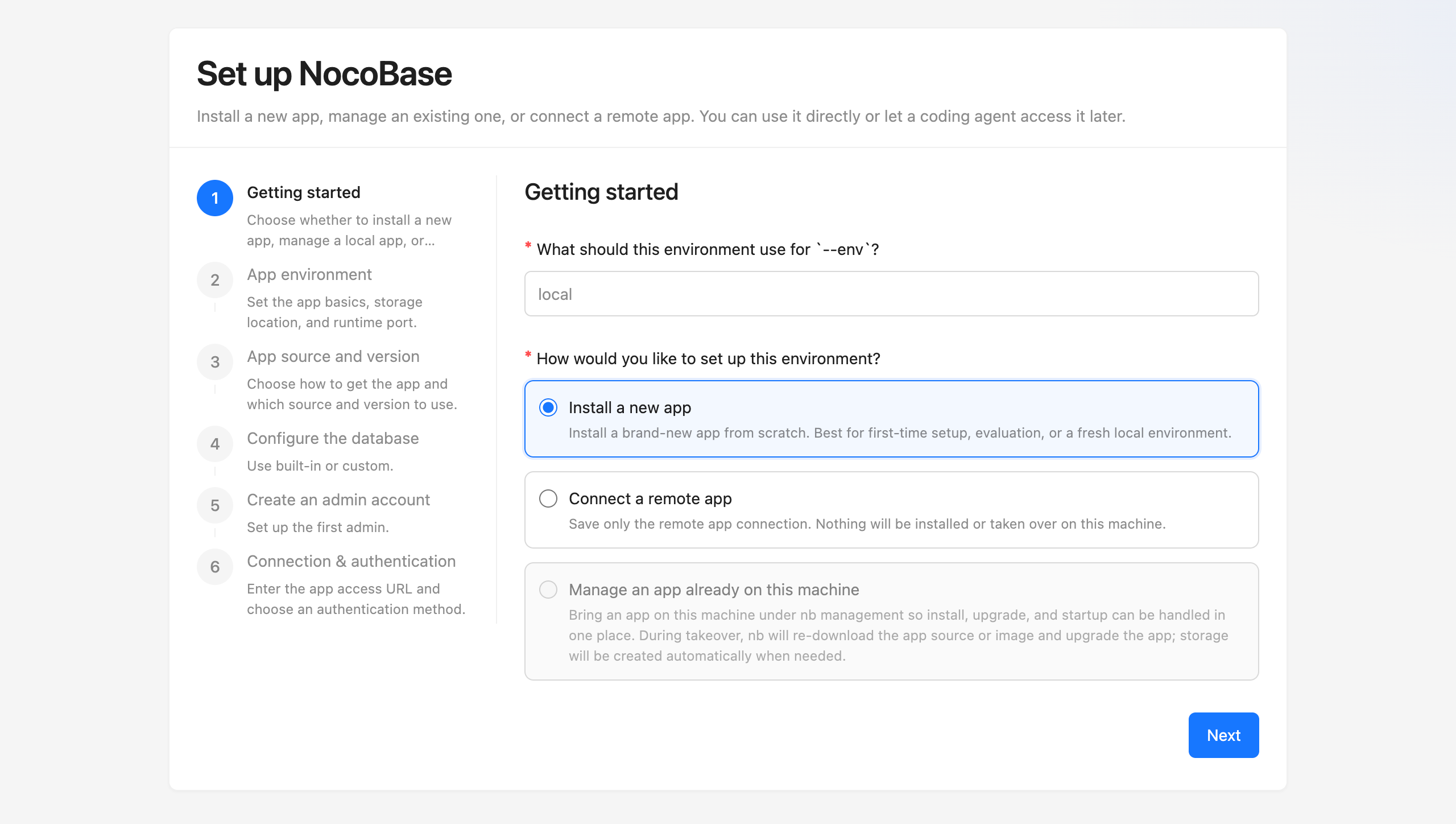
- package/dist/ai/docs/nocobase/plugins/@nocobase/plugin-action-import/index.md +4 -2
- package/dist/ai/docs/nocobase/plugins/@nocobase/plugin-action-import-pro/index.md +3 -1
- package/dist/ai/docs/nocobase/plugins/@nocobase/plugin-action-print/index.md +3 -1
- package/dist/ai/docs/nocobase/plugins/@nocobase/plugin-action-template-print/index.md +5 -3
- package/dist/ai/docs/nocobase/plugins/@nocobase/plugin-ai/index.md +6 -2
- package/dist/ai/docs/nocobase/plugins/@nocobase/plugin-ai-gigachat/index.md +3 -1
- package/dist/ai/docs/nocobase/plugins/@nocobase/plugin-ai-knowledge-base/index.md +2 -0
- package/dist/ai/docs/nocobase/plugins/@nocobase/plugin-api-doc/index.md +4 -2
- package/dist/ai/docs/nocobase/plugins/@nocobase/plugin-api-keys/index.md +5 -3
- package/dist/ai/docs/nocobase/plugins/@nocobase/plugin-app-sso/index.md +16 -0
- package/dist/ai/docs/nocobase/plugins/@nocobase/plugin-app-supervisor/index.md +5 -3
- package/dist/ai/docs/nocobase/plugins/@nocobase/plugin-async-task-manager/index.md +5 -3
- package/dist/ai/docs/nocobase/plugins/@nocobase/plugin-audit-logger/index.md +2 -0
- package/dist/ai/docs/nocobase/plugins/@nocobase/plugin-audit-logs/index.md +3 -1
- package/dist/ai/docs/nocobase/plugins/@nocobase/plugin-auth/index.md +3 -1
- package/dist/ai/docs/nocobase/plugins/@nocobase/plugin-auth-cas/index.md +3 -1
- package/dist/ai/docs/nocobase/plugins/@nocobase/plugin-auth-dingtalk/index.md +5 -3
- package/dist/ai/docs/nocobase/plugins/@nocobase/plugin-auth-ldap/index.md +3 -1
- package/dist/ai/docs/nocobase/plugins/@nocobase/plugin-auth-oidc/index.md +3 -1
- package/dist/ai/docs/nocobase/plugins/@nocobase/plugin-auth-saml/index.md +3 -1
- package/dist/ai/docs/nocobase/plugins/@nocobase/plugin-auth-sms/index.md +5 -3
- package/dist/ai/docs/nocobase/plugins/@nocobase/plugin-auth-wecom/index.md +5 -3
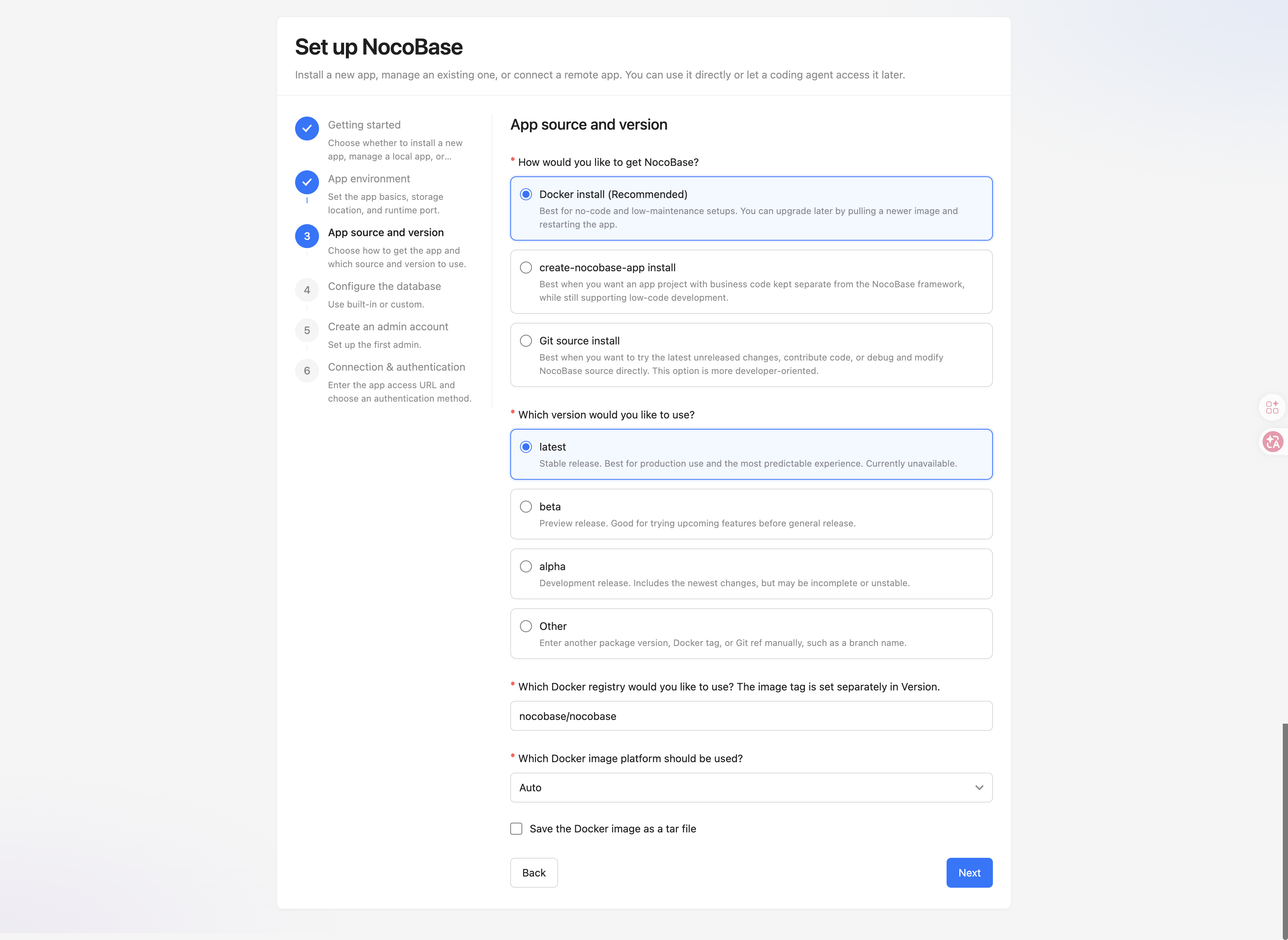
- package/dist/ai/docs/nocobase/plugins/@nocobase/plugin-backup-restore/index.md +3 -1
- package/dist/ai/docs/nocobase/plugins/@nocobase/plugin-backups/index.md +5 -3
- package/dist/ai/docs/nocobase/plugins/@nocobase/plugin-block-grid-card/index.md +4 -2
- package/dist/ai/docs/nocobase/plugins/@nocobase/plugin-block-iframe/index.md +3 -1
- package/dist/ai/docs/nocobase/plugins/@nocobase/plugin-block-list/index.md +3 -1
- package/dist/ai/docs/nocobase/plugins/@nocobase/plugin-block-markdown/index.md +4 -2
- package/dist/ai/docs/nocobase/plugins/@nocobase/plugin-block-multi-step-form/index.md +6 -1
- package/dist/ai/docs/nocobase/plugins/@nocobase/plugin-block-template/index.md +3 -1
- package/dist/ai/docs/nocobase/plugins/@nocobase/plugin-block-tree/index.md +3 -1
- package/dist/ai/docs/nocobase/plugins/@nocobase/plugin-block-workbench/index.md +3 -1
- package/dist/ai/docs/nocobase/plugins/@nocobase/plugin-calendar/index.md +4 -2
- package/dist/ai/docs/nocobase/plugins/@nocobase/plugin-charts/index.md +5 -1
- package/dist/ai/docs/nocobase/plugins/@nocobase/plugin-client/index.md +4 -2
- package/dist/ai/docs/nocobase/plugins/@nocobase/plugin-collection-fdw/index.md +3 -1
- package/dist/ai/docs/nocobase/plugins/@nocobase/plugin-collection-sql/index.md +3 -1
- package/dist/ai/docs/nocobase/plugins/@nocobase/plugin-collection-tree/index.md +3 -1
- package/dist/ai/docs/nocobase/plugins/@nocobase/plugin-comments/index.md +3 -1
- package/dist/ai/docs/nocobase/plugins/@nocobase/plugin-custom-brand/index.md +2 -0
- package/dist/ai/docs/nocobase/plugins/@nocobase/plugin-custom-variables/index.md +3 -1
- package/dist/ai/docs/nocobase/plugins/@nocobase/plugin-data-source-external-clickhouse/index.md +5 -3
- package/dist/ai/docs/nocobase/plugins/@nocobase/plugin-data-source-external-doris/index.md +5 -3
- package/dist/ai/docs/nocobase/plugins/@nocobase/plugin-data-source-external-mariadb/index.md +3 -1
- package/dist/ai/docs/nocobase/plugins/@nocobase/plugin-data-source-external-mssql/index.md +3 -1
- package/dist/ai/docs/nocobase/plugins/@nocobase/plugin-data-source-external-mysql/index.md +3 -1
- package/dist/ai/docs/nocobase/plugins/@nocobase/plugin-data-source-external-nocobase/index.md +16 -0
- package/dist/ai/docs/nocobase/plugins/@nocobase/plugin-data-source-external-oracle/index.md +5 -3
- package/dist/ai/docs/nocobase/plugins/@nocobase/plugin-data-source-external-postgres/index.md +3 -1
- package/dist/ai/docs/nocobase/plugins/@nocobase/plugin-data-source-kingbase/index.md +4 -2
- package/dist/ai/docs/nocobase/plugins/@nocobase/plugin-data-source-main/index.md +5 -3
- package/dist/ai/docs/nocobase/plugins/@nocobase/plugin-data-source-manager/index.md +5 -3
- package/dist/ai/docs/nocobase/plugins/@nocobase/plugin-data-source-rest-api/index.md +3 -1
- package/dist/ai/docs/nocobase/plugins/@nocobase/plugin-data-visualization/index.md +5 -3
- package/dist/ai/docs/nocobase/plugins/@nocobase/plugin-data-visualization-echarts/index.md +8 -4
- package/dist/ai/docs/nocobase/plugins/@nocobase/plugin-departments/index.md +3 -1
- package/dist/ai/docs/nocobase/plugins/@nocobase/plugin-email-manager/index.md +4 -2
- package/dist/ai/docs/nocobase/plugins/@nocobase/plugin-embed/index.md +4 -1
- package/dist/ai/docs/nocobase/plugins/@nocobase/plugin-environment-variables/index.md +3 -1
- package/dist/ai/docs/nocobase/plugins/@nocobase/plugin-error-handler/index.md +3 -1
- package/dist/ai/docs/nocobase/plugins/@nocobase/plugin-field-attachment-url/index.md +4 -2
- package/dist/ai/docs/nocobase/plugins/@nocobase/plugin-field-china-region/index.md +5 -3
- package/dist/ai/docs/nocobase/plugins/@nocobase/plugin-field-code/index.md +3 -1
- package/dist/ai/docs/nocobase/plugins/@nocobase/plugin-field-component-mask/index.md +5 -3
- package/dist/ai/docs/nocobase/plugins/@nocobase/plugin-field-encryption/index.md +2 -0
- package/dist/ai/docs/nocobase/plugins/@nocobase/plugin-field-formula/index.md +3 -1
- package/dist/ai/docs/nocobase/plugins/@nocobase/plugin-field-m2m-array/index.md +5 -3
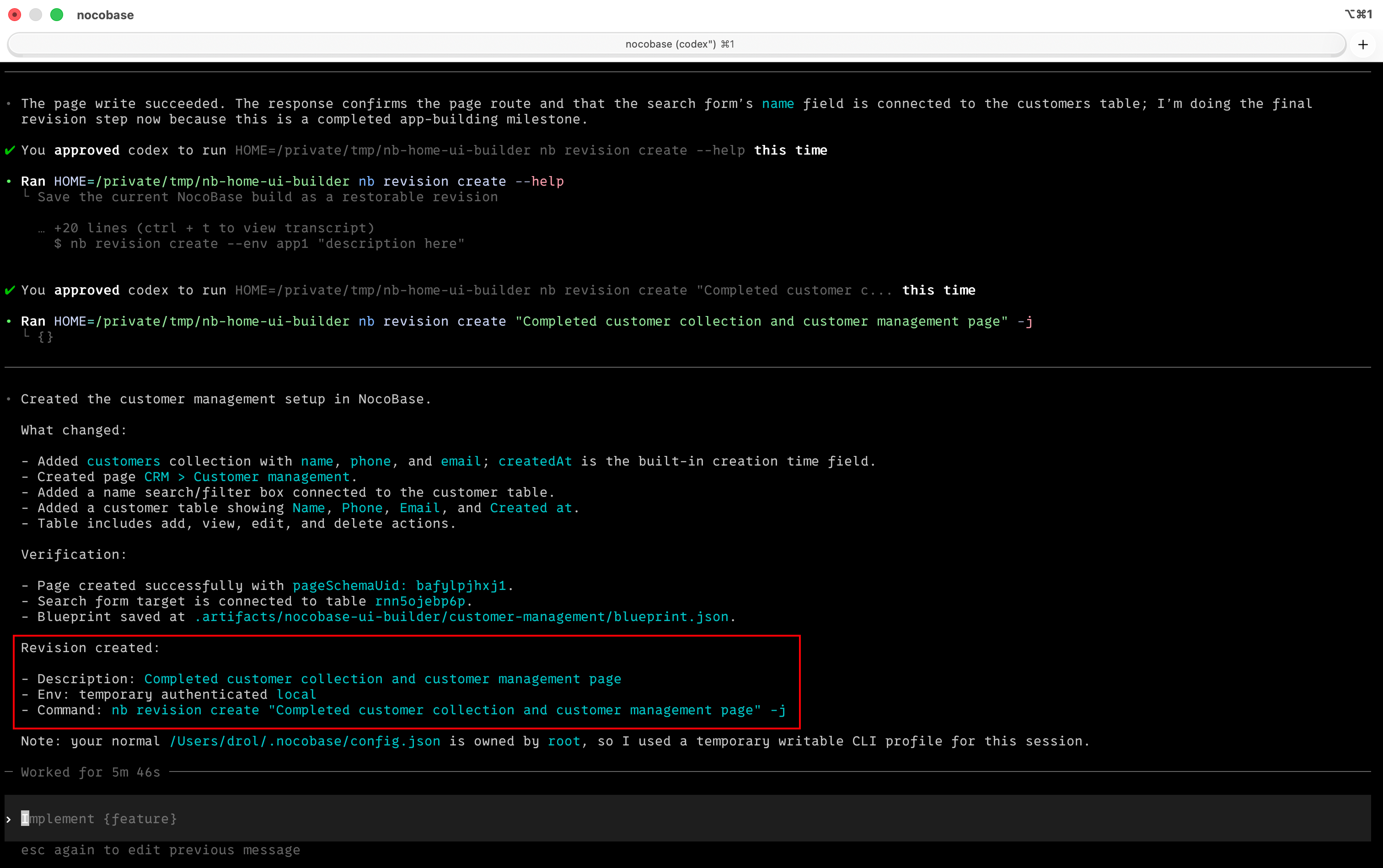
- package/dist/ai/docs/nocobase/plugins/@nocobase/plugin-field-markdown-vditor/index.md +4 -2
- package/dist/ai/docs/nocobase/plugins/@nocobase/plugin-field-sequence/index.md +3 -1
- package/dist/ai/docs/nocobase/plugins/@nocobase/plugin-field-signature/index.md +3 -1
- package/dist/ai/docs/nocobase/plugins/@nocobase/plugin-field-sort/index.md +3 -1
- package/dist/ai/docs/nocobase/plugins/@nocobase/plugin-file-manager/index.md +5 -3
- package/dist/ai/docs/nocobase/plugins/@nocobase/plugin-file-previewer-office/index.md +5 -3
- package/dist/ai/docs/nocobase/plugins/@nocobase/plugin-file-storage-s3-pro/index.md +4 -2
- package/dist/ai/docs/nocobase/plugins/@nocobase/plugin-flow-engine/index.md +4 -2
- package/dist/ai/docs/nocobase/plugins/@nocobase/plugin-form-drafts/index.md +5 -3
- package/dist/ai/docs/nocobase/plugins/@nocobase/plugin-gantt/index.md +3 -1
- package/dist/ai/docs/nocobase/plugins/@nocobase/plugin-graph-collection-manager/index.md +8 -1
- package/dist/ai/docs/nocobase/plugins/@nocobase/plugin-idp-oauth/index.md +14 -0
- package/dist/ai/docs/nocobase/plugins/@nocobase/plugin-ip-restriction/index.md +2 -0
- package/dist/ai/docs/nocobase/plugins/@nocobase/plugin-kanban/index.md +4 -2
- package/dist/ai/docs/nocobase/plugins/@nocobase/plugin-license/index.md +3 -1
- package/dist/ai/docs/nocobase/plugins/@nocobase/plugin-locale-tester/index.md +3 -1
- package/dist/ai/docs/nocobase/plugins/@nocobase/plugin-localization/index.md +4 -2
- package/dist/ai/docs/nocobase/plugins/@nocobase/plugin-lock-adapter-redis/index.md +2 -0
- package/dist/ai/docs/nocobase/plugins/@nocobase/plugin-logger/index.md +4 -2
- package/dist/ai/docs/nocobase/plugins/@nocobase/plugin-map/index.md +4 -2
- package/dist/ai/docs/nocobase/plugins/@nocobase/plugin-mcp-server/index.md +14 -0
- package/dist/ai/docs/nocobase/plugins/@nocobase/plugin-migration-manager/index.md +5 -3
- package/dist/ai/docs/nocobase/plugins/@nocobase/plugin-mobile/index.md +8 -1
- package/dist/ai/docs/nocobase/plugins/@nocobase/plugin-mobile-client/index.md +7 -3
- package/dist/ai/docs/nocobase/plugins/@nocobase/plugin-multi-app-manager/index.md +3 -1
- package/dist/ai/docs/nocobase/plugins/@nocobase/plugin-multi-app-share-collection/index.md +3 -1
- package/dist/ai/docs/nocobase/plugins/@nocobase/plugin-multi-keyword-filter/index.md +4 -1
- package/dist/ai/docs/nocobase/plugins/@nocobase/plugin-multi-space/index.md +5 -3
- package/dist/ai/docs/nocobase/plugins/@nocobase/plugin-notification-email/index.md +3 -1
- package/dist/ai/docs/nocobase/plugins/@nocobase/plugin-notification-in-app-message/index.md +3 -1
- package/dist/ai/docs/nocobase/plugins/@nocobase/plugin-notification-manager/index.md +5 -3
- package/dist/ai/docs/nocobase/plugins/@nocobase/plugin-password-policy/index.md +2 -0
- package/dist/ai/docs/nocobase/plugins/@nocobase/plugin-public-forms/index.md +5 -3
- package/dist/ai/docs/nocobase/plugins/@nocobase/plugin-pubsub-adapter-redis/index.md +2 -0
- package/dist/ai/docs/nocobase/plugins/@nocobase/plugin-queue-adapter-rabbitmq/index.md +2 -0
- package/dist/ai/docs/nocobase/plugins/@nocobase/plugin-queue-adapter-redis/index.md +2 -0
- package/dist/ai/docs/nocobase/plugins/@nocobase/plugin-record-history/index.md +2 -0
- package/dist/ai/docs/nocobase/plugins/@nocobase/plugin-request-encryption/index.md +2 -0
- package/dist/ai/docs/nocobase/plugins/@nocobase/plugin-snapshot-field/index.md +6 -4
- package/dist/ai/docs/nocobase/plugins/@nocobase/plugin-system-settings/index.md +3 -1
- package/dist/ai/docs/nocobase/plugins/@nocobase/plugin-telemetry/index.md +2 -0
- package/dist/ai/docs/nocobase/plugins/@nocobase/plugin-telemetry-prometheus/index.md +2 -0
- package/dist/ai/docs/nocobase/plugins/@nocobase/plugin-text-copy/index.md +5 -3
- package/dist/ai/docs/nocobase/plugins/@nocobase/plugin-theme-editor/index.md +4 -2
- package/dist/ai/docs/nocobase/plugins/@nocobase/plugin-two-factor-authentication/index.md +2 -0
- package/dist/ai/docs/nocobase/plugins/@nocobase/plugin-ui-schema-storage/index.md +4 -2
- package/dist/ai/docs/nocobase/plugins/@nocobase/plugin-ui-templates/index.md +4 -2
- package/dist/ai/docs/nocobase/plugins/@nocobase/plugin-user-data-sync/index.md +5 -3
- package/dist/ai/docs/nocobase/plugins/@nocobase/plugin-users/index.md +4 -2
- package/dist/ai/docs/nocobase/plugins/@nocobase/plugin-verification/index.md +3 -1
- package/dist/ai/docs/nocobase/plugins/@nocobase/plugin-verification-totp-authenticator/index.md +2 -0
- package/dist/ai/docs/nocobase/plugins/@nocobase/plugin-version-control/index.md +3 -1
- package/dist/ai/docs/nocobase/plugins/@nocobase/plugin-workerid-allocator-redis/index.md +4 -2
- package/dist/ai/docs/nocobase/plugins/@nocobase/plugin-workflow/index.md +3 -1
- package/dist/ai/docs/nocobase/plugins/@nocobase/plugin-workflow-action-trigger/index.md +4 -2
- package/dist/ai/docs/nocobase/plugins/@nocobase/plugin-workflow-aggregate/index.md +5 -3
- package/dist/ai/docs/nocobase/plugins/@nocobase/plugin-workflow-approval/index.md +4 -2
- package/dist/ai/docs/nocobase/plugins/@nocobase/plugin-workflow-cc/index.md +3 -1
- package/dist/ai/docs/nocobase/plugins/@nocobase/plugin-workflow-custom-action-trigger/index.md +4 -2
- package/dist/ai/docs/nocobase/plugins/@nocobase/plugin-workflow-date-calculation/index.md +5 -3
- package/dist/ai/docs/nocobase/plugins/@nocobase/plugin-workflow-delay/index.md +4 -2
- package/dist/ai/docs/nocobase/plugins/@nocobase/plugin-workflow-dynamic-calculation/index.md +6 -4
- package/dist/ai/docs/nocobase/plugins/@nocobase/plugin-workflow-javascript/index.md +5 -3
- package/dist/ai/docs/nocobase/plugins/@nocobase/plugin-workflow-json-query/index.md +5 -3
- package/dist/ai/docs/nocobase/plugins/@nocobase/plugin-workflow-json-variable-mapping/index.md +3 -1
- package/dist/ai/docs/nocobase/plugins/@nocobase/plugin-workflow-loop/index.md +4 -2
- package/dist/ai/docs/nocobase/plugins/@nocobase/plugin-workflow-mailer/index.md +5 -3
- package/dist/ai/docs/nocobase/plugins/@nocobase/plugin-workflow-manual/index.md +5 -3
- package/dist/ai/docs/nocobase/plugins/@nocobase/plugin-workflow-notification/index.md +5 -3
- package/dist/ai/docs/nocobase/plugins/@nocobase/plugin-workflow-parallel/index.md +5 -3
- package/dist/ai/docs/nocobase/plugins/@nocobase/plugin-workflow-request/index.md +5 -3
- package/dist/ai/docs/nocobase/plugins/@nocobase/plugin-workflow-request-interceptor/index.md +4 -2
- package/dist/ai/docs/nocobase/plugins/@nocobase/plugin-workflow-response-message/index.md +4 -2
- package/dist/ai/docs/nocobase/plugins/@nocobase/plugin-workflow-sql/index.md +5 -3
- package/dist/ai/docs/nocobase/plugins/@nocobase/plugin-workflow-subflow/index.md +3 -1
- package/dist/ai/docs/nocobase/plugins/@nocobase/plugin-workflow-test/index.md +4 -2
- package/dist/ai/docs/nocobase/plugins/@nocobase/plugin-workflow-variable/index.md +5 -3
- package/dist/ai/docs/nocobase/plugins/@nocobase/plugin-workflow-webhook/index.md +4 -2
- package/dist/ai/docs/nocobase/tutorials/v2/01-getting-started.md +2 -2
- package/dist/ai/docs/nocobase/tutorials/v2/03-building-pages.md +1 -1
- package/dist/ai/docs/nocobase/tutorials/v2/04-forms-and-details.md +1 -1
- package/dist/ai/docs/nocobase/tutorials/v2/05-roles-and-permissions.md +1 -1
- package/dist/ai/docs/nocobase/tutorials/v2/07-dashboard.md +1 -1
- package/dist/ai/docs/nocobase/tutorials/v2/index.md +1 -1
- package/dist/client/561.7ec804ef39ec7dcd.js +10 -0
- package/dist/client/{646.b0ed728921b007d4.js → 646.d4483b4ff23da0a0.js} +1 -1
- package/dist/client/components/ListCollapse.d.ts +2 -1
- package/dist/client/features/components.d.ts +9 -0
- package/dist/client/features/feature-manager.d.ts +1 -9
- package/dist/client/features/index.d.ts +1 -9
- package/dist/client/features/vector-database-provider.d.ts +1 -10
- package/dist/client/features/vector-store-provider.d.ts +9 -0
- package/dist/client/index.d.ts +1 -0
- package/dist/client/index.js +2 -2
- package/dist/client/manager/ai-feature-manager.d.ts +1 -6
- package/dist/client-v2/features/components.d.ts +14 -0
- package/dist/client-v2/features/feature-manager.d.ts +19 -0
- package/dist/client-v2/features/index.d.ts +22 -0
- package/dist/client-v2/features/vector-database-provider.d.ts +18 -0
- package/dist/client-v2/features/vector-store-provider.d.ts +38 -0
- package/dist/client-v2/index.d.ts +5 -0
- package/dist/client-v2/index.js +1 -1
- package/dist/client-v2/manager/ai-feature-manager.d.ts +15 -0
- package/dist/externalVersion.js +17 -17
- package/dist/node_modules/@langchain/xai/package.json +1 -1
- package/dist/node_modules/fs-extra/package.json +1 -1
- package/dist/node_modules/jsonrepair/package.json +1 -1
- package/dist/node_modules/just-bash/package.json +1 -1
- package/dist/node_modules/nodejs-snowflake/package.json +1 -1
- package/dist/node_modules/openai/package.json +1 -1
- package/dist/node_modules/zod/package.json +1 -1
- package/dist/server/ai-employees/ai-knowledge-base.js +1 -1
- package/dist/server/features/feature-manager.d.ts +2 -2
- package/dist/server/features/vector-store-provider.d.ts +1 -0
- package/dist/server/llm-providers/dashscope.js +2 -2
- package/dist/server/llm-providers/kimi/provider.js +2 -2
- package/dist/server/llm-providers/mimo.js +2 -2
- package/dist/server/llm-providers/openai/completions.js +2 -2
- package/dist/server/llm-providers/openai/responses.js +8 -4
- package/dist/server/llm-providers/provider.d.ts +2 -2
- package/dist/server/llm-providers/provider.js +1 -0
- package/dist/server/types/knowledge-base.type.d.ts +1 -1
- package/dist/server/workflow/nodes/llm/index.js +3 -0
- package/package.json +3 -2
- package/dist/client/561.776886c5308e3c26.js +0 -10
- /package/dist/ai/docs/nocobase/{quickstart → nocobase-cli}/cli-design/nb-app-design-intent.md +0 -0
- /package/dist/ai/docs/nocobase/{quickstart → nocobase-cli}/cli-design/nb-proxy-design-intent.md +0 -0
- /package/dist/ai/docs/nocobase/{quickstart → nocobase-cli}/installation/airgap.md +0 -0
- /package/dist/ai/docs/nocobase/{quickstart → nocobase-cli}/installation/docker-compose.md +0 -0
- /package/dist/ai/docs/nocobase/{quickstart → nocobase-cli}/operations/backup-restore.md +0 -0
- /package/dist/ai/docs/nocobase/{quickstart → nocobase-cli}/operations/manage-app.md +0 -0
- /package/dist/ai/docs/nocobase/{quickstart → nocobase-cli}/operations/multi-environment.md +0 -0
- /package/dist/ai/docs/nocobase/{quickstart → nocobase-cli}/plugins/third-party.md +0 -0
- /package/dist/ai/docs/nocobase/{quickstart → nocobase-cli}/production/autostart.md +0 -0
- /package/dist/ai/docs/nocobase/{quickstart → nocobase-cli}/release-management.md +0 -0
|
@@ -63,7 +63,7 @@ Before starting, make sure you have the following environment ready:
|
|
|
63
63
|
|
|
64
64
|
- Claude Code installed (`npm install -g @anthropic-ai/claude-code`)
|
|
65
65
|
- Node.js >= 22 (for running NocoBase CLI and Skills)
|
|
66
|
-
- If you already have a NocoBase instance, **AI capabilities are evolving rapidly
|
|
66
|
+
- If you already have a NocoBase instance, **AI capabilities are evolving rapidly. The minimum required version is NocoBase 2.1.0, and we recommend updating to the latest version.**
|
|
67
67
|
|
|
68
68
|
## Quick Start
|
|
69
69
|
|
|
@@ -61,7 +61,7 @@ Before starting, make sure you have the following environment ready:
|
|
|
61
61
|
|
|
62
62
|
- Codex installed (`npm install -g @openai/codex`)
|
|
63
63
|
- Node.js >= 22 (for running NocoBase CLI and Skills)
|
|
64
|
-
- If you already have a NocoBase instance, **AI capabilities are evolving rapidly
|
|
64
|
+
- If you already have a NocoBase instance, **AI capabilities are evolving rapidly. The minimum required version is NocoBase 2.1.0, and we recommend updating to the latest version.**
|
|
65
65
|
|
|
66
66
|
## Quick Start
|
|
67
67
|
|
|
@@ -69,7 +69,7 @@ Before starting, make sure you have the following environment ready:
|
|
|
69
69
|
|
|
70
70
|
- A server running Hermes Agent (Linux / macOS, Python 3.10+)
|
|
71
71
|
- Node.js >= 22 (for running NocoBase CLI and Skills)
|
|
72
|
-
- If you already have a NocoBase instance, **AI capabilities are evolving rapidly
|
|
72
|
+
- If you already have a NocoBase instance, **AI capabilities are evolving rapidly. The minimum required version is NocoBase 2.1.0, and we recommend updating to the latest version.**
|
|
73
73
|
|
|
74
74
|
Installing Hermes requires just one command:
|
|
75
75
|
|
|
@@ -92,7 +92,7 @@ features:
|
|
|
92
92
|
items:
|
|
93
93
|
- title: NocoBase CLI
|
|
94
94
|
details: The command-line tool for NocoBase — install and you're ready to go, with built-in AI Skills that let your AI assistant directly operate NocoBase.
|
|
95
|
-
link: /
|
|
95
|
+
link: /nocobase-cli/
|
|
96
96
|
- title: NocoBase Skills
|
|
97
97
|
details: Domain knowledge packages installable into AI Agents, enabling AI to understand NocoBase's capabilities and conventions.
|
|
98
98
|
link: /ai-builder#nocobase-skills
|
|
@@ -0,0 +1,104 @@
|
|
|
1
|
+
---
|
|
2
|
+
title: Install NocoBase App
|
|
3
|
+
description: Install NocoBase CLI and quickly create a new NocoBase application with `nb init --ui`, so your AI Agent can start working right away.
|
|
4
|
+
---
|
|
5
|
+
|
|
6
|
+
# Install NocoBase App
|
|
7
|
+
|
|
8
|
+
## Prerequisites
|
|
9
|
+
|
|
10
|
+
- Node.js >= 22
|
|
11
|
+
- Yarn 1.x
|
|
12
|
+
- If you plan to install with Docker, make sure Docker is already running
|
|
13
|
+
|
|
14
|
+
## Step 1: Install CLI
|
|
15
|
+
|
|
16
|
+
Install NocoBase CLI globally first:
|
|
17
|
+
|
|
18
|
+
```bash
|
|
19
|
+
npm install -g @nocobase/cli
|
|
20
|
+
nb --version
|
|
21
|
+
```
|
|
22
|
+
|
|
23
|
+
If you often work with multiple terminals or want to operate in parallel with AI Agents, we also recommend running `nb session setup` once. This lets each session keep its own `current env`, so they are less likely to affect one another.
|
|
24
|
+
|
|
25
|
+
## Step 2: Initialize the app
|
|
26
|
+
|
|
27
|
+
We recommend opening the visual wizard directly:
|
|
28
|
+
|
|
29
|
+
```bash
|
|
30
|
+
nb init --ui
|
|
31
|
+
```
|
|
32
|
+
|
|
33
|
+
|
|
34
|
+
|
|
35
|
+
Different setup paths show slightly different steps. If you follow the default `Install a new app` path, you will usually see these six steps:
|
|
36
|
+
|
|
37
|
+
1. `Getting started` - set the `--env` identifier and choose `Install a new app`
|
|
38
|
+
2. `App environment` - set the app basics, storage location, and runtime port
|
|
39
|
+
3. `App source and version` - choose how to get the app and which source and version to use
|
|
40
|
+
4. `Configure the database` - choose the built-in database or a custom database
|
|
41
|
+
5. `Create an admin account` - set up the first admin account
|
|
42
|
+
6. `Connection & authentication` - enter the app access URL and choose an authentication method
|
|
43
|
+
|
|
44
|
+
If you prefer terminal interaction, you can also run:
|
|
45
|
+
|
|
46
|
+
```bash
|
|
47
|
+
nb init
|
|
48
|
+
```
|
|
49
|
+
|
|
50
|
+
If you need to initialize in scripts or CI, use non-interactive mode:
|
|
51
|
+
|
|
52
|
+
```bash
|
|
53
|
+
nb init --yes --env app1
|
|
54
|
+
```
|
|
55
|
+
|
|
56
|
+
:::tip Install on a remote server
|
|
57
|
+
|
|
58
|
+
If you run `nb init --ui` on a server, we recommend changing the default host to that server's IP first. That way, you can open the wizard from your local browser.
|
|
59
|
+
|
|
60
|
+
```bash
|
|
61
|
+
nb config set default-ui-host <server-ip>
|
|
62
|
+
nb config set default-api-host <server-ip>
|
|
63
|
+
```
|
|
64
|
+
|
|
65
|
+
:::
|
|
66
|
+
|
|
67
|
+
## Step 3: Confirm the app is ready
|
|
68
|
+
|
|
69
|
+
After installation, it is usually worth confirming these three things first:
|
|
70
|
+
|
|
71
|
+
- The env has been saved successfully
|
|
72
|
+
- The app has started normally
|
|
73
|
+
- You can sign in with the administrator account
|
|
74
|
+
|
|
75
|
+
Common commands:
|
|
76
|
+
|
|
77
|
+
```bash
|
|
78
|
+
nb env list
|
|
79
|
+
nb env info
|
|
80
|
+
nb app logs
|
|
81
|
+
```
|
|
82
|
+
|
|
83
|
+
For a local default installation, you can usually open `http://localhost:13000` in your browser directly. After signing in, start a new AI Agent session or restart the current one, and the AI can begin working with this NocoBase app.
|
|
84
|
+
|
|
85
|
+
CLI configuration is stored in `~/.nocobase/` by default, so AI Agents can usually access it from any working directory.
|
|
86
|
+
|
|
87
|
+
If this app will be exposed to real users later, we do not recommend using `IP + port` for the long term. The next step is usually to put it behind a reverse proxy and enable HTTPS.
|
|
88
|
+
|
|
89
|
+
## Next Steps
|
|
90
|
+
|
|
91
|
+
- If you already have a running NocoBase app, see [AI Agent Integration Guide](./quick-start.mdx)
|
|
92
|
+
- If you want to manage app startup, shutdown, logs, and upgrades, see [Manage apps](../nocobase-cli/operations/manage-app.md)
|
|
93
|
+
- If you want to continue with production deployment, see [Install apps with CLI](../nocobase-cli/installation/cli.md) and [Production deployment overview](../nocobase-cli/production/index.md)
|
|
94
|
+
- If you want AI to start building apps, see [AI Builder](../ai-builder/index.md)
|
|
95
|
+
|
|
96
|
+
## Related Links
|
|
97
|
+
|
|
98
|
+
- [Installation and Version Comparison](../get-started/quickstart.md) — Compare installation methods and version channels first, then decide how to install
|
|
99
|
+
- [AI Agent Integration Guide](./quick-start.mdx) — Connect an existing NocoBase app and let your AI Agent start working
|
|
100
|
+
- [`nb init` command reference](../api/cli/init.md) — Initialize a new app, take over an existing local app, or connect a remote app
|
|
101
|
+
- [`nb env info` command reference](../api/cli/env/info.md) — View the connection details and runtime configuration of the current env
|
|
102
|
+
- [NocoBase CLI](../api/cli/index.md) — Full reference for all `nb` commands
|
|
103
|
+
- [Manage apps](../nocobase-cli/operations/manage-app.md) — Start, stop, restart, view logs, and upgrade apps
|
|
104
|
+
- [Multiple environment management](../nocobase-cli/operations/multi-environment.md) — Common operations when you maintain multiple envs at the same time
|
|
@@ -63,7 +63,7 @@ Before starting, make sure you have the following environment ready:
|
|
|
63
63
|
|
|
64
64
|
- A deployed OpenClaw Agent ([one-click Lark deployment](https://openclaw.feishu.cn) or local deployment)
|
|
65
65
|
- Node.js >= 22 (for running NocoBase CLI and Skills)
|
|
66
|
-
- If you already have a NocoBase instance, **AI capabilities are evolving rapidly
|
|
66
|
+
- If you already have a NocoBase instance, **AI capabilities are evolving rapidly. The minimum required version is NocoBase 2.1.0, and we recommend updating to the latest version.**
|
|
67
67
|
|
|
68
68
|
:::warning Note
|
|
69
69
|
|
|
@@ -63,7 +63,7 @@ Before starting, make sure you have the following environment ready:
|
|
|
63
63
|
|
|
64
64
|
- OpenCode installed ([installation guide](https://opencode.ai/docs/))
|
|
65
65
|
- Node.js >= 22 (for running NocoBase CLI and Skills)
|
|
66
|
-
- If you already have a NocoBase instance, **AI capabilities are evolving rapidly
|
|
66
|
+
- If you already have a NocoBase instance, **AI capabilities are evolving rapidly. The minimum required version is NocoBase 2.1.0, and we recommend updating to the latest version.**
|
|
67
67
|
|
|
68
68
|
## Quick Start
|
|
69
69
|
|
|
@@ -2,7 +2,6 @@
|
|
|
2
2
|
title: "AI Agent Integration Guide"
|
|
3
3
|
description: "Install NocoBase CLI, connect to or install a NocoBase application, and let AI Agents start operating your business system."
|
|
4
4
|
keywords: "NocoBase CLI,AI Agent,integration,connect,installation,Skills,quick start"
|
|
5
|
-
sidebar: false
|
|
6
5
|
---
|
|
7
6
|
|
|
8
7
|
# AI Agent Integration Guide
|
|
@@ -58,15 +57,16 @@ Configuration files and application data are stored in your home directory by de
|
|
|
58
57
|
|
|
59
58
|
:::
|
|
60
59
|
|
|
61
|
-
The browser will automatically open a visual configuration page, guiding you through
|
|
60
|
+
The browser will automatically open a visual configuration page, guiding you through 6 steps:
|
|
62
61
|
|
|
63
|
-
1.
|
|
64
|
-
2.
|
|
65
|
-
3.
|
|
66
|
-
4.
|
|
67
|
-
5.
|
|
62
|
+
1. "Getting started" — Choose whether to install a new app, manage a local app, or connect a remote app.
|
|
63
|
+
2. "App environment" — Set the app basics, storage location, and runtime port.
|
|
64
|
+
3. "App source and version" — Choose how to get the app and which source and version to use.
|
|
65
|
+
4. "Configure the database" — Use built-in or custom.
|
|
66
|
+
5. "Create an admin account" — Set up the first admin.
|
|
67
|
+
6. "Connection & authentication" — Enter the app access URL and choose an authentication method.
|
|
68
68
|
|
|
69
|
-

|
|
70
70
|
|
|
71
71
|
After installation is complete, open your browser and visit `http://localhost:13000` (default port), then log in with the admin account you just set up.
|
|
72
72
|
|
|
@@ -92,7 +92,7 @@ After configuration is complete, restart your AI Agent session and you can start
|
|
|
92
92
|
|
|
93
93
|
## Connect AI Agent to an Existing NocoBase
|
|
94
94
|
|
|
95
|
-
If you already have a running NocoBase instance, you can connect AI Agent to it directly. **Since AI capabilities are evolving rapidly,
|
|
95
|
+
If you already have a running NocoBase instance, you can connect AI Agent to it directly. **Since AI capabilities are evolving rapidly, the minimum required version is NocoBase 2.1.0, and we recommend updating to the latest version.**
|
|
96
96
|
|
|
97
97
|
<Tabs>
|
|
98
98
|
<Tab label="Manual Connection" value="manual-connect">
|
|
@@ -116,12 +116,12 @@ Configuration files are stored in your home directory by default. See [NB_CLI_RO
|
|
|
116
116
|
|
|
117
117
|
:::
|
|
118
118
|
|
|
119
|
-
The browser will automatically open a visual configuration page. In the first step "Start Configuration", select "
|
|
119
|
+
The browser will automatically open a visual configuration page. In the first step "Start Configuration", select "Remote Connection", then:
|
|
120
120
|
|
|
121
121
|
1. **Enter API Address** — Input the API address of your existing NocoBase instance (e.g., `http://localhost:13000/api`)
|
|
122
122
|
2. **Select Authentication Method** — Choose an [authentication method](../ai-builder/security) (OAuth is recommended for quick setup)
|
|
123
123
|
|
|
124
|
-

|
|
125
125
|
|
|
126
126
|
No need to configure installation method, database, or admin account — the wizard will skip those steps.
|
|
127
127
|
|
|
@@ -132,7 +132,7 @@ Start a new or restart the AI Agent session, and you can let the AI Agent start
|
|
|
132
132
|
</Tab>
|
|
133
133
|
<Tab label="Connect with AI Agent" value="ai-connect">
|
|
134
134
|
|
|
135
|
-
Copy the prompt below to your AI assistant. It will complete CLI installation and guide you through connecting to your existing NocoBase instance. Select "
|
|
135
|
+
Copy the prompt below to your AI assistant. It will complete CLI installation and guide you through connecting to your existing NocoBase instance. Select "Remote Connection" in the first step of the visual wizard:
|
|
136
136
|
|
|
137
137
|
```
|
|
138
138
|
Help me install NocoBase CLI and complete initialization: https://docs.nocobase.com/ai/ai-quick-start.md (please read the linked content directly)
|
|
@@ -145,6 +145,13 @@ After configuration is complete, restart your AI Agent session and you can start
|
|
|
145
145
|
|
|
146
146
|
## What's Next
|
|
147
147
|
|
|
148
|
+
### Production Installation and Deployment
|
|
149
|
+
|
|
150
|
+
If you're preparing to deploy NocoBase to production, this order usually works best:
|
|
151
|
+
|
|
152
|
+
1. [Install using CLI](../nocobase-cli/installation/cli.md) - the complete installation flow. This is the right place when you want to install CLI from scratch, initialize env, and confirm the app is already running on your server
|
|
153
|
+
2. [Production deployment overview](../nocobase-cli/production/index.md) - the next step after the app is running. This mainly covers autostart, reverse proxy, domain setup, and HTTPS
|
|
154
|
+
|
|
148
155
|
### Manage Application Environments
|
|
149
156
|
|
|
150
157
|
If you need to manage existing NocoBase instances (such as test or production environments), or switch between multiple environments, see [Environment Management](../ai-builder/env-bootstrap) — covering environment checks, adding environments, upgrades, and troubleshooting.
|
|
@@ -172,4 +179,4 @@ If you already have a NocoBase application running, or have successfully complet
|
|
|
172
179
|
- [AI Employees](../ai-employees/index.md) — Collaborate with AI in the business interface
|
|
173
180
|
- [Environment Management](../ai-builder/env-bootstrap) — Environment checks, adding environments, upgrades, and troubleshooting
|
|
174
181
|
- [NocoBase CLI Command Reference](../api/cli/index.md) — Full parameter documentation for all commands
|
|
175
|
-
- [Installation Methods and Version Comparison](../
|
|
182
|
+
- [Installation Methods and Version Comparison](../ai/quickstart) — Different installation methods and version channels for NocoBase
|
|
@@ -70,7 +70,7 @@ Before starting, make sure you have the following environment ready:
|
|
|
70
70
|
|
|
71
71
|
- WorkBuddy account ([registration portal](https://www.codebuddy.cn))
|
|
72
72
|
- Node.js >= 22 (for running NocoBase CLI and Skills)
|
|
73
|
-
- If you already have a NocoBase instance, **AI capabilities are evolving rapidly
|
|
73
|
+
- If you already have a NocoBase instance, **AI capabilities are evolving rapidly. The minimum required version is NocoBase 2.1.0, and we recommend updating to the latest version.**
|
|
74
74
|
|
|
75
75
|
:::warning Note
|
|
76
76
|
|
|
@@ -95,13 +95,27 @@ The AI first outputs a design plan, then builds everything at once after confirm
|
|
|
95
95
|
|
|
96
96
|
To learn more about building complete systems, see [Solutions](./dsl-reconciler).
|
|
97
97
|
|
|
98
|
+
### Build a milestone, and the AI saves a restorable version for you
|
|
99
|
+
|
|
100
|
+
After finishing a page, a set of data tables, or a workflow, let the AI save the current state as a version — if a configuration goes wrong, you can always roll back to the last clear milestone.
|
|
101
|
+
|
|
102
|
+
```
|
|
103
|
+
Save the current build as a version: completed customer management page, filter area, and edit form configuration
|
|
104
|
+
```
|
|
105
|
+
|
|
106
|
+
|
|
107
|
+
|
|
108
|
+
The AI won't save a version every time it changes a field; it only saves after completing and verifying a clear milestone, which keeps the version list easy to read and makes it easier to decide where to roll back to.
|
|
109
|
+
|
|
110
|
+
To learn more about version control, see [Version Control](./version-control).
|
|
111
|
+
|
|
98
112
|
## Security & Audit
|
|
99
113
|
|
|
100
114
|
Before letting an AI Agent operate NocoBase, we recommend understanding the authentication methods, permission controls, and operation auditing — ensuring the AI only does what it should, with every step recorded. See [Security & Audit](./security).
|
|
101
115
|
|
|
102
116
|
## NocoBase Skills
|
|
103
117
|
|
|
104
|
-
[NocoBase Skills](https://github.com/nocobase/skills) are domain knowledge packages that can be installed into AI Agents, enabling AI to understand NocoBase's configuration system. NocoBase provides
|
|
118
|
+
[NocoBase Skills](https://github.com/nocobase/skills) are domain knowledge packages that can be installed into AI Agents, enabling AI to understand NocoBase's configuration system. NocoBase provides 9 Skills covering the entire building workflow:
|
|
105
119
|
|
|
106
120
|
- [Environment Management](./env-bootstrap) — Environment checks, installation, deployment, upgrades, and troubleshooting
|
|
107
121
|
- [Data Modeling](./data-modeling) — Create and manage data tables, fields, and relationships
|
|
@@ -111,6 +125,7 @@ Before letting an AI Agent operate NocoBase, we recommend understanding the auth
|
|
|
111
125
|
- [Solutions](./dsl-reconciler) — Batch-build entire business systems from YAML
|
|
112
126
|
- [Plugin Management](./plugin-manage) — View, enable, and disable plugins
|
|
113
127
|
- [Release Management](./publish) — Cross-environment releases, backup & restore, and migration
|
|
128
|
+
- [Version Control](./version-control) — Save restorable versions after completed milestones
|
|
114
129
|
|
|
115
130
|
:::tip
|
|
116
131
|
|
|
@@ -0,0 +1,120 @@
|
|
|
1
|
+
---
|
|
2
|
+
title: "Version Control"
|
|
3
|
+
description: "The Version Control Skill (nocobase-revision) creates restorable application versions after AI Builder completes milestone work."
|
|
4
|
+
keywords: "AI Builder,version control,nocobase-revision,nb revision create,restore version"
|
|
5
|
+
---
|
|
6
|
+
|
|
7
|
+
# Version Control
|
|
8
|
+
|
|
9
|
+
:::tip Prerequisites
|
|
10
|
+
|
|
11
|
+
- Before reading this page, install the NocoBase CLI and complete initialization as described in [AI Builder Quick Start](./index.md)
|
|
12
|
+
- Enable the Backup Management and Version Control plugins
|
|
13
|
+
- Community and Standard editions do not include the Version Control plugin. If you only need a rollback point before key changes, use [Backup Management](../ops-management/backup-manager/index.mdx)
|
|
14
|
+
|
|
15
|
+
:::
|
|
16
|
+
|
|
17
|
+
## Introduction
|
|
18
|
+
|
|
19
|
+
The Version Control Skill (`nocobase-revision`) creates a restorable application version after AI Builder completes a meaningful milestone. For example, after building a page, creating a group of collections, or configuring a workflow, AI can run `nb revision create` to save the current state.
|
|
20
|
+
|
|
21
|
+
It does not create a version for every field change. By default, it saves only after a clear milestone is completed and verified, so the version list stays readable and rollback points are easier to choose.
|
|
22
|
+
|
|
23
|
+
For version lists, manual version creation, restore operations, and retention settings, see the [Version Control plugin guide](../ops-management/version-control/index.md).
|
|
24
|
+
|
|
25
|
+
## Capabilities
|
|
26
|
+
|
|
27
|
+
Can do:
|
|
28
|
+
|
|
29
|
+
- Create a version after a building milestone is completed and verified
|
|
30
|
+
- Write a concise description that explains what was saved
|
|
31
|
+
- Create versions using the current CLI environment
|
|
32
|
+
|
|
33
|
+
Cannot do:
|
|
34
|
+
|
|
35
|
+
- Replace the underlying save and restore capabilities of the Backup Management plugin
|
|
36
|
+
- Create versions when the Version Control plugin is not enabled
|
|
37
|
+
- Restore to a version automatically. Use the [Version Control plugin](../ops-management/version-control/index.md) to restore versions
|
|
38
|
+
|
|
39
|
+
## Prompt Examples
|
|
40
|
+
|
|
41
|
+
### Scenario A: Save a completed page configuration
|
|
42
|
+
|
|
43
|
+
```text
|
|
44
|
+
Save the current build as a version: completed customer management page, filter area, and edit form configuration
|
|
45
|
+
```
|
|
46
|
+
|
|
47
|
+
The Skill turns the description into a concise version note and creates a version.
|
|
48
|
+
|
|
49
|
+
Command mode:
|
|
50
|
+
|
|
51
|
+
```bash
|
|
52
|
+
nb revision create "Completed customer management page, filter area, and edit form configuration"
|
|
53
|
+
```
|
|
54
|
+
|
|
55
|
+
### Scenario B: Save data model and workflow milestones
|
|
56
|
+
|
|
57
|
+
```text
|
|
58
|
+
The supplier collections and purchase approval workflow have been verified. Create a version for me.
|
|
59
|
+
```
|
|
60
|
+
|
|
61
|
+
This fits work that spans multiple capabilities. For example, create collections with [Data Modeling](./data-modeling), configure an approval process with [Workflow Management](./workflow), verify the result, then save a version.
|
|
62
|
+
|
|
63
|
+
### Scenario C: Create a version in a specified environment
|
|
64
|
+
|
|
65
|
+
```text
|
|
66
|
+
In the dev environment, save a version: completed ticket management page and SLA field configuration
|
|
67
|
+
```
|
|
68
|
+
|
|
69
|
+
If the specified environment is not the current CLI environment, the Skill confirms the target environment first to avoid saving the version to the wrong application.
|
|
70
|
+
|
|
71
|
+
Command mode:
|
|
72
|
+
|
|
73
|
+
```bash
|
|
74
|
+
nb revision create --env dev --yes "Completed ticket management page and SLA field configuration"
|
|
75
|
+
```
|
|
76
|
+
|
|
77
|
+
## How to Write Version Descriptions
|
|
78
|
+
|
|
79
|
+
A version description should say what has been completed, not just use a vague label.
|
|
80
|
+
|
|
81
|
+
Recommended:
|
|
82
|
+
|
|
83
|
+
- `Completed customer ledger, detail page, and approval submission flow`
|
|
84
|
+
- `Completed supplier collections, purchase request form, and approval workflow`
|
|
85
|
+
- `完成客户台账、详情页与审批提交流程配置`
|
|
86
|
+
|
|
87
|
+
Not recommended:
|
|
88
|
+
|
|
89
|
+
- `snapshot`
|
|
90
|
+
- `backup`
|
|
91
|
+
- `test`
|
|
92
|
+
- `version 2`
|
|
93
|
+
- Date or timestamp only
|
|
94
|
+
|
|
95
|
+
Also, do not include tokens, URLs, passwords, or other sensitive information. Descriptions appear in the version list and should stay clear, readable, and auditable.
|
|
96
|
+
|
|
97
|
+
## FAQ
|
|
98
|
+
|
|
99
|
+
**When should I create a version?**
|
|
100
|
+
|
|
101
|
+
Create one after a milestone that can be reviewed on its own. For example, a page opens and edits correctly, collection relationships have been verified, or a workflow has been saved and its node chain checked.
|
|
102
|
+
|
|
103
|
+
**Why not create a version after every AI adjustment?**
|
|
104
|
+
|
|
105
|
+
Too many tiny versions quickly make the list hard to read. A version should usually represent a point you can restore to and continue working from, not a single field rename or button position change.
|
|
106
|
+
|
|
107
|
+
**Should the result be verified before creating a version?**
|
|
108
|
+
|
|
109
|
+
Yes. The Version Control Skill is for saving completed and verified work. If a page still errors or a workflow is not confirmed, ask AI to fix and verify it before creating a version.
|
|
110
|
+
|
|
111
|
+
**Where do I restore a version after it is created?**
|
|
112
|
+
|
|
113
|
+
Restore it in the version list of the Version Control plugin. Restoring overwrites the current application configuration and the data included in that version. Read the [Version Control plugin guide](../ops-management/version-control/index.md) before operating.
|
|
114
|
+
|
|
115
|
+
## Related Links
|
|
116
|
+
|
|
117
|
+
- [Version Control plugin guide](../ops-management/version-control/index.md) — manually create versions, restore versions, and configure version rules
|
|
118
|
+
- [Backup Management](../ops-management/backup-manager/index.mdx) — the underlying capability required by Version Control
|
|
119
|
+
- [AI Builder Overview](./index.md) — overview and installation guide for all AI Builder Skills
|
|
120
|
+
- [Release Management](./publish.md) — cross-environment releases, backup restore, and migration
|
|
@@ -71,4 +71,4 @@ You do not need to extract anything into `storage/plugins` by hand. `nb plugin i
|
|
|
71
71
|
|
|
72
72
|
- [`nb app restart`](../app/restart.md)
|
|
73
73
|
- [`nb plugin enable`](./enable.md)
|
|
74
|
-
- [`Install and upgrade third-party plugins`](../../../
|
|
74
|
+
- [`Install and upgrade third-party plugins`](../../../nocobase-cli/plugins/third-party.md)
|
|
@@ -3,4 +3,11 @@
|
|
|
3
3
|
<video controls width="100%" poster="https://static-docs.nocobase.com/video-cover-home.png">
|
|
4
4
|
<source src="https://static-docs.nocobase.com/nocobase-2-main-1080p-en-v2.mp4" type="video/mp4" />
|
|
5
5
|
Your browser does not support video playback.
|
|
6
|
-
</video>
|
|
6
|
+
</video>
|
|
7
|
+
|
|
8
|
+
## What's Next
|
|
9
|
+
|
|
10
|
+
If you've finished the video and want to start right away, there are usually two common paths:
|
|
11
|
+
|
|
12
|
+
1. If you want to compare installation methods and version channels first, continue with [Installation and Version Comparison](/ai/quickstart)
|
|
13
|
+
2. If you want to install the app right away, continue with [Install NocoBase App](/ai/install-nocobase-app)
|
|
@@ -55,4 +55,9 @@ You can install NocoBase in different ways.
|
|
|
55
55
|
| **Scenarios** | No-code users; users who want to quickly deploy to a server. | Front-end/full-stack developers; team projects; low-code development. | Technical developers; users who want to try unreleased versions. |
|
|
56
56
|
| **Technical Requirement** | ★☆☆☆☆ | ★★★☆☆ | ★★★★★ |
|
|
57
57
|
| **Upgrade Method** | Pull the latest image and restart the container. | Update dependencies with yarn. | Synchronize updates through Git. |
|
|
58
|
-
|
|
58
|
+
|
|
59
|
+
|
|
60
|
+
|
|
61
|
+
## What's Next
|
|
62
|
+
|
|
63
|
+
If you've already picked an installation method, the next step is [Install NocoBase App](/ai/install-nocobase-app). It walks you through installing NocoBase CLI and finishing the app installation and initialization.
|
|
@@ -11,21 +11,21 @@ hero:
|
|
|
11
11
|
actions:
|
|
12
12
|
- theme: brand
|
|
13
13
|
text: Get Started
|
|
14
|
-
link: /
|
|
14
|
+
link: /ai/how-nocobase-works
|
|
15
15
|
- theme: alt
|
|
16
16
|
text: GitHub
|
|
17
17
|
link: https://github.com/nocobase/nocobase
|
|
18
18
|
|
|
19
19
|
features:
|
|
20
20
|
- title: Start
|
|
21
|
-
details: Get started with NocoBase
|
|
21
|
+
details: Get started with NocoBase quickly - install, configure, and explore step by step.
|
|
22
22
|
items:
|
|
23
|
-
- title: NocoBase
|
|
23
|
+
- title: How NocoBase Works
|
|
24
24
|
details: Understand NocoBase's core concepts and basic operations.
|
|
25
|
-
link: /
|
|
26
|
-
- title: Install App
|
|
27
|
-
details:
|
|
28
|
-
link: /
|
|
25
|
+
link: /ai/how-nocobase-works
|
|
26
|
+
- title: Install NocoBase App
|
|
27
|
+
details: Use NocoBase CLI to install an application quickly.
|
|
28
|
+
link: /ai/install-nocobase-app
|
|
29
29
|
- title: Tutorials
|
|
30
30
|
details: Step-by-step tutorials to build real projects with NocoBase from scratch.
|
|
31
31
|
link: /tutorials/v2/
|
|
@@ -33,9 +33,6 @@ features:
|
|
|
33
33
|
- title: AI
|
|
34
34
|
details: An AI-powered new way to get started - use natural language to build, use, and develop.
|
|
35
35
|
items:
|
|
36
|
-
- title: Quick Start
|
|
37
|
-
details: Install NocoBase CLI, configure AI Skills, and connect your AI Agent, preparing for AI building, using, and developing NocoBase.
|
|
38
|
-
link: /ai/quick-start
|
|
39
36
|
- title: AI Builder
|
|
40
37
|
details: Build NocoBase applications from scratch with AI, covering the full process from data modeling, UI configuration, workflows to release management.
|
|
41
38
|
link: /ai-builder
|
|
@@ -1,4 +1,4 @@
|
|
|
1
|
-
#
|
|
1
|
+
# NocoBase CLI Overview
|
|
2
2
|
|
|
3
3
|
If this is your first time using this CLI, you don’t need to memorize all the commands at the beginning. Use `nb init --ui` to install an application first, and then continue looking at the rest according to the scenario.
|
|
4
4
|
|
|
@@ -20,7 +20,7 @@ Keep this in mind first, and the subsequent documents will be much smoother.
|
|
|
20
20
|
|
|
21
21
|
If you're not sure where to start, it's usually easiest to follow this path:
|
|
22
22
|
|
|
23
|
-
1. First read [
|
|
23
|
+
1. First read [Install using CLI](./installation/cli.md) and complete `nb init` once.
|
|
24
24
|
2. After the application is saved as env, look at [Multiple Environment Management](./operations/multi-environment.md) to confirm the current env, switch env, and check the status.
|
|
25
25
|
3. For daily startup, stop, log and upgrade, continue to see [Manage Application](./operations/manage-app.md).
|
|
26
26
|
4. Before making upgrades, migrations or important changes, see [Backup and Restore](./operations/backup-restore.md).
|
|
@@ -32,8 +32,8 @@ The first three steps cover most usage scenarios.
|
|
|
32
32
|
|
|
33
33
|
| I want... | Where to look |
|
|
34
34
|
| --- | --- |
|
|
35
|
-
| There is no application yet
|
|
36
|
-
|
|
|
35
|
+
| There is no application yet and you want to install a new NocoBase and save it as a CLI env | [Install using CLI](./installation/cli.md) |
|
|
36
|
+
| You already have a running NocoBase and want to bring it under CLI management | [Install using CLI](./installation/cli.md) |
|
|
37
37
|
| Gradually migrate old installation methods to CLI | [Migrate from old installation methods to CLI](./installation/migration.md) |
|
|
38
38
|
| See which envs are saved locally, switch the current env, and check the status | [Multiple environment management](./operations/multi-environment.md) |
|
|
39
39
|
| Start, stop, restart the application, view logs, or continue the upgrade | [Manage Application](./operations/manage-app.md) |
|
|
@@ -44,11 +44,11 @@ The first three steps cover most usage scenarios.
|
|
|
44
44
|
|
|
45
45
|
## When to look at the command reference
|
|
46
46
|
|
|
47
|
-
This set of quick start documents is more "what do I want to do now". If you already know which command you want to
|
|
47
|
+
This set of quick start documents is more about "what do I want to do now". If you already know which command you want to run and only want the full parameters, go straight to [NocoBase CLI Command Reference](../api/cli/index.md).
|
|
48
48
|
|
|
49
49
|
The default suggestions are:
|
|
50
50
|
|
|
51
|
-
- First use the
|
|
51
|
+
- First use this overview and the quick start documents to establish a sense of path
|
|
52
52
|
- Then check the parameter details on the specific command page
|
|
53
53
|
|
|
54
54
|
This makes it easier to get started than reading the complete command tree at first glance.
|
|
@@ -1,4 +1,4 @@
|
|
|
1
|
-
# Install using CLI
|
|
1
|
+
# Install using CLI
|
|
2
2
|
|
|
3
3
|
After NocoBase 2.1.0, the official CLI-based installation and management method is provided. You can use it to complete installation, connection, upgrade and daily maintenance, and you can also prepare a connectable and operable environment for AI Agent.
|
|
4
4
|
|
|
@@ -2,7 +2,7 @@
|
|
|
2
2
|
|
|
3
3
|
This page only applies to applications created or hosted via the NocoBase CLI.
|
|
4
4
|
|
|
5
|
-
If you have just finished reading [
|
|
5
|
+
If you have just finished reading [Install using CLI](./cli.md) and have seen the "Installation Directory" section, then the most common problems you will encounter are usually the following:
|
|
6
6
|
|
|
7
7
|
- Where is the `.env` file placed?
|
|
8
8
|
- Which configurations are still suitable to be written into `.env`
|
|
@@ -17,7 +17,7 @@ Let’s talk about the conclusion first:
|
|
|
17
17
|
|
|
18
18
|
## Find `app-path` first
|
|
19
19
|
|
|
20
|
-
In [Install using CLI
|
|
20
|
+
In [Install using CLI](./cli.md#Installation directory), the default directory structure of CLI env is as follows:
|
|
21
21
|
|
|
22
22
|
```text
|
|
23
23
|
<app-path>/
|
|
@@ -148,6 +148,6 @@ This is also the mentality that this page most wants to help you build:
|
|
|
148
148
|
|
|
149
149
|
## Where to look next
|
|
150
150
|
|
|
151
|
-
- If you have not confirmed the application directory structure, first go back to [Install using CLI
|
|
151
|
+
- If you have not confirmed the application directory structure, first go back to [Install using CLI](./cli.md#Installation directory)
|
|
152
152
|
- If you want to modify basic configurations such as ports, time zones, database connections, and public access paths, continue to see [`nb env update`](../../api/cli/env/update.md)
|
|
153
153
|
- If you want to start, restart or view application logs, continue to see [Manage Application](../operations/manage-app.md)
|
|
@@ -99,5 +99,5 @@ By default, it is enough to migrate the test environment first. Only migrate the
|
|
|
99
99
|
|
|
100
100
|
## Where to look next
|
|
101
101
|
|
|
102
|
-
- If you are ready to install and manage applications in a new way, continue to [
|
|
102
|
+
- If you are ready to install and manage applications in a new way, continue to [Install using CLI](./cli.md)
|
|
103
103
|
- If you just continue to use the original installation method, just go back to the installation and upgrade document entry above.
|
|
@@ -69,7 +69,7 @@ If you happen to be stuck here "Why do you need `nb app autostart`", just contin
|
|
|
69
69
|
- If you are going to connect to the reverse proxy, `appPort` has been saved in env
|
|
70
70
|
- If you are ready to officially open it to the outside world, you have already planned the domain name, entrance port and HTTPS solution.
|
|
71
71
|
|
|
72
|
-
If you have not completed the CLI installation or env initialization, go back to [
|
|
72
|
+
If you have not completed the CLI installation or env initialization, go back to [Install using CLI](../installation/cli.md).
|
|
73
73
|
|
|
74
74
|
If the command prompts that env is missing `appPort`, first execute [`nb env update`](../../api/cli/env/update.md) to fill it in.
|
|
75
75
|
|
|
@@ -290,6 +290,6 @@ nb proxy caddy status
|
|
|
290
290
|
|
|
291
291
|
- [Production environment reverse proxy](./index.md)
|
|
292
292
|
- [Nginx](./nginx.md)
|
|
293
|
-
- [Install using CLI
|
|
293
|
+
- [Install using CLI](../../installation/cli.md)
|
|
294
294
|
- [Application configuration with `.env`](../../installation/env.md)
|
|
295
295
|
- [`nb proxy caddy` Command Reference](../../../api/cli/proxy/caddy/index.md)
|
|
@@ -45,4 +45,4 @@ It can usually be judged like this:
|
|
|
45
45
|
| Follow the Nginx management site entrance | [Nginx](./nginx.md) |
|
|
46
46
|
| Connect HTTPS as soon as possible | [Caddy](./caddy.md) |
|
|
47
47
|
| First adjust the env configuration that will affect the proxy results, such as `app-port`, `app-public-path` | [`nb env update`](../../../api/cli/env/update.md) |
|
|
48
|
-
| First confirm the installation and env configuration of the application | [Install using CLI
|
|
48
|
+
| First confirm the installation and env configuration of the application | [Install using CLI](../../installation/cli.md) |
|
|
@@ -246,6 +246,6 @@ However, if you just want to get available HTTPS as soon as possible, and don't
|
|
|
246
246
|
|
|
247
247
|
- [Production environment reverse proxy](./index.md)
|
|
248
248
|
- [Caddy](./caddy.md)
|
|
249
|
-
- [Install using CLI
|
|
249
|
+
- [Install using CLI](../../installation/cli.md)
|
|
250
250
|
- [Application configuration with `.env`](../../installation/env.md)
|
|
251
251
|
- [`nb proxy nginx` Command Reference](../../../api/cli/proxy/nginx/index.md)
|