@nocobase/plugin-ai 2.1.0-beta.47 → 2.1.0-beta.48
This diff represents the content of publicly available package versions that have been released to one of the supported registries. The information contained in this diff is provided for informational purposes only and reflects changes between package versions as they appear in their respective public registries.
- package/dist/ai/docs/nocobase/api/cli/app/restart.md +1 -3
- package/dist/ai/docs/nocobase/api/cli/app/start.md +1 -7
- package/dist/ai/docs/nocobase/api/cli/index.md +0 -1
- package/dist/ai/docs/nocobase/api/cli/init.md +30 -0
- package/dist/ai/docs/nocobase/data-sources/data-source-external-nocobase/index.md +157 -0
- package/dist/ai/docs/nocobase/data-sources/data-source-manager/index.md +5 -0
- package/dist/ai/docs/nocobase/ops-management/version-control/index.md +7 -1
- package/dist/ai/docs/nocobase/plugins/@nocobase/plugin-version-control/index.md +14 -0
- package/dist/client/index.js +1 -1
- package/dist/externalVersion.js +16 -16
- package/dist/node_modules/@langchain/xai/package.json +1 -1
- package/dist/node_modules/fs-extra/package.json +1 -1
- package/dist/node_modules/jsonrepair/package.json +1 -1
- package/dist/node_modules/just-bash/package.json +1 -1
- package/dist/node_modules/nodejs-snowflake/package.json +1 -1
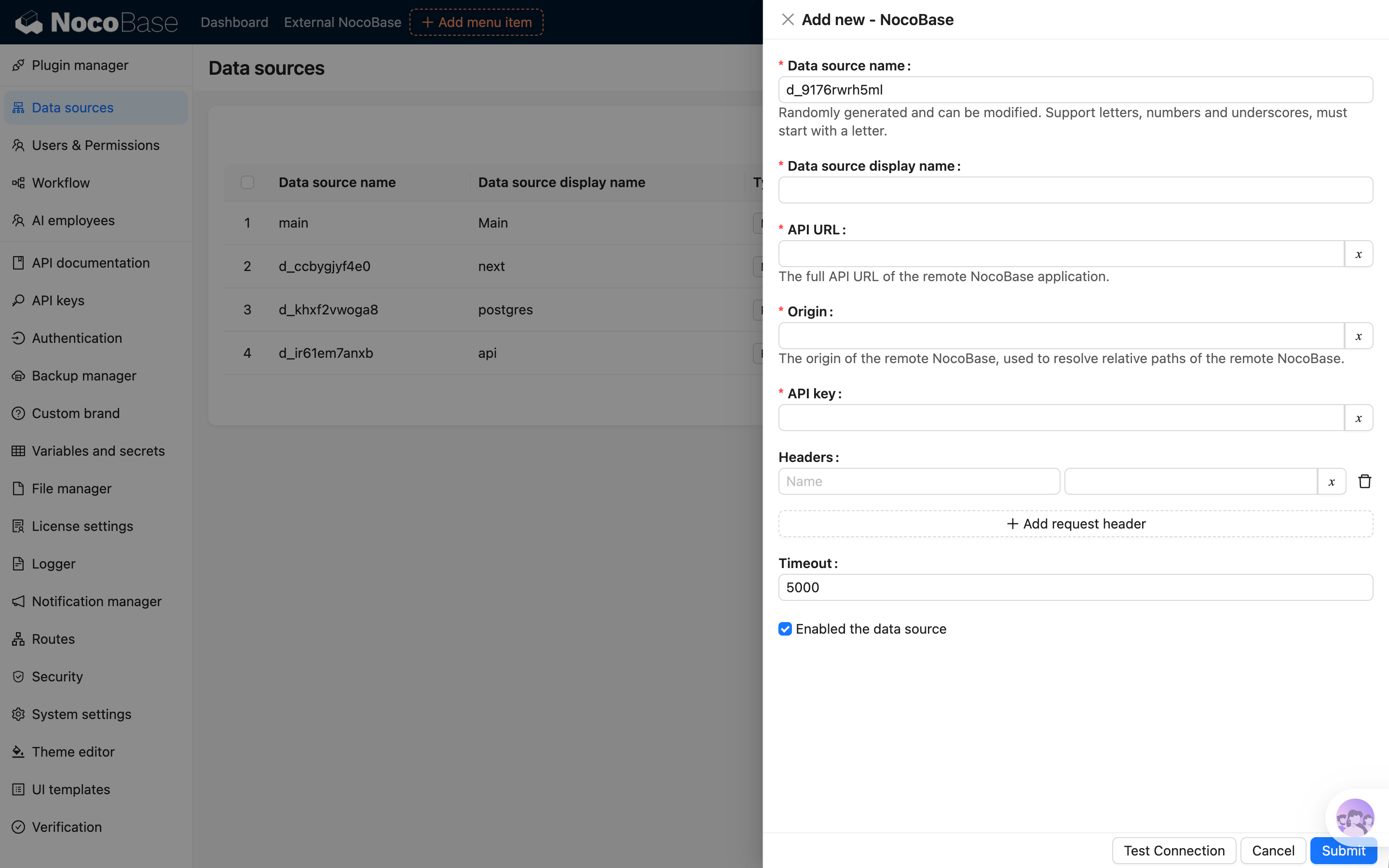
- package/dist/node_modules/openai/package.json +1 -1
- package/dist/node_modules/zod/package.json +1 -1
- package/package.json +2 -2
- package/dist/ai/docs/nocobase/ai/install-upgrade-migration.mdx +0 -402
|
@@ -20,7 +20,6 @@ nb app restart [flags]
|
|
|
20
20
|
| --- | --- | --- |
|
|
21
21
|
| `--env`, `-e` | string | CLI env name to restart; uses the current env if omitted |
|
|
22
22
|
| `--yes`, `-y` | boolean | When an explicitly passed `--env` targets a different env than the current env, skip the interactive confirmation prompt |
|
|
23
|
-
| `--daemon`, `-d` / `--no-daemon` | boolean | Whether to run in daemon mode after stopping; enabled by default |
|
|
24
23
|
| `--verbose` | boolean | Show underlying stop and start command output |
|
|
25
24
|
|
|
26
25
|
## Examples
|
|
@@ -28,14 +27,13 @@ nb app restart [flags]
|
|
|
28
27
|
```bash
|
|
29
28
|
nb app restart
|
|
30
29
|
nb app restart --env local
|
|
31
|
-
nb app restart --env local --no-daemon
|
|
32
30
|
nb app restart --env local --verbose
|
|
33
31
|
nb app restart --env local-docker
|
|
34
32
|
```
|
|
35
33
|
|
|
36
34
|
If you explicitly pass `--env` and it differs from the current env, the CLI asks for confirmation first. In non-interactive terminals or AI agent sessions, add `--yes` yourself or run `nb env use <name>` first and try again.
|
|
37
35
|
|
|
38
|
-
By default, when applicable, the CLI first runs `nb license plugins sync --skip-if-no-license` to synchronize the commercial plugins allowed by the current license. Then local envs automatically complete any required install or upgrade preparation before starting again, and Docker envs complete that step before recreating the container. Whenever the CLI needs to wait for readiness, it checks `__health_check`: it prints one waiting line first, then one progress line every 10 seconds until the app becomes available or times out.
|
|
36
|
+
By default, when applicable, the CLI first runs `nb license plugins sync --skip-if-no-license` to synchronize the commercial plugins allowed by the current license. Then local envs automatically complete any required install or upgrade preparation before starting again, and Docker envs complete that step before recreating the container. Whenever the CLI needs to wait for readiness, it checks `__health_check`: it prints one waiting line first, then one progress line every 10 seconds until the app becomes available or times out.
|
|
39
37
|
|
|
40
38
|
## Related Commands
|
|
41
39
|
|
|
@@ -20,7 +20,6 @@ nb app start [flags]
|
|
|
20
20
|
| --- | --- | --- |
|
|
21
21
|
| `--env`, `-e` | string | CLI env name to start; uses the current env if omitted |
|
|
22
22
|
| `--yes`, `-y` | boolean | When an explicitly passed `--env` targets a different env than the current env, skip the interactive confirmation prompt |
|
|
23
|
-
| `--daemon`, `-d` / `--no-daemon` | boolean | Whether to run in daemon mode; enabled by default |
|
|
24
23
|
| `--verbose` | boolean | Show underlying local or Docker command output |
|
|
25
24
|
|
|
26
25
|
## Examples
|
|
@@ -28,18 +27,13 @@ nb app start [flags]
|
|
|
28
27
|
```bash
|
|
29
28
|
nb app start
|
|
30
29
|
nb app start --env local
|
|
31
|
-
nb app start --env local --daemon
|
|
32
|
-
nb app start --env local --no-daemon
|
|
33
30
|
nb app start --env local --verbose
|
|
34
31
|
nb app start --env local-docker
|
|
35
32
|
```
|
|
36
33
|
|
|
37
34
|
If you explicitly pass `--env` and it differs from the current env, the CLI asks for confirmation first. In non-interactive terminals or AI agent sessions, add `--yes` yourself or run `nb env use <name>` first and try again.
|
|
38
35
|
|
|
39
|
-
By default, when applicable, the CLI first runs `nb license plugins sync --skip-if-no-license` to synchronize the commercial plugins allowed by the current license. Then local envs automatically complete any required install or upgrade preparation before starting
|
|
40
|
-
|
|
41
|
-
If you pass `--no-daemon` for a local env, the app runs in the foreground. In that case, the CLI does not keep waiting for the readiness check after startup.
|
|
42
|
-
|
|
36
|
+
By default, when applicable, the CLI first runs `nb license plugins sync --skip-if-no-license` to synchronize the commercial plugins allowed by the current license. Then local envs automatically complete any required install or upgrade preparation before starting, and Docker envs recreate the app container from saved env config. Whenever the CLI needs to wait for readiness, it checks `__health_check`: it prints one waiting line first, then one progress line every 10 seconds until the app becomes available or times out.
|
|
43
37
|
## Related Commands
|
|
44
38
|
|
|
45
39
|
- [`nb app stop`](./stop.md)
|
|
@@ -191,7 +191,6 @@ This file is generated or refreshed by [`nb env update`](./env/update.md) and is
|
|
|
191
191
|
## Related links
|
|
192
192
|
|
|
193
193
|
- [Quick Start](../../ai/quick-start.mdx)
|
|
194
|
-
- [Install, Upgrade, and Migration](../../ai/install-upgrade-migration.mdx)
|
|
195
194
|
- [Global Environment Variables](../app/env.md)
|
|
196
195
|
- [AI Builder](../../ai-builder/index.md)
|
|
197
196
|
- [Plugin Development](../../plugin-development/index.md)
|
|
@@ -38,6 +38,27 @@ nb init --env app1 --resume
|
|
|
38
38
|
|
|
39
39
|
`--resume` only applies to initialization flows where the env configuration has already been saved, and `--env` must be passed explicitly.
|
|
40
40
|
|
|
41
|
+
## Preparing an env without installing the app yet
|
|
42
|
+
|
|
43
|
+
`--prepare-only` is intended for flows where the env should be prepared first, then the license is activated, and only after that the app is installed and started.
|
|
44
|
+
|
|
45
|
+
If you want to save the env config, prepare the source files or image, and get the database ready first, but delay the actual app installation and first startup, you can use:
|
|
46
|
+
|
|
47
|
+
```bash
|
|
48
|
+
nb init --env app1 --prepare-only
|
|
49
|
+
nb init --env app1 --prepare-only --ui
|
|
50
|
+
nb init --env app1 --prepare-only --yes
|
|
51
|
+
```
|
|
52
|
+
|
|
53
|
+
This mode is available for local installation flows, including the `--ui` wizard. It is not available for remote connection flows. It saves the env as a prepared env, so you can continue later with a flow such as:
|
|
54
|
+
|
|
55
|
+
```bash
|
|
56
|
+
nb license activate --env app1
|
|
57
|
+
nb app start --env app1
|
|
58
|
+
```
|
|
59
|
+
|
|
60
|
+
`nb app start` will then complete the first installation and switch the env from the prepared state to the normal installed state.
|
|
61
|
+
|
|
41
62
|
## Installation directory layout
|
|
42
63
|
|
|
43
64
|
You can view the full path with `nb env info app1 --field app.appPath`.
|
|
@@ -104,6 +125,7 @@ The “Default” below means the value or behavior that `nb init` usually uses
|
|
|
104
125
|
| `--ui-port` | integer | `0` | Port for the `--ui` local service; `0` means automatic assignment |
|
|
105
126
|
| `--locale` | string | Follows `NB_LOCALE`, CLI config, or system locale; final fallback is `en-US` | Language for CLI prompts and the local setup UI: `en-US` or `zh-CN` |
|
|
106
127
|
| `--resume` | boolean | `false` | Continue the last unfinished initialization and reuse the saved workspace env config |
|
|
128
|
+
| `--prepare-only` | boolean | `false` | Save and prepare a local installation env, including `--ui` flows, without installing or starting the app yet |
|
|
107
129
|
|
|
108
130
|
### Connecting to an existing app
|
|
109
131
|
|
|
@@ -180,6 +202,14 @@ nb init --ui
|
|
|
180
202
|
nb init --ui --ui-port 3000
|
|
181
203
|
```
|
|
182
204
|
|
|
205
|
+
### Prepare first, then activate the license and start later
|
|
206
|
+
|
|
207
|
+
```bash
|
|
208
|
+
nb init --env app1 --prepare-only
|
|
209
|
+
nb license activate --env app1
|
|
210
|
+
nb app start --env app1
|
|
211
|
+
```
|
|
212
|
+
|
|
183
213
|
### Install a new local app in non-interactive mode
|
|
184
214
|
|
|
185
215
|
If you do not specify `--source`, Docker is usually used as the install source.
|
|
@@ -0,0 +1,157 @@
|
|
|
1
|
+
---
|
|
2
|
+
title: 'External NocoBase'
|
|
3
|
+
description: 'Connect another NocoBase application as an external data source and learn about configuration, available capabilities, and workflow limitations.'
|
|
4
|
+
keywords: 'External NocoBase,NocoBase data source,data source manager,workflow,NocoBase'
|
|
5
|
+
---
|
|
6
|
+
|
|
7
|
+
# External NocoBase
|
|
8
|
+
|
|
9
|
+
## Introduction
|
|
10
|
+
|
|
11
|
+
The External NocoBase data source connects another NocoBase application to the current application while preserving metadata from the remote application, including collections, field interfaces, titles, and association fields.
|
|
12
|
+
|
|
13
|
+
Compared with an external database data source, an external NocoBase data source usually does not require you to configure field interfaces again or manually create association fields. In addition to viewing, creating, editing, and deleting records, it also supports file upload and preview, import and export, chart queries, and some workflow scenarios.
|
|
14
|
+
|
|
15
|
+
## Add a Data Source
|
|
16
|
+
|
|
17
|
+
After activating the plugin, add an External NocoBase data source in Data Source Manager and fill in the access information of the remote application.
|
|
18
|
+
|
|
19
|
+
| Option | Description |
|
|
20
|
+
| --- | --- |
|
|
21
|
+
| API URL | The full API URL of the remote NocoBase application, such as `https://example.com/api` |
|
|
22
|
+
| Origin | The public origin of the remote NocoBase application, such as `https://example.com`. It is mainly used to handle preview URLs for local files in the remote application |
|
|
23
|
+
| API key | The credential used by the current application to access the remote NocoBase application |
|
|
24
|
+
| Request headers | Additional request headers sent to the remote application, such as space information |
|
|
25
|
+
| Timeout | Request timeout for accessing the remote application |
|
|
26
|
+
|
|
27
|
+
After the data source is enabled, the system loads the collections from the remote application.
|
|
28
|
+
|
|
29
|
+
|
|
30
|
+
|
|
31
|
+
## Permissions
|
|
32
|
+
|
|
33
|
+
An External NocoBase data source is affected by permissions in both the current application and the remote application.
|
|
34
|
+
|
|
35
|
+
- In the current application, you can configure access permissions for different collections and fields just like other external data sources.
|
|
36
|
+
- In the remote application, data is read and operated according to the permissions of the configured API key.
|
|
37
|
+
|
|
38
|
+
External NocoBase data sources do not return permission metadata used for fine-grained button visibility on the frontend. As a result, some buttons may not be automatically hidden by permissions in the same way as the main data source. Regardless of whether a button is visible, submitted operations still go through server-side permission checks in the current application, and unauthorized operations are rejected.
|
|
39
|
+
|
|
40
|
+
:::warning{title=Note}
|
|
41
|
+
Prepare a dedicated API key for the External NocoBase data source and grant only the required collection and operation permissions. If a user has permission in the current application but the operation fails, check the permissions of the remote API key.
|
|
42
|
+
:::
|
|
43
|
+
|
|
44
|
+
## Use Collections
|
|
45
|
+
|
|
46
|
+
After collections are loaded successfully, select this data source in page configuration, block configuration, charts, or workflows to use collections from the remote application.
|
|
47
|
+
|
|
48
|
+
When the collection structure in the remote application changes, reload the collections in the current application.
|
|
49
|
+
|
|
50
|
+
## Features
|
|
51
|
+
|
|
52
|
+
External NocoBase data sources are mainly used to use collections and data from a remote application in the current application. The collection structure, field configuration, and actual data are still maintained by the remote application.
|
|
53
|
+
|
|
54
|
+
### Collections and Fields
|
|
55
|
+
|
|
56
|
+
The current application loads metadata from the remote application, including collections, field interfaces, titles, and association fields. Compared with an external database data source, you usually do not need to configure field interfaces again or manually create association fields in the current application.
|
|
57
|
+
|
|
58
|
+
The current application does not support configuring fields directly for an External NocoBase data source. To add fields, adjust field types, or modify association fields, make the changes in the remote application and then reload the collections in the current application.
|
|
59
|
+
|
|
60
|
+
### Records and Associated Data
|
|
61
|
+
|
|
62
|
+
External NocoBase data sources support viewing, creating, editing, and deleting records in page blocks, and also support viewing and maintaining associated data. Operations are initiated by the current application and sent to the remote application through the configured API key.
|
|
63
|
+
|
|
64
|
+
### Files and Attachments
|
|
65
|
+
|
|
66
|
+
Files are uploaded to the storage used by the remote application. The current application initiates upload, preview, and download requests, but the files themselves are not stored in the current application.
|
|
67
|
+
|
|
68
|
+
Origin is mainly used to handle preview URLs for files stored locally by the remote application. If the remote application returns a relative path, the current application uses Origin to complete the file access URL. Origin should be the public access address of the remote NocoBase application, for example:
|
|
69
|
+
|
|
70
|
+
```text
|
|
71
|
+
https://example.com
|
|
72
|
+
```
|
|
73
|
+
|
|
74
|
+
Do not use the API URL as Origin.
|
|
75
|
+
|
|
76
|
+
### Import and Export
|
|
77
|
+
|
|
78
|
+
Import and export operations read from or write to the data source through external files, and are proxied to the remote application for execution. The current application handles user operations, forwards requests, and returns download results. The actual data read and write operations are completed by the remote application.
|
|
79
|
+
|
|
80
|
+
- Import records: the current application receives the uploaded import file and proxies it to the remote application for import.
|
|
81
|
+
- Export records: the current application proxies the request to the remote application to export records. In synchronous mode, the record file returned by the remote application is streamed back to the browser for download. In asynchronous mode, a local async task is created, record export is started in the remote application, progress is synchronized to the local task, and the result file is streamed from the remote application when downloaded.
|
|
82
|
+
- Export attachments: the current application proxies the request to the remote application to export attachments. In synchronous mode, the attachment archive returned by the remote application is streamed back to the browser for download. In asynchronous mode, a local async task is created, attachment export is started in the remote application, progress is synchronized to the local task, and the attachment archive is streamed from the remote application when downloaded.
|
|
83
|
+
|
|
84
|
+
### Template Print
|
|
85
|
+
|
|
86
|
+
Template Print can use records from an External NocoBase data source. Print templates and print action configuration are stored in the current application. When printing, the current application reads remote records and associated data, and generates the print file in the current application.
|
|
87
|
+
|
|
88
|
+
### Charts
|
|
89
|
+
|
|
90
|
+
#### Query Panel
|
|
91
|
+
|
|
92
|
+
External NocoBase data sources can be used in the chart query panel. The current application processes query parameters according to locally configured chart, data source, collection, and field permissions, then requests results from the remote application.
|
|
93
|
+
|
|
94
|
+
The remote API key must also have access to the corresponding data, otherwise the query fails.
|
|
95
|
+
|
|
96
|
+
#### SQL Panel
|
|
97
|
+
|
|
98
|
+
The SQL panel is the SQL query mode in charts and is used only for queries. The current application saves SQL configuration and initiates the call, while the SQL is proxied to the remote application for execution.
|
|
99
|
+
|
|
100
|
+
When using the SQL panel, the local user must have UI configuration permissions in the current application, and the remote API key must also have UI configuration permissions in the remote application. SQL is not broken down by collection and field permissions like the query panel. Grant UI configuration permissions to local users and the corresponding API key with caution.
|
|
101
|
+
|
|
102
|
+
### Workflows
|
|
103
|
+
|
|
104
|
+
External NocoBase data sources may involve workflows in both the current application and the remote application. The current application responds to events in local pages, buttons, and API request chains. After the remote application receives proxied requests, it handles them according to its own workflow configuration.
|
|
105
|
+
|
|
106
|
+
The current application does not listen to create, update, or delete events that occur inside remote collections. Remote collection events are triggered only in the remote application.
|
|
107
|
+
|
|
108
|
+
#### Triggers
|
|
109
|
+
|
|
110
|
+
The following table describes how triggers affected by External NocoBase data sources behave in the current application and the remote application when the corresponding workflow is enabled.
|
|
111
|
+
|
|
112
|
+
| Trigger | Current application | Remote application | Description |
|
|
113
|
+
| --- | --- | --- | --- |
|
|
114
|
+
| Pre-action event | Triggered | Triggered only in global mode | Global mode is triggered in the current application, and local mode follows button bindings in the current application. After the remote application receives the proxied request, only global mode is triggered |
|
|
115
|
+
| Post-action event | Triggered | Triggered only in global mode | Global mode is triggered in the current application, and local mode follows button bindings in the current application. After the remote application receives the proxied request, only global mode is triggered |
|
|
116
|
+
| Custom action event | Triggered | Not triggered | A Trigger workflow button bound in the current application triggers the local workflow. Proxied CRUD requests do not trigger remote custom action events |
|
|
117
|
+
| Collection event | Not triggered | Triggered | The actual data changes in the remote application. The current application does not trigger local collection events, while the remote application triggers its own collection events |
|
|
118
|
+
| Date field schedule trigger | Not triggered | Triggered | The current application does not trigger based on fields in remote collections. The remote application triggers according to its own date field configuration |
|
|
119
|
+
|
|
120
|
+
Triggers that do not depend on data sources are triggered in the current application and the remote application according to their own configurations.
|
|
121
|
+
|
|
122
|
+
To orchestrate workflows that operate on External NocoBase data in the current application, use pre-action events, post-action events, or custom action events. Existing workflows in the remote application run independently in the remote application.
|
|
123
|
+
|
|
124
|
+
#### Nodes
|
|
125
|
+
|
|
126
|
+
The following table lists only data-source-related nodes. General nodes such as condition, calculation, loop, and JSON processing do not depend on the data source type and can be used as usual.
|
|
127
|
+
|
|
128
|
+
| Node | Available | Description |
|
|
129
|
+
| --- | --- | --- |
|
|
130
|
+
| Query records | Available | Query records in the remote application |
|
|
131
|
+
| Create record | Available | Create records in the remote application |
|
|
132
|
+
| Update record | Available | Update records in the remote application |
|
|
133
|
+
| Delete record | Available | Delete records in the remote application |
|
|
134
|
+
| SQL node | Not available | The workflow SQL node supports only database data sources |
|
|
135
|
+
| Aggregate node | Not available | The aggregate node supports only database data sources |
|
|
136
|
+
|
|
137
|
+
## FAQ
|
|
138
|
+
|
|
139
|
+
### Collections Do Not Appear
|
|
140
|
+
|
|
141
|
+
Check whether the data source is enabled and whether the API URL and API key are correct. The remote application must also allow the API key to access the corresponding collections.
|
|
142
|
+
|
|
143
|
+
### Files Upload Successfully but Cannot Be Previewed
|
|
144
|
+
|
|
145
|
+
If the current application or the remote application uses local file storage, check whether Origin is the public access address of the corresponding application. Origin should not be the API URL.
|
|
146
|
+
|
|
147
|
+
### The Current Application Has Permission, but the Operation Fails
|
|
148
|
+
|
|
149
|
+
Check the API key permissions in the remote application. External NocoBase data sources are affected by permissions in both the current application and the remote application.
|
|
150
|
+
|
|
151
|
+
### Collections Cannot Be Used After a Remote Service Error
|
|
152
|
+
|
|
153
|
+
If the remote application returns 502, restarts, or is temporarily unavailable, the current application may temporarily fail to read remote collection metadata. After the remote service recovers, the current application automatically reloads metadata the next time this data source's collections are accessed.
|
|
154
|
+
|
|
155
|
+
### Why Fields Cannot Be Configured in the Current Application
|
|
156
|
+
|
|
157
|
+
External NocoBase data sources use the collection structure and field configuration from the remote application. Adjust fields in the remote application, then reload the collections in the current application.
|
|
@@ -14,6 +14,7 @@ NocoBase provides a data source management plugin for managing data sources and
|
|
|
14
14
|
- [External PostgreSQL](/data-sources/data-source-external-postgres): Use an external PostgreSQL database as a data source.
|
|
15
15
|
- [External MSSQL](/data-sources/data-source-external-mssql): Use an external MSSQL (SQL Server) database as a data source.
|
|
16
16
|
- [External Oracle](/data-sources/data-source-external-oracle): Use an external Oracle database as a data source.
|
|
17
|
+
- [External NocoBase](/data-sources/data-source-external-nocobase/): Use another NocoBase application as an external data source through the remote NocoBase API.
|
|
17
18
|
|
|
18
19
|
In addition, more types can be extended through plugins, which can be common types of databases or platforms that provide APIs (SDKs).
|
|
19
20
|
|
|
@@ -40,3 +41,7 @@ External databases are supported as data sources. For more information, see the
|
|
|
40
41
|
|
|
41
42
|
|
|
42
43
|
You can also access data from HTTP API sources. For more information, see the [REST API Data Source](/data-sources/data-source-rest-api/index.md) documentation.
|
|
44
|
+
|
|
45
|
+
### External NocoBase Data Source
|
|
46
|
+
|
|
47
|
+
You can use another NocoBase application as an external data source through the remote NocoBase API. For more information, see the [External NocoBase](/data-sources/data-source-external-nocobase/) documentation.
|
|
@@ -8,7 +8,13 @@ keywords: "Version control,ops management,create version,restore version,NocoBas
|
|
|
8
8
|
|
|
9
9
|
In NocoBase, **Version control** lets you save a restorable version of the current application. You can create versions manually, restore the application to a saved version when needed, and use the plugin settings to control how many versions to keep, which shortcut to use, and which user collections should be saved with the version.
|
|
10
10
|
|
|
11
|
-
|
|
11
|
+
Version control depends on [Backup manager](../backup-manager/index.mdx) to save and restore application states. Before using Version control, enable Backup manager first.
|
|
12
|
+
|
|
13
|
+
:::warning Note
|
|
14
|
+
|
|
15
|
+
Community and Standard editions do not include the Version control plugin. If you need to save a restorable application state, use [Backup manager](../backup-manager/index.mdx): create a backup manually before key changes, and restore the corresponding backup when you need to roll back.
|
|
16
|
+
|
|
17
|
+
:::
|
|
12
18
|
|
|
13
19
|
## Open the plugin
|
|
14
20
|
|
|
@@ -0,0 +1,14 @@
|
|
|
1
|
+
---
|
|
2
|
+
displayName: "Version control"
|
|
3
|
+
packageName: '@nocobase/plugin-version-control'
|
|
4
|
+
supportedVersions:
|
|
5
|
+
- 2.x
|
|
6
|
+
description: |
|
|
7
|
+
Saves restorable application versions and restores the application to a specified version when needed.
|
|
8
|
+
isFree: false
|
|
9
|
+
builtIn: false
|
|
10
|
+
defaultEnabled: false
|
|
11
|
+
editionLevel: 2
|
|
12
|
+
---
|
|
13
|
+
|
|
14
|
+
# Version control
|