@nocobase/plugin-ai 2.1.0-beta.46 → 2.1.0-beta.48
This diff represents the content of publicly available package versions that have been released to one of the supported registries. The information contained in this diff is provided for informational purposes only and reflects changes between package versions as they appear in their respective public registries.
- package/dist/ai/docs/nocobase/api/cli/app/restart.md +1 -3
- package/dist/ai/docs/nocobase/api/cli/app/start.md +1 -7
- package/dist/ai/docs/nocobase/api/cli/config/delete.md +7 -5
- package/dist/ai/docs/nocobase/api/cli/config/get.md +7 -5
- package/dist/ai/docs/nocobase/api/cli/config/index.md +38 -18
- package/dist/ai/docs/nocobase/api/cli/config/set.md +9 -7
- package/dist/ai/docs/nocobase/api/cli/env/index.md +19 -20
- package/dist/ai/docs/nocobase/api/cli/env/update.md +72 -72
- package/dist/ai/docs/nocobase/api/cli/index.md +0 -1
- package/dist/ai/docs/nocobase/api/cli/init.md +30 -0
- package/dist/ai/docs/nocobase/api/cli/proxy/caddy/current.md +33 -0
- package/dist/ai/docs/nocobase/api/cli/proxy/caddy/generate.md +54 -0
- package/dist/ai/docs/nocobase/api/cli/proxy/caddy/index.md +60 -0
- package/dist/ai/docs/nocobase/api/cli/proxy/caddy/info.md +42 -0
- package/dist/ai/docs/nocobase/api/cli/proxy/caddy/reload.md +32 -0
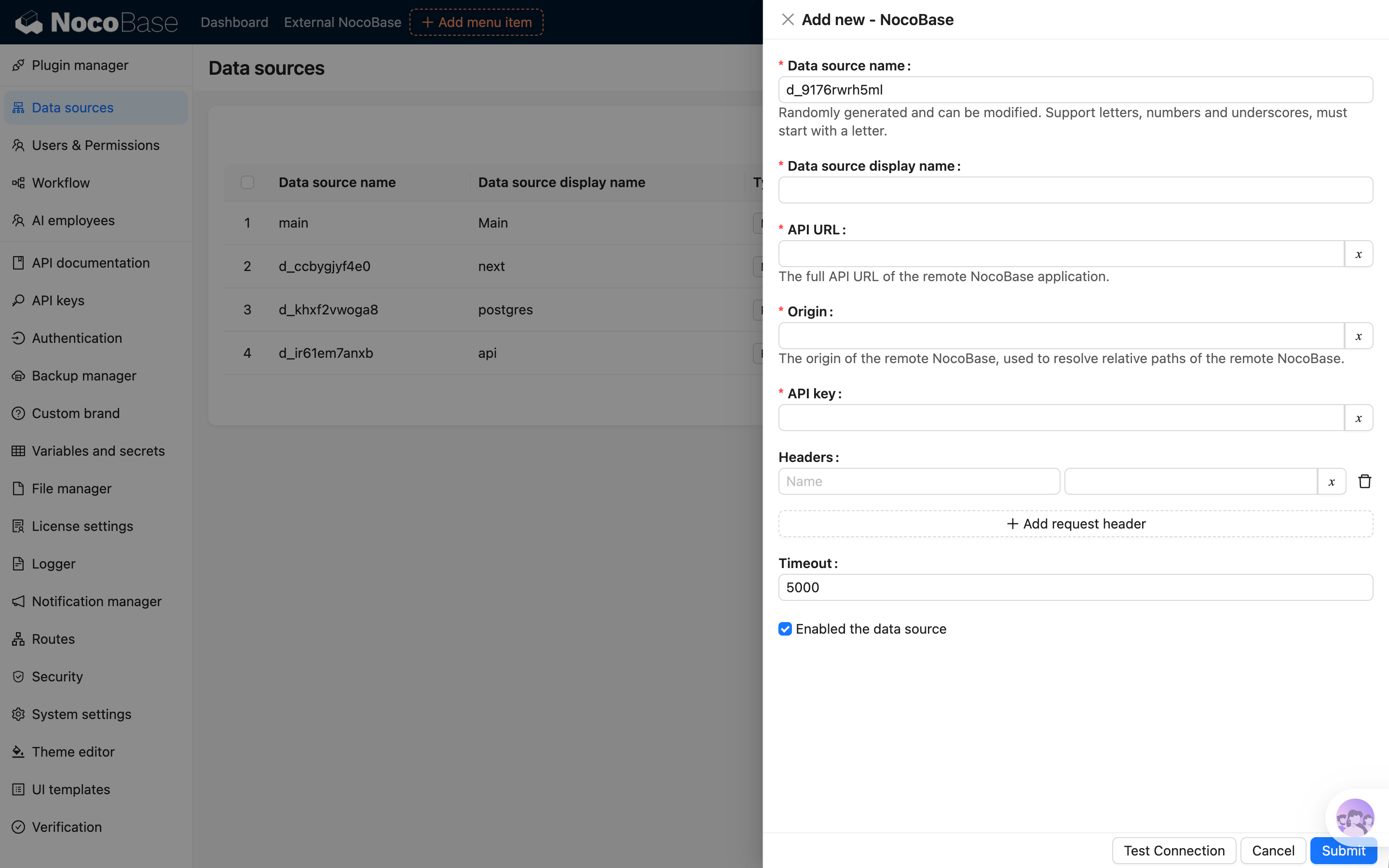
- package/dist/ai/docs/nocobase/api/cli/proxy/caddy/restart.md +32 -0
- package/dist/ai/docs/nocobase/api/cli/proxy/caddy/start.md +32 -0
- package/dist/ai/docs/nocobase/api/cli/proxy/caddy/status.md +36 -0
- package/dist/ai/docs/nocobase/api/cli/proxy/caddy/stop.md +32 -0
- package/dist/ai/docs/nocobase/api/cli/proxy/caddy/use.md +38 -0
- package/dist/ai/docs/nocobase/api/cli/proxy/index.md +124 -0
- package/dist/ai/docs/nocobase/api/cli/proxy/nginx/current.md +33 -0
- package/dist/ai/docs/nocobase/api/cli/proxy/nginx/generate.md +62 -0
- package/dist/ai/docs/nocobase/api/cli/proxy/nginx/index.md +60 -0
- package/dist/ai/docs/nocobase/api/cli/proxy/nginx/info.md +43 -0
- package/dist/ai/docs/nocobase/api/cli/proxy/nginx/reload.md +32 -0
- package/dist/ai/docs/nocobase/api/cli/proxy/nginx/restart.md +32 -0
- package/dist/ai/docs/nocobase/api/cli/proxy/nginx/start.md +32 -0
- package/dist/ai/docs/nocobase/api/cli/proxy/nginx/status.md +36 -0
- package/dist/ai/docs/nocobase/api/cli/proxy/nginx/stop.md +32 -0
- package/dist/ai/docs/nocobase/api/cli/proxy/nginx/use.md +38 -0
- package/dist/ai/docs/nocobase/data-sources/data-source-external-nocobase/index.md +157 -0
- package/dist/ai/docs/nocobase/data-sources/data-source-manager/index.md +5 -0
- package/dist/ai/docs/nocobase/ops-management/version-control/index.md +79 -0
- package/dist/ai/docs/nocobase/plugins/@nocobase/plugin-version-control/index.md +14 -0
- package/dist/ai/docs/nocobase/quickstart/production/index.md +75 -69
- package/dist/ai/docs/nocobase/quickstart/production/reverse-proxy/caddy.md +211 -80
- package/dist/ai/docs/nocobase/quickstart/production/reverse-proxy/index.md +72 -53
- package/dist/ai/docs/nocobase/quickstart/production/reverse-proxy/nginx.md +186 -89
- package/dist/client/{290.0888139e33c9b7cb.js → 290.0f7f441d8a94f03c.js} +1 -1
- package/dist/client/{428.431a00d29107058e.js → 428.fdd0cc3cfd1632ef.js} +1 -1
- package/dist/client/ai-employees/chatbox/hooks/useChat.d.ts +14 -14
- package/dist/client/ai-employees/chatbox/stores/chat-box.d.ts +1 -105
- package/dist/client/ai-employees/chatbox/stores/chat-conversations.d.ts +1 -37
- package/dist/client/ai-employees/chatbox/stores/chat-messages.d.ts +1 -109
- package/dist/client/index.js +3 -3
- package/dist/client-v2/ai-employees/chatbox/hooks/useChatBoxActions.d.ts +17 -0
- package/dist/client-v2/ai-employees/chatbox/stores/chat-box.d.ts +113 -0
- package/dist/client-v2/ai-employees/chatbox/stores/chat-conversations.d.ts +45 -0
- package/dist/client-v2/ai-employees/chatbox/stores/chat-messages.d.ts +118 -0
- package/dist/client-v2/ai-employees/chatbox/stores/create-selectors.d.ts +18 -0
- package/dist/client-v2/ai-employees/chatbox/stores/global-store.d.ts +9 -0
- package/dist/client-v2/ai-employees/types.d.ts +151 -0
- package/dist/client-v2/index.d.ts +8 -1
- package/dist/client-v2/index.js +1 -1
- package/dist/client-v2/repositories/AIConfigRepository.d.ts +81 -0
- package/dist/client-v2/repositories/hooks/useAIConfigRepository.d.ts +10 -0
- package/dist/collections/ai-context-datasource.js +1 -0
- package/dist/externalVersion.js +16 -16
- package/dist/node_modules/@langchain/xai/package.json +1 -1
- package/dist/node_modules/fs-extra/package.json +1 -1
- package/dist/node_modules/jsonrepair/package.json +1 -1
- package/dist/node_modules/just-bash/package.json +1 -1
- package/dist/node_modules/nodejs-snowflake/package.json +1 -1
- package/dist/node_modules/openai/package.json +1 -1
- package/dist/node_modules/zod/package.json +1 -1
- package/dist/server/collections/ai-conversations.js +1 -0
- package/dist/server/collections/ai-employees.js +1 -0
- package/dist/server/collections/ai-files.js +1 -0
- package/dist/server/collections/ai-messages.js +1 -0
- package/dist/server/collections/ai-settings.js +1 -0
- package/dist/server/collections/ai-tool-messages.js +1 -0
- package/dist/server/collections/lc-checkpoint-blobs.js +1 -0
- package/dist/server/collections/lc-checkpoint-writes.js +1 -0
- package/dist/server/collections/lc-checkpoints.js +1 -0
- package/dist/server/collections/llm-services.js +1 -0
- package/dist/server/collections/users-ai-employees.js +1 -0
- package/package.json +2 -2
- package/dist/ai/docs/nocobase/ai/install-upgrade-migration.mdx +0 -402
- package/dist/ai/docs/nocobase/api/cli/env/proxy/caddy.md +0 -108
- package/dist/ai/docs/nocobase/api/cli/env/proxy/index.md +0 -54
- package/dist/ai/docs/nocobase/api/cli/env/proxy/nginx.md +0 -104
|
@@ -0,0 +1,43 @@
|
|
|
1
|
+
---
|
|
2
|
+
title: "nb proxy nginx info"
|
|
3
|
+
description: "nb proxy nginx info command reference: show the current Nginx provider driver, config paths, and runtime details."
|
|
4
|
+
keywords: "nb proxy nginx info,NocoBase CLI,nginx,paths,configuration"
|
|
5
|
+
---
|
|
6
|
+
|
|
7
|
+
# nb proxy nginx info
|
|
8
|
+
|
|
9
|
+
Show the current Nginx provider driver, config paths, and runtime details.
|
|
10
|
+
|
|
11
|
+
## Usage
|
|
12
|
+
|
|
13
|
+
```bash
|
|
14
|
+
nb proxy nginx info
|
|
15
|
+
```
|
|
16
|
+
|
|
17
|
+
## Output
|
|
18
|
+
|
|
19
|
+
The output usually includes these fields:
|
|
20
|
+
|
|
21
|
+
- `driver`
|
|
22
|
+
- `configFile`
|
|
23
|
+
- `snippetsDir`
|
|
24
|
+
- `runtimeRoot`
|
|
25
|
+
- `upstreamHost`
|
|
26
|
+
- `nginxBinary` or `container`
|
|
27
|
+
- `image`
|
|
28
|
+
|
|
29
|
+
Where:
|
|
30
|
+
|
|
31
|
+
- with the `local` driver, the output shows `nginxBinary`
|
|
32
|
+
- with the `docker` driver, the output shows `container` and `image`
|
|
33
|
+
|
|
34
|
+
## Examples
|
|
35
|
+
|
|
36
|
+
```bash
|
|
37
|
+
nb proxy nginx info
|
|
38
|
+
```
|
|
39
|
+
|
|
40
|
+
## Related commands
|
|
41
|
+
|
|
42
|
+
- [`nb proxy nginx current`](./current.md)
|
|
43
|
+
- [`nb proxy nginx status`](./status.md)
|
|
@@ -0,0 +1,32 @@
|
|
|
1
|
+
---
|
|
2
|
+
title: "nb proxy nginx reload"
|
|
3
|
+
description: "nb proxy nginx reload command reference: reload the Nginx config with the current driver."
|
|
4
|
+
keywords: "nb proxy nginx reload,NocoBase CLI,nginx,reload"
|
|
5
|
+
---
|
|
6
|
+
|
|
7
|
+
# nb proxy nginx reload
|
|
8
|
+
|
|
9
|
+
Reload the Nginx config with the current driver.
|
|
10
|
+
|
|
11
|
+
## Usage
|
|
12
|
+
|
|
13
|
+
```bash
|
|
14
|
+
nb proxy nginx reload
|
|
15
|
+
```
|
|
16
|
+
|
|
17
|
+
## Examples
|
|
18
|
+
|
|
19
|
+
```bash
|
|
20
|
+
nb proxy nginx reload
|
|
21
|
+
```
|
|
22
|
+
|
|
23
|
+
## Notes
|
|
24
|
+
|
|
25
|
+
- This command is typically used after you regenerate the config
|
|
26
|
+
- `reload` requires Nginx to already be running; if it is not running yet, use `nb proxy nginx start` first
|
|
27
|
+
- The local driver reloads local Nginx, and the Docker driver reloads Nginx inside the container
|
|
28
|
+
|
|
29
|
+
## Related commands
|
|
30
|
+
|
|
31
|
+
- [`nb proxy nginx generate`](./generate.md)
|
|
32
|
+
- [`nb proxy nginx start`](./start.md)
|
|
@@ -0,0 +1,32 @@
|
|
|
1
|
+
---
|
|
2
|
+
title: "nb proxy nginx restart"
|
|
3
|
+
description: "nb proxy nginx restart command reference: restart the Nginx proxy with the current driver."
|
|
4
|
+
keywords: "nb proxy nginx restart,NocoBase CLI,nginx,restart"
|
|
5
|
+
---
|
|
6
|
+
|
|
7
|
+
# nb proxy nginx restart
|
|
8
|
+
|
|
9
|
+
Restart the Nginx proxy with the current driver.
|
|
10
|
+
|
|
11
|
+
## Usage
|
|
12
|
+
|
|
13
|
+
```bash
|
|
14
|
+
nb proxy nginx restart
|
|
15
|
+
```
|
|
16
|
+
|
|
17
|
+
## Examples
|
|
18
|
+
|
|
19
|
+
```bash
|
|
20
|
+
nb proxy nginx restart
|
|
21
|
+
```
|
|
22
|
+
|
|
23
|
+
## Notes
|
|
24
|
+
|
|
25
|
+
- This command stops the proxy first and then starts it again
|
|
26
|
+
- With `local` or `docker`, it operates on the local process or Docker container for the current driver
|
|
27
|
+
|
|
28
|
+
## Related commands
|
|
29
|
+
|
|
30
|
+
- [`nb proxy nginx start`](./start.md)
|
|
31
|
+
- [`nb proxy nginx stop`](./stop.md)
|
|
32
|
+
- [`nb proxy nginx reload`](./reload.md)
|
|
@@ -0,0 +1,32 @@
|
|
|
1
|
+
---
|
|
2
|
+
title: "nb proxy nginx start"
|
|
3
|
+
description: "nb proxy nginx start command reference: start the Nginx proxy with the current driver."
|
|
4
|
+
keywords: "nb proxy nginx start,NocoBase CLI,nginx,start"
|
|
5
|
+
---
|
|
6
|
+
|
|
7
|
+
# nb proxy nginx start
|
|
8
|
+
|
|
9
|
+
Start the Nginx proxy with the current driver.
|
|
10
|
+
|
|
11
|
+
## Usage
|
|
12
|
+
|
|
13
|
+
```bash
|
|
14
|
+
nb proxy nginx start
|
|
15
|
+
```
|
|
16
|
+
|
|
17
|
+
## Examples
|
|
18
|
+
|
|
19
|
+
```bash
|
|
20
|
+
nb proxy nginx start
|
|
21
|
+
```
|
|
22
|
+
|
|
23
|
+
## Notes
|
|
24
|
+
|
|
25
|
+
- With the `local` driver, this starts the local Nginx process
|
|
26
|
+
- With the `docker` driver, this starts or creates the Docker container
|
|
27
|
+
- If the proxy is already running, the command reports that it is already running
|
|
28
|
+
|
|
29
|
+
## Related commands
|
|
30
|
+
|
|
31
|
+
- [`nb proxy nginx stop`](./stop.md)
|
|
32
|
+
- [`nb proxy nginx status`](./status.md)
|
|
@@ -0,0 +1,36 @@
|
|
|
1
|
+
---
|
|
2
|
+
title: "nb proxy nginx status"
|
|
3
|
+
description: "nb proxy nginx status command reference: show the current Nginx proxy runtime status."
|
|
4
|
+
keywords: "nb proxy nginx status,NocoBase CLI,nginx,status"
|
|
5
|
+
---
|
|
6
|
+
|
|
7
|
+
# nb proxy nginx status
|
|
8
|
+
|
|
9
|
+
Show the current Nginx proxy runtime status.
|
|
10
|
+
|
|
11
|
+
## Usage
|
|
12
|
+
|
|
13
|
+
```bash
|
|
14
|
+
nb proxy nginx status
|
|
15
|
+
```
|
|
16
|
+
|
|
17
|
+
## Output
|
|
18
|
+
|
|
19
|
+
The output usually includes:
|
|
20
|
+
|
|
21
|
+
- `driver`
|
|
22
|
+
- `status`
|
|
23
|
+
- `config`
|
|
24
|
+
- `nginx` or `container`
|
|
25
|
+
|
|
26
|
+
## Examples
|
|
27
|
+
|
|
28
|
+
```bash
|
|
29
|
+
nb proxy nginx status
|
|
30
|
+
```
|
|
31
|
+
|
|
32
|
+
## Related commands
|
|
33
|
+
|
|
34
|
+
- [`nb proxy nginx info`](./info.md)
|
|
35
|
+
- [`nb proxy nginx start`](./start.md)
|
|
36
|
+
- [`nb proxy nginx stop`](./stop.md)
|
|
@@ -0,0 +1,32 @@
|
|
|
1
|
+
---
|
|
2
|
+
title: "nb proxy nginx stop"
|
|
3
|
+
description: "nb proxy nginx stop command reference: stop the Nginx proxy with the current driver."
|
|
4
|
+
keywords: "nb proxy nginx stop,NocoBase CLI,nginx,stop"
|
|
5
|
+
---
|
|
6
|
+
|
|
7
|
+
# nb proxy nginx stop
|
|
8
|
+
|
|
9
|
+
Stop the Nginx proxy with the current driver.
|
|
10
|
+
|
|
11
|
+
## Usage
|
|
12
|
+
|
|
13
|
+
```bash
|
|
14
|
+
nb proxy nginx stop
|
|
15
|
+
```
|
|
16
|
+
|
|
17
|
+
## Examples
|
|
18
|
+
|
|
19
|
+
```bash
|
|
20
|
+
nb proxy nginx stop
|
|
21
|
+
```
|
|
22
|
+
|
|
23
|
+
## Notes
|
|
24
|
+
|
|
25
|
+
- With the `local` driver, this stops the local Nginx process
|
|
26
|
+
- With the `docker` driver, this stops the proxy container
|
|
27
|
+
- If the proxy is already stopped, the command reports that it is already stopped
|
|
28
|
+
|
|
29
|
+
## Related commands
|
|
30
|
+
|
|
31
|
+
- [`nb proxy nginx start`](./start.md)
|
|
32
|
+
- [`nb proxy nginx status`](./status.md)
|
|
@@ -0,0 +1,38 @@
|
|
|
1
|
+
---
|
|
2
|
+
title: "nb proxy nginx use"
|
|
3
|
+
description: "nb proxy nginx use command reference: switch the current driver for the Nginx provider."
|
|
4
|
+
keywords: "nb proxy nginx use,NocoBase CLI,nginx,driver"
|
|
5
|
+
---
|
|
6
|
+
|
|
7
|
+
# nb proxy nginx use
|
|
8
|
+
|
|
9
|
+
Switch the current driver for the Nginx provider.
|
|
10
|
+
|
|
11
|
+
## Usage
|
|
12
|
+
|
|
13
|
+
```bash
|
|
14
|
+
nb proxy nginx use <driver>
|
|
15
|
+
```
|
|
16
|
+
|
|
17
|
+
## Parameters
|
|
18
|
+
|
|
19
|
+
| Parameter | Type | Description |
|
|
20
|
+
| --- | --- | --- |
|
|
21
|
+
| `<driver>` | string | Supports `local` or `docker` |
|
|
22
|
+
|
|
23
|
+
## Examples
|
|
24
|
+
|
|
25
|
+
```bash
|
|
26
|
+
nb proxy nginx use local
|
|
27
|
+
nb proxy nginx use docker
|
|
28
|
+
```
|
|
29
|
+
|
|
30
|
+
## Notes
|
|
31
|
+
|
|
32
|
+
- This command saves the result to `proxy.nginx-driver`
|
|
33
|
+
- Later commands such as `start`, `reload`, `stop`, `status`, and `info` all use the current driver
|
|
34
|
+
|
|
35
|
+
## Related commands
|
|
36
|
+
|
|
37
|
+
- [`nb proxy nginx current`](./current.md)
|
|
38
|
+
- [`nb proxy nginx start`](./start.md)
|
|
@@ -0,0 +1,157 @@
|
|
|
1
|
+
---
|
|
2
|
+
title: 'External NocoBase'
|
|
3
|
+
description: 'Connect another NocoBase application as an external data source and learn about configuration, available capabilities, and workflow limitations.'
|
|
4
|
+
keywords: 'External NocoBase,NocoBase data source,data source manager,workflow,NocoBase'
|
|
5
|
+
---
|
|
6
|
+
|
|
7
|
+
# External NocoBase
|
|
8
|
+
|
|
9
|
+
## Introduction
|
|
10
|
+
|
|
11
|
+
The External NocoBase data source connects another NocoBase application to the current application while preserving metadata from the remote application, including collections, field interfaces, titles, and association fields.
|
|
12
|
+
|
|
13
|
+
Compared with an external database data source, an external NocoBase data source usually does not require you to configure field interfaces again or manually create association fields. In addition to viewing, creating, editing, and deleting records, it also supports file upload and preview, import and export, chart queries, and some workflow scenarios.
|
|
14
|
+
|
|
15
|
+
## Add a Data Source
|
|
16
|
+
|
|
17
|
+
After activating the plugin, add an External NocoBase data source in Data Source Manager and fill in the access information of the remote application.
|
|
18
|
+
|
|
19
|
+
| Option | Description |
|
|
20
|
+
| --- | --- |
|
|
21
|
+
| API URL | The full API URL of the remote NocoBase application, such as `https://example.com/api` |
|
|
22
|
+
| Origin | The public origin of the remote NocoBase application, such as `https://example.com`. It is mainly used to handle preview URLs for local files in the remote application |
|
|
23
|
+
| API key | The credential used by the current application to access the remote NocoBase application |
|
|
24
|
+
| Request headers | Additional request headers sent to the remote application, such as space information |
|
|
25
|
+
| Timeout | Request timeout for accessing the remote application |
|
|
26
|
+
|
|
27
|
+
After the data source is enabled, the system loads the collections from the remote application.
|
|
28
|
+
|
|
29
|
+
|
|
30
|
+
|
|
31
|
+
## Permissions
|
|
32
|
+
|
|
33
|
+
An External NocoBase data source is affected by permissions in both the current application and the remote application.
|
|
34
|
+
|
|
35
|
+
- In the current application, you can configure access permissions for different collections and fields just like other external data sources.
|
|
36
|
+
- In the remote application, data is read and operated according to the permissions of the configured API key.
|
|
37
|
+
|
|
38
|
+
External NocoBase data sources do not return permission metadata used for fine-grained button visibility on the frontend. As a result, some buttons may not be automatically hidden by permissions in the same way as the main data source. Regardless of whether a button is visible, submitted operations still go through server-side permission checks in the current application, and unauthorized operations are rejected.
|
|
39
|
+
|
|
40
|
+
:::warning{title=Note}
|
|
41
|
+
Prepare a dedicated API key for the External NocoBase data source and grant only the required collection and operation permissions. If a user has permission in the current application but the operation fails, check the permissions of the remote API key.
|
|
42
|
+
:::
|
|
43
|
+
|
|
44
|
+
## Use Collections
|
|
45
|
+
|
|
46
|
+
After collections are loaded successfully, select this data source in page configuration, block configuration, charts, or workflows to use collections from the remote application.
|
|
47
|
+
|
|
48
|
+
When the collection structure in the remote application changes, reload the collections in the current application.
|
|
49
|
+
|
|
50
|
+
## Features
|
|
51
|
+
|
|
52
|
+
External NocoBase data sources are mainly used to use collections and data from a remote application in the current application. The collection structure, field configuration, and actual data are still maintained by the remote application.
|
|
53
|
+
|
|
54
|
+
### Collections and Fields
|
|
55
|
+
|
|
56
|
+
The current application loads metadata from the remote application, including collections, field interfaces, titles, and association fields. Compared with an external database data source, you usually do not need to configure field interfaces again or manually create association fields in the current application.
|
|
57
|
+
|
|
58
|
+
The current application does not support configuring fields directly for an External NocoBase data source. To add fields, adjust field types, or modify association fields, make the changes in the remote application and then reload the collections in the current application.
|
|
59
|
+
|
|
60
|
+
### Records and Associated Data
|
|
61
|
+
|
|
62
|
+
External NocoBase data sources support viewing, creating, editing, and deleting records in page blocks, and also support viewing and maintaining associated data. Operations are initiated by the current application and sent to the remote application through the configured API key.
|
|
63
|
+
|
|
64
|
+
### Files and Attachments
|
|
65
|
+
|
|
66
|
+
Files are uploaded to the storage used by the remote application. The current application initiates upload, preview, and download requests, but the files themselves are not stored in the current application.
|
|
67
|
+
|
|
68
|
+
Origin is mainly used to handle preview URLs for files stored locally by the remote application. If the remote application returns a relative path, the current application uses Origin to complete the file access URL. Origin should be the public access address of the remote NocoBase application, for example:
|
|
69
|
+
|
|
70
|
+
```text
|
|
71
|
+
https://example.com
|
|
72
|
+
```
|
|
73
|
+
|
|
74
|
+
Do not use the API URL as Origin.
|
|
75
|
+
|
|
76
|
+
### Import and Export
|
|
77
|
+
|
|
78
|
+
Import and export operations read from or write to the data source through external files, and are proxied to the remote application for execution. The current application handles user operations, forwards requests, and returns download results. The actual data read and write operations are completed by the remote application.
|
|
79
|
+
|
|
80
|
+
- Import records: the current application receives the uploaded import file and proxies it to the remote application for import.
|
|
81
|
+
- Export records: the current application proxies the request to the remote application to export records. In synchronous mode, the record file returned by the remote application is streamed back to the browser for download. In asynchronous mode, a local async task is created, record export is started in the remote application, progress is synchronized to the local task, and the result file is streamed from the remote application when downloaded.
|
|
82
|
+
- Export attachments: the current application proxies the request to the remote application to export attachments. In synchronous mode, the attachment archive returned by the remote application is streamed back to the browser for download. In asynchronous mode, a local async task is created, attachment export is started in the remote application, progress is synchronized to the local task, and the attachment archive is streamed from the remote application when downloaded.
|
|
83
|
+
|
|
84
|
+
### Template Print
|
|
85
|
+
|
|
86
|
+
Template Print can use records from an External NocoBase data source. Print templates and print action configuration are stored in the current application. When printing, the current application reads remote records and associated data, and generates the print file in the current application.
|
|
87
|
+
|
|
88
|
+
### Charts
|
|
89
|
+
|
|
90
|
+
#### Query Panel
|
|
91
|
+
|
|
92
|
+
External NocoBase data sources can be used in the chart query panel. The current application processes query parameters according to locally configured chart, data source, collection, and field permissions, then requests results from the remote application.
|
|
93
|
+
|
|
94
|
+
The remote API key must also have access to the corresponding data, otherwise the query fails.
|
|
95
|
+
|
|
96
|
+
#### SQL Panel
|
|
97
|
+
|
|
98
|
+
The SQL panel is the SQL query mode in charts and is used only for queries. The current application saves SQL configuration and initiates the call, while the SQL is proxied to the remote application for execution.
|
|
99
|
+
|
|
100
|
+
When using the SQL panel, the local user must have UI configuration permissions in the current application, and the remote API key must also have UI configuration permissions in the remote application. SQL is not broken down by collection and field permissions like the query panel. Grant UI configuration permissions to local users and the corresponding API key with caution.
|
|
101
|
+
|
|
102
|
+
### Workflows
|
|
103
|
+
|
|
104
|
+
External NocoBase data sources may involve workflows in both the current application and the remote application. The current application responds to events in local pages, buttons, and API request chains. After the remote application receives proxied requests, it handles them according to its own workflow configuration.
|
|
105
|
+
|
|
106
|
+
The current application does not listen to create, update, or delete events that occur inside remote collections. Remote collection events are triggered only in the remote application.
|
|
107
|
+
|
|
108
|
+
#### Triggers
|
|
109
|
+
|
|
110
|
+
The following table describes how triggers affected by External NocoBase data sources behave in the current application and the remote application when the corresponding workflow is enabled.
|
|
111
|
+
|
|
112
|
+
| Trigger | Current application | Remote application | Description |
|
|
113
|
+
| --- | --- | --- | --- |
|
|
114
|
+
| Pre-action event | Triggered | Triggered only in global mode | Global mode is triggered in the current application, and local mode follows button bindings in the current application. After the remote application receives the proxied request, only global mode is triggered |
|
|
115
|
+
| Post-action event | Triggered | Triggered only in global mode | Global mode is triggered in the current application, and local mode follows button bindings in the current application. After the remote application receives the proxied request, only global mode is triggered |
|
|
116
|
+
| Custom action event | Triggered | Not triggered | A Trigger workflow button bound in the current application triggers the local workflow. Proxied CRUD requests do not trigger remote custom action events |
|
|
117
|
+
| Collection event | Not triggered | Triggered | The actual data changes in the remote application. The current application does not trigger local collection events, while the remote application triggers its own collection events |
|
|
118
|
+
| Date field schedule trigger | Not triggered | Triggered | The current application does not trigger based on fields in remote collections. The remote application triggers according to its own date field configuration |
|
|
119
|
+
|
|
120
|
+
Triggers that do not depend on data sources are triggered in the current application and the remote application according to their own configurations.
|
|
121
|
+
|
|
122
|
+
To orchestrate workflows that operate on External NocoBase data in the current application, use pre-action events, post-action events, or custom action events. Existing workflows in the remote application run independently in the remote application.
|
|
123
|
+
|
|
124
|
+
#### Nodes
|
|
125
|
+
|
|
126
|
+
The following table lists only data-source-related nodes. General nodes such as condition, calculation, loop, and JSON processing do not depend on the data source type and can be used as usual.
|
|
127
|
+
|
|
128
|
+
| Node | Available | Description |
|
|
129
|
+
| --- | --- | --- |
|
|
130
|
+
| Query records | Available | Query records in the remote application |
|
|
131
|
+
| Create record | Available | Create records in the remote application |
|
|
132
|
+
| Update record | Available | Update records in the remote application |
|
|
133
|
+
| Delete record | Available | Delete records in the remote application |
|
|
134
|
+
| SQL node | Not available | The workflow SQL node supports only database data sources |
|
|
135
|
+
| Aggregate node | Not available | The aggregate node supports only database data sources |
|
|
136
|
+
|
|
137
|
+
## FAQ
|
|
138
|
+
|
|
139
|
+
### Collections Do Not Appear
|
|
140
|
+
|
|
141
|
+
Check whether the data source is enabled and whether the API URL and API key are correct. The remote application must also allow the API key to access the corresponding collections.
|
|
142
|
+
|
|
143
|
+
### Files Upload Successfully but Cannot Be Previewed
|
|
144
|
+
|
|
145
|
+
If the current application or the remote application uses local file storage, check whether Origin is the public access address of the corresponding application. Origin should not be the API URL.
|
|
146
|
+
|
|
147
|
+
### The Current Application Has Permission, but the Operation Fails
|
|
148
|
+
|
|
149
|
+
Check the API key permissions in the remote application. External NocoBase data sources are affected by permissions in both the current application and the remote application.
|
|
150
|
+
|
|
151
|
+
### Collections Cannot Be Used After a Remote Service Error
|
|
152
|
+
|
|
153
|
+
If the remote application returns 502, restarts, or is temporarily unavailable, the current application may temporarily fail to read remote collection metadata. After the remote service recovers, the current application automatically reloads metadata the next time this data source's collections are accessed.
|
|
154
|
+
|
|
155
|
+
### Why Fields Cannot Be Configured in the Current Application
|
|
156
|
+
|
|
157
|
+
External NocoBase data sources use the collection structure and field configuration from the remote application. Adjust fields in the remote application, then reload the collections in the current application.
|
|
@@ -14,6 +14,7 @@ NocoBase provides a data source management plugin for managing data sources and
|
|
|
14
14
|
- [External PostgreSQL](/data-sources/data-source-external-postgres): Use an external PostgreSQL database as a data source.
|
|
15
15
|
- [External MSSQL](/data-sources/data-source-external-mssql): Use an external MSSQL (SQL Server) database as a data source.
|
|
16
16
|
- [External Oracle](/data-sources/data-source-external-oracle): Use an external Oracle database as a data source.
|
|
17
|
+
- [External NocoBase](/data-sources/data-source-external-nocobase/): Use another NocoBase application as an external data source through the remote NocoBase API.
|
|
17
18
|
|
|
18
19
|
In addition, more types can be extended through plugins, which can be common types of databases or platforms that provide APIs (SDKs).
|
|
19
20
|
|
|
@@ -40,3 +41,7 @@ External databases are supported as data sources. For more information, see the
|
|
|
40
41
|
|
|
41
42
|
|
|
42
43
|
You can also access data from HTTP API sources. For more information, see the [REST API Data Source](/data-sources/data-source-rest-api/index.md) documentation.
|
|
44
|
+
|
|
45
|
+
### External NocoBase Data Source
|
|
46
|
+
|
|
47
|
+
You can use another NocoBase application as an external data source through the remote NocoBase API. For more information, see the [External NocoBase](/data-sources/data-source-external-nocobase/) documentation.
|
|
@@ -0,0 +1,79 @@
|
|
|
1
|
+
---
|
|
2
|
+
title: "Version control"
|
|
3
|
+
description: "Version control plugin guide: create versions, restore versions, configure retention, set shortcuts, and include user collections in saved versions."
|
|
4
|
+
keywords: "Version control,ops management,create version,restore version,NocoBase"
|
|
5
|
+
---
|
|
6
|
+
|
|
7
|
+
# Version control
|
|
8
|
+
|
|
9
|
+
In NocoBase, **Version control** lets you save a restorable version of the current application. You can create versions manually, restore the application to a saved version when needed, and use the plugin settings to control how many versions to keep, which shortcut to use, and which user collections should be saved with the version.
|
|
10
|
+
|
|
11
|
+
Version control depends on [Backup manager](../backup-manager/index.mdx) to save and restore application states. Before using Version control, enable Backup manager first.
|
|
12
|
+
|
|
13
|
+
:::warning Note
|
|
14
|
+
|
|
15
|
+
Community and Standard editions do not include the Version control plugin. If you need to save a restorable application state, use [Backup manager](../backup-manager/index.mdx): create a backup manually before key changes, and restore the corresponding backup when you need to roll back.
|
|
16
|
+
|
|
17
|
+
:::
|
|
18
|
+
|
|
19
|
+
## Open the plugin
|
|
20
|
+
|
|
21
|
+
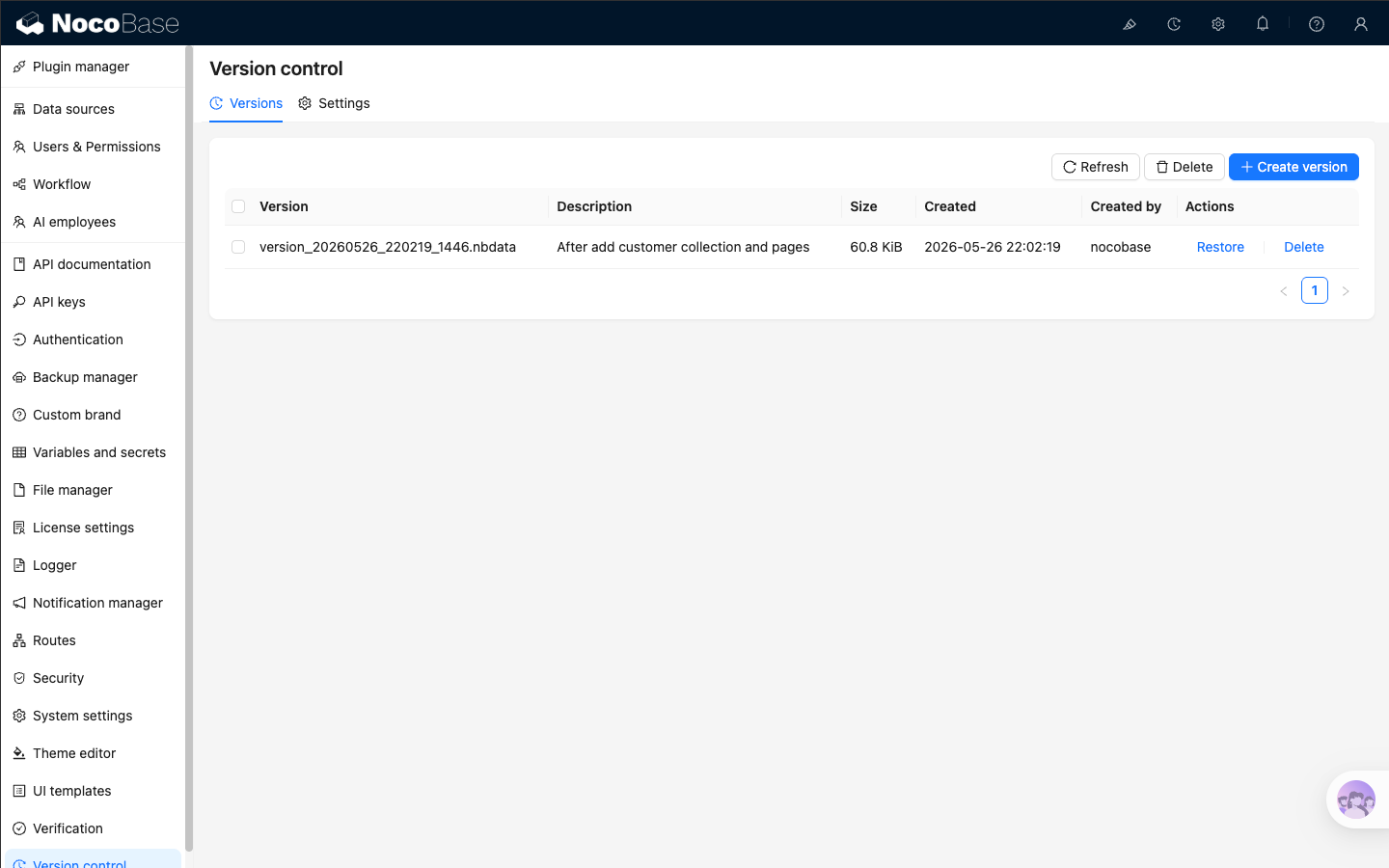
You can open the plugin from 「System settings」 → 「Version control」. A Version control button also appears in the top bar. Click it to create a version directly or jump to the versions list. The default shortcut for creating a version is `Ctrl + K`, and you can change it in the settings tab.
|
|
22
|
+
|
|
23
|
+
|
|
24
|
+
|
|
25
|
+
## Create a version
|
|
26
|
+
|
|
27
|
+
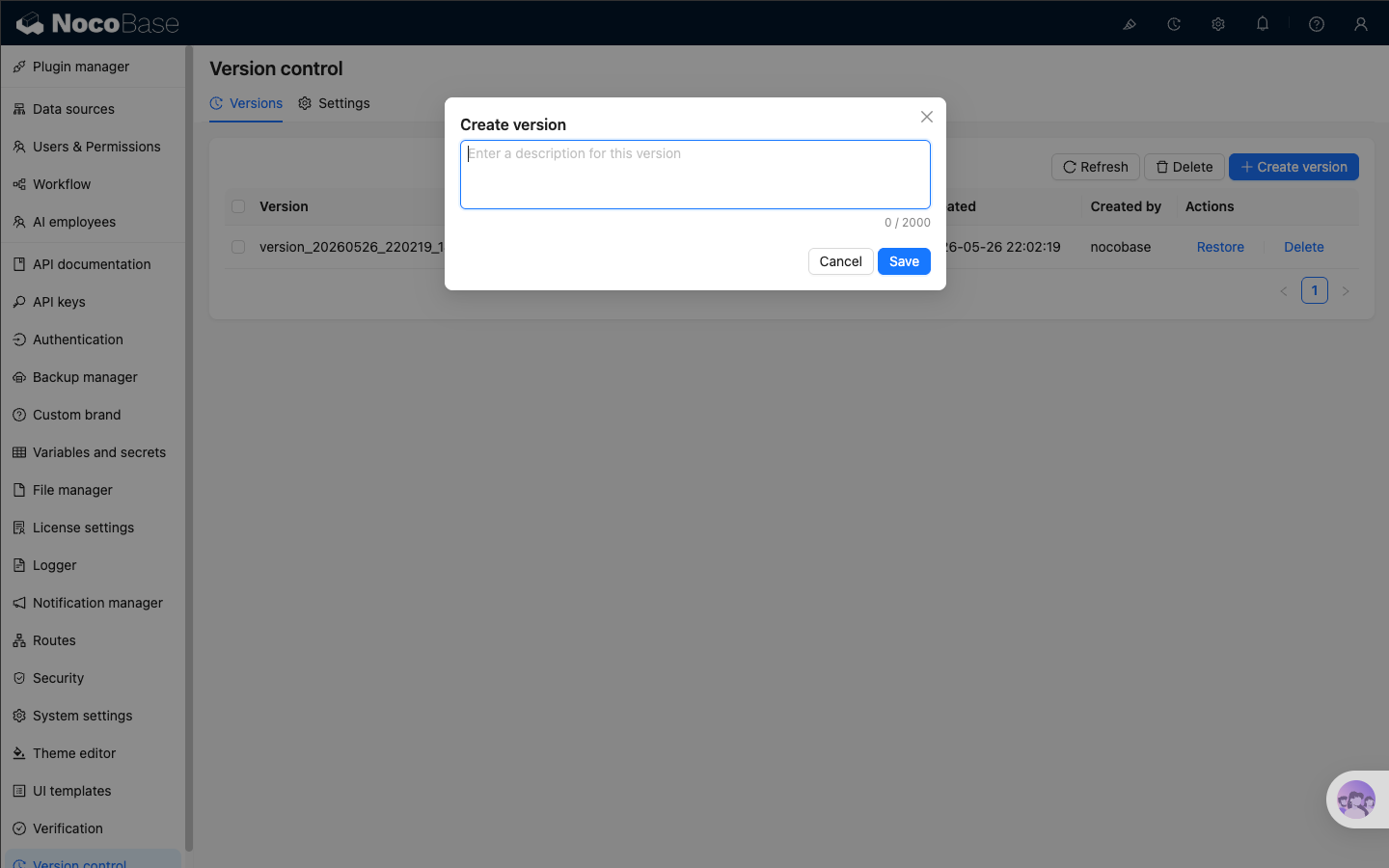
Click 「Create version」, enter a description, and save it. The description can be up to 2000 characters. It is useful for recording the background of the change, such as “Adjusted approval fields and permissions”.
|
|
28
|
+
|
|
29
|
+
|
|
30
|
+
|
|
31
|
+
After you click save, the list first shows a temporary “Saving” entry. When the task finishes, the saved version appears in the list.
|
|
32
|
+
|
|
33
|
+
Key points:
|
|
34
|
+
|
|
35
|
+
- Version names are generated automatically
|
|
36
|
+
- Creating a version from the top bar, the shortcut, or the list page behaves the same
|
|
37
|
+
- The list shows the version name, description, file size, creation time, creator, and available actions
|
|
38
|
+
|
|
39
|
+
## Manage and restore versions
|
|
40
|
+
|
|
41
|
+
The versions list mainly provides these actions:
|
|
42
|
+
|
|
43
|
+
- 「Refresh」 reloads the current list
|
|
44
|
+
- 「Delete」 removes one version, or multiple selected versions in batch
|
|
45
|
+
- 「Restore」 restores the application to the state saved in that version
|
|
46
|
+
|
|
47
|
+
:::warning Notice
|
|
48
|
+
|
|
49
|
+
Restoring a version overwrites the current application configuration and the data included in that version. It is recommended to create a version of the current state before restoring, so you can roll back again if needed.
|
|
50
|
+
|
|
51
|
+
:::
|
|
52
|
+
|
|
53
|
+
After you click 「Restore」, the application enters maintenance mode for a short time while the restore is running. Do not submit another restore request during that time. If the restore fails, the UI shows an error notification.
|
|
54
|
+
|
|
55
|
+
## Configure version rules
|
|
56
|
+
|
|
57
|
+
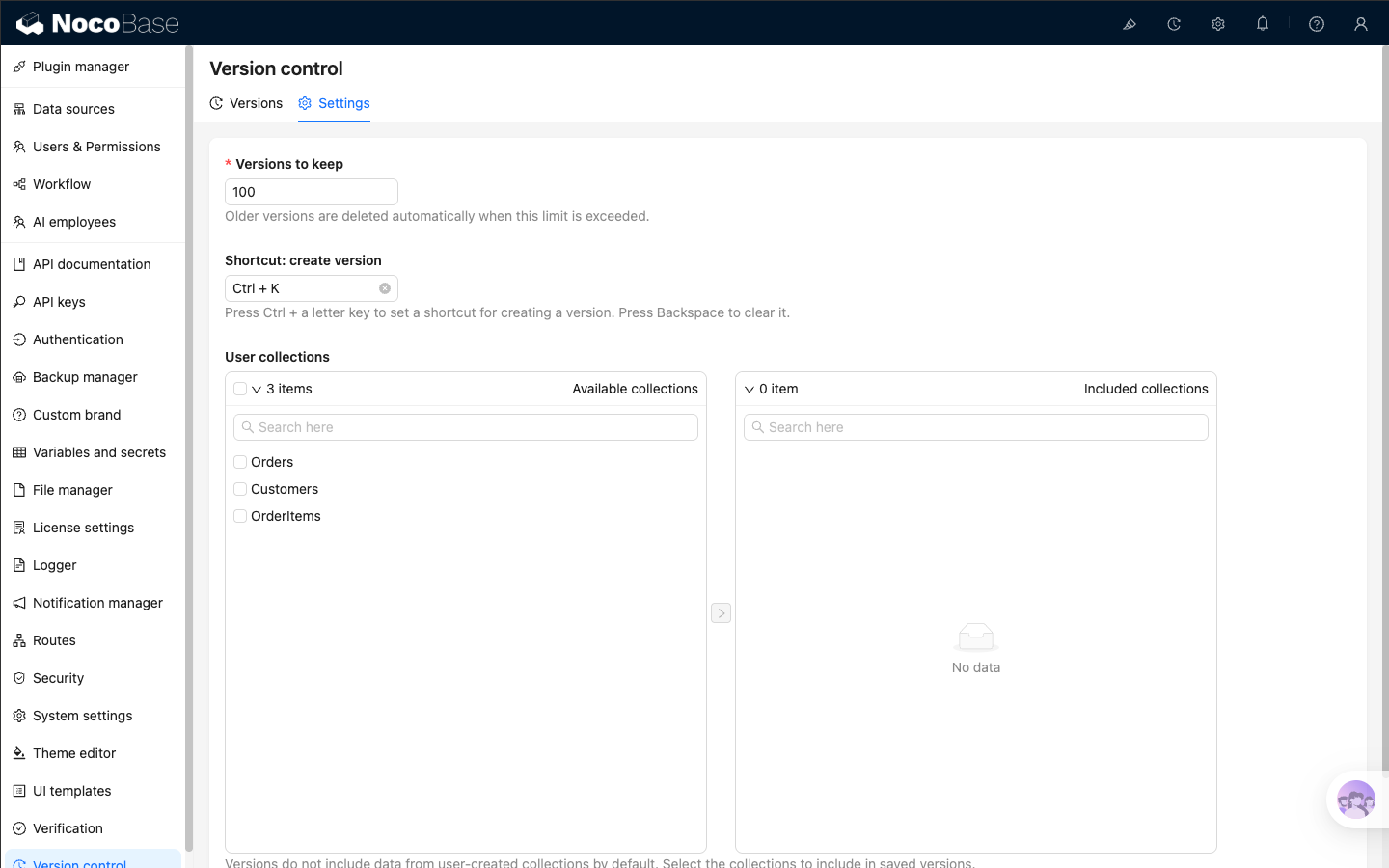
Open the 「Settings」 tab to control retention and what each version includes.
|
|
58
|
+
|
|
59
|
+
|
|
60
|
+
|
|
61
|
+
The settings include:
|
|
62
|
+
|
|
63
|
+
- `Versions to keep`: the maximum number of saved versions. Older versions are deleted automatically after the limit is exceeded
|
|
64
|
+
- `Shortcut: create version`: the shortcut for creating a version. Press `Ctrl + a letter key` to set it, or `Backspace` to clear it
|
|
65
|
+
- `User collections`: choose which user-created collections should have their data included in saved versions
|
|
66
|
+
|
|
67
|
+
:::tip
|
|
68
|
+
|
|
69
|
+
By default, saved versions do not include data from user-created collections. You only need to select collections here when you want some business data to be restored together with the application version.
|
|
70
|
+
|
|
71
|
+
:::
|
|
72
|
+
|
|
73
|
+
If you include a user collection, NocoBase also includes related collections automatically, so restores are usually more complete.
|
|
74
|
+
|
|
75
|
+
## Related links
|
|
76
|
+
|
|
77
|
+
- [Backup manager](../backup-manager/index.mdx) — the underlying capability required by Version control
|
|
78
|
+
- [Migration manager](../migration-manager/index.md) — move application configuration across environments
|
|
79
|
+
- [Release management](../release-management/index.md) — plan release workflows with backups, migrations, and variables
|
|
@@ -0,0 +1,14 @@
|
|
|
1
|
+
---
|
|
2
|
+
displayName: "Version control"
|
|
3
|
+
packageName: '@nocobase/plugin-version-control'
|
|
4
|
+
supportedVersions:
|
|
5
|
+
- 2.x
|
|
6
|
+
description: |
|
|
7
|
+
Saves restorable application versions and restores the application to a specified version when needed.
|
|
8
|
+
isFree: false
|
|
9
|
+
builtIn: false
|
|
10
|
+
defaultEnabled: false
|
|
11
|
+
editionLevel: 2
|
|
12
|
+
---
|
|
13
|
+
|
|
14
|
+
# Version control
|