@nocobase/plugin-ai 2.1.0-beta.46 → 2.1.0-beta.47
This diff represents the content of publicly available package versions that have been released to one of the supported registries. The information contained in this diff is provided for informational purposes only and reflects changes between package versions as they appear in their respective public registries.
- package/dist/ai/docs/nocobase/api/cli/config/delete.md +7 -5
- package/dist/ai/docs/nocobase/api/cli/config/get.md +7 -5
- package/dist/ai/docs/nocobase/api/cli/config/index.md +38 -18
- package/dist/ai/docs/nocobase/api/cli/config/set.md +9 -7
- package/dist/ai/docs/nocobase/api/cli/env/index.md +19 -20
- package/dist/ai/docs/nocobase/api/cli/env/update.md +72 -72
- package/dist/ai/docs/nocobase/api/cli/proxy/caddy/current.md +33 -0
- package/dist/ai/docs/nocobase/api/cli/proxy/caddy/generate.md +54 -0
- package/dist/ai/docs/nocobase/api/cli/proxy/caddy/index.md +60 -0
- package/dist/ai/docs/nocobase/api/cli/proxy/caddy/info.md +42 -0
- package/dist/ai/docs/nocobase/api/cli/proxy/caddy/reload.md +32 -0
- package/dist/ai/docs/nocobase/api/cli/proxy/caddy/restart.md +32 -0
- package/dist/ai/docs/nocobase/api/cli/proxy/caddy/start.md +32 -0
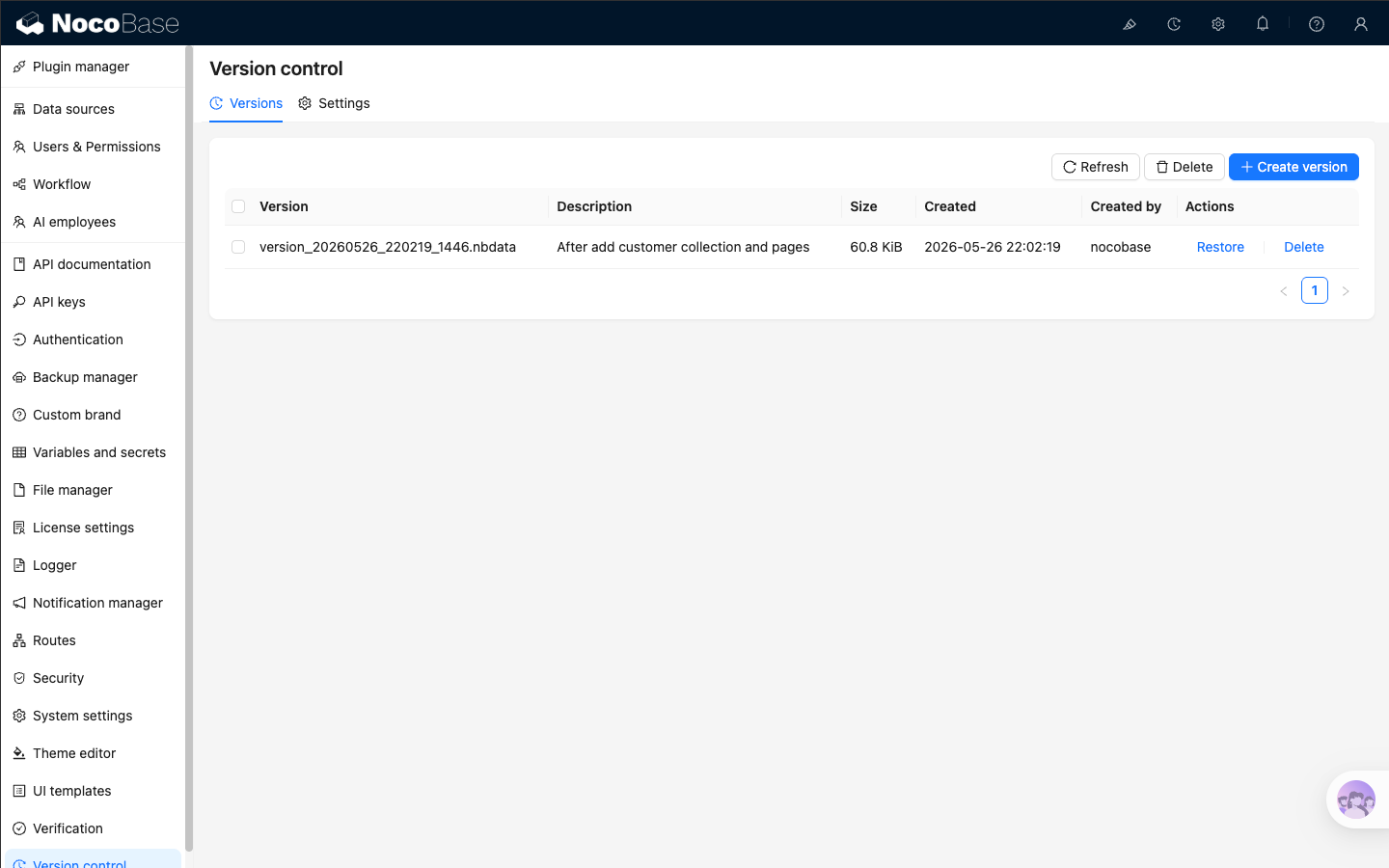
- package/dist/ai/docs/nocobase/api/cli/proxy/caddy/status.md +36 -0
- package/dist/ai/docs/nocobase/api/cli/proxy/caddy/stop.md +32 -0
- package/dist/ai/docs/nocobase/api/cli/proxy/caddy/use.md +38 -0
- package/dist/ai/docs/nocobase/api/cli/proxy/index.md +124 -0
- package/dist/ai/docs/nocobase/api/cli/proxy/nginx/current.md +33 -0
- package/dist/ai/docs/nocobase/api/cli/proxy/nginx/generate.md +62 -0
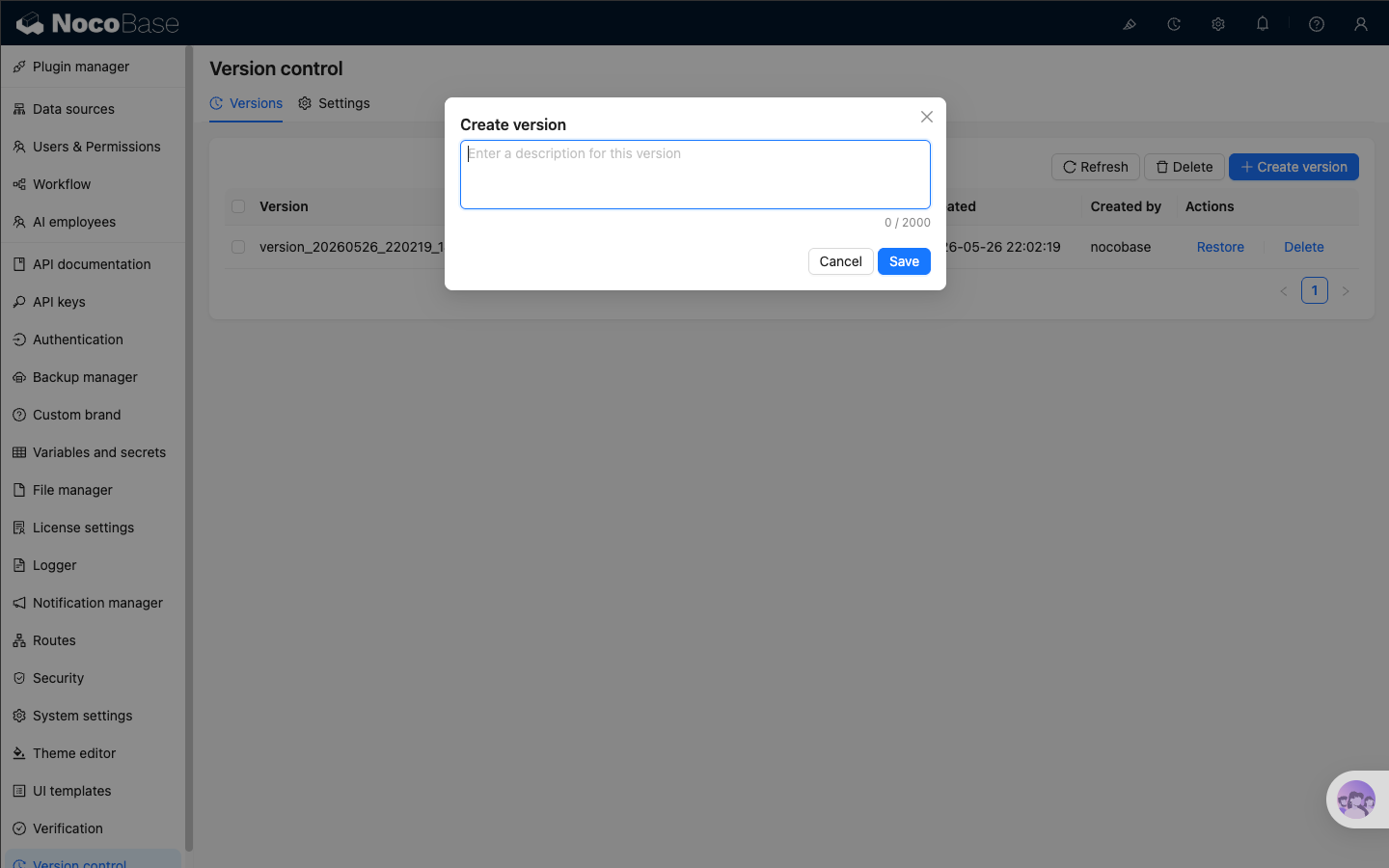
- package/dist/ai/docs/nocobase/api/cli/proxy/nginx/index.md +60 -0
- package/dist/ai/docs/nocobase/api/cli/proxy/nginx/info.md +43 -0
- package/dist/ai/docs/nocobase/api/cli/proxy/nginx/reload.md +32 -0
- package/dist/ai/docs/nocobase/api/cli/proxy/nginx/restart.md +32 -0
- package/dist/ai/docs/nocobase/api/cli/proxy/nginx/start.md +32 -0
- package/dist/ai/docs/nocobase/api/cli/proxy/nginx/status.md +36 -0
- package/dist/ai/docs/nocobase/api/cli/proxy/nginx/stop.md +32 -0
- package/dist/ai/docs/nocobase/api/cli/proxy/nginx/use.md +38 -0
- package/dist/ai/docs/nocobase/ops-management/version-control/index.md +73 -0
- package/dist/ai/docs/nocobase/quickstart/production/index.md +75 -69
- package/dist/ai/docs/nocobase/quickstart/production/reverse-proxy/caddy.md +211 -80
- package/dist/ai/docs/nocobase/quickstart/production/reverse-proxy/index.md +72 -53
- package/dist/ai/docs/nocobase/quickstart/production/reverse-proxy/nginx.md +186 -89
- package/dist/client/{290.0888139e33c9b7cb.js → 290.0f7f441d8a94f03c.js} +1 -1
- package/dist/client/{428.431a00d29107058e.js → 428.fdd0cc3cfd1632ef.js} +1 -1
- package/dist/client/ai-employees/chatbox/hooks/useChat.d.ts +14 -14
- package/dist/client/ai-employees/chatbox/stores/chat-box.d.ts +1 -105
- package/dist/client/ai-employees/chatbox/stores/chat-conversations.d.ts +1 -37
- package/dist/client/ai-employees/chatbox/stores/chat-messages.d.ts +1 -109
- package/dist/client/index.js +3 -3
- package/dist/client-v2/ai-employees/chatbox/hooks/useChatBoxActions.d.ts +17 -0
- package/dist/client-v2/ai-employees/chatbox/stores/chat-box.d.ts +113 -0
- package/dist/client-v2/ai-employees/chatbox/stores/chat-conversations.d.ts +45 -0
- package/dist/client-v2/ai-employees/chatbox/stores/chat-messages.d.ts +118 -0
- package/dist/client-v2/ai-employees/chatbox/stores/create-selectors.d.ts +18 -0
- package/dist/client-v2/ai-employees/chatbox/stores/global-store.d.ts +9 -0
- package/dist/client-v2/ai-employees/types.d.ts +151 -0
- package/dist/client-v2/index.d.ts +8 -1
- package/dist/client-v2/index.js +1 -1
- package/dist/client-v2/repositories/AIConfigRepository.d.ts +81 -0
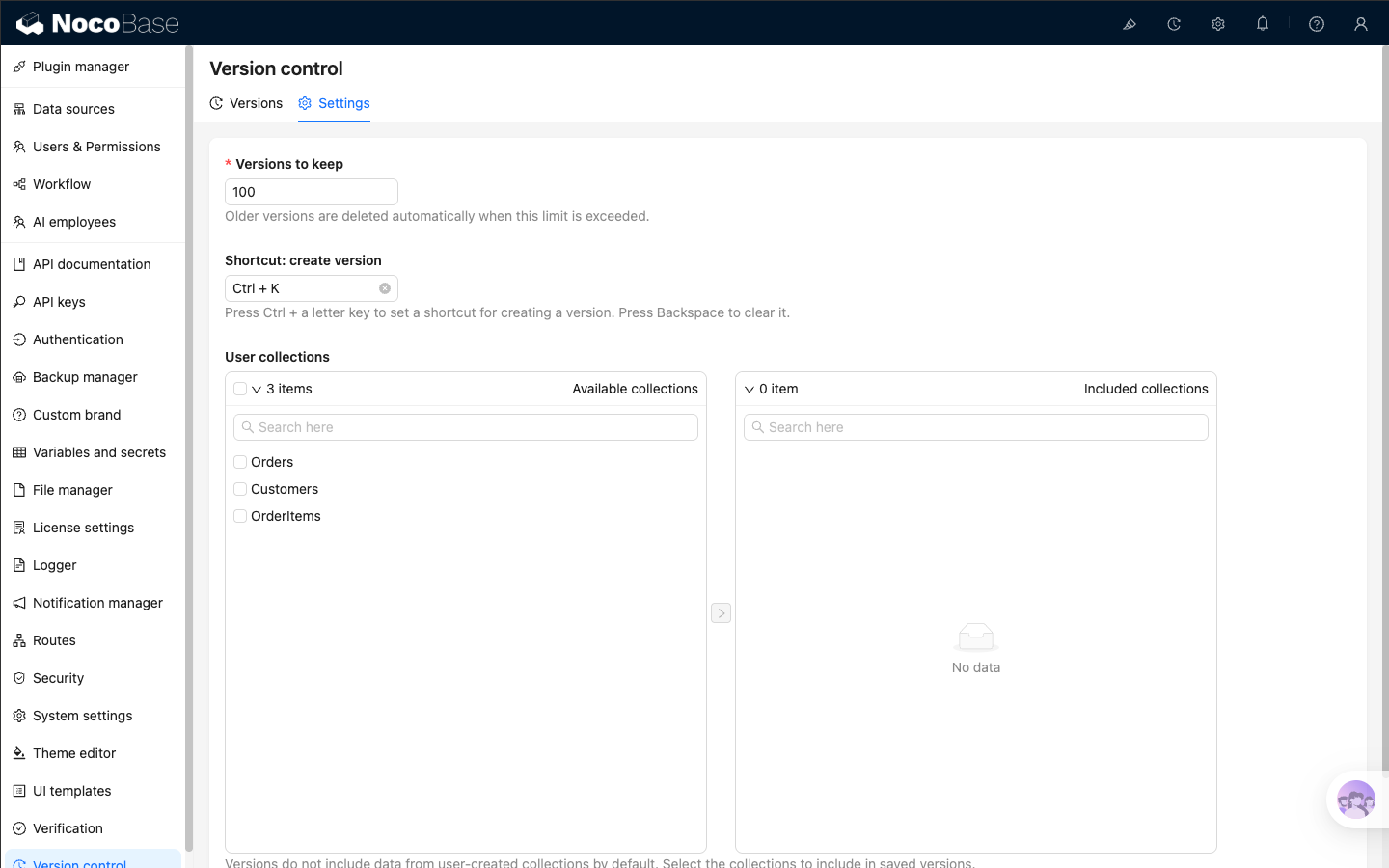
- package/dist/client-v2/repositories/hooks/useAIConfigRepository.d.ts +10 -0
- package/dist/collections/ai-context-datasource.js +1 -0
- package/dist/externalVersion.js +16 -16
- package/dist/node_modules/@langchain/xai/package.json +1 -1
- package/dist/node_modules/fs-extra/package.json +1 -1
- package/dist/node_modules/jsonrepair/package.json +1 -1
- package/dist/node_modules/just-bash/package.json +1 -1
- package/dist/node_modules/nodejs-snowflake/package.json +1 -1
- package/dist/node_modules/openai/package.json +1 -1
- package/dist/node_modules/zod/package.json +1 -1
- package/dist/server/collections/ai-conversations.js +1 -0
- package/dist/server/collections/ai-employees.js +1 -0
- package/dist/server/collections/ai-files.js +1 -0
- package/dist/server/collections/ai-messages.js +1 -0
- package/dist/server/collections/ai-settings.js +1 -0
- package/dist/server/collections/ai-tool-messages.js +1 -0
- package/dist/server/collections/lc-checkpoint-blobs.js +1 -0
- package/dist/server/collections/lc-checkpoint-writes.js +1 -0
- package/dist/server/collections/lc-checkpoints.js +1 -0
- package/dist/server/collections/llm-services.js +1 -0
- package/dist/server/collections/users-ai-employees.js +1 -0
- package/package.json +2 -2
- package/dist/ai/docs/nocobase/api/cli/env/proxy/caddy.md +0 -108
- package/dist/ai/docs/nocobase/api/cli/env/proxy/index.md +0 -54
- package/dist/ai/docs/nocobase/api/cli/env/proxy/nginx.md +0 -104
|
@@ -0,0 +1,36 @@
|
|
|
1
|
+
---
|
|
2
|
+
title: "nb proxy nginx status"
|
|
3
|
+
description: "nb proxy nginx status command reference: show the current Nginx proxy runtime status."
|
|
4
|
+
keywords: "nb proxy nginx status,NocoBase CLI,nginx,status"
|
|
5
|
+
---
|
|
6
|
+
|
|
7
|
+
# nb proxy nginx status
|
|
8
|
+
|
|
9
|
+
Show the current Nginx proxy runtime status.
|
|
10
|
+
|
|
11
|
+
## Usage
|
|
12
|
+
|
|
13
|
+
```bash
|
|
14
|
+
nb proxy nginx status
|
|
15
|
+
```
|
|
16
|
+
|
|
17
|
+
## Output
|
|
18
|
+
|
|
19
|
+
The output usually includes:
|
|
20
|
+
|
|
21
|
+
- `driver`
|
|
22
|
+
- `status`
|
|
23
|
+
- `config`
|
|
24
|
+
- `nginx` or `container`
|
|
25
|
+
|
|
26
|
+
## Examples
|
|
27
|
+
|
|
28
|
+
```bash
|
|
29
|
+
nb proxy nginx status
|
|
30
|
+
```
|
|
31
|
+
|
|
32
|
+
## Related commands
|
|
33
|
+
|
|
34
|
+
- [`nb proxy nginx info`](./info.md)
|
|
35
|
+
- [`nb proxy nginx start`](./start.md)
|
|
36
|
+
- [`nb proxy nginx stop`](./stop.md)
|
|
@@ -0,0 +1,32 @@
|
|
|
1
|
+
---
|
|
2
|
+
title: "nb proxy nginx stop"
|
|
3
|
+
description: "nb proxy nginx stop command reference: stop the Nginx proxy with the current driver."
|
|
4
|
+
keywords: "nb proxy nginx stop,NocoBase CLI,nginx,stop"
|
|
5
|
+
---
|
|
6
|
+
|
|
7
|
+
# nb proxy nginx stop
|
|
8
|
+
|
|
9
|
+
Stop the Nginx proxy with the current driver.
|
|
10
|
+
|
|
11
|
+
## Usage
|
|
12
|
+
|
|
13
|
+
```bash
|
|
14
|
+
nb proxy nginx stop
|
|
15
|
+
```
|
|
16
|
+
|
|
17
|
+
## Examples
|
|
18
|
+
|
|
19
|
+
```bash
|
|
20
|
+
nb proxy nginx stop
|
|
21
|
+
```
|
|
22
|
+
|
|
23
|
+
## Notes
|
|
24
|
+
|
|
25
|
+
- With the `local` driver, this stops the local Nginx process
|
|
26
|
+
- With the `docker` driver, this stops the proxy container
|
|
27
|
+
- If the proxy is already stopped, the command reports that it is already stopped
|
|
28
|
+
|
|
29
|
+
## Related commands
|
|
30
|
+
|
|
31
|
+
- [`nb proxy nginx start`](./start.md)
|
|
32
|
+
- [`nb proxy nginx status`](./status.md)
|
|
@@ -0,0 +1,38 @@
|
|
|
1
|
+
---
|
|
2
|
+
title: "nb proxy nginx use"
|
|
3
|
+
description: "nb proxy nginx use command reference: switch the current driver for the Nginx provider."
|
|
4
|
+
keywords: "nb proxy nginx use,NocoBase CLI,nginx,driver"
|
|
5
|
+
---
|
|
6
|
+
|
|
7
|
+
# nb proxy nginx use
|
|
8
|
+
|
|
9
|
+
Switch the current driver for the Nginx provider.
|
|
10
|
+
|
|
11
|
+
## Usage
|
|
12
|
+
|
|
13
|
+
```bash
|
|
14
|
+
nb proxy nginx use <driver>
|
|
15
|
+
```
|
|
16
|
+
|
|
17
|
+
## Parameters
|
|
18
|
+
|
|
19
|
+
| Parameter | Type | Description |
|
|
20
|
+
| --- | --- | --- |
|
|
21
|
+
| `<driver>` | string | Supports `local` or `docker` |
|
|
22
|
+
|
|
23
|
+
## Examples
|
|
24
|
+
|
|
25
|
+
```bash
|
|
26
|
+
nb proxy nginx use local
|
|
27
|
+
nb proxy nginx use docker
|
|
28
|
+
```
|
|
29
|
+
|
|
30
|
+
## Notes
|
|
31
|
+
|
|
32
|
+
- This command saves the result to `proxy.nginx-driver`
|
|
33
|
+
- Later commands such as `start`, `reload`, `stop`, `status`, and `info` all use the current driver
|
|
34
|
+
|
|
35
|
+
## Related commands
|
|
36
|
+
|
|
37
|
+
- [`nb proxy nginx current`](./current.md)
|
|
38
|
+
- [`nb proxy nginx start`](./start.md)
|
|
@@ -0,0 +1,73 @@
|
|
|
1
|
+
---
|
|
2
|
+
title: "Version control"
|
|
3
|
+
description: "Version control plugin guide: create versions, restore versions, configure retention, set shortcuts, and include user collections in saved versions."
|
|
4
|
+
keywords: "Version control,ops management,create version,restore version,NocoBase"
|
|
5
|
+
---
|
|
6
|
+
|
|
7
|
+
# Version control
|
|
8
|
+
|
|
9
|
+
In NocoBase, **Version control** lets you save a restorable version of the current application. You can create versions manually, restore the application to a saved version when needed, and use the plugin settings to control how many versions to keep, which shortcut to use, and which user collections should be saved with the version.
|
|
10
|
+
|
|
11
|
+
It depends on [Backup manager](../backup-manager/index.mdx). If the Version control plugin is already enabled but the system still shows related errors, first make sure Backup manager is enabled.
|
|
12
|
+
|
|
13
|
+
## Open the plugin
|
|
14
|
+
|
|
15
|
+
You can open the plugin from 「System settings」 → 「Version control」. A Version control button also appears in the top bar. Click it to create a version directly or jump to the versions list. The default shortcut for creating a version is `Ctrl + K`, and you can change it in the settings tab.
|
|
16
|
+
|
|
17
|
+
|
|
18
|
+
|
|
19
|
+
## Create a version
|
|
20
|
+
|
|
21
|
+
Click 「Create version」, enter a description, and save it. The description can be up to 2000 characters. It is useful for recording the background of the change, such as “Adjusted approval fields and permissions”.
|
|
22
|
+
|
|
23
|
+
|
|
24
|
+
|
|
25
|
+
After you click save, the list first shows a temporary “Saving” entry. When the task finishes, the saved version appears in the list.
|
|
26
|
+
|
|
27
|
+
Key points:
|
|
28
|
+
|
|
29
|
+
- Version names are generated automatically
|
|
30
|
+
- Creating a version from the top bar, the shortcut, or the list page behaves the same
|
|
31
|
+
- The list shows the version name, description, file size, creation time, creator, and available actions
|
|
32
|
+
|
|
33
|
+
## Manage and restore versions
|
|
34
|
+
|
|
35
|
+
The versions list mainly provides these actions:
|
|
36
|
+
|
|
37
|
+
- 「Refresh」 reloads the current list
|
|
38
|
+
- 「Delete」 removes one version, or multiple selected versions in batch
|
|
39
|
+
- 「Restore」 restores the application to the state saved in that version
|
|
40
|
+
|
|
41
|
+
:::warning Notice
|
|
42
|
+
|
|
43
|
+
Restoring a version overwrites the current application configuration and the data included in that version. It is recommended to create a version of the current state before restoring, so you can roll back again if needed.
|
|
44
|
+
|
|
45
|
+
:::
|
|
46
|
+
|
|
47
|
+
After you click 「Restore」, the application enters maintenance mode for a short time while the restore is running. Do not submit another restore request during that time. If the restore fails, the UI shows an error notification.
|
|
48
|
+
|
|
49
|
+
## Configure version rules
|
|
50
|
+
|
|
51
|
+
Open the 「Settings」 tab to control retention and what each version includes.
|
|
52
|
+
|
|
53
|
+
|
|
54
|
+
|
|
55
|
+
The settings include:
|
|
56
|
+
|
|
57
|
+
- `Versions to keep`: the maximum number of saved versions. Older versions are deleted automatically after the limit is exceeded
|
|
58
|
+
- `Shortcut: create version`: the shortcut for creating a version. Press `Ctrl + a letter key` to set it, or `Backspace` to clear it
|
|
59
|
+
- `User collections`: choose which user-created collections should have their data included in saved versions
|
|
60
|
+
|
|
61
|
+
:::tip
|
|
62
|
+
|
|
63
|
+
By default, saved versions do not include data from user-created collections. You only need to select collections here when you want some business data to be restored together with the application version.
|
|
64
|
+
|
|
65
|
+
:::
|
|
66
|
+
|
|
67
|
+
If you include a user collection, NocoBase also includes related collections automatically, so restores are usually more complete.
|
|
68
|
+
|
|
69
|
+
## Related links
|
|
70
|
+
|
|
71
|
+
- [Backup manager](../backup-manager/index.mdx) — the underlying capability required by Version control
|
|
72
|
+
- [Migration manager](../migration-manager/index.md) — move application configuration across environments
|
|
73
|
+
- [Release management](../release-management/index.md) — plan release workflows with backups, migrations, and variables
|
|
@@ -1,163 +1,169 @@
|
|
|
1
1
|
---
|
|
2
2
|
title: "Production Deployment"
|
|
3
|
-
description: "
|
|
4
|
-
keywords: "NocoBase,production deployment,nb app autostart,nb
|
|
3
|
+
description: "Finish NocoBase production deployment quickly: configure app auto-start first, then configure a reverse proxy."
|
|
4
|
+
keywords: "NocoBase,production deployment,nb app autostart,nb proxy nginx,nb proxy caddy,Nginx,Caddy"
|
|
5
5
|
---
|
|
6
6
|
|
|
7
7
|
# Production Deployment
|
|
8
8
|
|
|
9
|
-
If your NocoBase app
|
|
9
|
+
If your NocoBase app can already run normally on the server, production rollout usually only needs two more things:
|
|
10
10
|
|
|
11
|
-
1.
|
|
12
|
-
2.
|
|
11
|
+
1. make sure the app can recover automatically after the machine restarts
|
|
12
|
+
2. add a reverse-proxy entrypoint so the app can be accessed from outside reliably
|
|
13
13
|
|
|
14
|
-
In
|
|
14
|
+
In NocoBase CLI, the main command groups are:
|
|
15
15
|
|
|
16
16
|
- `nb app autostart`
|
|
17
|
-
- `nb
|
|
17
|
+
- `nb proxy`
|
|
18
18
|
|
|
19
|
-
This page
|
|
19
|
+
This page explains the overall path first. For Nginx or Caddy details, continue to the provider-specific pages.
|
|
20
20
|
|
|
21
|
-
## Step 1:
|
|
21
|
+
## Step 1: configure app auto-start
|
|
22
22
|
|
|
23
|
-
In production, the first priority is not the domain name.
|
|
23
|
+
In production, the first priority is not the domain name. It is making sure the service itself can recover reliably. Otherwise, after a machine restart, container recreation, or routine operations work, the app may not come back automatically.
|
|
24
24
|
|
|
25
|
-
|
|
25
|
+
The most common `nb app autostart` subcommands are:
|
|
26
26
|
|
|
27
27
|
- `nb app autostart enable`
|
|
28
28
|
- `nb app autostart list`
|
|
29
29
|
- `nb app autostart run`
|
|
30
30
|
|
|
31
|
-
Enable
|
|
31
|
+
Enable auto-start for the current env:
|
|
32
32
|
|
|
33
33
|
```bash
|
|
34
34
|
nb app autostart enable
|
|
35
35
|
```
|
|
36
36
|
|
|
37
|
-
If
|
|
37
|
+
If the target is not the current env, specify it explicitly:
|
|
38
38
|
|
|
39
39
|
```bash
|
|
40
40
|
nb app autostart enable --env app1 --yes
|
|
41
41
|
```
|
|
42
42
|
|
|
43
|
-
|
|
43
|
+
Check which envs are marked for auto-start:
|
|
44
44
|
|
|
45
45
|
```bash
|
|
46
46
|
nb app autostart list
|
|
47
47
|
```
|
|
48
48
|
|
|
49
|
-
After the system boots,
|
|
49
|
+
After the system boots, start all enabled envs with:
|
|
50
50
|
|
|
51
51
|
```bash
|
|
52
52
|
nb app autostart run
|
|
53
53
|
```
|
|
54
54
|
|
|
55
|
-
If you want
|
|
55
|
+
If you want detailed startup output while debugging:
|
|
56
56
|
|
|
57
57
|
```bash
|
|
58
58
|
nb app autostart run --verbose
|
|
59
59
|
```
|
|
60
60
|
|
|
61
|
-
:::tip What this actually does
|
|
61
|
+
:::tip What this step actually does
|
|
62
62
|
|
|
63
|
-
`nb app autostart enable` marks a CLI-managed env as allowed to start automatically.
|
|
64
|
-
`nb app autostart run` is the command that actually starts all envs that were marked for autostart.
|
|
63
|
+
`nb app autostart enable` marks a CLI-managed env as allowed to start automatically. `nb app autostart run` actually starts all envs that have auto-start enabled.
|
|
65
64
|
|
|
66
|
-
In
|
|
65
|
+
In production, you usually still need to connect `nb app autostart run` to your own system startup flow, such as `systemd`, a container platform startup script, or another host-level auto-start mechanism that you already use.
|
|
67
66
|
|
|
68
67
|
:::
|
|
69
68
|
|
|
70
|
-
###
|
|
69
|
+
### Applicability
|
|
71
70
|
|
|
72
|
-
`nb app autostart` only
|
|
71
|
+
`nb app autostart` only works for envs with a CLI-managed runtime:
|
|
73
72
|
|
|
74
73
|
- `local`
|
|
75
74
|
- `docker`
|
|
76
75
|
|
|
77
|
-
If
|
|
76
|
+
If an env is only a remote API connection, or the app is not managed locally by the CLI on the current machine, this command group is not the right way to handle auto-start.
|
|
78
77
|
|
|
79
|
-
## Step 2:
|
|
78
|
+
## Step 2: configure the reverse proxy
|
|
80
79
|
|
|
81
|
-
|
|
80
|
+
After the app can recover automatically, handle the external entrypoint. In production, the reverse proxy usually takes care of:
|
|
82
81
|
|
|
83
|
-
- binding the domain name or
|
|
84
|
-
- forwarding HTTP and WebSocket
|
|
82
|
+
- binding the domain name or entry port
|
|
83
|
+
- forwarding HTTP and WebSocket requests to NocoBase
|
|
85
84
|
- handling HTTPS, certificates, caching, or access control
|
|
86
85
|
|
|
87
|
-
|
|
86
|
+
The recommended CLI entrypoints are:
|
|
88
87
|
|
|
89
|
-
- `nb
|
|
90
|
-
- `nb
|
|
88
|
+
- `nb proxy nginx`
|
|
89
|
+
- `nb proxy caddy`
|
|
91
90
|
|
|
92
|
-
### Default
|
|
91
|
+
### Default workflow
|
|
93
92
|
|
|
94
|
-
If
|
|
93
|
+
If the app has already been saved as a CLI env and that env is `local` or `docker`, the usual path is to let the CLI generate the config directly:
|
|
95
94
|
|
|
96
95
|
```bash
|
|
97
|
-
nb
|
|
98
|
-
nb
|
|
96
|
+
nb proxy nginx use docker
|
|
97
|
+
nb proxy nginx generate --env app1 --host app.example.com
|
|
98
|
+
|
|
99
|
+
nb proxy caddy use local
|
|
100
|
+
nb proxy caddy generate --env app1 --host app.example.com
|
|
99
101
|
```
|
|
100
102
|
|
|
101
|
-
|
|
103
|
+
Then start the chosen provider:
|
|
102
104
|
|
|
103
105
|
```bash
|
|
104
|
-
nb
|
|
106
|
+
nb proxy nginx start
|
|
107
|
+
nb proxy caddy start
|
|
105
108
|
```
|
|
106
109
|
|
|
107
|
-
The CLI helps
|
|
110
|
+
The CLI also helps with details that are easy to miss in handwritten configs, such as:
|
|
108
111
|
|
|
109
112
|
- WebSocket forwarding
|
|
110
|
-
- entry and
|
|
113
|
+
- entry and asset URLs under subpaths
|
|
111
114
|
- SPA fallback pages
|
|
112
|
-
- provider shared config files
|
|
113
|
-
|
|
114
|
-
### When To Choose Nginx Or Caddy
|
|
115
|
+
- provider-level shared config files
|
|
115
116
|
|
|
116
|
-
|
|
117
|
+
### When to choose Nginx or Caddy
|
|
117
118
|
|
|
118
|
-
| Scenario |
|
|
119
|
+
| Scenario | Recommendation |
|
|
119
120
|
| --- | --- |
|
|
120
|
-
| You already use Nginx
|
|
121
|
-
| You already have a domain and want HTTPS
|
|
122
|
-
| You want the overall
|
|
121
|
+
| You already use Nginx to manage sites, caching, certificates, or access control | [Nginx](./reverse-proxy/nginx.md) |
|
|
122
|
+
| You already have a domain and want HTTPS up quickly with fewer TLS details to maintain | [Caddy](./reverse-proxy/caddy.md) |
|
|
123
|
+
| You want the overall introduction first | [Reverse Proxy in Production](./reverse-proxy/index.md) |
|
|
123
124
|
|
|
124
|
-
If you change env settings
|
|
125
|
+
If you later change env settings such as `app-port` or `app-public-path` that affect proxy behavior, rerun the matching proxy subcommand.
|
|
125
126
|
|
|
126
|
-
##
|
|
127
|
+
## Default rollout path
|
|
127
128
|
|
|
128
|
-
|
|
129
|
+
For the simplest production rollout, this sequence is usually enough:
|
|
129
130
|
|
|
130
|
-
1.
|
|
131
|
-
2.
|
|
132
|
-
3.
|
|
133
|
-
4.
|
|
134
|
-
5.
|
|
131
|
+
1. confirm the app can already start normally on the server itself
|
|
132
|
+
2. run `nb app autostart enable`
|
|
133
|
+
3. connect `nb app autostart run` to your system startup flow
|
|
134
|
+
4. choose Nginx or Caddy and run the matching `nb proxy` subcommand
|
|
135
|
+
5. verify external access through the domain name or entry address
|
|
135
136
|
|
|
136
|
-
## Quick
|
|
137
|
+
## Quick index
|
|
137
138
|
|
|
138
|
-
| I want to... |
|
|
139
|
+
| I want to... | Go here |
|
|
139
140
|
| --- | --- |
|
|
140
|
-
|
|
|
141
|
-
| Keep using Nginx
|
|
142
|
-
| Use Caddy
|
|
143
|
-
|
|
|
144
|
-
| Read the `nb
|
|
141
|
+
| Read the overall reverse-proxy introduction first | [Reverse Proxy in Production](./reverse-proxy/index.md) |
|
|
142
|
+
| Keep using Nginx at the entry layer | [Nginx](./reverse-proxy/nginx.md) |
|
|
143
|
+
| Use Caddy to get HTTPS faster | [Caddy](./reverse-proxy/caddy.md) |
|
|
144
|
+
| View app start, stop, logs, and upgrade operations | [Manage the App](../operations/manage-app.md) |
|
|
145
|
+
| Read the `nb proxy nginx` CLI reference | [`nb proxy nginx`](../../api/cli/proxy/nginx/index.md) |
|
|
146
|
+
| Read the `nb proxy caddy` CLI reference | [`nb proxy caddy`](../../api/cli/proxy/caddy/index.md) |
|
|
145
147
|
|
|
146
|
-
## Related
|
|
148
|
+
## Related commands
|
|
147
149
|
|
|
148
150
|
```bash
|
|
149
|
-
# Enable
|
|
151
|
+
# Enable auto-start for one env
|
|
150
152
|
nb app autostart enable --env app1 --yes
|
|
151
153
|
|
|
152
|
-
#
|
|
154
|
+
# Check auto-start state
|
|
153
155
|
nb app autostart list
|
|
154
156
|
|
|
155
|
-
# Start all envs
|
|
157
|
+
# Start all enabled envs
|
|
156
158
|
nb app autostart run
|
|
157
159
|
|
|
158
|
-
#
|
|
159
|
-
nb
|
|
160
|
+
# Choose the Nginx runtime and generate config
|
|
161
|
+
nb proxy nginx use docker
|
|
162
|
+
nb proxy nginx generate --env app1 --host app.example.com
|
|
163
|
+
nb proxy nginx start
|
|
160
164
|
|
|
161
|
-
#
|
|
162
|
-
nb
|
|
165
|
+
# Choose the Caddy runtime and generate config
|
|
166
|
+
nb proxy caddy use local
|
|
167
|
+
nb proxy caddy generate --env app1 --host app.example.com
|
|
168
|
+
nb proxy caddy start
|
|
163
169
|
```
|