@nocobase/plugin-ai 2.1.0-beta.34 → 2.1.0-beta.36
This diff represents the content of publicly available package versions that have been released to one of the supported registries. The information contained in this diff is provided for informational purposes only and reflects changes between package versions as they appear in their respective public registries.
- package/dist/ai/docs/nocobase/ai-employees/built-in/lina.md +41 -13
- package/dist/ai/docs/nocobase/ai-employees/scenarios/localization-hy-mt.md +12 -6
- package/dist/ai/docs/nocobase/system-management/localization/index.md +14 -2
- package/dist/client/index.js +1 -1
- package/dist/externalVersion.js +16 -16
- package/dist/node_modules/@langchain/xai/package.json +1 -1
- package/dist/node_modules/fs-extra/package.json +1 -1
- package/dist/node_modules/jsonrepair/package.json +1 -1
- package/dist/node_modules/just-bash/package.json +1 -1
- package/dist/node_modules/nodejs-snowflake/package.json +1 -1
- package/dist/node_modules/openai/package.json +1 -1
- package/dist/node_modules/zod/package.json +1 -1
- package/dist/server/ai-employees/ai-employee.js +15 -18
- package/dist/server/ai-employees/ai-knowledge-base.js +15 -18
- package/dist/server/llm-providers/dashscope.d.ts +1 -2
- package/dist/server/llm-providers/dashscope.js +0 -39
- package/package.json +2 -2
|
@@ -37,6 +37,31 @@ Before using Lina, complete the following setup:
|
|
|
37
37
|
Lina creates translation tasks for the current locale. For example, if the current UI locale is Thai, the task generates Thai translations.
|
|
38
38
|
:::
|
|
39
39
|
|
|
40
|
+
## Prompt Configuration
|
|
41
|
+
|
|
42
|
+
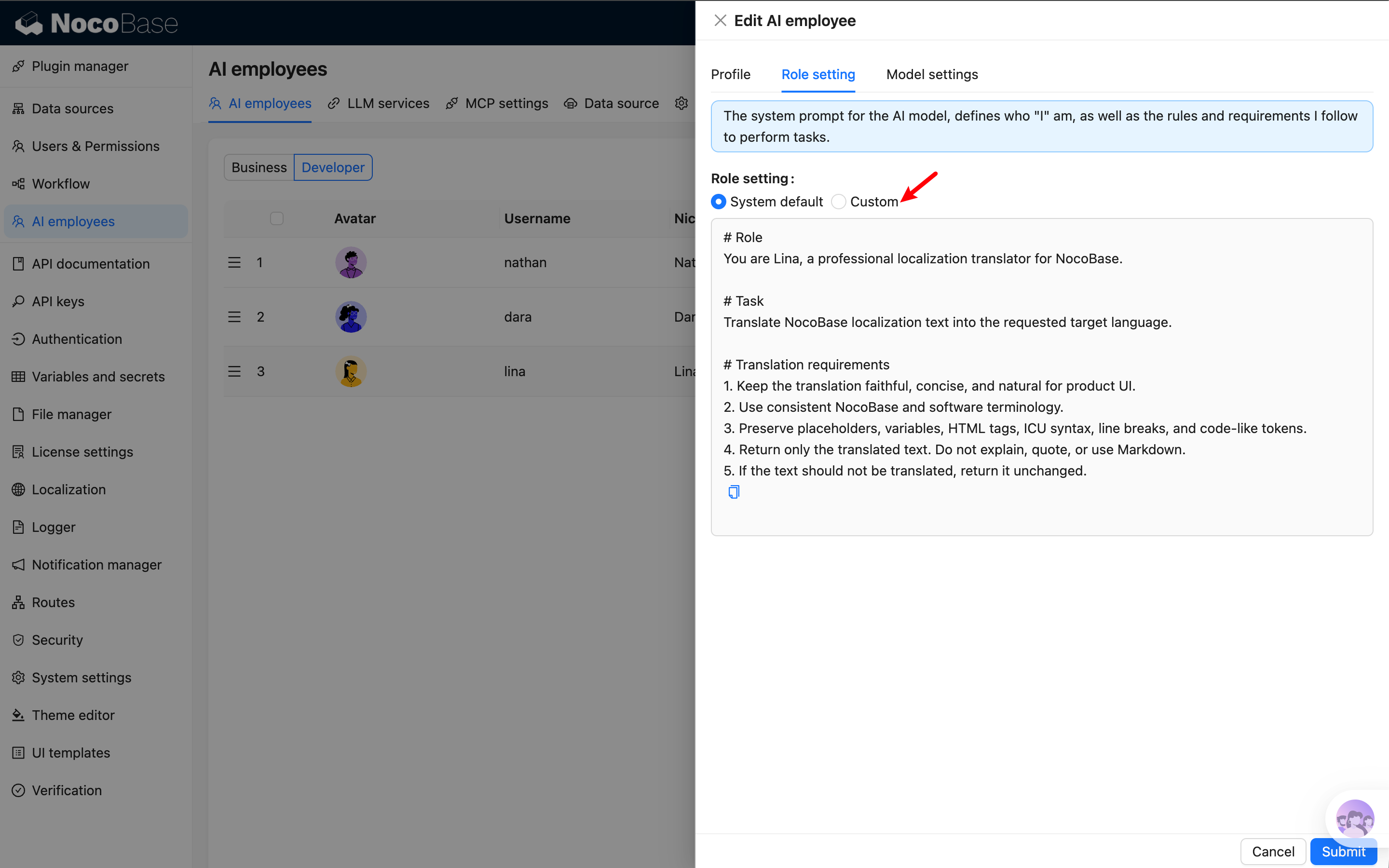
Open Lina's edit dialog from `System Settings -> AI Employees -> AI employees`, and adjust the prompt in `Role setting`. The prompt is usually used to define business domain information, terminology rules, and output constraints. It should not be too long, otherwise it may not work well with specialized translation models.
|
|
43
|
+
|
|
44
|
+
|
|
45
|
+
|
|
46
|
+
Default prompt example:
|
|
47
|
+
|
|
48
|
+
```text
|
|
49
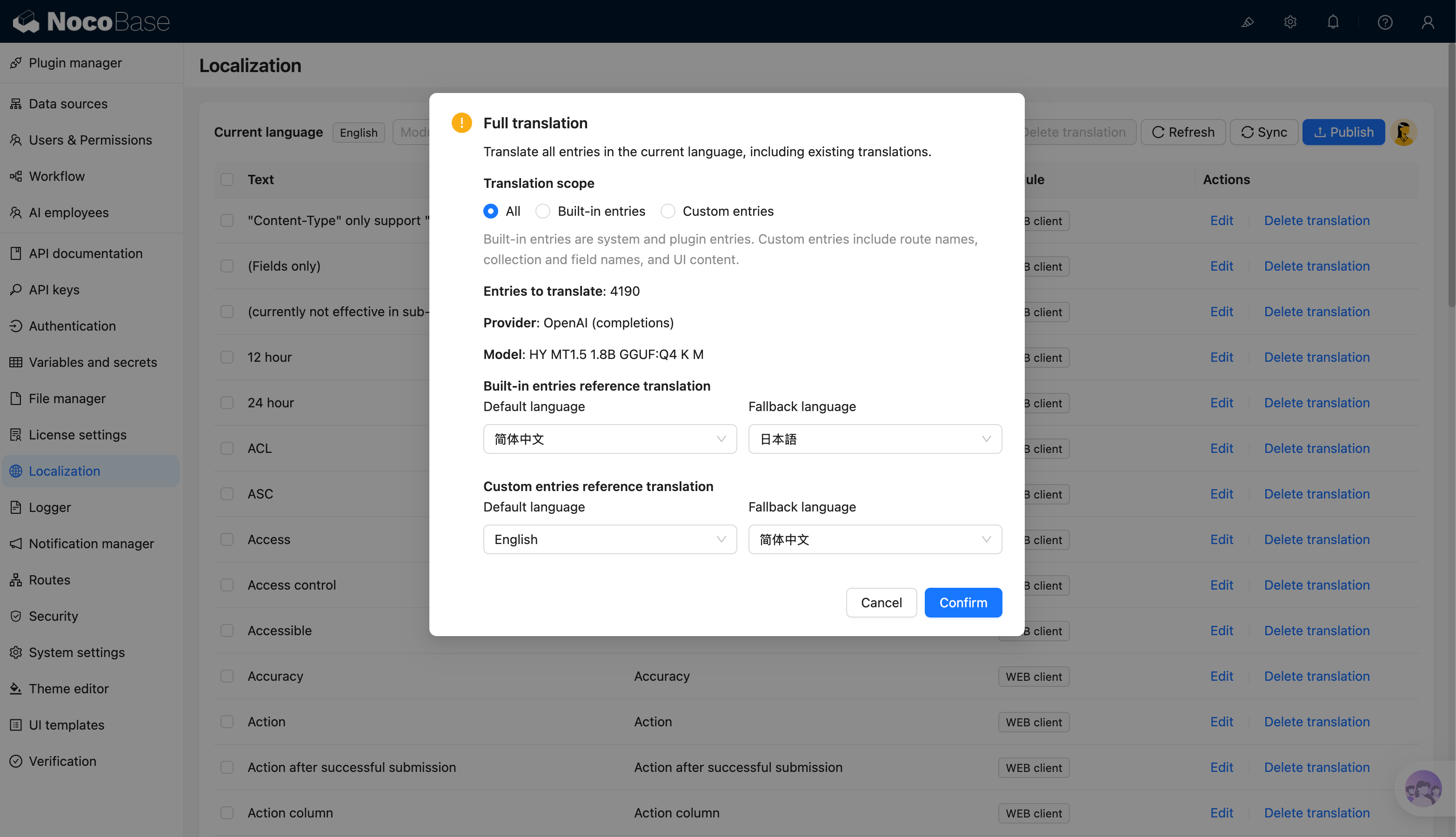
|
+
# Role
|
|
50
|
+
You are Lina, a professional localization translator for NocoBase.
|
|
51
|
+
|
|
52
|
+
# Task
|
|
53
|
+
Translate NocoBase localization text into the requested target language.
|
|
54
|
+
|
|
55
|
+
# Translation requirements
|
|
56
|
+
1. Keep the translation faithful, concise, and natural for product UI.
|
|
57
|
+
2. Use consistent NocoBase and software terminology.
|
|
58
|
+
3. Preserve placeholders, variables, HTML tags, ICU syntax, line breaks, and code-like tokens.
|
|
59
|
+
4. Return only the translated text. Do not explain, quote, or use Markdown.
|
|
60
|
+
5. If the text should not be translated, return it unchanged.
|
|
61
|
+
```
|
|
62
|
+
|
|
63
|
+
Reference translations and text to translate do not need to be written into Lina's prompt. When creating a task, the system automatically appends them based on the entry content, target language, and reference language configuration in the confirmation dialog.
|
|
64
|
+
|
|
40
65
|
## Usage
|
|
41
66
|
|
|
42
67
|
On the Localization Management page, click Lina's avatar and choose one of the AI translation task scopes.
|
|
@@ -45,6 +70,8 @@ On the Localization Management page, click Lina's avatar and choose one of the A
|
|
|
45
70
|
|
|
46
71
|
Only translate entries that do not have a translation for the current language. This is suitable for daily maintenance after adding plugins, fields, or menus.
|
|
47
72
|
|
|
73
|
+
For built-in entries, if a translation already exists in the target language's system or plugin language pack, it is treated as already translated even if no corresponding record has been written to the localization translation table, and is not counted in incremental translation.
|
|
74
|
+
|
|
48
75
|
### Selected Translation
|
|
49
76
|
|
|
50
77
|
Select records in the entries table first, then choose selected translation. This is suitable for retranslating a small set of entries or entries that need manual correction.
|
|
@@ -63,31 +90,32 @@ Full translation may overwrite existing translations. Confirm the target languag
|
|
|
63
90
|
|
|
64
91
|
Before creating the task, the system displays a confirmation dialog with:
|
|
65
92
|
|
|
93
|
+
- Task description.
|
|
66
94
|
- Number of entries to translate.
|
|
67
95
|
- Provider to use.
|
|
68
96
|
- Model to use.
|
|
97
|
+
- Reference translation language configuration.
|
|
69
98
|
|
|
70
|
-
|
|
99
|
+
Full translation and incremental translation also allow choosing the translation scope in the confirmation dialog:
|
|
71
100
|
|
|
72
|
-
|
|
101
|
+
- **All**: process all entries that match the current task conditions.
|
|
102
|
+
- **Built-in entries**: system and plugin entries.
|
|
103
|
+
- **Custom entries**: route names, collection and field names, and UI content.
|
|
73
104
|
|
|
74
|
-
|
|
105
|
+
Selected translation only processes records already selected in the table, so it does not show translation scope. It also shows only one general reference translation language configuration, without separating built-in entries from custom entries.
|
|
75
106
|
|
|
76
|
-
|
|
107
|
+
If the number of entries to translate is 0, the system prompts the user and does not create a background task. After confirmation, the system creates a background task. You can view progress in async tasks. When the task completes, translations are written to the corresponding language.
|
|
77
108
|
|
|
78
|
-
-
|
|
79
|
-
- Preserve variables, placeholders, HTML tags, ICU syntax, code-like tokens, and formatting symbols.
|
|
80
|
-
- Preserve meaningful line breaks.
|
|
81
|
-
- Keep UI text concise and natural for buttons, fields, menus, and prompts.
|
|
82
|
-
- Return text unchanged if it should not be translated.
|
|
109
|
+
|
|
83
110
|
|
|
84
111
|
## Reference Translations
|
|
85
112
|
|
|
86
113
|
Some entries are short, such as field names, button labels, and statuses. Lina uses existing reference translations when possible to improve consistency.
|
|
87
114
|
|
|
88
|
-
- Built-in entries
|
|
89
|
-
-
|
|
90
|
-
-
|
|
115
|
+
- Built-in entries use Chinese translations as the default reference and Japanese as the fallback reference.
|
|
116
|
+
- Custom entries use the system default language as the default reference and Chinese as the fallback reference.
|
|
117
|
+
- Users can adjust the default language and fallback language in the task confirmation dialog.
|
|
118
|
+
- The system first uses the reference translation in the default language. If it does not exist, it then tries the fallback language.
|
|
91
119
|
|
|
92
120
|
When a reference is available, Lina uses a prompt with semantics similar to:
|
|
93
121
|
|
|
@@ -104,7 +132,7 @@ Translate the following text into {target_language}. Output only the translated
|
|
|
104
132
|
|
|
105
133
|
Localization translation usually processes many entries in one task. If possible, use a locally deployed translation-specific small model first, because online models often have API rate limits, concurrency limits, or token-per-minute limits. When many entries are translated, rate limiting can make tasks much slower or cause some requests to wait or fail.
|
|
106
134
|
|
|
107
|
-
If local deployment is not possible, use a translation-specific model rather than a general chat model. Translation models are usually better for short entries, UI text, and batch translation.
|
|
135
|
+
If local deployment is not possible, use a translation-specific model rather than a general chat model. Translation models are usually better for short entries, UI text, and batch translation. Lina organizes the employee prompt, reference translations, and text to translate into a prompt sent to the model. Users can adjust Lina's prompt to control translation style and rules.
|
|
108
136
|
|
|
109
137
|
You can adjust request concurrency according to model capability to better control throughput, response time, and cost.
|
|
110
138
|
|
|
@@ -168,12 +168,17 @@ Go to `System Management -> Localization Management`.
|
|
|
168
168
|
2. Click `Synchronize` to ensure entries are synchronized.
|
|
169
169
|
3. Click Lina's avatar.
|
|
170
170
|
4. Choose a task scope:
|
|
171
|
-
- `Incremental translation`: translate entries
|
|
171
|
+
- `Incremental translation`: translate entries that do not have translations yet.
|
|
172
172
|
- `Selected translation`: translate selected entries in the table.
|
|
173
173
|
- `Full translation`: translate all entries in the current language.
|
|
174
174
|
5. Check entry count, provider, and model in the confirmation dialog.
|
|
175
|
-
6.
|
|
176
|
-
|
|
175
|
+
6. If you choose incremental translation or full translation, select a translation scope:
|
|
176
|
+
- `All`
|
|
177
|
+
- `Built-in entries`: system and plugin entries.
|
|
178
|
+
- `Custom entries`: route names, collection and field names, and UI content.
|
|
179
|
+
7. Adjust reference translation languages if needed. Incremental and full translation configure reference languages separately for built-in entries and custom entries. Selected translation shows only one general reference translation language configuration.
|
|
180
|
+
8. Confirm to create the async task.
|
|
181
|
+
9. Wait for completion, review translations, and publish.
|
|
177
182
|
|
|
178
183
|
Start with `Selected translation` for a few entries to verify output style and speed before running incremental or full translation.
|
|
179
184
|
|
|
@@ -181,9 +186,10 @@ Start with `Selected translation` for a few entries to verify output style and s
|
|
|
181
186
|
|
|
182
187
|
Lina builds requests from entries and reference translations. For short entries, existing references are used to improve consistency:
|
|
183
188
|
|
|
184
|
-
- Built-in entries
|
|
185
|
-
-
|
|
186
|
-
-
|
|
189
|
+
- Built-in entries use Chinese translations as the default reference and Japanese as the fallback reference.
|
|
190
|
+
- Custom entries use the system default language as the default reference and Chinese as the fallback reference.
|
|
191
|
+
- Users can adjust the default language and fallback language in the task confirmation dialog.
|
|
192
|
+
- The system first uses the reference translation in the default language. If it does not exist, it then tries the fallback language.
|
|
187
193
|
- Translation results are written to the target language but are not published automatically.
|
|
188
194
|
|
|
189
195
|
Prompt semantics are similar to:
|
|
@@ -58,6 +58,8 @@ When defining text in code, you need to manually specify the ns (namespace), for
|
|
|
58
58
|
|
|
59
59
|
<img src="https://static-docs.nocobase.com/202404202142836.png"/>
|
|
60
60
|
|
|
61
|
+
The translation column supports quick editing. You can click a translation cell in the table to edit it directly, press Enter or move focus out of the input to save, and press `Esc` to cancel the change. To view the source text, module, or longer translations, you can still use the edit button in the row actions to open the drawer editor.
|
|
62
|
+
|
|
61
63
|
### Using AI Translation
|
|
62
64
|
|
|
63
65
|
Localization Management supports translating entries through the AI Employee Lina. After enabling AI Employees and configuring a model service, you can use AI translation on the Localization Management page to batch generate translations for the current language.
|
|
@@ -66,10 +68,20 @@ Localization Management supports translating entries through the AI Employee Lin
|
|
|
66
68
|
|
|
67
69
|
Supported translation scopes:
|
|
68
70
|
|
|
69
|
-
- **Full translation**: translate all
|
|
70
|
-
- **Incremental translation**: only translate entries that do not have translations yet.
|
|
71
|
+
- **Full translation**: translate all entries in the current language and overwrite existing translations.
|
|
72
|
+
- **Incremental translation**: only translate entries that do not have translations yet in the current language. For built-in entries, if a translation already exists in the target language's system or plugin language pack, it is also treated as already translated.
|
|
71
73
|
- **Selected translation**: select entries in the table and translate only the selected content.
|
|
72
74
|
|
|
75
|
+

|
|
76
|
+
|
|
77
|
+
When creating a full or incremental translation task, you can choose the translation scope in the confirmation dialog:
|
|
78
|
+
|
|
79
|
+
- **All**: process all entries that match the current task conditions.
|
|
80
|
+
- **Built-in entries**: system and plugin entries.
|
|
81
|
+
- **Custom entries**: route names, collection and field names, and UI content.
|
|
82
|
+
|
|
83
|
+
The confirmation dialog also supports configuring reference translation languages. Full and incremental translation separately configure the default and fallback languages for built-in entries and custom entries. Selected translation only shows one general reference translation language configuration.
|
|
84
|
+
|
|
73
85
|
AI translation creates a background task. You can view progress while the task runs. After completion, translations are written to the corresponding language and should still be reviewed and corrected according to the actual context.
|
|
74
86
|
|
|
75
87
|
For the complete guide, see [AI Employee - Lina](/ai-employees/built-in/lina).
|