@nocobase/plugin-ai 2.1.0-beta.30 → 2.1.0-beta.33
This diff represents the content of publicly available package versions that have been released to one of the supported registries. The information contained in this diff is provided for informational purposes only and reflects changes between package versions as they appear in their respective public registries.
- package/client-v2.d.ts +1 -0
- package/client-v2.js +1 -0
- package/dist/ai/docs/nocobase/ai/index.md +1 -1
- package/dist/ai/docs/nocobase/ai-employees/built-in/atlas.md +24 -0
- package/dist/ai/docs/nocobase/ai-employees/built-in/dara.md +22 -0
- package/dist/ai/docs/nocobase/ai-employees/built-in/dex.md +32 -0
- package/dist/ai/docs/nocobase/ai-employees/built-in/ellis.md +22 -0
- package/dist/ai/docs/nocobase/ai-employees/built-in/index.md +25 -0
- package/dist/ai/docs/nocobase/ai-employees/built-in/lexi.md +26 -0
- package/dist/ai/docs/nocobase/ai-employees/built-in/lina.md +142 -0
- package/dist/ai/docs/nocobase/ai-employees/built-in/nathan.md +36 -0
- package/dist/ai/docs/nocobase/ai-employees/built-in/vera.md +22 -0
- package/dist/ai/docs/nocobase/ai-employees/built-in/viz.md +25 -0
- package/dist/ai/docs/nocobase/ai-employees/features/built-in-employee.md +1 -29
- package/dist/ai/docs/nocobase/ai-employees/features/collaborate.md +17 -7
- package/dist/ai/docs/nocobase/ai-employees/features/enable-ai-employee.md +4 -4
- package/dist/ai/docs/nocobase/ai-employees/features/model-settings.md +87 -0
- package/dist/ai/docs/nocobase/ai-employees/index.md +1 -1
- package/dist/ai/docs/nocobase/ai-employees/scenarios/localization-hy-mt.md +241 -0
- package/dist/ai/docs/nocobase/ai-employees/workflow/nodes/employee/configuration.md +1 -1
- package/dist/ai/docs/nocobase/cluster-mode/index.md +5 -1
- package/dist/ai/docs/nocobase/cluster-mode/preparations.md +58 -3
- package/dist/ai/docs/nocobase/interface-builder/actions/types/js-action.md +1 -1
- package/dist/ai/docs/nocobase/interface-builder/actions/types/js-item.md +1 -1
- package/dist/ai/docs/nocobase/interface-builder/blocks/other-blocks/js-block.md +1 -1
- package/dist/ai/docs/nocobase/interface-builder/fields/specific/js-column.md +1 -1
- package/dist/ai/docs/nocobase/interface-builder/fields/specific/js-field.md +1 -1
- package/dist/ai/docs/nocobase/interface-builder/fields/specific/js-item.md +1 -1
- package/dist/ai/docs/nocobase/security/guide.md +13 -1
- package/dist/ai/docs/nocobase/system-management/localization/index.md +25 -1
- package/dist/client/462.1708385b148779cd.js +10 -0
- package/dist/client/{559.39872901b9053629.js → 559.585f80c3bcea0bed.js} +1 -1
- package/dist/client/646.b0ed728921b007d4.js +10 -0
- package/dist/client/{927.ac9ee9a8c1cb4f1d.js → 927.d95c74ebb8fd51c9.js} +1 -1
- package/dist/client/ai-employees/admin/ModelSettings.d.ts +10 -0
- package/dist/client/ai-employees/admin/hooks.d.ts +1 -1
- package/dist/client/ai-employees/avatars.d.ts +9 -783
- package/dist/client/ai-employees/chatbox/model.d.ts +6 -3
- package/dist/client/ai-employees/types.d.ts +23 -0
- package/dist/client/features/vector-database-provider.d.ts +1 -1
- package/dist/client/index.js +4 -4
- package/dist/client/llm-services/component/EnabledModelsSelect.d.ts +1 -14
- package/dist/client-v2/ai-employees/AIEmployeeShortcut.d.ts +21 -0
- package/dist/client-v2/ai-employees/ProfileCard.d.ts +17 -0
- package/dist/client-v2/ai-employees/avatars.d.ts +783 -0
- package/dist/client-v2/ai-employees/types.d.ts +20 -0
- package/dist/client-v2/index.d.ts +17 -0
- package/dist/client-v2/index.js +10 -0
- package/dist/client-v2/llm-services/model-label.d.ts +22 -0
- package/dist/collections/ai-employees.d.ts +2 -1
- package/dist/collections/ai-employees.js +1 -1
- package/dist/externalVersion.js +17 -17
- package/dist/locale/en-US.json +15 -1
- package/dist/locale/zh-CN.json +15 -1
- package/dist/node_modules/@langchain/xai/package.json +1 -1
- package/dist/node_modules/fs-extra/package.json +1 -1
- package/dist/node_modules/jsonrepair/package.json +1 -1
- package/dist/node_modules/just-bash/package.json +1 -1
- package/dist/node_modules/nodejs-snowflake/package.json +1 -1
- package/dist/node_modules/openai/package.json +1 -1
- package/dist/node_modules/zod/package.json +1 -1
- package/dist/server/ai-employees/ai-conversations.d.ts +1 -0
- package/dist/server/ai-employees/ai-conversations.js +4 -1
- package/dist/server/ai-employees/ai-employee.d.ts +15 -1
- package/dist/server/ai-employees/ai-employee.js +140 -9
- package/dist/server/ai-employees/ai-employees-manager.d.ts +4 -0
- package/dist/server/ai-employees/ai-employees-manager.js +41 -0
- package/dist/server/ai-employees/ai-knowledge-base.js +7 -7
- package/dist/server/ai-employees/middleware/conversation.d.ts +1 -0
- package/dist/server/ai-employees/middleware/conversation.js +4 -2
- package/dist/server/ai-employees/sub-agents/dispatcher.js +2 -4
- package/dist/server/ai-employees/utils.d.ts +6 -3
- package/dist/server/ai-employees/utils.js +7 -1
- package/dist/server/features/knowledge-base.d.ts +3 -2
- package/dist/server/index.d.ts +2 -0
- package/dist/server/index.js +3 -0
- package/dist/server/llm-providers/common/reasoning.d.ts +2 -0
- package/dist/server/llm-providers/common/reasoning.js +15 -2
- package/dist/server/llm-providers/dashscope.d.ts +2 -1
- package/dist/server/llm-providers/dashscope.js +39 -0
- package/dist/server/llm-providers/deepseek.js +2 -0
- package/dist/server/llm-providers/provider.d.ts +15 -1
- package/dist/server/llm-providers/provider.js +21 -2
- package/dist/server/manager/ai-chat-conversation.js +3 -4
- package/dist/server/manager/ai-manager.d.ts +17 -0
- package/dist/server/manager/ai-manager.js +65 -0
- package/dist/server/manager/llm-stream-manager.d.ts +16 -10
- package/dist/server/manager/llm-stream-manager.js +121 -27
- package/dist/server/migrations/20260407170416-ai-employee-knowledge-base-add-key.d.ts +14 -0
- package/dist/server/migrations/20260407170416-ai-employee-knowledge-base-add-key.js +61 -0
- package/dist/server/resource/ai.js +1 -41
- package/dist/server/resource/aiConversations.d.ts +12 -13
- package/dist/server/resource/aiConversations.js +129 -121
- package/dist/server/resource/aiEmployees.js +32 -1
- package/dist/server/types/knowledge-base.type.d.ts +3 -2
- package/dist/server/utils.d.ts +4 -0
- package/dist/server/utils.js +9 -0
- package/dist/server/workflow/nodes/employee/index.js +4 -2
- package/package.json +2 -2
- package/dist/client/343.6f36d97dd122c5b6.js +0 -10
- package/dist/client/646.5860101cb28c8272.js +0 -10
|
@@ -0,0 +1,241 @@
|
|
|
1
|
+
---
|
|
2
|
+
pkg: '@nocobase/plugin-ai'
|
|
3
|
+
title: 'Use Lina and local HY-MT to translate localization entries'
|
|
4
|
+
description: 'Deploy the HY-MT1.5 GGUF translation model with llama-server and configure it for Lina to batch translate NocoBase localization entries.'
|
|
5
|
+
keywords: 'Lina,localization,HY-MT,GGUF,llama-server,OpenAI compatible,AI translation,NocoBase'
|
|
6
|
+
---
|
|
7
|
+
|
|
8
|
+
# Use Lina and local HY-MT1.5-1.8B to translate localization entries
|
|
9
|
+
|
|
10
|
+
This guide describes a localization translation practice: deploy a translation-specific small model locally, expose it as an OpenAI-compatible service, and configure it for Lina to translate localization entries in batches.
|
|
11
|
+
|
|
12
|
+
This approach is suitable for translating many system entries, plugin text, menus, collection titles, and field labels. Compared with online models, local models are not affected by external API RPM, TPM, or concurrency limits, and concurrency can be tuned according to machine and model capability.
|
|
13
|
+
|
|
14
|
+
## Overview
|
|
15
|
+
|
|
16
|
+
This guide uses:
|
|
17
|
+
|
|
18
|
+
- Model: `tencent/HY-MT1.5-1.8B-GGUF`
|
|
19
|
+
- Inference service: `llama-server`
|
|
20
|
+
- Integration: OpenAI-compatible API
|
|
21
|
+
- AI Employee: Lina
|
|
22
|
+
- Entry point: Localization Management page
|
|
23
|
+
|
|
24
|
+
:::info{title=Note}
|
|
25
|
+
HY-MT1.5-1.8B is a translation-specific small model. It is more suitable for short entries, UI text, and batch translation. General chat models are not recommended as the first choice for localization tasks.
|
|
26
|
+
:::
|
|
27
|
+
|
|
28
|
+
## Prerequisites
|
|
29
|
+
|
|
30
|
+
Before starting, prepare:
|
|
31
|
+
|
|
32
|
+
- The **Localization Management** plugin is enabled.
|
|
33
|
+
- Target language is enabled.
|
|
34
|
+
- Localization entries have been synchronized.
|
|
35
|
+
- The local machine or server can run [`llama-server`](https://github.com/ggml-org/llama.cpp).
|
|
36
|
+
- The NocoBase service can access the HTTP address of `llama-server`.
|
|
37
|
+
|
|
38
|
+
## Deploy HY-MT GGUF
|
|
39
|
+
|
|
40
|
+
### Install llama.cpp
|
|
41
|
+
|
|
42
|
+
On macOS, you can install it with Homebrew:
|
|
43
|
+
|
|
44
|
+
```bash
|
|
45
|
+
brew install llama.cpp
|
|
46
|
+
```
|
|
47
|
+
|
|
48
|
+
You can also use a prebuilt llama.cpp binary or build it from source. The final requirement is that `llama-server` is available.
|
|
49
|
+
|
|
50
|
+
### Start an OpenAI-compatible service
|
|
51
|
+
|
|
52
|
+
Start the service with the GGUF model from Hugging Face:
|
|
53
|
+
|
|
54
|
+
```bash
|
|
55
|
+
llama-server \
|
|
56
|
+
-hf tencent/HY-MT1.5-1.8B-GGUF:Q4_K_M \
|
|
57
|
+
--host 0.0.0.0 \
|
|
58
|
+
--port 8000 \
|
|
59
|
+
-c 2048 \
|
|
60
|
+
-np 4
|
|
61
|
+
```
|
|
62
|
+
|
|
63
|
+
| Parameter | Description |
|
|
64
|
+
| --- | --- |
|
|
65
|
+
| `-hf` | Load the model from Hugging Face. |
|
|
66
|
+
| `--host` | Listening address. Use `127.0.0.1` for local testing or `0.0.0.0` for container or remote access. |
|
|
67
|
+
| `--port` | HTTP service port. |
|
|
68
|
+
| `-c` | Context length. Localization entries are usually short, so `2048` is usually enough. |
|
|
69
|
+
| `-np` | Number of parallel slots. Adjust according to machine performance. |
|
|
70
|
+
|
|
71
|
+
:::info{title=Tip}
|
|
72
|
+
If server resources are limited, start with `-np 1` or `-np 2`, then increase gradually after verifying stability.
|
|
73
|
+
:::
|
|
74
|
+
|
|
75
|
+
## Test the Model Service
|
|
76
|
+
|
|
77
|
+
After `llama-server` starts, check service health:
|
|
78
|
+
|
|
79
|
+
```bash
|
|
80
|
+
curl http://127.0.0.1:8000/health
|
|
81
|
+
```
|
|
82
|
+
|
|
83
|
+
Then test translation through the OpenAI-compatible API:
|
|
84
|
+
|
|
85
|
+
```bash
|
|
86
|
+
curl http://127.0.0.1:8000/v1/chat/completions \
|
|
87
|
+
-H "Content-Type: application/json" \
|
|
88
|
+
-d '{
|
|
89
|
+
"model": "tencent/HY-MT1.5-1.8B-GGUF:Q4_K_M",
|
|
90
|
+
"messages": [
|
|
91
|
+
{
|
|
92
|
+
"role": "user",
|
|
93
|
+
"content": "Translate the following text into Chinese. Output only the translated result without any additional explanation:\n\nSave"
|
|
94
|
+
}
|
|
95
|
+
]
|
|
96
|
+
}'
|
|
97
|
+
```
|
|
98
|
+
|
|
99
|
+
If you start from a local model file, change `model` to the actual model name returned or configured by the service.
|
|
100
|
+
|
|
101
|
+
:::warning{title=Note}
|
|
102
|
+
If a request does not respond for a long time, the model may be too slow, concurrency may be too high, or context may be too large. Lower `-np` and NocoBase translation concurrency first, then observe response time.
|
|
103
|
+
:::
|
|
104
|
+
|
|
105
|
+
## Configure an LLM Service in NocoBase
|
|
106
|
+
|
|
107
|
+
Go to `System Settings -> AI Employees -> LLM service` and add an LLM service.
|
|
108
|
+
|
|
109
|
+
Example configuration:
|
|
110
|
+
|
|
111
|
+
| Setting | Example |
|
|
112
|
+
| --- | --- |
|
|
113
|
+
| Provider | OpenAI (completions) |
|
|
114
|
+
| Title | HY-MT Local |
|
|
115
|
+
| Base URL | `http://127.0.0.1:8000/v1` |
|
|
116
|
+
| API Key | If llama-server has no authentication, use a placeholder such as `dummy`. |
|
|
117
|
+
| Enabled Models | Select `tencent/HY-MT1.5-1.8B-GGUF:Q4_K_M`, or enter the actual model name. |
|
|
118
|
+
|
|
119
|
+
After configuration, use `Test flight` to verify the model.
|
|
120
|
+
|
|
121
|
+
:::info{title=Tip}
|
|
122
|
+
If NocoBase runs in Docker, `127.0.0.1` points to the container itself and may not access the host service. Use the host IP, container network address, or `host.docker.internal`.
|
|
123
|
+
:::
|
|
124
|
+
|
|
125
|
+
## Configure Lina's Dedicated Model
|
|
126
|
+
|
|
127
|
+
Go to `System Settings -> AI Employees -> AI employees`, open Lina, and switch to `Model settings`.
|
|
128
|
+
|
|
129
|
+
1. Enable `Enable dedicated model configuration`.
|
|
130
|
+
2. Select the HY-MT local model in `Models`.
|
|
131
|
+
3. Save the configuration.
|
|
132
|
+
|
|
133
|
+
After this, Lina uses this model for localization translation tasks, preventing users or tasks from switching to general chat models.
|
|
134
|
+
|
|
135
|
+
For details, see [Configure AI Employee Models](/ai-employees/features/model-settings).
|
|
136
|
+
|
|
137
|
+
## Configure Translation Concurrency
|
|
138
|
+
|
|
139
|
+
Localization translation task concurrency is controlled by `AI_LOCALIZATION_CONCURRENCY`:
|
|
140
|
+
|
|
141
|
+
```bash
|
|
142
|
+
AI_LOCALIZATION_CONCURRENCY=10
|
|
143
|
+
```
|
|
144
|
+
|
|
145
|
+
Rules:
|
|
146
|
+
|
|
147
|
+
- Default: `10`
|
|
148
|
+
- Minimum: `1`
|
|
149
|
+
- Maximum: `20`
|
|
150
|
+
- Values outside the range use the default
|
|
151
|
+
|
|
152
|
+
The best concurrency depends on CPU, GPU, memory, model quantization, and `llama-server -np`. If the default concurrency causes issues:
|
|
153
|
+
|
|
154
|
+
1. Start with `AI_LOCALIZATION_CONCURRENCY=1` and verify single-entry translation.
|
|
155
|
+
2. Set both `llama-server -np` and `AI_LOCALIZATION_CONCURRENCY` to `2` or `4`.
|
|
156
|
+
3. Observe response time, CPU/GPU usage, and task progress.
|
|
157
|
+
4. Increase concurrency gradually only if stable.
|
|
158
|
+
|
|
159
|
+
:::warning{title=Note}
|
|
160
|
+
Do not set concurrency too high at the beginning. If concurrency exceeds actual model capacity, tasks may become slower due to queuing, timeout, or service stalls.
|
|
161
|
+
:::
|
|
162
|
+
|
|
163
|
+
## Execute Localization Translation
|
|
164
|
+
|
|
165
|
+
Go to `System Management -> Localization Management`.
|
|
166
|
+
|
|
167
|
+
1. Switch to the target language.
|
|
168
|
+
2. Click `Synchronize` to ensure entries are synchronized.
|
|
169
|
+
3. Click Lina's avatar.
|
|
170
|
+
4. Choose a task scope:
|
|
171
|
+
- `Incremental translation`: translate entries without translations.
|
|
172
|
+
- `Selected translation`: translate selected entries in the table.
|
|
173
|
+
- `Full translation`: translate all entries in the current language.
|
|
174
|
+
5. Check entry count, provider, and model in the confirmation dialog.
|
|
175
|
+
6. Confirm to create the async task.
|
|
176
|
+
7. Wait for completion, review translations, and publish.
|
|
177
|
+
|
|
178
|
+
Start with `Selected translation` for a few entries to verify output style and speed before running incremental or full translation.
|
|
179
|
+
|
|
180
|
+
## How Lina Builds Translation Requests
|
|
181
|
+
|
|
182
|
+
Lina builds requests from entries and reference translations. For short entries, existing references are used to improve consistency:
|
|
183
|
+
|
|
184
|
+
- Built-in entries prefer Chinese translations as references.
|
|
185
|
+
- Non-built-in entries prefer the system default language as references.
|
|
186
|
+
- If an English reference exists, English is used as source text.
|
|
187
|
+
- Translation results are written to the target language but are not published automatically.
|
|
188
|
+
|
|
189
|
+
Prompt semantics are similar to:
|
|
190
|
+
|
|
191
|
+
```text
|
|
192
|
+
Refer to the following translation:
|
|
193
|
+
{source_term} is translated as {target_term}
|
|
194
|
+
|
|
195
|
+
Translate the following text into {target_language}. Output only the translated result without any additional explanation:
|
|
196
|
+
|
|
197
|
+
{source_text}
|
|
198
|
+
```
|
|
199
|
+
|
|
200
|
+
## Troubleshooting
|
|
201
|
+
|
|
202
|
+
### No progress after creating a task
|
|
203
|
+
|
|
204
|
+
Check whether `llama-server` received requests. View service logs or call `/v1/chat/completions` with `curl`.
|
|
205
|
+
|
|
206
|
+
If the model receives requests but does not return, reduce:
|
|
207
|
+
|
|
208
|
+
- `AI_LOCALIZATION_CONCURRENCY`
|
|
209
|
+
- `llama-server -np`
|
|
210
|
+
- `llama-server -c`
|
|
211
|
+
|
|
212
|
+
### The model returns explanations instead of translations
|
|
213
|
+
|
|
214
|
+
Local translation models are usually more stable than general chat models. If explanations still appear, test the same prompt with `curl` first to verify the model's output style.
|
|
215
|
+
|
|
216
|
+
You can also translate shorter entries first or reduce sampling parameters such as temperature.
|
|
217
|
+
|
|
218
|
+
### NocoBase cannot connect to the model service
|
|
219
|
+
|
|
220
|
+
Check:
|
|
221
|
+
|
|
222
|
+
- Whether Base URL includes `/v1`.
|
|
223
|
+
- Whether the NocoBase runtime environment can access the address.
|
|
224
|
+
- Whether firewall or container networking blocks the port.
|
|
225
|
+
- Whether `llama-server` is still running.
|
|
226
|
+
|
|
227
|
+
## Review Before Publishing
|
|
228
|
+
|
|
229
|
+
After AI translation finishes, review before publishing:
|
|
230
|
+
|
|
231
|
+
- Filter by module and check short entries such as menus, buttons, field names, and statuses.
|
|
232
|
+
- Check variables, placeholders, HTML tags, and formatting symbols.
|
|
233
|
+
- Check key business terminology consistency.
|
|
234
|
+
- If built-in entry translations are overwritten, resynchronize in Localization Management and select `Reset system built-in entry translations` to restore defaults. To contribute default translations for the system and official plugins, see [Translation Contribution](/get-started/translations).
|
|
235
|
+
- Publish in a test environment first, then sync to production.
|
|
236
|
+
|
|
237
|
+
## References
|
|
238
|
+
|
|
239
|
+
- [tencent/HY-MT1.5-1.8B-GGUF](https://huggingface.co/tencent/HY-MT1.5-1.8B-GGUF)
|
|
240
|
+
- [llama-server documentation](https://www.mintlify.com/ggml-org/llama.cpp/inference/server)
|
|
241
|
+
- [Lina: Localization Engineer](/ai-employees/built-in/lina)
|
|
@@ -18,7 +18,7 @@ You can refer to the following documents:
|
|
|
18
18
|
|
|
19
19
|
- [Workflow](/workflow)
|
|
20
20
|
- [Configure LLM Service](/ai-employees/features/llm-service)
|
|
21
|
-
- [Built-in AI Employees](/ai-employees/
|
|
21
|
+
- [Built-in AI Employees](/ai-employees/built-in/)
|
|
22
22
|
- [New AI Employee](/ai-employees/features/new-ai-employees)
|
|
23
23
|
|
|
24
24
|
### Task
|
|
@@ -11,6 +11,10 @@ keywords: "cluster mode,multi-instance,load balancing,shared storage,Redis,Kuber
|
|
|
11
11
|
|
|
12
12
|
Starting from v1.6.0, NocoBase supports running applications in cluster mode. When an application runs in cluster mode, it can improve its performance in handling concurrent access by using multiple instances and a multi-core mode.
|
|
13
13
|
|
|
14
|
+
Based on cluster mode, you can achieve application-level high availability: traffic is distributed by a load balancer across multiple NocoBase instances within the same cluster, so if a single instance fails, restarts, or is being released, other instances can continue serving traffic. In practice, a single cluster should usually be deployed within the same low-latency network environment.
|
|
15
|
+
|
|
16
|
+
It is important to note that NocoBase cluster mode addresses horizontal scaling and high availability of application instances at the application layer. If you need warm standby or disaster recovery across availability zones or regions, you would typically deploy multiple independent clusters, and the operations team would be responsible for the data replication and switchover strategy for the database, shared storage, and other infrastructure.
|
|
17
|
+
|
|
14
18
|
## System Architecture
|
|
15
19
|
|
|
16
20
|
|
|
@@ -33,4 +37,4 @@ This document only introduces the basic concepts and components of NocoBase's cl
|
|
|
33
37
|
- [Operations](./operations)
|
|
34
38
|
- Advanced
|
|
35
39
|
- [Service Splitting](./services-splitting)
|
|
36
|
-
- [Development Reference](./development)
|
|
40
|
+
- [Development Reference](./development)
|
|
@@ -25,12 +25,14 @@ First, please ensure you have obtained licenses for the above plugins (you can p
|
|
|
25
25
|
|
|
26
26
|
## System Components
|
|
27
27
|
|
|
28
|
-
|
|
28
|
+
In addition to the application instances themselves, cluster deployment also requires system components such as the database, middleware, shared storage, and load balancing. Different teams can choose the specific implementation of these components based on their own operating model.
|
|
29
29
|
|
|
30
30
|
### Database
|
|
31
31
|
|
|
32
32
|
Since the current cluster mode only targets application instances, the database temporarily supports only a single node. If you have a database architecture like master-slave, you need to implement it yourself through middleware and ensure it is transparent to the NocoBase application.
|
|
33
33
|
|
|
34
|
+
If you need warm standby or disaster recovery across availability zones or regions, the database synchronization and switchover strategy must be designed and implemented by your operations team.
|
|
35
|
+
|
|
34
36
|
### Middleware
|
|
35
37
|
|
|
36
38
|
NocoBase's cluster mode relies on some middleware to achieve inter-cluster communication and coordination, including:
|
|
@@ -49,10 +51,37 @@ When all middleware components use Redis, you can start a single Redis service w
|
|
|
49
51
|
|
|
50
52
|
### Shared Storage
|
|
51
53
|
|
|
52
|
-
NocoBase needs to use the storage directory to store system-related files. In multi-node mode, you
|
|
54
|
+
NocoBase needs to use the `storage` directory to store system-related files, and shared storage is also a required component of cluster deployment. In multi-node mode, you can choose different implementations based on your infrastructure environment, such as cloud disks, NFS, or EFS, to support shared access across multiple nodes. Otherwise, system files will not be synchronized automatically and the application will not work properly.
|
|
53
55
|
|
|
54
56
|
When deploying with Kubernetes, please refer to the [Kubernetes Deployment: Shared Storage](./kubernetes#shared-storage) section.
|
|
55
57
|
|
|
58
|
+
#### What is typically stored in the `storage` directory
|
|
59
|
+
|
|
60
|
+
The contents of the `storage` directory vary depending on the enabled plugins and the deployment method. Based on the current implementation, common contents include:
|
|
61
|
+
|
|
62
|
+
| Path | Purpose | Usage recommendation |
|
|
63
|
+
| --- | --- | --- |
|
|
64
|
+
| `storage/uploads` | Uploaded files when using local storage mode | In production clusters, prefer object storage such as S3 / OSS / COS |
|
|
65
|
+
| `storage/plugins` | Local plugin packages installed, uploaded, or discovered at runtime | If you rely on local plugins, this directory must be shared; if plugins are built into the image, this dependency can be reduced |
|
|
66
|
+
| `storage/apps/<app>/jwt_secret.dat` | Default token secret generated automatically when `APP_KEY` is not explicitly configured | Do not rely on this file in production; explicitly configure `APP_KEY` instead |
|
|
67
|
+
| `storage/apps/<app>/aes_key.dat` | Default AES key generated automatically when `APP_AES_SECRET_KEY` is not explicitly configured | Do not rely on this file in production; explicitly configure `APP_AES_SECRET_KEY` instead |
|
|
68
|
+
| `storage/environment-variables/<app>/aes_key.dat` | AES key file used in environment-variable plugin scenarios | A read-only mounted key file is recommended |
|
|
69
|
+
| `storage/logs` | Default log directory and some migration logs | It is recommended to integrate with an external logging platform in the future |
|
|
70
|
+
| `storage/tmp` | Temporary files for import, export, migration, etc. | It can be temporary, but if it needs to be reused across nodes, it must be shared, or the operation should be fixed to a single management node |
|
|
71
|
+
| `storage/backups`, `storage/duplicator`, `storage/migration-manager` | Artifacts related to backup, restore, and migration | These should be treated as operations directories, stored persistently, and not modified concurrently across multiple nodes |
|
|
72
|
+
|
|
73
|
+
The table above is not exhaustive, but it illustrates an important point: `storage` mixes business files, secret files, plugin directories, logs, and operations-related temporary artifacts. Therefore, in cluster deployment, the baseline is usually to persist and share the entire `/app/nocobase/storage`.
|
|
74
|
+
|
|
75
|
+
#### Storage recommendations
|
|
76
|
+
|
|
77
|
+
Cluster consistency in NocoBase mainly relies on the database, Redis, message queues, and distributed locks, rather than treating shared file systems as a high-concurrency coordination medium.
|
|
78
|
+
|
|
79
|
+
Therefore, the following is recommended:
|
|
80
|
+
|
|
81
|
+
- For high-frequency business files such as attachments, prefer object storage. In production clusters, long-term reliance on local storage is not recommended.
|
|
82
|
+
- Shared storage should mainly be used to host the `storage` directory, rather than as a high-throughput file storage service.
|
|
83
|
+
- Operations such as plugin installation, plugin upgrade, backup, restore, and migration should be performed only after scaling the cluster down to a single node, and the cluster can be scaled out again after completion.
|
|
84
|
+
|
|
56
85
|
### Load Balancing
|
|
57
86
|
|
|
58
87
|
Cluster mode requires a load balancer to distribute requests, as well as for health checks and failover of application instances. This part should be selected and configured according to the team's operational needs.
|
|
@@ -61,7 +90,6 @@ Taking a self-hosted Nginx as an example, add the following content to the confi
|
|
|
61
90
|
|
|
62
91
|
```
|
|
63
92
|
upstream myapp {
|
|
64
|
-
# ip_hash; # Can be used for session persistence. When enabled, requests from the same client are always sent to the same backend server.
|
|
65
93
|
server 172.31.0.1:13000; # Internal node 1
|
|
66
94
|
server 172.31.0.2:13000; # Internal node 2
|
|
67
95
|
server 172.31.0.3:13000; # Internal node 3
|
|
@@ -82,10 +110,37 @@ This means that requests are reverse-proxied and distributed to different server
|
|
|
82
110
|
|
|
83
111
|
For load balancing middleware provided by other cloud service providers, please refer to the configuration documentation provided by the specific provider.
|
|
84
112
|
|
|
113
|
+
For high-availability deployments, the following is recommended:
|
|
114
|
+
|
|
115
|
+
- Run at least 2 application instances within the same cluster, and let the load balancer handle instance failover.
|
|
116
|
+
- The health check of the load balancer should reflect actual application availability, not just whether the port is open.
|
|
117
|
+
- If you need warm standby across availability zones or regions, you would typically deploy multiple independent clusters, and the operations team would be responsible for synchronizing and switching the database, shared storage, and other infrastructure.
|
|
118
|
+
|
|
85
119
|
## Environment Variable Configuration
|
|
86
120
|
|
|
87
121
|
All nodes in the cluster should use the same environment variable configuration. In addition to NocoBase's basic [environment variables](../api/app/env), the following middleware-related environment variables also need to be configured.
|
|
88
122
|
|
|
123
|
+
### Key Secrets
|
|
124
|
+
|
|
125
|
+
In addition to the middleware environment variables, all nodes in the cluster should also explicitly configure the same key secrets:
|
|
126
|
+
|
|
127
|
+
```ini
|
|
128
|
+
APP_KEY=
|
|
129
|
+
APP_AES_SECRET_KEY=
|
|
130
|
+
# Or use a read-only mounted key file
|
|
131
|
+
# APP_AES_SECRET_KEY_PATH=
|
|
132
|
+
```
|
|
133
|
+
|
|
134
|
+
- `APP_KEY` is used for token / JWT signing. If it is not explicitly configured, the application falls back to the default secret file under `storage`.
|
|
135
|
+
- `APP_AES_SECRET_KEY` is used to decrypt sensitive fields in the database. If it is not explicitly configured, the application also falls back to the default secret file under `storage`.
|
|
136
|
+
- In ephemeral containers or multi-node deployments, relying on automatically generated local secret files can cause tokens to become invalid after restart, or historical encrypted data to become undecryptable.
|
|
137
|
+
|
|
138
|
+
:::info{title=Tip}
|
|
139
|
+
`APP_AES_SECRET_KEY` must be a 32-byte AES-256 key, represented by 64 hexadecimal characters.
|
|
140
|
+
|
|
141
|
+
In cloud environments, it is recommended to manage these values centrally through services such as Secrets Manager, SSM Parameter Store, Kubernetes Secret, or a read-only mounted key file.
|
|
142
|
+
:::
|
|
143
|
+
|
|
89
144
|
### Multi-core Mode
|
|
90
145
|
|
|
91
146
|
When the application runs on a multi-core node, you can enable the node's multi-core mode:
|
|
@@ -35,7 +35,7 @@ JS Action is used to execute JavaScript when a button is clicked, allowing for c
|
|
|
35
35
|
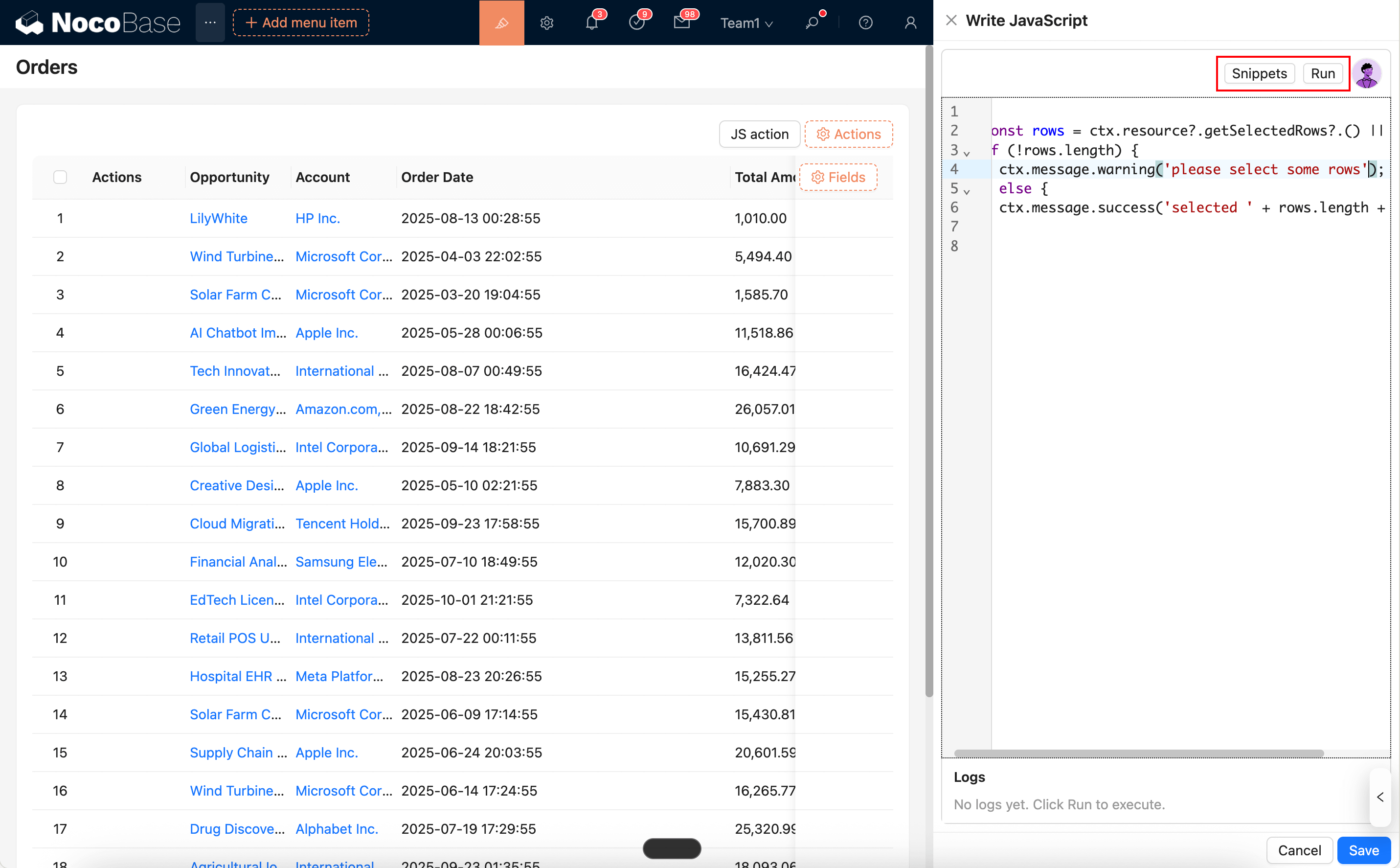
|
|
36
36
|
|
|
37
37
|
|
|
38
|
-
- You can use AI employees to generate/modify scripts: [AI Employee · Nathan: Frontend Engineer](/ai-employees/
|
|
38
|
+
- You can use AI employees to generate/modify scripts: [AI Employee · Nathan: Frontend Engineer](/ai-employees/built-in/)
|
|
39
39
|
|
|
40
40
|
## Common Usage (Simplified Examples)
|
|
41
41
|
|
|
@@ -47,7 +47,7 @@ The JS Item runtime injects common capabilities that you can use directly in the
|
|
|
47
47
|
|
|
48
48
|
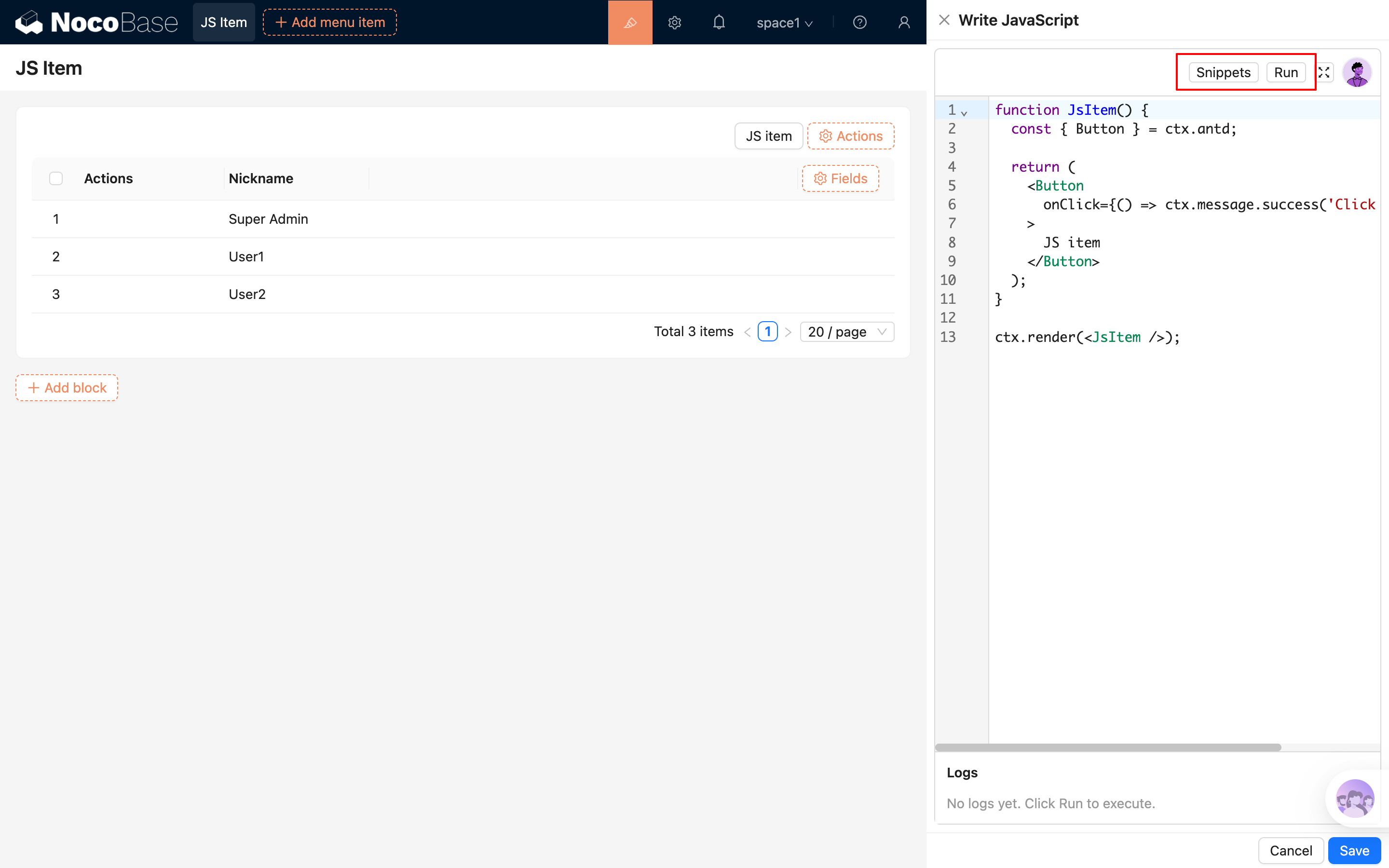
|
|
49
49
|
|
|
50
|
-
- You can use AI employees to generate / modify scripts: [AI Employee · Nathan: Frontend Engineer](/ai-employees/
|
|
50
|
+
- You can use AI employees to generate / modify scripts: [AI Employee · Nathan: Frontend Engineer](/ai-employees/built-in/)
|
|
51
51
|
|
|
52
52
|
## Common Usage (Simplified Examples)
|
|
53
53
|
|
|
@@ -38,7 +38,7 @@ The JS Block's script editor supports syntax highlighting, error hints, and buil
|
|
|
38
38
|
|
|
39
39
|
Additionally, you can directly summon the AI employee "Frontend Engineer · Nathan" from the top-right corner of the editor. Nathan can help you write or modify scripts based on the current context. You can then "Apply to editor" with one click and run the code to see the effect. For details, see:
|
|
40
40
|
|
|
41
|
-
- [AI Employee · Nathan: Frontend Engineer](/ai-employees/
|
|
41
|
+
- [AI Employee · Nathan: Frontend Engineer](/ai-employees/built-in/)
|
|
42
42
|
|
|
43
43
|
## Runtime Environment and Security
|
|
44
44
|
|
|
@@ -37,7 +37,7 @@ The script editor for JS Column supports syntax highlighting, error hints, and b
|
|
|
37
37
|
|
|
38
38
|
You can also use an AI Employee to generate code:
|
|
39
39
|
|
|
40
|
-
- [AI Employee · Nathan: Frontend Engineer](/ai-employees/
|
|
40
|
+
- [AI Employee · Nathan: Frontend Engineer](/ai-employees/built-in/)
|
|
41
41
|
|
|
42
42
|
## Common Usage
|
|
43
43
|
|
|
@@ -58,7 +58,7 @@ The JS Field script editor supports syntax highlighting, error hints, and built-
|
|
|
58
58
|
|
|
59
59
|
You can also generate code with the AI Employee:
|
|
60
60
|
|
|
61
|
-
- [AI Employee · Nathan: Frontend Engineer](/ai-employees/
|
|
61
|
+
- [AI Employee · Nathan: Frontend Engineer](/ai-employees/built-in/)
|
|
62
62
|
|
|
63
63
|
## Common Usage
|
|
64
64
|
|
|
@@ -32,7 +32,7 @@ JS Item is used for "custom items" (not bound to a field) in a form. You can use
|
|
|
32
32
|
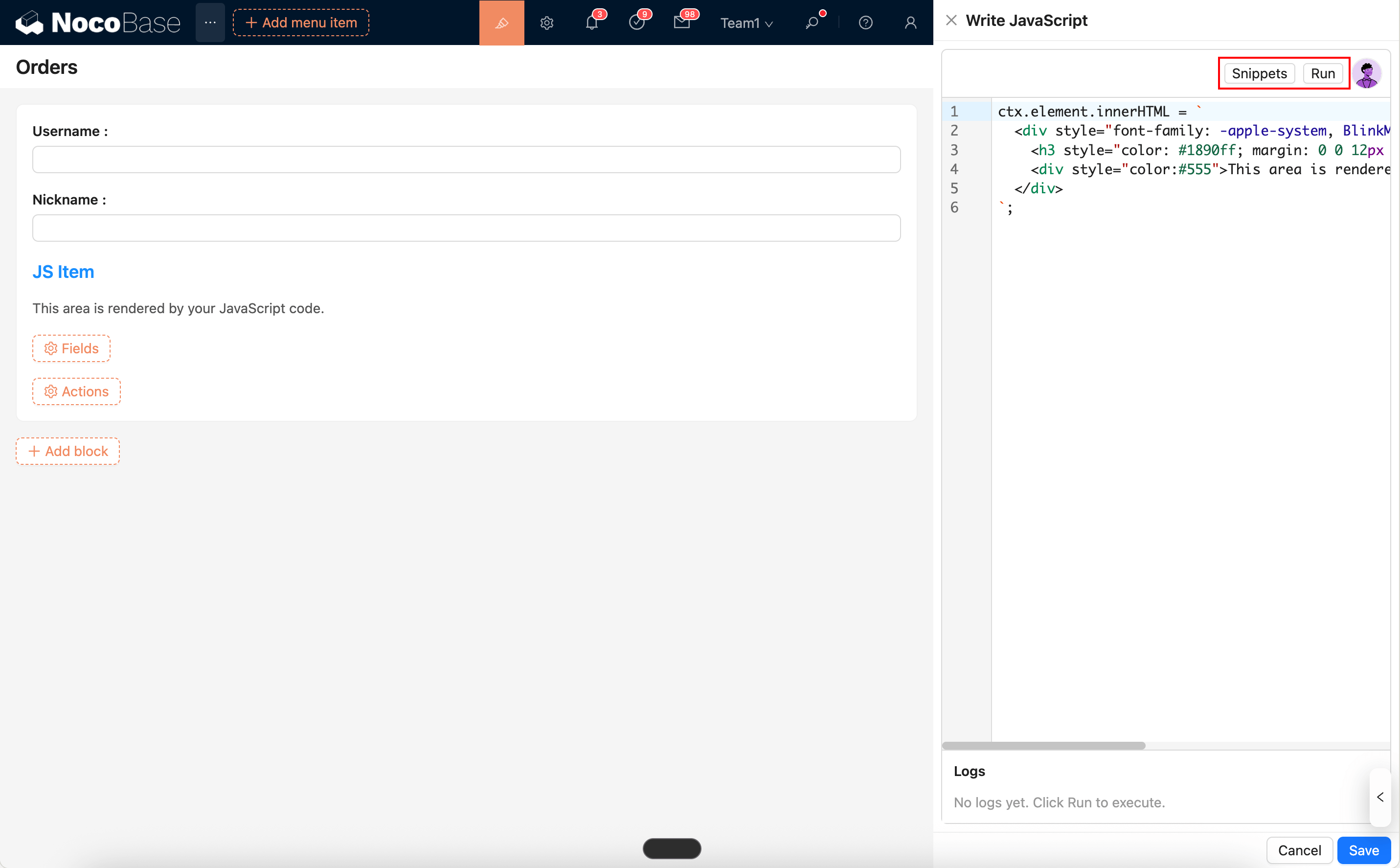
|
|
33
33
|
|
|
34
34
|
|
|
35
|
-
- Can be used with AI Employee to generate/modify scripts: [AI Employee · Nathan: Frontend Engineer](/ai-employees/
|
|
35
|
+
- Can be used with AI Employee to generate/modify scripts: [AI Employee · Nathan: Frontend Engineer](/ai-employees/built-in/)
|
|
36
36
|
|
|
37
37
|
## Common Usage (Simplified Examples)
|
|
38
38
|
|
|
@@ -213,6 +213,18 @@ If you need to store sensitive files, it is recommended to use a cloud storage s
|
|
|
213
213
|
|
|
214
214
|

|
|
215
215
|
|
|
216
|
+
For local storage or other public storage that can be accessed directly through same-origin application URLs, you should also pay extra attention to the risks introduced by active content files. Files such as `html`, `xhtml`, and `svg` may be parsed and executed directly by the browser. If an attacker can upload such a file and trick a user into opening it, the attacker may use your trusted application domain to host a malicious page or script.
|
|
217
|
+
|
|
218
|
+
In most cases, we recommend that administrators:
|
|
219
|
+
|
|
220
|
+
- Prefer private storage, signed URLs, or a separate file domain, so that user-uploaded files are not served directly from the same origin as the main application.
|
|
221
|
+
- Enforce a strict MIME type allowlist for uploads and only allow the file types that are actually required by the business.
|
|
222
|
+
- Be cautious about allowing active content types such as `text/html`, `application/xhtml+xml`, and `image/svg+xml`. Even if the system tries to return these files as downloads, this should not be considered a complete replacement for upload restrictions and origin isolation.
|
|
223
|
+
- Apply consistent security settings to reverse proxies, CDNs, object storage, and any other static file delivery layer, so dangerous files are not returned inline by bypassing application-layer protections.
|
|
224
|
+
- Do not use local/public storage to host untrusted web content. If you really need this capability, use an isolated domain and separately evaluate CSP, download behavior, and access control.
|
|
225
|
+
|
|
226
|
+
If an administrator explicitly allows dangerous file types to be uploaded, they should assess the resulting phishing, same-origin script execution, and sensitive information leakage risks on their own, and ensure that the Web Server, gateway, CDN, and storage services in the deployment chain enforce consistent restrictions.
|
|
227
|
+
|
|
216
228
|
|
|
217
229
|
### Application Backup
|
|
218
230
|
|
|
@@ -293,4 +305,4 @@ NocoBase provides multiple log types to help users understand the system's runni
|
|
|
293
305
|
- Request log: API request logs, including accessed URLs, HTTP methods, request parameters, response times, and status codes.
|
|
294
306
|
- System log: Records application running events, including service startup, configuration changes, error messages, and key operations.
|
|
295
307
|
- SQL log: Records database operation statements and their execution times, covering operations such as query, update, insert, and delete.
|
|
296
|
-
- Workflow log: Execution log of the workflow, including execution time, running information, and error information.
|
|
308
|
+
- Workflow log: Execution log of the workflow, including execution time, running information, and error information.
|
|
@@ -4,6 +4,8 @@
|
|
|
4
4
|
|
|
5
5
|
The Localization Management plugin is used to manage and implement NocoBase's localization resources. It can translate system menus, collections, fields, and all plugins to adapt to the language and culture of specific regions.
|
|
6
6
|
|
|
7
|
+
If you want to contribute default translations for the system and official plugins to NocoBase, see [Translation Contribution](/get-started/translations).
|
|
8
|
+
|
|
7
9
|
## Installation
|
|
8
10
|
|
|
9
11
|
This plugin is built-in and requires no additional installation.
|
|
@@ -36,6 +38,8 @@ After synchronization, the system will list all translatable entries for the cur
|
|
|
36
38
|
Different modules may have the same original text entries, which need to be translated separately.
|
|
37
39
|
:::
|
|
38
40
|
|
|
41
|
+
If translations for system or plugin built-in entries are manually changed or overwritten by AI translation, select `Reset system built-in entry translations` during synchronization. After synchronization, the system will overwrite existing built-in entry translations for the current language with translations from the built-in language pack to restore the defaults.
|
|
42
|
+
|
|
39
43
|
### Automatically Create Translation Entries
|
|
40
44
|
|
|
41
45
|
When editing a page, custom text within each block will automatically generate the corresponding i18n entry and simultaneously create the translation for the current language.
|
|
@@ -54,6 +58,26 @@ When defining text in code, you need to manually specify the ns (namespace), for
|
|
|
54
58
|
|
|
55
59
|
<img src="https://static-docs.nocobase.com/202404202142836.png"/>
|
|
56
60
|
|
|
61
|
+
### Using AI Translation
|
|
62
|
+
|
|
63
|
+
Localization Management supports translating entries through the AI Employee Lina. After enabling AI Employees and configuring a model service, you can use AI translation on the Localization Management page to batch generate translations for the current language.
|
|
64
|
+
|
|
65
|
+
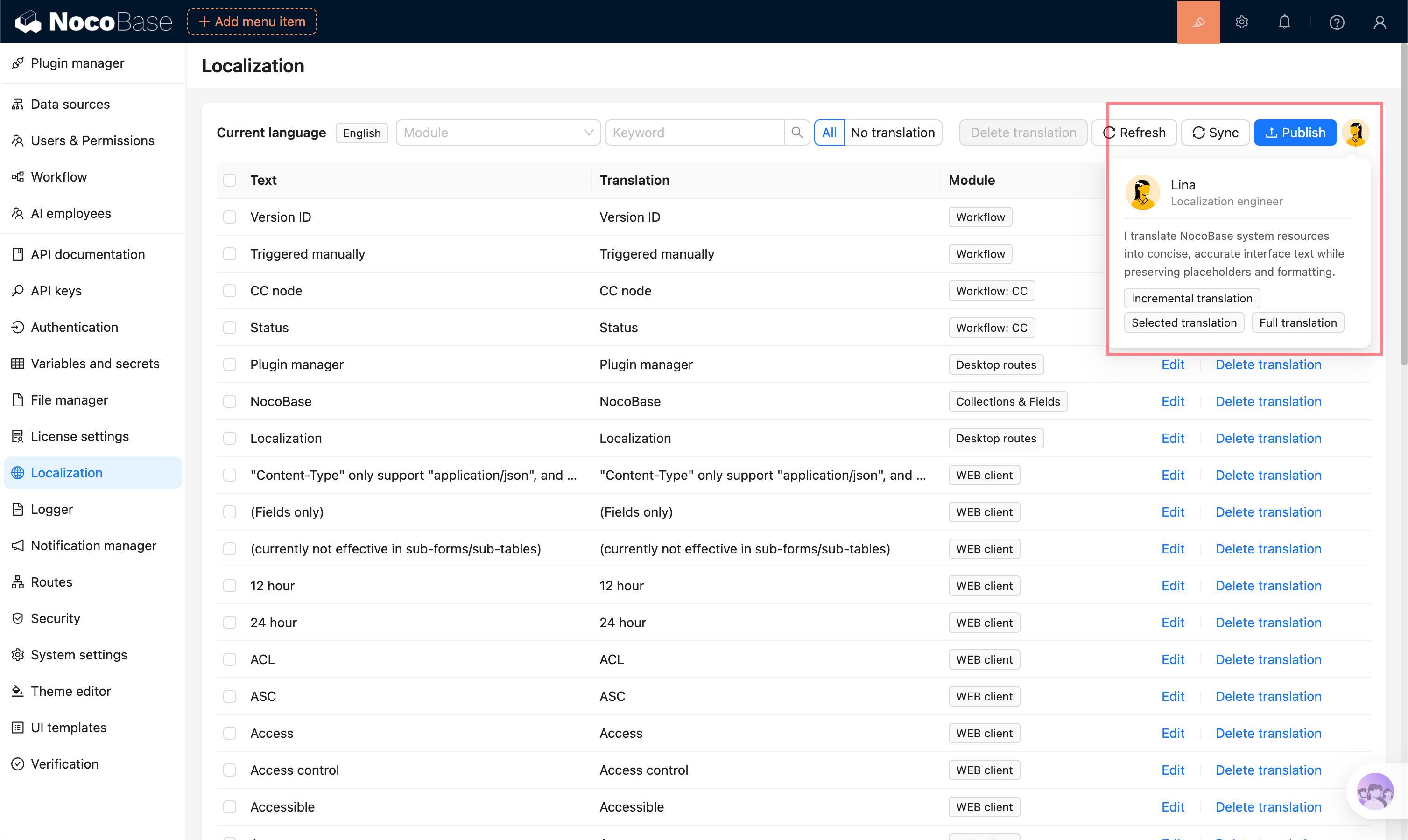
|
|
66
|
+
|
|
67
|
+
Supported translation scopes:
|
|
68
|
+
|
|
69
|
+
- **Full translation**: translate all eligible entries in the current language.
|
|
70
|
+
- **Incremental translation**: only translate entries that do not have translations yet.
|
|
71
|
+
- **Selected translation**: select entries in the table and translate only the selected content.
|
|
72
|
+
|
|
73
|
+
AI translation creates a background task. You can view progress while the task runs. After completion, translations are written to the corresponding language and should still be reviewed and corrected according to the actual context.
|
|
74
|
+
|
|
75
|
+
For the complete guide, see [AI Employee - Lina](/ai-employees/built-in/lina).
|
|
76
|
+
|
|
77
|
+
:::warning{title=Note}
|
|
78
|
+
AI-generated translations may have semantic deviations, inconsistent terminology, or insufficient context understanding. Before publishing, manually review important pages, business terminology, and user-facing copy.
|
|
79
|
+
:::
|
|
80
|
+
|
|
57
81
|
### Publishing Translations
|
|
58
82
|
|
|
59
83
|
After completing the translation, you need to click the "Publish" button to make the changes take effect.
|
|
@@ -76,4 +100,4 @@ Synchronize the entries.
|
|
|
76
100
|
|
|
77
101
|
Translate and publish.
|
|
78
102
|
|
|
79
|
-
<img src="https://static-docs.nocobase.com/202404202143135.png"/>
|
|
103
|
+
<img src="https://static-docs.nocobase.com/202404202143135.png"/>
|