@nocobase/plugin-ai 2.1.0-alpha.46 → 2.1.0-alpha.47
This diff represents the content of publicly available package versions that have been released to one of the supported registries. The information contained in this diff is provided for informational purposes only and reflects changes between package versions as they appear in their respective public registries.
- package/dist/ai/docs/nocobase/ai/install-upgrade-migration.mdx +127 -132
- package/dist/ai/docs/nocobase/api/cli/app/autostart/disable.md +44 -0
- package/dist/ai/docs/nocobase/api/cli/app/autostart/enable.md +44 -0
- package/dist/ai/docs/nocobase/api/cli/app/autostart/index.md +63 -0
- package/dist/ai/docs/nocobase/api/cli/app/autostart/list.md +41 -0
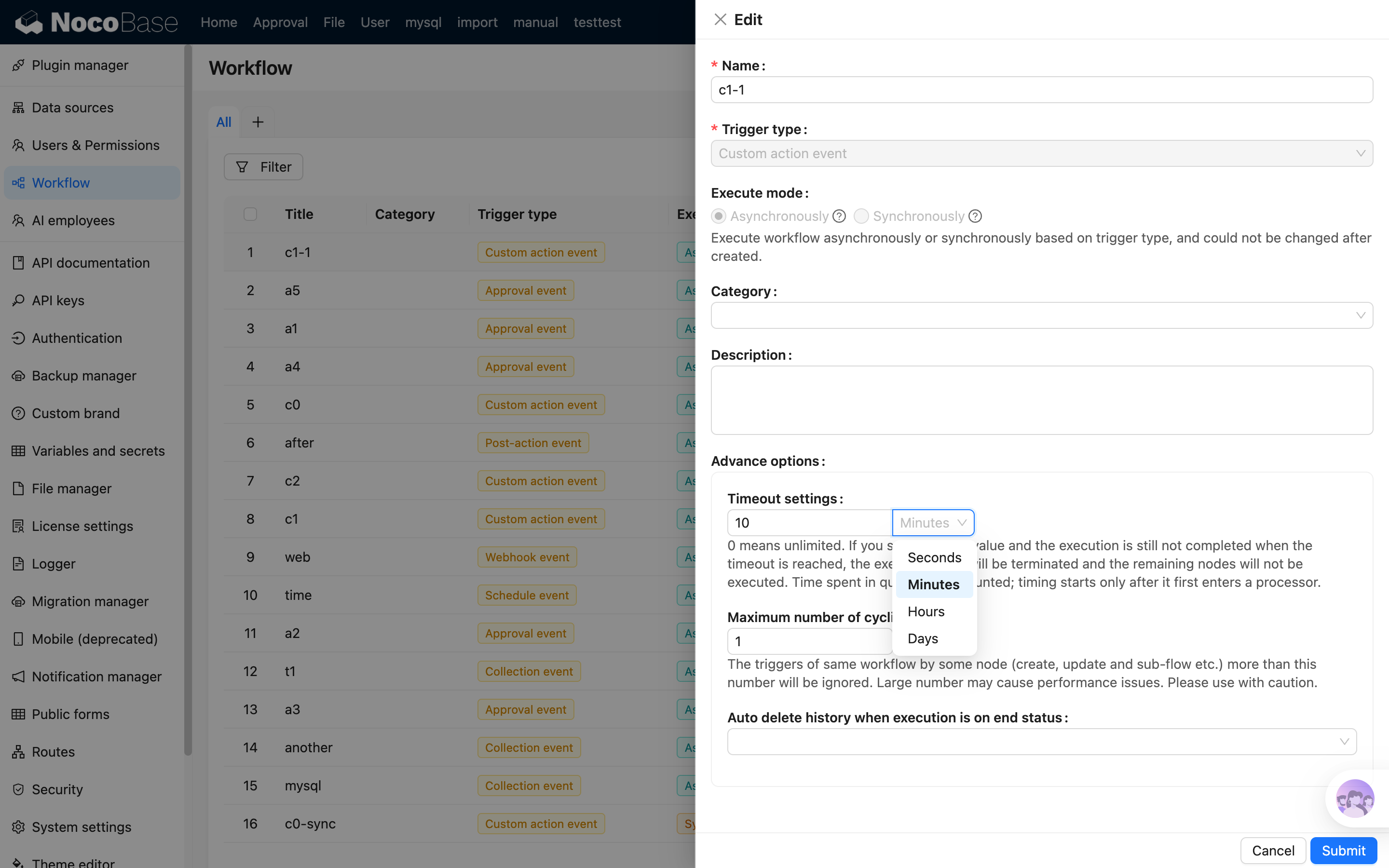
- package/dist/ai/docs/nocobase/api/cli/app/autostart/run.md +50 -0
- package/dist/ai/docs/nocobase/api/cli/app/index.md +18 -15
- package/dist/ai/docs/nocobase/api/cli/app/restart.md +3 -11
- package/dist/ai/docs/nocobase/api/cli/app/start.md +3 -11
- package/dist/ai/docs/nocobase/api/cli/app/stop.md +22 -12
- package/dist/ai/docs/nocobase/api/cli/app/upgrade.md +6 -6
- package/dist/ai/docs/nocobase/api/cli/backup/create.md +49 -0
- package/dist/ai/docs/nocobase/api/cli/backup/index.md +46 -0
- package/dist/ai/docs/nocobase/api/cli/backup/restore.md +46 -0
- package/dist/ai/docs/nocobase/api/cli/config/delete.md +11 -9
- package/dist/ai/docs/nocobase/api/cli/config/get.md +11 -8
- package/dist/ai/docs/nocobase/api/cli/config/index.md +28 -24
- package/dist/ai/docs/nocobase/api/cli/config/set.md +14 -12
- package/dist/ai/docs/nocobase/api/cli/db/stop.md +10 -11
- package/dist/ai/docs/nocobase/api/cli/env/index.md +25 -23
- package/dist/ai/docs/nocobase/api/cli/env/info.md +12 -10
- package/dist/ai/docs/nocobase/api/cli/env/proxy/caddy.md +108 -0
- package/dist/ai/docs/nocobase/api/cli/env/proxy/index.md +54 -0
- package/dist/ai/docs/nocobase/api/cli/env/proxy/nginx.md +104 -0
- package/dist/ai/docs/nocobase/api/cli/env/remove.md +18 -14
- package/dist/ai/docs/nocobase/api/cli/env/update.md +115 -14
- package/dist/ai/docs/nocobase/api/cli/index.md +66 -52
- package/dist/ai/docs/nocobase/api/cli/init.md +244 -62
- package/dist/ai/docs/nocobase/api/cli/license/activate.md +13 -12
- package/dist/ai/docs/nocobase/api/cli/license/index.md +2 -2
- package/dist/ai/docs/nocobase/api/cli/plugin/import.md +74 -0
- package/dist/ai/docs/nocobase/api/cli/plugin/index.md +4 -2
- package/dist/ai/docs/nocobase/get-started/install-upgrade-plugins.mdx +16 -10
- package/dist/ai/docs/nocobase/index.md +3 -3
- package/dist/ai/docs/nocobase/quickstart/index.md +27 -0
- package/dist/ai/docs/nocobase/quickstart/installation/airgap.md +67 -0
- package/dist/ai/docs/nocobase/quickstart/installation/cli.md +205 -0
- package/dist/ai/docs/nocobase/quickstart/installation/docker-compose.md +123 -0
- package/dist/ai/docs/nocobase/quickstart/installation/env.md +101 -0
- package/dist/ai/docs/nocobase/quickstart/installation/migration.md +50 -0
- package/dist/ai/docs/nocobase/quickstart/operations/backup-restore.md +94 -0
- package/dist/ai/docs/nocobase/quickstart/operations/manage-app.md +166 -0
- package/dist/ai/docs/nocobase/quickstart/operations/multi-environment.md +171 -0
- package/dist/ai/docs/nocobase/quickstart/plugins/third-party.md +86 -0
- package/dist/ai/docs/nocobase/quickstart/production/index.md +163 -0
- package/dist/ai/docs/nocobase/quickstart/production/reverse-proxy/caddy.md +158 -0
- package/dist/ai/docs/nocobase/quickstart/production/reverse-proxy/index.md +100 -0
- package/dist/ai/docs/nocobase/quickstart/production/reverse-proxy/nginx.md +166 -0
- package/dist/ai/docs/nocobase/quickstart/release-management.md +1 -0
- package/dist/ai/docs/nocobase/workflow/advanced/options.md +45 -1
- package/dist/externalVersion.js +16 -16
- package/dist/node_modules/@langchain/xai/package.json +1 -1
- package/dist/node_modules/fs-extra/package.json +1 -1
- package/dist/node_modules/jsonrepair/package.json +1 -1
- package/dist/node_modules/just-bash/package.json +1 -1
- package/dist/node_modules/nodejs-snowflake/package.json +1 -1
- package/dist/node_modules/openai/package.json +1 -1
- package/dist/node_modules/zod/package.json +1 -1
- package/dist/server/workflow/nodes/employee/index.js +2 -4
- package/package.json +2 -2
- package/dist/ai/docs/nocobase/api/cli/app/down.md +0 -41
|
@@ -0,0 +1,158 @@
|
|
|
1
|
+
# Caddy
|
|
2
|
+
|
|
3
|
+
If you already have a domain and want to get HTTPS running quickly, Caddy is usually the easiest choice. Compared with maintaining Nginx certificate config yourself, Caddy is more like the shortcut path for getting the entry layer online first.
|
|
4
|
+
|
|
5
|
+
The default recommendation is to run `nb env proxy caddy` directly.
|
|
6
|
+
|
|
7
|
+
## When Caddy is usually the better fit
|
|
8
|
+
|
|
9
|
+
These cases usually favor Caddy first:
|
|
10
|
+
|
|
11
|
+
- You already have a domain and want HTTPS quickly
|
|
12
|
+
- You do not want to maintain too many certificate and TLS details yourself
|
|
13
|
+
- You only need a simple and stable entry layer
|
|
14
|
+
|
|
15
|
+
If you already use Nginx across the server to manage many sites, or you still need heavier caching, access control, and custom rules, [Nginx](./nginx.md) is usually the better fit.
|
|
16
|
+
|
|
17
|
+
## Default path: let the CLI generate the Caddy config
|
|
18
|
+
|
|
19
|
+
If your app has already been saved as a CLI env and the env type is `local` or `docker`, the default recommendation is still to let the CLI generate the config. That way, routing details related to NocoBase paths, WebSocket handling, and subpaths stay managed by the CLI, and you only need to care about the site entry itself.
|
|
20
|
+
|
|
21
|
+
The most direct form is:
|
|
22
|
+
|
|
23
|
+
```bash
|
|
24
|
+
nb env proxy caddy --env demo --host demo.example.com
|
|
25
|
+
```
|
|
26
|
+
|
|
27
|
+
If you have already switched to the current env, you can also omit `--env`:
|
|
28
|
+
|
|
29
|
+
```bash
|
|
30
|
+
nb env proxy caddy --host demo.example.com
|
|
31
|
+
```
|
|
32
|
+
|
|
33
|
+
If you also want to specify the entry port, add it at the same time:
|
|
34
|
+
|
|
35
|
+
```bash
|
|
36
|
+
nb env proxy caddy --env demo --host demo.example.com --port 8080
|
|
37
|
+
```
|
|
38
|
+
|
|
39
|
+
`--host` is important here. Caddy decides whether to manage HTTPS based on the site address. In production, try to pass a domain that already resolves to the current server.
|
|
40
|
+
|
|
41
|
+
### Which files the CLI generates
|
|
42
|
+
|
|
43
|
+
If you do not pass `--output`, the Caddy provider keeps three layers of files under `~/.nocobase/proxy/caddy/<env>/`:
|
|
44
|
+
|
|
45
|
+
| File | Purpose |
|
|
46
|
+
| --- | --- |
|
|
47
|
+
| `generated.caddy` | The actual reverse-proxy config managed by the CLI and overwritten every time you run `nb env proxy caddy` |
|
|
48
|
+
| `app.caddy` | Editable site entry file where you can add site-level config |
|
|
49
|
+
| `~/.nocobase/proxy/caddy/nocobase.caddy` | Shared main config that imports every env `app.caddy` |
|
|
50
|
+
|
|
51
|
+
Where:
|
|
52
|
+
|
|
53
|
+
- `generated.caddy` is only meant to be managed by the CLI and should not be edited manually
|
|
54
|
+
- `app.caddy` is editable, but you should keep the generated import inserted by the CLI
|
|
55
|
+
- `nocobase.caddy` is mainly used by `--install`
|
|
56
|
+
|
|
57
|
+
:::warning Note
|
|
58
|
+
|
|
59
|
+
If you need to add site-level Caddy config such as extra headers, authentication, rate limiting, or compression rules, edit `app.caddy`. `generated.caddy` will be overwritten the next time you run `nb env proxy caddy`.
|
|
60
|
+
|
|
61
|
+
:::
|
|
62
|
+
|
|
63
|
+
### Install the shared config into Caddy and reload it
|
|
64
|
+
|
|
65
|
+
If you want the CLI to connect the shared config to the Caddy main config and immediately validate and reload Caddy, run:
|
|
66
|
+
|
|
67
|
+
```bash
|
|
68
|
+
nb env proxy caddy --env demo --host demo.example.com --install --reload
|
|
69
|
+
```
|
|
70
|
+
|
|
71
|
+
These flags are split like this:
|
|
72
|
+
|
|
73
|
+
- `--install` connects `~/.nocobase/proxy/caddy/nocobase.caddy` to the Caddy main config
|
|
74
|
+
- `--reload` validates the config first and then reloads Caddy
|
|
75
|
+
|
|
76
|
+
If your Caddy executable is not on the default path, set the CLI config first:
|
|
77
|
+
|
|
78
|
+
```bash
|
|
79
|
+
nb config set bin.caddy /usr/bin/caddy
|
|
80
|
+
```
|
|
81
|
+
|
|
82
|
+
### When should you change `proxy.nb-cli-root`
|
|
83
|
+
|
|
84
|
+
Most setups do not need to change `proxy.nb-cli-root`. You usually need it only when Caddy runs in another container, mount root, or path view and cannot see the current user's `~/.nocobase` path.
|
|
85
|
+
|
|
86
|
+
For example, if Caddy sees that path as `/workspace/.nocobase/...` inside a container, set:
|
|
87
|
+
|
|
88
|
+
```bash
|
|
89
|
+
nb config set proxy.nb-cli-root /workspace
|
|
90
|
+
nb env proxy caddy --env demo --install --reload
|
|
91
|
+
```
|
|
92
|
+
|
|
93
|
+
If you only want to preview the generated result, use:
|
|
94
|
+
|
|
95
|
+
```bash
|
|
96
|
+
nb env proxy caddy --env demo --print
|
|
97
|
+
```
|
|
98
|
+
|
|
99
|
+
If you want to write the generated route fragment to a custom file, use:
|
|
100
|
+
|
|
101
|
+
```bash
|
|
102
|
+
nb env proxy caddy --env demo --output ./generated.caddy
|
|
103
|
+
```
|
|
104
|
+
|
|
105
|
+
For the full parameter reference, see [`nb env proxy caddy`](../../../api/cli/env/proxy/caddy.md).
|
|
106
|
+
|
|
107
|
+
## Handwritten config: what to do without the CLI
|
|
108
|
+
|
|
109
|
+
If your app is not managed by the CLI, or you explicitly want to maintain the full `Caddyfile` yourself, start with this minimal version:
|
|
110
|
+
|
|
111
|
+
```text
|
|
112
|
+
your-domain.com {
|
|
113
|
+
encode zstd gzip
|
|
114
|
+
reverse_proxy 127.0.0.1:13000
|
|
115
|
+
}
|
|
116
|
+
```
|
|
117
|
+
|
|
118
|
+
Where:
|
|
119
|
+
|
|
120
|
+
- Replace `your-domain.com` with your domain
|
|
121
|
+
- Replace `127.0.0.1:13000` with the real address your NocoBase app listens on
|
|
122
|
+
|
|
123
|
+
If the domain already resolves to the current server correctly, Caddy usually handles HTTPS certificate issuance and renewal automatically.
|
|
124
|
+
|
|
125
|
+
If you do not have a domain yet and only want to verify the reverse-proxy chain first, you can listen on a port:
|
|
126
|
+
|
|
127
|
+
```text
|
|
128
|
+
:80 {
|
|
129
|
+
reverse_proxy 127.0.0.1:13000
|
|
130
|
+
}
|
|
131
|
+
```
|
|
132
|
+
|
|
133
|
+
In production, though, it is still better to switch to a domain-based site address as soon as possible so Caddy can also take over HTTPS.
|
|
134
|
+
|
|
135
|
+
If your app is not mounted at `/` but under a subpath, handwritten Caddy config also means you need to confirm application variables such as `APP_PUBLIC_PATH` and `WS_PATH`. In that case, it is usually easier to go back to `nb env proxy caddy` and let the CLI generate the config.
|
|
136
|
+
|
|
137
|
+
## Validate and reload the config
|
|
138
|
+
|
|
139
|
+
```bash
|
|
140
|
+
caddy validate --config /etc/caddy/Caddyfile
|
|
141
|
+
systemctl reload caddy
|
|
142
|
+
```
|
|
143
|
+
|
|
144
|
+
If you do not manage Caddy with `systemd`, use your own startup and reload workflow.
|
|
145
|
+
|
|
146
|
+
## Notes
|
|
147
|
+
|
|
148
|
+
- `nb env proxy caddy` only works for CLI-managed envs whose runtime is reachable from the current machine, which means `local` or `docker`
|
|
149
|
+
- If the command says the env is missing `appPort`, run `nb env update <name> --app-port <port>` first
|
|
150
|
+
- `--output` and `--print` are useful for preview or custom integration, but they do not additionally create `app.caddy` or the shared main config
|
|
151
|
+
- If you already have a domain that resolves correctly to the server, Caddy is often the fastest way to get HTTPS working
|
|
152
|
+
|
|
153
|
+
## Related links
|
|
154
|
+
|
|
155
|
+
- [`nb env proxy caddy`](../../../api/cli/env/proxy/caddy.md)
|
|
156
|
+
- [Install with CLI (Recommended)](../../installation/cli.md)
|
|
157
|
+
- [Install with Docker Compose](../../installation/docker-compose.md)
|
|
158
|
+
- [App Environment Variables](../../installation/env.md)
|
|
@@ -0,0 +1,100 @@
|
|
|
1
|
+
---
|
|
2
|
+
title: 'Reverse Proxy for Production'
|
|
3
|
+
description: 'Use nb env proxy nginx and nb env proxy caddy to generate reverse-proxy configs for CLI-managed NocoBase envs.'
|
|
4
|
+
keywords: 'NocoBase,nb env proxy nginx,nb env proxy caddy,reverse proxy,Nginx,Caddy,production'
|
|
5
|
+
---
|
|
6
|
+
|
|
7
|
+
# Reverse Proxy for Production
|
|
8
|
+
|
|
9
|
+
In NocoBase CLI, there are two recommended entry points for putting a reverse proxy in front of a production app:
|
|
10
|
+
|
|
11
|
+
- `nb env proxy nginx`
|
|
12
|
+
- `nb env proxy caddy`
|
|
13
|
+
|
|
14
|
+
As long as your app has already been saved as a CLI env and the env type is `local` or `docker`, letting the CLI generate the config is usually enough. That way, the CLI keeps tricky details such as WebSocket handling, subpaths, SPA fallback pages, and later updates in sync. You only need to decide whether the entry layer should keep using Nginx or move to Caddy.
|
|
15
|
+
|
|
16
|
+
If your app is not managed by the CLI, or if you explicitly want to handwrite the full proxy config, go straight to the handwritten-config section in the provider pages.
|
|
17
|
+
|
|
18
|
+
## Check whether this path fits your setup
|
|
19
|
+
|
|
20
|
+
- Your app is already reachable through an internal address such as `http://127.0.0.1:13000`
|
|
21
|
+
- The app has already been saved as a CLI env, and the env type is `local` or `docker`
|
|
22
|
+
- The env already has `appPort` saved
|
|
23
|
+
|
|
24
|
+
If the command says the env is missing `appPort`, run [`nb env update`](../../../api/cli/env/update.md) first and save it.
|
|
25
|
+
|
|
26
|
+
If you later change settings such as `app-port` or `app-public-path` that affect proxy output, remember to rerun the matching proxy subcommand.
|
|
27
|
+
|
|
28
|
+
## Default path: let the CLI generate the config first
|
|
29
|
+
|
|
30
|
+
If you already know which entry provider you want to keep using, go straight to that subcommand:
|
|
31
|
+
|
|
32
|
+
```bash
|
|
33
|
+
nb env proxy nginx --env demo --host demo.example.com
|
|
34
|
+
nb env proxy caddy --env demo --host demo.example.com
|
|
35
|
+
```
|
|
36
|
+
|
|
37
|
+
If you have already switched to the current env, you can also omit `--env`:
|
|
38
|
+
|
|
39
|
+
```bash
|
|
40
|
+
nb env proxy nginx --host demo.example.com
|
|
41
|
+
```
|
|
42
|
+
|
|
43
|
+
Where:
|
|
44
|
+
|
|
45
|
+
- If you already use Nginx to manage sites, caching, access control, or certificates, start with [`nb env proxy nginx`](../../../api/cli/env/proxy/nginx.md)
|
|
46
|
+
- If you want HTTPS running quickly and do not want to maintain many TLS details yourself, start with [`nb env proxy caddy`](../../../api/cli/env/proxy/caddy.md)
|
|
47
|
+
- `--port` is the proxy entry port, not the app `appPort`
|
|
48
|
+
|
|
49
|
+
If you want the CLI to also connect the shared config to the provider main config and reload it after validation, add:
|
|
50
|
+
|
|
51
|
+
```bash
|
|
52
|
+
nb env proxy nginx --env demo --host demo.example.com --install --reload
|
|
53
|
+
```
|
|
54
|
+
|
|
55
|
+
For the full command reference, see [`nb env proxy`](../../../api/cli/env/proxy/index.md).
|
|
56
|
+
|
|
57
|
+
## What the CLI keeps in sync for you
|
|
58
|
+
|
|
59
|
+
The CLI does more than generate one proxy snippet. It also maintains provider-specific helper files. The output shape differs between the two providers:
|
|
60
|
+
|
|
61
|
+
- Nginx keeps `app.conf`, `public/index-v1.html`, `public/index-v2.html`, the shared `nocobase.conf`, and the shared `snippets/`
|
|
62
|
+
- Caddy keeps `generated.caddy`, `app.caddy`, and the shared `nocobase.caddy`
|
|
63
|
+
|
|
64
|
+
:::warning Note
|
|
65
|
+
|
|
66
|
+
If you need to add site-level configuration, edit `app.conf` or `app.caddy`. Do not manually edit CLI-managed helper files, because they will be overwritten the next time you run the command.
|
|
67
|
+
|
|
68
|
+
:::
|
|
69
|
+
|
|
70
|
+
## Which page should you open first
|
|
71
|
+
|
|
72
|
+
| I want to... | Go here |
|
|
73
|
+
| --- | --- |
|
|
74
|
+
| Keep using Nginx to manage sites, certificates, caching, or access control | [Nginx](./nginx.md) |
|
|
75
|
+
| Get HTTPS running quickly and maintain fewer certificate and TLS details | [Caddy](./caddy.md) |
|
|
76
|
+
| Review the command tree and choose a provider first | [`nb env proxy`](../../../api/cli/env/proxy/index.md) |
|
|
77
|
+
| See the Nginx subcommand options, output files, and examples first | [`nb env proxy nginx`](../../../api/cli/env/proxy/nginx.md) |
|
|
78
|
+
| See the Caddy subcommand options, output files, and examples first | [`nb env proxy caddy`](../../../api/cli/env/proxy/caddy.md) |
|
|
79
|
+
| Adjust env settings that may affect proxy output, such as `app-port` or `app-public-path` | [`nb env update`](../../../api/cli/env/update.md) |
|
|
80
|
+
| Install the app as a CLI-managed env first | [Install with CLI (Recommended)](../../installation/cli.md) |
|
|
81
|
+
|
|
82
|
+
## When the CLI-generated path is not the best fit
|
|
83
|
+
|
|
84
|
+
These cases are usually better served by the handwritten-config section in the provider pages:
|
|
85
|
+
|
|
86
|
+
- Your app is not managed by the CLI
|
|
87
|
+
- The env only has a remote API connection, or it is an SSH env
|
|
88
|
+
- You explicitly want to maintain the full Nginx config or full `Caddyfile` yourself
|
|
89
|
+
|
|
90
|
+
As long as the app has already been saved as a CLI env and the current machine can reach its runtime, the default recommendation is still to start with these commands. It makes later domain changes, site-level adjustments, and regeneration much easier to manage.
|
|
91
|
+
|
|
92
|
+
## Related links
|
|
93
|
+
|
|
94
|
+
- [`nb env proxy`](../../../api/cli/env/proxy/index.md)
|
|
95
|
+
- [`nb env proxy nginx`](../../../api/cli/env/proxy/nginx.md)
|
|
96
|
+
- [`nb env proxy caddy`](../../../api/cli/env/proxy/caddy.md)
|
|
97
|
+
- [Nginx](./nginx.md)
|
|
98
|
+
- [Caddy](./caddy.md)
|
|
99
|
+
- [App Environment Variables](../../installation/env.md)
|
|
100
|
+
- [Install with CLI (Recommended)](../../installation/cli.md)
|
|
@@ -0,0 +1,166 @@
|
|
|
1
|
+
# Nginx
|
|
2
|
+
|
|
3
|
+
If you already use Nginx on the server to manage sites, or you still want to manage certificates, caching, or access control yourself, staying with Nginx is the most direct path. For CLI-managed NocoBase envs, this is also the default recommendation.
|
|
4
|
+
|
|
5
|
+
If you mainly want to get HTTPS running quickly and do not want to maintain many proxy details yourself, [Caddy](./caddy.md) is the easier path. But if Nginx is already part of your stack, this page is the default place to start.
|
|
6
|
+
|
|
7
|
+
## Confirm these two things first
|
|
8
|
+
|
|
9
|
+
- NocoBase is already reachable through an internal address such as `http://127.0.0.1:13000`
|
|
10
|
+
- You know whether this deployment is a CLI-managed env or a fully handwritten setup
|
|
11
|
+
|
|
12
|
+
Once those two things are clear, the next step is usually straightforward:
|
|
13
|
+
|
|
14
|
+
- If the app has already been saved as a CLI env and the env type is `local` or `docker`, use `nb env proxy nginx`
|
|
15
|
+
- If the app is not managed by the CLI, or you explicitly want to maintain the full Nginx config yourself, handwrite the `server` block
|
|
16
|
+
|
|
17
|
+
## Default path: let the CLI generate the Nginx config
|
|
18
|
+
|
|
19
|
+
If your app was installed, adopted, or saved through NocoBase CLI as a `local` or `docker` env, the default recommendation is to run `nb env proxy nginx`. The CLI maintains the editable entry file, SPA fallback pages, shared main config, and shared snippets together, which makes it much less likely to miss WebSocket handling, subpaths, or later updates.
|
|
20
|
+
|
|
21
|
+
Start by generating a config for a specific env:
|
|
22
|
+
|
|
23
|
+
```bash
|
|
24
|
+
nb env proxy nginx --env demo
|
|
25
|
+
```
|
|
26
|
+
|
|
27
|
+
If you have already switched to the current env, you can also omit `--env`:
|
|
28
|
+
|
|
29
|
+
```bash
|
|
30
|
+
nb env proxy nginx
|
|
31
|
+
```
|
|
32
|
+
|
|
33
|
+
If you already know the public domain or entry port, you can write them at generation time:
|
|
34
|
+
|
|
35
|
+
```bash
|
|
36
|
+
nb env proxy nginx --env demo --host demo.example.com
|
|
37
|
+
nb env proxy nginx --env demo --host demo.example.com --port 8080
|
|
38
|
+
```
|
|
39
|
+
|
|
40
|
+
Here, `--port` is the proxy entry port, not the port the NocoBase app itself listens on. The upstream app port comes from the saved env `appPort`.
|
|
41
|
+
|
|
42
|
+
### Which files the CLI generates
|
|
43
|
+
|
|
44
|
+
The Nginx provider keeps these files under `~/.nocobase/proxy/nginx/`:
|
|
45
|
+
|
|
46
|
+
| File | Purpose |
|
|
47
|
+
| --- | --- |
|
|
48
|
+
| `~/.nocobase/proxy/nginx/<env>/app.conf` | Editable site entry file. The CLI refreshes the managed block inside it, and you can add site-level config around that block |
|
|
49
|
+
| `~/.nocobase/proxy/nginx/<env>/public/index-v1.html` | v1 SPA fallback page generated from the current active client's `index.html` |
|
|
50
|
+
| `~/.nocobase/proxy/nginx/<env>/public/index-v2.html` | v2 SPA fallback page generated from the current active client's `v/index.html` |
|
|
51
|
+
| `~/.nocobase/proxy/nginx/nocobase.conf` | Shared main config that includes every env `app.conf` |
|
|
52
|
+
| `~/.nocobase/proxy/nginx/snippets/` | Shared snippets directory copied from built-in templates |
|
|
53
|
+
|
|
54
|
+
Where:
|
|
55
|
+
|
|
56
|
+
- `app.conf` is editable, but you should keep the managed block between `# BEGIN NocoBase managed config` and `# END NocoBase managed config`
|
|
57
|
+
- `index-v1.html` and `index-v2.html` automatically rewrite asset URLs according to the current env subpath, active client version, and `CDN_BASE_URL`
|
|
58
|
+
- `nocobase.conf` is mainly used by `--install`
|
|
59
|
+
- Files under `snippets/` and `public/` are usually not meant to be edited manually and will be resynced the next time you run the command
|
|
60
|
+
|
|
61
|
+
:::warning Note
|
|
62
|
+
|
|
63
|
+
If you need to add site-level Nginx config such as rate limits, extra headers, or access control, edit `app.conf`. Managed files under `public/` and `snippets/` will be overwritten the next time you run `nb env proxy nginx`.
|
|
64
|
+
|
|
65
|
+
:::
|
|
66
|
+
|
|
67
|
+
### Install the shared config into Nginx and reload it
|
|
68
|
+
|
|
69
|
+
If you want the CLI to connect the shared config to the Nginx main config and immediately validate and reload Nginx, run:
|
|
70
|
+
|
|
71
|
+
```bash
|
|
72
|
+
nb env proxy nginx --env demo --host demo.example.com --install --reload
|
|
73
|
+
```
|
|
74
|
+
|
|
75
|
+
These flags are split like this:
|
|
76
|
+
|
|
77
|
+
- `--install` connects `~/.nocobase/proxy/nginx/nocobase.conf` to the Nginx main config
|
|
78
|
+
- `--reload` validates the config first and then reloads Nginx
|
|
79
|
+
|
|
80
|
+
If your Nginx executable is not on the default path, set the CLI config first:
|
|
81
|
+
|
|
82
|
+
```bash
|
|
83
|
+
nb config set bin.nginx /usr/sbin/nginx
|
|
84
|
+
```
|
|
85
|
+
|
|
86
|
+
### When should you change `proxy.nb-cli-root`
|
|
87
|
+
|
|
88
|
+
Most setups do not need to change `proxy.nb-cli-root`. You usually need it only when Nginx runs in another container, mount root, or path view and cannot see the current user's `~/.nocobase` path.
|
|
89
|
+
|
|
90
|
+
For example, if Nginx sees that path as `/workspace/.nocobase/...` inside a container, set:
|
|
91
|
+
|
|
92
|
+
```bash
|
|
93
|
+
nb config set proxy.nb-cli-root /workspace
|
|
94
|
+
nb env proxy nginx --env demo --install --reload
|
|
95
|
+
```
|
|
96
|
+
|
|
97
|
+
If you only want to preview the rendered `app.conf`, you can also use:
|
|
98
|
+
|
|
99
|
+
```bash
|
|
100
|
+
nb env proxy nginx --env demo --print
|
|
101
|
+
```
|
|
102
|
+
|
|
103
|
+
The Nginx provider does not support `--output`. For the full parameter reference, see [`nb env proxy nginx`](../../../api/cli/env/proxy/nginx.md).
|
|
104
|
+
|
|
105
|
+
## Handwritten config: what to do without the CLI
|
|
106
|
+
|
|
107
|
+
If your app is not managed by the CLI, or you explicitly want to maintain the full Nginx config yourself, start with this minimal version. In most cases, one `server` block is enough.
|
|
108
|
+
|
|
109
|
+
Create a config file on the server, for example `/etc/nginx/conf.d/nocobase.conf`:
|
|
110
|
+
|
|
111
|
+
```nginx
|
|
112
|
+
server {
|
|
113
|
+
listen 80;
|
|
114
|
+
server_name your-domain.com;
|
|
115
|
+
|
|
116
|
+
client_max_body_size 100m;
|
|
117
|
+
|
|
118
|
+
location / {
|
|
119
|
+
proxy_pass http://127.0.0.1:13000;
|
|
120
|
+
proxy_http_version 1.1;
|
|
121
|
+
proxy_set_header Host $host;
|
|
122
|
+
proxy_set_header X-Real-IP $remote_addr;
|
|
123
|
+
proxy_set_header X-Forwarded-For $proxy_add_x_forwarded_for;
|
|
124
|
+
proxy_set_header X-Forwarded-Proto $scheme;
|
|
125
|
+
proxy_set_header Upgrade $http_upgrade;
|
|
126
|
+
proxy_set_header Connection "upgrade";
|
|
127
|
+
}
|
|
128
|
+
}
|
|
129
|
+
```
|
|
130
|
+
|
|
131
|
+
Where:
|
|
132
|
+
|
|
133
|
+
- Replace `server_name` with your domain
|
|
134
|
+
- Replace `127.0.0.1:13000` with the real address your NocoBase app listens on
|
|
135
|
+
- Adjust `client_max_body_size` to match your upload needs
|
|
136
|
+
|
|
137
|
+
If your app is not mounted at `/` but under a subpath such as `/app/`, handwritten configs also need you to confirm application variables such as `APP_PUBLIC_PATH` and `WS_PATH`. In that case, it is usually easier to go back to `nb env proxy nginx` and let the CLI handle the routing details.
|
|
138
|
+
|
|
139
|
+
## Validate and reload the config
|
|
140
|
+
|
|
141
|
+
```bash
|
|
142
|
+
nginx -t
|
|
143
|
+
systemctl reload nginx
|
|
144
|
+
```
|
|
145
|
+
|
|
146
|
+
If you do not manage Nginx with `systemd`, use your own reload workflow.
|
|
147
|
+
|
|
148
|
+
## How to handle HTTPS
|
|
149
|
+
|
|
150
|
+
If you have already decided to stay with Nginx, you can keep handling HTTPS there as well. A common next step is to expand `listen 80` into dual `80/443` entry points and add your certificate paths and TLS config.
|
|
151
|
+
|
|
152
|
+
But if you mainly want working HTTPS as quickly as possible and do not want to deal with certificate issuance and renewal yourself, switching to [Caddy](./caddy.md) is usually easier.
|
|
153
|
+
|
|
154
|
+
## Notes
|
|
155
|
+
|
|
156
|
+
- `nb env proxy nginx` only works for CLI-managed envs whose runtime is reachable from the current machine, which means `local` or `docker`
|
|
157
|
+
- If the command says the env is missing `appPort`, run `nb env update <name> --app-port <port>` first
|
|
158
|
+
- `nb env proxy nginx` does not support `--output`. If you only want to preview the entry file, use `--print`
|
|
159
|
+
- If you already have a large custom Nginx main config, the CLI-generated config usually fits best as a site fragment that you include, not as a replacement for the whole main config
|
|
160
|
+
|
|
161
|
+
## Related links
|
|
162
|
+
|
|
163
|
+
- [`nb env proxy nginx`](../../../api/cli/env/proxy/nginx.md)
|
|
164
|
+
- [Install with CLI (Recommended)](../../installation/cli.md)
|
|
165
|
+
- [Install with Docker Compose](../../installation/docker-compose.md)
|
|
166
|
+
- [App Environment Variables](../../installation/env.md)
|
|
@@ -0,0 +1 @@
|
|
|
1
|
+
# 发布管理
|
|
@@ -1,5 +1,49 @@
|
|
|
1
1
|
# Advanced Configuration
|
|
2
2
|
|
|
3
|
+
## Timeout Settings
|
|
4
|
+
|
|
5
|
+
Starting from version `2.1.0`, workflows support timeout settings to limit the maximum duration of a single execution from the time it starts processing until it ends. Timeout settings are useful for preventing workflows from occupying execution resources indefinitely because of long-running operations, manual processing, or waiting for external callbacks.
|
|
6
|
+
|
|
7
|
+
In the workflow creation or editing dialog, expand "Advanced options" to configure "Timeout settings":
|
|
8
|
+
|
|
9
|
+
|
|
10
|
+
|
|
11
|
+
The available options are:
|
|
12
|
+
|
|
13
|
+
- Enter `0` to set no timeout limit (default).
|
|
14
|
+
- Enter a value greater than `0` to enable the timeout limit. The interface supports seconds, minutes, hours, and days as units.
|
|
15
|
+
- The maximum timeout is 180 days.
|
|
16
|
+
|
|
17
|
+
### Timing Rules
|
|
18
|
+
|
|
19
|
+
The timeout starts counting when the workflow first enters a processor. After a workflow is triggered, time spent waiting in the queue for scheduling, or stored for delayed start, does not count toward the timeout.
|
|
20
|
+
|
|
21
|
+
After entering a processor, the timeout continues to count, including actual node execution time and time spent by nodes that have entered a waiting state, such as manual processing, approval, delay, or waiting for an external callback. The timeout does not pause when the workflow is waiting for user action.
|
|
22
|
+
|
|
23
|
+
The timeout deadline is determined when the execution starts. Changing a workflow's timeout settings only affects executions that start processing afterward; it does not recalculate executions that have already started.
|
|
24
|
+
|
|
25
|
+
### Timeout Handling
|
|
26
|
+
|
|
27
|
+
If the execution has not ended when the timeout is reached, the system terminates it:
|
|
28
|
+
|
|
29
|
+
- The execution history status changes to "Aborted", and the termination reason is shown as "Timed out".
|
|
30
|
+
- Node jobs that are currently running or waiting are marked as "Aborted".
|
|
31
|
+
- Subsequent nodes will not continue to execute.
|
|
32
|
+
- If this execution has running subflow executions, those subflows are also aborted together with the parent execution.
|
|
33
|
+
|
|
34
|
+
Examples:
|
|
35
|
+
|
|
36
|
+
- If a loop node runs an extremely long loop and the processing inside the loop is time-consuming, causing the whole loop node to exceed the configured timeout, the currently running loop node and its internal nodes are forcibly terminated, and subsequent nodes will not continue to execute.
|
|
37
|
+
- If a manual processing or approval node waits for a long time and exceeds the configured timeout, the currently waiting manual processing node is forcibly terminated, subsequent nodes will not continue to execute, and the related tasks are canceled.
|
|
38
|
+
|
|
39
|
+
:::info{title=Note}
|
|
40
|
+
Timeout settings are a global limit for the entire workflow execution, not a timeout for an individual node. If you only need to limit the waiting time of a specific node, such as an HTTP Request or JavaScript Script node, use that node's own timeout settings.
|
|
41
|
+
:::
|
|
42
|
+
|
|
43
|
+
:::info{title=Note}
|
|
44
|
+
If you need to implement business-level time-limited handling, such as "mark a work order as timed out if nobody processes it within 10 minutes", usually use the [Delay node](../nodes/delay.md) together with parallel branches to arrange the follow-up handling. The global timeout directly terminates the current execution, so it is suitable as a fallback protection mechanism, not for carrying subsequent business branches.
|
|
45
|
+
:::
|
|
46
|
+
|
|
3
47
|
## Execution Mode
|
|
4
48
|
|
|
5
49
|
Workflows are executed either asynchronously or synchronously, based on a trigger type selected during creation. Asynchronous mode means that after a specific event is triggered, the workflow enters a queue and is executed one by one by background scheduling. Synchronous mode, on the other hand, does not enter the scheduling queue after being triggered; it starts executing directly and provides immediate feedback upon completion.
|
|
@@ -30,4 +74,4 @@ It is recommended not to enable auto-deletion of execution history when debuggin
|
|
|
30
74
|
|
|
31
75
|
:::info{title=Note}
|
|
32
76
|
Deleting a workflow's history does not reduce its execution count.
|
|
33
|
-
:::
|
|
77
|
+
:::
|
package/dist/externalVersion.js
CHANGED
|
@@ -8,22 +8,22 @@
|
|
|
8
8
|
*/
|
|
9
9
|
|
|
10
10
|
module.exports = {
|
|
11
|
-
"@nocobase/plugin-acl": "2.1.0-alpha.
|
|
12
|
-
"@nocobase/plugin-workflow": "2.1.0-alpha.
|
|
13
|
-
"@nocobase/client": "2.1.0-alpha.
|
|
14
|
-
"@nocobase/utils": "2.1.0-alpha.
|
|
15
|
-
"@nocobase/client-v2": "2.1.0-alpha.
|
|
16
|
-
"@nocobase/database": "2.1.0-alpha.
|
|
17
|
-
"@nocobase/server": "2.1.0-alpha.
|
|
18
|
-
"@nocobase/plugin-file-manager": "2.1.0-alpha.
|
|
19
|
-
"@nocobase/actions": "2.1.0-alpha.
|
|
20
|
-
"@nocobase/ai": "2.1.0-alpha.
|
|
11
|
+
"@nocobase/plugin-acl": "2.1.0-alpha.47",
|
|
12
|
+
"@nocobase/plugin-workflow": "2.1.0-alpha.47",
|
|
13
|
+
"@nocobase/client": "2.1.0-alpha.47",
|
|
14
|
+
"@nocobase/utils": "2.1.0-alpha.47",
|
|
15
|
+
"@nocobase/client-v2": "2.1.0-alpha.47",
|
|
16
|
+
"@nocobase/database": "2.1.0-alpha.47",
|
|
17
|
+
"@nocobase/server": "2.1.0-alpha.47",
|
|
18
|
+
"@nocobase/plugin-file-manager": "2.1.0-alpha.47",
|
|
19
|
+
"@nocobase/actions": "2.1.0-alpha.47",
|
|
20
|
+
"@nocobase/ai": "2.1.0-alpha.47",
|
|
21
21
|
"langchain": "1.2.39",
|
|
22
22
|
"react": "18.2.0",
|
|
23
23
|
"antd": "5.24.2",
|
|
24
24
|
"@formily/core": "2.3.7",
|
|
25
25
|
"@formily/react": "2.3.7",
|
|
26
|
-
"@nocobase/flow-engine": "2.1.0-alpha.
|
|
26
|
+
"@nocobase/flow-engine": "2.1.0-alpha.47",
|
|
27
27
|
"@ant-design/icons": "5.6.1",
|
|
28
28
|
"@formily/antd-v5": "1.2.3",
|
|
29
29
|
"react-router-dom": "6.30.1",
|
|
@@ -33,20 +33,20 @@ module.exports = {
|
|
|
33
33
|
"lodash": "4.18.1",
|
|
34
34
|
"@langchain/core": "1.1.48",
|
|
35
35
|
"@langchain/langgraph": "1.1.5",
|
|
36
|
-
"@nocobase/cache": "2.1.0-alpha.
|
|
36
|
+
"@nocobase/cache": "2.1.0-alpha.47",
|
|
37
37
|
"@langchain/anthropic": "1.3.17",
|
|
38
38
|
"@langchain/openai": "1.2.7",
|
|
39
39
|
"@langchain/deepseek": "1.0.11",
|
|
40
40
|
"@langchain/google-genai": "2.1.18",
|
|
41
41
|
"@langchain/ollama": "1.2.7",
|
|
42
|
-
"@nocobase/acl": "2.1.0-alpha.
|
|
43
|
-
"@nocobase/resourcer": "2.1.0-alpha.
|
|
42
|
+
"@nocobase/acl": "2.1.0-alpha.47",
|
|
43
|
+
"@nocobase/resourcer": "2.1.0-alpha.47",
|
|
44
44
|
"@emotion/css": "11.13.0",
|
|
45
45
|
"dayjs": "1.11.13",
|
|
46
46
|
"react-i18next": "11.18.6",
|
|
47
|
-
"@nocobase/plugin-data-source-manager": "2.1.0-alpha.
|
|
47
|
+
"@nocobase/plugin-data-source-manager": "2.1.0-alpha.47",
|
|
48
48
|
"@langchain/langgraph-checkpoint": "1.0.0",
|
|
49
|
-
"@nocobase/data-source-manager": "2.1.0-alpha.
|
|
49
|
+
"@nocobase/data-source-manager": "2.1.0-alpha.47",
|
|
50
50
|
"react-dom": "18.2.0",
|
|
51
51
|
"axios": "1.7.7"
|
|
52
52
|
};
|
|
@@ -1 +1 @@
|
|
|
1
|
-
{"name":"@langchain/xai","version":"1.3.3","description":"xAI integration for LangChain.js","author":"LangChain","license":"MIT","type":"module","engines":{"node":">=20"},"repository":{"type":"git","url":"git@github.com:langchain-ai/langchainjs.git"},"homepage":"https://github.com/langchain-ai/langchainjs/tree/main/libs/langchain-xai/","dependencies":{"@langchain/openai":"1.2.7"},"peerDependencies":{"@langchain/core":"^1.0.0"},"devDependencies":{"@tsconfig/recommended":"^1.0.3","@types/uuid":"^9","@vitest/coverage-v8":"^3.2.4","dotenv":"^16.3.1","dpdm":"^3.14.0","eslint":"^9.34.0","prettier":"^3.5.0","typescript":"~5.8.3","vitest":"^3.2.4","zod":"^3.25.76","@langchain/core":"^1.1.21","@langchain/eslint":"0.1.1","@langchain/openai":"^1.2.7","@langchain/tsconfig":"0.0.1","@langchain/standard-tests":"0.0.23"},"publishConfig":{"access":"public"},"main":"./dist/index.cjs","types":"./dist/index.d.cts","exports":{".":{"input":"./src/index.ts","require":{"types":"./dist/index.d.cts","default":"./dist/index.cjs"},"import":{"types":"./dist/index.d.ts","default":"./dist/index.js"}},"./package.json":"./package.json"},"files":["dist/","CHANGELOG.md","README.md","LICENSE"],"module":"./dist/index.js","scripts":{"build":"turbo build:compile --filter @langchain/xai --output-logs new-only","build:compile":"tsdown","lint:eslint":"eslint --cache src/","lint:dpdm":"dpdm --skip-dynamic-imports circular --exit-code circular:1 --no-warning --no-tree src/*.ts src/**/*.ts","lint":"pnpm lint:eslint && pnpm lint:dpdm","lint:fix":"pnpm lint:eslint --fix && pnpm lint:dpdm","clean":"rm -rf .turbo dist/","test":"vitest run","test:watch":"vitest --watch","test:int":"vitest --mode int","test:standard:unit":"vitest --mode standard-unit","test:standard:int":"vitest --mode standard-int","test:standard":"pnpm test:standard:unit && pnpm test:standard:int","format":"prettier --write \"src\"","format:check":"prettier --check \"src\"","typegen":"pnpm run typegen:profiles","typegen:profiles":"pnpm --filter @langchain/model-profiles make --config profiles.toml"},"_lastModified":"2026-06-
|
|
1
|
+
{"name":"@langchain/xai","version":"1.3.3","description":"xAI integration for LangChain.js","author":"LangChain","license":"MIT","type":"module","engines":{"node":">=20"},"repository":{"type":"git","url":"git@github.com:langchain-ai/langchainjs.git"},"homepage":"https://github.com/langchain-ai/langchainjs/tree/main/libs/langchain-xai/","dependencies":{"@langchain/openai":"1.2.7"},"peerDependencies":{"@langchain/core":"^1.0.0"},"devDependencies":{"@tsconfig/recommended":"^1.0.3","@types/uuid":"^9","@vitest/coverage-v8":"^3.2.4","dotenv":"^16.3.1","dpdm":"^3.14.0","eslint":"^9.34.0","prettier":"^3.5.0","typescript":"~5.8.3","vitest":"^3.2.4","zod":"^3.25.76","@langchain/core":"^1.1.21","@langchain/eslint":"0.1.1","@langchain/openai":"^1.2.7","@langchain/tsconfig":"0.0.1","@langchain/standard-tests":"0.0.23"},"publishConfig":{"access":"public"},"main":"./dist/index.cjs","types":"./dist/index.d.cts","exports":{".":{"input":"./src/index.ts","require":{"types":"./dist/index.d.cts","default":"./dist/index.cjs"},"import":{"types":"./dist/index.d.ts","default":"./dist/index.js"}},"./package.json":"./package.json"},"files":["dist/","CHANGELOG.md","README.md","LICENSE"],"module":"./dist/index.js","scripts":{"build":"turbo build:compile --filter @langchain/xai --output-logs new-only","build:compile":"tsdown","lint:eslint":"eslint --cache src/","lint:dpdm":"dpdm --skip-dynamic-imports circular --exit-code circular:1 --no-warning --no-tree src/*.ts src/**/*.ts","lint":"pnpm lint:eslint && pnpm lint:dpdm","lint:fix":"pnpm lint:eslint --fix && pnpm lint:dpdm","clean":"rm -rf .turbo dist/","test":"vitest run","test:watch":"vitest --watch","test:int":"vitest --mode int","test:standard:unit":"vitest --mode standard-unit","test:standard:int":"vitest --mode standard-int","test:standard":"pnpm test:standard:unit && pnpm test:standard:int","format":"prettier --write \"src\"","format:check":"prettier --check \"src\"","typegen":"pnpm run typegen:profiles","typegen:profiles":"pnpm --filter @langchain/model-profiles make --config profiles.toml"},"_lastModified":"2026-06-08T04:02:47.402Z"}
|
|
@@ -1 +1 @@
|
|
|
1
|
-
{"name":"fs-extra","version":"9.1.0","description":"fs-extra contains methods that aren't included in the vanilla Node.js fs package. Such as recursive mkdir, copy, and remove.","engines":{"node":">=10"},"homepage":"https://github.com/jprichardson/node-fs-extra","repository":{"type":"git","url":"https://github.com/jprichardson/node-fs-extra"},"keywords":["fs","file","file system","copy","directory","extra","mkdirp","mkdir","mkdirs","recursive","json","read","write","extra","delete","remove","touch","create","text","output","move","promise"],"author":"JP Richardson <jprichardson@gmail.com>","license":"MIT","dependencies":{"at-least-node":"^1.0.0","graceful-fs":"^4.2.0","jsonfile":"^6.0.1","universalify":"^2.0.0"},"devDependencies":{"coveralls":"^3.0.0","klaw":"^2.1.1","klaw-sync":"^3.0.2","minimist":"^1.1.1","mocha":"^5.0.5","nyc":"^15.0.0","proxyquire":"^2.0.1","read-dir-files":"^0.1.1","standard":"^14.1.0"},"main":"./lib/index.js","files":["lib/","!lib/**/__tests__/"],"scripts":{"full-ci":"npm run lint && npm run coverage","coverage":"nyc -r lcovonly npm run unit","coveralls":"coveralls < coverage/lcov.info","lint":"standard","test-find":"find ./lib/**/__tests__ -name *.test.js | xargs mocha","test":"npm run lint && npm run unit","unit":"node test.js"},"_lastModified":"2026-06-
|
|
1
|
+
{"name":"fs-extra","version":"9.1.0","description":"fs-extra contains methods that aren't included in the vanilla Node.js fs package. Such as recursive mkdir, copy, and remove.","engines":{"node":">=10"},"homepage":"https://github.com/jprichardson/node-fs-extra","repository":{"type":"git","url":"https://github.com/jprichardson/node-fs-extra"},"keywords":["fs","file","file system","copy","directory","extra","mkdirp","mkdir","mkdirs","recursive","json","read","write","extra","delete","remove","touch","create","text","output","move","promise"],"author":"JP Richardson <jprichardson@gmail.com>","license":"MIT","dependencies":{"at-least-node":"^1.0.0","graceful-fs":"^4.2.0","jsonfile":"^6.0.1","universalify":"^2.0.0"},"devDependencies":{"coveralls":"^3.0.0","klaw":"^2.1.1","klaw-sync":"^3.0.2","minimist":"^1.1.1","mocha":"^5.0.5","nyc":"^15.0.0","proxyquire":"^2.0.1","read-dir-files":"^0.1.1","standard":"^14.1.0"},"main":"./lib/index.js","files":["lib/","!lib/**/__tests__/"],"scripts":{"full-ci":"npm run lint && npm run coverage","coverage":"nyc -r lcovonly npm run unit","coveralls":"coveralls < coverage/lcov.info","lint":"standard","test-find":"find ./lib/**/__tests__ -name *.test.js | xargs mocha","test":"npm run lint && npm run unit","unit":"node test.js"},"_lastModified":"2026-06-08T04:02:47.580Z"}
|
|
@@ -1 +1 @@
|
|
|
1
|
-
{"name":"jsonrepair","version":"3.13.1","description":"Repair broken JSON documents","repository":{"type":"git","url":"https://github.com/josdejong/jsonrepair.git"},"type":"module","main":"lib/cjs/index.js","module":"lib/esm/index.js","browser":"lib/umd/jsonrepair.min.js","types":"lib/types/index.d.ts","sideEffects":false,"exports":{".":{"import":"./lib/esm/index.js","require":"./lib/cjs/index.js","types":"./lib/types/index.d.ts"},"./stream":{"import":"./lib/esm/stream.js","require":"./lib/cjs/stream.js","types":"./lib/types/stream.d.ts"}},"keywords":["simple","json","repair","fix","invalid","stream","streaming"],"bin":{"jsonrepair":"./bin/cli.js"},"scripts":{"test":"vitest watch src","test:it":"vitest run src","build":"npm-run-all build:**","build:clean":"del-cli lib","build:esm":"babel src --out-dir lib/esm --extensions \".ts\" --source-maps --config-file ./babel.config.json","build:cjs":"babel src --out-dir lib/cjs --extensions \".ts\" --source-maps --config-file ./babel-cjs.config.json && cpy tools/cjs lib/cjs --flat","build:umd":"rollup lib/esm/index.js --format umd --name JSONRepair --sourcemap --output.file lib/umd/jsonrepair.js && cpy tools/cjs/package.json lib/umd --flat","build:umd:min":"uglifyjs --compress --mangle --source-map --comments --output lib/umd/jsonrepair.min.js -- lib/umd/jsonrepair.js","build:types":"tsc --project tsconfig-types.json","build:validate":"vitest run test-lib","lint":"biome check","format":"biome check --write","benchmark":"npm run build:esm && node tools/benchmark/run.mjs","build-and-test":"npm run lint && npm run test:it && npm run build","release":"npm-run-all release:**","release:build-and-test":"npm run build-and-test","release:version":"standard-version","release:push":"git push && git push --tag","release:publish":"npm publish","release-dry-run":"npm run build-and-test && standard-version --dry-run","prepare":"husky"},"files":["README.md","LICENSE.md","lib"],"author":"Jos de Jong","license":"ISC","devDependencies":{"@babel/cli":"7.28.3","@babel/core":"7.28.4","@babel/plugin-transform-typescript":"7.28.0","@babel/preset-env":"7.28.3","@babel/preset-typescript":"7.27.1","@biomejs/biome":"2.2.4","@commitlint/cli":"19.8.1","@commitlint/config-conventional":"19.8.1","@types/node":"24.5.2","cpy-cli":"6.0.0","del-cli":"7.0.0","husky":"9.1.7","npm-run-all":"4.1.5","rollup":"4.51.0","standard-version":"9.5.0","tinybench":"5.0.1","ts-node":"10.9.2","typescript":"5.9.2","uglify-js":"3.19.3","vitest":"3.2.4"},"_lastModified":"2026-06-
|
|
1
|
+
{"name":"jsonrepair","version":"3.13.1","description":"Repair broken JSON documents","repository":{"type":"git","url":"https://github.com/josdejong/jsonrepair.git"},"type":"module","main":"lib/cjs/index.js","module":"lib/esm/index.js","browser":"lib/umd/jsonrepair.min.js","types":"lib/types/index.d.ts","sideEffects":false,"exports":{".":{"import":"./lib/esm/index.js","require":"./lib/cjs/index.js","types":"./lib/types/index.d.ts"},"./stream":{"import":"./lib/esm/stream.js","require":"./lib/cjs/stream.js","types":"./lib/types/stream.d.ts"}},"keywords":["simple","json","repair","fix","invalid","stream","streaming"],"bin":{"jsonrepair":"./bin/cli.js"},"scripts":{"test":"vitest watch src","test:it":"vitest run src","build":"npm-run-all build:**","build:clean":"del-cli lib","build:esm":"babel src --out-dir lib/esm --extensions \".ts\" --source-maps --config-file ./babel.config.json","build:cjs":"babel src --out-dir lib/cjs --extensions \".ts\" --source-maps --config-file ./babel-cjs.config.json && cpy tools/cjs lib/cjs --flat","build:umd":"rollup lib/esm/index.js --format umd --name JSONRepair --sourcemap --output.file lib/umd/jsonrepair.js && cpy tools/cjs/package.json lib/umd --flat","build:umd:min":"uglifyjs --compress --mangle --source-map --comments --output lib/umd/jsonrepair.min.js -- lib/umd/jsonrepair.js","build:types":"tsc --project tsconfig-types.json","build:validate":"vitest run test-lib","lint":"biome check","format":"biome check --write","benchmark":"npm run build:esm && node tools/benchmark/run.mjs","build-and-test":"npm run lint && npm run test:it && npm run build","release":"npm-run-all release:**","release:build-and-test":"npm run build-and-test","release:version":"standard-version","release:push":"git push && git push --tag","release:publish":"npm publish","release-dry-run":"npm run build-and-test && standard-version --dry-run","prepare":"husky"},"files":["README.md","LICENSE.md","lib"],"author":"Jos de Jong","license":"ISC","devDependencies":{"@babel/cli":"7.28.3","@babel/core":"7.28.4","@babel/plugin-transform-typescript":"7.28.0","@babel/preset-env":"7.28.3","@babel/preset-typescript":"7.27.1","@biomejs/biome":"2.2.4","@commitlint/cli":"19.8.1","@commitlint/config-conventional":"19.8.1","@types/node":"24.5.2","cpy-cli":"6.0.0","del-cli":"7.0.0","husky":"9.1.7","npm-run-all":"4.1.5","rollup":"4.51.0","standard-version":"9.5.0","tinybench":"5.0.1","ts-node":"10.9.2","typescript":"5.9.2","uglify-js":"3.19.3","vitest":"3.2.4"},"_lastModified":"2026-06-08T04:02:53.638Z"}
|
|
@@ -1 +1 @@
|
|
|
1
|
-
{"name":"just-bash","version":"2.14.3","description":"A simulated bash environment with virtual filesystem","repository":{"type":"git","url":"git+https://github.com/vercel-labs/just-bash.git"},"homepage":"https://github.com/vercel-labs/just-bash#readme","bugs":{"url":"https://github.com/vercel-labs/just-bash/issues"},"type":"module","main":"dist/bundle/index.js","types":"dist/index.d.ts","exports":{".":{"browser":"./dist/bundle/browser.js","require":{"types":"./dist/index.d.cts","default":"./dist/bundle/index.cjs"},"import":{"types":"./dist/index.d.ts","default":"./dist/bundle/index.js"}},"./browser":{"types":"./dist/browser.d.ts","import":"./dist/bundle/browser.js"}},"files":["dist/bundle/","dist/bin/","dist/*.d.ts","dist/*.d.cts","dist/ast/*.d.ts","dist/commands/**/*.d.ts","dist/fs/**/*.d.ts","dist/interpreter/**/*.d.ts","dist/network/**/*.d.ts","dist/parser/*.d.ts","dist/sandbox/*.d.ts","dist/utils/*.d.ts","vendor/cpython-emscripten/","README.md","CHANGELOG.md","dist/AGENTS.md"],"bin":{"just-bash":"./dist/bin/just-bash.js","just-bash-shell":"./dist/bin/shell/shell.js"},"publishConfig":{"access":"public"},"keywords":[],"author":"Malte and Claude","license":"Apache-2.0","devDependencies":{"@types/ini":"^4.1.1","@types/node":"^25.0.3","@types/papaparse":"^5.5.2","@types/sprintf-js":"^1.1.4","@types/sql.js":"^1.4.9","@types/turndown":"^5.0.6","@vitest/coverage-v8":"^4.0.18","esbuild":"^0.27.2","fast-check":"^3.23.2","knip":"^5.41.1","typescript":"^5.9.3","vitest":"^4.0.16"},"dependencies":{"seek-bzip":"^2.0.0","diff":"^8.0.2","fast-xml-parser":"5.3.3","file-type":"^21.2.0","ini":"^6.0.0","minimatch":"^10.1.1","modern-tar":"^0.7.3","papaparse":"^5.5.3","quickjs-emscripten":"^0.32.0","re2js":"^1.2.1","smol-toml":"^1.6.0","sprintf-js":"^1.1.3","sql.js":"^1.13.0","turndown":"^7.2.2","yaml":"^2.8.2"},"optionalDependencies":{"@mongodb-js/zstd":"^7.0.0","node-liblzma":"^2.0.3"},"scripts":{"build":"rm -rf dist && tsc && pnpm build:lib && pnpm build:lib:cjs && pnpm build:browser && pnpm build:cli && pnpm build:shell && pnpm build:worker && pnpm build:clean && cp dist/index.d.ts dist/index.d.cts && sed '1,/^-->/d' AGENTS.npm.md > dist/AGENTS.md","build:clean":"find dist -name '*.test.js' -delete && find dist -name '*.test.d.ts' -delete","build:worker":"esbuild src/commands/python3/worker.ts --bundle --platform=node --format=esm --outfile=src/commands/python3/worker.js --external:../../../vendor/cpython-emscripten/* && cp src/commands/python3/worker.js dist/commands/python3/worker.js && mkdir -p dist/bin/chunks && cp src/commands/python3/worker.js dist/bin/chunks/worker.js && mkdir -p dist/bundle/chunks && cp src/commands/python3/worker.js dist/bundle/chunks/worker.js && esbuild src/commands/js-exec/js-exec-worker.ts --bundle --platform=node --format=esm --outfile=src/commands/js-exec/js-exec-worker.js --external:quickjs-emscripten && cp src/commands/js-exec/js-exec-worker.js dist/commands/js-exec/js-exec-worker.js && cp src/commands/js-exec/js-exec-worker.js dist/bin/chunks/js-exec-worker.js && cp src/commands/js-exec/js-exec-worker.js dist/bundle/chunks/js-exec-worker.js","build:lib":"esbuild dist/index.js --bundle --splitting --platform=node --format=esm --minify --outdir=dist/bundle --chunk-names=chunks/[name]-[hash] --external:diff --external:minimatch --external:sprintf-js --external:turndown --external:sql.js --external:quickjs-emscripten --external:@mongodb-js/zstd --external:node-liblzma --external:seek-bzip","build:lib:cjs":"esbuild dist/index.js --bundle --platform=node --format=cjs --minify --outfile=dist/bundle/index.cjs --external:diff --external:minimatch --external:sprintf-js --external:turndown --external:sql.js --external:quickjs-emscripten --external:@mongodb-js/zstd --external:node-liblzma --external:seek-bzip","build:browser":"esbuild dist/browser.js --bundle --platform=browser --format=esm --minify --outfile=dist/bundle/browser.js --external:diff --external:minimatch --external:sprintf-js --external:turndown --external:node:zlib --external:@mongodb-js/zstd --external:node-liblzma --external:seek-bzip --define:__BROWSER__=true --alias:node:dns=./src/shims/browser-unsupported.js","build:cli":"esbuild dist/cli/just-bash.js --bundle --splitting --platform=node --format=esm --minify --outdir=dist/bin --entry-names=[name] --chunk-names=chunks/[name]-[hash] --banner:js='#!/usr/bin/env node' --external:sql.js --external:quickjs-emscripten --external:@mongodb-js/zstd --external:node-liblzma --external:seek-bzip","build:shell":"esbuild dist/cli/shell.js --bundle --splitting --platform=node --format=esm --minify --outdir=dist/bin/shell --entry-names=[name] --chunk-names=chunks/[name]-[hash] --banner:js='#!/usr/bin/env node' --external:sql.js --external:quickjs-emscripten --external:@mongodb-js/zstd --external:node-liblzma --external:seek-bzip","validate":"pnpm lint && pnpm knip && pnpm typecheck && pnpm build && pnpm check:worker-sync && pnpm test:run && pnpm test:wasm && pnpm test:dist","typecheck":"tsc --noEmit","lint":"pnpm lint:banned","check:worker-sync":"node scripts/check-worker-sync.js","lint:banned":"node scripts/check-banned-patterns.js","lint:fix":"pnpm --workspace-root lint:fix","knip":"knip","test":"vitest","test:run":"vitest run --exclude src/security/fuzzing/ --exclude src/commands/python3/ --exclude src/commands/sqlite3/ --exclude src/commands/js-exec/ --exclude src/agent-examples/python-scripting.test.ts","test:dist":"vitest run src/cli/just-bash.bundle.test.ts","test:unit":"vitest run --config vitest.unit.config.ts","test:wasm":"vitest run --config vitest.wasm.config.ts","test:comparison":"vitest run --config vitest.comparison.config.ts","test:comparison:record":"RECORD_FIXTURES=1 vitest run --config vitest.comparison.config.ts","test:coverage":"vitest run --coverage","test:coverage:unit":"vitest run --config vitest.unit.config.ts --coverage","test:fuzz":"vitest run src/security/fuzzing/","test:fuzz:long":"FUZZ_RUNS=10000 vitest run src/security/fuzzing/","shell":"npx tsx src/cli/shell.ts","dev:exec":"npx tsx src/cli/exec.ts"},"_lastModified":"2026-06-
|
|
1
|
+
{"name":"just-bash","version":"2.14.3","description":"A simulated bash environment with virtual filesystem","repository":{"type":"git","url":"git+https://github.com/vercel-labs/just-bash.git"},"homepage":"https://github.com/vercel-labs/just-bash#readme","bugs":{"url":"https://github.com/vercel-labs/just-bash/issues"},"type":"module","main":"dist/bundle/index.js","types":"dist/index.d.ts","exports":{".":{"browser":"./dist/bundle/browser.js","require":{"types":"./dist/index.d.cts","default":"./dist/bundle/index.cjs"},"import":{"types":"./dist/index.d.ts","default":"./dist/bundle/index.js"}},"./browser":{"types":"./dist/browser.d.ts","import":"./dist/bundle/browser.js"}},"files":["dist/bundle/","dist/bin/","dist/*.d.ts","dist/*.d.cts","dist/ast/*.d.ts","dist/commands/**/*.d.ts","dist/fs/**/*.d.ts","dist/interpreter/**/*.d.ts","dist/network/**/*.d.ts","dist/parser/*.d.ts","dist/sandbox/*.d.ts","dist/utils/*.d.ts","vendor/cpython-emscripten/","README.md","CHANGELOG.md","dist/AGENTS.md"],"bin":{"just-bash":"./dist/bin/just-bash.js","just-bash-shell":"./dist/bin/shell/shell.js"},"publishConfig":{"access":"public"},"keywords":[],"author":"Malte and Claude","license":"Apache-2.0","devDependencies":{"@types/ini":"^4.1.1","@types/node":"^25.0.3","@types/papaparse":"^5.5.2","@types/sprintf-js":"^1.1.4","@types/sql.js":"^1.4.9","@types/turndown":"^5.0.6","@vitest/coverage-v8":"^4.0.18","esbuild":"^0.27.2","fast-check":"^3.23.2","knip":"^5.41.1","typescript":"^5.9.3","vitest":"^4.0.16"},"dependencies":{"seek-bzip":"^2.0.0","diff":"^8.0.2","fast-xml-parser":"5.3.3","file-type":"^21.2.0","ini":"^6.0.0","minimatch":"^10.1.1","modern-tar":"^0.7.3","papaparse":"^5.5.3","quickjs-emscripten":"^0.32.0","re2js":"^1.2.1","smol-toml":"^1.6.0","sprintf-js":"^1.1.3","sql.js":"^1.13.0","turndown":"^7.2.2","yaml":"^2.8.2"},"optionalDependencies":{"@mongodb-js/zstd":"^7.0.0","node-liblzma":"^2.0.3"},"scripts":{"build":"rm -rf dist && tsc && pnpm build:lib && pnpm build:lib:cjs && pnpm build:browser && pnpm build:cli && pnpm build:shell && pnpm build:worker && pnpm build:clean && cp dist/index.d.ts dist/index.d.cts && sed '1,/^-->/d' AGENTS.npm.md > dist/AGENTS.md","build:clean":"find dist -name '*.test.js' -delete && find dist -name '*.test.d.ts' -delete","build:worker":"esbuild src/commands/python3/worker.ts --bundle --platform=node --format=esm --outfile=src/commands/python3/worker.js --external:../../../vendor/cpython-emscripten/* && cp src/commands/python3/worker.js dist/commands/python3/worker.js && mkdir -p dist/bin/chunks && cp src/commands/python3/worker.js dist/bin/chunks/worker.js && mkdir -p dist/bundle/chunks && cp src/commands/python3/worker.js dist/bundle/chunks/worker.js && esbuild src/commands/js-exec/js-exec-worker.ts --bundle --platform=node --format=esm --outfile=src/commands/js-exec/js-exec-worker.js --external:quickjs-emscripten && cp src/commands/js-exec/js-exec-worker.js dist/commands/js-exec/js-exec-worker.js && cp src/commands/js-exec/js-exec-worker.js dist/bin/chunks/js-exec-worker.js && cp src/commands/js-exec/js-exec-worker.js dist/bundle/chunks/js-exec-worker.js","build:lib":"esbuild dist/index.js --bundle --splitting --platform=node --format=esm --minify --outdir=dist/bundle --chunk-names=chunks/[name]-[hash] --external:diff --external:minimatch --external:sprintf-js --external:turndown --external:sql.js --external:quickjs-emscripten --external:@mongodb-js/zstd --external:node-liblzma --external:seek-bzip","build:lib:cjs":"esbuild dist/index.js --bundle --platform=node --format=cjs --minify --outfile=dist/bundle/index.cjs --external:diff --external:minimatch --external:sprintf-js --external:turndown --external:sql.js --external:quickjs-emscripten --external:@mongodb-js/zstd --external:node-liblzma --external:seek-bzip","build:browser":"esbuild dist/browser.js --bundle --platform=browser --format=esm --minify --outfile=dist/bundle/browser.js --external:diff --external:minimatch --external:sprintf-js --external:turndown --external:node:zlib --external:@mongodb-js/zstd --external:node-liblzma --external:seek-bzip --define:__BROWSER__=true --alias:node:dns=./src/shims/browser-unsupported.js","build:cli":"esbuild dist/cli/just-bash.js --bundle --splitting --platform=node --format=esm --minify --outdir=dist/bin --entry-names=[name] --chunk-names=chunks/[name]-[hash] --banner:js='#!/usr/bin/env node' --external:sql.js --external:quickjs-emscripten --external:@mongodb-js/zstd --external:node-liblzma --external:seek-bzip","build:shell":"esbuild dist/cli/shell.js --bundle --splitting --platform=node --format=esm --minify --outdir=dist/bin/shell --entry-names=[name] --chunk-names=chunks/[name]-[hash] --banner:js='#!/usr/bin/env node' --external:sql.js --external:quickjs-emscripten --external:@mongodb-js/zstd --external:node-liblzma --external:seek-bzip","validate":"pnpm lint && pnpm knip && pnpm typecheck && pnpm build && pnpm check:worker-sync && pnpm test:run && pnpm test:wasm && pnpm test:dist","typecheck":"tsc --noEmit","lint":"pnpm lint:banned","check:worker-sync":"node scripts/check-worker-sync.js","lint:banned":"node scripts/check-banned-patterns.js","lint:fix":"pnpm --workspace-root lint:fix","knip":"knip","test":"vitest","test:run":"vitest run --exclude src/security/fuzzing/ --exclude src/commands/python3/ --exclude src/commands/sqlite3/ --exclude src/commands/js-exec/ --exclude src/agent-examples/python-scripting.test.ts","test:dist":"vitest run src/cli/just-bash.bundle.test.ts","test:unit":"vitest run --config vitest.unit.config.ts","test:wasm":"vitest run --config vitest.wasm.config.ts","test:comparison":"vitest run --config vitest.comparison.config.ts","test:comparison:record":"RECORD_FIXTURES=1 vitest run --config vitest.comparison.config.ts","test:coverage":"vitest run --coverage","test:coverage:unit":"vitest run --config vitest.unit.config.ts --coverage","test:fuzz":"vitest run src/security/fuzzing/","test:fuzz:long":"FUZZ_RUNS=10000 vitest run src/security/fuzzing/","shell":"npx tsx src/cli/shell.ts","dev:exec":"npx tsx src/cli/exec.ts"},"_lastModified":"2026-06-08T04:02:53.480Z"}
|