@nocobase/plugin-ai 2.1.0-alpha.40 → 2.1.0-alpha.46
This diff represents the content of publicly available package versions that have been released to one of the supported registries. The information contained in this diff is provided for informational purposes only and reflects changes between package versions as they appear in their respective public registries.
- package/dist/ai/docs/nocobase/ai-dev/capabilities.md +1 -1
- package/dist/ai/docs/nocobase/ai-dev/index.md +1 -1
- package/dist/ai/docs/nocobase/ai-dev/watermark-plugin.md +1 -1
- package/dist/ai/docs/nocobase/api/cli/app/index.md +4 -4
- package/dist/ai/docs/nocobase/api/cli/app/restart.md +4 -2
- package/dist/ai/docs/nocobase/api/cli/app/start.md +6 -2
- package/dist/ai/docs/nocobase/api/cli/app/stop.md +2 -2
- package/dist/ai/docs/nocobase/api/cli/app/upgrade.md +27 -6
- package/dist/ai/docs/nocobase/api/cli/config/delete.md +4 -1
- package/dist/ai/docs/nocobase/api/cli/config/get.md +4 -1
- package/dist/ai/docs/nocobase/api/cli/config/index.md +21 -0
- package/dist/ai/docs/nocobase/api/cli/config/set.md +9 -2
- package/dist/ai/docs/nocobase/api/cli/init.md +1 -1
- package/dist/ai/docs/nocobase/api/cli/license/plugins/sync.md +4 -0
- package/dist/ai/docs/nocobase/api/cli/self/update.md +2 -0
- package/dist/ai/docs/nocobase/auth-verification/api-keys/index.md +1 -1
- package/dist/ai/docs/nocobase/file-manager/file-preview/index.md +17 -0
- package/dist/ai/docs/nocobase/get-started/installation/env.md +6 -2
- package/dist/ai/docs/nocobase/integration/api-keys/index.md +1 -1
- package/dist/ai/docs/nocobase/integration/embed/index.md +3 -3
- package/dist/ai/docs/nocobase/multi-app/multi-app/app-block-and-switcher.md +68 -0
- package/dist/ai/docs/nocobase/multi-app/multi-app/app-sso.md +71 -0
- package/dist/ai/docs/nocobase/multi-app/multi-app/index.md +9 -1
- package/dist/ai/docs/nocobase/multi-app/multi-app/sub-app-api.md +112 -0
- package/dist/ai/docs/nocobase/plugin-development/build.md +5 -0
- package/dist/ai/docs/nocobase/plugin-development/client/appendix/faq.md +3 -3
- package/dist/ai/docs/nocobase/plugin-development/client/component/index.md +1 -1
- package/dist/ai/docs/nocobase/plugin-development/client/ctx/common-capabilities.md +2 -2
- package/dist/ai/docs/nocobase/plugin-development/client/ctx/index.md +1 -1
- package/dist/ai/docs/nocobase/plugin-development/client/router.md +11 -11
- package/dist/ai/docs/nocobase/plugin-development/write-your-first-plugin.md +28 -0
- package/dist/ai/docs/nocobase/solution/all-in-one/installation.md +181 -0
- package/dist/ai/docs/nocobase/solution/crm/changelog.md +0 -3
- package/dist/ai/docs/nocobase/solution/crm/installation.md +6 -76
- package/dist/ai/docs/nocobase/solution/crm/v1.md +6 -35
- package/dist/ai/docs/nocobase/solution/ticket-system/changelog.md +0 -2
- package/dist/ai/docs/nocobase/solution/ticket-system/installation.md +6 -69
- package/dist/ai/docs/nocobase/workflow/nodes/javascript.md +4 -2
- package/dist/client/{406.15c09d98faa2ccf1.js → 406.9a530334eae8cede.js} +1 -1
- package/dist/client/{428.e9f38da3b0d8b498.js → 428.431a00d29107058e.js} +1 -1
- package/dist/client/462.d172d0fe91519e35.js +10 -0
- package/dist/client/559.a0f2f1cc2be3c039.js +10 -0
- package/dist/client/index.js +2 -2
- package/dist/client/workflow/nodes/employee/index.d.ts +1 -4
- package/dist/client/workflow/nodes/llm/index.d.ts +1 -4
- package/dist/client-v2/index.js +1 -1
- package/dist/collections/ai-employees.d.ts +9 -2
- package/dist/collections/ai-employees.js +2 -1
- package/dist/externalVersion.js +22 -22
- package/dist/locale/de-DE.json +1 -0
- package/dist/locale/en-US.json +2 -1
- package/dist/locale/es-ES.json +1 -0
- package/dist/locale/fr-FR.json +1 -0
- package/dist/locale/hu-HU.json +1 -0
- package/dist/locale/id-ID.json +1 -0
- package/dist/locale/it-IT.json +1 -0
- package/dist/locale/ja-JP.json +1 -0
- package/dist/locale/ko-KR.json +1 -0
- package/dist/locale/nl-NL.json +1 -0
- package/dist/locale/pt-BR.json +1 -0
- package/dist/locale/ru-RU.json +1 -0
- package/dist/locale/tr-TR.json +1 -0
- package/dist/locale/uk-UA.json +1 -0
- package/dist/locale/vi-VN.json +1 -0
- package/dist/locale/zh-CN.json +2 -1
- package/dist/locale/zh-TW.json +1 -0
- package/dist/node_modules/@langchain/xai/dist/index.cjs +16 -2
- package/dist/node_modules/@langchain/xai/package.json +1 -1
- package/dist/node_modules/fs-extra/package.json +1 -1
- package/dist/node_modules/jsonrepair/package.json +1 -1
- package/dist/node_modules/just-bash/package.json +1 -1
- package/dist/node_modules/nodejs-snowflake/package.json +1 -1
- package/dist/node_modules/openai/package.json +1 -1
- package/dist/node_modules/zod/package.json +1 -1
- package/dist/server/ai-employees/ai-employee.d.ts +2 -1
- package/dist/server/ai-employees/ai-employee.js +3 -1
- package/dist/server/llm-providers/anthropic.js +17 -23
- package/dist/server/llm-providers/dashscope.js +3 -3
- package/dist/server/llm-providers/deepseek.js +2 -2
- package/dist/server/llm-providers/google-genai.js +17 -22
- package/dist/server/llm-providers/kimi/provider.js +4 -4
- package/dist/server/llm-providers/mimo.js +2 -2
- package/dist/server/llm-providers/ollama.js +14 -21
- package/dist/server/llm-providers/openai/completions.js +2 -2
- package/dist/server/llm-providers/openai/embedding.js +1 -1
- package/dist/server/llm-providers/openai/responses.js +2 -2
- package/dist/server/llm-providers/provider.d.ts +3 -1
- package/dist/server/llm-providers/provider.js +61 -24
- package/dist/server/llm-providers/xai.js +2 -2
- package/dist/server/resource/ai.js +11 -9
- package/dist/server/utils.d.ts +1 -1
- package/dist/server/workflow/nodes/employee/constants.d.ts +23 -0
- package/dist/server/workflow/nodes/employee/constants.js +50 -0
- package/dist/server/workflow/nodes/employee/handler.js +23 -2
- package/dist/server/workflow/nodes/employee/index.d.ts +1 -0
- package/dist/server/workflow/nodes/employee/index.js +83 -25
- package/dist/server/workflow/nodes/employee/tools.d.ts +2 -2
- package/dist/server/workflow/nodes/employee/tools.js +26 -5
- package/dist/server/workflow/nodes/employee/types.d.ts +4 -3
- package/dist/server/workflow/nodes/llm/index.js +31 -9
- package/package.json +7 -7
- package/dist/client/462.1708385b148779cd.js +0 -10
- package/dist/client/559.585f80c3bcea0bed.js +0 -10
|
@@ -0,0 +1,112 @@
|
|
|
1
|
+
---
|
|
2
|
+
pkg: '@nocobase/plugin-app-supervisor'
|
|
3
|
+
title: 'Calling sub-app APIs'
|
|
4
|
+
description: 'How to call sub-app APIs in multi-app: access sub-app APIs through the entry app and specify the target sub-app with a path prefix, request header, or query parameter.'
|
|
5
|
+
keywords: 'multi-app,sub-app API,AppSupervisor,entry app,API call,NocoBase'
|
|
6
|
+
---
|
|
7
|
+
|
|
8
|
+
# Calling sub-app APIs
|
|
9
|
+
|
|
10
|
+
In a multi-app setup, each sub-app has its own independent APIs. When calling a sub-app API, the entry app needs to know which sub-app the request should be routed to.
|
|
11
|
+
|
|
12
|
+
For example, a main app API is usually:
|
|
13
|
+
|
|
14
|
+
```bash
|
|
15
|
+
GET /api/users:list
|
|
16
|
+
```
|
|
17
|
+
|
|
18
|
+
`/api` is the default API prefix and can be customized with the `API_BASE_PATH` environment variable.
|
|
19
|
+
|
|
20
|
+
To call the same API in a sub-app, specify the sub-app name in the request.
|
|
21
|
+
|
|
22
|
+
## Use a path prefix
|
|
23
|
+
|
|
24
|
+
Use the `/api/__app/<appName>/` prefix to call sub-app APIs:
|
|
25
|
+
|
|
26
|
+
```bash
|
|
27
|
+
GET /api/__app/a_xxx/users:list
|
|
28
|
+
```
|
|
29
|
+
|
|
30
|
+
Where:
|
|
31
|
+
|
|
32
|
+
- `a_xxx` is the sub-app name
|
|
33
|
+
- `users:list` is the resource and action to call
|
|
34
|
+
- `/api` is the current system's API base path
|
|
35
|
+
|
|
36
|
+
Query parameters can be appended as usual:
|
|
37
|
+
|
|
38
|
+
```bash
|
|
39
|
+
GET /api/__app/a_xxx/users:list?page=1&pageSize=20
|
|
40
|
+
```
|
|
41
|
+
|
|
42
|
+
This approach is explicit and works well when sub-app APIs are accessed through the entry app in multi-environment deployments.
|
|
43
|
+
|
|
44
|
+
## Specify the sub-app with a request header
|
|
45
|
+
|
|
46
|
+
If the caller already uses a fixed `/api/...` address, specify the sub-app with the `X-App` request header:
|
|
47
|
+
|
|
48
|
+
```bash
|
|
49
|
+
curl \
|
|
50
|
+
-H "X-App: a_xxx" \
|
|
51
|
+
http://localhost:13003/api/users:list
|
|
52
|
+
```
|
|
53
|
+
|
|
54
|
+
This is suitable for backend service calls, or when a frontend request utility already centralizes API URLs and only needs an additional header.
|
|
55
|
+
|
|
56
|
+
## Specify the sub-app with a query parameter
|
|
57
|
+
|
|
58
|
+
You can also specify the sub-app with the `__appName` query parameter:
|
|
59
|
+
|
|
60
|
+
```bash
|
|
61
|
+
GET /api/users:list?__appName=a_xxx
|
|
62
|
+
```
|
|
63
|
+
|
|
64
|
+
If there are other query parameters, pass them together:
|
|
65
|
+
|
|
66
|
+
```bash
|
|
67
|
+
GET /api/users:list?__appName=a_xxx&page=1&pageSize=20
|
|
68
|
+
```
|
|
69
|
+
|
|
70
|
+
In general, the path prefix or request header is clearer because the target sub-app is more explicit.
|
|
71
|
+
|
|
72
|
+
## API address in multi-environment deployments
|
|
73
|
+
|
|
74
|
+
In multi-environment deployments, there is usually an entry app and multiple runtime environments.
|
|
75
|
+
|
|
76
|
+
For example:
|
|
77
|
+
|
|
78
|
+
- Entry app address: `http://localhost:13003`
|
|
79
|
+
- Runtime environment address: `http://localhost:14000`
|
|
80
|
+
|
|
81
|
+
When calling sub-app APIs, it is recommended to access them through the entry app:
|
|
82
|
+
|
|
83
|
+
```bash
|
|
84
|
+
GET http://localhost:13003/api/__app/a_xxx/users:list
|
|
85
|
+
```
|
|
86
|
+
|
|
87
|
+
The entry app routes the request to the corresponding sub-app according to the app configuration. If you clearly know which runtime environment to access, you can also call through that environment address.
|
|
88
|
+
|
|
89
|
+
```bash
|
|
90
|
+
GET http://localhost:14000/api/__app/a_xxx/users:list
|
|
91
|
+
```
|
|
92
|
+
|
|
93
|
+
## Sub-app custom domains
|
|
94
|
+
|
|
95
|
+
If a sub-app has its own access domain, you can also call that sub-app's APIs directly through that domain:
|
|
96
|
+
|
|
97
|
+
```bash
|
|
98
|
+
GET https://app-example.example.com/api/users:list
|
|
99
|
+
```
|
|
100
|
+
|
|
101
|
+
If you want to go through the entry app uniformly, continue using the entry app's `/api/__app/<appName>/...` address.
|
|
102
|
+
|
|
103
|
+
## Authentication
|
|
104
|
+
|
|
105
|
+
When calling sub-app APIs, permission checks are still based on the target sub-app.
|
|
106
|
+
|
|
107
|
+
This means:
|
|
108
|
+
|
|
109
|
+
- A sign-in state or access token valid for the sub-app is required
|
|
110
|
+
- The main app sign-in state does not automatically equal API permissions in the sub-app
|
|
111
|
+
|
|
112
|
+
If the request does not carry valid authentication information, the sub-app returns an unauthenticated or unauthorized error according to its own authentication configuration.
|
|
@@ -44,6 +44,10 @@ yarn build @my-project/plugin-hello --tar
|
|
|
44
44
|
|
|
45
45
|
Upload and extract the `.tar.gz` file to the target application's `./storage/plugins` directory. For detailed steps, see [Install and Upgrade Plugins](../get-started/install-upgrade-plugins.mdx).
|
|
46
46
|
|
|
47
|
+
### Enable a Plugin by Default
|
|
48
|
+
|
|
49
|
+
After uploading, the plugin is not activated automatically — it appears in the Plugin Manager and must be enabled manually. If you are maintaining your own NocoBase application and want the plugin to be enabled by default along with the application, you can use the `APPEND_PRESET_BUILT_IN_PLUGINS` (append built-in plugins) environment variable. See [Make a Plugin Preset or Built-in by Default](./write-your-first-plugin.md#make-a-plugin-preset-or-built-in-by-default-optional) for usage.
|
|
50
|
+
|
|
47
51
|
## Custom Build Configuration
|
|
48
52
|
|
|
49
53
|
In most cases, the default build configuration is sufficient. If you need to customize it — such as modifying the bundle entry, adding aliases, adjusting compression options, etc. — you can create a `build.config.ts` file in the plugin root directory:
|
|
@@ -84,3 +88,4 @@ Key points:
|
|
|
84
88
|
- [Dependency Management](./dependency-management.md) — Plugin dependency declarations and global dependencies
|
|
85
89
|
- [Plugin Development Overview](./index.md) — Overall introduction to plugin development
|
|
86
90
|
- [Install and Upgrade Plugins](../get-started/install-upgrade-plugins.mdx) — Upload packaged files to target environments
|
|
91
|
+
- [Environment Variables](../get-started/installation/env.md) — Environment variable configuration for preset and built-in plugins
|
|
@@ -38,11 +38,11 @@ If client code changes don't hot reload, try refreshing the browser first.
|
|
|
38
38
|
|
|
39
39
|
### Registered page route is not accessible
|
|
40
40
|
|
|
41
|
-
NocoBase v2 routes automatically add a `/
|
|
41
|
+
NocoBase v2 routes automatically add a `/v` prefix. For example, if you registered `path: '/hello'`, the actual URL is `/v/hello`:
|
|
42
42
|
|
|
43
43
|
```ts
|
|
44
44
|
this.router.add('hello', {
|
|
45
|
-
path: '/hello', // actual URL -> /
|
|
45
|
+
path: '/hello', // actual URL -> /v/hello
|
|
46
46
|
componentLoader: () => import('./pages/HelloPage'),
|
|
47
47
|
});
|
|
48
48
|
```
|
|
@@ -285,7 +285,7 @@ NocoBase's build system maintains an [external list](../../dependency-management
|
|
|
285
285
|
## Related Links
|
|
286
286
|
|
|
287
287
|
- [Plugin](../plugin) — Plugin entry and lifecycle
|
|
288
|
-
- [Router](../router) — Route registration and the `/
|
|
288
|
+
- [Router](../router) — Route registration and the `/v` prefix
|
|
289
289
|
- [FlowEngine Overview](../flow-engine/index.md) — FlowModel basics
|
|
290
290
|
- [FlowEngine - Block Extension](../flow-engine/block) — BlockModel, TableBlockModel, filterCollection
|
|
291
291
|
- [FlowEngine - Field Extension](../flow-engine/field) — FieldModel, bindModelToInterface
|
|
@@ -118,7 +118,7 @@ const msg = ctx.t('Save success', { ns: '@my-project/plugin-hello' });
|
|
|
118
118
|
Use `ctx.router.navigate()` for page navigation:
|
|
119
119
|
|
|
120
120
|
```tsx
|
|
121
|
-
ctx.router.navigate('/some-page'); // -> /
|
|
121
|
+
ctx.router.navigate('/some-page'); // -> /v/some-page
|
|
122
122
|
```
|
|
123
123
|
|
|
124
124
|
Get current route parameters:
|
|
@@ -316,7 +316,7 @@ Navigate between pages in components via `ctx.router.navigate()`:
|
|
|
316
316
|
|
|
317
317
|
```tsx
|
|
318
318
|
const ctx = useFlowContext();
|
|
319
|
-
ctx.router.navigate('/hello'); // -> /
|
|
319
|
+
ctx.router.navigate('/hello'); // -> /v/hello
|
|
320
320
|
```
|
|
321
321
|
|
|
322
322
|
### Route Information (ctx.route)
|
|
@@ -351,7 +351,7 @@ interface RouteOptions {
|
|
|
351
351
|
```tsx
|
|
352
352
|
const ctx = useFlowContext();
|
|
353
353
|
|
|
354
|
-
console.log(ctx.location.pathname); // '/
|
|
354
|
+
console.log(ctx.location.pathname); // '/v/hello'
|
|
355
355
|
console.log(ctx.location.search); // '?page=1'
|
|
356
356
|
console.log(ctx.location.hash); // '#section'
|
|
357
357
|
```
|
|
@@ -15,7 +15,7 @@ Route registration is typically done in the plugin's `load()` method. See [Plugi
|
|
|
15
15
|
|
|
16
16
|
:::warning Note
|
|
17
17
|
|
|
18
|
-
For NocoBase v2 plugins, registered routes automatically get a `/
|
|
18
|
+
For NocoBase v2 plugins, registered routes automatically get a `/v` prefix. You need to include this prefix when accessing the routes.
|
|
19
19
|
|
|
20
20
|
:::
|
|
21
21
|
|
|
@@ -25,9 +25,9 @@ NocoBase has the following default routes registered:
|
|
|
25
25
|
|
|
26
26
|
| Name | Path | Component | Description |
|
|
27
27
|
| -------------- | --------------------- | ------------------- | ------------------------- |
|
|
28
|
-
| admin | /
|
|
29
|
-
| admin.page | /
|
|
30
|
-
| admin.settings | /
|
|
28
|
+
| admin | /v/admin/\* | AdminLayout | Admin pages |
|
|
29
|
+
| admin.page | /v/admin/:name | AdminDynamicPage | Dynamically created pages |
|
|
30
|
+
| admin.settings | /v/admin/settings/\* | AdminSettingsLayout | Plugin settings pages |
|
|
31
31
|
|
|
32
32
|
## Page Routes
|
|
33
33
|
|
|
@@ -55,7 +55,7 @@ class MyPlugin extends Plugin {
|
|
|
55
55
|
async load() {
|
|
56
56
|
this.router.add('hello', {
|
|
57
57
|
path: '/hello',
|
|
58
|
-
// Lazy loading: the module is loaded only when /
|
|
58
|
+
// Lazy loading: the module is loaded only when /v/hello is visited
|
|
59
59
|
componentLoader: () => import('./pages/HelloPage'),
|
|
60
60
|
});
|
|
61
61
|
}
|
|
@@ -103,12 +103,12 @@ class MyPlugin extends Plugin {
|
|
|
103
103
|
|
|
104
104
|
// Child route, using componentLoader for lazy loading
|
|
105
105
|
this.router.add('root.home', {
|
|
106
|
-
path: '/', // -> /
|
|
106
|
+
path: '/', // -> /v/
|
|
107
107
|
componentLoader: () => import('./pages/HomePage'),
|
|
108
108
|
});
|
|
109
109
|
|
|
110
110
|
this.router.add('root.about', {
|
|
111
|
-
path: '/about', // -> /
|
|
111
|
+
path: '/about', // -> /v/about
|
|
112
112
|
componentLoader: () => import('./pages/AboutPage'),
|
|
113
113
|
});
|
|
114
114
|
}
|
|
@@ -121,7 +121,7 @@ Route paths support dynamic parameters:
|
|
|
121
121
|
|
|
122
122
|
```tsx
|
|
123
123
|
this.router.add('root.user', {
|
|
124
|
-
path: '/user/:id', // -> /
|
|
124
|
+
path: '/user/:id', // -> /v/user/:id
|
|
125
125
|
componentLoader: () => import('./pages/UserPage'),
|
|
126
126
|
});
|
|
127
127
|
```
|
|
@@ -176,7 +176,7 @@ export class HelloPlugin extends Plugin<any, Application> {
|
|
|
176
176
|
}
|
|
177
177
|
```
|
|
178
178
|
|
|
179
|
-
After registration, the access path is `/admin/settings/hello`. When there is only one page under the menu, the top tab bar is automatically hidden.
|
|
179
|
+
After registration, the access path is `/v/admin/settings/hello`. When there is only one page under the menu, the top tab bar is automatically hidden.
|
|
180
180
|
|
|
181
181
|
### Multi-Tab Settings Page
|
|
182
182
|
|
|
@@ -194,7 +194,7 @@ class HelloPlugin extends Plugin<any, Application> {
|
|
|
194
194
|
icon: 'ApiOutlined',
|
|
195
195
|
});
|
|
196
196
|
|
|
197
|
-
// Tab 1: General settings (key 'index' maps to /admin/settings/hello)
|
|
197
|
+
// Tab 1: General settings (key 'index' maps to /v/admin/settings/hello)
|
|
198
198
|
this.pluginSettingsManager.addPageTabItem({
|
|
199
199
|
menuKey: 'hello',
|
|
200
200
|
key: 'index',
|
|
@@ -202,7 +202,7 @@ class HelloPlugin extends Plugin<any, Application> {
|
|
|
202
202
|
componentLoader: () => import('./settings/GeneralPage'),
|
|
203
203
|
});
|
|
204
204
|
|
|
205
|
-
// Tab 2: Advanced settings (maps to /admin/settings/hello/advanced)
|
|
205
|
+
// Tab 2: Advanced settings (maps to /v/admin/settings/hello/advanced)
|
|
206
206
|
this.pluginSettingsManager.addPageTabItem({
|
|
207
207
|
menuKey: 'hello',
|
|
208
208
|
key: 'advanced',
|
|
@@ -118,6 +118,33 @@ After activation, create a new "Modern page (v2)" page. When adding blocks, you'
|
|
|
118
118
|
|
|
119
119
|
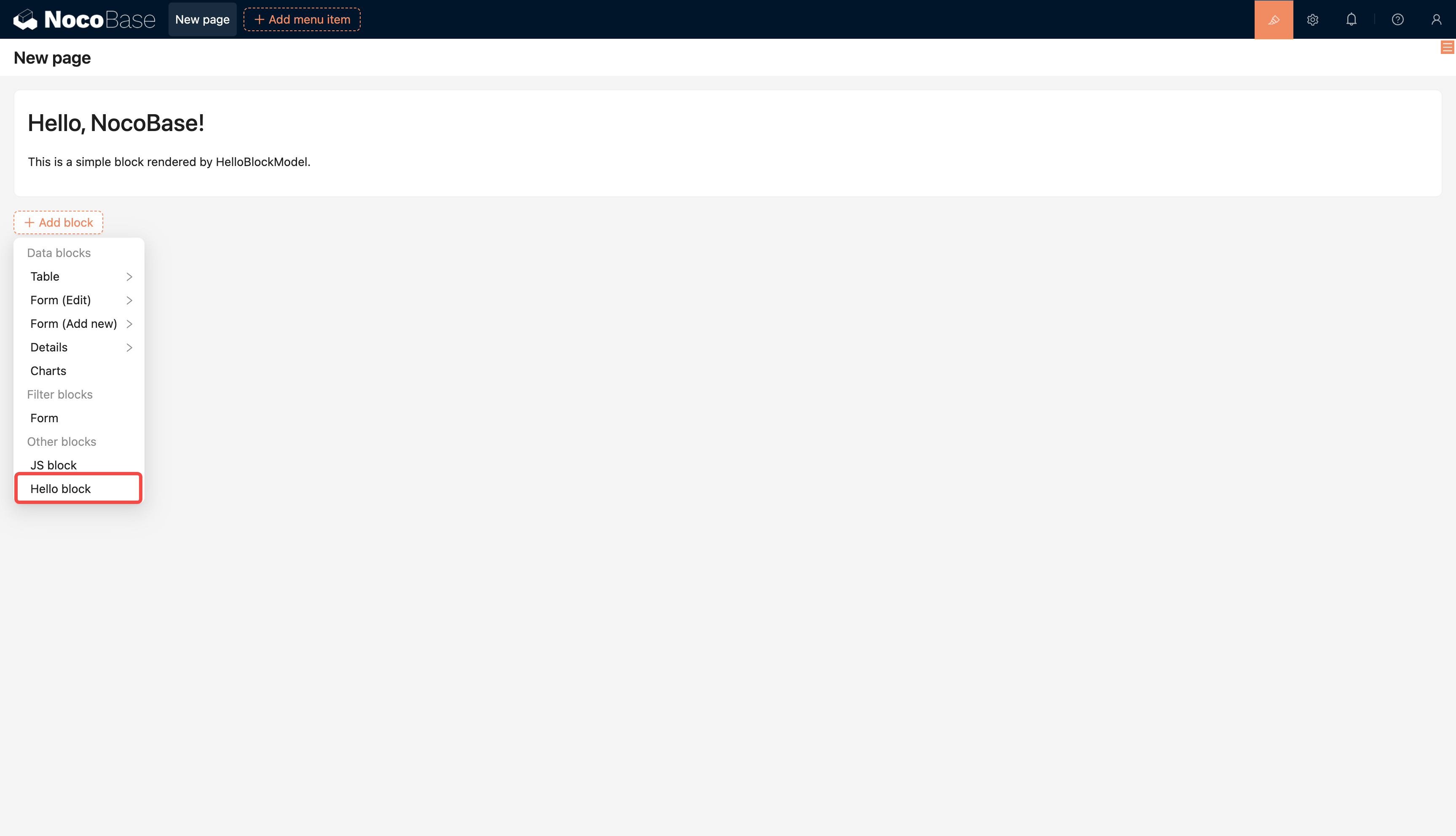
|
|
120
120
|
|
|
121
|
+
### Make a Plugin Preset or Built-in by Default (Optional)
|
|
122
|
+
|
|
123
|
+
The steps above describe manually enabling a single plugin. If you are maintaining your own NocoBase application and want certain plugins to be automatically ready after running `nocobase install` (first-time installation) or `nocobase upgrade` (upgrade), you can use two environment variables to control a plugin's default state:
|
|
124
|
+
|
|
125
|
+
- **`APPEND_PRESET_LOCAL_PLUGINS` (append preset local plugins)** — Adds the plugin to the preset local plugin list. After installation it appears in the Plugin Manager but is not activated by default; you need to enable it manually.
|
|
126
|
+
- **`APPEND_PRESET_BUILT_IN_PLUGINS` (append built-in plugins)** — Adds the plugin to the built-in plugin list. It is automatically activated on installation and, as a built-in plugin, **cannot be disabled or deleted from the Plugin Manager**.
|
|
127
|
+
|
|
128
|
+
The value for both variables is the plugin package name (the `name` field in `package.json`); separate multiple plugins with commas. Configure them in `.env` like this:
|
|
129
|
+
|
|
130
|
+
```bash
|
|
131
|
+
# Preset: appears in the Plugin Manager list but is not activated automatically
|
|
132
|
+
APPEND_PRESET_LOCAL_PLUGINS=@my-project/plugin-hello,@my-project/plugin-hello-world
|
|
133
|
+
|
|
134
|
+
# Built-in: automatically installed and activated, and cannot be disabled from the UI
|
|
135
|
+
APPEND_PRESET_BUILT_IN_PLUGINS=@my-project/plugin-hello,@my-project/plugin-hello-world
|
|
136
|
+
```
|
|
137
|
+
|
|
138
|
+
For day-to-day local development and debugging, `yarn pm enable` (described above) is usually sufficient. These two variables are better suited for "out-of-the-box" distribution scenarios — for example, when you are shipping a NocoBase application bundled with a fixed set of plugins and want those plugins to be ready immediately after initialization.
|
|
139
|
+
|
|
140
|
+
:::tip Note
|
|
141
|
+
|
|
142
|
+
- The plugin must already be downloaded locally and resolvable in `node_modules`. See [Project Structure](./project-structure.md) for details.
|
|
143
|
+
- After configuring, you need to re-run `nocobase install` or `nocobase upgrade` for the changes to take effect.
|
|
144
|
+
- For the full list of environment variable options, see [Environment Variables](../get-started/installation/env.md#append_preset_local_plugins).
|
|
145
|
+
|
|
146
|
+
:::
|
|
147
|
+
|
|
121
148
|
## Step 4: Build and Package
|
|
122
149
|
|
|
123
150
|
When you're ready to distribute the plugin to other environments, you need to build and package it first:
|
|
@@ -158,4 +185,5 @@ Upload and extract the package file to the target application's `./storage/plugi
|
|
|
158
185
|
- [Install using create-nocobase-app](../get-started/installation/create-nocobase-app) — One of the NocoBase installation methods
|
|
159
186
|
- [Install from Git source](../get-started/installation/git) — Install NocoBase from source code
|
|
160
187
|
- [Install and Upgrade Plugins](../get-started/install-upgrade-plugins.mdx) — Upload packaged plugins to other environments
|
|
188
|
+
- [Environment Variables](../get-started/installation/env.md) — Environment variable configuration for preset and built-in plugins
|
|
161
189
|
|
|
@@ -0,0 +1,181 @@
|
|
|
1
|
+
---
|
|
2
|
+
title: "All-in-One Business Suite - Installation"
|
|
3
|
+
description: "Install the All-in-One Business Suite: one-click restore of the .nbdata backup file via Backup Manager. Requires NocoBase v2.1.0-alpha.40 or above and PostgreSQL 16; DB_UNDERSCORED must not be true."
|
|
4
|
+
keywords: "all-in-one business suite installation, All-in-One, backup restore, Backup Manager, nbdata, PostgreSQL, NocoBase"
|
|
5
|
+
---
|
|
6
|
+
|
|
7
|
+
# Installation
|
|
8
|
+
|
|
9
|
+
The All-in-One Business Suite covers six modules: **CRM, Sales Management, Help Desk, Project Management, IT Asset Management, and HR**. Use NocoBase's built-in **Backup Manager** plugin to restore the `.nbdata` backup file in one click and get the complete dataset.
|
|
10
|
+
|
|
11
|
+
:::tip Prerequisites
|
|
12
|
+
|
|
13
|
+
- A working NocoBase environment. For the main installation, see the [official installation docs](https://docs.nocobase.com/welcome/getting-started/installation)
|
|
14
|
+
- NocoBase **v2.1.0-alpha.40 or above** (the Backup Manager plugin is open source since this version, available in the Community Edition)
|
|
15
|
+
- The backup file downloaded: [nocobase_all_in_one_backup_260521.nbdata](https://static-docs.nocobase.com/nocobase_all_in_one_backup_260521.nbdata)
|
|
16
|
+
|
|
17
|
+
:::
|
|
18
|
+
|
|
19
|
+
:::warning Note
|
|
20
|
+
|
|
21
|
+
- The solution is built on **PostgreSQL 16** — your environment must use PostgreSQL 16
|
|
22
|
+
- **`DB_UNDERSCORED` must not be `true`** — check your `docker-compose.yml`; restore will fail if it is set to `true`
|
|
23
|
+
- **Restore overwrites ALL data in the target app** — if the target already has data, back up the current app first and run the restore carefully
|
|
24
|
+
|
|
25
|
+
:::
|
|
26
|
+
|
|
27
|
+
The current release is deployed via **backup restore**. Future releases will switch to incremental migration to make integration with existing NocoBase systems easier.
|
|
28
|
+
|
|
29
|
+
---
|
|
30
|
+
|
|
31
|
+
## Steps
|
|
32
|
+
|
|
33
|
+
### Step 1: Start the app with the `full` image
|
|
34
|
+
|
|
35
|
+
Use the `full` Docker image. It bundles the database client and other companion tools, so no extra configuration is needed:
|
|
36
|
+
|
|
37
|
+
```bash
|
|
38
|
+
docker pull nocobase/nocobase:alpha-full
|
|
39
|
+
```
|
|
40
|
+
|
|
41
|
+
Then start NocoBase from this image.
|
|
42
|
+
|
|
43
|
+
:::tip
|
|
44
|
+
|
|
45
|
+
Without the `full` image, you may need to install the `pg_dump` client inside the container manually — a tedious and brittle process.
|
|
46
|
+
|
|
47
|
+
:::
|
|
48
|
+
|
|
49
|
+
### Step 2: Enable the Backup Manager plugin
|
|
50
|
+
|
|
51
|
+
1. Sign in to NocoBase
|
|
52
|
+
2. Open **Plugin Manager**
|
|
53
|
+
3. Find and enable **Backup Manager**
|
|
54
|
+
|
|
55
|
+
### Step 3: Restore from the local backup file
|
|
56
|
+
|
|
57
|
+
1. After enabling the plugin, refresh the page
|
|
58
|
+
2. From the left menu, go to **System Management / Backup Manager**
|
|
59
|
+
|
|
60
|
+
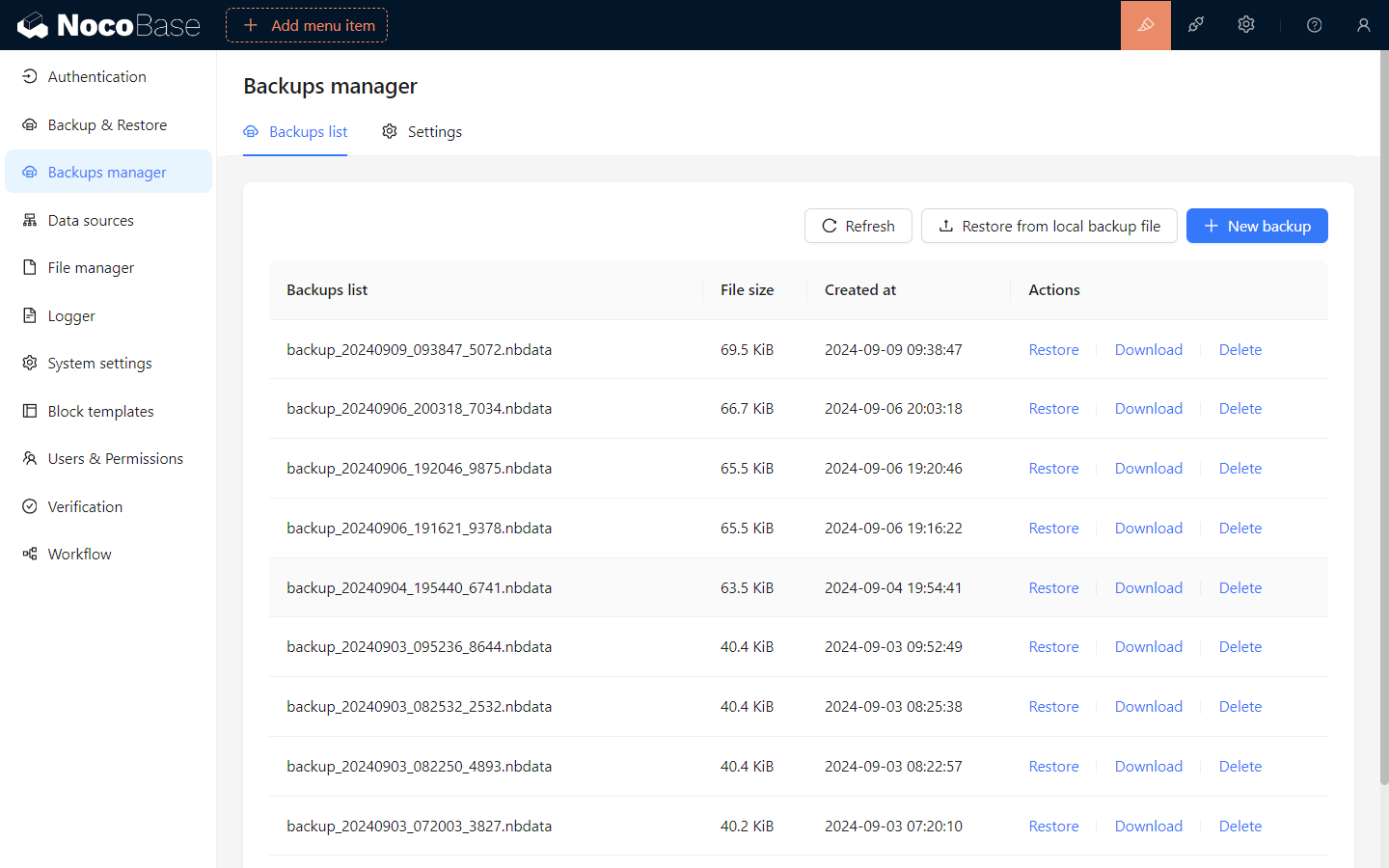
|
|
61
|
+
|
|
62
|
+
3. Click **Restore from local backup** in the top right
|
|
63
|
+
4. Drag the downloaded `nocobase_all_in_one_backup_260521.nbdata` file onto the upload area
|
|
64
|
+
|
|
65
|
+
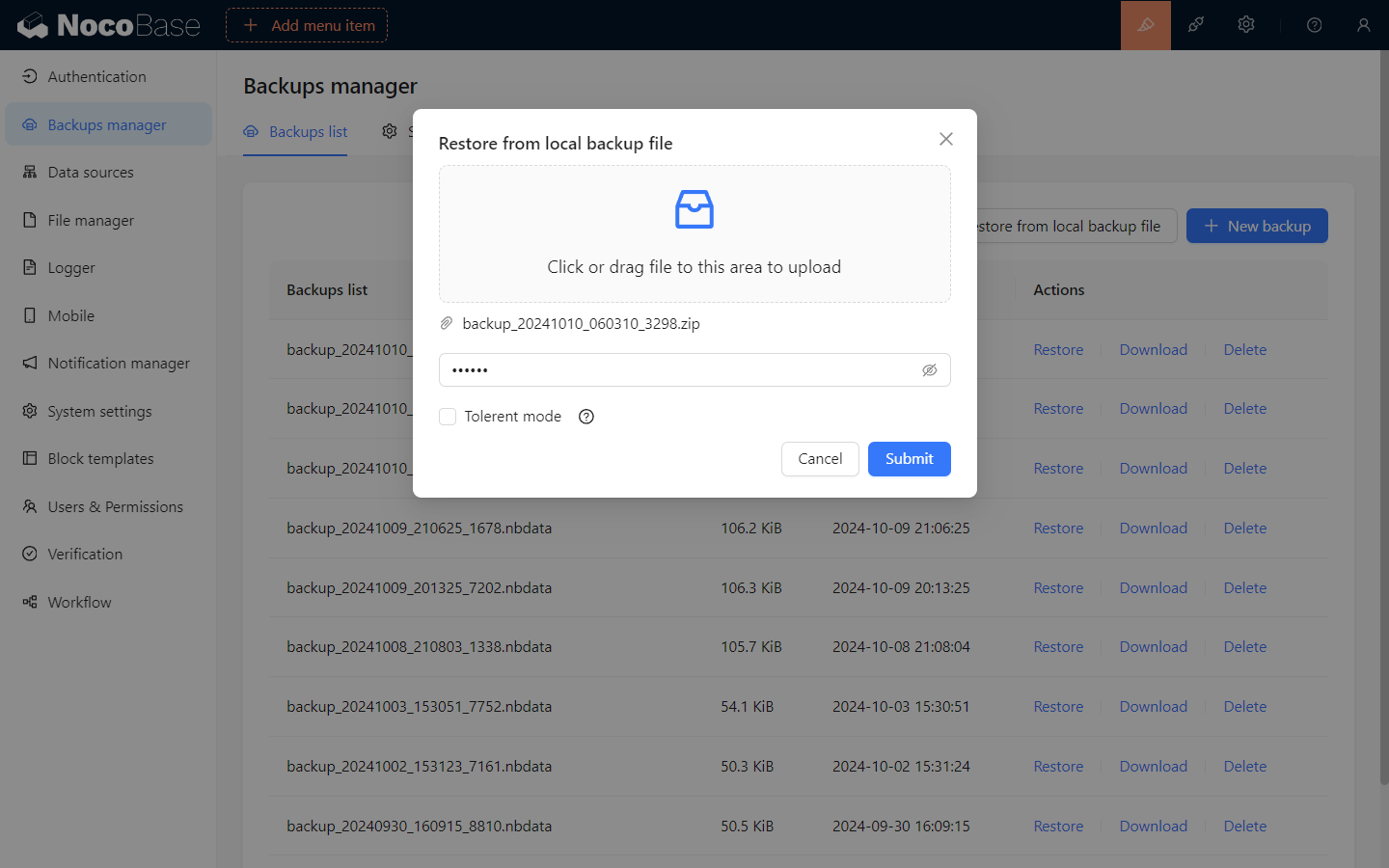
|
|
66
|
+
|
|
67
|
+
5. Click **Submit** and wait for the restore to complete — typically tens of seconds to a few minutes
|
|
68
|
+
|
|
69
|
+
---
|
|
70
|
+
|
|
71
|
+
## Notes
|
|
72
|
+
|
|
73
|
+
- **Database compatibility** — PostgreSQL version, character set, and case sensitivity must match the backup source; the `schema` name in particular must be identical
|
|
74
|
+
- **Commercial plugin match** — every commercial plugin used in the backup must be installed and enabled locally first, or the restore will be interrupted. The All-in-One solution uses commercial plugins such as Email Manager, Audit Log, and AI Employees. On the Community Edition, the entry points for missing plugins simply do not appear and the other modules are unaffected
|
|
75
|
+
|
|
76
|
+
---
|
|
77
|
+
|
|
78
|
+
## Post-install configuration
|
|
79
|
+
|
|
80
|
+
The system is usable once the restore finishes, but two settings still point at our demo environment and need to be switched to your own.
|
|
81
|
+
|
|
82
|
+
### 1. File storage engine (OSS / local)
|
|
83
|
+
|
|
84
|
+
The demo backup ships with a storage engine pointing at our Alibaba Cloud OSS. The Access Key is not public, so any attachment field, print template, or AI employee avatar upload will fail.
|
|
85
|
+
|
|
86
|
+
Local storage is usually enough; switch to your own OSS only when you need CDN acceleration or large-file workloads.
|
|
87
|
+
|
|
88
|
+
**Switching steps:**
|
|
89
|
+
|
|
90
|
+
1. Open **Plugin Manager / File Manager** (or go to `/admin/settings/file-manager`)
|
|
91
|
+
|
|
92
|
+
2. **Option A — use local storage** (simplest, suited for self-hosted deployments):
|
|
93
|
+
|
|
94
|
+
- Find the auto-created **Local Storage** entry
|
|
95
|
+
- Click **Edit**, check **Set as default storage engine** at the bottom of the config panel, then submit
|
|
96
|
+
|
|
97
|
+
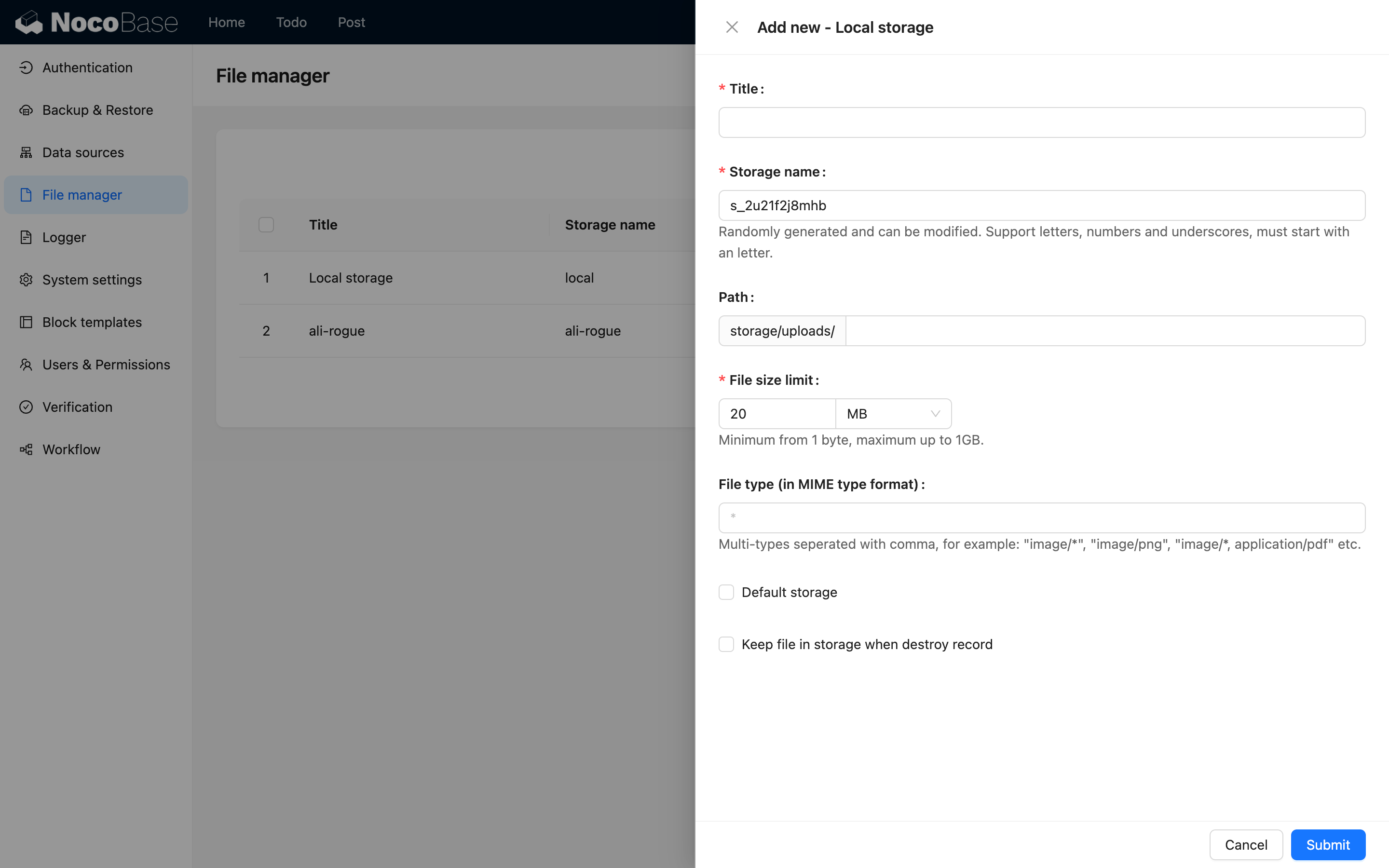
|
|
98
|
+
|
|
99
|
+
:::warning Note
|
|
100
|
+
|
|
101
|
+
For Docker deployments, local storage lives inside the container; deleting the container loses the files. In production, mount a volume or use cloud storage.
|
|
102
|
+
|
|
103
|
+
:::
|
|
104
|
+
|
|
105
|
+
3. **Option B — use your own OSS / S3 / COS**:
|
|
106
|
+
|
|
107
|
+
- Click **Add new**, choose the matching type (Alibaba Cloud OSS / Amazon S3 / Tencent Cloud COS / S3 Pro)
|
|
108
|
+
- Fill in Access Key, Bucket, Region, domain, and other parameters, check **Set as default storage engine**, then submit
|
|
109
|
+
|
|
110
|
+
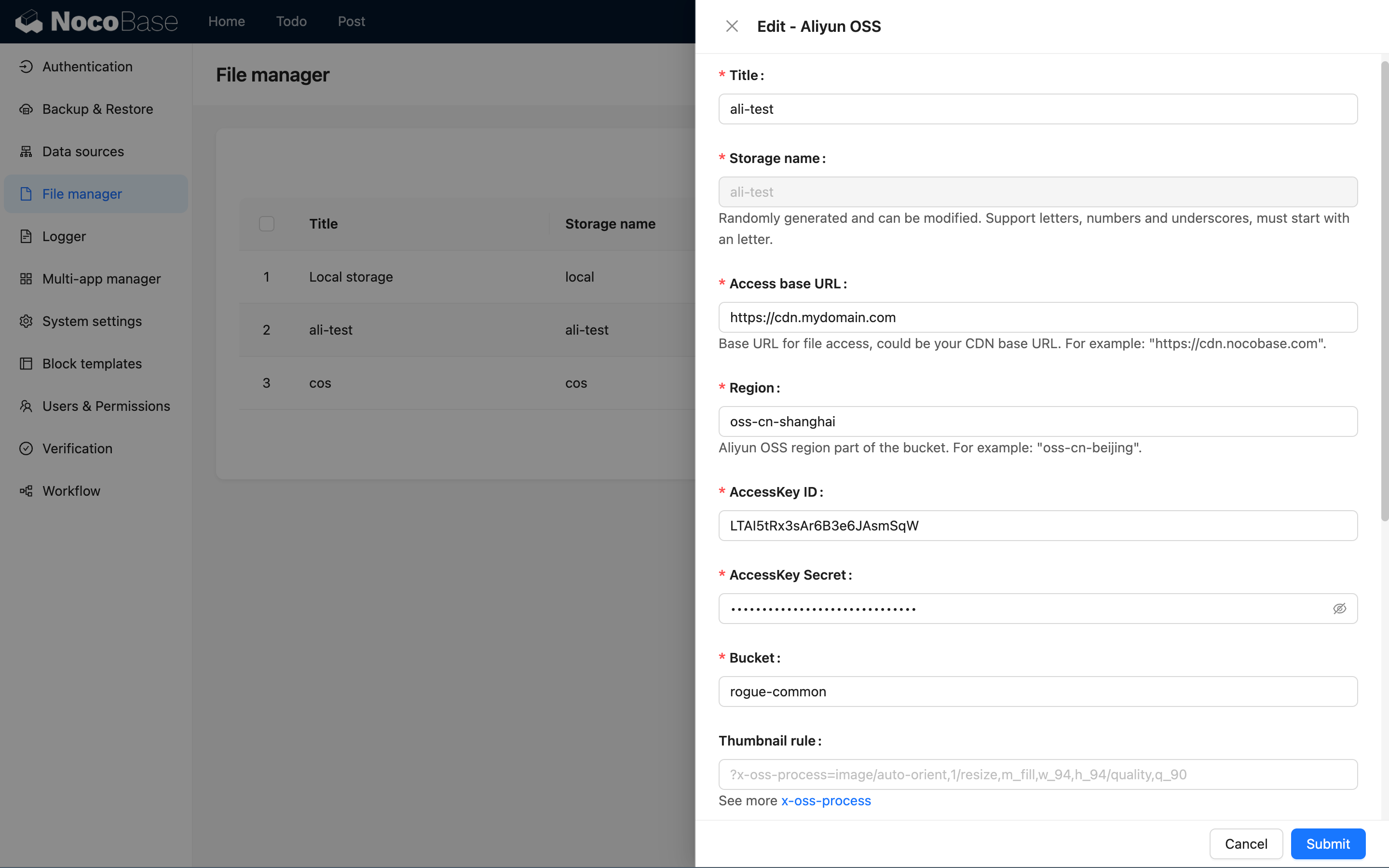
|
|
111
|
+
|
|
112
|
+
4. Delete or disable the demo-preset OSS entry to avoid accidental use
|
|
113
|
+
|
|
114
|
+
See [Storage engine overview](../../file-manager/storage/index.md) for parameter details.
|
|
115
|
+
|
|
116
|
+
### 2. AI Employees LLM service keys
|
|
117
|
+
|
|
118
|
+
The demo backup preloads several LLM service entries (OpenAI, Claude, Gemini, DeepSeek, Qwen, Kimi, etc.) using our own API keys, which **will not work for you**. The AI Employees features are unusable until you swap them out.
|
|
119
|
+
|
|
120
|
+
**Configuration steps:**
|
|
121
|
+
|
|
122
|
+
1. Open **System Settings / AI Employees / LLM service** (or go to `/admin/settings/ai/llm-services`)
|
|
123
|
+
|
|
124
|
+
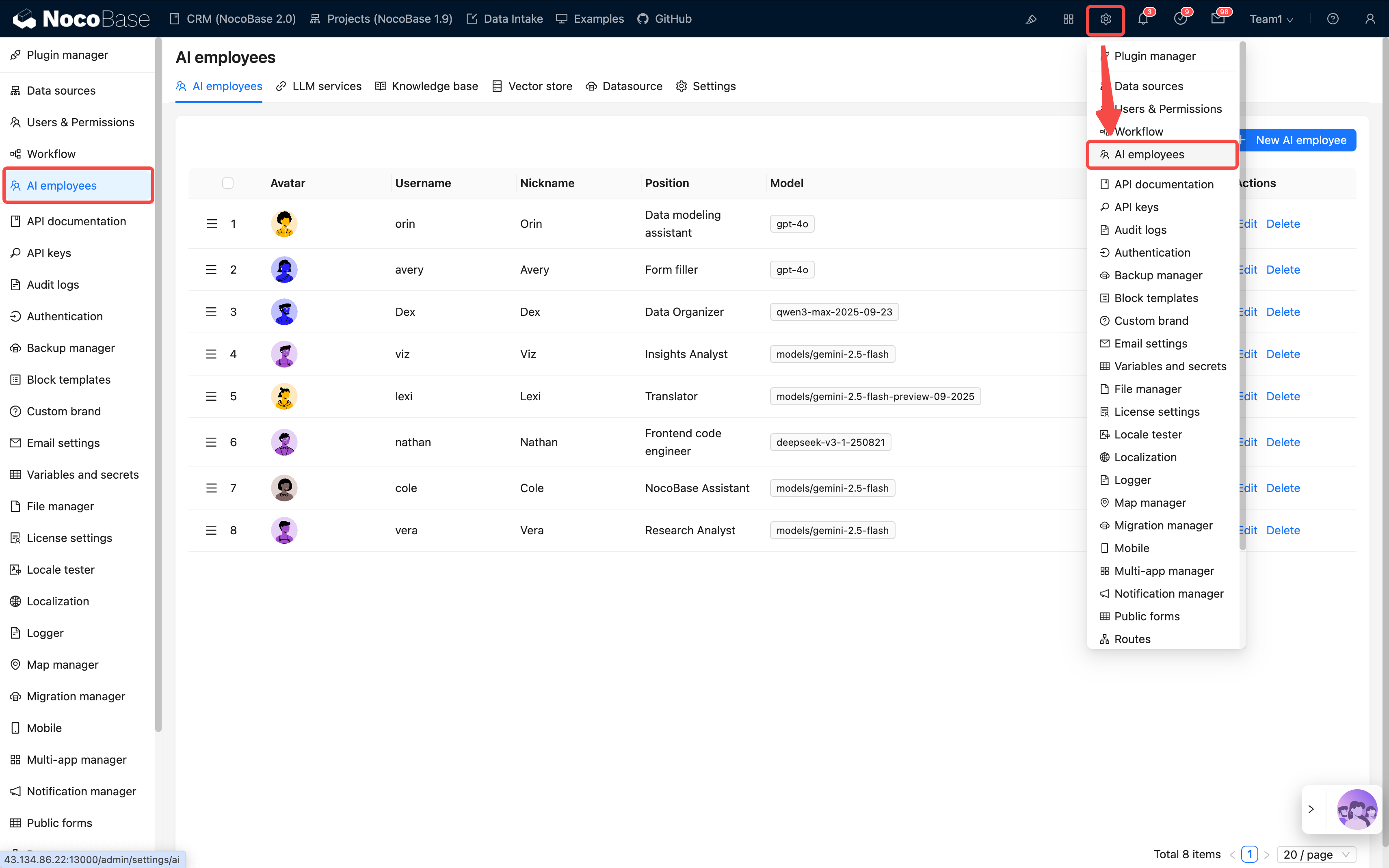
|
|
125
|
+
|
|
126
|
+
2. The preloaded service list supports drag-to-reorder and an **Enabled** toggle
|
|
127
|
+
|
|
128
|
+
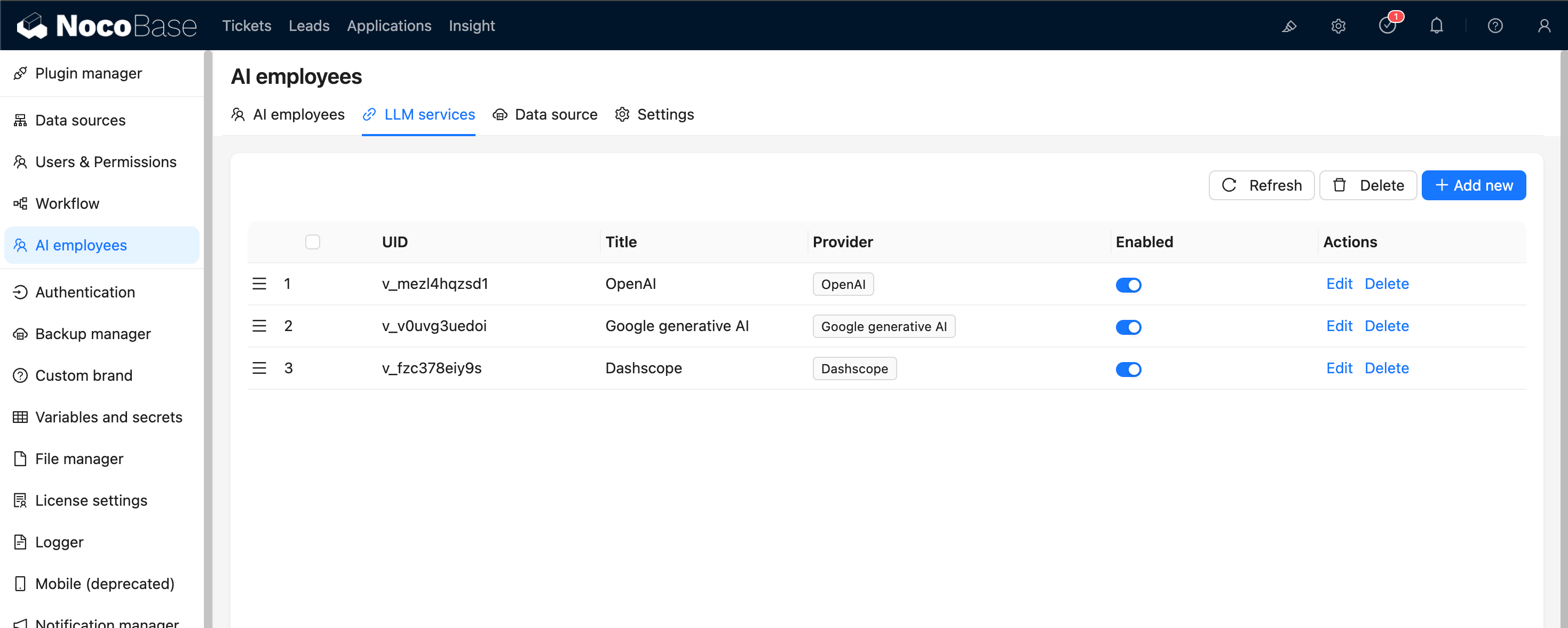
|
|
129
|
+
|
|
130
|
+
3. For each service you plan to use:
|
|
131
|
+
|
|
132
|
+
- Click **Edit**
|
|
133
|
+
- Replace **API Key** with your own (from the matching provider account: OpenAI, Anthropic, Google AI Studio, DeepSeek, Qwen, Kimi, etc.)
|
|
134
|
+
- Adjust **Base URL** if you use a proxy or a regional relay
|
|
135
|
+
- In **Enabled Models**, keep the models you need and remove the rest
|
|
136
|
+
|
|
137
|
+
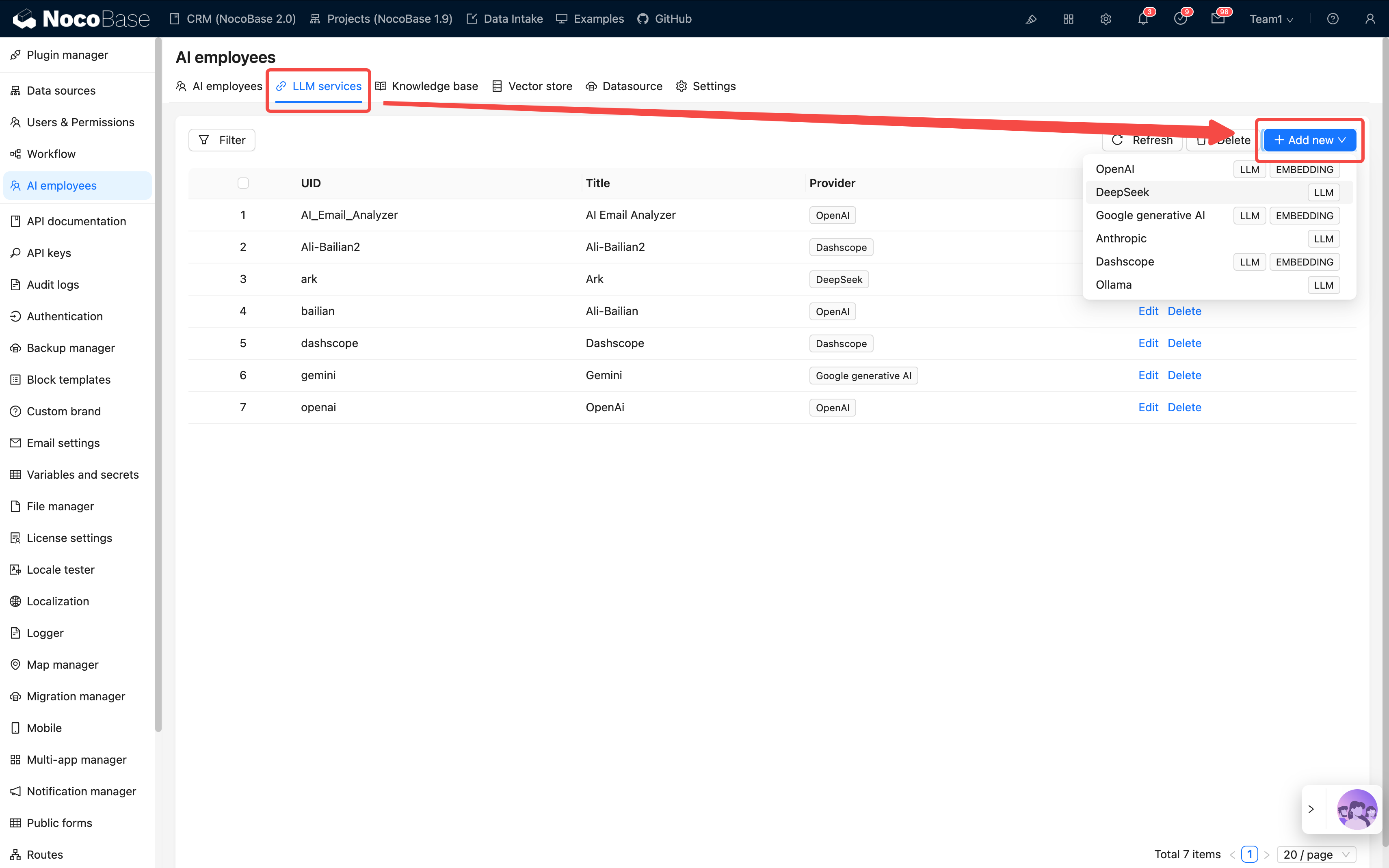
|
|
138
|
+
|
|
139
|
+
4. Click **Test flight** at the bottom to check connectivity, then **Submit** to save
|
|
140
|
+
|
|
141
|
+
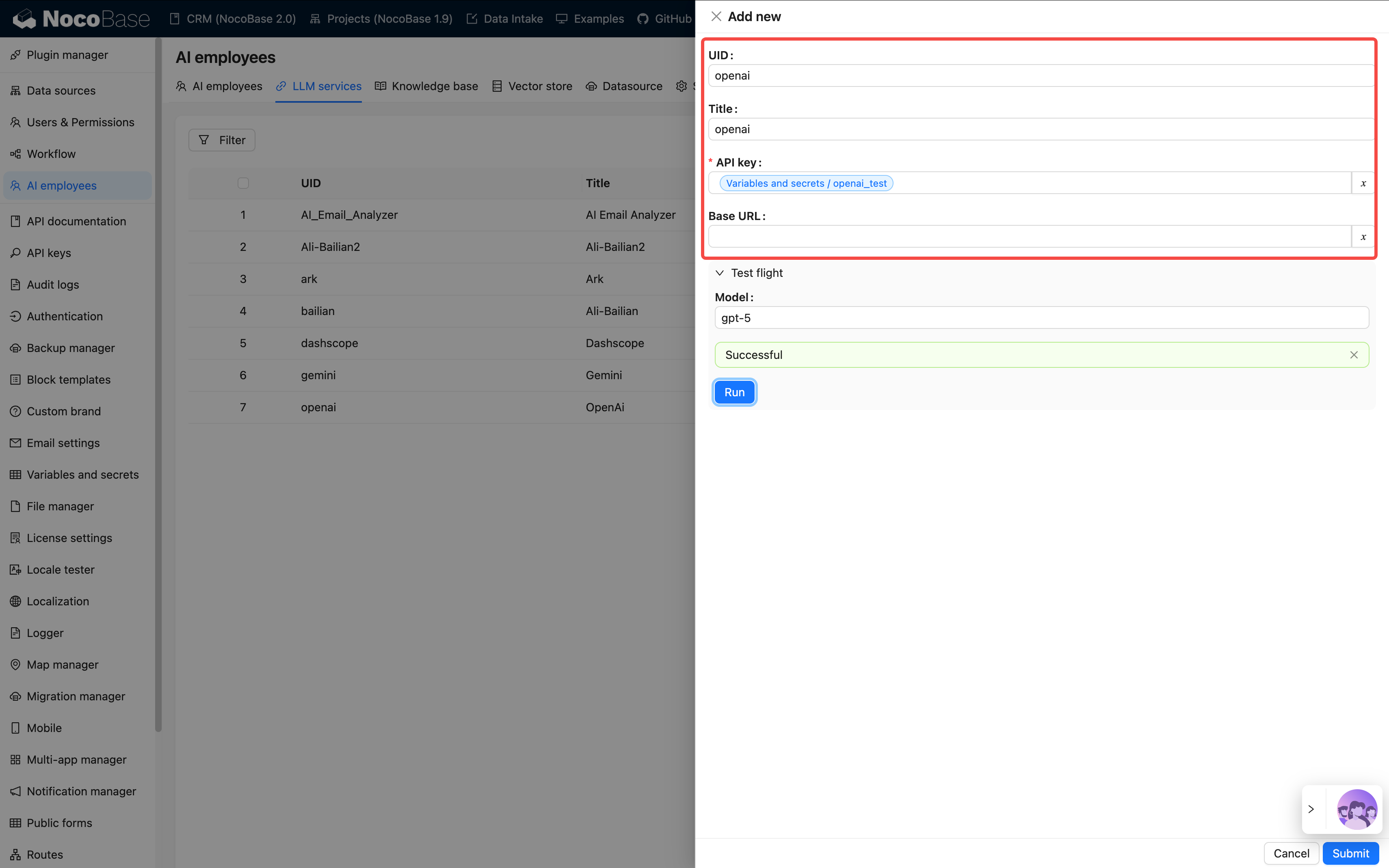
|
|
142
|
+
|
|
143
|
+
5. For services you do not plan to use, just toggle **Disabled** — no need to delete
|
|
144
|
+
|
|
145
|
+
See [Configure LLM service](../../ai-employees/features/llm-service.md) for the full configuration.
|
|
146
|
+
|
|
147
|
+
:::tip
|
|
148
|
+
|
|
149
|
+
These two are the only must-change items after restoring the demo. Other settings (site logo, SMTP, Enterprise plugins, etc.) can be tuned as needed.
|
|
150
|
+
|
|
151
|
+
:::
|
|
152
|
+
|
|
153
|
+
---
|
|
154
|
+
|
|
155
|
+
## FAQ
|
|
156
|
+
|
|
157
|
+
### Will it work on the Community Edition? Any errors?
|
|
158
|
+
|
|
159
|
+
Yes, it works out of the box with no errors. Backup Manager has been open source since `v2.1.0-alpha.40`, so the Community Edition can install it. The demo does use some Enterprise plugins (Email Manager, Audit Log, AI Employees, etc.); on the Community Edition, the entry points for those features simply do not appear, but other modules are unaffected. For example, the Audit Log entry disappears, while CRM, Sales, Help Desk, Project, Asset, HR, and other core modules work normally.
|
|
160
|
+
|
|
161
|
+
### Which version should I use after restore?
|
|
162
|
+
|
|
163
|
+
Use the latest `alpha-full` image (`nocobase/nocobase:alpha-full`). The `full` image bundles the database client and other dependencies, avoiding restore failures caused by missing tools.
|
|
164
|
+
|
|
165
|
+
### The logo does not display after restore?
|
|
166
|
+
|
|
167
|
+
The logo in the official online demo has a domain restriction and cannot load on a local domain. Open **System Settings** and upload your own logo.
|
|
168
|
+
|
|
169
|
+
### File upload fails (OSS key error)?
|
|
170
|
+
|
|
171
|
+
The demo backup's preset storage engine points at our own OSS, and the key is not public. Open **Plugin Manager / File Manager**, set **Local Storage** as the default storage, save, and uploads will work again.
|
|
172
|
+
|
|
173
|
+
See the [File storage engine](#1-file-storage-engine-oss--local) section above for details.
|
|
174
|
+
|
|
175
|
+
### How do I switch languages?
|
|
176
|
+
|
|
177
|
+
The All-in-One solution ships with localization for 20+ languages (under the `nb_demo` namespace). After restore, the default language is Chinese; switch via **System Settings / enable the target language**.
|
|
178
|
+
|
|
179
|
+
### What about incremental upgrades?
|
|
180
|
+
|
|
181
|
+
Today the upgrade path is a full replacement, which means custom changes are overwritten. Always back up before upgrading. An incremental migration plan is in the works.
|
|
@@ -8,7 +8,6 @@ This page documents the update history for the CRM solution. New entries are add
|
|
|
8
8
|
|
|
9
9
|
**Backup files**:
|
|
10
10
|
- [nocobase_crm_v2_backup_260406.nbdata](https://static-docs.nocobase.com/nocobase_crm_v2_backup_260406.nbdata)
|
|
11
|
-
- [nocobase_crm_v2_sql_260406.zip](https://static-docs.nocobase.com/nocobase_crm_v2_sql_260406.zip)
|
|
12
11
|
|
|
13
12
|
**Changes**:
|
|
14
13
|
- Fixed table Summary aggregation display issue
|
|
@@ -24,7 +23,6 @@ This page documents the update history for the CRM solution. New entries are add
|
|
|
24
23
|
|
|
25
24
|
**Backup files**:
|
|
26
25
|
- [nocobase_crm_v2_backup_260327.nbdata](https://static-docs.nocobase.com/nocobase_crm_v2_backup_260327.nbdata)
|
|
27
|
-
- [nocobase_crm_v2_sql_260327.zip](https://static-docs.nocobase.com/nocobase_crm_v2_sql_260327.zip)
|
|
28
26
|
|
|
29
27
|
**Changes**:
|
|
30
28
|
|
|
@@ -52,7 +50,6 @@ This page documents the update history for the CRM solution. New entries are add
|
|
|
52
50
|
|
|
53
51
|
**Backup files**:
|
|
54
52
|
- nocobase_crm_v2_backup_260223.nbdata
|
|
55
|
-
- nocobase_crm_v2_sql_260223.zip
|
|
56
53
|
|
|
57
54
|
**Changes**:
|
|
58
55
|
- Initial release of CRM 2.0
|
|
@@ -2,15 +2,13 @@
|
|
|
2
2
|
|
|
3
3
|
> The current version is deployed via **backup and restore**. In future versions, we may switch to **incremental migration** to make it easier to integrate the solution into your existing systems.
|
|
4
4
|
|
|
5
|
-
|
|
5
|
+
> **The Backup Manager plugin is now open-source**: The "[Backup Manager](https://docs-cn.nocobase.com/handbook/backups)" plugin needed to restore the solution is now open-source and available to all editions (including the Community Edition). We recommend restoring directly via this plugin.
|
|
6
6
|
|
|
7
7
|
Before you begin, please ensure:
|
|
8
8
|
|
|
9
9
|
- You have a basic NocoBase running environment. For main system installation, please refer to the [official installation documentation](https://docs-cn.nocobase.com/welcome/getting-started/installation).
|
|
10
10
|
- NocoBase version **v2.1.0-beta.2 or above**.
|
|
11
|
-
- You have downloaded the
|
|
12
|
-
- **Backup file**: [nocobase_crm_v2_backup_260406.nbdata](https://static-docs.nocobase.com/nocobase_crm_v2_backup_260406.nbdata) - For Method 1
|
|
13
|
-
- **SQL file**: [nocobase_crm_v2_sql_260406.zip](https://static-docs.nocobase.com/nocobase_crm_v2_sql_260406.zip) - For Method 2
|
|
11
|
+
- You have downloaded the CRM system backup file: [nocobase_crm_v2_backup_260523.nbdata](https://static-docs.nocobase.com/nocobase_crm_v2_backup_260523.nbdata)
|
|
14
12
|
|
|
15
13
|
**Important Notes**:
|
|
16
14
|
- This solution is built on **PostgreSQL 16**. Please ensure your environment uses PostgreSQL 16.
|
|
@@ -18,9 +16,9 @@ Before you begin, please ensure:
|
|
|
18
16
|
|
|
19
17
|
---
|
|
20
18
|
|
|
21
|
-
##
|
|
19
|
+
## Restore Using Backup Manager
|
|
22
20
|
|
|
23
|
-
This method uses NocoBase's built-in "[Backup Manager](https://docs-cn.nocobase.com/handbook/backups)"
|
|
21
|
+
This method uses NocoBase's built-in "[Backup Manager](https://docs-cn.nocobase.com/handbook/backups)" plugin for one-click restoration. It is the simplest operation. This plugin is now open-source and available to all editions (including the Community Edition).
|
|
24
22
|
|
|
25
23
|
### Key Characteristics
|
|
26
24
|
|
|
@@ -28,9 +26,8 @@ This method uses NocoBase's built-in "[Backup Manager](https://docs-cn.nocobase.
|
|
|
28
26
|
1. **Convenient operation**: Completed within the UI, allowing for full restoration of all configurations including plugins.
|
|
29
27
|
2. **Complete restoration**: **Able to restore all system files**, including print template files and files uploaded via file fields in collections, ensuring full functional integrity.
|
|
30
28
|
* **Limitations**:
|
|
31
|
-
1. **
|
|
32
|
-
2. **
|
|
33
|
-
3. **Plugin dependency**: If the solution includes commercial plugins not present in your local environment, the restoration will fail.
|
|
29
|
+
1. **Strict environment requirements**: Requires your database environment (version, case sensitivity settings, etc.) to be highly compatible with the environment where the backup was created.
|
|
30
|
+
2. **Plugin dependency**: If the solution includes commercial plugins not present in your local environment, the restoration will fail.
|
|
34
31
|
|
|
35
32
|
### Steps
|
|
36
33
|
|
|
@@ -69,69 +66,6 @@ Then use this image to start your NocoBase service.
|
|
|
69
66
|
|
|
70
67
|
---
|
|
71
68
|
|
|
72
|
-
## Method 2: Direct SQL File Import (Universal, Better for Community Edition)
|
|
73
|
-
|
|
74
|
-
This method restores data by directly operating on the database, bypassing the "Backup Manager" plugin, and therefore has no Pro/Enterprise Edition restrictions.
|
|
75
|
-
|
|
76
|
-
### Key Characteristics
|
|
77
|
-
|
|
78
|
-
* **Advantages**:
|
|
79
|
-
1. **No edition restrictions**: Suitable for all NocoBase users, including Community Edition.
|
|
80
|
-
2. **High compatibility**: Does not rely on the `dump` tool within the application; as long as you can connect to the database, you can operate.
|
|
81
|
-
3. **High fault tolerance**: If the solution includes commercial plugins you do not have, the related features will not be enabled, but it will not affect the normal use of other features, and the application can start successfully.
|
|
82
|
-
* **Limitations**:
|
|
83
|
-
1. **Requires database operation skills**: Users need basic database operation skills, such as how to execute a `.sql` file.
|
|
84
|
-
2. **System file loss**: **This method will lose all system files**, including print template files and files uploaded via file fields in collections.
|
|
85
|
-
|
|
86
|
-
### Steps
|
|
87
|
-
|
|
88
|
-
**Step 1: Prepare a clean database**
|
|
89
|
-
|
|
90
|
-
Prepare a brand new, empty database for the data you are about to import.
|
|
91
|
-
|
|
92
|
-
**Step 2: Import the `.sql` file into the database**
|
|
93
|
-
|
|
94
|
-
Obtain the downloaded database file (usually in `.sql` format) and import its content into the database you prepared in the previous step. There are several ways to execute this, depending on your environment:
|
|
95
|
-
|
|
96
|
-
* **Option A: Via server command line (using Docker as an example)**
|
|
97
|
-
If you use Docker to install NocoBase and the database, you can upload the `.sql` file to the server and then use the `docker exec` command to perform the import. Assuming your PostgreSQL container is named `my-nocobase-db` and the filename is `nocobase_crm_v2_sql_260327.sql`:
|
|
98
|
-
|
|
99
|
-
```bash
|
|
100
|
-
# Copy the sql file into the container
|
|
101
|
-
docker cp nocobase_crm_v2_sql_260327.sql my-nocobase-db:/tmp/
|
|
102
|
-
# Enter the container and execute the import command
|
|
103
|
-
docker exec -it my-nocobase-db psql -U nocobase -d nocobase -f /tmp/nocobase_crm_v2_sql_260327.sql
|
|
104
|
-
```
|
|
105
|
-
* **Option B: Via a remote database client (Navicat, etc.)**
|
|
106
|
-
If your database port is exposed, you can use any graphical database client (such as Navicat, DBeaver, pgAdmin, etc.) to connect to the database, then:
|
|
107
|
-
1. Right-click the target database.
|
|
108
|
-
2. Select "Run SQL File" or "Execute SQL Script".
|
|
109
|
-
3. Select the downloaded `.sql` file and execute.
|
|
110
|
-
|
|
111
|
-
**Step 3: Connect to the database and start the application**
|
|
112
|
-
|
|
113
|
-
Configure your NocoBase startup parameters (such as environment variables `DB_HOST`, `DB_PORT`, `DB_DATABASE`, `DB_USER`, `DB_PASSWORD`, etc.) to point to the database where you just imported the data. Then, start the NocoBase service normally.
|
|
114
|
-
|
|
115
|
-
### Notes
|
|
116
|
-
|
|
117
|
-
* **Database permissions**: This method requires you to have an account and password that can directly operate on the database.
|
|
118
|
-
* **Plugin status**: After a successful import, although the data for commercial plugins included in the system exists, if you have not installed and enabled the corresponding plugins locally, the related features will not be displayed or usable, but this will not cause the application to crash.
|
|
119
|
-
|
|
120
|
-
---
|
|
121
|
-
|
|
122
|
-
## Summary and Comparison
|
|
123
|
-
|
|
124
|
-
| Feature | Method 1: Backup Manager | Method 2: Direct SQL Import |
|
|
125
|
-
| :-------------- | :--------------------------------------------------------------- | :----------------------------------------------------------------------------------------------------- |
|
|
126
|
-
| **Applicable Users** | **Pro/Enterprise Edition** users | **All users** (including Community Edition) |
|
|
127
|
-
| **Ease of Use** | ⭐⭐⭐⭐⭐ (Very simple, UI operation) | ⭐⭐⭐ (Requires basic database knowledge) |
|
|
128
|
-
| **Environment Requirements** | **Strict**, database and system versions must be highly compatible | **General**, requires database compatibility |
|
|
129
|
-
| **Plugin Dependency** | **Strong dependency**, plugins are validated during restoration; missing any plugin will cause **restoration failure**. | **Features strongly depend on plugins**. Data can be imported independently, and the system will have basic functionality. However, if corresponding plugins are missing, related features will be **completely unusable**. |
|
|
130
|
-
| **System Files** | **Fully preserved** (print templates, uploaded files, etc.) | **Will be lost** (print templates, uploaded files, etc.) |
|
|
131
|
-
| **Recommended Scenarios** | Enterprise users with controlled, consistent environments needing full functionality | Missing some plugins, seeking high compatibility and flexibility, non-Pro/Enterprise users, or those who can accept the loss of file features |
|
|
132
|
-
|
|
133
|
-
---
|
|
134
|
-
|
|
135
69
|
## FAQ
|
|
136
70
|
|
|
137
71
|
### Can Pro Edition users install this? Will it cause errors?
|
|
@@ -146,10 +80,6 @@ We recommend the latest `beta-full` image (e.g., `nocobase/nocobase:beta-full`).
|
|
|
146
80
|
|
|
147
81
|
The demo's logo is configured with a domain restriction and cannot load on local domains. Go to **System Settings** and re-upload your own logo.
|
|
148
82
|
|
|
149
|
-
### File upload error (OSS Key error)?
|
|
150
|
-
|
|
151
|
-
After SQL import, file uploads may fail with an OSS-related error. Solution: go to **Plugin Manager → File Manager**, set **Local Storage** as the default storage, and save. Uploads will work normally after this.
|
|
152
|
-
|
|
153
83
|
### What about incremental upgrades?
|
|
154
84
|
|
|
155
85
|
Currently, version upgrades are full replacements — your custom modifications will be overwritten. Always back up before upgrading. An incremental migration solution is being planned and will prioritize Pro/Enterprise editions. Community edition support is more difficult due to the lack of the migration management plugin.
|