@nocobase/plugin-ai 2.1.0-alpha.40 → 2.1.0-alpha.45
This diff represents the content of publicly available package versions that have been released to one of the supported registries. The information contained in this diff is provided for informational purposes only and reflects changes between package versions as they appear in their respective public registries.
- package/dist/ai/docs/nocobase/api/cli/app/index.md +4 -4
- package/dist/ai/docs/nocobase/api/cli/app/restart.md +4 -2
- package/dist/ai/docs/nocobase/api/cli/app/start.md +6 -2
- package/dist/ai/docs/nocobase/api/cli/app/stop.md +2 -2
- package/dist/ai/docs/nocobase/api/cli/app/upgrade.md +27 -6
- package/dist/ai/docs/nocobase/api/cli/init.md +1 -1
- package/dist/ai/docs/nocobase/api/cli/license/plugins/sync.md +4 -0
- package/dist/ai/docs/nocobase/auth-verification/api-keys/index.md +1 -1
- package/dist/ai/docs/nocobase/file-manager/file-preview/index.md +17 -0
- package/dist/ai/docs/nocobase/integration/api-keys/index.md +1 -1
- package/dist/ai/docs/nocobase/multi-app/multi-app/app-block-and-switcher.md +68 -0
- package/dist/ai/docs/nocobase/multi-app/multi-app/app-sso.md +71 -0
- package/dist/ai/docs/nocobase/multi-app/multi-app/index.md +9 -1
- package/dist/ai/docs/nocobase/multi-app/multi-app/sub-app-api.md +112 -0
- package/dist/ai/docs/nocobase/solution/all-in-one/installation.md +181 -0
- package/dist/ai/docs/nocobase/solution/crm/installation.md +5 -5
- package/dist/ai/docs/nocobase/solution/crm/v1.md +9 -1
- package/dist/client/462.d172d0fe91519e35.js +10 -0
- package/dist/client/559.a0f2f1cc2be3c039.js +10 -0
- package/dist/client/index.js +1 -1
- package/dist/client/workflow/nodes/employee/index.d.ts +1 -4
- package/dist/client/workflow/nodes/llm/index.d.ts +1 -4
- package/dist/collections/ai-employees.d.ts +9 -2
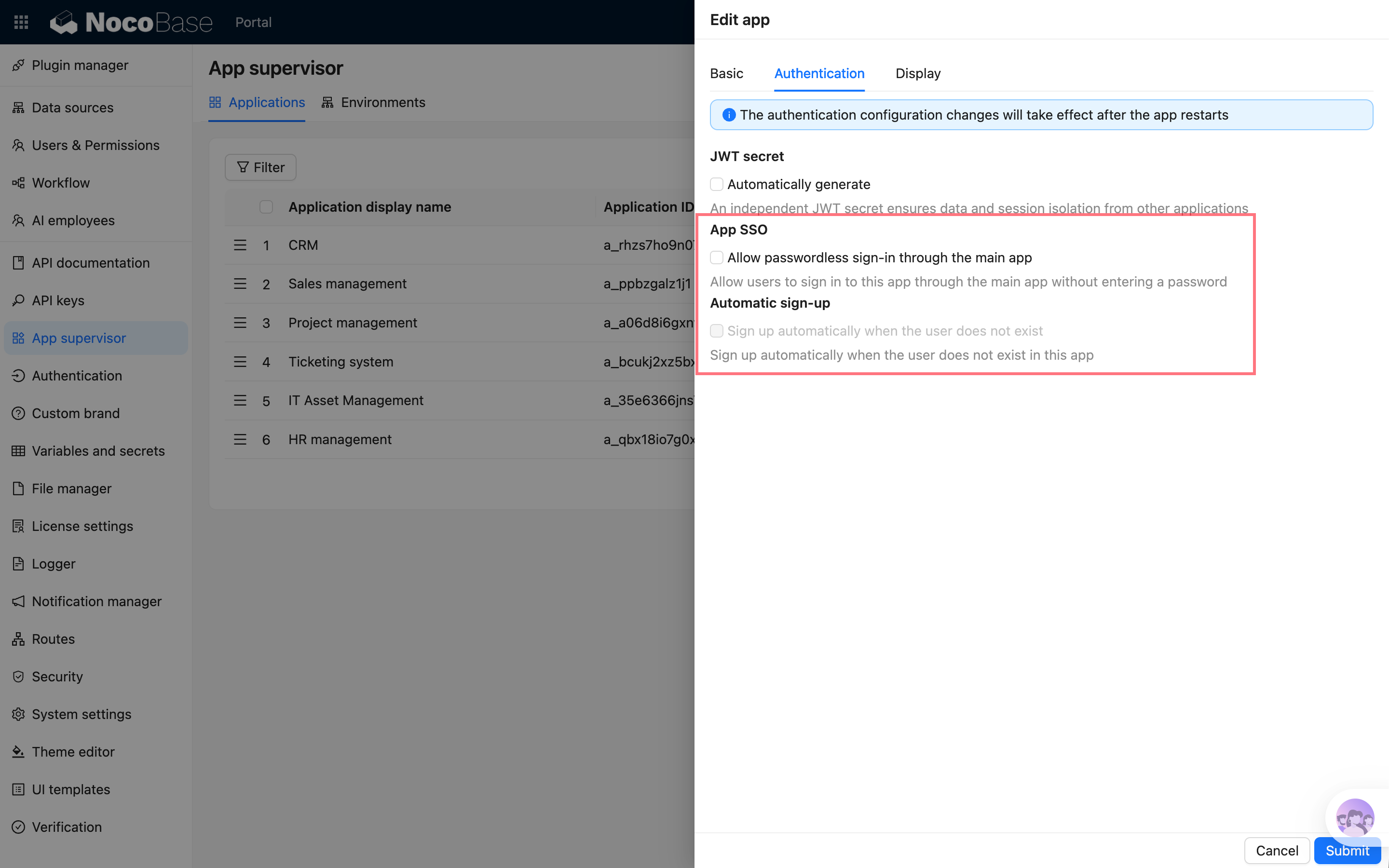
- package/dist/collections/ai-employees.js +2 -1
- package/dist/externalVersion.js +20 -20
- package/dist/node_modules/@langchain/xai/dist/index.cjs +16 -2
- package/dist/node_modules/@langchain/xai/package.json +1 -1
- package/dist/node_modules/fs-extra/package.json +1 -1
- package/dist/node_modules/jsonrepair/package.json +1 -1
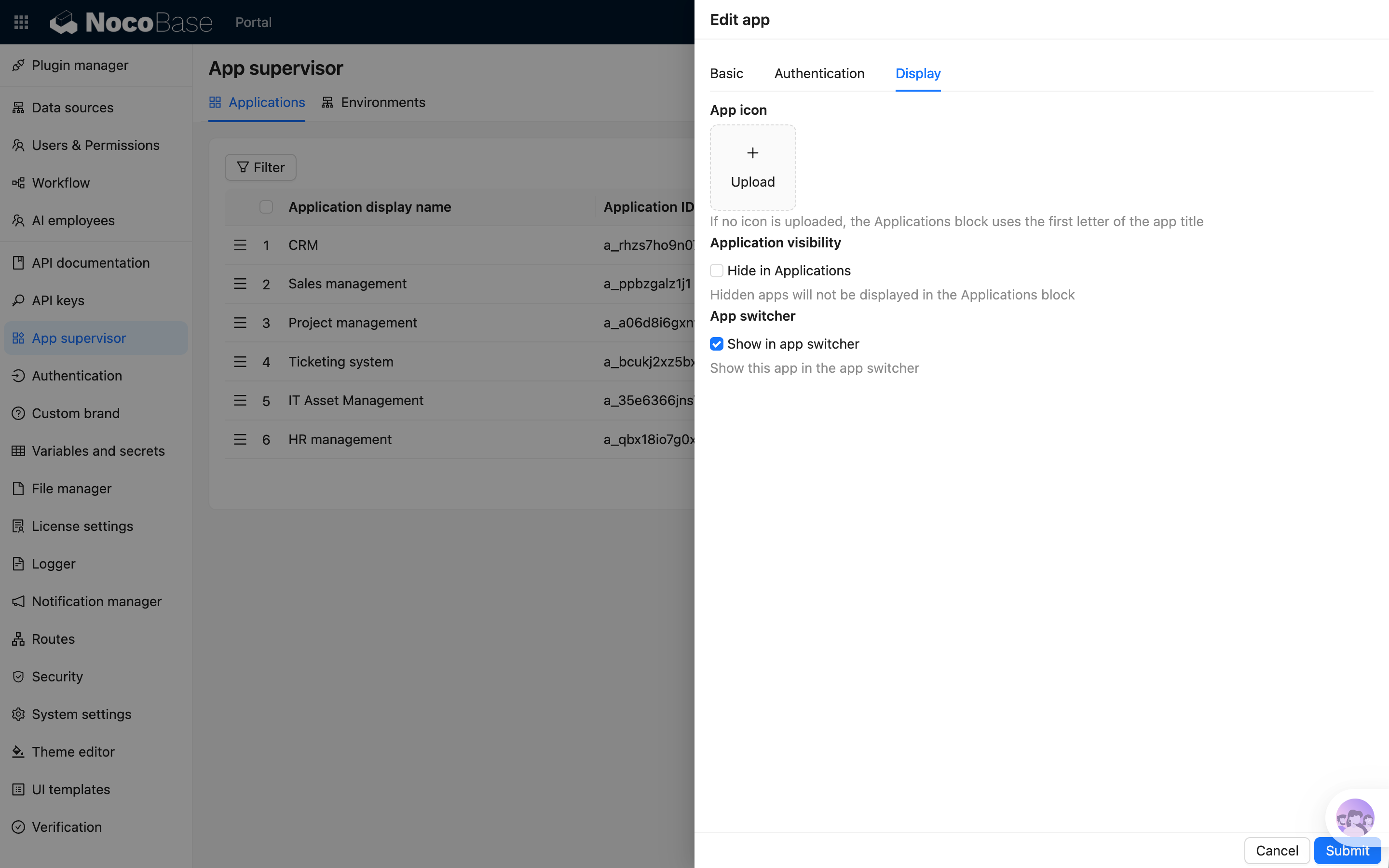
- package/dist/node_modules/just-bash/package.json +1 -1
- package/dist/node_modules/nodejs-snowflake/package.json +1 -1
- package/dist/node_modules/openai/package.json +1 -1
- package/dist/node_modules/zod/package.json +1 -1
- package/dist/server/ai-employees/ai-employee.d.ts +2 -1
- package/dist/server/ai-employees/ai-employee.js +3 -1
- package/dist/server/llm-providers/provider.js +6 -2
- package/dist/server/utils.d.ts +1 -1
- package/dist/server/workflow/nodes/employee/constants.d.ts +23 -0
- package/dist/server/workflow/nodes/employee/constants.js +50 -0
- package/dist/server/workflow/nodes/employee/handler.js +23 -2
- package/dist/server/workflow/nodes/employee/index.d.ts +1 -0
- package/dist/server/workflow/nodes/employee/index.js +83 -25
- package/dist/server/workflow/nodes/employee/tools.d.ts +2 -2
- package/dist/server/workflow/nodes/employee/tools.js +26 -5
- package/dist/server/workflow/nodes/employee/types.d.ts +2 -1
- package/dist/server/workflow/nodes/llm/index.js +31 -9
- package/package.json +7 -7
- package/dist/client/462.1708385b148779cd.js +0 -10
- package/dist/client/559.585f80c3bcea0bed.js +0 -10
|
@@ -6,7 +6,7 @@ keywords: "nb app,NocoBase CLI,app runtime,start,stop,logs,upgrade"
|
|
|
6
6
|
|
|
7
7
|
# nb app
|
|
8
8
|
|
|
9
|
-
Manage the runtime of a selected NocoBase env. npm/Git envs run local app commands; Docker envs manage saved
|
|
9
|
+
Manage the runtime of a selected NocoBase env. npm/Git envs run local app commands; Docker envs manage app containers from the saved env config.
|
|
10
10
|
|
|
11
11
|
## Usage
|
|
12
12
|
|
|
@@ -18,12 +18,12 @@ nb app <command>
|
|
|
18
18
|
|
|
19
19
|
| Command | Description |
|
|
20
20
|
| --- | --- |
|
|
21
|
-
| [`nb app start`](./start.md) | Start the app or Docker container |
|
|
22
|
-
| [`nb app stop`](./stop.md) | Stop the app or Docker container |
|
|
21
|
+
| [`nb app start`](./start.md) | Start the app or recreate the Docker container |
|
|
22
|
+
| [`nb app stop`](./stop.md) | Stop the app or remove the Docker container |
|
|
23
23
|
| [`nb app restart`](./restart.md) | Stop and then start the app |
|
|
24
24
|
| [`nb app logs`](./logs.md) | View app logs |
|
|
25
25
|
| [`nb app down`](./down.md) | Stop and clean up local runtime resources |
|
|
26
|
-
| [`nb app upgrade`](./upgrade.md) |
|
|
26
|
+
| [`nb app upgrade`](./upgrade.md) | Stop the app, replace the source or image, then start it again |
|
|
27
27
|
|
|
28
28
|
## Examples
|
|
29
29
|
|
|
@@ -1,12 +1,12 @@
|
|
|
1
1
|
---
|
|
2
2
|
title: "nb app restart"
|
|
3
|
-
description: "nb app restart command reference: restart the NocoBase app
|
|
3
|
+
description: "nb app restart command reference: restart the NocoBase app for a selected env and recreate the Docker app container from saved env config when needed."
|
|
4
4
|
keywords: "nb app restart,NocoBase CLI,restart app,Docker"
|
|
5
5
|
---
|
|
6
6
|
|
|
7
7
|
# nb app restart
|
|
8
8
|
|
|
9
|
-
Stop and then start the NocoBase app for a selected env.
|
|
9
|
+
Stop and then start the NocoBase app for a selected env. Local envs reuse the `nb app stop` and `nb app start` flow; Docker envs remove the current container first, then recreate the app container from saved env config.
|
|
10
10
|
|
|
11
11
|
## Usage
|
|
12
12
|
|
|
@@ -43,6 +43,8 @@ nb app restart --env local-docker
|
|
|
43
43
|
|
|
44
44
|
If you explicitly pass `--env` and it differs from the current env, the CLI asks for confirmation first. In non-interactive terminals or AI agent sessions, add `--yes` yourself or run `nb env use <name>` first and try again.
|
|
45
45
|
|
|
46
|
+
Whenever the CLI needs to wait for readiness, it checks `__health_check`: it prints one waiting line first, then one progress line every 10 seconds until the app becomes available or times out. If you pass `--no-daemon` for a local env, the app runs in the foreground, so the CLI does not keep waiting for the readiness check after startup.
|
|
47
|
+
|
|
46
48
|
## Related Commands
|
|
47
49
|
|
|
48
50
|
- [`nb app start`](./start.md)
|
|
@@ -1,12 +1,12 @@
|
|
|
1
1
|
---
|
|
2
2
|
title: "nb app start"
|
|
3
|
-
description: "nb app start command reference: start the NocoBase app
|
|
3
|
+
description: "nb app start command reference: start the NocoBase app for a selected env and recreate the Docker app container from saved env config when needed."
|
|
4
4
|
keywords: "nb app start,NocoBase CLI,start app,Docker,pm2"
|
|
5
5
|
---
|
|
6
6
|
|
|
7
7
|
# nb app start
|
|
8
8
|
|
|
9
|
-
Start the NocoBase app for a selected env. npm/Git installations run local app commands; Docker installations
|
|
9
|
+
Start the NocoBase app for a selected env. npm/Git installations run local app commands; Docker installations recreate the saved app container from the saved env config.
|
|
10
10
|
|
|
11
11
|
## Usage
|
|
12
12
|
|
|
@@ -44,6 +44,10 @@ nb app start --env local-docker
|
|
|
44
44
|
|
|
45
45
|
If you explicitly pass `--env` and it differs from the current env, the CLI asks for confirmation first. In non-interactive terminals or AI agent sessions, add `--yes` yourself or run `nb env use <name>` first and try again.
|
|
46
46
|
|
|
47
|
+
By default, local envs start in daemon mode and Docker envs recreate the app container from saved env config. Whenever the CLI needs to wait for readiness, it checks `__health_check`: it prints one waiting line first, then one progress line every 10 seconds until the app becomes available or times out.
|
|
48
|
+
|
|
49
|
+
If you pass `--no-daemon` for a local env, the app runs in the foreground. In that case, the CLI does not keep waiting for the readiness check after startup.
|
|
50
|
+
|
|
47
51
|
## Related Commands
|
|
48
52
|
|
|
49
53
|
- [`nb app stop`](./stop.md)
|
|
@@ -1,12 +1,12 @@
|
|
|
1
1
|
---
|
|
2
2
|
title: "nb app stop"
|
|
3
|
-
description: "nb app stop command reference: stop the NocoBase app
|
|
3
|
+
description: "nb app stop command reference: stop the NocoBase app and remove the Docker app container for a selected env."
|
|
4
4
|
keywords: "nb app stop,NocoBase CLI,stop app,Docker"
|
|
5
5
|
---
|
|
6
6
|
|
|
7
7
|
# nb app stop
|
|
8
8
|
|
|
9
|
-
Stop the NocoBase app for a selected env. npm/Git installations stop local app processes; Docker installations
|
|
9
|
+
Stop the NocoBase app for a selected env. npm/Git installations stop local app processes; Docker installations remove the saved app container.
|
|
10
10
|
|
|
11
11
|
## Usage
|
|
12
12
|
|
|
@@ -1,12 +1,12 @@
|
|
|
1
1
|
---
|
|
2
2
|
title: "nb app upgrade"
|
|
3
|
-
description: "nb app upgrade command reference:
|
|
3
|
+
description: "nb app upgrade command reference: stop the app, replace the saved source or image, then start the selected NocoBase app again."
|
|
4
4
|
keywords: "nb app upgrade,NocoBase CLI,upgrade,update,Docker image"
|
|
5
5
|
---
|
|
6
6
|
|
|
7
7
|
# nb app upgrade
|
|
8
8
|
|
|
9
|
-
Upgrade a selected NocoBase app.
|
|
9
|
+
Upgrade a selected NocoBase app. The CLI stops the current app, replaces the saved source or image by default, synchronizes commercial plugins, quickstarts the app again, and refreshes the env runtime at the end. Docker envs recreate the app container from the saved env config during startup.
|
|
10
10
|
|
|
11
11
|
## Usage
|
|
12
12
|
|
|
@@ -20,23 +20,44 @@ nb app upgrade [flags]
|
|
|
20
20
|
| --- | --- | --- |
|
|
21
21
|
| `--env`, `-e` | string | CLI env name to upgrade; uses the current env if omitted |
|
|
22
22
|
| `--yes`, `-y` | boolean | When an explicitly passed `--env` targets a different env than the current env, skip the interactive confirmation prompt |
|
|
23
|
-
| `--
|
|
24
|
-
| `--
|
|
23
|
+
| `--force`, `-f` | boolean | Skip the upgrade confirmation prompt. Required in non-interactive terminals and AI agent sessions |
|
|
24
|
+
| `--skip-download`, `-s` | boolean | Restart from the currently saved local source or Docker image without downloading updates first; also skips `nb license plugins sync` |
|
|
25
|
+
| `--version` | string | Override the target version for this upgrade; when the upgrade succeeds, the new version is written back to `downloadVersion` in the env config |
|
|
25
26
|
| `--verbose` | boolean | Show underlying update and restart command output |
|
|
26
27
|
|
|
27
28
|
## Examples
|
|
28
29
|
|
|
29
30
|
```bash
|
|
30
31
|
nb app upgrade
|
|
32
|
+
nb app upgrade --force
|
|
31
33
|
nb app upgrade --env local
|
|
32
|
-
nb app upgrade --env local
|
|
34
|
+
nb app upgrade --env local --force
|
|
35
|
+
nb app upgrade --env local --skip-download
|
|
36
|
+
nb app upgrade --env local --skip-download --version beta
|
|
33
37
|
nb app upgrade --env local --version beta
|
|
34
38
|
nb app upgrade --env local --verbose
|
|
35
|
-
nb app upgrade --env local-docker -
|
|
39
|
+
nb app upgrade --env local-docker --skip-download
|
|
36
40
|
```
|
|
37
41
|
|
|
38
42
|
If you explicitly pass `--env` and it differs from the current env, the CLI asks for confirmation first. In non-interactive terminals or AI agent sessions, add `--yes` yourself or run `nb env use <name>` first and try again.
|
|
39
43
|
|
|
44
|
+
Before the upgrade starts, interactive terminals also ask for upgrade confirmation unless you pass `--force`. In non-interactive terminals and AI agent sessions, `nb app upgrade` refuses to proceed without `--force` and prints a copyable re-run command. If the command is also cross-env, you need both `--yes` and `--force`.
|
|
45
|
+
|
|
46
|
+
By default, `nb app upgrade` runs these steps:
|
|
47
|
+
|
|
48
|
+
1. `nb app stop`
|
|
49
|
+
2. `nb source download --replace`
|
|
50
|
+
3. `nb license plugins sync --skip-if-no-license`
|
|
51
|
+
4. `nb app start --quickstart`
|
|
52
|
+
5. Save the new `downloadVersion` when needed
|
|
53
|
+
6. `nb env update`
|
|
54
|
+
|
|
55
|
+
When `--skip-download` is passed, the CLI skips steps 2 and 3 and restarts the currently saved source or image directly. If `--version` is also passed, the CLI does not download that version during this run; instead it only saves it as the new `downloadVersion` after a successful restart so later upgrades can use it.
|
|
56
|
+
|
|
57
|
+
Step 4 waits for the app to pass `__health_check`. During this wait, the CLI prints one waiting line first, then one progress line every 10 seconds until the app is ready or the health check times out.
|
|
58
|
+
|
|
59
|
+
If the final `nb env update` step fails, the upgrade still counts as successful. The CLI prints a warning and tells you to run `nb env update <envName>` manually afterward.
|
|
60
|
+
|
|
40
61
|
## Related Commands
|
|
41
62
|
|
|
42
63
|
- [`nb source download`](../source/download.md)
|
|
@@ -63,7 +63,7 @@ nb init --env app1 --resume
|
|
|
63
63
|
| `--db-database` | string | Database name |
|
|
64
64
|
| `--db-user` | string | Database user |
|
|
65
65
|
| `--db-password` | string | Database password |
|
|
66
|
-
| `--
|
|
66
|
+
| `--skip-download` | boolean | Skip downloading app files or pulling the Docker image before installation, and reuse existing local resources |
|
|
67
67
|
| `--source`, `-s` | string | How to obtain NocoBase: `docker`, `npm`, or `git` |
|
|
68
68
|
| `--version`, `-v` | string | Version parameter: npm version, Docker image tag, or Git ref |
|
|
69
69
|
| `--replace`, `-r` | boolean | Replace the target directory if it already exists |
|
|
@@ -22,6 +22,7 @@ nb license plugins sync [flags]
|
|
|
22
22
|
| `--yes`, `-y` | boolean | When an explicitly passed `--env` targets a different env than the current env, skip the interactive confirmation prompt |
|
|
23
23
|
| `--dry-run` | boolean | Preview changes without installing, upgrading, or removing plugins |
|
|
24
24
|
| `--version` | string | Registry version or dist-tag to synchronize; defaults to the current workspace version |
|
|
25
|
+
| `--skip-if-no-license` | boolean | Skip without error when the current env does not have a saved license key |
|
|
25
26
|
| `--verbose` | boolean | Show detailed per-plugin sync logs |
|
|
26
27
|
| `--json` | boolean | Output JSON |
|
|
27
28
|
|
|
@@ -32,6 +33,7 @@ nb license plugins sync
|
|
|
32
33
|
nb license plugins sync --env app1
|
|
33
34
|
nb license plugins sync --env app1 --yes
|
|
34
35
|
nb license plugins sync --env app1 --dry-run
|
|
36
|
+
nb license plugins sync --env app1 --skip-if-no-license
|
|
35
37
|
nb license plugins sync --env app1 --json
|
|
36
38
|
```
|
|
37
39
|
|
|
@@ -39,6 +41,8 @@ nb license plugins sync --env app1 --json
|
|
|
39
41
|
|
|
40
42
|
When `--version` is omitted, the CLI detects the current app version automatically and uses that to decide which registry version of commercial plugins should be downloaded.
|
|
41
43
|
|
|
44
|
+
`--skip-if-no-license` only ignores one case: the current env does not have a saved license key yet. Other errors, such as missing registry credentials in the key, registry login failures, or plugin download failures, still surface normally.
|
|
45
|
+
|
|
42
46
|
If you explicitly pass `--env` and it differs from the current env, the CLI asks for confirmation first. In non-interactive terminals or AI agent sessions, add `--yes` yourself or run `nb env use <name>` first and try again.
|
|
43
47
|
|
|
44
48
|
## Related Commands
|
|
@@ -9,3 +9,20 @@ For file types that do not support native preview, you can enable preview functi
|
|
|
9
9
|
Currently, NocoBase provides the following file preview plugins:
|
|
10
10
|
|
|
11
11
|
* [Office File Preview Plugin](../file-preview/ms-office.md)
|
|
12
|
+
|
|
13
|
+
## PDF preview with external storage
|
|
14
|
+
|
|
15
|
+
PDF preview uses PDF.js to render files in the browser. The browser must first read the PDF file content and then pass it to PDF.js for rendering. Therefore, when files are stored in external storage such as OSS, S3, COS, or a CDN, and the file access domain is different from the NocoBase site domain, the external storage must allow the NocoBase site to read files across origins.
|
|
16
|
+
|
|
17
|
+
If CORS is not configured, PDF downloads can still work normally, but preview may fail with a file loading error.
|
|
18
|
+
|
|
19
|
+
The CORS configuration for external storage or CDN should include:
|
|
20
|
+
|
|
21
|
+
```http
|
|
22
|
+
Access-Control-Allow-Origin: https://your-nocobase-domain
|
|
23
|
+
Access-Control-Allow-Methods: GET, HEAD
|
|
24
|
+
Access-Control-Allow-Headers: *
|
|
25
|
+
Access-Control-Expose-Headers: Content-Length, Content-Range, Accept-Ranges, Content-Disposition, Content-Type
|
|
26
|
+
```
|
|
27
|
+
|
|
28
|
+
`Access-Control-Allow-Origin` should be set to the actual domain used to access NocoBase. Avoid using `*` for non-public files over the long term, because it expands the range of sites that can read the files.
|
|
@@ -0,0 +1,68 @@
|
|
|
1
|
+
---
|
|
2
|
+
pkg: '@nocobase/plugin-app-supervisor'
|
|
3
|
+
title: 'Applications block and app switcher'
|
|
4
|
+
description: 'Applications block and app switcher in multi-app: show sub-app entries on the frontend, configure app icons, visibility, and the app switcher in the upper-left corner.'
|
|
5
|
+
keywords: 'multi-app,Applications block,app switcher,sub-app entry,NocoBase'
|
|
6
|
+
---
|
|
7
|
+
|
|
8
|
+
# Applications block and app switcher
|
|
9
|
+
|
|
10
|
+
Besides managing sub-apps in the admin panel, multi-app can also provide app entries on the frontend. Common ways include:
|
|
11
|
+
|
|
12
|
+
- Adding an "Applications" block to a page to display accessible sub-apps
|
|
13
|
+
- Enabling the app switcher in the upper-left corner so users can switch between the main app and sub-apps
|
|
14
|
+
|
|
15
|
+
## Applications block
|
|
16
|
+
|
|
17
|
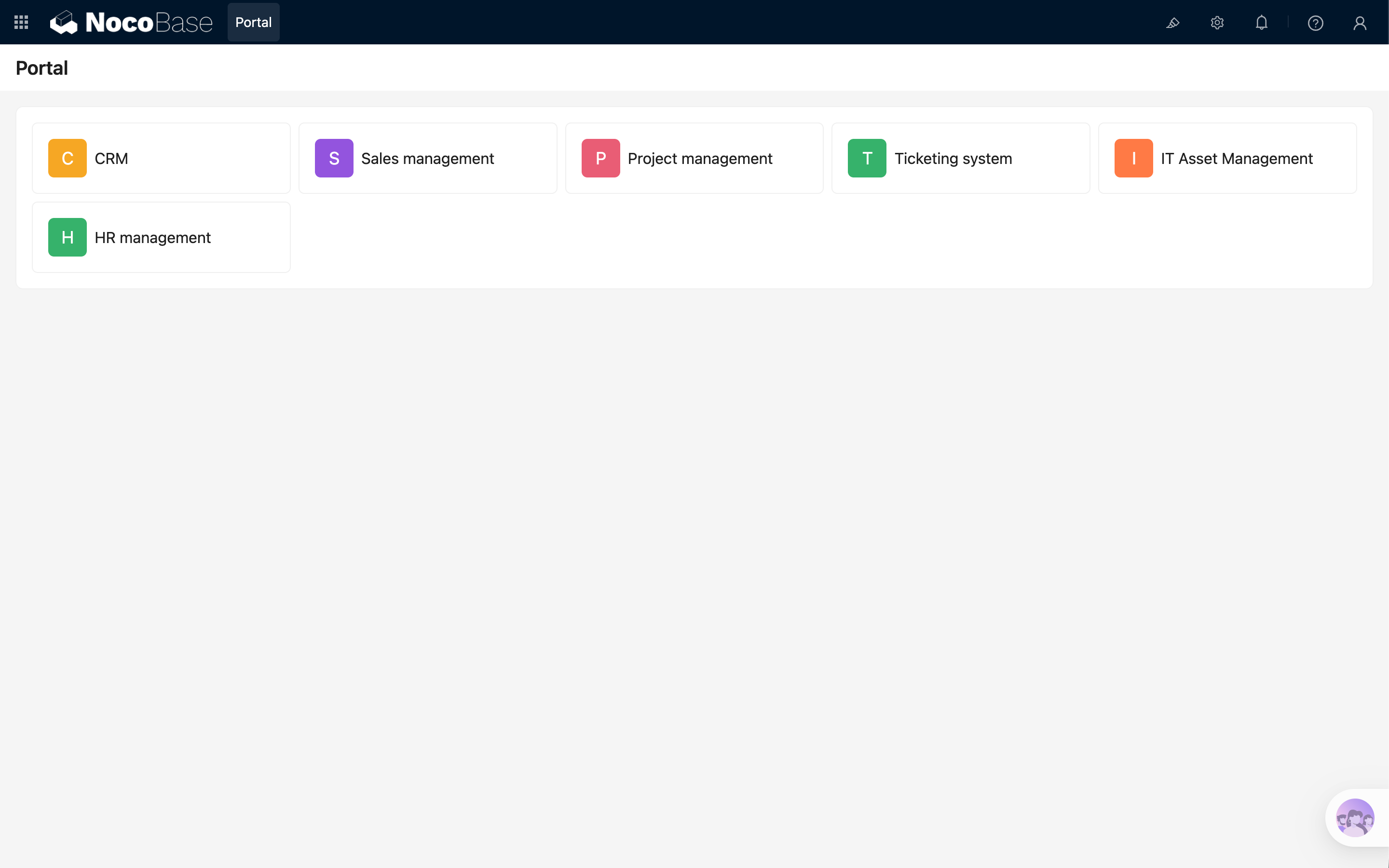
+
|
|
18
|
+
|
|
19
|
+
The "Applications" block displays a list of sub-apps on a frontend page. It is suitable for building a simple app portal, where end users can enter different business apps from one page.
|
|
20
|
+
|
|
21
|
+
Each app in the block displays:
|
|
22
|
+
|
|
23
|
+
- App icon
|
|
24
|
+
- App name
|
|
25
|
+
- Access entry
|
|
26
|
+
|
|
27
|
+
Clicking an app opens the corresponding sub-app.
|
|
28
|
+
|
|
29
|
+
### Configure app icons
|
|
30
|
+
|
|
31
|
+
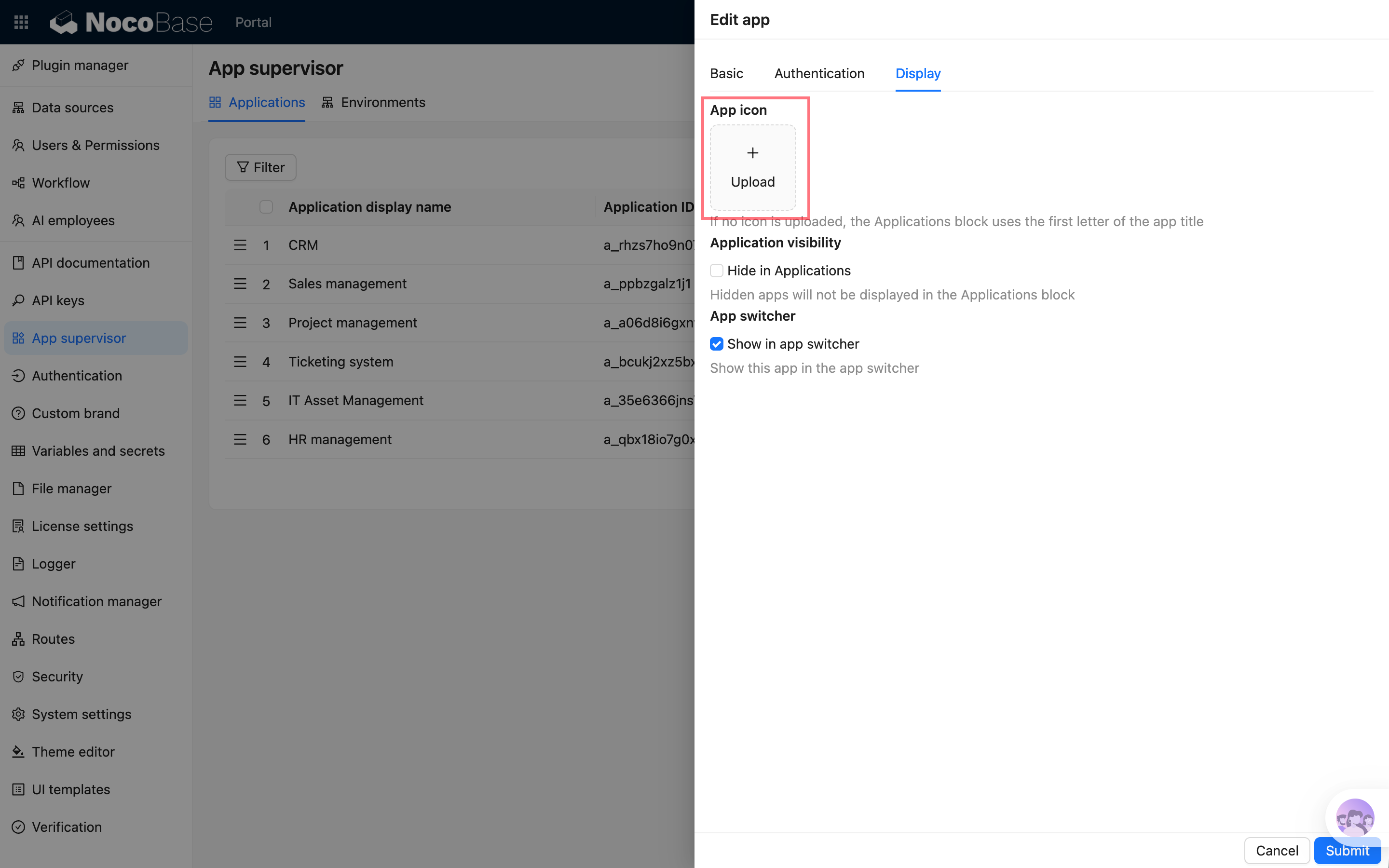
When creating or editing an app in App Supervisor, you can upload an app icon in "Display configuration".
|
|
32
|
+
|
|
33
|
+
If no icon is uploaded, the system generates a default icon from the first letter of the app name, making apps easier to distinguish in the list.
|
|
34
|
+
|
|
35
|
+
|
|
36
|
+
|
|
37
|
+
### Hide apps
|
|
38
|
+
|
|
39
|
+
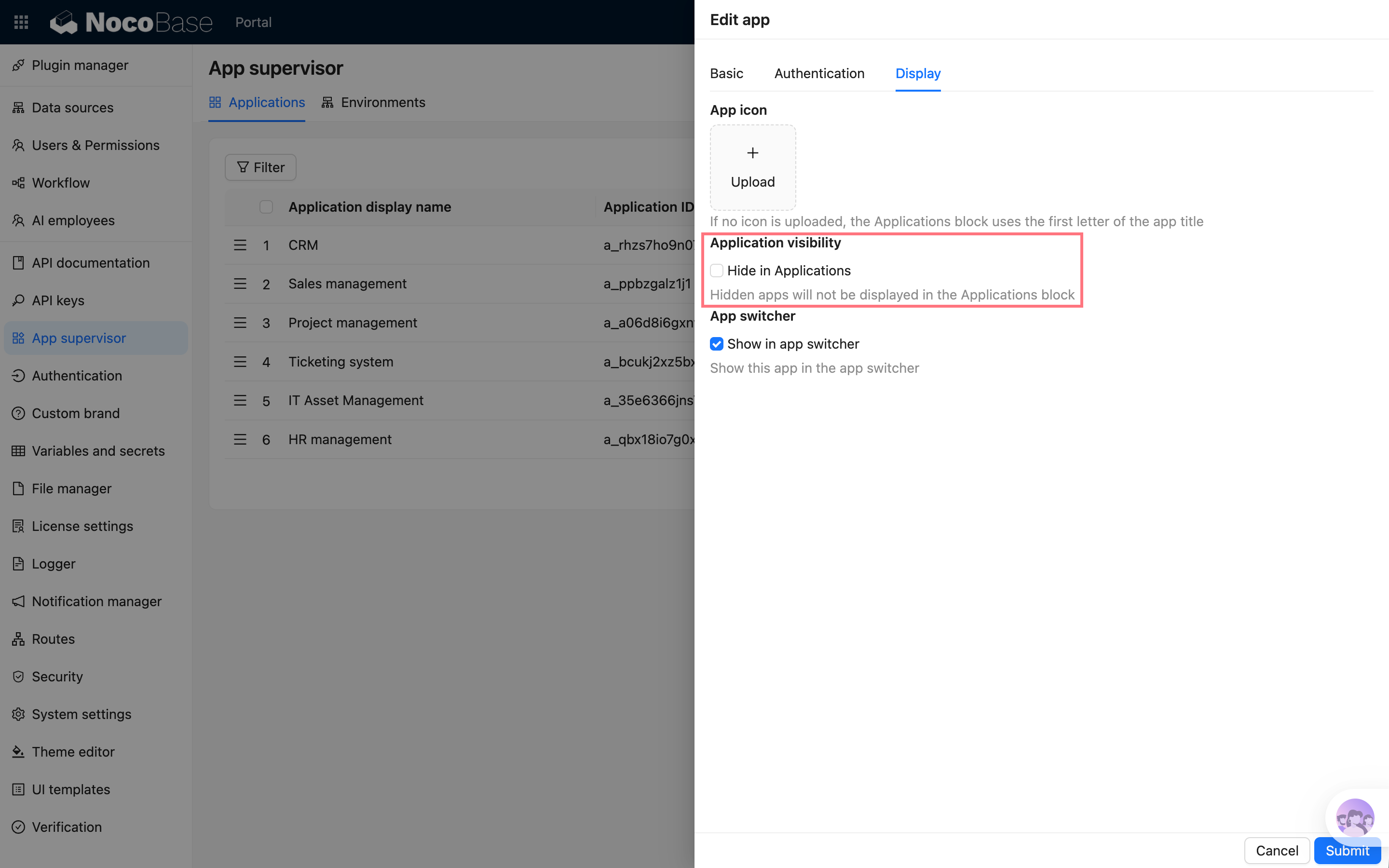
If an app should not appear in the frontend "Applications" block, select "Hide in Applications block" in the app configuration.
|
|
40
|
+
|
|
41
|
+
After it is hidden:
|
|
42
|
+
|
|
43
|
+
- The app can still be managed in the admin panel
|
|
44
|
+
- The app can still be opened through its direct URL
|
|
45
|
+
- It simply no longer appears in the frontend "Applications" block
|
|
46
|
+
|
|
47
|
+
|
|
48
|
+
|
|
49
|
+
## App switcher
|
|
50
|
+
|
|
51
|
+
|
|
52
|
+
|
|
53
|
+
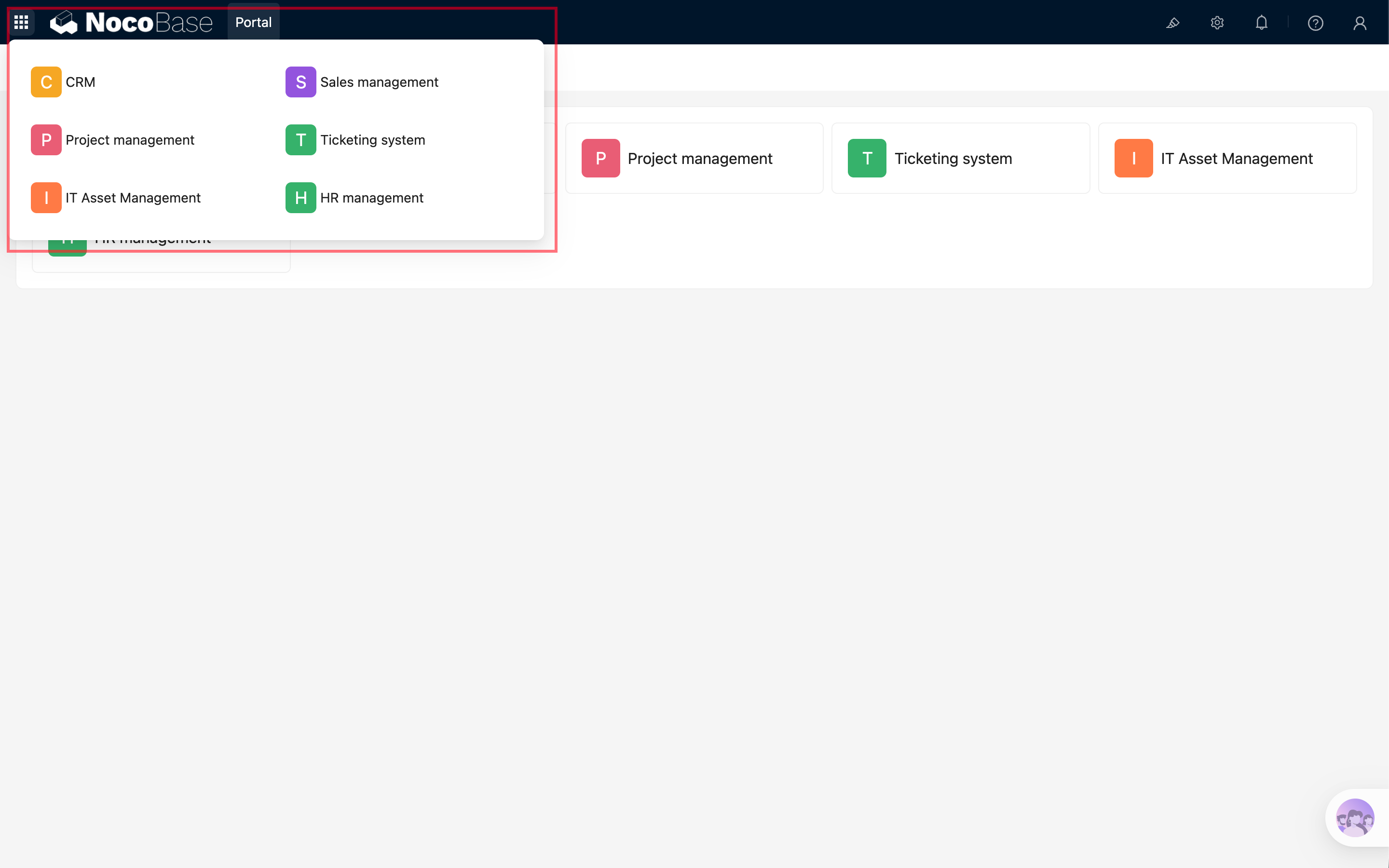
The app switcher appears in the upper-left corner and is used to quickly switch to other apps.
|
|
54
|
+
|
|
55
|
+
To show an app in the app switcher, enable "Show in app switcher" in the app configuration.
|
|
56
|
+
|
|
57
|
+
After it is enabled, users can see the app switcher in the upper-left corner of the main app or sub-apps and enter other apps from the list.
|
|
58
|
+
|
|
59
|
+
|
|
60
|
+
|
|
61
|
+
### Opening behavior
|
|
62
|
+
|
|
63
|
+
The app switcher opens apps as follows:
|
|
64
|
+
|
|
65
|
+
- From the main app to a sub-app: opens in a new tab
|
|
66
|
+
- From one sub-app to another: opens in the current tab
|
|
67
|
+
|
|
68
|
+
This avoids interrupting work in the main app while keeping switching between sub-apps natural.
|
|
@@ -0,0 +1,71 @@
|
|
|
1
|
+
---
|
|
2
|
+
pkg: '@nocobase/plugin-app-supervisor'
|
|
3
|
+
title: 'App SSO'
|
|
4
|
+
description: 'App SSO in multi-app: automatically sign in to sub-apps from the main app or app switcher, with username mapping and automatic user signup.'
|
|
5
|
+
keywords: 'multi-app,App SSO,automatic sign-in,app switcher,sub-app,NocoBase'
|
|
6
|
+
---
|
|
7
|
+
|
|
8
|
+
# App SSO
|
|
9
|
+
|
|
10
|
+
App SSO simplifies the sign-in flow when users enter sub-apps in a multi-app setup.
|
|
11
|
+
|
|
12
|
+
After it is enabled, when a user enters a sub-app from the main app entry or switches between sub-apps, the system attempts to automatically sign in to the target sub-app as the current user. Users do not need to enter their username and password repeatedly in each sub-app.
|
|
13
|
+
|
|
14
|
+
## Use cases
|
|
15
|
+
|
|
16
|
+
App SSO is suitable for the following scenarios:
|
|
17
|
+
|
|
18
|
+
- The main app acts as a unified entry, and users enter different business sub-apps from it
|
|
19
|
+
- A system is split into multiple business sub-apps, but the user sign-in experience should remain continuous
|
|
20
|
+
- Users need to switch frequently between multiple sub-apps
|
|
21
|
+
- User accounts are mapped between sub-apps by the same username
|
|
22
|
+
|
|
23
|
+
## Enable App SSO
|
|
24
|
+
|
|
25
|
+
Go to "App Supervisor", create or edit a sub-app, and enable "App SSO" in "Authentication configuration".
|
|
26
|
+
|
|
27
|
+
After it is enabled, the sub-app can trigger automatic sign-in through the main app entry or the app switcher.
|
|
28
|
+
|
|
29
|
+
> After changing authentication configuration, the sub-app usually needs to be restarted for the change to take effect.
|
|
30
|
+
|
|
31
|
+
|
|
32
|
+
|
|
33
|
+
## Automatic user signup
|
|
34
|
+
|
|
35
|
+
If the corresponding user does not exist in the target sub-app, you can enable "Automatically sign up when user does not exist".
|
|
36
|
+
|
|
37
|
+
After it is enabled, when a user enters a sub-app through App SSO for the first time, the system creates a basic user in the sub-app from the user information in the main app.
|
|
38
|
+
|
|
39
|
+
User mapping is mainly based on username. This means:
|
|
40
|
+
|
|
41
|
+
- If the username is the same in the main app and sub-app, the user signs in as the corresponding sub-app user
|
|
42
|
+
- If the username does not exist in the sub-app, the user is created only when automatic signup is enabled
|
|
43
|
+
- If automatic signup is not enabled, the administrator needs to create the user in the sub-app in advance
|
|
44
|
+
|
|
45
|
+
Roles and permissions after user creation are determined by the sub-app's own user and permission configuration.
|
|
46
|
+
|
|
47
|
+
## Entries that trigger automatic sign-in
|
|
48
|
+
|
|
49
|
+
App SSO is mainly triggered from:
|
|
50
|
+
|
|
51
|
+
- Entering a sub-app from the main app's app entry
|
|
52
|
+
- Entering a sub-app from the upper-left app switcher
|
|
53
|
+
- Switching from one sub-app to another
|
|
54
|
+
|
|
55
|
+
Directly visiting the sub-app sign-in page or the sub-app's own URL does not force the main app sign-in state. This preserves the sub-app's own sign-in methods and makes it possible to manage sub-app accounts separately when needed.
|
|
56
|
+
|
|
57
|
+
## FAQ
|
|
58
|
+
|
|
59
|
+
### Still not signed in automatically after enabling it?
|
|
60
|
+
|
|
61
|
+
Check the following:
|
|
62
|
+
|
|
63
|
+
- Whether App SSO is enabled for the sub-app
|
|
64
|
+
- Whether the sub-app has been restarted so the authentication configuration takes effect
|
|
65
|
+
- Whether the user entered from the main app entry or app switcher
|
|
66
|
+
- Whether a user with the same username exists in the sub-app
|
|
67
|
+
- If the user does not exist, whether automatic signup is enabled
|
|
68
|
+
|
|
69
|
+
### Why does direct access to a sub-app not automatically sign in?
|
|
70
|
+
|
|
71
|
+
This is expected. When directly visiting a sub-app, the sub-app may need to use its own sign-in method, so the main app sign-in state is not forced.
|
|
@@ -8,6 +8,14 @@ pkg: '@nocobase/plugin-app-supervisor'
|
|
|
8
8
|
|
|
9
9
|
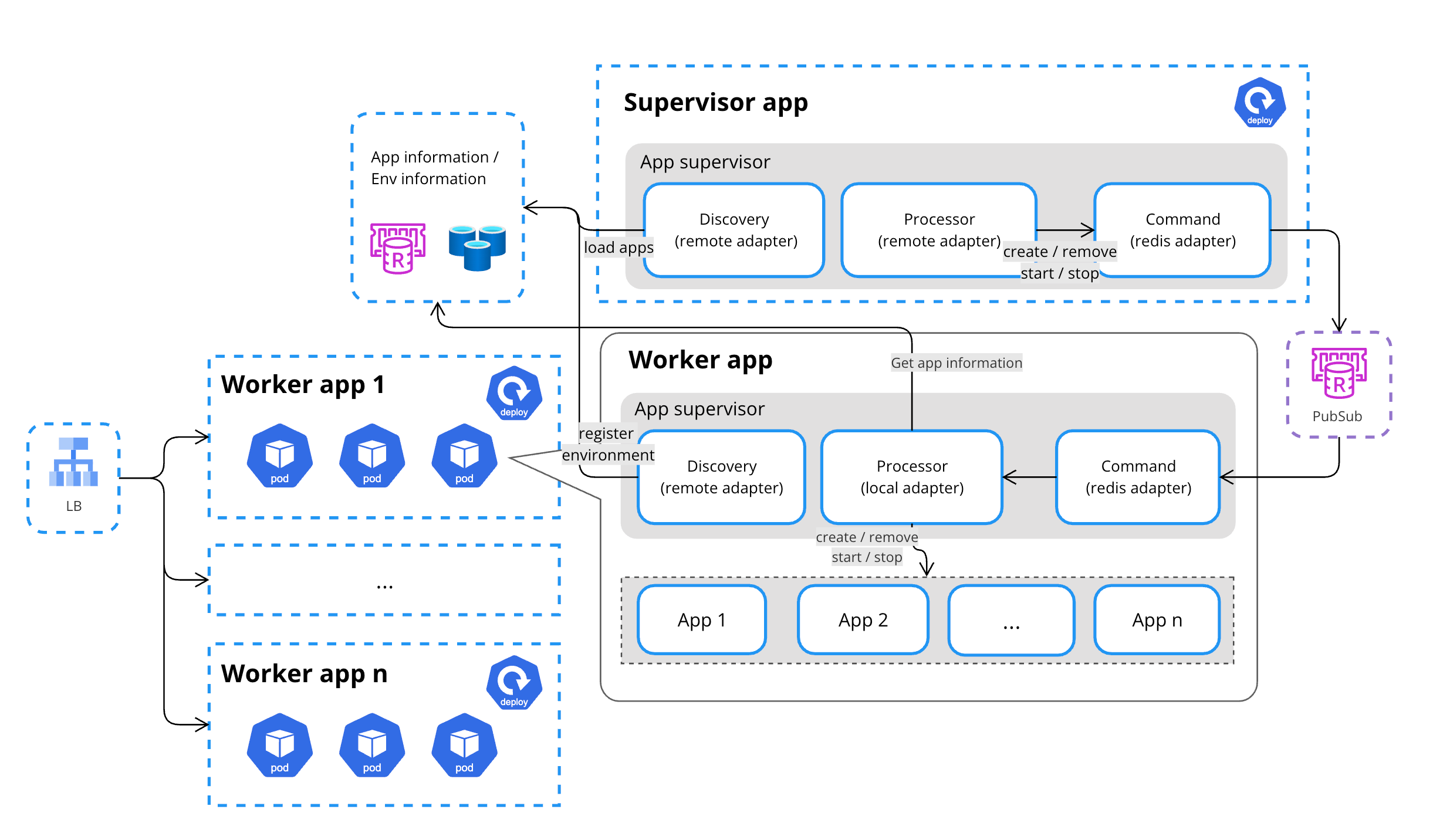
Multi-app management is a unified application management solution provided by NocoBase for creating and managing multiple physically isolated NocoBase application instances in one or more runtime environments. Through the AppSupervisor, users can create and maintain multiple applications from a unified entry point to meet the needs of different businesses and scale stages.
|
|
10
10
|
|
|
11
|
+
Multi-app is suitable for the following scenarios:
|
|
12
|
+
|
|
13
|
+
- Splitting a large system into multiple applications by business module, such as CRM, after-sales service, operations, and analytics
|
|
14
|
+
- Letting teams develop by business line or module in parallel, reducing configuration and release impact between modules
|
|
15
|
+
- Creating isolated applications for different customers, tenants, or organizations
|
|
16
|
+
- Creating independent demo, test, or sandbox applications in batches
|
|
17
|
+
- Assigning applications to different runtime environments as application count or load increases
|
|
18
|
+
|
|
11
19
|
## Single App
|
|
12
20
|
|
|
13
21
|
In the early stages of a project, most users start with a single app.
|
|
@@ -63,4 +71,4 @@ For users, multiple applications can still be created and managed through a sing
|
|
|
63
71
|
|
|
64
72
|
|
|
65
73
|
|
|
66
|
-
This approach is suitable for SaaS platforms, large numbers of demo environments, or multi-tenant scenarios, improving system stability and maintainability while ensuring flexibility.
|
|
74
|
+
This approach is suitable for SaaS platforms, large numbers of demo environments, or multi-tenant scenarios, improving system stability and maintainability while ensuring flexibility.
|
|
@@ -0,0 +1,112 @@
|
|
|
1
|
+
---
|
|
2
|
+
pkg: '@nocobase/plugin-app-supervisor'
|
|
3
|
+
title: 'Calling sub-app APIs'
|
|
4
|
+
description: 'How to call sub-app APIs in multi-app: access sub-app APIs through the entry app and specify the target sub-app with a path prefix, request header, or query parameter.'
|
|
5
|
+
keywords: 'multi-app,sub-app API,AppSupervisor,entry app,API call,NocoBase'
|
|
6
|
+
---
|
|
7
|
+
|
|
8
|
+
# Calling sub-app APIs
|
|
9
|
+
|
|
10
|
+
In a multi-app setup, each sub-app has its own independent APIs. When calling a sub-app API, the entry app needs to know which sub-app the request should be routed to.
|
|
11
|
+
|
|
12
|
+
For example, a main app API is usually:
|
|
13
|
+
|
|
14
|
+
```bash
|
|
15
|
+
GET /api/users:list
|
|
16
|
+
```
|
|
17
|
+
|
|
18
|
+
`/api` is the default API prefix and can be customized with the `API_BASE_PATH` environment variable.
|
|
19
|
+
|
|
20
|
+
To call the same API in a sub-app, specify the sub-app name in the request.
|
|
21
|
+
|
|
22
|
+
## Use a path prefix
|
|
23
|
+
|
|
24
|
+
Use the `/api/__app/<appName>/` prefix to call sub-app APIs:
|
|
25
|
+
|
|
26
|
+
```bash
|
|
27
|
+
GET /api/__app/a_xxx/users:list
|
|
28
|
+
```
|
|
29
|
+
|
|
30
|
+
Where:
|
|
31
|
+
|
|
32
|
+
- `a_xxx` is the sub-app name
|
|
33
|
+
- `users:list` is the resource and action to call
|
|
34
|
+
- `/api` is the current system's API base path
|
|
35
|
+
|
|
36
|
+
Query parameters can be appended as usual:
|
|
37
|
+
|
|
38
|
+
```bash
|
|
39
|
+
GET /api/__app/a_xxx/users:list?page=1&pageSize=20
|
|
40
|
+
```
|
|
41
|
+
|
|
42
|
+
This approach is explicit and works well when sub-app APIs are accessed through the entry app in multi-environment deployments.
|
|
43
|
+
|
|
44
|
+
## Specify the sub-app with a request header
|
|
45
|
+
|
|
46
|
+
If the caller already uses a fixed `/api/...` address, specify the sub-app with the `X-App` request header:
|
|
47
|
+
|
|
48
|
+
```bash
|
|
49
|
+
curl \
|
|
50
|
+
-H "X-App: a_xxx" \
|
|
51
|
+
http://localhost:13003/api/users:list
|
|
52
|
+
```
|
|
53
|
+
|
|
54
|
+
This is suitable for backend service calls, or when a frontend request utility already centralizes API URLs and only needs an additional header.
|
|
55
|
+
|
|
56
|
+
## Specify the sub-app with a query parameter
|
|
57
|
+
|
|
58
|
+
You can also specify the sub-app with the `__appName` query parameter:
|
|
59
|
+
|
|
60
|
+
```bash
|
|
61
|
+
GET /api/users:list?__appName=a_xxx
|
|
62
|
+
```
|
|
63
|
+
|
|
64
|
+
If there are other query parameters, pass them together:
|
|
65
|
+
|
|
66
|
+
```bash
|
|
67
|
+
GET /api/users:list?__appName=a_xxx&page=1&pageSize=20
|
|
68
|
+
```
|
|
69
|
+
|
|
70
|
+
In general, the path prefix or request header is clearer because the target sub-app is more explicit.
|
|
71
|
+
|
|
72
|
+
## API address in multi-environment deployments
|
|
73
|
+
|
|
74
|
+
In multi-environment deployments, there is usually an entry app and multiple runtime environments.
|
|
75
|
+
|
|
76
|
+
For example:
|
|
77
|
+
|
|
78
|
+
- Entry app address: `http://localhost:13003`
|
|
79
|
+
- Runtime environment address: `http://localhost:14000`
|
|
80
|
+
|
|
81
|
+
When calling sub-app APIs, it is recommended to access them through the entry app:
|
|
82
|
+
|
|
83
|
+
```bash
|
|
84
|
+
GET http://localhost:13003/api/__app/a_xxx/users:list
|
|
85
|
+
```
|
|
86
|
+
|
|
87
|
+
The entry app routes the request to the corresponding sub-app according to the app configuration. If you clearly know which runtime environment to access, you can also call through that environment address.
|
|
88
|
+
|
|
89
|
+
```bash
|
|
90
|
+
GET http://localhost:14000/api/__app/a_xxx/users:list
|
|
91
|
+
```
|
|
92
|
+
|
|
93
|
+
## Sub-app custom domains
|
|
94
|
+
|
|
95
|
+
If a sub-app has its own access domain, you can also call that sub-app's APIs directly through that domain:
|
|
96
|
+
|
|
97
|
+
```bash
|
|
98
|
+
GET https://app-example.example.com/api/users:list
|
|
99
|
+
```
|
|
100
|
+
|
|
101
|
+
If you want to go through the entry app uniformly, continue using the entry app's `/api/__app/<appName>/...` address.
|
|
102
|
+
|
|
103
|
+
## Authentication
|
|
104
|
+
|
|
105
|
+
When calling sub-app APIs, permission checks are still based on the target sub-app.
|
|
106
|
+
|
|
107
|
+
This means:
|
|
108
|
+
|
|
109
|
+
- A sign-in state or access token valid for the sub-app is required
|
|
110
|
+
- The main app sign-in state does not automatically equal API permissions in the sub-app
|
|
111
|
+
|
|
112
|
+
If the request does not carry valid authentication information, the sub-app returns an unauthenticated or unauthorized error according to its own authentication configuration.
|