@nocobase/plugin-ai 2.1.0-alpha.30 → 2.1.0-alpha.31
This diff represents the content of publicly available package versions that have been released to one of the supported registries. The information contained in this diff is provided for informational purposes only and reflects changes between package versions as they appear in their respective public registries.
- package/dist/ai/docs/nocobase/ai-builder/security.md +1 -1
- package/dist/ai/docs/nocobase/interface-builder/blocks/data-blocks/details.md +1 -1
- package/dist/ai/docs/nocobase/interface-builder/blocks/data-blocks/form.md +1 -1
- package/dist/ai/docs/nocobase/plugin-development/client/examples/custom-block.md +2 -2
- package/dist/ai/docs/nocobase/solution/crm/guide/guide-customers-emails.md +1 -1
- package/dist/ai/docs/nocobase/solution/crm/guide/guide-overview.md +2 -2
- package/dist/ai/docs/nocobase/tutorials/v2/01-getting-started.md +1 -1
- package/dist/ai/docs/nocobase/tutorials/v2/03-building-pages.md +2 -2
- package/dist/ai/docs/nocobase/tutorials/v2/04-forms-and-details.md +4 -4
- package/dist/ai/docs/nocobase/tutorials/v2/06-workflows.md +1 -1
- package/dist/ai/docs/nocobase/workflow/nodes/javascript.md +2 -2
- package/dist/client/index.js +1 -1
- package/dist/externalVersion.js +15 -15
- package/dist/locale/en-US.json +2 -0
- package/dist/locale/zh-CN.json +2 -0
- package/dist/node_modules/@langchain/xai/package.json +1 -1
- package/dist/node_modules/fs-extra/package.json +1 -1
- package/dist/node_modules/jsonrepair/package.json +1 -1
- package/dist/node_modules/just-bash/package.json +1 -1
- package/dist/node_modules/nodejs-snowflake/package.json +1 -1
- package/dist/node_modules/openai/package.json +1 -1
- package/dist/node_modules/zod/package.json +1 -1
- package/dist/server/ai-employees/ai-employee.js +11 -7
- package/dist/server/collections/lc-checkpoint-blobs.js +1 -1
- package/dist/server/collections/lc-checkpoint-writes.js +1 -1
- package/dist/server/collections/lc-checkpoints.js +1 -1
- package/dist/server/workflow/nodes/employee/files.d.ts +1 -0
- package/dist/server/workflow/nodes/employee/files.js +14 -4
- package/dist/server/workflow/nodes/employee/index.js +6 -4
- package/dist/server/workflow/nodes/employee/types.d.ts +2 -2
- package/package.json +2 -2
|
@@ -91,7 +91,7 @@ nb env auth local
|
|
|
91
91
|
|
|
92
92
|
`nb env auth` launches the browser login flow. After success, the CLI saves the authentication information to the current environment configuration, and you can then continue having the AI Agent call `nb api`.
|
|
93
93
|
|
|
94
|
-
The validity periods of OAuth access tokens and refresh tokens follow the system [Token policy](
|
|
94
|
+
The validity periods of OAuth access tokens and refresh tokens follow the system [Token policy](../security/token-policy/index.md) configuration.
|
|
95
95
|
|
|
96
96
|
- OAuth access tokens have the same validity period as system Tokens, with a default of **1 day**
|
|
97
97
|
- OAuth refresh tokens have the same validity period as system sessions, with a default of **7 days**
|
|
@@ -79,7 +79,7 @@ For more details, see [Linkage Rules](/interface-builder/linkage-rule)
|
|
|
79
79
|
|
|
80
80
|
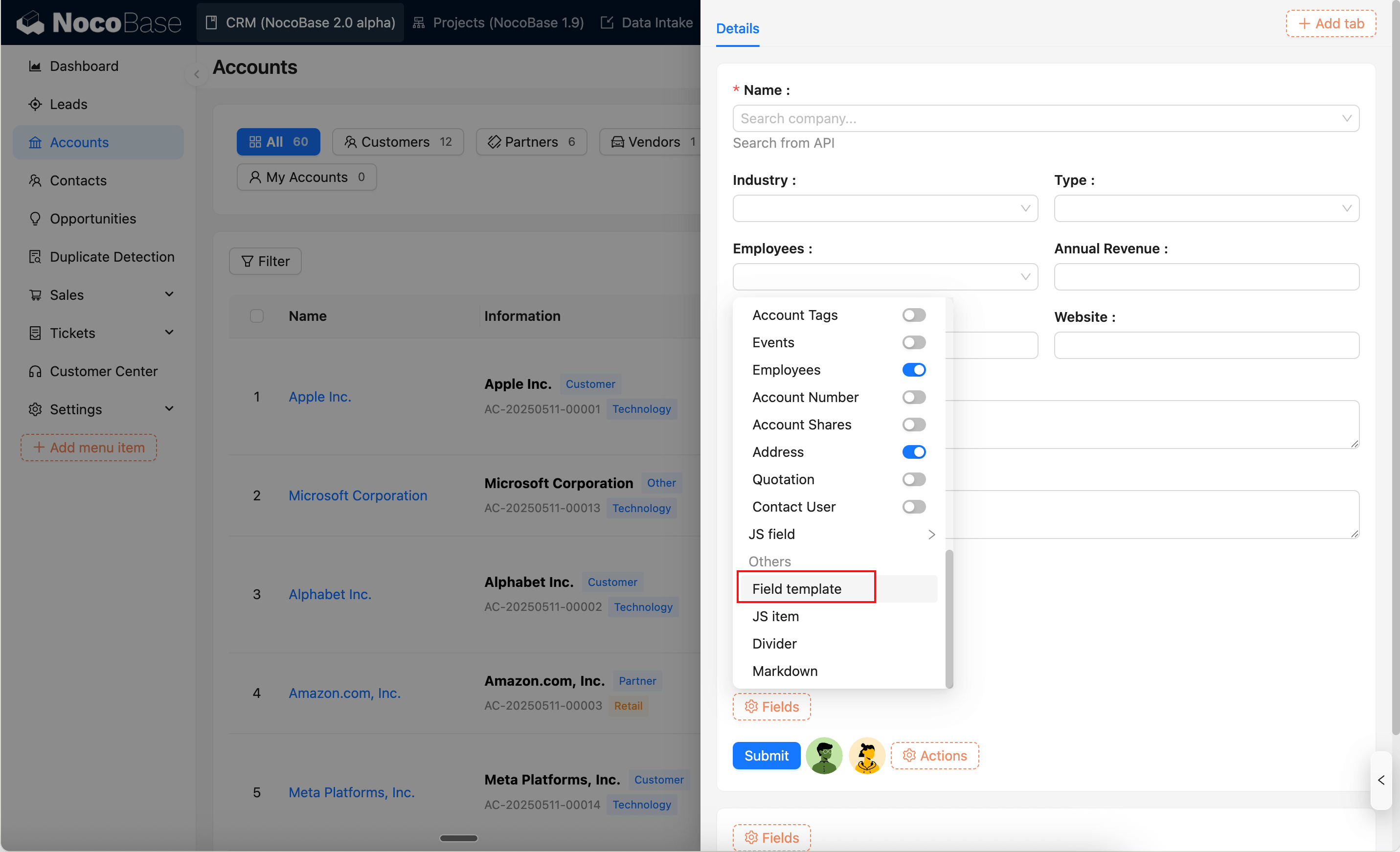
### Field template
|
|
81
81
|
|
|
82
|
-
Field templates let you reuse the field section configuration (selected fields, layout, and field settings) in Details blocks. See [Field template](
|
|
82
|
+
Field templates let you reuse the field section configuration (selected fields, layout, and field settings) in Details blocks. See [Field template](../../ui-templates.md).
|
|
83
83
|
|
|
84
84
|
|
|
85
85
|
|
|
@@ -73,7 +73,7 @@ The Form block supports two layout modes, which can be set via the `layout` attr
|
|
|
73
73
|
|
|
74
74
|
### Field Template
|
|
75
75
|
|
|
76
|
-
Field templates are used to reuse field area configurations in Form blocks. For details, see [Field Template](
|
|
76
|
+
Field templates are used to reuse field area configurations in Form blocks. For details, see [Field Template](../../ui-templates.md).
|
|
77
77
|
|
|
78
78
|

|
|
79
79
|
|
|
@@ -107,7 +107,7 @@ Key points:
|
|
|
107
107
|
|
|
108
108
|
- **`renderComponent()`** -- Renders the block UI, reading HTML content via `this.props.html`
|
|
109
109
|
- **`define()`** -- Sets the display name in the "Add Block" menu. `tExpr()` is used for deferred translation because `define()` executes at module load time, when i18n hasn't been initialized yet
|
|
110
|
-
- **`registerFlow()`** -- Adds a configuration panel. `uiSchema` defines the form using JSON Schema (syntax reference: [UI Schema](
|
|
110
|
+
- **`registerFlow()`** -- Adds a configuration panel. `uiSchema` defines the form using JSON Schema (syntax reference: [UI Schema](../../../flow-engine/ui-schema.md)), `handler` writes user-filled values to `ctx.model.props`, and `renderComponent()` can read them
|
|
111
111
|
|
|
112
112
|
## Step 3: Add Multilingual Files
|
|
113
113
|
|
|
@@ -194,7 +194,7 @@ Capabilities used in this example:
|
|
|
194
194
|
- [Writing Your First Plugin](../../write-your-first-plugin) -- Create a plugin skeleton from scratch
|
|
195
195
|
- [FlowEngine Overview](../flow-engine/index.md) -- FlowModel basic usage and registerFlow
|
|
196
196
|
- [FlowEngine -> Block Extension](../flow-engine/block) -- BlockModel, DataBlockModel, CollectionBlockModel
|
|
197
|
-
- [UI Schema](
|
|
197
|
+
- [UI Schema](../../../flow-engine/ui-schema.md) -- uiSchema syntax reference
|
|
198
198
|
- [Component vs FlowModel](../component-vs-flow-model) -- When to use FlowModel
|
|
199
199
|
- [Plugin](../plugin) -- Plugin entry point and load() lifecycle
|
|
200
200
|
- [i18n Internationalization](../component/i18n) -- Translation file conventions and tExpr usage
|
|
@@ -175,4 +175,4 @@ Activity records also appear in the calendar view on the Overview dashboard.
|
|
|
175
175
|
- [CRM User Guide](./index.md)
|
|
176
176
|
- [Lead Management](./guide-leads) — Leads automatically create customers and contacts upon conversion
|
|
177
177
|
- [Opportunity Management](./guide-opportunities) — Opportunities linked to customers
|
|
178
|
-
- [AI Employees](
|
|
178
|
+
- [AI Employees](../../../ai-employees/index.md)
|
|
@@ -201,10 +201,10 @@ Drill-through comes in two forms:
|
|
|
201
201
|
|
|
202
202
|
---
|
|
203
203
|
|
|
204
|
-
After understanding the system layout and dashboards, go back to the [User Guide](./
|
|
204
|
+
After understanding the system layout and dashboards, go back to the [User Guide](./index.md) for subsequent chapters.
|
|
205
205
|
|
|
206
206
|
## Related Pages
|
|
207
207
|
|
|
208
|
-
- [CRM User Guide](./
|
|
208
|
+
- [CRM User Guide](./index.md)
|
|
209
209
|
- [Solution Overview](../index)
|
|
210
210
|
- [Installation](../installation)
|
|
@@ -19,7 +19,7 @@ Compared to other no-code tools, NocoBase has a few core principles:
|
|
|
19
19
|
|
|
20
20
|
- **Data model driven**: Define your data structure first, then use [blocks](/interface-builder/blocks) to display data, then [actions](/interface-builder/actions) to process it — UI and data are fully decoupled
|
|
21
21
|
- **WYSIWYG**: Pages are your canvas. Click anywhere to edit, as intuitive as building a Notion page
|
|
22
|
-
- **Everything is a plugin**: All features are [plugins](/
|
|
22
|
+
- **Everything is a plugin**: All features are [plugins](../../plugins/index.mdx), similar to WordPress — install what you need
|
|
23
23
|
- **AI built into your workflow**: Built-in [AI employees](/ai-employees/quick-start) that can perform analysis, translation, data entry, and more
|
|
24
24
|
- **Open source + self-hosted**: Core code is fully open source, all data stays on your own server
|
|
25
25
|
|
|
@@ -181,7 +181,7 @@ This way, newly submitted tickets always appear at the top, making them easier t
|
|
|
181
181
|
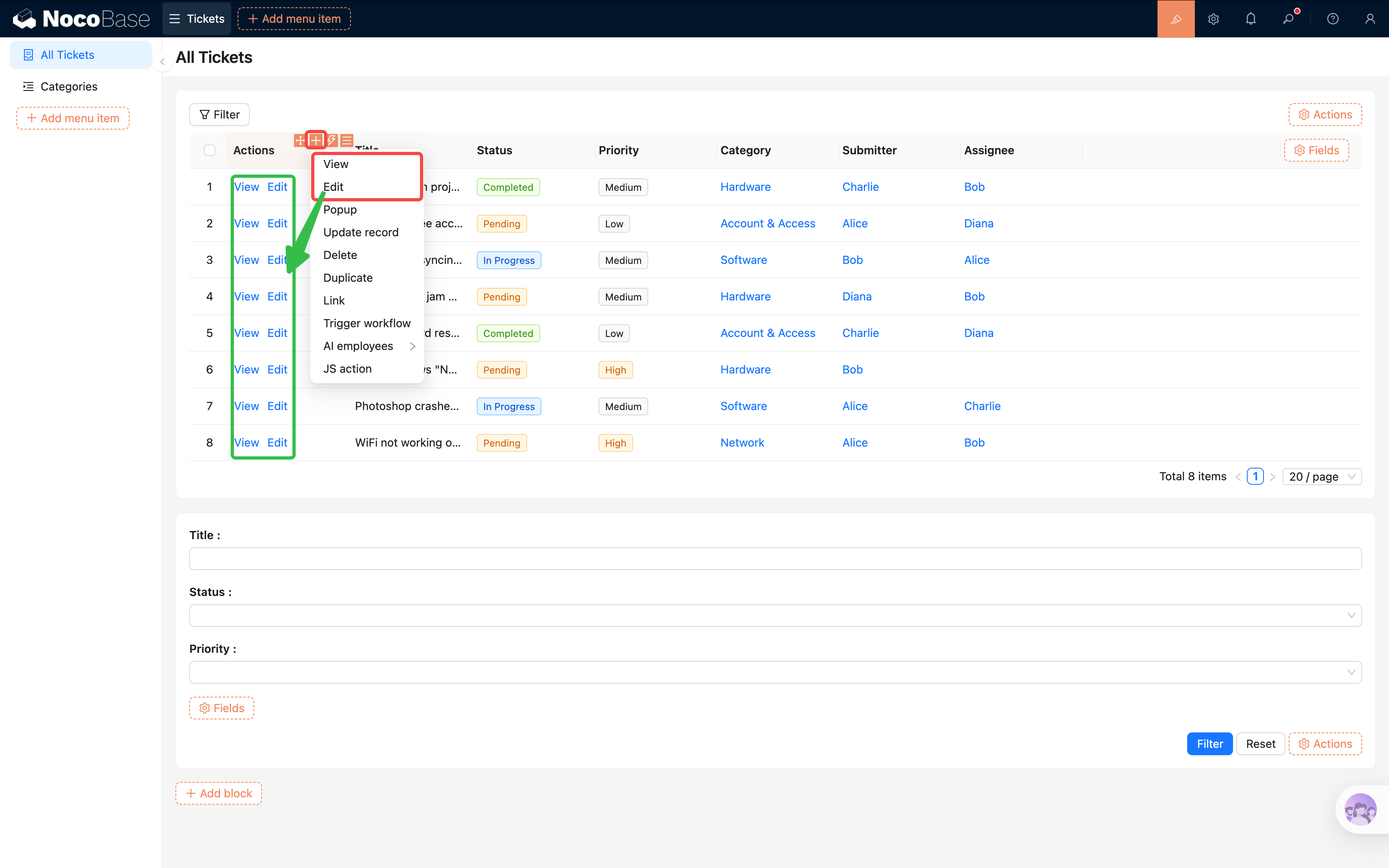
Viewing a list isn't enough — we also need to click into tickets to see details and make edits.
|
|
182
182
|
|
|
183
183
|
1. In the actions column, click the second "+" icon.
|
|
184
|
-
2. Click to add actions: **View**, **[Edit](
|
|
184
|
+
2. Click to add actions: **View**, **[Edit](../../interface-builder/actions/types/edit.md)**, **[Delete](../../interface-builder/actions/types/delete.md)**.
|
|
185
185
|
3. Each row will now have "View", "Edit", and "Delete" buttons in the actions column.
|
|
186
186
|
|
|
187
187
|
|
|
@@ -211,7 +211,7 @@ Remember the "Categories" collection we created in Chapter 2? It's a **tree tabl
|
|
|
211
211
|
|
|
212
212
|
Once enabled, the table will display categories in an indented hierarchy showing parent-child relationships, instead of listing all records flat.
|
|
213
213
|
|
|
214
|
-
3. Check the fields you want to display (e.g., Name, Description), and configure row actions ([Add new](
|
|
214
|
+
3. Check the fields you want to display (e.g., Name, Description), and configure row actions ([Add new](../../interface-builder/actions/types/add-new.md), Edit, Delete).
|
|
215
215
|
4. **Layout tip**: Put "Name" in the first column and "Actions" in the second. The categories table doesn't have many fields, so a two-column layout is more compact and user-friendly.
|
|
216
216
|
|
|
217
217
|
[Screenshot: Categories tree table configured]
|
|
@@ -1,6 +1,6 @@
|
|
|
1
1
|
# Chapter 4: Forms & Details — Input, Display, All in One
|
|
2
2
|
|
|
3
|
-
In the last chapter, we built the ticket list and used a quick form to enter test data. In this chapter, we'll **refine the form experience** — optimize [Form block](/interface-builder/blocks/data-blocks/form) field layouts, add [Details blocks](/interface-builder/blocks/data-blocks/details), configure [linkage rules](
|
|
3
|
+
In the last chapter, we built the ticket list and used a quick form to enter test data. In this chapter, we'll **refine the form experience** — optimize [Form block](/interface-builder/blocks/data-blocks/form) field layouts, add [Details blocks](/interface-builder/blocks/data-blocks/details), configure [linkage rules](../../interface-builder/linkage-rule.md), and use [change history](https://docs.nocobase.com/record-history/) to track every modification.
|
|
4
4
|
|
|
5
5
|
:::tip
|
|
6
6
|
Section 4.4 "Change History" requires the [Professional edition](https://www.nocobase.com/en/commercial). Skipping it won't affect later chapters.
|
|
@@ -15,7 +15,7 @@ In the last chapter, we quickly created a working "Add new" form. Now let's refi
|
|
|
15
15
|
1. Make sure you're in [UI Editor](/get-started/how-nocobase-works) mode (top-right toggle is on).
|
|
16
16
|
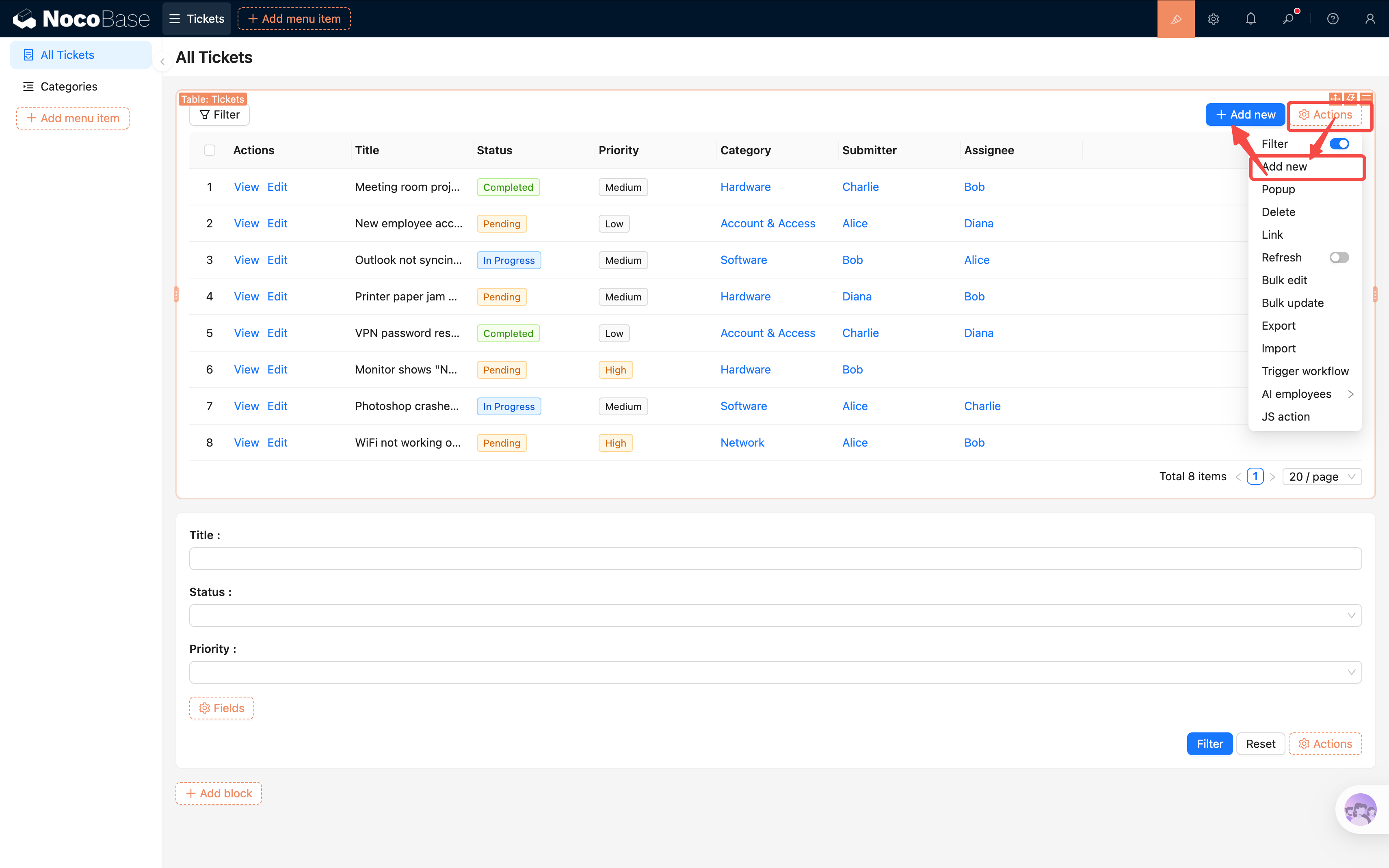
2. Go to the "All Tickets" page, and click **"[Actions](/interface-builder/actions)"** above the Table block.
|
|
17
17
|
3. Check the **"Add new"** action button.
|
|
18
|
-
4. An "Add new" button will appear above the table. Clicking it opens a [popup](
|
|
18
|
+
4. An "Add new" button will appear above the table. Clicking it opens a [popup](../../interface-builder/actions/types/pop-up.md).
|
|
19
19
|
|
|
20
20
|
|
|
21
21
|
|
|
@@ -268,7 +268,7 @@ In this chapter, we completed the full data lifecycle:
|
|
|
268
268
|
- **Form** — Users can submit new tickets with default values and validation
|
|
269
269
|
- **Linkage rules** — Urgent tickets automatically require a description
|
|
270
270
|
- **Details block** — Clearly displays a ticket's complete information
|
|
271
|
-
- **[Change history](
|
|
271
|
+
- **[Change history](../../record-history/index.md)** — Automatically tracks every modification for worry-free auditing (commercial plugin, optional)
|
|
272
272
|
|
|
273
273
|
From "visible" to "enterable" to "traceable" — our ticket system now has basic usability.
|
|
274
274
|
|
|
@@ -276,4 +276,4 @@ From "visible" to "enterable" to "traceable" — our ticket system now has basic
|
|
|
276
276
|
|
|
277
277
|
- [Form Block](/interface-builder/blocks/data-blocks/form) — Form block configuration guide
|
|
278
278
|
- [Details Block](/interface-builder/blocks/data-blocks/details) — Details block setup
|
|
279
|
-
- [Linkage Rules](
|
|
279
|
+
- [Linkage Rules](../../interface-builder/linkage-rule.md) — Field linkage configuration
|
|
@@ -34,7 +34,7 @@ NocoBase offers several trigger types, which you select when creating a workflow
|
|
|
34
34
|
|---------|-------------|-----------------|
|
|
35
35
|
| **[Collection event](/workflow/triggers/collection)** | Fires when a record is created, updated, or deleted | New ticket notification, status change logging |
|
|
36
36
|
| **[Schedule](/workflow/triggers/schedule)** | Fires on a Cron expression or fixed time | Daily reports, periodic data cleanup |
|
|
37
|
-
| **[Post-action event](
|
|
37
|
+
| **[Post-action event](../../workflow/triggers/post-action.md)** | Fires after a user performs a UI action | Send notification after form submission |
|
|
38
38
|
| **Approval** | Initiates an approval flow with multi-level support | Leave requests, purchase approvals |
|
|
39
39
|
| **Custom action** | Bound to a custom button, fires on click | One-click archiving, batch operations |
|
|
40
40
|
| **Pre-action event** | Intercepts a user action synchronously before it completes | Pre-submit validation, auto-fill fields |
|
|
@@ -8,7 +8,7 @@ pkg: '@nocobase/plugin-workflow-javascript'
|
|
|
8
8
|
|
|
9
9
|
The JavaScript Script node allows users to execute a custom server-side JavaScript script within a workflow. The script can use variables from upstream in the workflow as parameters, and its return value can be provided to downstream nodes.
|
|
10
10
|
|
|
11
|
-
The script runs in a worker thread on the NocoBase application's server. By default, it uses a secure sandbox (
|
|
11
|
+
The script runs in a worker thread on the NocoBase application's server. By default, it uses a secure sandbox (QuickJS, powered by WebAssembly) that does not support `require` or Node.js built-in APIs. For details, see [Execution Engine](#execution-engine) and [Feature List](#feature-list).
|
|
12
12
|
|
|
13
13
|
## Create Node
|
|
14
14
|
|
|
@@ -50,7 +50,7 @@ The JavaScript script node supports two execution engines, automatically selecte
|
|
|
50
50
|
|
|
51
51
|
### Safe Mode (Default)
|
|
52
52
|
|
|
53
|
-
When `WORKFLOW_SCRIPT_MODULES` is **not configured**, scripts run using the [
|
|
53
|
+
When `WORKFLOW_SCRIPT_MODULES` is **not configured**, scripts run using the [QuickJS](https://bellard.org/quickjs/) engine compiled to WebAssembly. This engine executes code in an isolated JavaScript runtime with the following characteristics:
|
|
54
54
|
|
|
55
55
|
- **Does not support** `require` — no modules can be imported
|
|
56
56
|
- **Does not support** Node.js built-in APIs (such as `process`, `Buffer`, `global`, etc.)
|