@nocobase/cli 2.1.0-beta.44 → 2.1.0-beta.44.test.2
This diff represents the content of publicly available package versions that have been released to one of the supported registries. The information contained in this diff is provided for informational purposes only and reflects changes between package versions as they appear in their respective public registries.
- package/LICENSE +201 -0
- package/README.md +63 -380
- package/assets/env-proxy/nginx/app.conf.tpl +23 -0
- package/assets/env-proxy/nginx/nocobase.conf.tpl +5 -0
- package/assets/env-proxy/nginx/snippets/dist-location.conf +5 -0
- package/assets/env-proxy/nginx/snippets/gzip.conf +17 -0
- package/assets/env-proxy/nginx/snippets/log-format-http.conf +13 -0
- package/assets/env-proxy/nginx/snippets/maps-http.conf +14 -0
- package/assets/env-proxy/nginx/snippets/mime-types.conf +98 -0
- package/assets/env-proxy/nginx/snippets/proxy-location.conf +17 -0
- package/assets/env-proxy/nginx/snippets/spa-location.conf +6 -0
- package/assets/env-proxy/nginx/snippets/uploads-location.conf +21 -0
- package/dist/commands/app/autostart/disable.js +55 -0
- package/dist/commands/app/autostart/enable.js +55 -0
- package/dist/commands/app/autostart/list.js +37 -0
- package/dist/commands/app/autostart/run.js +84 -0
- package/dist/commands/app/autostart/shared.js +49 -0
- package/dist/commands/app/destroy.js +8 -6
- package/dist/commands/app/down.js +2 -2
- package/dist/commands/app/logs.js +2 -1
- package/dist/commands/app/restart.js +79 -23
- package/dist/commands/app/shared.js +1 -1
- package/dist/commands/app/start.js +134 -38
- package/dist/commands/app/stop.js +31 -2
- package/dist/commands/app/upgrade.js +3 -1
- package/dist/commands/config/delete.js +4 -1
- package/dist/commands/config/get.js +4 -1
- package/dist/commands/config/set.js +5 -2
- package/dist/commands/env/add.js +19 -39
- package/dist/commands/env/info.js +3 -2
- package/dist/commands/env/proxy/caddy.js +28 -0
- package/dist/commands/env/proxy/index.js +353 -0
- package/dist/commands/env/proxy/nginx.js +28 -0
- package/dist/commands/env/remove.js +112 -22
- package/dist/commands/env/shared.js +17 -9
- package/dist/commands/env/update.js +385 -21
- package/dist/commands/init.js +233 -91
- package/dist/commands/install.js +174 -68
- package/dist/commands/license/activate.js +63 -244
- package/dist/commands/license/plugins/shared.js +64 -13
- package/dist/commands/plugin/import.js +108 -0
- package/dist/commands/revision/create.js +89 -0
- package/dist/locale/en-US.json +105 -19
- package/dist/locale/zh-CN.json +102 -16
- package/package.json +5 -8
- package/scripts/build.mjs +34 -0
- package/scripts/clean.mjs +9 -0
- package/tsconfig.json +19 -0
- package/LICENSE.txt +0 -107
- package/README.zh-CN.md +0 -355
- package/dist/lib/api-client.js +0 -335
- package/dist/lib/api-command-compat.js +0 -641
- package/dist/lib/app-health.js +0 -139
- package/dist/lib/app-managed-resources.js +0 -316
- package/dist/lib/app-runtime.js +0 -180
- package/dist/lib/auth-store.js +0 -405
- package/dist/lib/backup.js +0 -171
- package/dist/lib/bootstrap.js +0 -409
- package/dist/lib/build-config.js +0 -18
- package/dist/lib/builtin-db.js +0 -86
- package/dist/lib/cli-config.js +0 -309
- package/dist/lib/cli-entry-error.js +0 -44
- package/dist/lib/cli-home.js +0 -47
- package/dist/lib/cli-locale.js +0 -141
- package/dist/lib/command-discovery.js +0 -39
- package/dist/lib/db-connection-check.js +0 -219
- package/dist/lib/docker-env-file.js +0 -52
- package/dist/lib/docker-image.js +0 -37
- package/dist/lib/docker-log-stream.js +0 -45
- package/dist/lib/env-auth.js +0 -960
- package/dist/lib/env-config.js +0 -95
- package/dist/lib/env-guard.js +0 -62
- package/dist/lib/generated-command.js +0 -203
- package/dist/lib/http-request.js +0 -49
- package/dist/lib/inquirer-theme.js +0 -17
- package/dist/lib/inquirer.js +0 -244
- package/dist/lib/naming.js +0 -70
- package/dist/lib/object-utils.js +0 -76
- package/dist/lib/openapi.js +0 -62
- package/dist/lib/plugin-storage.js +0 -64
- package/dist/lib/post-processors.js +0 -23
- package/dist/lib/prompt-catalog-core.js +0 -185
- package/dist/lib/prompt-catalog-terminal.js +0 -375
- package/dist/lib/prompt-catalog.js +0 -10
- package/dist/lib/prompt-validators.js +0 -258
- package/dist/lib/prompt-web-ui.js +0 -2227
- package/dist/lib/resource-command.js +0 -357
- package/dist/lib/resource-request.js +0 -104
- package/dist/lib/run-npm.js +0 -385
- package/dist/lib/runtime-env-vars.js +0 -32
- package/dist/lib/runtime-generator.js +0 -498
- package/dist/lib/runtime-store.js +0 -56
- package/dist/lib/self-manager.js +0 -301
- package/dist/lib/session-id.js +0 -17
- package/dist/lib/session-integration.js +0 -703
- package/dist/lib/session-store.js +0 -118
- package/dist/lib/skills-manager.js +0 -436
- package/dist/lib/source-publish.js +0 -309
- package/dist/lib/source-registry.js +0 -188
- package/dist/lib/startup-update.js +0 -309
- package/dist/lib/ui.js +0 -158
package/LICENSE
ADDED
|
@@ -0,0 +1,201 @@
|
|
|
1
|
+
Apache License
|
|
2
|
+
Version 2.0, January 2004
|
|
3
|
+
http://www.apache.org/licenses/
|
|
4
|
+
|
|
5
|
+
TERMS AND CONDITIONS FOR USE, REPRODUCTION, AND DISTRIBUTION
|
|
6
|
+
|
|
7
|
+
1. Definitions.
|
|
8
|
+
|
|
9
|
+
"License" shall mean the terms and conditions for use, reproduction,
|
|
10
|
+
and distribution as defined by Sections 1 through 9 of this document.
|
|
11
|
+
|
|
12
|
+
"Licensor" shall mean the copyright owner or entity authorized by
|
|
13
|
+
the copyright owner that is granting the License.
|
|
14
|
+
|
|
15
|
+
"Legal Entity" shall mean the union of the acting entity and all
|
|
16
|
+
other entities that control, are controlled by, or are under common
|
|
17
|
+
control with that entity. For the purposes of this definition,
|
|
18
|
+
"control" means (i) the power, direct or indirect, to cause the
|
|
19
|
+
direction or management of such entity, whether by contract or
|
|
20
|
+
otherwise, or (ii) ownership of fifty percent (50%) or more of the
|
|
21
|
+
outstanding shares, or (iii) beneficial ownership of such entity.
|
|
22
|
+
|
|
23
|
+
"You" (or "Your") shall mean an individual or Legal Entity
|
|
24
|
+
exercising permissions granted by this License.
|
|
25
|
+
|
|
26
|
+
"Source" form shall mean the preferred form for making modifications,
|
|
27
|
+
including but not limited to software source code, documentation
|
|
28
|
+
source, and configuration files.
|
|
29
|
+
|
|
30
|
+
"Object" form shall mean any form resulting from mechanical
|
|
31
|
+
transformation or translation of a Source form, including but
|
|
32
|
+
not limited to compiled object code, generated documentation,
|
|
33
|
+
and conversions to other media types.
|
|
34
|
+
|
|
35
|
+
"Work" shall mean the work of authorship, whether in Source or
|
|
36
|
+
Object form, made available under the License, as indicated by a
|
|
37
|
+
copyright notice that is included in or attached to the work
|
|
38
|
+
(an example is provided in the Appendix below).
|
|
39
|
+
|
|
40
|
+
"Derivative Works" shall mean any work, whether in Source or Object
|
|
41
|
+
form, that is based on (or derived from) the Work and for which the
|
|
42
|
+
editorial revisions, annotations, elaborations, or other modifications
|
|
43
|
+
represent, as a whole, an original work of authorship. For the purposes
|
|
44
|
+
of this License, Derivative Works shall not include works that remain
|
|
45
|
+
separable from, or merely link (or bind by name) to the interfaces of,
|
|
46
|
+
the Work and Derivative Works thereof.
|
|
47
|
+
|
|
48
|
+
"Contribution" shall mean any work of authorship, including
|
|
49
|
+
the original version of the Work and any modifications or additions
|
|
50
|
+
to that Work or Derivative Works thereof, that is intentionally
|
|
51
|
+
submitted to Licensor for inclusion in the Work by the copyright owner
|
|
52
|
+
or by an individual or Legal Entity authorized to submit on behalf of
|
|
53
|
+
the copyright owner. For the purposes of this definition, "submitted"
|
|
54
|
+
means any form of electronic, verbal, or written communication sent
|
|
55
|
+
to the Licensor or its representatives, including but not limited to
|
|
56
|
+
communication on electronic mailing lists, source code control systems,
|
|
57
|
+
and issue tracking systems that are managed by, or on behalf of, the
|
|
58
|
+
Licensor for the purpose of discussing and improving the Work, but
|
|
59
|
+
excluding communication that is conspicuously marked or otherwise
|
|
60
|
+
designated in writing by the copyright owner as "Not a Contribution."
|
|
61
|
+
|
|
62
|
+
"Contributor" shall mean Licensor and any individual or Legal Entity
|
|
63
|
+
on behalf of whom a Contribution has been received by Licensor and
|
|
64
|
+
subsequently incorporated within the Work.
|
|
65
|
+
|
|
66
|
+
2. Grant of Copyright License. Subject to the terms and conditions of
|
|
67
|
+
this License, each Contributor hereby grants to You a perpetual,
|
|
68
|
+
worldwide, non-exclusive, no-charge, royalty-free, irrevocable
|
|
69
|
+
copyright license to reproduce, prepare Derivative Works of,
|
|
70
|
+
publicly display, publicly perform, sublicense, and distribute the
|
|
71
|
+
Work and such Derivative Works in Source or Object form.
|
|
72
|
+
|
|
73
|
+
3. Grant of Patent License. Subject to the terms and conditions of
|
|
74
|
+
this License, each Contributor hereby grants to You a perpetual,
|
|
75
|
+
worldwide, non-exclusive, no-charge, royalty-free, irrevocable
|
|
76
|
+
(except as stated in this section) patent license to make, have made,
|
|
77
|
+
use, offer to sell, sell, import, and otherwise transfer the Work,
|
|
78
|
+
where such license applies only to those patent claims licensable
|
|
79
|
+
by such Contributor that are necessarily infringed by their
|
|
80
|
+
Contribution(s) alone or by combination of their Contribution(s)
|
|
81
|
+
with the Work to which such Contribution(s) was submitted. If You
|
|
82
|
+
institute patent litigation against any entity (including a
|
|
83
|
+
cross-claim or counterclaim in a lawsuit) alleging that the Work
|
|
84
|
+
or a Contribution incorporated within the Work constitutes direct
|
|
85
|
+
or contributory patent infringement, then any patent licenses
|
|
86
|
+
granted to You under this License for that Work shall terminate
|
|
87
|
+
as of the date such litigation is filed.
|
|
88
|
+
|
|
89
|
+
4. Redistribution. You may reproduce and distribute copies of the
|
|
90
|
+
Work or Derivative Works thereof in any medium, with or without
|
|
91
|
+
modifications, and in Source or Object form, provided that You
|
|
92
|
+
meet the following conditions:
|
|
93
|
+
|
|
94
|
+
(a) You must give any other recipients of the Work or
|
|
95
|
+
Derivative Works a copy of this License; and
|
|
96
|
+
|
|
97
|
+
(b) You must cause any modified files to carry prominent notices
|
|
98
|
+
stating that You changed the files; and
|
|
99
|
+
|
|
100
|
+
(c) You must retain, in the Source form of any Derivative Works
|
|
101
|
+
that You distribute, all copyright, patent, trademark, and
|
|
102
|
+
attribution notices from the Source form of the Work,
|
|
103
|
+
excluding those notices that do not pertain to any part of
|
|
104
|
+
the Derivative Works; and
|
|
105
|
+
|
|
106
|
+
(d) If the Work includes a "NOTICE" text file as part of its
|
|
107
|
+
distribution, then any Derivative Works that You distribute must
|
|
108
|
+
include a readable copy of the attribution notices contained
|
|
109
|
+
within such NOTICE file, excluding those notices that do not
|
|
110
|
+
pertain to any part of the Derivative Works, in at least one
|
|
111
|
+
of the following places: within a NOTICE text file distributed
|
|
112
|
+
as part of the Derivative Works; within the Source form or
|
|
113
|
+
documentation, if provided along with the Derivative Works; or,
|
|
114
|
+
within a display generated by the Derivative Works, if and
|
|
115
|
+
wherever such third-party notices normally appear. The contents
|
|
116
|
+
of the NOTICE file are for informational purposes only and
|
|
117
|
+
do not modify the License. You may add Your own attribution
|
|
118
|
+
notices within Derivative Works that You distribute, alongside
|
|
119
|
+
or as an addendum to the NOTICE text from the Work, provided
|
|
120
|
+
that such additional attribution notices cannot be construed
|
|
121
|
+
as modifying the License.
|
|
122
|
+
|
|
123
|
+
You may add Your own copyright statement to Your modifications and
|
|
124
|
+
may provide additional or different license terms and conditions
|
|
125
|
+
for use, reproduction, or distribution of Your modifications, or
|
|
126
|
+
for any such Derivative Works as a whole, provided Your use,
|
|
127
|
+
reproduction, and distribution of the Work otherwise complies with
|
|
128
|
+
the conditions stated in this License.
|
|
129
|
+
|
|
130
|
+
5. Submission of Contributions. Unless You explicitly state otherwise,
|
|
131
|
+
any Contribution intentionally submitted for inclusion in the Work
|
|
132
|
+
by You to the Licensor shall be under the terms and conditions of
|
|
133
|
+
this License, without any additional terms or conditions.
|
|
134
|
+
Notwithstanding the above, nothing herein shall supersede or modify
|
|
135
|
+
the terms of any separate license agreement you may have executed
|
|
136
|
+
with Licensor regarding such Contributions.
|
|
137
|
+
|
|
138
|
+
6. Trademarks. This License does not grant permission to use the trade
|
|
139
|
+
names, trademarks, service marks, or product names of the Licensor,
|
|
140
|
+
except as required for reasonable and customary use in describing the
|
|
141
|
+
origin of the Work and reproducing the content of the NOTICE file.
|
|
142
|
+
|
|
143
|
+
7. Disclaimer of Warranty. Unless required by applicable law or
|
|
144
|
+
agreed to in writing, Licensor provides the Work (and each
|
|
145
|
+
Contributor provides its Contributions) on an "AS IS" BASIS,
|
|
146
|
+
WITHOUT WARRANTIES OR CONDITIONS OF ANY KIND, either express or
|
|
147
|
+
implied, including, without limitation, any warranties or conditions
|
|
148
|
+
of TITLE, NON-INFRINGEMENT, MERCHANTABILITY, or FITNESS FOR A
|
|
149
|
+
PARTICULAR PURPOSE. You are solely responsible for determining the
|
|
150
|
+
appropriateness of using or redistributing the Work and assume any
|
|
151
|
+
risks associated with Your exercise of permissions under this License.
|
|
152
|
+
|
|
153
|
+
8. Limitation of Liability. In no event and under no legal theory,
|
|
154
|
+
whether in tort (including negligence), contract, or otherwise,
|
|
155
|
+
unless required by applicable law (such as deliberate and grossly
|
|
156
|
+
negligent acts) or agreed to in writing, shall any Contributor be
|
|
157
|
+
liable to You for damages, including any direct, indirect, special,
|
|
158
|
+
incidental, or consequential damages of any character arising as a
|
|
159
|
+
result of this License or out of the use or inability to use the
|
|
160
|
+
Work (including but not limited to damages for loss of goodwill,
|
|
161
|
+
work stoppage, computer failure or malfunction, or any and all
|
|
162
|
+
other commercial damages or losses), even if such Contributor
|
|
163
|
+
has been advised of the possibility of such damages.
|
|
164
|
+
|
|
165
|
+
9. Accepting Warranty or Additional Liability. While redistributing
|
|
166
|
+
the Work or Derivative Works thereof, You may choose to offer,
|
|
167
|
+
and charge a fee for, acceptance of support, warranty, indemnity,
|
|
168
|
+
or other liability obligations and/or rights consistent with this
|
|
169
|
+
License. However, in accepting such obligations, You may act only
|
|
170
|
+
on Your own behalf and on Your sole responsibility, not on behalf
|
|
171
|
+
of any other Contributor, and only if You agree to indemnify,
|
|
172
|
+
defend, and hold each Contributor harmless for any liability
|
|
173
|
+
incurred by, or claims asserted against, such Contributor by reason
|
|
174
|
+
of your accepting any such warranty or additional liability.
|
|
175
|
+
|
|
176
|
+
END OF TERMS AND CONDITIONS
|
|
177
|
+
|
|
178
|
+
APPENDIX: How to apply the Apache License to your work.
|
|
179
|
+
|
|
180
|
+
To apply the Apache License to your work, attach the following
|
|
181
|
+
boilerplate notice, with the fields enclosed by brackets "[]"
|
|
182
|
+
replaced with your own identifying information. (Don't include
|
|
183
|
+
the brackets!) The text should be enclosed in the appropriate
|
|
184
|
+
comment syntax for the file format. We also recommend that a
|
|
185
|
+
file or class name and description of purpose be included on the
|
|
186
|
+
same "printed page" as the copyright notice for easier
|
|
187
|
+
identification within third-party archives.
|
|
188
|
+
|
|
189
|
+
Copyright [yyyy] [name of copyright owner]
|
|
190
|
+
|
|
191
|
+
Licensed under the Apache License, Version 2.0 (the "License");
|
|
192
|
+
you may not use this file except in compliance with the License.
|
|
193
|
+
You may obtain a copy of the License at
|
|
194
|
+
|
|
195
|
+
http://www.apache.org/licenses/LICENSE-2.0
|
|
196
|
+
|
|
197
|
+
Unless required by applicable law or agreed to in writing, software
|
|
198
|
+
distributed under the License is distributed on an "AS IS" BASIS,
|
|
199
|
+
WITHOUT WARRANTIES OR CONDITIONS OF ANY KIND, either express or implied.
|
|
200
|
+
See the License for the specific language governing permissions and
|
|
201
|
+
limitations under the License.
|
package/README.md
CHANGED
|
@@ -1,416 +1,99 @@
|
|
|
1
|
-
# NocoBase
|
|
1
|
+
# NocoBase
|
|
2
2
|
|
|
3
|
-
|
|
4
|
-
|
|
5
|
-
|
|
6
|
-
for start, stop, logs, upgrade, and cleanup.
|
|
3
|
+
<video width="100%" controls>
|
|
4
|
+
<source src="https://github.com/user-attachments/assets/4d11a87b-00e2-48f3-9bf7-389d21072d13" type="video/mp4">
|
|
5
|
+
</video>
|
|
7
6
|
|
|
8
|
-
|
|
7
|
+
<p align="center">
|
|
8
|
+
<a href="https://trendshift.io/repositories/4112" target="_blank"><img src="https://trendshift.io/api/badge/repositories/4112" alt="nocobase%2Fnocobase | Trendshift" style="width: 250px; height: 55px;" width="250" height="55"/></a>
|
|
9
|
+
<a href="https://www.producthunt.com/posts/nocobase?embed=true&utm_source=badge-top-post-topic-badge&utm_medium=badge&utm_souce=badge-nocobase" target="_blank"><img src="https://api.producthunt.com/widgets/embed-image/v1/top-post-topic-badge.svg?post_id=456520&theme=light&period=weekly&topic_id=267" alt="NocoBase - Scalability-first, open-source no-code platform | Product Hunt" style="width: 250px; height: 54px;" width="250" height="54" /></a>
|
|
10
|
+
</p>
|
|
9
11
|
|
|
10
|
-
|
|
11
|
-
- Install a new NocoBase app from Docker, npm, or Git, then connect it as a CLI env.
|
|
12
|
+
## What is NocoBase
|
|
12
13
|
|
|
13
|
-
|
|
14
|
+
NocoBase is the most extensible AI-powered no-code platform.
|
|
15
|
+
Total control. Infinite extensibility. AI collaboration.
|
|
16
|
+
Enable your team to adapt quickly and cut costs dramatically.
|
|
17
|
+
No years of development. No millions wasted.
|
|
18
|
+
Deploy NocoBase in minutes — and take control of everything.
|
|
14
19
|
|
|
15
|
-
|
|
16
|
-
|
|
17
|
-
- Git, required when installing from Git source
|
|
18
|
-
- Docker, required when installing with Docker or using the built-in database
|
|
20
|
+
Homepage:
|
|
21
|
+
https://www.nocobase.com/
|
|
19
22
|
|
|
20
|
-
|
|
21
|
-
|
|
22
|
-
Install the CLI globally:
|
|
23
|
-
|
|
24
|
-
```bash
|
|
25
|
-
npm install -g @nocobase/cli@alpha
|
|
26
|
-
```
|
|
27
|
-
|
|
28
|
-
Check the available commands:
|
|
29
|
-
|
|
30
|
-
```bash
|
|
31
|
-
nb --help
|
|
32
|
-
nb init --help
|
|
33
|
-
```
|
|
34
|
-
|
|
35
|
-
## Core Concepts
|
|
36
|
-
|
|
37
|
-
- **Workspace**: the current project folder where `.nocobase` is stored.
|
|
38
|
-
- **Env**: a named NocoBase connection saved by the CLI. In `nb init`, the app name is also the env name.
|
|
39
|
-
- **Source**: how the local app is obtained. Supported values are `docker`, `npm`, and `git`.
|
|
40
|
-
- **Remote env**: an env that only stores an API connection to an existing NocoBase app.
|
|
41
|
-
- **Runtime resources**: local app process, Docker app container, built-in database container, source directory, and storage directory managed by CLI commands.
|
|
42
|
-
|
|
43
|
-
## Quick Start
|
|
44
|
-
|
|
45
|
-
### Guided Setup
|
|
46
|
-
|
|
47
|
-
Run the guided terminal flow:
|
|
48
|
-
|
|
49
|
-
```bash
|
|
50
|
-
nb init
|
|
51
|
-
```
|
|
52
|
-
|
|
53
|
-
Use the browser-based setup form:
|
|
54
|
-
|
|
55
|
-
```bash
|
|
56
|
-
nb init --ui
|
|
57
|
-
```
|
|
58
|
-
|
|
59
|
-
`nb init` can either connect to an existing NocoBase app or install a new one.
|
|
60
|
-
When creating a new app, it can also install NocoBase AI coding skills
|
|
61
|
-
(`nocobase/skills`) globally.
|
|
62
|
-
|
|
63
|
-
Use `--skip-skills` if the skills are managed separately, or when running in CI
|
|
64
|
-
or offline environments where `nb init` should not install them.
|
|
65
|
-
|
|
66
|
-
### Non-Interactive Setup
|
|
67
|
-
|
|
68
|
-
When prompts are skipped, an app/env name is required:
|
|
69
|
-
|
|
70
|
-
```bash
|
|
71
|
-
nb init --env app1 --yes
|
|
72
|
-
nb init --env app1 --yes --skip-skills
|
|
73
|
-
```
|
|
74
|
-
|
|
75
|
-
Install with Docker:
|
|
76
|
-
|
|
77
|
-
```bash
|
|
78
|
-
nb init --env app1 --yes --source docker --version alpha
|
|
79
|
-
```
|
|
80
|
-
|
|
81
|
-
Install from npm:
|
|
82
|
-
|
|
83
|
-
```bash
|
|
84
|
-
nb init --env app1 --yes --source npm --version alpha --app-port 13080
|
|
85
|
-
```
|
|
86
|
-
|
|
87
|
-
Install from Git source:
|
|
88
|
-
|
|
89
|
-
```bash
|
|
90
|
-
nb init --env app1 --yes --source git --version alpha
|
|
91
|
-
```
|
|
92
|
-
|
|
93
|
-
For Git source installs, `--version alpha` resolves to the `develop` branch.
|
|
94
|
-
|
|
95
|
-
Install from a Git branch:
|
|
96
|
-
|
|
97
|
-
```bash
|
|
98
|
-
nb init --env app1 --yes --source git --version fix/cli-v2
|
|
99
|
-
```
|
|
100
|
-
|
|
101
|
-
`--version` is the shared version input across sources:
|
|
102
|
-
|
|
103
|
-
- npm: package version
|
|
104
|
-
- Docker: image tag
|
|
105
|
-
- Git: git ref such as a branch or tag
|
|
106
|
-
|
|
107
|
-
By default, a new local app uses:
|
|
108
|
-
|
|
109
|
-
- Source directory: `./<envName>/source/`
|
|
110
|
-
- Storage directory: `./<envName>/storage/`
|
|
111
|
-
|
|
112
|
-
### Resume an Interrupted Setup
|
|
113
|
-
|
|
114
|
-
If `nb init` was interrupted after the env config had already been saved, you can continue the same setup:
|
|
115
|
-
|
|
116
|
-
```bash
|
|
117
|
-
nb init --env app1 --resume
|
|
118
|
-
nb init --env app1 --resume --skip-skills
|
|
119
|
-
```
|
|
120
|
-
|
|
121
|
-
`--resume` reuses the saved workspace env config for app, source, database, and env connection settings. In interactive mode, it only asks for any missing setup-only values.
|
|
122
|
-
|
|
123
|
-
In non-interactive resume mode, `nb init --resume --yes` uses default initialization values unless these flags are passed explicitly:
|
|
124
|
-
|
|
125
|
-
- `--lang`
|
|
126
|
-
- `--root-username`
|
|
127
|
-
- `--root-email`
|
|
128
|
-
- `--root-password`
|
|
129
|
-
- `--root-nickname`
|
|
130
|
-
|
|
131
|
-
## Daily Commands
|
|
132
|
-
|
|
133
|
-
| Command | Description |
|
|
134
|
-
| --- | --- |
|
|
135
|
-
| `nb init` | Set up NocoBase and connect it as a CLI env for coding agents. |
|
|
136
|
-
| `nb app` | Manage app runtimes: start, stop, restart, logs, cleanup, and upgrades. |
|
|
137
|
-
| `nb source` | Manage the local source project: download, develop, build, and test. |
|
|
138
|
-
| `nb db` | Inspect or manage built-in database runtime status for local envs. |
|
|
139
|
-
| `nb env` | Manage saved CLI env connections. |
|
|
140
|
-
| `nb api` | Call NocoBase API resources from the CLI. |
|
|
141
|
-
| `nb plugin` | Manage plugins for the selected NocoBase env. |
|
|
142
|
-
| `nb self` | Check or update the installed NocoBase CLI. |
|
|
143
|
-
| `nb skills` | Check, install, or update global NocoBase AI coding skills. |
|
|
144
|
-
|
|
145
|
-
Recommended style: pass the env name explicitly when operating on a specific env. Runtime commands accept `--env`, and `nb env info` also accepts a positional env name:
|
|
146
|
-
|
|
147
|
-
```bash
|
|
148
|
-
nb app start --env app1
|
|
149
|
-
nb app restart --env app1
|
|
150
|
-
nb app logs --env app1
|
|
151
|
-
nb env info app1
|
|
152
|
-
nb db ps --env app1
|
|
153
|
-
```
|
|
154
|
-
|
|
155
|
-
Equivalent shorthand examples:
|
|
156
|
-
|
|
157
|
-
```bash
|
|
158
|
-
nb app start -e app1
|
|
159
|
-
nb app restart -e app1
|
|
160
|
-
nb app logs -e app1
|
|
161
|
-
nb app upgrade -e app1
|
|
162
|
-
nb db start -e app1
|
|
163
|
-
```
|
|
164
|
-
|
|
165
|
-
## CLI And Skills Updates
|
|
23
|
+
Online Demo:
|
|
24
|
+
https://demo.nocobase.com/new
|
|
166
25
|
|
|
167
|
-
|
|
26
|
+
Documents:
|
|
27
|
+
https://docs.nocobase.com/
|
|
168
28
|
|
|
169
|
-
|
|
170
|
-
|
|
171
|
-
nb self check --json
|
|
172
|
-
```
|
|
29
|
+
Forum:
|
|
30
|
+
https://forum.nocobase.com/
|
|
173
31
|
|
|
174
|
-
|
|
32
|
+
Use Cases:
|
|
33
|
+
https://www.nocobase.com/en/blog/tags/customer-stories
|
|
175
34
|
|
|
176
|
-
|
|
177
|
-
nb self update
|
|
178
|
-
```
|
|
35
|
+
## Release Notes
|
|
179
36
|
|
|
180
|
-
|
|
37
|
+
Our [blog](https://www.nocobase.com/en/blog/timeline) is regularly updated with release notes and provides a weekly summary.
|
|
181
38
|
|
|
182
|
-
|
|
183
|
-
nb skills check
|
|
184
|
-
nb skills check --json
|
|
185
|
-
```
|
|
39
|
+
## Distinctive features
|
|
186
40
|
|
|
187
|
-
|
|
41
|
+
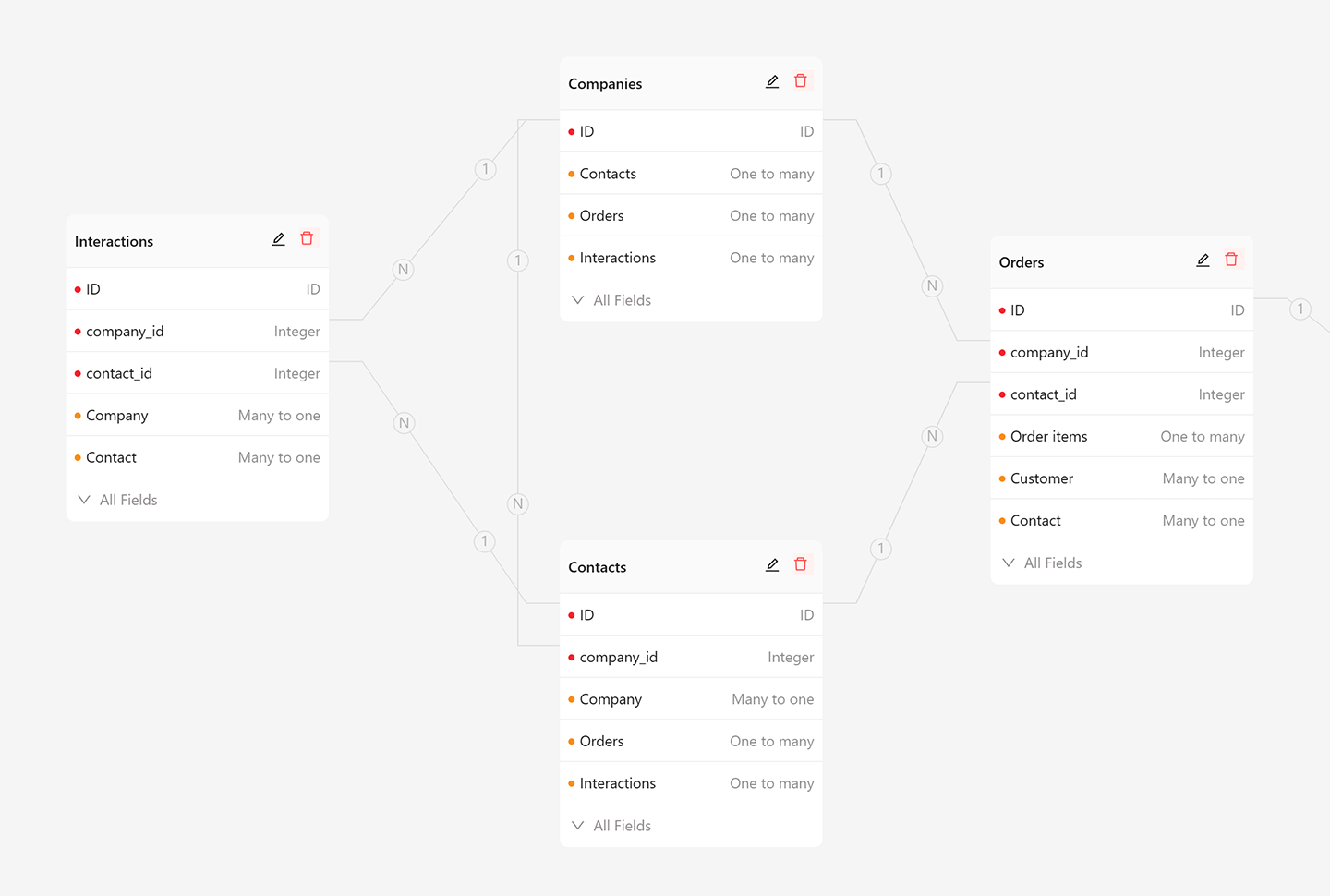
### 1. Data model-driven, not form/table–driven
|
|
188
42
|
|
|
189
|
-
|
|
190
|
-
nb skills install
|
|
191
|
-
nb skills update
|
|
192
|
-
```
|
|
43
|
+
Instead of being constrained by forms or tables, NocoBase adopts a data model–driven approach, separating data structure from user interface to unlock unlimited possibilities.
|
|
193
44
|
|
|
194
|
-
|
|
45
|
+
- UI and data structure are fully decoupled
|
|
46
|
+
- Multiple blocks and actions can be created for the same table or record in any quantity or form
|
|
47
|
+
- Supports the main database, external databases, and third-party APIs as data sources
|
|
195
48
|
|
|
196
|
-
|
|
49
|
+
|
|
197
50
|
|
|
198
|
-
|
|
51
|
+
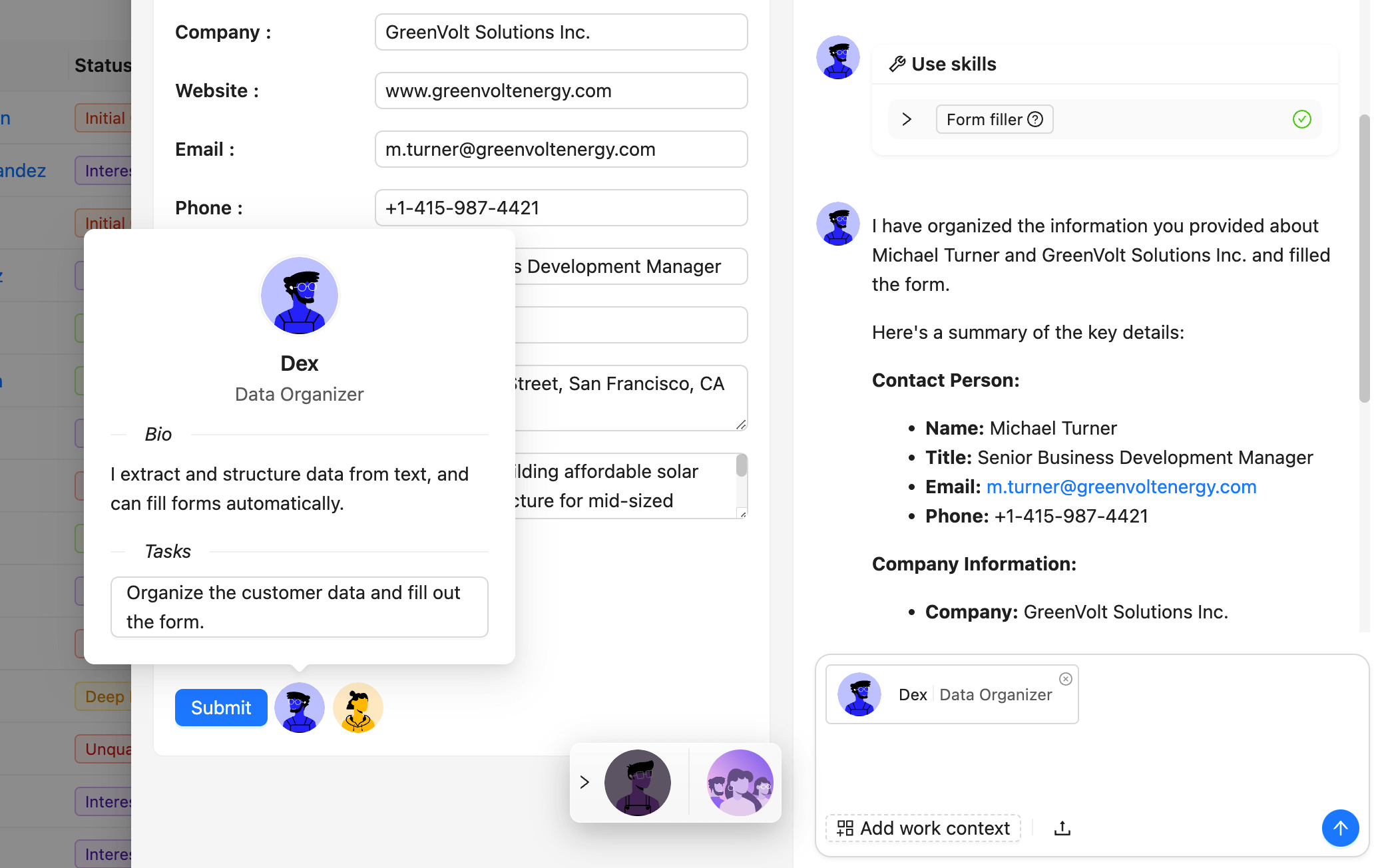
### 2. AI employees, integrated into your business systems
|
|
52
|
+
Unlike standalone AI demos, NocoBase allows you to embed AI capabilities seamlessly into your interfaces, workflows, and data context, making AI truly useful in real business scenarios.
|
|
199
53
|
|
|
200
|
-
|
|
201
|
-
|
|
202
|
-
|
|
203
|
-
nb app restart --env app1
|
|
204
|
-
nb app logs --env app1
|
|
205
|
-
nb app stop --env app1
|
|
206
|
-
```
|
|
54
|
+
- Define AI employees for roles such as translator, analyst, researcher, or assistant
|
|
55
|
+
- Seamless AI–human collaboration in interfaces and workflows
|
|
56
|
+
- Ensure AI usage is secure, transparent, and customizable for your business needs
|
|
207
57
|
|
|
208
|
-
|
|
58
|
+
|
|
209
59
|
|
|
210
|
-
|
|
211
|
-
nb source download --source docker --version alpha --docker-platform auto
|
|
212
|
-
nb source download --source docker --version alpha --docker-platform linux/amd64
|
|
213
|
-
nb source download --source docker --version alpha --docker-platform linux/arm64
|
|
214
|
-
```
|
|
60
|
+
### 3. What you see is what you get, incredibly easy to use
|
|
215
61
|
|
|
216
|
-
|
|
62
|
+
While enabling the development of complex business systems, NocoBase keeps the experience simple and intuitive.
|
|
217
63
|
|
|
218
|
-
|
|
64
|
+
- One-click switch between usage mode and configuration mode
|
|
65
|
+
- Pages serve as a canvas to arrange blocks and actions, similar to Notion
|
|
66
|
+
- Configuration mode is designed for ordinary users, not just programmers
|
|
219
67
|
|
|
220
|
-
|
|
221
|
-
nb init --env app1 --yes --source git --version alpha
|
|
222
|
-
nb source dev --env app1
|
|
223
|
-
```
|
|
68
|
+

|
|
224
69
|
|
|
225
|
-
|
|
226
|
-
|
|
70
|
+
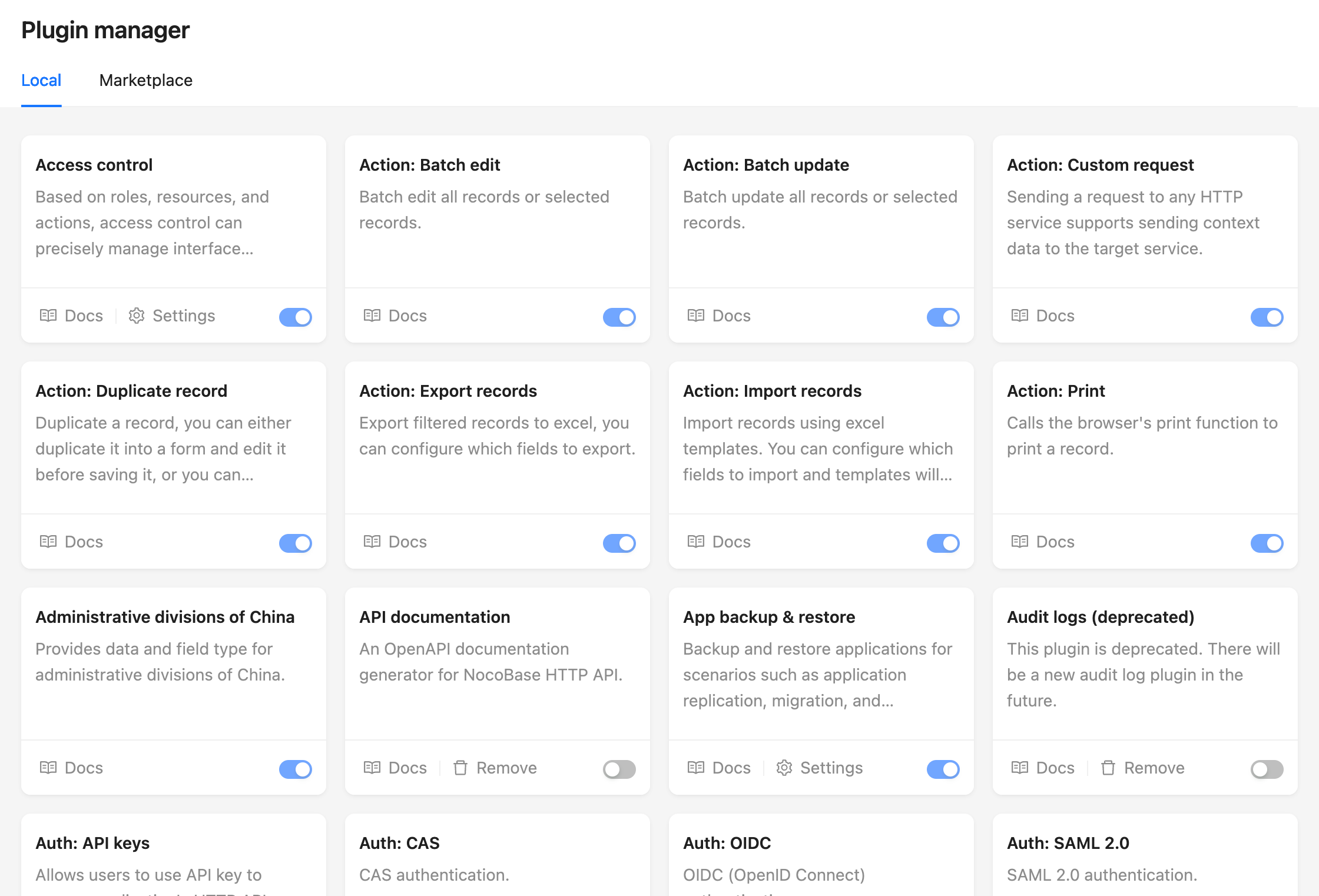
### 4. Everything is a plugin, designed for extension
|
|
71
|
+
Adding more no-code features will never cover every business case. NocoBase is built for extension through its plugin-based microkernel architecture.
|
|
227
72
|
|
|
228
|
-
|
|
73
|
+
- All functionalities are plugins, similar to WordPress
|
|
74
|
+
- Plugins are ready to use upon installation
|
|
75
|
+
- Pages, blocks, actions, APIs, and data sources can all be extended through custom plugins
|
|
229
76
|
|
|
230
|
-
|
|
231
|
-
path, or add the env directly:
|
|
77
|
+
|
|
232
78
|
|
|
233
|
-
|
|
234
|
-
nb env add app1 --api-base-url http://localhost:13000/api
|
|
235
|
-
```
|
|
236
|
-
|
|
237
|
-
`nb env add` will start the authentication flow automatically when needed.
|
|
238
|
-
|
|
239
|
-
## Upgrade
|
|
240
|
-
|
|
241
|
-
Upgrade refreshes the saved source or image, then restarts the app:
|
|
242
|
-
|
|
243
|
-
```bash
|
|
244
|
-
nb app upgrade --env app1
|
|
245
|
-
```
|
|
246
|
-
|
|
247
|
-
Use `--skip-code-update` or `-s` to restart with the saved local code or Docker
|
|
248
|
-
image without downloading updates first:
|
|
249
|
-
|
|
250
|
-
```bash
|
|
251
|
-
nb app upgrade --env app1 -s
|
|
252
|
-
```
|
|
253
|
-
|
|
254
|
-
## Database Commands
|
|
255
|
-
|
|
256
|
-
Use `nb db` to inspect or manage the built-in database runtime for a local env:
|
|
257
|
-
|
|
258
|
-
```bash
|
|
259
|
-
nb db ps
|
|
260
|
-
nb db ps --env app1
|
|
261
|
-
nb db start --env app1
|
|
262
|
-
nb db stop --env app1
|
|
263
|
-
nb db logs --env app1
|
|
264
|
-
```
|
|
265
|
-
|
|
266
|
-
Notes:
|
|
267
|
-
|
|
268
|
-
- `nb db start` can also recreate the saved built-in database container when it has been removed.
|
|
269
|
-
- `nb db start` and `nb db stop` only work for envs created with the built-in database option enabled.
|
|
270
|
-
- `nb db logs` only works for envs created with the built-in database option enabled.
|
|
271
|
-
- `nb db ps` can also show `external` or `remote` status for envs that do not have a CLI-managed database container.
|
|
272
|
-
|
|
273
|
-
## Cleanup
|
|
274
|
-
|
|
275
|
-
Stop only the app runtime:
|
|
276
|
-
|
|
277
|
-
```bash
|
|
278
|
-
nb app stop --env app1
|
|
279
|
-
```
|
|
280
|
-
|
|
281
|
-
Stop the app runtime and also remove the CLI-managed built-in database runtime when present:
|
|
282
|
-
|
|
283
|
-
```bash
|
|
284
|
-
nb app stop --env app1 --with-db
|
|
285
|
-
```
|
|
286
|
-
|
|
287
|
-
- `nb app stop` keeps storage data and the saved CLI env config.
|
|
288
|
-
- Docker envs remove the saved app container when stopped.
|
|
289
|
-
- `--with-db` only affects CLI-managed built-in databases. External databases are not touched.
|
|
290
|
-
|
|
291
|
-
Destroy the env's managed local resources:
|
|
292
|
-
|
|
293
|
-
```bash
|
|
294
|
-
nb app destroy --env app1
|
|
295
|
-
nb app destroy --env app1 --force
|
|
296
|
-
```
|
|
297
|
-
|
|
298
|
-
- `nb app destroy` removes managed runtime resources, storage data, and the saved CLI env config.
|
|
299
|
-
- For downloaded npm/Git envs, `nb app destroy` also removes the saved local app files. Custom local app directories are kept.
|
|
300
|
-
- In interactive terminals, `nb app destroy` requires a strong confirmation prompt. In non-interactive mode, re-run with `--env <name> --force`.
|
|
301
|
-
- `nb app down` is deprecated. Use `nb app stop --with-db` for runtime cleanup, or `nb app destroy` for destructive cleanup.
|
|
302
|
-
|
|
303
|
-
## Environment Management
|
|
304
|
-
|
|
305
|
-
Show the current env:
|
|
306
|
-
|
|
307
|
-
```bash
|
|
308
|
-
nb env
|
|
309
|
-
```
|
|
310
|
-
|
|
311
|
-
Show only the current env name:
|
|
312
|
-
|
|
313
|
-
```bash
|
|
314
|
-
nb env current
|
|
315
|
-
```
|
|
316
|
-
|
|
317
|
-
Set up shell session integration for `NB_SESSION_ID`:
|
|
318
|
-
|
|
319
|
-
```bash
|
|
320
|
-
nb session setup
|
|
321
|
-
nb session id
|
|
322
|
-
nb session remove
|
|
323
|
-
```
|
|
324
|
-
|
|
325
|
-
List configured envs with token-verified API status:
|
|
326
|
-
|
|
327
|
-
```bash
|
|
328
|
-
nb env list
|
|
329
|
-
```
|
|
330
|
-
|
|
331
|
-
Show details for one env:
|
|
332
|
-
|
|
333
|
-
```bash
|
|
334
|
-
nb env info app1
|
|
335
|
-
```
|
|
336
|
-
|
|
337
|
-
Switch the current env:
|
|
338
|
-
|
|
339
|
-
```bash
|
|
340
|
-
nb env use app1
|
|
341
|
-
```
|
|
342
|
-
|
|
343
|
-
Re-authenticate an env when credentials need to be refreshed:
|
|
344
|
-
|
|
345
|
-
```bash
|
|
346
|
-
nb env auth app1
|
|
347
|
-
```
|
|
348
|
-
|
|
349
|
-
Update runtime command metadata from the selected app:
|
|
350
|
-
|
|
351
|
-
```bash
|
|
352
|
-
nb env update app1
|
|
353
|
-
```
|
|
354
|
-
|
|
355
|
-
## API Commands
|
|
356
|
-
|
|
357
|
-
The CLI can call NocoBase resources through the configured env:
|
|
358
|
-
|
|
359
|
-
```bash
|
|
360
|
-
nb api resource list --resource users -e app1
|
|
361
|
-
nb api resource get --resource users --filter-by-tk 1 -e app1
|
|
362
|
-
nb api resource create --resource users --values '{"nickname":"Ada"}' -e app1
|
|
363
|
-
```
|
|
364
|
-
|
|
365
|
-
Create and download a backup:
|
|
366
|
-
|
|
367
|
-
```bash
|
|
368
|
-
nb api backup create -e app1
|
|
369
|
-
nb api backup status --name backup_20260430_120000_1234.nbdata -e app1
|
|
370
|
-
nb api backup download --name backup_20260430_120000_1234.nbdata --output ./backup.nbdata -e app1
|
|
371
|
-
```
|
|
372
|
-
|
|
373
|
-
Restore or run a migration package:
|
|
79
|
+
## Installation
|
|
374
80
|
|
|
375
|
-
|
|
376
|
-
nb api backup restore-upload --file ./backup.nbdata -e app1
|
|
377
|
-
nb api migration rules create --name default --user-defined-rule schema-only --system-defined-rule overwrite-first -e app1
|
|
378
|
-
nb api migration create --rule-id 1 --title release-20260430 -e app1
|
|
379
|
-
nb api migration execute --file ./migration.nbdata -e app1
|
|
380
|
-
```
|
|
81
|
+
NocoBase supports three installation methods:
|
|
381
82
|
|
|
382
|
-
|
|
83
|
+
- <a target="_blank" href="https://docs.nocobase.com/welcome/getting-started/installation/docker-compose">Installing With Docker (👍Recommended)</a>
|
|
383
84
|
|
|
384
|
-
|
|
385
|
-
nb api resource list --resource users -e app1 -j
|
|
386
|
-
```
|
|
85
|
+
Suitable for no-code scenarios, no code to write. When upgrading, just download the latest image and reboot.
|
|
387
86
|
|
|
388
|
-
|
|
87
|
+
- <a target="_blank" href="https://docs.nocobase.com/welcome/getting-started/installation/create-nocobase-app">Installing from create-nocobase-app CLI</a>
|
|
389
88
|
|
|
390
|
-
|
|
391
|
-
| --- | --- |
|
|
392
|
-
| `nb api acl` | Manage access control based on roles, resources, and actions. |
|
|
393
|
-
| `nb api api-keys` | Manage API keys for HTTP API access. |
|
|
394
|
-
| `nb api app` | Manage application resources. |
|
|
395
|
-
| `nb api authenticators` | Manage user authentication, including password auth, SMS auth, SSO protocols, and extensible providers. |
|
|
396
|
-
| `nb api backup` | Create, download, remove, and restore backups. |
|
|
397
|
-
| `nb api data-modeling` | Manage data sources, collections, and database modeling resources. |
|
|
398
|
-
| `nb api file-manager` | Manage file storage services, file collections, and attachment fields. |
|
|
399
|
-
| `nb api flow-surfaces` | Compose and mutate page, tab, block, field, and action surfaces. |
|
|
400
|
-
| `nb api migration` | Create, check, execute, and inspect migration packages. |
|
|
401
|
-
| `nb api pm` | Manage plugins through API commands. |
|
|
402
|
-
| `nb api resource` | Work with generic collection resources. |
|
|
403
|
-
| `nb api system-settings` | Adjust system title, logo, language, and other global settings. |
|
|
404
|
-
| `nb api theme-editor` | Customize UI colors and dimensions, save themes, and switch between them. |
|
|
405
|
-
| `nb api workflow` | Manage workflow resources for business automation. |
|
|
89
|
+
The business code of the project is completely independent and supports low-code development.
|
|
406
90
|
|
|
407
|
-
|
|
91
|
+
- <a target="_blank" href="https://docs.nocobase.com/welcome/getting-started/installation/git-clone">Installing from Git source code</a>
|
|
408
92
|
|
|
409
|
-
|
|
93
|
+
If you want to experience the latest unreleased version, or want to participate in the contribution, you need to make changes and debug on the source code, it is recommended to choose this installation method, which requires a high level of development skills, and if the code has been updated, you can git pull the latest code.
|
|
410
94
|
|
|
411
|
-
|
|
412
|
-
- `versions/<version>/commands.json`: cached runtime commands generated from the target app.
|
|
95
|
+
## How NocoBase works
|
|
413
96
|
|
|
414
|
-
|
|
415
|
-
|
|
416
|
-
|
|
97
|
+
<video width="100%" controls>
|
|
98
|
+
<source src="https://github.com/user-attachments/assets/8d183b44-9bb5-4792-b08f-bc08fe8dfaaf" type="video/mp4">
|
|
99
|
+
</video>
|