@nitrostack/cli 1.0.8 → 1.0.9
This diff represents the content of publicly available package versions that have been released to one of the supported registries. The information contained in this diff is provided for informational purposes only and reflects changes between package versions as they appear in their respective public registries.
- package/README.md +4 -0
- package/assets/gif/nitrocli.gif +0 -0
- package/assets/gif/nitrostudio-main.gif +0 -0
- package/dist/index.js +1 -1
- package/package.json +3 -2
- package/templates/typescript-oauth/README.md +2 -0
- package/templates/typescript-pizzaz/README.md +2 -0
- package/templates/typescript-starter/README.md +2 -0
package/README.md
CHANGED
|
@@ -37,6 +37,8 @@ npm install -g @nitrostack/cli
|
|
|
37
37
|
nitrostack-cli init my-project
|
|
38
38
|
```
|
|
39
39
|
|
|
40
|
+
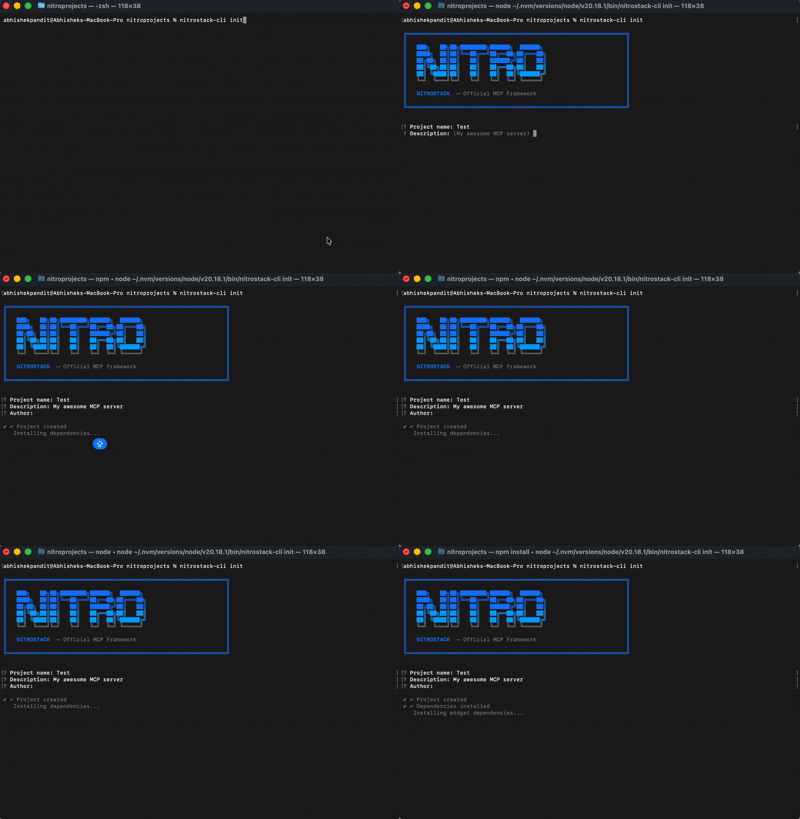
|
|
41
|
+
|
|
40
42
|
### Start Development Server
|
|
41
43
|
```bash
|
|
42
44
|
nitrostack-cli dev
|
|
@@ -58,6 +60,8 @@ nitrostack-cli build
|
|
|
58
60
|
|
|
59
61
|
NitroStudio works seamlessly with your projects. You don't even need to run a dev command—**opening your project in NitroStudio starts the server automatically.**
|
|
60
62
|
|
|
63
|
+
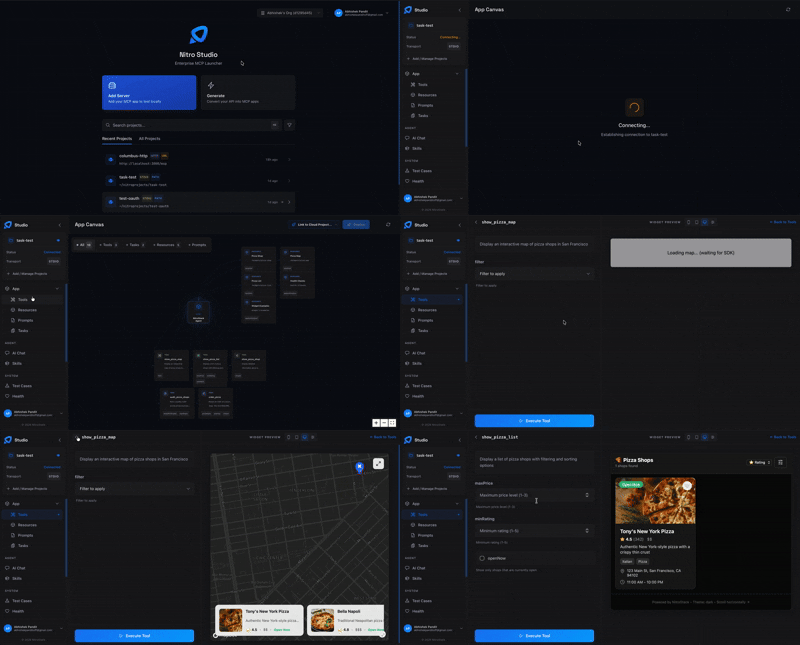
|
|
64
|
+
|
|
61
65
|
**[Download NitroStudio](https://nitrostack.ai/studio)**
|
|
62
66
|
|
|
63
67
|
---
|
|
Binary file
|
|
Binary file
|
package/dist/index.js
CHANGED
|
@@ -20,7 +20,7 @@ export function createProgram() {
|
|
|
20
20
|
.command('init')
|
|
21
21
|
.description('Initialize a new NitroStack project')
|
|
22
22
|
.argument('[project-name]', 'Name of the project')
|
|
23
|
-
.option('--template <template>', 'Template to use (typescript-starter, typescript-pizzaz, typescript-oauth)'
|
|
23
|
+
.option('--template <template>', 'Template to use (typescript-starter, typescript-pizzaz, typescript-oauth)')
|
|
24
24
|
.option('--description <description>', 'Description of the project')
|
|
25
25
|
.option('--author <author>', 'Author of the project')
|
|
26
26
|
.option('--skip-install', 'Skip installing dependencies')
|
package/package.json
CHANGED
|
@@ -1,6 +1,6 @@
|
|
|
1
1
|
{
|
|
2
2
|
"name": "@nitrostack/cli",
|
|
3
|
-
"version": "1.0.
|
|
3
|
+
"version": "1.0.9",
|
|
4
4
|
"description": "CLI for NitroStack - Create and manage MCP server projects",
|
|
5
5
|
"type": "module",
|
|
6
6
|
"main": "dist/index.js",
|
|
@@ -19,7 +19,8 @@
|
|
|
19
19
|
"files": [
|
|
20
20
|
"dist/",
|
|
21
21
|
"templates/",
|
|
22
|
-
"README.md"
|
|
22
|
+
"README.md",
|
|
23
|
+
"assets"
|
|
23
24
|
],
|
|
24
25
|
"scripts": {
|
|
25
26
|
"build": "tsc && chmod +x dist/index.js",
|
|
@@ -30,6 +30,8 @@ npm run install:all
|
|
|
30
30
|
|
|
31
31
|
Experience the visual seat selection and flight search as your users would see it.
|
|
32
32
|
|
|
33
|
+

|
|
34
|
+
|
|
33
35
|
1. **Download NitroStudio**: [nitrostack.ai/studio](https://nitrostack.ai/studio)
|
|
34
36
|
2. **Open Project**: Launch NitroStudio and select your project folder.
|
|
35
37
|
|
|
@@ -30,6 +30,8 @@ npm run install:all
|
|
|
30
30
|
|
|
31
31
|
NitroStudio provides the best experience for visual testing of widgets and maps.
|
|
32
32
|
|
|
33
|
+

|
|
34
|
+
|
|
33
35
|
1. **Download NitroStudio**: [nitrostack.ai/studio](https://nitrostack.ai/studio)
|
|
34
36
|
2. **Open Project**: Launch NitroStudio and select your project folder.
|
|
35
37
|
3. **View Maps**: Use the chat or visual tools to explore your pizza shops.
|
|
@@ -38,6 +38,8 @@ npm run install:all
|
|
|
38
38
|
|
|
39
39
|
NitroStudio is the recommended visual client for running, testing, and managing your NitroStack projects.
|
|
40
40
|
|
|
41
|
+

|
|
42
|
+
|
|
41
43
|
1. **Download NitroStudio**: [nitrostack.ai/studio](https://nitrostack.ai/studio)
|
|
42
44
|
2. **Open Project**: Launch NitroStudio and open this project folder.
|
|
43
45
|
3. **Run**: NitroStudio handles the rest!
|