@ninebone/datagrid 0.1.2 → 0.1.6
This diff represents the content of publicly available package versions that have been released to one of the supported registries. The information contained in this diff is provided for informational purposes only and reflects changes between package versions as they appear in their respective public registries.
- package/README.md +19 -156
- package/dist/css/nine-table.css +5 -0
- package/dist/nine-table.js +170 -159
- package/dist/nine-table.js.map +1 -1
- package/dist/nine-table.umd.js +8 -8
- package/dist/nine-table.umd.js.map +1 -1
- package/package.json +4 -9
package/README.md
CHANGED
|
@@ -33,58 +33,29 @@ Tired of heavy, overly complex JavaScript data grids? **Ninelab HTML Table** pre
|
|
|
33
33
|
|
|
34
34
|
```bash
|
|
35
35
|
npm install @ninebone/datagrid
|
|
36
|
+
```
|
|
36
37
|
|
|
37
38
|
|
|
38
39
|
### 2. HTML example
|
|
39
40
|
|
|
40
41
|
```html
|
|
41
|
-
|
|
42
|
-
|
|
43
|
-
|
|
44
|
-
|
|
45
|
-
|
|
46
|
-
|
|
47
|
-
|
|
48
|
-
|
|
49
|
-
|
|
50
|
-
|
|
51
|
-
|
|
52
|
-
|
|
53
|
-
|
|
54
|
-
|
|
55
|
-
|
|
56
|
-
</colgroup>
|
|
57
|
-
<thead>
|
|
58
|
-
<tr>
|
|
59
|
-
<th cell-type="checkbox"></th>
|
|
60
|
-
<th>Avatar & Name</th>
|
|
61
|
-
<th>Status Badge</th>
|
|
62
|
-
<th>Input Editor</th>
|
|
63
|
-
</tr>
|
|
64
|
-
</thead>
|
|
65
|
-
<tbody>
|
|
66
|
-
<tr>
|
|
67
|
-
<!-- Checkbox Cell -->
|
|
68
|
-
<td data-bind="sel" cell-type="checkbox"></td>
|
|
69
|
-
|
|
70
|
-
<!-- Custom Image Renderer -->
|
|
71
|
-
<td data-bind="NAME" data-expr="host.renderImage(data.PIC)" html="true"></td>
|
|
72
|
-
|
|
73
|
-
<!-- Custom Badge / Chart Renderer -->
|
|
74
|
-
<td data-expr="host.renderBadge(data.REC1, data.REC2)" html="true"></td>
|
|
75
|
-
|
|
76
|
-
<!-- Inline Input Binding -->
|
|
77
|
-
<td data-bind="NAME" cell-type="input" enable="data.REC1 > 30"></td>
|
|
78
|
-
</tr>
|
|
79
|
-
</tbody>
|
|
80
|
-
</table>
|
|
81
|
-
</ninelab-table>
|
|
82
|
-
</div>
|
|
83
|
-
|
|
84
|
-
<script>
|
|
42
|
+
<ninelab-table show-footer="true">
|
|
43
|
+
<table row-indicator="true">
|
|
44
|
+
<tbody>
|
|
45
|
+
<tr>
|
|
46
|
+
<td data-bind="sel" cell-type="checkbox"></td>
|
|
47
|
+
<td data-bind="NAME" data-expr="host.renderImage(data.PIC)" html="true"></td>
|
|
48
|
+
<td data-expr="host.renderBadge(data.REC1, data.REC2)" html="true"></td>
|
|
49
|
+
<td data-bind="NAME" cell-type="input" enable="data.REC1 > 30"></td>
|
|
50
|
+
</tr>
|
|
51
|
+
</tbody>
|
|
52
|
+
</table>
|
|
53
|
+
</ninelab-table>
|
|
54
|
+
|
|
55
|
+
|
|
56
|
+
<script>
|
|
85
57
|
const grd = document.querySelector("nine-table");
|
|
86
58
|
|
|
87
|
-
// Define custom provider helper functions used in data-expr
|
|
88
59
|
grd.provider.add({
|
|
89
60
|
getCommonCode: (group) => exampleData.generateCommonCode(group),
|
|
90
61
|
renderImage: (v) => `<img src="${v}" style="vertical-align:middle; width:58px; height:58px; border-radius:50%;" />`,
|
|
@@ -95,124 +66,16 @@ npm install @ninebone/datagrid
|
|
|
95
66
|
// Binding Data
|
|
96
67
|
grd.data.set([
|
|
97
68
|
{
|
|
98
|
-
A: "a",
|
|
99
|
-
...
|
|
100
69
|
},
|
|
101
70
|
...
|
|
102
71
|
]);
|
|
103
72
|
});
|
|
104
|
-
|
|
105
|
-
|
|
106
|
-
</html>
|
|
107
|
-
|
|
73
|
+
</script>
|
|
74
|
+
|
|
108
75
|
```
|
|
109
|
-
# Ninelab HTML Table (`@ninebone/datagrid`)
|
|
110
|
-
|
|
111
|
-
> **Blazing-fast performance powered by native HTML tags** — A next-generation table extension supporting 1,000,000+ rows virtual rendering and seamless inline editing out of the box.
|
|
112
|
-
|
|
113
|
-
[](https://opensource.org/licenses/MIT)
|
|
114
|
-
[](https://www.npmjs.com/)
|
|
115
|
-
|
|
116
|
-
Tired of heavy, overly complex JavaScript data grids? **Ninelab HTML Table** preserves the familiar structure of native HTML tags while leveraging advanced DOM virtualization to handle massive datasets effortlessly and provide a frictionless inline editing experience.
|
|
117
|
-
|
|
118
|
-
---
|
|
119
|
-
|
|
120
|
-
## Key Features
|
|
121
|
-
|
|
122
|
-
- **1M+ DOM Virtualized Rendering:** Scroll and render over a million rows in a fraction of a second without dropping frames.
|
|
123
|
-
- **Seamless Inline Editing & Form Binding:** Native support for Text, Number, Date, Color, Checkbox, Radio, and Combo (Autocomplete) input types.
|
|
124
|
-
- **HTML Tag-Based (Zero Learning Curve):** No complicated JS configuration objects required—build tables using familiar tag structures.
|
|
125
|
-
- **Shadow DOM & CSS Variables:** Perfect style encapsulation with zero CSS pollution, easily customizable via CSS variables.
|
|
126
|
-
- **Framework Agnostic:** Drops seamlessly into React, Vue, Svelte, or Vanilla JS.
|
|
127
|
-
|
|
128
|
-
---
|
|
129
|
-
|
|
130
|
-
## Live Demo & Previews
|
|
131
|
-
|
|
132
|
-
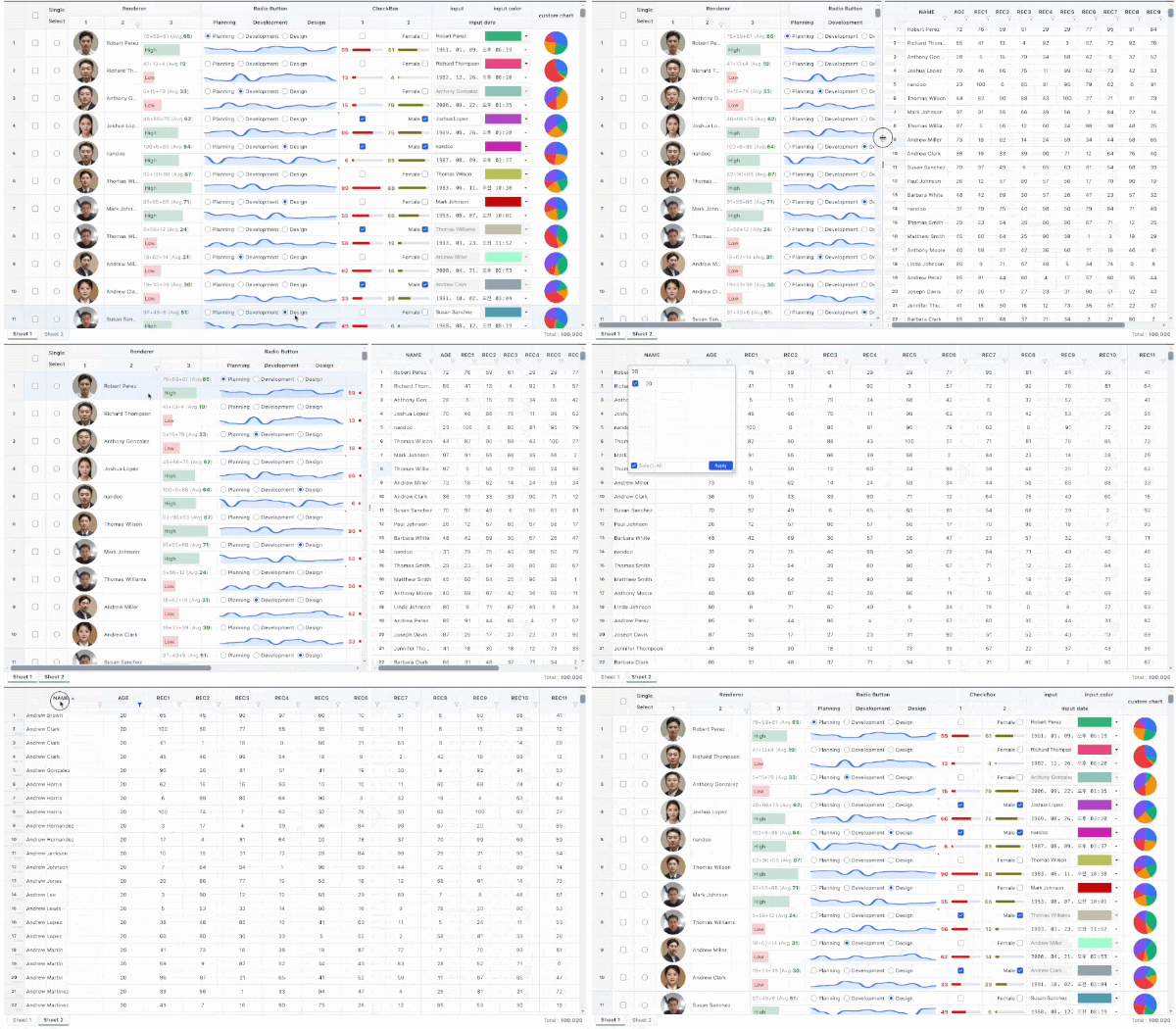
|
|
133
|
-
|
|
134
|
-
- [Live Demo](https://ninebone.github.io/datagrid/)
|
|
135
|
-
|
|
136
|
-
---
|
|
137
|
-
|
|
138
|
-
## Quick Start
|
|
139
|
-
|
|
140
|
-
### 1. Installation
|
|
141
|
-
|
|
142
|
-
```bash
|
|
143
|
-
npm install @ninebone/datagrid
|
|
144
|
-
|
|
145
|
-
|
|
146
|
-
### 2. HTML example
|
|
147
76
|
|
|
148
77
|
```html
|
|
149
|
-
<
|
|
150
|
-
<head>
|
|
151
|
-
<script type="text/javascript" src="https://cdn.jsdelivr.net/npm/@ninebone/util@latest/dist/nine-util.umd.js"></script>
|
|
152
|
-
<script type="text/javascript" src="https://cdn.jsdelivr.net/npm/@ninebone/datagrid@latest/dist/nine-table.umd.js"></script>
|
|
153
|
-
</head>
|
|
154
|
-
<body>
|
|
155
|
-
|
|
156
|
-
<div style="height: 600px;">
|
|
157
|
-
<ninelab-table show-footer="true">
|
|
158
|
-
<table row-indicator="true">
|
|
159
|
-
<colgroup>
|
|
160
|
-
<col width="50" fixed="left"/>
|
|
161
|
-
<col width="130"/>
|
|
162
|
-
<col width="100"/>
|
|
163
|
-
<col width="110"/>
|
|
164
|
-
</colgroup>
|
|
165
|
-
<thead>
|
|
166
|
-
<tr>
|
|
167
|
-
<th cell-type="checkbox"></th>
|
|
168
|
-
<th>Avatar & Name</th>
|
|
169
|
-
<th>Status Badge</th>
|
|
170
|
-
<th>Input Editor</th>
|
|
171
|
-
</tr>
|
|
172
|
-
</thead>
|
|
173
|
-
<tbody>
|
|
174
|
-
<tr>
|
|
175
|
-
<!-- Checkbox Cell -->
|
|
176
|
-
<td data-bind="sel" cell-type="checkbox"></td>
|
|
177
|
-
|
|
178
|
-
<!-- Custom Image Renderer -->
|
|
179
|
-
<td data-bind="NAME" data-expr="host.renderImage(data.PIC)" html="true"></td>
|
|
180
|
-
|
|
181
|
-
<!-- Custom Badge / Chart Renderer -->
|
|
182
|
-
<td data-expr="host.renderBadge(data.REC1, data.REC2)" html="true"></td>
|
|
183
|
-
|
|
184
|
-
<!-- Inline Input Binding -->
|
|
185
|
-
<td data-bind="NAME" cell-type="input" enable="data.REC1 > 30"></td>
|
|
186
|
-
</tr>
|
|
187
|
-
</tbody>
|
|
188
|
-
</table>
|
|
189
|
-
</ninelab-table>
|
|
190
|
-
</div>
|
|
191
|
-
|
|
192
|
-
<script>
|
|
193
|
-
const grd = document.querySelector("nine-table");
|
|
194
|
-
|
|
195
|
-
// Define custom provider helper functions used in data-expr
|
|
196
|
-
grd.provider.add({
|
|
197
|
-
getCommonCode: (group) => exampleData.generateCommonCode(group),
|
|
198
|
-
renderImage: (v) => `<img src="${v}" style="vertical-align:middle; width:58px; height:58px; border-radius:50%;" />`,
|
|
199
|
-
renderBadge: (v1, v2) => `<span>Score: ${Number(v1) + Number(v2)}</span>`,
|
|
200
|
-
});
|
|
201
|
-
|
|
202
|
-
grd.addEventListener("load", () => {
|
|
203
|
-
// Binding Data
|
|
204
|
-
grd.data.set([
|
|
205
|
-
{
|
|
206
|
-
A: "a",
|
|
207
|
-
...
|
|
208
|
-
},
|
|
209
|
-
...
|
|
210
|
-
]);
|
|
211
|
-
});
|
|
212
|
-
</script>
|
|
213
|
-
</body>
|
|
214
|
-
</html>
|
|
215
|
-
|
|
78
|
+
<ninelab-table show-footer="true">
|
|
216
79
|
```
|
|
217
80
|
|
|
218
81
|
|