@ninebone/datagrid 0.0.24 → 0.1.2
This diff represents the content of publicly available package versions that have been released to one of the supported registries. The information contained in this diff is provided for informational purposes only and reflects changes between package versions as they appear in their respective public registries.
- package/README.md +111 -5
- package/dist/css/nine-table.css +119 -26
- package/dist/nine-table.js +291 -141
- package/dist/nine-table.js.map +1 -1
- package/dist/nine-table.umd.js +12 -16
- package/dist/nine-table.umd.js.map +1 -1
- package/package.json +1 -1
package/README.md
CHANGED
|
@@ -25,9 +25,113 @@ Tired of heavy, overly complex JavaScript data grids? **Ninelab HTML Table** pre
|
|
|
25
25
|
|
|
26
26
|
- [Live Demo](https://ninebone.github.io/datagrid/)
|
|
27
27
|
|
|
28
|
-
|
|
29
|
-
|
|
30
|
-
|
|
28
|
+
---
|
|
29
|
+
|
|
30
|
+
## Quick Start
|
|
31
|
+
|
|
32
|
+
### 1. Installation
|
|
33
|
+
|
|
34
|
+
```bash
|
|
35
|
+
npm install @ninebone/datagrid
|
|
36
|
+
|
|
37
|
+
|
|
38
|
+
### 2. HTML example
|
|
39
|
+
|
|
40
|
+
```html
|
|
41
|
+
<html>
|
|
42
|
+
<head>
|
|
43
|
+
<script type="text/javascript" src="https://cdn.jsdelivr.net/npm/@ninebone/util@latest/dist/nine-util.umd.js"></script>
|
|
44
|
+
<script type="text/javascript" src="https://cdn.jsdelivr.net/npm/@ninebone/datagrid@latest/dist/nine-table.umd.js"></script>
|
|
45
|
+
</head>
|
|
46
|
+
<body>
|
|
47
|
+
|
|
48
|
+
<div style="height: 600px;">
|
|
49
|
+
<ninelab-table show-footer="true">
|
|
50
|
+
<table row-indicator="true">
|
|
51
|
+
<colgroup>
|
|
52
|
+
<col width="50" fixed="left"/>
|
|
53
|
+
<col width="130"/>
|
|
54
|
+
<col width="100"/>
|
|
55
|
+
<col width="110"/>
|
|
56
|
+
</colgroup>
|
|
57
|
+
<thead>
|
|
58
|
+
<tr>
|
|
59
|
+
<th cell-type="checkbox"></th>
|
|
60
|
+
<th>Avatar & Name</th>
|
|
61
|
+
<th>Status Badge</th>
|
|
62
|
+
<th>Input Editor</th>
|
|
63
|
+
</tr>
|
|
64
|
+
</thead>
|
|
65
|
+
<tbody>
|
|
66
|
+
<tr>
|
|
67
|
+
<!-- Checkbox Cell -->
|
|
68
|
+
<td data-bind="sel" cell-type="checkbox"></td>
|
|
69
|
+
|
|
70
|
+
<!-- Custom Image Renderer -->
|
|
71
|
+
<td data-bind="NAME" data-expr="host.renderImage(data.PIC)" html="true"></td>
|
|
72
|
+
|
|
73
|
+
<!-- Custom Badge / Chart Renderer -->
|
|
74
|
+
<td data-expr="host.renderBadge(data.REC1, data.REC2)" html="true"></td>
|
|
75
|
+
|
|
76
|
+
<!-- Inline Input Binding -->
|
|
77
|
+
<td data-bind="NAME" cell-type="input" enable="data.REC1 > 30"></td>
|
|
78
|
+
</tr>
|
|
79
|
+
</tbody>
|
|
80
|
+
</table>
|
|
81
|
+
</ninelab-table>
|
|
82
|
+
</div>
|
|
83
|
+
|
|
84
|
+
<script>
|
|
85
|
+
const grd = document.querySelector("nine-table");
|
|
86
|
+
|
|
87
|
+
// Define custom provider helper functions used in data-expr
|
|
88
|
+
grd.provider.add({
|
|
89
|
+
getCommonCode: (group) => exampleData.generateCommonCode(group),
|
|
90
|
+
renderImage: (v) => `<img src="${v}" style="vertical-align:middle; width:58px; height:58px; border-radius:50%;" />`,
|
|
91
|
+
renderBadge: (v1, v2) => `<span>Score: ${Number(v1) + Number(v2)}</span>`,
|
|
92
|
+
});
|
|
93
|
+
|
|
94
|
+
grd.addEventListener("load", () => {
|
|
95
|
+
// Binding Data
|
|
96
|
+
grd.data.set([
|
|
97
|
+
{
|
|
98
|
+
A: "a",
|
|
99
|
+
...
|
|
100
|
+
},
|
|
101
|
+
...
|
|
102
|
+
]);
|
|
103
|
+
});
|
|
104
|
+
</script>
|
|
105
|
+
</body>
|
|
106
|
+
</html>
|
|
107
|
+
|
|
108
|
+
```
|
|
109
|
+
# Ninelab HTML Table (`@ninebone/datagrid`)
|
|
110
|
+
|
|
111
|
+
> **Blazing-fast performance powered by native HTML tags** — A next-generation table extension supporting 1,000,000+ rows virtual rendering and seamless inline editing out of the box.
|
|
112
|
+
|
|
113
|
+
[](https://opensource.org/licenses/MIT)
|
|
114
|
+
[](https://www.npmjs.com/)
|
|
115
|
+
|
|
116
|
+
Tired of heavy, overly complex JavaScript data grids? **Ninelab HTML Table** preserves the familiar structure of native HTML tags while leveraging advanced DOM virtualization to handle massive datasets effortlessly and provide a frictionless inline editing experience.
|
|
117
|
+
|
|
118
|
+
---
|
|
119
|
+
|
|
120
|
+
## Key Features
|
|
121
|
+
|
|
122
|
+
- **1M+ DOM Virtualized Rendering:** Scroll and render over a million rows in a fraction of a second without dropping frames.
|
|
123
|
+
- **Seamless Inline Editing & Form Binding:** Native support for Text, Number, Date, Color, Checkbox, Radio, and Combo (Autocomplete) input types.
|
|
124
|
+
- **HTML Tag-Based (Zero Learning Curve):** No complicated JS configuration objects required—build tables using familiar tag structures.
|
|
125
|
+
- **Shadow DOM & CSS Variables:** Perfect style encapsulation with zero CSS pollution, easily customizable via CSS variables.
|
|
126
|
+
- **Framework Agnostic:** Drops seamlessly into React, Vue, Svelte, or Vanilla JS.
|
|
127
|
+
|
|
128
|
+
---
|
|
129
|
+
|
|
130
|
+
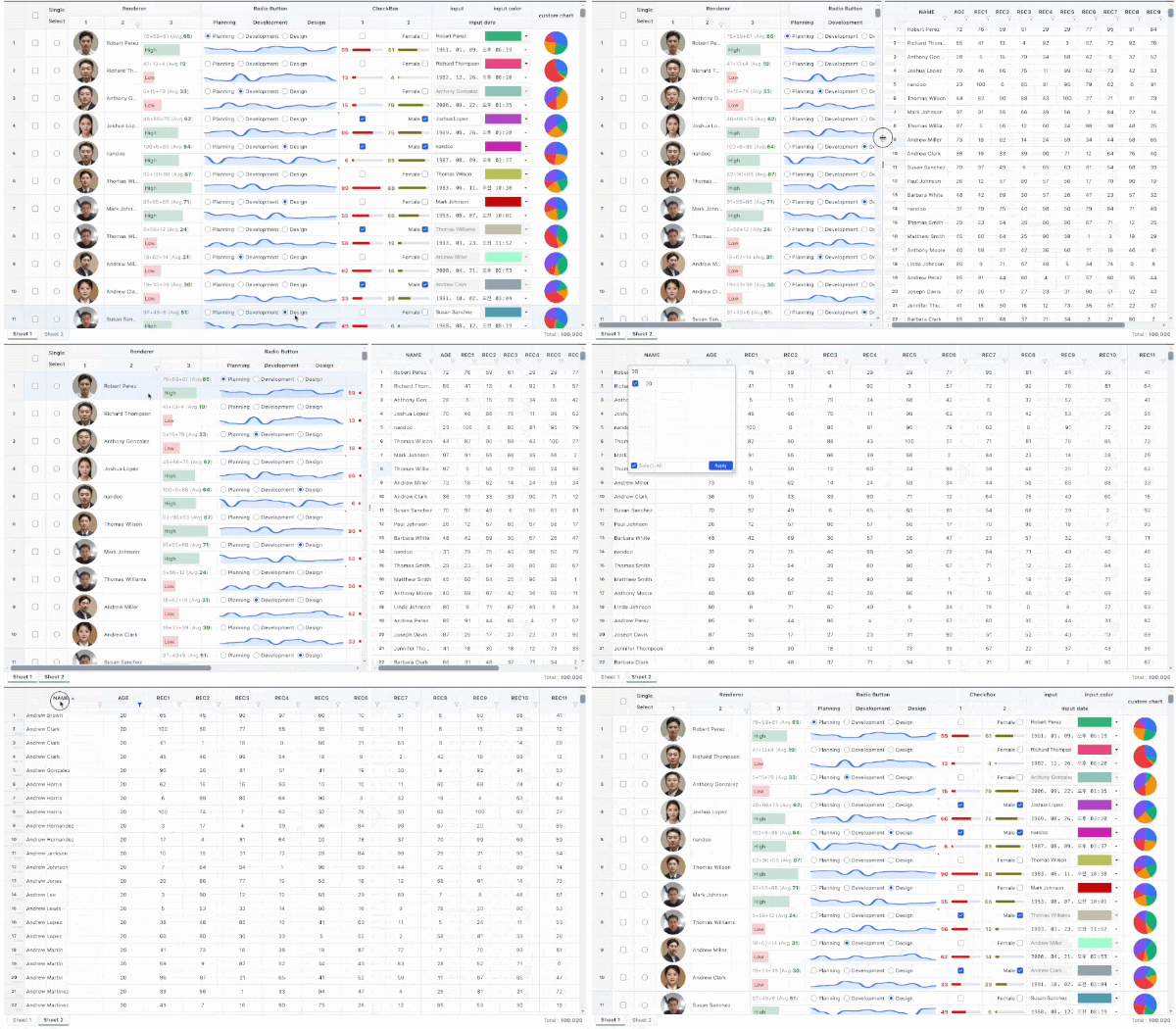
## Live Demo & Previews
|
|
131
|
+
|
|
132
|
+
|
|
133
|
+
|
|
134
|
+
- [Live Demo](https://ninebone.github.io/datagrid/)
|
|
31
135
|
|
|
32
136
|
---
|
|
33
137
|
|
|
@@ -38,9 +142,10 @@ Tired of heavy, overly complex JavaScript data grids? **Ninelab HTML Table** pre
|
|
|
38
142
|
```bash
|
|
39
143
|
npm install @ninebone/datagrid
|
|
40
144
|
|
|
41
|
-
<!-- HTML example -->
|
|
42
145
|
|
|
43
|
-
|
|
146
|
+
### 2. HTML example
|
|
147
|
+
|
|
148
|
+
```html
|
|
44
149
|
<html>
|
|
45
150
|
<head>
|
|
46
151
|
<script type="text/javascript" src="https://cdn.jsdelivr.net/npm/@ninebone/util@latest/dist/nine-util.umd.js"></script>
|
|
@@ -110,5 +215,6 @@ npm install @ninebone/datagrid
|
|
|
110
215
|
|
|
111
216
|
```
|
|
112
217
|
|
|
218
|
+
|
|
113
219
|
## LICENSE
|
|
114
220
|
MIT © 2026 ninebone
|
package/dist/css/nine-table.css
CHANGED
|
@@ -146,19 +146,22 @@ cell-combo-panel {
|
|
|
146
146
|
margin: 0;
|
|
147
147
|
resize: both;
|
|
148
148
|
|
|
149
|
-
|
|
149
|
+
input {
|
|
150
150
|
display: none;
|
|
151
|
-
|
|
152
|
-
|
|
151
|
+
width: 100%;
|
|
152
|
+
height: 32px;
|
|
153
|
+
box-sizing: border-box;
|
|
154
|
+
padding: 0px 8px;
|
|
155
|
+
border: none;
|
|
153
156
|
border-bottom: 1px solid #e5e7eb;
|
|
154
|
-
|
|
155
|
-
|
|
156
|
-
|
|
157
|
-
|
|
158
|
-
|
|
159
|
-
|
|
160
|
-
|
|
161
|
-
|
|
157
|
+
border-radius: 0px;
|
|
158
|
+
outline: none;
|
|
159
|
+
font-size: 12px;
|
|
160
|
+
background: #fafafa;
|
|
161
|
+
color: #333;
|
|
162
|
+
}
|
|
163
|
+
input:focus {
|
|
164
|
+
background: #ffffff;
|
|
162
165
|
}
|
|
163
166
|
|
|
164
167
|
.footer {
|
|
@@ -170,7 +173,9 @@ cell-combo-panel {
|
|
|
170
173
|
padding: 0 8px;
|
|
171
174
|
|
|
172
175
|
label {
|
|
173
|
-
|
|
176
|
+
display: flex;
|
|
177
|
+
align-items: center;
|
|
178
|
+
gap: 4px;
|
|
174
179
|
}
|
|
175
180
|
|
|
176
181
|
button {
|
|
@@ -201,11 +206,12 @@ cell-combo-panel.active {
|
|
|
201
206
|
}
|
|
202
207
|
|
|
203
208
|
cell-combo-panel.expand {
|
|
204
|
-
|
|
205
|
-
display:
|
|
209
|
+
input {
|
|
210
|
+
display: block;
|
|
206
211
|
}
|
|
207
212
|
}
|
|
208
213
|
|
|
214
|
+
|
|
209
215
|
cell-combo-panel.multi {
|
|
210
216
|
.footer {
|
|
211
217
|
display: flex;
|
|
@@ -214,7 +220,6 @@ cell-combo-panel.multi {
|
|
|
214
220
|
}
|
|
215
221
|
|
|
216
222
|
|
|
217
|
-
|
|
218
223
|
cell-combo-panel.loading {
|
|
219
224
|
nine-table-simple {
|
|
220
225
|
visibility: hidden;
|
|
@@ -287,6 +292,7 @@ cell-input-color {
|
|
|
287
292
|
-moz-appearance: none;
|
|
288
293
|
appearance: none;
|
|
289
294
|
background-color: transparent;
|
|
295
|
+
border-radius: 0;
|
|
290
296
|
}
|
|
291
297
|
|
|
292
298
|
input[type=color]::-webkit-color-swatch {
|
|
@@ -559,7 +565,6 @@ tbody {
|
|
|
559
565
|
.selected-left { border-left: 2px solid var(--cell-selection-border-color); }
|
|
560
566
|
.selected-right { border-right: 2px solid var(--cell-selection-border-color); }
|
|
561
567
|
}
|
|
562
|
-
|
|
563
568
|
nine-table-col-expand {
|
|
564
569
|
position: absolute;
|
|
565
570
|
right: 2px;
|
|
@@ -905,7 +910,6 @@ nine-table-filter-panel.loading::before {
|
|
|
905
910
|
|
|
906
911
|
|
|
907
912
|
:host([theme="simple"]) {
|
|
908
|
-
/* 1. 불필요한 패널 및 컴포넌트 숨기기 */
|
|
909
913
|
.ng-part-header, .ng-part-footer,
|
|
910
914
|
nine-table-toolbar,
|
|
911
915
|
nine-table-sheets-footer,
|
|
@@ -920,7 +924,7 @@ nine-table-filter-panel.loading::before {
|
|
|
920
924
|
}
|
|
921
925
|
|
|
922
926
|
tr {
|
|
923
|
-
height:
|
|
927
|
+
height: 28px;
|
|
924
928
|
}
|
|
925
929
|
|
|
926
930
|
nine-table-sheet {
|
|
@@ -935,15 +939,19 @@ nine-table-filter-panel.loading::before {
|
|
|
935
939
|
border: none;
|
|
936
940
|
padding: 0 8px;
|
|
937
941
|
}
|
|
942
|
+
|
|
943
|
+
th[data-col="0"] {
|
|
944
|
+
* {
|
|
945
|
+
display: none;
|
|
946
|
+
}
|
|
947
|
+
}
|
|
938
948
|
}
|
|
939
949
|
|
|
940
|
-
/* 🎯 Toolbar 숨김 제어 */
|
|
941
950
|
:host([theme="simple"]) nine-table-toolbar,
|
|
942
951
|
:host([show-header="false"]) nine-table-toolbar {
|
|
943
952
|
display: none;
|
|
944
953
|
}
|
|
945
954
|
|
|
946
|
-
/* 🎯 Footer(StatusBar) 숨김 제어 (show-statusbar="false") */
|
|
947
955
|
:host([theme="simple"]) nine-table-sheets-footer,
|
|
948
956
|
:host([show-footer="false"]) nine-table-sheets-footer,
|
|
949
957
|
:host([show-statusbar="false"]) nine-table-sheets-footer {
|
|
@@ -952,13 +960,94 @@ nine-table-filter-panel.loading::before {
|
|
|
952
960
|
|
|
953
961
|
:host([theme="simple"]) {
|
|
954
962
|
col[data-col="0"], th[data-col="0"], td[data-col="0"] {
|
|
963
|
+
|
|
964
|
+
}
|
|
965
|
+
.ng-container-right {
|
|
966
|
+
|
|
967
|
+
}
|
|
968
|
+
tr {
|
|
969
|
+
height: 28px;
|
|
970
|
+
min-height: 28px;
|
|
971
|
+
max-height: 28px;
|
|
972
|
+
}
|
|
973
|
+
}
|
|
974
|
+
|
|
975
|
+
:host(.combo-list) {
|
|
976
|
+
:focus {
|
|
977
|
+
--border-right: 2px solid #ccc;
|
|
978
|
+
}
|
|
979
|
+
|
|
980
|
+
tr.selected {
|
|
981
|
+
transform: unset !important;
|
|
982
|
+
|
|
983
|
+
.CELL-ROW-INDICATOR {
|
|
984
|
+
display: table-cell;
|
|
985
|
+
background: darkgoldenrod;
|
|
986
|
+
|
|
987
|
+
cell-row-indicator {
|
|
988
|
+
display: none;
|
|
989
|
+
}
|
|
990
|
+
}
|
|
991
|
+
}
|
|
992
|
+
|
|
993
|
+
.ng-container-left {
|
|
994
|
+
width: 2px;
|
|
995
|
+
min-width: 2px;
|
|
996
|
+
--flex: unset;
|
|
997
|
+
}
|
|
998
|
+
col[data-col="0"], th[data-col="0"], td[data-col="0"] {
|
|
999
|
+
width: 2px;
|
|
1000
|
+
min-width: 2px;
|
|
1001
|
+
max-width: 2px;
|
|
1002
|
+
}
|
|
1003
|
+
col[data-col="1"], th[data-col="1"], td[data-col="1"] {
|
|
955
1004
|
display: none;
|
|
956
1005
|
}
|
|
1006
|
+
|
|
957
1007
|
.ng-container-right {
|
|
958
1008
|
display: none;
|
|
959
1009
|
}
|
|
960
|
-
|
|
961
|
-
|
|
1010
|
+
}
|
|
1011
|
+
|
|
1012
|
+
:host(.multi) {
|
|
1013
|
+
|
|
1014
|
+
.ng-container-left {
|
|
1015
|
+
width: 26px;
|
|
1016
|
+
max-width: 26px;
|
|
1017
|
+
/**
|
|
1018
|
+
table {
|
|
1019
|
+
width: 26px !important;
|
|
1020
|
+
max-width: 26px !important;;
|
|
1021
|
+
} */
|
|
1022
|
+
}
|
|
1023
|
+
|
|
1024
|
+
col[data-col="0"], th[data-col="0"] {
|
|
1025
|
+
width: 2px !important;
|
|
1026
|
+
max-width: 2px !important;
|
|
1027
|
+
}
|
|
1028
|
+
|
|
1029
|
+
col[data-col="0"], col[data-col="1"] {
|
|
1030
|
+
display: table-column;
|
|
1031
|
+
}
|
|
1032
|
+
th[data-col="0"], td[data-col="1"] {
|
|
1033
|
+
display: table-cell;
|
|
1034
|
+
overflow: hidden;
|
|
1035
|
+
}
|
|
1036
|
+
col[data-col="1"], td[data-col="1"] {
|
|
1037
|
+
width: 24px;
|
|
1038
|
+
max-width: 24px;
|
|
1039
|
+
}
|
|
1040
|
+
|
|
1041
|
+
|
|
1042
|
+
|
|
1043
|
+
td[data-col="1"] {
|
|
1044
|
+
padding: 0;
|
|
1045
|
+
border-right: none;
|
|
1046
|
+
cell-checkbox {
|
|
1047
|
+
padding: 0;
|
|
1048
|
+
width: 24px;
|
|
1049
|
+
border-right: none;
|
|
1050
|
+
}
|
|
962
1051
|
}
|
|
963
1052
|
}
|
|
964
1053
|
|
|
@@ -1018,20 +1107,19 @@ nine-table-filter-panel.loading::before {
|
|
|
1018
1107
|
left: 0;
|
|
1019
1108
|
right: 0;
|
|
1020
1109
|
height: 2px;
|
|
1021
|
-
background: rgba(255, 255, 255, 0.08);
|
|
1110
|
+
background: rgba(255, 255, 255, 0.08);
|
|
1022
1111
|
z-index: 10000;
|
|
1023
1112
|
display: none;
|
|
1024
1113
|
overflow: hidden;
|
|
1025
1114
|
}
|
|
1026
1115
|
|
|
1027
|
-
/* 🎯 아주 좁고 쨍한 빛 조각 형태로 압축 */
|
|
1028
1116
|
.ng-loading-bar::after {
|
|
1029
1117
|
content: '';
|
|
1030
1118
|
position: absolute;
|
|
1031
1119
|
top: 0;
|
|
1032
1120
|
left: 0;
|
|
1033
1121
|
bottom: 0;
|
|
1034
|
-
width: 12%;
|
|
1122
|
+
width: 12%;
|
|
1035
1123
|
background: linear-gradient(
|
|
1036
1124
|
90deg,
|
|
1037
1125
|
transparent 0%,
|
|
@@ -1049,7 +1137,7 @@ nine-table-filter-panel.loading::before {
|
|
|
1049
1137
|
transform: translateX(-150%);
|
|
1050
1138
|
}
|
|
1051
1139
|
100% {
|
|
1052
|
-
transform: translateX(850%);
|
|
1140
|
+
transform: translateX(850%);
|
|
1053
1141
|
}
|
|
1054
1142
|
}
|
|
1055
1143
|
|
|
@@ -1134,6 +1222,11 @@ cell-input, cell-input-number, cell-button, cell-input-color, cell-input-date, c
|
|
|
1134
1222
|
}
|
|
1135
1223
|
}
|
|
1136
1224
|
|
|
1225
|
+
.ng-container-left,.ng-container-right {
|
|
1226
|
+
table {
|
|
1227
|
+
width: 100%;
|
|
1228
|
+
}
|
|
1229
|
+
}
|
|
1137
1230
|
|
|
1138
1231
|
.empty-value {
|
|
1139
1232
|
color: #999;
|