@nhonh/react-debugger 1.0.0 → 1.0.1
This diff represents the content of publicly available package versions that have been released to one of the supported registries. The information contained in this diff is provided for informational purposes only and reflects changes between package versions as they appear in their respective public registries.
- package/README.md +362 -36
- package/bin/cli.js +1 -1
- package/docs/GETTING-STARTED.md +267 -0
- package/docs/TABS-GUIDE.md +960 -0
- package/docs/TROUBLESHOOTING.md +416 -0
- package/package.json +7 -5
- package/src/install.js +1 -1
package/README.md
CHANGED
|
@@ -1,67 +1,393 @@
|
|
|
1
|
-
# ⚛️ React Debugger
|
|
1
|
+
# ⚛️ React Debugger Extension
|
|
2
2
|
|
|
3
|
-
|
|
3
|
+
[](https://www.npmjs.com/package/@nhonh/react-debugger)
|
|
4
|
+
[](https://opensource.org/licenses/MIT)
|
|
4
5
|
|
|
5
|
-
|
|
6
|
+
**Advanced debugging & performance optimization tool for ReactJS applications.**
|
|
7
|
+
|
|
8
|
+
<p align="center">
|
|
9
|
+
<img src="https://raw.githubusercontent.com/hoainho/react-debugger-extension/main/docs/images/preview.png" alt="React Debugger Preview" width="800">
|
|
10
|
+
</p>
|
|
11
|
+
|
|
12
|
+
---
|
|
13
|
+
|
|
14
|
+
## 🚀 Quick Install
|
|
15
|
+
|
|
16
|
+
```bash
|
|
17
|
+
npx @nhonh/react-debugger
|
|
18
|
+
```
|
|
19
|
+
|
|
20
|
+
Or install to a specific folder:
|
|
6
21
|
|
|
7
22
|
```bash
|
|
8
|
-
npx react-debugger
|
|
23
|
+
npx @nhonh/react-debugger ./my-extension
|
|
9
24
|
```
|
|
10
25
|
|
|
11
|
-
|
|
26
|
+
---
|
|
27
|
+
|
|
28
|
+
## 📦 What's Included
|
|
12
29
|
|
|
13
|
-
|
|
30
|
+
| Tab | Purpose | Key Metrics |
|
|
31
|
+
|-----|---------|-------------|
|
|
32
|
+
| 📊 **Timeline** | Visual timeline of all React events | Renders, state changes, effects, errors |
|
|
33
|
+
| 🎯 **UI & State** | Detect React anti-patterns | State mutations, missing/duplicate keys |
|
|
34
|
+
| ⚡ **Performance** | Track component performance | Render count, duration, Core Web Vitals |
|
|
35
|
+
| 💾 **Memory** | Monitor memory usage | Heap size, growth rate, leak detection |
|
|
36
|
+
| 🔄 **Side Effects** | Analyze useEffect hooks | Missing cleanups, dependency issues |
|
|
37
|
+
| 📐 **CLS** | Layout stability monitoring | Cumulative Layout Shift score |
|
|
38
|
+
| 🗄️ **Redux** | Redux state debugging | State tree, action history |
|
|
14
39
|
|
|
15
|
-
|
|
40
|
+
---
|
|
41
|
+
|
|
42
|
+
## 🔧 Installation Guide
|
|
43
|
+
|
|
44
|
+
### Step 1: Download the Extension
|
|
16
45
|
|
|
17
46
|
```bash
|
|
18
|
-
npx react-debugger
|
|
47
|
+
npx @nhonh/react-debugger
|
|
19
48
|
```
|
|
20
49
|
|
|
21
|
-
|
|
50
|
+
<p align="center">
|
|
51
|
+
<img src="https://raw.githubusercontent.com/hoainho/react-debugger-extension/main/docs/images/install-cli.png" alt="CLI Installation" width="600">
|
|
52
|
+
</p>
|
|
22
53
|
|
|
23
|
-
###
|
|
54
|
+
### Step 2: Load in Chrome
|
|
24
55
|
|
|
25
|
-
|
|
26
|
-
|
|
56
|
+
1. Open Chrome → Navigate to `chrome://extensions/`
|
|
57
|
+
2. Enable **Developer mode** (toggle top-right)
|
|
58
|
+
3. Click **"Load unpacked"**
|
|
59
|
+
4. Select your installation folder
|
|
60
|
+
|
|
61
|
+
<p align="center">
|
|
62
|
+
<img src="https://raw.githubusercontent.com/hoainho/react-debugger-extension/main/docs/images/chrome-load.png" alt="Load Extension" width="600">
|
|
63
|
+
</p>
|
|
64
|
+
|
|
65
|
+
### Step 3: Start Debugging
|
|
66
|
+
|
|
67
|
+
1. Open any React website
|
|
68
|
+
2. Press `F12` to open DevTools
|
|
69
|
+
3. Click the **"React Debugger"** tab
|
|
70
|
+
|
|
71
|
+
<p align="center">
|
|
72
|
+
<img src="https://raw.githubusercontent.com/hoainho/react-debugger-extension/main/docs/images/devtools-tab.png" alt="DevTools Tab" width="600">
|
|
73
|
+
</p>
|
|
74
|
+
|
|
75
|
+
---
|
|
76
|
+
|
|
77
|
+
## 📖 Quick Start Guide
|
|
78
|
+
|
|
79
|
+
### Finding Performance Issues
|
|
80
|
+
|
|
81
|
+
1. Open the **Performance** tab
|
|
82
|
+
2. Look at "Top Re-rendering Components" table
|
|
83
|
+
3. Components with high render counts need optimization
|
|
84
|
+
|
|
85
|
+
<p align="center">
|
|
86
|
+
<img src="https://raw.githubusercontent.com/hoainho/react-debugger-extension/main/docs/images/performance-tab.png" alt="Performance Tab" width="600">
|
|
87
|
+
</p>
|
|
88
|
+
|
|
89
|
+
**What the render triggers mean:**
|
|
90
|
+
|
|
91
|
+
| Trigger | Cause | Solution |
|
|
92
|
+
|---------|-------|----------|
|
|
93
|
+
| `props` | Parent passed new props | Use `React.memo()` |
|
|
94
|
+
| `state` | Component's state changed | Reduce state updates |
|
|
95
|
+
| `context` | Context value changed | Split into smaller contexts |
|
|
96
|
+
| `parent` | Parent component re-rendered | Memoize this component |
|
|
97
|
+
|
|
98
|
+
### Finding Code Issues
|
|
99
|
+
|
|
100
|
+
1. Open the **UI & State** tab
|
|
101
|
+
2. Issues are sorted by severity (Error → Warning → Info)
|
|
102
|
+
3. Click any issue to see details and fix suggestions
|
|
103
|
+
|
|
104
|
+
<p align="center">
|
|
105
|
+
<img src="https://raw.githubusercontent.com/hoainho/react-debugger-extension/main/docs/images/ui-state-tab.png" alt="UI & State Tab" width="600">
|
|
106
|
+
</p>
|
|
107
|
+
|
|
108
|
+
**Common issues detected:**
|
|
109
|
+
|
|
110
|
+
```jsx
|
|
111
|
+
// ❌ DIRECT_STATE_MUTATION
|
|
112
|
+
const [items, setItems] = useState([]);
|
|
113
|
+
items.push(newItem); // Mutating directly!
|
|
114
|
+
setItems(items);
|
|
115
|
+
|
|
116
|
+
// ✅ Fixed
|
|
117
|
+
setItems([...items, newItem]);
|
|
27
118
|
```
|
|
28
119
|
|
|
29
|
-
|
|
120
|
+
```jsx
|
|
121
|
+
// ❌ INDEX_AS_KEY
|
|
122
|
+
{items.map((item, i) => <li key={i}>{item}</li>)}
|
|
30
123
|
|
|
124
|
+
// ✅ Fixed
|
|
125
|
+
{items.map(item => <li key={item.id}>{item.name}</li>)}
|
|
31
126
|
```
|
|
32
|
-
|
|
33
|
-
|
|
127
|
+
|
|
128
|
+
### Detecting Memory Leaks
|
|
129
|
+
|
|
130
|
+
1. Open the **Memory** tab
|
|
131
|
+
2. Click **"Start Monitoring"**
|
|
132
|
+
3. Use your app for a few minutes
|
|
133
|
+
4. Check the **Growth Rate** - should be near 0 KB/s
|
|
134
|
+
|
|
135
|
+
<p align="center">
|
|
136
|
+
<img src="https://raw.githubusercontent.com/hoainho/react-debugger-extension/main/docs/images/memory-tab.png" alt="Memory Tab" width="600">
|
|
137
|
+
</p>
|
|
138
|
+
|
|
139
|
+
**Memory health indicators:**
|
|
140
|
+
|
|
141
|
+
| Usage | Status | Action |
|
|
142
|
+
|-------|--------|--------|
|
|
143
|
+
| < 70% | ✅ Healthy | No action needed |
|
|
144
|
+
| 70-90% | ⚠️ Warning | Monitor closely |
|
|
145
|
+
| > 90% | 🔴 Critical | Investigate immediately |
|
|
146
|
+
|
|
147
|
+
### Using Timeline
|
|
148
|
+
|
|
149
|
+
1. Open the **Timeline** tab
|
|
150
|
+
2. Filter by event type (renders, state, effects, errors)
|
|
151
|
+
3. Click any event to see related events highlighted
|
|
152
|
+
|
|
153
|
+
<p align="center">
|
|
154
|
+
<img src="https://raw.githubusercontent.com/hoainho/react-debugger-extension/main/docs/images/timeline-tab.png" alt="Timeline Tab" width="600">
|
|
155
|
+
</p>
|
|
156
|
+
|
|
157
|
+
**Event types:**
|
|
158
|
+
|
|
159
|
+
| Icon | Type | What it captures |
|
|
160
|
+
|------|------|------------------|
|
|
161
|
+
| 🔄 | Render | Component mounts and re-renders |
|
|
162
|
+
| 📦 | State | useState and Redux state changes |
|
|
163
|
+
| ⚡ | Effect | useEffect runs and cleanups |
|
|
164
|
+
| ❌ | Error | JavaScript errors and crashes |
|
|
165
|
+
| 🧠 | Memory | Memory usage snapshots |
|
|
166
|
+
|
|
167
|
+
---
|
|
168
|
+
|
|
169
|
+
### 🔄 Side Effects Tab
|
|
170
|
+
|
|
171
|
+
Find issues with `useEffect` hooks that cause bugs and memory leaks.
|
|
172
|
+
|
|
173
|
+
<p align="center">
|
|
174
|
+
<img src="https://raw.githubusercontent.com/hoainho/react-debugger-extension/main/docs/images/side-effects-tab.png" alt="Side Effects Tab" width="600">
|
|
175
|
+
</p>
|
|
176
|
+
|
|
177
|
+
**Issues detected:**
|
|
178
|
+
|
|
179
|
+
| Issue | Severity | Problem |
|
|
180
|
+
|-------|----------|---------|
|
|
181
|
+
| **MISSING_CLEANUP** | ⚠️ Warning | Effect doesn't clean up timers/listeners |
|
|
182
|
+
| **MISSING_DEP** | ⚠️ Warning | Variable used but not in dependency array |
|
|
183
|
+
| **INFINITE_LOOP_RISK** | 🔴 Error | Effect updates state it depends on |
|
|
184
|
+
| **STALE_CLOSURE** | ⚠️ Warning | Callback captures outdated values |
|
|
185
|
+
|
|
186
|
+
**Example fixes:**
|
|
187
|
+
|
|
188
|
+
```jsx
|
|
189
|
+
// ❌ Missing cleanup - causes memory leak
|
|
190
|
+
useEffect(() => {
|
|
191
|
+
const id = setInterval(() => tick(), 1000);
|
|
192
|
+
// Timer keeps running after unmount!
|
|
193
|
+
}, []);
|
|
194
|
+
|
|
195
|
+
// ✅ With cleanup
|
|
196
|
+
useEffect(() => {
|
|
197
|
+
const id = setInterval(() => tick(), 1000);
|
|
198
|
+
return () => clearInterval(id); // Cleanup!
|
|
199
|
+
}, []);
|
|
34
200
|
```
|
|
35
201
|
|
|
36
|
-
|
|
202
|
+
```jsx
|
|
203
|
+
// ❌ Stale closure - always logs initial value
|
|
204
|
+
useEffect(() => {
|
|
205
|
+
const handler = () => console.log(count);
|
|
206
|
+
window.addEventListener('click', handler);
|
|
207
|
+
return () => window.removeEventListener('click', handler);
|
|
208
|
+
}, []); // Missing count dependency!
|
|
37
209
|
|
|
38
|
-
|
|
210
|
+
// ✅ Fixed - re-subscribe when count changes
|
|
211
|
+
useEffect(() => {
|
|
212
|
+
const handler = () => console.log(count);
|
|
213
|
+
window.addEventListener('click', handler);
|
|
214
|
+
return () => window.removeEventListener('click', handler);
|
|
215
|
+
}, [count]);
|
|
216
|
+
```
|
|
39
217
|
|
|
40
|
-
|
|
41
|
-
2. Enable **Developer mode** (toggle in top right)
|
|
42
|
-
3. Click **Load unpacked**
|
|
43
|
-
4. Select the folder where you installed the extension
|
|
218
|
+
---
|
|
44
219
|
|
|
45
|
-
|
|
220
|
+
### 📐 CLS Tab (Layout Stability)
|
|
46
221
|
|
|
47
|
-
|
|
48
|
-
- ⚡ **Performance Analysis** - Track re-renders, identify excessive renders
|
|
49
|
-
- 🔄 **Side Effects** - Find missing cleanup, dependency issues in useEffect
|
|
50
|
-
- 📐 **CLS Monitor** - Track Cumulative Layout Shift in real-time
|
|
51
|
-
- 🗄️ **Redux DevTools** - View state tree, dispatch actions manually
|
|
52
|
-
- 📊 **Timeline** - Visual timeline of all React events
|
|
53
|
-
- 💾 **Memory** - Monitor memory usage and detect leaks
|
|
222
|
+
Monitor **Cumulative Layout Shift** - elements jumping around causes poor UX.
|
|
54
223
|
|
|
55
|
-
|
|
224
|
+
<p align="center">
|
|
225
|
+
<img src="https://raw.githubusercontent.com/hoainho/react-debugger-extension/main/docs/images/cls-tab.png" alt="CLS Tab" width="600">
|
|
226
|
+
</p>
|
|
56
227
|
|
|
57
|
-
|
|
58
|
-
|
|
228
|
+
**CLS Score:**
|
|
229
|
+
|
|
230
|
+
| Score | Rating | User Experience |
|
|
231
|
+
|-------|--------|-----------------|
|
|
232
|
+
| < 0.1 | ✅ Good | Stable, no jumps |
|
|
233
|
+
| 0.1 - 0.25 | ⚠️ Needs Work | Noticeable shifts |
|
|
234
|
+
| > 0.25 | 🔴 Poor | Frustrating, elements jump |
|
|
235
|
+
|
|
236
|
+
**Common causes & fixes:**
|
|
237
|
+
|
|
238
|
+
```jsx
|
|
239
|
+
// ❌ Image without dimensions - causes shift when loaded
|
|
240
|
+
<img src="photo.jpg" alt="Photo" />
|
|
241
|
+
|
|
242
|
+
// ✅ With dimensions - space reserved
|
|
243
|
+
<img src="photo.jpg" alt="Photo" width={800} height={600} />
|
|
244
|
+
```
|
|
245
|
+
|
|
246
|
+
```jsx
|
|
247
|
+
// ❌ Dynamic content pushes things down
|
|
248
|
+
{loaded && <Content />}
|
|
249
|
+
|
|
250
|
+
// ✅ Reserve space while loading
|
|
251
|
+
<div style={{ minHeight: 200 }}>
|
|
252
|
+
{loaded ? <Content /> : <Skeleton />}
|
|
253
|
+
</div>
|
|
254
|
+
```
|
|
59
255
|
|
|
60
|
-
|
|
256
|
+
**Top shift sources table** shows which elements cause the most shifts - fix those first!
|
|
257
|
+
|
|
258
|
+
---
|
|
259
|
+
|
|
260
|
+
## 🎯 Common Debugging Scenarios
|
|
261
|
+
|
|
262
|
+
### "My app feels slow"
|
|
263
|
+
|
|
264
|
+
```
|
|
265
|
+
1. Performance tab → Check "Slowest Components"
|
|
266
|
+
2. Look for render times > 16ms
|
|
267
|
+
3. Enable "React Scan" to see re-renders visually
|
|
268
|
+
4. Fix components with excessive renders
|
|
269
|
+
```
|
|
270
|
+
|
|
271
|
+
### "Memory keeps growing"
|
|
272
|
+
|
|
273
|
+
```
|
|
274
|
+
1. Memory tab → Start Monitoring
|
|
275
|
+
2. Navigate around your app
|
|
276
|
+
3. If growth rate stays positive → memory leak
|
|
277
|
+
4. Side Effects tab → Check for missing cleanups
|
|
278
|
+
```
|
|
279
|
+
|
|
280
|
+
### "Layout jumps when loading"
|
|
281
|
+
|
|
282
|
+
```
|
|
283
|
+
1. CLS tab → See shift score
|
|
284
|
+
2. Check "Top Shift Sources" table
|
|
285
|
+
3. Add width/height to images
|
|
286
|
+
4. Reserve space for dynamic content
|
|
287
|
+
```
|
|
288
|
+
|
|
289
|
+
### "Redux state is wrong"
|
|
290
|
+
|
|
291
|
+
```
|
|
292
|
+
1. Redux tab → Expand state tree
|
|
293
|
+
2. Check Action History for unexpected actions
|
|
294
|
+
3. Use Action Dispatcher to test
|
|
295
|
+
```
|
|
296
|
+
|
|
297
|
+
---
|
|
298
|
+
|
|
299
|
+
## 🗄️ Redux DevTools (Powerful Feature!)
|
|
300
|
+
|
|
301
|
+
The Redux tab provides a complete debugging experience:
|
|
302
|
+
|
|
303
|
+
### Live State Editing
|
|
304
|
+
|
|
305
|
+
**Click any value to edit it directly** - changes apply immediately!
|
|
306
|
+
|
|
307
|
+
```
|
|
308
|
+
State Tree:
|
|
309
|
+
▼ user
|
|
310
|
+
├─ name: "John" ← Click to edit → "Jane" → Enter ✓
|
|
311
|
+
├─ role: "user" ← Click → "admin" → See UI change!
|
|
312
|
+
└─ balance: 100 ← Click → 0 → Test empty state
|
|
313
|
+
```
|
|
314
|
+
|
|
315
|
+
### Array Manipulation
|
|
316
|
+
|
|
317
|
+
Reorder or delete array items with one click:
|
|
318
|
+
|
|
319
|
+
```
|
|
320
|
+
▼ cart.items: Array(3)
|
|
321
|
+
├─ [0]: Book [↑] [↓] [×] ← Move up/down or delete
|
|
322
|
+
├─ [1]: Pen [↑] [↓] [×]
|
|
323
|
+
└─ [2]: Paper [↑] [↓] [×]
|
|
324
|
+
```
|
|
325
|
+
|
|
326
|
+
### Action Dispatcher
|
|
327
|
+
|
|
328
|
+
Test your reducers without writing code:
|
|
329
|
+
|
|
330
|
+
```
|
|
331
|
+
Type: cart/addItem
|
|
332
|
+
Payload: { "productId": 123, "quantity": 2 }
|
|
333
|
+
[Dispatch] → Watch state update instantly!
|
|
334
|
+
```
|
|
335
|
+
|
|
336
|
+
### Pro Tips
|
|
337
|
+
|
|
338
|
+
| Scenario | Action |
|
|
339
|
+
|----------|--------|
|
|
340
|
+
| Test admin features | Edit `user.role` → "admin" |
|
|
341
|
+
| Test empty states | Edit `posts` → `[]` |
|
|
342
|
+
| Test error handling | Dispatch `api/error` action |
|
|
343
|
+
| Test loading UI | Dispatch `fetch/pending` action |
|
|
344
|
+
|
|
345
|
+
<p align="center">
|
|
346
|
+
<img src="https://raw.githubusercontent.com/hoainho/react-debugger-extension/main/docs/images/redux-tab.png" alt="Redux Tab" width="600">
|
|
347
|
+
</p>
|
|
348
|
+
|
|
349
|
+
---
|
|
350
|
+
|
|
351
|
+
## ⌨️ CLI Options
|
|
352
|
+
|
|
353
|
+
```bash
|
|
354
|
+
npx @nhonh/react-debugger [destination] [options]
|
|
355
|
+
|
|
356
|
+
Options:
|
|
357
|
+
-v, --version Show version number
|
|
358
|
+
-h, --help Show help
|
|
359
|
+
|
|
360
|
+
Examples:
|
|
361
|
+
npx @nhonh/react-debugger # Interactive mode
|
|
362
|
+
npx @nhonh/react-debugger ./extension # Install to ./extension
|
|
363
|
+
```
|
|
364
|
+
|
|
365
|
+
---
|
|
366
|
+
|
|
367
|
+
## 📚 Full Documentation
|
|
368
|
+
|
|
369
|
+
- [Getting Started Guide](./docs/GETTING-STARTED.md) - Detailed setup instructions
|
|
370
|
+
- [Understanding Each Tab](./docs/TABS-GUIDE.md) - Deep dive into all features
|
|
371
|
+
- [Troubleshooting](./docs/TROUBLESHOOTING.md) - Common issues and solutions
|
|
372
|
+
|
|
373
|
+
---
|
|
374
|
+
|
|
375
|
+
## 🔗 Links
|
|
376
|
+
|
|
377
|
+
- [GitHub Repository](https://github.com/hoainho/react-debugger-extension)
|
|
378
|
+
- [Report Issues](https://github.com/hoainho/react-debugger-extension/issues)
|
|
379
|
+
- [Changelog](https://github.com/hoainho/react-debugger-extension/releases)
|
|
380
|
+
|
|
381
|
+
---
|
|
382
|
+
|
|
383
|
+
## 📋 Requirements
|
|
384
|
+
|
|
385
|
+
- Node.js >= 18.0.0
|
|
386
|
+
- Chrome, Brave, Edge, or any Chromium-based browser
|
|
387
|
+
- React 16+ application
|
|
61
388
|
|
|
62
|
-
|
|
63
|
-
- [Report Issues](https://github.com/nhonh/react-debugger-extension/issues)
|
|
389
|
+
---
|
|
64
390
|
|
|
65
|
-
## License
|
|
391
|
+
## 📄 License
|
|
66
392
|
|
|
67
393
|
MIT © NhoNH
|
package/bin/cli.js
CHANGED
|
@@ -105,7 +105,7 @@ ${pc.yellow('Examples:')}
|
|
|
105
105
|
console.error(pc.red('Error:'), err.message);
|
|
106
106
|
console.error();
|
|
107
107
|
console.error(pc.dim('If this persists, please report at:'));
|
|
108
|
-
console.error(pc.dim('https://github.com/
|
|
108
|
+
console.error(pc.dim('https://github.com/hoainho/react-debugger-extension/issues'));
|
|
109
109
|
process.exit(1);
|
|
110
110
|
}
|
|
111
111
|
}
|
|
@@ -0,0 +1,267 @@
|
|
|
1
|
+
# Getting Started with React Debugger
|
|
2
|
+
|
|
3
|
+
This guide walks you through installing and using the React Debugger extension for the first time.
|
|
4
|
+
|
|
5
|
+
---
|
|
6
|
+
|
|
7
|
+
## Table of Contents
|
|
8
|
+
|
|
9
|
+
1. [Installation](#installation)
|
|
10
|
+
2. [Loading the Extension](#loading-the-extension)
|
|
11
|
+
3. [First Time Setup](#first-time-setup)
|
|
12
|
+
4. [Understanding the Interface](#understanding-the-interface)
|
|
13
|
+
5. [Your First Debug Session](#your-first-debug-session)
|
|
14
|
+
|
|
15
|
+
---
|
|
16
|
+
|
|
17
|
+
## Installation
|
|
18
|
+
|
|
19
|
+
### Method 1: NPX (Recommended)
|
|
20
|
+
|
|
21
|
+
The fastest way to get started:
|
|
22
|
+
|
|
23
|
+
```bash
|
|
24
|
+
npx @nhonh/react-debugger
|
|
25
|
+
```
|
|
26
|
+
|
|
27
|
+
You'll be prompted to choose an installation directory:
|
|
28
|
+
|
|
29
|
+
```
|
|
30
|
+
┌ React Debugger Extension Installer
|
|
31
|
+
│
|
|
32
|
+
◆ Where should we install the extension?
|
|
33
|
+
│ ./react-debugger
|
|
34
|
+
│
|
|
35
|
+
◇ Downloading extension...
|
|
36
|
+
│
|
|
37
|
+
└ Success!
|
|
38
|
+
```
|
|
39
|
+
|
|
40
|
+
### Method 2: Direct Path
|
|
41
|
+
|
|
42
|
+
Skip the prompt by specifying the path:
|
|
43
|
+
|
|
44
|
+
```bash
|
|
45
|
+
npx @nhonh/react-debugger ./my-react-debugger
|
|
46
|
+
```
|
|
47
|
+
|
|
48
|
+
### Method 3: Global Install
|
|
49
|
+
|
|
50
|
+
Install globally to use anywhere:
|
|
51
|
+
|
|
52
|
+
```bash
|
|
53
|
+
npm install -g @nhonh/react-debugger
|
|
54
|
+
react-debugger ./my-extension
|
|
55
|
+
```
|
|
56
|
+
|
|
57
|
+
---
|
|
58
|
+
|
|
59
|
+
## Loading the Extension
|
|
60
|
+
|
|
61
|
+
### Chrome / Brave / Edge
|
|
62
|
+
|
|
63
|
+
1. **Open Extensions Page**
|
|
64
|
+
- Chrome: `chrome://extensions/`
|
|
65
|
+
- Brave: `brave://extensions/`
|
|
66
|
+
- Edge: `edge://extensions/`
|
|
67
|
+
|
|
68
|
+
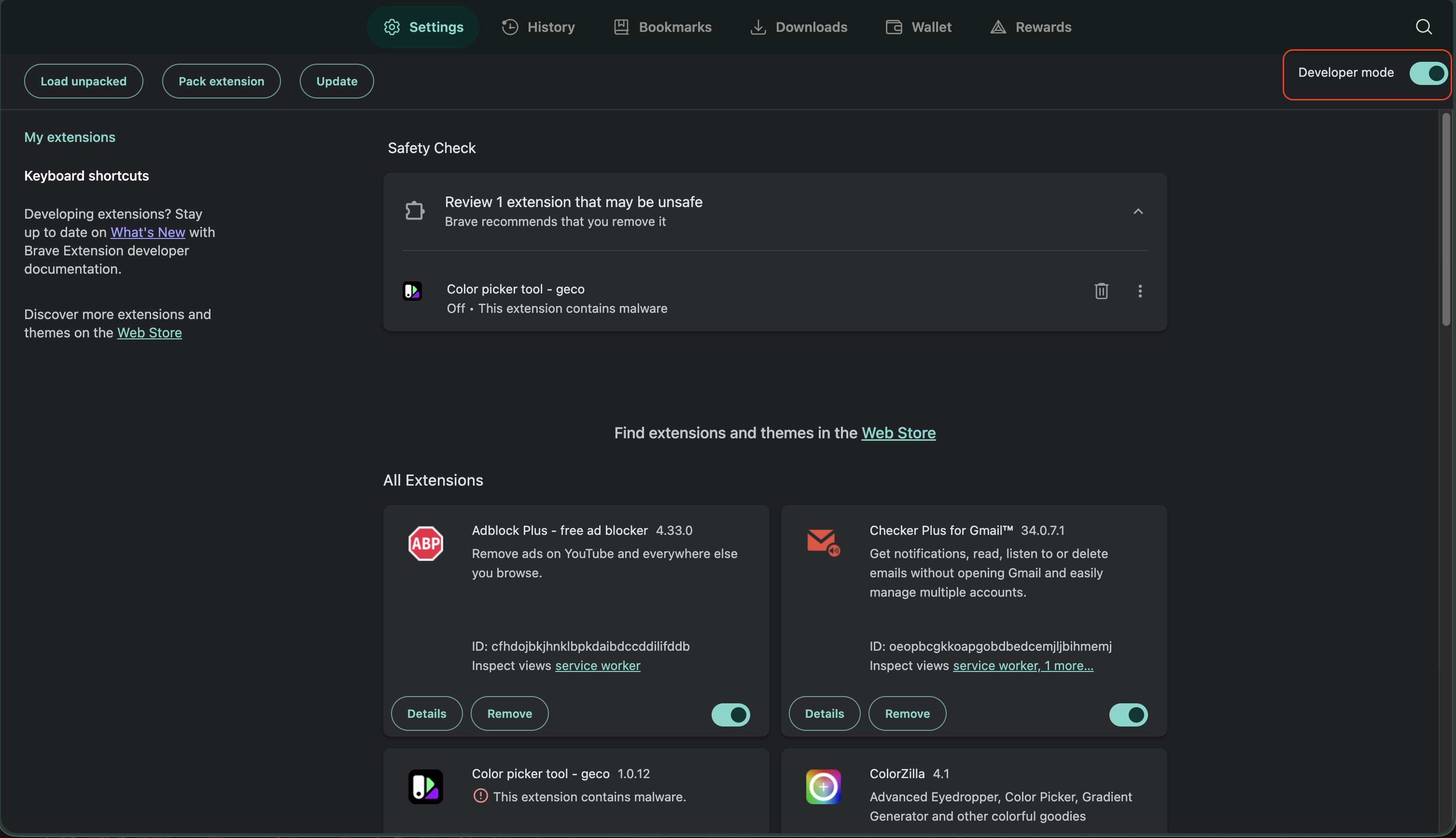
2. **Enable Developer Mode**
|
|
69
|
+
|
|
70
|
+
Toggle the "Developer mode" switch in the top-right corner.
|
|
71
|
+
|
|
72
|
+
|
|
73
|
+
|
|
74
|
+
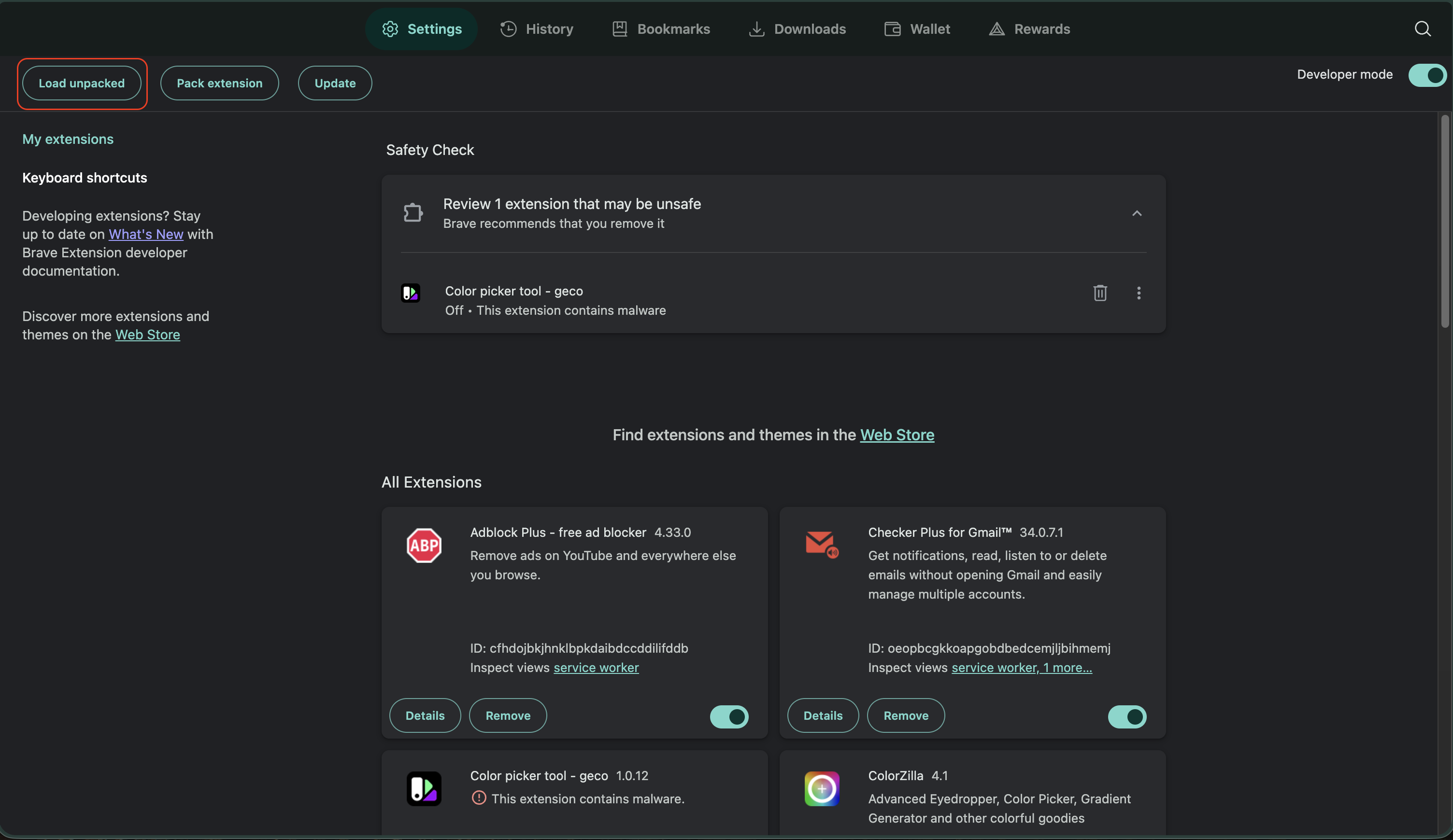
3. **Load the Extension**
|
|
75
|
+
|
|
76
|
+
Click "Load unpacked" and select your installation folder.
|
|
77
|
+
|
|
78
|
+
|
|
79
|
+
|
|
80
|
+
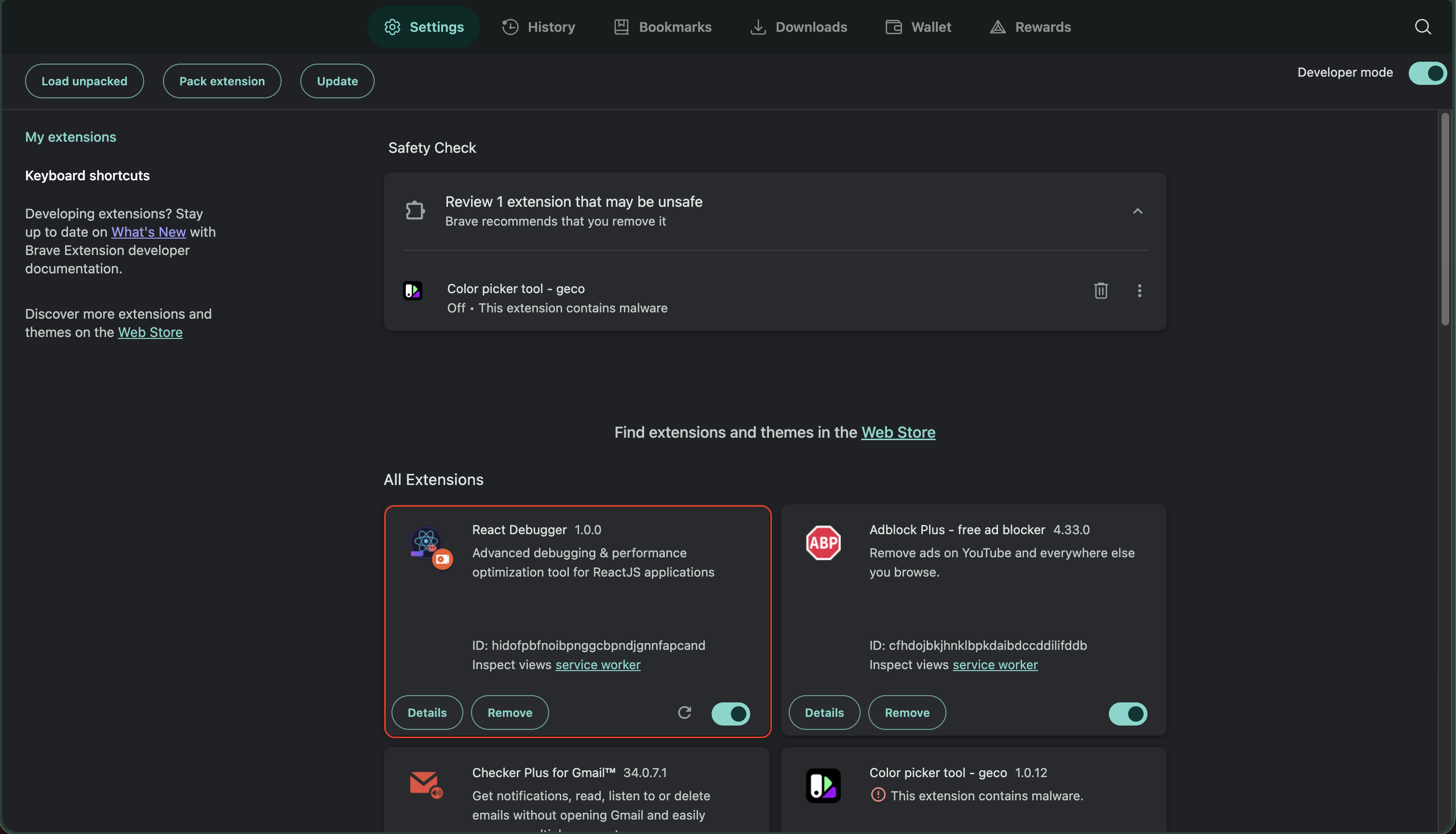
4. **Verify Installation**
|
|
81
|
+
|
|
82
|
+
You should see "React Debugger" in your extensions list.
|
|
83
|
+
|
|
84
|
+
|
|
85
|
+
|
|
86
|
+
---
|
|
87
|
+
|
|
88
|
+
## First Time Setup
|
|
89
|
+
|
|
90
|
+
### Opening the Debugger
|
|
91
|
+
|
|
92
|
+
1. Navigate to any React website (e.g., [react.dev](https://react.dev))
|
|
93
|
+
2. Open DevTools:
|
|
94
|
+
- **Mac**: `Cmd + Option + I`
|
|
95
|
+
- **Windows/Linux**: `F12` or `Ctrl + Shift + I`
|
|
96
|
+
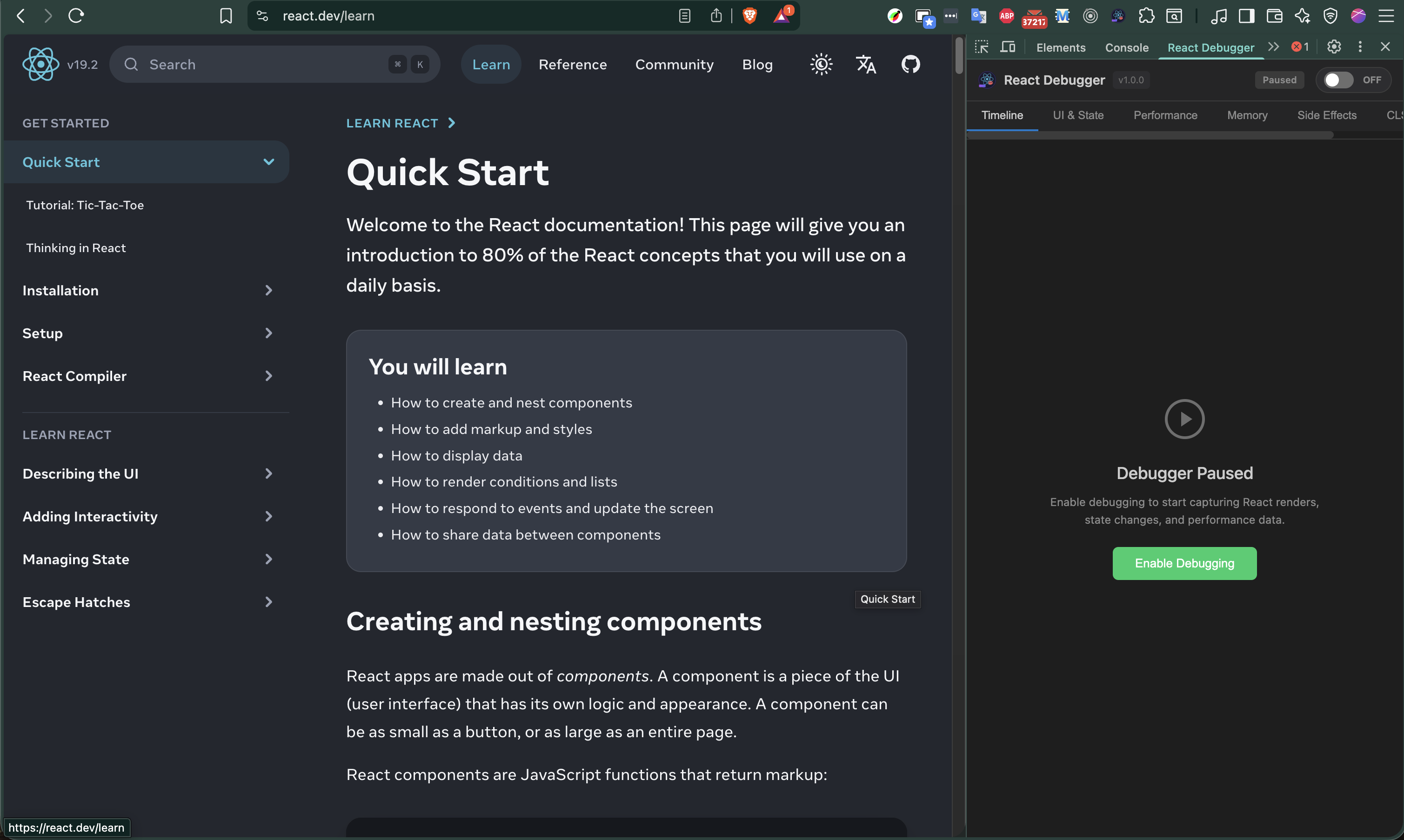
3. Find the **"React Debugger"** tab in DevTools
|
|
97
|
+
|
|
98
|
+
|
|
99
|
+
|
|
100
|
+
### Initial State
|
|
101
|
+
|
|
102
|
+
When you first open the debugger on a React page:
|
|
103
|
+
|
|
104
|
+
- ✅ **"Recording"** badge appears - the debugger is active
|
|
105
|
+
- ✅ **React version** is displayed in the header
|
|
106
|
+
- ✅ **Timeline** starts collecting events
|
|
107
|
+
|
|
108
|
+
If you see **"Waiting for React..."**, the page either:
|
|
109
|
+
- Doesn't use React
|
|
110
|
+
- Uses React < 16 (not supported)
|
|
111
|
+
- Is still loading
|
|
112
|
+
|
|
113
|
+
---
|
|
114
|
+
|
|
115
|
+
## Understanding the Interface
|
|
116
|
+
|
|
117
|
+
### Header Section
|
|
118
|
+
|
|
119
|
+
```
|
|
120
|
+
┌─────────────────────────────────────────────────────┐
|
|
121
|
+
│ ⚛️ React Debugger v1.0.0 [Recording] [Redux] │
|
|
122
|
+
│ [▶ Start] │
|
|
123
|
+
└─────────────────────────────────────────────────────┘
|
|
124
|
+
```
|
|
125
|
+
|
|
126
|
+
| Element | Description |
|
|
127
|
+
|---------|-------------|
|
|
128
|
+
| Version | Extension version |
|
|
129
|
+
| Recording | Green = active, Gray = paused |
|
|
130
|
+
| Redux | Appears if Redux store detected |
|
|
131
|
+
| Start/Stop | Toggle debugging on/off |
|
|
132
|
+
|
|
133
|
+
### Tab Bar
|
|
134
|
+
|
|
135
|
+
```
|
|
136
|
+
┌──────────┬───────────┬─────────────┬────────┬─────────────┬─────┬───────┐
|
|
137
|
+
│ Timeline │ UI & State│ Performance │ Memory │ Side Effects│ CLS │ Redux │
|
|
138
|
+
└──────────┴───────────┴─────────────┴────────┴─────────────┴─────┴───────┘
|
|
139
|
+
```
|
|
140
|
+
|
|
141
|
+
Each tab shows a badge with issue count when problems are detected.
|
|
142
|
+
|
|
143
|
+
### Status Indicators
|
|
144
|
+
|
|
145
|
+
| Color | Meaning |
|
|
146
|
+
|-------|---------|
|
|
147
|
+
| 🟢 Green | Good / No issues |
|
|
148
|
+
| 🟡 Yellow | Warning / Needs attention |
|
|
149
|
+
| 🔴 Red | Error / Critical issue |
|
|
150
|
+
| 🔵 Blue | Informational |
|
|
151
|
+
|
|
152
|
+
---
|
|
153
|
+
|
|
154
|
+
## Your First Debug Session
|
|
155
|
+
|
|
156
|
+
Let's debug a simple React app to understand how the extension works.
|
|
157
|
+
|
|
158
|
+
### Step 1: Open a React App
|
|
159
|
+
|
|
160
|
+
For testing, use any of these:
|
|
161
|
+
- Your local development server
|
|
162
|
+
- [react.dev](https://react.dev)
|
|
163
|
+
- [CodeSandbox React template](https://codesandbox.io/s/new)
|
|
164
|
+
|
|
165
|
+
### Step 2: Check the Timeline
|
|
166
|
+
|
|
167
|
+
1. Click the **Timeline** tab
|
|
168
|
+
2. Interact with the page (click buttons, type in inputs)
|
|
169
|
+
3. Watch events appear in real-time
|
|
170
|
+
|
|
171
|
+
**What you'll see:**
|
|
172
|
+
|
|
173
|
+
| Icon | Event Type | Example |
|
|
174
|
+
|------|------------|---------|
|
|
175
|
+
| 🔄 | Render | Component mounted or updated |
|
|
176
|
+
| 📦 | State | useState or Redux state changed |
|
|
177
|
+
| ⚡ | Effect | useEffect ran or cleaned up |
|
|
178
|
+
| ❌ | Error | JavaScript error occurred |
|
|
179
|
+
|
|
180
|
+
### Step 3: Find Issues
|
|
181
|
+
|
|
182
|
+
1. Click the **UI & State** tab
|
|
183
|
+
2. If issues exist, they appear as cards
|
|
184
|
+
3. Click a card to expand details
|
|
185
|
+
|
|
186
|
+
**Example issue:**
|
|
187
|
+
|
|
188
|
+
```
|
|
189
|
+
⚠️ INDEX_AS_KEY
|
|
190
|
+
Component: TodoList
|
|
191
|
+
Message: Using array index as key can cause issues with list reordering
|
|
192
|
+
|
|
193
|
+
Suggestion: Use a unique identifier from your data as the key prop
|
|
194
|
+
|
|
195
|
+
Code:
|
|
196
|
+
{items.map((item, index) => (
|
|
197
|
+
<li key={index}>{item}</li> // ← Problem here
|
|
198
|
+
))}
|
|
199
|
+
```
|
|
200
|
+
|
|
201
|
+
### Step 4: Check Performance
|
|
202
|
+
|
|
203
|
+
1. Click the **Performance** tab
|
|
204
|
+
2. Look at the statistics dashboard
|
|
205
|
+
3. Check "Top Re-rendering Components"
|
|
206
|
+
|
|
207
|
+
**What to look for:**
|
|
208
|
+
|
|
209
|
+
| Metric | Good | Investigate |
|
|
210
|
+
|--------|------|-------------|
|
|
211
|
+
| Avg Render Time | < 16ms | > 16ms |
|
|
212
|
+
| Renders per component | < 10 | > 20 |
|
|
213
|
+
| Slow Renders | 0 | > 0 |
|
|
214
|
+
|
|
215
|
+
### Step 5: Enable React Scan (Visual Mode)
|
|
216
|
+
|
|
217
|
+
1. In **Performance** tab, find "React Scan"
|
|
218
|
+
2. Toggle it ON
|
|
219
|
+
3. Go back to your page - components flash colors on render
|
|
220
|
+
|
|
221
|
+
**Color meanings:**
|
|
222
|
+
|
|
223
|
+
| Color | Renders | Action |
|
|
224
|
+
|-------|---------|--------|
|
|
225
|
+
| 🟢 Green | 1 | Normal |
|
|
226
|
+
| 🟡 Yellow | 2-3 | Monitor |
|
|
227
|
+
| 🟠 Orange | 4-5 | Investigate |
|
|
228
|
+
| 🔴 Red | 10+ | Optimize! |
|
|
229
|
+
|
|
230
|
+
---
|
|
231
|
+
|
|
232
|
+
## Next Steps
|
|
233
|
+
|
|
234
|
+
Now that you understand the basics:
|
|
235
|
+
|
|
236
|
+
1. **[Read the Tabs Guide](./TABS-GUIDE.md)** - Deep dive into each tab's features
|
|
237
|
+
2. **[Check Troubleshooting](./TROUBLESHOOTING.md)** - If something isn't working
|
|
238
|
+
3. **Experiment!** - The best way to learn is by debugging real issues
|
|
239
|
+
|
|
240
|
+
---
|
|
241
|
+
|
|
242
|
+
## Quick Reference
|
|
243
|
+
|
|
244
|
+
### Keyboard Shortcuts
|
|
245
|
+
|
|
246
|
+
| Action | Mac | Windows |
|
|
247
|
+
|--------|-----|---------|
|
|
248
|
+
| Open DevTools | `Cmd + Option + I` | `F12` |
|
|
249
|
+
| Refresh page | `Cmd + R` | `Ctrl + R` |
|
|
250
|
+
| Hard refresh | `Cmd + Shift + R` | `Ctrl + Shift + R` |
|
|
251
|
+
|
|
252
|
+
### Useful Test Sites
|
|
253
|
+
|
|
254
|
+
| Site | What to Test |
|
|
255
|
+
|------|--------------|
|
|
256
|
+
| [react.dev](https://react.dev) | General React detection |
|
|
257
|
+
| [redux.js.org](https://redux.js.org) | Redux detection |
|
|
258
|
+
| [Next.js docs](https://nextjs.org/docs) | SSR React app |
|
|
259
|
+
| Your local app | Real issues! |
|
|
260
|
+
|
|
261
|
+
---
|
|
262
|
+
|
|
263
|
+
## Need Help?
|
|
264
|
+
|
|
265
|
+
- 📖 [Full Documentation](https://github.com/hoainho/react-debugger-extension#readme)
|
|
266
|
+
- 🐛 [Report a Bug](https://github.com/hoainho/react-debugger-extension/issues)
|
|
267
|
+
- 💬 [Discussions](https://github.com/hoainho/react-debugger-extension/discussions)
|