@nf-beta/angular 0.0.2 → 0.0.3
This diff represents the content of publicly available package versions that have been released to one of the supported registries. The information contained in this diff is provided for informational purposes only and reflects changes between package versions as they appear in their respective public registries.
- package/package.json +19 -5
- package/LICENSE +0 -8
- package/README.md +0 -458
package/package.json
CHANGED
|
@@ -1,6 +1,6 @@
|
|
|
1
1
|
{
|
|
2
2
|
"name": "@nf-beta/angular",
|
|
3
|
-
"version": "0.0.
|
|
3
|
+
"version": "0.0.3",
|
|
4
4
|
"generators": "./collection.json",
|
|
5
5
|
"builders": "./builders.json",
|
|
6
6
|
"schematics": "./collection.json",
|
|
@@ -15,7 +15,8 @@
|
|
|
15
15
|
"@angular-devkit/build-angular": "^21.0.4",
|
|
16
16
|
"@angular-devkit/core": "^21.0.4",
|
|
17
17
|
"@angular-devkit/schematics": "^21.0.4",
|
|
18
|
-
"@angular/build": "^21.0.4"
|
|
18
|
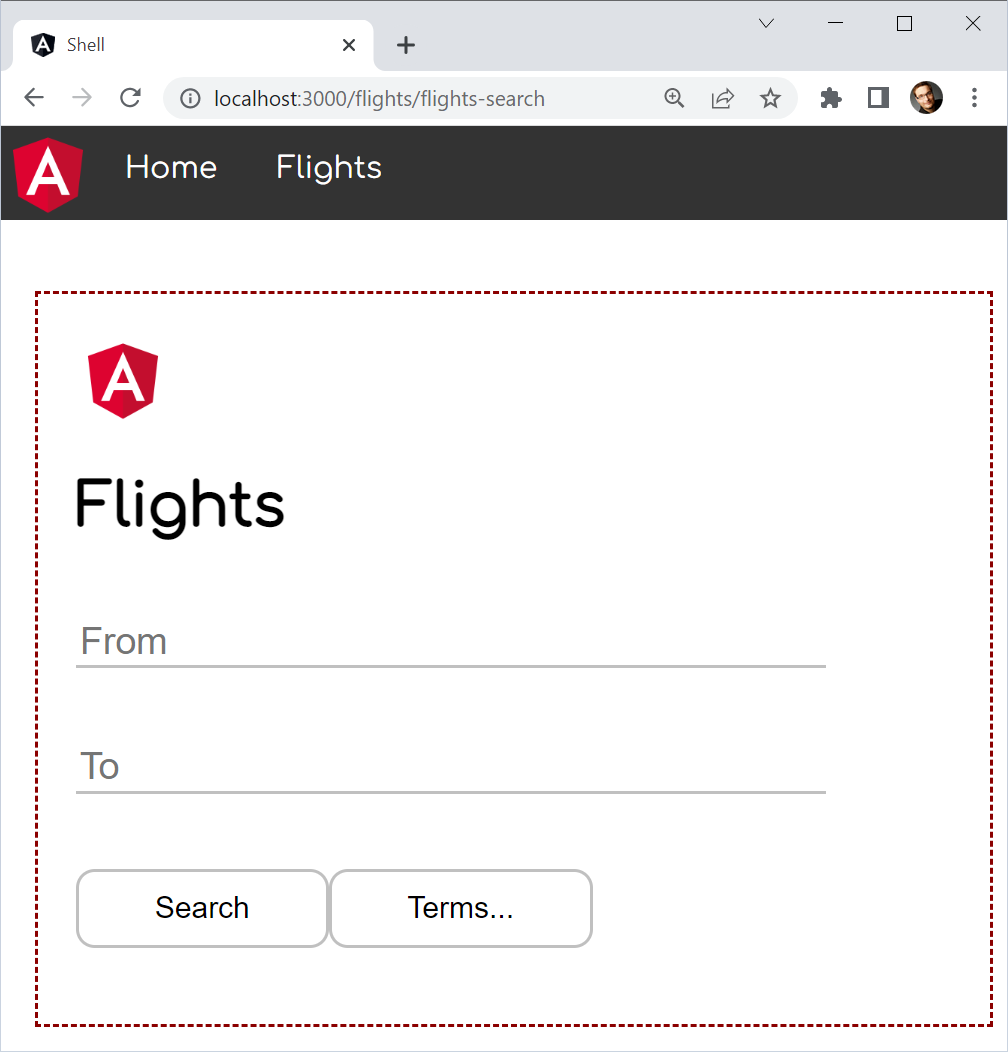
+
"@angular/build": "^21.0.4",
|
|
19
|
+
"@chialab/esbuild-plugin-commonjs": "^0.19.0"
|
|
19
20
|
},
|
|
20
21
|
"repository": {
|
|
21
22
|
"type": "git",
|
|
@@ -24,6 +25,19 @@
|
|
|
24
25
|
"ng-update": {
|
|
25
26
|
"migrations": "./migration-collection.json"
|
|
26
27
|
},
|
|
28
|
+
"exports": {
|
|
29
|
+
"./package.json": "./package.json",
|
|
30
|
+
".": {
|
|
31
|
+
"types": "./src/index.d.ts",
|
|
32
|
+
"import": "./src/index.js",
|
|
33
|
+
"default": "./src/index.js"
|
|
34
|
+
},
|
|
35
|
+
"./config": {
|
|
36
|
+
"types": "./src/config.d.ts",
|
|
37
|
+
"import": "./src/config.js",
|
|
38
|
+
"default": "./src/config.js"
|
|
39
|
+
}
|
|
40
|
+
},
|
|
27
41
|
"homepage": "https://github.com/native-federation/angular",
|
|
28
42
|
"type": "module",
|
|
29
43
|
"files": [
|
|
@@ -36,7 +50,7 @@
|
|
|
36
50
|
"LICENSE",
|
|
37
51
|
"!**/*.tsbuildinfo"
|
|
38
52
|
],
|
|
39
|
-
"types": "./src/index.d.ts",
|
|
40
|
-
"module": "./src/index.js",
|
|
41
|
-
"main": "./src/index.js"
|
|
53
|
+
"types": "./packages/angular/src/index.d.ts",
|
|
54
|
+
"module": "./packages/angular/src/index.js",
|
|
55
|
+
"main": "./packages/angular/src/index.js"
|
|
42
56
|
}
|
package/LICENSE
DELETED
|
@@ -1,8 +0,0 @@
|
|
|
1
|
-
Copyright 2021 Softarc Consulting GmbH
|
|
2
|
-
|
|
3
|
-
Permission is hereby granted, free of charge, to any person obtaining a copy of this software and associated documentation files (the "Software"), to deal in the Software without restriction, including without limitation the rights to use, copy, modify, merge, publish, distribute, sublicense, and/or sell copies of the Software, and to permit persons to whom the Software is furnished to do so, subject to the following conditions:
|
|
4
|
-
|
|
5
|
-
The above copyright notice and this permission notice shall be included in all copies or substantial portions of the Software.
|
|
6
|
-
|
|
7
|
-
THE SOFTWARE IS PROVIDED "AS IS", WITHOUT WARRANTY OF ANY KIND, EXPRESS OR IMPLIED, INCLUDING BUT NOT LIMITED TO THE WARRANTIES OF MERCHANTABILITY, FITNESS FOR A PARTICULAR PURPOSE AND NONINFRINGEMENT. IN NO EVENT SHALL THE AUTHORS OR COPYRIGHT HOLDERS BE LIABLE FOR ANY CLAIM, DAMAGES OR OTHER LIABILITY, WHETHER IN AN ACTION OF CONTRACT, TORT OR OTHERWISE, ARISING FROM, OUT OF OR IN CONNECTION WITH THE SOFTWARE OR THE USE OR OTHER DEALINGS IN THE SOFTWARE.
|
|
8
|
-
|
package/README.md
DELETED
|
@@ -1,458 +0,0 @@
|
|
|
1
|
-
# Native Federation for Angular
|
|
2
|
-
|
|
3
|
-
Native Federation is a "browser-native" implementation of the successful mental model behind webpack Module Federation for building Micro Frontends (Plugins, etc.).
|
|
4
|
-
|
|
5
|
-
## Features 🔥
|
|
6
|
-
|
|
7
|
-
- ✅ Mental Model of Module Federation
|
|
8
|
-
- ✅ Future Proof: Uses **Web Standards** to be **independent** of build tools like webpack
|
|
9
|
-
- ✅ Neat Angular-Integration: **Directly delegates** to Angular's new ultra-fast esbuild-based ApplicationBuilder to **prevent diverging** from the Angular standard.
|
|
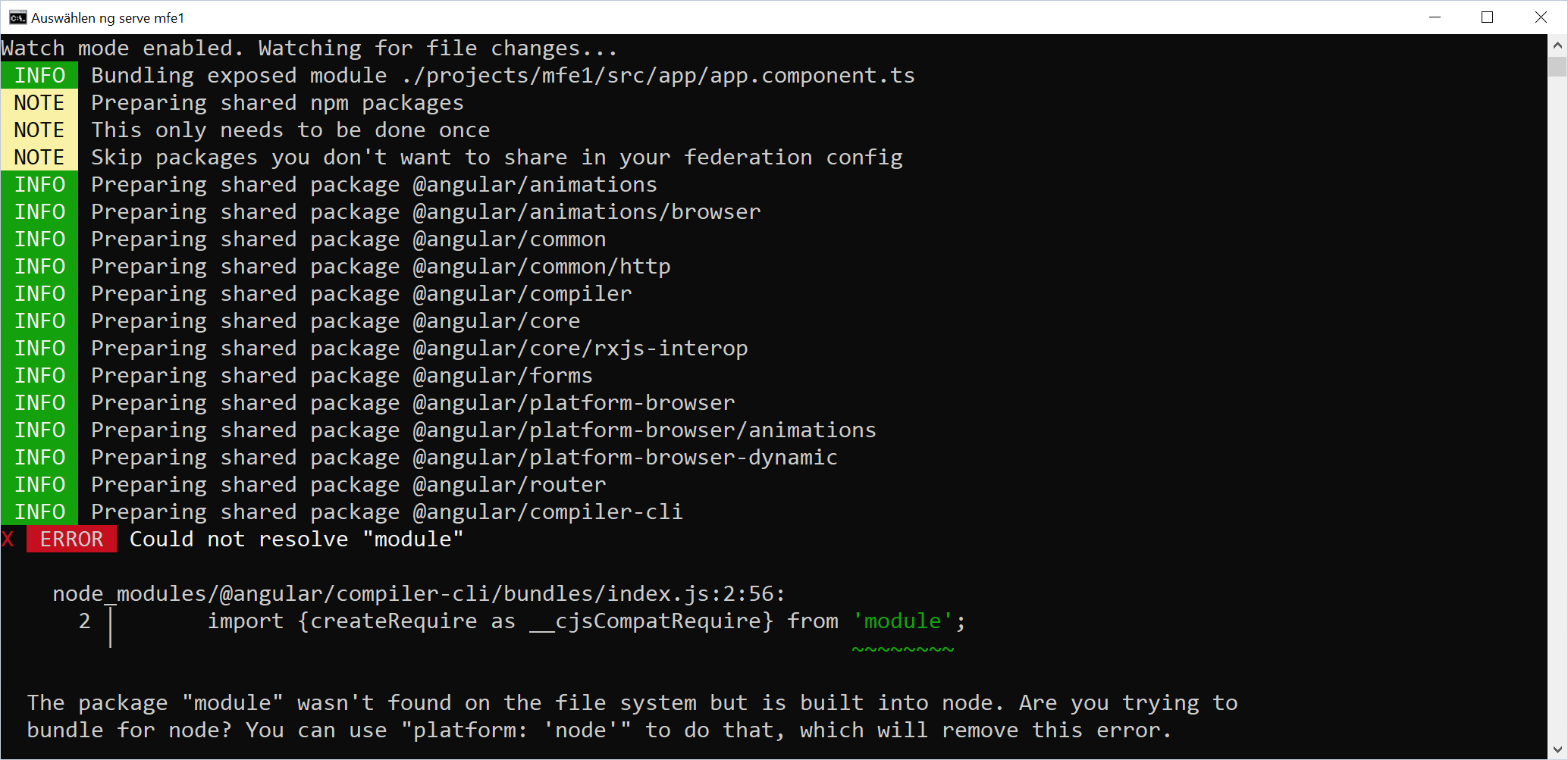
10
|
-
|
|
11
|
-
### More
|
|
12
|
-
|
|
13
|
-
- ✅ Embraces ESM and Import Maps - an emerging web standard
|
|
14
|
-
- ✅ Easy to configure: We use the same API and Schematics as for our Module Federation plugin
|
|
15
|
-
- ✅ Blazing Fast: The reference implementation not only uses the fast esbuild; it also caches already built shared dependencies.
|
|
16
|
-
- ✅ Supports Angular SSR and Incremental Hydration (since 18@latest)
|
|
17
|
-
- ✅ Supports Angular I18N (since 19.0.13)
|
|
18
|
-
|
|
19
|
-
## Prerequisite
|
|
20
|
-
|
|
21
|
-
Angular & Angular CLI 16.1 or higher
|
|
22
|
-
|
|
23
|
-
This package was successfully tested with Angular CLI projects and with Nx projects.
|
|
24
|
-
|
|
25
|
-
## Versions
|
|
26
|
-
|
|
27
|
-
We will at least provide a new version of this package per Angular major. If necessary, we will also provide packages to adapt to Angular minors. To make the relationship between Angular versions and versions of this package easy for all of us, **we follow Angular's version numbers**. E. g., `@angular-architects/native-federation` 16.1 is intended for Angular 16.1 and upwards.
|
|
28
|
-
|
|
29
|
-
- Use version 16.1.x for Angular 16.1.x
|
|
30
|
-
- Use version 16.2.x for Angular 16.2.x
|
|
31
|
-
- Use version 17.x for Angular 17.x
|
|
32
|
-
- Use version 17.1.x for Angular 17.1
|
|
33
|
-
- Use version 18.x for Angular 18.0.x
|
|
34
|
-
- Use version 18.1.x for Angular 18.1.x
|
|
35
|
-
- Use version 18.2.x for Angular 18.2.x
|
|
36
|
-
- Use version 19.x for Angular 19.x
|
|
37
|
-
- Use version 20.0.x for Angular 20.0.x
|
|
38
|
-
- Use version 20.1.x for Angular 20.1.x
|
|
39
|
-
- Use version 21.x for Angular 21.x
|
|
40
|
-
|
|
41
|
-
## Demo Repo
|
|
42
|
-
|
|
43
|
-
In this [demo repo](https://github.com/manfredsteyer/nf-test.git), we test Native Federation together with several known UI libraries for Angular. For this, we compile demo apps build with them with Native Federation.
|
|
44
|
-
|
|
45
|
-
<a href="https://github.com/manfredsteyer/nf-test.git" target="_blank">
|
|
46
|
-
<img width="500" src="https://github.com/angular-architects/module-federation-plugin/blob/main/libs/native-federation/demo-repo.png">
|
|
47
|
-
</a>
|
|
48
|
-
|
|
49
|
-
This is primarily for testing purposes. For an **initial example and/or an tutorial please look below.**
|
|
50
|
-
|
|
51
|
-
## Migration from Module Federation
|
|
52
|
-
|
|
53
|
-
If you currently use Angular with Module Federation, you can follow our [Migration Guide](https://github.com/angular-architects/module-federation-plugin/blob/main/libs/native-federation/docs/migrate.md) to migrate to Native Federation and Angular's new fast esbuild-based build system.
|
|
54
|
-
|
|
55
|
-
## Using Module Federation and Native Federation Side-by-Side
|
|
56
|
-
|
|
57
|
-
[In this article](https://www.angulararchitects.io/en/blog/combining-native-federation-and-module-federation/) we describe, how to use both technologies side-by-side.
|
|
58
|
-
|
|
59
|
-
## Updates
|
|
60
|
-
|
|
61
|
-
You can use `ng update` for updating Native Federation.
|
|
62
|
-
|
|
63
|
-
Notes for [updating to version 18](https://github.com/angular-architects/module-federation-plugin/blob/main/libs/native-federation/docs/update18.md)
|
|
64
|
-
|
|
65
|
-
## Angular Integration
|
|
66
|
-
|
|
67
|
-
Since 17.1, Native Federation for Angular uses the Angular CLI's `esbuild`-based **Application Builder** and the CLI's **Dev Server** to **keep track with all the innovations and performance-improvements provided by the Angular CLI team.**
|
|
68
|
-
|
|
69
|
-
Please find some [information for upgrading to 17.1. here](https://github.com/angular-architects/module-federation-plugin/blob/main/libs/native-federation/migrate-appbuilder.md).
|
|
70
|
-
|
|
71
|
-
## Credits
|
|
72
|
-
|
|
73
|
-
Big thanks to:
|
|
74
|
-
|
|
75
|
-
- [Zack Jackson](https://twitter.com/ScriptedAlchemy) for initially coming up with the great idea of Module Federation and its successful mental model
|
|
76
|
-
- [Tobias Koppers](https://twitter.com/wSokra) for helping to make Module Federation a first class citizen of webpack
|
|
77
|
-
- [Florian Rappl](https://twitter.com/FlorianRappl) for a good discussion about these topics during a speakers dinner in Nuremberg
|
|
78
|
-
- [The Nx Team](https://twitter.com/NxDevTools), esp. [Colum Ferry](https://twitter.com/FerryColum), who seamlessly integrated webpack Module Federation into Nx and hence helped to spread the word about it (Nx + Module Federation === ❤️)
|
|
79
|
-
- [Michael Egger-Zikes](https://twitter.com/MikeZks) for contributing to our Module Federation efforts and brining in valuable feedback
|
|
80
|
-
- The Angular CLI-Team, esp. [Alan Agius](https://twitter.com/AlanAgius4) and Charles Lyding, for their fantastic work on the esbuild builder for Angular
|
|
81
|
-
|
|
82
|
-
## Example 🛠️
|
|
83
|
-
|
|
84
|
-
We migrated our webpack Module Federation example to Native Federation:
|
|
85
|
-
|
|
86
|
-
|
|
87
|
-
|
|
88
|
-
Please find the example [here (branch: nf-standalone-solution)](https://github.com/manfredsteyer/module-federation-plugin-example/tree/nf-standalone-solution):
|
|
89
|
-
|
|
90
|
-
```
|
|
91
|
-
git clone https://github.com/manfredsteyer/module-federation-plugin-example.git --branch nf-standalone-solution
|
|
92
|
-
|
|
93
|
-
cd module-federation-plugin-example
|
|
94
|
-
|
|
95
|
-
npm i
|
|
96
|
-
```
|
|
97
|
-
|
|
98
|
-
Start the Micro Frontend:
|
|
99
|
-
|
|
100
|
-
```
|
|
101
|
-
ng serve mfe1 -o
|
|
102
|
-
```
|
|
103
|
-
|
|
104
|
-
_(In the case of an error, see this [information below](#error-file-srcmaints-is-missing-from-the-typescript-compilation-plugin-angular-compiler))_
|
|
105
|
-
|
|
106
|
-
Wait until the Micro Frontend is started.
|
|
107
|
-
|
|
108
|
-
Open another console and start the shell:
|
|
109
|
-
|
|
110
|
-
```
|
|
111
|
-
ng serve shell -o
|
|
112
|
-
```
|
|
113
|
-
|
|
114
|
-
The example loads a Micro Frontends into a shell:
|
|
115
|
-
|
|
116
|
-

|
|
117
|
-
|
|
118
|
-
## Relationship to @angular-architects/module-federation
|
|
119
|
-
|
|
120
|
-
This package, `@angular-architects/native-federation`, uses the same API as `@angular-architects/module-federation`. To switch over, just make sure you import everything from the former package. Don't mix these packages.
|
|
121
|
-
|
|
122
|
-
## About the Mental Model 🧠
|
|
123
|
-
|
|
124
|
-
The underlying mental model allows for runtime integration: Loading a part of a separately built and deployed application into yours. This is needed for Micro Frontend architectures but also for plugin-based solutions.
|
|
125
|
-
|
|
126
|
-
For this, the mental model introduces several concepts:
|
|
127
|
-
|
|
128
|
-
- **Remote:** The remote is a separately built and deployed application. It can **expose EcmaScript** modules that can be loaded into other applications.
|
|
129
|
-
- **Host:** The host loads one or several remotes on demand. From your framework's perspective, this looks like traditional lazy loading. The big difference is that the host doesn't know the remotes at compilation time.
|
|
130
|
-
- **Shared Dependencies**:\*\* If several remotes and the host use the same library, you might not want to download it several times. Instead, you might want to download it once and share it at runtime. For this use case, the mental model allows for defining such shared dependencies.
|
|
131
|
-
- **Version Mismatch:** If two or more applications use a different version of the same shared library, we need to prevent a version mismatch. The mental model defines several strategies to deal with it, like falling back to another version that fits the application, using a different compatible one (according to semantic versioning), or throwing an error.
|
|
132
|
-
|
|
133
|
-
## Usage/ Tutorial 🧪
|
|
134
|
-
|
|
135
|
-
You can checkout the [nf-standalone-starter branch](https://github.com/manfredsteyer/module-federation-plugin-example/tree/nf-standalone-starter) to try out Native Federation:
|
|
136
|
-
|
|
137
|
-
```
|
|
138
|
-
git clone https://github.com/manfredsteyer/module-federation-plugin-example.git --branch nf-standalone-starter
|
|
139
|
-
|
|
140
|
-
cd module-federation-plugin-example
|
|
141
|
-
|
|
142
|
-
npm i
|
|
143
|
-
```
|
|
144
|
-
|
|
145
|
-
This repository consists of two Angular applications: a `shell` and a Micro Frontend called `mfe1`. During this tutorial, you will load `mfe1` into the `shell`:
|
|
146
|
-
|
|
147
|
-

|
|
148
|
-
|
|
149
|
-
### Adding Native Federation
|
|
150
|
-
|
|
151
|
-
```
|
|
152
|
-
npm i @angular-architects/native-federation -D
|
|
153
|
-
```
|
|
154
|
-
|
|
155
|
-
Making an application a remote (Micro Frontend):
|
|
156
|
-
|
|
157
|
-
```
|
|
158
|
-
ng g @angular-architects/native-federation:init --project mfe1 --port 4201 --type remote
|
|
159
|
-
```
|
|
160
|
-
|
|
161
|
-
Making an application a host (shell):
|
|
162
|
-
|
|
163
|
-
```
|
|
164
|
-
ng g @angular-architects/native-federation:init --project shell --port 4200 --type dynamic-host
|
|
165
|
-
```
|
|
166
|
-
|
|
167
|
-
A dynamic host reads the configuration data at runtime from a `.json` file.
|
|
168
|
-
|
|
169
|
-
> The schematics called here automate most steps of this tutorial, esp. adding configuration files and bootstrapping Native Federation. Hence, the following sections primarily discuss these changes. You just need to add a lazy route (see below) and make sure the correct ports are configured in the federation manifest (see below too).
|
|
170
|
-
|
|
171
|
-
### Configuring the Host
|
|
172
|
-
|
|
173
|
-
The host configuration (`projects/shell/federation.config.js`) looks like what you know from our Module Federation plugin:
|
|
174
|
-
|
|
175
|
-
```javascript
|
|
176
|
-
const { withNativeFederation, shareAll } = require('@angular-architects/native-federation/config');
|
|
177
|
-
|
|
178
|
-
module.exports = withNativeFederation({
|
|
179
|
-
name: 'my-host',
|
|
180
|
-
shared: {
|
|
181
|
-
...shareAll({
|
|
182
|
-
singleton: true,
|
|
183
|
-
strictVersion: true,
|
|
184
|
-
requiredVersion: 'auto',
|
|
185
|
-
}),
|
|
186
|
-
},
|
|
187
|
-
|
|
188
|
-
skip: [
|
|
189
|
-
'rxjs/ajax',
|
|
190
|
-
'rxjs/fetch',
|
|
191
|
-
'rxjs/testing',
|
|
192
|
-
'rxjs/webSocket',
|
|
193
|
-
// Add further packages you don't need at runtime
|
|
194
|
-
],
|
|
195
|
-
});
|
|
196
|
-
```
|
|
197
|
-
|
|
198
|
-
> Our `init` schematic shown above generates this file for you.
|
|
199
|
-
|
|
200
|
-
### Configuring the Remote
|
|
201
|
-
|
|
202
|
-
Also, the remote configuration (`projects/mfe1/federation.config.js`) looks familiar:
|
|
203
|
-
|
|
204
|
-
```javascript
|
|
205
|
-
const { withNativeFederation, shareAll } = require('@angular-architects/native-federation/config');
|
|
206
|
-
|
|
207
|
-
module.exports = withNativeFederation({
|
|
208
|
-
name: 'mfe1',
|
|
209
|
-
|
|
210
|
-
exposes: {
|
|
211
|
-
'./Component': './projects/mfe1/src/app/app.component.ts',
|
|
212
|
-
},
|
|
213
|
-
|
|
214
|
-
shared: {
|
|
215
|
-
...shareAll({
|
|
216
|
-
singleton: true,
|
|
217
|
-
strictVersion: true,
|
|
218
|
-
requiredVersion: 'auto',
|
|
219
|
-
}),
|
|
220
|
-
},
|
|
221
|
-
|
|
222
|
-
skip: [
|
|
223
|
-
'rxjs/ajax',
|
|
224
|
-
'rxjs/fetch',
|
|
225
|
-
'rxjs/testing',
|
|
226
|
-
'rxjs/webSocket',
|
|
227
|
-
// Add further packages you don't need at runtime
|
|
228
|
-
],
|
|
229
|
-
});
|
|
230
|
-
```
|
|
231
|
-
|
|
232
|
-
> Our `init` schematic shown above generates this file for you.
|
|
233
|
-
|
|
234
|
-
### Initializing the Host
|
|
235
|
-
|
|
236
|
-
When bootstrapping the host (shell), Native Federation (`projects\shell\src\main.ts`) is initialized:
|
|
237
|
-
|
|
238
|
-
```typescript
|
|
239
|
-
import { initFederation } from '@angular-architects/native-federation';
|
|
240
|
-
|
|
241
|
-
initFederation('/assets/federation.manifest.json')
|
|
242
|
-
.catch((err) => console.error(err))
|
|
243
|
-
.then((_) => import('./bootstrap'))
|
|
244
|
-
.catch((err) => console.error(err));
|
|
245
|
-
```
|
|
246
|
-
|
|
247
|
-
> This file is generated by the schematic described above.
|
|
248
|
-
|
|
249
|
-
The function points to a federation manifest. This manifest lists the individual remotes. It can be exchanged when deploying the solution. Hence, you can adapt the build to the respective environment.
|
|
250
|
-
|
|
251
|
-
**Credits:** The Nx team originally came up with the idea for the manifest.
|
|
252
|
-
|
|
253
|
-
This is what the (also generated) federation manifest (`projects\shell\src\assets\federation.manifest.json`) looks like:
|
|
254
|
-
|
|
255
|
-
```json
|
|
256
|
-
{
|
|
257
|
-
"mfe1": "http://localhost:4201/remoteEntry.json"
|
|
258
|
-
}
|
|
259
|
-
```
|
|
260
|
-
|
|
261
|
-
Native Federation generates the `remoteEntry.json`. It contains metadata about the individual remote.
|
|
262
|
-
|
|
263
|
-
If you follow this tutorial, **ensure** this entry points to port `4201` (!).
|
|
264
|
-
|
|
265
|
-
### Initializing the Remote
|
|
266
|
-
|
|
267
|
-
When bootstrapping your remote (`projects\mfe1\src\main.ts`), Native Federation is initialized too:
|
|
268
|
-
|
|
269
|
-
```typescript
|
|
270
|
-
import { initFederation } from '@angular-architects/native-federation';
|
|
271
|
-
|
|
272
|
-
initFederation()
|
|
273
|
-
.catch((err) => console.error(err))
|
|
274
|
-
.then((_) => import('./bootstrap'))
|
|
275
|
-
.catch((err) => console.error(err));
|
|
276
|
-
```
|
|
277
|
-
|
|
278
|
-
> Our `init` schematic shown above also generates this file.
|
|
279
|
-
|
|
280
|
-
After the initialization, it loads the file `bootstrap.ts` starting your Angular application.
|
|
281
|
-
|
|
282
|
-
### Loading a Remote
|
|
283
|
-
|
|
284
|
-
For loading a component (or any other building block) exposed by a remote into the host, use Native Federation's `loadRemoteModule` function together with lazy loading (`projects\shell\src\app\app.routes.ts`):
|
|
285
|
-
|
|
286
|
-
```typescript
|
|
287
|
-
import { Routes } from '@angular/router';
|
|
288
|
-
import { HomeComponent } from './home/home.component';
|
|
289
|
-
import { NotFoundComponent } from './not-found/not-found.component';
|
|
290
|
-
|
|
291
|
-
// Add this import:
|
|
292
|
-
import { loadRemoteModule } from '@angular-architects/native-federation';
|
|
293
|
-
|
|
294
|
-
export const APP_ROUTES: Routes = [
|
|
295
|
-
{
|
|
296
|
-
path: '',
|
|
297
|
-
component: HomeComponent,
|
|
298
|
-
pathMatch: 'full',
|
|
299
|
-
},
|
|
300
|
-
|
|
301
|
-
// Add this route:
|
|
302
|
-
{
|
|
303
|
-
path: 'flights',
|
|
304
|
-
loadComponent: () => loadRemoteModule('mfe1', './Component').then((m) => m.AppComponent),
|
|
305
|
-
},
|
|
306
|
-
|
|
307
|
-
{
|
|
308
|
-
path: '**',
|
|
309
|
-
component: NotFoundComponent,
|
|
310
|
-
},
|
|
311
|
-
|
|
312
|
-
// DO NOT insert routes after this one.
|
|
313
|
-
// { path:'**', ...} needs to be the LAST one.
|
|
314
|
-
];
|
|
315
|
-
```
|
|
316
|
-
|
|
317
|
-
### Starting your example
|
|
318
|
-
|
|
319
|
-
Start the remote:
|
|
320
|
-
|
|
321
|
-
```
|
|
322
|
-
ng serve mfe1 -o
|
|
323
|
-
```
|
|
324
|
-
|
|
325
|
-
_(In the case of an error, see this [information below](#error-file-srcmaints-is-missing-from-the-typescript-compilation-plugin-angular-compiler))_
|
|
326
|
-
|
|
327
|
-
Once the remote is started, start the shell:
|
|
328
|
-
|
|
329
|
-
```
|
|
330
|
-
ng serve shell -o
|
|
331
|
-
```
|
|
332
|
-
|
|
333
|
-
Now, by clicking at the 2nd menu item, you can load the remote directly into the host.
|
|
334
|
-
|
|
335
|
-
## Advanced Use Cases
|
|
336
|
-
|
|
337
|
-
### SSR and Hydration
|
|
338
|
-
|
|
339
|
-
We support Angular's SSR and (Incremental) Hydration. Please find [more information here](https://www.angulararchitects.io/blog/ssr-and-hydration-with-native-federation-for-angular/).
|
|
340
|
-
|
|
341
|
-
### Native Federation and Module Federation
|
|
342
|
-
|
|
343
|
-
We support combining Native Federation with Module Federation. Please find [more information here](https://www.angulararchitects.io/blog/combining-native-federation-and-module-federation/).
|
|
344
|
-
|
|
345
|
-
### Angular I18N
|
|
346
|
-
|
|
347
|
-
Since version 19.0.13, Native Federation for Angular supports Angular I18N. Here are some things to keep in mind:
|
|
348
|
-
|
|
349
|
-
- Make sure, you also add I18N support to your shell (e.g., `ng add @angular/localize --project shell`)
|
|
350
|
-
- Configure I18N in your `angular.json`. Don't use command line parameters (as the Native Federation Builder does not forward them to the ApplicationBuilder by design)
|
|
351
|
-
- In production, make sure your `federation.manifest.json` points to the right language versions of your remotes
|
|
352
|
-
|
|
353
|
-
### Angular Localization
|
|
354
|
-
|
|
355
|
-
#### Out of the box
|
|
356
|
-
|
|
357
|
-
Since version 20.0.6, loading locales works out of the box, when the feature `ignoreUnusedDeps` is activated:
|
|
358
|
-
|
|
359
|
-
```js
|
|
360
|
-
features: {
|
|
361
|
-
ignoreUnusedDeps: true;
|
|
362
|
-
}
|
|
363
|
-
```
|
|
364
|
-
|
|
365
|
-
For new projects, this setting is generated by default.
|
|
366
|
-
|
|
367
|
-
#### Fallback
|
|
368
|
-
|
|
369
|
-
Before version 20.0.6 or when `ignoreUnusedDeps` is not activated, you need a helper that only loads the needed localization files:
|
|
370
|
-
|
|
371
|
-
```js
|
|
372
|
-
module.exports = withNativeFederation({
|
|
373
|
-
[...],
|
|
374
|
-
shared: {
|
|
375
|
-
...shareAll({ singleton: true, strictVersion: true, requiredVersion: 'auto' }),
|
|
376
|
-
...shareAngularLocales(['en', 'de', 'fr']),
|
|
377
|
-
}
|
|
378
|
-
});
|
|
379
|
-
```
|
|
380
|
-
|
|
381
|
-
This option was introduced with version 19.0.14.
|
|
382
|
-
|
|
383
|
-
#### Shell reloading when MFE finishes building for local development
|
|
384
|
-
|
|
385
|
-
Native Federation provides automatic shell reloading when remote Micro Frontends finish rebuilding during development. This feature eliminates manual page refreshes and significantly improves the development experience when working with multiple applications simultaneously.
|
|
386
|
-
|
|
387
|
-
For complete implementation details, configuration options, please refer to the article:
|
|
388
|
-
|
|
389
|
-
**📖 [Fixing DX Friction: Automatic Shell Reloading in Native Federation](https://www.angulararchitects.io/en/blog/fixing-dx-friction-automatic-shell-reloading-in-native-federation/)**
|
|
390
|
-
|
|
391
|
-
## FAQ
|
|
392
|
-
|
|
393
|
-
### When to use this package?
|
|
394
|
-
|
|
395
|
-
If you like the idea of webpack Module Federation but want to switch over to Angular's new esbuild builder, you can use this package.
|
|
396
|
-
|
|
397
|
-
### I get an error when preparing shared packages. What to do?
|
|
398
|
-
|
|
399
|
-
Native Federation needs to prepare all your shared packages so that it can load them on demand as EcmaScript modules. This only happens once for development and once for production builds. The result of this is cached.
|
|
400
|
-
|
|
401
|
-
If the preparation of one of these packages fails, you get an error like this one:
|
|
402
|
-
|
|
403
|
-
|
|
404
|
-
|
|
405
|
-
For this, there are several reasons:
|
|
406
|
-
|
|
407
|
-
- Perhaps you try to share a package intended for NodeJS/ a package that cannot be converted to EcmaScript modules. This happens if you use `shareAll` in the `federation.config.js` and when the package in question is part of your dependencies in `package.json`. If you don't need (to share) this package at runtime, move it to `devDependencies` or add it to the `skip` section of your `federation.config.js`.
|
|
408
|
-
|
|
409
|
-
- Perhaps your shared packages contain some code esbuild cannot transfer to EcmaScript modules. This should not be the case for packages, built with the Angular CLI or Nx and the underlying package ng-packagr. If this happens, please let us know about the package causing troubles.
|
|
410
|
-
|
|
411
|
-
### How to deal with CommonJS Packages?
|
|
412
|
-
|
|
413
|
-
The good message is, that the official Angular Package Format defines the usage of ECMA Script Modules (ESM) for years. This is the future-proof standard, Native Federation is built upon and all npm packages created with the Angular CLI follow. If you use older CommonJS-based packages, Native Federation automatically converts them to ESM. Depending on the package, this might change some details. Here, you find some [information for dealing with CommonJS packages](https://shorturl.at/jmzH0).
|
|
414
|
-
|
|
415
|
-
### How to Manually Define a Package's Entry Point?
|
|
416
|
-
|
|
417
|
-
Usually, Native Federation automatically detects entry points in shared packages. If the packages neither align with the official standard nor with typical conventions beyond these standards, you can also directly provide the entry point:
|
|
418
|
-
|
|
419
|
-
```js
|
|
420
|
-
module.exports = withNativeFederation({
|
|
421
|
-
shared: {
|
|
422
|
-
...shareAll({
|
|
423
|
-
singleton: true,
|
|
424
|
-
strictVersion: true,
|
|
425
|
-
requiredVersion: 'auto',
|
|
426
|
-
}),
|
|
427
|
-
'test-pkg': {
|
|
428
|
-
packageInfo: {
|
|
429
|
-
entryPoint: '/path/to/test-pkg/entry.mjs',
|
|
430
|
-
version: '1.0.0',
|
|
431
|
-
esm: true,
|
|
432
|
-
},
|
|
433
|
-
},
|
|
434
|
-
},
|
|
435
|
-
});
|
|
436
|
-
```
|
|
437
|
-
|
|
438
|
-
As in such cases, we cannot expect to find a `package.json` nearby, you also have to specifiy the `version` and the `esm` flag by hand.
|
|
439
|
-
|
|
440
|
-
### How to speed up package preparation during the build process
|
|
441
|
-
|
|
442
|
-
The already prepared packages are cached in `node_modules/.cache`. Make sure, this folder is reused across subsequent build process runs.
|
|
443
|
-
|
|
444
|
-
### How does Native Federation Work under the Covers?
|
|
445
|
-
|
|
446
|
-
We use Import Maps at runtime. In addition to Import Maps, we use some code at build time and at runtime to provide the Mental Model of Module Federation.
|
|
447
|
-
|
|
448
|
-
## Documentation 📰
|
|
449
|
-
|
|
450
|
-
Please have a look at this [article series](https://www.angulararchitects.io/en/aktuelles/the-microfrontend-revolution-part-2-module-federation-with-angular/).
|
|
451
|
-
|
|
452
|
-
Even though these articles were written for Module Federation, thanks to the same API, they also apply to Native Federation.
|
|
453
|
-
|
|
454
|
-
## More: Angular Architecture Workshop (100% online, interactive)
|
|
455
|
-
|
|
456
|
-
In our [Angular Architecture Workshop](https://www.angulararchitects.io/en/angular-workshops/advanced-angular-enterprise-architecture-incl-ivy/), we cover all these topics and far more. We provide different options and alternatives and show up their consequences.
|
|
457
|
-
|
|
458
|
-
[Details: Angular Architecture Workshop](https://www.angulararchitects.io/en/angular-workshops/advanced-angular-enterprise-architecture-incl-ivy/)
|