@nextbridgehq/payload-block-builder 0.1.9 → 0.2.0
This diff represents the content of publicly available package versions that have been released to one of the supported registries. The information contained in this diff is provided for informational purposes only and reflects changes between package versions as they appear in their respective public registries.
- package/README.md +165 -98
- package/dist/bin/init.js +0 -0
- package/dist/client.cjs +1251 -485
- package/dist/client.d.cts +2 -2
- package/dist/client.d.ts +2 -2
- package/dist/client.js +1263 -472
- package/dist/index.cjs +874 -520
- package/dist/index.d.cts +52 -8
- package/dist/index.d.ts +52 -8
- package/dist/index.js +871 -518
- package/package.json +29 -10
- package/src/block-builder/builder.css +391 -36
- package/src/components/BlockDataField/BlockDataField.css +482 -393
- package/src/components/SchemaBuilderField/SchemaBuilderField.css +361 -361
package/README.md
CHANGED
|
@@ -8,6 +8,8 @@
|
|
|
8
8
|
|
|
9
9
|
Developed and open-sourced by [Nextbridge](https://nextbridge.com).
|
|
10
10
|
|
|
11
|
+
[GitHub](https://github.com/nextbridgehq/block-builder) · [Releases](https://github.com/nextbridgehq/block-builder/releases) · [Issues](https://github.com/nextbridgehq/block-builder/issues) · [Changelog](./CHANGELOG.md) · [Payload CMS](https://payloadcms.com)
|
|
12
|
+
|
|
11
13
|
## Screenshots
|
|
12
14
|
|
|
13
15
|
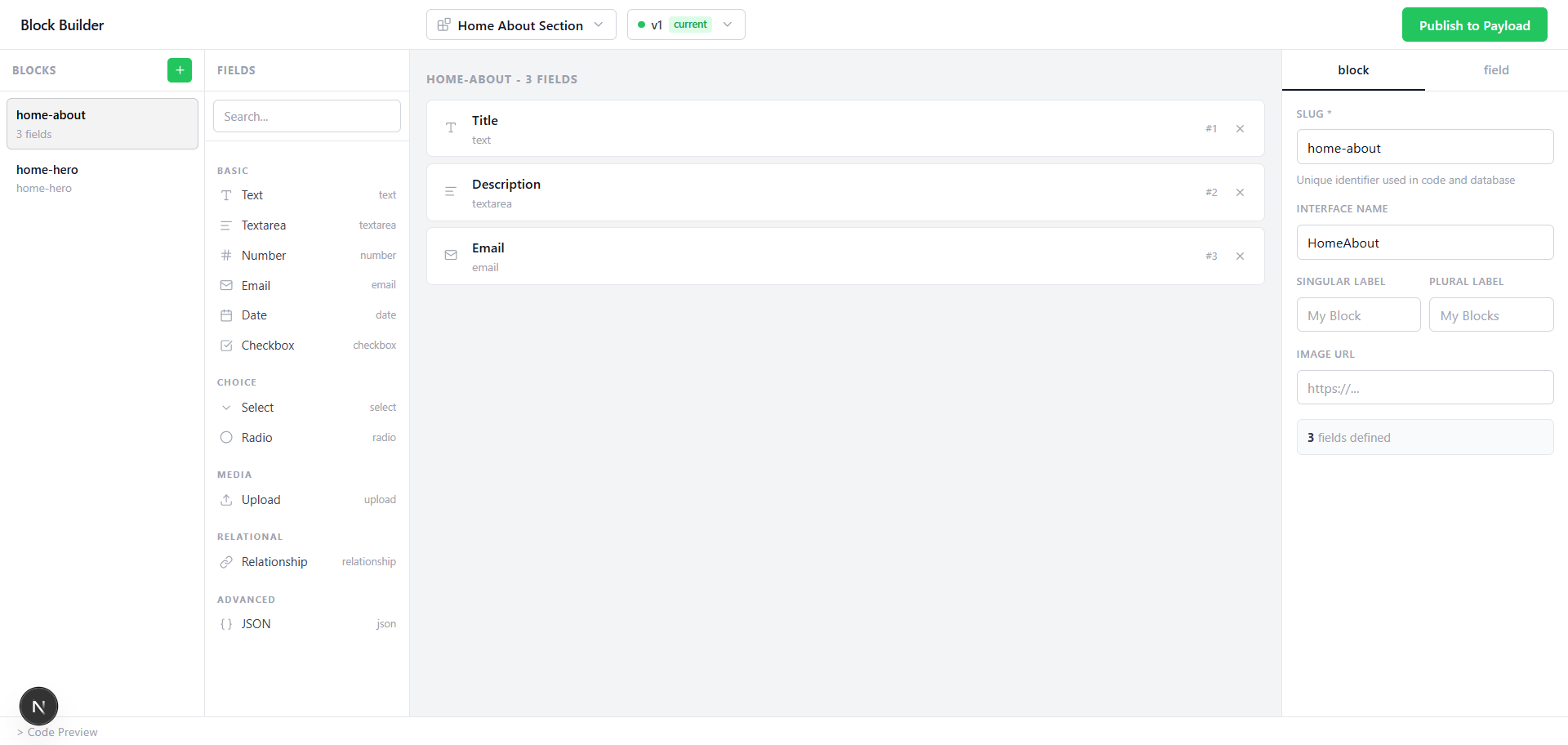
|
|
@@ -30,9 +32,11 @@ Payload Block Builder moves block schema definitions from code into your databas
|
|
|
30
32
|
|
|
31
33
|
- **Visual drag-and-drop block designer** — No code required to create new block types
|
|
32
34
|
- **Database-stored schemas** — Block definitions live in your DB, not your codebase
|
|
33
|
-
- **Version snapshots** — Every publish creates an immutable version; existing content never breaks
|
|
34
|
-
- **Collection integration** — Adds a "DB Layout" tab to any collection with one line of config
|
|
35
|
-
- **
|
|
35
|
+
- **Version snapshots with restore** — Every publish creates an immutable, concurrency-safe version; browse history, view any past version read-only, or restore it as a new version — existing content never breaks
|
|
36
|
+
- **Collection integration** — Adds a "DB Layout" tab to any collection with one line of config, plus a nav-sidebar shortcut and an "Edit in Builder" button on each block definition
|
|
37
|
+
- **16 field types**, including layout containers — text, textarea, number, email, date, checkbox, select, image, file, relationship, json, and the Row / Group / Array / Tabs / Collapsible layout fields for structuring and nesting a block's own fields
|
|
38
|
+
- **Live Preview** — A self-contained, zero-config panel that renders a block's schema as a mock form as you build it — labels, field slugs (the exact JSON path a frontend integration should read, including array/group nesting and named-tab keys), and realistic placeholders per field type. No external URL or frontend receiver needed.
|
|
39
|
+
- **JSON Import / Export** — Export any block's schema to a `.json` file, or import a hand-authored or previously-exported one back into the builder
|
|
36
40
|
- **Multi-tenant ready** — Each tenant can have its own block definitions without shared config changes
|
|
37
41
|
- **Framework agnostic frontend** — Fetch structured JSON and render with React, Vue, Svelte, or anything else
|
|
38
42
|
- **Automatic init command** — Get up and running in under 2 minutes
|
|
@@ -40,24 +44,6 @@ Payload Block Builder moves block schema definitions from code into your databas
|
|
|
40
44
|
|
|
41
45
|
---
|
|
42
46
|
|
|
43
|
-
## 📋 Compatibility
|
|
44
|
-
|
|
45
|
-
| Requirement | Version |
|
|
46
|
-
|---|---|
|
|
47
|
-
| Payload CMS | v3.x |
|
|
48
|
-
| Node.js | ≥ 18 |
|
|
49
|
-
| Next.js | ≥ 14 |
|
|
50
|
-
|
|
51
|
-
### Database Support
|
|
52
|
-
|
|
53
|
-
| Database | Adapter |
|
|
54
|
-
|---|---|
|
|
55
|
-
| PostgreSQL / Supabase / Neon | `@payloadcms/db-postgres` |
|
|
56
|
-
| SQLite / Turso / LibSQL | `@payloadcms/db-sqlite` |
|
|
57
|
-
| MongoDB | `@payloadcms/db-mongodb` |
|
|
58
|
-
|
|
59
|
-
---
|
|
60
|
-
|
|
61
47
|
## 🚀 Quick Start
|
|
62
48
|
|
|
63
49
|
### Option A — Automatic Setup (Recommended)
|
|
@@ -89,15 +75,6 @@ pnpm dev
|
|
|
89
75
|
|
|
90
76
|
Visit `https://your-domain.com/block-builder` and you're ready to build.
|
|
91
77
|
|
|
92
|
-
> **PostgreSQL users:** Payload will automatically push new schema tables on first startup in dev mode. For production migrations:
|
|
93
|
-
>
|
|
94
|
-
> ```bash
|
|
95
|
-
> pnpm payload migrate:create --name=add_block_builder
|
|
96
|
-
> pnpm payload migrate
|
|
97
|
-
> ```
|
|
98
|
-
|
|
99
|
-
---
|
|
100
|
-
|
|
101
78
|
<details>
|
|
102
79
|
<summary><strong>Option B — Manual Setup</strong></summary>
|
|
103
80
|
|
|
@@ -178,6 +155,48 @@ pnpm dev
|
|
|
178
155
|
|
|
179
156
|
---
|
|
180
157
|
|
|
158
|
+
## Upgrading from 0.1.x
|
|
159
|
+
|
|
160
|
+
**0.2.0 changes the database schema.** The `block-definition-versions`
|
|
161
|
+
collection gains a `versionIdString` column with a unique index — this is what
|
|
162
|
+
makes concurrent publishing safe, replacing the previous count-then-insert
|
|
163
|
+
version numbering that could hand out the same number twice.
|
|
164
|
+
|
|
165
|
+
Run a migration before deploying:
|
|
166
|
+
|
|
167
|
+
```bash
|
|
168
|
+
pnpm payload migrate:create --name=block_builder_0_2_0
|
|
169
|
+
pnpm payload migrate
|
|
170
|
+
```
|
|
171
|
+
|
|
172
|
+
In dev mode Payload pushes the column automatically; **production will not start
|
|
173
|
+
correctly without the migration.**
|
|
174
|
+
|
|
175
|
+
Notes:
|
|
176
|
+
|
|
177
|
+
- Existing version rows are backfilled with `NULL`, which the unique index
|
|
178
|
+
permits. Historical versions are readable and restorable as before, but the
|
|
179
|
+
uniqueness guarantee only applies to versions published from 0.2.0 onward.
|
|
180
|
+
- MongoDB users need no migration.
|
|
181
|
+
|
|
182
|
+
### Other breaking changes in 0.2.0
|
|
183
|
+
|
|
184
|
+
| Change | Impact |
|
|
185
|
+
| --- | --- |
|
|
186
|
+
| Internal endpoints require an `X-Block-Builder: 1` header | Only affects code calling `/api/blocks/*` directly. The builder UI and admin components send it already. |
|
|
187
|
+
| `generateAllBlocks()` returns one file per block again | Pass `{ react: true }` to also emit the `.tsx` component stub, which 0.2.0-beta emitted unconditionally. |
|
|
188
|
+
| Field-type vocabulary unified | The builder now uses `richtext`, `image`, `file`, and `collection` internally, matching the stored schema. Generated Payload config is unaffected — it is translated at emit time to `richText`, `upload`, and `relationTo`. |
|
|
189
|
+
| `radio` and `upload` removed from the palette | Use `select` and `image`/`file`. Existing schemas still load. |
|
|
190
|
+
|
|
191
|
+
> **PostgreSQL users:** Payload will automatically push new schema tables on first startup in dev mode. For production migrations:
|
|
192
|
+
>
|
|
193
|
+
> ```bash
|
|
194
|
+
> pnpm payload migrate:create --name=add_block_builder
|
|
195
|
+
> pnpm payload migrate
|
|
196
|
+
> ```
|
|
197
|
+
|
|
198
|
+
---
|
|
199
|
+
|
|
181
200
|
## ⚙️ Configuration Options
|
|
182
201
|
|
|
183
202
|
```ts
|
|
@@ -208,22 +227,31 @@ npx payload-block-builder init --collections=pages,posts
|
|
|
208
227
|
|
|
209
228
|
### Creating a Block
|
|
210
229
|
|
|
211
|
-
1. Open `/block-builder` in your browser.
|
|
230
|
+
1. Open `/block-builder` in your browser (also reachable from the admin sidebar and via the "Edit in Builder" button on any block definition).
|
|
212
231
|
2. Click "Add Block" and give it a name and slug.
|
|
213
|
-
3. Drag fields from the panel on the
|
|
214
|
-
4. Configure each field (label, name, required, options, etc.).
|
|
215
|
-
5.
|
|
232
|
+
3. Drag fields from the panel on the left onto the canvas — including layout fields (Row, Group, Array, Tabs, Collapsible) to nest and structure fields; use each layout field's "Edit Fields" button to drill into its contents.
|
|
233
|
+
4. Configure each field (label, name, required, options, etc.) in the panel on the right.
|
|
234
|
+
5. Open **Live Preview** at any time to see a mock rendering of the block's current shape, with each field's exact data path.
|
|
235
|
+
6. Click Publish — the block schema is validated and saved to your database, and a new immutable version snapshot is created.
|
|
236
|
+
7. Use **Import JSON** / **Export JSON** in the toolbar to move a block's schema in or out as a file — handy for backups, sharing a schema between projects, or hand-authoring one.
|
|
216
237
|
|
|
217
238
|
### Using Blocks in a Collection
|
|
218
239
|
|
|
219
240
|
Any collection listed in the `collections` option gets a new "DB Layout" tab in the Payload admin. Editors can:
|
|
220
241
|
|
|
221
242
|
1. Click "Add Row" to add a block instance.
|
|
222
|
-
2. Select a block definition
|
|
243
|
+
2. Select a block definition — its current version is auto-selected, or pick a specific version manually.
|
|
223
244
|
3. Fill in the fields — they render dynamically based on the selected schema.
|
|
224
245
|
4. Reorder, hide, or add anchor IDs to individual block instances.
|
|
225
246
|
5. Save the document as normal.
|
|
226
247
|
|
|
248
|
+
### Live Preview
|
|
249
|
+
|
|
250
|
+
The Live Preview panel (toggled from the builder's toolbar) renders the *shape* of a block being designed — not a real page, since the builder has no way to know what a "Hero" block should look like on your actual frontend. For each field it shows:
|
|
251
|
+
|
|
252
|
+
- The field's label and, right beside it, its **slug** — the exact key a frontend integration reads. For a top-level field this is just its name (`heading`); for a field nested in a Group it's dot-prefixed (`cta.label`); for one inside an Array it gets a trailing `[]` (`items[].title`); for a field inside a *named* Tab it's prefixed by the tab's name (`seo.metaTitle`). Row, Collapsible, and unnamed Tabs are presentation-only in Payload and flatten their children into the surrounding data — so they never show a slug of their own, and their children inherit whatever prefix they themselves received.
|
|
253
|
+
- A realistic, type-appropriate placeholder (respecting an explicit `admin.placeholder` if one is set).
|
|
254
|
+
|
|
227
255
|
### Reading Block Data on the Frontend
|
|
228
256
|
|
|
229
257
|
```ts
|
|
@@ -234,7 +262,7 @@ for (const block of page.dbLayout) {
|
|
|
234
262
|
const type = block.blockDefinition.slug // e.g. "hero"
|
|
235
263
|
const fields = block.data // { heading: '...', image: '...', ... }
|
|
236
264
|
const isHidden = block.hidden
|
|
237
|
-
const anchor = block.
|
|
265
|
+
const anchor = block.anchor
|
|
238
266
|
}
|
|
239
267
|
```
|
|
240
268
|
|
|
@@ -257,9 +285,9 @@ function PageRenderer({ blocks }) {
|
|
|
257
285
|
const Component = blockComponents[block.blockDefinition.slug]
|
|
258
286
|
if (!Component) return null
|
|
259
287
|
return (
|
|
260
|
-
|
|
261
|
-
|
|
262
|
-
|
|
288
|
+
<section key={block.instanceId ?? i} id={block.anchor || undefined}>
|
|
289
|
+
<Component {...block.data} />
|
|
290
|
+
</section>
|
|
263
291
|
)
|
|
264
292
|
})}
|
|
265
293
|
</>
|
|
@@ -267,25 +295,86 @@ function PageRenderer({ blocks }) {
|
|
|
267
295
|
}
|
|
268
296
|
```
|
|
269
297
|
|
|
270
|
-
> **Note:** The inner JSX of the `return (` in the React Component Map example is intentionally left blank in this snippet — fill in with your `<section>` / `<Component>` rendering as appropriate for your app.
|
|
271
|
-
|
|
272
298
|
---
|
|
273
299
|
|
|
274
300
|
## 🧩 Supported Field Types
|
|
275
301
|
|
|
276
|
-
|
|
|
277
|
-
|
|
278
|
-
|
|
|
279
|
-
|
|
|
280
|
-
|
|
|
281
|
-
|
|
|
282
|
-
|
|
|
283
|
-
|
|
|
284
|
-
|
|
285
|
-
|
|
286
|
-
|
|
287
|
-
|
|
|
288
|
-
|
|
302
|
+
| Category | Types |
|
|
303
|
+
|---|---|
|
|
304
|
+
| Basic | `text`, `textarea`, `number`, `email`, `date`, `checkbox` |
|
|
305
|
+
| Choice | `select` (custom label/value options) |
|
|
306
|
+
| Media | `image`, `file` |
|
|
307
|
+
| Relational | `relationship` (link to any collection, optionally `hasMany`) |
|
|
308
|
+
| Layout | `array`, `group`, `row`, `tabs`, `collapsible` |
|
|
309
|
+
| Advanced | `json` (raw JSON data) |
|
|
310
|
+
|
|
311
|
+
**Layout fields** structure and nest a block's other fields rather than holding a value themselves:
|
|
312
|
+
|
|
313
|
+
| Type | Behavior |
|
|
314
|
+
|---|---|
|
|
315
|
+
| `group` | Nests its fields' data under its own name (`group.field`) |
|
|
316
|
+
| `array` | A repeating list of fields; each row's data lives under the array's name (`items[].field`) |
|
|
317
|
+
| `row` | Presentation only — lays its fields out horizontally; their data flattens into the parent, no nesting |
|
|
318
|
+
| `collapsible` | Presentation only — an expandable section; its fields also flatten into the parent |
|
|
319
|
+
| `tabs` | A tab strip; a *named* tab nests its fields under the tab's name, an *unnamed* tab flattens into the parent |
|
|
320
|
+
|
|
321
|
+
Live Preview shows the exact resolved data path for every field, including through nested layout fields — see the Live Preview section above.
|
|
322
|
+
|
|
323
|
+
---
|
|
324
|
+
|
|
325
|
+
## 🗺️ Use Cases
|
|
326
|
+
|
|
327
|
+
| Use Case | How It Helps |
|
|
328
|
+
|---|---|
|
|
329
|
+
| Dynamic landing pages | Editors compose pages from a library of blocks (hero, features, testimonials, CTA) without code changes |
|
|
330
|
+
| Multi-tenant platforms | Each tenant gets its own block definitions without touching shared config or triggering redeployments |
|
|
331
|
+
| Marketing teams | Full control to create, update, and reorder blocks on any page, any time |
|
|
332
|
+
| Evolving content schemas | Roll out new block versions without breaking content built against older ones |
|
|
333
|
+
| Headless frontends | Fetch structured block data from the Payload API and render with any framework |
|
|
334
|
+
|
|
335
|
+
---
|
|
336
|
+
|
|
337
|
+
## 📋 Compatibility
|
|
338
|
+
|
|
339
|
+
| Requirement | Version |
|
|
340
|
+
|---|---|
|
|
341
|
+
| Payload CMS | v3.x |
|
|
342
|
+
| Node.js | ≥ 18 |
|
|
343
|
+
| Next.js | ≥ 14 |
|
|
344
|
+
|
|
345
|
+
### Database Support
|
|
346
|
+
|
|
347
|
+
| Database | Adapter |
|
|
348
|
+
|---|---|
|
|
349
|
+
| PostgreSQL / Supabase / Neon | `@payloadcms/db-postgres` |
|
|
350
|
+
| SQLite / Turso / LibSQL | `@payloadcms/db-sqlite` |
|
|
351
|
+
| MongoDB | `@payloadcms/db-mongodb` |
|
|
352
|
+
|
|
353
|
+
---
|
|
354
|
+
|
|
355
|
+
## 🔧 Advanced Usage
|
|
356
|
+
|
|
357
|
+
### Using `dbLayoutField` Directly
|
|
358
|
+
|
|
359
|
+
If you prefer not to use the plugin's `collections` option, you can add the layout tab manually to any collection:
|
|
360
|
+
|
|
361
|
+
```ts
|
|
362
|
+
import { dbLayoutField } from '@nextbridgehq/payload-block-builder'
|
|
363
|
+
|
|
364
|
+
export const Pages: CollectionConfig = {
|
|
365
|
+
slug: 'pages',
|
|
366
|
+
fields: [
|
|
367
|
+
{
|
|
368
|
+
type: 'tabs',
|
|
369
|
+
tabs: [
|
|
370
|
+
{ label: 'Content', fields: [/* your fields */] },
|
|
371
|
+
dbLayoutField(), // fieldName='dbLayout', tab label='DB Layout'
|
|
372
|
+
dbLayoutField('heroBlocks', 'Hero'), // custom field name and tab label
|
|
373
|
+
],
|
|
374
|
+
},
|
|
375
|
+
],
|
|
376
|
+
}
|
|
377
|
+
```
|
|
289
378
|
|
|
290
379
|
---
|
|
291
380
|
|
|
@@ -319,36 +408,10 @@ function PageRenderer({ blocks }) {
|
|
|
319
408
|
Key design decisions:
|
|
320
409
|
|
|
321
410
|
- Block definitions are stored in a `block-definitions` collection. Each document is a named block type with a slug and a list of field definitions.
|
|
322
|
-
- Versions are stored in a `block-definition-versions` collection. Every publish creates an immutable snapshot.
|
|
411
|
+
- Versions are stored in a `block-definition-versions` collection. Every publish creates an immutable snapshot; version numbers are assigned with a retry loop against a unique constraint, so concurrent publishes from two editors can never collide.
|
|
323
412
|
- Documents in opted-in collections store a reference to the exact block version they were built against — updating a block schema later does not break existing content.
|
|
324
413
|
- The DB Layout tab is injected automatically into each collection you list. It renders a dynamic array field where editors pick a block and version.
|
|
325
|
-
- Four internal API endpoints power the builder UI and admin field components. You do not need to call them directly.
|
|
326
|
-
|
|
327
|
-
---
|
|
328
|
-
|
|
329
|
-
## 🔧 Advanced Usage
|
|
330
|
-
|
|
331
|
-
### Using `dbLayoutField` Directly
|
|
332
|
-
|
|
333
|
-
If you prefer not to use the plugin's `collections` option, you can add the layout tab manually to any collection:
|
|
334
|
-
|
|
335
|
-
```ts
|
|
336
|
-
import { dbLayoutField } from '@nextbridgehq/payload-block-builder'
|
|
337
|
-
|
|
338
|
-
export const Pages: CollectionConfig = {
|
|
339
|
-
slug: 'pages',
|
|
340
|
-
fields: [
|
|
341
|
-
{
|
|
342
|
-
type: 'tabs',
|
|
343
|
-
tabs: [
|
|
344
|
-
{ label: 'Content', fields: [/* your fields */] },
|
|
345
|
-
dbLayoutField(), // fieldName='dbLayout', tab label='DB Layout'
|
|
346
|
-
dbLayoutField('heroBlocks', 'Hero'), // custom field name and tab label
|
|
347
|
-
],
|
|
348
|
-
},
|
|
349
|
-
],
|
|
350
|
-
}
|
|
351
|
-
```
|
|
414
|
+
- Four internal API endpoints power the builder UI and admin field components — each requires an authenticated Payload session and a `X-Block-Builder: 1` header (CSRF protection). You do not need to call them directly.
|
|
352
415
|
|
|
353
416
|
---
|
|
354
417
|
|
|
@@ -362,15 +425,26 @@ export const Pages: CollectionConfig = {
|
|
|
362
425
|
|
|
363
426
|
---
|
|
364
427
|
|
|
365
|
-
##
|
|
428
|
+
## 🧪 Testing
|
|
366
429
|
|
|
367
|
-
|
|
368
|
-
|
|
369
|
-
|
|
370
|
-
|
|
371
|
-
|
|
372
|
-
|
|
373
|
-
|
|
430
|
+
The package ships a Vitest suite (114 tests, including a golden-file snapshot of generated code per field type) covering schema normalization, validation, and code generation:
|
|
431
|
+
|
|
432
|
+
```bash
|
|
433
|
+
npm test # run once
|
|
434
|
+
npm run test:watch # watch mode
|
|
435
|
+
npm run test:coverage # with coverage thresholds
|
|
436
|
+
npm run check:encoding # scan for stray UTF-8 BOMs / mojibake
|
|
437
|
+
```
|
|
438
|
+
|
|
439
|
+
CI (`.github/workflows/ci.yml`) runs typecheck → test → build → encoding check on every push.
|
|
440
|
+
|
|
441
|
+
---
|
|
442
|
+
|
|
443
|
+
## 📝 Changelog
|
|
444
|
+
|
|
445
|
+
See [CHANGELOG.md](./CHANGELOG.md) for the full history. Latest release:
|
|
446
|
+
|
|
447
|
+
**0.2.0** — Live Preview, Layout fields (Row/Group/Array/Tabs/Collapsible), JSON Import/Export, version history & restore, concurrency-safe publishing, CSRF protection, a 114-test suite with CI, and a large batch of correctness fixes (generated-code compilation, nested-field validation, breadcrumb navigation, and more — see CHANGELOG.md for the full list).
|
|
374
448
|
|
|
375
449
|
---
|
|
376
450
|
|
|
@@ -392,11 +466,4 @@ MIT © [Nextbridge](https://nextbridge.com)
|
|
|
392
466
|
|
|
393
467
|
---
|
|
394
468
|
|
|
395
|
-
|
|
396
|
-
|
|
397
|
-
- [npm Package](https://www.npmjs.com/package/@nextbridgehq/payload-block-builder)
|
|
398
|
-
- [GitHub Repository](https://github.com/nextbridgehq/block-builder)
|
|
399
|
-
- [Report a Bug](https://github.com/nextbridgehq/block-builder/issues)
|
|
400
|
-
- [Payload CMS](https://payloadcms.com)
|
|
401
|
-
|
|
402
|
-
Built with ❤️ by Nextbridge
|
|
469
|
+
Built and maintained by **[Nextbridge](https://nextbridge.com)** — If Payload Block Builder helped you ship content blocks without waiting on a developer, a ⭐ would mean a lot — it helps other developers discover Payload Block Builder.
|
package/dist/bin/init.js
CHANGED
|
File without changes
|