@nextbridgehq/payload-block-builder 0.1.8 → 0.1.9
This diff represents the content of publicly available package versions that have been released to one of the supported registries. The information contained in this diff is provided for informational purposes only and reflects changes between package versions as they appear in their respective public registries.
- package/README.md +199 -62
- package/dist/client.cjs +401 -283
- package/dist/client.d.cts +5 -1
- package/dist/client.d.ts +5 -1
- package/dist/client.js +202 -85
- package/dist/index.cjs +14 -1
- package/dist/index.js +14 -1
- package/package.json +1 -1
- package/src/components/BlockDataField/BlockDataField.css +170 -0
package/README.md
CHANGED
|
@@ -1,22 +1,54 @@
|
|
|
1
1
|
# Payload Block Builder
|
|
2
2
|
|
|
3
|
-
|
|
3
|
+
[](https://www.npmjs.com/package/@nextbridgehq/payload-block-builder)
|
|
4
|
+
[](https://opensource.org/licenses/MIT)
|
|
5
|
+
[](https://payloadcms.com)
|
|
6
|
+
|
|
7
|
+
> A visual block builder plugin for Payload CMS v3. Design content blocks through a drag-and-drop UI, store schemas in your database, and let editors build pages without waiting on a developer.
|
|
8
|
+
|
|
9
|
+
Developed and open-sourced by [Nextbridge](https://nextbridge.com).
|
|
10
|
+
|
|
11
|
+
## Screenshots
|
|
12
|
+
|
|
13
|
+
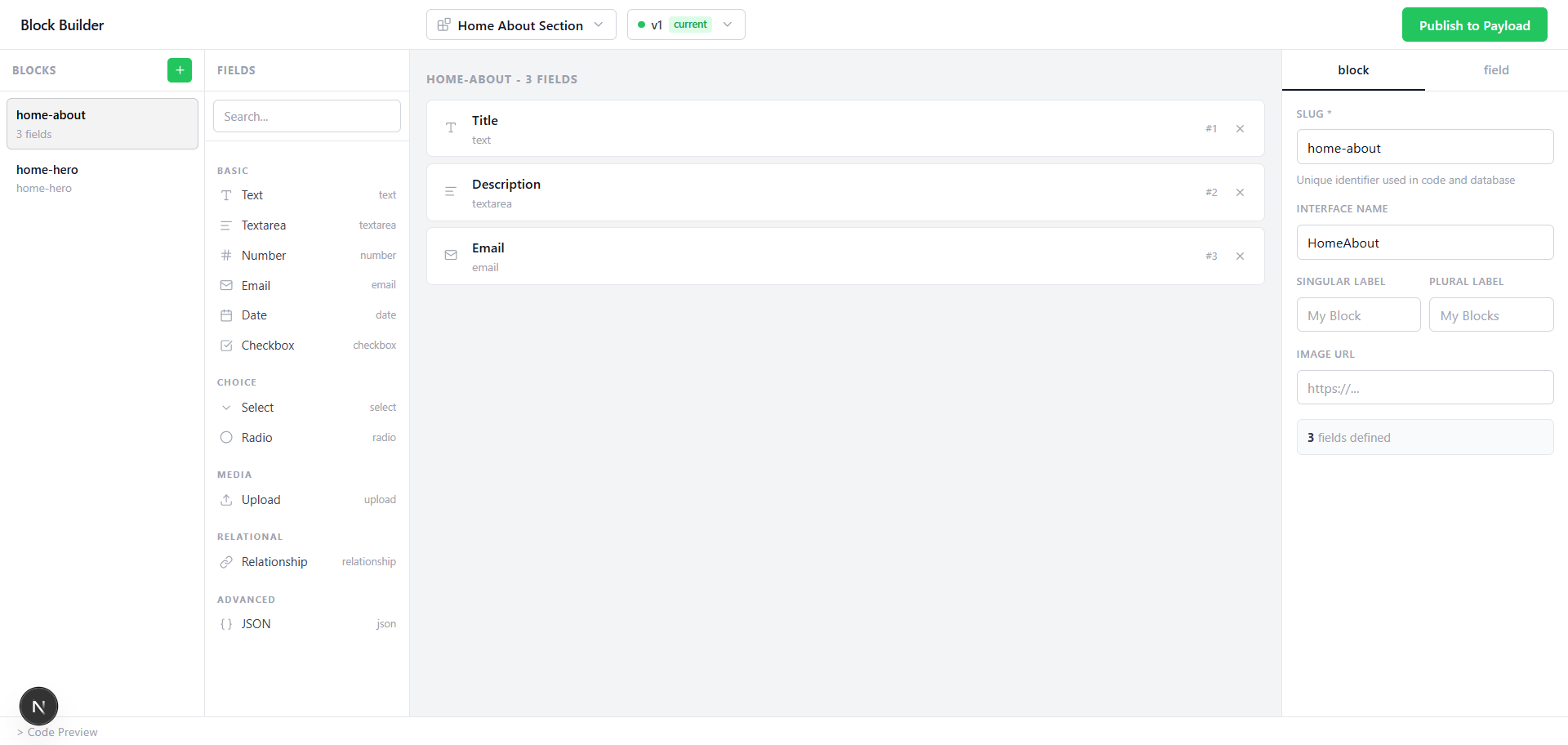
|
|
14
|
+
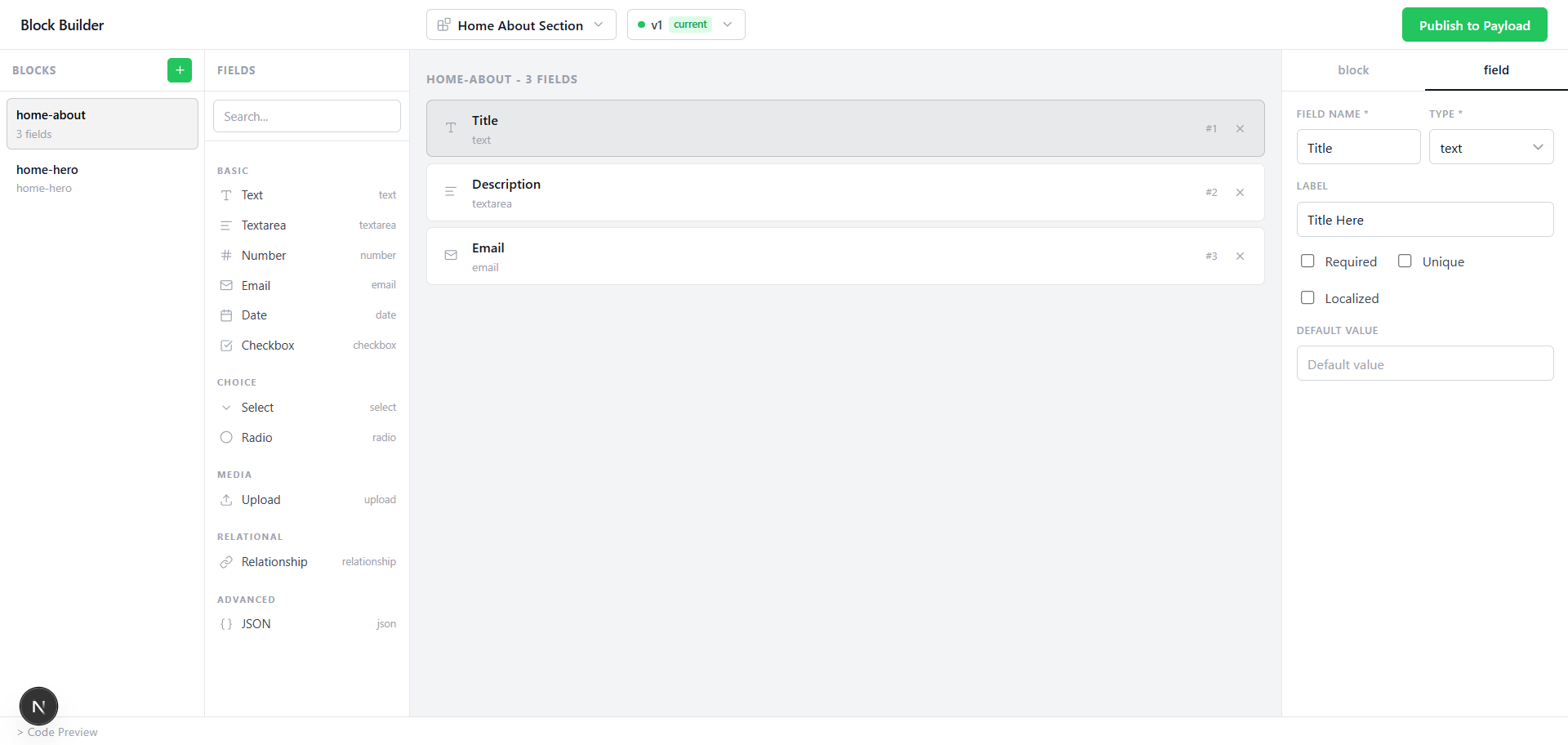
|
|
15
|
+
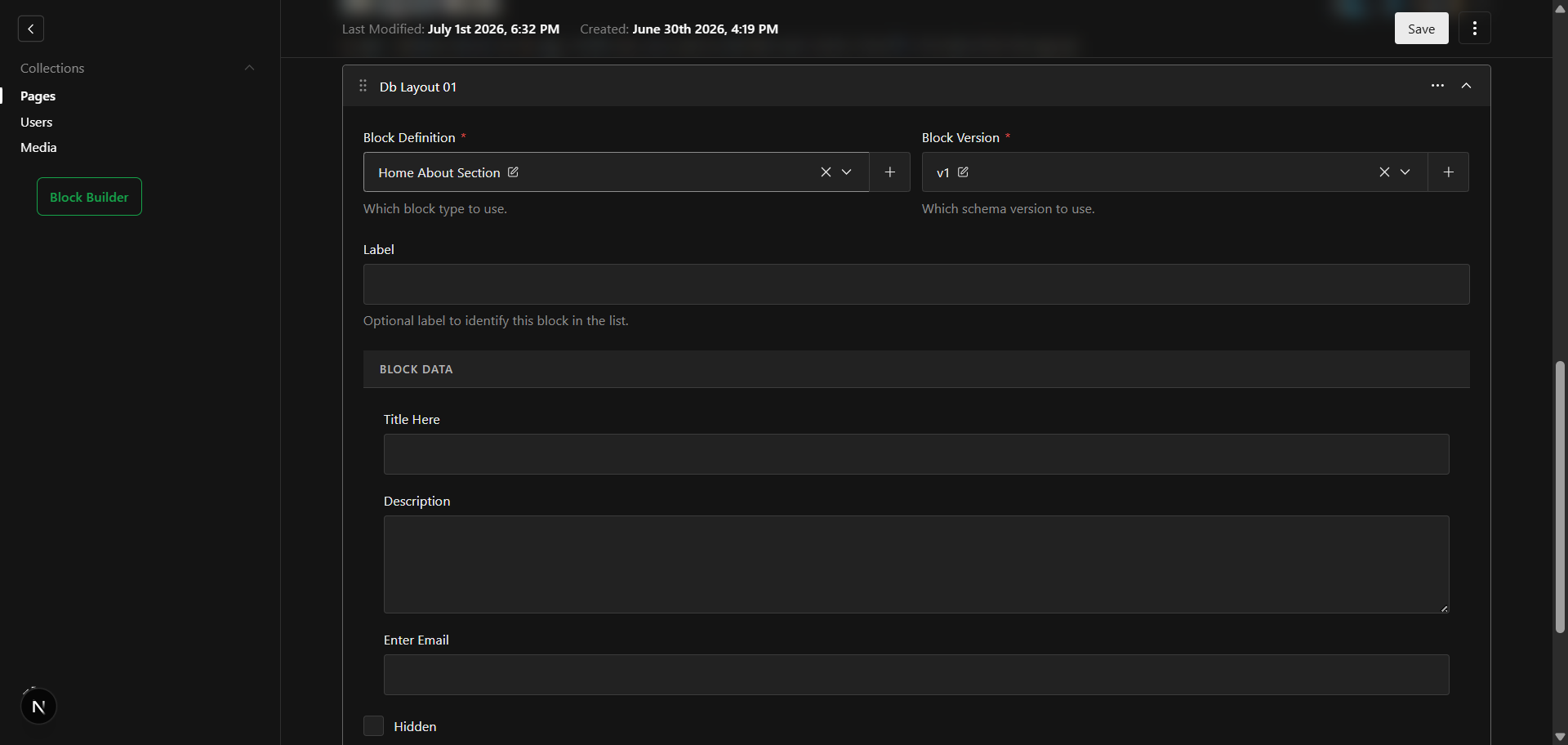
|
|
4
16
|
|
|
5
17
|
---
|
|
6
18
|
|
|
7
|
-
|
|
19
|
+
## 🎯 The Problem
|
|
8
20
|
|
|
9
|
-
|
|
21
|
+
Content editors need to manage flexible page layouts — but every new block type or layout change requires a developer to update code, redeploy, and migrate. This creates bottlenecks, slows down marketing teams, and turns simple content tasks into engineering tickets.
|
|
10
22
|
|
|
11
|
-
|
|
12
|
-
|
|
13
|
-
|
|
14
|
-
|
|
15
|
-
|
|
23
|
+
## 💡 The Solution
|
|
24
|
+
|
|
25
|
+
Payload Block Builder moves block schema definitions from code into your database. Editors design blocks visually, publish them instantly, and use them across any collection — all without touching code or triggering deployments.
|
|
26
|
+
|
|
27
|
+
---
|
|
16
28
|
|
|
17
|
-
##
|
|
29
|
+
## ✨ Features
|
|
30
|
+
|
|
31
|
+
- **Visual drag-and-drop block designer** — No code required to create new block types
|
|
32
|
+
- **Database-stored schemas** — Block definitions live in your DB, not your codebase
|
|
33
|
+
- **Version snapshots** — Every publish creates an immutable version; existing content never breaks
|
|
34
|
+
- **Collection integration** — Adds a "DB Layout" tab to any collection with one line of config
|
|
35
|
+
- **13 field types** — text, textarea, number, email, date, checkbox, select, radio, upload, relationship, json, and more
|
|
36
|
+
- **Multi-tenant ready** — Each tenant can have its own block definitions without shared config changes
|
|
37
|
+
- **Framework agnostic frontend** — Fetch structured JSON and render with React, Vue, Svelte, or anything else
|
|
38
|
+
- **Automatic init command** — Get up and running in under 2 minutes
|
|
39
|
+
- **Works with all Payload databases** — PostgreSQL, SQLite, MongoDB — no database-specific code
|
|
40
|
+
|
|
41
|
+
---
|
|
42
|
+
|
|
43
|
+
## 📋 Compatibility
|
|
44
|
+
|
|
45
|
+
| Requirement | Version |
|
|
46
|
+
|---|---|
|
|
47
|
+
| Payload CMS | v3.x |
|
|
48
|
+
| Node.js | ≥ 18 |
|
|
49
|
+
| Next.js | ≥ 14 |
|
|
18
50
|
|
|
19
|
-
|
|
51
|
+
### Database Support
|
|
20
52
|
|
|
21
53
|
| Database | Adapter |
|
|
22
54
|
|---|---|
|
|
@@ -26,25 +58,27 @@ Works with all Payload-supported databases — no direct SQL, no database-specif
|
|
|
26
58
|
|
|
27
59
|
---
|
|
28
60
|
|
|
29
|
-
## Quick
|
|
61
|
+
## 🚀 Quick Start
|
|
30
62
|
|
|
31
|
-
### Option A — Automatic
|
|
32
|
-
|
|
33
|
-
Install the package and run the init command from your project root:
|
|
63
|
+
### Option A — Automatic Setup (Recommended)
|
|
34
64
|
|
|
35
65
|
```bash
|
|
66
|
+
# Install
|
|
36
67
|
pnpm add @nextbridgehq/payload-block-builder
|
|
37
68
|
# or: npm install @nextbridgehq/payload-block-builder
|
|
38
69
|
|
|
70
|
+
# Initialize
|
|
39
71
|
npx payload-block-builder init
|
|
40
72
|
```
|
|
41
73
|
|
|
42
74
|
The init command automatically:
|
|
43
75
|
|
|
44
|
-
|
|
45
|
-
|
|
46
|
-
|
|
47
|
-
|
|
76
|
+
| What it does | File |
|
|
77
|
+
|---|---|
|
|
78
|
+
| Creates the builder UI page | `src/app/block-builder/page.tsx` |
|
|
79
|
+
| Creates a standalone layout | `src/app/block-builder/layout.tsx` |
|
|
80
|
+
| Injects admin field styles | `src/app/(payload)/custom.scss` |
|
|
81
|
+
| Adds plugin config | `payload.config.ts` |
|
|
48
82
|
|
|
49
83
|
Then regenerate the import map and start your dev server:
|
|
50
84
|
|
|
@@ -53,9 +87,10 @@ pnpm generate:importmap
|
|
|
53
87
|
pnpm dev
|
|
54
88
|
```
|
|
55
89
|
|
|
56
|
-
Visit `
|
|
90
|
+
Visit `https://your-domain.com/block-builder` and you're ready to build.
|
|
57
91
|
|
|
58
|
-
> **PostgreSQL users:** Payload will automatically push
|
|
92
|
+
> **PostgreSQL users:** Payload will automatically push new schema tables on first startup in dev mode. For production migrations:
|
|
93
|
+
>
|
|
59
94
|
> ```bash
|
|
60
95
|
> pnpm payload migrate:create --name=add_block_builder
|
|
61
96
|
> pnpm payload migrate
|
|
@@ -63,7 +98,8 @@ Visit `http://localhost:3000/block-builder` and you're ready to build.
|
|
|
63
98
|
|
|
64
99
|
---
|
|
65
100
|
|
|
66
|
-
|
|
101
|
+
<details>
|
|
102
|
+
<summary><strong>Option B — Manual Setup</strong></summary>
|
|
67
103
|
|
|
68
104
|
**1. Install:**
|
|
69
105
|
|
|
@@ -138,19 +174,28 @@ pnpm generate:importmap
|
|
|
138
174
|
pnpm dev
|
|
139
175
|
```
|
|
140
176
|
|
|
177
|
+
</details>
|
|
178
|
+
|
|
141
179
|
---
|
|
142
180
|
|
|
143
|
-
##
|
|
181
|
+
## ⚙️ Configuration Options
|
|
144
182
|
|
|
145
183
|
```ts
|
|
146
184
|
dynamicBlocksPlugin({
|
|
147
|
-
enabled?: boolean
|
|
148
|
-
collections?: string[]
|
|
149
|
-
fieldName?: string
|
|
150
|
-
tabLabel?: string
|
|
185
|
+
enabled?: boolean, // Disable without removing. Default: true
|
|
186
|
+
collections?: string[], // Collection slugs that get the DB Layout tab. Default: []
|
|
187
|
+
fieldName?: string, // Name of the layout array field. Default: 'dbLayout'
|
|
188
|
+
tabLabel?: string, // Label shown on the tab in the admin UI. Default: 'DB Layout'
|
|
151
189
|
})
|
|
152
190
|
```
|
|
153
191
|
|
|
192
|
+
| Option | Type | Default | Description |
|
|
193
|
+
|---|---|---|---|
|
|
194
|
+
| `enabled` | `boolean` | `true` | Toggle the plugin on/off without removing it from config |
|
|
195
|
+
| `collections` | `string[]` | `[]` | Collection slugs that receive the DB Layout tab |
|
|
196
|
+
| `fieldName` | `string` | `'dbLayout'` | The field name for the layout array stored on documents |
|
|
197
|
+
| `tabLabel` | `string` | `'DB Layout'` | Label displayed on the tab in the Payload admin UI |
|
|
198
|
+
|
|
154
199
|
The `--collections` flag is also supported in the init command:
|
|
155
200
|
|
|
156
201
|
```bash
|
|
@@ -159,17 +204,17 @@ npx payload-block-builder init --collections=pages,posts
|
|
|
159
204
|
|
|
160
205
|
---
|
|
161
206
|
|
|
162
|
-
## Usage
|
|
207
|
+
## 📖 Usage
|
|
163
208
|
|
|
164
|
-
### Creating a
|
|
209
|
+
### Creating a Block
|
|
165
210
|
|
|
166
211
|
1. Open `/block-builder` in your browser.
|
|
167
212
|
2. Click "Add Block" and give it a name and slug.
|
|
168
213
|
3. Drag fields from the panel on the right onto the canvas.
|
|
169
214
|
4. Configure each field (label, name, required, options, etc.).
|
|
170
|
-
5. Click Publish
|
|
215
|
+
5. Click Publish — the block schema is saved to your database and a version snapshot is created.
|
|
171
216
|
|
|
172
|
-
### Using
|
|
217
|
+
### Using Blocks in a Collection
|
|
173
218
|
|
|
174
219
|
Any collection listed in the `collections` option gets a new "DB Layout" tab in the Payload admin. Editors can:
|
|
175
220
|
|
|
@@ -179,54 +224,111 @@ Any collection listed in the `collections` option gets a new "DB Layout" tab in
|
|
|
179
224
|
4. Reorder, hide, or add anchor IDs to individual block instances.
|
|
180
225
|
5. Save the document as normal.
|
|
181
226
|
|
|
182
|
-
### Reading
|
|
227
|
+
### Reading Block Data on the Frontend
|
|
183
228
|
|
|
184
229
|
```ts
|
|
185
230
|
const res = await fetch('/api/pages/my-page?depth=2')
|
|
186
231
|
const page = await res.json()
|
|
187
232
|
|
|
188
233
|
for (const block of page.dbLayout) {
|
|
189
|
-
const type = block.blockDefinition.slug
|
|
190
|
-
const fields = block.data
|
|
234
|
+
const type = block.blockDefinition.slug // e.g. "hero"
|
|
235
|
+
const fields = block.data // { heading: '...', image: '...', ... }
|
|
191
236
|
const isHidden = block.hidden
|
|
237
|
+
const anchor = block.anchorId
|
|
192
238
|
}
|
|
193
239
|
```
|
|
194
240
|
|
|
195
|
-
|
|
241
|
+
### Example: React Component Map
|
|
196
242
|
|
|
197
|
-
|
|
243
|
+
```tsx
|
|
244
|
+
const blockComponents = {
|
|
245
|
+
hero: HeroBlock,
|
|
246
|
+
features: FeaturesBlock,
|
|
247
|
+
testimonials: TestimonialsBlock,
|
|
248
|
+
cta: CTABlock,
|
|
249
|
+
}
|
|
250
|
+
|
|
251
|
+
function PageRenderer({ blocks }) {
|
|
252
|
+
return (
|
|
253
|
+
<>
|
|
254
|
+
{blocks
|
|
255
|
+
.filter((block) => !block.hidden)
|
|
256
|
+
.map((block, i) => {
|
|
257
|
+
const Component = blockComponents[block.blockDefinition.slug]
|
|
258
|
+
if (!Component) return null
|
|
259
|
+
return (
|
|
260
|
+
|
|
261
|
+
|
|
262
|
+
|
|
263
|
+
)
|
|
264
|
+
})}
|
|
265
|
+
</>
|
|
266
|
+
)
|
|
267
|
+
}
|
|
268
|
+
```
|
|
198
269
|
|
|
199
|
-
|
|
270
|
+
> **Note:** The inner JSX of the `return (` in the React Component Map example is intentionally left blank in this snippet — fill in with your `<section>` / `<Component>` rendering as appropriate for your app.
|
|
200
271
|
|
|
201
|
-
|
|
202
|
-
|
|
203
|
-
|
|
204
|
-
|
|
205
|
-
|
|
272
|
+
---
|
|
273
|
+
|
|
274
|
+
## 🧩 Supported Field Types
|
|
275
|
+
|
|
276
|
+
| Type | Description | Admin UI |
|
|
277
|
+
|---|---|---|
|
|
278
|
+
| `text` | Single-line text input | Standard text field |
|
|
279
|
+
| `textarea` | Multi-line text input | Expandable textarea |
|
|
280
|
+
| `number` | Numeric input | Number field with validation |
|
|
281
|
+
| `email` | Email address | Email field with validation |
|
|
282
|
+
| `date` | Date picker | Calendar date picker |
|
|
283
|
+
| `checkbox` | Boolean toggle | Checkbox input |
|
|
284
|
+
| `select` | Dropdown with custom options | Select dropdown |
|
|
285
|
+
| `radio` | Radio button group | Radio buttons |
|
|
286
|
+
| `upload` | File/image picker | Media library picker |
|
|
287
|
+
| `relationship` | Document picker from any collection | Relationship field |
|
|
288
|
+
| `json` | Raw JSON data | JSON editor |
|
|
206
289
|
|
|
207
290
|
---
|
|
208
291
|
|
|
209
|
-
##
|
|
292
|
+
## 🏗️ Architecture
|
|
210
293
|
|
|
211
|
-
|
|
294
|
+
```
|
|
295
|
+
┌─────────────────────────────────────────────────────┐
|
|
296
|
+
│ Block Builder UI │
|
|
297
|
+
│ /block-builder (drag & drop) │
|
|
298
|
+
└──────────────────────────┬──────────────────────────┘
|
|
299
|
+
│ Publish
|
|
300
|
+
▼
|
|
301
|
+
┌─────────────────────────────────────────────────────┐
|
|
302
|
+
│ block-definitions collection │
|
|
303
|
+
│ (name, slug, field definitions) │
|
|
304
|
+
└──────────────────────────┬──────────────────────────┘
|
|
305
|
+
│ Snapshot
|
|
306
|
+
▼
|
|
307
|
+
┌─────────────────────────────────────────────────────┐
|
|
308
|
+
│ block-definition-versions collection │
|
|
309
|
+
│ (immutable schema snapshots per publish) │
|
|
310
|
+
└──────────────────────────┬──────────────────────────┘
|
|
311
|
+
│ Referenced by
|
|
312
|
+
▼
|
|
313
|
+
┌─────────────────────────────────────────────────────┐
|
|
314
|
+
│ Your Collection (e.g. "pages") │
|
|
315
|
+
│ dbLayout: [{ blockDefinition, version, data }] │
|
|
316
|
+
└─────────────────────────────────────────────────────┘
|
|
317
|
+
```
|
|
212
318
|
|
|
213
|
-
|
|
214
|
-
|
|
215
|
-
|
|
216
|
-
|
|
217
|
-
|
|
218
|
-
|
|
219
|
-
|
|
220
|
-
| `checkbox` | Boolean toggle |
|
|
221
|
-
| `select` | Dropdown with custom options |
|
|
222
|
-
| `radio` | Radio button group with custom options |
|
|
223
|
-
| `upload` | File / image picker (from the media collection) |
|
|
224
|
-
| `relationship` | Document picker from any collection |
|
|
225
|
-
| `json` | Raw JSON data |
|
|
319
|
+
Key design decisions:
|
|
320
|
+
|
|
321
|
+
- Block definitions are stored in a `block-definitions` collection. Each document is a named block type with a slug and a list of field definitions.
|
|
322
|
+
- Versions are stored in a `block-definition-versions` collection. Every publish creates an immutable snapshot.
|
|
323
|
+
- Documents in opted-in collections store a reference to the exact block version they were built against — updating a block schema later does not break existing content.
|
|
324
|
+
- The DB Layout tab is injected automatically into each collection you list. It renders a dynamic array field where editors pick a block and version.
|
|
325
|
+
- Four internal API endpoints power the builder UI and admin field components. You do not need to call them directly.
|
|
226
326
|
|
|
227
327
|
---
|
|
228
328
|
|
|
229
|
-
##
|
|
329
|
+
## 🔧 Advanced Usage
|
|
330
|
+
|
|
331
|
+
### Using `dbLayoutField` Directly
|
|
230
332
|
|
|
231
333
|
If you prefer not to use the plugin's `collections` option, you can add the layout tab manually to any collection:
|
|
232
334
|
|
|
@@ -239,9 +341,9 @@ export const Pages: CollectionConfig = {
|
|
|
239
341
|
{
|
|
240
342
|
type: 'tabs',
|
|
241
343
|
tabs: [
|
|
242
|
-
{ label: 'Content', fields: [] },
|
|
243
|
-
dbLayoutField(),
|
|
244
|
-
dbLayoutField('heroBlocks', 'Hero'),
|
|
344
|
+
{ label: 'Content', fields: [/* your fields */] },
|
|
345
|
+
dbLayoutField(), // fieldName='dbLayout', tab label='DB Layout'
|
|
346
|
+
dbLayoutField('heroBlocks', 'Hero'), // custom field name and tab label
|
|
245
347
|
],
|
|
246
348
|
},
|
|
247
349
|
],
|
|
@@ -250,7 +352,7 @@ export const Pages: CollectionConfig = {
|
|
|
250
352
|
|
|
251
353
|
---
|
|
252
354
|
|
|
253
|
-
## CSS
|
|
355
|
+
## 📦 CSS Imports Reference
|
|
254
356
|
|
|
255
357
|
| Import path | Purpose |
|
|
256
358
|
|---|---|
|
|
@@ -260,6 +362,41 @@ export const Pages: CollectionConfig = {
|
|
|
260
362
|
|
|
261
363
|
---
|
|
262
364
|
|
|
263
|
-
##
|
|
365
|
+
## 🗺️ Use Cases
|
|
366
|
+
|
|
367
|
+
| Use Case | How It Helps |
|
|
368
|
+
|---|---|
|
|
369
|
+
| Dynamic landing pages | Editors compose pages from a library of blocks (hero, features, testimonials, CTA) without code changes |
|
|
370
|
+
| Multi-tenant platforms | Each tenant gets its own block definitions without touching shared config or triggering redeployments |
|
|
371
|
+
| Marketing teams | Full control to create, update, and reorder blocks on any page, any time |
|
|
372
|
+
| Evolving content schemas | Roll out new block versions without breaking content built against older ones |
|
|
373
|
+
| Headless frontends | Fetch structured block data from the Payload API and render with any framework |
|
|
374
|
+
|
|
375
|
+
---
|
|
376
|
+
|
|
377
|
+
## 🤝 Contributing
|
|
378
|
+
|
|
379
|
+
Contributions are welcome! Please see our Contributing Guide for details.
|
|
380
|
+
|
|
381
|
+
- Fork the repository
|
|
382
|
+
- Create your feature branch (`git checkout -b feature/amazing-feature`)
|
|
383
|
+
- Commit your changes (`git commit -m 'Add amazing feature'`)
|
|
384
|
+
- Push to the branch (`git push origin feature/amazing-feature`)
|
|
385
|
+
- Open a Pull Request
|
|
386
|
+
|
|
387
|
+
---
|
|
388
|
+
|
|
389
|
+
## 📄 License
|
|
264
390
|
|
|
265
391
|
MIT © [Nextbridge](https://nextbridge.com)
|
|
392
|
+
|
|
393
|
+
---
|
|
394
|
+
|
|
395
|
+
## 🔗 Links
|
|
396
|
+
|
|
397
|
+
- [npm Package](https://www.npmjs.com/package/@nextbridgehq/payload-block-builder)
|
|
398
|
+
- [GitHub Repository](https://github.com/nextbridgehq/block-builder)
|
|
399
|
+
- [Report a Bug](https://github.com/nextbridgehq/block-builder/issues)
|
|
400
|
+
- [Payload CMS](https://payloadcms.com)
|
|
401
|
+
|
|
402
|
+
Built with ❤️ by Nextbridge
|