@nestia/fetcher 1.2.2 → 1.3.0
This diff represents the content of publicly available package versions that have been released to one of the supported registries. The information contained in this diff is provided for informational purposes only and reflects changes between package versions as they appear in their respective public registries.
- package/README.md +60 -121
- package/lib/IConnection.d.ts +15 -0
- package/lib/Primitive.d.ts +1 -1
- package/package.json +2 -2
- package/src/IConnection.ts +16 -0
- package/src/Primitive.ts +3 -1
package/README.md
CHANGED
|
@@ -1,121 +1,60 @@
|
|
|
1
|
-
# Nestia
|
|
2
|
-
|
|
3
|
-
|
|
4
|
-
[
|
|
3
|
+
|
|
4
|
+
[](https://github.com/samchon/nestia/blob/master/LICENSE)
|
|
5
|
+
[](https://www.npmjs.com/package/@nestia/core)
|
|
6
|
+
[](https://www.npmjs.com/package/nestia)
|
|
7
|
+
[](https://github.com/samchon/nestia/actions?query=workflow%3Abuild)
|
|
8
|
+
[](https://nestia.io/docs/)
|
|
9
|
+
|
|
10
|
+
Nestia is a set of helper libraries for NestJS, supporting below features:
|
|
11
|
+
|
|
12
|
+
- `@nestia/core`: super-fast decorators
|
|
13
|
+
- `@nestia/sdk`:
|
|
14
|
+
- SDK generator for clients
|
|
15
|
+
- Swagger generator evolved than ever
|
|
16
|
+
- Automatic E2E test functions generator
|
|
17
|
+
- `nestia`: just CLI (command line interface) tool
|
|
18
|
+
|
|
19
|
+
> **Note**
|
|
20
|
+
>
|
|
21
|
+
> - **Only one line** required, with pure TypeScript type
|
|
22
|
+
> - Runtime validator is **20,000x faster** than `class-validator`
|
|
23
|
+
> - JSON serialization is **200x faster** than `class-transformer`
|
|
24
|
+
> - SDK is similar with [tRPC](https://trpc.io), but much advanced
|
|
25
|
+
|
|
26
|
+
|
|
27
|
+
|
|
28
|
+
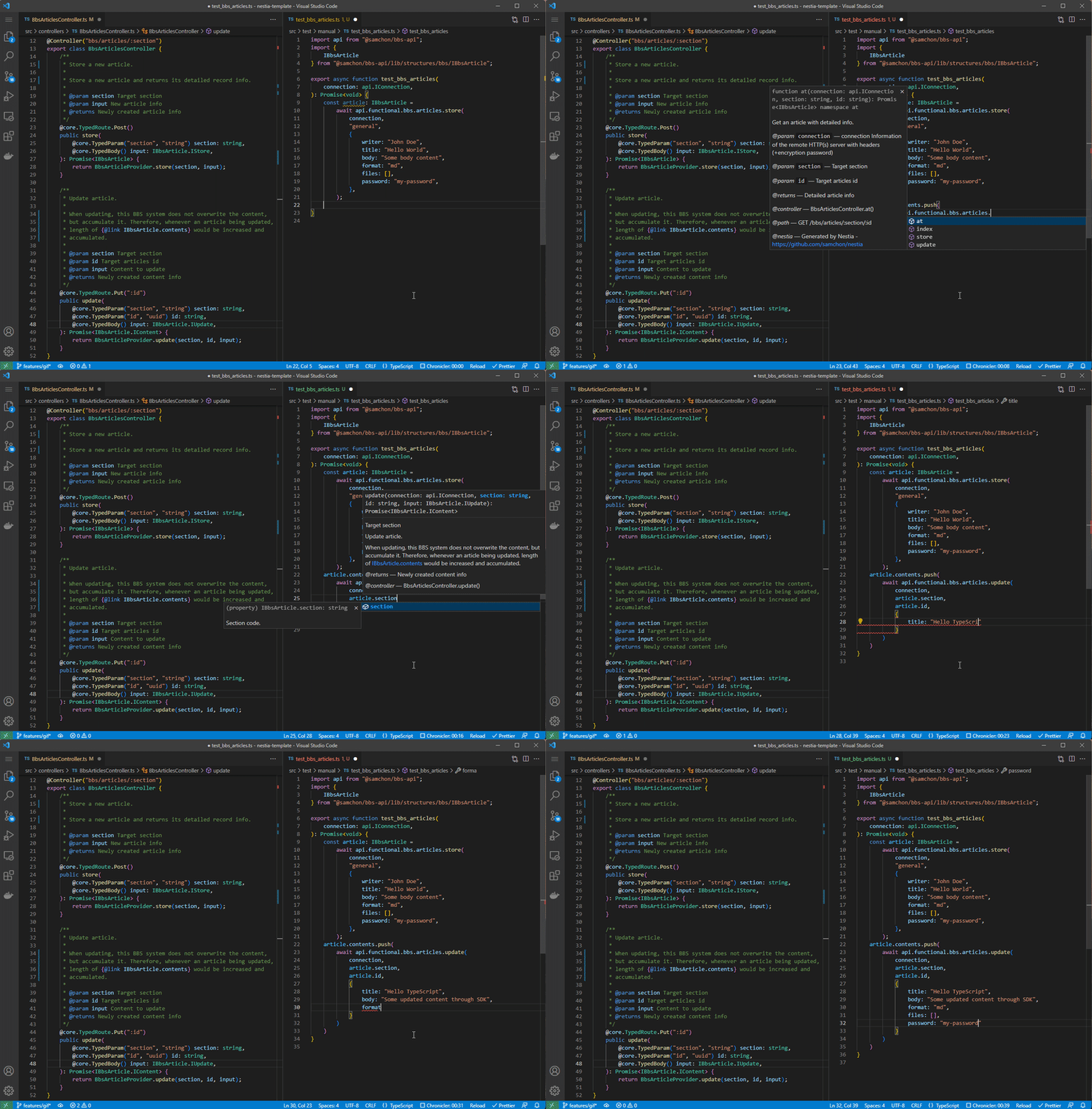
> Left is server code, and right is client code utilizing SDK
|
|
29
|
+
|
|
30
|
+
|
|
31
|
+
|
|
32
|
+
|
|
33
|
+
## Sponsors and Backers
|
|
34
|
+
Thanks for your support.
|
|
35
|
+
|
|
36
|
+
Your donation would encourage `nestia` development.
|
|
37
|
+
|
|
38
|
+
[](https://opencollective.com/nestia)
|
|
39
|
+
|
|
40
|
+
|
|
41
|
+
|
|
42
|
+
|
|
43
|
+
## Guide Documents
|
|
44
|
+
Check out the document in the [website](https://nestia.io/docs/):
|
|
45
|
+
|
|
46
|
+
### 🏠 Home
|
|
47
|
+
- [Introduction](https://nestia.io/docs/)
|
|
48
|
+
- [Setup](https://nestia.io/docs/setup/)
|
|
49
|
+
|
|
50
|
+
### 📖 Features
|
|
51
|
+
- [Pure TypeScript](https://nestia.io/docs/pure)
|
|
52
|
+
- Core Library
|
|
53
|
+
- [TypedRoute](https://nestia.io/docs/core/TypedRoute/)
|
|
54
|
+
- [TypedBody](https://nestia.io/docs/core/TypedBody/)
|
|
55
|
+
- [TypedParam](https://nestia.io/docs/core/TypedParam/)
|
|
56
|
+
- [TypedQuery](https://nestia.io/docs/core/TypedRoute/)
|
|
57
|
+
- Generators
|
|
58
|
+
- [Swagger Documents](https://nestia.io/docs/sdk/swagger/)
|
|
59
|
+
- [SDK Library](https://nestia.io/docs/sdk/sdk/)
|
|
60
|
+
- [E2E Functions](https://nestia.io/docs/sdk/e2e/)
|
package/lib/IConnection.d.ts
CHANGED
|
@@ -18,6 +18,21 @@ export interface IConnection {
|
|
|
18
18
|
* Host address of the remote HTTP server.
|
|
19
19
|
*/
|
|
20
20
|
host: string;
|
|
21
|
+
/**
|
|
22
|
+
* Use `typia.random<T>()` function instead.
|
|
23
|
+
*
|
|
24
|
+
* If you configure this property to be `true`, your SDK library does not send
|
|
25
|
+
* any request to remote backend server, but just returns a random data generated
|
|
26
|
+
* by `typia.random<T>()` function.
|
|
27
|
+
*
|
|
28
|
+
* By the way, to utilize this random property, SDK library must be generated with
|
|
29
|
+
* `random` option, too. Open `nestia.config.ts` file, and configure `random: true`
|
|
30
|
+
* property in the top level. Then newly generated SDK library would have a
|
|
31
|
+
* built-in random generator.
|
|
32
|
+
*
|
|
33
|
+
* @default false
|
|
34
|
+
*/
|
|
35
|
+
random?: boolean;
|
|
21
36
|
/**
|
|
22
37
|
* Header values delivered to the remote HTTP server.
|
|
23
38
|
*/
|
package/lib/Primitive.d.ts
CHANGED
|
@@ -34,7 +34,7 @@ type PrimitiveMain<Instance> = ValueOf<Instance> extends object ? Instance exten
|
|
|
34
34
|
type PrimitiveObject<Instance extends object> = Instance extends Array<infer T> ? IsTuple<Instance> extends true ? PrimitiveTuple<Instance> : PrimitiveMain<T>[] : {
|
|
35
35
|
[P in keyof Instance]: Instance[P] extends Function ? never : PrimitiveMain<Instance[P]>;
|
|
36
36
|
};
|
|
37
|
-
type PrimitiveTuple<T extends readonly any[]> = T extends [infer F] ? [PrimitiveMain<F>] : T extends [infer F, ...infer Rest extends readonly any[]] ? [PrimitiveMain<F>, ...PrimitiveTuple<Rest>] : T extends [(infer F)?] ? [PrimitiveMain<F>?] : T extends [(infer F)?, ...infer Rest extends readonly any[]] ? [PrimitiveMain<F>?, ...PrimitiveTuple<Rest>] : [];
|
|
37
|
+
type PrimitiveTuple<T extends readonly any[]> = T extends [] ? [] : T extends [infer F] ? [PrimitiveMain<F>] : T extends [infer F, ...infer Rest extends readonly any[]] ? [PrimitiveMain<F>, ...PrimitiveTuple<Rest>] : T extends [(infer F)?] ? [PrimitiveMain<F>?] : T extends [(infer F)?, ...infer Rest extends readonly any[]] ? [PrimitiveMain<F>?, ...PrimitiveTuple<Rest>] : [];
|
|
38
38
|
type ValueOf<Instance> = IsValueOf<Instance, Boolean> extends true ? boolean : IsValueOf<Instance, Number> extends true ? number : IsValueOf<Instance, String> extends true ? string : Instance;
|
|
39
39
|
type NativeClass = Set<any> | Map<any, any> | WeakSet<any> | WeakMap<any, any> | Uint8Array | Uint8ClampedArray | Uint16Array | Uint32Array | BigUint64Array | Int8Array | Int16Array | Int32Array | BigInt64Array | Float32Array | Float64Array | ArrayBuffer | SharedArrayBuffer | DataView;
|
|
40
40
|
type IsTuple<T extends readonly any[] | {
|
package/package.json
CHANGED
|
@@ -1,6 +1,6 @@
|
|
|
1
1
|
{
|
|
2
2
|
"name": "@nestia/fetcher",
|
|
3
|
-
"version": "1.
|
|
3
|
+
"version": "1.3.0",
|
|
4
4
|
"description": "Fetcher library of Nestia SDK",
|
|
5
5
|
"main": "lib/index.js",
|
|
6
6
|
"typings": "lib/index.d.ts",
|
|
@@ -25,7 +25,7 @@
|
|
|
25
25
|
"bugs": {
|
|
26
26
|
"url": "https://github.com/samchon/nestia/issues"
|
|
27
27
|
},
|
|
28
|
-
"homepage": "https://
|
|
28
|
+
"homepage": "https://nestia.io",
|
|
29
29
|
"devDependencies": {
|
|
30
30
|
"@types/node": "^18.11.14",
|
|
31
31
|
"@typescript-eslint/eslint-plugin": "^5.46.1",
|
package/src/IConnection.ts
CHANGED
|
@@ -20,6 +20,22 @@ export interface IConnection {
|
|
|
20
20
|
*/
|
|
21
21
|
host: string;
|
|
22
22
|
|
|
23
|
+
/**
|
|
24
|
+
* Use `typia.random<T>()` function instead.
|
|
25
|
+
*
|
|
26
|
+
* If you configure this property to be `true`, your SDK library does not send
|
|
27
|
+
* any request to remote backend server, but just returns a random data generated
|
|
28
|
+
* by `typia.random<T>()` function.
|
|
29
|
+
*
|
|
30
|
+
* By the way, to utilize this random property, SDK library must be generated with
|
|
31
|
+
* `random` option, too. Open `nestia.config.ts` file, and configure `random: true`
|
|
32
|
+
* property in the top level. Then newly generated SDK library would have a
|
|
33
|
+
* built-in random generator.
|
|
34
|
+
*
|
|
35
|
+
* @default false
|
|
36
|
+
*/
|
|
37
|
+
random?: boolean;
|
|
38
|
+
|
|
23
39
|
/**
|
|
24
40
|
* Header values delivered to the remote HTTP server.
|
|
25
41
|
*/
|
package/src/Primitive.ts
CHANGED
|
@@ -58,7 +58,9 @@ type PrimitiveObject<Instance extends object> = Instance extends Array<infer T>
|
|
|
58
58
|
: PrimitiveMain<Instance[P]>;
|
|
59
59
|
};
|
|
60
60
|
|
|
61
|
-
type PrimitiveTuple<T extends readonly any[]> = T extends [
|
|
61
|
+
type PrimitiveTuple<T extends readonly any[]> = T extends []
|
|
62
|
+
? []
|
|
63
|
+
: T extends [infer F]
|
|
62
64
|
? [PrimitiveMain<F>]
|
|
63
65
|
: T extends [infer F, ...infer Rest extends readonly any[]]
|
|
64
66
|
? [PrimitiveMain<F>, ...PrimitiveTuple<Rest>]
|