@needle-tools/gltf-progressive 3.1.0 → 3.1.1-next.26e0b81
This diff represents the content of publicly available package versions that have been released to one of the supported registries. The information contained in this diff is provided for informational purposes only and reflects changes between package versions as they appear in their respective public registries.
- package/CHANGELOG.md +4 -0
- package/README.md +79 -39
- package/gltf-progressive.js +916 -720
- package/gltf-progressive.min.js +7 -7
- package/gltf-progressive.umd.cjs +8 -8
- package/lib/extension.d.ts +3 -0
- package/lib/extension.js +96 -14
- package/lib/loaders.d.ts +8 -0
- package/lib/loaders.js +33 -22
- package/lib/lods.manager.js +24 -11
- package/lib/utils.internal.d.ts +4 -5
- package/lib/utils.internal.js +2 -2
- package/lib/version.js +1 -1
- package/lib/worker/loader.mainthread.d.ts +45 -0
- package/lib/worker/loader.mainthread.js +193 -0
- package/package.json +2 -2
package/CHANGELOG.md
CHANGED
|
@@ -4,6 +4,10 @@ All notable changes to this package will be documented in this file.
|
|
|
4
4
|
The format is based on [Keep a Changelog](http://keepachangelog.com/en/1.0.0/)
|
|
5
5
|
and this project adheres to [Semantic Versioning](http://semver.org/spec/v2.0.0.html).
|
|
6
6
|
|
|
7
|
+
## [3.1.1] - 2025-08-07
|
|
8
|
+
- Fix: Issue where compressed texture did loose LOD information ([issue](https://linear.app/needle/issue/NE-6669))
|
|
9
|
+
- Chore: Warn once if multi-mesh primitive is detected but compressed asset doesnt have densities per primitive, meaning an older compression pipeline version was used in processing this asset that would require an update for correct LOD updates
|
|
10
|
+
|
|
7
11
|
## [3.1.0] - 2025-08-06
|
|
8
12
|
- Add: Queue to limit max concurrent LOD requests
|
|
9
13
|
- Fix: Spread the skinned mesh bounds calculation over the available frames (defined by `skinnedMeshAutoUpdateBoundsInterval`)
|
package/README.md
CHANGED
|
@@ -1,19 +1,32 @@
|
|
|
1
1
|
# glTF progressive
|
|
2
2
|
|
|
3
|
-
|
|
3
|
+
**Blazingly fast loading for glTF, GLB or VRM files** + smart density based LOD selection for meshes or texture for any three.js based project.
|
|
4
|
+
|
|
5
|
+
## Installation
|
|
6
|
+
`npm i @needle-tools/gltf-progressive`
|
|
7
|
+
|
|
8
|
+
```ts
|
|
9
|
+
import { useNeedleProgressive } from "@needle-tools/gltf-progressive";
|
|
10
|
+
|
|
11
|
+
// Before loading with GLTFLoader
|
|
12
|
+
// call 'useNeedleProgressive' once to register the loader plugin
|
|
13
|
+
useNeedleProgressive("<asset_url>", webgl_renderer, gltf_loader)
|
|
14
|
+
```
|
|
4
15
|
|
|
5
16
|
## Features
|
|
6
|
-
-
|
|
7
|
-
- Mesh LOD support
|
|
8
|
-
-
|
|
9
|
-
-
|
|
10
|
-
-
|
|
11
|
-
-
|
|
17
|
+
- [**Single line integration**](#usage) for any three.js project
|
|
18
|
+
- Mesh & Texture LOD support
|
|
19
|
+
- LOD levels are loaded lazily on demand based on **mesh screen density** instead of pure distance ensuring consistent and predictable quality
|
|
20
|
+
- Mobile [data-saving](https://developer.mozilla.org/en-US/docs/Web/API/NetworkInformation/saveData) support
|
|
21
|
+
- Automatically handles KTX2, WebP, Draco, Meshopt... for you
|
|
22
|
+
- Asset generation and loading support via [Needle Cloud](https://cloud.needle.tools) for glTF, GLB & VRM assets
|
|
23
|
+
- Faster raycasting thanks to low poly LOD meshes: smooth interactions with high-poly meshes
|
|
12
24
|
|
|
13
25
|
## Examples
|
|
14
26
|
|
|
15
27
|
Examples are in the `/examples` directory. Live versions can be found in the links below.
|
|
16
28
|
|
|
29
|
+
- [Loading comparisons](https://stackblitz.com/edit/gltf-progressive-comparison?file=package.json,index.html)
|
|
17
30
|
- [Vanilla three.js](https://engine.needle.tools/demos/gltf-progressive/threejs/) - multiple models and animations
|
|
18
31
|
- [React Three Fiber](https://engine.needle.tools/demos/gltf-progressive/r3f/)
|
|
19
32
|
- \<model-viewer\>
|
|
@@ -27,32 +40,33 @@ Examples are in the `/examples` directory. Live versions can be found in the lin
|
|
|
27
40
|
- [Codesandbox](https://codesandbox.io/dashboard/sandboxes/gltf-progressive)
|
|
28
41
|
|
|
29
42
|
|
|
43
|
+
## Videos
|
|
44
|
+
<a href="https://youtu.be/7EjL0BRfIp8" target="_blank">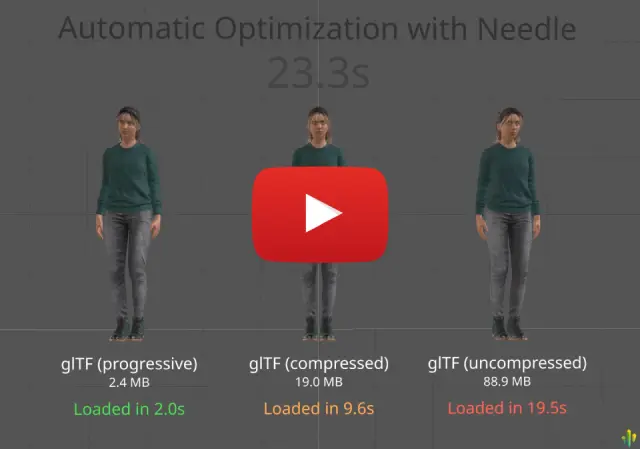</a>
|
|
46
|
+
*Progressive glTF — comparison with traditional three.js optimization*
|
|
47
|
+
|
|
30
48
|
<br/>
|
|
31
|
-
<video width="320" controls autoplay src="https://engine.needle.tools/demos/gltf-progressive/video.mp4">
|
|
32
|
-
<source src="https://engine.needle.tools/demos/gltf-progressive/video.mp4" type="video/mp4">
|
|
33
|
-
</video>
|
|
34
49
|
|
|
50
|
+
# Usage
|
|
35
51
|
|
|
36
|
-
##
|
|
52
|
+
## three.js
|
|
37
53
|
|
|
38
|
-
|
|
54
|
+
**gltf-progressive** works with any three.js project and should also work with any three.js version.
|
|
39
55
|
|
|
40
|
-
Full example
|
|
56
|
+
Full three.js example at: `examples/threejs`
|
|
41
57
|
|
|
42
58
|
```ts
|
|
43
|
-
|
|
44
|
-
|
|
45
|
-
const url = 'https://cloud.needle.tools/-/assets/Z23hmXBZN45qJ-ZN45qJ-world/file'
|
|
46
|
-
const { scene } = useGLTF(url, false, false, (loader) => {
|
|
47
|
-
useNeedleProgressive(url, gl, loader as any)
|
|
48
|
-
})
|
|
49
|
-
return <primitive object={scene} />
|
|
50
|
-
}
|
|
51
|
-
```
|
|
59
|
+
const gltfLoader = new GLTFLoader();
|
|
60
|
+
const url = "https://cloud.needle.tools/-/assets/Z23hmXBZN45qJ-ZN45qJ-world/file";
|
|
52
61
|
|
|
53
|
-
|
|
62
|
+
// register the progressive loader plugin
|
|
63
|
+
useNeedleProgressive(url, renderer, gltfLoader)
|
|
54
64
|
|
|
55
|
-
|
|
65
|
+
// just call the load method as usual
|
|
66
|
+
gltfLoader.load(url, gltf => {
|
|
67
|
+
scene.add(gltf.scene)
|
|
68
|
+
})
|
|
69
|
+
```
|
|
56
70
|
|
|
57
71
|
```html
|
|
58
72
|
<head>
|
|
@@ -70,25 +84,25 @@ The full example can be found at `examples/threejs`
|
|
|
70
84
|
</head>
|
|
71
85
|
```
|
|
72
86
|
|
|
73
|
-
In your script:
|
|
74
|
-
```ts
|
|
75
|
-
const gltfLoader = new GLTFLoader();
|
|
76
87
|
|
|
77
|
-
|
|
88
|
+
## react three fiber
|
|
78
89
|
|
|
79
|
-
|
|
80
|
-
useNeedleProgressive(url, renderer, gltfLoader)
|
|
90
|
+
Full react-three-fiber example at: `examples/react-three-fiber`
|
|
81
91
|
|
|
82
|
-
|
|
83
|
-
|
|
84
|
-
|
|
85
|
-
|
|
92
|
+
```ts
|
|
93
|
+
function MyModel() {
|
|
94
|
+
const { gl } = useThree()
|
|
95
|
+
const url = 'https://cloud.needle.tools/-/assets/Z23hmXBZN45qJ-ZN45qJ-world/file'
|
|
96
|
+
const { scene } = useGLTF(url, false, false, (loader) => {
|
|
97
|
+
useNeedleProgressive(url, gl, loader as any)
|
|
98
|
+
})
|
|
99
|
+
return <primitive object={scene} />
|
|
100
|
+
}
|
|
86
101
|
```
|
|
87
102
|
|
|
103
|
+
## google \<model-viewer\>
|
|
88
104
|
|
|
89
|
-
|
|
90
|
-
|
|
91
|
-
The example can be found in `examples/modelviewer.html`
|
|
105
|
+
Full model-viewer example at: `examples/modelviewer.html`
|
|
92
106
|
|
|
93
107
|
```html
|
|
94
108
|
<head>
|
|
@@ -113,13 +127,39 @@ The example can be found in `examples/modelviewer.html`
|
|
|
113
127
|
</body>
|
|
114
128
|
```
|
|
115
129
|
|
|
116
|
-
|
|
130
|
+
## Needle Engine
|
|
117
131
|
|
|
118
132
|
[Needle Engine](https://needle.tools) natively supports progressive loading of these glTF files! See [docs.needle.tools](https://docs.needle.tools) for more information.
|
|
119
133
|
|
|
120
134
|
|
|
121
|
-
|
|
135
|
+
# Advanced
|
|
136
|
+
|
|
137
|
+
### Add a LOD Manager plugin to receive callbacks per object
|
|
138
|
+
Create a new class extending `NEEDLE_progressive_plugin` and add your plugin by calling the static `LODSManager.addPlugin(<your_plugin_instance>)`
|
|
139
|
+
|
|
140
|
+
### Wait for LODs being loaded
|
|
141
|
+
Call `lodsManager.awaitLoading(<opts?>)` to receive a promise that will resolve when all object LODs that start loading during the next frame have finished to update. Use the optional options parameter to e.g. wait for more frames.
|
|
142
|
+
|
|
143
|
+
### Global LOD level override
|
|
144
|
+
Set the static `LODsManager.overrideGlobalLodLevel = <level>` to any number between 0 and 6. To disable the override again set it to `undefined`.
|
|
145
|
+
|
|
146
|
+
### LOD Manager settings
|
|
147
|
+
These settings are available on the LOD manager instance:
|
|
148
|
+
- `targetTriangleDensity` - The target triangle density is the desired max amount of triangles on screen when the mesh is filling the screen.
|
|
149
|
+
- `skinnedMeshAutoUpdateBoundsInterval` - The interval in frames to automatically update the bounds of skinned meshes.
|
|
150
|
+
- `updateInterval` - The update interval in frames. If set to 0, the LODs will be updated every frame. If set to 2, the LODs will be updated every second frame, etc.
|
|
151
|
+
- `pause` - If set to true, the LODsManager will not update the LODs.
|
|
152
|
+
- `manual` - When set to true the LODsManager will not update the LODs. This can be used to manually update the LODs using the `update` method. Otherwise the LODs will be updated automatically when the renderer renders the scene.
|
|
153
|
+
|
|
154
|
+
### Automatically use low-poly meshes for raycasting
|
|
155
|
+
Simply call `useRaycastMeshes(true)` to enable faster raycasting when using the the THREE.Raycaster. This can again be disabled by calling `useRaycastMeshes(false)`. Calling this method is only necessary once to enable it.
|
|
156
|
+
|
|
157
|
+
### Get LOW poly meshes for physics simulation
|
|
158
|
+
Call `getRaycastMesh(<your_mesh_object>)`
|
|
159
|
+
|
|
122
160
|
|
|
161
|
+
# How can I generate assets for progressive loading
|
|
162
|
+
Use [Needle Cloud](https://cloud.needle.tools) to generate LODs for your assets (includes hosting, global CDN, password protection, versioning, CLI support...) or use one of the Needle integrations for Unity or Blender.
|
|
123
163
|
|
|
124
164
|
# Contact ✒️
|
|
125
165
|
<b>[🌵 needle — tools for creators](https://needle.tools)</b> •
|