@needle-tools/engine 4.13.0 → 4.13.1-beta
This diff represents the content of publicly available package versions that have been released to one of the supported registries. The information contained in this diff is provided for informational purposes only and reflects changes between package versions as they appear in their respective public registries.
- package/CHANGELOG.md +2 -1
- package/README.md +37 -0
- package/components.needle.json +1 -1
- package/custom-elements.json +138 -4
- package/dist/{needle-engine.bundle-CxaKFQVS.min.js → needle-engine.bundle-6774fXoY.min.js} +107 -107
- package/dist/{needle-engine.bundle-Dl3TFYyv.js → needle-engine.bundle-CGtsEhyJ.js} +2346 -1844
- package/dist/{needle-engine.bundle-J4k4znv8.umd.cjs → needle-engine.bundle-fbFZTOKP.umd.cjs} +108 -108
- package/dist/needle-engine.d.ts +3769 -397
- package/dist/needle-engine.js +2 -2
- package/dist/needle-engine.min.js +1 -1
- package/dist/needle-engine.umd.cjs +1 -1
- package/lib/engine/engine_context.d.ts +16 -0
- package/lib/engine/engine_context.js +16 -0
- package/lib/engine/engine_context.js.map +1 -1
- package/lib/engine/engine_gameobject.d.ts +72 -0
- package/lib/engine/engine_gameobject.js +38 -0
- package/lib/engine/engine_gameobject.js.map +1 -1
- package/lib/engine/engine_input.d.ts +80 -4
- package/lib/engine/engine_input.js +78 -2
- package/lib/engine/engine_input.js.map +1 -1
- package/lib/engine/engine_math.d.ts +81 -2
- package/lib/engine/engine_math.js +68 -2
- package/lib/engine/engine_math.js.map +1 -1
- package/lib/engine/engine_networking.d.ts +181 -14
- package/lib/engine/engine_networking.js +181 -14
- package/lib/engine/engine_networking.js.map +1 -1
- package/lib/engine/engine_networking_auto.d.ts +35 -8
- package/lib/engine/engine_networking_auto.js +35 -8
- package/lib/engine/engine_networking_auto.js.map +1 -1
- package/lib/engine/engine_physics.d.ts +35 -1
- package/lib/engine/engine_physics.js +35 -1
- package/lib/engine/engine_physics.js.map +1 -1
- package/lib/engine/engine_physics_rapier.d.ts +76 -0
- package/lib/engine/engine_physics_rapier.js +76 -0
- package/lib/engine/engine_physics_rapier.js.map +1 -1
- package/lib/engine/engine_serialization_decorator.d.ts +28 -2
- package/lib/engine/engine_serialization_decorator.js +28 -2
- package/lib/engine/engine_serialization_decorator.js.map +1 -1
- package/lib/engine/engine_time.d.ts +23 -3
- package/lib/engine/engine_time.js +23 -3
- package/lib/engine/engine_time.js.map +1 -1
- package/lib/engine/engine_util_decorator.d.ts +31 -1
- package/lib/engine/engine_util_decorator.js +31 -1
- package/lib/engine/engine_util_decorator.js.map +1 -1
- package/lib/engine/engine_utils.d.ts +21 -5
- package/lib/engine/engine_utils.js +21 -5
- package/lib/engine/engine_utils.js.map +1 -1
- package/lib/engine/extensions/NEEDLE_materialx.d.ts +2 -2
- package/lib/engine/extensions/NEEDLE_materialx.js +2 -2
- package/lib/engine/extensions/NEEDLE_materialx.js.map +1 -1
- package/lib/engine/extensions/index.d.ts +1 -1
- package/lib/engine/extensions/index.js +1 -1
- package/lib/engine/extensions/index.js.map +1 -1
- package/lib/engine-components/AlignmentConstraint.d.ts +23 -3
- package/lib/engine-components/AlignmentConstraint.js +23 -3
- package/lib/engine-components/AlignmentConstraint.js.map +1 -1
- package/lib/engine-components/Animation.d.ts +42 -0
- package/lib/engine-components/Animation.js +36 -0
- package/lib/engine-components/Animation.js.map +1 -1
- package/lib/engine-components/Animator.d.ts +37 -4
- package/lib/engine-components/Animator.js +37 -4
- package/lib/engine-components/Animator.js.map +1 -1
- package/lib/engine-components/AudioListener.d.ts +1 -1
- package/lib/engine-components/AudioListener.js +1 -1
- package/lib/engine-components/AudioSource.d.ts +32 -10
- package/lib/engine-components/AudioSource.js +32 -10
- package/lib/engine-components/AudioSource.js.map +1 -1
- package/lib/engine-components/AxesHelper.d.ts +22 -3
- package/lib/engine-components/AxesHelper.js +22 -3
- package/lib/engine-components/AxesHelper.js.map +1 -1
- package/lib/engine-components/BasicIKConstraint.d.ts +27 -4
- package/lib/engine-components/BasicIKConstraint.js +27 -4
- package/lib/engine-components/BasicIKConstraint.js.map +1 -1
- package/lib/engine-components/Camera.d.ts +32 -2
- package/lib/engine-components/Camera.js +32 -2
- package/lib/engine-components/Camera.js.map +1 -1
- package/lib/engine-components/CharacterController.d.ts +68 -4
- package/lib/engine-components/CharacterController.js +68 -4
- package/lib/engine-components/CharacterController.js.map +1 -1
- package/lib/engine-components/Collider.d.ts +69 -12
- package/lib/engine-components/Collider.js +69 -12
- package/lib/engine-components/Collider.js.map +1 -1
- package/lib/engine-components/ContactShadows.d.ts +26 -6
- package/lib/engine-components/ContactShadows.js +31 -8
- package/lib/engine-components/ContactShadows.js.map +1 -1
- package/lib/engine-components/DeleteBox.d.ts +43 -2
- package/lib/engine-components/DeleteBox.js +43 -2
- package/lib/engine-components/DeleteBox.js.map +1 -1
- package/lib/engine-components/DeviceFlag.d.ts +21 -2
- package/lib/engine-components/DeviceFlag.js +21 -2
- package/lib/engine-components/DeviceFlag.js.map +1 -1
- package/lib/engine-components/DragControls.d.ts +32 -2
- package/lib/engine-components/DragControls.js +32 -2
- package/lib/engine-components/DragControls.js.map +1 -1
- package/lib/engine-components/DropListener.d.ts +33 -21
- package/lib/engine-components/DropListener.js +33 -21
- package/lib/engine-components/DropListener.js.map +1 -1
- package/lib/engine-components/Duplicatable.d.ts +36 -5
- package/lib/engine-components/Duplicatable.js +36 -5
- package/lib/engine-components/Duplicatable.js.map +1 -1
- package/lib/engine-components/EventList.d.ts +38 -10
- package/lib/engine-components/EventList.js +38 -10
- package/lib/engine-components/EventList.js.map +1 -1
- package/lib/engine-components/EventTrigger.d.ts +1 -1
- package/lib/engine-components/EventTrigger.js +1 -1
- package/lib/engine-components/Fog.d.ts +23 -1
- package/lib/engine-components/Fog.js +23 -1
- package/lib/engine-components/Fog.js.map +1 -1
- package/lib/engine-components/GridHelper.d.ts +18 -2
- package/lib/engine-components/GridHelper.js +18 -2
- package/lib/engine-components/GridHelper.js.map +1 -1
- package/lib/engine-components/GroundProjection.d.ts +24 -2
- package/lib/engine-components/GroundProjection.js +24 -2
- package/lib/engine-components/GroundProjection.js.map +1 -1
- package/lib/engine-components/Interactable.d.ts +17 -2
- package/lib/engine-components/Interactable.js +17 -2
- package/lib/engine-components/Interactable.js.map +1 -1
- package/lib/engine-components/Joints.d.ts +50 -7
- package/lib/engine-components/Joints.js +50 -7
- package/lib/engine-components/Joints.js.map +1 -1
- package/lib/engine-components/LODGroup.d.ts +36 -14
- package/lib/engine-components/LODGroup.js +43 -11
- package/lib/engine-components/LODGroup.js.map +1 -1
- package/lib/engine-components/Light.d.ts +30 -5
- package/lib/engine-components/Light.js +30 -5
- package/lib/engine-components/Light.js.map +1 -1
- package/lib/engine-components/LookAtConstraint.d.ts +22 -7
- package/lib/engine-components/LookAtConstraint.js +22 -7
- package/lib/engine-components/LookAtConstraint.js.map +1 -1
- package/lib/engine-components/NeedleMenu.d.ts +27 -5
- package/lib/engine-components/NeedleMenu.js +27 -5
- package/lib/engine-components/NeedleMenu.js.map +1 -1
- package/lib/engine-components/NestedGltf.d.ts +39 -4
- package/lib/engine-components/NestedGltf.js +42 -4
- package/lib/engine-components/NestedGltf.js.map +1 -1
- package/lib/engine-components/OffsetConstraint.d.ts +27 -3
- package/lib/engine-components/OffsetConstraint.js +27 -3
- package/lib/engine-components/OffsetConstraint.js.map +1 -1
- package/lib/engine-components/OrbitControls.d.ts +41 -3
- package/lib/engine-components/OrbitControls.js +41 -3
- package/lib/engine-components/OrbitControls.js.map +1 -1
- package/lib/engine-components/PlayerColor.d.ts +1 -1
- package/lib/engine-components/PlayerColor.js +1 -1
- package/lib/engine-components/ReflectionProbe.d.ts +17 -2
- package/lib/engine-components/ReflectionProbe.js +17 -3
- package/lib/engine-components/ReflectionProbe.js.map +1 -1
- package/lib/engine-components/Renderer.d.ts +34 -0
- package/lib/engine-components/Renderer.js +35 -2
- package/lib/engine-components/Renderer.js.map +1 -1
- package/lib/engine-components/SceneSwitcher.d.ts +11 -0
- package/lib/engine-components/SceneSwitcher.js +11 -0
- package/lib/engine-components/SceneSwitcher.js.map +1 -1
- package/lib/engine-components/ScreenCapture.d.ts +38 -6
- package/lib/engine-components/ScreenCapture.js +38 -6
- package/lib/engine-components/ScreenCapture.js.map +1 -1
- package/lib/engine-components/Skybox.d.ts +1 -1
- package/lib/engine-components/Skybox.js +1 -1
- package/lib/engine-components/SmoothFollow.d.ts +66 -7
- package/lib/engine-components/SmoothFollow.js +66 -7
- package/lib/engine-components/SmoothFollow.js.map +1 -1
- package/lib/engine-components/SpatialTrigger.d.ts +48 -1
- package/lib/engine-components/SpatialTrigger.js +48 -1
- package/lib/engine-components/SpatialTrigger.js.map +1 -1
- package/lib/engine-components/SpectatorCamera.d.ts +21 -3
- package/lib/engine-components/SpectatorCamera.js +21 -3
- package/lib/engine-components/SpectatorCamera.js.map +1 -1
- package/lib/engine-components/SyncedRoom.d.ts +7 -1
- package/lib/engine-components/SyncedRoom.js +7 -1
- package/lib/engine-components/SyncedRoom.js.map +1 -1
- package/lib/engine-components/SyncedTransform.d.ts +55 -6
- package/lib/engine-components/SyncedTransform.js +55 -6
- package/lib/engine-components/SyncedTransform.js.map +1 -1
- package/lib/engine-components/TransformGizmo.d.ts +30 -3
- package/lib/engine-components/TransformGizmo.js +30 -3
- package/lib/engine-components/TransformGizmo.js.map +1 -1
- package/lib/engine-components/VideoPlayer.d.ts +33 -6
- package/lib/engine-components/VideoPlayer.js +45 -6
- package/lib/engine-components/VideoPlayer.js.map +1 -1
- package/lib/engine-components/Voip.d.ts +33 -2
- package/lib/engine-components/Voip.js +33 -2
- package/lib/engine-components/Voip.js.map +1 -1
- package/lib/engine-components/export/usdz/USDZExporter.d.ts +47 -13
- package/lib/engine-components/export/usdz/USDZExporter.js +47 -13
- package/lib/engine-components/export/usdz/USDZExporter.js.map +1 -1
- package/lib/engine-components/particlesystem/ParticleSystem.d.ts +82 -3
- package/lib/engine-components/particlesystem/ParticleSystem.js +82 -3
- package/lib/engine-components/particlesystem/ParticleSystem.js.map +1 -1
- package/lib/engine-components/postprocessing/Effects/Antialiasing.d.ts +1 -0
- package/lib/engine-components/postprocessing/Effects/Antialiasing.js +1 -0
- package/lib/engine-components/postprocessing/Effects/Antialiasing.js.map +1 -1
- package/lib/engine-components/postprocessing/Effects/BloomEffect.d.ts +1 -1
- package/lib/engine-components/postprocessing/Effects/BloomEffect.js +1 -1
- package/lib/engine-components/postprocessing/Effects/ChromaticAberration.d.ts +1 -1
- package/lib/engine-components/postprocessing/Effects/ChromaticAberration.js +1 -1
- package/lib/engine-components/postprocessing/Effects/ColorAdjustments.d.ts +1 -1
- package/lib/engine-components/postprocessing/Effects/ColorAdjustments.js +1 -1
- package/lib/engine-components/postprocessing/Effects/DepthOfField.d.ts +1 -1
- package/lib/engine-components/postprocessing/Effects/DepthOfField.js +1 -1
- package/lib/engine-components/postprocessing/Effects/EffectWrapper.d.ts +1 -0
- package/lib/engine-components/postprocessing/Effects/EffectWrapper.js +1 -0
- package/lib/engine-components/postprocessing/Effects/EffectWrapper.js.map +1 -1
- package/lib/engine-components/postprocessing/Effects/Pixelation.d.ts +1 -1
- package/lib/engine-components/postprocessing/Effects/Pixelation.js +1 -1
- package/lib/engine-components/postprocessing/Effects/ScreenspaceAmbientOcclusion.d.ts +1 -1
- package/lib/engine-components/postprocessing/Effects/ScreenspaceAmbientOcclusion.js +1 -1
- package/lib/engine-components/postprocessing/Effects/ScreenspaceAmbientOcclusionN8.d.ts +1 -1
- package/lib/engine-components/postprocessing/Effects/ScreenspaceAmbientOcclusionN8.js +1 -1
- package/lib/engine-components/postprocessing/Effects/Sharpening.d.ts +1 -1
- package/lib/engine-components/postprocessing/Effects/Sharpening.js +1 -1
- package/lib/engine-components/postprocessing/Effects/TiltShiftEffect.d.ts +1 -1
- package/lib/engine-components/postprocessing/Effects/TiltShiftEffect.js +1 -1
- package/lib/engine-components/postprocessing/Effects/Tonemapping.d.ts +1 -1
- package/lib/engine-components/postprocessing/Effects/Tonemapping.js +1 -1
- package/lib/engine-components/postprocessing/Effects/Vignette.d.ts +1 -1
- package/lib/engine-components/postprocessing/Effects/Vignette.js +1 -1
- package/lib/engine-components/postprocessing/PostProcessingHandler.d.ts +1 -1
- package/lib/engine-components/postprocessing/PostProcessingHandler.js +1 -1
- package/lib/engine-components/postprocessing/Volume.d.ts +1 -1
- package/lib/engine-components/postprocessing/Volume.js +1 -1
- package/lib/engine-components/splines/Spline.d.ts +409 -12
- package/lib/engine-components/splines/Spline.js +409 -12
- package/lib/engine-components/splines/Spline.js.map +1 -1
- package/lib/engine-components/splines/SplineUtils.d.ts +1 -0
- package/lib/engine-components/splines/SplineUtils.js +1 -0
- package/lib/engine-components/splines/SplineUtils.js.map +1 -1
- package/lib/engine-components/splines/SplineWalker.d.ts +3 -1
- package/lib/engine-components/splines/SplineWalker.js +3 -1
- package/lib/engine-components/splines/SplineWalker.js.map +1 -1
- package/lib/engine-components/timeline/PlayableDirector.d.ts +99 -14
- package/lib/engine-components/timeline/PlayableDirector.js +91 -25
- package/lib/engine-components/timeline/PlayableDirector.js.map +1 -1
- package/lib/engine-components/ui/Button.d.ts +29 -3
- package/lib/engine-components/ui/Button.js +29 -3
- package/lib/engine-components/ui/Button.js.map +1 -1
- package/lib/engine-components/ui/Canvas.d.ts +29 -4
- package/lib/engine-components/ui/Canvas.js +29 -4
- package/lib/engine-components/ui/Canvas.js.map +1 -1
- package/lib/engine-components/ui/CanvasGroup.d.ts +1 -1
- package/lib/engine-components/ui/CanvasGroup.js +1 -1
- package/lib/engine-components/ui/EventSystem.d.ts +1 -1
- package/lib/engine-components/ui/EventSystem.js +1 -1
- package/lib/engine-components/ui/Graphic.d.ts +1 -0
- package/lib/engine-components/ui/Graphic.js +1 -0
- package/lib/engine-components/ui/Graphic.js.map +1 -1
- package/lib/engine-components/ui/Image.d.ts +22 -3
- package/lib/engine-components/ui/Image.js +22 -3
- package/lib/engine-components/ui/Image.js.map +1 -1
- package/lib/engine-components/ui/InputField.d.ts +1 -1
- package/lib/engine-components/ui/InputField.js +1 -1
- package/lib/engine-components/ui/Layout.d.ts +3 -0
- package/lib/engine-components/ui/Layout.js +3 -0
- package/lib/engine-components/ui/Layout.js.map +1 -1
- package/lib/engine-components/ui/Outline.d.ts +1 -1
- package/lib/engine-components/ui/Outline.js +1 -1
- package/lib/engine-components/ui/PointerEvents.d.ts +1 -1
- package/lib/engine-components/ui/PointerEvents.js +1 -1
- package/lib/engine-components/ui/Raycaster.d.ts +55 -6
- package/lib/engine-components/ui/Raycaster.js +55 -6
- package/lib/engine-components/ui/Raycaster.js.map +1 -1
- package/lib/engine-components/ui/RectTransform.d.ts +1 -1
- package/lib/engine-components/ui/RectTransform.js +1 -1
- package/lib/engine-components/ui/SpatialHtml.d.ts +1 -1
- package/lib/engine-components/ui/SpatialHtml.js +1 -1
- package/lib/engine-components/ui/Text.d.ts +23 -1
- package/lib/engine-components/ui/Text.js +23 -1
- package/lib/engine-components/ui/Text.js.map +1 -1
- package/lib/engine-components/utils/LookAt.d.ts +1 -1
- package/lib/engine-components/utils/LookAt.js +1 -1
- package/lib/engine-components/utils/OpenURL.d.ts +1 -1
- package/lib/engine-components/utils/OpenURL.js +1 -1
- package/lib/engine-components/web/Clickthrough.d.ts +116 -7
- package/lib/engine-components/web/Clickthrough.js +116 -7
- package/lib/engine-components/web/Clickthrough.js.map +1 -1
- package/lib/engine-components/web/CursorFollow.d.ts +171 -7
- package/lib/engine-components/web/CursorFollow.js +171 -7
- package/lib/engine-components/web/CursorFollow.js.map +1 -1
- package/lib/engine-components/web/HoverAnimation.d.ts +140 -11
- package/lib/engine-components/web/HoverAnimation.js +140 -11
- package/lib/engine-components/web/HoverAnimation.js.map +1 -1
- package/lib/engine-components/web/ScrollFollow.d.ts +4 -1
- package/lib/engine-components/web/ScrollFollow.js +4 -1
- package/lib/engine-components/web/ScrollFollow.js.map +1 -1
- package/lib/engine-components/web/ViewBox.d.ts +116 -16
- package/lib/engine-components/web/ViewBox.js +110 -16
- package/lib/engine-components/web/ViewBox.js.map +1 -1
- package/lib/engine-components/webxr/TeleportTarget.d.ts +21 -2
- package/lib/engine-components/webxr/TeleportTarget.js +21 -2
- package/lib/engine-components/webxr/TeleportTarget.js.map +1 -1
- package/lib/engine-components/webxr/WebXR.d.ts +10 -2
- package/lib/engine-components/webxr/WebXR.js +10 -2
- package/lib/engine-components/webxr/WebXR.js.map +1 -1
- package/lib/engine-components/webxr/WebXRAvatar.d.ts +39 -2
- package/lib/engine-components/webxr/WebXRAvatar.js +35 -3
- package/lib/engine-components/webxr/WebXRAvatar.js.map +1 -1
- package/lib/engine-components/webxr/WebXRImageTracking.d.ts +266 -30
- package/lib/engine-components/webxr/WebXRImageTracking.js +266 -30
- package/lib/engine-components/webxr/WebXRImageTracking.js.map +1 -1
- package/lib/engine-components/webxr/WebXRPlaneTracking.d.ts +1 -1
- package/lib/engine-components/webxr/WebXRPlaneTracking.js +1 -1
- package/lib/engine-components/webxr/XRFlag.d.ts +29 -2
- package/lib/engine-components/webxr/XRFlag.js +29 -2
- package/lib/engine-components/webxr/XRFlag.js.map +1 -1
- package/package.json +1 -1
- package/plugins/vite/custom-element-data.js +128 -19
- package/src/engine/engine_context.ts +16 -0
- package/src/engine/engine_gameobject.ts +73 -0
- package/src/engine/engine_input.ts +83 -7
- package/src/engine/engine_math.ts +81 -2
- package/src/engine/engine_networking.ts +186 -17
- package/src/engine/engine_networking_auto.ts +36 -9
- package/src/engine/engine_physics.ts +37 -1
- package/src/engine/engine_physics_rapier.ts +77 -0
- package/src/engine/engine_serialization_decorator.ts +28 -2
- package/src/engine/engine_time.ts +23 -3
- package/src/engine/engine_util_decorator.ts +31 -1
- package/src/engine/engine_utils.ts +21 -5
- package/src/engine/extensions/NEEDLE_materialx.ts +5 -4
- package/src/engine/extensions/index.ts +2 -2
- package/src/engine-components/AlignmentConstraint.ts +24 -4
- package/src/engine-components/Animation.ts +44 -2
- package/src/engine-components/Animator.ts +40 -7
- package/src/engine-components/AudioListener.ts +1 -1
- package/src/engine-components/AudioSource.ts +37 -15
- package/src/engine-components/AxesHelper.ts +23 -4
- package/src/engine-components/BasicIKConstraint.ts +28 -5
- package/src/engine-components/Camera.ts +33 -3
- package/src/engine-components/CharacterController.ts +74 -7
- package/src/engine-components/Collider.ts +78 -21
- package/src/engine-components/ContactShadows.ts +36 -11
- package/src/engine-components/DeleteBox.ts +43 -2
- package/src/engine-components/DeviceFlag.ts +22 -3
- package/src/engine-components/DragControls.ts +32 -2
- package/src/engine-components/DropListener.ts +41 -29
- package/src/engine-components/Duplicatable.ts +37 -6
- package/src/engine-components/EventList.ts +41 -13
- package/src/engine-components/EventTrigger.ts +1 -1
- package/src/engine-components/Fog.ts +23 -1
- package/src/engine-components/GridHelper.ts +18 -2
- package/src/engine-components/GroundProjection.ts +25 -3
- package/src/engine-components/Interactable.ts +17 -2
- package/src/engine-components/Joints.ts +51 -8
- package/src/engine-components/LODGroup.ts +45 -11
- package/src/engine-components/Light.ts +35 -13
- package/src/engine-components/LookAtConstraint.ts +26 -8
- package/src/engine-components/NeedleMenu.ts +29 -7
- package/src/engine-components/NestedGltf.ts +40 -4
- package/src/engine-components/OffsetConstraint.ts +27 -3
- package/src/engine-components/OrbitControls.ts +41 -3
- package/src/engine-components/PlayerColor.ts +1 -1
- package/src/engine-components/ReflectionProbe.ts +19 -5
- package/src/engine-components/Renderer.ts +34 -1
- package/src/engine-components/SceneSwitcher.ts +11 -0
- package/src/engine-components/ScreenCapture.ts +41 -9
- package/src/engine-components/Skybox.ts +1 -1
- package/src/engine-components/SmoothFollow.ts +68 -7
- package/src/engine-components/SpatialTrigger.ts +51 -4
- package/src/engine-components/SpectatorCamera.ts +23 -5
- package/src/engine-components/SyncedRoom.ts +8 -2
- package/src/engine-components/SyncedTransform.ts +59 -10
- package/src/engine-components/TransformGizmo.ts +31 -4
- package/src/engine-components/VideoPlayer.ts +48 -6
- package/src/engine-components/Voip.ts +33 -2
- package/src/engine-components/export/usdz/USDZExporter.ts +47 -13
- package/src/engine-components/particlesystem/ParticleSystem.ts +84 -5
- package/src/engine-components/postprocessing/Effects/Antialiasing.ts +1 -0
- package/src/engine-components/postprocessing/Effects/BloomEffect.ts +1 -1
- package/src/engine-components/postprocessing/Effects/ChromaticAberration.ts +1 -1
- package/src/engine-components/postprocessing/Effects/ColorAdjustments.ts +1 -1
- package/src/engine-components/postprocessing/Effects/DepthOfField.ts +1 -1
- package/src/engine-components/postprocessing/Effects/EffectWrapper.ts +1 -0
- package/src/engine-components/postprocessing/Effects/Pixelation.ts +1 -1
- package/src/engine-components/postprocessing/Effects/ScreenspaceAmbientOcclusion.ts +1 -1
- package/src/engine-components/postprocessing/Effects/ScreenspaceAmbientOcclusionN8.ts +1 -1
- package/src/engine-components/postprocessing/Effects/Sharpening.ts +1 -1
- package/src/engine-components/postprocessing/Effects/TiltShiftEffect.ts +1 -1
- package/src/engine-components/postprocessing/Effects/Tonemapping.ts +1 -1
- package/src/engine-components/postprocessing/Effects/Vignette.ts +1 -1
- package/src/engine-components/postprocessing/PostProcessingHandler.ts +1 -1
- package/src/engine-components/postprocessing/Volume.ts +1 -1
- package/src/engine-components/splines/Spline.ts +412 -14
- package/src/engine-components/splines/SplineUtils.ts +1 -0
- package/src/engine-components/splines/SplineWalker.ts +4 -2
- package/src/engine-components/timeline/PlayableDirector.ts +104 -27
- package/src/engine-components/ui/Button.ts +29 -3
- package/src/engine-components/ui/Canvas.ts +29 -4
- package/src/engine-components/ui/CanvasGroup.ts +2 -2
- package/src/engine-components/ui/EventSystem.ts +1 -1
- package/src/engine-components/ui/Graphic.ts +1 -0
- package/src/engine-components/ui/Image.ts +22 -3
- package/src/engine-components/ui/InputField.ts +2 -2
- package/src/engine-components/ui/Layout.ts +3 -0
- package/src/engine-components/ui/Outline.ts +1 -1
- package/src/engine-components/ui/PointerEvents.ts +1 -1
- package/src/engine-components/ui/Raycaster.ts +57 -8
- package/src/engine-components/ui/RectTransform.ts +2 -2
- package/src/engine-components/ui/SpatialHtml.ts +1 -1
- package/src/engine-components/ui/Text.ts +24 -2
- package/src/engine-components/utils/LookAt.ts +1 -1
- package/src/engine-components/utils/OpenURL.ts +1 -1
- package/src/engine-components/web/Clickthrough.ts +119 -10
- package/src/engine-components/web/CursorFollow.ts +174 -9
- package/src/engine-components/web/HoverAnimation.ts +142 -13
- package/src/engine-components/web/ScrollFollow.ts +4 -1
- package/src/engine-components/web/ViewBox.ts +118 -18
- package/src/engine-components/webxr/TeleportTarget.ts +23 -4
- package/src/engine-components/webxr/WebXR.ts +11 -3
- package/src/engine-components/webxr/WebXRAvatar.ts +41 -4
- package/src/engine-components/webxr/WebXRImageTracking.ts +282 -38
- package/src/engine-components/webxr/WebXRPlaneTracking.ts +1 -1
- package/src/engine-components/webxr/XRFlag.ts +30 -3
|
@@ -9,7 +9,7 @@ export declare enum ScreenSpaceAmbientOcclusionN8QualityMode {
|
|
|
9
9
|
High = 3,
|
|
10
10
|
Ultra = 4
|
|
11
11
|
}
|
|
12
|
-
/**
|
|
12
|
+
/** [ScreenSpaceAmbientOcclusionN8](https://engine.needle.tools/docs/api/ScreenSpaceAmbientOcclusionN8) is a screen space ambient occlusion (SSAO) effect.
|
|
13
13
|
* Ambient Occlusion is a shading method used to calculate how exposed each point in a scene is to ambient lighting.
|
|
14
14
|
* The effect enhances the depth and realism of 3D scenes by simulating the soft shadows that occur in crevices, corners, and areas where objects are close to each other.
|
|
15
15
|
* This implementation uses the N8AO library to provide high-quality SSAO with various quality settings.
|
|
@@ -23,7 +23,7 @@ export var ScreenSpaceAmbientOcclusionN8QualityMode;
|
|
|
23
23
|
ScreenSpaceAmbientOcclusionN8QualityMode[ScreenSpaceAmbientOcclusionN8QualityMode["High"] = 3] = "High";
|
|
24
24
|
ScreenSpaceAmbientOcclusionN8QualityMode[ScreenSpaceAmbientOcclusionN8QualityMode["Ultra"] = 4] = "Ultra";
|
|
25
25
|
})(ScreenSpaceAmbientOcclusionN8QualityMode || (ScreenSpaceAmbientOcclusionN8QualityMode = {}));
|
|
26
|
-
/**
|
|
26
|
+
/** [ScreenSpaceAmbientOcclusionN8](https://engine.needle.tools/docs/api/ScreenSpaceAmbientOcclusionN8) is a screen space ambient occlusion (SSAO) effect.
|
|
27
27
|
* Ambient Occlusion is a shading method used to calculate how exposed each point in a scene is to ambient lighting.
|
|
28
28
|
* The effect enhances the depth and realism of 3D scenes by simulating the soft shadows that occur in crevices, corners, and areas where objects are close to each other.
|
|
29
29
|
* This implementation uses the N8AO library to provide high-quality SSAO with various quality settings.
|
|
@@ -1,6 +1,6 @@
|
|
|
1
1
|
import { PostProcessingEffect } from "../PostProcessingEffect.js";
|
|
2
2
|
/**
|
|
3
|
-
* Sharpening effect enhances the details and edges in the rendered scene by increasing the contrast between adjacent pixels.
|
|
3
|
+
* [SharpeningEffect](https://engine.needle.tools/docs/api/SharpeningEffect) Sharpening effect enhances the details and edges in the rendered scene by increasing the contrast between adjacent pixels.
|
|
4
4
|
* This effect can make textures and fine details appear clearer and more defined, improving the overall visual quality of the scene.
|
|
5
5
|
* It is particularly useful in scenes where details may be lost due to blurriness or low resolution.
|
|
6
6
|
* @summary Sharpening Post-Processing Effect
|
|
@@ -17,7 +17,7 @@ import { PostProcessingEffectOrder } from "../utils.js";
|
|
|
17
17
|
// __SHARPENING_MODULE = module;
|
|
18
18
|
// }
|
|
19
19
|
/**
|
|
20
|
-
* Sharpening effect enhances the details and edges in the rendered scene by increasing the contrast between adjacent pixels.
|
|
20
|
+
* [SharpeningEffect](https://engine.needle.tools/docs/api/SharpeningEffect) Sharpening effect enhances the details and edges in the rendered scene by increasing the contrast between adjacent pixels.
|
|
21
21
|
* This effect can make textures and fine details appear clearer and more defined, improving the overall visual quality of the scene.
|
|
22
22
|
* It is particularly useful in scenes where details may be lost due to blurriness or low resolution.
|
|
23
23
|
* @summary Sharpening Post-Processing Effect
|
|
@@ -1,7 +1,7 @@
|
|
|
1
1
|
import { type EffectProviderResult, PostProcessingEffect } from "../PostProcessingEffect.js";
|
|
2
2
|
import { VolumeParameter } from "../VolumeParameter.js";
|
|
3
3
|
/**
|
|
4
|
-
* Tilt Shift effect simulates a miniature scene by applying a selective focus blur to the rendered image.
|
|
4
|
+
* [TiltShiftEffect](https://engine.needle.tools/docs/api/TiltShiftEffect) Tilt Shift effect simulates a miniature scene by applying a selective focus blur to the rendered image.
|
|
5
5
|
* This effect creates a shallow depth of field, making real-world scenes appear as if they are small-scale models.
|
|
6
6
|
* It is often used in photography and cinematography to draw attention to specific areas of the scene while blurring out the rest.
|
|
7
7
|
* @summary Tilt Shift Post-Processing Effect
|
|
@@ -10,7 +10,7 @@ import { PostProcessingEffect } from "../PostProcessingEffect.js";
|
|
|
10
10
|
import { VolumeParameter } from "../VolumeParameter.js";
|
|
11
11
|
import { registerCustomEffectType } from "../VolumeProfile.js";
|
|
12
12
|
/**
|
|
13
|
-
* Tilt Shift effect simulates a miniature scene by applying a selective focus blur to the rendered image.
|
|
13
|
+
* [TiltShiftEffect](https://engine.needle.tools/docs/api/TiltShiftEffect) Tilt Shift effect simulates a miniature scene by applying a selective focus blur to the rendered image.
|
|
14
14
|
* This effect creates a shallow depth of field, making real-world scenes appear as if they are small-scale models.
|
|
15
15
|
* It is often used in photography and cinematography to draw attention to specific areas of the scene while blurring out the rest.
|
|
16
16
|
* @summary Tilt Shift Post-Processing Effect
|
|
@@ -2,7 +2,7 @@ import { EffectProviderResult, PostProcessingEffect } from "../PostProcessingEff
|
|
|
2
2
|
import { VolumeParameter } from "../VolumeParameter.js";
|
|
3
3
|
import { NEToneMappingModeNames } from "./Tonemapping.utils.js";
|
|
4
4
|
/**
|
|
5
|
-
*
|
|
5
|
+
* [ToneMappingEffect](https://engine.needle.tools/docs/api/ToneMappingEffect) adjusts the brightness and contrast of the rendered scene to map high dynamic range (HDR) colors to a displayable range.
|
|
6
6
|
* This effect is essential for achieving realistic lighting and color representation in 3D scenes, as it helps to preserve details in both bright and dark areas.
|
|
7
7
|
* Various tonemapping algorithms can be applied to achieve different visual styles and effects.
|
|
8
8
|
* @summary Tonemapping Post-Processing Effect
|
|
@@ -15,7 +15,7 @@ import { registerCustomEffectType } from "../VolumeProfile.js";
|
|
|
15
15
|
import { NEToneMappingMode, threeToNeedleToneMapping, threeToneMappingToEffectMode, toThreeToneMapping } from "./Tonemapping.utils.js";
|
|
16
16
|
const debug = getParam("debugpost");
|
|
17
17
|
/**
|
|
18
|
-
*
|
|
18
|
+
* [ToneMappingEffect](https://engine.needle.tools/docs/api/ToneMappingEffect) adjusts the brightness and contrast of the rendered scene to map high dynamic range (HDR) colors to a displayable range.
|
|
19
19
|
* This effect is essential for achieving realistic lighting and color representation in 3D scenes, as it helps to preserve details in both bright and dark areas.
|
|
20
20
|
* Various tonemapping algorithms can be applied to achieve different visual styles and effects.
|
|
21
21
|
* @summary Tonemapping Post-Processing Effect
|
|
@@ -1,7 +1,7 @@
|
|
|
1
1
|
import { type EffectProviderResult, PostProcessingEffect } from "../PostProcessingEffect.js";
|
|
2
2
|
import { VolumeParameter } from "../VolumeParameter.js";
|
|
3
3
|
/**
|
|
4
|
-
* Vignette
|
|
4
|
+
* [Vignette](https://engine.needle.tools/docs/api/Vignette) darkens the edges of the rendered scene to draw attention to the center.
|
|
5
5
|
* This effect simulates the natural vignetting that occurs in photography and cinematography, where the corners of an image are darker than the center.
|
|
6
6
|
* It can be used to enhance the visual focus on the main subject of the scene and create a more immersive viewing experience.
|
|
7
7
|
* @summary Vignette Post-Processing Effect
|
|
@@ -10,7 +10,7 @@ import { PostProcessingEffect } from "../PostProcessingEffect.js";
|
|
|
10
10
|
import { VolumeParameter } from "../VolumeParameter.js";
|
|
11
11
|
import { registerCustomEffectType } from "../VolumeProfile.js";
|
|
12
12
|
/**
|
|
13
|
-
* Vignette
|
|
13
|
+
* [Vignette](https://engine.needle.tools/docs/api/Vignette) darkens the edges of the rendered scene to draw attention to the center.
|
|
14
14
|
* This effect simulates the natural vignetting that occurs in photography and cinematography, where the corners of an image are darker than the center.
|
|
15
15
|
* It can be used to enhance the visual focus on the main subject of the scene and create a more immersive viewing experience.
|
|
16
16
|
* @summary Vignette Post-Processing Effect
|
|
@@ -2,7 +2,7 @@ import type { Effect, EffectComposer } from "postprocessing";
|
|
|
2
2
|
import { Context } from "../../engine/engine_setup.js";
|
|
3
3
|
import { PostProcessingEffect } from "./PostProcessingEffect.js";
|
|
4
4
|
/**
|
|
5
|
-
* PostProcessingHandler
|
|
5
|
+
* [PostProcessingHandler](https://engine.needle.tools/docs/api/PostProcessingHandler) Is responsible for applying post processing effects to the scene. It is internally used by the {@link Volume} component
|
|
6
6
|
*/
|
|
7
7
|
export declare class PostProcessingHandler {
|
|
8
8
|
private _composer;
|
|
@@ -12,7 +12,7 @@ const activeKey = Symbol("needle:postprocessing-handler");
|
|
|
12
12
|
const autoclearSetting = Symbol("needle:previous-autoclear-state");
|
|
13
13
|
const previousToneMapping = Symbol("needle:previous-tone-mapping");
|
|
14
14
|
/**
|
|
15
|
-
* PostProcessingHandler
|
|
15
|
+
* [PostProcessingHandler](https://engine.needle.tools/docs/api/PostProcessingHandler) Is responsible for applying post processing effects to the scene. It is internally used by the {@link Volume} component
|
|
16
16
|
*/
|
|
17
17
|
export class PostProcessingHandler {
|
|
18
18
|
_composer = null;
|
|
@@ -4,7 +4,7 @@ import { Behaviour } from "../Component.js";
|
|
|
4
4
|
import { PostProcessingEffect } from "./PostProcessingEffect.js";
|
|
5
5
|
import { IPostProcessingManager } from "./utils.js";
|
|
6
6
|
import { VolumeProfile } from "./VolumeProfile.js";
|
|
7
|
-
/** The Volume/PostprocessingManager component is responsible for managing post processing effects.
|
|
7
|
+
/** [Volume](https://engine.needle.tools/docs/api/Volume) The Volume/PostprocessingManager component is responsible for managing post processing effects.
|
|
8
8
|
* Add this component to any object in your scene to enable post processing effects.
|
|
9
9
|
*
|
|
10
10
|
* @example Add bloom
|
|
@@ -15,7 +15,7 @@ import { setPostprocessingManagerType } from "./utils.js";
|
|
|
15
15
|
import { VolumeParameter } from "./VolumeParameter.js";
|
|
16
16
|
import { VolumeProfile } from "./VolumeProfile.js";
|
|
17
17
|
const debug = getParam("debugpost");
|
|
18
|
-
/** The Volume/PostprocessingManager component is responsible for managing post processing effects.
|
|
18
|
+
/** [Volume](https://engine.needle.tools/docs/api/Volume) The Volume/PostprocessingManager component is responsible for managing post processing effects.
|
|
19
19
|
* Add this component to any object in your scene to enable post processing effects.
|
|
20
20
|
*
|
|
21
21
|
* @example Add bloom
|
|
@@ -1,53 +1,450 @@
|
|
|
1
1
|
import { Curve, Quaternion, Vector3 } from "three";
|
|
2
2
|
import { Behaviour } from "../Component.js";
|
|
3
|
+
/**
|
|
4
|
+
* Represents a single knot (control point) in a spline curve.
|
|
5
|
+
*
|
|
6
|
+
* Each knot defines a point along the spline with its position, rotation, and tangent handles
|
|
7
|
+
* that control the curve's shape entering and leaving the knot.
|
|
8
|
+
*
|
|
9
|
+
* **Properties:**
|
|
10
|
+
* - **position**: The 3D position of this knot in local space
|
|
11
|
+
* - **rotation**: The orientation at this knot (useful for rotating objects along the spline)
|
|
12
|
+
* - **tangentIn**: The incoming tangent handle controlling the curve shape before this knot
|
|
13
|
+
* - **tangentOut**: The outgoing tangent handle controlling the curve shape after this knot
|
|
14
|
+
*
|
|
15
|
+
* @see {@link SplineContainer} for the container that holds and manages multiple knots
|
|
16
|
+
*/
|
|
3
17
|
export declare class SplineData {
|
|
18
|
+
/**
|
|
19
|
+
* The 3D position of this knot in local space relative to the SplineContainer.
|
|
20
|
+
*/
|
|
4
21
|
position: Vector3;
|
|
22
|
+
/**
|
|
23
|
+
* The orientation at this knot. Can be used to rotate objects following the spline.
|
|
24
|
+
*/
|
|
5
25
|
rotation: Quaternion;
|
|
26
|
+
/**
|
|
27
|
+
* The incoming tangent handle controlling the curve shape as it approaches this knot.
|
|
28
|
+
* The magnitude and direction affect the smoothness and curvature of the spline.
|
|
29
|
+
*/
|
|
6
30
|
tangentIn: Vector3;
|
|
31
|
+
/**
|
|
32
|
+
* The outgoing tangent handle controlling the curve shape as it leaves this knot.
|
|
33
|
+
* The magnitude and direction affect the smoothness and curvature of the spline.
|
|
34
|
+
*/
|
|
7
35
|
tangentOut: Vector3;
|
|
8
36
|
}
|
|
9
37
|
/**
|
|
10
|
-
*
|
|
11
|
-
*
|
|
38
|
+
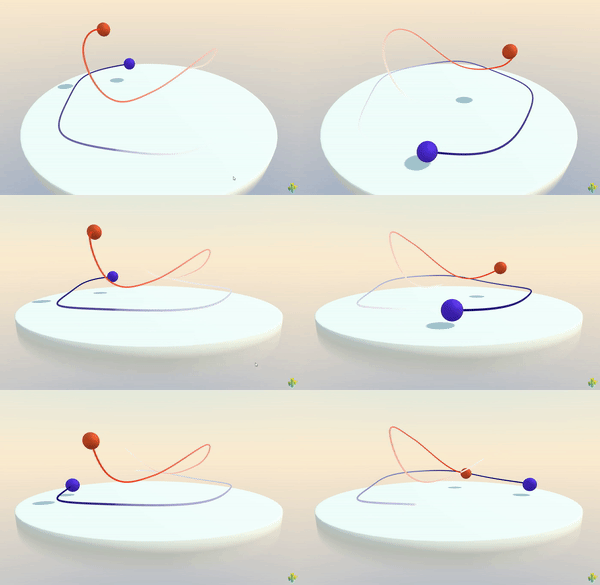
* [SplineContainer](https://engine.needle.tools/docs/api/SplineContainer) manages spline curves defined by a series of knots (control points).
|
|
39
|
+
* This component stores spline data and generates smooth curves that can be used for animation paths, camera paths, racing tracks, or any curved path in 3D space.
|
|
40
|
+
*
|
|
41
|
+
* 
|
|
42
|
+
*
|
|
43
|
+
* **How It Works:**
|
|
44
|
+
* The spline is defined by an array of {@link SplineData} knots. Each knot contains:
|
|
45
|
+
* - **Position**: The location of the control point
|
|
46
|
+
* - **Rotation**: Orientation at that point (useful for banking/tilting objects along the path)
|
|
47
|
+
* - **Tangents**: Handles that control the curve's smoothness and shape
|
|
48
|
+
*
|
|
49
|
+
* The component uses Catmull-Rom interpolation to create smooth curves between knots. The curve is automatically
|
|
50
|
+
* rebuilt when knots are added, removed, or marked dirty, and all sampling methods return positions in world space.
|
|
51
|
+
*
|
|
52
|
+
* **Key Features:**
|
|
53
|
+
* - Smooth Catmull-Rom curve interpolation
|
|
54
|
+
* - Support for open and closed curves
|
|
55
|
+
* - Dynamic knot management (add/remove at runtime)
|
|
56
|
+
* - World-space sampling with {@link getPointAt} and {@link getTangentAt}
|
|
57
|
+
* - Automatic curve regeneration when modified
|
|
58
|
+
* - Built-in debug visualization
|
|
59
|
+
* - Integrates seamlessly with {@link SplineWalker}
|
|
60
|
+
*
|
|
61
|
+
* **Common Use Cases:**
|
|
62
|
+
* - Camera paths and cinematics
|
|
63
|
+
* - Object movement along curved paths
|
|
64
|
+
* - Racing game tracks and racing lines
|
|
65
|
+
* - Character patrol routes
|
|
66
|
+
* - Procedural road/path generation
|
|
67
|
+
* - Animation curves for complex motion
|
|
68
|
+
* - Cable/rope visualization
|
|
69
|
+
*
|
|
70
|
+
* @example Basic spline setup with knots
|
|
71
|
+
* ```ts
|
|
72
|
+
* const splineObj = new Object3D();
|
|
73
|
+
* const spline = splineObj.addComponent(SplineContainer);
|
|
74
|
+
*
|
|
75
|
+
* // Add knots to define the path
|
|
76
|
+
* spline.addKnot({ position: new Vector3(0, 0, 0) });
|
|
77
|
+
* spline.addKnot({ position: new Vector3(2, 1, 0) });
|
|
78
|
+
* spline.addKnot({ position: new Vector3(4, 0, 2) });
|
|
79
|
+
* spline.addKnot({ position: new Vector3(6, -1, 1) });
|
|
80
|
+
*
|
|
81
|
+
* // Sample a point halfway along the spline
|
|
82
|
+
* const midpoint = spline.getPointAt(0.5);
|
|
83
|
+
* console.log("Midpoint:", midpoint);
|
|
84
|
+
* ```
|
|
85
|
+
*
|
|
86
|
+
* @example Creating a closed loop spline
|
|
87
|
+
* ```ts
|
|
88
|
+
* const loopSpline = gameObject.addComponent(SplineContainer);
|
|
89
|
+
* loopSpline.closed = true; // Makes the spline loop back to the start
|
|
12
90
|
*
|
|
13
|
-
*
|
|
91
|
+
* // Add circular path knots
|
|
92
|
+
* for (let i = 0; i < 8; i++) {
|
|
93
|
+
* const angle = (i / 8) * Math.PI * 2;
|
|
94
|
+
* const pos = new Vector3(Math.cos(angle) * 5, 0, Math.sin(angle) * 5);
|
|
95
|
+
* loopSpline.addKnot({ position: pos });
|
|
96
|
+
* }
|
|
97
|
+
* ```
|
|
14
98
|
*
|
|
15
|
-
* @
|
|
99
|
+
* @example Sampling points along a spline
|
|
100
|
+
* ```ts
|
|
101
|
+
* const spline = gameObject.getComponent(SplineContainer);
|
|
102
|
+
*
|
|
103
|
+
* // Sample 10 points along the spline
|
|
104
|
+
* const points: Vector3[] = [];
|
|
105
|
+
* for (let i = 0; i <= 10; i++) {
|
|
106
|
+
* const t = i / 10; // 0 to 1
|
|
107
|
+
* const point = spline.getPointAt(t);
|
|
108
|
+
* points.push(point);
|
|
109
|
+
* }
|
|
110
|
+
*
|
|
111
|
+
* // Get tangent (direction) at 75% along the spline
|
|
112
|
+
* const tangent = spline.getTangentAt(0.75);
|
|
113
|
+
* console.log("Direction at 75%:", tangent);
|
|
114
|
+
* ```
|
|
115
|
+
*
|
|
116
|
+
* @example Dynamic knot manipulation
|
|
117
|
+
* ```ts
|
|
118
|
+
* const spline = gameObject.getComponent(SplineContainer);
|
|
119
|
+
*
|
|
120
|
+
* // Add a new knot dynamically
|
|
121
|
+
* const newKnot = new SplineData();
|
|
122
|
+
* newKnot.position.set(10, 5, 0);
|
|
123
|
+
* spline.addKnot(newKnot);
|
|
124
|
+
*
|
|
125
|
+
* // Remove the first knot
|
|
126
|
+
* spline.removeKnot(0);
|
|
127
|
+
*
|
|
128
|
+
* // Modify existing knot
|
|
129
|
+
* spline.spline[1].position.y += 2;
|
|
130
|
+
* spline.markDirty(); // Tell the spline to rebuild
|
|
131
|
+
* ```
|
|
132
|
+
*
|
|
133
|
+
* @example Using with SplineWalker for animation
|
|
134
|
+
* ```ts
|
|
135
|
+
* // Set up spline path
|
|
136
|
+
* const spline = pathObject.addComponent(SplineContainer);
|
|
137
|
+
* spline.addKnot({ position: new Vector3(0, 0, 0) });
|
|
138
|
+
* spline.addKnot({ position: new Vector3(5, 2, 5) });
|
|
139
|
+
* spline.addKnot({ position: new Vector3(10, 0, 0) });
|
|
140
|
+
*
|
|
141
|
+
* // Make object follow the spline
|
|
142
|
+
* const walker = movingObject.addComponent(SplineWalker);
|
|
143
|
+
* walker.spline = spline;
|
|
144
|
+
* walker.speed = 2; // Units per second
|
|
145
|
+
* walker.loop = true;
|
|
146
|
+
* ```
|
|
147
|
+
*
|
|
148
|
+
* **Debug Visualization:**
|
|
149
|
+
* Add `?debugsplines` to your URL to enable debug visualization, which draws the spline curve as a purple line.
|
|
150
|
+
* You can also enable it programmatically:
|
|
151
|
+
* ```ts
|
|
152
|
+
* spline.debug = true; // Show debug visualization
|
|
153
|
+
* ```
|
|
154
|
+
*
|
|
155
|
+
* @see {@link SplineWalker} - Component for moving objects along a spline path
|
|
156
|
+
* @see {@link SplineData} - The knot data structure used to define spline points
|
|
157
|
+
* @see {@link getPointAt} - Sample positions along the spline
|
|
158
|
+
* @see {@link getTangentAt} - Get direction vectors along the spline
|
|
159
|
+
* @see {@link addKnot} - Add control points to the spline
|
|
160
|
+
* @see {@link removeKnot} - Remove control points from the spline
|
|
161
|
+
*
|
|
162
|
+
* @summary Manages smooth spline curves defined by control point knots
|
|
16
163
|
* @category Splines
|
|
17
164
|
* @group Components
|
|
165
|
+
* @component
|
|
18
166
|
*/
|
|
19
167
|
export declare class SplineContainer extends Behaviour {
|
|
20
168
|
/**
|
|
21
|
-
* Adds a knot to the end of the spline.
|
|
169
|
+
* Adds a knot (control point) to the end of the spline.
|
|
170
|
+
*
|
|
171
|
+
* You can pass either a full {@link SplineData} object or a simple object with just a position.
|
|
172
|
+
* When passing a simple object, default values are used for rotation and tangents.
|
|
173
|
+
*
|
|
174
|
+
* The spline curve is automatically marked dirty and will be rebuilt on the next update.
|
|
175
|
+
*
|
|
176
|
+
* @param knot - Either a SplineData object or an object with at least a `position` property
|
|
177
|
+
* @returns This SplineContainer for method chaining
|
|
178
|
+
*
|
|
179
|
+
* @example Add knots with positions only
|
|
180
|
+
* ```ts
|
|
181
|
+
* spline.addKnot({ position: new Vector3(0, 0, 0) })
|
|
182
|
+
* .addKnot({ position: new Vector3(5, 0, 0) })
|
|
183
|
+
* .addKnot({ position: new Vector3(5, 0, 5) });
|
|
184
|
+
* ```
|
|
185
|
+
*
|
|
186
|
+
* @example Add a full SplineData knot
|
|
187
|
+
* ```ts
|
|
188
|
+
* const knot = new SplineData();
|
|
189
|
+
* knot.position.set(10, 2, 5);
|
|
190
|
+
* knot.rotation.setFromEuler(new Euler(0, Math.PI / 4, 0));
|
|
191
|
+
* spline.addKnot(knot);
|
|
192
|
+
* ```
|
|
22
193
|
*/
|
|
23
194
|
addKnot(knot: SplineData | {
|
|
24
195
|
position: Vector3;
|
|
25
196
|
}): SplineContainer;
|
|
26
197
|
/**
|
|
27
|
-
* Removes a knot
|
|
198
|
+
* Removes a knot (control point) from the spline.
|
|
199
|
+
*
|
|
200
|
+
* You can remove a knot either by its numeric index in the spline array or by passing
|
|
201
|
+
* a reference to the SplineData object itself.
|
|
202
|
+
*
|
|
203
|
+
* The spline curve is automatically marked dirty and will be rebuilt on the next update.
|
|
204
|
+
*
|
|
205
|
+
* @param index - Either the numeric index of the knot to remove, or the SplineData object reference
|
|
206
|
+
* @returns This SplineContainer for method chaining
|
|
207
|
+
*
|
|
208
|
+
* @example Remove knot by index
|
|
209
|
+
* ```ts
|
|
210
|
+
* spline.removeKnot(0); // Remove first knot
|
|
211
|
+
* spline.removeKnot(spline.spline.length - 1); // Remove last knot
|
|
212
|
+
* ```
|
|
213
|
+
*
|
|
214
|
+
* @example Remove knot by reference
|
|
215
|
+
* ```ts
|
|
216
|
+
* const knotToRemove = spline.spline[2];
|
|
217
|
+
* spline.removeKnot(knotToRemove);
|
|
218
|
+
* ```
|
|
28
219
|
*/
|
|
29
220
|
removeKnot(index: number | SplineData): SplineContainer;
|
|
30
221
|
/**
|
|
31
|
-
*
|
|
222
|
+
* Samples a point on the spline at a given parametric position (in world space).
|
|
223
|
+
*
|
|
224
|
+
* The parameter `t` ranges from 0 to 1, where:
|
|
225
|
+
* - `0` = start of the spline
|
|
226
|
+
* - `0.5` = middle of the spline
|
|
227
|
+
* - `1` = end of the spline
|
|
228
|
+
*
|
|
229
|
+
* The returned position is in world space, accounting for the SplineContainer's transform.
|
|
230
|
+
* Values outside 0-1 are clamped to the valid range.
|
|
231
|
+
*
|
|
232
|
+
* @param t - Parametric position along the spline (0 to 1)
|
|
233
|
+
* @param target - Optional Vector3 to store the result (avoids allocation)
|
|
234
|
+
* @returns The world-space position at parameter `t`
|
|
235
|
+
*
|
|
236
|
+
* @example Sample multiple points along the spline
|
|
237
|
+
* ```ts
|
|
238
|
+
* // Sample 20 evenly-spaced points
|
|
239
|
+
* const points: Vector3[] = [];
|
|
240
|
+
* for (let i = 0; i <= 20; i++) {
|
|
241
|
+
* const t = i / 20;
|
|
242
|
+
* points.push(spline.getPointAt(t));
|
|
243
|
+
* }
|
|
244
|
+
* ```
|
|
245
|
+
*
|
|
246
|
+
* @example Using a target vector for efficiency
|
|
247
|
+
* ```ts
|
|
248
|
+
* const reusableVector = new Vector3();
|
|
249
|
+
* for (let i = 0; i < 100; i++) {
|
|
250
|
+
* const point = spline.getPointAt(i / 100, reusableVector);
|
|
251
|
+
* // Use point...
|
|
252
|
+
* }
|
|
253
|
+
* ```
|
|
254
|
+
*
|
|
255
|
+
* @see {@link getTangentAt} to get the direction at a point
|
|
32
256
|
*/
|
|
33
257
|
getPointAt(t: number, target?: Vector3): Vector3;
|
|
34
258
|
/**
|
|
35
|
-
* Marks the spline as dirty, causing it to be rebuilt on the next update.
|
|
259
|
+
* Marks the spline as dirty, causing it to be rebuilt on the next update frame.
|
|
260
|
+
*
|
|
261
|
+
* Call this method whenever you manually modify the spline data (knot positions, rotations, or tangents)
|
|
262
|
+
* to ensure the curve is regenerated. This is done automatically when using {@link addKnot} or {@link removeKnot}.
|
|
263
|
+
*
|
|
264
|
+
* @example Modifying knots and marking dirty
|
|
265
|
+
* ```ts
|
|
266
|
+
* // Modify existing knot positions
|
|
267
|
+
* spline.spline[0].position.y += 2;
|
|
268
|
+
* spline.spline[1].position.x -= 1;
|
|
269
|
+
*
|
|
270
|
+
* // Tell the spline to rebuild
|
|
271
|
+
* spline.markDirty();
|
|
272
|
+
* ```
|
|
273
|
+
*
|
|
274
|
+
* @example Animating knot positions
|
|
275
|
+
* ```ts
|
|
276
|
+
* update() {
|
|
277
|
+
* const time = this.context.time.time;
|
|
278
|
+
* // Animate knot positions
|
|
279
|
+
* for (let i = 0; i < spline.spline.length; i++) {
|
|
280
|
+
* spline.spline[i].position.y = Math.sin(time + i) * 2;
|
|
281
|
+
* }
|
|
282
|
+
* spline.markDirty(); // Rebuild curve each frame
|
|
283
|
+
* }
|
|
284
|
+
* ```
|
|
36
285
|
*/
|
|
37
286
|
markDirty(): void;
|
|
38
287
|
/**
|
|
39
|
-
*
|
|
288
|
+
* Samples the tangent (direction) vector on the spline at a given parametric position (in world space).
|
|
289
|
+
*
|
|
290
|
+
* The tangent represents the forward direction of the curve at point `t`. This is useful for:
|
|
291
|
+
* - Orienting objects along the spline (facing the direction of travel)
|
|
292
|
+
* - Calculating banking/tilting for vehicles on the path
|
|
293
|
+
* - Understanding the curve's direction at any point
|
|
294
|
+
*
|
|
295
|
+
* The parameter `t` ranges from 0 to 1 (same as {@link getPointAt}).
|
|
296
|
+
* The returned vector is normalized and in world space, accounting for the SplineContainer's rotation.
|
|
297
|
+
*
|
|
298
|
+
* @param t - Parametric position along the spline (0 to 1)
|
|
299
|
+
* @param target - Optional Vector3 to store the result (avoids allocation)
|
|
300
|
+
* @returns The normalized tangent vector in world space at parameter `t`
|
|
301
|
+
*
|
|
302
|
+
* @example Orient an object along the spline
|
|
303
|
+
* ```ts
|
|
304
|
+
* const position = spline.getPointAt(0.5);
|
|
305
|
+
* const tangent = spline.getTangentAt(0.5);
|
|
306
|
+
*
|
|
307
|
+
* object.position.copy(position);
|
|
308
|
+
* object.lookAt(position.clone().add(tangent)); // Face along the spline
|
|
309
|
+
* ```
|
|
310
|
+
*
|
|
311
|
+
* @example Calculate velocity direction for a moving object
|
|
312
|
+
* ```ts
|
|
313
|
+
* let t = 0;
|
|
314
|
+
* update() {
|
|
315
|
+
* t += this.context.time.deltaTime * 0.2; // Speed
|
|
316
|
+
* if (t > 1) t = 0; // Loop
|
|
317
|
+
*
|
|
318
|
+
* const pos = spline.getPointAt(t);
|
|
319
|
+
* const direction = spline.getTangentAt(t);
|
|
320
|
+
*
|
|
321
|
+
* movingObject.position.copy(pos);
|
|
322
|
+
* movingObject.quaternion.setFromUnitVectors(
|
|
323
|
+
* new Vector3(0, 0, 1),
|
|
324
|
+
* direction
|
|
325
|
+
* );
|
|
326
|
+
* }
|
|
327
|
+
* ```
|
|
328
|
+
*
|
|
329
|
+
* @see {@link getPointAt} to get the position at a point
|
|
40
330
|
*/
|
|
41
331
|
getTangentAt(t: number, target?: Vector3): Vector3;
|
|
332
|
+
/**
|
|
333
|
+
* Whether the spline forms a closed loop.
|
|
334
|
+
*
|
|
335
|
+
* **When `true`:**
|
|
336
|
+
* - The spline connects the last knot back to the first knot, forming a continuous loop
|
|
337
|
+
* - Perfect for racing tracks, patrol routes, or any circular path
|
|
338
|
+
* - Parameter `t=1` will smoothly connect back to `t=0`
|
|
339
|
+
*
|
|
340
|
+
* **When `false` (default):**
|
|
341
|
+
* - The spline is open, with distinct start and end points
|
|
342
|
+
* - Suitable for one-way paths, camera movements, or linear progressions
|
|
343
|
+
*
|
|
344
|
+
* Changing this property marks the spline as dirty and triggers a rebuild.
|
|
345
|
+
*
|
|
346
|
+
* @example Create a circular patrol route
|
|
347
|
+
* ```ts
|
|
348
|
+
* const patrol = gameObject.addComponent(SplineContainer);
|
|
349
|
+
* patrol.closed = true; // Loop back to start
|
|
350
|
+
*
|
|
351
|
+
* // Add points in a circle
|
|
352
|
+
* for (let i = 0; i < 8; i++) {
|
|
353
|
+
* const angle = (i / 8) * Math.PI * 2;
|
|
354
|
+
* patrol.addKnot({
|
|
355
|
+
* position: new Vector3(Math.cos(angle) * 10, 0, Math.sin(angle) * 10)
|
|
356
|
+
* });
|
|
357
|
+
* }
|
|
358
|
+
* ```
|
|
359
|
+
*
|
|
360
|
+
* @default false
|
|
361
|
+
*/
|
|
42
362
|
set closed(value: boolean);
|
|
43
363
|
get closed(): boolean;
|
|
44
364
|
private _closed;
|
|
45
|
-
/**
|
|
365
|
+
/**
|
|
366
|
+
* Array of knots (control points) that define the spline curve.
|
|
367
|
+
*
|
|
368
|
+
* Each element is a {@link SplineData} object containing position, rotation, and tangent information.
|
|
369
|
+
* You can directly access and modify this array, but remember to call {@link markDirty} afterwards
|
|
370
|
+
* to trigger a curve rebuild.
|
|
371
|
+
*
|
|
372
|
+
* **Best practices:**
|
|
373
|
+
* - Use {@link addKnot} and {@link removeKnot} methods for automatic dirty marking
|
|
374
|
+
* - If modifying knots directly, always call {@link markDirty} afterwards
|
|
375
|
+
* - The order of knots determines the path direction
|
|
376
|
+
*
|
|
377
|
+
* @example Direct array access
|
|
378
|
+
* ```ts
|
|
379
|
+
* console.log(`Spline has ${spline.spline.length} knots`);
|
|
380
|
+
*
|
|
381
|
+
* // Access first knot
|
|
382
|
+
* const firstKnot = spline.spline[0];
|
|
383
|
+
* console.log("Start position:", firstKnot.position);
|
|
384
|
+
*
|
|
385
|
+
* // Modify and mark dirty
|
|
386
|
+
* spline.spline[2].position.y += 5;
|
|
387
|
+
* spline.markDirty();
|
|
388
|
+
* ```
|
|
389
|
+
*
|
|
390
|
+
* @see {@link SplineData} for the knot data structure
|
|
391
|
+
* @see {@link addKnot} for adding knots (auto marks dirty)
|
|
392
|
+
* @see {@link removeKnot} for removing knots (auto marks dirty)
|
|
393
|
+
* @see {@link markDirty} to trigger rebuild after manual modifications
|
|
394
|
+
*/
|
|
46
395
|
spline: SplineData[];
|
|
47
|
-
/**
|
|
396
|
+
/**
|
|
397
|
+
* Enables visual debug rendering of the spline curve.
|
|
398
|
+
*
|
|
399
|
+
* When enabled, the spline is rendered as a purple line in the scene, making it easy to
|
|
400
|
+
* visualize the path during development. The debug line automatically updates when the spline is modified.
|
|
401
|
+
*
|
|
402
|
+
* **Debug visualization:**
|
|
403
|
+
* - Purple line showing the complete curve path
|
|
404
|
+
* - Automatically rebuilds when spline changes
|
|
405
|
+
* - Line resolution based on number of knots (10 segments per knot)
|
|
406
|
+
*
|
|
407
|
+
* **Tip:** You can also enable debug visualization globally for all splines by adding `?debugsplines`
|
|
408
|
+
* to your URL.
|
|
409
|
+
*
|
|
410
|
+
* @example Enable debug visualization
|
|
411
|
+
* ```ts
|
|
412
|
+
* const spline = gameObject.addComponent(SplineContainer);
|
|
413
|
+
* spline.debug = true; // Show purple debug line
|
|
414
|
+
*
|
|
415
|
+
* // Add some knots to see the visualization
|
|
416
|
+
* spline.addKnot({ position: new Vector3(0, 0, 0) });
|
|
417
|
+
* spline.addKnot({ position: new Vector3(5, 2, 0) });
|
|
418
|
+
* spline.addKnot({ position: new Vector3(10, 0, 5) });
|
|
419
|
+
* ```
|
|
420
|
+
*/
|
|
48
421
|
set debug(debug: boolean);
|
|
49
|
-
/**
|
|
422
|
+
/**
|
|
423
|
+
* The Three.js Curve object generated from the spline knots.
|
|
424
|
+
*
|
|
425
|
+
* This is the underlying curve implementation (typically a CatmullRomCurve3) that's used for
|
|
426
|
+
* all position and tangent sampling. The curve is automatically regenerated when the spline
|
|
427
|
+
* is marked dirty.
|
|
428
|
+
*
|
|
429
|
+
* **Note:** This curve is in local space relative to the SplineContainer. Use {@link getPointAt}
|
|
430
|
+
* and {@link getTangentAt} methods to get world-space results.
|
|
431
|
+
*
|
|
432
|
+
* @returns The generated Three.js Curve, or null if not yet built
|
|
433
|
+
*/
|
|
50
434
|
get curve(): Curve<Vector3> | null;
|
|
435
|
+
/**
|
|
436
|
+
* Whether the spline needs to be rebuilt due to modifications.
|
|
437
|
+
*
|
|
438
|
+
* The spline is marked dirty when:
|
|
439
|
+
* - Knots are added via {@link addKnot}
|
|
440
|
+
* - Knots are removed via {@link removeKnot}
|
|
441
|
+
* - {@link markDirty} is called manually
|
|
442
|
+
* - The {@link closed} property is changed
|
|
443
|
+
*
|
|
444
|
+
* The curve is automatically rebuilt on the next update frame when dirty.
|
|
445
|
+
*
|
|
446
|
+
* @returns `true` if the spline needs rebuilding, `false` otherwise
|
|
447
|
+
*/
|
|
51
448
|
get isDirty(): boolean;
|
|
52
449
|
private _isDirty;
|
|
53
450
|
private _curve;
|