@nataliapc/mcp-openmsx 1.2.4 → 1.2.6
This diff represents the content of publicly available package versions that have been released to one of the supported registries. The information contained in this diff is provided for informational purposes only and reflects changes between package versions as they appear in their respective public registries.
- package/README.md +40 -16
- package/dist/openmsx.js +10 -2
- package/dist/server.js +9 -3
- package/dist/server_elicitations.js +178 -0
- package/dist/server_prompts.js +1 -1
- package/dist/server_resources.js +15 -3
- package/dist/server_sampling.js +35 -0
- package/dist/server_tools.js +754 -88
- package/dist/utils.js +229 -0
- package/package.json +12 -11
- package/resources/programming/basic_wiki/_toc.json +1 -1
- package/resources/sdcc/lyx2md.py +745 -0
- package/resources/sdcc/sdccman.md +5557 -0
- /package/resources/programming/basic_wiki/{CLOAD?.md → CLOAD_Q.md} +0 -0
package/README.md
CHANGED
|
@@ -1,6 +1,6 @@
|
|
|
1
1
|
# MCP-openMSX
|
|
2
2
|
|
|
3
|
-
|
|
3
|
+
_"Orchestrating a binary opera where AI conducts, MCP interprets, and openMSX acts as the 8-bit diva."_
|
|
4
4
|
|
|
5
5
|
[](https://github.com/nataliapc)
|
|
6
6
|
[](https://github.com/nataliapc/mcp-openmsx/blob/main/LICENSE)
|
|
@@ -13,13 +13,18 @@ A [Model Context Protocol](https://modelcontextprotocol.io/introduction) (MCP) s
|
|
|
13
13
|
|
|
14
14
|
This server provides comprehensive tools for MSX software development, testing, and automation through standardized MCP protocols.
|
|
15
15
|
|
|
16
|
+
|
|
17
|
+
> 🎁🎁 _If you find this project useful, please consider making a donation: [PAYPAL Link](https://www.paypal.com/donate/?hosted_button_id=9X268YDDS9SYC)_
|
|
18
|
+
|
|
19
|
+
---
|
|
20
|
+
|
|
16
21
|
## Table of Contents
|
|
17
22
|
|
|
18
23
|
- [Project overview](#project-overview)
|
|
19
24
|
- [Architecture](#architecture)
|
|
20
25
|
- [Available MCP Tools](#available-mcp-tools)
|
|
21
26
|
- [Available MCP Resources](#available-mcp-resources)
|
|
22
|
-
- [
|
|
27
|
+
- ⚡ [Quick Start](#quick-start)
|
|
23
28
|
- [Quick installation with **VSCode**](#quick-installation-with-vscode)
|
|
24
29
|
- [Basic installation with **Claude Desktop**](#basic-installation-with-claude-desktop)
|
|
25
30
|
- [Environment Variables](#environment-variables)
|
|
@@ -28,6 +33,7 @@ This server provides comprehensive tools for MSX software development, testing,
|
|
|
28
33
|
- [License](#license)
|
|
29
34
|
- [Support](#support)
|
|
30
35
|
- [Contributing](#contributing)
|
|
36
|
+
- 🌟 [More stars!](#more-stars) 🌟
|
|
31
37
|
|
|
32
38
|
## Project Overview
|
|
33
39
|
|
|
@@ -99,12 +105,12 @@ The MCP server translates high-level natural language commands from your Copilot
|
|
|
99
105
|
### Debugging Tools
|
|
100
106
|
- `debug_run`: Control execution: _`break`, `isBreaked`, `continue`, `stepIn`, `stepOut`, `stepOver`, `stepBack`, `runTo`_.
|
|
101
107
|
- `debug_cpu`: Read/write CPU registers, CPU info, Stack pile, and Disassemble code: _`getCpuRegisters`, `getRegister`, `setRegister`, `getStackPile`, `disassemble`, `getActiveCpu`_.
|
|
102
|
-
- `debug_memory`: RAM memory operations: _`selectedSlots`, `getBlock`, `readByte`, `readWord`, `writeByte`, `writeWord`, `
|
|
103
|
-
- `debug_vram`: VRAM operations: _`getBlock`, `readByte`, `writeByte`_.
|
|
108
|
+
- `debug_memory`: RAM memory operations: _`selectedSlots`, `getBlock`, `readByte`, `readWord`, `writeByte`, `writeWord`, `searchBytes`_.
|
|
109
|
+
- `debug_vram`: VRAM operations: _`getBlock`, `readByte`, `writeByte`, `searchBytes`_.
|
|
104
110
|
- `debug_breakpoints`: Breakpoint management: _`create`, `remove`, `list`_.
|
|
105
111
|
|
|
106
112
|
### Automation Tools
|
|
107
|
-
- `emu_keyboard`: Send text
|
|
113
|
+
- `emu_keyboard`: Send text or key combinations to emulator: _`sendText`, `sendKeyCombo`_.
|
|
108
114
|
- `emu_savestates`: Save and restore machine states: _`load`, `save`, `list`_.
|
|
109
115
|
- `screen_shot`: Capture emulator screen: _`as_image`, `to_file`_.
|
|
110
116
|
- `screen_dump`: Export screen data as BASIC BSAVE instruction.
|
|
@@ -154,7 +160,8 @@ And books and manuals:
|
|
|
154
160
|
|
|
155
161
|
Thanks to the authors of these resources, who have made them available under various licenses. This MCP server includes some of these resources to enhance the development experience.
|
|
156
162
|
|
|
157
|
-
|
|
163
|
+
> [!IMPORTANT]
|
|
164
|
+
> The rights to these resources belong to their respective authors and are distributed under the licenses they have defined.
|
|
158
165
|
|
|
159
166
|
## Quick Start
|
|
160
167
|
|
|
@@ -165,9 +172,11 @@ You can use this MCP server in this basic way with the [precompiled NPM package]
|
|
|
165
172
|
[](https://insiders.vscode.dev/redirect/mcp/install?name=mcp-openmsx&config=%7B%22name%22%3A%22mcp-openmsx%22%2C%22type%22%3A%22stdio%22%2C%22command%22%3A%22npx%22%2C%22args%22%3A%5B%22-y%22%2C%22%40nataliapc%2Fmcp-openmsx%22%5D%7D)
|
|
166
173
|
|
|
167
174
|
Steps to install the MCP server in VSCode:
|
|
168
|
-
|
|
169
|
-
|
|
170
|
-
|
|
175
|
+
1. Install [Github Copilot extension](https://code.visualstudio.com/docs/copilot/overview)
|
|
176
|
+
2. [Install nodejs](https://nodejs.org/en/download) (`npx` command must be available in your PATH).
|
|
177
|
+
3. Install de MCP Server:
|
|
178
|
+
- Use the **Install MCP Server** button above to install the MCP server in your VSCode settings.
|
|
179
|
+
- Or add to your _workspace folder_ a file named `.vscode/mcp.json` with the json configuration below.
|
|
171
180
|
|
|
172
181
|
### STDIO mode (recommended)
|
|
173
182
|
|
|
@@ -185,7 +194,8 @@ Steps to install the MCP server in VSCode:
|
|
|
185
194
|
}
|
|
186
195
|
```
|
|
187
196
|
|
|
188
|
-
|
|
197
|
+
> [!NOTE]
|
|
198
|
+
> Environment variables are optional. Customize them as you need.
|
|
189
199
|
|
|
190
200
|
### Streamed HTTP mode (more advanced)
|
|
191
201
|
|
|
@@ -201,7 +211,8 @@ Steps to install the MCP server in VSCode:
|
|
|
201
211
|
}
|
|
202
212
|
```
|
|
203
213
|
|
|
204
|
-
|
|
214
|
+
> [!NOTE]
|
|
215
|
+
> The MCP HTTP Server must be running standalone in the same computer or in another (`make run_http`).
|
|
205
216
|
|
|
206
217
|
### Basic Installation with Claude Desktop
|
|
207
218
|
|
|
@@ -223,26 +234,29 @@ Edit it to include the following JSON entry:
|
|
|
223
234
|
}
|
|
224
235
|
```
|
|
225
236
|
|
|
226
|
-
|
|
237
|
+
> [!NOTE]
|
|
238
|
+
> Environment variables are optional. Customize them as you need.
|
|
227
239
|
|
|
228
240
|
### Environment Variables
|
|
229
241
|
|
|
230
242
|
| Variable | Description | Default Value | Example |
|
|
231
243
|
|----------|-------------|---------------|---------|
|
|
232
|
-
| `OPENMSX_EXECUTABLE` | Path or command to the openMSX executable | `openmsx` | `/usr/local/bin/openmsx` |
|
|
244
|
+
| `OPENMSX_EXECUTABLE` | Path or command to the openMSX executable | `openmsx` (Linux/macOS) / `openmsx.exe` (Windows) | `/usr/local/bin/openmsx` or `C:\Program Files\openMSX\openmsx.exe` |
|
|
233
245
|
| `OPENMSX_SHARE_DIR` | Directory containing openMSX data files (machines, extensions, etc.) | System dependent | `/home/myuser/.openmsx/share` |
|
|
234
246
|
| `OPENMSX_SCREENSHOT_DIR` | Directory where screenshots will be saved | Default for openmsx | `/myproject/screenshots` |
|
|
235
247
|
| `OPENMSX_SCREENDUMP_DIR` | Directory where screen dumps will be saved | Default for openmsx | `/myproject/screendumps` |
|
|
236
248
|
| `OPENMSX_REPLAYS_DIR` | Directory where replay files will be saved | Default for openmsx | `/myproject/replays` |
|
|
237
249
|
| `MCP_TRANSPORT` | Transport mode (`stdio` or `http`) | `stdio` | `http` |
|
|
238
250
|
| `MCP_HTTP_PORT` | Port number for HTTP transport mode | `3000` | `8080` |
|
|
251
|
+
| `MCP_ALLOWED_ORIGINS` | Comma-separated list of allowed origins for HTTP transport | Empty for all allowed | `http://localhost,http://mydomain.com` |
|
|
239
252
|
|
|
240
253
|
|
|
241
254
|
## Advanced Manual Usage
|
|
242
255
|
|
|
243
|
-
|
|
256
|
+
> [!IMPORTANT]
|
|
257
|
+
> This is not needed for using the MCP server, but if you want to install it manually, follow these steps.
|
|
244
258
|
|
|
245
|
-
|
|
259
|
+
The MCP server runs on Linux, macOS, and Windows. Building from source requires Node.js >= 18 and TypeScript.
|
|
246
260
|
|
|
247
261
|
### Manual installation
|
|
248
262
|
|
|
@@ -261,6 +275,7 @@ export OPENMSX_SCREENSHOT_DIR="/my_project/screenshots"
|
|
|
261
275
|
export OPENMSX_SCREENDUMP_DIR="/my_project/screendumps"
|
|
262
276
|
export OPENMSX_REPLAYS_DIR="/my_project/replays"
|
|
263
277
|
export MCP_HTTP_PORT=3000
|
|
278
|
+
export MCP_ALLOWED_ORIGINS="http://localhost,http://mydomain.com"
|
|
264
279
|
```
|
|
265
280
|
|
|
266
281
|
### As MCP Server (stdio)
|
|
@@ -279,7 +294,8 @@ mcp-openmsx http
|
|
|
279
294
|
|
|
280
295
|
## Development
|
|
281
296
|
|
|
282
|
-
|
|
297
|
+
> [!IMPORTANT]
|
|
298
|
+
> This is not needed for using the MCP server, but if you want to contribute or modify the code, follow these steps.
|
|
283
299
|
|
|
284
300
|
### Prerequisites to build
|
|
285
301
|
|
|
@@ -316,4 +332,12 @@ If you need help, or have questions or suggestions, please open an issue on the
|
|
|
316
332
|
|
|
317
333
|
Contributions are welcome! Please feel free to submit a Pull Request.
|
|
318
334
|
|
|
335
|
+
|
|
336
|
+
## More stars!
|
|
337
|
+
|
|
338
|
+
Please give us a star on [GitHub](https://github.com/nataliapc/mcp-openmsx) if you like this project.
|
|
339
|
+
|
|
340
|
+
[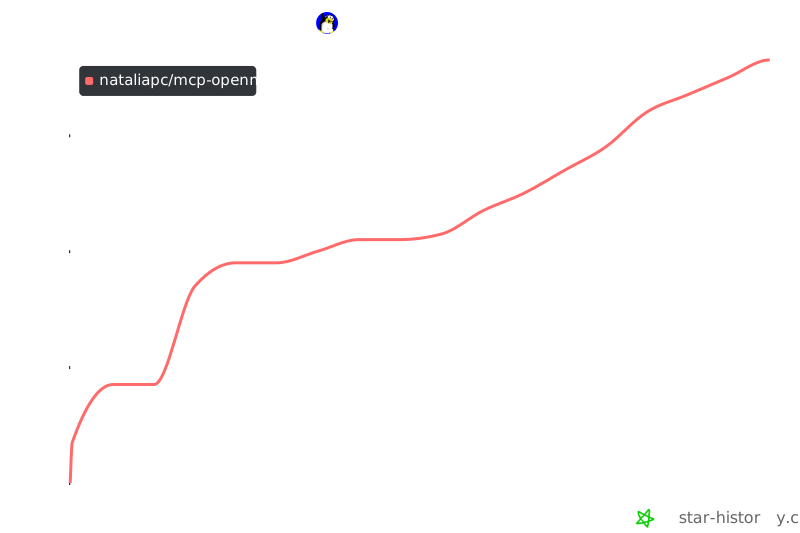](https://www.star-history.com/#nataliapc/mcp-openmsx&Date)
|
|
341
|
+
## Star History
|
|
342
|
+
|
|
319
343
|
---
|
package/dist/openmsx.js
CHANGED
|
@@ -166,8 +166,13 @@ export class OpenMSX {
|
|
|
166
166
|
this.sendCommand('exit');
|
|
167
167
|
}
|
|
168
168
|
catch (error) {
|
|
169
|
-
// If writing fails, force kill
|
|
170
|
-
|
|
169
|
+
// If writing fails, force kill.
|
|
170
|
+
// Use no-argument kill() for cross-platform safety:
|
|
171
|
+
// on POSIX it sends SIGTERM; on Windows it calls TerminateProcess().
|
|
172
|
+
try {
|
|
173
|
+
this.process.kill();
|
|
174
|
+
}
|
|
175
|
+
catch (_) { /* ignore */ }
|
|
171
176
|
}
|
|
172
177
|
}
|
|
173
178
|
else {
|
|
@@ -348,6 +353,9 @@ export class OpenMSX {
|
|
|
348
353
|
forceClose() {
|
|
349
354
|
if (this.process && !this.process.killed) {
|
|
350
355
|
try {
|
|
356
|
+
// 'SIGKILL' is accepted on Windows too (maps to TerminateProcess).
|
|
357
|
+
// No-argument kill() is also acceptable here, but SIGKILL makes
|
|
358
|
+
// the intent explicit: we want unconditional termination.
|
|
351
359
|
this.process.kill('SIGKILL');
|
|
352
360
|
}
|
|
353
361
|
catch (error) {
|
package/dist/server.js
CHANGED
|
@@ -16,6 +16,7 @@ import { isInitializeRequest } from "@modelcontextprotocol/sdk/types.js";
|
|
|
16
16
|
import { randomUUID } from "node:crypto";
|
|
17
17
|
import express from "express";
|
|
18
18
|
import path from "path";
|
|
19
|
+
import { fileURLToPath } from 'node:url';
|
|
19
20
|
import { createRequire } from 'module';
|
|
20
21
|
import { openMSXInstance } from "./openmsx.js";
|
|
21
22
|
import { VectorDB } from "./vectordb.js";
|
|
@@ -26,11 +27,14 @@ import { registerPrompts } from "./server_prompts.js";
|
|
|
26
27
|
// Dynamically obtain PACKAGE_VERSION from package.json at runtime
|
|
27
28
|
const require = createRequire(import.meta.url);
|
|
28
29
|
export const PACKAGE_VERSION = require('../package.json').version;
|
|
29
|
-
const
|
|
30
|
-
const
|
|
30
|
+
const __dirname = path.dirname(fileURLToPath(import.meta.url));
|
|
31
|
+
const resourcesDir = path.join(__dirname, "../resources");
|
|
32
|
+
const vectorDbDir = path.join(__dirname, "../vector-db");
|
|
31
33
|
export const emuDirectories = {
|
|
32
34
|
OPENMSX_SHARE_DIR: '',
|
|
33
|
-
|
|
35
|
+
// On Windows, Node.js spawn() may not resolve 'openmsx' to 'openmsx.exe' unless it is in PATH.
|
|
36
|
+
// Using the platform-aware default reduces friction for Windows users who have openMSX in PATH.
|
|
37
|
+
OPENMSX_EXECUTABLE: process.platform === 'win32' ? 'openmsx.exe' : 'openmsx',
|
|
34
38
|
OPENMSX_REPLAYS_DIR: '',
|
|
35
39
|
OPENMSX_SCREENSHOT_DIR: '',
|
|
36
40
|
OPENMSX_SCREENDUMP_DIR: '',
|
|
@@ -125,6 +129,8 @@ async function startHttpServer() {
|
|
|
125
129
|
else if (!sessionId && isInitializeRequest(req.body)) {
|
|
126
130
|
transport = new StreamableHTTPServerTransport({
|
|
127
131
|
sessionIdGenerator: () => randomUUID(),
|
|
132
|
+
enableDnsRebindingProtection: true,
|
|
133
|
+
allowedOrigins: process.env.MCP_ALLOWED_ORIGINS?.split(',') || [],
|
|
128
134
|
onsessioninitialized: (sessionId) => {
|
|
129
135
|
transports[sessionId] = transport;
|
|
130
136
|
}
|
|
@@ -0,0 +1,178 @@
|
|
|
1
|
+
import { openMSXInstance } from "./openmsx.js";
|
|
2
|
+
import { isErrorResponse } from "./utils.js";
|
|
3
|
+
import { samplingFindMatches } from "./server_sampling.js";
|
|
4
|
+
// ============================================================================
|
|
5
|
+
// Default machines offered when no machine is specified in launch command
|
|
6
|
+
// ============================================================================
|
|
7
|
+
const DEFAULT_MACHINES = [
|
|
8
|
+
{ const: 'C-BIOS_MSX1', title: 'MSX1 (C-BIOS, no system ROMs needed)' },
|
|
9
|
+
{ const: 'Philips_VG_8020', title: 'MSX1 European (Philips VG-8020)' },
|
|
10
|
+
{ const: 'C-BIOS_MSX2', title: 'MSX2 (C-BIOS, no system ROMs needed)' },
|
|
11
|
+
{ const: 'Philips_NMS_8250', title: 'MSX2 European (Philips NMS-8250)' },
|
|
12
|
+
{ const: 'C-BIOS_MSX2+', title: 'MSX2+ (C-BIOS, openMSX default)' },
|
|
13
|
+
{ const: 'Panasonic_FS-A1GT', title: 'MSX turboR (Panasonic FS-A1GT)' },
|
|
14
|
+
];
|
|
15
|
+
// ============================================================================
|
|
16
|
+
// Helper: Resolve machine and extensions for launch using elicitation + sampling
|
|
17
|
+
// ============================================================================
|
|
18
|
+
export async function resolveLaunchParams(server, emuDirectories, machine, extensions) {
|
|
19
|
+
// Load lists lazily only when needed
|
|
20
|
+
let machinesList;
|
|
21
|
+
let extensionsList;
|
|
22
|
+
const loadMachinesList = async () => {
|
|
23
|
+
if (!machinesList) {
|
|
24
|
+
const raw = await openMSXInstance.getMachineList(emuDirectories.MACHINES_DIR);
|
|
25
|
+
if (isErrorResponse(raw))
|
|
26
|
+
throw new Error(raw);
|
|
27
|
+
machinesList = JSON.parse(raw);
|
|
28
|
+
}
|
|
29
|
+
return machinesList;
|
|
30
|
+
};
|
|
31
|
+
const loadExtensionsList = async () => {
|
|
32
|
+
if (!extensionsList) {
|
|
33
|
+
const raw = await openMSXInstance.getExtensionList(emuDirectories.EXTENSIONS_DIR);
|
|
34
|
+
if (isErrorResponse(raw))
|
|
35
|
+
throw new Error(raw);
|
|
36
|
+
extensionsList = JSON.parse(raw);
|
|
37
|
+
}
|
|
38
|
+
return extensionsList;
|
|
39
|
+
};
|
|
40
|
+
// ── Resolve machine ──────────────────────────────────────────────────
|
|
41
|
+
let resolvedMachine = machine || '';
|
|
42
|
+
if (machine) {
|
|
43
|
+
// Check for exact match
|
|
44
|
+
const machines = await loadMachinesList();
|
|
45
|
+
const exactMatch = machines.find(m => m.name.toLowerCase() === machine.toLowerCase());
|
|
46
|
+
if (exactMatch) {
|
|
47
|
+
resolvedMachine = exactMatch.name;
|
|
48
|
+
}
|
|
49
|
+
else {
|
|
50
|
+
// Ambiguous machine name → use sampling to find suggestions, then elicit
|
|
51
|
+
try {
|
|
52
|
+
const suggestions = await samplingFindMatches(server, machine, machines, 'machine');
|
|
53
|
+
if (suggestions.length > 0) {
|
|
54
|
+
const elicitResult = await server.server.elicitInput({
|
|
55
|
+
mode: 'form',
|
|
56
|
+
message: `No exact match found for machine "${machine}". Please select the MSX machine to emulate:`,
|
|
57
|
+
requestedSchema: {
|
|
58
|
+
type: 'object',
|
|
59
|
+
properties: {
|
|
60
|
+
machine: {
|
|
61
|
+
type: 'string',
|
|
62
|
+
title: 'MSX Machine',
|
|
63
|
+
description: `Best matches for "${machine}"`,
|
|
64
|
+
oneOf: suggestions,
|
|
65
|
+
},
|
|
66
|
+
},
|
|
67
|
+
required: ['machine'],
|
|
68
|
+
},
|
|
69
|
+
});
|
|
70
|
+
if (elicitResult.action !== 'accept' || !elicitResult.content) {
|
|
71
|
+
return { machine: '', extensions: [], cancelled: true };
|
|
72
|
+
}
|
|
73
|
+
resolvedMachine = elicitResult.content.machine;
|
|
74
|
+
}
|
|
75
|
+
else {
|
|
76
|
+
// Sampling found nothing → use the original value (let openMSX handle the error)
|
|
77
|
+
resolvedMachine = machine;
|
|
78
|
+
}
|
|
79
|
+
}
|
|
80
|
+
catch {
|
|
81
|
+
// Client doesn't support sampling/elicitation → fallback
|
|
82
|
+
resolvedMachine = machine;
|
|
83
|
+
}
|
|
84
|
+
}
|
|
85
|
+
}
|
|
86
|
+
else {
|
|
87
|
+
// No machine provided → elicit with common defaults
|
|
88
|
+
try {
|
|
89
|
+
const elicitResult = await server.server.elicitInput({
|
|
90
|
+
mode: 'form',
|
|
91
|
+
message: 'No machine specified. Please select the MSX machine to emulate:',
|
|
92
|
+
requestedSchema: {
|
|
93
|
+
type: 'object',
|
|
94
|
+
properties: {
|
|
95
|
+
machine: {
|
|
96
|
+
type: 'string',
|
|
97
|
+
title: 'MSX Machine',
|
|
98
|
+
description: 'Select the type of MSX machine to launch',
|
|
99
|
+
oneOf: DEFAULT_MACHINES,
|
|
100
|
+
},
|
|
101
|
+
},
|
|
102
|
+
required: ['machine'],
|
|
103
|
+
},
|
|
104
|
+
});
|
|
105
|
+
if (elicitResult.action !== 'accept' || !elicitResult.content) {
|
|
106
|
+
return { machine: '', extensions: [], cancelled: true };
|
|
107
|
+
}
|
|
108
|
+
resolvedMachine = elicitResult.content.machine;
|
|
109
|
+
}
|
|
110
|
+
catch {
|
|
111
|
+
// Client doesn't support elicitation → launch with openMSX default
|
|
112
|
+
resolvedMachine = '';
|
|
113
|
+
}
|
|
114
|
+
}
|
|
115
|
+
// ── Resolve extensions ───────────────────────────────────────────────
|
|
116
|
+
let resolvedExtensions = extensions || [];
|
|
117
|
+
if (extensions && extensions.length > 0) {
|
|
118
|
+
try {
|
|
119
|
+
const allExtensions = await loadExtensionsList();
|
|
120
|
+
const extNameMap = new Map(allExtensions.map(e => [e.name.toLowerCase(), e]));
|
|
121
|
+
const matched = [];
|
|
122
|
+
const ambiguous = [];
|
|
123
|
+
for (const ext of extensions) {
|
|
124
|
+
const exact = extNameMap.get(ext.toLowerCase());
|
|
125
|
+
if (exact) {
|
|
126
|
+
matched.push(exact.name);
|
|
127
|
+
}
|
|
128
|
+
else {
|
|
129
|
+
ambiguous.push(ext);
|
|
130
|
+
}
|
|
131
|
+
}
|
|
132
|
+
if (ambiguous.length > 0) {
|
|
133
|
+
// Use sampling to find best matches for ALL ambiguous extensions at once
|
|
134
|
+
const ambiguousQuery = ambiguous.join(', ');
|
|
135
|
+
const suggestions = await samplingFindMatches(server, ambiguousQuery, allExtensions, 'extension', 6);
|
|
136
|
+
if (suggestions.length > 0) {
|
|
137
|
+
// Pre-select the already matched extensions in the suggestions
|
|
138
|
+
const elicitResult = await server.server.elicitInput({
|
|
139
|
+
mode: 'form',
|
|
140
|
+
message: `No exact match found for extension(s): ${ambiguous.map(e => `"${e}"`).join(', ')}. Please select the extensions to use:`,
|
|
141
|
+
requestedSchema: {
|
|
142
|
+
type: 'object',
|
|
143
|
+
properties: {
|
|
144
|
+
extensions: {
|
|
145
|
+
type: 'array',
|
|
146
|
+
title: 'MSX Extensions',
|
|
147
|
+
description: `Best matches for: ${ambiguousQuery}`,
|
|
148
|
+
items: {
|
|
149
|
+
anyOf: suggestions,
|
|
150
|
+
},
|
|
151
|
+
},
|
|
152
|
+
},
|
|
153
|
+
required: ['extensions'],
|
|
154
|
+
},
|
|
155
|
+
});
|
|
156
|
+
if (elicitResult.action !== 'accept' || !elicitResult.content) {
|
|
157
|
+
return { machine: resolvedMachine, extensions: [], cancelled: true };
|
|
158
|
+
}
|
|
159
|
+
const selectedExtensions = elicitResult.content.extensions;
|
|
160
|
+
resolvedExtensions = [...matched, ...selectedExtensions];
|
|
161
|
+
}
|
|
162
|
+
else {
|
|
163
|
+
// Sampling found nothing → use original values
|
|
164
|
+
resolvedExtensions = extensions;
|
|
165
|
+
}
|
|
166
|
+
}
|
|
167
|
+
else {
|
|
168
|
+
// All extensions matched exactly
|
|
169
|
+
resolvedExtensions = matched;
|
|
170
|
+
}
|
|
171
|
+
}
|
|
172
|
+
catch {
|
|
173
|
+
// Client doesn't support sampling/elicitation → fallback
|
|
174
|
+
resolvedExtensions = extensions;
|
|
175
|
+
}
|
|
176
|
+
}
|
|
177
|
+
return { machine: resolvedMachine, extensions: resolvedExtensions };
|
|
178
|
+
}
|
package/dist/server_prompts.js
CHANGED
|
@@ -17,7 +17,7 @@ export async function registerPrompts(server) {
|
|
|
17
17
|
.max(50, "Instruction name too long")
|
|
18
18
|
.describe("Name of the MSX BASIC instruction to get information about (e.g. 'PRINT', 'FOR', 'POKE'). Case insensitive.")
|
|
19
19
|
.transform(val => val.trim().toUpperCase()),
|
|
20
|
-
}
|
|
20
|
+
},
|
|
21
21
|
},
|
|
22
22
|
// Handler for the prompt (function to be executed when the prompt is called)
|
|
23
23
|
({ instruction }) => {
|
package/dist/server_resources.js
CHANGED
|
@@ -65,6 +65,10 @@ export async function registerResources(server, resourcesDir) {
|
|
|
65
65
|
title: item.title || `MSX Documentation '${sectionName}': ${itemName}`,
|
|
66
66
|
description: item.description || `Documentation for MSX resource '${sectionName}': ${itemName}`,
|
|
67
67
|
mimeType: item.mimeType || 'text/markdown',
|
|
68
|
+
annotations: {
|
|
69
|
+
"audience": ["user", "assistant"],
|
|
70
|
+
"priority": 0.8,
|
|
71
|
+
},
|
|
68
72
|
},
|
|
69
73
|
// Handler for the resource (function to be executed when the resource is called)
|
|
70
74
|
async (uri) => {
|
|
@@ -106,7 +110,7 @@ export async function registerResources(server, resourcesDir) {
|
|
|
106
110
|
}
|
|
107
111
|
;
|
|
108
112
|
// Source: https://www.msx.org/wiki/Category:MSX-BASIC_Instructions
|
|
109
|
-
server.
|
|
113
|
+
server.registerResource("msxdocs_basic_wiki", new ResourceTemplate("msxdocs://basic_wiki/{instruction}", {
|
|
110
114
|
list: undefined,
|
|
111
115
|
complete: {
|
|
112
116
|
instruction: (value) => basicInstructions,
|
|
@@ -115,20 +119,28 @@ export async function registerResources(server, resourcesDir) {
|
|
|
115
119
|
title: "MSX BASIC Instructions Documentation",
|
|
116
120
|
description: "Documentation about all the standard MSX BASIC instructions from www.msx.org/wiki/Category:MSX-BASIC_Instructions",
|
|
117
121
|
mimeType: "text/html",
|
|
122
|
+
annotations: {
|
|
123
|
+
"audience": ["user", "assistant"],
|
|
124
|
+
"priority": 0.8,
|
|
125
|
+
},
|
|
118
126
|
}, async (uri, variables) => {
|
|
119
127
|
let instruction = variables.instruction;
|
|
120
128
|
let resourceContent;
|
|
121
129
|
let mimeType;
|
|
122
130
|
// urldecode the instruction to avoid issues with special characters
|
|
123
131
|
instruction = decodeURIComponent(instruction).replaceAll(' ', '_');
|
|
132
|
+
// Convert Windows-invalid characters to safe equivalents for the filesystem lookup.
|
|
133
|
+
// The RAG and MCP URIs keep the canonical command name (e.g. CLOAD?),
|
|
134
|
+
// but the file on disk uses a safe name (e.g. CLOAD_Q.md).
|
|
135
|
+
const instructionFile = instruction.replaceAll('?', '_Q');
|
|
124
136
|
try {
|
|
125
137
|
let resourceFile;
|
|
126
|
-
[mimeType, resourceFile] = await addFileExtension(path.join(resourcesDir, 'programming', 'basic_wiki',
|
|
138
|
+
[mimeType, resourceFile] = await addFileExtension(path.join(resourcesDir, 'programming', 'basic_wiki', instructionFile));
|
|
127
139
|
resourceContent = await fs.readFile(resourceFile, 'utf8');
|
|
128
140
|
}
|
|
129
141
|
catch (error) {
|
|
130
142
|
// Throw exception (MCP protocol requirement)
|
|
131
|
-
throw new Error(`Error reading resource programming/basic_wiki/${instruction}: ${error instanceof Error ? error.message : String(error)}`);
|
|
143
|
+
throw new Error(`Error reading resource programming/basic_wiki/${instruction} (file: ${instructionFile}): ${error instanceof Error ? error.message : String(error)}`);
|
|
132
144
|
}
|
|
133
145
|
return {
|
|
134
146
|
contents: [{
|
|
@@ -0,0 +1,35 @@
|
|
|
1
|
+
// ============================================================================
|
|
2
|
+
// Helper: Use sampling (LLM) to pick the best matches from a list
|
|
3
|
+
// ============================================================================
|
|
4
|
+
export async function samplingFindMatches(server, userQuery, items, itemType, maxResults = 6) {
|
|
5
|
+
// Build a compact list for the LLM
|
|
6
|
+
const itemList = items.map(m => `${m.name}: ${m.description}`).join('\n');
|
|
7
|
+
const samplingResult = await server.server.createMessage({
|
|
8
|
+
messages: [{
|
|
9
|
+
role: 'user',
|
|
10
|
+
content: {
|
|
11
|
+
type: 'text',
|
|
12
|
+
text: `The user wants to launch an MSX emulator with ${itemType}: "${userQuery}".\n\nHere is the full list of available ${itemType}s:\n${itemList}\n\nReturn ONLY the top ${maxResults} best matching ${itemType} names (exact names from the list), one per line, no numbering, no descriptions, no extra text. Most relevant first.`
|
|
13
|
+
}
|
|
14
|
+
}],
|
|
15
|
+
maxTokens: 300,
|
|
16
|
+
systemPrompt: `You are a helpful assistant that matches user queries to MSX ${itemType} names. Return ONLY exact names from the provided list, one per line. No extra text.`,
|
|
17
|
+
temperature: 0,
|
|
18
|
+
});
|
|
19
|
+
if (samplingResult.content.type !== 'text')
|
|
20
|
+
return [];
|
|
21
|
+
const suggestedNames = samplingResult.content.text
|
|
22
|
+
.split('\n')
|
|
23
|
+
.map(l => l.trim())
|
|
24
|
+
.filter(l => l.length > 0);
|
|
25
|
+
// Map back to items with validation
|
|
26
|
+
const nameMap = new Map(items.map(m => [m.name.toLowerCase(), m]));
|
|
27
|
+
const matches = [];
|
|
28
|
+
for (const name of suggestedNames) {
|
|
29
|
+
const item = nameMap.get(name.toLowerCase());
|
|
30
|
+
if (item && matches.length < maxResults) {
|
|
31
|
+
matches.push({ const: item.name, title: `${item.name} — ${item.description}` });
|
|
32
|
+
}
|
|
33
|
+
}
|
|
34
|
+
return matches;
|
|
35
|
+
}
|